A registry digest tells you what you are running, not where it came from or who built it. This guide closes that gap end to end: generate an SBOM, sign keylessly with Cosign, attach SLSA build provenance, and refuse to admit anything unsigned in the cluster. Every step is a real command you can run in CI today.
In a nutshell
Software supply-chain security is one idea: proving an image is what it claims to be before you let it run. A container image arrives with a digest — a sha256:... fingerprint that says “this is exactly these bytes.” Useful, but it answers only what, never who made it, what is inside it, or how it was built. An attacker who slips a poisoned image into your registry gets a perfectly valid digest too.
Think of it like a food label. The barcode on a can (the digest) uniquely identifies that product, but a barcode alone does not tell you the food is safe. The rest of the label does the real work:
- Who made it — the brand and manufacturer. In our world that is a signature:
cosigncryptographically seals the image so you can prove who built and endorsed it. - The ingredients list — every component inside. That is the SBOM (Software Bill of Materials): a machine-readable list of every package, library, and version baked into the image.
- The “made in an inspected facility” stamp — proof of how and where it was produced. That is SLSA provenance: a signed record that this image came out of a specific, trusted build pipeline and was not hand-assembled on someone’s laptop.
And a responsible shop refuses to stock cans with no label at all — that is admission control (Kyverno) verifying every image at the cluster door and rejecting anything that cannot prove its label. Signing an image but never checking the signature at deploy time is like printing labels and throwing them in a drawer.
By the end you will be able to generate an SBOM from a built image, sign it keylessly (no long-lived keys to leak), attach SLSA provenance and vulnerability attestations, and enforce all of it at admission so an unsigned or wrong-identity image simply cannot start.
Level: Advanced (with a beginner on-ramp) · Time: ~35 min
Prerequisites — you should be comfortable with container images and digests (an image is content-addressed by sha256), have run a CI pipeline before, and understand that Kubernetes has an admission step that inspects every object before it is created. You do not need prior Sigstore experience; every term is defined as it appears and again in the Glossary at the end.
After this lesson you can:
- Explain the difference between “signed” and “signed by the identity I trust” — and why only the second is a security property.
- Produce a CycloneDX/SPDX SBOM with Syft (or BuildKit’s
--sbom) and scan exactly what shipped. - Sign an image keylessly with Cosign, Fulcio, and Rekor, and verify it by pinning certificate subject and issuer.
- Attach and verify SBOM, vulnerability, and SLSA provenance attestations.
- Enforce the whole chain at admission with Kyverno, staged Audit → Enforce.
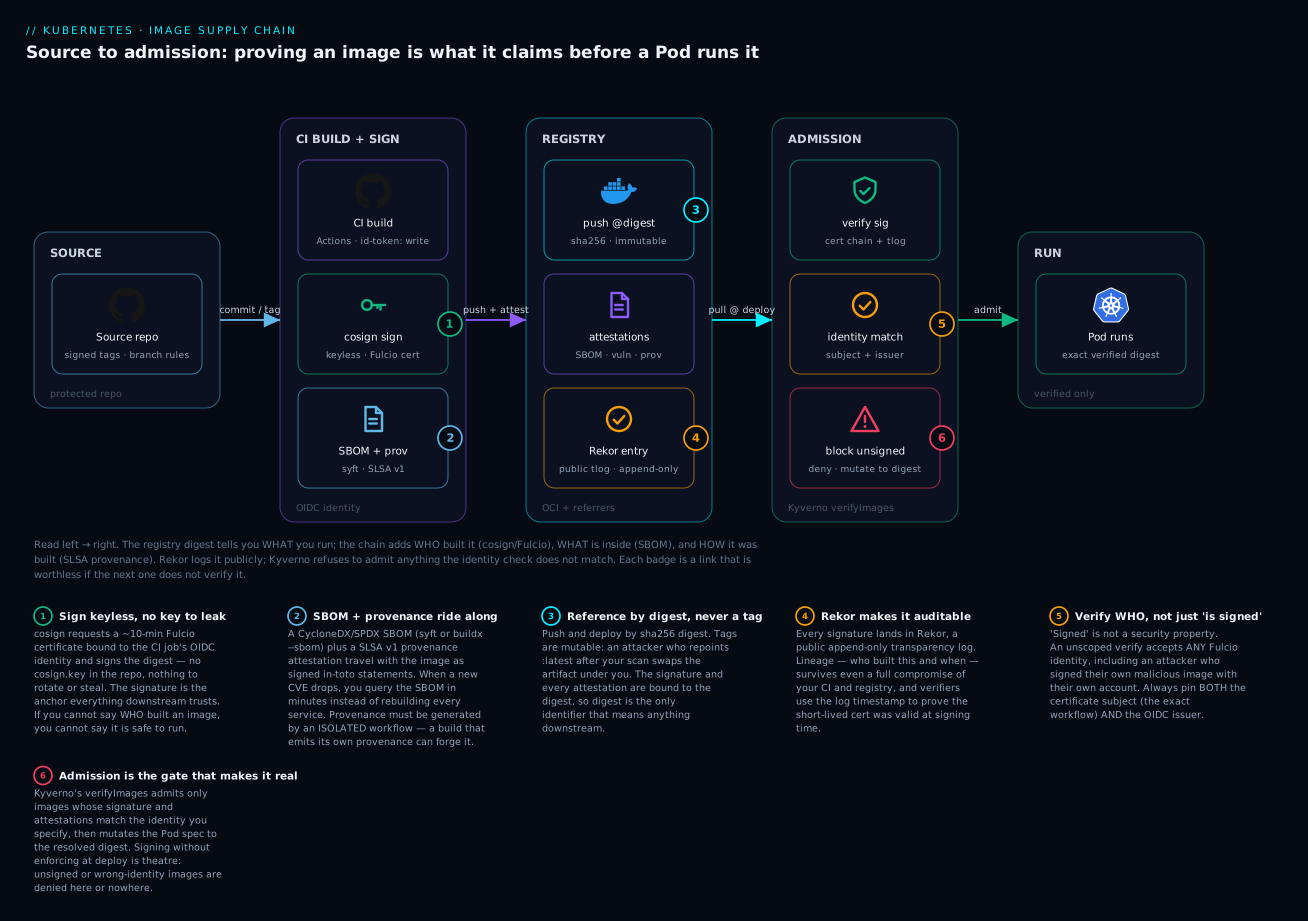
The diagram traces the whole chain left to right. Source commits and signed tags flow into an isolated CI build that signs keylessly (badge 1) and generates an SBOM plus SLSA provenance (badge 2). Everything is pushed to the registry by digest, never a tag (badge 3), and every signature is recorded in the public Rekor transparency log (badge 4). At deploy time the cluster’s admission controller does the two checks that matter: it verifies which identity signed the image (badge 5) and denies anything unsigned or mismatched (badge 6) — only then does a Pod run the exact verified digest. Read each numbered badge as a link in the chain that is worthless unless the next link actually verifies it.
1. The threat model
Before tooling, name what you are defending against. The attacks that actually matter on the container supply chain are:
| Threat | Example | Control |
|---|---|---|
| Typosquatted / compromised base image | node:lts pulled from a poisoned mirror |
Pin by digest; verify signatures on base images |
| Dependency injection | Malicious transitive package in node_modules |
SBOM + vulnerability scan, gated in CI |
| Compromised CI runner | Secret exfiltration, tampered build output | Keyless signing tied to OIDC identity; SLSA L3 |
| Registry tampering | Image swapped after push, tag mutation | Sign the digest; enforce signature at admission |
| Provenance forgery | Attacker claims an image was “built by us” | Verify the signing identity (issuer + subject), not just “is it signed” |
The through-line: a signature is only meaningful if you verify which identity produced it. “Signed” is not a security property. “Signed by the GitHub Actions workflow release.yml on refs/tags/* in my repo, attested by Rekor” is.
To make that concrete for a beginner, read the table as a chain of “what does an attacker have to compromise?” Each row moves the attacker one step closer to your running Pod, and each control cuts the chain at a different point:
- If the attacker owns your base image, they are inside your build before you write a line of code — so you pin base images by digest and verify their signatures, not just yours.
- If they own a dependency, the SBOM is what lets you find out you are exposed the day a CVE lands, rather than guessing.
- If they own the CI runner, keyless signing tied to a short-lived OIDC identity plus SLSA L3 isolation means they cannot forge a provenance that says “built cleanly.”
- If they own the registry, signing the digest and enforcing at admission means a swapped image fails verification at the cluster door.
- If they simply lie (“this was built by us”), pinning the certificate subject and issuer at verify time is what calls the bluff.
No single control is sufficient; the value is in the overlap. A signature with no admission check, or an SBOM nobody scans, or provenance the build forges itself — each is a link that looks secure in isolation and protects nothing.
2. Generate an SBOM with Syft and scan it
An SBOM (Software Bill of Materials) is the ingredients list from the In a nutshell analogy, made machine-readable: a structured document listing every package, library, OS component, and version present in the image. Its job is not to find vulnerabilities — it is to record what is there so that any scanner, today or a year from now, can answer “am I affected by CVE-X?” against a fixed, signed snapshot instead of re-inspecting a live image whose contents may have drifted.
Build the image first, then produce a CycloneDX SBOM from the built artifact (not the source tree — you want what actually shipped).
# Build once, reference everything by digest from here on
docker build -t ghcr.io/acme/api:"$GIT_SHA" .
docker push ghcr.io/acme/api:"$GIT_SHA"

# Resolve the immutable digest — this is the only identifier we trust downstream
DIGEST=$(docker buildx imagetools inspect ghcr.io/acme/api:"$GIT_SHA" \
  --format '{{json .Manifest.Digest}}' | tr -d '"')
IMAGE="ghcr.io/acme/api@${DIGEST}"

# SBOM in CycloneDX JSON
syft "$IMAGE" -o cyclonedx-json=sbom.cdx.json
Running syft against the image walks every layer and catalogs what it finds. A representative slice of the human-readable table output (syft "$IMAGE" -o table) looks like this:
 ✔ Loaded image                    ghcr.io/acme/api@sha256:9f3a...
 ✔ Parsed image
 ✔ Cataloged contents
NAME                 VERSION        TYPE
alpine-baselayout    3.4.3-r2       apk
ca-certificates      20240226-r0    apk
busybox              1.36.1-r15     apk
node                 20.11.1        binary
express              4.18.2         npm
lodash               4.17.21        npm
...                  ...            ...
Each row is one component the scanner can later look up. The CycloneDX JSON encodes the same list plus each component’s PURL (package URL, e.g. pkg:npm/express@4.18.2) and, where available, its license and cryptographic hash.
SBOM formats — pick one and be consistent
Two open standards dominate, plus Syft’s own richer native format. They carry the same core data; the difference is ecosystem support.
| Format | Flag (syft -o) |
Notes |
|---|---|---|
| CycloneDX (JSON/XML) | cyclonedx-json |
OWASP standard; best tooling for vuln + VEX correlation; Cosign’s --type cyclonedx |
| SPDX (JSON/tag-value) | spdx-json |
Linux Foundation / ISO standard; strong license & compliance focus; Cosign’s --type spdx |
| Syft native | syft-json |
Superset, lossless; convert to either standard later |
Then scan. Use the SBOM as scanner input so you scan exactly what you documented:
# Grype against the SBOM
grype sbom:sbom.cdx.json --fail-on high

# Or Trivy, scanning the image directly
trivy image --severity HIGH,CRITICAL --exit-code 1 "$IMAGE"
Scanning the SBOM rather than re-scanning the image keeps the documented bill of materials and the vulnerability verdict consistent. If they diverge, your SBOM is stale.
The build tool can emit the SBOM for you
You do not always need a separate Syft step. BuildKit (Docker Buildx) can generate an SBOM and SLSA provenance during the build and attach them to the image in the registry as OCI attestations, so they travel with the digest automatically:
# BuildKit generates + attaches SBOM and max-detail provenance at build time
docker buildx build \
  --sbom=true \
  --provenance=mode=max \
  -t ghcr.io/acme/api:"$GIT_SHA" \
  --push .

# Inspect what got attached (SBOM + provenance appear as referrers)
docker buildx imagetools inspect ghcr.io/acme/api:"$GIT_SHA" \
  --format '{{json .SBOM}}'
Both approaches are valid. The standalone Syft step gives you a portable file you can sign as its own attestation (next sections); the --sbom=true build flag is the lowest-friction way to always ship an SBOM. Many teams do both: --sbom=true for a baseline, and a Syft-generated CycloneDX SBOM signed as a first-class attestation for policy checks.
Whichever you choose, an SBOM is only worth generating if something consumes it. Wire continuous re-scanning of running images against fresh vulnerability data with the Trivy Operator so that a CVE disclosed after deploy still surfaces against yesterday’s SBOM.
3. Keyless signing with Cosign, Fulcio, and Rekor
Signing an image means attaching a cryptographic seal that proves this exact digest was endorsed by a specific identity. Cosign supports two ways to do it — and understanding the older keyed model first makes the keyless model click.
The keyed model (and why it hurts)
Traditionally you generate a key pair, sign with the private key, and hand out the public key so others can verify:
# Keyed signing — the classic approach
cosign generate-key-pair                 # writes cosign.key (private) + cosign.pub (public)
cosign sign --key cosign.key "$IMAGE"    # prompts for the key password
cosign verify --key cosign.pub "$IMAGE"  # anyone with cosign.pub can verify
It works, but the private key is now the crown jewel: it must live somewhere (a CI secret, a KMS, an HSM), it must be rotated, and if it leaks, an attacker can sign anything as you until you notice. Storing cosign.key as a plain CI secret is the single most common way this model fails.
The keyless model (no key to leak)
Keyless signing eliminates long-lived signing keys entirely. Cosign requests a short-lived (around 10-minute) certificate from Fulcio, the Sigstore CA, binding your OIDC identity to an ephemeral key. The signature plus certificate are logged in Rekor, the public transparency log, and stored as an artifact alongside the image in the registry.
In a CI runner with an OIDC token available (GitHub Actions, GitLab, etc.), set COSIGN_EXPERIMENTAL is no longer required on modern Cosign — keyless is the default when no key is supplied:
# GitHub Actions — the id-token permission is what makes keyless work
permissions:
  contents: read
  packages: write
  id-token: write   # required: lets the job mint an OIDC token for Fulcio
# Sign the digest (never a tag — tags are mutable)
cosign sign --yes "$IMAGE"
That single command fetches the OIDC token from the CI environment, gets a Fulcio cert, signs, and uploads the entry to Rekor. No cosign generate-key-pair, no secret in your repo, nothing to rotate. A representative run in CI prints roughly:
Generating ephemeral keys...
Retrieving signed certificate from Fulcio...
Successfully verified SCT...
tlog entry created with index: 148923771
Pushing signature to: ghcr.io/acme/api
The SCT line is the Signed Certificate Timestamp — proof the Fulcio certificate was itself logged. The tlog entry line is the Rekor record. Behind the scenes, the certificate Fulcio issued contains, in its Subject Alternative Name and custom extensions, the identity that authenticated — for a GitHub Actions job, the exact workflow path and the OIDC issuer https://token.actions.githubusercontent.com.
To verify, you assert the identity — both the certificate subject (the workflow identity) and the OIDC issuer:
cosign verify \
  --certificate-identity-regexp "https://github.com/acme/api/.github/workflows/release.yml@.*" \
  --certificate-oidc-issuer "https://token.actions.githubusercontent.com" \
  "$IMAGE"
A successful verification prints the checks it performed and the signed payload — representative output:
Verification for ghcr.io/acme/api@sha256:9f3a... --
The following checks were performed on each of these signatures:
  - The cosign claims were validated
  - Existence of the claims in the transparency log was verified offline
  - The code-signing certificate was verified using trusted certificate authority certificates
The two
--certificate-*flags are not optional in practice. Without them,cosign verifywill accept a signature from any Fulcio identity — including an attacker who legitimately signed their own malicious image with their own GitHub account.
4. Attach attestations: SBOM, scan, and SLSA provenance
A bare signature says “this digest is endorsed.” Attestations say why. Cosign wraps a predicate in an in-toto envelope, signs it keylessly, and stores it next to the image.
To ground the jargon: an attestation is a signed, typed statement about the image. It has three layers — the predicate (the actual claim, e.g. an SBOM document or a provenance record), wrapped in an in-toto Statement (which binds the predicate to the image’s digest and names the predicate type), wrapped again in a DSSE envelope (Dead Simple Signing Envelope — the signed container). When you run cosign verify-attestation, Cosign checks the DSSE signature, confirms the identity, and hands you back the predicate to inspect or gate on.
Attach the SBOM and a vulnerability-scan result as typed attestations:
# SBOM attestation (CycloneDX predicate)
cosign attest --yes \
  --predicate sbom.cdx.json \
  --type cyclonedx \
  "$IMAGE"

# Vulnerability report attestation (Trivy emits a cosign-compatible predicate)
trivy image --format cosign-vuln -o vuln.json "$IMAGE"
cosign attest --yes \
  --predicate vuln.json \
  --type vuln \
  "$IMAGE"
The common attestation types you will actually attach:
| Predicate type | --type |
What it asserts |
|---|---|---|
| SBOM | cyclonedx / spdx |
The exact components inside the image |
| Vulnerability scan | vuln |
The scanner verdict at build time |
| SLSA provenance | slsaprovenance1 |
How, where, and from what source the image was built |
| VEX | openvex |
Whether a listed CVE is actually exploitable here |
| Custom | any URI | Anything you define (e.g. test-passed, sbom-diff-approved) |
Once attached, you can list everything riding with an image using cosign tree "$IMAGE", which shows the signatures and attestations as OCI referrers:
📦 Supply Chain Security Related artifacts for ghcr.io/acme/api@sha256:9f3a...
├── 🔐 Signatures for tag: sha256-9f3a....sig
│   └── ...
└── 💾 Attestations for tag: sha256-9f3a....att
    ├── https://cyclonedx.org/bom
    ├── https://in-toto.io/attestation/vulns/v0.1
    └── https://slsa.dev/provenance/v1
For SLSA provenance, do not hand-roll it. The SLSA project ships reusable, hardened GitHub Actions workflows that generate provenance outside your build job, so a compromised build cannot forge its own provenance. The container generator produces a signed provenance attestation for a pushed digest:
# Calls the SLSA reusable workflow as a separate, isolated job
jobs:
  provenance:
    needs: [build]
    permissions:
      actions: read       # read the build's workflow metadata
      id-token: write     # keyless signing of the provenance
      packages: write     # write the attestation to the registry
    uses: slsa-framework/slsa-github-generator/.github/workflows/generator_container_slsa3.yml@v2.0.0
    with:
      image: ghcr.io/acme/api
      digest: ${{ needs.build.outputs.digest }}
    secrets:
      registry-username: ${{ github.actor }}
      registry-password: ${{ secrets.GITHUB_TOKEN }}
The isolation is the entire point: provenance generated inside the same job it describes is provenance an attacker controls.
5. Enforce at admission with Kyverno
Signing is worthless if the cluster admits unsigned images. Admission control is the checkpoint every Kubernetes object passes through before it is persisted: a webhook inspects the incoming Pod and can allow, mutate, or reject it. Kyverno’s verifyImages rule blocks any image that does not carry a valid Cosign signature from the identity you specify. Install Kyverno, then apply a ClusterPolicy:
apiVersion: kyverno.io/v1
kind: ClusterPolicy
metadata:
  name: require-signed-images
spec:
  validationFailureAction: Enforce   # Audit first, then flip to Enforce
  webhookTimeoutSeconds: 30
  rules:
    - name: verify-acme-signature
      match:
        any:
          - resources:
              kinds: ["Pod"]
      verifyImages:
        - imageReferences:
            - "ghcr.io/acme/*"
          attestors:
            - entries:
                - keyless:
                    subject: "https://github.com/acme/api/.github/workflows/release.yml@refs/tags/*"
                    issuer: "https://token.actions.githubusercontent.com"
                    rekor:
                      url: https://rekor.sigstore.dev
Kyverno verifies the signature, then mutates the Pod spec to the resolved digest, so even a tag-based deployment lands on the exact verified artifact. To also require the SLSA provenance attestation, add an attestations block under the same entry:
          attestations:
            - type: https://slsa.dev/provenance/v1
              attestors:
                - entries:
                    - keyless:
                        issuer: "https://token.actions.githubusercontent.com"
                        subject: "https://github.com/slsa-framework/slsa-github-generator/*"
              conditions:
                - all:
                    - key: "{{ regex_match('^refs/tags/.*', element.predicate.buildDefinition.externalParameters.source.ref) }}"
                      operator: Equals
                      value: true
The Sigstore
policy-controlleris the equivalent native-Sigstore option with aClusterImagePolicyCRD. Pick one admission controller — running both produces confusing double-denials.
Kyverno’s image-verification rules are a topic in their own right — the deep dive on Kyverno policy-as-code (mutate, generate, verifyImages) covers the digest-mutation behaviour, attestation conditions, and caching in detail. If your platform standard is OPA rather than Kyverno, the same admission gate can be built with OPA Gatekeeper plus an external data provider that calls Cosign — the enforcement point is identical; only the policy language differs.
6. SLSA Build Level 3 in practice
SLSA Build L3 is not a tool you install; it is a property of how you build. The reusable SLSA generator gets you there because it satisfies the L3 requirements:
- Build platform isolation — the build runs on GitHub-hosted, ephemeral runners you do not administer.
- Non-falsifiable provenance — provenance is generated and signed in a separate, locked-down reusable workflow, not by the build job.
- Provenance describes the build — source repo, commit, builder ID, and parameters are all captured and signed.
Your job is to (a) pin the reusable workflow to a tagged version, (b) pin all third-party actions by commit SHA, not tag, and © restrict who can push tags that trigger releases. Skip any of these and you have L2 wearing an L3 badge.
The SLSA Build levels, plainly
SLSA v1.0 defines a Build track with four levels. Each adds a stronger guarantee about how much you can trust the provenance:
| Level | Requirement | What it buys you |
|---|---|---|
| Build L0 | No guarantees | Baseline; provenance may not exist |
| Build L1 | Provenance exists | You can see how it was built, but it may be incomplete or unsigned |
| Build L2 | Signed provenance from a hosted build service | Tampering after the build is detectable |
| Build L3 | Hardened, isolated builds; non-falsifiable provenance | The build cannot forge its own provenance; strong run-to-run isolation |
(SLSA v1.0 tops the Build track out at L3 — the old “L4” from the 0.1 draft was removed.)
What provenance actually contains
A SLSA v1.0 provenance predicate is a JSON document with two halves: buildDefinition (the inputs — source repo and commit, build type, external parameters) and runDetails (the builder — its identity, plus metadata and byproducts). A trimmed, representative example:
{
  "buildDefinition": {
    "buildType": "https://slsa.dev/container-based-build/v0.1",
    "externalParameters": {
      "source": { "ref": "refs/tags/v1.4.2", "repository": "github.com/acme/api" }
    },
    "resolvedDependencies": [{ "uri": "git+https://github.com/acme/api@sha256:..." }]
  },
  "runDetails": {
    "builder": { "id": "https://github.com/slsa-framework/slsa-github-generator/.github/workflows/generator_container_slsa3.yml@refs/tags/v2.0.0" },
    "metadata": { "invocationId": "https://github.com/acme/api/actions/runs/7421..." }
  }
}
The builder.id is what your admission policy pins — it is the cryptographic answer to “was this built by the pipeline I trust, or by someone’s laptop?”
The lighter alternative: GitHub native attestations
If you build on GitHub and do not need the full SLSA generator, GitHub’s own actions/attest-build-provenance action generates a SLSA provenance attestation, signs it keylessly through Sigstore, and stores it in GitHub’s attestations API (and as an OCI referrer for container images):
      - uses: actions/attest-build-provenance@v2
        with:
          subject-name: ghcr.io/acme/api
          subject-digest: ${{ steps.build.outputs.digest }}
          push-to-registry: true
You then verify with the GitHub CLI — no separate reusable workflow required:
gh attestation verify oci://ghcr.io/acme/api@"$DIGEST" --owner acme
This is the fastest on-ramp to signed provenance; the standalone slsa-github-generator remains the choice when you need the strongest, framework-audited L3 guarantees or you are not on GitHub-hosted runners.
7. Handling exceptions: break-glass and rollout
You will need escape hatches. Stage them deliberately:
- Audit before Enforce. Ship the policy with
validationFailureAction: Audit, watchPolicyReportresources for a week, fix the violations, then flip toEnforce. - Namespaced exclusions, not global ones. Exclude a
kube-system-style namespace explicitly rather than weakening the rule. - Allowlist legacy images by digest. For an unsigned third-party image you cannot rebuild, add a narrowly scoped rule keyed to its exact digest — never a wildcard tag.
- Break-glass as an auditable event. A break-glass label that disables enforcement should be gated by RBAC, alert on use, and expire. A break-glass switch nobody notices is just “disabled.”
# Exclude a namespace from the policy without disabling it cluster-wide
      exclude:
        any:
          - resources:
              namespaces: ["kube-system", "kyverno"]
Going deeper
Everything above is the workflow. This section is the why it is trustworthy — the internals an experienced engineer needs to reason about failure modes, air-gaps, and where the cryptographic guarantees actually come from.
The Sigstore trust model — how keyless is safe without a key you hold
Keyless signing sounds paradoxical: if there is no long-lived key, what stops anyone from forging a signature? The answer is a chain of independent, publicly auditable components.
- Fulcio (the CA). When Cosign signs, it generates an ephemeral key pair in memory, presents your OIDC token to Fulcio, and Fulcio issues an X.509 certificate valid for ~10 minutes. The certificate’s Subject Alternative Name encodes the authenticated identity (a workflow URI like
.../release.yml@refs/tags/v1.4.2, or a human’s email), and a custom extension records the OIDC issuer. The private key is discarded the moment signing finishes — there is nothing to leak. - Certificate Transparency + SCT. Fulcio logs every certificate it issues to a Certificate Transparency log and embeds a Signed Certificate Timestamp (SCT) in the cert. A verifier can confirm the certificate was publicly logged — offline, using the embedded SCT — so a rogue or mis-issued cert cannot hide.
- Rekor (the transparency log). The signature, certificate, and a hash of the artifact are recorded in Rekor, an append-only Merkle-tree transparency log. Rekor returns an inclusion proof and a Signed Entry Timestamp (SET). That timestamp is doing critical work: because the Fulcio cert is only valid for ten minutes, a verifier days later needs proof the signature was created while the cert was valid — the Rekor SET provides exactly that trusted time anchor.
- TUF (the root of trust). How does Cosign know Fulcio’s CA cert, Rekor’s public key, and the CT log key in the first place? They are distributed through a TUF (The Update Framework) repository — a tamper-resistant, independently rotatable set of trust roots.
cosign initializefetches and caches this root; it is what lets trust be updated without shipping a new Cosign binary.
Putting it together, a full keyless verification succeeds only when all of these hold: the artifact signature is valid; the Fulcio certificate chains to the TUF-distributed root; the certificate’s SAN matches the identity you pinned and the issuer you pinned; the certificate was logged (SCT); and the signature is present in Rekor with a timestamp inside the certificate’s validity window. Miss the identity pin and you have checked everything except the one thing that matters — you have proven someone signed it, not that the right someone did.
Attestation types and cosign attest, in depth
Every attestation shares the same envelope but differs by predicate type, and the type is what your policy keys on. The three you will lean on most:
- SBOM (
cyclonedx/spdx) — the ingredients list, so a future CVE query has a fixed target. - Vulnerability scan (
vuln) — the scanner’s verdict at build time, a point-in-time record you can compare against later re-scans. - SLSA provenance (
slsaprovenance1) — the build’s identity and inputs.
cosign attest signs the DSSE envelope with the same keyless flow as cosign sign, so attestations carry the same identity guarantees as the signature itself. That is why an attestation is trustworthy: it is not a file sitting next to the image that anyone could swap — it is cryptographically bound to the digest and to the signer’s identity, and recorded in Rekor. Verify them with cosign verify-attestation --type <type> --certificate-identity-regexp ... --certificate-oidc-issuer ..., and gate on the predicate contents with --policy (a CUE or Rego policy) when you need to assert values inside the predicate, not just its existence.
Provenance generation in CI: two roads to L3
You now have two provenance-generation patterns; choose by how much assurance you need:
slsa-github-generator— a separate, framework-audited reusable workflow that produces non-falsifiable L3 provenance. Strongest guarantee, most moving parts. Use it when provenance is a compliance requirement.actions/attest-build-provenance— GitHub’s built-in action, one step in your existing job, signed keylessly through Sigstore. Lower friction, verified withgh attestation verify. Excellent default for most teams.
Either way, the L3 property comes from isolation: the entity that signs the provenance must be distinct from and un-influenceable by the build steps. Both patterns satisfy this; a hand-rolled “generate provenance in my build script” step does not.
Enforcing at admission: Kyverno, Gatekeeper, and the deploy gate
Admission is where the whole chain becomes real, and there is more than one way to build the gate:
- Kyverno
verifyImages— purpose-built for this; verifies signatures and attestations, then mutates the Pod to the digest. Covered in the Kyverno deep dive. - OPA Gatekeeper — general policy engine; pair it with Cosign via an external data source to reach the same verdict. See Gatekeeper policy-as-code.
- Sigstore
policy-controller— the native option with itsClusterImagePolicyCRD.
A subtle but important design choice: verify at admission and at promotion. Admission is your last line of defence, but checking slsa-verifier or cosign verify in the deploy/promotion pipeline as well means you fail fast, with a readable error, before a bad artifact ever reaches a cluster’s webhook.
The full chain, end to end
Assemble the pieces and the pipeline reads as one unbroken line — this is the diagram in words:
source (protected repo, signed tags) → build (isolated CI, id-token: write) → sign (cosign keyless, Fulcio cert) → SBOM + provenance (syft / buildx --sbom, SLSA generator) → push (by digest, attestations as OCI referrers) → log (Rekor) → verify at deploy (Kyverno mutates to the verified digest) → run.
The security property is emergent: no single link is trusted on its own, and every link is verified by the next. Break any one — sign but never verify, SBOM but never scan, provenance the build forges itself — and the chain silently protects nothing.
Dependency and base-image risk
Most real-world compromises do not attack your code; they attack what your code stands on.
- Pin base images by digest.
FROM node:20-alpineis a moving target;FROM node:20-alpine@sha256:...is not. A poisoned upstream tag re-point cannot reach you if you pin the digest and periodically, deliberately, bump it. - Prefer minimal/distroless bases. Fewer packages means a smaller SBOM, fewer CVEs, and less to audit. A distroless runtime image has no shell for an attacker to pivot into.
- Watch transitive dependencies. The dangerous package is rarely the one you imported; it is the one it imported. The SBOM is what makes transitive risk visible.
- Verify upstream signatures too. Many base images (
registry.k8s.io, Chainguard, distroless) are themselves signed. Verify their identity before you build on them — the chain should start above your ownFROMline.
VEX: cutting vulnerability noise honestly
An SBOM plus a scanner will flag CVEs in components you ship — including many that are not actually exploitable in your context (the vulnerable function is never called, the affected code path is compiled out, mitigations are in place). Suppressing them by editing scanner config is opaque and un-auditable. VEX (Vulnerability Exploitability eXchange) is the honest alternative: a signed, machine-readable statement asserting a specific CVE’s status for a specific product, with a justification.
{
  "@context": "https://openvex.dev/ns/v0.2.0",
  "@id": "https://acme.com/vex/api-2026-001",
  "author": "Acme Product Security",
  "timestamp": "2026-03-18T10:00:00Z",
  "statements": [
    {
      "vulnerability": { "name": "CVE-2025-12345" },
      "products": [{ "@id": "pkg:oci/api@sha256:9f3a..." }],
      "status": "not_affected",
      "justification": "vulnerable_code_not_in_execute_path"
    }
  ]
}
Feed the VEX document to your scanner (grype --vex vex.json ..., trivy image --vex vex.json ...) so it filters with a reason on record, and attach it as an attestation (cosign attest --type openvex --predicate vex.json "$IMAGE") so the justification is signed and auditable — not a silent config flag.
Air-gapped and private Sigstore
Public Fulcio and Rekor assume egress to *.sigstore.dev. Regulated or air-gapped clusters cannot rely on that. The path is a private Sigstore stack: your own Fulcio (chained to an internal CA or your OIDC provider), your own Rekor, and a private TUF root you distribute to clients via cosign initialize --mirror <your-tuf> --root <your-root.json>. Admission controllers then point their rekor.url and trust roots at your internal endpoints. This removes the public-log dependency from the hot path (see the enterprise scenario below for why that dependency bites at scale) while keeping the exact same verification guarantees.
Enterprise scenario
A fintech platform team flipped Kyverno to Enforce across 40 clusters and immediately broke every cluster-autoscaler scale-up. Their app images verified fine, but new nodes couldn’t pull the registry.k8s.io system images (pause, kube-proxy, CSI sidecars) — those are signed by Google’s Sigstore identity, not the team’s release.yml, and the catch-all imageReferences: "*" rule denied them. Worse, the verification webhook itself called out to rekor.sigstore.dev; under a node-pool churn storm, Rekor rate-limited them and Pods stalled in ImagePullBackOff because every admission did a fresh log lookup.
The fix had two parts. First, scope the strict identity rule to their own registry and add a separate attestor entry for the platform images they trust, keyed to the correct issuer/subject — never a blanket allow:
verifyImages:
  - imageReferences: ["ghcr.io/acme/*"]
    attestors: [{ entries: [{ keyless: { subject: "https://github.com/acme/api/.github/workflows/release.yml@refs/tags/*", issuer: "https://token.actions.githubusercontent.com" }}]}]
  - imageReferences: ["registry.k8s.io/*"]
    attestors: [{ entries: [{ keyless: { subject: "https://accounts.google.com", issuer: "https://accounts.google.com" }}]}]
Second, they cut the Rekor dependency out of the hot path with ctlog.ignoreSCT plus a cached TUF mirror, so admission verifies the bundled SCT offline instead of round-tripping the public log on every Pod. Lineage auditing still queries Rekor — just asynchronously, out of band. The lesson: a "*" image rule plus a hard online-log dependency turns your admission controller into a cluster-wide single point of failure the moment you scale.
Verify
Walk the chain end to end against a real digest:
# 1. Signature is present and from the expected identity
cosign verify \
  --certificate-identity-regexp "https://github.com/acme/api/.*" \
  --certificate-oidc-issuer "https://token.actions.githubusercontent.com" \
  "$IMAGE"

# 2. SBOM attestation exists and is signed
cosign verify-attestation \
  --type cyclonedx \
  --certificate-identity-regexp "https://github.com/acme/api/.*" \
  --certificate-oidc-issuer "https://token.actions.githubusercontent.com" \
  "$IMAGE"

# 3. SLSA provenance attestation verifies
cosign verify-attestation \
  --type slsaprovenance \
  --certificate-identity-regexp "https://github.com/slsa-framework/.*" \
  --certificate-oidc-issuer "https://token.actions.githubusercontent.com" \
  "$IMAGE"

# 4. Cross-check against the public transparency log
rekor-cli search --artifact <(cosign download signature "$IMAGE" 2>/dev/null) || \
  echo "use: rekor-cli search --sha ${DIGEST#sha256:}"

# 5. Admission control actually blocks an unsigned image
kubectl run rogue --image=ghcr.io/acme/unsigned:latest
# expected: admission webhook "mutate.kyverno.svc-fail" denied the request
The slsa-verifier CLI gives a one-shot, higher-level check that the provenance matches the source repo and builder:
slsa-verifier verify-image "$IMAGE" \
  --source-uri github.com/acme/api \
  --source-tag v1.4.2
Auditing the chain via Rekor
Because every signature lands in Rekor, you can prove an image’s lineage after the fact without trusting your own registry. Search the log by the artifact digest, fetch the entry, and inspect the certificate that signed it:
# Find every Rekor entry for this digest
rekor-cli search --sha "${DIGEST#sha256:}"

# Pull a specific entry and decode the signing certificate's identity
rekor-cli get --uuid <entry-uuid> --format json | jq '.Body'
This is the auditor’s win: the transparency log is append-only and independent of your infrastructure, so “who built this and when” survives even a full compromise of your CI and registry.
Practice challenges
Work these in order — each builds on the last. Try before opening the solution. If you have no cluster, challenges 1–4 run against any registry you can push to (a free GHCR namespace works); challenge 5 needs a kind/minikube cluster with Kyverno installed.
Challenge 1 (beginner) — Sign and verify keylessly. Push any small image to a registry you control, sign it keylessly with Cosign, then verify it while pinning both the certificate identity and the OIDC issuer.
<details> <summary>Solution</summary>
cosign sign --yes "$IMAGE"                      # opens a browser for OIDC if run locally
cosign verify \
  --certificate-identity "you@example.com" \
  --certificate-oidc-issuer "https://github.com/login/oauth" \
  "$IMAGE"
Why: signing is one command; the verify is the security control, and it only means something because you pinned who is allowed to have signed. Run locally, your identity is your email + the OIDC provider you authenticated with; in CI it is the workflow URI + token.actions.githubusercontent.com.
</details>
Challenge 2 (beginner) — Generate and attach an SBOM. Produce a CycloneDX SBOM for your image with Syft, attach it as a signed attestation, then verify that attestation.
<details> <summary>Solution</summary>
syft "$IMAGE" -o cyclonedx-json=sbom.cdx.json
cosign attest --yes --predicate sbom.cdx.json --type cyclonedx "$IMAGE"
cosign verify-attestation --type cyclonedx \
  --certificate-identity "you@example.com" \
  --certificate-oidc-issuer "https://github.com/login/oauth" \
  "$IMAGE"
Why: an SBOM that is not signed and attached is just a file that could be swapped. cosign attest binds it to the digest and to your identity, and verify-attestation proves both.
</details>
Challenge 3 (intermediate) — Reproduce the “signed ≠ safe” trap. Sign your image as yourself. Then run cosign verify "$IMAGE" with no --certificate-* flags. What happens, and why is that dangerous? Then make it fail correctly.
<details> <summary>Solution</summary>
An unscoped cosign verify (in older/experimental modes) or a verify that pins the wrong-but-real identity will happily accept a signature from any legitimate Fulcio identity. The danger: an attacker signs their malicious image with their own valid GitHub account, and a check that only asks “is it signed?” passes it.
# Correct: pin the identity you actually trust; a foreign signature now fails
cosign verify \
  --certificate-identity-regexp "https://github.com/acme/api/.*" \
  --certificate-oidc-issuer "https://token.actions.githubusercontent.com" \
  "$IMAGE"
Why: “signed” is not a security property; “signed by the identity I pinned” is. This is the single most common real-world mistake. </details>
Challenge 4 (advanced) — Verify SLSA provenance. For an image built with actions/attest-build-provenance (or the SLSA generator), verify the provenance and confirm it names the expected source repository and tag.
<details> <summary>Solution</summary>
# GitHub-native provenance
gh attestation verify oci://"$IMAGE" --owner acme

# or the framework verifier, which also checks source-uri/tag match
slsa-verifier verify-image "$IMAGE" \
  --source-uri github.com/acme/api \
  --source-tag v1.4.2
Why: provenance you never verify is decoration. slsa-verifier additionally asserts the source matches, catching an image built from a fork or an unexpected ref even if it is otherwise validly signed.
</details>
Challenge 5 (advanced) — Require signature and provenance at admission. Write a Kyverno ClusterPolicy that admits an image only if it has both a valid signature from your release workflow and a SLSA provenance attestation. Roll it out in Audit first, confirm a clean PolicyReport, then flip to Enforce and prove an unsigned image is denied.
<details> <summary>Solution</summary>
Start from the section 5 policy, keep both the attestors (signature) and the attestations (provenance) blocks under one verifyImages entry, and set validationFailureAction: Audit. Then:
kubectl get policyreport -A            # confirm no unexpected 'fail' results
# edit policy: validationFailureAction: Enforce
kubectl run rogue --image=ghcr.io/acme/unsigned:latest
# expected: denied by admission webhook
Why: staging Audit → Enforce is how you flip on enforcement across real workloads without an outage — you see exactly what would be blocked before it is. </details>
Common beginner mistakes
These are misconceptions, not error messages — the wrong mental model that leads to a hollow supply chain.
- “It’s signed, so it’s secure.” Signing at build time protects nothing if the cluster never checks the signature at deploy. The signature is a claim; admission verification is what makes the claim binding. Sign and enforce, or you have printed labels and thrown them in a drawer.
- “Keyless means I don’t need to verify an identity.” Keyless removes the key, not the check.
cosign verifywith no--certificate-identity/--certificate-oidc-issueraccepts any Fulcio identity — including an attacker who signed their own image with their own account. Always pin subject and issuer. - “I generated an SBOM, so I’m covered.” An SBOM that is never scanned, never attached, and never re-checked against new CVEs is a text file. The value is in consuming it — gate the scan in CI, attach it as an attestation, and re-scan running images continuously.
- “
latestis fine for now.” Tags are mutable;latestcan point at a different artifact tomorrow than the one you scanned and signed today. Reference by digest end to end — the signature and every attestation are bound to the digest, not the tag. - “Provenance? The build already records how it ran.” Provenance the build generates about itself is forgeable by a compromised build. Real provenance comes from an isolated generator (the SLSA reusable workflow or
attest-build-provenance) that the build steps cannot influence. No isolation, no L3.
Checklist
Pitfalls
- Verifying “is it signed” instead of “who signed it.” The single most common mistake. An unscoped
cosign verifyaccepts any Fulcio identity. Always pin subject and issuer. - Signing the tag. Tags are mutable; sign and deploy by digest or the whole model collapses.
- Provenance from inside the build. If the build job emits its own provenance, a compromised build forges its own attestation. Use the isolated generator.
- Pinning actions by tag.
actions/checkout@v4is a moving target; a compromised tag re-point defeats your supply-chain controls upstream of everything else. Pin by SHA. - Forgetting
readaccess to Rekor at admission. Air-gapped or egress-restricted clusters cannot reachrekor.sigstore.dev; plan for a private Sigstore deployment or a TUF mirror before you hit Enforce.
Glossary
- SBOM (Software Bill of Materials) — a machine-readable list of every component (package, library, OS layer) and version inside an image. The “ingredients list.”
- CycloneDX / SPDX — the two dominant open SBOM formats. CycloneDX (OWASP) leans toward security/VEX; SPDX (Linux Foundation, ISO) leans toward licensing/compliance.
- Syft — a tool that scans an image or filesystem and produces an SBOM.
- Grype / Trivy — vulnerability scanners that match SBOM components against CVE databases and can fail a build on severity.
- Cosign — the Sigstore CLI for signing, attesting, and verifying container images and artifacts.
- Sigstore — the umbrella project (Fulcio + Rekor + TUF + Cosign) that makes keyless signing possible.
- Fulcio — Sigstore’s certificate authority; issues short-lived signing certificates bound to an OIDC identity.
- Rekor — Sigstore’s public, append-only transparency log; records every signature so lineage is auditable.
- OIDC (OpenID Connect) — the identity protocol that lets a CI job (or a person) prove who they are to Fulcio without a stored key.
- Keyless signing — signing with an ephemeral key and a short-lived Fulcio certificate instead of a long-lived private key; nothing to store or rotate.
- Attestation — a signed, typed statement about an image (an SBOM, a scan result, provenance), bound to its digest.
- Predicate — the actual claim inside an attestation (e.g. the SBOM document or the provenance record).
- in-toto / DSSE — the statement format (in-toto) and signing envelope (Dead Simple Signing Envelope) that wrap a predicate into a verifiable attestation.
- Provenance — an attestation describing how, where, and from what source an image was built.
- SLSA (Supply-chain Levels for Software Artifacts) — a framework of build-integrity levels (L0–L3); higher levels give stronger, non-falsifiable provenance.
- SCT (Signed Certificate Timestamp) — proof, embedded in a Fulcio cert, that the certificate was publicly logged; verifiable offline.
- Transparency log / Merkle tree — an append-only, cryptographically verifiable log (Rekor) where entries cannot be altered or removed without detection.
- TUF (The Update Framework) — how Sigstore distributes and rotates its root of trust (Fulcio CA, Rekor key) securely to clients.
- Digest — the
sha256:...content hash that immutably identifies an exact image; the only identifier safe to trust downstream. - OCI referrers — the registry mechanism by which signatures and attestations are stored alongside an image, discoverable via
cosign tree. - Admission controller — the Kubernetes checkpoint (e.g. Kyverno) that inspects every object before it is created and can allow, mutate, or reject it.
- verifyImages — the Kyverno rule type that verifies image signatures/attestations and mutates the Pod to the verified digest.
- VEX (Vulnerability Exploitability eXchange) — a signed statement asserting whether a given CVE is actually exploitable in your product, with a justification.
- Distroless — a minimal base image with no shell or package manager, shrinking both the attack surface and the SBOM.
- Break-glass — a deliberately auditable, RBAC-gated, expiring override that lets you bypass enforcement in an emergency.
Next steps: stand up a private Sigstore stack (Fulcio, Rekor, and a TUF root) for air-gapped environments, and wire slsa-verifier into your deploy gate so provenance is checked at promotion, not just at admission.