In a nutshell
Kubernetes RBAC (Role-Based Access Control) answers exactly one question, over and over, for every single API call: can this subject perform this verb on this resource, in this scope? That is the whole model. A subject (a person, a group, or a workload) asks to do something (a verb like get, create, delete) to something (a resource like pods or secrets) somewhere (a namespace, or the whole cluster). RBAC checks whether some rule grants that exact combination. If one does, you are allowed. If none does, you are Forbidden — there is no “maybe.”
The mental model that keeps you safe is a keycard building. Every door (resource) has a lock. A keycard (your permissions) is programmed to open only specific doors on specific floors (namespaces). Least privilege means you hand out a card that opens nothing by default, then add exactly the doors a person or robot needs to do their job — and not one more. The wrong instinct, the one every cluster drifts toward, is issuing everyone the master key (cluster-admin) because it “just works.” It works right up until someone — or something that broke into a container — walks through a door they should never have reached.
Two properties make Kubernetes RBAC unusual, and you must internalize both. First, it is purely additive: permissions only ever add up. There is no “deny” rule, and order does not matter — your access is the union of every card you have been handed. Second, it is default-deny: absent a grant, the answer is no. So you never subtract access by writing a denial; you subtract it by removing or narrowing a grant. Keep those two facts in your head and most RBAC confusion evaporates.
New to the primitives? This lesson is the design and audit playbook. If terms like Role, RoleBinding, and ServiceAccount are brand new, read Kubernetes RBAC & ServiceAccounts: the fundamentals first, then come back here to learn how to scope, aggregate, and prove it at scale.
Level: Advanced · Time: ~31 min · You’ll be able to: design least-privilege Roles and ClusterRoles from personas; reuse a permission set across namespaces with one binding; wire the cluster to OIDC groups; hunt down privilege-escalation paths; and prove the model holds with kubectl auth can-i, admission policy, and a continuous audit trail.
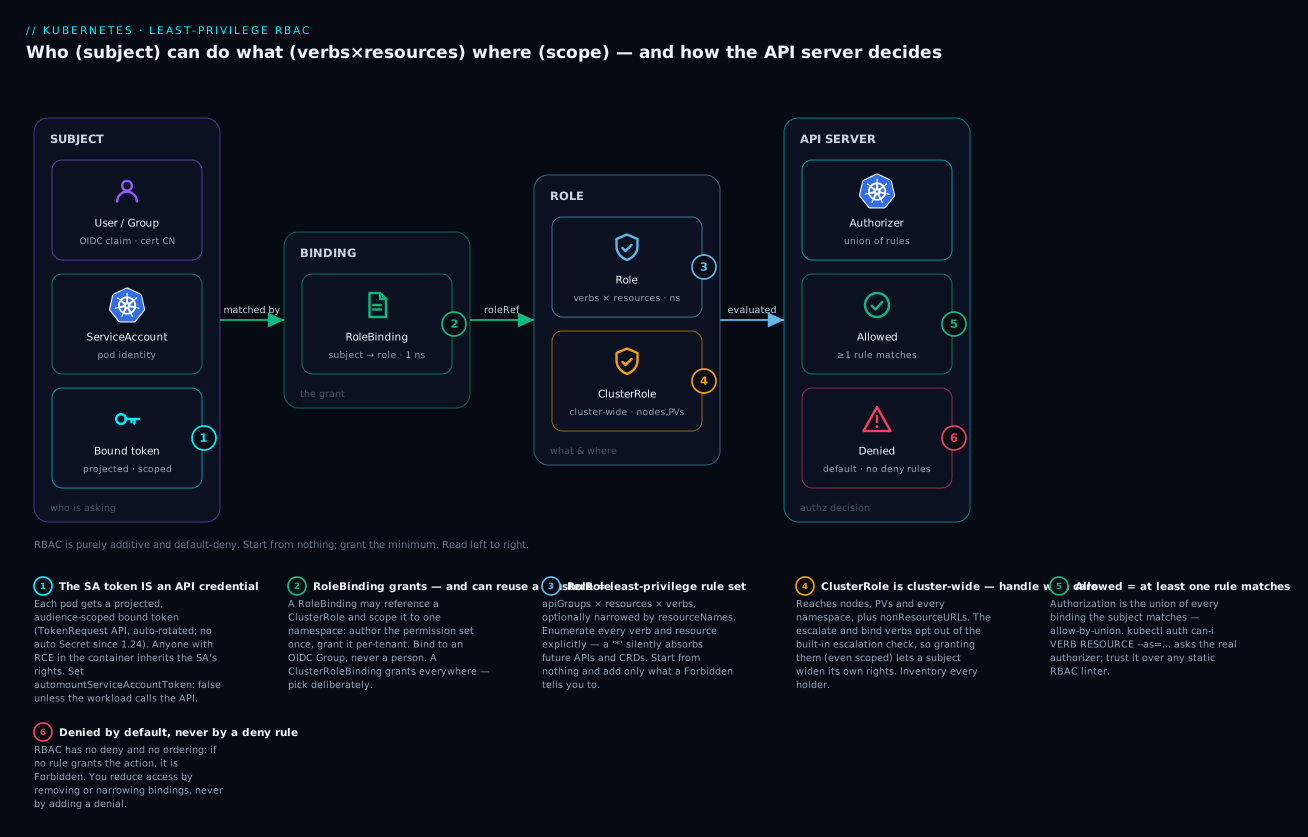
Read the diagram left to right: who (subject) → the grant (RoleBinding, which can reuse a ClusterRole and scope it to one namespace) → what & where (the Role’s verbs × resources, namespaced, or a cluster-wide ClusterRole) → the decision at the API server, which is the union of every matching rule: Allowed if at least one rule matches, Denied by default if none do. Each numbered badge marks a design decision — a token that is really an API credential, a binding that can silently reuse a moving target, an escalation verb that hands over the keys. The rest of this lesson is those six badges in depth.
Most clusters drift toward cluster-admin because it is the path of least resistance: someone hits a Forbidden, a binding gets widened, and nobody ever narrows it back. This is a playbook for doing the opposite — scoping permissions deliberately, binding to groups instead of people, and proving on a schedule that the model still holds.
1. RBAC primitives, revisited
Four object kinds do all the work. The split that trips people up is scope, not function.
| Kind | Scope | Grants permissions in |
|---|---|---|
Role |
namespaced | its own namespace |
ClusterRole |
cluster-wide | all namespaces, plus cluster-scoped & non-resource URLs |
RoleBinding |
namespaced | one namespace (subject ← Role or ClusterRole) |
ClusterRoleBinding |
cluster-wide | every namespace |
Think of them as two pairs. Roles are definitions — a named bag of permissions that grants nothing until something references it. Bindings are assignments — they attach a subject to a role. A role with no binding is inert; a binding with no subjects grants nothing. You always need one of each to actually give someone access.
The non-obvious combination: a RoleBinding can reference a ClusterRole. That lets you author a permission set once as a ClusterRole and grant it per namespace via RoleBinding — the workhorse pattern for multi-tenant clusters. The four legal wiring combinations, and the one illegal one, are worth memorizing:
| Binding | roleRef points to | Effect |
|---|---|---|
RoleBinding |
Role (same ns) |
subject gets those rules in that namespace |
RoleBinding |
ClusterRole |
subject gets those rules scoped to that one namespace (author once, bind per-ns) |
ClusterRoleBinding |
ClusterRole |
subject gets those rules in every namespace + cluster-scoped resources |
ClusterRoleBinding |
Role |
illegal — the API server rejects it; a ClusterRoleBinding can only reference a ClusterRole |
RBAC is purely additive. There are no deny rules; effective permission is the union of every binding a subject matches. You reduce access by removing or narrowing bindings, never by adding a denial.
A rule is apiGroups × resources × verbs, optionally narrowed by resourceNames:
apiVersion: rbac.authorization.k8s.io/v1
kind: Role
metadata:
  name: deploy-restart
  namespace: team-payments
rules:
  - apiGroups: ["apps"]
    resources: ["deployments"]
    verbs: ["get", "list", "watch", "patch"]   # patch = rollout restart
  - apiGroups: ["apps"]
    resources: ["deployments/scale"]            # subresource is a separate grant
    verbs: ["update", "patch"]
Read that rule as a sentence: “On resources in the apps API group, specifically deployments, allow the verbs get, list, watch, and patch.” A request is allowed only if all three axes match at once — the right verb, on the right resource, in the right group. Miss any axis and you get a Forbidden. Three axes trip up beginners constantly, so here is each one spelled out.
Verbs — the actions. These map to HTTP methods but are not identical to them; RBAC has a few special verbs with no CRUD equivalent.
| Verb | What it allows | Note |
|---|---|---|
get |
read one named object | does not grant list |
list |
read a collection (and see every field of every item) | a list on secrets dumps them all |
watch |
stream changes to a collection | usually paired with list |
create |
make a new object | cannot be narrowed by resourceNames (the name doesn’t exist yet) |
update |
replace an existing object | full replace (PUT) |
patch |
modify part of an object | how kubectl rollout restart, scale, label work |
delete |
remove one named object | |
deletecollection |
remove many at once | separate from delete; grant deliberately |
impersonate |
act as another user/group/SA | effectively a superuser verb |
escalate |
write a role with more rights than you hold | opts out of the escalation check |
bind |
bind an existing role to a subject | opts out of the escalation check |
The get/list split is the one beginners forget most: a get grant lets you read an object by name but returns Forbidden for kubectl get pods (which is a list). Grant both when someone needs to enumerate.
Resources — the nouns. pods, services, deployments, secrets, and so on. Two subtleties: subresources are addressed with a slash (pods/log, pods/exec, deployments/scale, pods/status) and are separate grants — access to pods does not include pods/exec. And resourceNames can pin a rule to specific named objects:
rules:
  - apiGroups: [""]
    resources: ["secrets"]
    resourceNames: ["payments-db-creds"]   # this ONE secret, nothing else
    verbs: ["get"]
resourceNames works for verbs that address a single object — get, update, patch, delete — but not for list, watch, create, or deletecollection. That is a security-critical caveat: you cannot grant “list only this one secret.” A list on secrets returns every secret in scope, full stop. To restrict to specific secrets, grant get with resourceNames and withhold list entirely.
apiGroups — the namespace of the nouns. Every resource lives in an API group, and the same resource name in a different group is a different resource. The empty string "" is the core group — the original built-ins.
| apiGroup | Common resources |
|---|---|
"" (core) |
pods, services, secrets, configmaps, namespaces, nodes, serviceaccounts, persistentvolumeclaims, events, endpoints |
apps |
deployments, statefulsets, daemonsets, replicasets |
batch |
jobs, cronjobs |
networking.k8s.io |
ingresses, networkpolicies |
rbac.authorization.k8s.io |
roles, clusterroles, rolebindings, clusterrolebindings |
apiextensions.k8s.io |
customresourcedefinitions |
Writing apiGroups: ["core"] is a classic beginner error — the core group is the empty string, not the word “core.” If a rule silently never matches, check this first.
Subjects are not Kubernetes objects. Users and groups are opaque strings asserted by the authenticator (your OIDC provider or client cert). The API server never validates that a user “exists” — it only matches the string. ServiceAccounts are real namespaced objects.
That last point deserves expanding, because subjects come in three flavors and they behave very differently:
- User — a human identity, a plain string like
oidc:alice@corp.comor a client-certCN. Kubernetes has no user objects, nokubectl create user. The string is whatever your authenticator asserts. Bind to users only for break-glass; prefer groups. - Group — also an opaque string (
oidc:eng-payments,system:authenticated), asserted by the authenticator. Binding to a group is how you make access manageable: membership lives in your IdP, not the cluster. - ServiceAccount — a real, namespaced object (
system:serviceaccount:<ns>:<name>). This is the identity a workload uses. Unlike users and groups, you create and manage these in the cluster, and every pod runs as exactly one.
2. Map personas to scoped roles
Start from who is asking, not from a default role. A workable baseline for a shared cluster:
| Persona | Scope | Core verbs |
|---|---|---|
| App developer | own namespace | read all; create/patch/delete deployments, configmaps, services; get pod logs; create pods/exec (gated) |
| SRE / on-call | cluster-wide | read everything; delete pods; patch nodes (cordon/drain); read events |
| CI pipeline (SA) | own namespace | apply app resources; no secrets read, no exec |
| Tenant team | own namespace | the developer set, bound only in their namespace |
Author each as a ClusterRole so it is reusable, then bind with a namespaced RoleBinding:
apiVersion: rbac.authorization.k8s.io/v1
kind: ClusterRole
metadata:
  name: app-developer
rules:
  - apiGroups: ["", "apps", "batch", "networking.k8s.io"]
    resources: ["deployments", "replicasets", "pods", "services",
                "configmaps", "jobs", "cronjobs", "ingresses"]
    verbs: ["get", "list", "watch", "create", "update", "patch", "delete"]
  - apiGroups: [""]
    resources: ["pods/log"]
    verbs: ["get", "list"]
  # NOTE: secrets and pods/exec are deliberately omitted
---
apiVersion: rbac.authorization.k8s.io/v1
kind: RoleBinding
metadata:
  name: payments-developers
  namespace: team-payments
roleRef:
  apiGroup: rbac.authorization.k8s.io
  kind: ClusterRole          # reuse the cluster role, scope it here
  name: app-developer
subjects:
  - apiGroup: rbac.authorization.k8s.io
    kind: Group
    name: "eng-payments"     # an OIDC group, not a person
Note that pods/log and pods/exec are separate subresources. Granting log access does not grant exec — keep exec on its own, more tightly bound role.
3. Aggregated ClusterRoles for maintainable sets
Hand-maintaining the rule list above across a dozen teams is how drift starts. Use ClusterRole aggregation: a controller automatically merges the rules of any ClusterRole whose labels match an aggregation selector.
apiVersion: rbac.authorization.k8s.io/v1
kind: ClusterRole
metadata:
  name: monitoring-reader        # the aggregate — leave rules empty
aggregationRule:
  clusterRoleSelectors:
    - matchLabels:
        rbac.kv.io/aggregate-to-monitoring: "true"
rules: []                        # filled in by the controller; do not hand-edit
---
apiVersion: rbac.authorization.k8s.io/v1
kind: ClusterRole
metadata:
  name: monitoring-prometheus
  labels:
    rbac.kv.io/aggregate-to-monitoring: "true"   # contributes into the aggregate
rules:
  - apiGroups: [""]
    resources: ["nodes/metrics", "services", "endpoints", "pods"]
    verbs: ["get", "list", "watch"]
Bind a subject to monitoring-reader; later, drop in a new labeled ClusterRole and the grant expands with zero edits to bindings. This is exactly how the built-in admin, edit, and view roles absorb CRD permissions — operators ship roles labeled rbac.authorization.k8s.io/aggregate-to-edit: "true" and they merge automatically.
Aggregation is convenient and a footgun. Any actor who can create a
ClusterRolewith the magic label silently widens every aggregate. Treatcreateonclusterrolesas a privileged grant (more on this in section 7).
4. ServiceAccount hygiene
Every pod runs as a ServiceAccount. If you do nothing, the default SA token is mounted into every pod at /var/run/secrets/kubernetes.io/serviceaccount/ — a ready-made credential for anyone who lands RCE in a container.
Disable automount unless the workload calls the API. Set it on the SA (and you can override per-pod):
apiVersion: v1
kind: ServiceAccount
metadata:
  name: web-frontend
  namespace: team-payments
automountServiceAccountToken: false   # frontend never talks to the API
---
apiVersion: apps/v1
kind: Deployment
metadata:
  name: web-frontend
  namespace: team-payments
spec:
  template:
    spec:
      serviceAccountName: web-frontend
      automountServiceAccountToken: false   # belt-and-suspenders at pod level
Give each workload its own SA and bind only the verbs it needs. Never reuse default, and never bind anything to the default SA. Find pods still riding the default SA:
kubectl get pods -A -o json | jq -r '
  .items[]
  | select((.spec.serviceAccountName // "default") == "default")
  | "\(.metadata.namespace)/\(.metadata.name)"'
Since Kubernetes 1.24, SAs no longer auto-create long-lived Secret tokens; pods get short-lived bound tokens via the TokenRequest API, auto-rotated and audience-scoped. If you find a manually created kubernetes.io/service-account-token Secret, treat it as a static credential to eliminate. (For the interplay between SA tokens and the Secrets they can read, see Kubernetes ConfigMaps & Secrets deep dive.)
5. Bind to OIDC groups, not individuals
Per-user bindings are unauditable and they outlive the user. Wire the API server to your IdP (Entra ID, Okta, or Dex fronting either) and bind to groups.
API server flags (managed control planes expose these as cluster settings — e.g. AKS/EKS OIDC integration — rather than raw flags):
kube-apiserver \
  --oidc-issuer-url=https://login.microsoftonline.com/<tenant-id>/v2.0 \
  --oidc-client-id=<app-client-id> \
  --oidc-username-claim=sub \
  --oidc-username-prefix="oidc:" \
  --oidc-groups-claim=groups \
  --oidc-groups-prefix="oidc:"
The prefixes namespace external identities so they cannot collide with built-ins like system:masters. Subjects then reference the prefixed group:
subjects:
  - apiGroup: rbac.authorization.k8s.io
    kind: Group
    name: "oidc:eng-payments"
Now access control lives in your IdP: add a user to the eng-payments group and they get exactly the bound role; remove them and access is gone at next token refresh. No cluster change, full IdP audit trail. For local CLI auth, kubectl uses the oidc exec/auth plugin (or kubelogin for Entra) to fetch and refresh tokens.
6. Find over-permissioned subjects
kubectl auth can-i is the built-in primitive — and the only one you should trust as ground truth, because it asks the API server’s actual authorizer:
# Impersonate a subject and ask a specific question
kubectl auth can-i delete secrets -n team-payments \
  --as="oidc:alice@corp.com" --as-group="oidc:eng-payments"

# List everything a ServiceAccount can do
kubectl auth can-i --list \
  --as=system:serviceaccount:team-payments:ci-deployer
For the reverse question — who can do something — reach for community tools. They parse RBAC objects, so confirm hits with auth can-i:
# krew plugins
kubectl krew install who-can rbac-tool access-matrix

# Who can read secrets anywhere?
kubectl who-can get secrets -A

# Resolve a subject's full effective permissions (transitively)
kubectl rbac-tool lookup oidc:alice@corp.com
kubectl rbac-tool policy-rules -e '^system:serviceaccount:.*'

# rakkess: per-resource access matrix for the current (or impersonated) subject
kubectl access-matrix --as=system:serviceaccount:team-payments:ci-deployer
rbac-tool also generates a least-privilege ClusterRole from observed audit-log activity (rbac-tool gen) — a strong starting point when retrofitting a permissive SA.
7. Catch privilege-escalation paths
Some grants are dangerous regardless of how narrow they look, because they let a subject grant themselves more. Hunt these specifically:
| Verb / resource | Why it is an escalation path |
|---|---|
escalate on roles/clusterroles |
create/update a role with more rights than you hold (bypasses the built-in escalation check) |
bind on roles/clusterroles |
bind an existing high-priv role to yourself |
impersonate on users/groups/serviceaccounts |
act as any subject — effectively a superuser |
create on pods (+ a privileged SA in ns) |
launch a pod mounting another SA’s token, or a hostPath/privileged pod |
get/list on secrets |
read SA tokens, then authenticate as those SAs |
pods/exec, pods/attach |
execute inside a running pod, inheriting its identity |
update on */status or nodes |
tamper with scheduling / admission outcomes |
Normally the API server blocks you from creating a role more powerful than your own. The escalate and bind verbs opt out of that check — so granting them, even scoped, hands over the keys. Find every subject holding them:
# Any binding granting escalate/bind/impersonate
kubectl rbac-tool policy-rules -o wide \
  | grep -Ei 'escalate|impersonate|(^|[^a-z])bind([^a-z]|$)'

# Wildcards are almost always over-grants — surface them
kubectl get clusterroles -o json | jq -r '
  .items[]
  | select([.rules[]? | select((.verbs[]?=="*") or (.resources[]?=="*"))] | length > 0)
  | .metadata.name'
Reading Secrets is the most underrated escalation. A “read-only” role that includes
secretscan read every mounted SA token in the namespace and then become those SAs. Excludesecretsfrom broad read roles and grant specific secrets byresourceNamesonly.
8. Continuous RBAC auditing
A correct model on Tuesday means nothing if Friday’s incident-fix binding never gets reverted. Make auditing continuous.
Enable the audit log and capture authorization decisions. A minimal policy that records RBAC changes and denials at metadata level:
apiVersion: audit.k8s.io/v1
kind: Policy
rules:
  - level: RequestResponse
    verbs: ["create", "update", "patch", "delete"]
    resources:
      - group: "rbac.authorization.k8s.io"
        resources: ["roles", "clusterroles", "rolebindings", "clusterrolebindings"]
  - level: Metadata
    resources:
      - group: ""
        resources: ["secrets"]   # who read what, without logging values
authorization.k8s.io/decision: forbid annotations in the log are gold — a steady stream of denials for one subject is a missing (legitimate) grant or an attacker probing. Ship the log to your SIEM and alert on:
- any write to
clusterrolebindings, - new subjects bound to
cluster-adminorsystem:masters, - spikes in
forbiddecisions per subject.
Policy-as-code stops bad grants before they merge. With Kyverno or Gatekeeper/OPA, reject dangerous bindings at admission. A Kyverno policy blocking new cluster-admin ClusterRoleBindings:
apiVersion: kyverno.io/v1
kind: ClusterPolicy
metadata:
  name: restrict-cluster-admin
spec:
  validationFailureAction: Enforce
  rules:
    - name: no-cluster-admin-binding
      match:
        any:
          - resources:
              kinds: ["ClusterRoleBinding"]
      validate:
        message: "Binding to cluster-admin is not allowed; request a scoped role."
        deny:
          conditions:
            any:
              - key: "{{ request.object.roleRef.name }}"
                operator: Equals
                value: "cluster-admin"
Keep all Roles/Bindings in Git, reconciled by Argo CD or Flux. GitOps gives you the missing pieces: drift detection (the cluster is corrected back to Git), peer review on every permission change, and a full history of who widened what and when.
Going deeper
Everything above is the design surface. This section is the machinery underneath it — how the answer is actually computed, what you already have installed, and the exact paths an attacker walks. Read it once and the design rules stop feeling arbitrary.
How the API server actually decides
Every request runs a three-stage gauntlet, in order:
- Authentication (authn) — who are you? The request’s credential (OIDC token, client cert, SA bound token) is turned into a username + group list. If this fails, you get
401 Unauthorized. RBAC has not even run yet. - Authorization (authz) — are you allowed? Here the RBAC authorizer runs. A
Forbiddenis a403. - Admission — should this specific object be allowed? Validating/mutating webhooks, Pod Security Admission, quotas. This is a different stage — an admission
deniedis not an RBAC problem.
The crucial nuance in stage 2: the API server usually runs several authorizers in a chain — commonly Node, then RBAC (and optionally Webhook, ABAC). They are combined with allow-by-union: the first authorizer to say “allow” wins, and the request proceeds. No authorizer can issue a “deny” that overrides another’s “allow” — a not-allowed answer just means “I have no opinion, ask the next one.” Only if every authorizer declines does the request get Forbidden. This is why RBAC has no deny rule: deny is not a concept the chain can express.
Within the RBAC authorizer itself, the algorithm is simple: collect every RoleBinding and ClusterRoleBinding whose subjects list matches your username or any of your groups or your SA identity; gather the rules from every role they reference; and check whether any rule matches (verb, apiGroup, resource, resourceName). One match anywhere in that union is enough. Order is irrelevant. This is the whole reason auditing means auditing the union, not the latest object you touched.
system:mastersis the one identity that skips all of this. It is hard-wired into the RBAC authorizer as a superuser — no binding required, and admission webhooks are the only thing left that can stop it. The kubeadmadmin.confclient cert carriesO=system:masters. Guard that file like a root password.
The default ClusterRoles you already have
Every cluster ships with user-facing ClusterRoles. You rarely need to write a “read-only” role from scratch — bind these (scoped with a RoleBinding) and you inherit CRD permissions for free via aggregation.
| ClusterRole | Grants | The trap |
|---|---|---|
view |
read-only on most namespaced resources | excludes Secrets by design (so it can’t be used to steal tokens) — but includes configmaps |
edit |
read/write most namespaced resources, including Secrets | can read and write Secrets in its scope → can read mounted SA tokens |
admin |
edit plus managing Roles/RoleBindings in the namespace |
can grant others access (up to its own rights); cannot touch ResourceQuota or the Namespace object |
cluster-admin |
* on * + all non-resource URLs |
the master key; bind via ClusterRoleBinding and it is cluster-wide superuser |
The line beginners miss: view is safe with Secrets, edit and admin are not. Handing a tenant the built-in edit role — even scoped to their namespace via a RoleBinding — gives them read/write on Secrets in that namespace, and therefore the ability to read any SA token mounted there and impersonate it. For untrusted tenants, pin an explicit non-aggregating ClusterRole instead of binding edit/admin. The hundreds of system:* ClusterRoles (system:kube-scheduler, system:node, …) are the control plane’s own identities — never bind humans to them.
kubectl auth can-i and impersonation are your source of truth
Static analysis of RBAC YAML is always an approximation; the API server’s authorizer is the only authority. kubectl auth can-i asks it directly. Two flags turn it into an audit tool:
# Am I allowed? (asks about YOUR identity)
kubectl auth can-i create deployments -n team-payments

# Ask about SOMEONE ELSE with impersonation
kubectl auth can-i list secrets -n team-payments \
  --as=oidc:alice@corp.com --as-group=oidc:eng-payments

# The full permission inventory for any subject
kubectl auth can-i --list \
  --as=system:serviceaccount:team-payments:ci-deployer
--as / --as-group use the impersonation feature: your own identity must hold the impersonate verb (cluster-admins do). You are asking “if I were this subject, what could I do?” — computed by the real authorizer, so it accounts for webhook authorizers and Node authorization that static tools miss. Because impersonation is that powerful, impersonate on users/groups/serviceaccounts is itself a superuser grant: whoever holds it can become system:masters and bypass everything. Inventory it as carefully as cluster-admin.
Escalation prevention: why you can’t grant what you don’t have
Kubernetes actively stops privilege escalation through RBAC itself with two built-in checks:
- Writing a Role/ClusterRole requires that you already hold every permission you’re putting in it (the “rules superset” check). You cannot author a role granting
delete secretsunless you can alreadydelete secrets. This stops anadminin one namespace from writing themselves a god-role. - Creating a binding to a role requires that you already hold that role’s permissions (or hold the special
bindverb on it). This stops you from binding an existing powerful role to yourself.
The two escape hatches are the verbs escalate and bind:
escalateonroles/clusterrolesturns off the superset check — you can now write a role with more rights than you hold.bindonroles/clusterrolesturns off the binding check — you can now bind any role, however powerful, to any subject.
That is why the section-7 table flags them so hard: they look like narrow, obscure verbs, but either one converts a limited account into a self-service cluster-admin. Grant them to controllers that genuinely provision RBAC (and audit those), never to humans.
ServiceAccount token projection, under the hood
Since the bound-token model went GA (v1.22) and legacy auto-Secrets were switched off (v1.24), a pod’s credential is a projected bound token, not a static Secret. When a pod mounts the default serviceAccountToken projected volume, the kubelet calls the TokenRequest API and receives a JWT that is:
- time-bound — expires (default ~1 hour) and is auto-rotated in place by the kubelet before expiry;
- audience-bound — scoped to the API server audience by default; you can request other audiences (e.g. for Vault or a cloud IdP) via an explicit projected volume;
- object-bound — tied to the specific pod (and its SA); when the pod is deleted, the token is useless.
# Request a second, differently-audienced token (e.g. for an external system)
spec:
  containers:
    - name: app
      volumeMounts:
        - name: vault-token
          mountPath: /var/run/secrets/vault
  volumes:
    - name: vault-token
      projected:
        sources:
          - serviceAccountToken:
              path: token
              audience: vault           # NOT valid against the kube API
              expirationSeconds: 3600
The security win is huge: a token exfiltrated from a compromised pod is short-lived, can’t be replayed against a different audience, and dies with the pod. But it does not change what the token authorizes — that is still pure RBAC. A bound token whose SA is bound to cluster-admin is a cluster-admin credential for the next hour. Token projection limits blast radius over time; least-privilege RBAC limits blast radius in scope. You need both.
A privilege-escalation path, walked end to end
To feel why the section-7 verbs matter, trace the single most common cluster takeover. Assume an attacker has landed code execution in a pod whose SA can only create pods in namespace team-payments — which sounds harmless:
create podslets them schedule a new pod, and a pod spec chooses its ownserviceAccountName.- They point the new pod at a more privileged SA that already exists in
team-payments— say the CI deployer bound toedit. - The kubelet dutifully mounts that SA’s bound token into the attacker’s pod.
- Now they hold an
editcredential: theyget secrets, read every mounted token in the namespace, and impersonate whichever SA is most powerful. - If any reachable SA can touch
clusterrolebindingsor holdsescalate/bind, the game is over — they mint themselvescluster-admin.
Every hop is legal RBAC. The lesson: create pods is only as safe as the most privileged SA in the same namespace, and reading Secrets is a lateral-movement primitive, not a read. This is why you keep one SA per workload, exclude Secrets from broad roles, and never leave a powerful SA sharing a namespace with an untrusted one.
Namespace-vs-cluster scoping traps
The single richest source of RBAC bugs is scope confusion. Keep this table close:
| Symptom | Cause | Fix |
|---|---|---|
| “view in dev” leaked into prod | bound with a ClusterRoleBinding instead of a namespaced RoleBinding |
use a RoleBinding per namespace |
Rule for nodes/persistentvolumes never works |
those are cluster-scoped; a Role/RoleBinding can’t grant them |
use a ClusterRole + ClusterRoleBinding |
ClusterRoleBinding to a Role rejected on apply |
a CRB can only reference a ClusterRole |
reference a ClusterRole, or switch to a RoleBinding |
Grant to /metrics, /healthz ignored |
non-resource URLs only exist in ClusterRole rules (nonResourceURLs) |
move it to a ClusterRole |
| Tenant sees another namespace’s objects | a list/watch grant via a ClusterRoleBinding is cluster-wide |
scope with a RoleBinding so list is namespaced |
The mental shortcut: cluster-scoped resources (nodes, PVs, namespaces, the RBAC objects themselves, non-resource URLs) can only be granted by a ClusterRole, and binding cluster-wide vs per-namespace is decided by the binding kind, not the role kind. A ClusterRole scoped by a RoleBinding is namespaced; the same ClusterRole under a ClusterRoleBinding is everywhere.
Enterprise scenario
A fintech platform team running multi-tenant EKS thought their tenants were boxed into their own namespaces. Each tenant got the app-developer ClusterRole bound via a namespaced RoleBinding — the canonical pattern from section 2. During a quarterly access review, rbac-tool flagged that one tenant’s CI ServiceAccount could read Secrets in every namespace. The grant looked scoped, so nobody believed it until auth can-i confirmed it.
The cause was the EKS-managed aws-node and a vendor monitoring operator both shipping ClusterRoles labeled rbac.authorization.k8s.io/aggregate-to-edit: "true". A platform engineer, building a self-service “give tenants edit in their namespace” flow, had bound tenants to the built-in edit ClusterRole. Aggregation silently merged the vendor’s secrets: ["get","list"] rule into edit cluster-wide — and because the tenant binding used edit, every tenant inherited Secret read in their namespace, including mounted SA tokens they could then impersonate.
The fix was to stop binding the aggregated built-ins for tenants and pin an explicit, non-aggregating ClusterRole instead, plus a Kyverno policy rejecting any new ClusterRole carrying an aggregation label unless it lives in an allowlisted namespace prefix.
# Prove the blast radius before and after the fix
kubectl auth can-i list secrets -n tenant-acme \
  --as=system:serviceaccount:tenant-acme:ci   # was: yes  ->  now: no

# Audit which ClusterRoles feed the built-in edit aggregate
kubectl get clusterroles -l rbac.authorization.k8s.io/aggregate-to-edit=true
Lesson: binding aggregated roles is binding a moving target. Any operator you install can widen them.
Verify
Prove the model end to end before you call it done.
# 1. The least-priv personas can do their job...
kubectl auth can-i patch deployments -n team-payments \
  --as=oidc:alice@corp.com --as-group=oidc:eng-payments        # expect: yes

# 2. ...and cannot do what they must not
kubectl auth can-i get secrets -n team-payments \
  --as=oidc:alice@corp.com --as-group=oidc:eng-payments        # expect: no
kubectl auth can-i create pods/exec -n team-payments \
  --as=oidc:alice@corp.com --as-group=oidc:eng-payments        # expect: no

# 3. CI cannot read secrets or exec
kubectl auth can-i get secrets \
  --as=system:serviceaccount:team-payments:ci-deployer         # expect: no

# 4. No unexpected holders of escalate/bind/impersonate
kubectl rbac-tool policy-rules -o wide | grep -Ei 'escalate|impersonate'

# 5. Nobody outside the break-glass list binds cluster-admin
kubectl get clusterrolebindings -o json | jq -r '
  .items[] | select(.roleRef.name=="cluster-admin")
  | "\(.metadata.name): \([.subjects[]?.name] | join(", "))"'

# 6. No pods silently using the default SA
kubectl get pods -A -o json | jq -r '
  .items[] | select((.spec.serviceAccountName // "default")=="default")
  | "\(.metadata.namespace)/\(.metadata.name)"'
When a can-i answer is the opposite of what you expected, work the scope traps in the RBAC troubleshooting methodology — the four-axis rule (verb × resource × group × scope) tells you which axis missed.
Practice challenges
Work these in order — they escalate from “write a Role” to “find the escalation.” Each solution is one command or manifest plus the one-line why. Try before you peek.
<details> <summary><strong>1 · Beginner — read-only into one namespace.</strong> Give the OIDC group <code>oidc:auditors</code> read (get/list/watch) on pods, deployments, and configmaps in <code>team-payments</code> — and <em>nothing</em> in any other namespace. Which binding kind, and why not <code>view</code>?</summary>
apiVersion: rbac.authorization.k8s.io/v1
kind: Role
metadata:
  name: ns-reader
  namespace: team-payments
rules:
  - apiGroups: ["", "apps"]
    resources: ["pods", "deployments", "configmaps"]
    verbs: ["get", "list", "watch"]
---
apiVersion: rbac.authorization.k8s.io/v1
kind: RoleBinding
metadata:
  name: auditors-read
  namespace: team-payments
roleRef:
  apiGroup: rbac.authorization.k8s.io
  kind: Role
  name: ns-reader
subjects:
  - apiGroup: rbac.authorization.k8s.io
    kind: Group
    name: "oidc:auditors"
Why: a RoleBinding (not a ClusterRoleBinding) keeps it to one namespace. You could bind the built-in view ClusterRole with a RoleBinding, but this explicit Role is narrower and won’t grow when an operator aggregates new rules into view.
</details>
<details> <summary><strong>2 · Beginner→Intermediate — a least-privilege CI bot.</strong> Design a role for a CI ServiceAccount <code>system:serviceaccount:team-payments:ci-deployer</code> that can apply app resources (deployments, services, configmaps) but must never read Secrets or exec into pods. Then prove both halves with <code>auth can-i</code>.</summary>
apiVersion: rbac.authorization.k8s.io/v1
kind: Role
metadata:
  name: ci-deployer
  namespace: team-payments
rules:
  - apiGroups: ["", "apps"]
    resources: ["deployments", "services", "configmaps"]
    verbs: ["get", "list", "watch", "create", "update", "patch"]
  # secrets and pods/exec deliberately absent
---
apiVersion: rbac.authorization.k8s.io/v1
kind: RoleBinding
metadata:
  name: ci-deployer
  namespace: team-payments
roleRef: { apiGroup: rbac.authorization.k8s.io, kind: Role, name: ci-deployer }
subjects:
  - kind: ServiceAccount
    name: ci-deployer
    namespace: team-payments
SA=system:serviceaccount:team-payments:ci-deployer
kubectl auth can-i patch deployments -n team-payments --as=$SA   # yes
kubectl auth can-i get secrets     -n team-payments --as=$SA   # no
kubectl auth can-i create pods/exec -n team-payments --as=$SA   # no
Why: omitting secrets and pods/exec from the rule set is the whole control — RBAC is default-deny, so what you don’t list is already forbidden. Note the ServiceAccount subject needs no apiGroup.
</details>
<details> <summary><strong>3 · Intermediate — one permission set, two namespaces.</strong> The same <code>app-developer</code> permissions are needed in both <code>team-payments</code> and <code>team-ledger</code>. Do it without duplicating the rules.</summary>
# Author ONCE as a ClusterRole (from section 2), then bind per-namespace:
apiVersion: rbac.authorization.k8s.io/v1
kind: RoleBinding
metadata: { name: devs, namespace: team-payments }
roleRef: { apiGroup: rbac.authorization.k8s.io, kind: ClusterRole, name: app-developer }
subjects: [{ apiGroup: rbac.authorization.k8s.io, kind: Group, name: "oidc:eng-payments" }]
---
apiVersion: rbac.authorization.k8s.io/v1
kind: RoleBinding
metadata: { name: devs, namespace: team-ledger }
roleRef: { apiGroup: rbac.authorization.k8s.io, kind: ClusterRole, name: app-developer }
subjects: [{ apiGroup: rbac.authorization.k8s.io, kind: Group, name: "oidc:eng-ledger" }]
Why: a RoleBinding can reference a ClusterRole and scope it to its own namespace. One rule set, N namespaced grants, zero duplication — and it stays a RoleBinding, so it is not cluster-wide.
</details>
<details> <summary><strong>4 · Intermediate→Advanced — find what a role can escalate to.</strong> A namespace <code>team-x</code> contains a SA <code>builder</code> whose Role grants only <code>create</code> on <code>pods</code>. The namespace also has a SA <code>deployer</code> bound to the built-in <code>edit</code>. What can <code>builder</code> actually reach, and how do you prove it?</summary>
# builder can create a pod that RUNS AS deployer -> inherits edit -> reads secrets
kubectl auth can-i create pods -n team-x \
  --as=system:serviceaccount:team-x:builder            # yes
kubectl auth can-i get secrets -n team-x \
  --as=system:serviceaccount:team-x:deployer           # yes  <- the real prize

# So builder's effective reach ⊇ deployer's. Confirm the lateral hop exists:
kubectl get sa -n team-x         # both SAs live in the same namespace
Why: create pods lets builder set serviceAccountName: deployer on a new pod; the kubelet mounts deployer’s token; builder now has edit, hence Secrets, hence every other SA token. The escalation isn’t in builder’s Role — it’s in sharing a namespace with a more privileged SA. Fix: don’t co-locate, or remove create pods.
</details>
<details> <summary><strong>5 · Advanced — pin a Secret grant to one object.</strong> A workload must read exactly the Secret <code>payments-db-creds</code> in <code>team-payments</code> and no other. Write the rule, then explain why you must <em>not</em> also grant <code>list</code>.</summary>
rules:
  - apiGroups: [""]
    resources: ["secrets"]
    resourceNames: ["payments-db-creds"]
    verbs: ["get"]        # get only — NOT list/watch
Why: resourceNames narrows verbs that address a single object (get, update, patch, delete) but is ignored by list/watch — the API has no way to “list one named secret.” Add list and the subject can enumerate every secret in the namespace, defeating the whole point. Grant get + resourceNames, never list.
</details>
<details> <summary><strong>6 · Advanced — hunt every dangerous grant in the cluster.</strong> In one pass, surface every subject that can escalate (holds <code>escalate</code>/<code>bind</code>/<code>impersonate</code>, or a wildcard, or binds <code>cluster-admin</code>).</summary>
# escalation verbs
kubectl rbac-tool policy-rules -o wide \
  | grep -Ei 'escalate|impersonate|(^|[^a-z])bind([^a-z]|$)'

# wildcard verbs or resources in any ClusterRole
kubectl get clusterroles -o json | jq -r '
  .items[] | select([.rules[]? |
    select((.verbs[]?=="*") or (.resources[]?=="*"))] | length > 0)
  | .metadata.name'

# who is bound to cluster-admin
kubectl get clusterrolebindings -o json | jq -r '
  .items[] | select(.roleRef.name=="cluster-admin")
  | "\(.metadata.name): \([.subjects[]?.name] | join(", "))"'
Why: these three checks cover the realistic self-escalation surface — the special verbs that opt out of the escalation check, wildcards that absorb future APIs, and direct master-key bindings. Every hit needs a name and a justification, or it gets removed. Wire this into CI so it runs on every change. </details>
Common beginner mistakes
These are misconceptions, not typos — each one comes from a wrong mental model, so the fix is a corrected model, not just a corrected command.
- “Just give it
cluster-adminto unblock the deploy.” The instinct that ruins clusters.cluster-adminis*on*, cluster-wide — a compromise of anything holding it is a full cluster takeover. Right model: aForbiddentells you exactly which verb/resource is missing; add that one grant, not the master key. - “A
*verb or resource is just convenient shorthand.” A wildcard silently absorbs every future API type, including CRDs installed months later by an operator you forgot about. Theedit-aggregation incident in the enterprise scenario is exactly this at cluster scale. Right model: enumerate verbs and resources explicitly; a role should never surprise you a quarter later. - “Binding to
system:authenticatedis a safe default for logged-in users.”system:authenticatedis every identity with a valid credential — every user, every ServiceAccount in every namespace, anything your authenticator accepts. Binding real permissions to it is nearly as broad ascluster-admin. Right model: bind to a specific OIDC group you control in your IdP. - “The SA token is just a mounted file, not a real credential.” That projected token in
/var/run/secrets/...is a live API credential; anyone who reads it (RCE, aget secrets, a path traversal) is that SA. Right model: SA token = password. Disable automount when unused, one SA per workload, and never let a read role touch Secrets. - “I’ll add a deny rule to block that one action.” There is no deny in RBAC, and order never matters — access is the union of all grants. A narrow “deny” cannot cancel a broad “allow.” Right model: you subtract access by removing or narrowing the grant, and you audit the union, never the last object edited.
- “
RoleBindingandClusterRoleBindingare basically the same, one’s just cluster-y.” The binding kind — not the role kind — decides scope. AClusterRoleBindinggrants the role in every namespace; aRoleBindinggrants it in one. Picking the wrong one turns “view in dev” into “view in prod.” Right model: default toRoleBinding; reach forClusterRoleBindingonly for genuine cluster-wide roles. - “
viewis read-only, so it’s safe to hand out anywhere.” True — but its siblingseditandadmincan read Secrets, and people reach foreditjust as casually. Right model: know that onlyviewexcludes Secrets; for anything writable near untrusted tenants, pin an explicit non-aggregating role.
Checklist
Pitfalls
*in any rule. A wildcard verb or resource silently absorbs future API types (including CRDs). Enumerate explicitly.RoleBindingto aClusterRoleBindingmental slip. ARoleBindingscopes aClusterRoleto one namespace — but aClusterRoleBindinggrants it everywhere. The wrong one turns “view in dev” into “view in production.”- Forgetting RBAC is additive. You cannot deny; an over-broad binding is not cancelled by a narrow one. Audit the union, not the latest object.
- Trusting community tooling as ground truth.
who-can,rbac-tool, andrakkessread RBAC objects, not the live authorizer — webhook authorizers and Node authorization can change the real answer. Confirm withkubectl auth can-i. - Leaving break-glass loose. Keep one audited, alerting-wired
cluster-adminpath. The goal is least privilege by default, not zero privilege when the cluster is on fire.
Glossary
- Subject — the identity making a request: a User (opaque string, e.g. an OIDC
sub), a Group (opaque string, e.g.oidc:eng-payments), or a ServiceAccount (a real namespaced object,system:serviceaccount:<ns>:<name>). - Verb — the action requested:
get,list,watch,create,update,patch,delete,deletecollection, plus special verbsimpersonate,escalate,bind. - Resource — the object type acted upon (
pods,secrets,deployments). Subresources (pods/exec,pods/log,deployments/scale) are addressed with a slash and are separate grants. - apiGroup — the API group a resource lives in.
""is the core group (pods, services, secrets); others includeapps,batch,networking.k8s.io,rbac.authorization.k8s.io. - Rule — one
apiGroups × resources × verbsgrant inside a Role/ClusterRole, optionally narrowed byresourceNames. - resourceNames — pins a rule to specific named objects; works for
get/update/patch/delete, ignored bylist/watch/create/deletecollection. - Role — a namespaced set of rules; grants only within its own namespace.
- ClusterRole — a cluster-wide set of rules; can grant cluster-scoped resources (nodes, PVs), non-resource URLs, and be reused in any namespace.
- RoleBinding — assigns a Role or a ClusterRole to subjects, scoped to one namespace.
- ClusterRoleBinding — assigns a ClusterRole to subjects across every namespace and cluster-scoped resources.
- roleRef — the field in a binding naming the role it grants; immutable after creation (delete and recreate to change it).
- Aggregated ClusterRole — a ClusterRole with an
aggregationRule; a controller fills itsrulesby merging every labeled ClusterRole that matches. How built-inview/edit/adminabsorb CRD permissions. - Bound (projected) token — the short-lived, audience- and object-scoped JWT a pod uses to authenticate to the API server, issued via the TokenRequest API and auto-rotated by the kubelet.
- TokenRequest API — the API the kubelet calls to mint a bound SA token for a pod (GA since v1.22); replaced the old long-lived Secret tokens (auto-generation off since v1.24).
- Impersonation — acting as another subject via
--as/--as-group; gated by theimpersonateverb. Effectively a superuser capability. escalateverb — opts a subject out of the rules-superset check, letting them write a role with more rights than they hold.bindverb — opts a subject out of the binding check, letting them bind a role more powerful than their own permissions.- Least privilege — grant exactly the permissions a subject needs to do its job, and no more; start from nothing and add only what a
Forbiddenproves is missing. - Additive / default-deny — RBAC has no deny rules and no ordering; access is the union of all grants, and anything not granted is Forbidden.
- Allow-by-union — the authorization chain (Node, RBAC, …) allows a request if any authorizer allows it; none can override another’s allow with a deny.
system:masters— a hard-wired superuser group that bypasses the RBAC authorizer entirely; the kubeadm admin client cert carries it. Guard like a root password.system:authenticated— the group containing every successfully authenticated identity; binding real permissions to it grants nearly everyone.- nonResourceURLs — API paths that aren’t Kubernetes objects (
/healthz,/metrics); grantable only in ClusterRole rules. - Break-glass — a deliberately-kept, audited, alerting-wired high-privilege path (usually one
cluster-adminbinding) for emergencies.