Every request that reaches the Kubernetes API server — a kubectl get pods, a controller reconciling a Deployment, a pod calling the API from inside the cluster — is checked twice before anything happens: who are you? (authentication) and are you allowed to do this? (authorisation). RBAC — Role-Based Access Control — is how Kubernetes answers the second question. It is the layer that decides whether a request becomes an action or a Forbidden.
This lesson takes RBAC apart field by field. By the end you will be able to read any Role, ClusterRole, RoleBinding or ClusterRoleBinding and say exactly what it grants and to whom; you will understand ServiceAccounts and the short-lived tokens that pods now use; and you will be able to prove any permission with a single command. This is the foundational companion to the advanced Least-Privilege RBAC design lesson — here we build the mental model and cover every primitive; there we cover designing, aggregating and auditing RBAC at scale.
In a nutshell
Level: Beginner-friendly → Intermediate · Time: ~40 min (skim the tables first, then run the lab)
Picture your cluster as a large office building. Authentication is the security desk checking your ID at the door — it proves who you are. RBAC (Role-Based Access Control) is the set of rules that then decides which rooms your badge opens — who can do what. RBAC never checks your ID; it only reads the identity authentication already established and looks up what that identity is allowed to touch.
There are two kinds of “who” in this building. A User is a human (you, at your laptop, running kubectl). A ServiceAccount is an identity for a program — a pod, a controller, a CI job — something running inside the cluster that needs to call the Kubernetes API. A ServiceAccount is not a person and has no password: it is a robot badge that Kubernetes hands to a workload so the workload can prove who it is. Every pod runs as exactly one ServiceAccount, the way every employee carries exactly one badge.
The rest of RBAC is just four objects that spell out the badge rules. A Role (or ClusterRole) is a list of what may be done — “may read pods, may not touch secrets.” A RoleBinding (or ClusterRoleBinding) is what hands that list to a specific badge. Nothing is granted until a binding connects the two — and there is no “deny”: RBAC only ever adds permissions, so you tighten access by handing out smaller lists, never by writing a rule that says no.
If you remember one sentence: RBAC decides who (a subject) can do what (verbs) to which things (resources), and a ServiceAccount is the badge a pod wears so it can be a “who.”
Learning objectives
By the end of this lesson you will be able to:
- Explain where RBAC sits in the request pipeline: authentication → authorisation → admission, and what RBAC does and does not control.
- Name the four RBAC objects and choose the right one by scope (namespaced vs cluster-wide).
- Write an RBAC rule correctly —
apiGroups,resources,subresources,verbs,resourceNames,nonResourceURLs— and avoid the wildcard trap. - Describe the three subject kinds (User, Group, ServiceAccount) and how each is authenticated.
- Create and use ServiceAccounts, understand bound/projected tokens vs legacy Secret tokens, control automounting, and attach imagePullSecrets.
- Use
kubectl auth can-i(including--as,--as-group, and--list) to verify permissions as ground truth. - Apply least-privilege patterns and recognise the common RBAC mistakes that send people reaching for
cluster-admin.
Prerequisites
You need a working kubectl and a cluster you can experiment in — a free local one is perfect (kind, minikube, or k3d). It helps to have met the core objects from earlier in the course — Pods, Deployments & Services — and to be comfortable with kubectl itself (get, describe, apply). You should also understand Namespaces, because the namespaced-vs-cluster-wide distinction is the heart of RBAC. This is the Security lesson of the Kubernetes Zero-to-Hero course; everything runs on free, local tooling with no cloud account required. Targets the current API (Kubernetes v1.30+), where RBAC has been stable (rbac.authorization.k8s.io/v1) for years.
Where RBAC sits: the request pipeline
When any client talks to the API server, the request passes through three gates in order. RBAC is only the middle one — getting this picture right prevents most confusion.
| Stage | Question | What does it | Failure shows as |
|---|---|---|---|
| Authentication | Who are you? | Validates a client certificate, bearer token, or OIDC token and produces a username + groups (or a ServiceAccount identity). Does not consult RBAC. | 401 Unauthorized |
| Authorisation | Are you allowed? | One or more authorisers decide. RBAC is the usual one; others are Node, ABAC, and Webhook. The request is allowed if any authoriser says yes. | 403 Forbidden |
| Admission control | Is the object acceptable / should it be changed? | Mutating and validating admission webhooks (and built-in controllers like ResourceQuota, Pod Security Admission) run after authorisation. | admission webhook denied the request |
Three consequences worth internalising:
- RBAC never authenticates. It receives an already-established identity (the username/groups string) and matches it. It never checks that a user “exists” — Users and Groups are not Kubernetes objects (more in Subjects below).
- Authorisation is a union of authorisers. On a managed cluster the Node authorizer grants kubelets exactly what they need for their own node; RBAC handles everyone else. A “yes” from any enabled authoriser wins, so RBAC can only grant, never deny over the top of another authoriser.
- RBAC is purely additive. Within RBAC there are no deny rules. A subject’s effective permission is the union of every binding that matches them. You reduce access by removing or narrowing bindings — never by adding a denial.
If you ever see
Forbiddenwith a clear message naming the missing verb/resource, that is the authorisation stage (RBAC). If you seeadmission webhook ... denied, authorisation already said yes and a later policy said no. They are different problems with different fixes.
The four RBAC objects: scope is everything
RBAC has exactly four object kinds, all in the API group rbac.authorization.k8s.io/v1. They split along two axes: permissions (Role/ClusterRole — what may be done) and bindings (RoleBinding/ClusterRoleBinding — who gets it). The dimension people trip over is scope, not function.
| Object | Scope | Holds | Grants permissions in |
|---|---|---|---|
Role |
namespaced | a set of rules | its own namespace only |
ClusterRole |
cluster-wide (not namespaced) | a set of rules | depends on how it’s bound; can also grant cluster-scoped resources & non-resource URLs |
RoleBinding |
namespaced | links subjects → a Role or a ClusterRole | one namespace (the binding’s own) |
ClusterRoleBinding |
cluster-wide | links subjects → a ClusterRole | every namespace + cluster-scoped resources |
A Role and a ClusterRole are inert on their own — they are just permission templates. Nothing happens until a binding ties a Role/ClusterRole to one or more subjects. A binding has two halves: a roleRef (which permission set) and a subjects list (who receives it).
Why ClusterRole exists when Role seems enough
A ClusterRole is needed for three things a namespaced Role cannot express:
- Cluster-scoped resources —
nodes,persistentvolumes,namespaces,clusterrolesthemselves,storageclasses. These do not live in a namespace, so only aClusterRole(bound by aClusterRoleBinding) can grant them. - Non-resource URLs — endpoints like
/healthz,/metrics,/version,/api. These are not REST resources; you grant them withnonResourceURLs, which only aClusterRolesupports. - A reusable permission set across many namespaces — author the rules once as a
ClusterRole, then grant them per namespace with aRoleBinding. This is the single most important RBAC pattern (see below).
The combination that surprises everyone
A RoleBinding can reference either a Role or a ClusterRole. When a RoleBinding references a ClusterRole, the subject gets those permissions only in the binding’s namespace — the cluster-wide reach of the ClusterRole is clipped to that one namespace.
| roleRef ↓ / binding → | RoleBinding (in ns team-a) |
ClusterRoleBinding |
|---|---|---|
Role (in ns team-a) |
permissions in team-a |
invalid — a ClusterRoleBinding cannot reference a namespaced Role |
ClusterRole |
permissions in team-a only (clipped) |
permissions in all namespaces + cluster-scoped resources |
This table is the most exam-tested fact in RBAC. The workhorse is the bottom-left cell: one ClusterRole named app-developer, bound by a RoleBinding in each tenant namespace — reusable, yet scoped.
# One reusable permission set...
apiVersion: rbac.authorization.k8s.io/v1
kind: ClusterRole
metadata:
  name: app-developer
rules:
  - apiGroups: ["", "apps"]
    resources: ["pods", "deployments", "services", "configmaps"]
    verbs: ["get", "list", "watch", "create", "update", "patch", "delete"]
---
# ...scoped to exactly one namespace by a RoleBinding referencing it
apiVersion: rbac.authorization.k8s.io/v1
kind: RoleBinding
metadata:
  name: team-a-developers
  namespace: team-a            # grant applies ONLY here
roleRef:
  apiGroup: rbac.authorization.k8s.io
  kind: ClusterRole            # reference the cluster role...
  name: app-developer
subjects:
  - apiGroup: rbac.authorization.k8s.io
    kind: Group
    name: "eng-team-a"         # ...for this group, in this namespace only
roleRefis immutable. Once a binding is created you cannot change which Role/ClusterRole it points at — you must delete and recreate it. Thesubjectslist, by contrast, can be edited freely.
The anatomy of a rule, field by field
The permission lives inside the rules list of a Role or ClusterRole. A rule is, conceptually, apiGroups × resources × verbs, optionally narrowed by resourceNames, with subresources addressed via resources. This is where exhaustiveness matters, so here is every field.
| Field | What it does | Values | Default | When to set | Gotcha |
|---|---|---|---|---|---|
apiGroups |
Which API group(s) the resources belong to. | [""] = the core group (pods, services, configmaps, secrets, nodes…); ["apps"], ["batch"], ["networking.k8s.io"], ["rbac.authorization.k8s.io"], etc. ["*"] = all groups. |
none (required for resource rules) | Always, for resource rules. | The core group is the empty string "", not "core" and not omitting the field. Forgetting this is the #1 beginner error. |
resources |
Which resource type(s), by their plural, lowercase API name. | ["pods"], ["deployments"], ["secrets"], ["pods/log"], ["deployments/scale"], ["*"]. |
none (required, unless nonResourceURLs is used) |
Always, for resource rules. | Use the plural name as it appears in the API (pods, not Pod). Subresources are written resource/subresource and are separate grants. |
verbs |
Which actions are permitted. | See the verb table below; ["*"] = all verbs. |
none (required) | Always. | watch is separate from list; many tools need both. deletecollection is separate from delete. |
resourceNames |
Restrict the rule to named instances of the resource. | e.g. ["my-config", "tls-cert"]. |
empty = all instances | When you want “read this secret” not “read all secrets”. | Does not work with create, list, watch, or deletecollection (the name isn’t known at request time, or the verb is collection-wide). It works with get, update, patch, delete. |
nonResourceURLs |
Grant access to non-resource endpoints (not REST objects). | ["/healthz", "/metrics", "/version", "/api/*"]. |
none | Monitoring/health probes against the API server. | ClusterRole only; cannot be combined with resources in the same rule; pairs with non-resource verbs like get. |
The verbs, exhaustively
Verbs map to HTTP methods against the API. Memorise these — they are the vocabulary of every rule.
| Verb | What it allows | Maps to |
|---|---|---|
get |
Read a single named object. | GET /…/name |
list |
Read a collection (all objects of a type in scope). | GET /… (collection) |
watch |
Stream changes to a collection (open a watch). | GET …?watch=true |
create |
Create a new object. | POST |
update |
Replace an entire object. | PUT |
patch |
Partially modify an object (incl. kubectl rollout restart, label edits). |
PATCH |
delete |
Delete a single named object. | DELETE /…/name |
deletecollection |
Delete all objects of a type in scope at once. | DELETE (collection) |
Plus special, non-CRUD verbs that are real escalation paths — covered in Security notes:
| Special verb | On resource | Effect |
|---|---|---|
bind |
roles, clusterroles |
Bind that (possibly higher-privilege) role to a subject. |
escalate |
roles, clusterroles |
Create/update a role with more rights than you currently hold (bypasses the escalation check). |
impersonate |
users, groups, serviceaccounts |
Act as another subject — effectively become them. |
use |
podsecuritypolicies (legacy) / certain admission policy resources |
Permission to use a policy object. |
approve / sign |
certificatesigningrequests (subresources) |
Approve or sign CSRs. |
A crucial subtlety:
getdoes not implylist. They are independent verbs against different endpoints. A role with onlygetlets you read a pod if you already know its name, butkubectl get pods(which lists) will returnForbidden. Grant["get","list","watch"]together for normal read access. Likewise,listreturns full objects — there is no “list names only”, so anyone withlist secretscan read secret values.
Worked rule: every field in play
apiVersion: rbac.authorization.k8s.io/v1
kind: Role
metadata:
  name: payments-operator
  namespace: team-payments
rules:
  # Full lifecycle on deployments in this namespace
  - apiGroups: ["apps"]
    resources: ["deployments"]
    verbs: ["get", "list", "watch", "create", "update", "patch", "delete"]
  # Scale subresource is a SEPARATE grant
  - apiGroups: ["apps"]
    resources: ["deployments/scale"]
    verbs: ["update", "patch"]
  # Read pod logs (subresource), but not exec
  - apiGroups: [""]
    resources: ["pods", "pods/log"]
    verbs: ["get", "list", "watch"]
  # Read EXACTLY one configmap by name, nothing else
  - apiGroups: [""]
    resources: ["configmaps"]
    resourceNames: ["payments-feature-flags"]
    verbs: ["get", "update", "patch"]
Read it as four independent grants OR’d together. Note that pods/log (read logs) and pods/exec (shell in) are different subresources — granting one never grants the other.
Subjects: who a binding grants to
The subjects list of a binding holds one or more of three kinds. Each is authenticated differently before RBAC ever sees it.
kind |
What it is | How it’s authenticated | apiGroup value |
Is it a real object? |
|---|---|---|---|---|
User |
A human (or external automation), identified by a username string. | Client certificate CN, OIDC token, or auth proxy header. | rbac.authorization.k8s.io |
No — just a string the authenticator asserts. |
Group |
A set of users, identified by a group-name string. | Cert O field, OIDC groups claim, or built-in groups. |
rbac.authorization.k8s.io |
No — also just a string. |
ServiceAccount |
A namespaced identity for workloads (pods, controllers). | A bearer token (bound/projected) mounted into the pod. | "" (the core group) — and you give name + namespace. |
Yes — a v1 ServiceAccount object. |
Two facts that catch people out:
- Users and Groups are not created in Kubernetes. There is no
kubectl create user. The API server trusts whatever username/groups your authenticator produces; RBAC simply matches the string. So a binding toUser: alice@corp.comworks the moment Alice authenticates as that string — even if nobody “made” Alice. - ServiceAccounts are the only subject kind that is a real, namespaced object, which is why they have
name+namespaceandapiGroup: "".
The full SA username form, which you use with impersonation and in some bindings, is:
system:serviceaccount:<namespace>:<name>
And every SA automatically belongs to two groups: system:serviceaccounts (all SAs) and system:serviceaccounts:<namespace> (all SAs in that namespace).
Built-in users and groups you’ll meet
| Identity | Kind | Meaning |
|---|---|---|
system:masters |
Group | Super-group — bound to cluster-admin by default; cluster super-user. Anyone with a cert in O=system:masters is god. |
system:authenticated |
Group | Every successfully authenticated request. |
system:unauthenticated |
Group | Anonymous requests (if anonymous auth is on). |
system:serviceaccounts |
Group | All ServiceAccounts cluster-wide. |
system:serviceaccounts:<ns> |
Group | All ServiceAccounts in one namespace. |
system:node:<name> |
User | A kubelet’s identity (handled mostly by the Node authorizer). |
Default ClusterRoles: don’t reinvent these
Kubernetes ships default (built-in) ClusterRoles so you rarely write read/write roles from scratch. The four “user-facing” ones are the ones to know.
| ClusterRole | Grants | Typical use |
|---|---|---|
view |
read-only (get/list/watch) on most resources except Secrets/roles/bindings. |
Auditors, dashboards, junior read access. |
edit |
read/write on most resources (create/update/delete), but not roles/bindings and not quota/limits. Can read Secrets (historically) and exec into pods. | Developers in their own namespace (bind with a RoleBinding). |
admin |
everything edit does plus managing Roles/RoleBindings within a namespace (but not the namespace object or resource quota). |
Namespace owner / team lead. |
cluster-admin |
everything, everywhere — all verbs on all resources in all namespaces + non-resource URLs. | Break-glass only. Bound to system:masters by default. |
These built-ins are aggregated (they absorb labelled add-on ClusterRoles automatically) — a powerful but double-edged feature covered in the advanced RBAC lesson. For most teams the pattern is: bind view/edit/admin with a RoleBinding per namespace, and reserve cluster-admin for emergencies.
Never bind
cluster-adminwith aClusterRoleBindingto a person or a workload SA “to make the error go away”. The whole point of RBAC is least privilege;cluster-admindiscards it.
ServiceAccounts: identity for workloads
A User is for humans; a ServiceAccount (SA) is for workloads. Every pod runs as exactly one SA, and that SA is how the pod authenticates to the API server (and how RBAC decides what the pod may do).
apiVersion: v1
kind: ServiceAccount
metadata:
  name: order-processor
  namespace: team-payments
automountServiceAccountToken: false   # see "automounting" below
A pod selects its SA with spec.serviceAccountName. If you omit it, the pod uses the namespace’s default SA.
apiVersion: apps/v1
kind: Deployment
metadata: { name: order-processor, namespace: team-payments }
spec:
  template:
    spec:
      serviceAccountName: order-processor   # else "default" is used
      containers:
        - name: app
          image: ghcr.io/acme/orders:1.4.0
The default ServiceAccount
Every namespace gets a default SA automatically (created by a controller). Two important points:
- The
defaultSA has no RBAC permissions of its own — out of the box it cannot do anything against the API. (Its token is still a valid identity, which matters forsystem:serviceaccountsgroup bindings, but it carries no granted verbs by default.) - Best practice: never bind permissions to
default, and give each workload its own SA. Binding todefaultgrants those permissions to every pod in the namespace that didn’t pick a different SA — a broad, accidental blast radius.
Tokens: bound/projected vs the legacy Secret token
How a pod actually authenticates is the part that changed most in modern Kubernetes. There are three eras; know all three because you’ll meet old manifests.
| Token type | How obtained | Lifetime | Audience-scoped? | Auto-rotated? | Status |
|---|---|---|---|---|---|
| Bound / projected token (TokenRequest API) | The kubelet requests a token for the pod’s SA and projects it into the pod via a projected volume. |
Short (default ~1h; kubelet refreshes before expiry) | Yes (default audience = API server; can request others) | Yes | Default since v1.22+; the right way. |
| Legacy auto-created Secret token | Pre-1.24, the SA controller auto-created a kubernetes.io/service-account-token Secret and mounted it. |
Never expires (static) | No | No | Removed as default in v1.24+. SAs no longer auto-get a Secret. |
| Manually created Secret token | You create a kubernetes.io/service-account-token Secret with kubernetes.io/service-account.name annotation. |
Never expires (static) | No | No | Still possible, but discouraged — treat as a static credential. |
Inside a pod, the projected token (and CA cert + namespace) lands at:
/var/run/secrets/kubernetes.io/serviceaccount/token
/var/run/secrets/kubernetes.io/serviceaccount/ca.crt
/var/run/secrets/kubernetes.io/serviceaccount/namespace
To mint a token from the command line (for testing or short-lived automation), use the TokenRequest API directly:
# Short-lived token for an SA (audience = API server by default)
kubectl create token order-processor -n team-payments

# With a custom expiry and audience
kubectl create token order-processor -n team-payments \
  --duration=30m --audience=https://kubernetes.default.svc
kubectl create tokenis the modern replacement for the old trick of reading a long-lived token out of a Secret. Prefer it everywhere. If you truly need a non-expiring token (rare — e.g. an external CI system that can’t refresh), you must create the Secret explicitly; do so knowing you’ve created a static credential to guard and rotate.
Automounting the token
By default, the SA token is mounted into every pod — handy if the workload calls the API, but a needless credential for one that doesn’t (a web frontend that only serves HTTP has no reason to hold a cluster token). Anyone who lands code execution in that container gets a ready-made credential.
Control it at two levels (pod-level wins if both are set):
# On the ServiceAccount: default for all pods using this SA
apiVersion: v1
kind: ServiceAccount
metadata: { name: web-frontend, namespace: shop }
automountServiceAccountToken: false
---
# On the Pod: overrides the SA setting for this pod
apiVersion: apps/v1
kind: Deployment
metadata: { name: web-frontend, namespace: shop }
spec:
  template:
    spec:
      serviceAccountName: web-frontend
      automountServiceAccountToken: false   # belt-and-braces
Rule of thumb: default to false, and switch it on only for workloads that genuinely talk to the API.
imagePullSecrets on a ServiceAccount
A ServiceAccount can also carry image pull credentials so pods using it can pull from a private registry without each pod specifying the secret. First create a docker-registry secret, then attach it to the SA:
kubectl create secret docker-registry regcred \
  --docker-server=ghcr.io \
  --docker-username=acme-bot \
  --docker-password='<token>' \
  -n team-payments
apiVersion: v1
kind: ServiceAccount
metadata:
  name: order-processor
  namespace: team-payments
imagePullSecrets:
  - name: regcred        # every pod using this SA inherits this pull credential
Now any pod with serviceAccountName: order-processor can pull private images without its own imagePullSecrets. (Note imagePullSecrets is a list of {name} objects; it references docker-registry secrets, not RBAC.)
The RBAC model at a glance
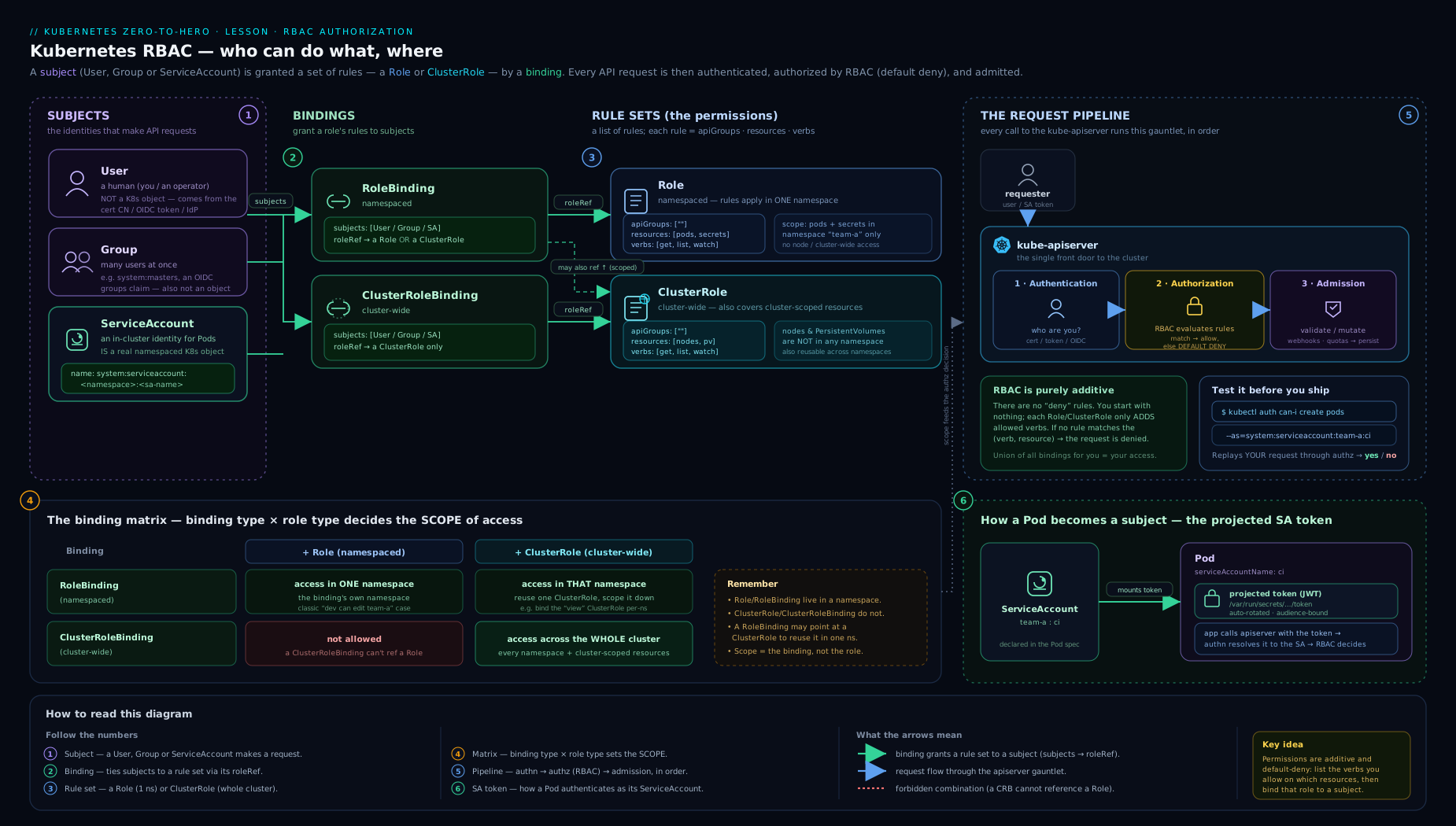
The diagram traces a request from a subject (a User, Group, or a pod’s ServiceAccount) through a binding (RoleBinding for one namespace, or ClusterRoleBinding cluster-wide) to a permission set (Role inside a namespace, or ClusterRole spanning the cluster), where the matching rule — apiGroups × resources × verbs — is what finally allows or forbids the action at the API server. Read it left to right: who → via which binding → gets which rules → over which resources.
Common beginner mistakes
These are conceptual traps — the mental-model errors that lead beginners astray — as opposed to the symptom→cause→fix table further down. Each item is the mistaken belief that causes a whole class of errors.
“I’ll just let pods use the default ServiceAccount.”
Why it bites: the default SA is shared by every pod in the namespace that doesn’t name another. The moment anyone binds a permission to default (often to make a Forbidden go away quickly), all of those pods silently inherit it — a blast radius you never see until something is over-privileged. Right model: one ServiceAccount per workload, named explicitly in the Deployment, and never bind anything to default. Treat default as “no identity,” not “the normal identity.”
“Mounting the token everywhere is harmless — most pods ignore it.”
Why it bites: a mounted token is a live credential sitting in the container’s filesystem at a well-known path. A frontend that only serves HTTP has no reason to hold a cluster credential, but if it does and an attacker gets code execution (an SSRF, an RCE, a leaked log), they inherit a ready-made key to the API with whatever that SA was granted. Right model: automountServiceAccountToken: false by default, switched on only for the workloads that actually call the API.
“If a pod has a ServiceAccount token, it can access the API.”
Why it bites: a token proves identity (authentication), not permission (authorisation). The default SA’s token is perfectly valid and authenticates fine — and can do essentially nothing, because no RBAC binding grants it any verbs. Conversely, an SA is powerless until a binding points at it. Right model: token = identity; binding = power. You need both to act.
“Users and ServiceAccounts are basically the same kind of account.”
Why it bites: they are authenticated in completely different ways, and one of them isn’t even a Kubernetes object. A User is just a string an external authenticator (a client certificate, your company OIDC/SSO) asserts — there is no User object and no kubectl create user. A ServiceAccount is a real, namespaced v1 object whose token Kubernetes itself issues. Right model: Users come from outside and are for humans; ServiceAccounts live inside the cluster and are for workloads. Bind humans via their IdP groups; bind workloads via their SA.
“get on a resource lets me kubectl get (list) it.”
Why it bites: get and list are separate verbs on separate endpoints, and kubectl get pods performs a list. Grant ["get","list","watch"] together for ordinary read access. (This one straddles concept and symptom — it appears in the troubleshooting table too, because it is that common.)
“I’ll grant cluster-admin for now and tighten it later.”
Why it bites: “later” rarely comes, and a ClusterRoleBinding to cluster-admin discards the whole point of RBAC — least privilege — in a single line. Right model: when something is Forbidden, add the one missing verb/resource to a scoped Role, proven with kubectl auth can-i. Never widen to cluster-admin to make an error disappear.
Hands-on lab: build and test RBAC end to end
Everything here runs on a free local cluster and is fully reversible. We will create a namespace, a ServiceAccount, a least-privilege Role, bind it, mint a token, and prove the boundaries with kubectl auth can-i.
0. Start a cluster
kind create cluster --name rbac-lab        # or: minikube start  / k3d cluster create
kubectl cluster-info
1. Namespace and ServiceAccount
kubectl create namespace team-payments
kubectl create serviceaccount ci-deployer -n team-payments
2. A least-privilege Role and a RoleBinding
Save as rbac-lab.yaml:
apiVersion: rbac.authorization.k8s.io/v1
kind: Role
metadata:
  name: deployer
  namespace: team-payments
rules:
  - apiGroups: ["apps"]
    resources: ["deployments"]
    verbs: ["get", "list", "watch", "create", "update", "patch", "delete"]
  - apiGroups: [""]
    resources: ["pods", "pods/log"]
    verbs: ["get", "list", "watch"]
  # Deliberately NO secrets, NO pods/exec
---
apiVersion: rbac.authorization.k8s.io/v1
kind: RoleBinding
metadata:
  name: ci-deployer-binding
  namespace: team-payments
roleRef:
  apiGroup: rbac.authorization.k8s.io
  kind: Role
  name: deployer
subjects:
  - kind: ServiceAccount
    name: ci-deployer
    namespace: team-payments
kubectl apply -f rbac-lab.yaml
Expected:
role.rbac.authorization.k8s.io/deployer created
rolebinding.rbac.authorization.k8s.io/ci-deployer-binding created
3. Prove the permissions with auth can-i (impersonation)
kubectl auth can-i asks the real authoriser, so it is ground truth. Impersonate the SA with --as:
# Should be ALLOWED
kubectl auth can-i create deployments -n team-payments \
  --as=system:serviceaccount:team-payments:ci-deployer        # -> yes

kubectl auth can-i get pods -n team-payments \
  --as=system:serviceaccount:team-payments:ci-deployer        # -> yes

# Should be FORBIDDEN (we never granted these)
kubectl auth can-i get secrets -n team-payments \
  --as=system:serviceaccount:team-payments:ci-deployer        # -> no

kubectl auth can-i create pods/exec -n team-payments \
  --as=system:serviceaccount:team-payments:ci-deployer        # -> no

# Wrong namespace -> the Role doesn't reach there
kubectl auth can-i create deployments -n default \
  --as=system:serviceaccount:team-payments:ci-deployer        # -> no
List everything the SA can do in the namespace:
kubectl auth can-i --list -n team-payments \
  --as=system:serviceaccount:team-payments:ci-deployer
Impersonation itself is a privileged action. As the cluster-admin in your kubeconfig you can
--asanyone; a normal user needs theimpersonateverb. That’s whyauth can-i --asworks for you here without extra setup.
4. Mint a real token and call the API as the SA
TOKEN=$(kubectl create token ci-deployer -n team-payments --duration=10m)

# Use the token directly against the API server
APISERVER=$(kubectl config view --minify -o jsonpath='{.clusters[0].cluster.server}')
curl -sk -H "Authorization: Bearer $TOKEN" \
  "$APISERVER/apis/apps/v1/namespaces/team-payments/deployments" | head

# Same token trying secrets -> 403 Forbidden body
curl -sk -H "Authorization: Bearer $TOKEN" \
  "$APISERVER/api/v1/namespaces/team-payments/secrets"
The first call returns a deployment list (or an empty list); the second returns a 403 Forbidden status object — RBAC enforcing exactly what you bound.
5. Validation
kubectl describe rolebinding ci-deployer-binding -n team-payments
kubectl get role deployer -n team-payments -o yaml
You should see the binding’s roleRef → deployer and the single SA subject.
6. Cleanup
kubectl delete -f rbac-lab.yaml
kubectl delete serviceaccount ci-deployer -n team-payments
kubectl delete namespace team-payments
kind delete cluster --name rbac-lab        # or: minikube delete / k3d cluster delete
Cost note: zero — everything is local. No cloud account, no charges.
Common mistakes & troubleshooting
| Symptom | Likely cause | Fix |
|---|---|---|
Forbidden even though “the Role looks right” |
The core API group was written as "core" or omitted. |
Use apiGroups: [""] (empty string) for pods/services/secrets/configmaps/nodes. |
kubectl get pods is Forbidden but get a named pod works |
Granted get but not list. |
Add list (and watch); these are independent verbs. |
| Role + RoleBinding created, subject still Forbidden | Role/RoleBinding live in the wrong namespace, or the SA’s namespace in the subject is wrong. | Ensure the RoleBinding is in the namespace where access is needed; verify subjects[].namespace. |
ClusterRoleBinding to a Role rejected |
A ClusterRoleBinding can only reference a ClusterRole. | Reference a ClusterRole, or switch to a RoleBinding. |
| Changed which role a binding points at, got an error | roleRef is immutable. |
Delete and recreate the binding. |
| Pod can read Secrets you never granted | Pod uses the default SA which someone bound, or you granted broad list that includes secrets. |
Give the pod its own SA; exclude secrets from broad read roles; never bind default. |
resourceNames rule ignored for kubectl get <type> |
resourceNames does not apply to list/watch/create. |
Use get with the explicit name, or accept that listing returns all. |
Cannot reach nodes / persistentvolumes |
These are cluster-scoped; a namespaced Role can’t grant them. | Use a ClusterRole + ClusterRoleBinding. |
| Old manifest reads a token from a Secret that no longer exists | Auto-created SA token Secrets were removed in v1.24+. | Use kubectl create token (TokenRequest) or projected tokens. |
The fastest debugging loop is always: reproduce the exact decision with kubectl auth can-i <verb> <resource> -n <ns> --as=<subject>, then add the specific missing verb/resource to a scoped Role — never widen to cluster-admin.
Best practices
- Author permission sets once as a
ClusterRole, scope them per namespace with aRoleBinding. This is the canonical reusable pattern. - Prefer the built-in
view/edit/adminClusterRoles bound per namespace before writing custom roles. - Enumerate
apiGroups,resources, andverbsexplicitly. Avoid*— a wildcard silently absorbs future API types, including CRDs. - Give every workload its own ServiceAccount. Never bind anything to the
defaultSA, and never reuse one SA across unrelated workloads. - Set
automountServiceAccountToken: falseby default, enabling it only for workloads that call the API. - Bind to Groups, not individuals (wire OIDC and bind the IdP group) so access lives in your identity provider with an audit trail — see the advanced lesson.
- Keep all Roles/Bindings in Git, reviewed and reconciled, so every permission change is peer-reviewed and reversible.
- Verify with
kubectl auth can-iafter every change — assert both the can and the cannot.
Security notes
RBAC is a primary security boundary, so a few risks deserve emphasis even at the fundamentals level:
list/getonsecretsis read access to secret values (they’re base64, not encrypted). A “read-only” role that includessecretscan read every mounted SA token in the namespace and then impersonate those SAs. Excludesecretsfrom broad read roles; grant specific secrets byresourceNamesonly.pods/execandpods/attachinherit the target pod’s identity — granting them is granting whatever that pod can do. Keep exec on its own, tightly bound role and audit it.escalate,bind, andimpersonateare super-powers.escalate/bindlet a subject grant themselves more than they hold (bypassing the built-in escalation check);impersonatelets them become anyone. Treatcreateonclusterroles/rolebindingsas privileged too.createonpodsplus a privileged SA in the namespace lets a subject launch a pod that mounts that SA’s token (or a hostPath/privileged pod) — an indirect escalation. Scope pod-creation carefully in shared namespaces.- The mounted SA token is a credential. Disable automount where unused; prefer short-lived bound tokens over static Secret tokens; never paste tokens or
kubectl get secret -o yamloutput into logs or tickets. system:mastersandcluster-adminare the keys to the kingdom. Keep exactly one audited break-glass path and alert on any new binding to either.
These threads are developed fully in Least-Privilege RBAC design (aggregation footguns, escalation-path hunting, continuous auditing) and in Pod Security Admission.
Going deeper
The fundamentals above are enough to pass an exam and write correct RBAC. This section is for the reader who wants to know how the machinery actually works — what a token is, how the API server trusts it, and how that in-cluster identity becomes a cloud credential. None of it needs a live cluster to understand, and it is exactly the material that separates “I can copy a Role” from “I can reason about an escalation.”
What a bound token really is, and how the API server trusts it
A modern ServiceAccount token is a signed JWT (JSON Web Token). When the kubelet projects it into a pod, the file at /var/run/secrets/kubernetes.io/serviceaccount/token is three base64url segments — header, claims, signature — joined by dots. Decode the middle segment and you see roughly:
{
  "aud": ["https://kubernetes.default.svc"],
  "exp": 1770000000,
  "iat": 1769996400,
  "iss": "https://kubernetes.default.svc",
  "sub": "system:serviceaccount:team-payments:order-processor",
  "kubernetes.io": {
    "namespace": "team-payments",
    "serviceaccount": { "name": "order-processor", "uid": "d4e5..." },
    "pod": { "name": "order-processor-7d9f8", "uid": "a1b2..." }
  }
}
(representative decoded claims)
When the pod sends Authorization: Bearer <jwt>, the API server’s ServiceAccount token authenticator does four things: verifies the signature against the SA signing keys (published at /openid/v1/jwks), checks exp (not expired) and aud (the audience is one this API server accepts), and — because this is a bound token — confirms the referenced pod and ServiceAccount still exist. If the pod named under kubernetes.io.pod has been deleted, the token is dead even before it expires. That “bound to the pod’s lifetime” property is precisely why these are called bound tokens, and it is something a static Secret token can never do.
Only after all that does the authenticator hand RBAC an identity: username system:serviceaccount:team-payments:order-processor, plus the groups system:serviceaccounts, system:serviceaccounts:team-payments, and system:authenticated. RBAC then matches that against bindings. Authentication proved the badge is real; RBAC decides what it opens.
The three token eras, precisely
The fundamentals table listed bound, legacy-auto, and manual Secret tokens. Here is what actually changed across versions, because you will meet all three in real clusters:
- Bound / projected (default, GA v1.22). The
BoundServiceAccountTokenVolumefeature made the kubelet request a token via the TokenRequest API (theserviceaccounts/tokensubresource) and mount it through aprojectedvolume. Short-lived (roughly one hour by default), audience-scoped, and auto-rotated by the kubelet at about 80% of its lifetime. Never written to a Secret. - Legacy auto-Secret (removed as default v1.24). Before v1.24 a token controller created a
kubernetes.io/service-account-tokenSecret for every SA and listed it under the SA’ssecrets:field. Those tokens never expired and sat in etcd forever.LegacyServiceAccountTokenNoAutoGenerationstopped that auto-creation in v1.24 — new SAs get no Secret. On modern clusters a cleaner also tracks akubernetes.io/legacy-token-last-usedlabel and can purge legacy tokens left unused (default roughly one year), so old static credentials rot away instead of lingering. - Manual Secret (still possible, discouraged). You can create a
kubernetes.io/service-account-tokenSecret yourself, with thekubernetes.io/service-account.nameannotation, and Kubernetes fills in a non-expiring token. This is the only supported way to get a static token — for the rare external system that genuinely cannot refresh — and it is a credential you now own the rotation of.
Audience, expiry, and requesting your own projected token
When a workload needs a token for something other than the API server — say, to prove its identity to Vault or a cloud IAM — you request a second projected token with a different audience. You can see the exact shape in a pod spec:
apiVersion: v1
kind: Pod
metadata:
  name: token-demo
  namespace: team-payments
spec:
  serviceAccountName: order-processor
  containers:
    - name: app
      image: ghcr.io/acme/orders:1.4.0
      volumeMounts:
        - name: vault-token
          mountPath: /var/run/secrets/vault
          readOnly: true
  volumes:
    - name: vault-token
      projected:
        sources:
          - serviceAccountToken:
              path: token
              audience: vault           # NOT the API server
              expirationSeconds: 600     # floor is 600 (10 minutes)
The kubelet mints and rotates that token independently of the default one. expirationSeconds has a floor of 600 (ten minutes); the admission-injected default token expires after about an hour. From the CLI the same TokenRequest is kubectl create token order-processor -n team-payments --audience=vault --duration=10m — handy for inspecting exactly what a downstream verifier will receive.
From cluster identity to cloud IAM: IRSA, Workload Identity, and friends
This is where ServiceAccounts become genuinely powerful. Each managed Kubernetes exposes the cluster’s SA-token OIDC issuer (discoverable at /.well-known/openid-configuration and /openid/v1/jwks) so a cloud IAM system will trust tokens the cluster signs. The pattern — workload-identity federation — lets a pod obtain cloud credentials with no long-lived cloud keys stored anywhere:
- AWS — IRSA / EKS Pod Identity. With IRSA you register the cluster’s OIDC issuer as an IAM identity provider and annotate the SA with
eks.amazonaws.com/role-arn. A mutating webhook injects a projected token (audiencests.amazonaws.com) plusAWS_ROLE_ARNandAWS_WEB_IDENTITY_TOKEN_FILE; the AWS SDK callssts:AssumeRoleWithWebIdentityto swap that token for temporary IAM credentials. EKS Pod Identity is the newer, simpler alternative (an association API plus an on-node agent, no per-cluster OIDC wiring). See EKS IRSA → Pod Identity. - GCP — GKE Workload Identity. You annotate the Kubernetes SA with
iam.gke.io/gcp-service-accountand let the GKE metadata server broker tokens mapped to a Google service account viaroles/iam.workloadIdentityUser. See GKE Workload Identity. - Azure — Workload Identity. You annotate the SA with
azure.workload.identity/client-id; a webhook projects a token (audienceapi://AzureADTokenExchange) that the pod exchanges, via a federated credential on a managed identity, for an Entra ID access token.
The through-line: the humble in-cluster projected token — a JWT the cluster signs — is exchanged for cloud credentials by each provider’s federation. Same primitive you already learned, one new audience.
imagePullSecrets, the admission plugin, and automount precedence
Three quieter mechanics run automatically and are worth making explicit:
- The ServiceAccount admission controller is what actually wires pods up. When a pod is created it sets
serviceAccountName: defaultif you didn’t specify one, injects the projected-token volume (unless automount is off), and merges the SA’simagePullSecretsinto the pod. SoimagePullSecretson an SA is convenience plumbing for the kubelet’s image pull — it is not RBAC and grants no API access. - Automount precedence: if
automountServiceAccountTokenis set on both the pod and the SA, the pod-level value wins. Set itfalseon the SA as the safe default, and override totrueon the specific pods that call the API. - A mounted token with no bindings still grants nothing. This is why “give every workload its own SA” is safe even when the SA is currently unbound — the identity exists, the power does not, and you add exactly the verbs it needs later.
Escalation paths that run through ServiceAccount tokens
Finally, the reason all of the above is a security topic. An attacker who lands code execution in a pod inherits that pod’s SA. From there the classic escalation chains are:
- Over-mounted token → API access. The pod never needed the token, but it was mounted; now the attacker has the SA’s granted verbs for free. (Fix: automount off.)
get/list secrets→ other identities. A “read-only” role that includessecretscan read any manually-created SA-token Secret in the namespace and then become that SA. (Fix: excludesecretsfrom broad reads; grant byresourceNames.)create pods+ a privileged SA in the namespace → token theft. If a subject can create pods, they can schedule a pod that runs as a more-privileged SA and mounts its token — an indirect escalation even without direct access to that SA. (Fix: scope pod-creation in shared namespaces; keep privileged SAs out of them.)escalate/bind→ self-granted power. These verbs bypass the built-in check that stops you granting more than you hold. Treatcreate/updateonroles,clusterroles, and their bindings as equivalent to the permissions they can mint.impersonate→ become anyone. Theimpersonateverb onusers/groups/serviceaccountslets a subject act as another — including highly-privileged ones. Audit it like a super-power.
Every one of these is blunted by the same three habits from the fundamentals: automount off, one least-privileged SA per workload, and never bind to default or cluster-admin. The advanced Least-Privilege RBAC design lesson turns these into a repeatable escalation-path hunt.
Interview & exam questions
-
What is the difference between authentication and authorisation in Kubernetes, and where does RBAC sit? Authentication establishes who you are (cert/OIDC/token → username + groups) and fails with
401. Authorisation decides whether you may act and fails with403. RBAC is an authoriser in the authorisation stage; admission control runs after, and is a separate concern. -
Role vs ClusterRole — when must you use a ClusterRole? Use a ClusterRole for cluster-scoped resources (nodes, PVs, namespaces, the RBAC objects themselves), for non-resource URLs (
/healthz,/metrics), or to define a reusable permission set you’ll bind per namespace. -
A RoleBinding references a ClusterRole. What does the subject get? Only the permissions of that ClusterRole within the binding’s namespace — the cluster-wide reach is clipped to that one namespace. This is the workhorse multi-tenant pattern.
-
Can a ClusterRoleBinding reference a Role? No. A ClusterRoleBinding can only reference a ClusterRole. A namespaced Role can only be referenced by a RoleBinding.
-
What are the components of an RBAC rule?
apiGroups×resources×verbs, optionally narrowed byresourceNames, ornonResourceURLs(+ verbs) for non-resource endpoints. The core group is the empty string"". -
Does
getimplylist? No. They are separate verbs on different endpoints.getreads one named object;listreads a collection.kubectl get <type>needslist. -
Is RBAC additive, and can you write a deny rule? RBAC is purely additive — effective permission is the union of all matching bindings. There are no deny rules; you reduce access only by removing/narrowing bindings.
-
What is the default ServiceAccount and what can it do? Every namespace has a
defaultSA, used by any pod that doesn’t name another. It has no RBAC permissions by default. Best practice: give workloads their own SA and never bind todefault. -
How do modern pods authenticate to the API server, and how did this change in v1.24? Via short-lived, audience-scoped bound/projected tokens from the TokenRequest API, auto-rotated by the kubelet. Before v1.24, the SA controller auto-created a non-expiring
service-account-tokenSecret; that auto-creation was removed in v1.24. -
How do you mint a token for a ServiceAccount from the CLI, and why prefer it?
kubectl create token <sa> -n <ns> [--duration --audience]. It returns a short-lived bound token instead of a static secret, so there’s no long-lived credential to leak. -
What does
automountServiceAccountToken: falsedo and when should you set it? It stops the SA token from being mounted into the pod. Default it tofalse; enable it only for workloads that actually call the API, reducing the credential blast radius if a container is compromised. -
Name three RBAC verbs/permissions that are privilege-escalation paths.
escalateandbindon roles/clusterroles (grant yourself more than you hold / bind a high-priv role), andimpersonateon users/groups/serviceaccounts (become another subject).list/getonsecretsis an underrated one too.
Quick check
- Which API group string covers pods, services, configmaps and secrets?
- You created a
Role+RoleBindingindefault, but your workload runs inteam-aand getsForbidden. Why? - True or false: a
RoleBindingcan reference aClusterRole. - Where does a pod’s projected ServiceAccount token appear inside the container?
- Which command proves, as ground truth, whether a specific subject may delete secrets in
team-a?
Answers
- The core group — the empty string
"". - A
Role/RoleBindingonly grant in their own namespace. They must live inteam-a(or be a ClusterRole bound via a RoleBinding inteam-a). - True. The subject then gets that ClusterRole’s permissions only in the binding’s namespace.
/var/run/secrets/kubernetes.io/serviceaccount/token(alongsideca.crtandnamespace).kubectl auth can-i delete secrets -n team-a --as=<subject>(e.g.--as=system:serviceaccount:team-a:ci).
Practice challenges
Work these in a throwaway local cluster (kind create cluster). They escalate from reading RBAC to reasoning about escalation. Each solution is one command or manifest plus a one-line why — try it before you open the toggle.
Challenge 1 — Beginner · Read a rule.
Given this rule, can the subject run kubectl get pods -n web? Can it read a pod’s logs?
- apiGroups: [""]
  resources: ["pods"]
  verbs: ["get", "watch"]
<details> <summary>Solution</summary>
No to kubectl get pods — that is a list, and only get/watch are granted — and no to logs, because pods/log is a separate subresource that was not granted. The rule only lets you get/watch a pod by name. Why: list and each subresource are independent grants.
</details>
Challenge 2 — Beginner · Give a workload its own identity.
Create a ServiceAccount reporter in namespace analytics, and a Deployment that runs as it with the token not mounted.
<details> <summary>Solution</summary>
kubectl create namespace analytics
kubectl create serviceaccount reporter -n analytics
spec:
  template:
    spec:
      serviceAccountName: reporter
      automountServiceAccountToken: false
      containers: [{ name: app, image: ghcr.io/acme/reporter:1.0 }]
Why: an explicit SA plus automount off is the safe default for a workload that does not call the API. </details>
Challenge 3 — Intermediate · Reusable role, scoped per namespace.
You need identical read/write on deployments for teams blue and green, authored once. Which objects — and why not just write two Roles?
<details> <summary>Solution</summary>
One ClusterRole (the rule set) plus one RoleBinding per namespace referencing it:
kubectl create clusterrole deploy-rw \
  --verb=get,list,watch,create,update,patch,delete --resource=deployments
kubectl create rolebinding deploy-rw -n blue  --clusterrole=deploy-rw --serviceaccount=blue:ci
kubectl create rolebinding deploy-rw -n green --clusterrole=deploy-rw --serviceaccount=green:ci
Why: a RoleBinding → ClusterRole clips the cluster-wide role to just its own namespace — author once, grant per tenant. </details>
Challenge 4 — Intermediate · Prove a boundary as ground truth.
Without applying anything new, show that analytics:reporter cannot read secrets in analytics.
<details> <summary>Solution</summary>
kubectl auth can-i get secrets -n analytics \
  --as=system:serviceaccount:analytics:reporter   # -> no
Why: auth can-i --as asks the real authoriser, so it is ground truth — assert the cannot, not only the can.
</details>
Challenge 5 — Advanced · Find the escalation.
Namespace sandbox has a ServiceAccount builder bound to a Role with create on pods, and it also contains a privileged SA deployer (bound to the built-in edit). Explain the escalation and the fix.
<details> <summary>Solution</summary>
builder can create a pod with serviceAccountName: deployer, then read that pod’s mounted token (or simply act through it) to gain deployer’s edit rights — indirect privilege escalation via create pods plus a privileged SA sharing the namespace. Fix: do not co-locate privileged SAs with pod-create grants; set automountServiceAccountToken: false on deployer; restrict which SAs a subject may run pods as.
</details>
Challenge 6 — Advanced · Federate to the cloud (design). A pod must read an AWS S3 bucket with no static AWS keys in the container. Outline the moving parts.
<details> <summary>Solution</summary>
Register the cluster OIDC issuer as an IAM identity provider; create an IAM role whose trust policy allows sts:AssumeRoleWithWebIdentity from that issuer; annotate the SA with eks.amazonaws.com/role-arn; the injected projected token (audience sts.amazonaws.com) is exchanged by the AWS SDK for temporary credentials. Why: workload-identity federation swaps a cluster-signed JWT for short-lived cloud creds — zero long-lived keys. See EKS IRSA → Pod Identity.
</details>
Exercise
In a fresh local cluster, build a read-only auditor and a scoped operator, then prove the boundaries:
- Create namespace
shopand two ServiceAccounts:auditorandoperator. - Bind
auditorto the built-inviewClusterRole using a RoleBinding scoped toshop(not a ClusterRoleBinding). - Write a custom
Roledeploy-managergranting full lifecycle ondeploymentsanddeployments/scale, plus read onpods/pods/log, and bind it tooperator. - Using
kubectl auth can-i --as, assert:auditorcanlist podsbut cannotcreate deploymentsand cannotget secrets;operatorcanpatch deploymentsandupdate deployments/scalebut cannotget secretsorcreate pods/exec. - Mint a 5-minute token for
operatorwithkubectl create tokenand confirm it can list deployments but is403on secrets viacurl. - Set
automountServiceAccountToken: falseon theauditorSA and verify a pod using it has no token file mounted. - Clean everything up.
Bonus: try to bind operator to a Role via a ClusterRoleBinding and observe the rejection — then explain why.
Certification mapping
| Exam | Where this maps |
|---|---|
| CKA | “Security → RBAC” objective — create Roles/ClusterRoles and bindings, use auth can-i. Core, frequently tested. |
| CKAD | Application security — ServiceAccounts for pods, serviceAccountName, token mounting, imagePullSecrets. |
| CKS | Cluster setup & hardening — least-privilege RBAC, minimising SA tokens, restricting secrets/exec, escalation paths (deepened in the advanced lesson). |
| KCNA | Cloud-native security fundamentals — recognising the RBAC model and the four objects. |
Glossary
- RBAC — Role-Based Access Control; the API server’s authorisation mechanism.
- Authentication — establishing identity (username + groups); fails with
401. - Authorisation — deciding whether an identity may perform an action; fails with
403. - Role — a namespaced set of permission rules.
- ClusterRole — a cluster-scoped set of rules; can grant cluster-scoped resources and non-resource URLs, or be bound per namespace.
- RoleBinding — links subjects to a Role or ClusterRole, granting in one namespace.
- ClusterRoleBinding — links subjects to a ClusterRole, granting cluster-wide.
- Rule —
apiGroups×resources×verbs, optionally narrowed byresourceNames, ornonResourceURLs. - Verb — an action:
get,list,watch,create,update,patch,delete,deletecollection, plus special verbs (bind,escalate,impersonate, …). - Subject — who a binding grants to:
User,Group, orServiceAccount. - ServiceAccount (SA) — a namespaced identity for workloads; the only subject kind that is a real object.
- default SA — the per-namespace SA used by pods that don’t name another; has no permissions by default.
- Bound / projected token — a short-lived, audience-scoped, auto-rotated SA token (TokenRequest API); the modern default.
automountServiceAccountToken— whether the SA token is mounted into a pod.- imagePullSecrets — registry credentials attached to an SA so its pods can pull private images.
system:masters— the super-group bound tocluster-admin.- Aggregation — ClusterRoles that absorb the rules of labelled add-on ClusterRoles (covered in the advanced lesson).
- JWT (JSON Web Token) — the signed token format a modern SA token uses: base64url
header.claims.signature, verifiable against the cluster’s signing keys. - TokenRequest API — the
serviceaccounts/tokensubresource that mints short-lived, audience-scoped SA tokens; what bothkubectl create tokenand the kubelet call. - Projected token / projected volume — a volume that assembles a live, auto-rotated SA token (plus CA cert and namespace) into the pod at request time; the modern default mount.
- Audience (
aud) — the intended recipient a token is valid for; the default is the API server, but you can request others (e.g.sts.amazonaws.com) for federation. - OIDC issuer / JWKS — the cluster’s token-signing identity, discoverable at
/.well-known/openid-configurationand/openid/v1/jwks, that lets external systems trust cluster-signed tokens. - Workload-identity federation — exchanging a cluster-signed SA token for cloud IAM credentials with no static keys (AWS IRSA / EKS Pod Identity, GKE Workload Identity, Azure Workload Identity).
- ServiceAccount admission controller — the built-in plugin that defaults the SA, injects the token volume, and merges
imagePullSecretswhen a pod is created. - Break-glass — a single, tightly-audited emergency access path (typically a
cluster-adminbinding) used only during incidents and alerted on.
Next steps
- Go deeper: Designing Least-Privilege RBAC: Roles, Aggregation & Auditing at Scale — the advanced companion: reusable patterns, ClusterRole aggregation footguns, OIDC group binding, escalation-path hunting, and continuous auditing.
- Previous lesson: Kubernetes Ingress, In Depth: Controllers, Rules, TLS & the Gateway API.
- Next lesson: Kubernetes Jobs, CronJobs & DaemonSets, In Depth.
- Related: ConfigMaps & Secrets, In Depth (RBAC for secrets) and Pod Security Admission (the pod-level hardening that pairs with RBAC).