In a nutshell
Level: Advanced · Time: ~30 min
If you have only ever used Docker, here is the one sentence that reframes everything: Docker is a friendly wrapper; containerd is the engine inside it — and on a Kubernetes node, the wrapper is gone and you are talking to the engine directly. When a Pod starts, the kubelet does not call Docker. It calls containerd over a standard interface called the CRI (Container Runtime Interface), and containerd pulls the image, unpacks it, and starts the process.
Three ideas carry this whole lesson:
- containerd is the container runtime Kubernetes actually uses. It stores images, builds each container’s filesystem, and launches the process. You already depend on it every time a Pod runs; this lesson makes it visible.
- nerdctl is a Docker-look-alike command line for containerd. If you know
docker run, you already knownerdctl run— same muscle memory, but it talks straight to containerd and unlocks containerd-only features (namespaces, lazy image pulls, layer encryption). - RuntimeClass is the Kubernetes knob that lets a single Pod ask for a stronger box. By default a container shares the host’s Linux kernel with every other container — fast, but a kernel bug that one workload triggers can, in theory, break out and reach all of them. A RuntimeClass named
gvisororkataroutes that one Pod to a heavier sandbox instead.
The mental model for the sandboxes: picture the host kernel as the shared foundation of an apartment building. Ordinary containers (runc) are apartments with normal walls — cheap and roomy, but they share plumbing, so a burst pipe upstairs floods you. gVisor wraps each apartment in a second, private set of pipes: a small kernel running in user space intercepts the tenant’s requests so they rarely reach the building’s real plumbing. Kata gives the tenant a whole separate tiny house with its own foundation (a lightweight virtual machine) — the strongest separation, but you pay for the extra house in memory and startup time. You do not want every tenant in a separate house; you want to choose per workload. That choice is exactly what RuntimeClass gives you.
Prerequisites: comfort with kubectl, Pods and Deployments, and basic Docker/OCI image concepts. Knowing how the kubelet and CRI fit together helps — see Node components: kubelet, CRI, kube-proxy.
After this lesson you can:
- Explain why a Kubernetes node runs containerd but has no Docker daemon, and drive it with
nerdctl,ctr, andcrictl. - Read the containerd object model — namespaces, content store, snapshotters, shims — and use it to debug a stuck image or pod.
- Choose a snapshotter (overlayfs vs stargz lazy-pull) on purpose, with the trade-offs written down.
- Encrypt image layers with ocicrypt and prove that decryption fails without the key.
- Install gVisor and Kata as runtime handlers, wire them through
RuntimeClass, and route only untrusted Pods to them. - Recognise when gVisor will break an app and when Kata’s VM overhead is worth paying.
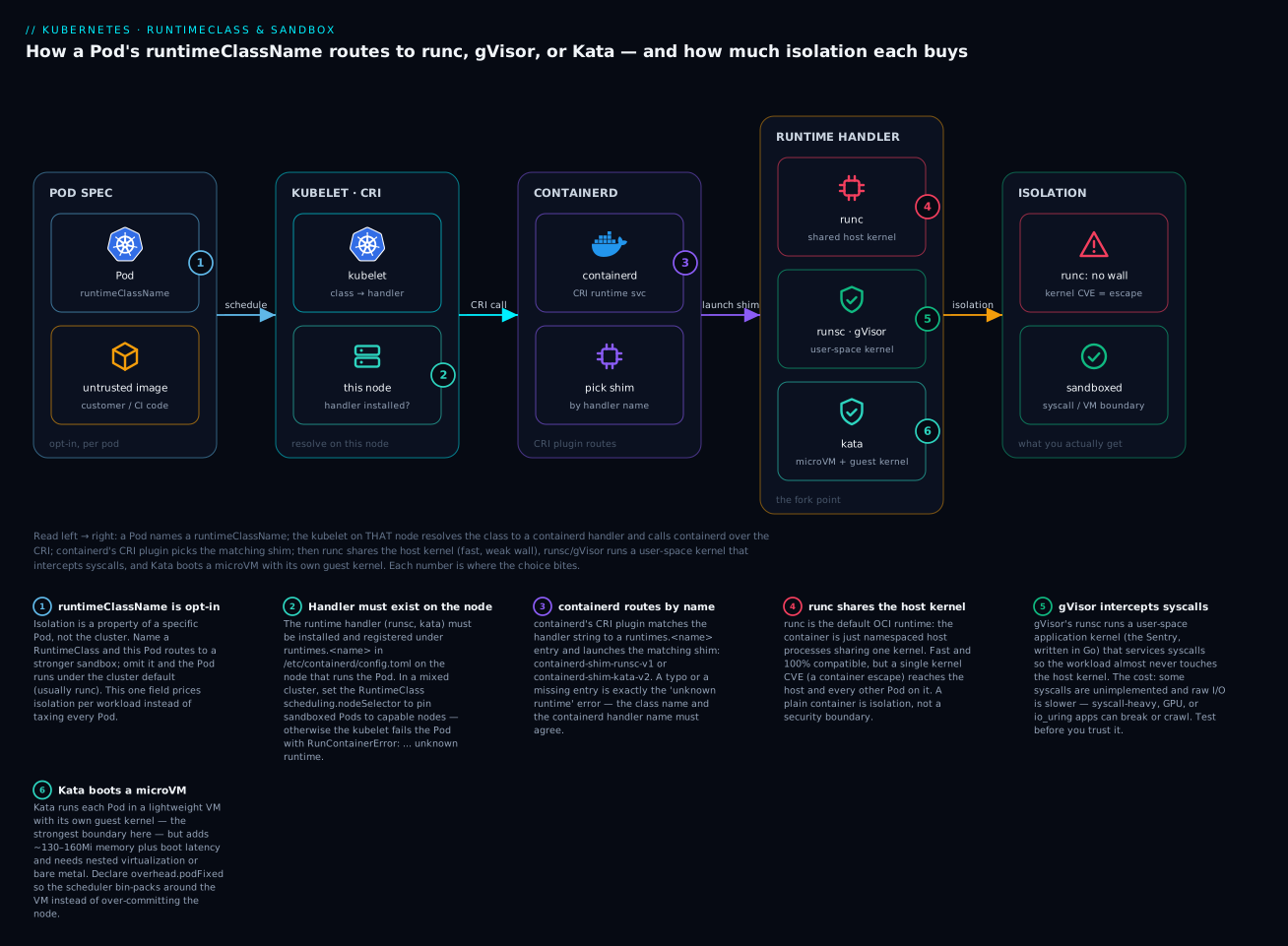
Trace that path once — Pod → kubelet/CRI → containerd → the chosen runtime → the isolation you actually get — and the rest of the lesson is detail. The numbered points on the diagram are the exact spots where the choice bites; they map to the mistakes and legends later in the lesson.
Docker is a client and a daemon that wraps containerd. Once you are running Kubernetes, the Docker shim is gone and containerd is the actual runtime under every node. So when a node misbehaves — a stuck snapshot, an image that will not unpack, a pod that needs a hardware-isolated sandbox — you are debugging containerd whether you meant to or not. This guide operates containerd on its own terms: namespaces and snapshotters, layer encryption with ocicrypt, and per-workload sandboxing with gVisor and Kata wired through RuntimeClass. Everything assumes containerd 1.7+ on a Linux node you control.
1. The containerd object model
containerd is a daemon (containerd) exposing a gRPC API over /run/containerd/containerd.sock, organized into a small set of subsystems you will touch constantly.
| Subsystem | Responsibility | Where it lives |
|---|---|---|
| Namespaces | Hard tenancy boundary for all metadata — images, containers, snapshots | metadata DB (/var/lib/containerd/io.containerd.metadata.v1.bolt) |
| Content store | Immutable, content-addressed blobs (manifests, configs, compressed layers) | /var/lib/containerd/io.containerd.content.v1.content |
| Snapshotter | Builds the writable root filesystem from layers (overlayfs, native, stargz) | /var/lib/containerd/io.containerd.snapshotter.v1.<name> |
| Runtime (shim) | One containerd-shim-runc-v2 per container; calls the OCI runtime |
per-container shim process |
| CRI plugin | Implements the Kubernetes Container Runtime Interface | in-process gRPC plugin |
The detail that surprises people: namespaces are not Linux namespaces. A containerd namespace is a metadata partition. The Docker CLI uses moby; nerdctl defaults to default; Kubernetes via CRI uses k8s.io. An image pulled in one namespace is invisible in another — even though both share the same content store on disk, because the content is deduplicated by digest but the references are namespaced. This single fact explains most “I pulled it but the pod can’t find it” tickets.
# List namespaces, then inspect what k8s.io actually holds
ctr namespace ls
ctr -n k8s.io images ls | head
ctr -n k8s.io containers ls
ctr is the low-level debug client shipped with containerd. It is intentionally unfriendly — no build, no compose, no logs. For day-to-day work use nerdctl, which is a Docker-compatible CLI that speaks directly to containerd and supports namespaces, BuildKit, encryption, and lazy pulling.
2. Driving containerd with nerdctl and ctr
Install nerdctl (the full bundle pulls in containerd, CNI, BuildKit, and RootlessKit) and confirm it talks to the daemon.
nerdctl --address /run/containerd/containerd.sock version
nerdctl info | grep -E 'Snapshotter|cgroup|Runtime'
The mental model maps cleanly onto Docker, with the namespace as an explicit flag:
# Pull, run, inspect — note -n selects the containerd namespace
nerdctl -n default pull --platform=linux/amd64 docker.io/library/nginx:1.27
nerdctl -n default run -d --name web -p 8080:80 docker.io/library/nginx:1.27
nerdctl -n default ps
nerdctl -n default inspect web --format '{{.State.Status}} {{.Process.Pid}}'
When you need to see what containerd itself sees — bypassing CRI and nerdctl’s bookkeeping — drop to ctr. This is invaluable when a Kubernetes image is “present” to containerd but a pod still fails:
# What is physically in the content store for this image?
ctr -n k8s.io images ls | grep nginx
ctr -n k8s.io content ls | head
# Mount a snapshot read-only to inspect a layer without starting a container
ctr -n k8s.io snapshots ls
Rule of thumb: use
nerdctlto do things, usectrto find out why containerd will not. Never mix the two for lifecycle (don’tctr task killa container nerdctl started) — they keep separate labels.
3. Snapshotter choices: overlayfs vs stargz lazy pulling
The snapshotter assembles the container root filesystem. The default, overlayfs, is fine for steady-state but pays a tax you feel on cold start: containerd must download and fully decompress every layer before the container can start. On a 1.5 GB image where the process only reads 40 MB of files, that is mostly wasted I/O.
stargz (Seekable tar.gz, via the stargz-snapshotter) fixes this with lazy pulling: the image is stored in a seekable format, and files are fetched on demand over HTTP range requests as the container reads them. Cold start drops from “download the whole image” to “download the bytes you touch.”
Register the stargz snapshotter as a proxy plugin in /etc/containerd/config.toml:
version = 2

[proxy_plugins]
  [proxy_plugins.stargz]
    type = "snapshot"
    address = "/run/containerd-stargz-grpc/containerd-stargz-grpc.sock"

[plugins."io.containerd.grpc.v1.cri".containerd]
  # Make CRI (Kubernetes) use stargz, and tell the shim to discard the
  # local snapshotter's notion of "unpacked" so lazy pulls take effect.
  snapshotter = "stargz"
  disable_snapshot_annotations = false
Then run the containerd-stargz-grpc daemon and pull an eStargz-formatted image with lazy semantics:
systemctl enable --now stargz-snapshotter
# --snapshotter=stargz selects it; eStargz images carry a TOC + landmarks
nerdctl pull --snapshotter=stargz ghcr.io/stargz-containers/python:3.12-esgz
nerdctl run --snapshotter=stargz --rm ghcr.io/stargz-containers/python:3.12-esgz python -c 'print("up")'
The trade-offs are real and you should state them to your team:
- stargz wins for large images with sparse read patterns (ML inference, JVM apps, anything with a fat base) and for autoscaling where cold-start latency dominates.
- stargz costs a format conversion step in CI (images must be repacked as eStargz), keeps a network dependency for the lifetime of the container (a layer you never read until hour three still fetches at hour three), and ties you to registries that honor range requests.
- overlayfs wins for small images, air-gapped nodes, and workloads where you’d rather pay once up front than carry a runtime registry dependency.
4. Encrypting image layers with ocicrypt
Cosign signs an image so you can verify who built it; it does nothing to stop reading it. For images carrying proprietary models or embedded secrets, you want the layers themselves encrypted at rest in the registry. That is OCI image encryption (the ocicrypt spec), and nerdctl drives it directly.
Generate a recipient key pair. JWE (JSON Web Encryption, RSA-wrapped) is the documented, portable mode:
openssl genrsa -out mykey.pem 4096
openssl rsa -in mykey.pem -pubout -out mypubkey.pem
Encrypt an existing local image to a new tag. Encryption is per layer — you can encrypt all layers or only the ones that carry sensitive data, leaving the public base layers shared and cacheable:
# Encrypt every layer for both architectures, push-ready
nerdctl image encrypt \
  --recipient=jwe:mypubkey.pem \
  --platform=linux/amd64,linux/arm64 \
  myapp:plain registry.example.com/myapp:encrypted

nerdctl push registry.example.com/myapp:encrypted
On the consuming node, decryption is transparent at run time as long as the private key is in containerd’s ocicrypt key directory. No flag, no wrapper:
# Root containerd looks here; rootless looks in ~/.config/containerd/ocicrypt/keys
sudo install -d -m 0700 /etc/containerd/ocicrypt/keys
sudo install -m 0600 mykey.pem /etc/containerd/ocicrypt/keys/myapp.pem

# Now a normal run decrypts on the fly using the key from the directory
nerdctl run --rm registry.example.com/myapp:encrypted /app/healthcheck
To inspect an encrypted image without unpacking, or to produce a decrypted copy offline:
# Pull the manifest/layers without unpacking the (still-encrypted) rootfs
nerdctl pull --unpack=false registry.example.com/myapp:encrypted
# Materialize a decrypted image locally with an explicit key
nerdctl image decrypt --key=mykey.pem registry.example.com/myapp:encrypted myapp:decrypted
The operational reality is key distribution, not the crypto. Shipping mykey.pem to every node by hand defeats the purpose. In production you wire ocicrypt to a key provider (a gRPC/exec plugin referenced by OCICRYPT_KEYPROVIDER_CONFIG) that fetches the decryption key from a KMS or Vault per pull, so the private key never lands on disk. Start with the file-based directory to prove the pipeline, then replace it with a keyprovider before you go wide.
5. Installing gVisor (runsc) and Kata as alternative runtimes
A container shares the host kernel. For genuinely untrusted code — customer-supplied images, CI of unknown PRs, multi-tenant SaaS — that shared kernel is the attack surface. Two sandboxes shrink it, with different mechanics:
- gVisor (
runsc) runs an application kernel in userspace that intercepts syscalls in Go, so the workload almost never touches the host kernel directly. Low overhead, but some syscalls are unimplemented and raw I/O is slower. - Kata Containers boots each pod inside a lightweight VM (via QEMU/Cloud Hypervisor) with its own real kernel. Stronger isolation (a true VM boundary), higher memory cost, and it needs nested virtualization or bare metal.
Both plug into containerd as runtime handlers under the CRI plugin. Install the binaries first.
# gVisor: installs runsc + the containerd shim, then wires config.toml
curl -fsSL https://gvisor.dev/archive.key | sudo gpg --dearmor -o /usr/share/keyrings/gvisor-archive-keyring.gpg
echo "deb [arch=amd64,arm64 signed-by=/usr/share/keyrings/gvisor-archive-keyring.gpg] https://storage.googleapis.com/gvisor/releases release main" \
  | sudo tee /etc/apt/sources.list.d/gvisor.list >/dev/null
sudo apt-get update && sudo apt-get install -y runsc

# Kata: install the static release (self-contained, /opt/kata)
sudo apt-get install -y kata-runtime kata-proxy kata-shim 2>/dev/null || \
  echo "or use the kata static tarball / kata-deploy DaemonSet on k8s"
Now declare both handlers in /etc/containerd/config.toml. The handler name (runsc, kata) is the string Kubernetes will reference:
[plugins."io.containerd.grpc.v1.cri".containerd]
  default_runtime_name = "runc"

  # Default, unsandboxed runtime
  [plugins."io.containerd.grpc.v1.cri".containerd.runtimes.runc]
    runtime_type = "io.containerd.runc.v2"
    [plugins."io.containerd.grpc.v1.cri".containerd.runtimes.runc.options]
      SystemdCgroup = true

  # gVisor handler -> containerd-shim-runsc-v1
  [plugins."io.containerd.grpc.v1.cri".containerd.runtimes.runsc]
    runtime_type = "io.containerd.runsc.v1"
    [plugins."io.containerd.grpc.v1.cri".containerd.runtimes.runsc.options]
      TypeUrl = "io.containerd.runsc.v1.options"
      ConfigPath = "/etc/containerd/runsc.toml"

  # Kata handler -> containerd-shim-kata-v2
  [plugins."io.containerd.grpc.v1.cri".containerd.runtimes.kata]
    runtime_type = "io.containerd.kata.v2"
    [plugins."io.containerd.grpc.v1.cri".containerd.runtimes.kata.options]
      ConfigPath = "/etc/kata-containers/configuration.toml"
Restart and smoke-test each handler with ctr, which can target a runtime directly without Kubernetes in the loop:
sudo systemctl restart containerd
# Boot a container under gVisor and prove the kernel is the sandbox kernel
sudo ctr run --rm --runtime io.containerd.runsc.v1 \
  docker.io/library/alpine:3.20 gv uname -a
# Under Kata, /proc/version reports the guest VM kernel, not the host
sudo ctr run --rm --runtime io.containerd.kata.v2 \
  docker.io/library/alpine:3.20 kt cat /proc/version
6. Wiring RuntimeClass to schedule sandboxed pods
You do not want every pod paying the gVisor/Kata tax. RuntimeClass is the Kubernetes object that maps a friendly name to a containerd handler, so workloads opt in per pod. Create one class per handler:
apiVersion: node.k8s.io/v1
kind: RuntimeClass
metadata:
  name: gvisor
handler: runsc            # must match the containerd runtimes.<name>
---
apiVersion: node.k8s.io/v1
kind: RuntimeClass
metadata:
  name: kata
handler: kata
scheduling:
  # Only schedule kata pods onto nodes advertising VM support
  nodeSelector:
    katacontainers.io/kata-runtime: "true"
overhead:
  # Account for the VM's memory/CPU so the scheduler bin-packs correctly
  podFixed:
    memory: "160Mi"
    cpu: "250m"
A pod opts in with one field. Everything else is a normal Deployment:
apiVersion: v1
kind: Pod
metadata:
  name: untrusted-job
spec:
  runtimeClassName: gvisor      # routes this pod to the runsc handler
  containers:
    - name: app
      image: registry.example.com/customer-code:latest
      resources:
        requests: { cpu: "200m", memory: "256Mi" }
Two production details that bite teams:
scheduling.nodeSelectoris mandatory in mixed clusters. If only some nodes have gVisor/Kata installed, the RuntimeClass must pin pods to them or the kubelet will fail the pod withRunContainerError: failed to create containerd task ... unknown runtime.overhead.podFixedmatters for Kata specifically. The VM consumes memory the workload never sees; without declaring overhead, the scheduler over-packs the node and the OOM killer arrives at 3 a.m.
7. Registry mirrors, hosts.toml, and pull-through caches
Hard-coding registry mirrors into config.toml means a daemon restart for every change and one giant unreadable block. The modern mechanism is the certs.d host directory: per-registry hosts.toml files that containerd reads live, no restart required.
Point containerd at the directory once:
[plugins."io.containerd.grpc.v1.cri".registry]
  config_path = "/etc/containerd/certs.d"
Then create one directory per upstream namespace. Here we front Docker Hub with a local pull-through cache and fall back to the real registry on a miss:
sudo install -d /etc/containerd/certs.d/docker.io
# /etc/containerd/certs.d/docker.io/hosts.toml
server = "https://registry-1.docker.io"

[host."https://mirror.internal.example.com/v2/dockerhub"]
  capabilities = ["pull", "resolve"]
  # skip_verify only for an internal mirror with a private CA you trust
  skip_verify = false

[host."https://registry-1.docker.io"]
  capabilities = ["pull", "resolve"]
The semantics are precise and worth internalizing: server is the canonical upstream. Each [host.<url>] is tried in file order; containerd hits the mirror first, and on a miss or error falls through to the next host. capabilities gates what each host may serve — listing only ["pull", "resolve"] ensures the mirror is never used for pushes. For a registry that omits the standard /v2 prefix, add override_path = true to the host entry. Because this lives under certs.d, edits take effect on the next pull with no systemctl restart containerd.
Verify
Confirm each layer works before you trust it in production.
# 1) Namespaces and snapshotter are what you expect
ctr namespace ls
nerdctl info | grep -i snapshotter      # -> stargz (or overlayfs)

# 2) Lazy pulling is active (stargz mounts show up, not full extractions)
ctr -n default snapshots --snapshotter stargz ls | head

# 3) Encryption round-trips: a fresh node with the key runs the image,
#    and the same image WITHOUT the key fails to unpack
sudo mv /etc/containerd/ocicrypt/keys/myapp.pem /tmp/   # remove key
nerdctl run --rm registry.example.com/myapp:encrypted true   # expect: unpack error
sudo mv /tmp/myapp.pem /etc/containerd/ocicrypt/keys/        # restore
nerdctl run --rm registry.example.com/myapp:encrypted true   # expect: success

# 4) Sandbox handlers are live and report a different kernel
sudo ctr run --rm --runtime io.containerd.runsc.v1 docker.io/library/alpine:3.20 g dmesg 2>&1 | head -1
sudo crictl info | grep -A3 -i runtimes      # runsc + kata present to CRI

# 5) RuntimeClass routes correctly: the pod's sandbox uses the sandboxed runtime
kubectl get runtimeclass
kubectl run gv --image=alpine:3.20 --restart=Never \
  --overrides='{"spec":{"runtimeClassName":"gvisor"}}' -- dmesg
kubectl logs gv | head -1     # gVisor banner, not the host kernel ring buffer

# 6) Mirror is actually serving pulls
sudo crictl pull docker.io/library/busybox:latest
sudo journalctl -u containerd --since "2 min ago" | grep -i mirror.internal
8. Debugging containerd with crictl, logs, and events
When a node is wedged, these are the four tools, in escalation order.
crictl is the CRI-level debugger — it sees exactly what the kubelet sees. Use it when kubectl shows a pod stuck and you need ground truth on the node:
# Pods, containers, and images AS CRI sees them (always k8s.io namespace)
sudo crictl pods
sudo crictl ps -a
sudo crictl images
# The single most useful command for "why won't this pull/start"
sudo crictl logs <container-id>
sudo crictl inspectp <pod-id> | jq '.status.metadata, .info.runtimeType'
The events stream is containerd’s real-time firehose. Tail it in one terminal while you reproduce a failure in another — you will see image pulls, snapshot prepares, and task exits as they happen:
ctr -n k8s.io events
# Filter the noise to just the lifecycle moments that matter
ctr -n k8s.io events | grep -E 'TaskExit|ImageCreate|content'
Daemon logs carry the snapshotter and shim errors that never surface to Kubernetes:
sudo journalctl -u containerd -f --no-pager
# Raise verbosity temporarily for a gnarly snapshot or pull bug
sudo sed -i 's/level = "info"/level = "debug"/' /etc/containerd/config.toml
sudo systemctl restart containerd   # remember to revert; debug is loud
The plugin sanity check catches the silent failure where a plugin failed to load (a bad stargz socket path, a missing CNI binary). A plugin in any state but ok explains a whole class of “containerd is running but nothing works”:
ctr plugins ls | grep -v ok # any non-ok plugin is your bug
The decision tree I give on-call: if kubectl is confused, drop to crictl. If crictl shows a clean pull but a dead container, tail ctr events. If events show a snapshot prepare that never completes, you have a snapshotter problem — check journalctl and ctr plugins ls. This walks down the stack one layer at a time, and it almost always lands on the real cause within three commands.
Enterprise scenario
A fintech platform team ran a multi-tenant CI service: customers pushed Git repos, the platform built and executed test suites from arbitrary, untrusted code on a shared EKS-on-bare-metal cluster. The constraint from their security org was absolute — no untrusted process may run on the host kernel — but a blanket switch to Kata for every workload was a non-starter, because their own trusted platform services (the controller, the queue workers) saw a 30 to 40 percent throughput drop and a memory tax under VM isolation they could not afford at their pod density.
The resolution was to make isolation a scheduling decision, not a cluster-wide default. They installed Kata via the kata-deploy DaemonSet, which labels capable nodes and registers the handler in containerd. They defined a single RuntimeClass whose scheduling.nodeSelector pinned sandboxed pods to a dedicated bare-metal node pool, and declared overhead.podFixed so the scheduler accounted for the guest VM and stopped over-packing those nodes. The controller then injected runtimeClassName: kata only into the ephemeral pods that executed customer code — every trusted platform component kept running under plain runc on the general node pool at full speed.
# Injected by the build controller onto customer-code execution pods only
apiVersion: v1
kind: Pod
metadata:
  generateName: ci-run-
  labels: { tenant-workload: "untrusted" }
spec:
  runtimeClassName: kata          # VM-isolated; trusted pods omit this entirely
  automountServiceAccountToken: false
  containers:
    - name: runner
      image: ci-internal/runner:pinned
      resources:
        requests: { cpu: "1", memory: "1Gi" }
        limits:   { cpu: "2", memory: "2Gi" }
The result: untrusted code never shared a kernel with the host or with other tenants, while 90 percent of the platform’s pods paid zero isolation overhead. The key architectural move was recognizing that “untrusted” is a property of a specific pod, and RuntimeClass is exactly the lever that lets you price isolation per workload instead of per cluster.
Going deeper
The sections above got you operating. This one explains the machinery, so that when something behaves oddly you can reason about why instead of guessing.
The containerd plugin model and snapshotters
containerd is not a monolith; it is a registry of plugins loaded at startup, and almost everything you touched above — the CRI service, each snapshotter, the metadata store, every runtime type — is a plugin. ctr plugins ls prints that graph and each plugin’s health, which is why a single non-ok line explains a whole class of “containerd is up but nothing works” failures.
Snapshotters are the plugins that matter most at scale. A snapshotter’s entire job is to turn a stack of read-only image layers into the writable root filesystem a container sees, and how it does that is a performance decision:
| Snapshotter | How it builds the rootfs | Cold-start cost | Needs at run time | Best for |
|---|---|---|---|---|
| overlayfs | union-mounts fully-unpacked layers | download + decompress every layer first | nothing | small images, air-gapped nodes |
| native | copies each layer (no overlay) | highest disk + time | nothing | kernels without overlayfs |
| stargz | lazy: fetch file bytes on demand via HTTP range | near-zero; pulls as you read | a registry that honours range requests, for the container’s lifetime | large images, sparse reads, autoscaling |
| devmapper / blockfile | block device per snapshot | thin-pool provisioning | a block backend | Kata (wants a block device), strict I/O isolation |
The stargz internal worth knowing: an eStargz image is an ordinary OCI image whose layers are seekable .tar.gz with a Table of Contents and landmark entries appended. containerd mounts the layer immediately and, on the first read() of a file, the stargz snapshotter issues an HTTP range request for just that file’s bytes. That is why cold start collapses — but also why a layer you never read until hour three still triggers a network fetch at hour three, and why the registry dependency lasts the container’s whole life, not just the pull. (Kata pairs naturally with a block-based snapshotter such as devmapper, because a VM wants a block device, not a host overlay mount.)
One bundle, three runtimes: the OCI runtime spec
Here is why swapping runc for runsc or kata-runtime is a one-word change and nothing else in your manifest moves. containerd’s shim hands the runtime an OCI runtime bundle: a directory containing the unpacked rootfs/ and a config.json that describes the process, mounts, namespaces, cgroups, and capabilities. runc, runsc, and kata-runtime all consume the same bundle format (the OCI Runtime Specification). They differ only in what they do with it:
- runc applies the config to the host kernel directly — clone the namespaces, set cgroups, drop capabilities,
execthe process. - runsc (gVisor) starts its own Sentry kernel, applies the config inside that user-space kernel, and proxies the few host operations it truly needs through a tightly restricted gofer.
- kata-runtime boots a VM, hands the bundle to an agent inside the guest, and the guest kernel runs the process.
So RuntimeClass never rewrites your Pod; it only changes which binary receives an otherwise-identical bundle. That is the entire elegance of the design — and why a workload that runs under runc can, in principle, run under a sandbox with no manifest changes beyond the one runtimeClassName line.
runc vs gVisor vs Kata: the isolation / performance / compatibility triangle
You are always trading three things against each other, and no runtime wins all three:
| Dimension | runc | gVisor (runsc) | Kata |
|---|---|---|---|
| Isolation boundary | shared host kernel (namespaces + cgroups) | user-space kernel; ~2 host entry points | separate guest kernel in a VM |
| Kernel attack surface | full host syscall table | Sentry re-implements a subset; host rarely called | hypervisor + narrow virtio surface |
| Syscall compatibility | 100% | partial — some syscalls unimplemented | ~100% (a real kernel in the guest) |
| Startup latency | milliseconds | tens of ms | hundreds of ms (VM boot) |
| Per-pod memory overhead | ~0 | small (Sentry + gofer) | ~130–160Mi (guest + VMM) |
| I/O & network throughput | native | reduced (proxied) | near-native with vhost |
| GPU / special devices | native | limited / evolving | via device passthrough |
| Good fit | trusted first-party workloads | untrusted code that is CPU/logic-bound | untrusted code needing full kernel compat or device access |
Read the triangle as: runc maximises compatibility and speed and minimises isolation; Kata maximises isolation and compatibility and sacrifices density and startup; gVisor maximises isolation and density and sacrifices compatibility. Your workload’s syscall profile is what decides between the two sandboxes.
RuntimeClass internals: resolution, scheduling, overhead
Walk the resolution path once and every RuntimeClass bug becomes obvious:
- You create a
RuntimeClassobject with ahandlerstring. - A Pod sets
spec.runtimeClassName: <class>. - At schedule time, the RuntimeClass’s
scheduling.nodeSelectorandscheduling.tolerationsare merged into the Pod, so the scheduler only considers nodes that advertise the runtime. - On the chosen node, the kubelet reads the class’s
handlerand passes it to containerd via the CRIRunPodSandboxcall. - containerd looks up
runtimes.<handler>in its config and launches that shim.
Two fields separate a demo from production. scheduling.nodeSelector is what keeps a gVisor Pod off a node that never had runsc installed — without it you get unknown runtime at container create. overhead.podFixed is the honesty field: it tells the scheduler and any ResourceQuota how much CPU/memory the sandbox itself consumes before the workload gets any, so a Kata node stops being over-committed. Overhead is added to the Pod’s effective requests for scheduling and quota accounting and shows up in kubectl describe node; it is invisible to the container’s own cgroup limits.
Per-node handler config is where mixed clusters get subtle: the RuntimeClass is a cluster-scoped object, but the handler only means something on nodes where you actually registered it in config.toml. kata-deploy and gVisor’s node installer exist precisely to label capable nodes and edit containerd’s config as a DaemonSet, so the fleet stays consistent instead of drifting node by node.
When gVisor’s syscall interception breaks apps
gVisor’s Sentry re-implements a large but incomplete slice of the Linux syscall surface. When an app calls something the Sentry does not implement, it typically gets ENOSYS and crashes with a confusing error far from the real cause. The failure modes you will actually meet:
- Unimplemented or partial syscalls — exotic
ioctls, someio_uringoperations, certainptrace/perf_event_openpaths. When an app dies mysteriously under gVisor but runs fine on runc,runsc --straceand the gVisor issue tracker are your first stops. - Performance cliffs — because syscalls and I/O are serviced in user space, workloads that are syscall-bound (tiny reads in a tight loop, fork-heavy servers, chatty network proxies) can slow dramatically even though CPU-bound code barely notices.
- Filesystem semantics — the gofer mediates host file access; apps that assume specific inode,
mmap, or direct-I/O behaviour can misbehave. - GPUs and special hardware — support exists but is narrower and more version-sensitive than on runc.
/procand/sysgaps — tools that scrape detailed host kernel metrics may see a synthetic, simplified view (gVisor reports a fixed, synthetic kernel version rather than the host’s — a handy tell that you really are inside the sandbox).
The rule: gVisor is superb for untrusted code that is logic- and CPU-bound, and a poor fit for I/O-heavy or syscall-exotic workloads. Benchmark the specific workload under runsc before you commit — do not assume drop-in compatibility.
Image encryption internals: ocicrypt and key providers
nerdctl image encrypt implements the ocicrypt spec, and two properties make it practical. First, encryption is per layer: the manifest still lists layers, but a sensitive layer’s descriptor is replaced with an encrypted blob plus org.opencontainers.image.enc.* annotations carrying the wrapped content-encryption key. You can encrypt only the layer with your model weights and leave the public base layers shared and cacheable. Second, a layer can be wrapped for multiple recipients — several JWE public keys, or a mix of JWE, PKCS7, and pkcs11 — so different fleets decrypt with different private keys.
At run time containerd’s ocicrypt integration looks for a matching private key. The file directory (/etc/containerd/ocicrypt/keys) is the training-wheels version; production wires a key provider: a small gRPC or exec plugin named in OCICRYPT_KEYPROVIDER_CONFIG that containerd calls per pull to unwrap the layer key from a KMS, Vault, or a TEE-bound service — so the private key never rests on the node’s disk. Note the distinction from signing: Cosign and the supply-chain stack prove who built an image and that it is unaltered; ocicrypt controls who can read it. You usually want both — sign for integrity, encrypt for confidentiality.
Sandboxed Pods for multi-tenancy — and where the boundary really is
RuntimeClass is one layer of a multi-tenant design, not the whole thing. A sandboxed runtime protects the host kernel from the workload, but a Pod still has a network identity, a service account, and volume mounts. Real isolation stacks the sandbox with the controls that guard those: a default-deny NetworkPolicy, automountServiceAccountToken: false, a restricted Pod Security Admission profile, and tight resource limits. gVisor or Kata answers “can this untrusted process attack the kernel?”; it does not answer “can it reach the cloud metadata endpoint or another tenant’s Service?” — that is still your job. (For the kernel-primitive side of hardening — capabilities, seccomp, no-privilege-escalation — see Security contexts, capabilities, and seccomp; a sandbox complements those controls, it does not replace them.)
Confidential Containers (preview)
The frontier is protecting the workload from the infrastructure itself — the cloud operator, a compromised hypervisor, another tenant with node access. Confidential Containers (CoCo), a CNCF sandbox project, runs Kata inside a hardware Trusted Execution Environment (AMD SEV-SNP, Intel TDX) so the guest’s memory is encrypted and integrity-protected by the CPU, opaque even to the host. RuntimeClasses like kata-qemu-snp or kata-qemu-tdx select these, and before secrets are released the guest performs remote attestation — proving to a key broker (Trustee/KBS) that it is the expected, unmodified image on genuine confidential hardware — at which point the decryption key (often the same ocicrypt key from above) is handed over. It is preview-grade: hardware-dependent, operationally heavy, and evolving fast, but it is the logical endpoint of “untrusted is a per-workload property.”
A note on containerd versions
This lesson targets containerd 1.7+, still the common LTS on managed nodes. containerd 2.0 (GA late 2024) is now landing across distros: it stabilises the Sandbox API (a cleaner separation between a pod sandbox and its containers that Kata and gVisor build on), removes long-deprecated config (the v1 config.toml schema, legacy fields), and continues the CRI v1alpha removal. Everything in this lesson — namespaces, snapshotters, ocicrypt, RuntimeClass handlers — carries forward unchanged; if you are on 2.x, run containerd config migrate on an old config and re-check ctr plugins ls after the upgrade.
Common beginner mistakes
These are misconceptions, not symptom→fix tickets: the wrong mental model, why it is wrong, and the model to hold instead.
-
“Where’s the Docker daemon? Let me
docker psthe node.” Kubernetes nodes run containerd, not Docker — the in-tree dockershim was removed in Kubernetes 1.24. There is no/var/run/docker.sockand often nodockerbinary at all. Right model: inspect the node withcrictl(what the kubelet sees),nerdctl, orctr. Reach forcrictl ps, notdocker ps. -
“I pulled the image, but the Pod says ImagePull/NotFound.” You ran
nerdctl pull(default namespacedefault) ordocker pullon a Docker host, but Kubernetes reads and writes in the containerd namespacek8s.io. Right model: containerd namespaces partition metadata, not Linux namespaces — pull into-n k8s.io, or better, let the kubelet pull so the reference lands where CRI looks. -
“I created the RuntimeClass, so my Pod is sandboxed now.” A
RuntimeClassobject is just a name → handler mapping. If the handler binary (runsc/kata) and itsruntimes.<name>entry are not installed on the node the Pod lands on, the kubelet fails it withRunContainerError: ... unknown runtime. Right model: the object plus the node-side handler plusscheduling.nodeSelectorto route the Pod there are all required — three parts, not one. -
“gVisor is a drop-in; just add
runtimeClassName: gvisor.” gVisor re-implements a subset of the Linux syscall surface, so I/O-heavy, GPU, or exotic-syscall apps can crash withENOSYSor slow to a crawl. Right model: gVisor is opt-in per workload and per validation — benchmark and functionally test the specific app under runsc before you route production traffic to it. -
“A container already isolates my workload, so I don’t need a sandbox.” A plain runc container is namespaced host processes sharing one kernel; the boundary is an operational convenience, not a strong security wall against hostile code. A single kernel escape reaches the host and every other Pod. Right model: for untrusted code, add a real sandbox (gVisor/Kata) — the container alone is not the trust boundary.
-
“I signed the image with cosign, so its contents are protected.” Signing proves authenticity and integrity — who built it and that it is unaltered — but anyone who can
pullcan still read every layer. Right model: signing and encryption are orthogonal; use ocicrypt to keep sensitive layers confidential, and sign as well for integrity. -
“Kata Pods scheduled fine, then the node started OOM-killing at 3 a.m.” You omitted
overhead.podFixed, so the scheduler never accounted for the guest VM’s memory and over-committed the node. Right model: declare the sandbox’s fixed overhead on the RuntimeClass so the scheduler bin-packs around the VM instead of pretending it is free.
Practice challenges
Work these on a node you control (or a kind/minikube node with containerd). Each has a graded difficulty and a hidden solution — try before you peek. Outputs shown in solutions are representative.
Challenge 1 — Beginner: find containerd, not Docker. On a running Kubernetes node, list the containers the Kubernetes way and confirm there is no Docker daemon in the path.
<details> <summary>Solution</summary>
sudo crictl ps                 # containers as the kubelet/CRI sees them
sudo crictl pods               # and their pod sandboxes
docker ps                      # -> command not found / cannot connect: there is no daemon
ctr namespace ls               # note the k8s.io namespace CRI uses
Why: the node runs containerd; crictl is the CRI-level client that shows exactly what the kubelet sees. docker ps fails because the dockershim was removed in Kubernetes 1.24 and no Docker daemon runs.
</details>
Challenge 2 — Beginner: inspect an image with nerdctl. Pull nginx:1.27 and examine its layers, config, and size without running a container.
<details> <summary>Solution</summary>
nerdctl -n k8s.io pull docker.io/library/nginx:1.27
nerdctl -n k8s.io images                                   # size on disk
nerdctl -n k8s.io image inspect nginx:1.27 \
  --format '{{json .RootFS.Layers}}'                        # digest of each layer
nerdctl -n k8s.io image inspect nginx:1.27 \
  --format '{{.Architecture}} {{.Os}} {{index .Config.Cmd 0}}'
# Cross-check what physically landed in the content store:
ctr -n k8s.io content ls | head
Representative:
sha256:5f3... 68MB   # nginx:1.27 in the k8s.io namespace
["sha256:...","sha256:...","sha256:..."]
amd64 linux /docker-entrypoint.sh
Why: nerdctl image inspect reads the manifest/config from the content store without unpacking or starting anything, and doing it in -n k8s.io inspects the exact copy Kubernetes will use.
</details>
Challenge 3 — Intermediate: a gVisor RuntimeClass + Pod. Create a gvisor RuntimeClass and a Pod that uses it, then prove its kernel is the sandbox kernel, not the host’s. (Assumes runsc is installed and registered on the node.)
<details> <summary>Solution</summary>
apiVersion: node.k8s.io/v1
kind: RuntimeClass
metadata:
  name: gvisor
handler: runsc            # matches runtimes.runsc in config.toml
---
apiVersion: v1
kind: Pod
metadata:
  name: sandbox-demo
spec:
  runtimeClassName: gvisor
  containers:
    - name: probe
      image: alpine:3.20
      command: ["sleep", "3600"]
      resources:
        requests: { cpu: "100m", memory: "64Mi" }
kubectl apply -f gvisor-demo.yaml
kubectl exec sandbox-demo -- dmesg | head -1     # gVisor banner
kubectl exec sandbox-demo -- uname -r            # synthetic, not the host version
Representative:
Starting gVisor...
4.4.0                     # gVisor's synthetic kernel version, not the node's 6.x
Why: handler: runsc routes the Pod to gVisor’s shim; inside, the “kernel” is the Sentry, so dmesg shows the gVisor boot banner and uname -r reports a fixed synthetic version distinct from the host node.
</details>
Challenge 4 — Intermediate: smoke-test the handler without Kubernetes. Before trusting the RuntimeClass, prove runsc works at the containerd layer directly.
<details> <summary>Solution</summary>
# Default runtime (runc) — reports the real host kernel
sudo ctr run --rm docker.io/library/alpine:3.20 h uname -r
# gVisor handler — reports the sandbox kernel
sudo ctr run --rm --runtime io.containerd.runsc.v1 \
  docker.io/library/alpine:3.20 g uname -r
Representative: the first prints the node kernel (e.g. 6.8.0-...); the second prints gVisor’s synthetic version (e.g. 4.4.0).
Why: ctr run --runtime targets a shim directly, taking Kubernetes and RuntimeClass out of the loop — the cleanest way to confirm the handler binary and config.toml entry are correct before debugging higher up the stack.
</details>
Challenge 5 — Advanced: encrypt one layer and prove the key gates it. Encrypt an image with a JWE recipient key, then show it runs only when the private key is present.
<details> <summary>Solution</summary>
openssl genrsa -out k.pem 4096 && openssl rsa -in k.pem -pubout -out k.pub
nerdctl image encrypt --recipient=jwe:k.pub myapp:plain reg.example.com/myapp:enc
nerdctl push reg.example.com/myapp:enc

# Key absent -> unpack fails
sudo rm -f /etc/containerd/ocicrypt/keys/myapp.pem
nerdctl run --rm reg.example.com/myapp:enc true      # expect: decrypt/unpack error

# Key present -> transparent decryption
sudo install -m 0600 k.pem /etc/containerd/ocicrypt/keys/myapp.pem
nerdctl run --rm reg.example.com/myapp:enc true      # expect: success
Why: ocicrypt encrypts per layer and wraps the content key to the JWE recipient; containerd decrypts transparently only when a matching private key sits in the ocicrypt key directory, so removing it turns the image into unreadable blobs. </details>
Challenge 6 — Advanced: diagnose unknown runtime. A Pod with runtimeClassName: kata is stuck in RunContainerError: ... unknown runtime "kata". Walk the diagnosis and fix.
<details> <summary>Solution</summary>
# 1) Does the RuntimeClass handler name match a containerd runtime?
kubectl get runtimeclass kata -o jsonpath='{.handler}'; echo
# 2) On the node the Pod landed on, is that handler registered?
sudo crictl info | jq '.config.containerd.runtimes | keys'
# 3) Is the shim binary present?
which containerd-shim-kata-v2
# 4) Is the Pod even on a Kata-capable node?
kubectl get pod <p> -o wide         # compare node vs RuntimeClass nodeSelector
Fix: the handler string, the runtimes.<name> entry in config.toml, and the shim binary must all agree on the node that runs the Pod. The usual root cause is a missing scheduling.nodeSelector on the RuntimeClass, so the Pod scheduled onto a node where Kata was never installed. Add the nodeSelector (or install/register the handler on that node) and re-apply.
</details>
Glossary
- containerd — the container runtime Kubernetes actually uses on each node: stores images, builds container filesystems, and launches processes via a per-container shim.
- CRI (Container Runtime Interface) — the gRPC protocol the kubelet uses to tell a runtime (containerd, CRI-O) to pull images and run pod sandboxes and containers.
- ctr — containerd’s low-level, unfriendly debug CLI; read-only inspection and direct runtime calls, no build/compose/logs.
- nerdctl — a Docker-compatible CLI for containerd; same commands as
docker, plus namespaces, BuildKit, encryption, and lazy pulls. - crictl — a CRI-level debugging CLI that sees exactly what the kubelet sees (always the
k8s.ionamespace). - containerd namespace — a metadata partition (
default,moby,k8s.io) that isolates image/container/snapshot references; not a Linux namespace. - content store — containerd’s immutable, content-addressed blob store for manifests, configs, and compressed layers, deduplicated by digest.
- snapshotter — the plugin that assembles a container’s writable root filesystem from image layers (overlayfs, native, stargz, devmapper).
- overlayfs — the default snapshotter; union-mounts fully-unpacked layers after downloading and decompressing all of them.
- stargz / eStargz — a seekable image format (tar.gz + Table of Contents + landmarks) enabling lazy pulling.
- lazy pulling — fetching only the file bytes a container actually reads, on demand over HTTP range requests, instead of the whole image up front.
- shim — the small per-container process (
containerd-shim-<runtime>-v2) that keeps a container’s I/O and lifecycle alive and calls the OCI runtime. - OCI runtime spec — the standard describing a runtime bundle (
rootfs/+config.json); runc, runsc, and kata-runtime all consume it. - OCI bundle / config.json — the unpacked filesystem plus the JSON describing process, mounts, namespaces, cgroups, and capabilities handed to the runtime.
- runc — the default OCI runtime; runs the container as namespaced host processes sharing the host kernel.
- RuntimeClass — the Kubernetes object mapping a friendly name to a containerd handler, letting a Pod opt into a specific runtime via
runtimeClassName. - runtime handler — the containerd-side name (
runc,runsc,kata) registered underruntimes.<name>that a RuntimeClass points at. - gVisor / runsc — a sandbox whose user-space application kernel intercepts syscalls so the workload rarely touches the host kernel.
- Sentry — gVisor’s user-space kernel (written in Go) that services the sandboxed workload’s syscalls.
- gofer — gVisor’s tightly restricted host-side helper that mediates the few filesystem/host operations the Sentry must delegate.
- Kata Containers — a sandbox that boots each Pod inside a lightweight VM with its own guest kernel for a VM-strength boundary.
- microVM — a minimal, fast-booting virtual machine (via QEMU, Cloud Hypervisor, or Firecracker) used by Kata.
- ocicrypt — the OCI image-encryption spec; encrypts image layers at rest so only holders of a matching key can read them.
- JWE (JSON Web Encryption) — the portable, RSA-wrapped recipient mode ocicrypt uses (
--recipient=jwe:pubkey.pem). - key provider — an ocicrypt gRPC/exec plugin (via
OCICRYPT_KEYPROVIDER_CONFIG) that fetches decryption keys from a KMS/Vault per pull, so private keys never rest on disk. - overhead.podFixed — the RuntimeClass field declaring the sandbox’s own CPU/memory cost so the scheduler bin-packs around it.
- Confidential Containers (CoCo) — a CNCF project running Kata inside a hardware TEE with remote attestation, protecting the workload even from the host.
- TEE (Trusted Execution Environment) — CPU-enforced encrypted, integrity-protected memory (AMD SEV-SNP, Intel TDX) opaque to the host.
- dockershim — the removed (Kubernetes 1.24) in-tree adapter that once let the kubelet talk to Docker; its removal is why nodes now use containerd directly.