In a nutshell
Level: Junior (CKAD-aligned) · Time: ~35 min read + a ~15-min hands-on lab
Every app needs two kinds of settings that should live outside the container image: ordinary configuration (a database hostname, a log level, a feature flag) and sensitive data (a password, an API token, a TLS key). Kubernetes gives you one object for each — a ConfigMap for the non-sensitive settings and a Secret for the sensitive ones.
Think of a ConfigMap as a recipe card taped to the fridge: it holds the settings your app follows, and anyone in the kitchen can read it — no privacy intended. A Secret is the same kind of card, but for the things you’d rather keep private, like the safe combination. Here is the twist that catches almost everyone: by default Kubernetes writes a Secret in mirror writing — a format called base64. It looks scrambled, but anyone can hold it up to a mirror and read it in one command. base64 is encoding, not encryption. To actually lock a Secret away you switch on encryption at rest, which we cover later.
You hand these cards to your app in one of two ways. Either the app reads them aloud once at startup — these become environment variables, and like a memorised number they never change until the app restarts. Or you pin them to a corkboard the app can glance at any time — these become files in a mounted volume, and Kubernetes can quietly swap the card while the app keeps running. That single choice, environment variable versus mounted file, decides whether a config change ever reaches a running Pod, and it is the most practical thing in this whole lesson.
If you remember only three sentences: a ConfigMap holds non-secret settings; a Secret holds sensitive data that is base64-encoded, not encrypted; you inject either as environment variables (frozen at start) or as mounted files (can update live). Everything below is the detail behind those three sentences.
Almost every application needs two things from its environment that do not belong baked into the container image: configuration (the database hostname, a feature flag, a log level, an entire config file) and secrets (the database password, an API token, a TLS private key, a registry credential). Hard-coding either into the image is the classic anti-pattern — you cannot promote the same image from staging to production, and you end up rebuilding just to change a hostname or, worse, leaking a password into a registry layer.
Kubernetes gives you two purpose-built objects for this: the ConfigMap for non-sensitive configuration, and the Secret for sensitive data. They look almost identical on the surface — both are key/value stores that you inject into Pods — but they differ in how they are stored, how they are protected, and how you are expected to treat them. This lesson covers both, exhaustively: every field, every Secret type, every way to get the data into a container, what happens when you update them, how to make them tamper-resistant with immutability, and — the part most tutorials skip — how Secrets are actually stored in etcd and how to turn on encryption at rest so they are not sitting there in plain base64.
The single most important sentence to internalise up front: a Secret is not encrypted by default — its values are merely base64-encoded, which is encoding, not encryption. Anyone who can read the Secret object (through the API or by reading etcd) can decode it instantly. Everything in the security half of this lesson exists to close that gap.
Learning objectives
By the end of this lesson you can:
- Create ConfigMaps from literals, files, directories and env-files, and explain
datavsbinaryData. - Create every Secret type Kubernetes ships —
Opaque,kubernetes.io/dockerconfigjson,kubernetes.io/tls,kubernetes.io/service-account-token,kubernetes.io/basic-auth,kubernetes.io/ssh-auth— and know when each is required. - Consume config and secrets four ways — single env var,
envFrom, volume mount, and projected volume — and controlsubPath,optional,defaultModeand per-keymode. - Explain exactly how (and how fast) mounted updates propagate, and why env-var injection never updates.
- Make a ConfigMap or Secret immutable and explain the performance and safety reasons to do so.
- Describe encryption at rest with an
EncryptionConfiguration, the available providers, and how to rotate keys and re-encrypt existing Secrets. - Explain, at a concept level, external secret stores (the Secrets Store CSI Driver and the External Secrets Operator) and the RBAC that keeps Secrets readable only by what should read them.
Prerequisites & where this fits
You need a terminal, a free local cluster (kind, minikube or k3d — the What Is Kubernetes? lesson walks you through installing one), and comfort with Pods and how a container’s environment and filesystem work — covered in Kubernetes Pods, In Depth. It also helps to have met Services, since one common use of a ConfigMap is to hand an app the address of a Service — see Kubernetes Services & Networking, In Depth. This is Lesson 5 of the Kubernetes Zero-to-Hero course (Foundation tier); it sits between Services and Namespaces, ResourceQuotas & LimitRanges, and it is the foundation for everything you will later do with the Secrets Store CSI driver, sealed secrets and GitOps.
Core concepts: config vs secrets, and the data model
Both objects are namespaced (they live in a namespace and can only be consumed by Pods in the same namespace) and both are decoupled from Pods — you change the object, and Pods that reference it pick up the change according to the rules below. The mental model:
- A ConfigMap holds non-confidential key/value data. Keys are config keys (or filenames); values are strings (or, for
binaryData, bytes). - A Secret holds the same shape of data but is intended for sensitive values. The API treats Secrets specially: it can encrypt them at rest, it keeps them out of
kubectl get -o yamlby default unless you ask, kubelet only sends a Secret to a node that has a Pod which needs it, and that copy is held in tmpfs (memory, never written to the node’s disk).
A few hard limits and rules apply to both:
| Property | ConfigMap | Secret | Notes |
|---|---|---|---|
| Scope | Namespaced | Namespaced | A Pod can only mount one from its own namespace. |
| Size limit | 1 MiB total | 1 MiB total | The limit is etcd’s; it counts keys, values and metadata. Use a volume/PVC or an external store for anything larger. |
| Key name rules | Must be a valid env-var name if used as env; otherwise alphanumerics, -, _, . |
Same | Keys with . work for files but not as env-var names. |
| Value storage | Plain string in etcd | base64 in the manifest; plain or encrypted in etcd | base64 is not security. |
| Can be immutable? | Yes (immutable: true) |
Yes (immutable: true) |
Optional, recommended at scale. |
Jargon check. etcd is the cluster’s key/value database — the single source of truth where every object, including every Secret, is stored. If a Secret is not encrypted at rest, it sits in etcd in plain base64, which is why protecting etcd (and turning on encryption) matters so much.
ConfigMaps: every field
A ConfigMap is deliberately simple. It has no spec — the data lives at the top level:
apiVersion: v1
kind: ConfigMap
metadata:
  name: app-config
  namespace: demo
data:                       # UTF-8 string values
  LOG_LEVEL: "info"
  FEATURE_FLAGS: "beta,checkout-v2"
  app.properties: |        # a whole file as one value
    server.port=8080
    cache.ttl=300
binaryData:                 # base64-encoded binary values
  logo.png: iVBORw0KGgoAAA...   # raw bytes, base64-encoded
immutable: false            # optional; see the immutability section
The fields:
| Field | What it holds | Values | Default | When to use | Gotcha |
|---|---|---|---|---|---|
data |
UTF-8 string key/value pairs | Any UTF-8 string; the value can be multi-line (a whole file) | empty | Almost all config: flags, hostnames, full *.properties/*.yaml/*.conf files |
A value must be valid UTF-8 — if you put binary here it will be rejected. Use binaryData. |
binaryData |
binary values, base64-encoded in the manifest | Base64 of arbitrary bytes | empty | Binary config: a small icon, a .p12, a gzipped blob |
Keys in data and binaryData must not collide. When mounted, the file contains the decoded bytes. |
immutable |
Lock the object against updates | true/false |
false |
Config that should never change in place (see below) | Once true you cannot edit data/binaryData — you must delete and recreate. |
Creating ConfigMaps imperatively
kubectl create configmap is the fastest way, and it has four source flags you can mix:
# --from-literal: individual key=value pairs
kubectl create configmap app-config \
  --from-literal=LOG_LEVEL=info \
  --from-literal=FEATURE_FLAGS=beta,checkout-v2

# --from-file: the file's *name* becomes the key, its *contents* the value
kubectl create configmap app-config --from-file=app.properties
# rename the key:  --from-file=props=app.properties

# --from-file with a DIRECTORY: every file in it becomes one key
kubectl create configmap nginx-conf --from-file=./conf.d/

# --from-env-file: a KEY=VALUE file → one ConfigMap key per line
kubectl create configmap app-config --from-env-file=.env
| Flag | Each key becomes… | Each value becomes… | Typical use |
|---|---|---|---|
--from-literal=K=V |
K |
V |
A handful of simple settings |
--from-file=path |
the filename | the file contents | Inject a whole config file |
--from-file=key=path |
key (renamed) |
the file contents | Control the mounted filename |
--from-file=dir/ |
each filename in the dir | each file’s contents | A directory of configs (e.g. nginx conf.d) |
--from-env-file=.env |
the left side of each K=V line |
the right side | Turn an existing .env into many keys |
A pro habit: generate the YAML rather than creating live objects, so it goes into Git:
kubectl create configmap app-config \
  --from-literal=LOG_LEVEL=info \
  --dry-run=client -o yaml > configmap.yaml
Secrets: every type, in full
A Secret has the same data/binaryData/immutable shape as a ConfigMap, plus a type and a convenience field stringData:
apiVersion: v1
kind: Secret
metadata:
  name: db-credentials
  namespace: demo
type: Opaque
data:                       # values MUST be base64-encoded here
  username: YWRtaW4=        # "admin"
  password: czNjcjN0UGFzcw==
stringData:                 # write-only convenience: plain text in, base64 at rest
  connection-string: "postgres://admin:s3cr3tPass@db:5432/app"
immutable: false
| Field | What it does | Gotcha |
|---|---|---|
type |
Tells Kubernetes (and tools) what shape the Secret has and which keys are required | Built-in types validate required keys; Opaque validates nothing. |
data |
base64-encoded values | If you hand-write YAML, you must base64-encode. echo -n value | base64. |
stringData |
Plain-text values that the API base64-encodes for you on write | Write-only — it never shows up on read; on read you see it merged into data. If a key exists in both, stringData wins. |
binaryData |
base64-encoded binary values (same as ConfigMap) | Use for genuinely binary secrets. |
immutable |
Lock against updates | Same semantics as ConfigMap. |
The base64 trap.
datavalues are base64, not encrypted.echo czNjcjN0UGFzcw== | base64 -dprints the password. base64 exists so that binary data survives being stored as a string — it provides zero confidentiality. Treat a Secret manifest exactly as you would treat the plaintext password.
The Secret types
type is the field that distinguishes Secret flavours. Each built-in type expects a specific set of keys, and some Kubernetes features only accept the right type (e.g. imagePullSecrets only accepts dockerconfigjson, Ingress TLS only accepts kubernetes.io/tls).
type |
Required keys | What it is for | How you usually create it |
|---|---|---|---|
Opaque |
none (arbitrary) | The default, general-purpose bucket for any sensitive key/value | kubectl create secret generic |
kubernetes.io/dockerconfigjson |
.dockerconfigjson |
Pulling images from a private registry (used by imagePullSecrets) |
kubectl create secret docker-registry |
kubernetes.io/dockercfg |
.dockercfg |
Legacy registry-credential format | rarely; superseded by the above |
kubernetes.io/tls |
tls.crt, tls.key |
TLS cert + private key for Ingress / app TLS | kubectl create secret tls |
kubernetes.io/basic-auth |
username, password |
HTTP basic-auth credentials | kubectl create secret generic --type=... |
kubernetes.io/ssh-auth |
ssh-privatekey |
An SSH private key (e.g. for Git clone) | kubectl create secret generic --type=... |
kubernetes.io/service-account-token |
token (+ annotations) |
A long-lived ServiceAccount token (legacy) | annotate with kubernetes.io/service-account.name |
bootstrap.kubernetes.io/token |
token-id, token-secret, … |
Node bootstrap tokens (kubeadm join) | cluster bootstrap; not app config |
Creating each of the common ones imperatively:
# Opaque — the everyday case
kubectl create secret generic db-credentials \
  --from-literal=username=admin \
  --from-literal=password='s3cr3tPass'

# docker-registry — for pulling private images
kubectl create secret docker-registry regcred \
  --docker-server=registry.example.com \
  --docker-username=ci-bot \
  --docker-password='REDACTED' \
  --docker-email=ci@example.com
#  → produces a single key  .dockerconfigjson

# tls — cert + key
kubectl create secret tls web-tls \
  --cert=tls.crt --key=tls.key

# basic-auth and ssh-auth (note the explicit --type)
kubectl create secret generic basic-cred \
  --type=kubernetes.io/basic-auth \
  --from-literal=username=admin --from-literal=password='s3cr3tPass'
dockerconfigjson and imagePullSecrets
The dockerconfigjson Secret is what lets a node authenticate to a private registry. You reference it from a Pod (or, better, attach it to a ServiceAccount so every Pod using that SA gets it):
spec:
  imagePullSecrets:
    - name: regcred          # the docker-registry Secret above
  containers:
    - name: app
      image: registry.example.com/team/app:1.4.0
# Attach to a ServiceAccount so you never repeat it per-Pod:
kubectl patch serviceaccount default \
  -p '{"imagePullSecrets":[{"name":"regcred"}]}'
ServiceAccount tokens — the modern default
Historically every ServiceAccount got a long-lived kubernetes.io/service-account-token Secret minted automatically. Since Kubernetes 1.24 that no longer happens. The modern, more secure path is bound, projected tokens: short-lived, audience-scoped JWTs that kubelet refreshes and mounts via a projected volume (covered below). You only create a service-account-token Secret by hand when you genuinely need a long-lived token (e.g. for an external CI system), and even then a short-lived token from kubectl create token <sa> is preferred.
Consuming config and secrets in Pods
This is where most of the day-to-day knowledge lives. There are four ways to get data into a container, and the choice has real consequences (especially for whether updates reach a running Pod). The same four mechanisms work for both ConfigMaps and Secrets — the YAML keys just change (configMapKeyRef↔secretKeyRef, configMap↔secret).
| Method | What the container sees | Updates live? | Best for |
|---|---|---|---|
Single env var (valueFrom) |
One environment variable | No — env is set once at container start | A few individual settings |
envFrom |
Every key as an env var | No | Loading a whole ConfigMap/Secret of flags |
| Volume mount | A directory of files, one file per key | Yes (with delay; see propagation) | Whole config files; values that change |
| Projected volume | Multiple sources combined into one dir; SA tokens | Yes | Combining sources; bound SA tokens |
1 & 2 — Environment variables
spec:
  containers:
    - name: app
      image: myapp:1.0
      env:
        # one specific key from a ConfigMap
        - name: LOG_LEVEL
          valueFrom:
            configMapKeyRef:
              name: app-config
              key: LOG_LEVEL
        # one specific key from a Secret
        - name: DB_PASSWORD
          valueFrom:
            secretKeyRef:
              name: db-credentials
              key: password
      envFrom:
        # EVERY key in this ConfigMap becomes an env var
        - configMapRef:
            name: app-config
        # EVERY key in this Secret becomes an env var, with a prefix
        - secretRef:
            name: db-credentials
          prefix: DB_          # → DB_username, DB_password
Important env-var rules and gotchas:
| Behaviour | Detail |
|---|---|
| No live updates | Environment variables are baked into the process at start. Editing the ConfigMap/Secret does not change a running container’s env — you must restart the Pod (kubectl rollout restart deployment/...). |
| Invalid env names are skipped | With envFrom, any key that is not a valid shell identifier (e.g. app.properties, my-key) is silently skipped and an event is logged. Use volume mounts for file-like keys. |
| Missing reference = Pod won’t start | If a configMapKeyRef/secretKeyRef points at something that doesn’t exist, the container fails to start with CreateContainerConfigError — unless you mark it optional: true. |
prefix |
Only valid on envFrom; prepends a string to every imported key name. |
| Secrets in env leak easily | Env vars show up in kubectl describe pod references, crash dumps, /proc/<pid>/environ, and child processes. Prefer mounting Secrets over env for anything truly sensitive. |
Mark a reference optional so a missing source does not block startup:
env:
  - name: OPTIONAL_FLAG
    valueFrom:
      configMapKeyRef:
        name: maybe-missing
        key: FLAG
        optional: true        # absent ⇒ var simply not set, Pod still starts
envFrom:
  - configMapRef:
      name: maybe-missing
      optional: true          # absent ⇒ no vars imported, Pod still starts
3 — Volume mounts (files)
Mounting turns each key into a file inside a directory. This is the right choice for whole config files and for any value you want to update without restarting:
spec:
  containers:
    - name: app
      image: myapp:1.0
      volumeMounts:
        - name: config-vol
          mountPath: /etc/app          # files appear here, one per key
          readOnly: true
        - name: secret-vol
          mountPath: /etc/app/secrets
          readOnly: true
  volumes:
    - name: config-vol
      configMap:
        name: app-config
        defaultMode: 0644              # file permissions for all keys
        items:                         # OPTIONAL: pick & rename specific keys
          - key: app.properties
            path: app.properties        # → /etc/app/app.properties
            mode: 0600                  # per-file override
    - name: secret-vol
      secret:
        secretName: db-credentials
        defaultMode: 0400              # secrets: read-only to owner only
        optional: false
The volume fields, exhaustively:
| Field | What it does | Values / default | Gotcha |
|---|---|---|---|
configMap.name / secret.secretName |
Which object to mount | — | Note the inconsistent field names — name for ConfigMap, secretName for Secret. |
items |
Mount only some keys, optionally renamed | List of {key, path, mode} |
If you specify items, only the listed keys are mounted; everything else is omitted. |
items[].path |
Filename (relative to mountPath) |
Can include subdirs (tls/server.crt) |
Lets you reshape the layout. |
items[].mode |
Per-file permission bits | Octal (0600) |
Overrides defaultMode for that file. |
defaultMode |
Permission bits for all files | Octal; default 0644 (decimal 420 in YAML if not quoted) | Always quote octal or write decimal — unquoted 0644 is parsed oddly. Combined with the process UID and fsGroup. |
optional |
Don’t block the Pod if the object is missing | true/false, default false |
With false, a missing object means the Pod stays Pending/ContainerCreating. |
readOnly (on the mount) |
Mount the volume read-only | default false |
Always set readOnly: true for config/secret mounts — the data is managed by Kubernetes, not the app. |
Two subtleties that trip everyone up:
- Mounting a whole ConfigMap replaces the directory. If you mount
config-volat/etc/app, the only files in/etc/appare the ConfigMap’s keys — anything that was in the image at that path is hidden. To add a single file without clobbering the directory, usesubPath. - The files are symlinks. Each “file” is actually a symlink into a hidden
..datadirectory that Kubernetes atomically swaps on update. This is how updates appear atomically, but it means some apps thatinotify-watch the file (rather than the directory) miss changes — they should watch the directory.
subPath — mount one file without hiding the directory
volumeMounts:
  - name: config-vol
    mountPath: /etc/nginx/nginx.conf   # a single file path
    subPath: nginx.conf                # mount just this key as that file
    readOnly: true
| Behaviour | Detail |
|---|---|
| What it does | Mounts a single key as a single file, leaving the rest of the target directory intact. |
| The big trade-off | A subPath mount does NOT receive updates. It is resolved once at mount time. If you edit the ConfigMap, a subPath-mounted file stays stale until the Pod restarts. |
| When to use | Dropping a config file next to files that exist in the image (e.g. nginx.conf into /etc/nginx/). |
| Alternative for live updates | Mount the whole volume at a dedicated dir (no subPath) and point the app there, or use subPathExpr only when you accept staleness. |
4 — Projected volumes (combine sources + SA tokens)
A projected volume merges several sources into one directory. It is also how modern, short-lived ServiceAccount tokens are delivered:
volumes:
  - name: combined
    projected:
      defaultMode: 0440
      sources:
        - configMap:
            name: app-config
            items:
              - key: app.properties
                path: app.properties
        - secret:
            name: db-credentials
            items:
              - key: password
                path: db-password
        - downwardAPI:                 # pod metadata as files
            items:
              - path: pod-name
                fieldRef:
                  fieldPath: metadata.name
        - serviceAccountToken:         # short-lived, audience-bound token
            path: token
            expirationSeconds: 3600    # kubelet auto-rotates before expiry
            audience: vault            # who the token is valid for
| Source type | Provides | Notes |
|---|---|---|
configMap |
Keys as files | Same items/optional semantics as a plain mount. |
secret |
Keys as files | Same as above. |
downwardAPI |
Pod/container metadata as files | Labels, annotations, name, namespace, resource limits. |
serviceAccountToken |
A bound, expiring JWT | The modern auth path; audience scopes it, kubelet refreshes it. This is what automountServiceAccountToken wires up under the hood. |
Update propagation: who sees changes, and when
This is one of the most-asked interview questions because the answer is “it depends on how you consumed it.”
| Consumption method | Does a live Pod see an edit? | Timing |
|---|---|---|
Env var (valueFrom) |
Never | Requires Pod restart. |
envFrom |
Never | Requires Pod restart. |
Volume mount (no subPath) |
Yes | kubelet refreshes on its sync loop — typically within ~60–90s (the kubelet syncFrequency plus cache TTL), not instant. |
subPath mount |
No | Resolved once at mount; needs restart. |
| Projected volume | Yes (for configMap/secret sources) | Same kubelet refresh timing. |
| Immutable ConfigMap/Secret | N/A | The object cannot be edited at all — you create a new one. |
Two consequences:
- The application must re-read the file for a mounted update to take effect. Kubernetes updates the file; it cannot make your process reload. Apps either watch the directory (
inotify) or you trigger akubectl rollout restart. - A very common production pattern is to make the change visible by triggering a restart. Tools like the “Reloader” controller, or a config-hash annotation in your Deployment template, change the Pod template whenever the ConfigMap/Secret changes, which forces a clean rolling restart — far more predictable than relying on in-place file refresh.
# config-hash pattern: annotation changes ⇒ rolling restart on every config edit
spec:
  template:
    metadata:
      annotations:
        checksum/config: "{{ sha256 of the configmap data }}"   # e.g. via Helm/Kustomize
Immutable ConfigMaps and Secrets
Set immutable: true and the object can no longer be edited — any attempt is rejected; to change it you must delete and recreate (typically under a new name). Two reasons to do this:
| Benefit | Why |
|---|---|
| Protection from accidental change | An immutable Secret can’t be edited out from under running Pods by a fat-fingered kubectl edit. |
| Cluster performance at scale | The kubelet stops watching immutable objects for changes. On large clusters with thousands of Pods/ConfigMaps, those watches are a real load on the API server and etcd; immutability removes them. |
apiVersion: v1
kind: ConfigMap
metadata:
  name: app-config-v3       # version the NAME, since you can't edit in place
data:
  LOG_LEVEL: "info"
immutable: true
The natural pattern is versioned, immutable objects (app-config-v1, -v2, …): each release ships a new immutable ConfigMap/Secret and points the Deployment at it, which also gives you a clean rollback (point back at the old one) and automatic rolling restarts (the Pod template changed).
Gotcha. You cannot toggle
immutableback tofalse, and you cannot addimmutable: trueand changedatain the same edit. Plan to recreate.
Encryption at rest: how Secrets are really stored
By default, the API server writes Secrets to etcd as plain base64 — i.e. effectively plaintext. Anyone with read access to etcd (a backup file, a snapshot, a compromised etcd node) can read every Secret in the cluster. Encryption at rest fixes this by having the API server encrypt resources before writing them to etcd and decrypt on read.
You enable it with an EncryptionConfiguration file passed to the API server via --encryption-provider-config. It lists which resources to encrypt and, in order, which providers to use — the first provider encrypts new writes; all listed providers can decrypt (so you can roll keys).
apiVersion: apiserver.config.k8s.io/v1
kind: EncryptionConfiguration
resources:
  - resources:
      - secrets               # encrypt Secrets (you can add configmaps, etc.)
    providers:
      - aescbc:               # the encrypting provider listed FIRST
          keys:
            - name: key2024-06
              secret: <base64-32-byte-key>
      - identity: {}          # MUST be present to read pre-encryption data
The providers, with their trade-offs:
| Provider | What it does | Strength / speed | When to use | Gotcha |
|---|---|---|---|---|
identity |
No encryption (plaintext) | n/a | The default; also needed last so old plaintext can still be read during migration | Listing it first = nothing is encrypted. |
secretbox |
XSalsa20-Poly1305 | Fast, strong, modern | Good local-key choice | Keys live in the config file on the control plane. |
aescbc |
AES-CBC with PKCS#7 | Strong; older | Widely used local-key option | CBC has known padding-oracle concerns; many now prefer secretbox or KMS. |
aesgcm |
AES-GCM | Fast, authenticated | Only with automated, frequent key rotation | Nonce reuse is catastrophic — do not use with static keys. |
kms (v2) |
Envelope encryption via an external KMS (cloud KMS / Vault) | Strongest — root key never leaves the KMS | Production, especially in the cloud | Requires a KMS plugin; v2 is the current, performant version. |
Key points to remember:
- The order matters. The first provider is used to encrypt; every provider can decrypt. To read existing data you must keep
identity(or the old key) listed until everything is re-encrypted. - Enabling it does not encrypt existing Secrets. Only future writes are encrypted. To encrypt what’s already there, force a rewrite:
kubectl get secrets --all-namespaces -o json | kubectl replace -f - - Rotating a key = add the new key first in the provider’s
keyslist (so it encrypts new writes), keep the old key listed (so old data still decrypts), roll the API servers, then re-encrypt all Secrets with thereplacetrick, then finally drop the old key. - Local-key providers store the key on the control-plane disk in the config file — protect that file (
0600, root-only). KMS providers keep the root key in an external service and only envelope-encrypt data keys, which is why KMS is the gold standard.
Note for managed clusters. On EKS/GKE/AKS you usually enable envelope encryption with the provider’s KMS through a checkbox/flag rather than hand-editing the API server — the managed control plane wires up the
kmsprovider for you. The concept is identical; you just don’t own the manifest.
External secret stores (concept level)
Storing every secret as a Kubernetes Secret — even encrypted — has limits: secrets sprawl across clusters, rotation is manual, and your source of truth is etcd rather than a purpose-built vault. Two mature patterns pull secrets from an external store (HashiCorp Vault, AWS Secrets Manager, Azure Key Vault, GCP Secret Manager):
| Approach | How it works | You get | Trade-off |
|---|---|---|---|
| Secrets Store CSI Driver | A CSI volume that, at Pod start, fetches secrets from the external store and mounts them as files (optionally also syncing them into a native Secret) | Secrets never need to live in etcd; values mount straight from the vault; auto-rotation supported | Adds a CSI driver + a provider (Vault/AWS/Azure/GCP); secrets only present while a Pod mounts them. |
| External Secrets Operator (ESO) | A controller watches an ExternalSecret custom resource and creates/refreshes a normal Kubernetes Secret from the external store on a schedule |
Apps consume an ordinary Secret (no app changes); central source of truth; periodic resync/rotation | The materialised Secret does live in etcd (so still encrypt at rest); eventual-consistency on rotation. |
The mental distinction: CSI driver = mount from the vault into the Pod (etcd optional); ESO = mirror the vault into a native Secret (etcd always). Both keep the authoritative secret in a real vault with audit logging and rotation, and both are vastly better than committing secrets to Git. (If you must keep secrets in Git for GitOps, Sealed Secrets or SOPS-encrypted manifests are the encrypt-before-commit answer — a topic for a later lesson.)
Going deeper
You now know the mechanics. This section is for when you need to reason about the internals: why propagation takes the time it does, how an update is actually delivered without tearing, where Secrets physically live, and what KMS is really doing. This is the CKA/CKS-level material — skip it on a first read, come back when a propagation bug or a hardening review sends you here.
Why mounted updates take ~60–90s: kubelet’s change-detection strategy
Earlier we said a mounted update lands “within ~60–90s.” That number is not arbitrary; it falls out of one strategy choice plus one timer.
kubelet must first learn that a ConfigMap or Secret changed before it can refresh the files. How it learns is governed by configMapAndSecretChangeDetectionStrategy in the kubelet configuration:
| Strategy | How kubelet detects changes | Cost | Freshness |
|---|---|---|---|
Watch (default) |
Opens a watch on exactly the objects its Pods reference; the API server pushes changes | One watch per referenced object — this is precisely what immutability removes | Near-real-time into kubelet’s cache |
Cache |
Serves from a TTL cache, re-Getting when the entry expires |
Periodic Gets |
Up to one TTL stale |
Get |
Gets the object from the API server on every Pod sync |
Highest API-server load | Fresh per sync, but slowest and heaviest |
Even under the default Watch, the file on disk is not rewritten the instant the watch fires. The volume manager rewrites mounted ConfigMap/Secret files on its periodic resync, tied to the kubelet syncFrequency (default 1 minute). So the worst-case latency is roughly: time for the watch to deliver the change + up to one syncFrequency for the volume to be rewritten + time for your app to actually re-read the file. That is the origin of the familiar ~30–90s band. It is eventual, not instantaneous, and per node — which is exactly why the “config-hash annotation → rolling restart” pattern is more predictable: it doesn’t wait on any of this.
How an update is delivered atomically: the ..data symlink dance
Look inside a mounted ConfigMap and you will not find plain files — you’ll find a small forest of symlinks:
kubectl exec consumer -- ls -lA /etc/app
# drwxr-xr-x ... ..2026_07_18_10_30_00.847523901   (a timestamped dir: the real data)
# lrwxrwxrwx ... ..data -> ..2026_07_18_10_30_00.847523901
# lrwxrwxrwx ... LOG_LEVEL      -> ..data/LOG_LEVEL
# lrwxrwxrwx ... GREETING       -> ..data/GREETING
# lrwxrwxrwx ... app.properties -> ..data/app.properties
Every visible key (LOG_LEVEL) is a symlink to ..data/LOG_LEVEL; ..data is itself a symlink to a hidden, timestamped directory holding the actual bytes. When the ConfigMap changes, kubelet:
- writes a new timestamped directory with the updated content,
- creates a temporary symlink pointing at it, and
- atomically
rename()s that symlink over..data.
Because rename() is atomic, a reader never observes a half-updated set of keys — it sees either the whole old directory or the whole new one, never a mix. The old timestamped directory is then removed. Two practical consequences fall out of this design:
- Watch the directory, not the file. An app that sets an
inotifywatch on/etc/app/app.propertiesis watching a symlink whose target is replaced; depending on the flags it uses, it can miss the swap entirely. Watching the directory (or..data) catches every update. Config-reload libraries that “never see the change” are almost always watching the wrong inode. subPathopts out of all of this. AsubPathmount is resolved to a single file at mount time and is not part of the symlink tree at all — which is the concrete, mechanical reason it never receives updates.
Secrets live in memory (tmpfs), not on the node’s disk
When a Secret is mounted, kubelet backs the volume with tmpfs — a RAM-backed filesystem — so the plaintext never touches the node’s disk and disappears when the Pod stops. That is a genuine security property (steal the node’s disk and you get no secrets) but it is also a real cost: every mounted Secret consumes node memory, and on nodes packing hundreds of Pods that adds up. It is one more reason to keep Secrets small and to mount only what a given Pod actually needs.
KMS v2 envelope encryption, and reload-without-restart (1.29)
The kms provider is the production answer for encryption at rest, and KMS v2 is GA as of Kubernetes 1.29. Its architecture is envelope encryption — a two-level key hierarchy:
- A KEK (Key Encryption Key) lives in the external KMS (a cloud KMS, or Vault) and never leaves it.
- The API server holds a DEK (Data Encryption Key) that actually encrypts the Secret bytes locally. The DEK is stored right next to the ciphertext in etcd, but only in a form wrapped (encrypted) by the KEK. To read a Secret, the API server asks the KMS to unwrap the DEK, then decrypts locally.
Why v2 matters over v1: KMS v1 generated a fresh DEK on every Secret write and called the KMS each time — expensive, and a hard scaling bottleneck. KMS v2 uses one DEK per API server, cached in memory, so the KMS is contacted roughly once at startup and again on key rotation, not per write. That is the difference between KMS encryption being viable at fleet scale and not.
Two 1.29-era operational niceties worth knowing:
--encryption-provider-config-automatic-reload: the API server watches theEncryptionConfigurationfile and hot-reloads it on change, so you can rotate KMS keys without restarting the API server (KMS v2). Before this, every key change meant a rolling API-server restart.- Key-ID observability: KMS v2 surfaces the current key ID through metrics and health checks, so you can actually tell when a stale key is still in use and whether a re-encryption pass has finished.
Everything from the earlier “encrypt existing Secrets” trick (kubectl get secrets -A -o json | kubectl replace -f -) still applies — automatic reload changes how the config updates, not the rule that only future writes are encrypted.
ServiceAccount token projection, under the hood
The modern serviceAccountToken projected source (from the Consuming section) is not merely “a file with a JWT in it.” kubelet obtains that token through the TokenRequest API, which mints a credential that is:
- Bound to the Pod — a
BoundObjectRefties the token to the Pod’s UID, so deleting the Pod invalidates the token immediately, even before it expires. - Audience-scoped (
audience:) — a token minted forvaultis rejected by any other audience, so a leaked token has a blast radius of exactly one service. - Auto-rotated — kubelet proactively refreshes the token once it passes 80% of its lifetime (or hits 24h, whichever comes first) and rewrites the file via the same atomic mechanism above.
- Floor-limited — you may request
expirationSeconds, but the kubelet and API server enforce a minimum (10 minutes) and a cluster maximum; you cannot mint a 30-second token.
Contrast that with the legacy kubernetes.io/service-account-token Secret: it never expires, is not bound to any Pod, and lingers forever in etcd — which is exactly why Kubernetes 1.24 stopped creating them automatically. For the full ServiceAccount and token story, see Kubernetes RBAC & ServiceAccounts, Fundamentals; for the downwardAPI source that a projected volume can also carry, see The Kubernetes Downward API.
Kubernetes core objects, in one picture
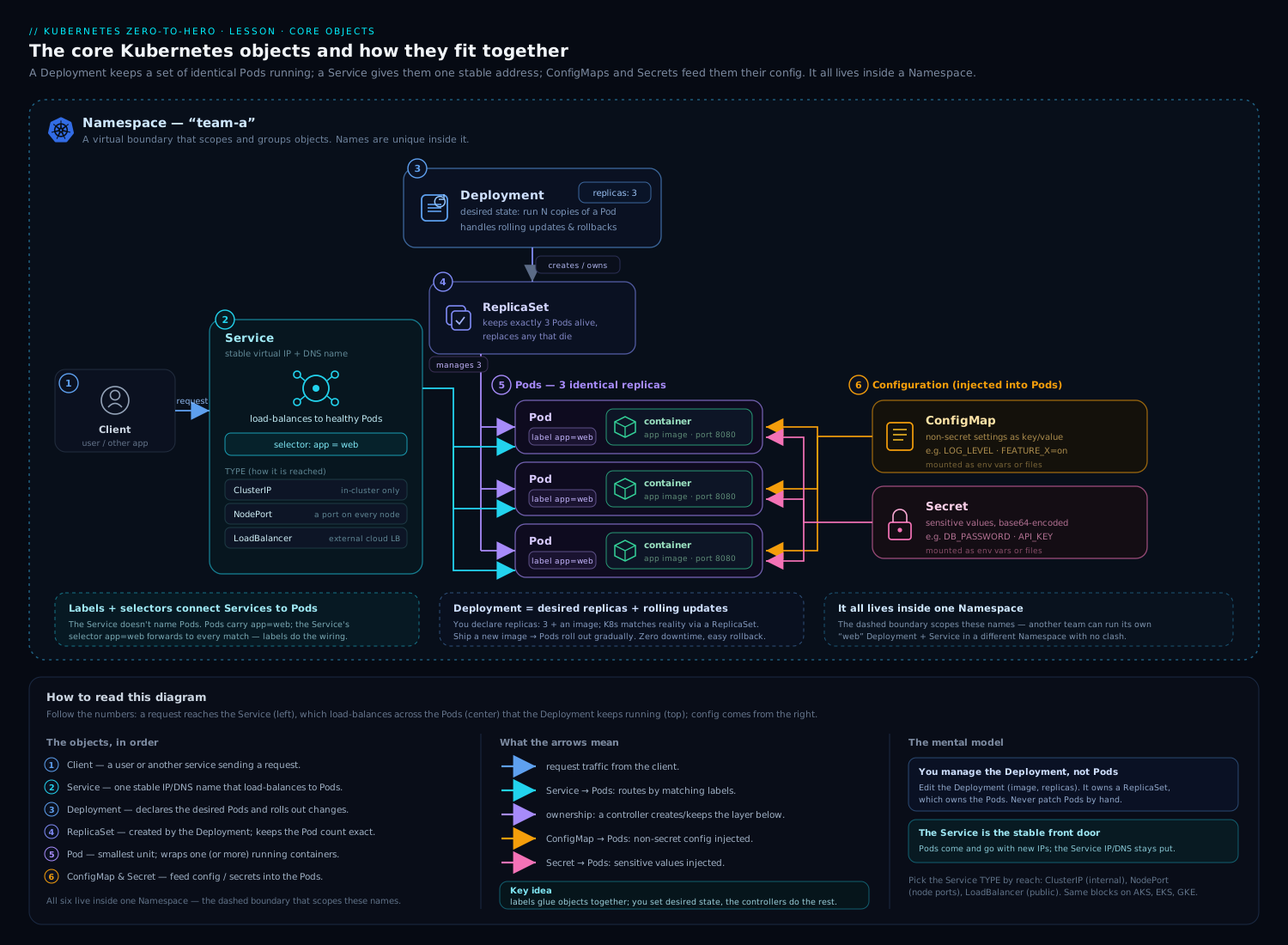
ConfigMaps and Secrets sit alongside the workload and networking objects you have already met: a Deployment owns Pods, a Service gives them a stable address, and ConfigMaps and Secrets feed configuration and credentials into those Pods — by environment variable or by mounted volume. Keeping config and secrets as separate objects is exactly what lets you ship one image to every environment and change behaviour by swapping the attached ConfigMap/Secret.
Hands-on lab
Free, local, ~15 minutes. Works on kind, minikube or k3d. We will create a ConfigMap and a Secret, consume them as env vars and as files, prove the base64 point, prove that mounted updates propagate but env vars don’t, and clean up.
0. A namespace to keep it tidy
kubectl create namespace cms-lab
kubectl config set-context --current --namespace=cms-lab
1. Create a ConfigMap (literals + a file)
printf 'server.port=8080\ncache.ttl=300\n' > app.properties

kubectl create configmap app-config \
  --from-literal=LOG_LEVEL=info \
  --from-literal=GREETING=hello \
  --from-file=app.properties

kubectl get configmap app-config -o yaml
Expected: data contains LOG_LEVEL, GREETING, and an app.properties key whose value is the file’s contents.
2. Create a Secret and prove base64 is not encryption
kubectl create secret generic db-credentials \
  --from-literal=username=admin \
  --from-literal=password='s3cr3tPass'

# The stored value is base64 — trivially reversible:
kubectl get secret db-credentials -o jsonpath='{.data.password}' | base64 -d ; echo
# → s3cr3tPass
3. A Pod that consumes both — env vars AND files
cat <<'EOF' | kubectl apply -f -
apiVersion: v1
kind: Pod
metadata:
  name: consumer
spec:
  containers:
    - name: app
      image: busybox:1.36
      command: ["sh", "-c", "sleep 3600"]
      env:
        - name: LOG_LEVEL
          valueFrom:
            configMapKeyRef: { name: app-config, key: LOG_LEVEL }
        - name: DB_PASSWORD
          valueFrom:
            secretKeyRef: { name: db-credentials, key: password }
      envFrom:
        - configMapRef: { name: app-config }
      volumeMounts:
        - name: cfg
          mountPath: /etc/app
          readOnly: true
        - name: sec
          mountPath: /etc/secret
          readOnly: true
  volumes:
    - name: cfg
      configMap: { name: app-config }
    - name: sec
      secret: { secretName: db-credentials, defaultMode: 0400 }
EOF

kubectl wait --for=condition=Ready pod/consumer --timeout=60s
4. Validate both injection styles
# env var from the Secret:
kubectl exec consumer -- printenv DB_PASSWORD          # → s3cr3tPass
# envFrom imported the whole ConfigMap:
kubectl exec consumer -- printenv GREETING LOG_LEVEL   # → hello / info
# the ConfigMap mounted as files:
kubectl exec consumer -- ls /etc/app                   # → LOG_LEVEL GREETING app.properties
kubectl exec consumer -- cat /etc/app/app.properties   # → the file contents
# the Secret mounted as files, owner-read-only:
kubectl exec consumer -- ls -l /etc/secret             # → -r-------- username, password
5. Prove the propagation rules
# Edit the ConfigMap's GREETING value:
kubectl patch configmap app-config --type merge -p '{"data":{"GREETING":"namaste"}}'

# The ENV VAR does NOT change (set at start):
kubectl exec consumer -- printenv GREETING             # → still "hello"

# The MOUNTED file DOES change — but allow ~60-90s for kubelet to refresh.
# Re-run until it flips:
kubectl exec consumer -- sh -c 'cat /etc/app/GREETING; echo'   # → eventually "namaste"
That contrast — env frozen, file updated — is the whole propagation lesson in two commands.
6. Make a versioned, immutable Secret (optional)
kubectl create secret generic db-credentials-v2 \
  --from-literal=username=admin --from-literal=password='newPass' \
  --dry-run=client -o yaml | \
  kubectl apply -f - --dry-run=client -o yaml      # inspect first
# Then add `immutable: true` in the manifest and apply for real.
Cleanup
kubectl delete namespace cms-lab          # removes Pod, ConfigMap, Secrets in one go
kubectl config set-context --current --namespace=default
rm -f app.properties
Cost note: entirely free — everything runs on your local kind/minikube/k3d cluster; no cloud resources are created.
Common beginner mistakes
These are the misconceptions that cause the bugs — the wrong mental model, not just the error message. (For symptom → fix, use the troubleshooting table below.)
“A Secret is encrypted, so it’s safe to put credentials there.” It is not — not by default. The values are base64-encoded, a reversible text format with zero confidentiality; base64 -d reveals them in one command. The right model: treat a Secret manifest as plaintext you happen to have wrapped in base64. Real protection comes from three separate things — encryption at rest (so etcd and its backups aren’t plaintext), tight RBAC (so few identities can even get it), and never committing the manifest. Until you have done those, a Secret is only marginally safer than a ConfigMap.
“I edited the ConfigMap, so my app has the new value now.” Only if you consumed it as a mounted file and your app re-reads that file. If you injected it as an environment variable (valueFrom or envFrom), the value was frozen into the process at startup and will never change until the Pod restarts. The right model: an env var is a photograph taken at boot; a mounted file is a live feed. When in doubt, kubectl rollout restart — it is the reliable way to guarantee every replica picks up the change.
“Mounting with subPath is just a neat way to place one file.” It is — but it silently opts that file out of live updates. A subPath mount is resolved once at mount time and is not part of the atomic-symlink tree that delivers updates, so an edited ConfigMap never reaches a subPath-mounted file. The right model: reach for subPath only when you want a static drop-in (e.g. nginx.conf sitting beside files that ship in the image) and you accept restarting to change it. If the value must update live, mount the whole volume at a dedicated directory instead.
“It’s fine to commit the Secret YAML to Git — it’s base64.” This is the most dangerous mistake precisely because base64 looks obfuscated. Committing a Secret manifest publishes the credential to everyone with repo access, and to every fork, mirror, CI cache, and backup — permanently, in history, even after you “delete” it. The right model: what goes into Git must be encrypted (Sealed Secrets, SOPS) or a reference to an external vault (ESO or the CSI driver), never a raw Secret. And if you ever do commit one, treat the credential as compromised and rotate it — a git rm does not un-leak it.
“I’ll just stuff this 5 MB file into a ConfigMap.” Both ConfigMaps and Secrets are capped at 1 MiB. The limit comes from etcd and it counts keys, values and metadata together, so your practical ceiling is lower than 1 MiB. Exceeding it fails the write outright. The right model: ConfigMaps and Secrets are for small config and credentials; large blobs (certificate bundles, datasets, big binaries) belong in a volume/PVC, an object store, or an init-container fetch.
“envFrom will import every key I put in the ConfigMap.” Only the keys that are valid environment-variable names. Any key containing a . or - (like app.properties or my-key) is silently skipped — no error, just a missing variable and a log event. The right model: file-shaped keys belong in a volume mount, not envFrom; keep env-only ConfigMaps to UPPER_SNAKE_CASE keys.
“Granting read on one Secret is safe because I used resourceNames.” For the get verb, yes — but resourceNames is ignored by list and watch. Grant list on Secrets and the subject can enumerate every Secret in the namespace, regardless of the names you listed. The right model: prefer get with resourceNames; treat list/watch on Secrets as “read all credentials in this namespace.”
Common mistakes & troubleshooting
| Symptom | Likely cause | Fix |
|---|---|---|
CreateContainerConfigError on the Pod |
A configMapKeyRef/secretKeyRef/secretName points at a key or object that doesn’t exist |
Create the object/key, or set optional: true; check kubectl describe pod. |
Pod stuck ContainerCreating, event “couldn’t find key/secret” |
Mounted ConfigMap/Secret missing and optional is false |
Create it (it must be in the same namespace) or mark optional. |
| Edited a ConfigMap but the app didn’t change | Consumed as env var, or via subPath, or app doesn’t re-read the file |
Restart the Pod (kubectl rollout restart), or switch to a non-subPath mount + an app that watches the dir. |
Some envFrom keys never appear |
Keys aren’t valid env-var names (contain ./-) |
They’re silently skipped — mount those keys as files instead. |
| Mounted file has the wrong permissions | defaultMode written unquoted, or overridden by items[].mode |
Quote octal ("0400") or use decimal; remember fsGroup/UID interaction. |
kubectl get secret -o yaml shows my password “encrypted” but it’s readable |
It’s base64, not encryption | This is expected; enable encryption at rest, restrict RBAC, don’t commit manifests. |
Image pull fails with ImagePullBackOff on a private registry |
Missing/incorrect imagePullSecrets or wrong Secret type |
Create a docker-registry Secret and reference it (Pod or ServiceAccount). |
| Secret edits rejected outright | Object is immutable: true |
Create a new (versioned) object and repoint the workload. |
Best practices
- One image, many environments: keep all environment-specific values in ConfigMaps/Secrets, never in the image. Promote the same digest from dev to prod.
- Prefer mounting Secrets over env vars. Mounted secrets stay out of
/proc/<pid>/environ, crash dumps and child-process inheritance, and they support live rotation. - Version your config objects and make them immutable (
app-config-v3,immutable: true). You gain clean rollbacks, automatic rolling restarts, and reduced API-server watch load. - Trigger restarts deliberately with a config-hash annotation (Helm
sha256sum, KustomizeconfigMapGenerator/secretGeneratorwith hash suffixes) rather than relying on in-place file refresh timing. - Generators over hand-written base64: Kustomize’s
configMapGenerator/secretGeneratorbuild hashed, immutable objects and rewire references for you. - Never commit raw Secret manifests to Git. Use Sealed Secrets, SOPS, or an external store (ESO / CSI driver) so what’s in Git is encrypted or a reference.
- Keep ConfigMaps and Secrets small (well under 1 MiB). Large blobs belong in a volume, an object store, or an init-container fetch.
Security notes
- base64 ≠ encryption. A Secret object is as sensitive as the plaintext it carries. Anyone able to
getthe Secret, or read etcd, reads the value. - Turn on encryption at rest for
secrets(akmsprovider in production;secretboxfor local keys). Remember it only protects future writes — re-encrypt existing Secrets, and protect any local key file. - Lock down RBAC for Secrets.
get/list/watchon Secrets is effectively read-all-credentials. Grant it narrowly, byresourceNameswhere possible:apiVersion: rbac.authorization.k8s.io/v1 kind: Role metadata: { name: read-one-secret, namespace: demo } rules: - apiGroups: [""] resources: ["secrets"] verbs: ["get"] resourceNames: ["db-credentials"] # only THIS secretlistSecrets ignoresresourceNames(you cannot list-by-name), solistleaks everything — avoid it. - Use short-lived, bound ServiceAccount tokens (projected
serviceAccountTokenwith anaudienceandexpirationSeconds) instead of long-lived token Secrets. SetautomountServiceAccountToken: falseon Pods that don’t call the API. - Protect etcd itself — encrypt etcd backups, restrict node access. Encryption at rest is moot if backups are plaintext.
- Audit access. Enable audit logging on Secret reads so you can answer “who read this credential?”.
Interview & exam questions
-
Is a Kubernetes Secret encrypted? What is base64 doing there? No — values are base64-encoded, which is reversible and provides no confidentiality. base64 only lets binary data be stored as a string. Real protection comes from encryption at rest, RBAC, and not leaking the manifest.
-
A teammate edits a ConfigMap; the app’s behaviour doesn’t change. Why, and how do you fix it? It was consumed as an environment variable (or via
subPath), which is set once at container start and never updates. Restart the Pods (kubectl rollout restart), or switch to a non-subPathvolume mount and have the app watch the file/directory. -
How fast does a mounted ConfigMap update reach a running Pod? Not instantly — kubelet refreshes mounted ConfigMaps/Secrets on its sync loop, typically within ~60–90 seconds; the app must then re-read the file.
subPathmounts and env vars never update. -
List the Secret types and when you’d use each.
Opaque(general);kubernetes.io/dockerconfigjson(private-registry pulls /imagePullSecrets);kubernetes.io/tls(tls.crt+tls.keyfor Ingress/app TLS);kubernetes.io/basic-auth;kubernetes.io/ssh-auth;kubernetes.io/service-account-token(legacy long-lived SA token). Some features require the matching type. -
What does
immutable: truegive you, beyond preventing edits? The kubelet stops watching the object, cutting API-server/etcd load at scale, and it prevents accidental in-place changes to running workloads. You version the name and recreate to change it. -
Walk me through enabling encryption at rest and rotating the key. Provide an
EncryptionConfigurationvia--encryption-provider-configlisting the encrypting provider first andidentitylast. Existing Secrets stay plaintext until rewritten (kubectl get secrets -A -o json | kubectl replace -f -). To rotate: add the new key first in the provider’s key list, keep the old key for decryption, restart API servers, re-encrypt all Secrets, then drop the old key. -
datavsstringDatain a Secret?datamust be base64-encoded;stringDatatakes plaintext that the API encodes for you and is write-only (never shown on read). If both define a key,stringDatawins. -
How do you give a Pod credentials to pull from a private registry? Create a
docker-registrySecret (typekubernetes.io/dockerconfigjson) and reference it viaimagePullSecretson the Pod or, better, attach it to the ServiceAccount. -
configMapKeyRefvsenvFromvs a volume mount — when each?configMapKeyRef/secretKeyReffor one specific key as one env var;envFromto import every key as env vars (with optionalprefix); a volume mount for whole files or any value you want to update without restarting. -
Why prefer mounting a Secret over injecting it as an env var? Env vars appear in
/proc/<pid>/environ, crash dumps,describereferences and child processes, and never live-update. Mounted secrets avoid that exposure and support rotation. -
What changed about ServiceAccount tokens in 1.24, and what’s the modern approach? Auto-creation of long-lived token Secrets stopped. The modern path is bound, projected tokens — short-lived, audience-scoped JWTs mounted via a projected volume and auto-rotated by kubelet;
kubectl create tokenmints one on demand. -
Compare the Secrets Store CSI Driver and the External Secrets Operator. The CSI driver mounts secrets from an external vault straight into the Pod as files (etcd optional); ESO mirrors an external vault into a normal Kubernetes Secret via an
ExternalSecretCR (etcd always, so still encrypt at rest). Both keep the source of truth in a real vault with rotation/audit.
Quick check
- True or false: editing a Secret consumed via
envFromupdates the value in a running Pod. - Which Secret
typeis required for an Ingress TLS certificate, and which two keys must it contain? - You mount a ConfigMap with
subPath. Will a later edit to that ConfigMap reach the Pod without a restart? - In an
EncryptionConfiguration, which provider must remain listed so you can still read previously unencrypted Secrets, and where in the list does the encrypting provider go? - Name two concrete benefits of setting
immutable: trueon a ConfigMap.
Answers
- False. Environment variables (including those from
envFrom) are set once at container start and never update — restart the Pod. kubernetes.io/tls, containingtls.crtandtls.key.- No.
subPathmounts are resolved once at mount time and do not receive updates — the Pod must restart. identitymust remain listed (so plaintext/old data can still be read); the encrypting provider must be listed first (the first provider is used for writes, all providers can decrypt).- (a) It prevents accidental in-place edits to running workloads, and (b) the kubelet stops watching it, reducing API-server/etcd load at scale. (Versioned rollbacks are a third.)
Practice challenges
Do these in your local cluster (kind/minikube/k3d). They escalate from beginner to CKS-level; each solution is one command or manifest plus a one-line why. Try each before opening the answer.
Challenge 1 (beginner) — a Git-ready ConfigMap. Create a ConfigMap game-config with LIVES=3 and DIFFICULTY=hard, but produce it as YAML you could commit rather than a live object.
<details> <summary><strong>Solution</strong></summary>
kubectl create configmap game-config \
  --from-literal=LIVES=3 \
  --from-literal=DIFFICULTY=hard \
  --dry-run=client -o yaml > game-config.yaml
Why: --dry-run=client -o yaml renders the object without touching the cluster, so the definition lands in Git instead of only in etcd.
</details>
Challenge 2 (beginner) — prove base64 is not encryption. Create a generic Secret holding a placeholder password, then read the stored value back as plaintext.
<details> <summary><strong>Solution</strong></summary>
kubectl create secret generic demo-cred \
  --from-literal=password='P@ss-PLACEHOLDER'
kubectl get secret demo-cred -o jsonpath='{.data.password}' | base64 -d ; echo
# → P@ss-PLACEHOLDER
Why: data holds base64, and a single base64 -d reverses it — the whole point that a Secret is encoded, not encrypted.
</details>
Challenge 3 (intermediate) — one Secret env var + a tolerated-missing ConfigMap key. Write the env: block that injects DB_PASSWORD from Secret db-credentials (key password) and FEATURE_X from ConfigMap maybe-missing (key FEATURE_X) such that the Pod still starts even if maybe-missing doesn’t exist.
<details> <summary><strong>Solution</strong></summary>
env:
  - name: DB_PASSWORD
    valueFrom:
      secretKeyRef:
        name: db-credentials
        key: password
  - name: FEATURE_X
    valueFrom:
      configMapKeyRef:
        name: maybe-missing
        key: FEATURE_X
        optional: true      # absent ⇒ var simply unset, Pod still starts
Why: without optional: true, a missing reference fails the container with CreateContainerConfigError; optional turns “must exist” into “use if present.”
</details>
Challenge 4 (intermediate) — mount exactly one key, renamed. Mount ConfigMap app-config so that only the key app.properties appears in the container, renamed to application.properties with mode 0644, and no other keys are present.
<details> <summary><strong>Solution</strong></summary>
volumes:
  - name: cfg
    configMap:
      name: app-config
      items:
        - key: app.properties
          path: application.properties
          mode: 0644
Why: the moment you specify items, only the listed keys are projected — everything else is excluded — and path renames while mode sets the file bits.
</details>
Challenge 5 (advanced) — prove the propagation split. With a running Pod that consumes app-config both as an envFrom env var GREETING and as a mounted file /etc/app/GREETING, edit the ConfigMap’s GREETING and show which view changes.
<details> <summary><strong>Solution</strong></summary>
kubectl patch configmap app-config --type merge -p '{"data":{"GREETING":"namaste"}}'

kubectl exec consumer -- printenv GREETING              # → still "hello" (frozen at start)
kubectl exec consumer -- sh -c 'cat /etc/app/GREETING'  # → eventually "namaste" (~60–90s)
Why: environment variables are set once at container start and never update; mounted files are refreshed on kubelet’s volume resync, so only the file view flips. </details>
Challenge 6 (advanced / CKS) — immutable, versioned, and encrypted. (a) Create an immutable Secret api-cred-v1 and prove that editing it is rejected. (b) Sketch the config-hash annotation that forces a rollout when config changes. © Sketch the EncryptionConfiguration that encrypts Secrets at rest with secretbox, then the command to encrypt Secrets that already exist.
<details> <summary><strong>Solution</strong></summary>
# (a) an immutable Secret — version the NAME, since you can't edit it later
apiVersion: v1
kind: Secret
metadata:
  name: api-cred-v1
type: Opaque
stringData:
  API_TOKEN: "REPLACE_WITH_TOKEN_PLACEHOLDER"
immutable: true
# apply it, then prove edits are refused:
kubectl apply -f api-cred-v1.yaml
kubectl patch secret api-cred-v1 --type merge -p '{"stringData":{"API_TOKEN":"x"}}'
# → error: Secret "api-cred-v1" is invalid: data: Forbidden: field is immutable when `immutable` is set
# (b) config-hash: a changed checksum ⇒ new Pod template ⇒ rolling restart
spec:
  template:
    metadata:
      annotations:
        checksum/config: "3f9a2bc7...c21"   # sha256 of the ConfigMap data (Helm/Kustomize computes it)
# (c) encrypt Secrets at rest with a local secretbox key
apiVersion: apiserver.config.k8s.io/v1
kind: EncryptionConfiguration
resources:
  - resources:
      - secrets
    providers:
      - secretbox:                 # encrypts new writes (listed FIRST)
          keys:
            - name: key-2026-07
              secret: <base64-32-byte-key>
      - identity: {}               # MUST stay last so pre-encryption data still reads
# existing Secrets stay plaintext until rewritten — force a rewrite:
kubectl get secrets --all-namespaces -o json | kubectl replace -f -
Why: immutability blocks in-place edits (and drops kubelet’s watch), the config-hash annotation ties the Pod template to config content so any change rolls the Deployment, the first provider encrypts while identity keeps old data readable, and replace rewrites existing Secrets so they get encrypted too.
</details>
Exercise
Build a tiny “promote one image across environments” demo:
- Create two namespaces,
stagingandprod. - In each, create a ConfigMap
web-configwith a differentBANNERvalue (e.g."STAGING"vs"PROD") and a Secretweb-credwith a differentAPI_TOKEN. - Deploy the same
nginx-based Pod (same image) into both namespaces, mountingBANNERas a file at/usr/share/nginx/html/banner.txtand injectingAPI_TOKENas a mounted Secret (not an env var). - Verify each Pod serves the correct banner and has the correct token file, with the token file readable only by the owner (
0400). - Make both
web-configobjects immutable, then attemptkubectl editand observe the rejection. Recreate asweb-config-v2and repoint the Pod. - Bonus: add a
checksum/configannotation to a Deployment version of step 3 and confirm that changing the ConfigMap triggers a rolling restart.
Success criteria: identical image in both namespaces, environment-specific behaviour driven entirely by the attached ConfigMap/Secret, secret delivered as a 0400 file, and immutability enforced.
Certification mapping
| Exam | Objective area this supports |
|---|---|
| KCNA (Kubernetes and Cloud Native Associate) | Kubernetes Fundamentals — ConfigMaps and Secrets as core objects; how applications consume configuration. |
| CKAD (Certified Kubernetes Application Developer) | Application Environment, Configuration & Security — create and consume ConfigMaps/Secrets (env, envFrom, volumes, projected, subPath, optional, defaultMode), imagePullSecrets, ServiceAccount tokens, and SecurityContext interactions. |
| CKA (Certified Kubernetes Administrator) | Workloads & Scheduling / Cluster Architecture — manage ConfigMaps/Secrets; understand storage in etcd and immutability’s effect on the control plane. |
| CKS (Certified Kubernetes Security Specialist) | Cluster Hardening & Minimise Microservice Vulnerabilities — encryption at rest (EncryptionConfiguration, providers, key rotation), Secret RBAC and least privilege, short-lived bound tokens, and external secret stores. |
Glossary
- ConfigMap — a namespaced object holding non-sensitive key/value configuration (strings in
data, bytes inbinaryData). - Secret — a namespaced object for sensitive key/value data; values are base64 in the manifest and (optionally) encrypted in etcd.
- base64 — a reversible text encoding for binary data; provides no confidentiality.
stringData— write-only Secret field that accepts plaintext and is base64-encoded by the API on write.envFrom— import every key of a ConfigMap/Secret as environment variables (optionally with aprefix).subPath— mount a single key as a single file without hiding the rest of the directory; does not receive updates.- Projected volume — a volume that merges multiple sources (ConfigMap, Secret, downwardAPI, serviceAccountToken) into one directory.
defaultMode— default UNIX permission bits for files in a ConfigMap/Secret volume.- Immutable object — a ConfigMap/Secret with
immutable: true; cannot be edited (recreate to change); kubelet stops watching it. - Encryption at rest — encrypting resources before they are written to etcd, configured via an
EncryptionConfigurationand--encryption-provider-config. - EncryptionConfiguration — the API-server config listing which resources to encrypt and which providers (e.g.
secretbox,aescbc,kms,identity) to use. - KMS provider — envelope encryption using an external Key Management Service; the root key never leaves the KMS.
- Secrets Store CSI Driver — a CSI volume that mounts secrets from an external store directly into Pods (etcd optional).
- External Secrets Operator (ESO) — a controller that materialises a native Secret from an external store via an
ExternalSecretcustom resource. - imagePullSecrets — a reference to a
dockerconfigjsonSecret used to authenticate to a private registry. - Bound ServiceAccount token — a short-lived, audience-scoped JWT delivered via a projected volume and auto-rotated by kubelet.
- tmpfs — a RAM-backed filesystem; kubelet mounts Secret volumes on
tmpfsso plaintext never touches the node’s disk and is gone when the Pod stops. ..datasymlink — the hidden symlink inside a mounted ConfigMap/Secret volume that kubelet atomically re-points to deliver updates without partial reads.configMapAndSecretChangeDetectionStrategy— kubelet setting (Watch/Cache/Get) that governs how it detects ConfigMap/Secret changes;Watchis the default.- Envelope encryption — encrypting data with a local DEK that is itself encrypted (wrapped) by a remote KEK; the basis of the
kmsprovider. - DEK / KEK — Data Encryption Key (encrypts the Secret bytes) and Key Encryption Key (wraps the DEK and never leaves the KMS).
- KMS v2 — the envelope-encryption provider that is GA as of Kubernetes 1.29; caches one DEK per API server for performance and supports config hot-reload.
TokenRequestAPI — the API kubelet calls to mint short-lived, Pod-bound, audience-scoped ServiceAccount tokens for projected volumes.subPathExpr— asubPathwhose value is built from environment variables (e.g. per-Pod paths); likesubPath, it does not receive live updates.- config-hash annotation — a
checksum/configPod-template annotation that changes with the config content, forcing a rolling restart on every edit.
Next steps
Continue the course with Kubernetes Namespaces, ResourceQuotas & LimitRanges, In Depth — now that you can inject config and credentials, learn how namespaces isolate them and how quotas and limit ranges keep tenants in their lane. Then go further with:
- Kubernetes Pods, In Depth: Containers, Probes, Lifecycle & Every Field — revisit how env, volumes and
securityContextinteract at the Pod level. - Kubernetes Services & Networking, In Depth — the most common thing a ConfigMap configures is where to reach another Service.
- Designing Least-Privilege RBAC in Kubernetes — lock down exactly who can read your Secrets.