You have a handful of Services running inside a cluster, each one a stable internal address in front of some Pods. Now the real question arrives: how does traffic from a browser on the public internet reach the right Service? You could give every Service its own cloud load balancer, but that is one public IP — and one monthly bill — per app, with no shared TLS, no path routing, and no single front door. Ingress exists to solve exactly this: one entry point that routes HTTP and HTTPS traffic to many Services based on the hostname and URL path, terminating TLS once, in front of everything.
Ingress trips up newcomers because it has an unusual shape. The Ingress object you write is just a set of routing rules — a piece of configuration. On its own it does nothing at all. Something has to read those rules and actually do the proxying, and that something is an Ingress controller (NGINX, Traefik, HAProxy, a cloud load-balancer controller, and others). Kubernetes ships with the Ingress API but no controller — you install one yourself. Get that mental model right and the rest falls into place.
This lesson covers Ingress exhaustively: every field of the resource, every pathType, how IngressClass selects a controller, how TLS termination and cert-manager fit together, and the handful of annotations you will actually reach for. Then it covers the Gateway API — the newer, role-oriented, more expressive standard that the project positions as Ingress’s long-term successor — so you know which one to choose for new work. You will install a controller on a free local cluster, route two apps behind one address, and add TLS, all on your laptop.
In a nutshell
Picture an office tower with a single street address and one front door. Visitors do not wander the corridors — they tell the receptionist “I’m here for Sales on the third floor” or “where’s the mailroom?”, and the receptionist walks each person to the right place. Kubernetes Ingress is that front door for HTTP traffic. One public IP, one entry point, and a set of rules that send shop.example.com to one app and example.com/api to another — all behind the same door.
Now the one twist that trips up every newcomer, so learn it before anything else: the Ingress object you write is only the directory of rules taped to the desk — it is paper, not a person. The thing that actually reads those rules and walks each request to the correct Service is a separate program called the Ingress controller (usually an NGINX or Envoy reverse proxy running as a Pod). Kubernetes ships the rules format but not the receptionist. Apply an Ingress on a cluster with no controller installed and, quite literally, nothing happens — the rules just sit there in the database. Install a controller first, and those very same rules spring to life. If you remember only one sentence from this lesson, make it that one.
Why should a beginner care? Because this single pattern is how essentially every real website on Kubernetes reaches the outside world. It lets you run ten apps behind one cloud load balancer instead of ten (one bill, not ten), terminate HTTPS once at the edge for all of them, and route by hostname and URL path — the everyday plumbing of production traffic. Get the “rules vs. controller” split straight and the rest of this page is detail.
Level: Intermediate · Time: ~42 min read · You’ll need: a local cluster (kind or minikube) and basic kubectl comfort.
Learning objectives
By the end of this lesson you can:
- Explain why a
LoadBalancerService is not enough for multiple HTTP apps, and what Ingress adds (host/path routing, shared TLS, one entry point). - Describe the Ingress controller model and why you must install a controller before any
Ingressresource has any effect. - Write a complete
Ingressresource and explain every field:ingressClassName,rules,host,http.paths,path,pathType,backend.service, anddefaultBackend. - Use the three
pathTypevalues —Exact,Prefix,ImplementationSpecific— correctly, and predict which rule wins when several match. - Configure
IngressClass(including the default class) and understand how it binds an Ingress to a specific controller. - Set up TLS termination with a
kubernetes.io/tlsSecret and SNI, and explain howcert-managerautomates certificates. - Use the most common controller annotations (rewrite, redirect, body size, rate limit, auth) and know why they are non-portable.
- Explain the Gateway API (
GatewayClass,Gateway,HTTPRoute), its role separation, and when to choose it over Ingress.
Prerequisites & where this fits
You need a working local cluster and basic comfort with kubectl, plus an understanding of Services — especially ClusterIP and LoadBalancer — and label selectors, since Ingress routes to Services. If Services are still hazy, do Kubernetes Services & Networking, In Depth first; for the absolute basics of Pods and Deployments see Pods, ReplicaSets, Deployments & Services: The Core Objects. This is the edge-routing lesson of the Kubernetes Zero-to-Hero course: it sits just after storage and just before RBAC, and it is the foundation for everything user-facing — public APIs, web frontends, multi-tenant routing, and TLS at the edge.
Core concepts: Ingress vs Service, and the controller model
Start from what a Service already gives you and what it does not.
A ClusterIP Service is internal only — perfect for Pod-to-Pod traffic, useless for the public internet. A NodePort opens a high port (30000–32767) on every node — crude, ugly URLs, not for production. A LoadBalancer Service asks your cloud for a real external load balancer with a public IP — but it is Layer 4 (TCP/UDP): it forwards a port to one Service and knows nothing about HTTP. It cannot read the Host header, cannot route by URL path, and cannot terminate TLS for many hostnames. So “ten public apps” becomes “ten cloud load balancers, ten IPs, ten bills, ten places to manage certificates.”
Ingress is the Layer 7 (HTTP/HTTPS) answer. One Ingress controller sits behind a single LoadBalancer Service (or host network), and routes intelligently:
- by hostname —
shop.example.comandapi.example.comshare one IP, go to different Services (this is name-based virtual hosting, using TLS SNI and the HTTPHostheader); - by URL path —
/to the web app,/apito the API,/staticto a cache; - with TLS terminated once, at the edge, for all of those hostnames.
Here is the part that confuses everyone, stated plainly:
The
Ingressresource is just rules — data in etcd. It does nothing by itself. An Ingress controller is a real Pod (usually a reverse proxy like NGINX) that watches allIngressresources and reconfigures itself to actually route traffic. Kubernetes does not include a controller. A freshly installed cluster has the Ingress API but no controller, so yourIngressobjects sit inert until you install one.
The flow end to end: Client → DNS → cloud LoadBalancer (one public IP) → Ingress controller Pod → (reads your Ingress rules) → ClusterIP Service → Pods. The controller is the only piece doing HTTP work; the Ingress object only tells it what to do.
There are many controllers, and the annotations and exact behaviour differ between them — a critical, often-missed fact. ingress-nginx (the community NGINX controller, the most common default) is not the same as NGINX Inc.'s commercial nginx-ingress; their annotations differ. Other popular controllers include Traefik, HAProxy, Contour (Envoy-based), and cloud-native ones like the AWS Load Balancer Controller, GKE Ingress, and Azure Application Gateway Ingress Controller (AGIC). The core Ingress fields are portable; the annotations are not.
The Ingress resource: every field
A minimal but complete Ingress (apiVersion networking.k8s.io/v1, stable since Kubernetes 1.19):
apiVersion: networking.k8s.io/v1
kind: Ingress
metadata:
  name: shop-ingress
  namespace: web
spec:
  ingressClassName: nginx          # which controller handles this Ingress
  defaultBackend:                  # optional: catches anything no rule matches
    service:
      name: fallback
      port:
        number: 80
  rules:
  - host: shop.example.com         # optional; omit to match any host
    http:
      paths:
      - path: /
        pathType: Prefix
        backend:
          service:
            name: shop-frontend
            port:
              number: 80
      - path: /api
        pathType: Prefix
        backend:
          service:
            name: shop-api
            port:
              number: 8080
The full field matrix — what every key does:
| Field | What it does | Values | Default | When to set | Gotcha |
|---|---|---|---|---|---|
spec.ingressClassName |
Names the IngressClass (and thus the controller) that should serve this Ingress | A string matching an IngressClass name |
None (falls back to default class, if any) | Almost always set it explicitly | If unset and there is no default class, no controller picks it up and nothing happens |
spec.defaultBackend |
Where to send requests that match no rule | A service (name + port) or a resource ref |
Controller’s own default (often a 404 page) | When you want a custom catch-all/landing page | Per-Ingress default backends are honoured inconsistently across controllers; many use the controller-wide one |
spec.rules[] |
The list of host-based routing rules | Array | Empty (then only defaultBackend applies) |
The heart of every real Ingress | An empty rules with no default backend routes nothing |
rules[].host |
The HTTP hostname this rule matches (virtual host) | FQDN, or wildcard like *.example.com |
Omitted = match all hosts | One rule per public hostname | Wildcards match one label only: *.example.com matches a.example.com, not a.b.example.com or bare example.com |
rules[].http.paths[] |
The path rules within a host | Array (at least one) | — | Always | Order in the file does not decide precedence — longest match does (see pathType) |
paths[].path |
The URL path to match | A path string, e.g. /, /api |
— (required) | Always | With Prefix, /api matches /api and /api/... but not /apil (element-wise, not string prefix) |
paths[].pathType |
How path is matched |
Exact, Prefix, ImplementationSpecific |
Required (no default) | Always — pick deliberately | Older extensions/v1beta1 had no pathType; on networking.k8s.io/v1 it is mandatory |
paths[].backend.service.name |
The Service to route matched traffic to | A Service name in the same namespace | — | Always (unless using resource) |
Must be in the same namespace as the Ingress — Ingress is namespaced and cannot point cross-namespace |
paths[].backend.service.port.number / .name |
The Service port (by number or named port) | Port number, or a named port | — | Always | Use name if your Service names its ports; use number otherwise — not both |
paths[].backend.resource |
Route to a non-Service object (e.g. a storage/object backend via a custom resource) | A TypedLocalObjectReference |
— | Rarely (e.g. static assets via a CRD) | Mutually exclusive with backend.service; controller-dependent |
spec.tls[] |
TLS termination config (see TLS section) | Array of {hosts, secretName} |
None (HTTP only) | Whenever you serve HTTPS | The Secret must exist, be type kubernetes.io/tls, and live in the same namespace |
metadata.annotations |
Controller-specific behaviour (rewrite, auth, limits…) | Key/value strings | None | For anything beyond basic routing | Not portable — nginx.ingress.kubernetes.io/* means nothing to Traefik |
status.loadBalancer.ingress[] |
Read-only: the external IP/hostname the controller published | Filled by the controller | — | You read it, never set it | Stays empty until a controller adopts the Ingress and a LoadBalancer is provisioned |
Two structural rules worth memorising: an Ingress is namespaced, and its backends must be Services in the same namespace — you cannot route from an Ingress in team-a to a Service in team-b. And an Ingress can have defaultBackend only, rules only, or both; with neither, it does nothing.
pathType: Exact vs Prefix vs ImplementationSpecific
pathType is mandatory on networking.k8s.io/v1 and decides how path is compared to the incoming request. Get this wrong and traffic silently goes to the wrong place.
pathType |
Matching rule | Example path |
Matches | Does NOT match | When to use |
|---|---|---|---|---|---|
Exact |
The URL path must equal path exactly, case-sensitive |
/api |
/api |
/api/, /api/v1, /Api |
A single specific endpoint; health-check URLs |
Prefix |
Split both into path elements (by /); match element-by-element |
/api |
/api, /api/, /api/v1, /api/v1/users |
/apifoo, /apis |
The default choice for “this service owns this subtree” |
ImplementationSpecific |
Whatever the controller decides — often regex/glob | /api/.* (nginx) |
controller-defined | controller-defined | Only when you need controller-native features (regex paths) |
The element-wise subtlety of Prefix is the classic exam trap. path: /api with Prefix matches /api and /api/anything, but it does not match /apifoo, because matching is per path segment, not raw string prefix. A trailing-slash request /api/ does match. The special path / with Prefix matches everything — the catch-all root.
Precedence when multiple paths match: the controller picks the longest matching path, and Exact is preferred over Prefix at equal length. So given / (Prefix) and /api (Prefix), a request to /api/v1 goes to the /api backend because it is the longer match. Order in the YAML is irrelevant. With ImplementationSpecific, precedence is whatever the controller defines (ingress-nginx, for instance, has its own ordering and a canary/priority system via annotations).
A wildcard host also affects precedence: a request is matched against the most specific host first. api.example.com (exact host) beats *.example.com (wildcard host) for api.example.com.
IngressClass: binding an Ingress to a controller
Before IngressClass, you chose a controller with the annotation kubernetes.io/ingress.class. That is deprecated. The modern mechanism is the IngressClass resource plus spec.ingressClassName on the Ingress.
apiVersion: networking.k8s.io/v1
kind: IngressClass
metadata:
  name: nginx
  annotations:
    ingressclass.kubernetes.io/is-default-class: "true"   # makes this the default
spec:
  controller: k8s.io/ingress-nginx       # which controller implements this class
  # parameters:                          # optional: controller-wide config object
  #   apiGroup: k8s.example.com
  #   kind: IngressNginxParams
  #   name: nginx-global
| Field | What it does | Values | Default | When to set | Gotcha |
|---|---|---|---|---|---|
metadata.name |
The class name you reference in ingressClassName |
A string | — | Always | Must match exactly what Ingresses put in ingressClassName |
spec.controller |
Identifies which controller owns this class | A controller string, e.g. k8s.io/ingress-nginx, traefik.io/ingress-controller |
— | Set by the controller’s install | Immutable after creation — to change controllers, make a new class |
annotation is-default-class |
Marks this class as the cluster default | "true" / absent |
No default | Set on at most one class | If two classes claim default, behaviour is undefined — keep it to one |
spec.parameters |
Points to a controller-specific config object (scope Cluster or Namespace) |
A typed reference | None | For controllers that read global config from a CRD | Schema is entirely controller-defined |
How selection works, in order: (1) if the Ingress sets spec.ingressClassName, the controller owning that class serves it; (2) if it is unset, the default IngressClass (the one annotated is-default-class: "true") serves it; (3) if it is unset and there is no default, nothing serves it — the single most common “my Ingress does nothing” cause. You can run multiple controllers in one cluster (e.g. an internal-only NGINX and an external one) by giving each its own class and labelling Ingresses accordingly.
TLS: terminating HTTPS at the edge
To serve HTTPS, you give the Ingress a TLS Secret and list the hostnames it covers. The controller then terminates TLS (decrypts) at the edge and forwards plain HTTP to your Service inside the cluster.
spec:
  tls:
  - hosts:
    - shop.example.com
    - www.example.com
    secretName: shop-tls          # a Secret of type kubernetes.io/tls
  rules:
  - host: shop.example.com
    http:
      paths:
      - path: /
        pathType: Prefix
        backend:
          service: { name: shop-frontend, port: { number: 80 } }
The Secret must be type kubernetes.io/tls with two keys, tls.crt and tls.key:
kubectl create secret tls shop-tls \
  --cert=tls.crt --key=tls.key -n web
| TLS concept | What it means | Detail / gotcha |
|---|---|---|
spec.tls[].hosts |
The hostnames this certificate serves | Should match the cert’s SAN entries and the rules[].host; mismatch ⇒ browser warning |
spec.tls[].secretName |
The kubernetes.io/tls Secret holding cert + key |
Must be in the same namespace as the Ingress; controller reads it live |
| SNI (Server Name Indication) | TLS extension carrying the hostname in the handshake | Lets one IP serve many certs — the controller picks the right cert per hostname. This is what makes name-based HTTPS virtual hosting possible |
| Termination | TLS is decrypted at the controller, not the Pod | Pod-to-controller traffic is plain HTTP unless you configure re-encryption/mTLS (controller-specific) |
| Default certificate | A fallback cert for requests whose host has no matching tls entry |
Often a self-signed “Kubernetes Ingress Controller Fake Certificate” — seeing it means your TLS host didn’t match |
| Passthrough | TLS is not terminated; bytes pass straight to the Pod | Not a core Ingress feature; ingress-nginx supports it via ssl-passthrough annotation, with caveats |
cert-manager: automating certificates
Hand-managing certificates does not scale. cert-manager is the de-facto add-on that issues and auto-renews TLS certificates from issuers like Let’s Encrypt (free, ACME). The pattern:
- Install cert-manager (a set of controllers + CRDs).
- Create an
Issuer(namespaced) orClusterIssuer(cluster-wide) describing the ACME server and a solver (HTTP-01 via your Ingress, or DNS-01). - Annotate the Ingress with
cert-manager.io/cluster-issuer: letsencrypt-prod. - cert-manager watches the Ingress, performs the ACME challenge, and creates the
kubernetes.io/tlsSecret named inspec.tls[].secretNamefor you — then renews it automatically before expiry.
metadata:
  annotations:
    cert-manager.io/cluster-issuer: letsencrypt-prod
spec:
  tls:
  - hosts: [shop.example.com]
    secretName: shop-tls       # cert-manager creates and renews this Secret
You write the Ingress and the annotation; cert-manager fills in the Secret. This is the standard production approach for free, auto-renewing TLS.
Annotations: the useful (non-portable) ones
Anything the core Ingress API can’t express lives in annotations, which are specific to your controller. The examples below are ingress-nginx; Traefik, HAProxy and the cloud controllers use different keys. This non-portability is a deliberate trade-off and a frequent gotcha.
| Need | ingress-nginx annotation | What it does | Gotcha |
|---|---|---|---|
| Rewrite the path before forwarding | nginx.ingress.kubernetes.io/rewrite-target: /$2 |
Strip/transform the URL (often with a regex capture group in path) |
Needs use-regex / a capture-group path; easy to misconfigure |
| Force HTTP → HTTPS | nginx.ingress.kubernetes.io/ssl-redirect: "true" |
Redirect plaintext to TLS (on by default when a TLS block exists) | force-ssl-redirect is needed if no TLS block but you still want redirect |
| Max request body size | nginx.ingress.kubernetes.io/proxy-body-size: 50m |
Raise upload limit (default ~1m) | Symptom of the default is mysterious 413 errors on uploads |
| Rate limiting | nginx.ingress.kubernetes.io/limit-rps: "10" |
Requests per second per client IP | Coarse; for real quotas use a gateway/API manager |
| Basic auth | nginx.ingress.kubernetes.io/auth-type: basic + auth-secret |
Username/password gate at the edge | Stores creds in a Secret; not SSO |
| External auth (forward-auth) | nginx.ingress.kubernetes.io/auth-url: https://auth.example.com/verify |
Delegate auth to an external service (OIDC/OAuth2 proxy) | Adds a hop per request |
| Sticky sessions | nginx.ingress.kubernetes.io/affinity: cookie |
Cookie-based session affinity | Defeats even load spreading |
| Backend protocol | nginx.ingress.kubernetes.io/backend-protocol: HTTPS |
Talk to the Pod over HTTPS/gRPC | For re-encryption or gRPC backends |
| Custom timeouts | nginx.ingress.kubernetes.io/proxy-read-timeout: "120" |
Lengthen slow-backend timeouts | Default ~60s causes 504 on long requests |
The annotation lock-in trap. A wall of
nginx.ingress.kubernetes.io/*annotations means your routing is tied to ingress-nginx. Migrating controllers later means rewriting all of them. This pain — config smuggled into opaque, vendor-specific annotation strings — is precisely the problem the Gateway API was designed to fix.
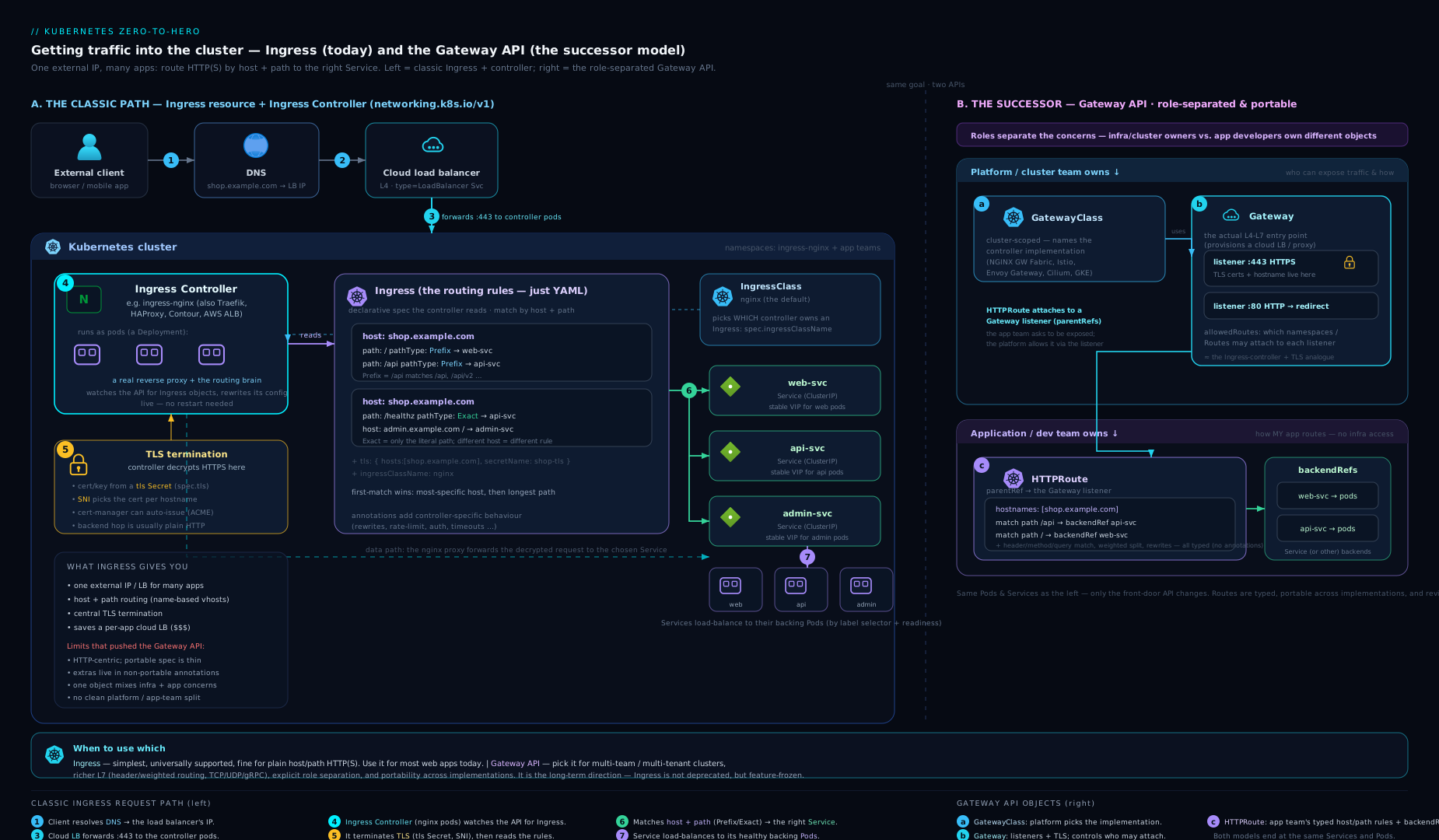
The diagram contrasts the two models: on the left, a client reaches one LoadBalancer and Ingress controller that fans out by host/path to Services; on the right, the Gateway API’s GatewayClass → Gateway → HTTPRoute chain shows the same traffic split across infrastructure-owned and app-owned objects.
The Gateway API: Ingress’s successor
The Gateway API is a newer, official Kubernetes networking standard (under the gateway.networking.k8s.io group, GA for HTTP since v1.0 in late 2023) designed to replace Ingress for new work. It keeps the same job — get external traffic to Services — but fixes Ingress’s three structural weaknesses: it is role-oriented, expressive without annotations, and extensible (HTTP, gRPC, TCP, TLS, UDP). Ingress is not deprecated and remains supported, but the project steers new, advanced use cases to the Gateway API.
It splits the one Ingress object into several resources owned by different roles — the central design idea:
| Resource | Owned by (persona) | What it represents | Analogue |
|---|---|---|---|
GatewayClass |
Infrastructure provider / cluster admin | The type of gateway, backed by a controller (like a StorageClass for networking) | IngressClass |
Gateway |
Cluster operator | An actual deployed load balancer / listener — IP, ports, protocols, TLS, allowed routes | The LB + controller that an Ingress implies |
HTTPRoute |
Application developer | The routing rules — hosts, paths, headers, methods, backends, traffic splitting | The rules inside an Ingress |
TLSRoute / TCPRoute / GRPCRoute / UDPRoute |
App developer | Routing for non-HTTP protocols | (No Ingress equivalent) |
ReferenceGrant |
Namespace owner | Explicitly permits cross-namespace references (e.g. a Route in ns A targeting a Service/Gateway in ns B) | (Ingress cannot cross namespaces at all) |
A minimal Gateway + HTTPRoute:
apiVersion: gateway.networking.k8s.io/v1
kind: Gateway
metadata:
  name: prod-gateway
  namespace: infra
spec:
  gatewayClassName: nginx              # which GatewayClass (controller)
  listeners:
  - name: https
    protocol: HTTPS
    port: 443
    tls:
      mode: Terminate
      certificateRefs:
      - name: shop-tls                 # the kubernetes.io/tls Secret
    allowedRoutes:
      namespaces:
        from: Selector                 # which namespaces may attach Routes
        selector:
          matchLabels: { team: web }
---
apiVersion: gateway.networking.k8s.io/v1
kind: HTTPRoute
metadata:
  name: shop-route
  namespace: web
spec:
  parentRefs:
  - name: prod-gateway                 # attach to the Gateway above
    namespace: infra
  hostnames: ["shop.example.com"]
  rules:
  - matches:
    - path: { type: PathPrefix, value: /api }
      headers:                         # match on headers — no annotations needed
      - name: x-canary
        value: "true"
    backendRefs:
    - name: shop-api
      port: 8080
      weight: 90                       # built-in traffic splitting
    - name: shop-api-canary
      port: 8080
      weight: 10
Why the role separation matters: the platform team owns the Gateway (the shared, security-sensitive entry point — IPs, certificates, which namespaces may attach), while each app team owns its own HTTPRoute in its own namespace. The Gateway controls who may attach via allowedRoutes; cross-namespace links require an explicit ReferenceGrant. Capabilities that needed proprietary annotations in Ingress — header/method matching, request mirroring, weighted traffic splitting, header rewrites, redirects, request/response header modification — are first-class, typed, portable fields here.
When to use which
| Situation | Recommended | Why |
|---|---|---|
| Simple host/path routing, existing setup | Ingress | Mature, ubiquitous, every controller supports it; don’t migrate for nothing |
| Brand-new platform, advanced routing | Gateway API | Portable header/traffic-split features, clean role separation |
| Multi-team / multi-tenant cluster | Gateway API | Platform owns Gateway; teams own HTTPRoute; explicit cross-ns grants |
| Canary / blue-green by weight or header | Gateway API | Built-in weight and header matching — no annotation hacks |
| Non-HTTP (raw TCP/UDP/TLS) routing | Gateway API | TCPRoute/UDPRoute/TLSRoute; Ingress is HTTP-only |
| Heavy reliance on existing nginx annotations | Ingress (for now) | Migration means re-expressing every annotation as Gateway fields |
The honest summary: Ingress is the present and is going nowhere soon; the Gateway API is the future and the right default for new, non-trivial routing. Many controllers (ingress-nginx, Traefik, Contour/Envoy Gateway, cloud controllers) already implement both.
Hands-on lab
You will install the ingress-nginx controller on a local cluster, route two apps behind one address by path, then add TLS — all free, no cloud.
1. Create a cluster with an ingress-ready port mapping (kind)
kind needs explicit port mapping so the controller is reachable from your laptop:
cat <<'EOF' | kind create cluster --name ingress-lab --config=-
kind: Cluster
apiVersion: kind.x-k8s.io/v1alpha4
nodes:
- role: control-plane
  kubeadmConfigPatches:
  - |
    kind: InitConfiguration
    nodeRegistration:
      kubeletExtraArgs:
        node-labels: "ingress-ready=true"
  extraPortMappings:
  - containerPort: 80
    hostPort: 80
    protocol: TCP
  - containerPort: 443
    hostPort: 443
    protocol: TCP
EOF
(On minikube instead: minikube start then minikube addons enable ingress — it installs ingress-nginx for you; skip step 2.)
2. Install the ingress-nginx controller
kubectl apply -f https://raw.githubusercontent.com/kubernetes/ingress-nginx/main/deploy/static/provider/kind/deploy.yaml

# Wait until the controller is ready
kubectl wait --namespace ingress-nginx \
  --for=condition=ready pod \
  --selector=app.kubernetes.io/component=controller \
  --timeout=120s
Confirm the IngressClass was created:
kubectl get ingressclass
# NAME    CONTROLLER             PARAMETERS   AGE
# nginx   k8s.io/ingress-nginx   <none>       30s
3. Deploy two tiny apps + Services
kubectl create deployment web   --image=hashicorp/http-echo --replicas=1 -- /http-echo -text="hello from WEB"
kubectl create deployment apiapp --image=hashicorp/http-echo --replicas=1 -- /http-echo -text="hello from API"

kubectl expose deployment web    --port=80 --target-port=5678
kubectl expose deployment apiapp --port=80 --target-port=5678
kubectl wait --for=condition=available deployment/web deployment/apiapp --timeout=60s
4. Create the Ingress (path routing, one host)
cat <<'EOF' | kubectl apply -f -
apiVersion: networking.k8s.io/v1
kind: Ingress
metadata:
  name: demo
  annotations:
    nginx.ingress.kubernetes.io/rewrite-target: /
spec:
  ingressClassName: nginx
  rules:
  - host: demo.localdev.me        # resolves to 127.0.0.1 automatically
    http:
      paths:
      - path: /api
        pathType: Prefix
        backend:
          service: { name: apiapp, port: { number: 80 } }
      - path: /
        pathType: Prefix
        backend:
          service: { name: web, port: { number: 80 } }
EOF
5. Test routing
curl http://demo.localdev.me/        # -> hello from WEB
curl http://demo.localdev.me/api     # -> hello from API
*.localdev.me is a public DNS name that resolves to 127.0.0.1, so no /etc/hosts edit is needed. The /api request hits the longer-matching /api Prefix rule; everything else falls to /.
6. Inspect and validate
kubectl get ingress demo            # ADDRESS should populate (localhost)
kubectl describe ingress demo       # see rules, backends, and any events
kubectl describe is your first debugging stop — it shows the parsed rules, the resolved backends, and warning events (e.g. a missing Service).
7. Add TLS (self-signed, for the lab)
openssl req -x509 -nodes -days 365 -newkey rsa:2048 \
  -keyout tls.key -out tls.crt \
  -subj "/CN=demo.localdev.me" -addext "subjectAltName=DNS:demo.localdev.me"

kubectl create secret tls demo-tls --cert=tls.crt --key=tls.key

kubectl patch ingress demo --type merge -p \
  '{"spec":{"tls":[{"hosts":["demo.localdev.me"],"secretName":"demo-tls"}]}}'

curl -k https://demo.localdev.me/    # -k accepts the self-signed cert -> hello from WEB
In production you would replace this self-signed Secret with a cert-manager ClusterIssuer + the cert-manager.io/cluster-issuer annotation, and the Secret would be created and renewed for you.
Cleanup
kind delete cluster --name ingress-lab
# (minikube: minikube delete)
rm -f tls.key tls.crt
Cost note: entirely free — kind/minikube and the controller run in local containers. No cloud load balancer is provisioned, so there is no bill. In a real cloud, the controller’s one LoadBalancer Service is the cost, shared across all your Ingresses — which is the whole economic point of Ingress.
Going deeper
Everything above is enough to ship. This section is for the reader who wants to know how the receptionist actually works, where it breaks at scale, and why the whole model is quietly being replaced. None of it is required to pass the exam — but it is what separates “I can write an Ingress” from “I run the edge for a platform.”
What the controller actually does: the reconcile loop
An Ingress controller is a control loop, exactly like the built-in Kubernetes controllers. It opens watches against the API server for several object kinds at once — Ingress, IngressClass, Service, EndpointSlice (the Pod IPs behind each Service), Secret (for TLS), and often ConfigMap (its own tunables) — and reacts to every add/update/delete. On each change it rebuilds an in-memory model of “which host + path should go to which set of Pod IPs,” renders that model into a proxy configuration, and applies it. For ingress-nginx the rendered artifact is literally an nginx.conf; for Traefik or Contour it is Envoy/Traefik’s dynamic config.
The subtlety that matters in production is what triggers a reload versus a hot update:
| Change | ingress-nginx behaviour | Why it matters |
|---|---|---|
| A Pod scales up/down (EndpointSlice change) | Hot — the embedded Lua (OpenResty) updates the upstream server list in memory, no nginx reload |
Endpoint churn is constant in a busy cluster; reloading on every Pod change would be catastrophic |
| A new/edited Ingress, host, path, or most annotations | Full nginx -s reload — regenerate and re-exec workers |
Reloads drain old worker processes; in-flight long connections and some keep-alives can drop |
| A TLS Secret’s cert rotates | Cert is re-read into the SNI map, typically without a structural reload | cert-manager renewals therefore don’t cause churn |
This is why a “reload storm” — hundreds of Ingress edits landing at once (a big GitOps sync, a namespace-wide rollout) — can spike controller CPU and momentarily disrupt connections. The mitigations are real operational levers: batch/debounce config changes, raise worker-shutdown-timeout so draining is graceful, and shard Ingresses across multiple controllers (below). Controllers run multiple replicas for availability, but only one holds a leader-election lease to write status.loadBalancer.ingress back onto your Ingress objects — so an empty ADDRESS can also mean “the leader can’t reach the API,” not just “no LoadBalancer.”
Running multiple controllers (and why you would)
IngressClass is not just paperwork — it is the sharding key. A common production layout runs two controllers: an internet-facing one and an internal-only one (private LB, reachable only from the VPC), each with its own class:
apiVersion: networking.k8s.io/v1
kind: IngressClass
metadata:
  name: external-nginx
spec:
  controller: k8s.io/ingress-nginx
---
apiVersion: networking.k8s.io/v1
kind: IngressClass
metadata:
  name: internal-nginx
spec:
  controller: k8s.io/internal-ingress-nginx   # a 2nd install with its own --controller-class
The second controller install must be given a distinct --controller-class value (here k8s.io/internal-ingress-nginx) so the two do not fight over the same Ingresses; each adopts only the class whose spec.controller matches its own. An app then chooses its blast radius purely by setting ingressClassName: internal-nginx or external-nginx. Other sharding dimensions: --watch-namespace (a controller per tenant), and label/annotation selectors. Sharding is how large clusters keep any single controller’s config small enough to render and reload quickly.
TLS, SNI and cert-manager, one layer down
When a browser opens https://shop.example.com, the hostname travels in cleartext inside the TLS ClientHello as the SNI extension — before any certificate is chosen. The controller keeps an in-memory map of hostname → certificate built from every spec.tls[] block across all Ingresses, looks up the SNI value, and presents the matching cert. No SNI match ⇒ it serves the default certificate, which on a fresh ingress-nginx is the self-signed “Kubernetes Ingress Controller Fake Certificate.” Seeing that name in a browser is a near-certain sign that your tls.hosts, rules.host, and the certificate’s SAN do not all agree — not that certificate generation failed.
cert-manager automates the cert half via ACME, and the choice of solver has real trade-offs worth knowing before you pick one:
| ACME challenge | How it proves ownership | Can do wildcards? | Needs | Typical use |
|---|---|---|---|---|
| HTTP-01 | Serves a token at http://<host>/.well-known/acme-challenge/… via your Ingress |
No — one exact host at a time | Port 80 reachable from the internet | The default; simplest for public single hosts |
| DNS-01 | Publishes a TXT record under _acme-challenge.<host> |
Yes (*.example.com) |
API credentials for your DNS provider | Wildcards, or when port 80 is closed / behind a private LB |
The flow: you create an Issuer (namespaced) or ClusterIssuer (cluster-wide) pointing at Let’s Encrypt, annotate the Ingress with cert-manager.io/cluster-issuer, and cert-manager watches it, solves the challenge, writes the kubernetes.io/tls Secret named in spec.tls[].secretName, and renews it ~30 days before expiry — at which point the controller hot-reloads the new cert into its SNI map with no downtime.
pathType precedence, exactly
The spec’s rule is: among all matching paths across all rules, the controller picks the longest matching path; at equal length, Exact beats Prefix. But ImplementationSpecific deliberately hands precedence back to the controller, and this is where portability quietly ends. In ingress-nginx, Prefix/Exact are translated into ordered location blocks, while regex routing is only enabled when you use rewrite-target or use-regex: "true" — and once regex is in play, order and specificity are nginx’s, not the spec’s. Two more real edge cases: matching is case-sensitive for Exact; and a request to /api/ (trailing slash) matches a Prefix: /api but a bare Exact: /api will not match /api/. If precedence ever surprises you, kubectl exec into the controller Pod and read the generated nginx.conf — the truth is always in the rendered config, not the Ingress YAML.
Annotations are a config-smuggling escape hatch
Every feature the core API cannot express is stuffed into a string annotation the controller parses. Two that are worth understanding mechanically, because the Gateway API replaces exactly them:
- Canary / traffic splitting in ingress-nginx is not a field — you create a second Ingress for the same host+path marked
nginx.ingress.kubernetes.io/canary: "true"pluscanary-weight: "10"(orcanary-by-header), and the controller diverts that percentage to the canary’s backend. Powerful, but it is two objects pretending to be one route, with weight buried in a string. - Rate limiting (
limit-rps,limit-connections) is enforced per nginx worker process, per client IP using nginx’s leaky-bucket zones — so the real global limit is roughlylimit-rps × workers, and it resets when the config reloads. It is a blunt instrument, fine for crude abuse protection, wrong for billing-grade quotas (use an API gateway for those).
The pattern to notice: both are legitimate needs expressed as untyped, unvalidated, controller-specific strings. That is the core design smell the successor API sets out to fix.
Default backend, custom error pages
defaultBackend catches requests that match no rule. Beyond a friendly 404, controllers can route specific status codes to a custom Service via custom-http-errors, letting you serve branded, monitored error pages:
apiVersion: networking.k8s.io/v1
kind: Ingress
metadata:
  name: shop-ingress
  namespace: web
  annotations:
    nginx.ingress.kubernetes.io/custom-http-errors: "404,503"
spec:
  ingressClassName: nginx
  defaultBackend:
    service:
      name: error-pages
      port:
        number: 80
  rules:
  - host: shop.example.com
    http:
      paths:
      - path: /
        pathType: Prefix
        backend:
          service:
            name: shop-frontend
            port:
              number: 80
Note the honesty gap flagged in the field table earlier: per-Ingress defaultBackend is honoured inconsistently — some controllers only respect a single controller-wide default backend set at install time. Test yours; don’t assume.
The migration story: Ingress → Gateway API
Here is the state of play, stated plainly. The Ingress API is effectively frozen — it is stable at networking.k8s.io/v1, but SIG Network adds no new features to it; all new networking work goes to the Gateway API. Ingress is not deprecated and will not be removed — it is far too widely deployed — but it is done growing. For moving existing config, the community ships ingress2gateway (under kubernetes-sigs/), a CLI that converts Ingress resources — and some provider-specific annotations — into equivalent Gateway + HTTPRoute objects you can review and apply. It gets you 80% of the way; the annotation-heavy 20% (custom snippets, exotic rewrites) still needs hand-translation. For the full mechanics of GatewayClass/Gateway/HTTPRoute, weighted splits, and a staged migration, see the dedicated lesson: Adopting the Kubernetes Gateway API.
Why Ingress is being superseded — the honest three: (1) annotations are an unversioned, untyped, per-controller config channel that defeats portability and validation; (2) a single object conflates roles — the LB/IP/cert concerns a platform team owns are mixed with the routes an app team owns, which is painful in multi-tenant clusters; (3) it is HTTP(S)-only with no first-class traffic splitting, header/method matching, or request mirroring. The Gateway API answers all three with typed fields and role-separated resources. That is the whole case — not that Ingress is bad, but that it hit its ceiling.
Scale and security notes for the edge
At scale, the numbers to watch are: count of Ingresses per controller (config render + reload time grows with it), reload frequency (debounce it), SNI map size (thousands of certs is a lot of memory), and EndpointSlice churn (the hot-path that dynamic reconfiguration exists to protect). On security, the controller is your internet edge and has historically been a juicy target: snippet annotations (configuration-snippet, server-snippet) let an Ingress inject raw nginx config, which is an injection/RCE surface — recent ingress-nginx releases default allow-snippet-annotations to false and add --enable-annotation-validation precisely because of this. The March 2025 “IngressNightmare” vulnerabilities (CVE-2025-1974 and related) allowed unauthenticated remote code execution through the ingress-nginx admission controller, forcing emergency patching across the industry — a standing reminder to pin the controller version, watch its CHANGELOG, restrict who may create Ingresses, and keep the edge patched.
Common mistakes & troubleshooting
| Symptom | Likely cause | Fix |
|---|---|---|
Ingress created but ADDRESS stays empty and nothing routes |
No controller installed, or ingressClassName set to a class no controller owns, or no default class |
Install a controller; set ingressClassName to the real class (kubectl get ingressclass) |
404 Not Found from “nginx” on every path |
Request Host doesn’t match any rules[].host, or no rule/path matches and no default backend |
Match the host exactly, or add a host-less rule / defaultBackend |
/apifoo unexpectedly 404s under a /api Prefix |
Prefix matches path elements, not raw string prefixes |
Use the correct path; add an explicit rule for the other path |
| Browser shows “Fake Certificate” / cert warning | TLS host didn’t match a spec.tls[].hosts entry, so the controller served its default cert |
Ensure tls.hosts, rules.host, and the cert SAN all agree |
413 Request Entity Too Large on uploads |
Default body-size limit (~1m on nginx) | nginx.ingress.kubernetes.io/proxy-body-size: 50m |
504 Gateway Time-out on slow endpoints |
Default proxy read timeout (~60s) | Raise proxy-read-timeout / proxy-send-timeout |
| Two Ingresses for the same host conflict | Overlapping host/path across Ingresses | Consolidate, or use distinct paths; check controller merge behaviour |
| Annotation has no effect | Wrong controller prefix (e.g. nginx.* on Traefik) or typo |
Use your controller’s annotation namespace; verify spelling |
Backend Service “not found” in describe |
Service in a different namespace, wrong name, or wrong port | Ingress backends must be same-namespace; fix name/port |
Common beginner mistakes
The table above is symptom → fix. This list is different: these are the mental-model errors — the wrong belief underneath the symptom. Fix the belief and the symptom never comes back.
-
“I applied the Ingress, so traffic should route now.” The misconception is that an
Ingressdoes something. It does not — it is data, a list of rules. Right model: rules need a reader. Install an Ingress controller, confirmkubectl get ingressclassreturns a class, and setingressClassNameto it. An Ingress with no controller is a note left for a receptionist who was never hired. -
“
ingressClassNameis optional, there’s always a default.” Sometimes there is; often there isn’t. IfingressClassNameis unset and noIngressClassis annotatedis-default-class: "true", no controller adopts your Ingress and it silently does nothing. Right model: always name the class explicitly; treat the default as a convenience that may not exist and may change under you. -
“
Prefix: /apimatches anything starting with/api.” It does not match/apifoo.Prefixcompares path elements split on/, not raw string prefixes. Right model: think of the path as folders —/apiowns the/apifolder and everything inside it (/api,/api/,/api/v1), but/apifoois a different folder. When you truly want string/regex matching, that isImplementationSpecificwith your controller’s regex support, deliberately chosen. -
“I copied these
nginx.ingress.kubernetes.io/*annotations, they’ll work on Traefik too.” Annotations are controller-specific vocabulary. An nginx annotation is invisible to Traefik, HAProxy, or a cloud controller — it is not an error, it is simply ignored, which is worse because it fails silently. Right model: the coreIngressfields are portable; annotations are dialect. Always check your controller’s annotation namespace and docs. -
“My cert is broken — the browser shows a warning.” Usually the certificate is fine; the host didn’t match. If the request’s SNI/
Hostisn’t listed in anyspec.tls[].hosts, the controller serves its default “Fake Certificate.” Right model: for HTTPS to work, three things must name the same host —spec.tls[].hosts, the matchingrules[].host, and the certificate’s SAN. A warning almost always means one of the three disagrees. -
“I’ll put the TLS Secret wherever is convenient.” The Secret must be type
kubernetes.io/tlsand live in the same namespace as the Ingress (not the controller’s namespace, not a shared one). Right model: Ingress is namespaced and reads only Secrets beside it; a perfect certificate in the wrong namespace is invisible to it. -
“One Ingress can point at Services in other namespaces.” It cannot. An Ingress backend must be a Service in the same namespace — a deliberate safety boundary. Right model: one Ingress per namespace for that namespace’s Services; genuine cross-namespace routing is a Gateway-API feature gated by an explicit
ReferenceGrant. -
“The controller gave me an IP, so
shop.example.comworks now.” The IP is real, but the DNS for your hostname still has to point at it — Kubernetes does not touch your public DNS. Right model: Ingress terminates at an IP/hostname you must publish yourself (anA/CNAMErecord). In the lab,*.localdev.meandcurl --resolvefake this for you; production does not.
Best practices
- Always set
ingressClassNameexplicitly. Relying on an implicit default is the top cause of “my Ingress does nothing” and breaks the moment the default changes. - Use
Prefixfor subtrees,Exactfor single endpoints. Reach forImplementationSpecificonly when you genuinely need controller-native regex — and document it. - One hostname, one purpose. Keep host/path layouts predictable; avoid deep overlapping prefixes that make precedence hard to reason about.
- Automate TLS with cert-manager + a
ClusterIssuer. Never hand-rotate production certs; let ACME renew them. - Pin the controller version and watch its CHANGELOG. ingress-nginx in particular has had behaviour and security-relevant changes; upgrade deliberately.
- Keep annotations minimal and reviewed. Each one is controller lock-in; capture intent in comments so a future migration is feasible.
- For new, multi-team, or advanced routing, start on the Gateway API. Role separation and typed traffic-splitting beat annotation sprawl.
- Run a custom
defaultBackendso unmatched traffic gets a friendly, monitored 404 rather than the controller’s generic page.
Security notes
- TLS Secrets are sensitive. They hold private keys. Lock down RBAC on Secrets in the Ingress namespace; prefer cert-manager-issued, short-lived certs over long-lived static ones.
- Treat the Ingress controller as your edge. It is internet-facing — keep it patched, restrict the
LoadBalancersource ranges where possible, and front it with a WAF / DDoS protection for public workloads. - Beware annotation-based features that execute config. Some controllers historically allowed snippet annotations (raw nginx config) that became injection vectors; ingress-nginx now restricts these. Disable snippet annotations unless you truly need them, and never let untrusted users create Ingresses with them.
- Enforce who can create Ingresses. In multi-tenant clusters, an Ingress is a way to expose services publicly — gate it with RBAC and admission policies (e.g. require an allow-listed host suffix).
- Validate cross-namespace exposure. Ingress can’t cross namespaces (a safety feature); the Gateway API can, but only via an explicit
ReferenceGrant— review those grants like firewall rules. - Redirect HTTP to HTTPS and enable HSTS. Don’t serve sensitive apps over plaintext; most controllers redirect automatically once a TLS block exists.
Interview & exam questions
-
Why isn’t a
LoadBalancerService enough for ten public web apps? It is Layer 4: one LB/IP per Service, noHost/path routing, no shared TLS. You’d pay for ten load balancers. Ingress gives one Layer-7 entry point routing by host and path with shared TLS. -
What’s the relationship between an
Ingressresource and an Ingress controller? The resource is just rules (data); it does nothing alone. The controller is a running proxy that watches Ingress resources and reconfigures itself to route traffic. Kubernetes ships the API but no controller — you install one. -
Explain the three
pathTypevalues.Exact= the path must equal exactly.Prefix= match by path elements (so/apicovers/apiand/api/xbut not/apifoo).ImplementationSpecific= the controller decides (often regex). Onnetworking.k8s.io/v1,pathTypeis mandatory. -
Given
/(Prefix) and/api(Prefix), where does/api/v1go, and why? To the/apibackend — controllers pick the longest matching path; YAML order is irrelevant. -
How does an Ingress select its controller, and what’s the most common reason “nothing happens”? Via
spec.ingressClassName→ anIngressClass→ a controller; if unset, the default class is used. IfingressClassNameis unset and there’s no default class, no controller adopts it. (The oldkubernetes.io/ingress.classannotation is deprecated.) -
How does one IP serve HTTPS for many hostnames? SNI — the client sends the hostname in the TLS handshake, so the controller selects the right certificate per host. That enables name-based HTTPS virtual hosting behind a single IP.
-
What must a TLS Secret for Ingress look like, and where must it live? Type
kubernetes.io/tlswith keystls.crtandtls.key, in the same namespace as the Ingress. -
What does cert-manager do for Ingress? It watches annotated Ingresses, performs ACME (e.g. Let’s Encrypt) challenges, and creates and auto-renews the
kubernetes.io/tlsSecret named inspec.tls, giving free, automatic certificates. -
Why are Ingress annotations a portability risk? They’re controller-specific (
nginx.ingress.kubernetes.io/*is meaningless to Traefik). Heavy annotation use locks you to one controller and complicates migration. -
What problems does the Gateway API solve over Ingress? Role separation (
GatewayClass/Gateway/HTTPRouteowned by different personas), typed/portable features (header & method matching, weighted traffic splitting, rewrites) instead of annotations, multi-protocol support (TCP/UDP/TLS/gRPC), and controlled cross-namespace routing viaReferenceGrant. -
Map the Gateway API objects to their Ingress equivalents.
GatewayClass≈IngressClass;Gateway≈ the LB+controller an Ingress implies;HTTPRoute≈ therulesin an Ingress.ReferenceGranthas no Ingress equivalent (Ingress can’t cross namespaces). -
Is Ingress deprecated now that the Gateway API is GA? No. Ingress is stable and widely supported; the Gateway API is the recommended path for new and advanced use cases. Many controllers implement both.
Quick check
- True or false: applying an
Ingresswith no controller installed will start routing traffic. - Which
pathTypematches by URL path elements:Exact,Prefix, orImplementationSpecific? - With rules
/(Prefix) and/shop(Prefix), which backend serves/shop/cart? - What two keys must a
kubernetes.io/tlsSecret contain? - In the Gateway API, which object does an application developer typically own?
Answers
- False. The Ingress is inert until an Ingress controller is installed to read and act on it.
Prefix— element-wise matching (so/api≠/apifoo).- The
/shopbackend — longest matching path wins, regardless of YAML order. tls.crtandtls.key.- The
HTTPRoute(the routing rules); the platform team owns theGateway, the provider owns theGatewayClass.
Practice challenges
Work these in order — each builds on the last. Try to answer before opening the solution. They escalate from “prove you understand the model” to “run canary and multi-controller setups.” Commands assume the lab cluster from the Hands-on section and a namespace shop (kubectl create ns shop).
Challenge 1 (beginner) — Diagnose “nothing routes.” You applied an Ingress and kubectl get ingress shows an empty ADDRESS. Name the single command that most quickly reveals the root cause, and give the two-line fix.
<details> <summary>Solution</summary>
kubectl get ingressclass # empty output => no controller is installed
If it returns no rows, no controller exists, so nothing can adopt your Ingress. Fix: install a controller (e.g. the ingress-nginx kind manifest from the lab), then ensure your Ingress sets ingressClassName: nginx. Why: the Ingress is inert rules; the empty ADDRESS means no controller ever claimed it.
</details>
Challenge 2 (beginner) — Write a one-host, one-path Ingress. In namespace shop, route host store.localdev.me, path / (Prefix) to Service web on port 80.
<details> <summary>Solution</summary>
apiVersion: networking.k8s.io/v1
kind: Ingress
metadata:
  name: store
  namespace: shop
spec:
  ingressClassName: nginx
  rules:
  - host: store.localdev.me
    http:
      paths:
      - path: /
        pathType: Prefix
        backend:
          service:
            name: web
            port:
              number: 80
Why: / with Prefix is the catch-all root; ingressClassName is set explicitly so a controller adopts it regardless of any default class.
</details>
Challenge 3 (intermediate) — Predict pathType routing. An Ingress has three paths on one host: / (Prefix → web), /api (Prefix → api), /api/health (Exact → health). For each request, name the backend: /api, /api/health, /api/health/, /apixyz.
<details> <summary>Solution</summary>
/api→api(matches/apiPrefix; no longer match exists)./api/health→health(theExactmatch wins — equal-or-longer andExactis preferred)./api/health/→api(the trailing slash means it does not equal theExact: /api/health; it falls back to the longest matching Prefix,/api)./apixyz→web(Prefix is element-wise, so/apidoes not cover/apixyz; only/matches).
Why: longest matching path wins, Exact beats Prefix at equal length, and Prefix matches whole path segments — the classic exam trap.
</details>
Challenge 4 (intermediate) — Add TLS and force HTTPS. Extend the store Ingress to serve HTTPS for store.localdev.me using an existing Secret store-tls, and redirect all HTTP to HTTPS.
<details> <summary>Solution</summary>
apiVersion: networking.k8s.io/v1
kind: Ingress
metadata:
  name: store
  namespace: shop
  annotations:
    nginx.ingress.kubernetes.io/ssl-redirect: "true"
spec:
  ingressClassName: nginx
  tls:
  - hosts:
    - store.localdev.me
    secretName: store-tls
  rules:
  - host: store.localdev.me
    http:
      paths:
      - path: /
        pathType: Prefix
        backend:
          service:
            name: web
            port:
              number: 80
Why: the tls block turns on HTTPS termination for that host (ingress-nginx redirects HTTP→HTTPS automatically once a TLS block exists; the annotation makes the intent explicit). The Secret must be type kubernetes.io/tls and live in shop.
</details>
Challenge 5 (advanced) — Canary by weight, two ways. Send 10% of traffic for api.localdev.me to api-v2 and 90% to api, using ingress-nginx annotations. Then show the Gateway API equivalent and note what changed.
<details> <summary>Solution</summary>
ingress-nginx needs two Ingress objects for the same host/path — a stable one and a canary one:
apiVersion: networking.k8s.io/v1
kind: Ingress
metadata:
  name: api-stable
  namespace: shop
spec:
  ingressClassName: nginx
  rules:
  - host: api.localdev.me
    http:
      paths:
      - path: /
        pathType: Prefix
        backend:
          service:
            name: api
            port:
              number: 80
---
apiVersion: networking.k8s.io/v1
kind: Ingress
metadata:
  name: api-canary
  namespace: shop
  annotations:
    nginx.ingress.kubernetes.io/canary: "true"
    nginx.ingress.kubernetes.io/canary-weight: "10"
spec:
  ingressClassName: nginx
  rules:
  - host: api.localdev.me
    http:
      paths:
      - path: /
        pathType: Prefix
        backend:
          service:
            name: api-v2
            port:
              number: 80
The Gateway API expresses the same split as one typed route with weight fields:
apiVersion: gateway.networking.k8s.io/v1
kind: HTTPRoute
metadata:
  name: api
  namespace: shop
spec:
  parentRefs:
  - name: prod-gateway
  hostnames: ["api.localdev.me"]
  rules:
  - backendRefs:
    - name: api
      port: 80
      weight: 90
    - name: api-v2
      port: 80
      weight: 10
Why: in Ingress the split is smuggled into annotations across two objects; in the Gateway API it is a first-class weight field in a single route — the exact portability win the successor API was built for.
</details>
Challenge 6 (advanced) — Two controllers, one cluster. You need an internet-facing edge and an internal-only edge in the same cluster. Sketch the two IngressClass objects and explain how an app selects the internal one.
<details> <summary>Solution</summary>
apiVersion: networking.k8s.io/v1
kind: IngressClass
metadata:
  name: external-nginx
spec:
  controller: k8s.io/ingress-nginx
---
apiVersion: networking.k8s.io/v1
kind: IngressClass
metadata:
  name: internal-nginx
spec:
  controller: k8s.io/internal-ingress-nginx
Install two controllers; give the second a distinct --controller-class (k8s.io/internal-ingress-nginx) so it only adopts the internal-nginx class. An app then chooses its exposure with a single field: ingressClassName: internal-nginx. Why: IngressClass is the sharding key — each controller owns only the class whose spec.controller matches its own controller value, so the two never fight over the same Ingress.
</details>
Exercise
On a fresh local cluster:
- Install ingress-nginx and deploy three Services:
web,api, andadmin. - Create a single Ingress on host
app.localdev.methat routes/→web,/api→api(Prefix), and/admin→admin(useExacton/adminand observe that/admin/then misses — explain why). - Add a custom
defaultBackendthat serves a “not found” Service, and verify an unmatched path hits it. - Add TLS with a self-signed cert and force an HTTP→HTTPS redirect via the appropriate annotation; confirm with
curl -kvL. - Stretch: re-express the same routing using the Gateway API — install Envoy Gateway (or your controller’s Gateway implementation), create a
Gatewayin aninfranamespace and anHTTPRoutein the app namespace, attach them withparentRefs, and add a 90/10 weighted split betweenapiand a newapi-v2. Note which features needed annotations in Ingress but are native fields in the Gateway API.
Certification mapping
- CKAD — Application Environment, Configuration & Security / Services & Networking: expose applications, configure Ingress rules,
pathType, TLS Secrets, and choose Service vs Ingress. Expect to write a workingIngressquickly under time pressure. - CKA — Services & Networking (~20% of the exam): Ingress and Ingress controllers,
IngressClass, troubleshooting why an Ingress isn’t routing, and (increasingly) familiarity with the Gateway API objects. - CKS — Cluster Setup / Minimize Microservice Vulnerabilities: securing the edge — TLS termination, restricting snippet annotations, RBAC on Secrets, and admission control over who may create Ingresses.
Glossary
- Ingress — A namespaced Kubernetes object holding HTTP/HTTPS routing rules; inert without a controller.
- Ingress controller — A running reverse proxy (NGINX, Traefik, Envoy/Contour, cloud LB controllers…) that watches
Ingressresources and actually routes traffic. Not bundled with Kubernetes. - IngressClass — A resource binding an Ingress (via
ingressClassName) to a specific controller; one may be marked the cluster default. - pathType — How a rule’s
pathis matched:Exact,Prefix(element-wise), orImplementationSpecific. - defaultBackend — Where requests matching no rule are sent.
- SNI (Server Name Indication) — TLS extension carrying the hostname in the handshake, enabling one IP to serve many certificates.
- TLS termination — Decrypting HTTPS at the controller; traffic to Pods is plain HTTP unless re-encrypted.
- cert-manager — Add-on that issues and auto-renews TLS certificates (e.g. from Let’s Encrypt via ACME) and populates the TLS Secret.
- Name-based virtual hosting — Serving multiple hostnames on one IP, distinguished by the
Hostheader (and SNI for HTTPS). - Gateway API — The newer
gateway.networking.k8s.iostandard (GatewayClass/Gateway/HTTPRoute…) positioned as Ingress’s role-oriented, more expressive successor. - GatewayClass / Gateway / HTTPRoute — Provider-owned type / operator-owned deployed listener / developer-owned routing rules, respectively.
- ReferenceGrant — A Gateway API object that explicitly permits a cross-namespace reference.
- Reconcile loop (control loop) — The pattern every controller runs: watch objects via the API server, compare desired vs. actual, and act. An Ingress controller watches
Ingress/Service/EndpointSlice/Secretand re-renders its proxy config on each change. - EndpointSlice — The Kubernetes object listing the current Pod IPs behind a Service; the controller watches it so backend Pod scaling updates routing (hot, without a reload).
- Reload storm — A burst of Ingress/config changes forcing many proxy reloads at once, spiking controller CPU and risking dropped connections; mitigated by debouncing and sharding.
- Leader election — How multiple controller replicas coordinate: only the replica holding the lease writes
status.loadBalancer.ingressback to Ingress objects. - Layer 4 / Layer 7 (L4/L7) — L4 routes by IP/port (what a
LoadBalancerService does); L7 understands HTTP — hosts, paths, headers — which is what an Ingress controller adds. - ACME — The protocol (Automatic Certificate Management Environment) Let’s Encrypt uses to issue certificates automatically; driven by cert-manager.
- HTTP-01 / DNS-01 challenge — The two ways ACME proves you control a domain: serving a token over HTTP (single host, needs port 80) or publishing a DNS
TXTrecord (supports wildcards, needs DNS API access). - Issuer / ClusterIssuer — cert-manager objects describing how to obtain certs (ACME server + solver);
Issueris namespaced,ClusterIssueris cluster-wide. - Default (fake) certificate — The self-signed cert an Ingress controller serves when a request’s host matches no
spec.tls[]entry; the ingress-nginx one is literally named “Kubernetes Ingress Controller Fake Certificate.” - Canary (annotation-based) — In ingress-nginx, a weighted/header-based traffic split implemented as a second Ingress marked
canary: "true"— the ad-hoc predecessor to the Gateway API’s typedweightfield. - Snippet annotation — An annotation (
configuration-snippet,server-snippet) injecting raw proxy config into the controller; powerful but an injection/RCE risk, disabled by default in recent ingress-nginx. ingress2gateway— A Kubernetes SIG CLI that converts existingIngressresources (and some annotations) into equivalent Gateway APIGateway+HTTPRouteobjects to ease migration.
Next steps
- Take the successor seriously: move this same routing to
GatewayClass/Gateway/HTTPRoute, do weighted splits as typed fields, and plan a migration in Adopting the Kubernetes Gateway API. - Lock down who and what can talk to your workloads: Kubernetes RBAC & Service Accounts, In Depth.
- Revisit the layer beneath Ingress — Service types, EndpointSlices and DNS: Kubernetes Services & Networking, In Depth.
- See how stateful apps that sit behind Ingress get durable storage: Kubernetes Storage, In Depth: Volumes, PV, PVC & StorageClass.
- For the day-one mental model of Services and Deployments that Ingress builds on: Pods, ReplicaSets, Deployments & Services: The Core Objects.