Most teams stop learning CSI the moment a PVC binds. That is a mistake. The interesting half of the Container Storage Interface — snapshots, cloning, online expansion, and topology-aware placement — is exactly the half you reach for during an incident, a migration, or a 2 a.m. restore. This guide walks the full feature set with real manifests, the sidecars that make each feature work, and the failure modes that actually page you. Examples assume a cluster on Kubernetes 1.27+ with a modern CSI driver (the EBS, Disk CSI, GCE PD, and Ceph drivers all behave the same way here).
In a nutshell
CSI — the Container Storage Interface — is the plug standard that lets any storage vendor’s disks work with Kubernetes without Kubernetes shipping code for each one. The analogy is USB. Before USB, every peripheral needed a custom port and a driver baked into the computer. USB defined one socket, and now a keyboard, a webcam, and a 4 TB drive all just work in the same hole. CSI is USB for storage: AWS, Azure, Google, NetApp, Ceph, and Portworx each write one driver that speaks the CSI “socket,” and Kubernetes talks to all of them the same way.
Plugging a disk in is only the boring half. The interesting half — the half this lesson is about — is everything CSI unlocks once the plug is standardized: snapshots (a point-in-time copy you can restore from), clones (a brand-new volume seeded from an existing one), online resize (grow a disk while the app keeps running), and topology-aware provisioning (cut the disk in the same zone the Pod landed in, so they can actually attach). If you have only ever created a PVC and watched it bind, you have used maybe a fifth of what your storage driver can already do today.
Carry one mental model through the whole lesson: a CSI driver is not one thing. It is a node plugin that performs the physical mount on each machine, plus a set of small sidecar programs — one that provisions, one that attaches, one that snapshots, one that resizes — each watching one kind of Kubernetes object and translating it into a call to the vendor’s storage API. When a feature “does nothing,” it is almost always because its sidecar (or a missing CRD) is not installed. Keep that sentence in your pocket; it explains most of the surprises below.
Level: Intermediate–Advanced · Time: ~45 min
Prerequisites & what you’ll be able to do
You should already be comfortable with the basics from Kubernetes storage: Volumes, PV, PVC & StorageClass — what a PersistentVolumeClaim is, how it binds one-to-one to a PersistentVolume, and how a StorageClass drives dynamic provisioning. Familiarity with StatefulSets helps, since per-Pod storage is where these features earn their keep, as does the placement vocabulary from scheduling, affinity & topology spread. You do not need a live cluster to read along — every manifest here is real and schema-correct — but you will get the most out of it with a cluster and a modern CSI driver to try things on.
After this lesson you will be able to:
- Install the snapshot CRDs + controller and explain why they ship outside core Kubernetes.
- Take an application-consistent
VolumeSnapshotand restore a PVC from it. - Clone a live PVC and articulate exactly how a clone differs from a snapshot.
- Turn on
allowVolumeExpansion, grow a volume online, and say why you can never shrink one. - Choose
WaitForFirstConsumervsImmediatecorrectly and pin volumes to zones withallowedTopologies. - Diagnose the classic failures: snapshots stuck
readyToUse: false, cross-zone attach deadlock, and RWO Multi-Attach.
The whole feature set on one page
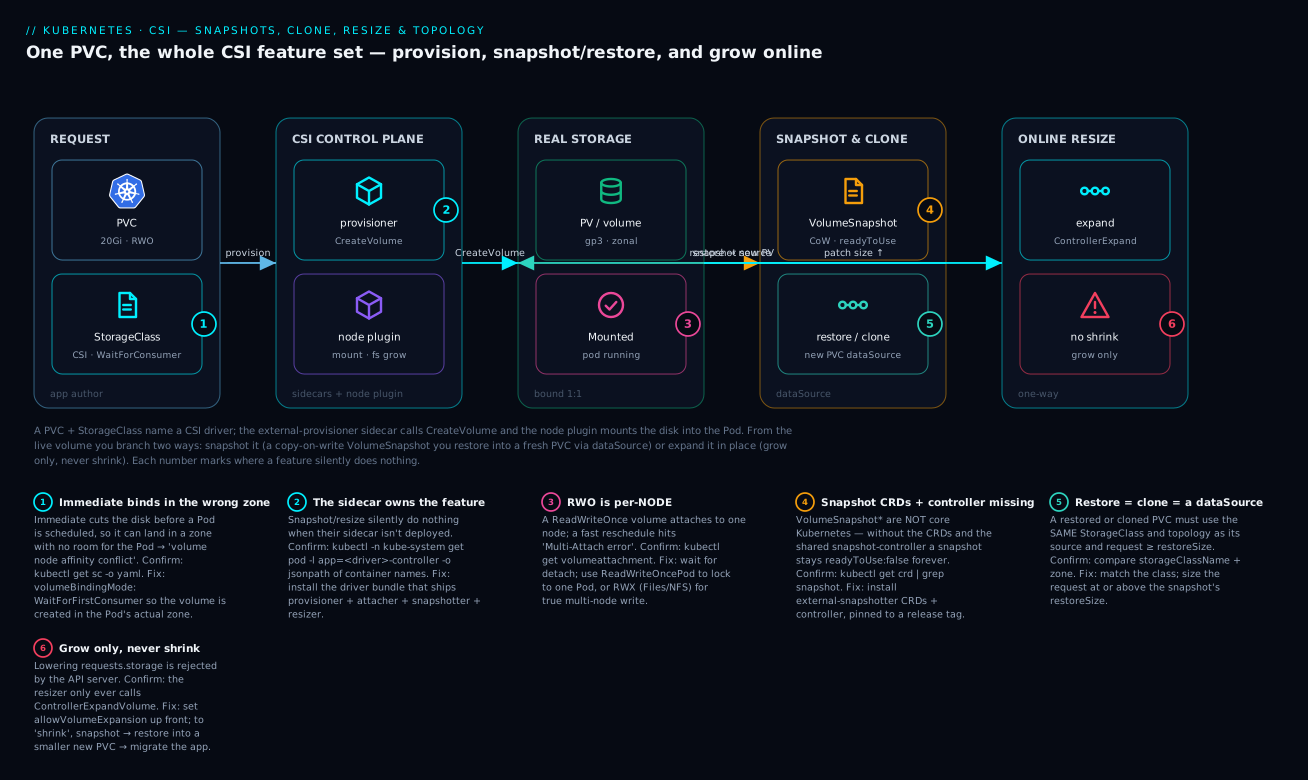
Read the diagram left to right. A PVC plus a StorageClass name a CSI driver; the external-provisioner sidecar calls CreateVolume and the node plugin mounts the resulting disk into your Pod (the middle “real storage” zone). From that live volume you branch two ways. Branch up: snapshot it — a copy-on-write VolumeSnapshot you later restore into a fresh PVC by pointing its dataSource at the snapshot. Branch down: expand it in place with a one-line patch — grow only, never shrink. The six numbered badges mark the exact spots where a feature silently does nothing: wrong binding mode, a missing sidecar, an RWO multi-attach, absent snapshot CRDs, a StorageClass mismatch on restore, and the shrink that the API will always reject. Every one of those is unpacked below.
1. The CSI architecture you actually need to understand
Before the reference table, the one-sentence version for newcomers: a “CSI driver” is really two cooperating halves — a cluster-level brain that talks to your cloud’s storage API, and a per-node hand that does the actual mounting — glued to Kubernetes by a handful of sidecar containers that each own exactly one feature. Learn which sidecar owns which feature and you can diagnose almost any storage surprise in one command.
A CSI driver is not one process. It is a node-level plugin (a DaemonSet that mounts volumes onto the host) plus a controller deployment that wraps the vendor’s CSI gRPC server with a set of Kubernetes-aware sidecar containers. Each sidecar watches one kind of object and translates it into a CSI call. You should know which sidecar owns which feature, because when a feature silently does nothing, the answer is almost always “that sidecar isn’t deployed or isn’t permitted.”
| Sidecar | Watches | CSI calls it drives | Feature it enables |
|---|---|---|---|
external-provisioner |
PVC / PV | CreateVolume, DeleteVolume |
Dynamic provisioning |
external-attacher |
VolumeAttachment | ControllerPublishVolume |
Attach/detach to nodes |
external-snapshotter |
VolumeSnapshotContent | CreateSnapshot, DeleteSnapshot |
Snapshots |
external-resizer |
PVC (spec change) | ControllerExpandVolume |
Online/offline resize |
node-driver-registrar |
(none) | NodeGetInfo registration |
Kubelet plugin registration |
livenessprobe |
(none) | Probe |
Health endpoint |
The mental model: the controller sidecars run as a Deployment (often leader-elected, replica 2+), and they only make controller-plane calls to your cloud’s storage API. The node side does the actual NodeStageVolume / NodePublishVolume mount work and is where filesystem resize physically happens. Snapshotter and resizer are optional — a driver can ship without them, which is the first thing to check before you debug for an hour.
# Which sidecars is your driver actually running?
kubectl -n kube-system get deploy,daemonset -l app.kubernetes.io/name=aws-ebs-csi-driver
kubectl -n kube-system get pod -l app=ebs-csi-controller -o jsonpath='{.items[0].spec.containers[*].name}'
# Expect: ebs-plugin csi-provisioner csi-attacher csi-snapshotter csi-resizer liveness-probe
Two cluster objects the driver registers, and why you care. When a driver installs, it creates a cluster-scoped CSIDriver object (advertises capabilities — does it need attach? does it track capacity? does it support fsGroup?) and one CSINode object per node (lists which drivers are healthy on that node and, crucially, the driver’s topology keys for that node). These are your ground truth. If a Pod won’t schedule its volume, kubectl get csinode <node> -o yaml tells you whether the driver is even registered there and what zone label it reports — you will need that exact key name in section 6.
kubectl get csidrivers
kubectl get csinode -o custom-columns='NODE:.metadata.name,DRIVERS:.spec.drivers[*].name'
2. Install the snapshot CRDs and controller (they ship outside core Kubernetes)
This trips up nearly everyone. VolumeSnapshot, VolumeSnapshotContent, and VolumeSnapshotClass are not part of core Kubernetes. They live in the external-snapshotter project and consist of two pieces you must install yourself unless your managed control plane already did it:
- The three CRDs.
- The snapshot-controller — a cluster-wide controller (one per cluster) that handles the common, vendor-independent snapshot logic and binds
VolumeSnapshottoVolumeSnapshotContent. This is distinct from the per-drivercsi-snapshottersidecar.
# Pin to a release tag — never apply from a moving branch in production.
SNAP_VERSION=v8.2.0
BASE=https://raw.githubusercontent.com/kubernetes-csi/external-snapshotter/${SNAP_VERSION}

# 1. CRDs
kubectl apply -f ${BASE}/client/config/crd/snapshot.storage.k8s.io_volumesnapshotclasses.yaml
kubectl apply -f ${BASE}/client/config/crd/snapshot.storage.k8s.io_volumesnapshotcontents.yaml
kubectl apply -f ${BASE}/client/config/crd/snapshot.storage.k8s.io_volumesnapshots.yaml

# 2. The shared snapshot-controller (RBAC + Deployment)
kubectl apply -f ${BASE}/deploy/kubernetes/snapshot-controller/rbac-snapshot-controller.yaml
kubectl apply -f ${BASE}/deploy/kubernetes/snapshot-controller/setup-snapshot-controller.yaml
Managed clusters differ. EKS requires you to install both CRDs and controller (the EBS CSI add-on ships only the sidecar). AKS and GKE install the controller and CRDs for you on recent versions. Run
kubectl get crd | grep snapshotbefore assuming anything. Mismatched CRDapiVersionbetween controller and sidecar is a classic cause of snapshots that stayreadyToUse: falseforever.
Why is it split into a shared controller and a per-driver sidecar? Because the vendor-neutral bookkeeping (validating the VolumeSnapshot, creating and binding the VolumeSnapshotContent, enforcing deletion policy) is identical for every driver, so it lives once in the cluster-wide snapshot-controller. Only the last mile — the actual CreateSnapshot gRPC call to AWS/Azure/GCP — is driver-specific, and that lives in the csi-snapshotter sidecar that ships inside each driver’s controller Pod. You need both present. A cluster with the CRDs and the shared controller but a driver whose Pod has no csi-snapshotter container will accept your VolumeSnapshot object and then never make it ready — exactly the silent failure from badge 2 on the diagram.
3. Define a VolumeSnapshotClass and take an application-consistent snapshot
A VolumeSnapshotClass is to snapshots what a StorageClass is to volumes: it names the driver and sets a deletion policy. Retain keeps the underlying cloud snapshot when the Kubernetes object is deleted; Delete garbage-collects it.
apiVersion: snapshot.storage.k8s.io/v1
kind: VolumeSnapshotClass
metadata:
  name: ebs-snapclass
driver: ebs.csi.aws.com
deletionPolicy: Retain
parameters:
  # Driver-specific. EBS tags the snapshot; useful for cost allocation and Velero.
  tagSpecification_1: "Name=k8s-csi-snapshot"
The three snapshot objects (and how they mirror PVC/PV/StorageClass)
The snapshot world is a deliberate copy of the volume world you already know. Internalize this table and nothing about snapshots will surprise you again:
| Volume world | Snapshot world | Scope | Who creates it | Role |
|---|---|---|---|---|
StorageClass |
VolumeSnapshotClass |
Cluster | You (once) | Names the driver + policy |
PersistentVolumeClaim |
VolumeSnapshot |
Namespaced | You (the request) | “I want a snapshot of this PVC” |
PersistentVolume |
VolumeSnapshotContent |
Cluster | Controller (dynamic) or you (pre-provisioned) | The actual cloud snapshot resource |
Just as a PVC binds one-to-one to a PV, a VolumeSnapshot binds one-to-one to a VolumeSnapshotContent. In the common dynamic flow you create only the namespaced VolumeSnapshot; the snapshot-controller creates the matching cluster-scoped VolumeSnapshotContent for you and records the real cloud snapshot ID in its status.snapshotHandle. The pre-provisioned flow is the mirror image of a statically-provisioned PV: you already have a cloud snapshot (say an EBS snap-… created by another tool) and you want Kubernetes to adopt it. You hand-write the VolumeSnapshotContent with the existing handle and point a VolumeSnapshot at it by name — no class needed:
# Adopt an existing cloud snapshot into Kubernetes (pre-provisioned).
apiVersion: snapshot.storage.k8s.io/v1
kind: VolumeSnapshotContent
metadata:
  name: imported-ebs-snap
spec:
  deletionPolicy: Retain
  driver: ebs.csi.aws.com
  source:
    snapshotHandle: snap-0123456789abcdef0   # a real, existing EBS snapshot ID
  volumeSnapshotRef:
    name: restored-from-import
    namespace: data
---
apiVersion: snapshot.storage.k8s.io/v1
kind: VolumeSnapshot
metadata:
  name: restored-from-import
  namespace: data
spec:
  # No volumeSnapshotClassName for pre-provisioned — bind by content name instead.
  source:
    volumeSnapshotContentName: imported-ebs-snap
Now the crisp distinction that matters in production: CSI does not freeze your application. A snapshot is crash-consistent — equivalent to pulling the power cord. For a database that is usually recoverable via WAL replay, but “usually” is not a backup strategy. For application consistency you quiesce the workload around the snapshot. The dependable pattern is a brief flush-and-lock:
# Application-consistent snapshot of a Postgres PVC.
# 1. Checkpoint so the on-disk state is current, then snapshot immediately.
kubectl exec -it postgres-0 -- psql -U postgres -c "CHECKPOINT;"

cat <<'EOF' | kubectl apply -f -
apiVersion: snapshot.storage.k8s.io/v1
kind: VolumeSnapshot
metadata:
  name: postgres-snap-2026-05-30
  namespace: data
spec:
  volumeSnapshotClassName: ebs-snapclass
  source:
    persistentVolumeClaimName: data-postgres-0
EOF
For stricter guarantees, use a brief filesystem freeze (fsfreeze -f / -u) or the engine’s hot-backup mode (pg_backup_start / pg_backup_stop) bracketing the kubectl apply. The snapshot call returns in milliseconds — the cloud copy-on-write happens afterward — so the lock window is short. Watch the object until it reports ready:
kubectl -n data get volumesnapshot postgres-snap-2026-05-30 \
  -o jsonpath='{.status.readyToUse} {.status.restoreSize}{"\n"}'
# true 20Gi
The three status fields worth knowing by heart: readyToUse (the driver confirmed the cloud snapshot exists), restoreSize (the minimum size any PVC you restore from it must request), and boundVolumeSnapshotContentName (the cluster-scoped object holding the real handle — the place to look when something is wrong).
4. Restore a PVC from a snapshot, and clone a live volume
Restore and clone are the same mechanism: a dataSource on a fresh PVC. The provisioner sees the reference and calls CreateVolume with a source instead of provisioning empty.
Restore from a snapshot — point dataSource at the VolumeSnapshot:
apiVersion: v1
kind: PersistentVolumeClaim
metadata:
  name: data-postgres-restored
  namespace: data
spec:
  storageClassName: ebs-sc
  dataSource:
    name: postgres-snap-2026-05-30
    kind: VolumeSnapshot
    apiGroup: snapshot.storage.k8s.io
  accessModes: ["ReadWriteOnce"]
  resources:
    requests:
      storage: 20Gi   # must be >= snapshot restoreSize
Clone a live PVC — point dataSource at the source PersistentVolumeClaim (no snapshot needed):
apiVersion: v1
kind: PersistentVolumeClaim
metadata:
  name: data-postgres-clone
  namespace: data
spec:
  storageClassName: ebs-sc
  dataSource:
    name: data-postgres-0
    kind: PersistentVolumeClaim
  accessModes: ["ReadWriteOnce"]
  resources:
    requests:
      storage: 20Gi
Two hard constraints that will bite you: the source and destination PVC must use the same StorageClass and (for most drivers) the same volume binding topology — you cannot clone an us-east-1a volume into a PVC that resolves to us-east-1b. And cloning copies live blocks, so the clone is crash-consistent against an active writer. Quiesce the source if you need the clone to be coherent.
Snapshot vs clone — pick the right one on purpose
They feel interchangeable; they are not. A snapshot is a stored artifact you can keep, restore many times, and (with a backup tool) move elsewhere. A clone is a one-shot new volume with no retained artifact. Use this table to choose:
| Restore from snapshot | Clone from PVC | |
|---|---|---|
dataSource.kind |
VolumeSnapshot |
PersistentVolumeClaim |
| Keeps a reusable artifact? | Yes — the snapshot persists | No — nothing retained |
| Restore N times? | Yes, from the one snapshot | No — one new volume per clone |
| Needs snapshot CRDs/controller? | Yes | No |
| Driver capability required | CREATE_DELETE_SNAPSHOT |
CLONE_VOLUME (separate!) |
| Typical use | Backup/restore, roll back, seed from a known-good point | Fast dev/test copy, fork a dataset now |
| Consistency | As good as the snapshot you took (quiesce first) | Crash-consistent vs a live writer |
The trap in that last row of capabilities: snapshot support and clone support are two independent driver capabilities. A driver can offer one and not the other. If a clone fails with no volume content source or the provisioner ignores your dataSource, check the driver docs before assuming a bug.
A note on dataSource vs dataSourceRef. The classic dataSource field only understands two kinds — PersistentVolumeClaim and VolumeSnapshot — and only within the same namespace. The newer dataSourceRef field (stable for same-namespace use since 1.24 via AnyVolumeDataSource) accepts any custom resource kind, which is how ecosystem tools populate volumes from their own CRDs (for example a VolumePopulator that seeds a disk from a container image or a remote backup). Cross-namespace dataSourceRef exists too but is still gated behind CrossNamespaceVolumeDataSource and needs a ReferenceGrant. For plain snapshot/clone, dataSource is fine; reach for dataSourceRef when a tool asks you to.
5. Enable allowVolumeExpansion and resize online
Set one field on the StorageClass and you unlock expansion. Note: this is one-way — you can grow a volume, never shrink it.
apiVersion: storage.k8s.io/v1
kind: StorageClass
metadata:
  name: ebs-sc
provisioner: ebs.csi.aws.com
allowVolumeExpansion: true        # the line that enables resize
volumeBindingMode: WaitForFirstConsumer
parameters:
  type: gp3
  csi.storage.k8s.io/fstype: ext4
reclaimPolicy: Delete
To resize, edit the PVC’s spec.resources.requests.storage upward. The external-resizer calls ControllerExpandVolume to grow the backing disk, then the node plugin grows the filesystem. Online resize (no pod restart) is supported by modern drivers on ext4 and xfs when the ExpandInUsePersistentVolumes feature is active — which it is by default on supported versions.
# Grow from 20Gi to 50Gi, in place, pod stays running.
kubectl -n data patch pvc data-postgres-0 --type merge \
  -p '{"spec":{"resources":{"requests":{"storage":"50Gi"}}}}'

# Watch the two-phase progression via conditions.
kubectl -n data get pvc data-postgres-0 \
  -o jsonpath='{.status.capacity.storage} | {range .status.conditions[*]}{.type}={.status} {end}{"\n"}'
# 20Gi | Resizing=True
# ...then...
# 50Gi |   (conditions cleared, capacity updated)
If you see the condition FileSystemResizePending, the cloud disk grew but the node-side filesystem grow hasn’t completed — for older drivers this clears on the next pod restart. Most current drivers do it live.
The two phases, and how a resize can get stuck
Expansion is genuinely two operations, and knowing the boundary tells you which half failed:
- Controller expand — the
external-resizercallsControllerExpandVolume; the driver grows the block device in the cloud (EBS/Disk/PD API call). This is where quota or “volume modified too recently” errors live (EBS, for instance, rate-limits a volume to one modification per 6 hours). - Node expand — the node plugin calls
NodeExpandVolumeto grow the filesystem (resize2fsfor ext4,xfs_growfsfor xfs) so the extra blocks become usable space. This is whereFileSystemResizePendingsits until a Pod is using the volume on a node that can do the grow.
The spec.resources.requests you set is the desired size; status.capacity is the actual size. They differ during the in-flight window, and comparing them is the fastest way to see progress. One more field worth knowing: status.allocatedResources — populated when the RecoverVolumeExpansionFailure feature gate is on — lets you walk a failed, too-large expansion request back down to a smaller (still ≥ current) value so a typo like 500Ti doesn’t wedge the PVC forever. That gate is off by default on many distributions, so treat every expansion request as final unless you’ve confirmed otherwise.
6. Topology-aware provisioning: keep volumes and pods in the same zone
Block storage in the cloud is zonal. An EBS volume in us-east-1a cannot attach to a node in us-east-1b, full stop. If the scheduler places your pod in 1b but the provisioner already cut the volume in 1a, the pod is wedged forever. The fix has two parts.
volumeBindingMode: WaitForFirstConsumer (shown above) is the critical one. It tells the provisioner not to create the volume until a pod is scheduled, so the volume is cut in the zone the scheduler actually picked. The default Immediate mode provisions eagerly and is the single most common cause of unschedulable stateful pods across zones. Use WaitForFirstConsumer for any zonal block storage.
allowedTopologies narrows the candidate zones — useful when you must keep volumes out of a zone (capacity, compliance, or a paired-AZ requirement):
apiVersion: storage.k8s.io/v1
kind: StorageClass
metadata:
  name: ebs-sc-zoned
provisioner: ebs.csi.aws.com
volumeBindingMode: WaitForFirstConsumer
allowVolumeExpansion: true
parameters:
  type: gp3
allowedTopologies:
  - matchLabelExpressions:
      - key: topology.ebs.csi.aws.com/zone
        values:
          - us-east-1a
          - us-east-1b
The topology key is driver-specific (topology.ebs.csi.aws.com/zone, topology.gke.io/zone, etc.) — copy it from the driver’s CSINode object, do not assume topology.kubernetes.io/zone. For a StatefulSet that must spread one replica per zone, pair this StorageClass with topologySpreadConstraints on the pod template so the scheduler distributes replicas and the provisioner follows.
Why WaitForFirstConsumer is a chicken-and-egg fix
The deadlock Immediate creates is subtle enough to draw once. With Immediate the ordering is volume first, Pod second: the provisioner cuts the disk the instant the PVC appears, guessing a zone with zero knowledge of where the Pod will run. The scheduler then has to place the Pod into whatever zone that disk landed in — and if that zone is full, or a node-affinity/taint rules it out, the Pod is stuck with volume node affinity conflict and nothing recovers it automatically.
WaitForFirstConsumer inverts the order to Pod first, volume second. Binding is deferred; the scheduler picks a node using all its normal constraints (affinity, spread, taints, resources), and only then does the provisioner receive the chosen node’s topology and cut the disk in the matching zone. The two can no longer disagree. This is also what makes allowedTopologies and topologySpreadConstraints actually cooperate — the provisioner is downstream of the scheduler’s decision instead of racing ahead of it. The scheduler side of this bargain (spread constraints, affinity, taints) is covered in depth in scheduling, affinity & topology spread.
One more piece for large or heterogeneous clusters: storage capacity tracking (the CSIStorageCapacity API, GA since 1.24). When a driver publishes capacity per topology segment and its CSIDriver object sets storageCapacity: true, the scheduler will avoid placing a Pod on a node whose zone has no room to provision the volume — turning a would-be WaitForFirstConsumer failure at bind time into a clean “unschedulable, try elsewhere” decision at schedule time.
7. Back it up properly: Velero with CSI snapshot data movement
Native CSI snapshots are fast but they usually live in the same account and region as the source disk — that is not disaster recovery, it is a fast undo. Velero closes the gap. Its CSI support takes a VolumeSnapshot and, with the data mover (GA since Velero 1.14), copies the snapshot’s contents to object storage in another region via a Kopia/Restic uploader, decoupling your backup from the cloud snapshot’s lifecycle.
velero install \
  --provider aws \
  --plugins velero/velero-plugin-for-aws:v1.10.0 \
  --bucket velero-prod-backups \
  --backup-location-config region=us-west-2 \
  --use-node-agent \
  --features=EnableCSI \
  --snapshot-location-config region=us-east-1

# Back up a namespace and MOVE snapshot data to the bucket (cross-region durable).
velero backup create data-2026-05-30 \
  --include-namespaces data \
  --snapshot-move-data \
  --wait
--snapshot-move-data is the flag that turns an in-region CSI snapshot into a portable, cross-region backup object. Restores then provision fresh PVCs from that data, which also lets you restore into a different cluster or region — the real test of any backup.
Going deeper
Everything above is the “what.” This section is the “how it actually works underneath,” the edge cases that separate a working setup from a robust one, and the access modes and volume types most people never reach for.
The snapshot data-source flow, call by call
When you kubectl apply a VolumeSnapshot, a small relay race happens across three components:
- The snapshot-controller (cluster-wide) sees the new namespaced
VolumeSnapshot, validates it, and creates a cluster-scopedVolumeSnapshotContentbound to it — still empty of a real handle. - The
csi-snapshottersidecar (inside the driver’s controller Pod) sees theVolumeSnapshotContentand callsCreateSnapshoton the driver’s gRPC endpoint. The driver asks the cloud to cut the snapshot and returns asnapshotHandle, which the sidecar writes intostatus. - The controller flips
readyToUse: trueand recordsrestoreSize. Only now is the snapshot usable.
Restoring reuses the provisioner you already know. When a PVC with dataSource.kind: VolumeSnapshot appears, the external-provisioner resolves the snapshot → its VolumeSnapshotContent → the snapshotHandle, then calls CreateVolume with a VolumeContentSource{snapshot: …}. The driver creates a new volume seeded from that snapshot. Cloning is the identical path with VolumeContentSource{volume: …} — the provisioner resolves the source PVC to its PV’s volumeHandle and passes that instead. This is why restore and clone share every constraint: they are the same CreateVolume call with a different content source.
Copy-on-write, and why a “20Gi” snapshot can be nearly free
Cloud block snapshots are copy-on-write (CoW) and incremental. The first snapshot references the volume’s existing blocks; it does not duplicate 20Gi of data, it records pointers. Subsequent snapshots store only the blocks that changed since the last one. That is why snapshots are near-instant and initially cheap — and also why deleting the “oldest” snapshot may free almost nothing, because later snapshots still reference its blocks. On restore, some clouds lazily hydrate blocks on first access (EBS pulls from S3 on first touch), so a freshly restored volume can show elevated latency until it’s warmed. Pre-warm critical restores (fio/dd a full read) before you cut traffic over. CoW is also the reason a snapshot is only as consistent as the instant you took it: it freezes the block pointers, not your application’s in-memory state — hence the quiesce discipline in section 3.
Why you can grow but never shrink
Shrinking is refused by design, not laziness. To safely shrink you would have to (a) guarantee no live data lives in the blocks being removed — which means understanding the filesystem’s allocation, online, from outside the filesystem — and (b) shrink the filesystem before the block device, in a crash-safe order, across every filesystem CSI supports. xfs cannot shrink at all. The blast radius of getting it wrong is silent data loss. So the API simply rejects any requests.storage lower than the current value. The supported “shrink” is a migration: snapshot the volume, restore into a new, smaller PVC (must still be ≥ the data’s actual footprint), and cut the app over. Plan it as a maintenance window, not an edit.
Access modes — and the one everybody gets wrong
| Mode | Short | Scope of exclusivity | Typical backing |
|---|---|---|---|
ReadWriteOnce |
RWO | One node (many Pods on that node OK) | EBS, Azure Disk, GCE PD |
ReadWriteOncePod |
RWOP | One Pod, cluster-wide | Same block drivers, CSI + k8s 1.27+ |
ReadOnlyMany |
ROX | Many nodes, read-only | Snapshots-as-source, some NFS |
ReadWriteMany |
RWX | Many nodes, read-write | EFS, Azure Files, CephFS, NFS |
The near-universal misconception is that RWO means “one Pod.” It does not — RWO is per node. Two Pods scheduled onto the same node can both mount the same RWO volume, which is a real split-brain risk for a database that assumed exclusivity. ReadWriteOncePod (GA in 1.29) is the fix: it guarantees exactly one Pod can use the volume across the whole cluster, and the kubelet enforces it. Use RWOP for any single-writer datastore where a second mounter would corrupt state.
# Guarantee exactly one Pod can mount this volume, cluster-wide.
apiVersion: v1
kind: PersistentVolumeClaim
metadata:
  name: single-writer
  namespace: data
spec:
  storageClassName: ebs-sc
  accessModes: ["ReadWriteOncePod"]   # not ReadWriteOnce
  resources:
    requests:
      storage: 20Gi
RWX is a different animal entirely — it needs a file/object protocol (NFS, SMB, CephFS), not a block device. You cannot ask the EBS driver for RWX; you switch to the EFS or Azure Files driver. That switch changes the whole snapshot/resize story, which is why the per-driver table below matters.
Generic ephemeral volumes vs CSI inline ephemeral volumes
Not all CSI volumes are persistent. Two ephemeral flavors exist and they are easy to confuse:
-
Generic ephemeral volumes (GA 1.23) give a Pod a full-featured, dynamically provisioned volume that is created and destroyed with the Pod. It uses your normal StorageClass and CSI driver, so it supports resize, topology, even snapshots while it lives — but its lifecycle is tied to the Pod, ideal for large scratch space that outgrows
emptyDir.apiVersion: v1 kind: Pod metadata: name: scratch-job spec: containers: - name: worker image: busybox command: ["sh", "-c", "sleep 3600"] volumeMounts: - name: scratch mountPath: /scratch volumes: - name: scratch ephemeral: volumeClaimTemplate: # a PVC that lives and dies with the Pod spec: accessModes: ["ReadWriteOnce"] storageClassName: ebs-sc resources: requests: storage: 10Gi -
CSI inline ephemeral volumes are the opposite end: a lightweight
csi:block directly inspec.volumes, for drivers that serve small, Pod-scoped data (the Secrets Store CSI driver mounting secrets, for instance). They bypass PVCs entirely and only work with drivers that advertise theEphemeralvolume-lifecycle mode. Use them for secrets/config injection, never for real data volumes.
Per-cloud CSI drivers at a glance
The features are standardized; the details are not. Copy the topology key and confirm the capability from your driver — never assume:
| Driver | provisioner | Topology key | Online expand | Snapshot | Clone | RWX |
|---|---|---|---|---|---|---|
| AWS EBS | ebs.csi.aws.com |
topology.ebs.csi.aws.com/zone |
Yes (ext4/xfs) | Yes | Yes | No (block/RWO) |
| Azure Disk | disk.csi.azure.com |
topology.disk.csi.azure.com/zone |
Yes | Yes | Yes | No |
| GCP PD | pd.csi.storage.gke.io |
topology.gke.io/zone |
Yes | Yes | Yes | Regional PD only |
| Ceph RBD | rbd.csi.ceph.com |
(optional) | Yes | Yes | Yes | No (RBD block) |
| AWS EFS | efs.csi.aws.com |
(regional) | n/a (elastic) | No | No | Yes |
| Azure Files | file.csi.azure.com |
(regional) | Yes | Yes (share) | No | Yes |
The two rows that catch people: EFS has no CSI snapshot or resize because it is elastic and file-based — back it up with AWS Backup or Velero file-level, not CSI snapshots. And RWX only appears on the file drivers — the moment you need many-writer access you have left the block-storage world and its snapshot semantics change with it.
Production nuances worth internalizing
- Snapshotting is not backing up. An in-region CoW snapshot dies with the region. Real DR moves the data out (section 7). Rehearse a restore into a different cluster; a backup you have never restored is a hypothesis.
Retainpolicies leak money quietly. ARetainreclaim policy on PVs and aRetaindeletionPolicyon snapshots both leave billable cloud objects after the Kubernetes object is gone. ReconcileReleasedPVs and orphaned snapshots on a schedule.- Resize has cloud-side rate limits. EBS allows one modification per volume per 6 hours; hammering
patchwill fail the second call. Batch growth decisions. - StorageClass and VolumeSnapshotClass fields are immutable. Changing binding mode or parameters means create-new-class + roll workloads onto it, never an in-place edit — the same migration the enterprise scenario below hit.
Verify
Run these end-to-end before you trust the setup. Each line proves one feature actually works rather than merely being configured.
# Snapshot CRDs + controller present
kubectl get crd | grep snapshot.storage.k8s.io        # 3 CRDs
kubectl -n kube-system get deploy snapshot-controller  # 1/1 ready

# Snapshot reaches readyToUse
kubectl -n data get volumesnapshot -o wide

# Restored PVC binds and the cloud reports the right size
kubectl -n data get pvc data-postgres-restored          # STATUS=Bound

# Expansion actually grew the filesystem inside the pod
kubectl -n data exec postgres-0 -- df -h /var/lib/postgresql/data  # shows 50G

# Topology landed the volume in the pod's zone (they MUST match)
kubectl get pv -o custom-columns=\
'NAME:.metadata.name,ZONE:.spec.nodeAffinity.required.nodeSelectorTerms[0].matchExpressions[0].values[0]'
kubectl get pod postgres-0 -o jsonpath='{.spec.nodeName}{"\n"}'
If a snapshot is stuck on readyToUse: false, describe its VolumeSnapshotContent and read the status.error — that is where the driver’s real message surfaces, not on the VolumeSnapshot.
Enterprise scenario
A fintech platform team ran a 40-node multi-tenant Postgres fleet on EKS across three AZs, provisioned by the EBS CSI driver with the default Immediate binding mode inherited from an old StorageClass. It worked until a regional capacity event in us-east-1a forced the cluster autoscaler to bring up replacement nodes only in 1b and 1c. New StatefulSet replicas scheduled onto the surviving zones — but the provisioner, in Immediate mode, had already cut their PVCs in 1a minutes earlier, so the volumes could not attach. Roughly a third of the fleet’s restarting pods wedged in Pending with node(s) had volume node affinity conflict, and the team could not fail over.
The root cause was binding mode, not capacity. They switched the StorageClass to WaitForFirstConsumer so the volume is provisioned only after the scheduler commits a pod to a node, guaranteeing zone co-location, and constrained placement with allowedTopologies plus a per-zone spread constraint. They also moved their hourly snapshots to Velero with --snapshot-move-data into us-west-2, so a zone or region event no longer stranded both the data and its backup in the same place.
# The one-line change that prevents cross-zone attach deadlock.
apiVersion: storage.k8s.io/v1
kind: StorageClass
metadata:
  name: ebs-sc-zoned
provisioner: ebs.csi.aws.com
volumeBindingMode: WaitForFirstConsumer   # was: Immediate
allowVolumeExpansion: true
parameters:
  type: gp3
Because StorageClass fields are immutable, the migration was create-new-class plus rolling replacement of the StatefulSets onto it — not an in-place edit. Plan that window.
Troubleshooting: stuck attachments, finalizers, and orphans
These are the recurring failure modes, in order of how often they page.
-
Volume won’t detach after a node dies. The
VolumeAttachmentlingers because the node never confirmed the unmount. Inspect it:kubectl get volumeattachment | grep <pv-name>. If the node is genuinely gone, the attacher’s 6-minute force-detach timer normally clears it. Only if it is truly stuck, remove the finalizer manually — and confirm the disk is detached in the cloud console first, or you risk a multi-attach corruption:kubectl patch volumeattachment <name> --type merge \ -p '{"metadata":{"finalizers":[]}}' -
PVC stuck
Terminating. Akubernetes.io/pvc-protectionfinalizer means a pod still references it. Find the holder before deleting:kubectl describe pvc <name>lists mounting pods underUsed By. Do not strip the finalizer to force it — delete the consuming pod instead, or you orphan the PV. -
Orphaned PV / leaked cloud disk. With
reclaimPolicy: Retain, deleting the PVC leaves the PVReleasedand the cloud disk billed. Reconcile periodically: listReleasedPVs, and cross-checkRetainsnapshots from aRetainVolumeSnapshotClass against what you expect — those are the quiet line items that inflate the storage bill.kubectl get pv --field-selector status.phase=Released -
Snapshot
readyToUse: falseforever. Almost always the snapshot-controller is missing, or CRD/controller versions mismatch the sidecar. Re-check section 2, then readstatus.error.messageon theVolumeSnapshotContent.
Common beginner mistakes
The misconception, why it’s wrong, and the mental model that fixes it. These are distinct from the symptom→fix table above — they are the wrong beliefs that generate the symptoms.
-
“Snapshots are built into Kubernetes.” They are not core objects. Apply a
VolumeSnapshoton a cluster without the CRDs and the shared snapshot-controller and it either errors or sitsreadyToUse: falseforever. Right model: snapshots are an add-on (external-snapshotter) — install the CRDs + controller first, and confirm the driver Pod actually has acsi-snapshottersidecar. -
“
WaitForFirstConsumeris just a performance tweak.” It changes when the volume is created, not how fast.Immediatecuts the disk before the scheduler runs, so it guesses a zone and can strand the volume where the Pod can’t go. Right model: for any zonal block storage,WaitForFirstConsumeris the correct default, not an optimization — it makes the disk follow the Pod’s zone. -
“If it grew, I can shrink it back.” No. Expansion is one-way; the API rejects any smaller
requests.storage, andxfscan’t shrink at all. Right model: to reduce, snapshot → restore into a new smaller PVC → migrate. Treat every expansion as permanent. -
“RWO means one Pod owns the volume.” RWO means one node. Two Pods on the same node can both mount it, and a fast reschedule triggers
Multi-Attach erroracross nodes. Right model: RWO = one node; useReadWriteOncePodwhen you truly need one Pod, and RWX (file drivers) for real multi-node writes. -
“A CSI snapshot is my backup.” It usually lives in the same account and region as the source disk — a fast undo, not disaster recovery. Right model: a backup is data you can restore in a different place; move snapshot data cross-region (Velero
--snapshot-move-data) and rehearse restoring into another cluster. -
“I’ll snapshot with one driver and restore with another.” Snapshots are driver-specific — the
snapshotHandlefromebs.csi.aws.comis meaningless todisk.csi.azure.com. Cross-driver or cross-cloud restore through native CSI snapshots does not exist. Right model: keep snapshot and restore on the same driver; to move between drivers or clouds, use a file-level backup tool (Velero/Kopia) that reads and re-writes the actual data.
Practice challenges
Work these top to bottom; they escalate from confirming your cluster can snapshot at all to spreading a StatefulSet across zones. Each solution includes the why, not just the command.
1 (Beginner) — Prove your cluster can snapshot before you rely on it. In one or two commands, determine whether snapshots will work at all.
<details><summary>Solution</summary>
kubectl get crd | grep snapshot.storage.k8s.io          # expect 3 CRDs
kubectl -n kube-system get deploy snapshot-controller    # expect 1/1
Why: the three CRDs plus the shared controller are the non-negotiable prerequisites. If either is missing, every VolumeSnapshot you create will hang readyToUse: false. This is the single highest-value 10-second check before any restore drill.
</details>
2 (Beginner) — Author a StorageClass that binds late and allows growth. Write a StorageClass for zonal block storage that avoids cross-zone deadlock and permits future resize.
<details><summary>Solution</summary>
apiVersion: storage.k8s.io/v1
kind: StorageClass
metadata:
  name: ebs-sc
provisioner: ebs.csi.aws.com
volumeBindingMode: WaitForFirstConsumer   # follow the Pod's zone
allowVolumeExpansion: true                # permit online grow
parameters:
  type: gp3
reclaimPolicy: Delete
Why: WaitForFirstConsumer defers CreateVolume until the scheduler picks a node, so the disk lands in the Pod’s zone; allowVolumeExpansion: true must be set before you provision, because it’s read at bind time.
</details>
3 (Intermediate) — Snapshot a PVC and restore it into a new one. Given a bound PVC data-app-0 in namespace apps, capture it and provision a fresh PVC from that point in time.
<details><summary>Solution</summary>
apiVersion: snapshot.storage.k8s.io/v1
kind: VolumeSnapshot
metadata: { name: app-snap-1, namespace: apps }
spec:
  volumeSnapshotClassName: ebs-snapclass
  source: { persistentVolumeClaimName: data-app-0 }
---
apiVersion: v1
kind: PersistentVolumeClaim
metadata: { name: data-app-restored, namespace: apps }
spec:
  storageClassName: ebs-sc
  dataSource: { name: app-snap-1, kind: VolumeSnapshot, apiGroup: snapshot.storage.k8s.io }
  accessModes: ["ReadWriteOnce"]
  resources: { requests: { storage: 20Gi } }   # >= snapshot restoreSize
Why: restore is just a PVC whose dataSource points at the snapshot. The request must be ≥ the snapshot’s restoreSize, and the StorageClass must match the source’s driver/topology.
</details>
4 (Intermediate) — Clone a running PVC without a snapshot, and name the guarantee you lose. Fork data-app-0 into data-app-clone in one step, then state the consistency caveat.
<details><summary>Solution</summary>
apiVersion: v1
kind: PersistentVolumeClaim
metadata: { name: data-app-clone, namespace: apps }
spec:
  storageClassName: ebs-sc
  dataSource: { name: data-app-0, kind: PersistentVolumeClaim }
  accessModes: ["ReadWriteOnce"]
  resources: { requests: { storage: 20Gi } }
Why: dataSource.kind: PersistentVolumeClaim clones live blocks with no retained artifact and no CRDs needed. The lost guarantee: the clone is crash-consistent against an active writer — quiesce the source (checkpoint/fsfreeze) if you need it coherent. It also requires the driver’s separate CLONE_VOLUME capability.
</details>
5 (Advanced) — Grow a volume online and prove the filesystem actually expanded. Take data-app-0 from 20Gi to 40Gi with the Pod running, then confirm real usable space, not just cloud capacity.
<details><summary>Solution</summary>
kubectl -n apps patch pvc data-app-0 --type merge \
  -p '{"spec":{"resources":{"requests":{"storage":"40Gi"}}}}'

# Watch the two phases resolve, then verify inside the Pod:
kubectl -n apps get pvc data-app-0 -o jsonpath='{.status.capacity.storage}{"\n"}'  # -> 40Gi
kubectl -n apps exec app-0 -- df -h /data                                          # -> ~40G
Why: patching requests.storage triggers ControllerExpandVolume (grow disk) then NodeExpandVolume (grow filesystem). status.capacity proves phase one; df -h inside the Pod proves phase two — the disk can be bigger while the filesystem still shows the old size if FileSystemResizePending is stuck.
</details>
6 (Advanced) — Spread a 3-replica StatefulSet one-per-zone with zone-pinned volumes. Combine a zoned StorageClass with a spread constraint so replicas and their disks co-locate correctly across three AZs.
<details><summary>Solution</summary>
StorageClass with WaitForFirstConsumer + allowedTopologies listing the three zones (as in section 6), then on the StatefulSet Pod template:
topologySpreadConstraints:
  - maxSkew: 1
    topologyKey: topology.kubernetes.io/zone
    whenUnsatisfiable: DoNotSchedule
    labelSelector:
      matchLabels: { app: pg }
Why: the spread constraint forces the scheduler to put one replica per zone; because the StorageClass is WaitForFirstConsumer, the provisioner then cuts each PVC in the zone the scheduler chose. Order matters — Pod decision first, volume second — which is exactly why Immediate breaks this.
</details>
Glossary
- CSI (Container Storage Interface): the vendor-neutral gRPC standard Kubernetes uses to talk to any storage system, so drivers ship out-of-tree instead of inside Kubernetes.
- Node plugin: the per-node half of a driver (a DaemonSet) that performs the physical
NodeStageVolume/NodePublishVolumemount and node-side filesystem grow. - Controller / sidecar: the cluster-level half of a driver (a Deployment) whose sidecar containers translate Kubernetes objects into CSI calls to the cloud API.
- external-provisioner / -attacher / -snapshotter / -resizer: the four feature sidecars — provisioning, attach/detach, snapshots, and resize respectively. A missing sidecar = a silently missing feature.
- snapshot-controller: the one-per-cluster, driver-neutral controller that binds
VolumeSnapshottoVolumeSnapshotContent. Distinct from thecsi-snapshottersidecar. - CSIDriver object: cluster-scoped record advertising a driver’s capabilities (attach required? capacity tracked? fsGroup policy?).
- CSINode object: per-node record of which drivers are healthy there and their topology keys — your ground truth for zone labels.
- PVC / PV / StorageClass: the volume request, the real volume, and the provisioning template — the base objects this lesson builds on.
- VolumeSnapshot: namespaced request “snapshot this PVC.” Mirrors a PVC.
- VolumeSnapshotContent: cluster-scoped object holding the actual cloud snapshot handle. Mirrors a PV.
- VolumeSnapshotClass: names the driver +
deletionPolicyfor snapshots. Mirrors a StorageClass. - dataSource / dataSourceRef: the PVC field that seeds a new volume from a
VolumeSnapshot(restore) or aPersistentVolumeClaim(clone).dataSourceRefis the newer form that also accepts custom populators. - Clone: a brand-new volume copied from a live PVC’s blocks — one-shot, no retained artifact, needs the
CLONE_VOLUMEcapability. - Copy-on-write (CoW): snapshots store pointers to unchanged blocks and only new blocks on change — why they’re fast, incremental, and cheap at first.
- allowVolumeExpansion: the StorageClass boolean that permits growing PVCs. Read at bind time; set it up front.
- ControllerExpandVolume / NodeExpandVolume: the two phases of a resize — grow the cloud disk, then grow the filesystem.
- Online / offline resize: growing while the Pod runs (online, ext4/xfs on modern drivers) vs requiring a restart (offline, older drivers).
- volumeBindingMode:
Immediate(provision the disk now) vsWaitForFirstConsumer(provision after the Pod is scheduled, in its zone). - allowedTopologies: StorageClass field constraining which zones a volume may be cut in.
- Topology key: the driver-specific node label (e.g.
topology.ebs.csi.aws.com/zone) that ties a volume to a zone. Copy it from CSINode. - CSIStorageCapacity: API that lets the scheduler avoid zones/nodes without room to provision a volume.
- RWO / RWOP / RWX / ROX: access modes — one node / one Pod / many nodes read-write / many nodes read-only.
- Generic ephemeral volume: a full CSI volume created and destroyed with the Pod (via
ephemeral.volumeClaimTemplate) — scratch space that outgrowsemptyDir. - CSI inline ephemeral volume: a lightweight
csi:volume in the Pod spec for drivers serving small Pod-scoped data (e.g. secrets), no PVC involved. - VolumeAttachment: the object tracking that a PV is attached to a node; lingers on node death and is a common stuck-detach culprit.
- reclaimPolicy / deletionPolicy:
RetainvsDeletefor PVs and for snapshots respectively —Retainleaves billable cloud objects behind. - restoreSize / readyToUse: a snapshot’s minimum restore size and its “the cloud snapshot exists” flag.
- Crash-consistent vs application-consistent: a snapshot equivalent to yanking power vs one taken after quiescing the app (checkpoint/fsfreeze/hot-backup).
- Quiesce / fsfreeze: briefly flushing and pausing writes so a snapshot captures a coherent state.
- Data mover (Velero): the component that copies CSI snapshot contents to object storage in another region, turning a fast in-region undo into real cross-region DR.