Containers are deliberately forgetful. When a container restarts, its writable layer is thrown away and recreated from the image; when a Pod is rescheduled to another node, anything it wrote to the container filesystem is gone. That amnesia is exactly what makes stateless apps so easy to operate — but the moment you run a database, a message broker, a file upload service, or anything that must remember something across restarts, you have to give Kubernetes a way to attach storage that outlives the container. This lesson is the complete tour of how Kubernetes does that.
We will start with volumes — storage attached to a Pod — and work through every ephemeral type you will actually use: emptyDir, the config-injection volumes (configMap, secret, downwardAPI, projected), and the newer generic ephemeral volumes. Then we move to persistent storage, where the real depth lives: the PersistentVolume (PV) and PersistentVolumeClaim (PVC) pair, every field on each, the four access modes (RWO, ROX, RWX, RWOP), the three reclaim policies, volumeMode, and how a claim binds to a volume. From there we cover the StorageClass and dynamic provisioning — how Kubernetes creates disks on demand — the CSI (Container Storage Interface) model that drives all modern storage, and the day-two operations that matter: volume snapshots, cloning, and online resize. We finish with subPath and the link to StatefulSet volumeClaimTemplates. By the end you will understand every field you are likely to set, why it is there, and the gotcha that bites people who set it wrong.
In a nutshell
If the jargon below already feels heavy, read this section and nothing else will surprise you. Picture Kubernetes storage as household plumbing, and learn four words in order:
- A volume is storage that a Pod mounts. Its one superpower is that it outlives the container: when a crashed container restarts inside the same Pod, whatever it wrote to a volume is still there — unlike the container’s own filesystem, which is wiped and rebuilt from the image on every restart.
- A PersistentVolume (PV) is an actual piece of storage — a 100 GB cloud disk, an NFS export, a slice of a storage array. It lives in the cluster independently of any Pod. Think of it as the water tank.
- A PersistentVolumeClaim (PVC) is a request for storage — “I need 20 GB I can read and write.” You hand Kubernetes the claim like a coat-check ticket, and it finds (or creates) a matching PV and binds the two together. Your Pod only ever names the PVC; it never touches the PV directly. Think of it as the tap you turn on.
- A StorageClass is the machine that makes PVs on demand. Instead of an admin pre-cutting disks by hand, a StorageClass provisions a brand-new PV the instant a PVC asks for one. Think of it as the utility company that runs a fresh pipe to your house the moment you request a connection.
So the everyday flow is one sentence: your Pod references a PVC → the PVC asks a StorageClass → the StorageClass tells a storage driver to cut a real disk → that disk becomes a PV → the PV binds to your PVC → your container mounts it as a volume. Everything else in this lesson is detail hanging off that sentence — which access mode to ask for, what happens when you delete the claim, and how the disk lands in the right zone.
Level: Intermediate · Time: ~40 min · You’ll need: a free local cluster (kind or minikube), kubectl, and basic YAML. No cloud account required for the lab.
Learning objectives
By the end of this lesson you can:
- Explain the difference between ephemeral and persistent storage in Kubernetes, and pick the right volume type for a given need.
- Use every common ephemeral volume —
emptyDir(includingmedium: Memory),configMap,secret,downwardAPI,projected, and generic ephemeral volumes — and explain what each is for. - Describe the PV ↔ PVC relationship, the binding lifecycle, and every important field on both objects.
- Choose the correct access mode (RWO / ROX / RWX / RWOP) and reclaim policy (Retain / Delete / Recycle) for a workload, and explain
volumeMode: FilesystemvsBlock. - Author a StorageClass and use dynamic provisioning, and explain
volumeBindingMode,allowVolumeExpansion,reclaimPolicy,parameters, andallowedTopologies. - Explain the CSI model and perform snapshots, clones, and online resize.
- Use
subPathsafely and wire persistent storage into a StatefulSet withvolumeClaimTemplates.
Prerequisites & where this fits
You need a working local cluster and basic comfort with kubectl and YAML — if Pods and Deployments are still new, read Pods, ReplicaSets, Deployments & Services first, and make sure you have a free local cluster running per What Is Kubernetes?. It also helps (but is not required) to have seen ConfigMaps & Secrets, because two of the ephemeral volume types simply mount those objects. This is the storage foundation of the Kubernetes Zero-to-Hero course: every stateful lesson later on — StatefulSets, the Postgres operator, CSI snapshots at scale — assumes you know the material here cold. After this lesson you will move on to Ingress, controllers and TLS.
Core concepts: the storage mental model
Before the fields, fix four ideas in your head. They explain everything that follows.
1. A volume is mounted into a Pod, not into a container. You declare volumes in spec.volumes at the Pod level, then each container mounts the ones it needs via volumeMounts. This is precisely how containers in the same Pod share files: they mount the same volume.
2. There are two lifetimes — and that is the whole taxonomy. An ephemeral volume lives and dies with the Pod (some die with the container). A persistent volume lives independently of any Pod: delete the Pod, the data stays; a new Pod can mount it again. Almost every storage decision starts with “does this data need to survive the Pod?”
3. Persistent storage uses a claim-check pattern. Application authors do not want to know whether the cluster runs on AWS EBS, Google Persistent Disk, Ceph, or an NFS server. So Kubernetes splits the concern in two: the PersistentVolume (PV) is the actual piece of storage (the cluster/admin concern), and the PersistentVolumeClaim (PVC) is a request for storage (the app author’s concern). A Pod references a PVC by name; Kubernetes binds that claim to a suitable PV. It is the same idea as a coat-check: you hand over a claim ticket, the system finds your coat.
4. Modern storage is plugged in via CSI. Kubernetes itself does not know how to create an AWS disk or talk to NetApp. A CSI driver — a vendor-written plugin — does that. Kubernetes just calls a standard interface. Every “magic” you will see (a PVC turning into a real cloud disk in seconds) is a StorageClass pointing at a CSI provisioner.
Jargon check. Provisioning means creating the underlying storage. Static provisioning = an admin creates PVs by hand in advance. Dynamic provisioning = Kubernetes creates a PV automatically the moment a PVC asks for one, using a StorageClass. Dynamic is what you will use 95% of the time.
Ephemeral volumes: storage tied to the Pod
Ephemeral volumes need no PV or PVC — you declare them inline in the Pod spec and they exist only as long as the Pod (or, for some, the container) does. Here are all the ones you will use.
emptyDir — scratch space shared in a Pod
An emptyDir is created empty when the Pod is assigned to a node and exists as long as that Pod runs on that node. It is deleted permanently when the Pod is removed from the node. It is the canonical way for two containers in one Pod to share files, and for a single container to get scratch space.
apiVersion: v1
kind: Pod
metadata:
  name: scratch-demo
spec:
  containers:
    - name: writer
      image: busybox
      command: ["sh", "-c", "echo hello > /data/file && sleep 3600"]
      volumeMounts:
        - name: cache
          mountPath: /data
  volumes:
    - name: cache
      emptyDir:
        sizeLimit: 1Gi        # optional cap; eviction if exceeded
        medium: ""            # "" = node disk (default); "Memory" = tmpfs (RAM)
| Field | What it does | Values | Default | Gotcha |
|---|---|---|---|---|
medium |
Where the dir is backed | "" (node disk) or "Memory" |
"" |
Memory is a tmpfs in RAM — fast, but counts against the container’s memory limit and is lost on reboot. |
sizeLimit |
Caps total size | quantity (e.g. 1Gi) |
unlimited | Exceeding it makes the Pod a candidate for eviction, not a hard write error. |
Survives a container crash/restart within the same Pod (the data is at Pod level), but not a Pod reschedule. Use it for caches, scratch, and sharing between sidecars — never for data you must keep.
configMap and secret — injecting configuration as files
These mount the keys of a ConfigMap or Secret as files. Each top-level key becomes a filename; the value becomes the file contents. This is how you ship config files and credentials into a container without baking them into the image.
volumes:
  - name: app-config
    configMap:
      name: my-config        # the ConfigMap to mount
      defaultMode: 0644       # file permissions (octal); default 0644
      optional: false         # if true, Pod starts even when ConfigMap is missing
      items:                  # optional: project only specific keys, rename them
        - key: app.properties
          path: conf/app.properties   # relative to mountPath
  - name: app-secret
    secret:
      secretName: my-secret
      defaultMode: 0400       # secrets often 0400 (owner-read only)
      optional: true
| Field | Applies to | What it does | Gotcha |
|---|---|---|---|
defaultMode |
both | Default permission bits for projected files (octal, e.g. 0644) |
When fsGroup or non-root users are involved, modes interact with ownership; secrets that scripts must read sometimes need 0444/0440. |
items |
both | Select a subset of keys and rename/relocate them | If you use items, only the listed keys appear — keys you forget are silently absent. |
optional |
both | Pod may start even if the object is missing | Default is false for these in a volume — a missing ConfigMap/Secret blocks Pod start. |
A subtle but important behaviour: mounted ConfigMaps and Secrets are updated in place when the source object changes (eventually — via kubelet sync, typically tens of seconds), except when mounted with subPath (covered later) or when the object is marked immutable. Values consumed as environment variables, by contrast, are not live-updated — only the volume form is.
downwardAPI — exposing Pod metadata as files
The downward API lets a container read information about itself — labels, annotations, the Pod name, namespace, resource limits — as files (or env vars). Useful when an app needs its own identity without calling the API server.
volumes:
  - name: podinfo
    downwardAPI:
      items:
        - path: "labels"
          fieldRef:
            fieldPath: metadata.labels
        - path: "cpu_limit"
          resourceFieldRef:
            containerName: app
            resource: limits.cpu
            divisor: "1m"
You can expose metadata.name, metadata.namespace, metadata.uid, metadata.labels, metadata.annotations via fieldRef, and requests/limits for cpu/memory/ephemeral-storage via resourceFieldRef. Labels and annotations exposed via a volume are updated live when they change; the same data exposed as env vars is fixed at start.
projected — combining several sources into one directory
A projected volume merges multiple sources — configMap, secret, downwardAPI, and serviceAccountToken — into a single directory. The killer feature is serviceAccountToken, which mounts a short-lived, audience-scoped, auto-rotated token for the Pod’s ServiceAccount. This is the modern, secure way Pods authenticate to the API server (and the pattern external secret stores build on).
volumes:
  - name: combined
    projected:
      defaultMode: 0420
      sources:
        - serviceAccountToken:
            path: token
            audience: vault           # who the token is for
            expirationSeconds: 3600   # min 600; kubelet rotates before expiry
        - configMap:
            name: app-config
        - secret:
            name: app-secret
        - downwardAPI:
            items:
              - path: "namespace"
                fieldRef:
                  fieldPath: metadata.namespace
Generic ephemeral volumes — per-Pod volumes with full storage features
Sometimes you want scratch space that is bigger than node disk allows, on a specific StorageClass, or even snapshottable — but still tied to the Pod lifetime. That is a generic ephemeral volume: it dynamically provisions a real volume (via a StorageClass and CSI driver) that is created when the Pod starts and deleted when the Pod is removed. It gives you the power of persistent storage with ephemeral semantics.
spec:
  containers:
    - name: app
      image: busybox
      command: ["sh", "-c", "sleep 3600"]
      volumeMounts:
        - name: scratch
          mountPath: /scratch
  volumes:
    - name: scratch
      ephemeral:
        volumeClaimTemplate:
          metadata:
            labels: { type: scratch }
          spec:
            accessModes: ["ReadWriteOnce"]
            storageClassName: "fast-ssd"
            resources:
              requests:
                storage: 20Gi
Behind the scenes Kubernetes creates a PVC named <pod-name>-<volume-name>, owned by the Pod, so it is garbage-collected automatically when the Pod dies. Contrast with CSI ephemeral inline volumes (csi: in volumes), which let specialised drivers (e.g. secrets-store CSI) inject ephemeral data directly — those do not use a PVC at all and are driver-specific.
Container Storage Interface ephemeral note. There are two distinct “ephemeral + CSI” things: generic ephemeral volumes (above, use any provisioner, full PVC features) and CSI ephemeral inline volumes (driver-provided, lightweight, e.g. mounting secrets). Reach for generic ephemeral when you want normal storage that just happens to be Pod-scoped.
PersistentVolume and PersistentVolumeClaim
Now the core. A PersistentVolume (PV) is a cluster resource representing a real piece of storage; a PersistentVolumeClaim (PVC) is a namespaced request that binds to a PV. Pods reference the PVC, never the PV directly.
The PersistentVolume spec — every field
Here is a statically-defined PV (e.g. an admin wiring up an existing NFS export or a pre-created cloud disk). With dynamic provisioning you rarely write these by hand, but you must be able to read one.
apiVersion: v1
kind: PersistentVolume
metadata:
  name: pv-data
spec:
  capacity:
    storage: 100Gi                 # how much storage this PV offers
  volumeMode: Filesystem           # Filesystem (default) | Block
  accessModes:
    - ReadWriteOnce                # how it can be mounted (see access modes)
  persistentVolumeReclaimPolicy: Retain   # Retain | Delete | Recycle(deprecated)
  storageClassName: ""             # "" = no class; matched by PVCs asking for ""
  mountOptions:                    # passed to the mount command (driver-dependent)
    - hard
    - nfsvers=4.1
  nodeAffinity:                    # restrict which nodes can use it (local/zonal)
    required:
      nodeSelectorTerms:
        - matchExpressions:
            - key: topology.kubernetes.io/zone
              operator: In
              values: ["eu-west-1a"]
  nfs:                             # the actual storage backend (one of many)
    server: 10.0.0.10
    path: /exports/data
| Field | What it does | Values | Notes / gotcha |
|---|---|---|---|
capacity.storage |
Size the PV advertises | quantity (100Gi) |
A PVC binds only if PV capacity ≥ the request. Statically, exact-fit is wise; dynamically, the PV is created at the requested size. |
volumeMode |
Filesystem vs raw block | Filesystem | Block |
Block exposes a raw device (no filesystem) for DBs that manage their own; mount via volumeDevices, not volumeMounts. |
accessModes |
How it may be mounted | RWO / ROX / RWX / RWOP | A list, but a PVC binds on a single matching mode; the backend must actually support it. |
persistentVolumeReclaimPolicy |
What happens to data when the PVC is deleted | Retain | Delete | Recycle |
Dynamically-provisioned PVs inherit this from the StorageClass (default Delete). |
storageClassName |
Class this PV belongs to | string or "" |
Must match the PVC’s storageClassName for binding. "" ≠ unset. |
mountOptions |
Extra mount flags | list | Not validated by Kubernetes; an invalid option fails the mount at attach time. |
nodeAffinity |
Which nodes can access it | node selector | Required for local and zonal volumes so the scheduler co-locates the Pod with the disk. |
backend (nfs, csi, hostPath, …) |
The actual storage source | one block | Exactly one. Modern PVs use csi:; hostPath is single-node/testing only; in-tree types like awsElasticBlockStore are deprecated in favour of CSI. |
A PV moves through phases you will see in kubectl get pv: Available (free, unbound), Bound (matched to a PVC), Released (the PVC was deleted but the PV is not yet reclaimed — common with Retain), and Failed (automatic reclamation failed). A Released PV is not automatically reusable: with Retain you must manually scrub the data and clear spec.claimRef to make it Available again.
The PersistentVolumeClaim spec — every field
apiVersion: v1
kind: PersistentVolumeClaim
metadata:
  name: data-claim
spec:
  accessModes:
    - ReadWriteOnce
  volumeMode: Filesystem
  resources:
    requests:
      storage: 20Gi          # minimum size required
    # limits:                # optional upper bound (rarely used)
    #   storage: 20Gi
  storageClassName: fast-ssd # which StorageClass to provision from
  selector:                  # optional: bind only to PVs with these labels
    matchLabels:
      tier: gold
  volumeName: pv-data        # optional: bind to a specific PV by name
  dataSource:                # optional: clone from a PVC or restore a snapshot
    kind: VolumeSnapshot
    apiGroup: snapshot.storage.k8s.io
    name: nightly-snap
| Field | What it does | Gotcha |
|---|---|---|
accessModes |
Modes the claim needs | Must be satisfiable by the bound PV / provisioner. |
volumeMode |
Filesystem or Block | Must match the PV’s mode to bind. |
resources.requests.storage |
Minimum capacity | The PVC may bind to a larger PV (static) or provision exactly this (dynamic). To grow later, edit this field — see resize. |
storageClassName |
Class to use | Omitting it uses the cluster’s default StorageClass; setting "" explicitly disables dynamic provisioning (static binding only). These two are different! |
selector |
Label-match a specific PV | Only meaningful for static binding; ignored once a class dynamically provisions. |
volumeName |
Bind to one named PV | Pre-binding; the named PV must match modes/size or the claim stays Pending. |
dataSource / dataSourceRef |
Populate from a snapshot or clone a PVC | dataSourceRef is the newer, more general form (allows cross-namespace and custom populators). |
A Pod consumes the claim like this:
spec:
  containers:
    - name: app
      image: postgres:16
      volumeMounts:
        - name: data
          mountPath: /var/lib/postgresql/data
  volumes:
    - name: data
      persistentVolumeClaim:
        claimName: data-claim     # reference the PVC by name
        readOnly: false
Binding: how a claim finds its volume
When you create a PVC, the control plane tries to bind it:
- Dynamic path (the common one): the PVC names a StorageClass (or uses the default). The class’s provisioner creates a brand-new PV sized to the request and binds it. With
volumeBindingMode: WaitForFirstConsumer, this is delayed until a Pod using the PVC is scheduled, so the volume lands in the right zone/node. - Static path: no provisioner. Kubernetes searches existing Available PVs for one whose
storageClassName,accessModes,volumeMode, capacity (≥ request), and anyselector/volumeNameall match, and binds it.
Binding is one-to-one and exclusive — a bound PV serves exactly one PVC. If nothing matches, the PVC sits in Pending until a suitable PV appears (static) or provisioning succeeds (dynamic). kubectl describe pvc <name> shows the events that explain a stuck claim.
The “different storageClassName” trap, stated plainly. Omit
storageClassName→ use the default class (dynamic). Set it to a name → use that class (dynamic). Set it to""(empty string) → no dynamic provisioning; bind only to a pre-created PV that also has"". Mixing these up is the number-one reason a PVC is unexpectedlyPending(or unexpectedly provisions a disk you did not want).
Access modes: RWO, ROX, RWX, RWOP
Access modes describe how many nodes can mount a volume and in what way. They are a property of capability — the backend must support the mode you ask for; asking for ReadWriteMany on a plain block device (EBS, GCE PD) will not work because block devices attach to one node at a time.
| Mode | Short | Meaning | Typical backends | When to use |
|---|---|---|---|---|
ReadWriteOnce |
RWO | Read-write by one node (many Pods on that node may share it) | Cloud block disks (EBS, GCE PD, Azure Disk), Ceph RBD | Databases, single-writer apps — the default and most common. |
ReadOnlyMany |
ROX | Read-only by many nodes at once | NFS, CephFS, object-backed FS, pre-loaded disks | Shared read-only data (static assets, ML model artefacts). |
ReadWriteMany |
RWX | Read-write by many nodes at once | NFS, CephFS, Azure Files, EFS | Shared upload dirs, CMS media, anything multiple Pods on different nodes must write. |
ReadWriteOncePod |
RWOP | Read-write by exactly one Pod in the whole cluster | CSI drivers supporting it (k8s 1.27+ GA) | Strict single-writer guarantee — leader-only databases where even two Pods writing would corrupt data. |
Two clarifications people miss. First, RWO is per-node, not per-Pod: several Pods scheduled to the same node can all mount one RWO volume — which is why RWOP exists when you need a true single-Pod lock. Second, the mode is enforced by the kubelet/CSI at attach/mount time, not by Kubernetes guessing — so the underlying storage genuinely has to support concurrency for RWX/ROX.
Reclaim policy and volumeMode
Reclaim policy decides what happens to the underlying storage when its PVC is deleted:
| Policy | What happens on PVC deletion | Use when |
|---|---|---|
Delete |
The PV and the backing storage (cloud disk, etc.) are deleted | Default for dynamic provisioning; fine for reproducible data. Dangerous for anything you cannot lose. |
Retain |
The PV becomes Released; data is kept; an admin must manually reclaim | Production databases and anything where accidental PVC deletion must not destroy data. |
Recycle |
(Deprecated) basic scrub (rm -rf) then made Available |
Do not use; gone in favour of dynamic provisioning. |
For dynamically-provisioned volumes the policy comes from the StorageClass (reclaimPolicy), defaulting to Delete. A common production pattern is a StorageClass with reclaimPolicy: Retain for stateful data so a fat-fingered kubectl delete pvc does not wipe the disk.
volumeMode controls the abstraction the Pod sees:
Filesystem(default): Kubernetes formats and mounts a filesystem; the container sees a directory atmountPath.Block: the container gets a raw block device (no filesystem) referenced viavolumeDevices+devicePath. Databases that manage their own I/O layout (some configurations of Oracle, Cassandra, certain HPC workloads) want raw block for performance.
StorageClass and dynamic provisioning
A StorageClass is the template that turns a PVC into a real PV automatically. It names a provisioner (a CSI driver) and the parameters that driver needs (disk type, IOPS, filesystem, encryption keys), plus policy fields.
apiVersion: storage.k8s.io/v1
kind: StorageClass
metadata:
  name: fast-ssd
  annotations:
    storageclass.kubernetes.io/is-default-class: "true"   # makes this the default
provisioner: ebs.csi.aws.com          # the CSI driver that creates volumes
parameters:                            # driver-specific (NOT validated by k8s)
  type: gp3
  iops: "5000"
  throughput: "250"
  encrypted: "true"
  csi.storage.k8s.io/fstype: ext4
reclaimPolicy: Delete                  # Delete (default) | Retain
volumeBindingMode: WaitForFirstConsumer  # Immediate | WaitForFirstConsumer
allowVolumeExpansion: true             # permit growing PVCs later
mountOptions:
  - noatime
allowedTopologies:                     # restrict where volumes are created
  - matchLabelExpressions:
      - key: topology.kubernetes.io/zone
        values: ["eu-west-1a", "eu-west-1b"]
| Field | What it does | Values | Default | When to set / gotcha |
|---|---|---|---|---|
provisioner |
Which driver creates volumes | CSI driver name (e.g. ebs.csi.aws.com, disk.csi.azure.com, pd.csi.storage.gke.io) or kubernetes.io/no-provisioner for static-only |
— | Must match an installed driver. no-provisioner is used for local volumes you create by hand. |
parameters |
Driver-specific options | key/values | none | Opaque to Kubernetes — typos are caught only when provisioning fails. Check the driver’s docs. |
reclaimPolicy |
Policy stamped onto provisioned PVs | Delete | Retain |
Delete |
Use Retain for irreplaceable data. |
volumeBindingMode |
When binding/provisioning happens | Immediate | WaitForFirstConsumer |
Immediate |
Use WaitForFirstConsumer for zonal block storage so the disk is created in the zone the Pod lands in — otherwise Pods become unschedulable across zones. |
allowVolumeExpansion |
Whether PVCs can grow | true | false |
false |
Must be true before you try to resize; you cannot retro-enable expansion on an already-bound volume by editing the class alone for some drivers — set it up front. |
mountOptions |
Mount flags for provisioned PVs | list | none | Driver/filesystem dependent. |
allowedTopologies |
Constrain placement | topology selector | none | Pin volumes to specific zones; pairs with WaitForFirstConsumer. |
Setting the default class. A cluster can have at most one StorageClass annotated storageclass.kubernetes.io/is-default-class: "true". PVCs that omit storageClassName get it. If two are marked default, the newest wins and you get a warning — a classic source of “why did my PVC use the wrong disk type” confusion.
ImmediatevsWaitForFirstConsumer, the single most important storage tuning knob.Immediateprovisions the volume the instant the PVC is created — before any Pod is scheduled — so Kubernetes has to guess the zone, and then the scheduler must place the Pod where that disk already is. In a multi-zone cluster this routinely strands Pods (the disk is in zone A, but the only spare capacity is in zone B).WaitForFirstConsumerdelays provisioning until a Pod consumes the claim, so the volume is cut in the same zone the scheduler chose. For any zonal block storage, set it.
The CSI model
The Container Storage Interface (CSI) is the standard that lets storage vendors write a single driver that works across container orchestrators. Since the in-tree volume plugins were deprecated and migrated (the “CSI migration” effort), CSI is how essentially all real storage works in modern Kubernetes.
A CSI driver typically ships as:
- A controller plugin (a Deployment) that handles cluster-wide operations: CreateVolume, DeleteVolume, ControllerPublishVolume (attach), snapshots, expand. It runs alongside Kubernetes sidecar containers the community provides —
external-provisioner(watches PVCs → calls CreateVolume),external-attacher,external-resizer,external-snapshotter. - A node plugin (a DaemonSet) that handles node-local operations: NodeStageVolume / NodePublishVolume (mount the device into the Pod), registered with the kubelet via the
node-driver-registrar.
You interact with all of this indirectly: you install the driver (often a Helm chart), you create a StorageClass with provisioner: <driver-name>, and from then on you only ever touch PVCs. The CSIDriver object advertises the driver’s capabilities (does it support fsGroup? volume expansion? ephemeral inline?), and CSINode objects track which drivers each node runs. You almost never edit these — but knowing they exist explains how a PVC becomes a disk.
Volume snapshots, cloning, and online resize
These are the day-two operations that separate “I can create a PVC” from “I can operate stateful workloads.”
Snapshots
A VolumeSnapshot is a point-in-time copy of a PVC, created through CSI. It needs a VolumeSnapshotClass (analogous to a StorageClass, naming the CSI driver and its snapshot parameters) and the snapshot CRDs + the external-snapshotter controller installed.
apiVersion: snapshot.storage.k8s.io/v1
kind: VolumeSnapshotClass
metadata:
  name: csi-snapclass
driver: ebs.csi.aws.com
deletionPolicy: Delete          # Delete | Retain (mirrors reclaim policy)
---
apiVersion: snapshot.storage.k8s.io/v1
kind: VolumeSnapshot
metadata:
  name: nightly-snap
spec:
  volumeSnapshotClassName: csi-snapclass
  source:
    persistentVolumeClaimName: data-claim   # the PVC to snapshot
A VolumeSnapshot (namespaced, the user’s request) binds to a VolumeSnapshotContent (cluster-scoped, the actual snapshot) — exactly mirroring the PVC↔PV pattern. You then restore by creating a new PVC with dataSource pointing at the snapshot (shown earlier).
Cloning
A clone creates a new, independent PVC pre-populated from an existing PVC (no snapshot needed), if the CSI driver supports it. Same dataSource mechanism, kind: PersistentVolumeClaim:
spec:
  storageClassName: fast-ssd
  accessModes: ["ReadWriteOnce"]
  resources:
    requests:
      storage: 20Gi
  dataSource:
    kind: PersistentVolumeClaim
    name: data-claim          # source PVC to clone
The clone must use the same StorageClass and (usually) be ≥ the source size. Great for spinning up a copy of production data for a test environment.
Online resize (volume expansion)
To grow a volume, the StorageClass must have allowVolumeExpansion: true. Then you simply increase spec.resources.requests.storage on the PVC and apply. With modern CSI drivers the disk expands and the filesystem grows online — no Pod restart needed. You can only ever grow, never shrink. If a filesystem expansion needs the node, the PVC carries a FileSystemResizePending condition until the Pod next mounts it.
kubectl patch pvc data-claim -p '{"spec":{"resources":{"requests":{"storage":"40Gi"}}}}'
subPath: mounting one file or sub-directory
By default a volume mount replaces the entire contents of mountPath. subPath lets you mount just one sub-directory or file of a volume into a path, leaving the rest of the container’s directory intact. The classic use is mounting a single config file into /etc without hiding everything else there, or giving two containers different sub-directories of one shared volume.
volumeMounts:
  - name: app-config
    mountPath: /etc/myapp/app.conf
    subPath: app.conf              # mount only this key/file
  - name: data
    mountPath: /var/lib/db
    subPath: postgres             # mount the "postgres" sub-dir of the volume
subPathExpr is a variant that lets you build the sub-path from environment variables (e.g. per-Pod directories using the downward-API Pod name).
The big
subPathgotcha. A volume mounted withsubPathdoes NOT receive live updates when the source ConfigMap/Secret changes — unlike a normal mount. If you rely on hot-reloading config, mount the whole volume (nosubPath) and point your app at the specific file, or restart the Pod on config change. HistoricallysubPathalso had CVEs around symlink traversal; keep your kubelet patched.
StatefulSets and volumeClaimTemplates
A Deployment’s Pods are interchangeable, so they cannot each own a stable, individual disk. A StatefulSet can — via volumeClaimTemplates. Each replica (web-0, web-1, …) gets its own PVC, created from the template, with a stable name (<claim>-<statefulset>-<ordinal>), and that PVC follows the Pod across reschedules. This is how you run replicated databases where each member keeps its own data.
apiVersion: apps/v1
kind: StatefulSet
metadata:
  name: web
spec:
  serviceName: web
  replicas: 3
  selector:
    matchLabels: { app: web }
  template:
    metadata:
      labels: { app: web }
    spec:
      containers:
        - name: nginx
          image: nginx
          volumeMounts:
            - name: data
              mountPath: /usr/share/nginx/html
  volumeClaimTemplates:            # each Pod gets its own PVC from this
    - metadata:
        name: data
      spec:
        accessModes: ["ReadWriteOnce"]
        storageClassName: fast-ssd
        resources:
          requests:
            storage: 1Gi
Two behaviours to remember. First, the per-Pod PVCs are not deleted when you scale down or delete the StatefulSet by default — so scaling 3→1 then 1→3 re-attaches the same data to web-1 and web-2. (The newer persistentVolumeClaimRetentionPolicy field can opt into deletion on scale-down/delete if you want that.) Second, pair volumeClaimTemplates with a StorageClass using WaitForFirstConsumer so each replica’s disk is provisioned in the zone its Pod is scheduled to.
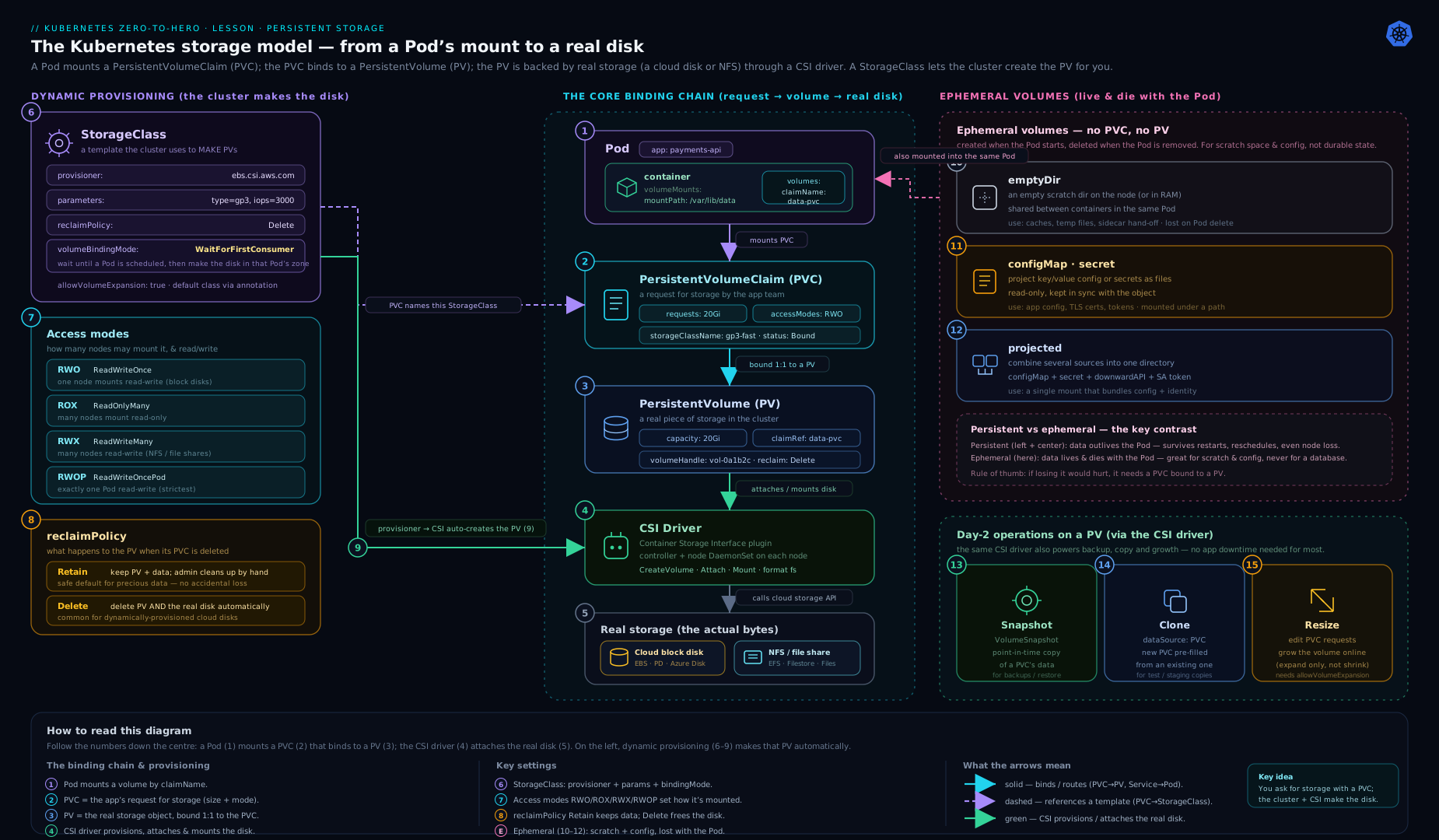
The diagram traces the full path: a Pod mounts a PVC, which binds to a PV; for dynamic provisioning the StorageClass drives a CSI provisioner that creates the real disk on demand, while ephemeral volumes (top) live and die with the Pod.
Going deeper
Everything above is enough to use Kubernetes storage. This section is for the reader who wants to know why a PVC binds, where an access mode is actually enforced, and what the kubelet does to your files before your container ever starts. None of it is required for the lab — but it is exactly the material that separates “I can write a PVC” from “I can debug one at 2 a.m.”
The bind loop, up close
Binding is not magic; it is two controllers reconciling. The PV controller inside kube-controller-manager watches every PVC and PV. When you create a PVC that names a class, it stamps the annotation volume.kubernetes.io/storage-provisioner: <driver> on the claim. The matching CSI external-provisioner sidecar sees that annotation, calls the driver’s CreateVolume, and creates a PV whose spec.claimRef already points back at your PVC — then both objects flip to Bound. Provenance is recorded in annotations you can see with kubectl get pvc -o yaml: pv.kubernetes.io/bound-by-controller: "yes" and volume.kubernetes.io/storage-provisioner.
Two finalizers make deletion safe. The PVC carries kubernetes.io/pvc-protection and the PV carries kubernetes.io/pv-protection. That is why kubectl delete pvc on a claim that a running Pod still mounts does not delete immediately — the object sits in Terminating until the last Pod referencing it is gone, then the finalizer is removed and deletion completes. If a PVC is “stuck Terminating,” a Pod is almost always still using it.
$ kubectl describe pvc data-claim
...
Used By:  app
Events:
  Reason                 Message
  WaitForFirstConsumer   waiting for first consumer to be created before binding
  Provisioning           External provisioner is provisioning volume for claim "default/data-claim"
  ProvisioningSucceeded  Successfully provisioned volume pvc-9f2c1e8a-...
(Representative output — event Type/Age/From columns trimmed for width.)
Static and dynamic, precisely
Static provisioning has no provisioner in the loop: an admin creates PVs up front, and the PV controller binds a PVC to the best existing Available PV whose class, access modes, volumeMode, capacity (≥ request) and any selector/volumeName all match. Dynamic provisioning adds the external-provisioner step above — the PV is created to order. The subtle part is that these two paths are chosen by a single field: name a real class (or omit it to use the default) → dynamic; set storageClassName: "" → static-only. There is no “a bit of both.”
Reclaim, at the storage layer
When you delete a bound PVC, the PV’s persistentVolumeReclaimPolicy decides the fate of the real storage:
Retain→ the PV moves to Released, keeps itsclaimRef, and the backing disk is untouched. It will not rebind until you manually scrub the data and clear the reference withkubectl patch pv <name> -p '{"spec":{"claimRef":null}}'to return it to Available.Delete→ the PV controller calls the driver’sDeleteVolume, and the cloud disk (or array volume) is destroyed. This is the default for dynamically-provisioned PVs, inherited from the StorageClass.
Because of the pv-protection finalizer, the PV is only actually removed after the PVC is fully gone — the ordering is deliberate so a half-deleted claim never orphans live storage.
Access modes: where they are actually enforced
An access mode is a capability contract checked at attach/mount time, not a hint:
- RWO is enforced by the attach step. The
external-attachercreates aVolumeAttachmentobject binding the volume to one node. If a Pod is rescheduled to a second node before the first node detaches (a fast failover, or a stuck kubelet), you get the classicMulti-Attach error for volume ...— the second attach is refused until the firstVolumeAttachmentis deleted. Crucially, many Pods on the same node can share one RWO volume — the node, not the Pod, is the unit. - RWX genuinely requires a shared filesystem — NFS, CephFS, SMB/Azure Files, EFS. A block device (EBS, GCE PD, Azure Disk) physically attaches to one node, so no amount of YAML makes it RWX.
- RWOP (
ReadWriteOncePod) is stricter than RWO: the scheduler and kubelet cooperate so that exactly one Pod cluster-wide may mount it — even two Pods on the same node are refused. Use it when a second writer would corrupt data (a leader-only database).
volumeMode: Filesystem vs Block, mechanically
With Filesystem (the default) the CSI node plugin formats the device on first use — the filesystem type comes from csi.storage.k8s.io/fstype in the StorageClass — and bind-mounts a directory at your mountPath. With Block, Kubernetes hands the container a raw device and mounts no filesystem; you consume it through volumeDevices + devicePath, not volumeMounts:
apiVersion: v1
kind: Pod
metadata:
  name: block-consumer
spec:
  containers:
    - name: app
      image: busybox
      command: ["sh", "-c", "sleep 3600"]
      volumeDevices:            # NOT volumeMounts — raw block has no filesystem
        - name: raw
          devicePath: /dev/xvda
  volumes:
    - name: raw
      persistentVolumeClaim:
        claimName: block-claim   # this PVC must have volumeMode: Block
The PVC and PV must both declare volumeMode: Block, and the driver must support raw block. Databases that manage their own on-disk layout (some Cassandra deployments, Oracle ASM, certain HPC engines) use this to skip the filesystem layer entirely.
WaitForFirstConsumer and topology
WaitForFirstConsumer is implemented by the scheduler’s VolumeBinding plugin. The PVC stays Pending (with the WaitForFirstConsumer event shown above) until a Pod that uses it is scheduled. The scheduler picks a node, writes volume.kubernetes.io/selected-node: <node> onto the PVC, and only then does the provisioner cut the disk — in that node’s zone — and stamp spec.nodeAffinity onto the resulting PV so the volume and Pod stay co-located forever after. This is why Immediate strands Pods in multi-zone clusters and WaitForFirstConsumer does not. The scheduler-side machinery is covered in depth in Scheduling: affinity, topology spread & priority.
The CSI hand-off, RPC by RPC
When a Pod finally lands on a node, the volume reaches it through a fixed sequence of CSI calls:
CreateVolume(controller plugin) — the disk now exists.ControllerPublishVolume(attach) — theexternal-attacherattaches it to the node via aVolumeAttachment.NodeStageVolume(node plugin) — mount to a node-global staging directory; format if this is first use.NodePublishVolume(node plugin) — bind-mount the staged volume into the Pod’s directory.
Teardown runs the mirror image (NodeUnpublish → NodeUnstage → ControllerUnpublish → DeleteVolume). You never call these yourself, but nearly every ContainerCreating storage hang is one of these steps failing — reading the kubelet log for the failing RPC is the fastest triage. The full driver anatomy and the community sidecars get a dedicated treatment in CSI volume snapshots, cloning, resize & topology.
fsGroup and volume permissions
A volume from a fresh disk is owned by root, so a container running as a non-root user (runAsNonRoot: true, runAsUser: 1000) often cannot write to it — a failure that looks like a broken image but is really ownership. The fix is securityContext.fsGroup: the kubelet recursively chown/chmods the volume so that group can write.
spec:
  securityContext:
    fsGroup: 2000                 # volume becomes group-owned by GID 2000
    fsGroupChangePolicy: OnRootMismatch   # only chown when the top dir doesn't match
  containers:
    - name: app
      image: postgres:16
      volumeMounts:
        - name: data
          mountPath: /var/lib/postgresql/data
On a volume with millions of files that recursive chown is slow and, by default, runs on every Pod start; fsGroupChangePolicy: OnRootMismatch skips it when the volume root already has the right group, turning minutes into milliseconds. Modern CSI drivers can advertise fsGroupPolicy to let the mount apply ownership instead. Related knobs — supplementalGroups, runAsNonRoot, and SELinux relabeling — are covered in Security contexts, capabilities & seccomp.
subPath, and why it freezes config
subPath is implemented as a bind-mount of a sub-tree of the volume. The kubelet updates a whole-volume ConfigMap/Secret mount by atomically swapping a symlink at the mount root — but a subPath bind-mount points below that symlink, so the swap never reaches it. That is the mechanical reason a subPath-mounted config file never hot-reloads. subPathExpr lets the sub-path itself be built from environment variables, which pairs beautifully with the downward API for per-Pod directories:
env:
  - name: POD_NAME
    valueFrom:
      fieldRef:
        fieldPath: metadata.name
volumeMounts:
  - name: data
    mountPath: /data
    subPathExpr: $(POD_NAME)      # each Pod gets its own sub-directory
Ephemeral volumes, the two flavours revisited
The lesson introduced generic ephemeral volumes earlier; here is the distinction that trips people up. A generic ephemeral volume creates a real, ordinary PVC named <pod>-<volume> with an ownerReference on the Pod — so it is garbage-collected the moment the Pod is deleted, but until then it is a full PVC (resizable, snapshottable, any class). A CSI ephemeral inline volume has no PVC at all: the volume is declared directly under csi: in the Pod’s volumes, the data is produced by the driver on the fly (the secrets-store CSI driver is the canonical example), and the driver must opt in by listing Ephemeral in its CSIDriver.spec.volumeLifecycleModes. Reach for generic ephemeral when you want normal storage that happens to be Pod-scoped; reach for inline for lightweight, driver-generated data.
Hands-on lab
Everything below runs on a free local cluster. We will use kind, whose default StorageClass (standard, backed by the local-path-provisioner) supports dynamic provisioning — so you can practise PV/PVC/StorageClass mechanics without any cloud account.
1. Create a cluster and confirm the default StorageClass.
kind create cluster --name storage-lab
kubectl get storageclass
# NAME                 PROVISIONER             ... DEFAULT
# standard (default)   rancher.io/local-path  ... true
2. emptyDir sharing between two containers in one Pod.
cat <<'EOF' | kubectl apply -f -
apiVersion: v1
kind: Pod
metadata: { name: shared }
spec:
  containers:
    - name: writer
      image: busybox
      command: ["sh","-c","echo 'from writer' > /shared/msg && sleep 3600"]
      volumeMounts: [{ name: scratch, mountPath: /shared }]
    - name: reader
      image: busybox
      command: ["sh","-c","sleep 3600"]
      volumeMounts: [{ name: scratch, mountPath: /shared }]
  volumes:
    - name: scratch
      emptyDir: {}
EOF
kubectl wait --for=condition=Ready pod/shared --timeout=60s
kubectl exec shared -c reader -- cat /shared/msg     # -> from writer
The reader sees the writer’s file: that is volume sharing inside a Pod.
3. Dynamic provisioning — a PVC that becomes a PV automatically.
cat <<'EOF' | kubectl apply -f -
apiVersion: v1
kind: PersistentVolumeClaim
metadata: { name: data-claim }
spec:
  accessModes: ["ReadWriteOnce"]
  resources: { requests: { storage: 1Gi } }
  # no storageClassName -> uses the default class
EOF

kubectl get pvc data-claim          # may show Pending with WaitForFirstConsumer
With kind’s local-path class (which uses WaitForFirstConsumer), the PVC stays Pending until a Pod uses it — exactly the behaviour we discussed.
4. Consume the PVC from a Pod and watch it bind.
cat <<'EOF' | kubectl apply -f -
apiVersion: v1
kind: Pod
metadata: { name: app }
spec:
  containers:
    - name: app
      image: busybox
      command: ["sh","-c","echo persisted-$(date +%s) > /data/state && sleep 3600"]
      volumeMounts: [{ name: data, mountPath: /data }]
  volumes:
    - name: data
      persistentVolumeClaim: { claimName: data-claim }
EOF

kubectl wait --for=condition=Ready pod/app --timeout=90s
kubectl get pvc data-claim          # now Bound
kubectl get pv                      # a PV was created automatically
kubectl exec app -- cat /data/state # shows your value
5. Prove persistence across a Pod delete.
VAL=$(kubectl exec app -- cat /data/state)
kubectl delete pod app
# recreate the same Pod spec (re-run the apply from step 4)
kubectl wait --for=condition=Ready pod/app --timeout=90s
kubectl exec app -- cat /data/state    # SAME value as $VAL -> data survived
The Pod was destroyed and recreated, yet the data is intact — because it lives on the PV, not in the Pod.
6. (Optional) Online resize. kind’s local-path class does not support expansion, so this is read-only learning: on a cloud cluster you would set allowVolumeExpansion: true on the class, then kubectl patch pvc data-claim -p '{"spec":{"resources":{"requests":{"storage":"2Gi"}}}}' and watch the volume grow without restarting the Pod.
Validation. You should have seen: an emptyDir shared between containers; a PVC go Pending → Bound; a PV created on demand; and data survive a Pod deletion. If your PVC is stuck Pending, run kubectl describe pvc data-claim and read the events.
Cleanup.
kubectl delete pod shared app --ignore-not-found
kubectl delete pvc data-claim --ignore-not-found
kind delete cluster --name storage-lab
Cost note. Entirely free — kind runs in Docker on your laptop and provisions volumes as directories on the node. On a real cloud, every dynamically-provisioned PVC with reclaimPolicy: Delete is a billable disk that disappears when you delete the PVC; PVCs with Retain keep billing until you delete the disk manually.
Practice challenges
Work these in order on a free kind cluster (kind create cluster) unless a challenge says otherwise. Try each yourself before opening the solution.
Challenge 1 — RAM-backed scratch (beginner). Create a Pod with an emptyDir mounted at /cache that is backed by memory, not node disk, and prove it is a tmpfs.
<details> <summary>Show solution</summary>
apiVersion: v1
kind: Pod
metadata: { name: ram-scratch }
spec:
  containers:
    - name: app
      image: busybox
      command: ["sh","-c","sleep 3600"]
      volumeMounts: [{ name: cache, mountPath: /cache }]
  volumes:
    - name: cache
      emptyDir: { medium: Memory, sizeLimit: 128Mi }
kubectl exec ram-scratch -- df -h /cache | grep -i tmpfs # backing store is tmpfs (RAM)
Why: medium: Memory makes the emptyDir a tmpfs. Remember it counts against the container’s memory limit and is lost on reboot.
</details>
Challenge 2 — set the default StorageClass (beginner). Using kubectl, ensure exactly one StorageClass is the cluster default, then create a PVC with no storageClassName and confirm it used that class.
<details> <summary>Show solution</summary>
kubectl patch storageclass standard \
  -p '{"metadata":{"annotations":{"storageclass.kubernetes.io/is-default-class":"true"}}}'

kubectl apply -f - <<'EOF'
apiVersion: v1
kind: PersistentVolumeClaim
metadata: { name: default-demo }
spec:
  accessModes: ["ReadWriteOnce"]
  resources: { requests: { storage: 1Gi } }
EOF

kubectl get pvc default-demo -o jsonpath='{.spec.storageClassName}'   # -> standard
Why: omitting storageClassName uses whichever class is annotated is-default-class: "true". If two are marked default, the newest wins and you get a warning.
</details>
Challenge 3 — diagnose a Pending PVC (intermediate). Deliberately create a PVC that will never bind, then use only kubectl to explain why, and fix it.
<details> <summary>Show solution</summary>
kubectl apply -f - <<'EOF'
apiVersion: v1
kind: PersistentVolumeClaim
metadata: { name: broken }
spec:
  accessModes: ["ReadWriteOnce"]
  storageClassName: does-not-exist
  resources: { requests: { storage: 1Gi } }
EOF

kubectl describe pvc broken | sed -n '/Events/,$p'
# Events show: storageclass.storage.k8s.io "does-not-exist" not found
Fix by pointing at a real class (or deleting and re-creating without storageClassName to use the default). Why: a PVC naming a non-existent class has nothing to provision it and stays Pending forever; the events name the missing class exactly.
</details>
Challenge 4 — Retain and manually reclaim (intermediate). Create a StorageClass with reclaimPolicy: Retain, bind a PVC + Pod, write a file, delete the PVC, and prove the data survives on a Released PV. Then return the PV to Available.
<details> <summary>Show solution</summary>
kubectl apply -f - <<'EOF'
apiVersion: storage.k8s.io/v1
kind: StorageClass
metadata: { name: lab-retain }
provisioner: rancher.io/local-path
reclaimPolicy: Retain
volumeBindingMode: WaitForFirstConsumer
EOF

# create a PVC on lab-retain, mount it in a Pod, write /data/keep, then:
kubectl delete pod <pod>
kubectl delete pvc <pvc>
kubectl get pv                 # the PV is now Released, not deleted — data intact
kubectl patch pv <pv> -p '{"spec":{"claimRef":null}}'   # returns it to Available
Why: Retain keeps the disk and leaves claimRef set on the Released PV; clearing claimRef makes it bindable again (after you scrub any old data).
</details>
Challenge 5 — non-root writes with fsGroup (advanced). Run a Pod as a non-root user that cannot write to its PVC, observe the Permission denied, then fix it with fsGroup — and make the fix fast for a large volume.
<details> <summary>Show solution</summary>
apiVersion: v1
kind: Pod
metadata: { name: nonroot-writer }
spec:
  securityContext:
    runAsNonRoot: true
    runAsUser: 1000
    fsGroup: 2000                     # remove this line first to see the failure
    fsGroupChangePolicy: OnRootMismatch
  containers:
    - name: app
      image: busybox
      command: ["sh","-c","echo hi > /data/f && sleep 3600"]
      volumeMounts: [{ name: data, mountPath: /data }]
  volumes:
    - name: data
      persistentVolumeClaim: { claimName: data-claim }
Why: a fresh volume is root-owned, so without fsGroup the UID-1000 process gets Permission denied. fsGroup: 2000 makes the volume group-writable; OnRootMismatch skips the recursive chown when the root already matches — which matters enormously on volumes with many files.
</details>
Challenge 6 — per-replica volumes that survive deletion (advanced). Create a 2-replica StatefulSet whose Pods each write their hostname to their own volume. Delete the StatefulSet, show the PVCs remain, recreate it, and prove each Pod re-attaches its original data. Then opt into automatic PVC deletion.
<details> <summary>Show solution</summary>
apiVersion: apps/v1
kind: StatefulSet
metadata: { name: web }
spec:
  serviceName: web
  replicas: 2
  selector: { matchLabels: { app: web } }
  persistentVolumeClaimRetentionPolicy:      # opt into cleanup (default is Retain both)
    whenDeleted: Delete
    whenScaled: Retain
  template:
    metadata: { labels: { app: web } }
    spec:
      containers:
        - name: c
          image: busybox
          command: ["sh","-c","hostname > /data/who && sleep 3600"]
          volumeMounts: [{ name: data, mountPath: /data }]
  volumeClaimTemplates:
    - metadata: { name: data }
      spec:
        accessModes: ["ReadWriteOnce"]
        resources: { requests: { storage: 1Gi } }
kubectl get pvc                       # data-web-0 and data-web-1, each Bound
kubectl exec web-0 -- cat /data/who   # -> web-0
Why: volumeClaimTemplates gives each ordinal its own stable PVC, and by default those PVCs survive StatefulSet deletion — so data re-attaches on recreate. persistentVolumeClaimRetentionPolicy.whenDeleted: Delete opts into cleanup instead. (Note: the retention policy runs on scale-down/delete; the per-replica PVCs are otherwise kept.)
</details>
Common beginner mistakes
These are the mental-model errors, distinct from the ops symptoms in the troubleshooting table below. Straighten these out and half the storage confusion disappears.
“RWO means only one Pod can use the volume.” It means one node. Several Pods scheduled to that same node can all mount an RWO volume at once; the restriction is per-node attach, not per-Pod. If you genuinely need a single-writer lock, that is exactly what ReadWriteOncePod is for. Right model: access modes count nodes, not Pods — RWOP is the one exception.
“My PVC is stuck Pending, so storage must be broken.” Usually nothing is broken. The three ordinary causes are: the class uses WaitForFirstConsumer and no Pod is using the PVC yet (it binds the moment one does); there is no default StorageClass and you omitted storageClassName; or you set storageClassName: "" (which disables dynamic provisioning) when you meant to use the default. Right model: always run kubectl describe pvc and read the events — they name the exact reason.
“Deleting a PVC is harmless — I’ll just recreate it.” With the dynamic default reclaimPolicy: Delete, deleting the PVC destroys the backing disk and all its data, with no undo. Right model: use reclaimPolicy: Retain (via the StorageClass) for anything irreplaceable, and take snapshots for real backups — never rely on “I won’t delete it by accident.”
“I over-provisioned, so I’ll just shrink the PVC.” You can’t. Kubernetes volume expansion is grow-only — lowering resources.requests.storage is rejected. Right model: right-size modestly up front (you can always grow online later), and if you truly must reduce, create a smaller volume and copy the data across.
“The mount is broken — my non-root app gets Permission denied.” The image is fine; the volume is root-owned and your container runs as a non-root UID. Right model: set securityContext.fsGroup so the volume becomes group-writable for your user. It is a permissions problem, not a mount problem.
“Omitting storageClassName and setting it to \"\" are the same thing.” They are opposites. Omit → use the default class (dynamic provisioning). "" → disable dynamic provisioning and bind only to a pre-created PV that also has "". Confusing these is the number-one cause of a surprise Pending PVC.
Common mistakes & troubleshooting
| Symptom | Likely cause | Fix |
|---|---|---|
PVC stuck Pending forever |
No matching PV (static) / no default StorageClass / storageClassName: "" set by mistake |
kubectl describe pvc; set a valid class or mark a default; remove the empty "" if you meant dynamic. |
Pod Pending, events say “node(s) had volume node affinity conflict” |
Volume provisioned in one zone (Immediate), Pod must run elsewhere |
Use volumeBindingMode: WaitForFirstConsumer on the StorageClass. |
Pod ContainerCreating, “Multi-Attach error” |
An RWO volume is being attached to a second node before the first detaches (e.g. fast reschedule) | Wait for detach; ensure only one node mounts RWO; consider RWOP or RWX if you truly need multi-node. |
| Resize edit ignored | StorageClass has allowVolumeExpansion: false, or driver lacks support, or you tried to shrink |
Set allowVolumeExpansion: true (before creating); only grow, never shrink. |
| Mounted ConfigMap not updating in the container | Mounted with subPath, or marked immutable, or value used as env var |
Mount without subPath; for env vars, restart the Pod. |
| Deleting a PVC wiped the data unexpectedly | StorageClass reclaimPolicy: Delete (the default) |
Use Retain for important data; back up with snapshots. |
RWX PVC won’t mount on a block-storage class |
Block disks (EBS/GCE PD/Azure Disk) cannot do ReadWriteMany |
Use a file/shared backend (NFS, EFS, Azure Files, CephFS). |
Released PV won’t rebind |
Retain policy leaves claimRef set |
Scrub the data, then kubectl edit pv to clear spec.claimRef, returning it to Available. |
Best practices
- Default to dynamic provisioning with a well-chosen StorageClass; reserve static PVs for special cases (existing NFS exports, pre-seeded data, local NVMe).
- Set
volumeBindingMode: WaitForFirstConsumeron every zonal block-storage class. This one setting prevents the most common stateful scheduling failure. - Use
reclaimPolicy: Retainfor irreplaceable data (databases, single-source-of-truth stores), and rely on snapshots for backups rather than hoping a PVC is never deleted. - Enable
allowVolumeExpansion: trueup front so you can grow disks online later without recreating workloads. - Right-size requests — you pay for provisioned capacity, and you can grow but never shrink, so start modest.
- Pick the narrowest access mode that works: RWO (or RWOP for strict single-writer) for databases, RWX only when multiple nodes genuinely must write.
- Keep ephemeral and persistent clearly separated — never store durable data in
emptyDir; use generic ephemeral volumes when you need big/feature-rich scratch. - Mount whole volumes (avoid
subPath) when you need live config reloads. - Use StatefulSets with
volumeClaimTemplatesfor any workload where each replica needs its own stable disk.
Security notes
- Secret volumes are not encryption. A
secretvolume base64-decodes data onto a tmpfs in the Pod; protect the source with encryption at rest and RBAC, and prefer projectedserviceAccountToken(short-lived, audience-scoped) over long-lived mounted tokens. - Restrict who can create PVs and StorageClasses. A PV can mount a
hostPathfrom the node; a user who can create arbitrary PVs (or use ahostPathvolume) can read host files and escalate. Gate PV/StorageClass creation behind admin RBAC and blockhostPathwith Pod Security Admission / a policy engine. - Use
fsGroupandrunAsNonRootso volume files are owned by the right group and the container does not run as root on shared storage; setreadOnlyRootFilesystemand mount only what needs to be writable. subPathhas a history of path-traversal CVEs — keep nodes patched.- Encrypt volumes at the storage layer (
encrypted: "true"parameter / CMK keys) for any sensitive data, and scrubRetained volumes before reuse so the next claimant cannot read old data. - Be deliberate about reclaim policy:
Deleteon the wrong class can destroy data on PVC deletion;Retaincan leak data if released volumes are reused without scrubbing.
Interview & exam questions
-
What is the difference between a PV and a PVC? A PV is the actual storage resource (admin/cluster concern); a PVC is a namespaced request for storage (app concern). Pods reference the PVC, which binds to a PV one-to-one.
-
Static vs dynamic provisioning? Static: an admin pre-creates PVs and PVCs bind to matching ones. Dynamic: a StorageClass + CSI provisioner creates a PV automatically when a PVC asks. Dynamic is the norm.
-
Explain the four access modes. RWO = read-write by one node; ROX = read-only by many nodes; RWX = read-write by many nodes; RWOP = read-write by exactly one Pod cluster-wide. RWO is per-node (multiple Pods on the same node can share), which is why RWOP exists for strict single-writer.
-
What does
volumeBindingMode: WaitForFirstConsumersolve? It delays volume provisioning until a Pod is scheduled, so the volume is created in the same zone/node as the Pod — preventing unschedulable Pods whenImmediateprovisions in the wrong zone. -
What are the reclaim policies and what do they do?
Deleteremoves the PV and backing storage when the PVC is deleted (default for dynamic);Retainkeeps the data and marks the PVReleasedfor manual reclaim;Recycleis deprecated. -
Difference between omitting
storageClassName, setting it to a name, and setting it to""? Omit → default class (dynamic); a name → that class (dynamic);""→ disable dynamic provisioning, bind only to a static PV that also has"". -
What is CSI and why does it matter? The Container Storage Interface is the standard plugin API for storage; vendors ship one driver (controller Deployment + node DaemonSet + community sidecars) and Kubernetes drives it through StorageClasses. In-tree plugins are deprecated/migrated to CSI.
-
How do you grow a volume, and what are the constraints? Ensure the StorageClass has
allowVolumeExpansion: true, then increasespec.resources.requests.storageon the PVC. Modern CSI does it online; you can only grow, never shrink. -
Why and how do StatefulSets use
volumeClaimTemplates? So each replica gets its own stable, individually-named PVC that follows the Pod across reschedules — essential for replicated databases. PVCs persist on scale-down by default. -
When would you use
volumeMode: Block? When the app wants a raw device with no filesystem (high-performance databases managing their own I/O); mounted viavolumeDevices. -
What is the
subPathupdate gotcha? Volumes mounted withsubPathdo not receive live ConfigMap/Secret updates; mount the whole volume if you need hot reload. -
What is a generic ephemeral volume vs an
emptyDir? Both are Pod-lifetime, but a generic ephemeral volume is dynamically provisioned through a StorageClass/CSI (so it can be large, on specific media, snapshottable) whereasemptyDiris plain node disk or RAM.
Quick check
- A Pod must keep data across rescheduling to another node.
emptyDiror PVC? - Your StorageClass uses
Immediateand Pods are unschedulable across zones. What one field do you change, and to what? - Three Pods on different nodes must all write to one shared volume. Which access mode, and which kind of backend?
- You delete a PVC and its cloud disk vanishes. Which StorageClass field caused this, and what value would have preserved it?
- You edit a mounted ConfigMap but the container never sees the change. Name two reasons.
Answers
- PVC —
emptyDirdies with the Pod; a PVC binds to a PV that persists independently. volumeBindingMode: WaitForFirstConsumeron the StorageClass, so the volume is provisioned in the Pod’s zone.- RWX (ReadWriteMany) on a shared/file backend (NFS, CephFS, Azure Files, EFS) — block disks cannot do RWX.
reclaimPolicy: Delete(the default);Retainwould have kept the disk.- It was mounted with
subPath, the ConfigMap is immutable, or the value is consumed as an environment variable (env vars are not live-updated). (Any two.)
Exercise
On a local kind cluster, build a tiny stateful app end to end:
- Create a StorageClass named
lab-retainthat uses the cluster’s local-path provisioner, withreclaimPolicy: RetainandvolumeBindingMode: WaitForFirstConsumer. - Create a StatefulSet with 2 replicas and a
volumeClaimTemplatesentry usinglab-retain, each Pod writing its own hostname into a file on its volume. - Confirm two distinct PVCs (
...-0,...-1) were created and bound, and that each Pod’s file contains its own ordinal name. - Delete the StatefulSet, observe that the PVCs and PVs remain (because they are not auto-deleted and the policy is
Retain). - Recreate the StatefulSet and confirm each Pod re-attaches its original data.
- Clean up: delete the StatefulSet, the leftover PVCs, then any
ReleasedPVs, then the cluster. Note in a sentence why the PVs needed manual deletion.
Certification mapping
- CKA (Certified Kubernetes Administrator): the Storage domain directly — PVs, PVCs, StorageClasses, access modes, reclaim policies, dynamic vs static provisioning, and configuring applications with persistent storage. Expect tasks like “create a PVC of size X with class Y and mount it,” and “make a StorageClass the default.”
- CKAD (Certified Kubernetes Application Developer): the Application Environment, Configuration and Security and Application Deployment areas — defining volumes (including
configMap/secret/emptyDir/projected), requesting persistent storage with PVCs, and usingsubPath. You will write Pod/Deployment YAML that consumes claims under time pressure. - Cross-references: snapshots/clone/resize and topology depth are explored further in CSI volume snapshots, cloning, resize & topology; stateful operation patterns in the StatefulSet lessons.
Glossary
- Volume: storage attached to a Pod and mounted into its containers; ephemeral or persistent.
- emptyDir: a Pod-lifetime scratch volume on node disk (or RAM with
medium: Memory). - PersistentVolume (PV): a cluster resource representing a real piece of storage.
- PersistentVolumeClaim (PVC): a namespaced request for storage that binds to a PV.
- Binding: the one-to-one association of a PVC to a PV.
- StorageClass: a template naming a provisioner + parameters that enables dynamic provisioning.
- Provisioner: the (CSI) driver that creates and deletes the underlying storage.
- Dynamic provisioning: automatic PV creation when a PVC requests storage via a StorageClass.
- Static provisioning: admin-created PVs that PVCs bind to.
- Access mode: how a volume may be mounted — RWO, ROX, RWX, RWOP.
- Reclaim policy: what happens to storage when its PVC is deleted — Retain, Delete, Recycle (deprecated).
- volumeMode: Filesystem (a mounted directory) or Block (a raw device).
- volumeBindingMode: when binding/provisioning occurs — Immediate or WaitForFirstConsumer.
- CSI (Container Storage Interface): the standard plugin API for storage drivers.
- VolumeSnapshot / VolumeSnapshotClass: a point-in-time copy of a PVC and its template.
- Clone: a new PVC pre-populated from an existing PVC.
- subPath: mounting a single file or sub-directory of a volume into a path.
- volumeClaimTemplates: the StatefulSet field giving each replica its own stable PVC.
- Generic ephemeral volume: a Pod-lifetime volume that is dynamically provisioned via a StorageClass.
- ReadWriteOncePod (RWOP): an access mode allowing read-write by exactly one Pod in the entire cluster — stricter than RWO, which is per-node.
- Multi-Attach error: the event raised when an RWO volume is asked to attach to a second node before it detaches from the first.
- claimRef: the field on a PV recording the PVC it is bound to; it stays set on
Retained/ReleasedPVs and must be cleared before the PV can rebind. - Finalizer (pvc-protection / pv-protection): metadata that blocks deletion of an in-use PVC or PV until nothing references it, so live storage is never orphaned.
- VolumeAttachment: the cluster object the CSI
external-attacheruses to attach or detach a volume to a node. - fsGroup: a Pod
securityContextGID; the kubelet makes the volume group-owned by it so non-root containers can write. - fsGroupChangePolicy: controls whether that ownership fix runs
Alwaysor onlyOnRootMismatch, avoiding a slow recursivechownon large volumes. - selected-node annotation: written by the scheduler under
WaitForFirstConsumerto tell the provisioner which node/zone to create the volume in. - subPathExpr: a
subPathwhose value is built from environment variables (e.g. a per-Pod directory from the Pod name). - CSI ephemeral inline volume: a driver-provided, PVC-less volume declared under
csi:in a Pod’svolumes. - persistentVolumeClaimRetentionPolicy: the StatefulSet field controlling whether per-replica PVCs are deleted on scale-down or StatefulSet deletion.
Next steps
Next, learn how to expose your stateful and stateless apps to the outside world in Kubernetes Ingress, In Depth: Controllers, Rules, TLS, IngressClass & the Gateway API. To go deeper on the storage operations introduced here — snapshots across regions, cloning at scale, and topology-aware provisioning — read CSI Volume Snapshots, Cloning, Resize & Topology, and to put persistent storage to work in a real database, see the StatefulSet Postgres operator lesson.