In a nutshell
Kubernetes was built to treat workloads as cattle: interchangeable pods with generic names, no fixed home, thrown away and replaced the instant one misbehaves. That model is perfect for a stateless web API. It is exactly wrong for a database. A database is a pet: it has a name (clients and replicas must find this specific instance), a disk full of irreplaceable data, and a role — one instance is the primary (accepts writes), the others are replicas (copy the primary, serve reads, and stand ready to take over). Delete the wrong pod and you don’t just restart a process; you can lose data.
Two Kubernetes pieces bridge that gap:
- A StatefulSet is the object that lets a pod keep its name (
pg-0,pg-1, …) and re-attach its own disk every time it is rescheduled — the opposite of a Deployment’s anonymous, disposable pods. - An Operator is software you install into the cluster that behaves like an on-call DBA. It watches your database around the clock, and when the primary dies at 3 a.m. it promotes a healthy replica, repoints client traffic, and files the paperwork — without paging you.
The other half of the story is not losing data even when nothing is broken in Kubernetes. Two mechanisms do that: streaming replication keeps replicas byte-for-byte current so a failover loses (almost) nothing, and WAL archiving ships a continuous “undo/redo log” to cheap object storage so you can rewind the whole database to any second in the past — the difference between “we restored to 10 seconds before the bad migration” and “we lost a day.”
If you remember four phrases, you have the spine of this lesson: StatefulSet = stable name + sticky disk. Operator = automated DBA. Streaming replication = live copies. WAL archiving = a time machine. Everything below is the detail behind those four.
Level: Advanced — with a beginner on-ramp · Time: ~30 min
Before this lesson, it helps to be comfortable with three siblings (each stands alone if you are not): StatefulSets deep dive: identity, storage & ordering, Volumes, PV, PVC & StorageClass, and CRDs, operators & the controller pattern.
After this lesson you will be able to:
- Explain, to a skeptic, why a production database needs a StatefulSet and an operator rather than a Deployment.
- Choose synchronous vs asynchronous replication with an explicit, written RPO in mind — and size a sync quorum that survives a correlated failure.
- Describe how automatic failover promotes a new primary without creating split-brain, and what fencing actually does.
- Configure continuous WAL archiving to object storage and rehearse a point-in-time recovery to a chosen second.
- Front the database with PgBouncer and alert on the four signals that actually predict database incidents.
Running a stateless web service on Kubernetes is a solved problem. Running a primary/replica PostgreSQL cluster — with synchronous replication, sub-30-second failover, and a recovery story that survives a fat-fingered DELETE — is where most teams get burned. The naive approach (a StatefulSet plus a sidecar that runs pg_ctl) handles the easy 80% and then quietly loses data during the failover you didn’t test.
This guide builds a production Postgres cluster on Kubernetes the way it actually holds up: a StatefulSet for stable identity and storage, a mature operator for the consensus and lifecycle logic, object-storage WAL archiving for durability, and a rehearsed PITR drill so recovery is a runbook, not a prayer. Examples use CloudNativePG because it is CNCF-hosted, Postgres-native, and avoids bolting on external Patroni/etcd machinery — but the architecture transfers to Zalando and Crunchy.
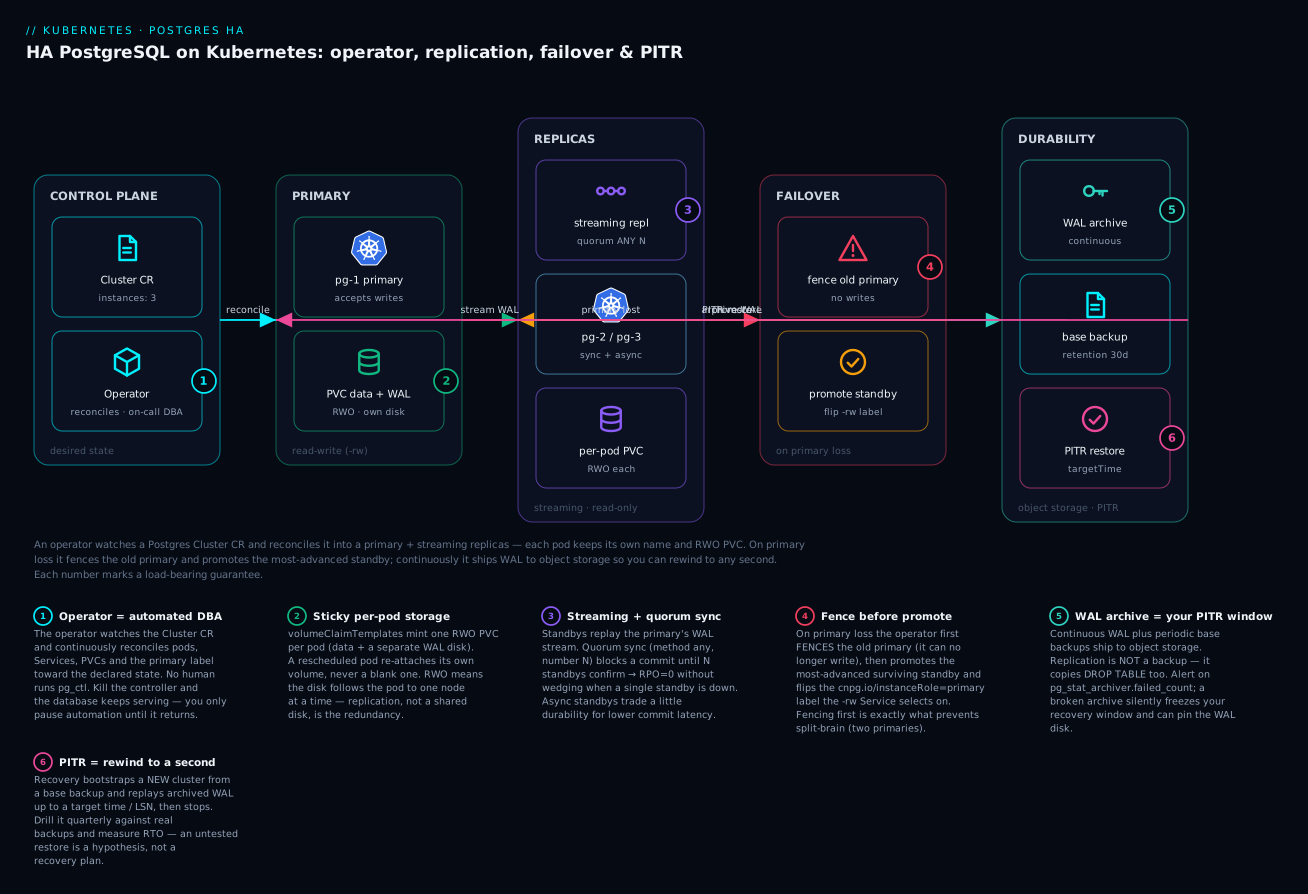
The diagram is the whole system on one page, and the sections that follow build it left to right. An operator (1) watches a Cluster custom resource and reconciles it into a primary pod with its own RWO PVC (2) and a set of streaming replicas (3), each carrying its own disk. When the primary is lost, the operator fences it and promotes the most-advanced standby (4) — fencing first is what keeps two pods from both believing they are primary. Continuously, the primary archives WAL to object storage alongside periodic base backups (5), which is what makes a point-in-time restore (6) possible. Keep the six numbered guarantees in view; every section below is one of them in detail.
1. StatefulSet fundamentals: stable identities, ordered rollout, headless services
A Deployment gives you interchangeable, anonymous pods. Postgres needs the opposite: each replica has a durable identity, its own volume, and a known position in a topology. That is exactly what a StatefulSet provides.
Three guarantees matter for databases:
- Stable network identity. Pods are named
<sts>-0,<sts>-1, … and keep that name across rescheduling. Paired with a headless Service (clusterIP: None), each pod gets a stable DNS record:pg-1.pg-headless.db.svc.cluster.local. Replicas can find the primary by name, not by a load balancer that might point anywhere. - Stable storage.
volumeClaimTemplatesmint one PVC per pod (data-pg-0,data-pg-1). Whenpg-0is rescheduled, it re-attaches its own PVC — not a fresh, empty one. Deleting the StatefulSet does not delete these PVCs; that is a feature for databases, a footgun if you forget. - Ordered, controlled lifecycle. Pods are created and scaled
0 -> 1 -> 2and terminated in reverse. Rollouts are one-at-a-time, so you never restart a quorum simultaneously.
apiVersion: v1
kind: Service
metadata:
  name: pg-headless
  namespace: db
spec:
  clusterIP: None          # headless: per-pod DNS, no virtual IP
  selector:
    app: pg
  ports:
    - name: postgres
      port: 5432
The DNS-per-pod property is the load-bearing primitive. Replication, leader election, and client routing all depend on a replica being reachable at a name that survives a node failure. Hold this mental model; everything below builds on it.
2. Why a raw StatefulSet is not enough: choosing an operator
A StatefulSet gives you stable pods. It gives you nothing about which pod is the primary, how a replica is promoted when the primary dies, or how to fence a node that is partitioned but still writing. That logic — distributed consensus, leader election, fencing, replication topology reconciliation — is the hard part, and it is operator territory.
| Operator | Consensus / HA mechanism | Notes |
|---|---|---|
| CloudNativePG | Operator-driven, uses the Kubernetes API as the source of truth (no external DCS) | CNCF Sandbox, Postgres-native, instance manager as PID 1 |
| Zalando postgres-operator | Patroni + Kubernetes endpoints/configmaps as the DCS | Battle-tested at scale, Spilo image, Patroni semantics |
| Crunchy PGO | Patroni-based | Commercial backing, broad enterprise feature set |
For a greenfield platform I default to CloudNativePG: it treats the Kubernetes control plane as the consensus store (no etcd cluster to babysit beside your database), and the primary is tracked by a label the operator flips atomically. The rest of this guide uses it.
Install the operator (pin the version; never track latest for a stateful controller):
kubectl apply --server-side -f \
  https://raw.githubusercontent.com/cloudnative-pg/cloudnative-pg/release-1.25/releases/cnpg-1.25.0.yaml

# Wait for the controller to be ready before creating clusters
kubectl -n cnpg-system rollout status deployment/cnpg-controller-manager
3. Provisioning storage with the right StorageClass, volumeClaimTemplates, and topology
Storage choice decides your recovery time and whether failover even works. Two hard rules:
- Use a StorageClass with
volumeBindingMode: WaitForFirstConsumer. Without it, a PVC can bind to a zone the scheduler later can’t place the pod into, deadlocking the rollout.WaitForFirstConsumerdefers binding until the pod is scheduled, so volume and pod land in the same zone. - Use block storage that supports your failover model. ReadWriteOnce (RWO) EBS/PD-style volumes are correct here — each replica owns its own copy, and replication (not a shared disk) provides redundancy. Do not try to share one RWX volume between primary and replica; that is data corruption waiting to happen.
apiVersion: storage.k8s.io/v1
kind: StorageClass
metadata:
  name: pg-ssd
provisioner: ebs.csi.aws.com
parameters:
  type: gp3
  iops: "6000"
  throughput: "250"
volumeBindingMode: WaitForFirstConsumer   # critical for zonal correctness
allowVolumeExpansion: true                 # lets you grow PVCs without recreating pods
reclaimPolicy: Retain                      # don't auto-delete database volumes
Now declare the cluster. CloudNativePG synthesizes the StatefulSet, the headless service, the read/write and read-only services, and per-instance PVCs for you. Spreading instances across zones is done with affinity:
apiVersion: postgresql.cnpg.io/v1
kind: Cluster
metadata:
  name: pg
  namespace: db
spec:
  instances: 3
  imageName: ghcr.io/cloudnative-pg/postgresql:16.4

  storage:
    storageClass: pg-ssd
    size: 100Gi

  # Dedicated volume for WAL keeps write spikes off the data disk
  walStorage:
    storageClass: pg-ssd
    size: 20Gi

  affinity:
    enablePodAntiAffinity: true
    topologyKey: topology.kubernetes.io/zone   # one instance per zone
    podAntiAffinityType: required

  resources:
    requests:
      memory: "4Gi"
      cpu: "2"
    limits:
      memory: "4Gi"
Putting WAL on its own PVC (walStorage) is not cosmetic: WAL is sequential write-heavy, and isolating it stops checkpoint storms from starving query I/O on the data volume.
4. Configuring synchronous vs asynchronous replicas and quorum-based failover
This is the decision that defines your data-durability guarantee, and the one teams most often get wrong by accident.
- Asynchronous replication (default): the primary commits and acknowledges the client before replicas confirm receipt. Fast, but a primary failure can lose the last few transactions (
RPO > 0). - Synchronous replication: the primary waits for at least one standby to confirm the WAL record is persisted before acknowledging the commit.
RPO = 0, at the cost of commit latency and an availability coupling.
The trap with naive synchronous setups (synchronous_standby_names = '1 (s1,s2)') is that if the listed standby is down, commits block forever. CloudNativePG solves this with a quorum-based config that ties the number of required confirmations to cluster size and won’t wedge when a single replica is unavailable:
spec:
  instances: 3
  postgresql:
    synchronous:
      method: any                 # quorum: ANY N synchronous standbys
      number: 1                   # require 1 of the available standbys to confirm
      dataDurability: required    # never silently fall back to async on commit
  # Bound how far a replica may lag before it's an eligible failover target
  failoverDelay: 0
With method: any and number: 1 across three instances, a commit needs one of the two standbys to confirm — you tolerate losing a single standby with zero data loss and no commit blocking. Setting dataDurability: required means the operator will refuse to degrade to asynchronous behavior to keep writes flowing; if you would rather preserve availability over strict RPO=0, use preferred and understand you are accepting potential loss during a double failure.
Rule of thumb: synchronous-with-quorum needs at least 3 instances. With 2 instances, synchronous replication makes the primary’s availability depend on the single standby — the opposite of what you wanted.
5. Automated failover mechanics: leader election, fencing, and split-brain avoidance
When the primary dies, four things must happen in order, and the order is what prevents split-brain (two pods both believing they are primary and both accepting writes):
  primary unhealthy
        |
   (1) operator detects via liveness + replication state
        |
   (2) FENCE the old primary  -> it is demoted / stopped, cannot accept writes
        |
   (3) ELECT most-advanced standby (least WAL lag) as new primary
        |
   (4) promote it, repoint the -rw Service, reconfigure remaining replicas
The non-negotiable step is (2) fencing. A primary that is network-partitioned but still running will happily accept writes that the rest of the cluster never sees. If you promote a standby without first guaranteeing the old primary cannot write, you now have two divergent timelines — split-brain — and reconciling them means losing one side’s data. CloudNativePG fences by demoting the old primary and only flips the cnpg.io/instanceRole=primary label (which the -rw Service selects on) once a single primary is guaranteed.
Because CloudNativePG uses the Kubernetes API as its source of truth, “who is primary” is a single atomic label update on one object — there is no separate etcd/Consul that can disagree with the cluster’s view. That eliminates an entire class of DCS-vs-database disagreement bugs.
You can also fence manually for maintenance — e.g., to take an instance out of rotation safely:
# Fence a specific instance (stops it accepting traffic; it stays demoted)
kubectl cnpg fencing on pg pg-2 -n db

# ... perform node maintenance, then ...
kubectl cnpg fencing off pg pg-2 -n db
To validate failover, kill the primary and watch promotion — don’t wait for an incident to find out your RTO:
PRIMARY=$(kubectl get cluster pg -n db -o jsonpath='{.status.currentPrimary}')
kubectl delete pod "$PRIMARY" -n db --grace-period=0 --force
kubectl get cluster pg -n db -w   # watch currentPrimary flip to a standby
6. Continuous WAL archiving to object storage and point-in-time recovery
Replication is not a backup. Replication faithfully copies a DROP TABLE to every standby in milliseconds. Durability against logical mistakes and total-cluster loss requires a base backup plus a continuous stream of WAL in object storage, which together enable point-in-time recovery — restoring to any moment, including “one second before the bad migration ran.”
Configure continuous archiving to S3 (CloudNativePG uses Barman Cloud under the hood). Store credentials in a Secret, never inline:
apiVersion: postgresql.cnpg.io/v1
kind: Cluster
metadata:
  name: pg
  namespace: db
spec:
  instances: 3
  backup:
    barmanObjectStore:
      destinationPath: s3://acme-pg-backups/pg
      s3Credentials:
        accessKeyId:
          name: pg-backup-creds
          key: ACCESS_KEY_ID
        secretAccessKey:
          name: pg-backup-creds
          key: SECRET_ACCESS_KEY
      wal:
        compression: gzip
        maxParallel: 8            # parallelize WAL upload to keep up with write load
      data:
        compression: gzip
    retentionPolicy: "30d"        # operator prunes backups + WAL older than 30 days
Take an on-demand base backup (and schedule recurring ones with a ScheduledBackup):
# One-off base backup
kubectl cnpg backup pg -n db

# Confirm WAL is actually shipping (the part people forget to check)
kubectl exec -n db pg-1 -c postgres -- \
  psql -tAc "SELECT archived_count, failed_count, last_failed_wal
             FROM pg_stat_archiver;"
failed_count climbing or last_failed_wal set means archiving is broken and your PITR window is silently frozen — alert on it.
To perform PITR, you create a new Cluster that bootstraps via recovery, pointing at the backup and a target time. CloudNativePG replays WAL from the base backup up to the target and stops:
apiVersion: postgresql.cnpg.io/v1
kind: Cluster
metadata:
  name: pg-restore
  namespace: db
spec:
  instances: 3
  storage:
    storageClass: pg-ssd
    size: 100Gi
  bootstrap:
    recovery:
      source: pg                       # references the externalCluster below
      recoveryTarget:
        targetTime: "2026-06-08 11:32:00+00"   # restore to just before the bad change
  externalClusters:
    - name: pg
      barmanObjectStore:
        destinationPath: s3://acme-pg-backups/pg
        s3Credentials:
          accessKeyId:
            name: pg-backup-creds
            key: ACCESS_KEY_ID
          secretAccessKey:
            name: pg-backup-creds
            key: SECRET_ACCESS_KEY
        wal:
          maxParallel: 8
Drill this quarterly against real backups. A PITR procedure you have never executed is a hypothesis, not a recovery plan. Measure wall-clock RTO and confirm row counts post-restore.
7. Rolling minor upgrades and major version upgrades
Minor upgrades (16.3 -> 16.4) are routine: bump imageName. The operator performs a rolling update — replicas first, then a controlled switchover so the primary restarts last, minimizing the write-path outage to a single fast failover:
kubectl patch cluster pg -n db --type merge \
  -p '{"spec":{"imageName":"ghcr.io/cloudnative-pg/postgresql:16.5"}}'
kubectl get cluster pg -n db -w   # watch the rolling switchover
Control whether the primary moves first or the operator drains replicas first via primaryUpdateStrategy (unsupervised lets the operator switch over automatically; supervised waits for you to trigger it during a maintenance window).
Major upgrades (16 -> 17) change the on-disk format and cannot be a simple image swap. Two safe paths:
- Logical replication / blue-green: stand up a v17 cluster, replicate from v16 via a
Subscription, cut over when caught up. Near-zero downtime, more moving parts. pg_upgradeimport: CloudNativePG supports bootstrapping a new major-version cluster that imports from the old one. Plan a short maintenance window and test on a clone first — extension compatibility (PostGIS, pgvector) is the usual source of surprises.
8. Monitoring, connection pooling with PgBouncer, and capacity planning
Connection pooling is mandatory, not optional. Each Postgres connection is a backend process with real memory cost; a few hundred app pods opening connections directly will exhaust max_connections and OOM the database. CloudNativePG ships a first-class Pooler (PgBouncer) — point your apps at the pooler service, not the database:
apiVersion: postgresql.cnpg.io/v1
kind: Pooler
metadata:
  name: pg-pooler-rw
  namespace: db
spec:
  cluster:
    name: pg
  instances: 3
  type: rw                       # pool writes to the current primary
  pgbouncer:
    poolMode: transaction        # transaction pooling -> highest connection multiplexing
    parameters:
      max_client_conn: "1000"
      default_pool_size: "25"
poolMode: transaction gives the best multiplexing but forbids session-level features (prepared statements across transactions, SET that outlives a transaction, advisory session locks) — confirm your app and ORM tolerate it before shipping.
For monitoring, CloudNativePG exposes Prometheus metrics natively. Enable a PodMonitor and alert on the signals that actually predict incidents:
spec:
  monitoring:
    enablePodMonitor: true
The four metrics worth paging on:
| Signal | Why it matters |
|---|---|
| Replication lag (bytes/seconds) | A lagging standby is not a valid failover target — silent RPO risk |
pg_stat_archiver.failed_count |
WAL archiving broken == PITR window frozen |
| PVC disk usage on data and WAL volumes | A full WAL disk stops the primary from accepting writes |
Connection saturation vs max_connections |
Predicts the OOM that pooling is meant to prevent |
For capacity planning, the disk that bites you is WAL: a long-running replication slot or a stalled archive can pin WAL forever and fill the volume, taking the primary read-only. Size the WAL PVC for your worst-case archive outage, cap max_slot_wal_keep_size, and alert on WAL volume usage well before 100%.
Going deeper
This section is for the reader who wants to know how the machinery actually works — the internals behind the eight steps above. None of it is required to stand up a cluster, but all of it is required to debug one at 3 a.m.
How an operator reconciles HA Postgres
An operator is a controller plus a Custom Resource Definition (CRD). The CRD (Cluster in CloudNativePG) teaches the Kubernetes API a new object type; the controller is a control loop that never stops running. Its logic is the same reconcile loop every Kubernetes controller uses:
- Observe — read the desired state (the
Clusterspec:instances: 3, image, storage, sync policy) and the actual state (which pods exist, who is primary, replication lag, PVC status). - Diff — compute what is different. Desired 3 instances, actual 2? A pod is missing. Desired primary reachable, actual primary unresponsive? A failover is needed.
- Act — take one convergent step toward desired (create the missing pod, promote a standby, flip a label), then requeue and start over.
Two properties make this robust and are worth internalizing:
- Level-triggered, not edge-triggered. The controller does not react to events (“a pod died”); it reacts to the difference between desired and actual on every pass. Miss an event during a controller restart and nothing breaks — the next reconcile still sees the gap and closes it. This is why “kill the operator” does not kill the database: the running Postgres pods keep serving; only automation pauses until the controller returns.
- The Kubernetes API is the source of truth. CloudNativePG stores “who is primary” as a label on a pod (
cnpg.io/instanceRole=primary) and in theClusterobject’s.status. There is no separate etcd/Consul/ZooKeeper (a “DCS”, distributed configuration store) to disagree with the cluster’s view — a whole class of “the DCS says X but Postgres thinks Y” split-brain bugs simply cannot occur. (Patroni-based operators like Zalando and Crunchy use the Kubernetes API as the DCS, achieving the same end by a different route.)
Inside each pod, an instance manager runs as PID 1 (not postgres directly). It is the operator’s on-node agent: it starts/stops Postgres, applies configuration, runs health probes, executes pg_ctl promote on command, and reports status back. That indirection is what lets the operator drive a graceful switchover instead of just deleting a pod and hoping.
The physics of a commit: WAL, fsync, and durability
Everything about Postgres durability comes down to the Write-Ahead Log (WAL). Before Postgres changes a data page, it writes a record describing the change to the WAL and flushes it to durable storage. The golden rule: the WAL record hits the disk before the transaction is acknowledged. Recovery replays the WAL to reconstruct any change that had not yet been written back to the data files.
The word “durable” hides the single most important storage fact on Kubernetes: fsync. A commit is only safe once the WAL write has been fsync’d — forced past the OS page cache and any volatile disk cache onto stable media. If your storage layer (or a helpful CSI driver, or a write-back cache) acknowledges the write before it is truly persisted, Postgres believes a transaction is durable that a power loss will erase. This is why you never run a serious database on a volume with fsync disabled or on network storage with dubious flush semantics. Two Postgres settings guard this and should stay at their safe defaults in production: fsync = on and full_page_writes = on (the latter protects against torn pages — a page half-written when the box lost power).
This also explains why WAL gets its own PVC (the walStorage block in §3). WAL is a sequential, fsync-heavy, latency-sensitive stream; data-file writes are bursty and random (checkpoints). Put them on the same disk and a checkpoint storm starves commit latency. Give WAL a dedicated volume — ideally the lowest-latency class you have — and commits stay fast under load.
Streaming replication internals: WAL senders, receivers, and slots
Streaming replication is simply the primary shipping its WAL stream to standbys as it is generated:
- On the primary, a
walsenderprocess per standby streams WAL records over a replication connection. - On each standby, a
walreceiverapplies them, keeping a live copy in “hot standby” mode (readable for read-only queries).
The subtlety that bites people is the physical replication slot. A slot is the primary’s promise to retain WAL until a specific standby has consumed it — it stops the primary from recycling WAL that a lagging replica still needs. That is essential (a briefly-offline replica can catch up instead of needing a full rebuild) and a footgun: an orphaned slot (a replica that is gone for good but whose slot was never dropped) pins WAL forever, filling the WAL disk and eventually taking the primary read-only. Inspect slots with pg_replication_slots; watch for a slot whose active is false and whose retained WAL keeps growing. CloudNativePG manages slots for its own instances, but this is the mechanism behind the “a stalled slot fills the disk and stops the primary” warning in §8. Bound the risk with max_slot_wal_keep_size.
Synchronous replication and the quorum math that actually guarantees RPO=0
Postgres exposes durability as synchronous_commit, and the level you pick decides how far a commit travels before the client hears “done”:
synchronous_commit |
Primary waits until… | Data-loss window |
|---|---|---|
off |
not even the local WAL flush | seconds (async, local) |
local |
local WAL fsync only |
standby may lag (RPO>0 on failover) |
remote_write |
standby received WAL (not yet fsync’d) |
standby OS crash can lose it |
on (default) |
standby flushed WAL to disk | RPO=0 vs that standby |
remote_apply |
standby replayed WAL (visible to reads) | RPO=0 + read-your-writes on replicas, highest latency |
CloudNativePG’s synchronous: { method: any, number: N } compiles down to synchronous_standby_names = 'ANY N (standby list)': a commit is acknowledged once any N of the listed standbys confirm. That avoids the classic wedge of naming specific standbys (FIRST 1 (s1)), where losing s1 blocks every commit.
Now the part most teams get subtly wrong — how big must N be for true RPO=0 under failure? A promoted standby is safe only if it holds every acknowledged commit. Because any N-subset of standbys can be the confirming set, and the operator promotes the most-advanced survivor, the guarantee is:
For zero data loss when the primary and up to F standbys fail together, you need N ≥ F + 1 (so the failed standbys cannot be the only confirmers). To also keep accepting writes with F standbys down, you need M − F ≥ N (enough survivors to reach quorum), where M is the number of standbys. Both hold only when M ≥ 2F + 1.
Apply it: three instances (M=2 standbys) with number: 1 gives RPO=0 for any single node loss — but a correlated primary-plus-one-standby failure can lose the last commit, because that commit might have been confirmed only by the standby that also died. That is precisely the trap the Enterprise scenario below hit. To be RPO=0 through a primary+1 standby loss and keep writing, you need M ≥ 3 standbys (four instances) with number: 2. Durability, availability, cost — pick the point on the curve deliberately and write it down.
Failover internals: promotion, timelines, and pg_rewind
When the operator promotes a standby, Postgres runs pg_promote() and increments its timeline ID. A timeline is Postgres’s way of forking history at the promotion LSN so the new primary’s WAL can never be confused with the old primary’s. This is also why a failed-over-from old primary cannot simply rejoin as a standby: its WAL diverged after the split point, so streaming from the new primary would corrupt it.
The fix is pg_rewind: it rewinds the old primary’s data directory to the divergence point by copying the changed blocks from the new primary, so it can then follow the new timeline as a standby. Doing this by hand is error-prone; the operator automates it — a demoted node is fenced, pg_rewind’d onto the current timeline, and re-added as a replica, all without you touching a shell. Knowing the mechanism is what lets you read the operator’s logs when a rejoin fails (usually because wal_log_hints or data checksums were not enabled, both prerequisites for pg_rewind).
PITR internals: base backups, restore_command, and recovery targets
Point-in-time recovery is one base backup + a continuous WAL stream, replayed. The restore path:
- Restore the base backup (a physical snapshot of the data directory, taken with
pg_basebackup/Barman while the DB is live). - Replay archived WAL via a
restore_commandthat fetches each segment from object storage. - Stop at the target you name and open the database on a fresh timeline.
The target can be more than a wall-clock time — CloudNativePG’s recoveryTarget accepts several, and choosing the right one matters when “the time” is fuzzy:
| Target | Meaning | Use when |
|---|---|---|
targetTime |
stop at a timestamp | you know roughly when the bad thing ran |
targetLSN |
stop at a WAL log-sequence number | you have the exact write position |
targetXID |
stop just before a transaction id | you found the offending transaction |
targetName |
stop at a named restore point (pg_create_restore_point) |
you tag known-good moments before risky migrations |
targetImmediate |
stop as soon as the backup is consistent | you just need the backup restored, no roll-forward |
The exclusive field under recoveryTarget (which maps to Postgres recovery_target_inclusive, inverted) decides whether the target transaction itself is replayed or recovery stops just before it. A pro move: run SELECT pg_create_restore_point('before_v42_migration'); immediately before any dangerous change, so recovery becomes targetName: before_v42_migration instead of guessing a timestamp under pressure.
Object storage as the durability backstop
WAL and base backups live in object storage (S3/GCS/Azure Blob) via Barman Cloud. Treat that bucket as tier-zero infrastructure, not an afterthought:
- Immutability / object-lock. Enable versioning and an object-lock retention on the backup bucket so ransomware (or a stray
aws s3 rm) cannot erase your recovery point. A backup an attacker can delete is not a backup. - Encryption at rest with a KMS key you control; the S3 credentials in the
Clustercome from a KubernetesSecret, never inline (as §6 shows). - Lifecycle + cross-region. Age older base backups to cheaper storage tiers, and replicate the bucket to a second region so a regional outage does not take your backups with your cluster.
- Retention is a real policy.
retentionPolicy: "30d"prunes WAL and backups older than the window — set it to your legal/operational recovery requirement, and remember it also bounds how far back PITR can reach.
PgBouncer pooling modes, in depth
§8 makes pooling mandatory; here is why the mode matters. Each Postgres backend is a full OS process (several MB before shared buffers); a few thousand direct connections exhausts max_connections and RAM. PgBouncer multiplexes many client connections onto few server connections. The mode is the trade:
| Pool mode | Server conn returned to pool… | Multiplexing | Breaks |
|---|---|---|---|
session |
when the client disconnects | low | nothing — safest |
transaction |
at the end of each transaction | high | prepared statements across txns, session SET, advisory session locks, LISTEN/NOTIFY |
statement |
after each statement | highest | anything multi-statement, including explicit transactions |
transaction is the sweet spot for most web apps and the CloudNativePG default — but only if your ORM/driver does not rely on session state. Modern drivers using the extended-query protocol keep server-side prepared statements, which historically broke under transaction pooling; recent PgBouncer (1.21+) supports them, but confirm your stack end-to-end before shipping. When in doubt, load-test with poolMode: transaction and watch for “prepared statement does not exist” errors.
Verify
Run these after deploying — green across the board is your definition of “done”:
# 1. Cluster healthy, expected number of ready instances, a primary elected
kubectl get cluster pg -n db \
  -o custom-columns=NAME:.metadata.name,STATUS:.status.phase,\
INSTANCES:.status.instances,READY:.status.readyInstances,PRIMARY:.status.currentPrimary

# 2. Replication is streaming and synchronous standbys are connected
kubectl exec -n db pg-1 -c postgres -- \
  psql -tAc "SELECT application_name, state, sync_state, replay_lag
             FROM pg_stat_replication;"

# 3. WAL archiving is succeeding (failed_count should be 0)
kubectl exec -n db pg-1 -c postgres -- \
  psql -tAc "SELECT archived_count, failed_count FROM pg_stat_archiver;"

# 4. Each instance has its own bound PVC (data + WAL)
kubectl get pvc -n db -l cnpg.io/cluster=pg

# 5. Failover works: delete the primary, confirm currentPrimary flips
kubectl delete pod "$(kubectl get cluster pg -n db -o jsonpath='{.status.currentPrimary}')" \
  -n db --grace-period=0 --force
kubectl get cluster pg -n db -w
If sync_state shows sync/quorum for the expected standbys, failed_count is 0, and the primary flips on pod deletion, the cluster is doing what it claims.
Enterprise scenario
A fintech platform team ran a 3-node CloudNativePG cluster across three AZs with synchronous replication (method: any, number: 1). During a routine node-pool upgrade, a cloud-provider zonal disruption took down the AZ holding the primary and one standby within the same minute. The surviving standby was healthy — but writes hung. Their on-call assumed a failover bug.
The actual constraint: with one of two standbys gone, a quorum requiring one confirmation was fine, but a second concurrent issue meant the lone surviving standby briefly couldn’t acknowledge, and dataDurability: required (correctly) refused to drop to asynchronous commits — so the primary blocked rather than risk RPO > 0. The cluster was choosing consistency over availability, exactly as configured. The team had picked strict durability without modeling a correlated double-AZ event.
Their fix was twofold. First, they spread instances across three failure domains with explicit anti-affinity so a single-AZ event can never take more than one instance — making the quorum robust to any one-zone loss:
spec:
  instances: 3
  affinity:
    enablePodAntiAffinity: true
    topologyKey: topology.kubernetes.io/zone
    podAntiAffinityType: required      # hard guarantee: no two instances share a zone
  postgresql:
    synchronous:
      method: any
      number: 1
      dataDurability: required         # consciously chosen: consistency > availability
Second — and this was the cultural shift — they wrote down the trade-off explicitly: for this workload, a brief write stall during a rare correlated double-failure is acceptable; silent data loss is not. They added an alert that distinguishes “commits blocking on synchronous quorum” from a generic outage, so on-call recognizes the condition as designed behavior rather than reflexively forcing the cluster into asynchronous mode and discarding the guarantee. The incident review’s headline: the database did exactly what they told it to — they just had not decided, in writing, what they were telling it.
Practice challenges
Work these top to bottom; they escalate from “do you get the model” to “can you operate it under fire.” Try each before opening the solution.
1 — Beginner: why not a Deployment?
A teammate proposes running Postgres as a Deployment with replicas: 3 and a shared ReadWriteMany volume “so any pod can serve.” Give two concrete reasons this loses data.
<details><summary>Show solution</summary>
Two independent failures. (a) No identity or role: a Deployment’s pods are interchangeable, so nothing decides which one is the primary; three pods writing to the same data directory is instant corruption (Postgres assumes a single writer per data directory). (b) No stable storage: Deployments do not get per-pod PVCs via volumeClaimTemplates, so a rescheduled pod will not reliably re-attach its own data. The right model is a StatefulSet (stable name + sticky RWO disk per pod) with an operator electing exactly one primary and replicating — not sharing — the disk. Why: databases need single-writer identity and durable per-instance storage, which is exactly what StatefulSet + operator give and Deployment + RWX does not.
</details>
2 — Beginner: name the pod
Your cluster’s headless Service is pg-headless in namespace db. Write the in-cluster FQDN a replica uses to reach primary pod pg-1.
<details><summary>Show solution</summary>
pg-1.pg-headless.db.svc.cluster.local. Why: a headless Service (clusterIP: None) publishes a per-pod DNS record of the form <pod>.<service>.<namespace>.svc.cluster.local, which survives rescheduling even as the pod’s IP changes — the stable name is the entire reason StatefulSets exist for clustered software.
</details>
3 — Intermediate: stop the zonal deadlock
A fresh cluster’s pods are stuck Pending with volume node affinity conflict. Which one StorageClass field fixes it, and why?
<details><summary>Show solution</summary>
volumeBindingMode: WaitForFirstConsumer. Why: the default Immediate binds (and provisions) the PV as soon as the PVC is created — often in a different zone than where the scheduler can later place the pod, deadlocking. WaitForFirstConsumer defers binding until the pod is scheduled, so the disk is provisioned in the same zone as the pod. (This is the rule from §3; it is the single most common stateful-on-k8s provisioning bug.)
</details>
4 — Intermediate: size the sync quorum
You need RPO=0 to survive the primary and one standby failing at the same instant, and you must keep accepting writes while any one standby is down. What is the minimum instance count and synchronous.number?
<details><summary>Show solution</summary>
Four instances (1 primary + M=3 standbys) with number: 2. Why: durability needs N ≥ F+1 with F=1 → N=2 (the two confirmers cannot both be the one failed standby). Availability needs M − F ≥ N → 3 − 1 = 2 ≥ 2 ✓. A three-instance cluster (M=2) cannot satisfy both — number: 2 there blocks writes when either standby is down. This is why the common “3 instances, number 1” gives RPO=0 for a single loss but not a correlated primary+standby loss.
spec:
  instances: 4
  postgresql:
    synchronous:
      method: any
      number: 2
      dataDurability: required
</details>
5 — Advanced: catch silent archive failure
Prove, from psql, whether WAL archiving is currently healthy, and state the two things that go wrong if it has been broken for a day.
<details><summary>Show solution</summary>
SELECT archived_count, failed_count, last_archived_wal, last_failed_wal, last_failed_time
FROM pg_stat_archiver;
Healthy = failed_count flat and last_failed_wal NULL (or old); broken = failed_count climbing and last_failed_wal recent. Two consequences: (1) your PITR window is frozen — you can only recover to the last successfully archived WAL, so “restore to 5 minutes ago” silently becomes “restore to yesterday”; (2) unarchived WAL cannot be recycled, so it piles up on the WAL disk and, at 100% full, takes the primary read-only. Why: archiving is a background promise; nothing in the write path fails when it breaks, so it must be alerted on explicitly.
</details>
6 — Advanced: PITR to just before a bad migration
A destructive migration committed at 2026-06-08 11:32:14+00. You want a new cluster restored to one second before it, without touching the running cluster. Sketch the bootstrap.
<details><summary>Show solution</summary>
Create a new Cluster that bootstraps from the backup via recovery, with a recoveryTarget.targetTime one second earlier and exclusive: true so recovery stops before that instant. The live cluster is untouched; you validate row counts on the restore, then repoint apps.
apiVersion: postgresql.cnpg.io/v1
kind: Cluster
metadata:
  name: pg-restore
  namespace: db
spec:
  instances: 1
  storage:
    storageClass: pg-ssd
    size: 100Gi
  bootstrap:
    recovery:
      source: pg
      recoveryTarget:
        targetTime: "2026-06-08 11:32:13+00"
        exclusive: true
  externalClusters:
    - name: pg
      barmanObjectStore:
        destinationPath: s3://acme-pg-backups/pg
        s3Credentials:
          accessKeyId:
            name: pg-backup-creds
            key: ACCESS_KEY_ID
          secretAccessKey:
            name: pg-backup-creds
            key: SECRET_ACCESS_KEY
        wal:
          maxParallel: 8
Why: PITR replays archived WAL from a base backup and stops at the target, opening on a new timeline — a surgical undo that a DROP TABLE propagated by replication cannot give you.
</details>
Common beginner mistakes
These are misconceptions, not symptom-to-fix entries — the wrong mental model, then the right one.
“I’ll just run a StatefulSet with a sidecar that calls pg_ctl — an operator is overkill.”
The easy 80% (start Postgres, mount a disk) is easy without an operator. The 20% that loses data — consensus on who is primary, fencing a partitioned node, pg_rewind on rejoin, quorum-aware synchronous commit, WAL archiving you can actually restore from — is thousands of lines of correctness-critical distributed-systems code. Rolling your own means re-implementing (and testing, at 3 a.m.) exactly the part that is hard. Right model: the operator is the DBA logic; you declare intent and it owns the mechanics.
“An RWO volume is fine — the pod can reschedule anywhere.”
ReadWriteOnce means the volume attaches to one node at a time. If a pod reschedules faster than the old volume detaches, the new pod hangs in ContainerCreating with a Multi-Attach error, and a database that “moves freely between nodes” is a fantasy — the disk has to detach first. Right model: replication (each replica on its own node with its own RWO disk), not a roaming shared disk, is how a database survives node loss.
“We have three replicas, so we’re backed up.”
Replication is real-time propagation of every change, including your mistakes. A DROP TABLE, a bad UPDATE without a WHERE, a botched migration — replicated to every standby in milliseconds. Right model: replicas protect against infrastructure failure (a node dies); backups + WAL archiving protect against logical failure (a human or app error) and total loss. You need both. If you have no PITR, you have no protection against the most common cause of data loss: people.
“Kubernetes storage gives me durability, so I don’t worry about fsync.”
A volume that acknowledges writes before they are truly on stable media (write-back cache, fsync disabled, dubious network-storage flush semantics) will make Postgres believe a transaction is durable that a power loss erases. Right model: durability is a property of the whole stack down to the physical flush; run on storage with honest fsync, keep fsync = on and full_page_writes = on, and never “optimize” them away for a benchmark.
“A database pod is just another pod — I can kubectl delete it or scale it like a web app.”
Deleting a StatefulSet does not delete its PVCs (a feature — your data survives), but deleting the wrong pod, or scaling down assuming instant statelessness, can trigger an unplanned failover or orphan a volume. A data-holding pod also cannot be evicted casually during node drains without a graceful switchover. Right model: treat DB pods as pets whose lifecycle the operator owns — drain, switch over, and scale through the operator’s mechanisms, not raw kubectl delete/scale.
Glossary
- StatefulSet — the Kubernetes controller that gives pods stable names (
pg-0,pg-1), sticky per-pod storage, and an ordered lifecycle. The right base for clustered, stateful software. - Headless Service — a Service with
clusterIP: None; instead of one virtual IP it publishes a DNS record per pod, so replicas reach a specific instance by name. - PVC (PersistentVolumeClaim) — a pod’s request for storage; binds one-to-one to a PV (the real disk).
- volumeClaimTemplates — the StatefulSet field that mints one PVC per pod automatically (
data-pg-0,data-pg-1), so each pod owns its disk. - StorageClass — a template for dynamically provisioning disks (type, IOPS, throughput) via a CSI driver.
- WaitForFirstConsumer — a StorageClass binding mode that defers disk provisioning until the pod is scheduled, so the volume lands in the pod’s zone.
- RWO / RWX — ReadWriteOnce (one node at a time — correct for a DB replica) / ReadWriteMany (many nodes — wrong for Postgres data files).
- Operator — software (a CRD plus a controller) that encodes an application’s operational knowledge, acting as an automated, always-on DBA.
- CRD / Custom Resource — a CustomResourceDefinition teaches the API a new kind (e.g.
Cluster); a Custom Resource is one instance of it (yourpgcluster). - Reconcile loop — a controller’s never-ending “observe → diff → act” cycle that drives actual state toward declared state.
- Primary / replica (standby) — the single instance that accepts writes / the copies that replay its WAL, serve reads, and stand by to take over.
- Streaming replication — the primary shipping its WAL stream to standbys continuously, keeping them near-live.
- WAL (Write-Ahead Log) — the ordered log of every change, written and flushed before the change is acknowledged; the basis of both crash recovery and replication.
- WAL archiving — continuously copying WAL segments to object storage, which (with a base backup) enables point-in-time recovery.
- Base backup — a physical snapshot of the whole data directory, taken live; the starting point a PITR replays WAL on top of.
- PITR (point-in-time recovery) — restoring the database to any chosen moment by replaying archived WAL onto a base backup up to a target time / LSN / XID.
- RPO / RTO — Recovery Point Objective (how much data you can afford to lose) / Recovery Time Objective (how long recovery may take).
- Synchronous / asynchronous replication — primary waits for a standby to confirm before commit (RPO=0, more latency) / primary acks first (faster, can lose the last transactions).
- Quorum commit (
ANY N) — require any N standbys to confirm a commit; tolerates a standby being down without blocking, unlike naming a specific standby. synchronous_standby_names— the Postgres setting that lists which standbys (and how many) must confirm synchronous commits.- Fencing — forcibly stopping a suspect primary from accepting writes before promoting a new one; the step that prevents split-brain.
- Split-brain — two instances both believing they are primary and both accepting writes, producing divergent, irreconcilable data.
- Leader election / promotion — choosing a standby and turning it into the new primary (
pg_promote, a new timeline). pg_rewind— rewinds a diverged old primary to the fork point so it can rejoin as a standby on the new timeline.- Timeline — Postgres’s fork of WAL history created at each promotion, so old and new primary WAL can never be confused.
- Replication slot — the primary’s promise to retain WAL until a named standby consumes it; prevents needed WAL from being recycled (and, if orphaned, pins WAL forever).
- PgBouncer / connection pooling — a lightweight proxy that multiplexes many client connections onto few Postgres backends, preventing connection exhaustion.
- Transaction pooling — a PgBouncer mode that returns a server connection to the pool after each transaction (high multiplexing, but no cross-transaction session state).
- Barman / Barman Cloud — the backup-and-WAL-archiving tooling CloudNativePG uses under the hood to talk to object storage.
- DCS (distributed configuration store) — an external consensus store (etcd/Consul) some HA stacks use to track the primary; CloudNativePG avoids a separate one by using the Kubernetes API.
fsync— the system call that forces a write past caches onto stable media; the linchpin of durability.- Checkpoint — periodic flush of dirty data pages to disk, bounding crash-recovery time; tuned via
checkpoint_timeout/max_wal_size.