In a nutshell
Most Kubernetes workloads run under a Deployment, which treats its Pods like identical, disposable workers: if one falls over, a fresh one with a brand-new name takes its place and nobody notices. That is perfect for a web server — but hopeless for a database, which needs to remember which replica it is and hold on to its own data.
A StatefulSet is the controller for exactly those workloads. Think of it as a Deployment for Pods that each need three things a plain worker doesn’t: a stable name that never changes, their own private disk that follows them around, and a predictable order in which they start, update, and stop.
The mental picture: a Deployment is a pool of interchangeable temp staff; a StatefulSet is a stable of horses in numbered stalls. Stalls web-0, web-1, web-2 always hold the same, named horse; each horse keeps the same feed bucket (its disk); and you bring them in and out one at a time — lowest number first, highest number back. Swap a horse out and it walks back to its stall with its bucket — same name, same data — where a temp worker would just be replaced by an anonymous stranger.
If you have ever wondered why you can’t simply run Postgres, Kafka, or etcd as a Deployment, this lesson is the answer. Everything below unpacks those three guarantees — stable identity, ordered lifecycle, per-Pod storage — field by field.
Level: Intermediate, with a beginner on-ramp · Time: ~35 min read + ~30 min optional lab · You’ll need: basic comfort with kubectl and a Pod spec (the lab sets up a free local cluster for you).
A Deployment treats its Pods as cattle: interchangeable, anonymous, disposable. If one dies, the controller stamps out a fresh replacement with a new random name and a new IP, and nothing downstream cares — that is exactly what you want for a stateless web server or an API. But a whole class of software refuses to be cattle. A database replica, a message broker node, a distributed-consensus member (etcd, ZooKeeper, Kafka, Cassandra) each needs to be a pet with papers: a stable name that survives restarts, a stable network address other members can find, its own private disk that follows it around, and a predictable order in which the herd is brought up, scaled, and torn down. A Postgres replica that comes back as pod-7f9c-xk2 with an empty volume is not the same replica — it has amnesia.
The StatefulSet is the workload controller built for exactly these requirements. It guarantees three things a Deployment cannot: stable, sticky identity (predictable names and stable per-Pod DNS), ordered, graceful lifecycle (Pods are created, scaled, and deleted in a deterministic sequence), and stable per-Pod storage (each replica gets its own PersistentVolumeClaim that is retained across rescheduling and even rescaling). Those three properties are what let you run consensus systems and databases on Kubernetes without losing data during the very failover you forgot to test.
This lesson covers StatefulSets exhaustively — every field that matters, what it does, the values it takes, its default, when to set it, and the gotcha that bites people in production. It is long on purpose: by the end you will be able to design a stateful workload with confidence and answer the exam questions that probe the subtle bits (the required headless Service, the partition canary, what happens to PVCs when you scale down). Everything targets Kubernetes v1.30+, where the newer pieces — persistentVolumeClaimRetentionPolicy and .spec.ordinals.start — are stable.
Learning objectives
By the end of this lesson you can:
- Explain the three guarantees a StatefulSet provides (stable identity, ordered lifecycle, stable storage) and why a Deployment cannot give them.
- Wire up the required headless Service and reason about the stable per-Pod DNS names (
pod-N.svc.ns.svc.cluster.local) that result. - Control lifecycle ordering with
podManagementPolicy(OrderedReadyvsParallel) and understand the ordered guarantees for deployment, scaling, and termination. - Provision per-replica storage with
volumeClaimTemplates, and predict exactly what happens to those PVCs when a Pod is rescheduled or the set is scaled down. - Roll out changes safely with
updateStrategy—RollingUpdate(reverse-ordinal, in place) and thepartitionfield for canary/staged rollouts — and know when to useOnDelete. - Configure
persistentVolumeClaimRetentionPolicy(whenDeleted/whenScaled) to choose whether per-Pod volumes are kept or reclaimed. - Choose correctly between StatefulSet, Deployment, and DaemonSet for a given requirement, and recognise the classic stateful patterns (primary/replica databases, quorum systems).
Prerequisites & where this fits
You need a local cluster and basic comfort with kubectl and a Pod spec. If you have not set one up, do the lab in What Is Kubernetes? Control Plane, Nodes, etcd & the kubelet — it walks you through a free local cluster with kind or minikube. Because a StatefulSet’s whole point is storage that persists, you should have met PersistentVolumes, PersistentVolumeClaims and StorageClasses in Kubernetes Storage: Volumes, PV, PVC & StorageClass. And because the easiest way to understand what a StatefulSet adds is to compare it to what you already know, it helps to have met the Deployment → ReplicaSet → Pod chain.
This is Lesson W1 of the Kubernetes Zero-to-Hero course (Intermediate tier). It sits in the workloads track alongside the Jobs, CronJobs & DaemonSets deep dive, and it is the conceptual foundation for the production case study Running Stateful PostgreSQL on Kubernetes with an operator, which applies everything here to a real HA database. After this, the course moves into platform extension with Admission Control: Validating & Mutating Webhooks + ValidatingAdmissionPolicy.
Core concepts: identity, ordering and storage
A StatefulSet manages a set of Pods that are not interchangeable. To make that work it pins three properties to each Pod, indexed by a stable integer ordinal (0, 1, 2, …):
- Stable identity. Each Pod gets a deterministic name of the form
<statefulset-name>-<ordinal>—web-0,web-1,web-2. That name is sticky: ifweb-1is deleted or its node fails, the controller recreates a Pod with the same name (and the same hostname, the same DNS record, and the same PVC). Contrast a Deployment, where a recreated Pod gets a fresh random suffix and a fresh identity. - Stable network identity. Paired with a headless Service, each Pod gets its own stable DNS A/AAAA record —
web-1.<service>.<namespace>.svc.cluster.local— that resolves to that specific Pod. Members of a cluster can therefore address each other by name, and that name survives rescheduling even though the Pod’s IP changes. - Stable storage. Through
volumeClaimTemplates, each Pod gets its own PersistentVolumeClaim, named deterministically (<volume>-<statefulset>-<ordinal>). Whenweb-1is rescheduled, it re-mounts its PVC — the same data — even on a different node. The PVC is not deleted when the Pod is deleted, and (by default) not even when the Pod is removed by scaling down.
Two more load-bearing terms:
- Ordinal — the stable integer index a StatefulSet assigns to each replica. By default ordinals run
0 … replicas-1. (Since v1.27,.spec.ordinals.startlets you begin at a non-zero number — useful for migrations and slicing one logical set across clusters.) - Headless Service — a Service with
clusterIP: None. It does not get a single virtual IP and does not load-balance. Instead, DNS returns the addresses of the individual Pods, and (when the StatefulSet names it as itsserviceName) the API server creates the per-Pod DNS records that give each ordinal its stable address. The headless Service is not optional — it is what makes the network identities exist. We’ll come back to this because it is the single most common StatefulSet exam question.
Here is the contrast that makes the whole concept click:
| Property | Deployment | StatefulSet |
|---|---|---|
| Pod names | random suffix (web-7f9c-xk2) |
stable ordinal (web-0, web-1) |
| Identity after restart | new (fresh suffix + IP) | same name, same DNS, same PVC |
| Storage | shared/none, or one PVC shared by all | one PVC per Pod, sticky |
| Per-Pod DNS | no | yes (via headless Service) |
| Creation/scale-up order | all at once | one at a time, ordinal order (default) |
| Termination/scale-down order | arbitrary | one at a time, reverse order (default) |
| Update strategy | RollingUpdate/Recreate (by surge) |
RollingUpdate (reverse-ordinal, in place) / OnDelete |
Stable network identity: the required headless Service & per-Pod DNS
Every StatefulSet must reference a governing Service via .spec.serviceName, and that Service should be headless (clusterIP: None). This Service is the machinery that creates each Pod’s stable DNS name. Without it, the per-Pod records never get created and your members cannot find each other by a durable address.
The minimal pair looks like this:
apiVersion: v1
kind: Service
metadata:
  name: nginx            # this becomes the DNS subdomain for every Pod
  labels:
    app: nginx
spec:
  clusterIP: None        # <-- headless: no VIP, DNS returns Pod IPs directly
  selector:
    app: nginx
  ports:
    - name: web
      port: 80
---
apiVersion: apps/v1
kind: StatefulSet
metadata:
  name: web
spec:
  serviceName: nginx     # <-- must match the headless Service name
  replicas: 3
  selector:
    matchLabels:
      app: nginx
  template:
    metadata:
      labels:
        app: nginx       # <-- must match both selectors above
    spec:
      containers:
        - name: nginx
          image: registry.k8s.io/nginx-slim:0.27
          ports:
            - containerPort: 80
              name: web
With this applied, the cluster gives you a precise, predictable set of names. Assume the namespace is default and the cluster domain is cluster.local:
| Name | Resolves to | Lifetime |
|---|---|---|
nginx.default.svc.cluster.local |
the set of all ready Pod IPs (headless: A records for web-0, web-1, web-2) |
as long as Pods are ready |
web-0.nginx.default.svc.cluster.local |
the IP of Pod web-0 specifically |
stable for the identity web-0, across reschedules |
web-1.nginx.default.svc.cluster.local |
the IP of Pod web-1 specifically |
stable for web-1 |
web-2.nginx.default.svc.cluster.local |
the IP of Pod web-2 specifically |
stable for web-2 |
The pattern is <pod-name>.<service-name>.<namespace>.svc.<cluster-domain>. Three things to internalise:
- The IP behind a per-Pod name changes; the name does not. When
web-1is rescheduled onto another node it gets a new IP, butweb-1.nginx…is updated to point at it. Members configured to talk toweb-1.nginx…keep working. This is the entire reason StatefulSets exist for clustered software. - The Pod’s
hostnameis its ordinal name (web-0), and itssubdomainis the Service name, which is what produces the FQDN. You don’t set these by hand — the StatefulSet does. - You usually pair a headless Service with a normal (ClusterIP) Service for clients. The headless one is for peer discovery (member-to-member); a separate ordinary Service (with a real VIP) is what application clients hit when they don’t care which replica answers — or, more commonly for databases, clients are routed to the primary by an operator-managed Service. A read-only consumer that must hit a specific replica uses the per-Pod name.
A subtlety worth knowing for production and exams: by default a Pod’s per-Pod DNS record is only published once the Pod is Ready. If a peer needs to be discoverable before it passes readiness (common during cluster bootstrap, where members find each other before they’re serving), set .spec.publishNotReadyAddresses: true on the headless Service so DNS includes not-yet-ready Pods.
Ordered, graceful lifecycle & podManagementPolicy
The second guarantee is ordering. By default a StatefulSet does not act on all Pods at once — it proceeds one Pod at a time, in order, waiting for each to be healthy before moving on. This matters because consensus systems and primary/replica databases often require members to come up in sequence (member 0 bootstraps, member 1 joins it, member 2 joins the cluster).
The default ordering guarantees (podManagementPolicy: OrderedReady) are:
- Deployment / scale-up: Pods are created in ascending ordinal order (
0, then1, then2). Before Pod N is created, all of0 … N-1must be Running and Ready. So ifweb-0is stuckCrashLoopBackOff,web-1is never created — the whole set is blocked on the lowest broken ordinal. (This is a frequent “my StatefulSet is stuck at 1/3” support ticket.) - Scale-down / termination: Pods are removed in descending ordinal order (highest first), one at a time. Before Pod N is terminated, all of
N+1 …must be fully terminated. Scalingwebfrom 3 to 1 deletesweb-2, waits for it to be gone, then deletesweb-1. - Before any scaling operation is applied to a Pod, all its predecessors must be Running and Ready (scaling up) or fully terminated (scaling down).
That last point has a sharp edge: a single unhealthy Pod blocks the entire roll. If web-1 never becomes Ready, you cannot scale up to add web-3 and you cannot finish a rolling update past web-1. This is by design — for a database you generally want to stop rather than charge ahead with a broken member — but it surprises people. (Kubernetes did add a guard so that a brand-new failed Pod doesn’t permanently wedge the set: the controller will recreate a Pod that failed before ever becoming Ready. But a Pod that was Ready and then went unhealthy will hold the line.)
podManagementPolicy switches this behaviour:
podManagementPolicy |
Create/scale-up order | Scale-down order | Waits for Ready between Pods? | When to use |
|---|---|---|---|---|
OrderedReady (default) |
strict ascending, one at a time | strict descending, one at a time | yes | Systems that must bootstrap in order or where one broken member should halt the roll (most databases, etcd/ZooKeeper). |
Parallel |
all at once | all at once | no | Members that are independent of one another and just need stable identity + storage (e.g. a sharded store where shards don’t bootstrap from each other, or where startup order is irrelevant). Much faster to scale. |
Two cautions on Parallel:
- It only changes launch/termination ordering and the readiness gate — it does not change update ordering (rolling updates are still reverse-ordinal) and it does not weaken the identity or storage guarantees. Each Pod still gets its stable name and its own PVC.
podManagementPolicyis immutable after creation. To change it you must delete and recreate the StatefulSet (you can do so with--cascade=orphanto leave the Pods and PVCs in place — see below).
Termination grace and ordering interact with terminationGracePeriodSeconds in the Pod template. Because Pods come down one at a time under OrderedReady, a generous grace period on a database (to flush WAL, leave the quorum cleanly) is multiplied across the set — draining 5 replicas with a 60-second grace can take minutes. That’s usually correct for safety, but plan for it during node drains and upgrades.
Per-Pod storage: volumeClaimTemplates
The third guarantee is stable storage, and it is delivered by volumeClaimTemplates — a list of PVC templates on the StatefulSet. For each template and each replica, the controller creates a dedicated PersistentVolumeClaim, dynamically provisioning a PersistentVolume from the named StorageClass. The PVC’s name is deterministic: <template-name>-<statefulset-name>-<ordinal>.
apiVersion: apps/v1
kind: StatefulSet
metadata:
  name: web
spec:
  serviceName: nginx
  replicas: 3
  selector:
    matchLabels:
      app: nginx
  template:
    metadata:
      labels:
        app: nginx
    spec:
      terminationGracePeriodSeconds: 10
      containers:
        - name: nginx
          image: registry.k8s.io/nginx-slim:0.27
          ports:
            - containerPort: 80
              name: web
          volumeMounts:
            - name: data            # <-- matches the template name below
              mountPath: /usr/share/nginx/html
  volumeClaimTemplates:
    - metadata:
        name: data
      spec:
        accessModes: ["ReadWriteOnce"]
        storageClassName: standard  # omit to use the cluster's default class
        resources:
          requests:
            storage: 1Gi
This produces three PVCs — data-web-0, data-web-1, data-web-2 — each bound to its own PV. The behaviour you must commit to memory:
- Stickiness across rescheduling. If
web-1is deleted or its node dies, the recreatedweb-1re-binds to the existingdata-web-1— same volume, same data. The PVC is the durable thing; the Pod is ephemeral. - PVCs are retained by default on scale-down. Scaling from 3 to 1 deletes Pods
web-2andweb-1but leavesdata-web-2anddata-web-1in place. Scale back up to 3 and the newweb-1/web-2re-attach their old data. This is deliberate: it prevents accidental data loss when you temporarily shrink a set. (Whether this is what you want is now configurable — seepersistentVolumeClaimRetentionPolicybelow.) - PVCs are not deleted when you delete the StatefulSet (by default).
kubectl delete statefulset webremoves the controller and Pods but leaves the PVCs — again, to protect data. You must delete PVCs explicitly (or set the retention policy). volumeClaimTemplatesis effectively immutable for most fields. You cannot add a new volume template, change the StorageClass, or change access modes on an existing StatefulSet. The one practical exception is growing a volume: if the StorageClass hasallowVolumeExpansion: true, you can edit thestoragerequest in the template and patch the PVCs to expand them (covered in the CSI volume snapshots, cloning & resize lesson). Shrinking is never allowed.
A common point of confusion: a volumeClaimTemplate is not the same as a volume of type persistentVolumeClaim in the Pod template. A normal PVC volume references one pre-existing claim that all replicas would share — wrong for stateful data (and impossible with ReadWriteOnce). The template creates one PVC per replica, which is the whole point. Reach for shared storage (one ReadWriteMany PVC mounted by every Pod) only when the workload genuinely shares a filesystem; for databases and queues you want per-Pod ReadWriteOnce.
One more for completeness: a StatefulSet Pod also has the StorageClass’s volumeBindingMode in play. With the recommended WaitForFirstConsumer, the PV is provisioned in the same zone the Pod is scheduled to, which keeps a zonal disk and its Pod together — important on cloud providers where a disk can’t cross zones.
Rolling out changes: updateStrategy & the partition canary
Changing the Pod template (a new image, a config change, a resource bump) triggers a rollout. StatefulSets give you two strategies via .spec.updateStrategy.type:
updateStrategy.type |
What it does | Ordering | When to use |
|---|---|---|---|
RollingUpdate (default) |
Automatically deletes and recreates Pods to the new template, one at a time | descending ordinal (highest first: N-1 … 1, 0) |
Most cases — automated, ordered, in-place updates. |
OnDelete |
Does nothing automatically; the new template applies only when you delete a Pod by hand | you control it | When you need full manual control over when and which member updates (e.g. drain-then-update each DB node yourself, or operator-driven updates). |
Three things to understand about RollingUpdate:
- It is reverse-ordinal and in place. The controller updates the highest ordinal first, waits for that Pod to become Running and Ready, then moves to the next lower one. Unlike a Deployment, there is no surge — the Pod is deleted and recreated under the same name and PVC (it has to be, to preserve identity and storage). So a StatefulSet rollout is inherently one-Pod-down-at-a-time; size your readiness and quorum tolerance accordingly.
- A stuck Pod halts the rollout. If the updated
web-2never becomes Ready, the rollout stops there and won’t touchweb-1/web-0— the same fail-safe ordering as scaling. - The
partitionfield is your staged-rollout / canary lever. This is the StatefulSet feature most people don’t know exists, and it’s a favourite exam question.
RollingUpdate with partition
Set .spec.updateStrategy.rollingUpdate.partition: K. The rule is simple but powerful:
Only Pods with an ordinal
>= Kare updated to the new template. Pods with ordinal< Kstay on the old template — even if you delete them, they come back on the old spec.
So with replicas: 5 and partition: 4, changing the image updates only web-4 (ordinals ≥ 4). web-0…web-3 remain on the previous version. You now have a canary: one member on the new build, the rest stable. If web-4 looks healthy, lower the partition to 3 to roll web-3, then 2, 1, and finally 0 (or jump straight to 0/remove the field to finish). If the canary misbehaves, raise the partition back up (or revert the template) and only the canary was ever affected.
spec:
  replicas: 5
  updateStrategy:
    type: RollingUpdate
    rollingUpdate:
      partition: 4        # only ordinals >= 4 get the new template -> canary on web-4
partition value (replicas=5) |
Pods that update on a template change |
|---|---|
0 (or field absent) |
all Pods (web-0 … web-4) — full rollout |
3 |
web-3, web-4 |
4 |
web-4 only (canary) |
5 (= replicas) |
none — template change is staged but applied to nothing yet |
Two notes: setting partition equal to or greater than replicas stages the new template without rolling any Pod — handy for pre-loading a change you’ll release later. And partition also gates new scale-ups: Pods created above the current size follow the rule too. Lowering the partition is the act of “releasing” the canary to more members; you do it deliberately, observing health at each step.
There is also .spec.updateStrategy.rollingUpdate.maxUnavailable (beta in recent releases, behind the MaxUnavailableStatefulSet feature gate): it lets a RollingUpdate take down more than one Pod at a time within the partition. Default is 1 (the classic one-at-a-time behaviour). Raise it only for sets that tolerate multiple simultaneous restarts.
Reclaiming storage: persistentVolumeClaimRetentionPolicy
Historically, StatefulSet PVCs were always retained — deleting the StatefulSet or scaling it down left the per-Pod PVCs (and their data) behind, which you then had to clean up by hand. Since Kubernetes v1.27 (stable), persistentVolumeClaimRetentionPolicy lets you choose what happens to the auto-created PVCs in two distinct events:
spec:
  persistentVolumeClaimRetentionPolicy:
    whenDeleted: Retain     # when the whole StatefulSet is deleted
    whenScaled: Delete      # when the StatefulSet is scaled down
The two fields and their values:
| Field | Trigger | Retain (default) |
Delete |
|---|---|---|---|
whenDeleted |
The StatefulSet itself is deleted | PVCs are kept; data survives; you clean up manually | PVCs (for all ordinals) are deleted after the Pods are gone |
whenScaled |
The set is scaled down (replica count reduced) | PVCs for removed ordinals are kept; scaling back up reuses them | PVCs for the removed (higher) ordinals are deleted |
Whether the underlying PersistentVolume (and the disk) is actually destroyed when a PVC is deleted depends on the PV’s reclaimPolicy (Delete vs Retain), set by the StorageClass — so Delete here plus a Delete reclaim policy genuinely erases data, while Delete here plus a Retain reclaim policy releases the PVC but keeps the PV for manual recovery.
How to choose:
Retain/Retain(the default, safest). Nothing is ever auto-deleted. Correct for any data you can’t afford to lose by a mistakenkubectl deleteor an over-eager autoscale-down. You accept manual cleanup.whenScaled: Delete. Use when scaling down genuinely means “this member is gone for good and its data is worthless or already rebalanced” — e.g. a cache tier, or a sharded system that re-replicates data off a removed node. Saves you from orphaned volumes piling up (and costing money) every time you shrink.whenDeleted: Delete. Use for ephemeral or test environments where tearing down the StatefulSet should also reclaim its storage — sokubectl delete statefulsettruly cleans up. Risky for production databases; pair with backups.
Implementation detail worth knowing: the controller wires up Delete behaviour using owner references on the PVCs (pointing at the StatefulSet for whenDeleted, or at the Pod for whenScaled), so Kubernetes garbage collection does the deletion. This means the policy is honoured even if the controller restarts mid-operation.
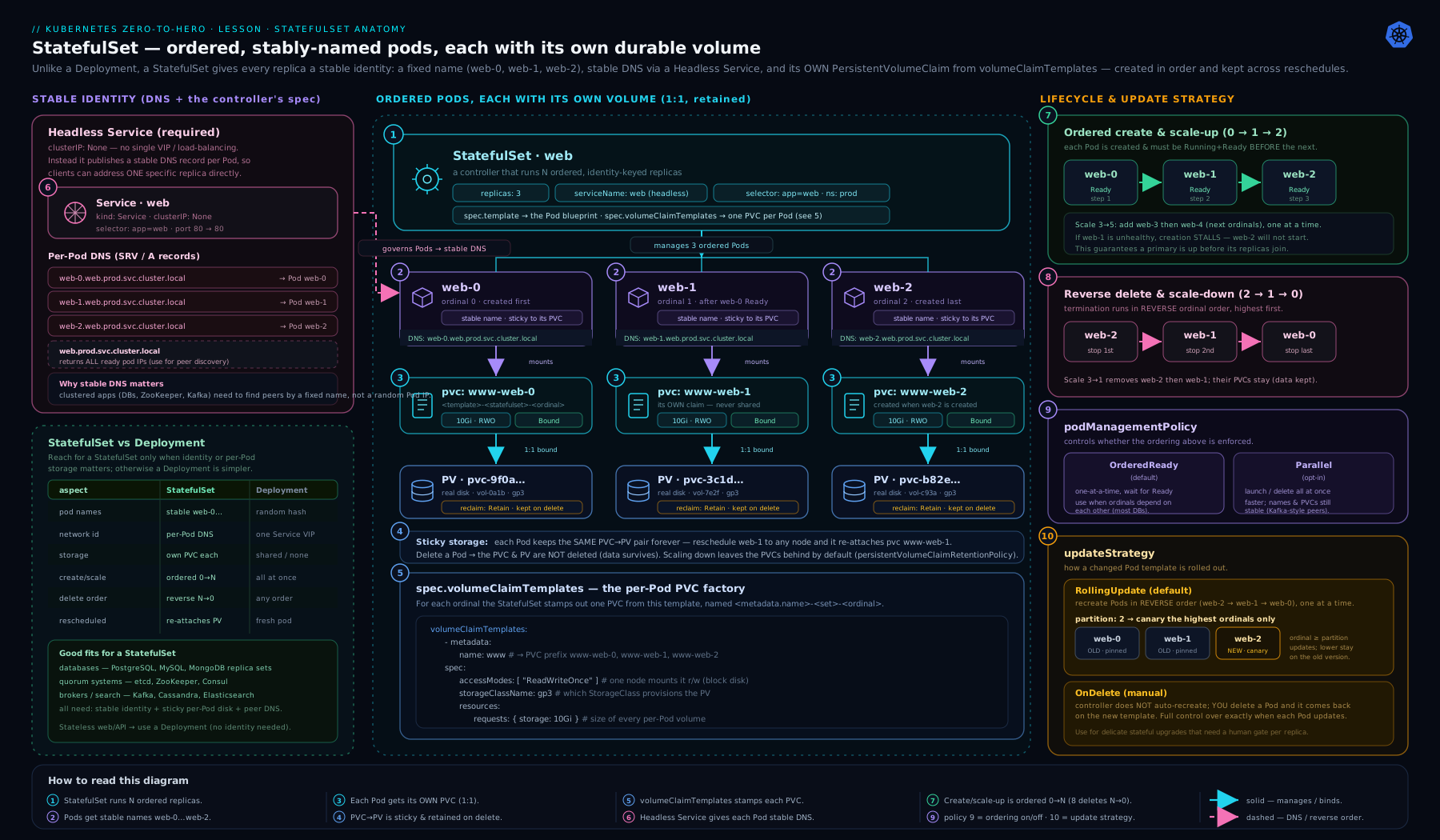
The diagram above ties the three guarantees together: a headless Service fronts ordinal Pods web-0…web-N, each Pod carries its stable per-Pod DNS name and its own data-web-N PVC bound to a dedicated PV, and the arrows show the lifecycle ordering — ascending for creation, descending for termination and rolling updates — with the partition line marking which ordinals a staged rollout touches.
StatefulSet vs Deployment vs DaemonSet
Choosing the right controller is the most common real-world (and interview) decision. The short version: stateless and interchangeable → Deployment; needs stable identity/order/storage → StatefulSet; one per node → DaemonSet.
| Requirement | Use | Why |
|---|---|---|
| Stateless web/API; Pods interchangeable | Deployment | Fastest rollout (surge), no identity baggage, scales freely. |
| Each replica needs a stable name + DNS | StatefulSet | Deployment Pods get random, changing identities. |
| Each replica needs its own persistent disk that follows it | StatefulSet | volumeClaimTemplates gives one sticky PVC per Pod. |
| Members must bootstrap/scale in a fixed order | StatefulSet | OrderedReady guarantees sequence; Deployments don’t. |
| Primary/replica databases, quorum systems (etcd, ZooKeeper, Kafka, Cassandra) | StatefulSet (usually via an operator) | Needs all three guarantees at once. |
| Exactly one Pod on every node (log/metrics/CNI/CSI agents) | DaemonSet | Tracks node membership; one-per-node, not a fixed count. |
| A run-once or scheduled batch task | Job / CronJob | Run-to-completion semantics, not run-forever. |
Sharp contrasts beginners blur:
- StatefulSet vs Deployment. A Deployment’s Pods are anonymous and its rollout surges (it can briefly run more Pods than
replicas). A StatefulSet’s Pods have sticky identities and storage and roll in place, one at a time, reverse-ordinal (never surging, because two Pods can’t share one identity or oneReadWriteOncePVC). If you don’t need a stable name, stable DNS, ordered lifecycle, or per-Pod storage, you don’t need a StatefulSet — use a Deployment; it’s simpler and faster. - StatefulSet vs DaemonSet. A StatefulSet runs a fixed count of identity-bearing replicas wherever the scheduler places them; a DaemonSet runs one Pod per node and scales with the cluster. “Three Cassandra nodes” is a StatefulSet; “a log shipper on every node” is a DaemonSet.
And the production reality check: for anything beyond a toy, you usually don’t hand-write the StatefulSet for a database — you use an operator (CloudNativePG for Postgres, Strimzi for Kafka, the ZooKeeper operator, etc.). The operator generates a StatefulSet under the hood for identity and storage, then layers on the consensus, failover, backup and PITR logic a bare StatefulSet can’t express. This lesson teaches the primitives; the Stateful PostgreSQL with an operator lesson shows the real thing.
Common stateful patterns
- Primary/replica databases (Postgres, MySQL). Ordinal
0is often the primary that bootstraps first; replicas1…Njoin by addressingdb-0.<svc>and streaming from it. The headless Service gives the durable peer addresses;OrderedReadyensures the primary is up before replicas try to attach. An operator promotes a new primary on failover and updates a separate “primary” Service. - Quorum / consensus systems (etcd, ZooKeeper, Consul). Run an odd number of replicas (3 or 5) so the cluster can form a majority. Each member discovers peers via the per-Pod DNS names.
OrderedReady(orParallelwith a discovery mechanism) brings members up;partitionlets you upgrade one member at a time while quorum holds. Never scale a quorum system below majority during an upgrade — that’s why one-at-a-time rolling updates matter. - Sharded stores (Cassandra, Elasticsearch data nodes). Each ordinal owns a shard/range and its own disk.
Parallelmanagement can speed bring-up when nodes don’t depend on a strict start order, andwhenScaled: Deleteis reasonable when removing a node triggers data rebalancing. - The “stable identity, modest storage” case (some message brokers, Zookeeper). Even when the disk is small, the stable name and stable DNS are the reason to choose a StatefulSet over a Deployment.
Going deeper
You now have the whole surface area. This section is for the reader who has to operate StatefulSets in anger — the internals and edge cases that separate “I can write the YAML” from “I can debug this at 3 a.m. without losing data.” None of it is required to pass the exam; all of it eventually matters in production.
The lost-node problem — and why force-deleting a StatefulSet Pod is dangerous
The identity guarantee has a sharp operational edge that every StatefulSet operator eventually hits. When a node goes unreachable (the kubelet stops reporting — a crash, a network partition), its Pods are marked Terminating (or Unknown) but are not actually deleted, because the control plane cannot confirm they have stopped. The node might still be up and still running your Pod, with its ReadWriteOnce volume mounted and being written to.
For a StatefulSet this is deliberate and load-bearing: the controller will not create a replacement web-1 while the old web-1 might still be alive, because two Pods sharing one identity and one RWO disk is exactly the split-brain / data-corruption scenario StatefulSets exist to prevent. So a lost node leaves you with web-1 stuck Terminating and no replacement — the set looks wedged, and there is no higher ordinal it can safely advance to.
The tempting fix — kubectl delete pod web-1 --force --grace-period=0 — tells the API server to drop the Pod object without any confirmation that the container actually stopped. If the node was merely partitioned and is in fact still running the container, you now have two live web-1s writing to the same data. The safe sequence is:
- Confirm the kubelet is truly dead (the node is powered off, deleted, or fenced), not just unreachable. A destroyed VM or failed hardware is safe; a transient network blip is not.
- Then either delete the Node object (
kubectl delete node <node>), which lets the controller safely recreate the Pod, or force-delete the Pod only after you have fenced the node. - Database operators automate this “fence before failover” so a human doesn’t have to make the call under pressure — one more reason production stateful workloads run under an operator rather than a hand-rolled StatefulSet.
This is the single most important StatefulSet operational gotcha, and a favourite senior-level interview probe: why is my StatefulSet Pod stuck Terminating, and why shouldn’t I just --force it?
Update history & rollback: ControllerRevisions
Every change to the Pod template is recorded as a ControllerRevision object — an immutable snapshot of the template, the same mechanism DaemonSets use. That history is what powers rollback:
kubectl rollout history statefulset/web              # list revisions
kubectl rollout history statefulset/web --revision=2 # show one revision's template
kubectl rollout undo statefulset/web                 # roll back to the previous revision
kubectl rollout undo statefulset/web --to-revision=2 # roll back to a specific one
The StatefulSet’s .status tracks two revision hashes that make partitioned rollouts legible:
currentRevision— the template the stable Pods (ordinals belowpartition) are running.updateRevision— the template being rolled out (ordinals at or abovepartition).
When a rollout is complete and un-partitioned, the two are equal. During a partition canary they differ — and that difference is literally how the controller knows which ordinals still need updating. A rollback is just applying an older ControllerRevision as the new updateRevision and rolling it out reverse-ordinal, exactly like any other template change (still one-at-a-time, still fail-stop). One caveat that trips people up: rolling back the template does not revert data on the PVCs — storage is orthogonal to the rollout. Only the Pod spec rolls back; a bad schema migration is your problem, not the StatefulSet’s.
minReadySeconds: don’t count a flapping member as available
By default a StatefulSet Pod is treated as “available” the instant it reports Ready. .spec.minReadySeconds (stable since v1.25) makes the controller wait N seconds of continuous readiness — no container crashes in that window — before counting a Pod as available and letting the rolling update proceed to the next ordinal. For a database that can pass a readiness probe a beat before it is genuinely serving (cache warm, replication caught up), a modest value (say 15–30) stops a rollout from racing ahead through members that immediately flap. It also feeds .status.availableReplicas, giving you an honest “how many are really up” number.
ordinals.start: slicing and migrating a set
Ordinals default to 0 … replicas-1, but .spec.ordinals.start: N shifts the whole range to N … N+replicas-1 (beta and on by default since v1.27, stable in v1.31). The names, DNS records and PVCs all follow: with start: 5 and replicas: 3 you get web-5, web-6, web-7 and data-web-5…7. The point isn’t cosmetic — it lets you migrate a StatefulSet across clusters or namespaces without ordinal collisions: run ordinals 0–2 in the old cluster and 3–5 in the new one, move members across the boundary one at a time, and no two members ever claim the same identity or the same slice of a sharded keyspace. It’s a specialist tool, but when you need it there is no substitute.
Reading .status like the controller does
kubectl get statefulset web -o yaml (or kubectl describe) exposes exactly what the controller reasons about. When a rollout or scale looks stuck, these fields tell you where:
| Field | Meaning |
|---|---|
replicas |
how many Pods the set currently owns |
readyReplicas |
how many are passing readiness right now |
availableReplicas |
how many have been Ready for at least minReadySeconds |
currentReplicas / updatedReplicas |
how many are on currentRevision vs updateRevision — watch these march during a rollout |
currentRevision / updateRevision |
the ControllerRevision hashes described above |
observedGeneration |
the .metadata.generation the controller has acted on — if it lags your last edit, the controller hasn’t reconciled your change yet |
collisionCount |
internal hash-collision guard for ControllerRevision naming; you never set it |
Two quick diagnoses fall straight out of this table: updatedReplicas vs replicas tells you how far a rollout got before it stalled, and observedGeneration vs .metadata.generation tells you whether the controller has even seen your latest change.
Hands-on lab
Free, on your laptop, using kind (or minikube). You’ll create a headless Service + StatefulSet, observe ordered creation, prove per-Pod identity and storage stickiness, run a partition canary, scale down to see PVC retention, then experiment with the retention policy. kind ships a default standard StorageClass (Rancher local-path provisioner) so dynamic provisioning works out of the box.
1. Create a cluster:
kind create cluster --name sts-lab
kubectl get storageclass
# expect a 'standard (default)' class (rancher.io/local-path)
2. Create the headless Service and StatefulSet:
cat <<'EOF' | kubectl apply -f -
apiVersion: v1
kind: Service
metadata:
  name: web
  labels: { app: web }
spec:
  clusterIP: None
  selector: { app: web }
  ports:
    - { name: http, port: 80 }
---
apiVersion: apps/v1
kind: StatefulSet
metadata:
  name: web
spec:
  serviceName: web
  replicas: 3
  podManagementPolicy: OrderedReady
  selector:
    matchLabels: { app: web }
  updateStrategy:
    type: RollingUpdate
  persistentVolumeClaimRetentionPolicy:
    whenScaled: Retain
    whenDeleted: Retain
  template:
    metadata:
      labels: { app: web }
    spec:
      terminationGracePeriodSeconds: 5
      containers:
        - name: nginx
          image: registry.k8s.io/nginx-slim:0.27
          ports: [{ containerPort: 80, name: http }]
          volumeMounts:
            - { name: data, mountPath: /usr/share/nginx/html }
  volumeClaimTemplates:
    - metadata: { name: data }
      spec:
        accessModes: ["ReadWriteOnce"]
        resources: { requests: { storage: 64Mi } }
EOF
3. Watch ordered, one-at-a-time creation:
kubectl get pods -l app=web -w
# web-0 -> Running/Ready, THEN web-1 -> Running/Ready, THEN web-2. Never all at once.
# Ctrl-C when 3/3 are Ready.
kubectl get statefulset web        # READY 3/3
kubectl get pvc -l app=web
# data-web-0, data-web-1, data-web-2 -> all Bound
Validation: the Pod names are web-0, web-1, web-2 (stable ordinals), and there are exactly three PVCs named data-web-<n>.
4. Prove stable per-Pod DNS and storage stickiness. Write a file into web-1’s volume, then delete the Pod and confirm the data and identity return:
# write unique content onto web-1's disk, served by nginx
kubectl exec web-1 -- sh -c 'echo "I am web-1, ordinal 1" > /usr/share/nginx/html/index.html'

# from a throwaway client Pod, resolve the per-Pod name and fetch it
kubectl run client --rm -it --image=busybox:1.36 --restart=Never -- \
  sh -c 'nslookup web-1.web.default.svc.cluster.local; wget -qO- http://web-1.web.default.svc.cluster.local'
# nslookup returns web-1's IP; wget prints: I am web-1, ordinal 1

# now delete web-1 and watch it come back with the SAME name and SAME data
kubectl delete pod web-1
kubectl wait --for=condition=Ready pod/web-1 --timeout=60s
kubectl exec web-1 -- cat /usr/share/nginx/html/index.html
# STILL prints: I am web-1, ordinal 1   <-- it re-bound data-web-1
This is the headline demonstration: a deleted StatefulSet Pod returns with its name, DNS record, and disk intact. A Deployment Pod would have come back anonymous and empty.
5. Run a partition canary. Stage a change so only the highest ordinal updates:
# set a partition so only ordinals >= 2 update
kubectl patch statefulset web --type=merge \
  -p '{"spec":{"updateStrategy":{"rollingUpdate":{"partition":2}}}}'

# change the image -> with partition=2, only web-2 should roll
kubectl set image statefulset/web nginx=registry.k8s.io/nginx-slim:0.28
kubectl rollout status statefulset/web --timeout=120s

# verify: web-2 on the new image, web-0/web-1 still on the old one
kubectl get pod web-0 web-1 web-2 \
  -o custom-columns=NAME:.metadata.name,IMAGE:.spec.containers[0].image
# web-0 -> :0.27   web-1 -> :0.27   web-2 -> :0.28   (canary on web-2 only)
Now “release” the canary to the rest by lowering the partition:
kubectl patch statefulset web --type=merge \
  -p '{"spec":{"updateStrategy":{"rollingUpdate":{"partition":0}}}}'
kubectl rollout status statefulset/web --timeout=120s
kubectl get pods -l app=web \
  -o custom-columns=NAME:.metadata.name,IMAGE:.spec.containers[0].image
# all three now on :0.28, rolled web-1 then web-0 (reverse ordinal)
6. See PVC retention on scale-down (policy = Retain):
kubectl scale statefulset web --replicas=1
kubectl get pods -l app=web        # only web-0 remains (web-2, then web-1 terminated)
kubectl get pvc -l app=web
# data-web-0, data-web-1, data-web-2 are ALL still here and Bound -> PVCs retained
Scale back up and watch the data return:
kubectl scale statefulset web --replicas=3
kubectl wait --for=condition=Ready pod/web-1 --timeout=60s
kubectl exec web-1 -- cat /usr/share/nginx/html/index.html
# STILL "I am web-1, ordinal 1" -> web-1 re-attached its retained PVC
7. (Optional) Contrast with whenScaled: Delete:
kubectl patch statefulset web --type=merge \
  -p '{"spec":{"persistentVolumeClaimRetentionPolicy":{"whenScaled":"Delete"}}}'
kubectl scale statefulset web --replicas=1
kubectl get pvc -l app=web
# now data-web-1 and data-web-2 are GONE (deleted with their Pods); only data-web-0 remains
Cleanup:
kubectl delete statefulset web
kubectl delete service web
kubectl delete pvc -l app=web        # PVCs are NOT removed by deleting the StatefulSet (Retain)
kind delete cluster --name sts-lab
Cost note: entirely free — kind runs in Docker on your laptop and the local-path provisioner uses host disk. On a cloud provider, every volumeClaimTemplate PVC provisions a real, billed managed disk per replica (e.g. an EBS/Managed Disk volume), and with whenScaled: Retain those disks keep costing money after you scale down until you delete the PVCs — the number-one surprise on a StatefulSet bill.
Practice challenges
Work these on the kind cluster from the lab (or any cluster with a default StorageClass). Each states a goal and a done-when — try it yourself before opening the solution. They escalate from beginner to advanced, and every solution ends with a one-line why.
Challenge 1 — Stable identity you can dial (beginner)
Goal: Deploy a 3-replica StatefulSet cache behind a headless Service, and from a throwaway Pod resolve the DNS name of the middle replica to its IP.
Done when: nslookup cache-1.cache.default.svc.cluster.local returns one A record, and it matches the IP from kubectl get pod cache-1 -o wide.
<details> <summary>Show solution</summary>
cat <<'EOF' | kubectl apply -f -
apiVersion: v1
kind: Service
metadata: { name: cache, labels: { app: cache } }
spec:
  clusterIP: None
  selector: { app: cache }
  ports: [{ name: http, port: 80 }]
---
apiVersion: apps/v1
kind: StatefulSet
metadata: { name: cache }
spec:
  serviceName: cache
  replicas: 3
  selector: { matchLabels: { app: cache } }
  template:
    metadata: { labels: { app: cache } }
    spec:
      containers:
        - name: nginx
          image: registry.k8s.io/nginx-slim:0.27
          ports: [{ containerPort: 80, name: http }]
EOF

kubectl rollout status statefulset/cache
kubectl get pod cache-1 -o wide          # note the IP
kubectl run c --rm -it --image=busybox:1.36 --restart=Never -- \
  nslookup cache-1.cache.default.svc.cluster.local
Why: clusterIP: None plus serviceName: cache is the minimum that makes per-Pod DNS records exist; cache-1 is the ordinal-1 (second) replica, so its FQDN is cache-1.cache.default.svc.cluster.local. No volumeClaimTemplates here — identity and DNS don’t require storage.
</details>
Challenge 2 — Canary exactly one member (intermediate)
Goal: On that cache set, roll a new image to only the highest ordinal first, confirm the other two are untouched, then release the rest in reverse-ordinal order.
Done when: after step one, cache-2 is on the new image and cache-0/cache-1 are on the old one; after step two, all three are on the new image.
<details> <summary>Show solution</summary>
# pin everything below ordinal 2, then change the image -> only cache-2 rolls
kubectl patch statefulset cache --type=merge \
  -p '{"spec":{"updateStrategy":{"rollingUpdate":{"partition":2}}}}'
kubectl set image statefulset/cache nginx=registry.k8s.io/nginx-slim:0.28
kubectl rollout status statefulset/cache
kubectl get pod cache-0 cache-1 cache-2 \
  -o custom-columns=NAME:.metadata.name,IMAGE:.spec.containers[0].image
# cache-0 :0.27  cache-1 :0.27  cache-2 :0.28   <- canary on the top ordinal only

# release: drop the partition to 0 -> rolls cache-1 then cache-0
kubectl patch statefulset cache --type=merge \
  -p '{"spec":{"updateStrategy":{"rollingUpdate":{"partition":0}}}}'
kubectl rollout status statefulset/cache
Why: partition: K updates only ordinals >= K. With replicas: 3, partition: 2 isolates the change to cache-2; lowering it to 0 releases the rest, and StatefulSets always roll reverse-ordinal (cache-1 then cache-0).
</details>
Challenge 3 — Prove the data outlives the controller (intermediate/advanced)
Goal: Give cache a volumeClaimTemplate, write a unique file to cache-0’s disk, delete the whole StatefulSet, and prove the PVC (and data) survived — then bring the set back and re-attach it.
Done when: after kubectl delete statefulset cache, kubectl get pvc still shows data-cache-0 Bound; after re-applying, cache-0 serves the original file.
<details> <summary>Show solution</summary>
Save your manifest to cache-sts.yaml and add a volumeClaimTemplate (templates can’t be added to an existing set, so recreate cache with it):
  # under the StatefulSet .spec:
  volumeClaimTemplates:
    - metadata: { name: data }
      spec:
        accessModes: ["ReadWriteOnce"]
        resources: { requests: { storage: 64Mi } }
and a matching volumeMounts entry on the container (- { name: data, mountPath: /usr/share/nginx/html }). Then:
kubectl exec cache-0 -- sh -c 'echo hello-from-cache-0 > /usr/share/nginx/html/index.html'

kubectl delete statefulset cache          # controller + Pods gone...
kubectl get pvc -l app=cache              # data-cache-0/1/2 still Bound  <- retained

# re-apply the SAME manifest -> the new StatefulSet adopts the existing PVCs
kubectl apply -f cache-sts.yaml
kubectl wait --for=condition=Ready pod/cache-0 --timeout=60s
kubectl exec cache-0 -- cat /usr/share/nginx/html/index.html
# hello-from-cache-0   <- same PVC, same data
Why: the default persistentVolumeClaimRetentionPolicy.whenDeleted: Retain means deleting the StatefulSet leaves the per-Pod PVCs untouched; a re-applied StatefulSet re-binds data-cache-0 to the new cache-0 by its deterministic name. Storage is durable; the controller is not.
</details>
Challenge 4 — Change an immutable field without downtime (advanced)
Goal: Change cache from the default OrderedReady to podManagementPolicy: Parallel — an immutable field — without deleting its Pods or PVCs.
Done when: the StatefulSet reports Parallel, and the same three Pods (same names, same age, same PVCs) ran throughout.
<details> <summary>Show solution</summary>
# orphan-delete: removes the StatefulSet object but LEAVES Pods + PVCs running
kubectl delete statefulset cache --cascade=orphan
kubectl get pods -l app=cache    # cache-0/1/2 still Running, untouched

# edit cache-sts.yaml: set  podManagementPolicy: Parallel  then re-apply.
# the new StatefulSet adopts the existing Pods by selector (no restart).
kubectl apply -f cache-sts.yaml
kubectl get statefulset cache -o jsonpath='{.spec.podManagementPolicy}'   # Parallel
Why: podManagementPolicy, serviceName, selector and (mostly) volumeClaimTemplates are immutable. --cascade=orphan deletes only the controller; re-applying a manifest whose selector still matches makes the new StatefulSet adopt the orphaned Pods/PVCs, so the field changes with zero Pod restarts. This is the same trick the troubleshooting table below references.
</details>
Common beginner mistakes
These are misconceptions — the wrong mental model that leads to the trouble — not symptoms. (The symptom → cause → fix table comes next; this is about why you got there.)
- “A StatefulSet load-balances across its replicas like a Deployment.” It does not. A headless Service has no virtual IP and does no load-balancing — its whole job is to hand out the individual Pod addresses so members can find each other. Point application clients at
web.default.svc…expecting round-robin and you’ll get a DNS list of Pod IPs, not a balancer. Right model: the headless Service is for peer discovery; if clients need a single load-balanced endpoint, add a separate, normal ClusterIP Service (or let an operator manage a “primary”/“read” Service). Identity ≠ traffic distribution. - “I deleted the StatefulSet, so its storage is gone.” By default it is not.
whenDeleted: Retain(the default) keeps every per-Pod PVC — and on a cloud provider those disks keep billing until you delete the PVCs by hand. The mirror-image trap is assuming the data will survive when someone has quietly setwhenDeleted: Delete. Right model: the PVC lifecycle is governed bypersistentVolumeClaimRetentionPolicy, independently of the Pods — always check both fields before youkubectl delete sts, and remember that retained PVCs cost money. - “The headless Service is optional boilerplate.” Skip it — or misname
serviceName, or forgetclusterIP: None— and the per-Pod DNS records never get created:web-0.web…won’t resolve and your cluster members can’t address each other. Nothing errors loudly; it just silently doesn’t work, which makes it maddening to debug. Right model: the headless Service is the machinery that produces stable network identity. It is mandatory, and.spec.serviceNamemust equal its name exactly. - “Scaling a StatefulSet is quick, like a Deployment.” Under the default
OrderedReady, Pods come up one at a time, each waiting for the previous to be Ready — and each may have a slow init (data restore, replication catch-up) plus a generousterminationGracePeriodSecondson the way down, serialised across the set. Bringing up five members can take minutes, not seconds. Right model: ordered start is a safety feature, not a performance one; if members are genuinely independent and you need speed, that’s exactly whatpodManagementPolicy: Parallelis for. - “One broken Pod only affects that Pod.” With
OrderedReady, a singleweb-0stuck inCrashLoopBackOffblocks the entire set —web-1andweb-2are never created, and a rolling update won’t progress past the break. Right model: the set advances only as far as the lowest not-Ready ordinal. Fix the low ordinal first, and give members honest readiness probes so ordering waits for true cluster membership, not just “the process started.”
Common mistakes & troubleshooting
| Symptom | Likely cause | Fix |
|---|---|---|
StatefulSet stuck at 1/3 (or any partial count), higher Pods never created |
OrderedReady: a lower ordinal (e.g. web-0) is not Ready, so creation halts there |
kubectl describe pod web-0 / kubectl logs web-0; fix the failing Pod (image, probe, config). The roll resumes once it’s Ready. |
Per-Pod DNS names (web-0.svc…) don’t resolve |
No headless Service, serviceName doesn’t match it, or the Service isn’t clusterIP: None |
Create a headless Service whose name equals .spec.serviceName; verify clusterIP: None. |
Pods stay Pending, PVCs Pending |
No default StorageClass, named class doesn’t exist, or no provisioner/capacity | kubectl get sc; set storageClassName to a real class or mark one default; check provisioner logs. |
| Peers can’t find a member during bootstrap (before it’s Ready) | Per-Pod DNS only publishes Ready Pods by default | Set publishNotReadyAddresses: true on the headless Service. |
Forbidden: updates to statefulset spec for fields other than 'replicas', 'template', 'updateStrategy'... |
Tried to edit an immutable field (serviceName, selector, podManagementPolicy, volumeClaimTemplates) |
Recreate the StatefulSet; use kubectl delete sts --cascade=orphan to keep Pods/PVCs, then re-apply the new spec. |
| Rolling update doesn’t progress past one Pod | Updated Pod isn’t becoming Ready (reverse-ordinal roll halts), or a non-zero partition is pinning lower ordinals |
Fix the unhealthy Pod; check .spec.updateStrategy.rollingUpdate.partition — lower it to release more ordinals. |
| Image change applied to no Pods | partition ≥ replicas (staged but not released), or strategy is OnDelete |
Lower partition, or for OnDelete delete the Pods you want updated. |
StatefulSet Pod stuck Terminating, no replacement created |
Node is unreachable; the controller won’t recreate the identity while the old Pod might still be alive (RWO safety) | Confirm the node is truly dead, then kubectl delete node <node> (or force-delete the Pod only after fencing). Never --force a Pod on a merely-partitioned node — see Going deeper. |
| Orphaned PVCs / unexpected cloud disk bill after scaling down | Default whenScaled: Retain keeps removed ordinals’ PVCs |
Delete the stale PVCs, or set persistentVolumeClaimRetentionPolicy.whenScaled: Delete if losing that data is acceptable. |
| Deleting the StatefulSet left all PVCs behind | Default whenDeleted: Retain (data protection) |
Delete PVCs explicitly, or set whenDeleted: Delete for ephemeral environments. |
A note on --cascade=orphan: kubectl delete statefulset web --cascade=orphan removes the StatefulSet object but leaves the Pods and PVCs running. This is the supported way to change an immutable field (e.g. podManagementPolicy) without downtime: orphan, re-apply the StatefulSet with the new spec (it adopts the existing Pods/PVCs by selector), done.
Best practices
- Always pair the StatefulSet with a headless Service and set
.spec.serviceNameto it. This is mandatory for the identity guarantees, not optional decoration. - Set CPU/memory
requestsandlimitson stateful Pods. Databases and brokers are resource-sensitive; an OOM-killed primary triggers a failover you didn’t plan. - Use
WaitForFirstConsumerStorageClasses for zonal disks so each PVC is provisioned in the zone its Pod lands in — otherwise a Pod can be stranded unable to attach a cross-zone disk. - Default to
OrderedReadyunless you have a concrete reason forParallel. Ordered, fail-stop behaviour is what keeps a clustered database from charging ahead with a broken member. - Use
partitionfor canary rollouts of stateful upgrades — roll the top ordinal, observe, then walk the partition down. Never blindly full-roll a quorum system. - Choose
persistentVolumeClaimRetentionPolicydeliberately. KeepRetain/Retainfor precious data; opt intoDeleteonly where you understand the data-loss implications, and always have backups. - Set sensible
terminationGracePeriodSecondsso each member shuts down cleanly (flush, leave quorum) — but remember it’s serialised across the set underOrderedReady, so don’t make it gratuitously long. - Add readiness probes that reflect cluster membership, not just “process is up.” A Pod that’s running but not yet a healthy cluster member should report not-Ready so ordering and rollouts wait for true readiness.
- For anything production-grade, use a mature operator rather than a hand-rolled StatefulSet plus shell scripts. The StatefulSet handles identity and storage; the operator handles consensus, failover, backup and PITR.
- Plan PodDisruptionBudgets for stateful sets so voluntary disruptions (node drains, upgrades) can’t take out enough members to break quorum.
Security notes
- Per-Pod PVCs hold your most sensitive data (database files, message logs). Encrypt them at rest via the StorageClass / CSI driver (cloud-managed keys or CMK), and treat the volumes as in-scope for compliance.
- Scope the ServiceAccount tightly. A database StatefulSet rarely needs broad RBAC; give it its own ServiceAccount with minimal verbs, and
automountServiceAccountToken: falseif the Pods don’t call the Kubernetes API. - Apply Pod Security Standards. Stateful workloads should meet at least
baseline, ideallyrestricted: run non-root, drop capabilities, disallow privilege escalation, and use a read-only root filesystem with writes confined to the data PVC where the software allows. - Protect peer traffic. Member-to-member replication over the headless Service should be authenticated and encrypted (mTLS / database TLS), not plaintext on the pod network — especially for consensus systems whose membership is security-critical.
- Guard the retention policy in production. A careless
whenDeleted: Deleteplus aDeletereclaim policy means onekubectl delete statefulsetcan erase a production database. Keep production onRetain, gate deletions behind RBAC and review, and verify backups exist before any destructive change. - Mind
publishNotReadyAddresses. Publishing not-ready Pods in DNS aids bootstrap but also exposes half-initialised members; only enable it where the application’s discovery protocol expects it.
Interview & exam questions
-
Why does a StatefulSet require a headless Service, and what is “headless”? A headless Service (
clusterIP: None) has no virtual IP and doesn’t load-balance; DNS returns the Pods’ own addresses. The StatefulSet names it via.spec.serviceName, which is what causes the per-Pod DNS records (pod-N.<svc>.<ns>.svc.cluster.local) to be created — the stable network identity that lets cluster members address each other. Without it, those per-Pod names don’t exist. -
What three guarantees does a StatefulSet give that a Deployment does not? Stable, sticky identity (deterministic
name-Nthat persists across restarts, with stable DNS); ordered, graceful lifecycle (ordinal-ordered create/scale/terminate); and stable per-Pod storage (one sticky PVC per replica viavolumeClaimTemplates). -
In what order are StatefulSet Pods created and deleted by default? Created in ascending ordinal order (
0,1,2…), each waiting for the previous to be Running and Ready; deleted in descending order (highest first), each waiting for the higher ones to be fully gone. This ispodManagementPolicy: OrderedReady. -
web-0is inCrashLoopBackOff. You scale the StatefulSet from 3 to 5. What happens? Nothing new is created. UnderOrderedReady, Pod N isn’t created until0…N-1are Ready — so a brokenweb-0blocks the entire set;web-3/web-4never appear untilweb-0is healthy. -
What does
podManagementPolicy: Parallelchange, and what does it not change? It launches and terminates Pods all at once without waiting for Ready between them (faster scaling). It does not change update ordering (still reverse-ordinal), and it does not weaken identity or storage guarantees. It’s immutable after creation. -
How does
volumeClaimTemplatesname its PVCs, and what happens to a PVC when its Pod is rescheduled? PVCs are named<template>-<statefulset>-<ordinal>(e.g.data-web-1). On reschedule, the recreated Pod re-binds to its existing PVC — same volume, same data — even on a different node. The PVC is the durable thing; the Pod is ephemeral. -
What happens to the PVCs when you (a) scale a StatefulSet down and (b) delete it? By default (
Retain/Retain) both keep the PVCs — scale-down leaves removed ordinals’ PVCs (so scaling back up reuses the data), and deleting the StatefulSet leaves all PVCs. You change this withpersistentVolumeClaimRetentionPolicy.whenScaled/whenDeletedset toDelete. -
Explain
updateStrategy.rollingUpdate.partition. Withpartition: K, only Pods with ordinal ≥ K update to the new template; ordinals < K stay on the old one (and stay old even if deleted). It’s the canary/staged-rollout lever: set it high to update just the top ordinal, observe, then lower it to roll more.partition ≥ replicasstages a change without rolling anything. -
How does a StatefulSet rolling update differ from a Deployment’s? A StatefulSet rolls one Pod at a time, in reverse-ordinal order, in place (same name and PVC) with no surge — it can’t run two Pods for one identity or share a
ReadWriteOncedisk. A Deployment can surge (briefly exceedreplicas) and uses random-named replicas. A stuck Pod halts a StatefulSet roll. -
When would you choose a StatefulSet over a Deployment, and over a DaemonSet? Over a Deployment: when you need stable identity/DNS, ordered lifecycle, or per-Pod persistent storage (databases, queues, consensus). Over a DaemonSet: when you need a fixed count of identity-bearing replicas, not one per node (a DaemonSet is for per-node agents).
-
Which StatefulSet fields are immutable, and how do you change one anyway?
serviceName,selector,podManagementPolicy, and (mostly)volumeClaimTemplatesare immutable. To change one, delete the StatefulSet with--cascade=orphan(leaving Pods and PVCs), then re-apply the modified spec, which re-adopts them. -
You’re upgrading a 5-member quorum system (e.g. etcd) on a StatefulSet. How do you do it safely, and why does ordering matter? Use
RollingUpdate(default), upgrading one member at a time in reverse ordinal so a majority is always healthy; optionally drive it withpartitionto canary one member first. One-at-a-time matters because taking down two of five members at once loses quorum. Never scale below majority during the roll. -
Your StatefulSet Pod is stuck
Terminatingafter a node crash, and no replacement appears. Why, and what’s the safe fix? The node is unreachable, so the control plane can’t confirm the Pod stopped; the controller refuses to recreate the same identity while the old Pod (and its RWO volume) might still be alive — that would risk two members writing the same data. The safe fix is to confirm the node is truly dead (fenced/powered off/deleted) and then delete the Node object, which lets the controller recreate the Pod.kubectl delete pod --forceon a merely-partitioned node can create a split-brain.
Quick check
- What value of
clusterIPmakes a Service headless, and why does a StatefulSet need one? - A StatefulSet named
dbwithserviceName: dbin namespaceprod— what is the stable DNS name of its second replica? - With
podManagementPolicy: OrderedReady, canweb-2be created whileweb-1is stillPending? - After
kubectl delete statefulset webwith the default retention policy, are the PVCs gone? - With
replicas: 4andupdateStrategy.rollingUpdate.partition: 3, which Pods update when you change the image?
Answers
clusterIP: None. It gives no VIP and makes DNS return the individual Pod addresses, which is what creates the per-Pod stable DNS records the StatefulSet’s identity guarantee relies on.db-1.db.prod.svc.cluster.local(patternpod-name.service.namespace.svc.cluster-domain; ordinals start at 0, so the second replica isdb-1).- No. Under
OrderedReady,web-2isn’t created untilweb-0andweb-1are both Running and Ready. - No. With the default
whenDeleted: Retain, deleting the StatefulSet leaves the PVCs (and data) behind; you delete them explicitly. - Only
web-3(ordinals ≥ 3).web-0,web-1,web-2stay on the old template.
Exercise
Build a small quorum-style StatefulSet on a local kind cluster and exercise every guarantee:
- Create a headless Service
quorumand a StatefulSetquorumwithreplicas: 3,podManagementPolicy: OrderedReady, avolumeClaimTemplatenameddata(64Mi,ReadWriteOnce), andpersistentVolumeClaimRetentionPolicy: { whenScaled: Delete, whenDeleted: Retain }. Use any small server image (e.g.registry.k8s.io/nginx-slim). - Watch the Pods come up one at a time in ascending order; confirm three PVCs
data-quorum-0..2are Bound. - Write a distinct file into each Pod’s volume (
echo "member N" > …/index.html). Deletequorum-1, wait for it to return, and prove it kept its name and data. - From a throwaway
busyboxPod, resolve and fetchquorum-2.quorum.default.svc.cluster.localto prove per-Pod DNS works. - Set
updateStrategy.rollingUpdate.partition: 2, change the image, and confirm onlyquorum-2updated. Then lower the partition to0and watchquorum-1thenquorum-0roll (reverse ordinal). - Scale to
replicas: 1and confirm — becausewhenScaled: Delete— thatdata-quorum-1anddata-quorum-2were deleted (contrast with the defaultRetain). - Clean up with
kind delete cluster.
Success criteria: ordered bring-up; a deleted Pod returns with identical name and data; per-Pod DNS resolves; the partition canary touches exactly one ordinal; and the retention policy deletes the right PVCs on scale-down.
Certification mapping
- CKAD — Application Design and Build and Application Deployment expect you to understand and deploy StatefulSets: create one with a
volumeClaimTemplate, know the role of the headless Service andserviceName, reason about ordered startup, and perform/inspect a rolling update. Be ready to explain why a StatefulSet (not a Deployment) is required for a workload that needs stable identity or per-Pod storage. - CKA — Workloads & Scheduling and Storage cover StatefulSets end-to-end: dynamic provisioning via
volumeClaimTemplatesand StorageClasses, PVC lifecycle on scale/delete, and troubleshooting a StatefulSet that won’t progress (the “stuck on a not-Ready lower ordinal” scenario). You should also be able to usekubectl rollout status/undoagainst a StatefulSet and reason aboutpartition. - Handy exam fluency:
kubectl get sts,kubectl rollout status sts/<name>,kubectl scale sts/<name> --replicas=N,kubectl delete sts <name> --cascade=orphan(to change an immutable field), and resolvingpod-N.<svc>.<ns>.svc.cluster.localto verify identity.
Glossary
- StatefulSet — a controller that manages identity-bearing, ordered Pods with stable per-Pod storage.
- Ordinal — the stable integer index (0,1,2…) assigned to each replica; the basis for its name, DNS and PVC. Configurable start via
.spec.ordinals.start. - Headless Service — a Service with
clusterIP: Nonethat returns Pod addresses directly and, as a StatefulSet’sserviceName, creates the per-Pod DNS records. serviceName— the StatefulSet field naming its governing (headless) Service; required for stable network identity.- Per-Pod DNS name —
pod-name.service.namespace.svc.cluster-domain, a stable address for one specific replica. podManagementPolicy—OrderedReady(one-at-a-time, wait-for-Ready) orParallel(all at once); immutable.volumeClaimTemplates— PVC templates that give each replica its own PVC namedtemplate-statefulset-ordinal.updateStrategy— how template changes roll out:RollingUpdate(reverse-ordinal, in place) orOnDelete(manual).partition— underRollingUpdate, only ordinals ≥ this value update; the canary/staged-rollout lever.maxUnavailable(StatefulSet) — how many Pods aRollingUpdatemay take down at once within the partition (default 1; feature-gated).persistentVolumeClaimRetentionPolicy—whenScaled/whenDeletedset toRetain(keep PVCs) orDelete(reclaim them).publishNotReadyAddresses— headless-Service option to include not-yet-Ready Pods in DNS, for bootstrap discovery.reclaimPolicy— the PV’sRetain/Deletesetting (from the StorageClass) that decides whether deleting a PVC also destroys the disk.--cascade=orphan— delete the StatefulSet but keep its Pods/PVCs, the supported way to change an immutable field.- ControllerRevision — an immutable, versioned snapshot of the Pod template that records rollout history and powers
kubectl rollout undo. minReadySeconds— seconds a Pod must stay continuously Ready before it counts as available and the rollout proceeds to the next ordinal.- Quorum — a majority of members required for a consensus system to operate; run odd replica counts (3, 5).
Next steps
You now understand the three StatefulSet guarantees and every field that delivers them. The natural next move is to see them applied to a real, production-grade workload: Running Stateful PostgreSQL on Kubernetes with an operator builds an HA Postgres cluster with synchronous replication, automated quorum failover, WAL archiving and a rehearsed point-in-time-recovery drill — everything a bare StatefulSet can’t do on its own. From there the course turns to extending the platform itself with Kubernetes Admission Control: Validating & Mutating Webhooks + ValidatingAdmissionPolicy. If you want more depth on the storage layer underneath volumeClaimTemplates, revisit Kubernetes Storage: Volumes, PV, PVC & StorageClass and CSI Volume Snapshots, Cloning, Resize & Topology.
</content>
</invoke>