In a nutshell
Think of a Deployment as a thermostat for your application. You don’t run around starting and stopping copies of your app by hand; you simply declare the target — “keep 3 copies of this exact version running” — and a controller inside Kubernetes works continuously to make reality match that target. A copy crashes? It’s replaced. A node dies? The copies come back elsewhere. You never touch the individual copies; you adjust the setting, and the system converges.
Its two superpowers are self-healing (always keep N healthy copies alive) and safe, versioned updates (roll out a new version a few copies at a time so users never see an outage — and if the new version turns out bad, put the old one back with a single command). That second superpower is the whole reason Deployments exist instead of you managing Pods directly.
Under the hood there’s a tidy chain: a Deployment manages ReplicaSets (each ReplicaSet is one frozen version of your app), and the current ReplicaSet manages the Pods (the running copies). You only ever write the Deployment; Kubernetes creates and juggles the ReplicaSets and Pods for you. If you remember one sentence, make it this: a Deployment is a declarative “how many, which version, and how to change versions safely” object for stateless apps.
Level: Junior — beginner-friendly, with an advanced “Going deeper” section · Time: ~35 min read + ~20 min hands-on lab
In the previous lesson you took the Pod apart field by field — the smallest thing Kubernetes runs, and a thing you should almost never create by hand. The reason you don’t create bare Pods is simple: a Pod has no self-healing and no concept of versions. Delete it, lose the node it ran on, or ship a new image, and nothing brings the right Pods back in the right shape. That job belongs to a controller, and for the everyday case of “run N copies of a stateless app and let me update them safely” the controller you reach for is the Deployment.
This lesson is the exhaustive companion to that one-liner. A Deployment is deceptively small on the surface — a handful of YAML keys — but it sits on top of a second object, the ReplicaSet, and the way the two cooperate is what gives you zero-downtime rolling updates, instant rollback, paused canaries, and a tidy revision history. We will walk the whole ownership chain (Deployment → ReplicaSet → Pod), explain every field in the Deployment spec, dissect both update strategies (RollingUpdate with maxSurge/maxUnavailable, and Recreate), trace the rollout lifecycle end to end with the real kubectl rollout commands, and finish by drawing the line between a Deployment and its cousins — the StatefulSet and the DaemonSet. Every example is current Kubernetes (v1.30+), real YAML, and reproducible on a free local cluster.
Learning objectives
By the end of this lesson you can:
- Explain the Deployment → ReplicaSet → Pod ownership chain and what each layer is responsible for, including how
ownerReferencesandlabels/selectorswire them together. - Write a complete Deployment manifest and explain every field in
spec—replicas,selector,template,strategy,minReadySeconds,revisionHistoryLimit,progressDeadlineSeconds, andpaused. - Choose between the
RollingUpdateandRecreatestrategies, and tune a rolling update withmaxSurgeandmaxUnavailable(counts and percentages). - Drive the full rollout lifecycle with
kubectl rollout status / history / undo / pause / resume / restart, and read a Deployment’s conditions (Available,Progressing). - Scale a Deployment manually and explain how a HorizontalPodAutoscaler takes over
replicas. - Decide correctly when to use a Deployment versus a StatefulSet or a DaemonSet.
Prerequisites & where this fits
You need a terminal, a local cluster (kind, minikube, or k3d), and the kubectl basics. If you have not set up a cluster, do the lab in What Is Kubernetes? Control Plane, Nodes, etcd & the kubelet first. This lesson assumes you understand the Pod spec in detail — labels, template, probes, resources, and the reconciliation loop — which is covered in the previous lesson, Kubernetes Pods, In Depth. This is Lesson KD3 of the Kubernetes Zero-to-Hero course: it is the workload-controller foundation that scaling, autoscaling, progressive delivery (Argo Rollouts/Flagger), and the capstone all build on. The next lesson, Kubernetes Services & Networking, puts a stable network address in front of the Pods a Deployment manages.
Core concepts: the controller chain
The single most important idea in this lesson is the ownership chain:
A Deployment owns one or more ReplicaSets; the current ReplicaSet owns the Pods.
Each layer has exactly one responsibility, and understanding the split is what makes rollouts make sense.
| Object | Its one job | API group/version | You create it directly? |
|---|---|---|---|
| Pod | Run your container(s) once. No self-healing. | v1 (core) |
Rarely — only for one-off debugging. |
| ReplicaSet | Keep exactly N identical Pods running, of one version. Cannot update Pods in place. | apps/v1 |
Almost never — you let a Deployment make it. |
| Deployment | Manage ReplicaSets to give versioned, safe rollouts and rollback of a stateless workload. | apps/v1 |
Yes — this is the object you write. |
Two controllers run continuously in the control plane to make this work. The ReplicaSet controller watches each ReplicaSet and reconciles actual Pod count to desired count — the classic control loop. The Deployment controller watches each Deployment and reconciles which ReplicaSets exist and how many replicas each holds — it is the thing that, during an update, creates a new ReplicaSet and shifts replicas from old to new a few at a time.
Why two objects and not one?
It is tempting to ask why a Deployment doesn’t just manage Pods directly. The answer is versioning. A ReplicaSet is, by design, immutable in its Pod template for practical purposes — it represents one version of your app (one specific image + config). When you change the Deployment’s Pod template, the Deployment does not mutate the existing ReplicaSet; it creates a brand-new ReplicaSet for the new template and scales the old one down. Because the old ReplicaSet is still there (just scaled to 0), rollback is instant: the Deployment simply scales the old ReplicaSet back up and the new one down. Every revision you have ever rolled out is, by default, a ReplicaSet sitting at 0 replicas, ready to be reactivated. That is the whole trick.
Labels, selectors and ownerReferences — how the chain is wired
The chain is held together by two mechanisms working in tandem:
ownerReferences— a hard, explicit parent pointer set in each child object’s metadata. The current ReplicaSet has anownerReferenceto the Deployment; each Pod has anownerReferenceto its ReplicaSet. This drives garbage collection (delete the Deployment and its ReplicaSets and Pods are cleaned up) andkubectltree views.labels+selector— a soft, query-based match. The ReplicaSet’sspec.selectoris a label query that says “the Pods I own look like this”; the Pods carry matchinglabels(copied from the Deployment’stemplate.metadata.labels). To prevent two ReplicaSets from fighting over the same Pods, the Deployment controller injects a unique label,pod-template-hash(a hash of the Pod template), into each ReplicaSet’s selector and into the Pods it creates. That is why you will see Pod names likeweb-7d9f8c6b5-abcde— the middle segment is thepod-template-hash.
Jargon check. A selector is a label query; a label is a key/value tag on an object. The selector “finds” objects whose labels match. Get the selector wrong and a ReplicaSet either adopts Pods it shouldn’t or sees zero Pods and creates duplicates.
A complete Deployment manifest
Here is a realistic Deployment with the fields you will use most. We will then go through spec field by field.
apiVersion: apps/v1
kind: Deployment
metadata:
  name: web
  labels:
    app: web
spec:
  replicas: 3
  revisionHistoryLimit: 10
  progressDeadlineSeconds: 600
  minReadySeconds: 10
  selector:
    matchLabels:
      app: web
  strategy:
    type: RollingUpdate
    rollingUpdate:
      maxSurge: 25%
      maxUnavailable: 25%
  template:
    metadata:
      labels:
        app: web            # MUST match spec.selector.matchLabels
    spec:
      containers:
        - name: web
          image: nginx:1.27.1
          ports:
            - containerPort: 80
          readinessProbe:
            httpGet:
              path: /
              port: 80
            initialDelaySeconds: 2
            periodSeconds: 5
          resources:
            requests:
              cpu: "50m"
              memory: "64Mi"
            limits:
              memory: "128Mi"
Apply and inspect:
kubectl apply -f web.yaml
kubectl get deploy,rs,pod -l app=web
You will see one Deployment, one ReplicaSet (with the pod-template-hash suffix), and three Pods whose names share that hash.
The Deployment spec, field by field
This is the exhaustive field matrix — every key under spec, what it does, its values, its default, when to set it, and the gotcha.
| Field | What it does | Values / type | Default | When to set | Gotcha |
|---|---|---|---|---|---|
replicas |
Desired number of identical Pods. | integer ≥ 0 | 1 |
Always set explicitly; set to 0 to “park” a Deployment without deleting it. |
Omit it once an HPA owns the Deployment — otherwise kubectl apply fights the autoscaler (see the HPA section). |
selector |
Immutable label query identifying the Pods this Deployment manages. | matchLabels and/or matchExpressions |
none (required) | Always. Keep it minimal and stable. | Immutable after creation. It must match template.metadata.labels or the API rejects the object. Changing it requires delete + recreate. |
template |
The Pod template — the full PodSpec that each replica is stamped from. | a PodTemplateSpec | none (required) | Always — this is your app. | Any change here (image, env, resources, labels, annotations) triggers a new rollout. Trivial-looking edits (a changed annotation) still cut a new revision. |
strategy |
How Pods are replaced when the template changes. | object with type + rollingUpdate |
RollingUpdate |
Set Recreate only when two versions can’t run together. |
rollingUpdate block is ignored unless type: RollingUpdate. |
minReadySeconds |
Seconds a new Pod must be Ready without crashing before it counts as available and the rollout proceeds. | integer (seconds) | 0 |
Set to 10–30s to catch Pods that pass readiness then immediately die. | 0 means “Ready = available instantly,” so a flapping Pod can let a bad rollout race ahead. |
revisionHistoryLimit |
How many old ReplicaSets (scaled to 0) to retain for rollback. | integer ≥ 0 | 10 |
Lower (e.g. 3–5) to reduce clutter; raise if you need deep rollback history. | 0 deletes all history — you lose the ability to rollout undo. |
progressDeadlineSeconds |
How long a rollout may make no progress before it is marked failed (Progressing=False, reason ProgressDeadlineExceeded). |
integer (seconds) | 600 |
Lower for fast feedback in CI; raise for slow-starting apps. | Must be greater than minReadySeconds. Exceeding it does not auto-rollback — it only flags the failure (and makes kubectl rollout status exit non-zero). |
paused |
If true, the controller records template changes but does not act on them. |
boolean | false |
Set via kubectl rollout pause to batch many edits or stage a canary. |
A paused Deployment ignores rollouts and scaling driven by the rollout; remember to resume. |
A few of these deserve their own treatment because they are where rollouts are won or lost.
selector — minimal, stable, immutable
The selector supports two forms, which can be combined:
selector:
  matchLabels:
    app: web
  matchExpressions:
    - { key: tier, operator: In, values: [frontend] }
    - { key: track, operator: NotIn, values: [canary] }
matchLabels is sugar for an equality match; matchExpressions supports the operators In, NotIn, Exists, and DoesNotExist. Keep the selector as small as possible (often a single app label). It is immutable in apps/v1 — you cannot edit it on a live Deployment; you must delete and recreate. A good rule: the selector is an identity, not a description — put descriptive labels (version, team, commit) on the Pod template, but keep the selector to the one or two labels that will never change.
template — the unit of change
The Pod template is a complete PodSpec (every field from the previous lesson — containers, probes, resources, volumes, securityContext, scheduling). The crucial behaviour: the Deployment’s identity of a “version” is a hash of this template. Change anything in it and you get a new pod-template-hash, hence a new ReplicaSet, hence a rollout. This is why a common pattern for forcing a restart (e.g. to reload a mounted ConfigMap) is to change an annotation in the template — kubectl rollout restart does exactly this under the hood by stamping a kubectl.kubernetes.io/restartedAt annotation.
Update strategies: RollingUpdate vs Recreate
When you change the Pod template, the strategy decides how old Pods are swapped for new ones. There are exactly two types.
| Strategy | What happens | Downtime? | When to use | Cost / trade-off |
|---|---|---|---|---|
RollingUpdate (default) |
New ReplicaSet scaled up and old scaled down gradually, a few Pods at a time, so the app stays available throughout. | No (if probes + capacity are right) | The default for stateless web/API services. | Briefly runs two versions at once — your app and clients must tolerate that. May need a little spare capacity (maxSurge). |
Recreate |
All old Pods are terminated first, then new Pods are created. | Yes — a gap with zero running Pods. | When two versions cannot coexist: single-writer apps, incompatible schema migrations, exclusive locks, ReadWriteOnce volumes that only one Pod may mount. |
Simple and safe for “never two versions,” but you accept an outage window. |
Tuning RollingUpdate: maxSurge and maxUnavailable
A rolling update is governed by two knobs in spec.strategy.rollingUpdate. Both accept an absolute integer or a percentage (rounded — maxSurge rounds up, maxUnavailable rounds down).
| Knob | Meaning | Values | Default | Effect of raising it | Gotcha |
|---|---|---|---|---|---|
maxSurge |
How many Pods above replicas may exist during the rollout. |
int or % | 25% |
Faster rollout (more new Pods spin up at once); needs more spare cluster capacity. | With 0, the rollout can only proceed by first removing old Pods (so maxUnavailable must be > 0). |
maxUnavailable |
How many Pods below replicas may be unavailable during the rollout. |
int or % | 25% |
Faster rollout (more old Pods removed at once); reduces serving capacity mid-rollout. | With 0, the rollout can only proceed by first adding new Pods (so maxSurge must be > 0). |
They cannot both be 0 — that would forbid any movement and the rollout would deadlock; the API rejects it. The two combine to define a moving window. With replicas: 3, maxSurge: 25% (→ rounds up to 1), maxUnavailable: 25% (→ rounds down to 0):
- At most 4 Pods total at any instant (3 + 1 surge).
- At least 3 Pods available at any instant (3 − 0 unavailable).
So Kubernetes adds 1 new Pod (now 4), waits for it to be Ready (+minReadySeconds), terminates 1 old Pod (back to 3), and repeats until the new ReplicaSet holds all 3. Tuning patterns:
- Zero-downtime, capacity-safe (production default):
maxSurge: 25%,maxUnavailable: 0. Never drops below desired capacity; needs room to add Pods. - Fast, capacity-constrained:
maxSurge: 0,maxUnavailable: 25%. No extra Pods, but you serve with fewer during the roll. - Big-bang within rolling:
maxSurge: 100%,maxUnavailable: 0— double the Pods briefly, then drain old. Fastest, most expensive.
Jargon check. “Available” is stronger than “Ready”. A Pod is Ready when its readiness probe passes; it becomes available to the rollout only after it has stayed Ready for
minReadySeconds. The rollout counts available Pods, not merely Ready ones.
A Recreate Deployment ignores the rollingUpdate block entirely:
spec:
  strategy:
    type: Recreate
The rollout lifecycle, end to end
Let’s trace what actually happens when you change the image, and the commands you use to watch and control it.
Triggering a rollout
A rollout is triggered by any change to spec.template — not by changing replicas (that is just scaling). Common ways to trigger one:
# Imperative: change one container's image (records a clean revision)
kubectl set image deployment/web web=nginx:1.27.2

# Declarative: edit the YAML and re-apply (the canonical, GitOps-friendly way)
kubectl apply -f web.yaml

# Force a restart with no template change (re-pulls image, reloads mounted config)
kubectl rollout restart deployment/web
Watching it: kubectl rollout status
kubectl rollout status deployment/web
# Waiting for deployment "web" rollout to finish: 1 out of 3 new replicas have been updated...
# Waiting for deployment "web" rollout to finish: 2 of 3 updated replicas are available...
# deployment "web" successfully rolled out
rollout status blocks until the rollout completes or fails and exits non-zero on failure (after progressDeadlineSeconds) — which makes it perfect for CI/CD gates. Add --timeout=120s to cap how long you wait. Behind the scenes you can watch the ReplicaSets dance:
kubectl get rs -l app=web -w
# old RS scales 3→2→1→0 while new RS scales 0→1→2→3
Inspecting history: kubectl rollout history
kubectl rollout history deployment/web
# REVISION  CHANGE-CAUSE
# 1         <none>
# 2         kubectl set image deployment/web web=nginx:1.27.2

kubectl rollout history deployment/web --revision=2   # full template of revision 2
The CHANGE-CAUSE column is populated from the kubernetes.io/change-cause annotation. It is not filled in automatically by apply; set it deliberately for readable history:
kubectl annotate deployment/web kubernetes.io/change-cause="upgrade nginx to 1.27.2 (ticket OPS-1421)" --overwrite
Each entry corresponds to a retained old ReplicaSet (capped by revisionHistoryLimit).
Rolling back: kubectl rollout undo
kubectl rollout undo deployment/web                 # back to the immediately previous revision
kubectl rollout undo deployment/web --to-revision=1 # back to a specific revision
Rollback is fast because it is just a ReplicaSet scale-swap: the target old ReplicaSet scales up, the current one scales down — the same rolling mechanics in reverse. Note that an undo itself creates a new revision number (it does not rewind the counter); the template is restored, the history moves forward.
Pausing and resuming: canaries and batched edits
kubectl rollout pause deployment/web
# ...make several edits; none of them roll out yet...
kubectl set image deployment/web web=nginx:1.27.3
kubectl set resources deployment/web -c web --limits=memory=256Mi
kubectl rollout resume deployment/web   # now ONE rollout applies all changes
pause is also the primitive behind a manual canary: pause, change the image, manually scale the new ReplicaSet up by a single Pod, observe metrics, then either resume (finish the rollout) or undo (abort). For automated canaries with metric analysis you would reach for Argo Rollouts or Flagger, but the building block is this pause/resume primitive.
Reading the result: Deployment conditions
kubectl describe deployment web | sed -n '/Conditions/,/Events/p'
# Conditions:
#   Type           Status  Reason
#   Available      True    MinimumReplicasAvailable
#   Progressing    True    NewReplicaSetAvailable
| Condition | Meaning | Healthy value |
|---|---|---|
Available |
At least the minimum required Pods (replicas − maxUnavailable) are available. |
True |
Progressing |
The rollout is advancing (or finished successfully — reason NewReplicaSetAvailable). Goes False with reason ProgressDeadlineExceeded on a stuck rollout. |
True |
The diagram below shows the full picture — the Deployment shifting replicas from the old ReplicaSet to the new one during a rolling update, the surge/unavailable window, and the instant scale-swap that a rollback performs.
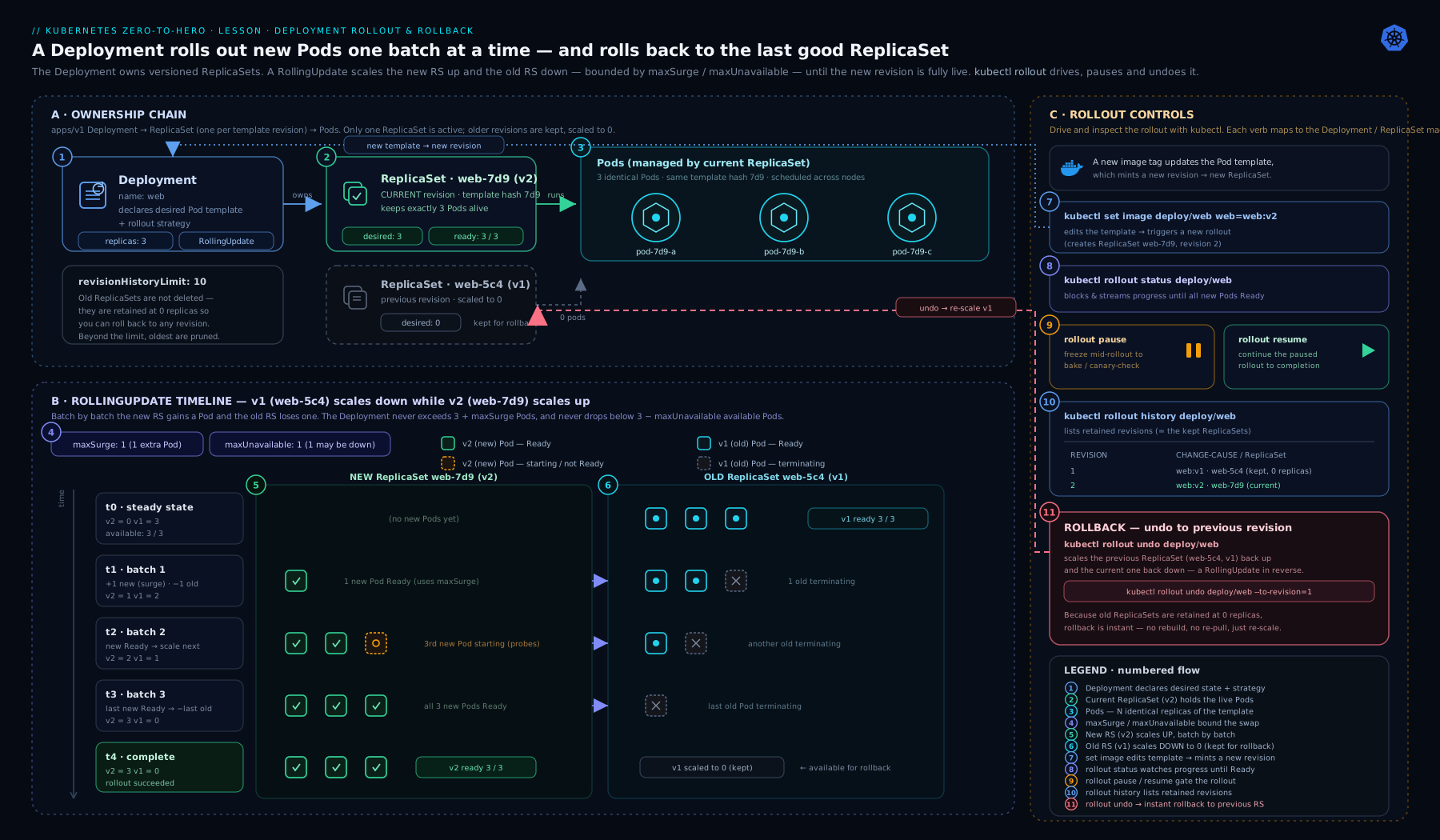
As the diagram makes clear, a rollout is a controlled migration of replicas between two ReplicaSets, and a rollback is the same migration aimed at a ReplicaSet you kept from a previous revision — nothing is rebuilt from scratch, which is why both are fast.
Scaling: manual and automatic
Scaling changes only replicas — it does not create a new ReplicaSet or a new revision; the current ReplicaSet simply adds or removes Pods.
kubectl scale deployment/web --replicas=5            # imperative
kubectl scale deployment/web --replicas=5 --current-replicas=3   # safe: only if currently 3
Declaratively, you edit spec.replicas and re-apply. Scaling down removes Pods chosen by a ranking that prefers, roughly: unscheduled/pending Pods first, then Pods on nodes with more replicas, then younger Pods — so it tends to keep your oldest, most-settled Pods.
The HPA hook: handing replicas to an autoscaler
A HorizontalPodAutoscaler (HPA) automatically adjusts a Deployment’s replicas based on observed metrics (CPU, memory, or custom/external metrics). The HPA targets the Deployment’s scale subresource — the same replicas field you set by hand.
apiVersion: autoscaling/v2
kind: HorizontalPodAutoscaler
metadata:
  name: web
spec:
  scaleTargetRef:
    apiVersion: apps/v1
    kind: Deployment
    name: web
  minReplicas: 3
  maxReplicas: 20
  metrics:
    - type: Resource
      resource:
        name: cpu
        target:
          type: Utilization
          averageUtilization: 70
The golden rule: once an HPA owns a Deployment, remove replicas from your Deployment YAML (or omit it). If you leave replicas: 3 in a manifest you keep kubectl apply-ing, you and the HPA will tug-of-war — apply resets it to 3, the HPA scales it back up, and you get rollout churn. (Server-side apply mitigates this by tracking field ownership, but the cleanest answer is to simply not declare replicas when an HPA is in charge.) HPA, KEDA, and node autoscaling are covered in depth in Kubernetes Autoscaling: HPA, KEDA & Karpenter.
Deployment vs StatefulSet vs DaemonSet
A Deployment is the right tool for stateless, interchangeable replicas. It is the wrong tool when Pods need stable identity or one-per-node placement. Here is the decision matrix.
| Controller | Pod identity | Storage | Update/scale order | Use it for | Don’t use it for |
|---|---|---|---|---|---|
| Deployment | Interchangeable; random name suffix; new IP/name on replacement | Shared or none (all replicas equivalent) | Unordered, parallel (within surge/unavailable window) | Stateless web/API/worker apps; anything where “any replica is as good as another” | Anything needing stable identity, ordered startup, or per-Pod storage |
| StatefulSet | Stable, sticky: ordinal names web-0, web-1, stable DNS, stable per-Pod PVC |
Per-Pod via volumeClaimTemplates |
Ordered (0,1,2 up; reverse down), one at a time by default | Databases, queues, clustered systems (Kafka, ZooKeeper, etcd), leader/follower apps | Plain stateless services (overkill, slower rollouts) |
| DaemonSet | One Pod per node (or per matching node) | Usually host-level (hostPath) |
Per-node rolling (RollingUpdate/OnDelete) |
Node agents: log shippers, CNI, kube-proxy, node-exporter, CSI node plugins | App replicas where you want a count, not one-per-node |
Quick heuristic: Deployment = “I want N copies and I don’t care which is which.” StatefulSet = “each copy is a distinct, named member with its own disk.” DaemonSet = “exactly one copy on every node.” StatefulSets are covered in Running Postgres on Kubernetes: StatefulSet, Operator, Failover & PITR.
Going deeper
Everything above is enough to use Deployments well. This section is for the reader who wants to know what the controller is actually doing under the hood — the annotations it writes, the status fields kubectl rollout status watches, the arithmetic of a rolling update across different replica counts, what happens when you scale during a rollout, and where a native Deployment’s abilities stop and progressive-delivery tools begin. Level: advanced — skippable on a first read.
What the Deployment controller writes on your objects
The controller records its bookkeeping in annotations you can read directly:
| Annotation | On which object | What it records |
|---|---|---|
deployment.kubernetes.io/revision |
Deployment and each ReplicaSet | The monotonic revision number. The ReplicaSet whose value matches the Deployment’s is the current one. |
deployment.kubernetes.io/desired-replicas |
each ReplicaSet | The Deployment’s replicas at the time the RS was scaled — an input to proportional scaling. |
deployment.kubernetes.io/max-replicas |
each ReplicaSet | replicas + maxSurge at that time — the RS’s ceiling during a roll. |
kubernetes.io/change-cause |
Deployment | The human-readable cause shown in rollout history (you set this). |
pod-template-hash |
each ReplicaSet + its Pods (a label, not an annotation) | The template hash that keeps versioned ReplicaSets from claiming each other’s Pods. |
# Read the revision + desired size of every ReplicaSet behind this Deployment:
kubectl get rs -l app=web \
  -o custom-columns='NAME:.metadata.name,REV:.metadata.annotations.deployment\.kubernetes\.io/revision,DESIRED:.spec.replicas'
The .status subresource — what a rollout is measured by
kubectl rollout status does not guess; it polls the Deployment’s .status and waits for a precise condition. These are the fields it reads (representative meanings):
.status field |
Meaning |
|---|---|
observedGeneration |
The .metadata.generation the controller has processed. If it lags .metadata.generation, your latest edit hasn’t been acted on yet. |
replicas |
Total non-terminated Pods across all ReplicaSets. Briefly exceeds spec.replicas during a surge. |
updatedReplicas |
Pods that already run the new template (the current ReplicaSet). |
readyReplicas |
Pods whose readiness probe passes. |
availableReplicas |
Pods that have been Ready for at least minReadySeconds. |
unavailableReplicas |
Desired minus available. |
collisionCount |
Times the controller hit a pod-template-hash collision (almost always absent). |
A rollout is reported complete when observedGeneration has caught up to .metadata.generation, updatedReplicas == readyReplicas == availableReplicas == spec.replicas, and no old-template Pods remain. That last clause is why a single crash-looping new Pod holds the whole rollout “in progress” until the deadline: availableReplicas never reaches the target.
# One-line health read (representative output shown):
kubectl get deploy web \
  -o jsonpath='gen {.metadata.generation} / observed {.status.observedGeneration} · avail {.status.availableReplicas}/{.spec.replicas}{"\n"}'
# gen 4 / observed 4 · avail 3/3
The rolling-update arithmetic, worked across replica counts
maxSurge rounds up; maxUnavailable rounds down. That asymmetry is deliberate: it biases the defaults toward keeping capacity rather than dropping it. Here is the window for the default 25% / 25% at several sizes:
replicas |
maxSurge 25% (↑) |
maxUnavailable 25% (↓) |
Max Pods at once | Min available |
|---|---|---|---|---|
| 1 | ⌈0.25⌉ = 1 | ⌊0.25⌋ = 0 | 2 | 1 |
| 3 | ⌈0.75⌉ = 1 | ⌊0.75⌋ = 0 | 4 | 3 |
| 4 | ⌈1.0⌉ = 1 | ⌊1.0⌋ = 1 | 5 | 3 |
| 5 | ⌈1.25⌉ = 2 | ⌊1.25⌋ = 1 | 7 | 4 |
| 8 | ⌈2.0⌉ = 2 | ⌊2.0⌋ = 2 | 10 | 6 |
| 10 | ⌈2.5⌉ = 3 | ⌊2.5⌋ = 2 | 13 | 8 |
Two edges follow from the rounding. First, at replicas: 1 the default maxUnavailable: 25% floors to 0, so the single Pod is replaced surge-first (a new Pod comes up before the old goes away) — good, but it means a one-replica Deployment always needs room for a second Pod to update without downtime. Second, maxSurge and maxUnavailable cannot both resolve to 0; the API rejects a literal 0/0, and with percentages on tiny replica counts you should keep maxSurge ≥ 1 so a floored-to-zero maxUnavailable can’t deadlock the roll.
Proportional scaling: what happens if you scale mid-rollout
Here is a subtlety most people never see until an HPA triggers during a deploy. Suppose replicas: 10, maxSurge: 3, and a rollout is in flight but stuck (the new Pods aren’t coming up): the old ReplicaSet holds 8 and the new one holds 5 — 13 Pods, the surge ceiling. Now load spikes and the HPA scales the Deployment to 15.
Kubernetes does not dump all the new capacity onto either ReplicaSet. It adds the extra Pods to the old and new ReplicaSets in proportion to their current sizes, so the rollout’s balance is preserved. The new ceiling is 15 + 3 = 18; distributing the 5 extra Pods proportionally (5 : 8) yields new RS → 7, old RS → 11 (18 total). This proportional scaling — driven by the desired-replicas and max-replicas annotations above — is why a scale event during a rollout neither secretly fast-forwards a broken deploy nor rewinds a good one. (Numbers are illustrative of the documented proportional-scaling rule.)
How kubectl rollout undo actually works
There is no “rewind” button in the API. kubectl rollout undo looks up the ReplicaSet for the target revision, copies its spec.template back into the Deployment’s spec.template, and issues a normal update. Because a ReplicaSet matching that exact template already exists (the one you kept), the controller just scales it back up and the current one down — the ordinary rolling mechanics, aimed backward. Crucially, the revision counter moves forward: undoing from revision 5 to revision 3’s template produces a new revision 6 whose template equals revision 3’s. Your history is append-only; undo never deletes revisions, it re-applies an old template as a new one.
Why there is no automatic rollback (and how to get one)
A Deployment is declarative desired state: the controller’s entire job is to make the cluster match spec.template. If it silently rolled back on failure, it would be overwriting the very intent you declared — and in a GitOps world it would immediately fight your Git source of truth, which still says “deploy v2.” So the platform draws a clean line: the Deployment reports failure (Progressing=False, ProgressDeadlineExceeded, non-zero rollout status) and holds — old Pods keep serving — but it will not change your declared spec for you.
Automatic rollback is a policy decision that belongs one layer up, where something can watch real signals (error rate, latency, custom metrics) and decide. That is exactly what progressive-delivery controllers add: Argo Rollouts and Flagger run metric analysis during a release and issue the undo (or abort the canary) themselves. The Deployment gives you the primitive (fast, safe manual rollback); the controller above it adds the automation.
Recreate up close — and the blue/green & canary boundary
Recreate is mechanically simple: on a template change the controller scales the old ReplicaSet to 0, waits until every old Pod has fully terminated (that RS’s .status.replicas reaches 0), and only then scales the new one up. maxSurge/maxUnavailable are ignored, and there is a real window with zero Pods serving — which is exactly the point when two versions must never coexist.
Note what a native Deployment cannot do:
-
True blue/green — running two complete environments and switching traffic atomically — needs two Deployments behind one Service, where you flip the Service’s
selectorfromversion: bluetoversion: greenin a single edit:apiVersion: v1 kind: Service metadata: name: web spec: selector: app: web version: blue # flip to green to cut all traffic over at once ports: - { port: 80, targetPort: 80 } -
True canary — sending, say, 5% of traffic (not 5% of Pods) to the new version and auto-promoting on healthy metrics — needs traffic-shaping (a service mesh or Gateway API) plus metric analysis. A single Deployment can only give a crude “canary by Pod ratio” (old and new Pods behind one Service split traffic roughly by count), with no metric gate. For the real thing, see Argo Rollouts blue/green & canary.
pod-template-hash collisions and collisionCount
Very rarely, two different Pod templates hash to the same pod-template-hash. If the controller is about to create a ReplicaSet whose name would collide with an existing RS that has a different template, it increments the Deployment’s .status.collisionCount and folds that number into the hash to force a distinct name. You will almost certainly never see this — but if you ever spot a non-zero collisionCount, that is what it means, and it is handled automatically.
Connection draining during a rollout
Zero-downtime is not only about starting new Pods; it is also about stopping old ones cleanly. When the rollout terminates an old Pod, two things happen concurrently: the Pod receives SIGTERM, and its address is removed from the Service’s endpoints. Because endpoint removal propagates asynchronously (through kube-proxy / your data plane), a terminating Pod can still receive a few requests after it began shutting down. The fix is a short preStop sleep plus an adequate terminationGracePeriodSeconds, so the Pod keeps serving while endpoints drain:
spec:
  template:
    spec:
      terminationGracePeriodSeconds: 45
      containers:
        - name: web
          # ...image, ports, probes as above...
          lifecycle:
            preStop:
              exec:
                command: ["/bin/sh", "-c", "sleep 10"]
For Pods fronted by an external load balancer, spec.template.spec.readinessGates let the LB controller gate availability on real backend registration, so the rollout won’t shift traffic to a Pod the LB hasn’t wired up yet:
spec:
  template:
    spec:
      readinessGates:
        - conditionType: "cloud.google.com/load-balancer-neg-ready"
Hands-on lab
Free and local — kind, minikube, or k3d. We will create a Deployment, do a clean rolling update, watch the ReplicaSets swap, force a failed rollout and observe the deadline, roll back, and clean up.
1. Create a cluster (skip if you already have one):
kind create cluster --name kd3        # or: minikube start   /   k3d cluster create kd3
kubectl get nodes
2. Create the Deployment (save as web.yaml from the manifest earlier, then):
kubectl apply -f web.yaml
kubectl rollout status deployment/web
kubectl get deploy,rs,pod -l app=web
Expected: 1 Deployment (3/3 ready), 1 ReplicaSet, 3 Pods sharing a pod-template-hash.
3. Do a clean rolling update and watch the ReplicaSets in a second terminal:
# Terminal A:
kubectl get rs -l app=web -w
# Terminal B:
kubectl annotate deployment/web kubernetes.io/change-cause="bump to nginx 1.27.2" --overwrite
kubectl set image deployment/web web=nginx:1.27.2
kubectl rollout status deployment/web
In Terminal A you will see the old ReplicaSet drain (3→2→1→0) while a new one fills (0→1→2→3). Check the history:
kubectl rollout history deployment/web
4. Trigger a failing rollout to see the progress deadline. Shorten the deadline first, then ship a broken image:
kubectl patch deployment web -p '{"spec":{"progressDeadlineSeconds":30}}'
kubectl set image deployment/web web=nginx:does-not-exist
kubectl rollout status deployment/web
# ...after ~30s: error: deployment "web" exceeded its progress deadline
kubectl get rs -l app=web    # the bad new RS is stuck with Pods in ImagePullBackOff
kubectl describe deployment web | grep -A3 Conditions   # Progressing=False, ProgressDeadlineExceeded
Note the old Pods are still serving — a RollingUpdate with a bad image fails safe: it never finishes draining the old ReplicaSet because the new Pods never become available.
5. Roll back:
kubectl rollout undo deployment/web
kubectl rollout status deployment/web
kubectl get pods -l app=web          # back to healthy 1.27.2 Pods
6. Scale, then observe:
kubectl scale deployment/web --replicas=5
kubectl get pods -l app=web          # 5 Pods, SAME ReplicaSet (no new revision)
kubectl rollout history deployment/web   # revision count unchanged by scaling
Validation checklist: you saw exactly one ReplicaSet per revision; a rolling update kept Pods available throughout; a bad image failed without taking down the old version; undo restored service; scaling did not create a revision.
Cleanup:
kubectl delete -f web.yaml          # removes Deployment + its ReplicaSets + Pods (ownerReferences)
kubectl delete hpa web --ignore-not-found
kind delete cluster --name kd3      # or: minikube delete  /  k3d cluster delete kd3
Cost note: entirely free — everything runs in local containers on your machine; no cloud resources are created.
Practice challenges
Work these top to bottom — they escalate from recall to design. Try each before opening the solution. All are runnable on the same free local cluster from the lab; outputs shown are representative.
Challenge 1 (warm-up). Without applying anything, say whether each action cuts a new revision: (a) kubectl scale deployment/web --replicas=6; (b) kubectl set image deployment/web web=nginx:1.27.4; © kubectl rollout restart deployment/web; (d) editing a template annotation.
<details> <summary>Solution</summary>
(a) No — scaling reuses the current ReplicaSet. (b), ©, (d) Yes — all change spec.template (restart stamps a restartedAt annotation), so each produces a new pod-template-hash and a new revision. Why: a revision is defined by the template hash, not by “did something change.”
</details>
Challenge 2 (arithmetic). A Deployment has replicas: 10, maxSurge: 25%, maxUnavailable: 25%. During a rolling update, what is the maximum number of Pods that can exist at once, and the minimum available?
<details> <summary>Solution</summary>
Max 13, min available 8. maxSurge 25% of 10 = 2.5 → rounds up to 3 (10 + 3 = 13). maxUnavailable 25% of 10 = 2.5 → rounds down to 2 (10 − 2 = 8). Why: surge rounds up, unavailable rounds down, biasing the default toward preserving capacity.
</details>
Challenge 3 (rollback). You are on revision 5 and need to return to the image that shipped in revision 2. Give the command, and say what it does to the ReplicaSets and the revision number.
<details> <summary>Solution</summary>
kubectl rollout undo deployment/web --to-revision=2
It scales revision 2’s retained ReplicaSet back up and the current one down (a scale-swap, not a rebuild), and records a new revision 6 whose template equals revision 2’s. Why: history is append-only; undo re-applies an old template as a new revision.
</details>
Challenge 4 (capacity constraint). Your nodes are full — there is no room for even one extra Pod — but you still want the safest rollout possible. What strategy do you set, and what do you unavoidably give up?
<details> <summary>Solution</summary>
strategy:
  type: RollingUpdate
  rollingUpdate:
    maxSurge: 0
    maxUnavailable: 1   # or a small %
With maxSurge: 0 no extra Pods are created, so the roll proceeds by removing an old Pod first — you give up full capacity during the update (you serve with N − 1). You cannot have both zero surge and zero capacity dip; one must give. Why: maxSurge and maxUnavailable can’t both be 0, so a no-surge roll must accept reduced availability.
</details>
Challenge 5 (reload config). A mounted ConfigMap changed, but the running Pods still serve the old values. Reload it without changing the image and without deleting Pods by hand. Give two ways.
<details> <summary>Solution</summary>
# Way 1 — rolling restart (stamps a template annotation → new rollout):
kubectl rollout restart deployment/web

# Way 2 — bake a config checksum into the template so any config change rolls automatically:
#   spec.template.metadata.annotations["checksum/config"] = sha256(configmap-contents)
Both mutate spec.template, triggering a normal zero-downtime rollout that remounts the updated ConfigMap. Why: mounted ConfigMap updates don’t restart containers on their own; you must cut a new revision. See ConfigMaps & Secrets, In Depth.
</details>
Challenge 6 (manual canary). Using only a Deployment (no Argo Rollouts), stage a one-Pod canary of nginx:1.27.5: ship it, observe, then either finish or abort. List the commands.
<details> <summary>Solution</summary>
kubectl rollout pause deployment/web           # freeze the controller
kubectl set image deployment/web web=nginx:1.27.5
kubectl get rs -l app=web                       # the new ReplicaSet is created but held; watch metrics
# happy path — let the full rollout proceed:
kubectl rollout resume deployment/web
# unhappy path — abandon the canary:
kubectl rollout undo deployment/web && kubectl rollout resume deployment/web
Why: pause is the primitive behind a manual canary; you observe before committing, then resume to promote or undo to abort. For metric-gated, traffic-percentage canaries, use a progressive-delivery controller.
</details>
Challenge 7 (diagnose, advanced). kubectl rollout status is stuck at “2 of 5 updated replicas are available” and eventually errors with exceeded its progress deadline. Walk the exact commands you’d run, and state whether users are currently being served.
<details> <summary>Solution</summary>
kubectl get pods -l app=web           # find the new Pods that aren't Ready
kubectl describe pod <new-pod>        # Events: ImagePullBackOff? probe failing? OOMKilled? quota?
kubectl logs <new-pod> --previous     # if it crashed
kubectl rollout undo deployment/web   # recover once you've confirmed the cause
Users are still served — a RollingUpdate fails safe: it never finishes draining the old ReplicaSet because the new Pods never become available, so the old version keeps handling traffic. The deadline only flags the failure; it does not auto-rollback. Why: availability gates the roll, so a bad new version stalls rather than takes down the old one.
</details>
Common beginner mistakes
These are misconceptions — the wrong mental model, why it’s wrong, and the right one. (For a symptom → cause → fix lookup, see the troubleshooting table below.)
- “Scaling is a deployment.” Changing
replicasis not a new version and creates no revision — the current ReplicaSet just adds or removes Pods. Right model: a revision = aspec.templatechange; scaling is orthogonal. - “I should create the ReplicaSet (or the Pods) myself.” You almost never write a ReplicaSet, and never a bare Pod for real workloads. Right model: you declare the Deployment; it owns the ReplicaSets; the current ReplicaSet owns the Pods — let the chain do its job.
- “
image: nginx:latestis fine.” A mutable tag makes rollouts non-reproducible and rollback meaningless — “the previous image” may now point somewhere else. Right model: pin an immutable tag, ideally a digest (@sha256:…), so a revision always means the same bits. - “The moment I run
set image, the old Pods are gone.” WithRollingUpdatethe old Pods keep serving until the new ones are available; a broken image simply stalls the roll. Right model: the switchover is gradual and gated on readiness, and a bad rollout fails safe. - “
progressDeadlineSecondswill roll me back.” It only flags failure (Progressing=False) and makesrollout statusexit non-zero. Right model: there is no auto-rollback — you (or a progressive-delivery controller) issue theundo. - “I’ll just tweak the
selectorto add a label.”spec.selectoris immutable; the API rejects the edit, and a mismatch with the template labels is a hard error. Right model: selector = stable identity (one or two labels); put changeable metadata on the template, never in the selector. - “More replicas makes the rollout faster.” Rollout speed is set by
maxSurge/maxUnavailable, readiness, andminReadySeconds— not by how many replicas you run. Right model: tune the strategy knobs and your probes, not the replica count, to speed a roll. - “
rollout undorewinds the revision number.” Undo moves history forward: it re-applies an old template as a brand-new revision. Right model: revision history is append-only; the counter never goes backward. - “Two versions serving at once is a bug.” For
RollingUpdateit’s expected — briefly both versions handle traffic. Right model: design your app and clients to tolerate N and N+1 together, or switch toRecreate(and accept downtime) when they truly can’t coexist. - “A readiness probe and
minReadySecondsdo the same thing.” The probe decides Ready;minReadySecondsrequires a Pod to stay Ready that long before it’s available to the rollout. Right model: the probe is instantaneous health;minReadySecondsis a soak timer that catches Pods which pass readiness then crash.
Common mistakes & troubleshooting
| Symptom | Likely cause | Fix |
|---|---|---|
selector does not match template labels on apply |
spec.selector.matchLabels ≠ spec.template.metadata.labels |
Make them match; remember the selector is immutable — fix it before first apply. |
| Rollout hangs forever, never “successfully rolled out” | New Pods never become Ready (bad image, failing readiness probe, insufficient resources/quota) | kubectl get pods, kubectl describe pod, kubectl logs; fix the probe/image/resources; old version keeps serving meanwhile. |
exceeded its progress deadline |
No progress within progressDeadlineSeconds (often ImagePullBackOff or CrashLoopBackOff) |
Diagnose the new Pods; rollout undo. The deadline only flags failure — it does not auto-rollback. |
| Brief downtime during a rolling update | maxUnavailable too high, no readiness probe, or terminationGracePeriodSeconds/preStop too short so traffic hits dying Pods |
Set maxUnavailable: 0 + maxSurge: 25%; add a readiness probe; add a preStop sleep so endpoints drain. |
| Two app versions briefly serving (sometimes a bug) | That is normal for RollingUpdate |
If versions can’t coexist, switch to strategy.type: Recreate and accept the downtime. |
Can’t roll back — no rollout history found |
revisionHistoryLimit: 0, or it’s the very first revision |
Keep history ≥ 3; you can only undo to a retained revision. |
apply keeps resetting replicas; pods churn |
replicas declared in YAML while an HPA also owns it |
Remove replicas from the manifest when an HPA manages the Deployment. |
New ReplicaSet created on every apply even with no real change |
A controller/templating tool injecting a changing annotation/label into template |
Find the drifting field (kubectl get rs + diff templates); stop mutating the Pod template on every render. |
Best practices
- Always set a readiness probe. A rolling update is only zero-downtime if Kubernetes can tell when a new Pod is truly serving. Without it, “Ready” means “process started,” and traffic hits Pods that aren’t ready.
- Default to
maxSurge: 25%, maxUnavailable: 0for user-facing services — never drop below capacity. UseRecreateonly when versions can’t coexist. - Set
minReadySecondsto 10–30s for anything that can pass readiness then crash, so a flapping Pod can’t race a bad rollout through. - Keep the
selectortiny and immutable; put descriptive metadata (version, commit, team) on labels you can change — but not in the selector. - Populate
kubernetes.io/change-causeon every rollout (or have CI do it) sorollout historyis readable during an incident. - Gate CI/CD on
kubectl rollout status --timeout=...— it exits non-zero on failure, turning a bad deploy into a failed pipeline step. - Set a sane
revisionHistoryLimit(e.g. 5–10): enough to roll back, not so much that etcd fills with dead ReplicaSets. - Use
kubectl rollout restartto reload mounted ConfigMaps/Secrets rather than deleting Pods by hand — it does a proper rolling restart. - Hand
replicasto an HPA for anything with variable load, and removereplicasfrom the manifest once you do. - Manage Deployments declaratively (
applyfrom version control), reserving imperative commands for emergencies and learning.
Security notes
- A Deployment is a Pod factory — its security posture is the Pod template’s. Apply
securityContext(non-root,readOnlyRootFilesystem, dropped capabilities,seccompProfile: RuntimeDefault) inspec.template.spec, exactly as in the Pod lesson. Every replica inherits it. - Pin images by tag and prefer a digest (
image: nginx@sha256:...). A mutable tag likelatestmakes rollouts non-reproducible and rollback meaningless (the “previous” tag may now point elsewhere). - RBAC: creating/patching Deployments is powerful — it can run arbitrary images cluster-wide. Restrict
create/update/patch/deleteondeployments(apps group) to the right roles, and remember thatpatchon a Deployment is effectivelyexec-level power because the patcher chooses the image. - Namespace + ResourceQuota/LimitRange keep a runaway
replicasor HPAmaxReplicasfrom exhausting a cluster; set them so a Deployment can’t scale without bound. - Pod Security Admission (baseline/restricted) is enforced at the namespace, and a Deployment’s Pods must satisfy it — a template that violates the level will be rejected at rollout time, not silently downgraded.
Interview & exam questions
- What is the relationship between a Deployment, a ReplicaSet, and a Pod? A Deployment manages ReplicaSets; the current ReplicaSet manages Pods. The Deployment adds versioning and rollout/rollback on top of the ReplicaSet’s “keep N Pods running.”
- What actually happens during a rolling update? The Deployment creates a new ReplicaSet for the new template and shifts replicas from the old ReplicaSet to the new one a few at a time, bounded by
maxSurge/maxUnavailable, until the new one holds all replicas and the old sits at 0. maxSurgevsmaxUnavailable— define both and give the defaults.maxSurge= max Pods abovereplicasduring a roll (default 25%);maxUnavailable= max Pods belowreplicasthat may be unavailable (default 25%). They can’t both be 0.- How does rollback work and why is it fast?
kubectl rollout undoscales a retained old ReplicaSet back up and the current one down — a scale-swap, not a rebuild — using the same rolling mechanics in reverse. - When would you choose
RecreateoverRollingUpdate? When two versions cannot run simultaneously: single-writer apps, incompatible DB migrations, exclusive locks, orReadWriteOncevolumes only one Pod may mount. You accept a downtime gap. - What does
progressDeadlineSecondsdo — does it roll back automatically? It marks a rollout failed (Progressing=False,ProgressDeadlineExceeded) if no progress is made in time. It does not auto-rollback; it only flags the failure (and makesrollout statusexit non-zero). minReadySecondsvs a readiness probe — what’s the difference? The readiness probe decides Ready;minReadySecondsrequires a Pod to stay Ready that long before counting as available to the rollout — catching Pods that pass readiness then crash.- What is
pod-template-hashand why does it exist? A hash of the Pod template that the Deployment controller adds to each ReplicaSet’s selector and its Pods, so different-version ReplicaSets don’t fight over the same Pods. It’s the middle segment of Pod names. - Why doesn’t changing
replicascreate a new revision, but changing the image does?replicasis scaling — handled by the same ReplicaSet. Changing the template (image, env, etc.) creates a newpod-template-hash, hence a new ReplicaSet and a new revision. - How does an HPA interact with a Deployment, and what mistake do people make? The HPA writes to the Deployment’s scale subresource (
replicas). The mistake is leavingreplicashard-coded in a manifest you keepapply-ing, which fights the HPA — remove it. - Deployment vs StatefulSet vs DaemonSet in one line each. Deployment = N interchangeable stateless replicas; StatefulSet = stable-identity members with per-Pod storage, ordered ops; DaemonSet = one Pod per node.
- A rollout is stuck at “1 of 3 updated replicas are available” — how do you diagnose it? The new Pods aren’t becoming available:
kubectl get pods,describe,logsto find the cause (image pull, probe, resources/quota); the old version keeps serving;rollout undoto recover. - You scale a Deployment (via HPA) while a rollout is in progress — what does Kubernetes do? It applies proportional scaling: the extra (or removed) replicas are distributed across the active old and new ReplicaSets in proportion to their current sizes, so the scale event doesn’t secretly fast-forward or reverse the rollout.
- After a failed rollout, how does
kubectl rollout statussignal failure to CI, and does the old version stay up? OnceprogressDeadlineSecondselapses it prints “exceeded its progress deadline” and exits non-zero (failing the pipeline step); the old Pods keep serving because the roll never drained them.
Quick check
- True or false: changing
spec.replicastriggers a new rollout/revision. - With
replicas: 4,maxSurge: 50%,maxUnavailable: 0, what is the maximum number of Pods that can exist during a rolling update, and the minimum available? - Which strategy briefly runs zero Pods, and when must you use it?
- Which command rolls back to a specific earlier revision, and what does it do to old/new ReplicaSets?
- You set
revisionHistoryLimit: 0. What capability do you lose?
Answers
- False. Scaling reuses the current ReplicaSet; only a change to
spec.templatecuts a new revision. - Max 6 (4 + 50% surge = 4 + 2), min available 4 (4 − 0). New Pods are added before any old ones leave.
Recreate— it terminates all old Pods before creating new ones; use it when two versions can’t coexist (single-writer, incompatible migration,ReadWriteOncevolume).kubectl rollout undo deployment/<name> --to-revision=<n>— it scales the retained old ReplicaSet up and the current one down (a scale-swap), and records a new revision.- You lose rollback — with no retained old ReplicaSets,
kubectl rollout undohas nothing to roll back to.
Exercise
Build and operate a Deployment called api from scratch:
- Write a Deployment manifest (
api.yaml): imagehashicorp/http-echo:1.0with args["-text=v1","-listen=:8080"],replicas: 4, a readiness probe on:8080,strategy: RollingUpdatewithmaxSurge: 1andmaxUnavailable: 0,minReadySeconds: 5, andrevisionHistoryLimit: 5. Apply it and confirm4/4ready with one ReplicaSet. - Roll out
-text=v2usingkubectl set image(or by editing args +apply), set a meaningfulkubernetes.io/change-cause, and watch the ReplicaSets swap withkubectl get rs -w. Confirm capacity never dropped below 4. - Ship a deliberately broken image, watch the rollout fail against a 30s
progressDeadlineSeconds, confirm the v2 Pods kept serving, thenrollout undo. - Create an HPA (
min 4,max 12, CPU 60%) targetingapi, removereplicasfromapi.yaml, re-apply, and confirmapplyno longer fights the autoscaler. - Add a
StatefulSetand aDaemonSetin comments at the bottom of your file describing one workload each that would need them instead of a Deployment, and why. Clean everything up.
Certification mapping
- CKAD — Application Deployment is a major domain: creating and managing Deployments, performing rolling updates and rollbacks, scaling, and choosing deployment strategies (incl. blue/green and canary at a conceptual level) are core, frequently-tested skills. Expect tasks like “update the image and roll back,” “scale to N,” and “pause/resume a rollout.”
- CKA — workloads & scheduling: managing Deployments/ReplicaSets, scaling, and rolling updates appear in the Workloads & Scheduling domain; you must be fluent with
kubectl rolloutandkubectl scaleunder time pressure. - Related skills exercised here that recur on both exams: labels/selectors,
kubectl set image,kubectl applyvs imperative commands, and reading objectconditions. See the consolidated Kubernetes CKA/CKAD/CKS/KCNA Exam Prep Kit.
Glossary
- Deployment —
apps/v1controller that manages ReplicaSets to provide versioned, safe rollouts and rollback of a (typically stateless) workload. - ReplicaSet —
apps/v1controller that keeps exactly N identical Pods of one version running; represents a single revision. - Pod template — the embedded PodSpec (
spec.template) each replica is stamped from; a hash of it defines a “version.” pod-template-hash— label/selector value (a hash of the template) the Deployment injects so different-version ReplicaSets don’t claim each other’s Pods.- RollingUpdate — default strategy; replaces Pods gradually for zero downtime, bounded by
maxSurge/maxUnavailable. - Recreate — strategy that deletes all old Pods before creating new ones; incurs downtime; used when versions can’t coexist.
maxSurge— max Pods allowed abovereplicasduring a rolling update (default 25%); percentages round up.maxUnavailable— max Pods allowed to be unavailable (belowreplicas) during a rolling update (default 25%); percentages round down.minReadySeconds— time a new Pod must stay Ready before it counts as available to the rollout (default 0).revisionHistoryLimit— number of old ReplicaSets retained for rollback (default 10).progressDeadlineSeconds— time a rollout may make no progress before being marked failed (default 600); does not auto-rollback.- Available vs Ready — Ready = readiness probe passes; available = Ready for at least
minReadySeconds. ownerReferences— parent pointers (Deployment→ReplicaSet→Pod) used for garbage collection and tree views.- Revision — a recorded version of a Deployment, backed by a retained ReplicaSet, that you can roll back to.
- HorizontalPodAutoscaler (HPA) — controller that adjusts a Deployment’s
replicasautomatically from metrics, via the scale subresource. - Generation vs
observedGeneration—.metadata.generationbumps on every spec change;.status.observedGenerationis the generation the controller has processed.rollout statuswaits for the latter to catch up before declaring success. .statusreplicas fields —updatedReplicas(Pods on the new template),readyReplicas(probe passing),availableReplicas(Ready ≥minReadySeconds); a rollout completes when these all equal desired.- Proportional scaling — when you scale a Deployment while multiple ReplicaSets are active (mid-rollout), the controller distributes the change across them in proportion to their sizes, preserving the rollout’s balance.
collisionCount— a counter the controller bumps if two templates hash to the samepod-template-hash, folded into the hash to force distinct ReplicaSet names.- Scale subresource — the
/scaleendpoint exposing justreplicas, which an HPA writes to rather than editing the full Deployment. kubernetes.io/change-cause— annotation surfaced inrollout history’s CHANGE-CAUSE column; you set it to record why a revision shipped.- Blue/green deployment — two full environments (old “blue”, new “green”); traffic is switched atomically, usually by flipping a Service selector. Not native to a single Deployment.
- Canary deployment — routing a small fraction of traffic to a new version, promoting on healthy metrics. True (traffic-percentage, metric-gated) canaries need a progressive-delivery controller or mesh.
- Progressive delivery — the umbrella for metric-gated, automated rollouts/rollbacks (Argo Rollouts, Flagger) built on top of the Deployment’s rollout primitives.
- Readiness gate — an extra
spec.template.spec.readinessGatescondition an external controller (e.g. a cloud load balancer) must satisfy before a Pod counts as Ready/available. - Connection draining — keeping a terminating Pod serving (via
preStop+terminationGracePeriodSeconds) until it’s removed from Service endpoints, so in-flight requests aren’t dropped during a roll.
Next steps
- Next lesson: Kubernetes Services & Networking, In Depth: ClusterIP, NodePort, LoadBalancer, Headless & DNS — put a stable network address in front of the Pods your Deployment manages.
- Go deeper on scaling: Kubernetes Autoscaling: HPA, KEDA & Karpenter.
- Stateful workloads: Running Postgres on Kubernetes: StatefulSet, Operator, Failover & PITR — when a Deployment is the wrong tool.
- Placement control: Kubernetes Scheduling: Affinity, Topology Spread, Priority & Preemption.