In a nutshell
Picture the seating planner at a large wedding. Guests (pods) keep arriving; the hall has many tables (nodes). The planner does not just point each guest at the nearest empty chair. There are rules: the band needs the table by the stage, the kids’ table must not be next to the bar, the family should be spread across the room so one draughty corner does not ruin the whole side, and the VIPs get seated even if it means politely moving someone with a lower place-card. Kubernetes has exactly this planner, and it is called kube-scheduler. It looks at every pod that has no home yet and decides which node it should run on, one pod at a time, using rules you write.
The scheduler’s job splits into three moves, and if you remember only three words, remember these: filter, score, bind. Filter throws out every node the pod simply cannot use (wrong CPU, a “keep out” sign, a rule you marked as mandatory). Score ranks the nodes that survived, best to worst. Bind writes the winning node’s name onto the pod so the node’s agent can start it. That is the entire pipeline. Everything else in this lesson — affinity, taints, topology spread, priority — is just a different way of leaning on the filter step or the score step.
The single most important idea, and the one beginners get wrong most often, is hard versus soft. A hard rule is a filter: “this pod may run only on nodes like X.” If no node qualifies, the pod waits forever in a Pending state rather than break the rule. A soft rule is a score: “I’d prefer nodes like X.” If none exist, the scheduler shrugs and places the pod anyway. Choose “hard” and you get guarantees but risk unschedulable pods; choose “soft” and you get best-effort placement that quietly bends when the cluster is tight. Almost every mistake in this space is really a hard/soft mix-up.
Level: Intermediate → Advanced · Time: ~40 min · By the end you will be able to read a pod’s placement rules and predict where it lands, and write rules that keep a service spread across failure domains without wedging your next scale-up.
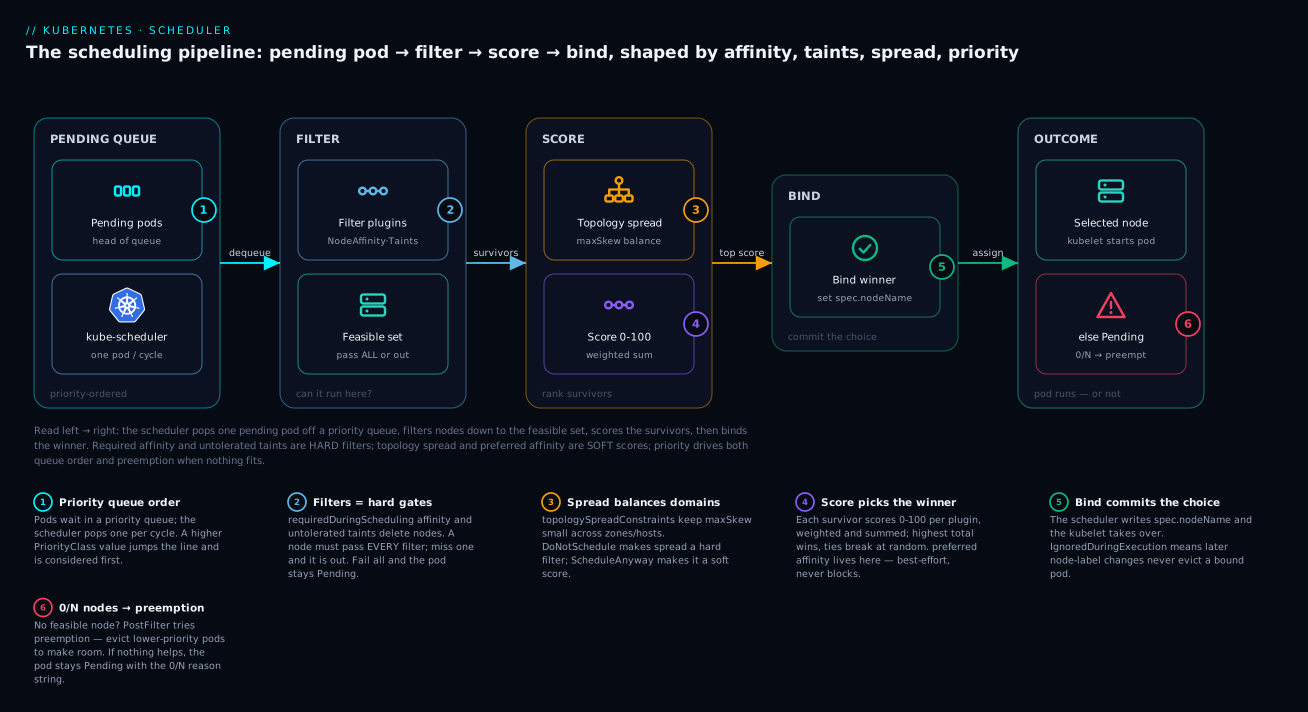
Read the diagram left to right: one pending pod is dequeued, filtered to the nodes that can run it, scored so the best one wins, and bound; the red branch is what happens when nothing fits and priority-driven preemption steps in.
Prerequisites and what you’ll be able to do
You will get the most from this lesson if you are already comfortable with a few earlier ideas. You should know what a pod and a Deployment are and how a ReplicaSet fans a Deployment out into N pod copies. You should know that a pod declares resource requests (cpu, memory) and that requests — not live usage — are what the scheduler reserves. And you should be fluent with labels and selectors, because every affinity, spread, and taint rule below is a label match under the hood; if that is fuzzy, read Labels, selectors, annotations, and field selectors first. A working kubectl and the ability to kubectl describe pod and read its Events are assumed throughout.
After working through this lesson you will be able to:
- Trace a pod through the filter → score → bind cycle and explain, from a
describeoutput, exactly why it landed where it did. - Choose correctly between
required(hard filter) andpreferred(soft score) for every placement rule, and know the failure mode of each. - Spread replicas across zones and nodes with
topologySpreadConstraints, and compute the resulting skew by hand. - Reserve dedicated hardware with taints and tolerations, and pin the right pods to it with the matching affinity.
- Protect critical workloads with PriorityClasses and preemption, and predict which pods get evicted when the cluster is full.
- Read a
0/N nodes are availablemessage and map each clause to the plugin that produced it.
The default scheduler will keep your cluster running, but it will not keep it balanced or resilient unless you tell it how. Left alone, kube-scheduler packs pods onto whichever feasible node scores highest, and “highest” rarely means “spread across three failure domains so a zone outage does not take down quorum.” This guide walks the scheduling cycle end to end, then layers on the four controls that actually shape placement in production: affinity, topology spread constraints, taints and tolerations, and PriorityClasses with preemption. Everything here targets Kubernetes 1.29+ where the newer matchLabelKeys and minDomains semantics are stable.
Before diving into each control, here is the whole toolbox on one line, so the sections below have a home. Match the goal to the tool, and notice that only two of them are about attraction — the rest are about spreading or repelling:
| Placement goal | Reach for | Hard or soft |
|---|---|---|
| “Run only on nodes with label X” | nodeSelector or node affinity required |
Hard |
| “Prefer nodes with label X, tolerate others” | node affinity preferred |
Soft |
| “Keep two of my replicas off the same node/zone” | pod anti-affinity, or topology spread | Either |
| “Put my cache pod near its app pod” | pod affinity | Either |
| “Even distribution across many zones/nodes at scale” | topologySpreadConstraints |
Either |
| “Reserve this hardware for specific pods only” | taint the node + toleration on the pod | Hard (repel) |
| “Decide who wins when the cluster is full” | PriorityClass + preemption |
n/a |
1. The scheduling cycle: filtering, scoring, binding
kube-scheduler runs one pod at a time off the head of a priority queue. For each pod it executes a two-phase cycle built on the scheduler framework, a set of extension points (plugins) that the in-tree behavior itself is implemented against.
| Phase | Extension points | What happens |
|---|---|---|
| Scheduling cycle | PreFilter, Filter, PostFilter, PreScore, Score, Reserve, Permit |
Pick exactly one node, synchronously |
| Binding cycle | PreBind, Bind, PostBind |
Persist the assignment, possibly asynchronously |
The mental model that matters:
- Filtering answers “can this pod run here at all?” Plugins like
NodeAffinity,TaintToleration,NodeResourcesFit, andPodTopologySpreadeach return feasible/infeasible per node. A node has to pass every filter. If zero nodes survive, the pod isUnschedulableandPostFilterruns — which is where preemption lives. - Scoring ranks the survivors. Each scoring plugin returns 0-100 per node; the framework applies plugin weights and sums them.
NodeResourcesBalancedAllocation,ImageLocality,InterPodAffinity, andPodTopologySpreadall contribute. The highest total wins; ties break randomly. - Binding writes the
nodeNameto the pod’sspec. The kubelet on that node takes over from there.
A critical consequence: filtering is hard, scoring is soft. requiredDuringSchedulingIgnoredDuringExecution rules become filters (a pod will go Pending forever rather than violate them). preferredDuringScheduling... rules become scores (the scheduler tries, then gives up and places the pod anyway). Choosing between the two is the single most important decision in every spec below.
Because that hard/soft split is the decision, keep this contrast table close — every control later in the lesson is just a row of it:
| Control | Hard variant (a filter) | Soft variant (a score) |
|---|---|---|
| Node affinity | requiredDuringSchedulingIgnoredDuringExecution |
preferredDuringSchedulingIgnoredDuringExecution (with weight) |
| Pod (anti-)affinity | requiredDuringSchedulingIgnoredDuringExecution |
preferredDuringSchedulingIgnoredDuringExecution (with weight) |
| Topology spread | whenUnsatisfiable: DoNotSchedule |
whenUnsatisfiable: ScheduleAnyway |
| Taints | NoSchedule / NoExecute |
PreferNoSchedule |
| Failure mode | Pod goes Pending if unmet | Pod is placed anyway, rule ignored |
You can see the framework’s view of an unschedulable pod directly:
kubectl get pod payments-7d9c-abcde -o yaml | yq '.status.conditions'
# look for type: PodScheduled, status: "False", reason: Unschedulable
kubectl describe pod payments-7d9c-abcde | sed -n '/Events:/,$p'
2. Node affinity and nodeSelector vs matchLabelKeys
nodeSelector is the blunt instrument: a flat map of label key/value pairs that must all match. It is still fine for trivial cases.
spec:
  nodeSelector:
    kubernetes.io/arch: arm64
    node.kubernetes.io/instance-type: m7g.2xlarge
Node affinity is the expressive version. It supports operators (In, NotIn, Exists, Gt, Lt) and both hard and soft variants:
spec:
  affinity:
    nodeAffinity:
      requiredDuringSchedulingIgnoredDuringExecution:
        nodeSelectorTerms:
          - matchExpressions:
              - key: topology.kubernetes.io/zone
                operator: In
                values: ["eu-west-1a", "eu-west-1b", "eu-west-1c"]
      preferredDuringSchedulingIgnoredDuringExecution:
        - weight: 80
          preference:
            matchExpressions:
              - key: karpenter.sh/capacity-type
                operator: In
                values: ["on-demand"]   # prefer on-demand, tolerate spot
Two semantics worth internalizing:
- Multiple
nodeSelectorTermsare OR-ed; multiplematchExpressionswithin one term are AND-ed. This is the opposite of most people’s first guess and a common source of “why is nothing scheduling.” IgnoredDuringExecutionmeans the rule is evaluated at schedule time only. A node label that changes after the pod is bound does not evict it. There is no stableRequiredDuringExecutionvariant; do not design around eviction-on-relabel.
The OR/AND rule trips up so many people that it is worth making concrete. Say you want “arm64 and (zone-a or zone-b).” The AND lives inside one term as two matchExpressions; the OR lives across two terms:
requiredDuringSchedulingIgnoredDuringExecution:
  nodeSelectorTerms:
    - matchExpressions:                 # term 1  (arch AND zone-a)
        - { key: kubernetes.io/arch, operator: In, values: ["arm64"] }
        - { key: topology.kubernetes.io/zone, operator: In, values: ["eu-west-1a"] }
    - matchExpressions:                 # term 2  (arch AND zone-b)  — OR-ed with term 1
        - { key: kubernetes.io/arch, operator: In, values: ["arm64"] }
        - { key: topology.kubernetes.io/zone, operator: In, values: ["eu-west-1b"] }
If you had instead put all four expressions in a single term, you would demand a node that is simultaneously in zone-a and zone-b — an impossible AND that filters out every node and leaves the pod Pending. When affinity produces zero survivors, re-read your terms as “OR of ANDs” first.
matchLabelKeys is the newer addition (stable for topology spread in 1.27; for pod affinity it reached beta later). It does not match against node labels at all — it tells the scheduler to derive part of the constraint from the incoming pod’s own labels, keyed by label name. Its primary job is to scope a constraint per rollout using pod-template-hash, so a Deployment update does not see old and new ReplicaSets as one spreading domain. You will see it used in Section 4 where it actually matters; for node affinity specifically, prefer plain matchExpressions.
3. Inter-pod affinity and anti-affinity
Pod affinity constrains placement relative to other pods, evaluated within a topologyKey — a node label that defines the domain (“same node,” “same zone”). This is how you spread replicas and co-locate caches.
Anti-affinity to spread replicas across nodes (so a node failure never takes two replicas):
spec:
  affinity:
    podAntiAffinity:
      requiredDuringSchedulingIgnoredDuringExecution:
        - labelSelector:
            matchLabels:
              app: payments-api
          topologyKey: kubernetes.io/hostname
Affinity to co-locate a sidecar cache with its app in the same zone (cheap, low-latency cross-AZ avoidance):
spec:
  affinity:
    podAffinity:
      preferredDuringSchedulingIgnoredDuringExecution:
        - weight: 100
          podAffinityTerm:
            labelSelector:
              matchLabels:
                app: payments-api
            topologyKey: topology.kubernetes.io/zone
Performance warning: inter-pod affinity is O(pods x nodes) to evaluate and does not scale the way topology spread does. The upstream guidance is explicit — avoid required pod anti-affinity in clusters beyond a few hundred nodes; use topology spread constraints for spreading at scale and reserve pod affinity for genuine co-location intent. Required hostname anti-affinity also caps your replica count at the node count, which produces silent Pending pods during scale-up.
The topologyKey is the hinge of the whole feature, and it is easy to misread. It names a node label, and the scheduler groups nodes by that label’s value into domains. kubernetes.io/hostname makes every node its own domain (so anti-affinity means “one per node”); topology.kubernetes.io/zone makes each zone a domain (so anti-affinity means “one per zone”). A subtle trap: if some nodes lack the topologyKey label entirely, they are treated as not matching any domain and the constraint behaves in surprising ways — always confirm every candidate node carries the key with kubectl get nodes -L <key>.
4. Topology spread constraints: maxSkew, minDomains, whenUnsatisfiable
Topology spread is the purpose-built, scalable mechanism for even distribution. It evaluates the skew — the difference in matching-pod count between the most and least populated domains — and keeps it under a bound.
spec:
  topologySpreadConstraints:
    - maxSkew: 1
      topologyKey: topology.kubernetes.io/zone
      whenUnsatisfiable: DoNotSchedule
      minDomains: 3
      matchLabelKeys:
        - pod-template-hash
      labelSelector:
        matchLabels:
          app: payments-api
    - maxSkew: 1
      topologyKey: kubernetes.io/hostname
      whenUnsatisfiable: ScheduleAnyway
      labelSelector:
        matchLabels:
          app: payments-api
Each knob, precisely:
maxSkewis the maximum allowed(max domain count) - (min domain count). WithmaxSkew: 1and three zones, replica counts like 2/2/1 are legal; 3/1/1 is not.whenUnsatisfiableis the hard/soft switch.DoNotSchedulemakes the constraint a filter (the pod goes Pending).ScheduleAnywaymakes it a score (best-effort). The pattern above is the production default: hard spread across zones, soft spread across nodes.minDomains(stable in 1.27) forces the scheduler to assume at least N domains exist even if fewer are currently populated. Without it, the first replica creates one zone-domain, skew is trivially satisfied, and a small Deployment can land entirely in one zone before the others are ever considered. SetminDomainsto your zone count for any workload that needs true zonal spread from replica one. It is only valid withwhenUnsatisfiable: DoNotSchedule.matchLabelKeysappends the named pod labels to the selector at scheduling time. Addingpod-template-hashmeans a rolling update computes skew per ReplicaSet, so old and new pods are not pooled together — which otherwise lets a deploy temporarily violate spread or block on it.
Two cluster-wide defaults also feed in: nodeAffinityPolicy and nodeTaintsPolicy (both default Honor in current versions) control whether nodes the pod could not run on anyway are excluded from skew math. Leave them at the defaults unless you have a specific reason.
Topology spread and pod anti-affinity overlap enough to confuse, so here is the split at a glance:
Pod anti-affinity (required) |
Topology spread (DoNotSchedule) |
|
|---|---|---|
| Question it answers | “Never two together in a domain” | “Keep counts within maxSkew per domain” |
| Granularity | Binary (allowed / forbidden) | Numeric (tolerates 2/2/1, forbids 3/1/1) |
| Cost at scale | O(pods x nodes), degrades past ~hundreds of nodes | Purpose-built, scales |
| Replica cap risk | Caps replicas at domain count | None — degrees of skew are allowed |
| Use it for | Genuine “must never share” needs | Even distribution at any scale |
5. Taints, tolerations, and dedicated node pools
Affinity is pod-attracts-node. Taints are the inverse — node-repels-pod — and they are how you reserve hardware. A taint has a key, value, and effect:
| Effect | Behavior |
|---|---|
NoSchedule |
New pods without a matching toleration are not scheduled here |
PreferNoSchedule |
Soft version; scheduler avoids but may place |
NoExecute |
As NoSchedule, and evicts already-running pods that do not tolerate it |
Taint a GPU pool so only GPU workloads land there:
kubectl taint nodes -l node.kubernetes.io/instance-type=g5.xlarge \
  nvidia.com/gpu=present:NoSchedule
Only pods that explicitly tolerate it are eligible:
spec:
  tolerations:
    - key: nvidia.com/gpu
      operator: Equal
      value: present
      effect: NoSchedule
  nodeSelector:
    nvidia.com/gpu.present: "true"
The pairing that trips people up: a toleration is permission, not attraction. Tolerating the GPU taint lets a pod run there, but does not stop it from being scheduled onto an ordinary node. To actually pin GPU pods to GPU nodes you need both a toleration (to get past the taint) and node affinity or a nodeSelector (to require the GPU label). For hard multi-tenant isolation, apply the same dual pattern per tenant: taint tenant=acme:NoExecute and require tenant: acme via affinity.
NoExecute additionally supports tolerationSeconds, which is how the node-lifecycle controller’s node.kubernetes.io/not-ready and unreachable taints give pods a grace window (default 300s) before eviction:
  tolerations:
    - key: node.kubernetes.io/unreachable
      operator: Exists
      effect: NoExecute
      tolerationSeconds: 30   # evict fast for latency-critical pods
The attract/repel mental model is worth pinning down, because the two halves of a dedicated pool answer different questions. Think of it as a lock and a magnet:
| Mechanism | Direction | Answers | Alone, it… |
|---|---|---|---|
| Taint (on node) | Node repels pod | “Who is forbidden here?” | Keeps untolerating pods out — but attracts nobody |
| Toleration (on pod) | Pod ignores taint | “May this pod enter?” | Grants a pass — but the pod may still land elsewhere |
Node affinity / nodeSelector |
Pod attracts node | “Where must this pod go?” | Requires the label — but is blocked by an untolerated taint |
A dedicated pool needs the taint (to fence others out) plus, on the pool’s own pods, the toleration (to get in) and the affinity (to stay in). Drop any one and the isolation leaks: no taint and other pods wander in; no affinity and your pool’s pods wander out.
6. PriorityClasses, preemption, and protecting critical workloads
When the cluster is full, who wins? Pod priority decides. A PriorityClass maps a name to an integer; higher is more important.
apiVersion: scheduling.k8s.io/v1
kind: PriorityClass
metadata:
  name: platform-critical
value: 1000000
globalDefault: false
preemptionPolicy: PreemptLowerPriority
description: "Control-plane adjacent and Tier-0 platform services."
---
apiVersion: scheduling.k8s.io/v1
kind: PriorityClass
metadata:
  name: best-effort-batch
value: 10000
globalDefault: false
preemptionPolicy: Never
description: "Batch jobs that should run only on genuinely spare capacity."
Wire it into a pod with priorityClassName: platform-critical.
How preemption works: when a high-priority pod fails filtering (no feasible node), the PostFilter phase looks for a node where evicting one or more lower-priority pods would make the pending pod fit. It picks the node that minimizes disruption, then deletes the victims (respecting their graceful termination). The victims go back to Pending and reschedule elsewhere if they can.
Three guardrails that matter in production:
preemptionPolicy: Neverlets a pod be high-priority for queue ordering without ever evicting anyone. This is exactly right for important-but-not-urgent batch: it jumps the line for free capacity but never knocks out a serving pod.- System-reserved classes
system-cluster-criticalandsystem-node-criticalship built in (values ~2 billion). Do not exceed them with your own classes; reserve those tiers for control-plane and node agents. - Preemption respects PodDisruptionBudgets on a best-effort basis only. The scheduler prefers victims whose eviction does not violate a PDB, but if no such set exists, it will preempt across a PDB rather than leave the higher-priority pod Pending. PDBs are not a hard shield against preemption — priority is.
kubectl get pods -A \
  -o custom-columns='NS:.metadata.namespace,POD:.metadata.name,PRIO:.spec.priority,PC:.spec.priorityClassName' \
  | sort -k3 -n -r | head
7. Pod Disruption Budgets, the descheduler, and node drains
A PodDisruptionBudget bounds voluntary disruption — kubectl drain, node-pool upgrades, the descheduler, autoscaler scale-down. It does nothing for involuntary events (a node dying) and, as noted, only soft-protects against preemption.
apiVersion: policy/v1
kind: PodDisruptionBudget
metadata:
  name: payments-api
spec:
  minAvailable: 2          # or maxUnavailable: 1
  selector:
    matchLabels:
      app: payments-api
minAvailable and maxUnavailable are mutually exclusive — pick one. A drain blocks (the eviction API returns 429) until honoring it would not breach the budget:
kubectl drain ip-10-1-2-3.eu-west-1.compute.internal \
  --ignore-daemonsets --delete-emptydir-data --grace-period=120
The descheduler is the counterweight to the scheduler’s point-in-time decisions. The scheduler never moves a pod once bound, so over time you get drift — pods stranded on nodes that violate affinity after a relabel, lopsided utilization after scale events, topology skew that grew as nodes were added. The descheduler runs as a CronJob or Deployment, finds pods that would not be scheduled the same way today, and evicts them so the scheduler replaces them better. It honors PDBs and priority by default.
A profile that targets the two highest-value strategies:
apiVersion: descheduler/v1alpha2
kind: DeschedulerPolicy
profiles:
  - name: rebalance
    pluginConfig:
      - name: RemovePodsViolatingTopologySpreadConstraint
        args:
          constraints:
            - DoNotSchedule
      - name: LowNodeUtilization
        args:
          thresholds:
            cpu: 25
            memory: 25
          targetThresholds:
            cpu: 70
            memory: 70
    plugins:
      balance:
        enabled:
          - RemovePodsViolatingTopologySpreadConstraint
          - LowNodeUtilization
LowNodeUtilization evicts pods off nodes below the thresholds band so they can pack onto nodes under targetThresholds — letting the autoscaler then remove the drained nodes. Run it on a schedule (every few minutes to hourly), never tighter than your rollout cadence, and always with PDBs in place so it cannot evict past your availability floor.
Going deeper
Everything above is enough to write correct specs. This section is for when you need to reason about the scheduler — debug a stubborn Pending pod, tune throughput on a big cluster, or predict a preemption. It is the machinery under the four controls.
The scheduler framework, cycle by cycle
The framework is a fixed sequence of extension points, and each is served by one or more plugins. The in-tree behavior you have been configuring is itself just plugins wired at these points. In order, for a single pod:
| Extension point | Cycle | What a plugin does here | Example plugins |
|---|---|---|---|
PreEnqueue |
queue | Gate whether a pod may even enter the active queue | SchedulingGates |
QueueSort |
queue | Order the queue (default: by priority, then timestamp) | PrioritySort |
PreFilter |
scheduling | Compute pod-level state once, or reject early | NodeResourcesFit, PodTopologySpread |
Filter |
scheduling | Per node: feasible or not | NodeAffinity, TaintToleration, NodeResourcesFit, NodeUnschedulable, VolumeBinding |
PostFilter |
scheduling | Runs only if no node passed Filter | DefaultPreemption |
PreScore |
scheduling | Precompute scoring state | InterPodAffinity, PodTopologySpread |
Score |
scheduling | Per node: 0-100 | NodeResourcesBalancedAllocation, ImageLocality, TaintToleration |
NormalizeScore |
scheduling | Rescale a plugin’s raw scores to 0-100 | (plugin-internal) |
Reserve / Unreserve |
scheduling | Tentatively claim resources; roll back on failure | VolumeBinding |
Permit |
scheduling | Approve, deny, or wait (gang/coscheduling) | (custom) |
PreBind / Bind / PostBind |
binding | Attach volumes, write nodeName, clean up |
VolumeBinding, DefaultBinder |
Two facts fall out of this list. First, PostFilter runs only when filtering fails for every node — preemption is not a normal step, it is the fallback. Second, the framework supports multiple scheduler profiles in one kube-scheduler process: you can define a second profile that, say, disables PodTopologySpread scoring or bumps NodeResourcesBalancedAllocation weight, and route pods to it by setting spec.schedulerName. That is how you run bin-packing and spread policies side by side without a second scheduler binary.
Scoring is weighted. Each Score plugin has a weight (default 1; NodeResourcesFit and others are configurable), and the node’s final score is sum(weight_i * score_i). If you want image locality to matter more than balanced allocation, you raise its weight in a KubeSchedulerConfiguration — you do not touch the pod spec at all.
Scheduling queues and throughput knobs
The “priority queue” is actually three queues. Understanding them explains why a pod sometimes sits Pending far longer than you expect:
- activeQ — pods ready to be scheduled, ordered by
QueueSort. The scheduler pops from here. - backoffQ — pods that just failed a scheduling attempt. They wait out an exponential backoff (starting ~1s, capped ~10s) before returning to activeQ, so a hopeless pod does not spin the CPU.
- unschedulableQ — pods that failed and are waiting for a cluster change (a new node, a freed resource, a label edit) to make them worth retrying. A relevant event moves them back to activeQ.
The practical upshot: if you kubectl label node to satisfy a stuck pod, it may take a moment to move out of the unschedulable queue — the scheduler is event-driven, not polling. And a pod in backoff can look “stuck” for up to ~10 seconds even when a node is free.
On large clusters, the dominant cost knob is percentageOfNodesToScore. To bind a pod the scheduler does not have to evaluate every node — once it has found “enough” feasible nodes (a percentage of the cluster, adaptively lowered as the cluster grows, floor 5% or 100 nodes) it stops filtering and scores that subset. This trades a little placement quality for a lot of throughput. Set it explicitly (e.g. 50) if you have a few thousand nodes and want tighter placement, or leave it adaptive for the common case. This is also why on a huge cluster the “best” node by score is sometimes not chosen — it was never in the sampled subset.
When a node genuinely cannot fit a Pending pod because there is simply no capacity, that is the Cluster Autoscaler or Karpenter’s cue to add a node — the scheduler and the autoscaler form a loop, with the Pending pod as the shared signal.
Topology spread: the skew math, worked
maxSkew is a bound on max(count per domain) - min(count per domain), evaluated at each placement, for the domains that match the constraint. Work a concrete case: three zones a/b/c, maxSkew: 1, whenUnsatisfiable: DoNotSchedule, and current matching-pod counts of a=2, b=2, c=1.
A new pod arrives. The scheduler asks, per candidate zone, “if I place here, what is the resulting skew?”
- Place in c → counts
2/2/2, skew0. Legal. - Place in a → counts
3/2/1, skew2. ViolatesmaxSkew: 1; zone-a nodes are filtered out. - Place in b → counts
2/3/1, skew2. Also filtered out.
So the pod is forced into zone c — spread works because the high-count zones fail the filter. Now suppose zone c has no schedulable nodes (all cordoned). Every remaining zone violates maxSkew, so with DoNotSchedule the pod goes Pending — the constraint chose availability-of-spread over availability-of-the-pod, exactly as you asked. Flip to ScheduleAnyway and the same situation places the pod in whichever zone scores best (spread becomes a tiebreaker, not a gate).
minDomains changes the min term. Without it, the very first replica sees only one populated domain: min == max == 1, skew 0, and the constraint is trivially happy no matter where replica two lands. With minDomains: 3 the scheduler pretends three domains exist from the start (missing ones count as 0), so replica one in zone a gives counts 1/0/0, skew already 1, and replica two is forced into a different zone to keep skew ≤ 1. That is why minDomains is mandatory for “spread from replica one” and why it is only meaningful with DoNotSchedule.
Preemption, PDBs, and graceful eviction — the exact contract
When DefaultPreemption runs in PostFilter, it does not evict blindly. The algorithm, roughly:
- Find nodes where removing some set of lower-priority pods would let the pending pod pass all filters. (Pods at equal or higher priority are never victims.)
- Among those nodes, pick the one whose victim set causes the least disruption — fewest PDB violations first, then fewest victims, then lowest total priority, then other tiebreakers.
- Set the pending pod’s
status.nominatedNodeNameto that node (visible inkubectl get pod -o wideand events) and delete the victims with their graceful termination period honored. - The pending pod is not immediately bound — it goes back through a normal cycle. In the gap, a different pod could take the freed space (preemption “nominates,” it does not reserve). Usually the nominated pod wins the next round.
Three consequences that surprise people:
- A high-priority pod can still be Pending after preemption. If the only reason it does not fit is a taint, a failed affinity, or a topology-spread
DoNotSchedule— anything other than resource pressure that evicting a pod would relieve — then no victim helps, and you seepreemption: 0/N nodes are available: N No preemption victims found. Preemption frees resources, it does not satisfy placement rules. - PDBs are a preference, not a wall. Step 2 prefers victim sets that respect PDBs, but if none exist, it will breach a PDB to place the higher-priority pod. If you need a hard floor, priority is the lever, not the PDB.
- Graceful termination still applies to victims. They get their
terminationGracePeriodSeconds, run preStop hooks, and drain — preemption is not aSIGKILL. Budget for that delay when you reason about how fast capacity is reclaimed.
Resource fit: requests, pod overhead, and extended resources
The NodeResourcesFit plugin is the filter (and a scorer) that decides whether a pod’s requested resources fit a node’s allocatable capacity. Three details matter beyond “cpu and memory”:
- It counts requests, not usage. A node with 90% idle CPU but whose pods have requested all of it will filter out a new request — the scheduler reserves against requests. This is the number-one cause of “Insufficient cpu” on a visibly idle node. Right-sizing those requests is its own discipline; see VPA, right-sizing requests, and bin-packing.
- Pod overhead is added on top. If the pod’s
RuntimeClassdefinesoverhead(the per-pod cost of the sandbox — think Kata or gVisor), that overhead is added to the pod’s requests for both the fit check and quota. A pod that “should” fit can fail the filter because 130Mi of overhead pushed it over allocatable. - Extended resources are scheduled like CPU/memory.
nvidia.com/gpu: 1is a countable extended resource advertised by a device plugin on the node’sstatus.allocatable. The scheduler filters on it exactly as it does for CPU. If GPU pods stay Pending, confirm the device plugin actually advertised the resource (kubectl get node <n> -o jsonpath='{.status.allocatable}') — an unlabeled or plugin-less node offers zero, and the fit filter rejects every GPU request.
The scoring side of resource fit is configurable via scoringStrategy: LeastAllocated (the default — spreads pods to the emptiest nodes), MostAllocated (bin-packs onto the fullest feasible node, which the autoscaler loves because it empties nodes for removal), or RequestedToCapacityRatio (a custom curve). Switching to MostAllocated in a dedicated scheduler profile is the canonical way to make a cost-optimized node pool pack tightly.
Decoding “0/N nodes are available”
The single most useful debugging skill here is reading the describe message, because it is a per-plugin tally of why each node was rejected. A real example:
0/12 nodes are available:
  3 node(s) didn't match Pod's node affinity/selector,
  4 node(s) had untolerated taint {dedicated: gpu},
  2 Insufficient cpu,
  2 node(s) didn't match pod topology spread constraints,
  1 node(s) had volume node affinity conflict.
  preemption: 0/12 nodes are available:
    12 Preemption is not helpful for scheduling.
Read it as a checklist — the counts sum to the cluster size (3+4+2+2+1 = 12), and each clause names the filter that rejected those nodes:
| Message clause | Filter plugin | Usual fix |
|---|---|---|
didn't match Pod's node affinity/selector |
NodeAffinity |
Wrong label/value, or an impossible AND across matchExpressions |
had untolerated taint {…} |
TaintToleration |
Add the matching toleration (and affinity to pin) |
Insufficient cpu / memory |
NodeResourcesFit |
Requests exceed allocatable; right-size or add nodes |
didn't match pod topology spread constraints |
PodTopologySpread |
Placing here would breach maxSkew; needs a new domain/node |
had volume node affinity conflict |
VolumeBinding |
PV is zone-locked; pod must go to that zone |
node(s) were unschedulable |
NodeUnschedulable |
Node cordoned (SchedulingDisabled) |
too many pods |
NodeResourcesFit |
Node hit its max-pods cap |
Preemption is not helpful |
DefaultPreemption |
Non-resource block (taint/affinity/spread) — no victim helps |
When the counts do not sum to the node total, some nodes passed filtering and the problem is elsewhere (scoring, binding, or a race). And when the preemption line says “not helpful,” stop looking for capacity — the block is a placement rule, and you must relax affinity/taint/spread, not free memory.
Common beginner mistakes
These are the misconceptions that produce most scheduling incidents. Each is a wrong mental model, not just a typo.
-
“I’ll mark everything
requiredto be safe.” The instinct is backwards.required/DoNotSchedule/NoScheduleare filters: unmet, the pod goes Pending indefinitely. Over-constraining is the most common cause of self-inflictedUnschedulable. The right model: reach for the hard variant only where a Pending pod is genuinely preferable to a misplaced one (a quorum service that must not co-locate). For everything else,preferred/ScheduleAnywaygives you the intent without the outage. -
“A toleration will send my pod to the GPU nodes.” A toleration is permission to enter, never attraction. A pod that tolerates the GPU taint is now eligible for GPU nodes and every ordinary node — and the scheduler will happily pick an ordinary one. To pin, you need the toleration plus a
nodeSelector/affinity for the GPU label. Half the pair leaks every time. -
“Required pod anti-affinity is how you spread replicas.” It works — until scale. It is O(pods x nodes), degrades badly past a few hundred nodes, and (with
topologyKey: hostname) silently caps your replica count at the node count: the 11th replica of a required-one-per-node Deployment on a 10-node cluster sits Pending forever. UsetopologySpreadConstraintsfor spreading; reserve pod anti-affinity for true “these two must never share a node” cases. -
“My 3 replicas will naturally land in 3 zones.” Not without help. With a plain spread constraint and no
minDomains, the first replica satisfies the constraint trivially and the next two can pile into the same zone. SetminDomainsto your zone count (andDoNotSchedule) for true spread from replica one. This is the exact bug behind most “we thought we were multi-AZ” postmortems. -
“Multiple
matchExpressionsare OR-ed.” They are AND-ed within a term; only separatenodeSelectorTermsare OR-ed. Cramming “zone-a or zone-b” into one term as two expressions demands a node in both zones at once — impossible — and nothing schedules. Re-read affinity as “OR of ANDs.” -
“
IgnoredDuringExecution— so the pod moves when the node’s labels change.” No. That phrase means the rule is checked only at schedule time; a bound pod is never re-evaluated or evicted when a label changes. If you need running pods rebalanced after cluster changes, that is the descheduler’s job, not affinity’s. -
“My PDB will stop preemption from touching this pod.” A PDB bounds voluntary disruption and only soft-protects against preemption. A higher-priority pod will preempt across your PDB if no PDB-respecting victim set exists. Priority — not the PDB — is the real defense.
-
“I’ll give my critical app the highest priority number I can.” Do not exceed the built-in
system-cluster-critical/system-node-criticaltiers (~2 billion). Outbidding them lets an app pod preempt control-plane or node agents and destabilize the cluster. Keep app classes well below.
Practice challenges
Work these in order; each builds on the last. Manifests target Kubernetes 1.29+. Reveal the solution only after you have written your own.
Challenge 1 (Beginner) — pin to an architecture. You have a mixed arm64/amd64 cluster. Write the pod-spec fragment that runs a pod only on arm64 nodes, using node affinity (not nodeSelector).
<details> <summary>Solution</summary>
spec:
  affinity:
    nodeAffinity:
      requiredDuringSchedulingIgnoredDuringExecution:
        nodeSelectorTerms:
          - matchExpressions:
              - key: kubernetes.io/arch
                operator: In
                values: ["arm64"]
required makes it a hard filter — an amd64-only cluster would leave the pod Pending, which is the correct, visible failure for a hard requirement.
</details>
Challenge 2 (Beginner → Intermediate) — spread 6 replicas across 3 zones, hard. Write the topologySpreadConstraints for a Deployment (app: web) that must place exactly 2 replicas per zone across three zones, from the first replica, and refuse to schedule rather than skew.
<details> <summary>Solution</summary>
spec:
  topologySpreadConstraints:
    - maxSkew: 1
      minDomains: 3
      topologyKey: topology.kubernetes.io/zone
      whenUnsatisfiable: DoNotSchedule
      matchLabelKeys: [pod-template-hash]
      labelSelector:
        matchLabels:
          app: web
maxSkew: 1 over 6 replicas and 3 zones forces 2/2/2; minDomains: 3 prevents an early pile-up in one zone; matchLabelKeys: [pod-template-hash] keeps rollouts computing skew per ReplicaSet.
</details>
Challenge 3 (Intermediate) — the toleration that isn’t enough. A pod tolerates dedicated=gpu:NoSchedule but keeps landing on ordinary nodes. GPU nodes carry the label dedicated: gpu. Fix the spec so the pod runs only on GPU nodes.
<details> <summary>Solution</summary>
spec:
  tolerations:
    - key: dedicated
      operator: Equal
      value: gpu
      effect: NoSchedule
  affinity:                       # the missing half — attraction
    nodeAffinity:
      requiredDuringSchedulingIgnoredDuringExecution:
        nodeSelectorTerms:
          - matchExpressions:
              - key: dedicated
                operator: In
                values: ["gpu"]
The toleration only granted permission; without the affinity the scheduler was free to pick an untainted node. Toleration + affinity together pin the pod. </details>
Challenge 4 (Intermediate) — compute the skew. Zones a/b/c currently hold a=4, b=2, c=1 matching pods; the constraint is maxSkew: 1, whenUnsatisfiable: DoNotSchedule. A new replica arrives. Which zone(s) can it schedule into, and what happens if zone c is fully cordoned?
<details> <summary>Solution</summary>
Only zone c. For each candidate zone the scheduler computes skew = (that zone's count after adding the pod) − (current global minimum) and rejects the zone if skew > maxSkew. The current global minimum is 1 (zone c):
- Zone a:
(4+1) − 1 = 4→ rejected. - Zone b:
(2+1) − 1 = 2→ rejected. - Zone c:
(1+1) − 1 = 1 ≤ 1→ the only feasible zone.
So the replica must land in zone c, giving 4/2/2. If zone c is fully cordoned (no schedulable node), no zone is feasible and the pod goes Pending with didn't match pod topology spread constraints. Note that the pre-existing 4/2/1 is itself skewed past maxSkew — that only happens when pods were placed under a soft rule, existed before the constraint, or landed on nodes added later. The descheduler’s RemovePodsViolatingTopologySpreadConstraint is what repairs such drift.
</details>
Challenge 5 (Advanced) — preemption that doesn’t help. A platform-critical pod is Pending with:
0/8 nodes are available: 8 node(s) had untolerated taint {dedicated: gpu}. preemption: 0/8 nodes are available: 8 Preemption is not helpful for scheduling. Explain why preemption cannot help, and give the fix.
<details> <summary>Solution</summary>
Every node is blocked by a taint, not by resource pressure. Preemption only frees resources by evicting lower-priority pods; it cannot make a pod tolerate a taint. Evicting victims would leave the taint in place, so “Preemption is not helpful.” The fix is a toleration for dedicated=gpu (and, if these are the only nodes, that is intended — otherwise the pod should target untainted nodes). Priority and preemption are irrelevant to placement-rule failures.
</details>
Challenge 6 (Advanced) — design for a zone loss without wedging scale-up. Design the placement for a 3-replica quorum service (app: authz) that must (a) survive the loss of any one zone, (b) never run two replicas on the same node, and © never block a scale-up on the anti-co-location rule. Sketch the spec and justify each hard/soft choice.
<details> <summary>Solution</summary>
spec:
  topologySpreadConstraints:
    - maxSkew: 1                         # hard zone spread — survives a zone loss
      minDomains: 3
      topologyKey: topology.kubernetes.io/zone
      whenUnsatisfiable: DoNotSchedule
      matchLabelKeys: [pod-template-hash]
      labelSelector: { matchLabels: { app: authz } }
    - maxSkew: 1                         # soft node spread — never wedges scale-up
      topologyKey: kubernetes.io/hostname
      whenUnsatisfiable: ScheduleAnyway
      labelSelector: { matchLabels: { app: authz } }
  priorityClassName: platform-critical   # reclaim capacity during an AZ loss
Pair it with PodDisruptionBudget: minAvailable: 2. Zone spread is hard because losing a zone must never drop quorum; node spread is soft (ScheduleAnyway) so a temporary node shortage during scale-up degrades to two-on-a-node instead of Pending; platform-critical lets displaced replicas preempt batch to re-establish quorum; the PDB bounds voluntary disruption during drains. This is exactly the pattern from the enterprise scenario below.
</details>
Verify
Confirm each control is doing what you intended before you trust it under load.
Spread across zones is actually achieved:
kubectl get pods -l app=payments-api -o wide --no-headers \
  | awk '{print $7}' | sort | uniq -c
# join node -> zone if needed:
kubectl get nodes -L topology.kubernetes.io/zone
A pending pod’s reason, per filter, including preemption verdicts:
kubectl describe pod <pending-pod> | sed -n '/Events:/,$p'
# typical messages:
#   "0/12 nodes are available: 4 node(s) didn't match pod topology spread constraints,
#    8 node(s) had untolerated taint {nvidia.com/gpu: present}."
#   "0/12 nodes are available: ... preemption: 0/12 nodes are available:
#    12 No preemption victims found for incoming pod."
Taints and tolerations line up:
kubectl get nodes -o json \
  | jq -r '.items[] | "\(.metadata.name)\t\(.spec.taints // [])"'
PDB headroom before a drain:
kubectl get pdb payments-api \
  -o custom-columns='NAME:.metadata.name,MIN:.spec.minAvailable,ALLOWED:.status.disruptionsAllowed,CURRENT:.status.currentHealthy'
Priority and preemption events are visible cluster-wide:
kubectl get events -A --field-selector reason=Preempted \
  --sort-by=.lastTimestamp | tail
Enterprise scenario
A payments platform team ran a regional EKS cluster across three AZs and a 6-replica Deployment of their authorization service behind a minAvailable: 4 PDB. They believed they were zone-resilient. During an eu-west-1b impairment, the service dropped below quorum and latency spiked — and the postmortem found five of six replicas had been running in eu-west-1a.
Root cause was two compounding gaps. First, they used only required pod anti-affinity on kubernetes.io/hostname, which guarantees one-replica-per-node but says nothing about zones; the cluster autoscaler had grown the 1a node group first during a prior scale event, and the scheduler happily filled it. Second, they had a soft zone spread (ScheduleAnyway) that the scheduler abandoned the moment scoring preferred the warm, already-provisioned 1a nodes.
The fix was to make zone spread a filter, force the domain count from replica one, and scope it per rollout so deploys would not thrash:
spec:
  topologySpreadConstraints:
    - maxSkew: 1
      minDomains: 3
      topologyKey: topology.kubernetes.io/zone
      whenUnsatisfiable: DoNotSchedule
      matchLabelKeys: [pod-template-hash]
      labelSelector:
        matchLabels:
          app: authz
They kept the hostname anti-affinity as ScheduleAnyway (downgraded from required, so scale-up could never wedge on it), set the authz Deployment to a platform-critical PriorityClass with preemptionPolicy: PreemptLowerPriority so it could reclaim capacity from batch during an AZ loss, and added a descheduler RemovePodsViolatingTopologySpreadConstraint pass on a 10-minute schedule to correct any drift the autoscaler reintroduced. The next quarter’s GameDay zone-kill held quorum: 2/2/2 going in, 2/0/2 surviving with the two displaced replicas rescheduling into 1a and 1c within the PDB.
The lesson the team wrote down: soft constraints describe intent; only hard constraints survive a bad day. Zonal availability that you cannot lose is a DoNotSchedule plus minDomains, never a preference.
Glossary
kube-scheduler— the control-plane component that assigns each unscheduled pod to a node. The “seating planner.”- Scheduling cycle — the synchronous phase that picks exactly one node for a pod (filter → score). Followed by the binding cycle.
- Binding cycle — the phase that persists the choice by writing
spec.nodeName(and attaching volumes); may run asynchronously. - Scheduler framework — the set of ordered extension points (PreFilter, Filter, Score, Bind, …) that plugins implement; the in-tree behavior is itself plugins.
- Filter — an extension point / plugin that answers “can this pod run on this node?” A node must pass every filter to be feasible.
- Score — an extension point / plugin that ranks feasible nodes 0-100; weighted and summed to pick a winner.
- Feasible node — a node that survived all filters and is eligible to receive the pod.
Pending/Unschedulable— a pod with no node yet;Unschedulableis the reason when no node passed filtering.nodeSelector— the simplest placement rule: a flat map of node labels that must all match. Hard, no operators.- Node affinity — expressive node matching with operators and hard (
required) / soft (preferred) variants. - Pod affinity / anti-affinity — placement relative to other pods within a
topologyKeydomain; affinity co-locates, anti-affinity separates. topologyKey— the node label whose values define domains (“same node” viahostname, “same zone” viazone).- Topology domain — a group of nodes sharing one
topologyKeyvalue (one host, one zone, etc.). topologySpreadConstraints— the scalable mechanism to keep matching-pod counts even across domains.maxSkew— the largest allowed difference between the most- and least-populated domains.minDomains— forces the scheduler to assume at least N domains exist, so spread holds from the first replica. RequiresDoNotSchedule.whenUnsatisfiable— the hard/soft switch for spread:DoNotSchedule(filter) orScheduleAnyway(score).matchLabelKeys— derives part of a constraint from the incoming pod’s own labels (commonlypod-template-hash) to scope skew per rollout.- Taint — a “keep out” mark on a node (
key=value:effect); repels pods that do not tolerate it. - Toleration — a pod’s permission to schedule onto a node with a matching taint. Permission, never attraction.
- Effect —
NoSchedule(block new),PreferNoSchedule(soft avoid),NoExecute(block new and evict running). tolerationSeconds— withNoExecute, the grace window before an intolerant running pod is evicted.PriorityClass— a named integer priority; higher wins the queue and can preempt.- Preemption — the
PostFilterfallback that evicts lower-priority pods to make room for a Pending higher-priority pod. preemptionPolicy—PreemptLowerPriority(default, may evict) orNever(jump the queue but never evict).PostFilter— the extension point that runs only when no node passed filtering; home of preemption.PodDisruptionBudget(PDB) — bounds voluntary disruption; only soft-protects against preemption.- Descheduler — an add-on that evicts pods that would not schedule the same way today, correcting drift.
- Pod overhead — per-pod resource cost from a
RuntimeClass(sandbox), added to requests for the fit check. - Extended resource — a countable node resource advertised by a device plugin (e.g.
nvidia.com/gpu), scheduled like CPU. NodeResourcesFit— the plugin that filters/scores on whether requested resources (plus overhead) fit allocatable capacity.percentageOfNodesToScore— throughput knob: the fraction of nodes the scheduler evaluates before it stops and scores.