Getting a container to run on Kubernetes is the easy part. A kubectl apply and a kubectl get pods showing Running looks like success — and in a demo it is. But the gap between running and production-ready is where most teams quietly accumulate outages: the pod that takes traffic before its database connection is open, the workload with no memory limit that gets OOMKilled at 3 a.m., the Deployment that drops requests during every rollout, the StatefulSet that all lands on one node and disappears when that node is drained for patching.
This lesson is the Day-2 readiness checklist — the set of properties a workload needs before it carries real traffic, and the reasoning behind each one so you can defend your choices in a design review or an interview. We will work through the controls that separate a demo from production: probes (liveness, readiness, startup), resource requests and limits with the QoS classes they produce, PodDisruptionBudgets, topology spread constraints and anti-affinity, the HorizontalPodAutoscaler, graceful shutdown, the rolling-update strategy, ConfigMap and Secret hygiene, securityContext and Pod Security, NetworkPolicy, and observability. We finish with a copy-paste checklist you can put in a pull-request template and a single hardened Deployment manifest that wires almost all of it together.
The voice here is deliberately practical. Every setting below has cost you can feel in production if you get it wrong, and an interviewer will ask you why, not just what.
In a nutshell
Getting a container to start on Kubernetes is like getting a plane’s engine to turn over. Getting it production-ready is the pre-flight checklist a pilot runs before every single takeoff — flaps, fuel, instruments, radios — because “the engine started” tells you nothing about whether you will survive the flight. A workload is production-ready when it survives the four things that actually happen in production:
- A node dies at 3 a.m. — hardware fault, a spot instance reclaimed, a kernel panic. Do your replicas live on other nodes, or were they all sitting on that one?
- A bad deploy ships a broken image. Does the rollout stop and keep the old version serving, or does it happily replace healthy pods with broken ones?
- A traffic spike hits. Do you add replicas automatically and have the headroom to absorb the ramp, or fall over?
- You get paged. Can you see what is wrong from metrics, logs and traces in a minute, or are you guessing while the clock runs?
Every item on the checklist in this lesson defends against one of those four. None of them are exotic — each one is a field you add to a YAML manifest. The reason teams skip them is that a workload with none of them still shows Running in a demo; the failure only appears later, under load, at the worst possible time. The whole job of this lesson is to move that discovery from 3 a.m. in production to code-review on your laptop.
So treat the final checklist as your pre-flight card: you run it every time, in the same order, and you do not take off with a box unchecked. The rest of the lesson explains what each box defends against, so you can not only tick it but defend it.
Level: Intermediate · Time: ~40 min
Learning objectives
By the end of this lesson you can:
- Distinguish liveness, readiness and startup probes, choose the right probe type and handler, and explain the failure mode each one prevents.
- Set resource requests and limits deliberately, predict the resulting QoS class (Guaranteed, Burstable, BestEffort), and explain how QoS drives eviction order.
- Protect availability during voluntary disruptions with a PodDisruptionBudget, and spread replicas across failure domains with topology spread constraints and pod anti-affinity.
- Configure a safe rolling update (
maxSurge/maxUnavailable) and implement graceful shutdown withpreStophooks andterminationGracePeriodSeconds. - Add a HorizontalPodAutoscaler, manage configuration with ConfigMaps and Secrets, and harden the pod with securityContext, Pod Security Admission and NetworkPolicy.
- Apply a single production-readiness checklist to any workload and read a hardened Deployment manifest line by line.
Prerequisites & where this fits
You need to be comfortable with the core workload objects — Pods, ReplicaSets, Deployments and Services — and able to run kubectl apply, kubectl get, kubectl describe and kubectl logs. If those are not yet second nature, work through Pods, ReplicaSets, Deployments & Services: The Core Objects and Your First Cluster: kubectl and a Real Deploy first. You will need a cluster for the lab; a free local one from kind, minikube or k3d is enough.
This is the production-readiness checkpoint of the Kubernetes Zero-to-Hero course. It sits after the fundamentals and before you provision and operate your own clusters in Provisioning Production Kubernetes: kubeadm, HA Control Plane, etcd Backup & Upgrades. Everything here is squarely in the CKAD wheelhouse (designing resilient application deployments) and overlaps heavily with CKA (workload operations).
Core concepts: what “production-ready” actually means
Kubernetes is a declarative reconciliation engine: you describe the desired state and controllers work continuously to make actual state match. “Production-ready” means you have given those controllers enough information to make good decisions on your behalf — and protected the workload against the four things that routinely break it:
| Threat to availability | What it looks like | The control that addresses it |
|---|---|---|
| Bad rollouts | A new image crashes or serves errors, but the old version is already gone | Readiness probes + rolling-update strategy + (later) progressive delivery |
| Resource contention | A noisy neighbour starves your pod of CPU/memory; OOMKills | Requests, limits, QoS classes |
| Voluntary disruptions | A node drain (upgrade, autoscaler) takes down too many replicas at once | PodDisruptionBudget + multiple replicas |
| Involuntary disruptions | A node, rack or zone fails | Topology spread / anti-affinity across failure domains |
Two distinctions underpin the whole lesson. The first is voluntary vs involuntary disruption. Involuntary disruptions are things you do not initiate — a kernel panic, a hardware failure, a node running out of memory. Voluntary disruptions are deliberate operator actions: draining a node to patch it, scaling down a node pool, deleting a pod. You cannot prevent involuntary disruptions, only spread your blast radius; you can rate-limit voluntary disruptions with a PodDisruptionBudget. The second is desired vs actual state — the readiness signal you expose is how a pod tells Kubernetes “actual is not ready yet, do not send me traffic,” and almost every control below is ultimately about making that signal accurate.
Health probes: liveness, readiness and startup
Kubernetes cannot read your application’s mind. It knows a container’s process is alive, but not whether the app inside is healthy or ready to serve. Probes are how you tell it.
| Probe | Question it answers | On failure | Use it for |
|---|---|---|---|
| Liveness | “Is this container wedged and beyond recovery?” | The container is restarted (per restartPolicy) |
Deadlocks, stuck event loops — states a restart fixes |
| Readiness | “Should this pod receive traffic right now?” | The pod is removed from Service endpoints (not restarted) | Warm-up, lost dependency, overload, draining |
| Startup | “Has this slow-starting app finished booting yet?” | The container is restarted; gates liveness/readiness until it passes | Legacy/JVM apps with long, variable startup |
Three rules save you from the classic self-inflicted outages:
- Readiness is the one that protects users. It controls whether the pod is in the Service’s endpoint list. A readiness probe that also checks a critical downstream dependency lets a pod gracefully stop taking traffic when that dependency is gone — but be careful: if every replica checks a shared dependency and that dependency blips, you can take the entire Service out of rotation at once. Probe what this pod needs to serve, not the health of the whole world.
- Liveness must be cheap and local. If your liveness probe calls the database and the database is slow, Kubernetes will conclude the container is dead and restart it — turning a dependency hiccup into a restart storm that makes recovery harder. Liveness should answer “is this process wedged,” nothing more.
- Startup probes exist so the other two do not have to compensate. Without a startup probe, a slow app forces you to set a long
initialDelaySecondson liveness, which then makes liveness slow to detect real hangs for the container’s whole life. A startup probe gives the app a generous boot budget once, then hands over to a tight liveness probe.
Probe handlers come in four flavours: httpGet (a 2xx/3xx response means pass — the most common for web services), tcpSocket (the port accepts a connection — fine for non-HTTP servers), exec (a command exits 0 — flexible but the most expensive, as it forks a process each run), and grpc (native gRPC health checking, stable since v1.27). The tunables are the same for all three lifecycle probes:
| Field | Meaning | Sensible default |
|---|---|---|
initialDelaySeconds |
Wait before the first probe | Prefer a startup probe over a large value here |
periodSeconds |
How often to probe | 10 (readiness can be tighter, e.g. 5) |
timeoutSeconds |
How long to wait for a response | 1–2 (the default 1 is often too tight for HTTP) |
failureThreshold |
Consecutive failures before acting | 3 |
successThreshold |
Consecutive successes to recover | 1 (must be 1 for liveness/startup) |
A startup probe’s total budget is failureThreshold × periodSeconds — set that to comfortably exceed your worst-case boot time. Expose a lightweight /healthz (liveness) and a /readyz (readiness) in your app rather than reusing one endpoint for both; they answer different questions.
Resource requests, limits and QoS classes
Requests and limits are the single most consequential — and most often skipped — production setting.
- A request is what the scheduler reserves for the pod. It is the basis for bin-packing: the scheduler only places a pod on a node that has the requested CPU and memory free. Requests are also what the HorizontalPodAutoscaler measures utilisation against.
- A limit is the hard ceiling the kubelet/runtime enforces. The two resources behave very differently at the limit:
| Resource | Over the limit, what happens | Implication |
|---|---|---|
| CPU | The container is throttled (CFS quota) — slowed, never killed | Tail-latency spikes; the pod survives |
| Memory | The container is OOMKilled when it exceeds its limit | The container dies and restarts |
Because CPU throttles but memory kills, the standard guidance is: always set memory requests and limits equal for predictable workloads, set a CPU request, and be cautious with CPU limits — aggressive CPU limits cause throttling that hurts latency without any safety benefit. Many mature platforms set CPU requests but omit CPU limits for latency-sensitive services, relying on requests for fair scheduling.
The combination of requests and limits determines the pod’s Quality of Service (QoS) class, which decides eviction order when a node runs out of memory (the kubelet evicts to reclaim resources):
| QoS class | Condition | Eviction order under node pressure |
|---|---|---|
| Guaranteed | Every container has requests equal to limits for both CPU and memory | Evicted last — most protected |
| Burstable | At least one container has a request or limit, but not Guaranteed | Evicted after BestEffort, ordered by usage above requests |
| BestEffort | No requests or limits set anywhere | Evicted first — never run critical workloads this way |
For production: give every container at least requests, and target Guaranteed for anything stateful or latency-critical. A BestEffort pod is a pod the kubelet will sacrifice without hesitation — acceptable only for throwaway batch work. You can constrain a namespace with a LimitRange (defaults and min/max per pod) and cap total consumption with a ResourceQuota; both are how platform teams stop a single team’s workloads from starving a shared cluster.
PodDisruptionBudgets: surviving voluntary disruption
A PodDisruptionBudget (PDB) caps how many of a workload’s pods can be voluntarily disrupted at once. It does not stop a node failing — it stops kubectl drain (and the cluster autoscaler, and node-pool upgrades) from evicting too many replicas simultaneously.
You express it one of two ways, never both:
| Field | Meaning | Example |
|---|---|---|
minAvailable |
Minimum pods that must stay up during disruption | 2 or 50% |
maxUnavailable |
Maximum pods that may be down during disruption | 1 or 25% |
A PDB only has teeth if you run more than one replica. minAvailable: 1 on a single-replica Deployment means the drain blocks forever and you cannot patch the node — a common foot-gun. For a 3-replica web service, maxUnavailable: 1 (or minAvailable: 2) lets node maintenance proceed one pod at a time while keeping a quorum serving. Percentages are evaluated against the number of pods at disruption time and round in your favour for minAvailable.
Spreading replicas: topology spread and anti-affinity
Three replicas mean nothing if all three land on the same node and that node is drained. You need them spread across failure domains — nodes, then availability zones.
Topology spread constraints are the modern, preferred tool. They tell the scheduler to keep pods evenly distributed across a topology key:
| Field | What it controls |
|---|---|
topologyKey |
The domain to spread across — kubernetes.io/hostname (node) or topology.kubernetes.io/zone (zone) |
maxSkew |
The maximum allowed difference in pod count between the most and least populated domains |
whenUnsatisfiable |
DoNotSchedule (hard — pod stays Pending if it would breach skew) or ScheduleAnyway (soft — best effort) |
labelSelector |
Which pods are counted when computing the spread |
A typical production pattern spreads across zones softly (ScheduleAnyway) and across nodes more firmly, so a pod never piles two replicas on one node when another is free. Pod anti-affinity is the older mechanism that achieves similar goals (preferredDuringScheduling... keeps replicas apart on a best-effort basis); prefer topology spread constraints for new work — they are cheaper for the scheduler and express intent more directly. Use the hard variant (DoNotSchedule / requiredDuringScheduling) only when you genuinely prefer a Pending pod to a co-located one.
Rolling updates and graceful shutdown
A Deployment’s default update strategy is RollingUpdate, governed by two knobs that, combined with readiness probes, give you zero-downtime deploys:
| Field | Meaning | Effect |
|---|---|---|
maxSurge |
Extra pods allowed above the desired count during a rollout | Higher = faster rollout, more peak capacity used |
maxUnavailable |
Pods allowed to be unavailable during a rollout | 0 = never drop below desired count (safest); requires headroom |
The safest production setting for an even-numbered, capacity-constrained service is maxUnavailable: 0 with maxSurge: 1 — a new pod must become Ready before an old one is removed, so capacity never dips. This only works if your readiness probe is honest: if it reports ready before the app can serve, the rollout will happily replace healthy pods with broken ones. The other strategy, Recreate, kills all old pods before creating new ones (a downtime window) — use it only when two versions cannot coexist, e.g. an exclusive lock or an incompatible schema.
Graceful shutdown is the other half of zero-downtime. When a pod is deleted (a rollout, a scale-down, a drain), Kubernetes does this, in parallel:
- The pod is marked
Terminatingand removed from Service endpoints (it stops being a traffic target). - The
preStophook runs (if defined). SIGTERMis sent to PID 1 in each container.- After
terminationGracePeriodSeconds(default 30), any remaining processes getSIGKILL.
The subtle race: endpoint removal propagates asynchronously through kube-proxy and ingress controllers, so for a brief moment a Terminating pod may still receive new connections. The standard fix is a preStop sleep (sleep 5–15) that delays SIGTERM long enough for the endpoint removal to propagate, then a graceful in-app handler that drains in-flight requests before exiting. Set terminationGracePeriodSeconds longer than your longest in-flight request plus the preStop sleep. Your app must trap SIGTERM and exit cleanly — if it ignores SIGTERM (common when the process is wrapped in a shell), every shutdown becomes a hard 30-second kill that drops requests.
Configuration and secrets
Hard-coding configuration into an image is the anti-pattern; externalise it:
| Mechanism | For | Inject as | Notes |
|---|---|---|---|
| ConfigMap | Non-sensitive config (flags, URLs, files) | Env vars or mounted files | Changing it does not restart pods — roll the Deployment or use a config-reloader |
| Secret | Sensitive data (tokens, passwords, keys) | Env vars or mounted files | Base64-encoded not encrypted by default; mount as files, not env, where possible |
Two production rules: prefer mounting ConfigMaps/Secrets as files over environment variables (mounted files can update live without a restart and do not leak into kubectl describe or crash dumps), and enable encryption at rest for Secrets in etcd (or use an external store via the Secrets Store CSI driver). To force a rollout when config changes, hash the config into a pod-template annotation (e.g. a checksum/config annotation) so the Deployment’s pod template changes and triggers a rolling update.
securityContext and Pod Security
A hardened pod runs as an unprivileged user, with a read-only root filesystem, no extra Linux capabilities, and no privilege escalation. The fields live at pod and container level:
| Field | Set to | Why |
|---|---|---|
runAsNonRoot: true |
always | Refuses to start a container running as UID 0 |
runAsUser / runAsGroup |
a high non-zero UID (e.g. 10001) |
Drops root explicitly |
allowPrivilegeEscalation: false |
always | Blocks setuid/setgid gaining more privilege than the parent |
readOnlyRootFilesystem: true |
where feasible | Immutable container FS; mount emptyDir for writable paths |
capabilities.drop: ["ALL"] |
always | Start from zero Linux capabilities, add back only what is needed |
seccompProfile.type: RuntimeDefault |
always | Restricts the syscalls the container can make |
These are enforced cluster-side by Pod Security Admission (PSA), the built-in replacement for the removed PodSecurityPolicy. PSA applies one of three Pod Security Standards per namespace via labels:
| Standard | What it allows | Use for |
|---|---|---|
| privileged | Unrestricted | System/infra namespaces only |
| baseline | Blocks known privilege escalations | A sane minimum for most apps |
| restricted | Enforces the hardening above (non-root, drop ALL, seccomp, etc.) | The target for production workloads |
You set it with namespace labels — pod-security.kubernetes.io/enforce: restricted (plus warn and audit variants to surface violations without blocking during migration). Aim every production namespace at restricted and make the workload comply, rather than weakening the namespace to fit a lax workload.
NetworkPolicy: default-deny networking
By default, every pod can talk to every other pod in the cluster — a flat network with no segmentation. A NetworkPolicy restricts ingress and egress at the pod level (enforced by your CNI — Calico, Cilium, etc.; note that some CNIs do not enforce NetworkPolicy at all, so verify yours does).
The production baseline is default-deny, then allow what is needed: apply a policy that selects all pods in a namespace and denies all ingress (and ideally egress), then add narrow allow-policies for the specific flows your app needs — e.g. “allow ingress to the API on port 8080 from pods labelled role=frontend,” and “allow egress to the database namespace on 5432 and to kube-dns on 53.” This turns a single compromised pod from a cluster-wide pivot point into a contained incident. Remember to allow DNS egress (UDP/TCP 53 to kube-system) or name resolution breaks in subtle ways.
Observability: metrics, logs and traces
You cannot operate what you cannot see. Production-ready means the three pillars are wired in from day one, not bolted on after the first incident:
| Pillar | What it gives you | Common stack |
|---|---|---|
| Metrics | Aggregate health, alerting, autoscaling signals | Prometheus + Grafana; expose /metrics, set prometheus.io/scrape or a ServiceMonitor |
| Logs | Per-request detail, debugging | Write structured logs to stdout/stderr; collect with Fluent Bit/Loki/ELK |
| Traces | Latency across service hops | OpenTelemetry → Tempo/Jaeger |
Three minimums: log to stdout/stderr (never to a file inside the container — the platform collects stdout), emit structured (JSON) logs so they are queryable, and expose application metrics including the RED signals (Rate, Errors, Duration) so you can define SLOs and drive the HPA on a meaningful signal. Wire metrics to your readiness/SLO story so alerts fire on user-visible symptoms, not just on pod restarts.
Autoscaling: the HorizontalPodAutoscaler
The HorizontalPodAutoscaler (HPA) adds and removes pod replicas to track a target metric — most commonly CPU utilisation as a percentage of the pod’s CPU request (which is exactly why requests are non-negotiable: with no request, the HPA has nothing to compute a percentage against). It needs the metrics-server installed.
Key knobs: minReplicas/maxReplicas (the bounds), the target (e.g. averageUtilization: 70), and behavior (scale-up/down stabilisation windows and rate limits, to damp flapping). For metrics beyond CPU/memory — queue depth, requests-per-second, external signals — you graduate to KEDA, covered in Kubernetes Autoscaling: HPA, KEDA & Karpenter. Pair the HPA with a PDB and topology spread so scaling events keep replicas well distributed and respect disruption limits.
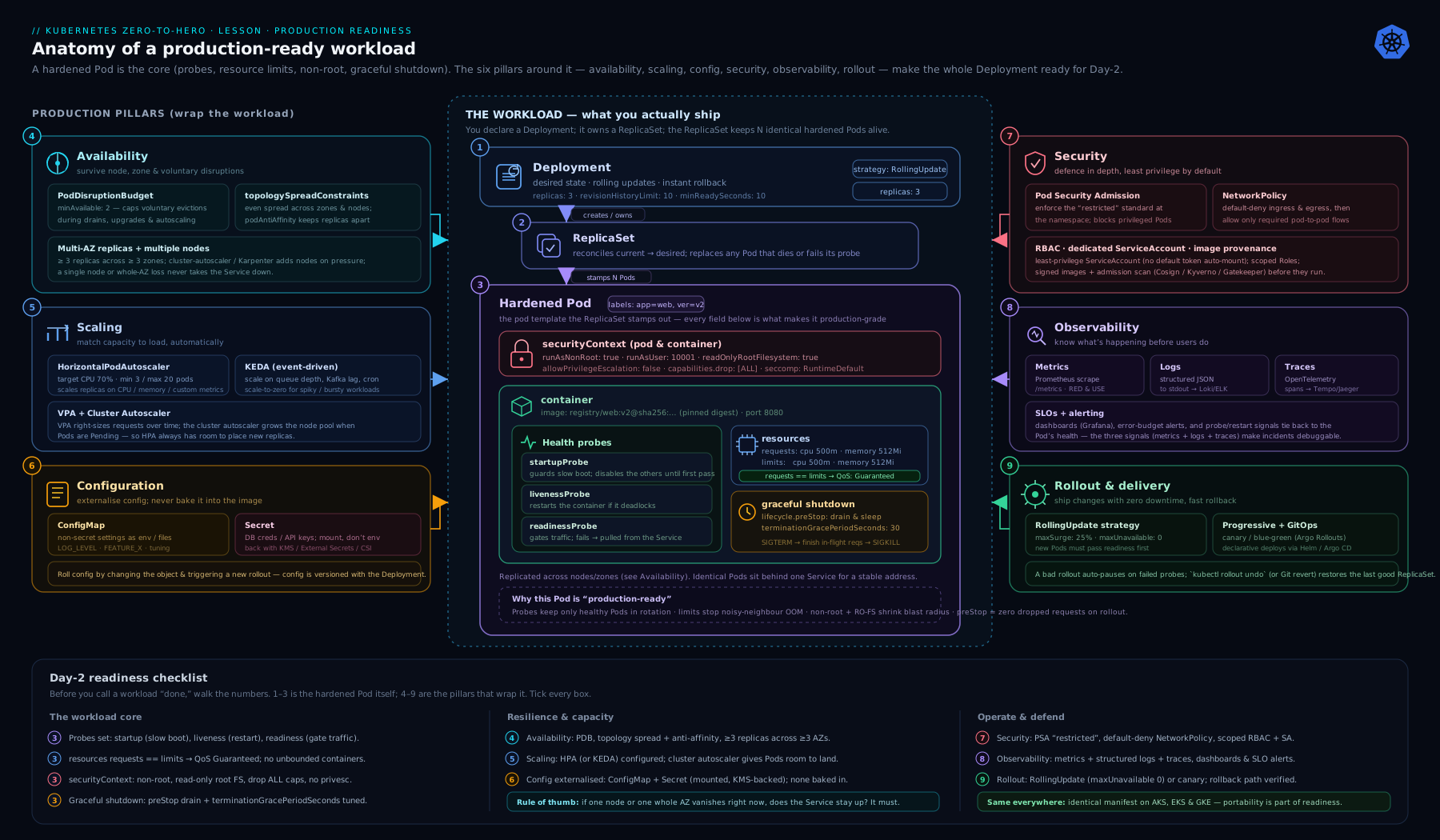
The diagram groups every control above into the four readiness pillars — health & lifecycle, resources & scaling, resilience & disruption, and security & networking — so you can see at a glance which knob defends against which failure mode.
The copy-paste production-readiness checklist
Paste this into your pull-request template or a READINESS.md and tick each box before a workload carries real traffic.
PRODUCTION-READINESS CHECKLIST  (tick every box before go-live)

HEALTH & LIFECYCLE
[ ] Readiness probe defined; reflects "can serve traffic now" (warm-up + critical deps)
[ ] Liveness probe defined; cheap, local, no external dependency calls
[ ] Startup probe for slow-starting apps (so liveness can stay tight)
[ ] App traps SIGTERM and drains in-flight work before exit
[ ] preStop hook (sleep 5-15s) to cover async endpoint removal
[ ] terminationGracePeriodSeconds > preStop sleep + longest in-flight request

RESOURCES & SCALING
[ ] CPU + memory requests set on every container
[ ] Memory limit == memory request (predictable; avoid OOM surprises)
[ ] QoS class is Guaranteed or Burstable (never BestEffort for prod)
[ ] HPA configured with min/max and a meaningful target (CPU% or custom)
[ ] metrics-server (and Prometheus adapter / KEDA if custom metrics) installed
[ ] Namespace LimitRange + ResourceQuota in place (shared clusters)

RESILIENCE & DISRUPTION
[ ] replicas >= 2 (>=3 for quorum/HA services)
[ ] PodDisruptionBudget set (maxUnavailable or minAvailable) and not blocking drains
[ ] Topology spread across nodes (and zones) configured
[ ] RollingUpdate: maxUnavailable: 0 / maxSurge: 1 (capacity never dips), or justified
[ ] No single points of failure pinned to one node/zone

CONFIG & SECRETS
[ ] Config externalised to ConfigMap (no config baked into the image)
[ ] Secrets in Secret objects; encryption-at-rest enabled (or external store/CSI)
[ ] Secrets mounted as files where possible (not env); checksum annotation to roll on change

SECURITY
[ ] runAsNonRoot: true, runAsUser a high non-zero UID
[ ] allowPrivilegeEscalation: false; capabilities drop ALL
[ ] readOnlyRootFilesystem: true (+ emptyDir for writable paths)
[ ] seccompProfile: RuntimeDefault
[ ] Namespace at Pod Security 'restricted' (enforce)
[ ] Image pinned by digest; scanned; pulled from a trusted registry

NETWORKING
[ ] Default-deny NetworkPolicy in the namespace
[ ] Explicit allow rules for required ingress/egress (incl. DNS egress to kube-dns)

OBSERVABILITY
[ ] Logs to stdout/stderr, structured (JSON)
[ ] App metrics exposed (/metrics) incl. Rate/Errors/Duration
[ ] Dashboards + alerts on user-visible SLOs; tracing wired (OpenTelemetry)
[ ] Labels/annotations: app, version, owner, runbook link
A hardened Deployment manifest
This single manifest wires together almost every control above — probes, resources for a Guaranteed pod, graceful shutdown, a safe rolling update, externalised config, a full securityContext, and topology spread. Read it top to bottom; the inline comments map each block back to the checklist.
apiVersion: apps/v1
kind: Deployment
metadata:
  name: orders-api
  labels:
    app: orders-api
    version: "1.4.2"          # observability: every object carries app + version
spec:
  replicas: 3                  # resilience: >=3 so a PDB + spread are meaningful
  revisionHistoryLimit: 5
  strategy:
    type: RollingUpdate
    rollingUpdate:
      maxUnavailable: 0        # capacity never dips below desired during a rollout
      maxSurge: 1              # one new (Ready) pod created before an old one goes
  selector:
    matchLabels:
      app: orders-api
  template:
    metadata:
      labels:
        app: orders-api
        version: "1.4.2"
      annotations:
        checksum/config: "REPLACED_BY_CI_WITH_HASH"  # roll pods when ConfigMap changes
    spec:
      terminationGracePeriodSeconds: 45   # > preStop sleep + longest in-flight request
      securityContext:                    # pod-level: applies to all containers
        runAsNonRoot: true
        runAsUser: 10001
        runAsGroup: 10001
        fsGroup: 10001
        seccompProfile:
          type: RuntimeDefault
      topologySpreadConstraints:
        - maxSkew: 1
          topologyKey: topology.kubernetes.io/zone
          whenUnsatisfiable: ScheduleAnyway      # spread across zones, best effort
          labelSelector:
            matchLabels:
              app: orders-api
        - maxSkew: 1
          topologyKey: kubernetes.io/hostname
          whenUnsatisfiable: DoNotSchedule       # never two replicas on one node
          labelSelector:
            matchLabels:
              app: orders-api
      containers:
        - name: orders-api
          image: registry.example.com/orders-api@sha256:<digest>  # pin by digest
          imagePullPolicy: IfNotPresent
          ports:
            - name: http
              containerPort: 8080
          envFrom:
            - configMapRef:
                name: orders-api-config        # externalised, non-sensitive config
          env:
            - name: DB_PASSWORD
              valueFrom:
                secretKeyRef:
                  name: orders-api-secrets     # sensitive value from a Secret
                  key: db-password
          resources:
            requests:
              cpu: "500m"
              memory: "512Mi"
            limits:
              cpu: "500m"                       # requests == limits => Guaranteed QoS
              memory: "512Mi"                   # memory limit == request avoids OOM surprises
          startupProbe:                         # generous one-time boot budget
            httpGet: { path: /healthz, port: http }
            periodSeconds: 5
            failureThreshold: 30                # up to 150s to start, then hand over
          readinessProbe:                       # gates Service endpoints
            httpGet: { path: /readyz, port: http }
            periodSeconds: 5
            timeoutSeconds: 2
            failureThreshold: 3
          livenessProbe:                        # cheap, local; restarts a wedged process
            httpGet: { path: /healthz, port: http }
            periodSeconds: 10
            timeoutSeconds: 2
            failureThreshold: 3
          lifecycle:
            preStop:
              exec:
                command: ["/bin/sh", "-c", "sleep 10"]  # cover async endpoint removal
          securityContext:                      # container-level hardening
            allowPrivilegeEscalation: false
            readOnlyRootFilesystem: true
            capabilities:
              drop: ["ALL"]
          volumeMounts:
            - name: tmp
              mountPath: /tmp                   # writable path despite read-only root FS
      volumes:
        - name: tmp
          emptyDir: {}
Pair it with the three companion objects the checklist demands — a PDB, an HPA, and a default-deny NetworkPolicy:
apiVersion: policy/v1
kind: PodDisruptionBudget
metadata:
  name: orders-api
spec:
  maxUnavailable: 1            # node drains take at most one replica at a time
  selector:
    matchLabels:
      app: orders-api
---
apiVersion: autoscaling/v2
kind: HorizontalPodAutoscaler
metadata:
  name: orders-api
spec:
  scaleTargetRef:
    apiVersion: apps/v1
    kind: Deployment
    name: orders-api
  minReplicas: 3
  maxReplicas: 10
  metrics:
    - type: Resource
      resource:
        name: cpu
        target:
          type: Utilization
          averageUtilization: 70   # 70% of the pod's CPU request
---
apiVersion: networking.k8s.io/v1
kind: NetworkPolicy
metadata:
  name: default-deny-ingress
spec:
  podSelector: {}               # selects every pod in the namespace
  policyTypes: ["Ingress"]      # deny all ingress; add explicit allow-policies next
Hands-on lab
You will harden a workload on a free local cluster, then prove each control works — watching a rollout stay up, a PDB block a drain, and a missing-request pod fail to autoscale. Roughly 25 minutes.
1. Create a cluster and a namespace
# kind (or: minikube start  /  k3d cluster create ready)
kind create cluster --name ready
kubectl create namespace shop
kubectl label namespace shop \
  pod-security.kubernetes.io/enforce=restricted \
  pod-security.kubernetes.io/warn=restricted
Labelling the namespace restricted means Pod Security Admission will reject any pod that is not hardened — a fast way to verify your manifest actually complies.
2. Try an unhardened pod (and watch it get rejected)
kubectl -n shop run nginx --image=nginx:1.27
Expected: the request is denied with a message listing violations (allowPrivilegeEscalation != false, unrestricted capabilities, runAsNonRoot != true, seccompProfile). This is Pod Security doing its job — proof that “restricted” is enforced.
3. Deploy the hardened workload
Save the hardened Deployment above as orders-api.yaml (swap the image for a runnable hardened one — ghcr.io/nginxinc/nginx-unprivileged:1.27 listens on 8080 and runs as non-root; point both probes at /), plus the PDB and HPA, then apply:
kubectl -n shop apply -f orders-api.yaml
kubectl -n shop rollout status deploy/orders-api
kubectl -n shop get pods -o wide        # confirm spread across nodes
Expected: three pods reach Running and READY 1/1. On a multi-node cluster the -o wide output shows them on different nodes (topology spread). Confirm the QoS class is Guaranteed:
kubectl -n shop get pod -l app=orders-api \
  -o jsonpath='{.items[0].status.qosClass}{"\n"}'
# -> Guaranteed
4. Watch a zero-downtime rollout
# In terminal 1, hammer the Service (after exposing it):
kubectl -n shop expose deploy/orders-api --port=80 --target-port=8080
kubectl -n shop run curl --image=curlimages/curl --restart=Never -it --rm -- \
  sh -c 'while true; do curl -s -o /dev/null -w "%{http_code}\n" orders-api; sleep 0.5; done'

# In terminal 2, trigger a rollout:
kubectl -n shop set image deploy/orders-api orders-api=ghcr.io/nginxinc/nginx-unprivileged:1.26
Expected: the curl loop keeps printing 200 throughout — maxUnavailable: 0 plus a working readiness probe means no request is dropped.
5. Prove the PodDisruptionBudget protects you
NODE=$(kubectl -n shop get pod -l app=orders-api \
  -o jsonpath='{.items[0].spec.nodeName}')
kubectl drain "$NODE" --ignore-daemonsets --delete-emptydir-data
Expected: the drain evicts pods one at a time, waiting for replacements to become Ready, because maxUnavailable: 1 forbids taking down more than one at once. With a single replica and minAvailable: 1, this command would block — that is the foot-gun to avoid. Uncordon when done: kubectl uncordon "$NODE".
6. See why requests matter for autoscaling
kubectl -n shop describe hpa orders-api | grep -A3 Metrics
If metrics-server is installed you will see a CPU percentage; if you had omitted CPU requests, the HPA would report <unknown> and refuse to scale — the concrete reason requests are non-negotiable. (On kind, install metrics-server with --kubelet-insecure-tls to see live numbers.)
Cleanup
kubectl delete namespace shop
kind delete cluster --name ready     # or: minikube delete / k3d cluster delete ready
Cost note
Everything here runs on a free local cluster (kind/minikube/k3d) on your laptop — zero cloud spend. The only cost is the few hundred MB of RAM the control plane and three small pods use.
Going deeper
The checklist tells you what to set. This section is the why underneath the why — the internals, edge cases and version caveats that separate someone who copies the manifest from someone who can defend every line of it when a design review pushes back. Read it once now; come back to it after your first production incident and it will read differently. (Everything below is current as of Kubernetes 1.29–1.33.)
Requests, limits and QoS below the surface
On a modern node the kubelet translates your requests and limits into cgroup v2 settings. A CPU request of 500m becomes a cpu.weight (a relative share applied only under contention); a CPU limit becomes a cpu.max quota over a 100 ms period. That period is the source of the classic throttling trap: a container with limits.cpu: "1" that wants 1.5 cores for 60 ms of a 100 ms window is throttled for the remaining 40 ms even though the node has idle CPU — because the quota is per-period, not per-second. This is exactly why latency-sensitive services often set a CPU request and omit the CPU limit: you get a guaranteed floor for scheduling without the periodic throttling ceiling.
Memory is a hard wall because it cannot be reclaimed by slowing the process down — once pages are allocated, the only lever is the OOM killer. cgroup v2 adds memory QoS (memory.min/memory.high, still an alpha feature gate) that lets the kubelet apply gentle back-pressure before the hard memory.max limit, but the safe mental model is unchanged: set memory request == limit and size it to the real working set plus headroom.
A few refinements the checklist glosses over:
| Nuance | Detail |
|---|---|
| Request:limit ratio | Burstable pods with a limit far above their request oversubscribe the node — great for bursty batch, dangerous for latency SLOs, because the burst headroom evaporates the moment neighbours get busy. |
| In-place pod resize | InPlacePodVerticalScaling (alpha since v1.27, beta in v1.33) lets you change a running pod’s CPU/memory requests via the resize subresource without a restart — the beginning of the end for “every resize is a restart.” |
initContainers count too |
The scheduler reserves max(sum of init requests, sum of app requests), so a heavy init container can inflate what the pod reserves. Native sidecars (restartable init containers, beta and on by default since v1.29, GA in v1.33) are instead summed into the app total. |
| Ephemeral storage | You can request/limit ephemeral-storage as well; a pod that fills the node’s disk with logs is evicted for exceeding it — a failure mode teams forget until it bites. |
Probes: the interactions the tables don’t show
Three subtleties bite in production:
- A probe can have its own
terminationGracePeriodSeconds. On current clusters you can set a probe-level grace period on the liveness probe so a container that fails liveness is killed faster than the pod’s (long) grace period — useful when the app needs 120 s to drain on a clean shutdown but should be killed in 10 s once it is already wedged. successThresholdmust be1for liveness and startup. Only readiness may require multiple consecutive successes to flap back in. This is a schema rule, not a style choice — the API server rejects anything else.- A readiness probe that checks a shared dependency can cause a correlated outage. If all N replicas readiness-probe the same database and it blips, all N leave the endpoint list at once and the Service returns zero endpoints — a self-inflicted total outage worse than the blip that triggered it. Probe what this pod needs to serve one request; push cross-service health into alerting, not into the data path.
For gRPC services, prefer the native grpc probe handler (stable since v1.27) over shelling out to grpc_health_probe — one fewer binary in the image and one fewer thing to keep patched. And remember that startup, readiness and liveness form a pipeline: the startup probe holds the other two back until the app has booted, so you can keep liveness tight (fast detection of real hangs) without punishing a slow boot.
PodDisruptionBudgets: the eviction subtleties
A PDB is enforced only by the Eviction API — kubectl drain, the cluster autoscaler, node-pool upgrades. A direct kubectl delete pod bypasses it entirely, as does an involuntary node failure. Two fields most people never touch matter at scale:
unhealthyPodEvictionPolicy(stable in v1.31). The default,IfHealthyBudget, means a PDB can block eviction of already-broken pods — so a bad rollout that leaves pods CrashLooping can also wedge a node drain. SetAlwaysAllowto let unhealthy pods be evicted freely, which is almost always what you want during an incident.- A PDB constrains rollouts too, not just drains. During a rolling update the Deployment controller respects the PDB, so an overly strict budget (
minAvailable: 100%) can deadlock a rollout — nothing can be taken down to make room for the new version.
The graceful-termination sequence is worth internalising exactly, because the parallelism trips people up. On pod deletion, simultaneously: (a) the pod’s endpoints are removed — asynchronously, eventually reaching kube-proxy and every ingress — and (b) the preStop hook fires, then SIGTERM, then after the grace period SIGKILL. The preStop: sleep exists purely to hold the container alive during window (a) so it keeps serving in-flight and just-arrived requests until every data-plane component has stopped routing to it. If your app exits immediately on SIGTERM with no preStop, you drop exactly the requests that were in flight during that async window — the outage that “only happens under load, during a deploy.”
Spreading for HA: the newer topology knobs
Topology spread constraints have gained several fields that fix real gaps:
| Field | Since | What it fixes |
|---|---|---|
minDomains |
v1.30 (stable) | Forces spread across at least N domains. Without it, three replicas can satisfy maxSkew: 1 while all sitting in one zone if that is the only zone with room. Pair with DoNotSchedule. |
nodeAffinityPolicy / nodeTaintsPolicy |
v1.26 (beta, on by default) | Controls whether nodes filtered out by affinity/taints are counted when computing skew — stops tainted or cordoned nodes from skewing the math. |
matchLabelKeys |
v1.27 (beta, on by default) | Spreads per-revision by folding in the pod-template-hash, so a rolling update does not count old-ReplicaSet pods against the new one’s spread. |
The practical HA recipe for a regional service: a soft zone spread (ScheduleAnyway, so a zone outage never blocks scheduling), plus a hard node spread (DoNotSchedule, so you never stack two replicas on one node), plus minDomains equal to your zone count when you truly require multi-zone placement. Anti-affinity still expresses one thing topology spread does not: “never co-locate with a different workload” (keep the API away from a batch job) — reach for podAntiAffinity there.
HPA, headroom and the math that keeps you up
Memorise the HPA’s core formula: desiredReplicas = ceil(currentReplicas × currentMetric / targetMetric). Set averageUtilization: 70 and the HPA drives the fleet average CPU to 70% of request — which means each pod needs 30% headroom to absorb the lag between “load rises” and “new pods are Ready.” If your pods take 90 s to start, that headroom must cover 90 s of growth; a 70 target on a fast app and a 50 target on a slow one can be the same real safety margin. A 90 target on a slow-starting app guarantees you saturate before help arrives.
Three production controls the basic example omits:
behavior(autoscaling/v2) tunes scale-up and scale-down independently. The default scale-down stabilization window is 300 s to damp flapping; scale-up is immediate. SetstabilizationWindowSecondsandpolicies(e.g. “at most 100% increase per 60 s”) to match your traffic shape.- Scale on the right metric. CPU is a proxy; a queue worker should scale on queue depth, a web service on requests-per-second or p99 latency. That is the jump to custom/external metrics (Prometheus adapter) or KEDA.
- Do not run HPA and VPA on the same resource. An HPA and a VPA both targeting CPU on one workload will fight. Use VPA for requests-sizing on non-HPA workloads, HPA for replica count.
Security context: least privilege, layer by layer
restricted Pod Security is a floor, not a ceiling. The layers, from most to least commonly applied:
| Layer | Control | Attack it removes |
|---|---|---|
| Identity | runAsNonRoot, a high runAsUser, fsGroup |
Container-as-root, the start of most node-root escape paths |
| Escalation | allowPrivilegeEscalation: false, capabilities.drop: ["ALL"] |
setuid binaries, CAP_SYS_ADMIN abuse |
| Filesystem | readOnlyRootFilesystem: true + emptyDir for writable paths |
Tamper-and-persist; dropping tools into a running container |
| Syscalls | seccompProfile: RuntimeDefault |
Kernel-surface exploits through exotic syscalls |
| Kernel isolation | User namespaces (hostUsers: false, beta since v1.30) or a sandbox runtime (gVisor/Kata via RuntimeClass) |
Maps container root to an unprivileged host UID — a genuine escape mitigation, not just least-privilege |
User namespaces are the most under-used of these: with hostUsers: false the container’s UID 0 maps to an unprivileged host UID, so even a full container-root compromise lands on the host as nobody. That is the difference between defence-in-depth and defence-in-theory. Enforce the whole stack cluster-side with Pod Security Admission for the built-in standards, and Kyverno or Gatekeeper for what PSA cannot express (registry allow-lists, required labels, digest pinning).
Observability that ties to SLOs, not vibes
“Add metrics” is not a plan. Production observability means you can answer “are users having a good time right now?” with a number. That number is a Service Level Indicator (SLI) — typically the fraction of requests served correctly and fast — against which you set a Service Level Objective (SLO), say 99.9% over 28 days. The gap between 100% and the SLO is your error budget: spend it on releases and experiments, and when it is exhausted, freeze risky changes. This reframes “production-ready” from “no pod restarts” to “we are inside budget.”
Two vocabularies make dashboards instantly legible: RED (Rate, Errors, Duration) for request-driven services, and USE (Utilisation, Saturation, Errors) for resources like nodes and queues. Alert on symptoms (error rate, latency, budget burn), not causes (one pod restart) — a pod restarting is fine if users never noticed. Wire trace exemplars from your latency histograms so a spike in a Grafana panel links straight to the offending trace.
Rollout safety and rollback
maxUnavailable: 0 / maxSurge: 1 is table stakes. Three more fields turn a rollout into a safe one:
| Field | Role |
|---|---|
minReadySeconds |
A new pod must stay Ready this long before it counts — filters out pods that pass readiness then immediately crash. |
progressDeadlineSeconds |
If the rollout makes no progress within this window, the Deployment is marked ProgressDeadlineExceeded (a signal CI can watch and abort on). It does not auto-rollback. |
revisionHistoryLimit |
How many old ReplicaSets to keep for kubectl rollout undo — your instant rollback path. |
Rollback itself is one command — kubectl rollout undo deploy/<name> — but it only reverts the pod template, not a database migration or a ConfigMap you already changed. That asymmetry (code is instantly reversible, data is not) is why schema changes must be backward-compatible and shipped in expand/contract phases. The full rollout/rollback machinery is covered in Deployments, ReplicaSets, Rollouts & Rollback. When even maxUnavailable: 0 is not safe enough — a payment path, a risky migration — you graduate to progressive delivery (canary or blue-green with automated metric analysis), where a controller shifts a slice of traffic, checks your SLIs, and rolls back automatically on a bad signal: see Progressive Delivery with Argo Rollouts: Canary & Metric Analysis.
Backup, DR and the state you forget you have
Stateless workloads are easy: the manifest is the backup, in Git. The moment you have state, you have three distinct things to protect, each with its own tool and its own RPO/RTO:
| What | Where it lives | How you protect it |
|---|---|---|
| Cluster state | etcd — every object you kubectl apply |
Scheduled etcd snapshots; the control plane’s source of truth |
| Declarative config | Your Git repo (GitOps) | The repo is the backup; a cluster is rebuilt by re-syncing |
| Application data | PersistentVolumes, external databases | CSI volume snapshots, app-native backups, or a tool like Velero |
Two numbers define your DR posture: RPO (how much data can you afford to lose — governs backup frequency) and RTO (how long can you be down — governs restore rehearsal). A backup you have never restored is a hypothesis, not a backup; rehearse the restore on a schedule. For the control plane specifically, etcd snapshots turn “the cluster is gone” from a résumé-updating event into an hour of downtime — covered in depth in etcd Snapshot Backup & Disaster Restore.
The failure-injection mindset
Everything above is a hypothesis until you test it. The senior move is to stop trusting the manifest and start attacking it — deliberately, in a controlled way, before production does it for you at 3 a.m.:
- Kill a pod (
kubectl delete pod) and watch the readiness/endpoints machinery route around it. Did the curl loop stay at200? - Drain a node and confirm the PDB paces it while topology spread kept a replica elsewhere.
- Cordon a whole zone’s nodes and check that
minDomains/soft spread degrade gracefully. - Throttle CPU or fill memory (a stress sidecar) and confirm limits/QoS behave and the HPA reacts.
- Break a dependency and confirm liveness does not restart-storm while readiness sheds load.
Run this as a scheduled game day first — announced, in staging or a canary environment, with everyone watching — then graduate to automated chaos engineering (LitmusChaos, Chaos Mesh) that injects faults continuously and fails the build when an SLO breaks. The goal is not to break things for sport; it is to convert every unchecked box into a control that has actually been exercised under failure. A checklist you have verified under injected failure is the real definition of production-ready.
Practice challenges
Work these in order; each escalates. Try before opening the solution — the value is in the attempt. You can do 1–4 by reasoning alone; 5–6 want a scratch cluster (kind).
Challenge 1 (beginner) — name the QoS class. A container sets requests: {cpu: 250m, memory: 256Mi} and limits: {cpu: 500m, memory: 256Mi}. What QoS class does its pod get, and where does it sit in eviction order?
<details> <summary>Solution</summary>
Burstable. Guaranteed requires requests to equal limits for both CPU and memory; here CPU request (250m) ≠ CPU limit (500m), so it is not Guaranteed — but resources are set, so it is not BestEffort either. Burstable pods are evicted after BestEffort and before Guaranteed under node memory pressure. To make it Guaranteed, set cpu request == limit as well.
</details>
Challenge 2 (beginner) — spot the probe bug. A team reports that whenever their database has a brief hiccup, every replica restarts at once and the outage lasts far longer than the hiccup. Their liveness and readiness probes both point at /db-check, which opens a database connection. What is wrong, and what is the fix?
<details> <summary>Solution</summary>
The liveness probe is calling a dependency. When the DB blips, liveness fails on every replica, Kubernetes restarts them all, and you get a restart storm — the cold caches and reconnect stampede make recovery far slower than the original blip. Fix: liveness must be cheap and local (/healthz that only checks the process). Move the dependency check into readiness (/readyz) so a struggling pod sheds traffic without restarting — and probe only what this pod needs, so a shared-dependency blip does not empty the whole endpoint list at once.
</details>
Challenge 3 (intermediate) — audit this manifest. The following “runs fine” in a demo. List every production-readiness gap you can find against the checklist.
apiVersion: apps/v1
kind: Deployment
metadata:
  name: payments
spec:
  replicas: 1
  selector:
    matchLabels:
      app: payments
  template:
    metadata:
      labels:
        app: payments
    spec:
      containers:
        - name: payments
          image: mycorp/payments:latest
          ports:
            - containerPort: 8080
          livenessProbe:
            httpGet: { path: /db-check, port: 8080 }
            initialDelaySeconds: 60
          readinessProbe:
            httpGet: { path: /db-check, port: 8080 }
<details> <summary>Solution</summary>
At least nine gaps:
replicas: 1— no HA; every rollout, drain or crash is a full outage, and a PDB here would deadlock drains.- No resource requests/limits — the pod is BestEffort (evicted first) and the HPA has no CPU denominator, so it can never scale.
- Liveness calls a dependency (
/db-check) — a DB blip triggers a restart storm. - Liveness and readiness are identical — they answer different questions; readiness should own the dependency check, liveness should be cheap and local.
initialDelaySeconds: 60instead of a startup probe — inflating liveness delay makes real hangs slow to detect for the container’s whole life.image: ...:latest— not pinned by digest; not reproducible, not verifiably scanned.- No
securityContext— will be rejected by arestrictednamespace (needs non-root, drop ALL, seccomp, no priv-esc). - No graceful shutdown — no
preStop, no consideredterminationGracePeriodSeconds; requests drop on every deploy. - Missing companions — no
strategytuning (maxUnavailable: 0/maxSurge: 1), no PDB, no topology spread, no HPA, no NetworkPolicy, no externalised config, and noversion/ownerlabels for observability.
A minimal fix for the probes alone:
          startupProbe:
            httpGet: { path: /healthz, port: 8080 }
            periodSeconds: 5
            failureThreshold: 24
          livenessProbe:
            httpGet: { path: /healthz, port: 8080 }
            periodSeconds: 10
            failureThreshold: 3
          readinessProbe:
            httpGet: { path: /readyz, port: 8080 }
            periodSeconds: 5
            failureThreshold: 3
</details>
Challenge 4 (intermediate) — the PDB foot-gun. An operator adds PodDisruptionBudget with minAvailable: 1 to a single-replica Deployment, then tries kubectl drain on the node that runs it. What happens, and how do you fix it without removing the PDB?
<details> <summary>Solution</summary>
The drain blocks indefinitely. Evicting the one replica would drop availability below minAvailable: 1, which the PDB forbids — but there is nowhere else for the pod to go, so the node can never be drained. The fix is to make the PDB satisfiable: run ≥2 replicas (ideally 3), so one can be evicted while the budget is still met. A PDB is only meaningful with plurality; on a single replica it is a self-lock. (Emergency-only escape hatch: kubectl drain --disable-eviction, which bypasses the PDB — use it knowingly, not as a habit.)
</details>
Challenge 5 (advanced) — design for a zone loss. Write the topologySpreadConstraints and a PDB for a 6-replica web service across a 3-zone cluster such that (a) losing one entire zone still leaves the service serving, and (b) two replicas never land on the same node. State your reasoning.
<details> <summary>Solution</summary>
Spread 2 per zone hard (so a zone loss drops only 2 of 6, leaving 4 serving), spread across nodes softly, and force all three zones to be used with minDomains: 3:
apiVersion: apps/v1
kind: Deployment
metadata:
  name: web
spec:
  replicas: 6
  selector:
    matchLabels:
      app: web
  template:
    metadata:
      labels:
        app: web
    spec:
      topologySpreadConstraints:
        - maxSkew: 1
          topologyKey: topology.kubernetes.io/zone
          whenUnsatisfiable: DoNotSchedule
          minDomains: 3
          labelSelector:
            matchLabels:
              app: web
        - maxSkew: 1
          topologyKey: kubernetes.io/hostname
          whenUnsatisfiable: ScheduleAnyway
          labelSelector:
            matchLabels:
              app: web
      containers:
        - name: web
          image: registry.example.com/web@sha256:<digest>
---
apiVersion: policy/v1
kind: PodDisruptionBudget
metadata:
  name: web
spec:
  minAvailable: 4
  selector:
    matchLabels:
      app: web
Reasoning: maxSkew: 1 + minDomains: 3 + DoNotSchedule on the zone key forces exactly 2 replicas per zone — an involuntary zone loss (which a PDB does not govern) removes only those 2, leaving 4 up. The node-key spread is soft so it never blocks scheduling but discourages stacking. minAvailable: 4 on the PDB means that during voluntary disruption (drains, upgrades) you keep at least a two-zones’ worth of capacity — and if maintenance is attempted while a zone is already down, the PDB correctly refuses to take you below 4.
</details>
Challenge 6 (advanced) — size the shutdown window. Your app’s longest in-flight request takes up to 20 s, endpoint removal takes ~5 s to propagate across kube-proxy and ingress, and the app needs ~2 s to close connections cleanly after it stops accepting new work. Choose preStop sleep and terminationGracePeriodSeconds, and state the ordering guarantee you are relying on.
<details> <summary>Solution</summary>
Set the preStop sleep to ≥5 s (cover async endpoint-removal propagation) and terminationGracePeriodSeconds to comfortably exceed preStop + longest in-flight + clean-close, i.e. 5 + 20 + 2 = 27 s → round up to 35 s (or 45 s for margin). The guarantee: on deletion, endpoint removal and the preStop hook run in parallel, and SIGTERM is only sent after preStop completes — so the sleep holds the pod in rotation until routing has stopped, and the generous grace period lets in-flight requests finish before SIGKILL. This only works if the app actually traps SIGTERM and drains; otherwise the grace period is just a countdown to a hard kill.
</details>
Common beginner mistakes
These are misconceptions, not symptoms — the wrong mental model that produces the bug. Fix the model and the bug never ships. (The symptom-to-fix lookup is the troubleshooting table that follows.)
-
“It says
Running, so it is fine.”Runningmeans the container process started, nothing more. It says nothing about whether the app can serve, whether it survives a node loss, or whether it drops traffic on deploy. Right model:Runningis the first 10% of readiness; the checklist is the other 90%. -
“I will add resource requests later.” Without requests your pod is BestEffort — first to be evicted under pressure — and your HPA has no denominator, so it silently never scales. Later never comes, and you discover this during your first traffic spike. Right model: requests are how the scheduler and autoscaler see your pod; a pod with no requests is invisible to both.
-
“Liveness and readiness can point at the same endpoint.” They answer opposite questions. Point both at a check that calls your database and a DB blip makes liveness fail, so Kubernetes restarts every replica — a restart storm that turns a 5-second blip into a 5-minute outage. Right model: liveness = “is this process wedged?” (cheap, local, a restart fixes it); readiness = “should I get traffic right now?” (may weigh warm-up and load). Never the same endpoint.
-
“One replica is enough to start with.” One replica means every rollout, node drain and crash is a full outage — and a PDB on a single replica blocks node maintenance forever. Right model: the minimum production count is 2 (3 for quorum services); HA is a property of plurality plus spread, not of one healthy pod.
-
“A PodDisruptionBudget keeps me up.” A PDB only limits voluntary disruptions (drains, upgrades). It does nothing for a node that fails, and
minAvailable: 1on a single replica actively wedges maintenance. Right model: a PDB rate-limits planned disruption; spread (topology/anti-affinity) handles unplanned disruption. You need both. -
“The app just stops when Kubernetes kills it.” If your process ignores
SIGTERM— common when it is wrapped in a shell that does not forward signals — every shutdown is a hard 30-secondSIGKILLthat severs in-flight requests. Adding apreStopsleep without a signal handler only masks it until the grace period is too short. Right model: graceful shutdown is a contract your app must honour — trap SIGTERM, stop accepting new work, drain in-flight, then exit. -
“We will add monitoring after launch.” The first incident is exactly when you need metrics, logs and traces — and the worst time to be wiring them in. Logging to a file inside the container (instead of stdout) means the logs vanish with the pod. Right model: observability is part of the definition of done, not a follow-up ticket. If you cannot see it, you cannot operate it.
Common mistakes & troubleshooting
| Symptom | Likely cause | Fix |
|---|---|---|
| Requests dropped during every rollout | No readiness probe, or it reports ready too early | Add an honest readiness probe gating real serving capability; set maxUnavailable: 0 |
| Restart storm during a dependency outage | Liveness probe calls the slow/down dependency | Make liveness cheap and local; check dependencies in readiness, not liveness |
Pod OOMKilled, restarts repeatedly |
Memory limit too low, or limit set well below real usage | Set memory request == limit to the observed working set; right-size with VPA recommendations |
kubectl drain hangs forever |
PDB cannot be satisfied (e.g. single replica, minAvailable: 1) |
Run >=2 replicas; relax PDB; or --disable-eviction only as a last resort |
| All replicas on one node; node drain caused an outage | No topology spread / anti-affinity | Add topology spread on kubernetes.io/hostname (and zone) |
| Pod rejected at apply with policy violations | Namespace enforces restricted; manifest not hardened |
Add the full securityContext (non-root, drop ALL, seccomp, no priv-esc) |
| Requests work in-cluster but break after deploy | Connections to Terminating pods during async endpoint removal |
Add a preStop sleep; ensure the app traps SIGTERM and drains |
HPA shows <unknown> targets, never scales |
No CPU/memory request, or metrics-server missing | Set requests; install metrics-server |
| Config change not picked up | ConfigMap updated but pods not restarted | Add a checksum/config annotation to the pod template to force a rollout |
| DNS resolution fails after adding NetworkPolicy | Default-deny egress blocks port 53 to kube-dns | Add an egress allow rule to kube-system DNS on UDP/TCP 53 |
Best practices
- Make readiness honest and liveness cheap. Readiness gates user traffic; liveness only restarts a wedged process. Never let liveness depend on an external system.
- Always set requests; set memory limits equal to memory requests. Be deliberate (and often sparing) with CPU limits — throttling hurts latency without preventing failure.
- Run at least two (ideally three) replicas for anything that serves traffic, and back them with a PDB plus topology spread so neither maintenance nor a node failure can take you down.
- Roll out with
maxUnavailable: 0/maxSurge: 1for capacity-sensitive services, and pair it with graceful shutdown (preStop+ SIGTERM handling + a sufficient grace period). - Externalise config and secrets, mount secrets as files, enable encryption at rest, and force rollouts on config change with a checksum annotation.
- Pin images by digest, scan them, and standardise labels (
app,version,owner, runbook link) so observability and incident response have something to key on. - Treat the checklist as a gate, not a wishlist — enforce it with Pod Security Admission and policy-as-code (Kyverno/OPA Gatekeeper) so non-compliant workloads cannot reach production.
Security notes
Production-readiness is security here. Three points deserve emphasis. First, Secrets are base64, not encrypted, by default — anyone with get secret RBAC or etcd access can read them; enable encryption at rest, prefer mounting over env vars, and consider an external store via the Secrets Store CSI driver. Second, the default flat network is a lateral-movement highway — a default-deny NetworkPolicy turns a single compromised pod into a contained incident instead of a cluster-wide pivot; just remember to allow DNS egress. Third, restricted Pod Security is the floor, not the ceiling — a non-root, read-only, capability-stripped pod with RuntimeDefault seccomp removes the most common container-escape and privilege-escalation paths; layer on Pod Security Admission to enforce it cluster-side. Combine least-privilege RBAC, image provenance (signed, scanned, digest-pinned), and these pod-level controls for defence in depth.
Interview & exam questions
-
What is the difference between a liveness and a readiness probe, and what happens when each fails? Liveness answers “is this container wedged?” — on failure the container is restarted. Readiness answers “should this pod get traffic?” — on failure the pod is removed from Service endpoints but not restarted. Liveness fixes hangs; readiness controls traffic during warm-up, overload or dependency loss.
-
When and why would you add a startup probe? For slow-starting apps (JVM, legacy). It gives a generous one-time boot budget and gates liveness/readiness until it passes, so you can keep the liveness probe tight for the rest of the container’s life instead of inflating
initialDelaySeconds. -
Why should a liveness probe never call an external dependency? If the dependency is slow or down, the probe fails, Kubernetes restarts the container, and you get a restart storm that makes recovery harder — turning a dependency blip into a self-inflicted outage. Liveness must be cheap and local.
-
What determines a pod’s QoS class, and why does it matter? The relationship between requests and limits. Guaranteed = requests equal limits for both CPU and memory; Burstable = some requests/limits but not equal; BestEffort = none set. QoS sets eviction order under node memory pressure: BestEffort is evicted first, Guaranteed last.
-
What happens when a container exceeds its CPU limit versus its memory limit? Over the CPU limit it is throttled (slowed, never killed). Over the memory limit it is OOMKilled and restarted. Hence: be cautious with CPU limits (throttling hurts latency); set memory limit equal to request for predictability.
-
What does a PodDisruptionBudget protect against, and what does it not? It limits voluntary disruptions (drains, autoscaler scale-down, node-pool upgrades) so too many replicas are not evicted at once. It does not protect against involuntary disruptions (node/hardware failure) — spread (topology/anti-affinity) handles those. And it only works with >1 replica.
-
How do you achieve a zero-downtime rolling update? Run multiple replicas, set
maxUnavailable: 0andmaxSurge: 1(a new Ready pod before removing an old one), back it with an honest readiness probe, and implement graceful shutdown (preStop sleep + SIGTERM handling + adequateterminationGracePeriodSeconds). -
Why might requests still reach a pod after it enters
Terminating? Endpoint removal propagates asynchronously through kube-proxy and ingress controllers, so for a short window a terminating pod can still be a target. Mitigate with apreStopsleep that delays SIGTERM until the removal has propagated, plus in-app connection draining. -
Prefer topology spread constraints or pod anti-affinity, and why? Topology spread constraints for new work — they express “spread evenly across this domain” directly with
maxSkew, are cheaper for the scheduler, and support soft/hard viawhenUnsatisfiable. Anti-affinity is the older, more expensive mechanism for keeping pods apart. -
How does the HorizontalPodAutoscaler use resource requests? CPU utilisation is computed as a percentage of the pod’s CPU request, so without a request the HPA has no denominator and reports
<unknown>, refusing to scale. This is a key reason requests are mandatory. The HPA also needs metrics-server. -
What replaced PodSecurityPolicy, and how do you enforce hardening cluster-side? Pod Security Admission (PSA), applied per namespace via labels (
pod-security.kubernetes.io/enforce: restricted, withwarn/auditfor migration). It enforces the Pod Security Standards (privileged / baseline / restricted);restrictedrequires non-root, dropped capabilities, seccompRuntimeDefault, no privilege escalation, etc. -
What is the default pod-to-pod network behaviour, and how do you secure it? By default every pod can reach every other pod. Apply a default-deny NetworkPolicy (select all pods, deny ingress/egress), then add narrow allow-rules per required flow — remembering to allow DNS egress to kube-dns on port 53. Enforcement depends on a CNI that supports NetworkPolicy.
Quick check
- Which probe controls whether a pod appears in a Service’s endpoint list?
- A pod has CPU/memory requests equal to its limits. What QoS class is it, and where does it sit in eviction order?
- You set
minAvailable: 1on a single-replica Deployment and then runkubectl drain. What happens? - What two rolling-update fields give you “never drop below desired capacity,” and what value does each take?
- Name the three minimum observability practices for a production workload.
Answers
- The readiness probe — on failure the pod is removed from Service endpoints (it is not restarted).
- Guaranteed, and it is evicted last under node memory pressure (most protected).
- The drain blocks indefinitely — evicting the only replica would breach
minAvailable: 1, so the node cannot be drained. Run at least two replicas. maxUnavailable: 0(no pod may be unavailable) andmaxSurge: 1(one extra Ready pod is created before an old one is removed).- Log to stdout/stderr, emit structured (JSON) logs, and expose application metrics (Rate/Errors/Duration) for SLOs and autoscaling.
Exercise
Take an unhardened Deployment of your choice (or the bare nginx from the lab) and bring it to production-readiness against the checklist, proving each control:
- Add liveness, readiness and startup probes pointing at real endpoints; demonstrate that failing readiness drops the pod from Service endpoints (
kubectl get endpoints) without a restart. - Set requests and limits to land the pod in Guaranteed QoS; verify with
kubectl get pod -o jsonpath='{.status.qosClass}'. - Scale to three replicas, add a PDB (
maxUnavailable: 1) and topology spread across nodes; drain a node and show eviction proceeds one pod at a time. - Configure
maxUnavailable: 0/maxSurge: 1, add apreStopsleep and a sensible grace period, and show a rollout that keeps acurlloop returning200throughout. - Move all config to a ConfigMap and any secret to a Secret; apply the full
restrictedsecurityContextand confirm the pod is admitted into arestrictednamespace. - Add a default-deny NetworkPolicy plus the minimum allow-rules (including DNS egress) and confirm the app still works.
Write a short READINESS.md recording which checklist items you completed and the command that proves each one — exactly what a reviewer would ask for.
Certification mapping
| Exam | Where this lesson maps |
|---|---|
| CKAD | Application Design and Build (probes, multi-container patterns, config), Application Deployment (rolling updates, deployment strategies), Application Observability and Maintenance (probes, logging, monitoring), Services & Networking (NetworkPolicy) — this is core CKAD territory |
| CKA | Workloads & Scheduling (deployments, rolling updates, resource limits, PDBs, topology), Services & Networking (NetworkPolicy), Troubleshooting (probe and resource failures) |
| CKS | Minimize Microservice Vulnerabilities (securityContext, Pod Security Standards), System Hardening and Cluster Hardening (NetworkPolicy default-deny, least privilege) |
| KCNA | Conceptual coverage of probes, resources, scaling and observability for the entry-level exam |
Glossary
- Liveness probe — a check that, on failure, restarts the container; for detecting wedged processes.
- Readiness probe — a check that, on failure, removes the pod from Service endpoints; for controlling traffic.
- Startup probe — a one-time boot-budget check that gates liveness/readiness for slow-starting apps.
- Request — the CPU/memory the scheduler reserves for a container; the basis for bin-packing and HPA percentages.
- Limit — the hard ceiling enforced by the kubelet/runtime; CPU is throttled, memory is OOMKilled.
- QoS class — Guaranteed / Burstable / BestEffort, derived from requests vs limits; sets eviction order.
- PodDisruptionBudget (PDB) — caps how many pods may be voluntarily disrupted at once.
- Topology spread constraint — scheduler rule to distribute pods evenly across a topology domain (node, zone).
- Voluntary vs involuntary disruption — operator-initiated (drain, scale-down) vs unplanned (node failure).
- Graceful shutdown — endpoint removal → preStop → SIGTERM → (grace period) → SIGKILL; lets a pod drain cleanly.
- securityContext — pod/container security settings (non-root, capabilities, read-only FS, seccomp).
- Pod Security Admission (PSA) — built-in admission controller enforcing the Pod Security Standards per namespace.
- NetworkPolicy — pod-level ingress/egress firewall rules enforced by the CNI.
- HorizontalPodAutoscaler (HPA) — scales replica count to track a target metric (often CPU% of request).
- QoS class — Guaranteed / Burstable / BestEffort; derived from the requests-vs-limits relationship and used to decide eviction order under node pressure.
- cgroup v2 — the Linux control-group interface the kubelet uses to enforce requests/limits (
cpu.weight,cpu.max,memory.max). - Eviction API — the mechanism (used by
drain, the autoscaler and upgrades) that a PodDisruptionBudget governs; a directdelete podbypasses it. unhealthyPodEvictionPolicy— PDB field (stable v1.31) deciding whether already-unhealthy pods can be evicted even when the budget is tight.minDomains— topology-spread field (stable v1.30) forcing pods across at least N domains, so replicas cannot all pile into one zone.- User namespace — pod isolation (
hostUsers: false, beta v1.30) that maps container root to an unprivileged host UID, containing a container-root compromise. - In-place pod resize — changing a running pod’s CPU/memory requests without a restart via the
resizesubresource (InPlacePodVerticalScaling, beta v1.33). progressDeadlineSeconds— marks a DeploymentProgressDeadlineExceededwhen a rollout stalls; a signal to abort, not an auto-rollback.minReadySeconds— how long a new pod must stay Ready before it counts toward the rollout, filtering out pods that crash right after passing readiness.- SLI / SLO / error budget — Service Level Indicator (a health number), Objective (its target, e.g. 99.9%), and the budget (
100% − SLO) you spend on releases and risk. - RED / USE — dashboard vocabularies: Rate, Errors, Duration for request services; Utilisation, Saturation, Errors for resources like nodes and queues.
- RPO / RTO — Recovery Point Objective (tolerable data loss → backup frequency) and Recovery Time Objective (tolerable downtime → restore rehearsal).
- Progressive delivery — canary or blue-green rollouts with automated metric analysis that shift traffic gradually and roll back on a bad SLI.
- Game day / chaos engineering — deliberately injecting failures (announced game days, then automated tools like LitmusChaos/Chaos Mesh) to verify the checklist under real fault conditions.
Next steps
You can now take any workload from “it runs” to “it is production-ready.” Next, learn to build and operate the cluster itself — HA control planes, etcd backup and safe upgrades — in Provisioning Production Kubernetes: kubeadm, HA Control Plane, etcd Backup & Upgrades. To go deeper on individual controls, see Kubernetes Autoscaling: HPA, KEDA & Karpenter, Right-Sizing with the Vertical Pod Autoscaler, Default-Deny Network Policies with Cilium, and Pod Security Admission: Baseline to Restricted.