In a nutshell
Every time you run kubectl apply, the object you create — a Deployment, a Secret, a ConfigMap, an RBAC binding, even the note that a particular Pod should exist — is written into etcd, a small database that runs alongside the Kubernetes control plane. The API server is just the doorway; etcd is the room where everything is actually kept. It is, quite literally, your cluster’s memory: if it is healthy, Kubernetes knows what should be running and keeps making it so; if it is gone and you have no copy, the cluster has amnesia — the workloads already running may limp along for a while, but nothing new schedules, nothing self-heals, and there is no record of what the cluster was even supposed to be. On a managed cluster (EKS, AKS, GKE) the cloud provider quietly backs etcd up for you. On a self-managed cluster — the kubeadm world this lesson lives in — that job is yours, and this runbook is how you do it.
An etcd snapshot is a photograph of that entire memory at one instant, saved to a single file. Think of it as a seatbelt: on the overwhelming majority of drives you never think about it, and on the one drive that goes wrong, nothing else you own substitutes for it. The whole discipline below is just “wear the seatbelt, and once in a while actually check that it holds” — take snapshots on a schedule, store them somewhere that survives the cluster itself dying, and practice restoring, so that the night you finally need it the procedure is boring instead of terrifying.
Level: Advanced · Time: ~35 min
What you should already know — the control-plane pieces and where etcd sits among them (see Cluster architecture and the control plane), and how a kubeadm HA control plane with stacked etcd is built (see Provisioning a kubeadm HA control plane). Comfort with kubectl, SSH, and TLS certificates helps.
After this lesson you’ll be able to:
- Explain in one sentence why etcd is the one thing on a self-managed cluster you cannot afford to lose.
- Take and verify a consistent etcd snapshot by hand with
etcdctlandetcdutl. - Schedule snapshots as a CronJob and ship them to durable, versioned, off-cluster storage.
- Alert on backup freshness, so a silently broken backup pages you instead of ambushing you during an outage.
- Recover a single failed member while quorum holds, and rebuild the whole cluster from a snapshot after full quorum loss.
- Reason about the hard limits — no arbitrary point-in-time recovery, and what encryption-at-rest adds to a restore.
At 02:14 a platform engineer runs a routine etcdctl defrag on the wrong member of a three-node, self-managed kubeadm control plane, the member’s data directory corrupts mid-compaction, and within ninety seconds two of the three etcd peers are flapping and the API server is returning etcdserver: request timed out. No new pods schedule, no Deployment rolls, and the GitOps controller is stuck because the API it writes to is unavailable. The cluster’s workloads are still running — kubelets keep the existing pods alive — but the control plane is brain-dead, and nobody on the bridge can answer the only question that matters: where is the last good etcd snapshot, and has anyone ever actually restored from one? This runbook exists so that question has a boring answer. etcd is the single source of truth for every Kubernetes object — every Secret, every Deployment, every RBAC binding — and on a self-managed cluster (no cloud-provider managed control plane to fall back on), protecting etcd is protecting the cluster. We will set up scheduled etcdctl snapshot save via a Kubernetes CronJob, ship the snapshots off-cluster, and rehearse two restores end to end: a single corrupted member, and a full quorum-loss rebuild.
Prerequisites
- A self-managed Kubernetes cluster (this guide assumes
kubeadmwith a stacked etcd topology — etcd runs as a static pod on each control-plane node), v1.27+ with a 3-node control plane. The same commands work for an external etcd topology; only the host paths differ. - Root /
sudoSSH access to all control-plane nodes, plus a workingkubectlcontext withcluster-admin. etcdctlandetcdutl(the v3.5+ restore tool) available — they ship inside theregistry.k8s.io/etcdimage, so you rarely install them on the host.- The etcd PKI on each control-plane node at
/etc/kubernetes/pki/etcd/(ca.crt,server.crt,server.key). - An off-cluster object store for snapshots — this guide uses an S3-compatible bucket. Write access is brokered by HashiCorp Vault (a short-lived AWS secrets-engine lease), never a static long-lived key baked into a manifest.
- Terraform to provision the bucket, its lifecycle/retention policy, and the IAM role the Vault AWS engine assumes; Ansible to lay down the on-host PKI and the local snapshot directory consistently across all three nodes.
Target topology
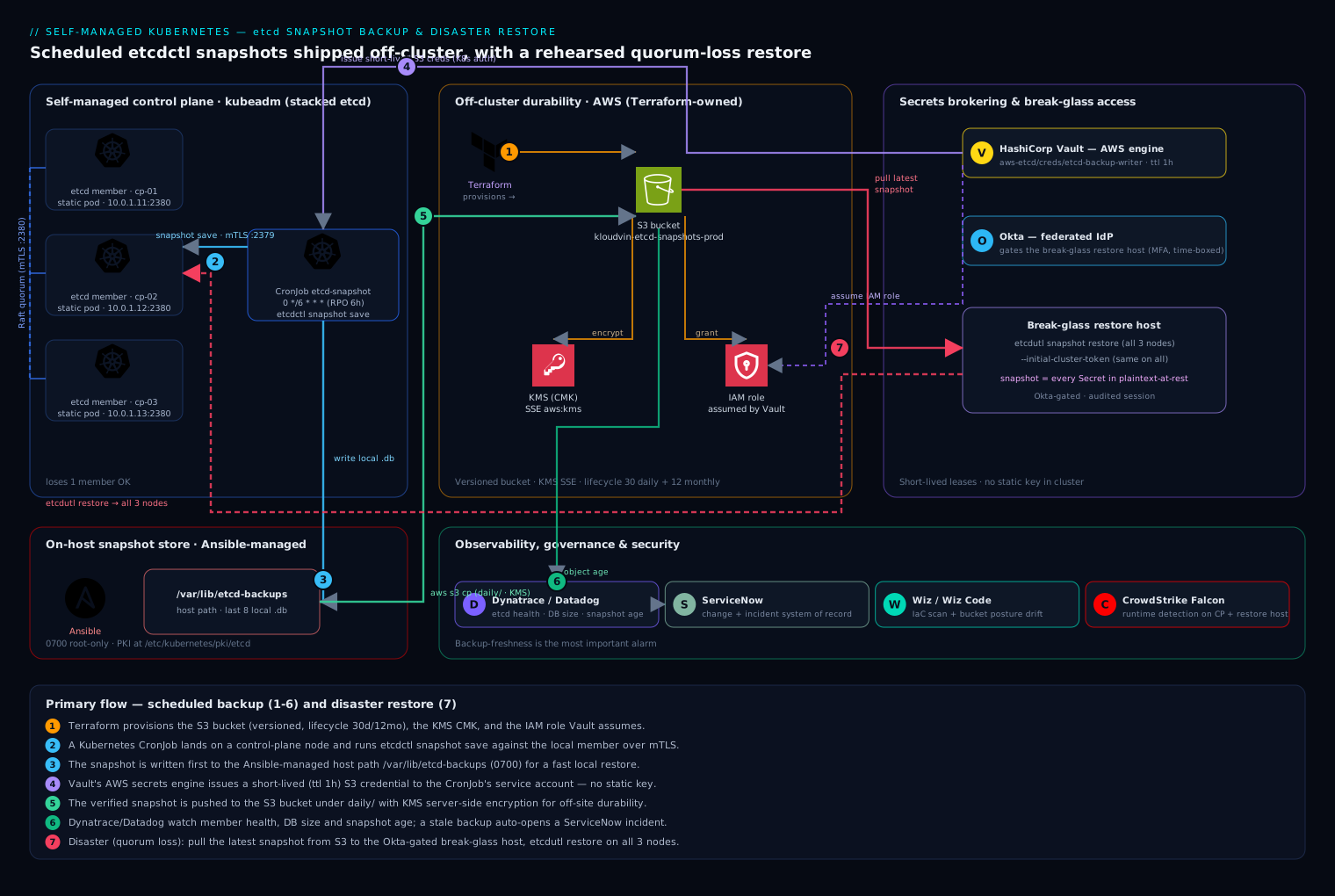
The control plane is three nodes, each running an etcd member as a static pod, forming a single Raft quorum (a 3-member cluster tolerates the loss of one member and keeps quorum at two). A Kubernetes CronJob, pinned by node affinity and a control-plane toleration to land on a control-plane node, runs etcdctl snapshot save on a schedule against the local member’s client endpoint over mTLS. Each snapshot is written first to a host path (/var/lib/etcd-backups) for a fast local restore, then pushed to an S3-compatible bucket off-cluster for durability and off-site retention. Vault issues the bucket credentials on demand to the CronJob’s service account, so no permanent secret lives in the cluster. Terraform owns the bucket, its versioning, and a lifecycle rule that keeps 30 daily + 12 monthly snapshots; Ansible owns the on-host directories and PKI. Dynatrace (or Datadog) watches the etcd member health, Raft leader changes, DB size, and — critically — the age of the newest snapshot in the bucket, so a silently failing backup pages someone instead of being discovered during an outage. ServiceNow is the system of record: every DR rehearsal and every real restore opens a change/incident record, and the post-restore validation gets attached to it. Restores run from a tightly controlled break-glass host whose access is gated by Okta federated to your IdP and time-boxed, because the snapshot contains every Kubernetes Secret in plaintext-at-rest terms.
If this is your first read of the diagram, the only two boxes that truly matter are the etcd members (the thing being protected) and the off-cluster bucket (where the protection lives); everything else — CronJob, Vault, monitoring, ServiceNow, Okta — exists to schedule, secure, and watch the path between those two.
1. Provision the off-cluster bucket and credential path
Stand up the durable target before you generate a single snapshot — a backup you cannot store off the failing cluster is not a backup. Use Terraform so the bucket, its versioning, retention lifecycle, and the IAM role that Vault will assume are all code-reviewed and reproducible.
# etcd-backup-bucket.tf
resource "aws_s3_bucket" "etcd_backups" {
  bucket = "kloudvin-etcd-snapshots-prod"
}

resource "aws_s3_bucket_versioning" "etcd_backups" {
  bucket = aws_s3_bucket.etcd_backups.id
  versioning_configuration { status = "Enabled" }
}

resource "aws_s3_bucket_lifecycle_configuration" "retention" {
  bucket = aws_s3_bucket.etcd_backups.id
  rule {
    id     = "daily-30d"
    status = "Enabled"
    filter { prefix = "daily/" }
    expiration { days = 30 }
  }
  rule {
    id     = "monthly-365d"
    status = "Enabled"
    filter { prefix = "monthly/" }
    expiration { days = 365 }
  }
}

# Server-side encryption with a CMK so snapshots (which contain every Secret) are encrypted at rest
resource "aws_s3_bucket_server_side_encryption_configuration" "enc" {
  bucket = aws_s3_bucket.etcd_backups.id
  rule {
    apply_server_side_encryption_by_default { sse_algorithm = "aws:kms" }
  }
}
Configure the Vault AWS secrets engine to mint short-lived credentials scoped to only this bucket, so the CronJob never holds a static key:
vault secrets enable -path=aws-etcd aws
vault write aws-etcd/roles/etcd-backup-writer \
  credential_type=iam_user \
  policy_document=-<<'EOF'
{ "Version": "2012-10-17",
  "Statement": [{ "Effect": "Allow",
    "Action": ["s3:PutObject","s3:GetObject","s3:ListBucket"],
    "Resource": ["arn:aws:s3:::kloudvin-etcd-snapshots-prod",
                 "arn:aws:s3:::kloudvin-etcd-snapshots-prod/*"] }] }
EOF
# 1h lease — far longer than a backup run, far shorter than useful to an attacker
vault write aws-etcd/roles/etcd-backup-writer ttl=1h max_ttl=2h
The CronJob’s service account authenticates to Vault via the Kubernetes auth method and reads aws-etcd/creds/etcd-backup-writer at runtime; the Vault Agent injector writes the lease into the pod’s memory, not a Secret object.
2. Lay down host paths and verify the etcd endpoint
Use Ansible so all three control-plane nodes are identical — drift here is what makes a 02:14 restore fail.
# roles/etcd-backup/tasks/main.yml
- name: Ensure local snapshot directory exists
  ansible.builtin.file:
    path: /var/lib/etcd-backups
    state: directory
    owner: root
    group: root
    mode: "0700"        # snapshots are sensitive; lock them down
Confirm etcdctl can talk to the local member over mTLS before automating anything. Run this on a control-plane node — it execs into the running etcd static pod, so you use the exact client certs and CA the cluster already trusts:
sudo ETCDCTL_API=3 etcdctl \
  --endpoints=https://127.0.0.1:2379 \
  --cacert=/etc/kubernetes/pki/etcd/ca.crt \
  --cert=/etc/kubernetes/pki/etcd/server.crt \
  --key=/etc/kubernetes/pki/etcd/server.key \
  endpoint health
# https://127.0.0.1:2379 is healthy: successfully committed proposal: took = 7.4ms

# Capture the member list and the current DB size — you will compare these after restore:
sudo ETCDCTL_API=3 etcdctl --endpoints=https://127.0.0.1:2379 \
  --cacert=/etc/kubernetes/pki/etcd/ca.crt \
  --cert=/etc/kubernetes/pki/etcd/server.crt \
  --key=/etc/kubernetes/pki/etcd/server.key \
  endpoint status --write-out=table
3. Take a manual snapshot (prove the mechanism by hand first)
Never schedule something you have not run manually. etcdctl snapshot save writes a consistent point-in-time copy of the keyspace:
sudo ETCDCTL_API=3 etcdctl \
  --endpoints=https://127.0.0.1:2379 \
  --cacert=/etc/kubernetes/pki/etcd/ca.crt \
  --cert=/etc/kubernetes/pki/etcd/server.crt \
  --key=/etc/kubernetes/pki/etcd/server.key \
  snapshot save /var/lib/etcd-backups/snapshot-$(date +%Y%m%dT%H%M%SZ).db
# {"level":"info","msg":"saved","path":"/var/lib/etcd-backups/snapshot-20260610T021400Z.db"}
What each flag is doing — --endpoints=https://127.0.0.1:2379 points etcdctl at the etcd member running on this node’s loopback (every control-plane node runs its own member listening on 2379 for clients); you snapshot the local member because it is the cheapest and most available copy. The three certificate flags perform mutual TLS: --cacert is the CA etcdctl uses to trust the server, and --cert / --key are the client identity etcd checks before it will answer — etcd rejects an unauthenticated client, which is why a snapshot command with missing or wrong certs fails with a TLS handshake error rather than a small or silent snapshot. snapshot save then streams a consistent point-in-time copy of that member’s entire keyspace into the .db file: internally it is a single read transaction over etcd’s boltdb backend, so the file is coherent even though clients keep writing while it runs.
Then verify the snapshot’s integrity with etcdutl (the v3.5+ successor to etcdctl snapshot status). A snapshot you cannot verify is a snapshot you cannot trust:
sudo etcdutl snapshot status \
  /var/lib/etcd-backups/snapshot-20260610T021400Z.db --write-out=table
# +----------+----------+------------+------------+
# |   HASH   | REVISION | TOTAL KEYS | TOTAL SIZE |
# +----------+----------+------------+------------+
# | a1b2c3d4 |   480213 |       9471 |      82 MB |
# +----------+----------+------------+------------+
TOTAL KEYS and TOTAL SIZE in the right ballpark for your cluster is your first sanity gate — a near-empty snapshot means you backed up the wrong endpoint.
4. Schedule the backup as a CronJob
Now automate it. The CronJob runs the same etcdctl snapshot save inside the etcd image (which already contains etcdctl/etcdutl), mounts the host PKI and the host backup directory, and is pinned to a control-plane node. The container then verifies the snapshot and pushes it to S3 using the Vault-issued credentials.
apiVersion: batch/v1
kind: CronJob
metadata:
  name: etcd-snapshot
  namespace: kube-system
spec:
  schedule: "0 */6 * * *"          # every 6 hours -> RPO ceiling of 6h
  concurrencyPolicy: Forbid         # never overlap a slow run with the next
  successfulJobsHistoryLimit: 3
  failedJobsHistoryLimit: 3
  jobTemplate:
    spec:
      backoffLimit: 2
      template:
        metadata:
          annotations:
            vault.hashicorp.com/agent-inject: "true"
            vault.hashicorp.com/role: "etcd-backup"
            vault.hashicorp.com/agent-inject-secret-s3: "aws-etcd/creds/etcd-backup-writer"
        spec:
          serviceAccountName: etcd-backup
          # Land on a control-plane node and tolerate its taint
          nodeSelector:
            node-role.kubernetes.io/control-plane: ""
          tolerations:
            - key: node-role.kubernetes.io/control-plane
              operator: Exists
              effect: NoSchedule
          hostNetwork: true          # reach the local member on 127.0.0.1:2379
          restartPolicy: OnFailure
          containers:
            - name: snapshot
              image: registry.k8s.io/etcd:3.5.16-0
              command: ["/bin/sh","-c"]
              args:
                - |
                  set -euo pipefail
                  TS=$(date +%Y%m%dT%H%M%SZ)
                  F=/backups/snapshot-${TS}.db
                  ETCDCTL_API=3 etcdctl \
                    --endpoints=https://127.0.0.1:2379 \
                    --cacert=/etc/kubernetes/pki/etcd/ca.crt \
                    --cert=/etc/kubernetes/pki/etcd/server.crt \
                    --key=/etc/kubernetes/pki/etcd/server.key \
                    snapshot save "$F"
                  etcdutl snapshot status "$F" --write-out=table
                  # Vault Agent wrote creds to /vault/secrets/s3 as shell exports
                  . /vault/secrets/s3
                  aws s3 cp "$F" "s3://kloudvin-etcd-snapshots-prod/daily/snapshot-${TS}.db" \
                    --sse aws:kms
                  # Keep only the last 8 local copies; S3 lifecycle owns long-term retention
                  ls -1t /backups/snapshot-*.db | tail -n +9 | xargs -r rm -f
              volumeMounts:
                - { name: pki,     mountPath: /etc/kubernetes/pki/etcd, readOnly: true }
                - { name: backups, mountPath: /backups }
          volumes:
            - name: pki
              hostPath: { path: /etc/kubernetes/pki/etcd, type: Directory }
            - name: backups
              hostPath: { path: /var/lib/etcd-backups, type: DirectoryOrCreate }
Every scheduling knob on that Job is load-bearing — together they are what make the backup land on a node that can actually reach a local etcd member and read its certs:
| Field | Why it’s here | What breaks without it |
|---|---|---|
nodeSelector (control-plane) + matching tolerations |
Forces the pod onto a control-plane node and lets it past the control-plane taint | The Job lands on a worker with no etcd member and no PKI — nothing to snapshot |
hostNetwork: true |
Lets the container reach the member on 127.0.0.1:2379 |
127.0.0.1 inside a normal pod is the pod, not the node — connection refused |
hostPath mounts for PKI + backups |
Reuses the node’s real etcd certs and writes to the node’s backup dir | mTLS fails with no certs, and the snapshot vanishes with the pod |
concurrencyPolicy: Forbid |
Stops a slow run overlapping the next scheduled run | Two snapshots race, doubling read load on etcd at the worst moment |
schedule: "0 */6 * * *" |
Sets the cadence — and therefore the RPO ceiling (6h) | Cadence silently drifts from your RPO target; you lose more than planned |
Manage this manifest in Git and let Argo CD sync it (or apply it from a GitHub Actions / Jenkins pipeline) — the backup job is cluster infrastructure and belongs in the same GitOps flow as everything else, so a change to the schedule or retention is reviewed, not hand-edited on a node. Trigger one run immediately instead of waiting six hours:
kubectl -n kube-system create job --from=cronjob/etcd-snapshot etcd-snapshot-manual-001
kubectl -n kube-system logs job/etcd-snapshot-manual-001
5. Wire monitoring and alerting on backup freshness
A backup system fails silently by default — the job errors, nobody notices, and you find out during the outage. Dynatrace (or Datadog) scrapes etcd’s own Prometheus metrics from https://127.0.0.1:2381/metrics and the bucket’s object metadata. Alert on the three things that actually predict a bad restore:
# Alert 1 — backup freshness (the most important alarm in this whole guide)
ALERT EtcdSnapshotStale
  WHEN  time() - max(s3_object_last_modified{prefix="daily/"}) > 25200   # >7h (one missed 6h run + buffer)
  THEN  page platform-oncall; open ServiceNow incident "etcd backups stale"

# Alert 2 — etcd is unhealthy *before* it loses quorum
ALERT EtcdMemberDown
  WHEN  etcd_server_has_leader == 0  FOR 1m

# Alert 3 — DB approaching the space quota (a full etcd goes read-only and corrupts restores)
ALERT EtcdDbSizeHigh
  WHEN  etcd_mvcc_db_total_size_in_bytes / etcd_server_quota_backend_bytes > 0.80
Route Alert 1 to auto-open a ServiceNow incident so a stale-backup condition becomes a tracked ticket with an owner, not a Slack message that scrolls away.
6. Restore drill A — recover a single corrupted member
This is the common case from the opening scenario: one member’s data dir is corrupt, the other two still hold quorum. You do not restore from snapshot here — you let Raft re-replicate. Restoring a single member from an old snapshot would inject stale data and split-brain the cluster.
On the healthy control-plane nodes, remove the broken member from the cluster, then on the broken node wipe its data dir and rejoin:
# On a HEALTHY node: find and remove the broken member
sudo ETCDCTL_API=3 etcdctl --endpoints=https://127.0.0.1:2379 \
  --cacert=/etc/kubernetes/pki/etcd/ca.crt \
  --cert=/etc/kubernetes/pki/etcd/server.crt \
  --key=/etc/kubernetes/pki/etcd/server.key member list
# 8e9f...: name=cp-03 peerURLs=https://10.0.1.13:2380   <-- the broken one
sudo ETCDCTL_API=3 etcdctl --endpoints=https://127.0.0.1:2379 \
  --cacert=/etc/kubernetes/pki/etcd/ca.crt \
  --cert=/etc/kubernetes/pki/etcd/server.crt \
  --key=/etc/kubernetes/pki/etcd/server.key member remove 8e9f...

# Re-add it as a new member, getting back the initial-cluster string to use on cp-03
sudo ETCDCTL_API=3 etcdctl --endpoints=https://127.0.0.1:2379 \
  --cacert=/etc/kubernetes/pki/etcd/ca.crt \
  --cert=/etc/kubernetes/pki/etcd/server.crt \
  --key=/etc/kubernetes/pki/etcd/server.key \
  member add cp-03 --peer-urls=https://10.0.1.13:2380
On the broken node cp-03, stop the static pod, clear the data, set --initial-cluster-state=existing in the etcd manifest, and let it resync:
# Stop etcd by moving its static-pod manifest out of the watched dir
sudo mv /etc/kubernetes/manifests/etcd.yaml /tmp/etcd.yaml.bak
sudo rm -rf /var/lib/etcd/member        # wipe the corrupt data dir only
# Edit /tmp/etcd.yaml.bak: set --initial-cluster-state=existing and the
# --initial-cluster value returned by 'member add' above, then restore it:
sudo mv /tmp/etcd.yaml.bak /etc/kubernetes/manifests/etcd.yaml
# kubelet re-creates the etcd pod; it joins and re-replicates from the leader.
Within a minute member list shows three healthy members again, and no API objects were lost because quorum was never broken.
7. Restore drill B — full quorum loss (the snapshot restore)
This is the disaster: two or three members gone, quorum lost, API server down. Now you restore from a snapshot onto a fresh data directory using etcdutl snapshot restore, on every control-plane node, with matching flags. Rehearse this on a throwaway cluster first — it is the procedure you will be running under pressure.
Pull the most recent verified snapshot from the bucket to all three nodes:
. /vault/secrets/s3 2>/dev/null || aws configure   # use a Vault-issued read lease
LATEST=$(aws s3 ls s3://kloudvin-etcd-snapshots-prod/daily/ | sort | tail -1 | awk '{print $4}')
aws s3 cp "s3://kloudvin-etcd-snapshots-prod/daily/${LATEST}" /var/lib/etcd-backups/restore.db
sudo etcdutl snapshot status /var/lib/etcd-backups/restore.db --write-out=table   # verify FIRST
Stop the control plane on all three nodes (move the static-pod manifests aside) and wipe the old etcd data:
sudo mkdir -p /tmp/manifests-bak
sudo mv /etc/kubernetes/manifests/*.yaml /tmp/manifests-bak/   # stops etcd + apiserver
sudo mv /var/lib/etcd /var/lib/etcd.corrupt.$(date +%s)        # keep the old dir, don't delete yet
Now restore on each node. The --initial-cluster, --name, and --initial-advertise-peer-urls must exactly match that node’s identity and the cluster’s membership, or the members will refuse to form quorum:
# Run the matching block on each node (values shown for cp-01)
sudo etcdutl snapshot restore /var/lib/etcd-backups/restore.db \
  --name=cp-01 \
  --initial-cluster=cp-01=https://10.0.1.11:2380,cp-02=https://10.0.1.12:2380,cp-03=https://10.0.1.13:2380 \
  --initial-cluster-token=etcd-cluster-restore-20260610 \
  --initial-advertise-peer-urls=https://10.0.1.11:2380 \
  --data-dir=/var/lib/etcd
sudo chown -R root:root /var/lib/etcd
The --initial-cluster-token must be the same string on all three nodes (it isolates this restored cluster from any stragglers). Once all three data dirs are restored, bring the control plane back — etcd first, then the rest:
sudo mv /tmp/manifests-bak/etcd.yaml /etc/kubernetes/manifests/      # start etcd everywhere
# wait for endpoint health, then restore the remaining manifests:
sudo mv /tmp/manifests-bak/*.yaml /etc/kubernetes/manifests/
What the restore actually produced, and why the static-pod dance matters — etcdutl snapshot restore ... --data-dir=/var/lib/etcd does not talk to a running etcd at all; it is an offline tool that unpacks the snapshot into a brand-new data directory on disk — a fresh member/ folder with a new write-ahead log and a new cluster/member ID stamped from the --initial-cluster and --initial-cluster-token you passed. Nothing is “restored into” the old cluster; you are fabricating a new cluster’s disk state that happens to contain the old keyspace. That is exactly why every static-pod manifest had to be moved out of /etc/kubernetes/manifests/ first: the kubelet watches that directory and will (re)start etcd the instant a manifest reappears, and if etcd starts against a half-written or stale data dir you corrupt the restore. The choreography is therefore strict — stop (move manifests out) → restore each data dir offline → start etcd everywhere (move only etcd.yaml back) → confirm quorum → start the rest. Bring etcd back before the API server, because the API server crash-loops with dial tcp 127.0.0.1:2379: connect: connection refused until its etcd is serving.
Validation
A restore is not done when etcd starts — it is done when you have proven the cluster matches the snapshot. Run all of these and attach the output to the ServiceNow record:
# 1. All three members healthy and one leader elected
sudo ETCDCTL_API=3 etcdctl --endpoints=https://127.0.0.1:2379 \
  --cacert=/etc/kubernetes/pki/etcd/ca.crt --cert=/etc/kubernetes/pki/etcd/server.crt \
  --key=/etc/kubernetes/pki/etcd/server.key endpoint status --cluster --write-out=table

# 2. API server is serving and core components are up
kubectl get --raw='/readyz?verbose'
kubectl get nodes
kubectl -n kube-system get pods

# 3. Spot-check that real objects came back at the expected revision
kubectl get deploy -A | wc -l        # compare to your pre-incident inventory
kubectl get secrets -A | wc -l       # the data that justified the encryption in step 1

# 4. Confirm the GitOps controller reconciles against the restored API
kubectl -n argocd get applications    # Argo CD should report Synced/Healthy, not Unknown
Crucially, validate workload reality, not just object counts: deploy a canary, confirm Ingress routes resolve, and confirm DNS/CoreDNS answers. Object presence proves etcd restored; a passing canary proves the cluster restored.
Rollback / teardown
If a restore goes wrong, you preserved the escape hatch by moving — not deleting — the old data in step 7:
# Abort a bad restore: stop the control plane and swap the corrupt dir back
sudo mv /etc/kubernetes/manifests/*.yaml /tmp/manifests-bak/
sudo rm -rf /var/lib/etcd
sudo mv /var/lib/etcd.corrupt.<ts> /var/lib/etcd     # the dir you set aside
sudo mv /tmp/manifests-bak/*.yaml /etc/kubernetes/manifests/
To tear down the backup pipeline itself (e.g. decommissioning a cluster), suspend then delete the CronJob, then let Terraform retire the bucket once retention has lapsed — never delete the bucket while it is the only copy of a live cluster’s state:
kubectl -n kube-system patch cronjob etcd-snapshot -p '{"spec":{"suspend":true}}'
kubectl -n kube-system delete cronjob etcd-snapshot
# terraform destroy -target=aws_s3_bucket.etcd_backups   # ONLY after cluster is gone + retention met
Going deeper
The runbook above gets you protected. This section is for when you need to reason about why the mechanics are what they are — the internals, the edge cases, and the production nuances that separate “we have a CronJob” from “we can survive a bad night.”
Snapshot consistency, and what --consistency really controls. A snapshot from etcdctl snapshot save is always internally consistent — under the hood it is one read transaction over the member’s boltdb, so you get a coherent picture of the keyspace even while clients keep writing. What it is not is necessarily the very newest state in the cluster: snapshot save talks to a single endpoint, and if that endpoint is a follower lagging the leader by a few Raft entries, your snapshot is a handful of revisions behind. That is the real meaning of the --consistency=l|s flag you may have seen — it belongs to the read path (etcdctl get --consistency="l" for linearizable, "s" for serializable), not to snapshot save, and it decides whether a read is served from the leader (linearizable, always current) or locally by any member (serializable, possibly stale). For backups the practical rule is simpler: point snapshot save at a healthy member (the local one over loopback is fine) and you get a trustworthy point-in-time copy; the handful of revisions of possible lag is dwarfed by your snapshot interval. One more mechanism worth knowing: you can also create a snapshot by copying member/snap/db straight out of a stopped member’s data directory, but that file carries no integrity hash, so it only restores with etcdutl snapshot restore --skip-hash-check.
Restoring a multi-member cluster is a coordinated, identical restore. All members of the restored cluster must come up from the same snapshot file, and they only agree to form one Raft cluster if their bootstrap parameters line up. Each node runs its own etcdutl snapshot restore with a node-specific --name and --initial-advertise-peer-urls, but an identical --initial-cluster (the full membership list) and an identical --initial-cluster-token across all three. The token is the isolation boundary: it is baked into the new members’ cluster ID, so a stray old member with a different token can never accidentally join and poison the fresh cluster. Get one node’s --name wrong, or let the token differ, and the members will start but never elect a leader — endpoint status --cluster shows no leader and the API server stays down. Script the per-node values ahead of time; typing them by hand at 02:14 is how restores fail.
Point-in-time recovery: etcd only rewinds to a snapshot, not to an arbitrary second. If you come from relational database backups you may expect point-in-time recovery — replay the write-ahead log to 14:57:03 exactly. etcd does not offer that. It has a WAL, but the WAL exists to let a member replay its own recent history on restart, not to let you roll the whole cluster to any timestamp; there is no supported “restore snapshot, then replay WAL forward to time T” operation. Practically, the only instants you can restore to are the instants you took snapshots. That is why snapshot cadence is your real RPO: a 6-hour schedule means up to 6 hours of object changes can be lost in a full restore. If your workloads keep their own state in a real database, protect that separately with true PITR — for example, a Postgres operator with WAL archiving (see StatefulSet Postgres operator failover and PITR) — because an etcd snapshot captures the desired state of Kubernetes objects, not your application’s data.
Quorum loss is not something you restart your way out of. A 3-member cluster needs 2 members (a majority) to commit anything; lose 2 and the survivor cannot form a quorum, so it refuses writes even though its data is perfectly intact. Restarting the survivor does nothing — it is not a crash, it is a math problem. Your two exits are: (a) the clean one from drill B — restore the same snapshot onto all three nodes with matching bootstrap flags and form a brand-new cluster; or (b) the last-resort surgical one — if exactly one member still has good, current data and you cannot afford the snapshot’s RPO, start that member with --force-new-cluster (a flag you add to its etcd static-pod manifest) to forcibly reset membership to a single node, then member add the other two back so they resync. Prefer (a) unless you are certain the survivor’s data is more current than the snapshot; --force-new-cluster is sharp and easy to misuse.
Compaction, defragmentation, the NOSPACE alarm, and auto-compaction. etcd keeps every historical revision of every key until you compact it away, and even after compaction the freed pages stay inside the DB file until you defragment to hand them back to the OS. Let the backend grow past its quota (8 GB by default, --quota-backend-bytes) and etcd raises a cluster-wide NOSPACE alarm and goes read-only — the API server can read but every write fails with etcdserver: mvcc: database space exceeded, and any snapshot you take in that state is suspect. The recovery is a fixed three-step dance — compact, defrag, then disarm (reuse the same --endpoints/--cacert/--cert/--key flags as the health check in step 2, shortened to ... here):
# 1. Compact away revisions older than the current one (frees LOGICAL space inside the DB):
sudo ETCDCTL_API=3 etcdctl ... endpoint status --write-out=table   # read the current REVISION
sudo ETCDCTL_API=3 etcdctl ... compact <current-revision>
# 2. Defragment to return freed pages to the filesystem
#    (blocks reads/writes on the member being defragmented — do ONE member at a time):
sudo ETCDCTL_API=3 etcdctl ... defrag
# 3. Clear the NOSPACE alarm so writes are accepted again:
sudo ETCDCTL_API=3 etcdctl ... alarm list      # e.g. memberID:1380... alarm:NOSPACE
sudo ETCDCTL_API=3 etcdctl ... alarm disarm
Prevent the whole episode with auto-compaction so old revisions are trimmed continuously. On a kubeadm cluster the API server already compacts etcd periodically (the --etcd-compaction-interval flag, 5 minutes by default), and etcd itself can be told to self-compact with --auto-compaction-mode=periodic --auto-compaction-retention=8h (keep 8 hours of history) or --auto-compaction-mode=revision --auto-compaction-retention=1000 (keep the last 1000 revisions). Defrag still has to run on a schedule in a maintenance window, one member at a time, because it briefly blocks the member it is rebuilding.
Encryption at rest changes what a restore needs. By default Kubernetes stores Secrets in etcd only base64-encoded — not encrypted — so a snapshot is effectively plaintext and must be guarded like the crown jewels (see Security notes). If you turn on encryption at rest with an EncryptionConfiguration and a kms (or local aescbc/secretbox) provider, Secrets are written to etcd as ciphertext, so the snapshot holds ciphertext too — good for confidentiality, but it adds a hard dependency to your restore: the key must survive with the snapshot. For a kms provider that means the external KMS key (a KEK) has to still exist and be reachable, or restored Secrets decrypt to nothing; for a local provider the key lives in the EncryptionConfiguration file on each API server host (referenced by --encryption-provider-config) — and that file is not in etcd, so if you rebuild the control-plane hosts you must restore it too. A snapshot without its decryption key is a box you cannot open.
# /etc/kubernetes/enc/encryption-config.yaml — referenced by kube-apiserver's
# --encryption-provider-config. This file (or the KMS key it points to) MUST be
# backed up alongside etcd, or restored Secrets are unreadable.
apiVersion: apiserver.config.k8s.io/v1
kind: EncryptionConfiguration
resources:
  - resources: ["secrets"]
    providers:
      - kms:
          apiVersion: v2
          name: cluster-kms
          endpoint: unix:///var/run/kmsplugin/socket.sock
      - identity: {}          # fallback so existing plaintext reads still work
3-2-1, versioning, and object lock for the off-site copy. A backup that lives on the same disk, node, or even the same cluster as etcd dies with it. Follow 3-2-1: three copies, on two kinds of media, one off-site — which is exactly why step 1 pushes every snapshot to an off-cluster bucket. Turn on bucket versioning (step 1 does) so a bad or truncated overwrite cannot destroy the last good copy, and for the highest tier add object lock / WORM retention so not even a compromised credential can delete snapshots inside the retention window. Replicate the bucket to a second region if the cluster’s failure domain and the bucket’s could ever coincide. The test that matters: if the entire cluster and its primary region vanished, could you still reach a snapshot?
Restores are a game day, not a wiki page. The single highest-leverage practice in this whole runbook is rehearsing drill B on a throwaway cluster on a schedule — quarterly is a good floor — with a real snapshot, under a ServiceNow change record, and a stopwatch. You are testing three things at once: that the snapshot is actually restorable, that the runbook is correct and current, and that a human can execute it under pressure. Your measured restore time is your real RTO — not the number written in the DR plan. Rotate who runs the drill so the knowledge is not trapped in one person’s head.
Managed clusters move this whole job to the provider — mostly. On EKS, AKS, and GKE the control plane (including etcd) is the provider’s responsibility: they snapshot and restore etcd for you, and they generally do not even expose etcdctl or the etcd endpoint, so nothing in this lesson’s etcd mechanics is yours to run (see Understanding managed Kubernetes: AKS vs EKS vs GKE). What is still yours even on managed clusters is object-level backup — protecting namespaces, PVCs, and app state so you can recover from a bad kubectl delete or migrate between clusters — which is Velero/Kasten territory, not etcd snapshots. Self-managed (this lesson’s kubeadm world) is the case where the etcd snapshot is the control-plane backup and the buck stops with you; that is the whole reason it warrants a runbook and a quarterly game day.
Practice challenges
Work these in order — they escalate from a single command to a timed full-cluster rebuild. Challenges 4–6 mutate cluster state; run them only on a throwaway cluster you can afford to destroy, never on anything you care about.
1. Beginner — take a snapshot and prove it is real. On a control-plane node, save a snapshot to /var/lib/etcd-backups/ and report its TOTAL KEYS. Which single number tells you at a glance that you backed up a real cluster and not an empty endpoint?
<details> <summary>Solution</summary>
sudo ETCDCTL_API=3 etcdctl --endpoints=https://127.0.0.1:2379 \
  --cacert=/etc/kubernetes/pki/etcd/ca.crt --cert=/etc/kubernetes/pki/etcd/server.crt \
  --key=/etc/kubernetes/pki/etcd/server.key \
  snapshot save /var/lib/etcd-backups/ch1.db
sudo etcdutl snapshot status /var/lib/etcd-backups/ch1.db --write-out=table
TOTAL KEYS — a healthy cluster has thousands; a handful (or zero) means you hit the wrong endpoint or port. It is your fastest “did this actually work?” gate.
</details>
2. Beginner — catch a silent bad backup. A teammate’s snapshot verifies as valid but shows TOTAL KEYS = 11. The command exited 0 and “succeeded.” What almost certainly went wrong, and how do you confirm it?
<details> <summary>Solution</summary>
The snapshot is structurally valid but nearly empty — etcdctl was pointed at the wrong thing (a non-etcd port, a fresh/other etcd, or --endpoints that resolved to nothing useful). Confirm by comparing to a known-good endpoint status key count on a healthy member, then re-run snapshot save against https://127.0.0.1:2379 on an actual control-plane node. A command exiting 0 is not proof of a good backup; the key count is.
</details>
3. Intermediate — set the schedule and the freshness alarm to match. You need an RPO ceiling of 4 hours. Write the CronJob schedule: and set the EtcdSnapshotStale threshold (in seconds) so it fires after one missed run plus a safety buffer — but not on a single slightly-late run.
<details> <summary>Solution</summary>
schedule: "0 */4 * * *" (every 4 hours). One interval is 14400s; alert when the newest snapshot is older than roughly one interval plus a buffer, e.g. > 18000s (5h) — long enough to tolerate one late or slow run, short enough to catch a truly missed one. Rule of thumb: threshold ≈ interval + (interval/4 to interval/2). Match the alarm to the cadence or you get either false pages or silent gaps.
</details>
4. Intermediate — lose one member, keep quorum. On a 3-node throwaway cluster, stop one member’s static pod and corrupt its data dir (sudo rm -rf /var/lib/etcd/member). Recover it without restoring a snapshot. Why is snapshot-restore the wrong tool here?
<details> <summary>Solution</summary>
Use drill A: on a healthy node member remove <id> the broken one, then member add <name> --peer-urls=... to get a fresh --initial-cluster string; on the broken node wipe /var/lib/etcd/member, set --initial-cluster-state=existing (and the new --initial-cluster) in /etc/kubernetes/manifests/etcd.yaml, and let the kubelet restart it to resync from the leader. Snapshot-restore is wrong because quorum was never lost — injecting an old snapshot into one live member replays stale revisions and split-brains the cluster.
</details>
5. Advanced — full quorum-loss restore, timed. On a 3-node throwaway cluster, simulate total loss (move all control-plane manifests out and /var/lib/etcd aside on every node) and restore from your latest snapshot. Start a stopwatch when you begin and stop it when kubectl get --raw='/readyz' returns ok. What is your RTO, and which per-node values must differ versus match across the three restores?
<details> <summary>Solution</summary>
Run etcdutl snapshot restore on each node with the same snapshot, same --initial-cluster and --initial-cluster-token, but a node-specific --name and --initial-advertise-peer-urls; restore into --data-dir=/var/lib/etcd. Move etcd.yaml back everywhere, confirm endpoint status --cluster shows a leader, then restore the remaining manifests. The elapsed time is your real RTO — write it in the DR doc, replacing whatever number was guessed there.
</details>
6. Advanced — drive etcd into NOSPACE and recover. Set a tiny quota (--quota-backend-bytes=16777216, 16 MiB) on a throwaway member, write keys until it alarms, then restore write capability and prevent a recurrence.
<details> <summary>Solution</summary>
Writes begin failing with etcdserver: mvcc: database space exceeded. Recover with the three-step dance: compact <rev> → defrag → alarm disarm. Prevent recurrence with --auto-compaction-mode=periodic --auto-compaction-retention=8h (or a revision count) plus a scheduled maintenance-window defrag. Remember the division of labor: compaction frees logical space, only defrag returns it to the OS, and only alarm disarm re-enables writes — you need all three.
</details>
Common beginner mistakes
These are misconceptions, not symptom-lookup entries — each is a wrong mental model and the right one to replace it with.
- “We have backups, so we’re covered.” A CronJob that produces files is not a backup capability — a proven restore is. Teams discover on the worst night that the snapshots were empty, the token was wrong, or nobody knew the steps. The deliverable is the game day, not the cron schedule; if you have never restored from your snapshots, assume you cannot.
- Storing the snapshot on the same disk or node as etcd. If the disk or node that killed etcd also held the only copy of the snapshot, you have nothing. A backup must live somewhere that survives the failure it protects against — off the node, off the cluster, ideally off the region. That is why step 1 provisions an off-cluster bucket before step 3 ever runs.
- Restoring while etcd and the API server are still running.
etcdutl snapshot restoreis an offline tool that builds a new data dir on disk; if the kubelet restarts etcd against that dir mid-restore, or the API server keeps writing to the old cluster, you corrupt the result. Always move the static-pod manifests out of/etc/kubernetes/manifests/first so nothing is running, then restore, then start etcd, then everything else. - Restoring into the wrong data directory (or leaving the old one in place). etcd boots from whatever
--data-dirits manifest points at (/var/lib/etcd). Restore to a different path and etcd comes up empty against the stale dir; forget to move the oldmember/aside and you can boot the pre-disaster data as if nothing happened. Match--data-dirto the manifest exactly, and move — don’t delete — the old dir so you keep an escape hatch. - Running a single etcd member “to keep it simple.” One member has no quorum to lose and no peer to resync from — the moment its disk hiccups, the whole cluster is down and your only recovery is a snapshot restore with real data loss. Run an odd number ≥ 3 (3 tolerates 1 failure, 5 tolerates 2); an even count buys you no extra fault tolerance and can worsen split-brain.
- Forgetting the certs (or pointing at plain HTTP). etcd speaks mTLS; every
etcdctlcall needs--cacert,--cert, and--key, and--endpointsmust behttps://. Omit them and you get a TLS handshake failure or a hang — not a snapshot — which people misread as “etcd is down” in the middle of an incident. The cert paths under/etc/kubernetes/pki/etcd/are part of the command, not optional decoration. - Thinking an etcd snapshot backs up the whole cluster. It captures Kubernetes objects (the desired state), not your application’s PersistentVolume data or external databases. Those need their own backups — Velero/Kasten for PVs and objects, a database’s own PITR for its data. An etcd DR restore brings back the control plane, not your app’s data.
Common pitfalls
- Restoring a single member from a snapshot. When you still have quorum, never snapshot-restore one member — remove and re-add it (drill A) and let Raft resync. Snapshot-restoring a live member injects stale revisions and split-brains the cluster.
- Mismatched restore flags. A wrong
--name,--initial-cluster, or a different--initial-cluster-tokenper node is the most common reason a restored cluster never forms quorum. Script the per-node values; do not type them at 02:14. - Backing up the wrong endpoint. Pointing
etcdctlat a non-leader proxy or the wrong port yields a tiny or empty snapshot. Theetcdutl snapshot statuskey-count gate in step 3 catches this. - Never rehearsing. An untested backup is a hope. Schedule drill B quarterly on a throwaway cluster with a real snapshot, under a ServiceNow change record, and time it — your measured restore time is your real RTO.
- DB hitting the space quota. etcd defaults to an 8 GB backend quota; cross it and etcd goes read-only (
mvcc: database space exceeded) and snapshots taken in that state are suspect. Alert at 80% (step 5) and run periodicetcdctl defragin a maintenance window. - Version skew on restore. Restore with an
etcdutlwhose minor version matches the snapshot’s etcd. Using the in-clusterregistry.k8s.io/etcdimage guarantees this; a random host-installedetcdctlmay not.
Security notes
An etcd snapshot is the single most sensitive artifact in your infrastructure: it contains every Kubernetes Secret, service-account token, and TLS key, stored at rest with only base64 framing. Treat it accordingly. Encrypt snapshots at rest (the KMS SSE in step 1) and in transit (the bucket enforces TLS). Lock the local directory to 0700 root-only. Issue bucket credentials through Vault as short-lived leases scoped to a single bucket — never a static long-lived key in a manifest, which is exactly the kind of leaked credential that turns a backup store into a breach. Gate access to the break-glass restore host through Okta (federated to your IdP) with time-boxed, MFA-enforced, audited sessions, since whoever can pull a snapshot can read every Secret in the cluster. Run Wiz (and Wiz Code) continuously: Wiz Code scans the Terraform and CronJob manifests in the pull request for a public-bucket or unencrypted-storage misconfiguration before merge, and Wiz’s cloud posture scanning alerts if the live bucket ever drifts to public or its policy widens. Put CrowdStrike Falcon sensors on the control-plane nodes and the restore host so an attacker exfiltrating snapshots or tampering with the etcd data dir trips a runtime detection that reaches the SOC. Finally, if you also enable Kubernetes encryption-at-rest for Secrets (an EncryptionConfiguration with a KMS provider), remember that the encryption key must be restored/available too, or a snapshot restore yields ciphertext you cannot read.
Cost notes
This pipeline is deliberately cheap relative to what it protects. The dominant line items are S3 storage and request costs, both trivial: a typical control-plane etcd snapshot is tens to low-hundreds of MB, and at a 6-hour cadence with the 30-daily/12-monthly retention from step 1 you store on the order of a few GB — single-digit dollars a month including KMS and PUT requests, and the Terraform lifecycle rule prevents unbounded growth that would otherwise creep up on you. The CronJob itself consumes a few seconds of CPU on an existing control-plane node every six hours — effectively free. The Vault AWS engine adds no per-credential cost. The real, non-obvious cost lever is observability cardinality: scraping etcd’s full metric set into Dynatrace/Datadog at high frequency can cost more than the backups do, so keep the etcd scrape interval at 30–60s and alert on the handful of signals in step 5 rather than dashboarding every histogram bucket. And the cost that dwarfs all of these is the one you avoid: an unrecoverable self-managed control plane is a full cluster rebuild and a workload-restore project measured in days — which is the entire reason the few dollars a month and the quarterly rehearsal are non-negotiable.
Glossary
- etcd — the distributed key-value store that holds all Kubernetes state; the cluster’s memory and single source of truth.
- Raft — the consensus algorithm etcd uses so that a majority of members agree on every write before it commits.
- Quorum — the majority of members required to commit a write (2 of 3, 3 of 5). No quorum means no writes, even if the data is intact.
- Member — one etcd process (and node) in the cluster; three members form the HA control plane in this guide.
- Stacked vs. external etcd — stacked runs etcd as a static pod on each control-plane node (this guide); external runs it on separate dedicated hosts. Only the host paths differ.
- Snapshot — a point-in-time copy of etcd’s entire keyspace written to a
.dbfile byetcdctl snapshot save. - Keyspace — the full set of key/value pairs etcd stores; every Kubernetes object lives here.
- Revision — etcd’s global, monotonically increasing version number; every write bumps it.
- WAL (write-ahead log) — etcd’s on-disk log of recent changes, used to replay a member’s own history on restart — not a tool for arbitrary point-in-time recovery.
- Backend / boltdb — the memory-mapped file (
member/snap/db) where etcd persists the keyspace. - Compaction — discarding old key revisions to reclaim logical space; it does not shrink the file by itself.
- Defragmentation (defrag) — returning space freed by compaction back to the filesystem; briefly blocks the member being rebuilt.
NOSPACEalarm — the cluster-wide read-only state etcd enters when the DB exceeds its quota; cleared withalarm disarmafter compact + defrag.- Data directory — the on-disk folder (
/var/lib/etcd) etcd boots from; a restore writes a fresh one here. - Static pod — a pod the kubelet runs directly from a manifest in
/etc/kubernetes/manifests/, with no API server involved — how etcd runs on a kubeadm control plane. - mTLS (mutual TLS) — both client and server present certificates; etcd requires it, which is why every command carries
--cacert/--cert/--key. - RPO (Recovery Point Objective) — how much data (measured in time) you can afford to lose; here it equals your snapshot interval.
- RTO (Recovery Time Objective) — how long recovery is allowed to take; here it equals your measured restore-drill time.
- Encryption at rest — encrypting Secrets before they are written to etcd, via an
EncryptionConfigurationand a provider (KMS or a local key). - Break-glass host — a tightly controlled, audited machine used only for emergency operations such as a restore.
- Game day — a scheduled rehearsal of a disaster (here, a full restore) on a throwaway cluster to prove the runbook and measure real RTO.
--force-new-cluster— an etcd flag that forces a lone survivor to become a new single-member cluster; a last-resort quorum-loss recovery.