In a nutshell
Talos Linux is a Linux operating system stripped down until the only thing left is “run Kubernetes.” There is no login, no SSH, no shell, no package manager, no text editor — nothing to log into and nothing to hand-edit. The entire machine is controlled through one locked API. Cluster API (CAPI) is Kubernetes managing Kubernetes: instead of you building clusters by hand, you write down the cluster you want and a controller builds it, watches it, and rebuilds any part that breaks.
The mental model for Talos: a normal Linux server is like a house — you can walk in (SSH), move the furniture (install packages, edit config files), and after a year every house on the street is subtly different because different people tinkered with each one. Talos is like a sealed appliance — a microwave, a smart thermostat. There is no door to walk through and no “inside” to tinker with; it has exactly one control panel (an API secured by certificates) and it does exactly one job. If an appliance misbehaves, you do not open it up and solder a wire — you swap the whole unit for an identical new one. That “swap, never repair” property is called immutability, and it is the entire point: a Talos node cannot drift, cannot be logged into, and can be rebuilt bit-for-bit from a file in Git.
The mental model for Cluster API: you already know that Kubernetes keeps your apps in a desired state — you say “I want 5 replicas of this Pod,” a controller notices reality has drifted to 4, and it starts one more. Cluster API takes that exact same idea and moves it one level up, from Pods to whole clusters and the machines under them. You write “I want a 3-node control plane and 5 workers on this hardware, running Kubernetes 1.30,” and a controller — running inside a small, always-on management cluster — provisions those machines, joins them, and keeps replacing any that die. Clusters become cattle, not pets.
Put the two together and “patch the fleet at 2 a.m.” turns into “change a number in a YAML file, open a pull request, and let the controller roll every node onto a fresh, identical image.” That is what this lesson builds, end to end.
Level: Advanced, with a beginner on-ramp · Time: ~35 min · You’ll wire: a CAPI management cluster, a Talos-backed workload cluster, and the GitOps + identity + security stack around them.
A fintech platform team is tired of pet nodes. Their Kubernetes fleet runs on a mix of bare-metal in a colo and VMs on vSphere, and every node is a slightly different snowflake: someone SSH’d in last quarter to patch a CVE, the kubelet flags drifted, and a security audit found an interactive shell, a package manager, and sixty unaccounted-for packages on every host. The auditors flagged it; the CISO wants nodes that cannot be logged into, cannot drift, and can be rebuilt identically from a Git commit. The ask is concrete: replace SSH-managed Ubuntu nodes with Talos Linux — a minimal, immutable, API-only OS purpose-built for Kubernetes — and manage the whole node lifecycle declaratively through Cluster API (CAPI), so a node is a reconciled resource, not a server someone tends. This guide walks the full build: a CAPI management cluster, a Talos-backed workload cluster, GitOps for both, and the identity, secrets, security, and observability tooling a regulated shop needs around it.
Talos earns its place here because it removes the attack surface that started the audit. There is no SSH, no shell, no systemd, no apt/yum, no /bin/bash — the host exposes only a gRPC API (talosctl) secured by mutual TLS. Configuration is a single declarative YAML machine config; you cannot “fix one node by hand,” because there is no hand to fix it with. Cluster API then treats that machine config as the desired state and reconciles Machine, MachineDeployment, and KubeadmControlPlane-equivalent objects into real, immutable nodes. Together they turn “patch the fleet” into “change a value and let the controller roll it.”
Prerequisites
- A bootstrap/management environment: a Linux workstation or a small kind cluster (Docker 24+, 8 GB RAM) to host the CAPI controllers initially, then a permanent management cluster to pivot into.
- CLI tools:
kubectl1.30+,talosctlv1.9+,clusterctlv1.9+,kindv0.24+,helm3.15+,argocdCLI, andterraform1.9+. - Infrastructure target for this guide: bare-metal/vSphere via the CAPI providers
infrastructure-vsphere(CAPV) and the Talos providersbootstrap-talos(CABPT) +control-plane-talos(CACPPT). The same flow applies to AWS (CAPA) or Azure (CAPZ) by swapping the infra provider. - A reachable control-plane VIP (a free IP for the API server, e.g.
10.20.0.10) and DHCP or static IPs for nodes. - An OCI registry you control (Harbor/ECR/ACR) and a Git repo for the GitOps source of truth.
- Out of band: an Okta or Microsoft Entra ID tenant for human SSO, a HashiCorp Vault instance reachable from the management cluster, and admin rights to install agents (CrowdStrike, Dynatrace).
Helpful background first. Cluster API is “just” a set of Kubernetes controllers reconciling custom resources, so if the controller/reconcile pattern is new to you, read Kubernetes CRDs, operators, and the controller pattern first — everything CAPI does is that pattern applied to machines. It also helps to have built a cluster the traditional, mutable way once; provisioning an HA cluster with kubeadm is the contrast this whole lesson is defined against.
After this lesson you can:
- Explain, to a beginner or an auditor, what makes Talos immutable and why “no SSH” is a feature, not a limitation.
- Read and reason about a Talos machine config (the
machine:andcluster:halves) and apply changes the immutable way instead of by hand. - Stand up a Cluster API management cluster, install the core + infrastructure + Talos providers with
clusterctl, and tell the management cluster apart from the workload clusters it builds. - Describe the CAPI object graph —
Cluster,Machine,MachineSet,MachineDeployment,MachineHealthCheck— and how the reconcile loop turns them into real nodes. - Roll a fleet-wide Kubernetes or OS upgrade as a Git pull request, and roll it back the same way.
- Wire self-healing with
MachineHealthCheck, identity with OIDC, and GitOps for whole clusters with Argo CD.
Target topology
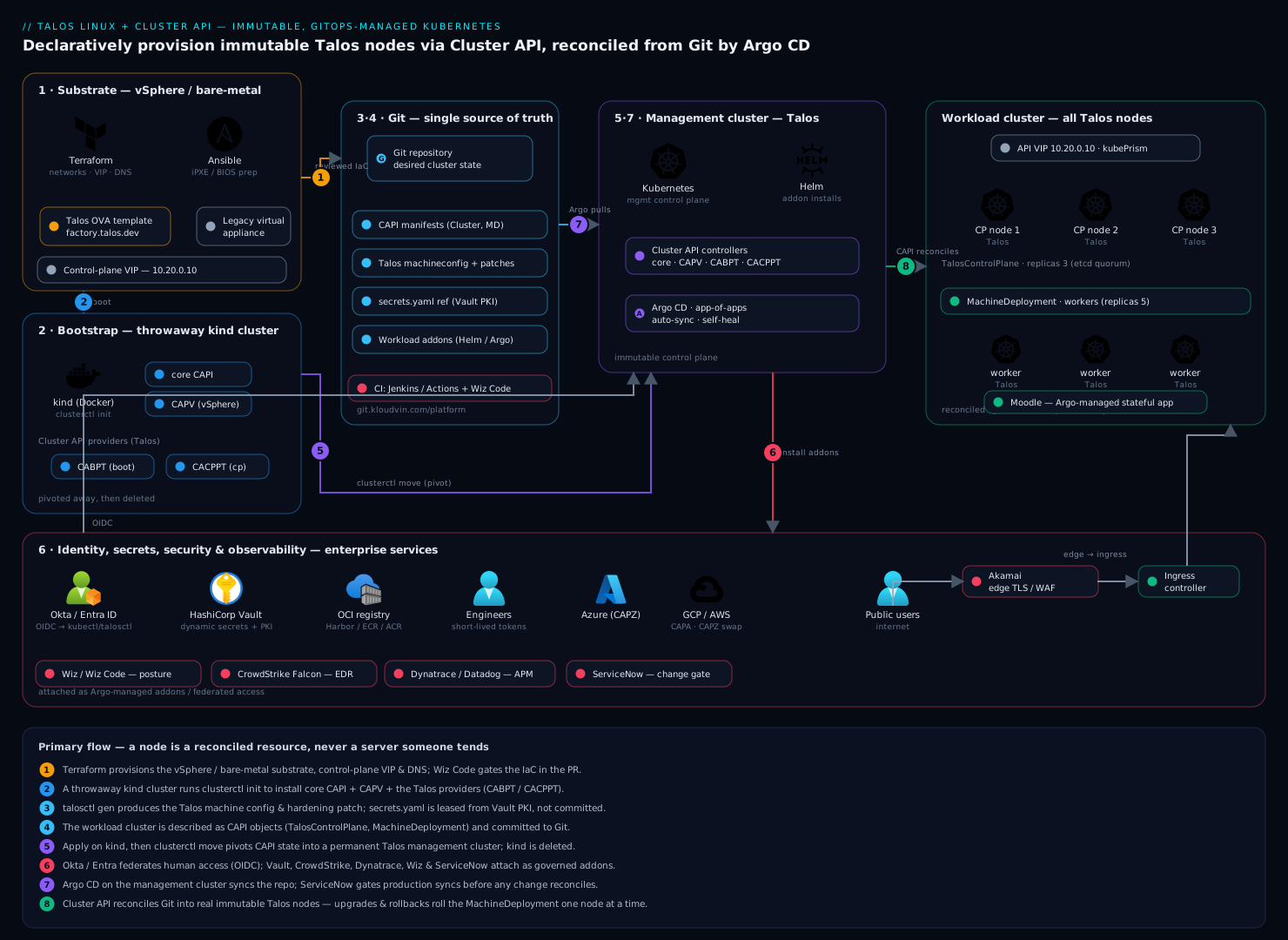
The build has two clusters and one Git repo. A small, long-lived management cluster runs the Cluster API controllers (core CAPI, the vSphere infra provider, and the Talos bootstrap + control-plane providers). It owns the lifecycle of one or more workload clusters, each made entirely of Talos Linux nodes — three control-plane machines behind a VIP and a MachineDeployment of worker machines. Everything that defines a cluster — the CAPI manifests, the Talos machine config patches, and the workload addons — lives in Git and is reconciled by Argo CD running on the management cluster. Around the edges sit the enterprise services: Okta/Entra ID federates human access to both talosctl and kubectl; HashiCorp Vault issues the secrets and PKI; Wiz/Wiz Code scans posture and IaC; CrowdStrike Falcon watches runtime; Dynatrace/Datadog observes; ServiceNow gates changes; Jenkins/GitHub Actions runs CI; Terraform/Ansible provisions the substrate; and Akamai fronts public ingress. The defining property is immutability: a node is never modified in place — to change it, you change its config in Git and CAPI rolls a replacement.
Talos Linux: an OS that is only an API
Before the hands-on build, it is worth slowing down on what Talos actually is, because everything that follows only makes sense once the “sealed appliance” model clicks.
A conventional node runs a general-purpose distro (Ubuntu, RHEL) with hundreds of packages, a shell, an SSH daemon, systemd, and a writable root filesystem. Every one of those is a knob a human — or an attacker — can turn. Talos removes all of them. What remains is a tiny (~80 MB) image containing the Linux kernel, a single init process (machined) written in Go, the container runtime, the Kubernetes components, and a handful of Talos services. There is no /bin/bash, no apt, no sshd, and the root filesystem is mounted read-only and verified. You cannot install a package or edit a file on a running node because there is no mechanism to do so.
So how do you operate it? Through one door: the Talos API, a gRPC endpoint served by the apid service on port 50000, secured with mutual TLS. The talosctl CLI is a client for that API. Everything you would normally SSH in to do becomes an API call:
talosctl --nodes 10.20.0.11 dmesg        # kernel logs — an API call, not a login
talosctl --nodes 10.20.0.11 services     # list Talos/K8s services + health
talosctl --nodes 10.20.0.11 get disks    # inspect hardware
talosctl --nodes 10.20.0.11 logs kubelet # stream a component's logs
talosctl --nodes 10.20.0.11 reboot       # lifecycle actions are API calls too
Your credentials live in a talosconfig file — a client certificate, the cluster CA, and the endpoint — exactly like a kubeconfig. Lose the cert and you lose access; there is no “root password” fallback, by design.
The one and only source of truth for a node is its machine config: a single declarative YAML document with two halves. The machine: half describes the node (which disk to install to, kubelet args, network, sysctls, features), and the cluster: half describes the Kubernetes cluster the node belongs to (control-plane endpoint, pod/service subnets, API server flags). A trimmed control-plane config looks like this:
version: v1alpha1
machine:
  type: controlplane           # or "worker"
  install:
    disk: /dev/sda
    image: ghcr.io/siderolabs/installer:v1.9.2
    wipe: true                 # every boot starts from a clean image
  kubelet:
    extraArgs:
      rotate-server-certificates: "true"
  network:
    hostname: cp-1
  features:
    rbac: true
    kubePrism:
      enabled: true            # in-cluster API load balancer on localhost:7445
cluster:
  controlPlane:
    endpoint: https://10.20.0.10:6443
  network:
    podSubnets: ["10.244.0.0/16"]
    serviceSubnets: ["10.96.0.0/12"]
To change a node you change this document and push it — never a live file. Standalone, that is talosctl apply-config; under Cluster API (the way this lesson does it) you never even run that by hand, because CAPI owns the config and rolls a fresh node whenever it changes. Two Talos features referenced above are worth naming now and will return in “Going deeper”: KubePrism is a tiny in-cluster load balancer that gives every node a stable local endpoint (localhost:7445) for the API server so a single control-plane node dying does not stall the kubelet; KubeSpan (not shown) is an optional WireGuard mesh that encrypts node-to-node traffic across networks. Both are turned on by a line in the machine config — configuration, not a package install.
Cluster API: Kubernetes managing Kubernetes
Talos gives you an immutable node. Cluster API gives you a declarative fleet of them. The trick that makes CAPI click is that it reuses the machinery you already trust — the Kubernetes API server, CRDs, and controllers — to manage clusters themselves.
There are always two kinds of cluster in a CAPI setup, and confusing them is the single most common beginner stumble:
- The management cluster is a small, long-lived Kubernetes cluster whose only job is to run the CAPI controllers and hold the CAPI custom resources. It does not run your applications.
- The workload clusters are the real clusters your apps run on. They exist as a set of custom resources inside the management cluster, and the controllers turn those resources into actual machines.
When you kubectl apply a cluster definition, you apply it to the management cluster. You then fetch a separate kubeconfig to talk to the workload cluster you just created. Two clusters, two kubeconfigs — keep them straight.
A workload cluster is described by a graph of custom resources, each owned by a specific provider:
| Resource | Kind | What it declares | Provider type |
|---|---|---|---|
| Cluster | Cluster |
The top-level object tying control plane + infrastructure together | core |
| Infra cluster | VSphereCluster / AWSCluster / … |
Cloud/DC-level networking (VPC, load balancers, VIP) | infrastructure |
| Control plane | TalosControlPlane / KubeadmControlPlane |
The control-plane machines + how they bootstrap | control-plane |
| Machine | Machine |
One node — the atomic unit CAPI reconciles | core |
| MachineSet | MachineSet |
Keeps N identical Machines alive (like a ReplicaSet) |
core |
| MachineDeployment | MachineDeployment |
Rolling updates over MachineSets (like a Deployment) |
core |
| Bootstrap config | TalosConfigTemplate |
How each machine turns into a Kubernetes node (the Talos config) | bootstrap |
| Infra machine | VSphereMachineTemplate |
The hardware shape of each node (CPU/RAM/disk/template) | infrastructure |
Notice the deliberate echo of core Kubernetes: MachineDeployment → MachineSet → Machine mirrors Deployment → ReplicaSet → Pod. If you understand how a Deployment rolls Pods, you already understand how a MachineDeployment rolls nodes.
Four provider types collaborate, and you install one of each:
- Core (
cluster-api): the genericCluster/Machine/MachineDeploymentcontrollers. - Bootstrap (Talos = CABPT, or kubeadm = CABPK): turns a blank machine into a joined Kubernetes node by generating its bootstrap data — for us, the Talos machine config.
- Control-plane (Talos = CACPPT, or kubeadm = KCP): manages the special lifecycle of control-plane nodes (etcd membership, quorum, rolling the control plane safely).
- Infrastructure (vSphere = CAPV, AWS = CAPA, Azure = CAPZ, GCP = CAPG, bare-metal = Metal3): actually creates the VM or server the node runs on.
The reconcile loop ties it together and is worth internalizing because it is why “delete a node” is a safe, routine act. Each Machine walks a lifecycle: Pending → Provisioning → Provisioned → Running. The bootstrap provider produces the config; the infrastructure provider creates the VM and injects that config as user data; the machine boots Talos, bootstraps or joins the cluster, and registers as a Kubernetes Node; CAPI links them by writing the node’s name into the Machine’s status.nodeRef. From then on the controller continuously compares desired state (the manifests in Git) to observed state (the real machines) and acts on any gap — a deleted Machine is simply a gap it fills by provisioning a replacement. This is the same controller/reconcile pattern behind every Kubernetes controller; if that idea is fuzzy, the controller-pattern lesson is the foundation this is built on.
1. Provision the substrate with Terraform
Talos nodes need somewhere to boot. Use Terraform to stand up the management cluster’s host (or kind on a builder), the workload-cluster networks, the control-plane VIP reservation, and DNS — keeping the substrate itself declarative and reviewable. Wiz Code scans this IaC in the pull request for misconfigurations (open security groups, public buckets) before it ever applies.
# infra/vsphere.tf — network + VIP reservation for the workload cluster
resource "vsphere_virtual_machine" "talos_template" {
  name             = "talos-v1.9.2-template"
  resource_pool_id = data.vsphere_resource_pool.pool.id
  datastore_id     = data.vsphere_datastore.ds.id
  num_cpus         = 4
  memory           = 8192
  guest_id         = "other5xLinux64Guest"
  # OVA built from the official Talos vSphere image (factory.talos.dev)
  ovf_deploy { remote_ovf_url = var.talos_ova_url }
}

output "control_plane_vip" { value = "10.20.0.10" }
cd infra
terraform init
terraform plan -out tf.plan      # Wiz Code gate runs here in CI
terraform apply tf.plan
For substrate that Terraform does not cover well (BIOS/iPXE config on physical hosts, switch ports), Ansible playbooks handle the one-time hardware prep. Note what Ansible does not do here: it never touches a running Talos node — Talos has no SSH for it to reach. Ansible’s job ends at “the machine can iPXE-boot the Talos installer.”
2. Bring up a kind bootstrap cluster and install Cluster API
Cluster API controllers have to run somewhere before your real management cluster exists. Stand up a throwaway kind cluster, then use clusterctl to install core CAPI plus the vSphere and Talos providers into it. The init call is where you wire the three Talos-specific providers.
kind create cluster --name capi-bootstrap

# Tell clusterctl about the Talos providers (community provider list).
export INFRASTRUCTURE_VSPHERE_VERSION=v1.11.0
clusterctl init \
  --infrastructure vsphere \
  --bootstrap talos \
  --control-plane talos
Confirm every controller is Running before going further:
kubectl get pods -A | grep -E 'capi|capv|cabpt|cacppt'
# capi-system                 capi-controller-manager-...            1/1 Running
# capv-system                 capv-controller-manager-...            1/1 Running
# cabpt-system                cabpt-controller-manager-...           1/1 Running   (Talos bootstrap)
# cacppt-system               cacppt-controller-manager-...          1/1 Running   (Talos control plane)
3. Generate the Talos machine configuration
Talos is configured by a declarative machine config. Generate a base config for the workload cluster, pinned to the control-plane VIP and a specific Kubernetes version. Treat secrets.yaml as Vault-grade material (see Security): it holds the cluster CA and bootstrap tokens.
talosctl gen secrets -o secrets.yaml          # cluster PKI/bootstrap secrets

talosctl gen config fintech-prod https://10.20.0.10:6443 \
  --with-secrets secrets.yaml \
  --kubernetes-version 1.30.4 \
  --install-disk /dev/sda \
  --config-patch @patches/hardening.yaml
The hardening.yaml patch is where the audit findings get answered declaratively — it locks down the kubelet, forces the immutable rootfs, and enables KubeSpan/audit logging. Because it is a file in Git, the control proves itself:
# patches/hardening.yaml — applied to every node, no exceptions
machine:
  kubelet:
    extraArgs:
      rotate-server-certificates: "true"
  features:
    rbac: true
    kubePrism:
      enabled: true                 # in-cluster API load balancing
  install:
    wipe: true                      # immutable: every boot is from a clean image
cluster:
  apiServer:
    auditPolicy:
      apiVersion: audit.k8s.io/v1
      kind: Policy
      rules: [{ level: RequestResponse }]
4. Define the Cluster API resources for a Talos cluster
Now describe the workload cluster as CAPI objects. The key wiring: the TalosControlPlane and TalosConfigTemplate reference the machine config from step 3, and the vSphere VSphereMachineTemplate says what hardware each node gets. This single manifest is the desired state CAPI reconciles.
apiVersion: controlplane.cluster.x-k8s.io/v1alpha3
kind: TalosControlPlane
metadata:
  name: fintech-prod-cp
spec:
  replicas: 3
  version: v1.30.4
  controlPlaneConfig:
    controlplane:
      generateType: controlplane    # uses Talos controlplane machine config
  infrastructureTemplate:
    kind: VSphereMachineTemplate
    name: fintech-prod-cp-vsphere
---
apiVersion: cluster.x-k8s.io/v1beta1
kind: MachineDeployment
metadata:
  name: fintech-prod-md-0
spec:
  clusterName: fintech-prod
  replicas: 5
  template:
    spec:
      version: v1.30.4
      bootstrap:
        configRef:
          apiVersion: bootstrap.cluster.x-k8s.io/v1alpha3
          kind: TalosConfigTemplate
          name: fintech-prod-workers
      infrastructureRef:
        kind: VSphereMachineTemplate
        name: fintech-prod-worker-vsphere
Commit this to Git rather than applying it by hand — step 7 is where Argo CD makes it real.
5. Apply, then pivot the management plane into Talos
Apply the cluster manifest to the bootstrap kind cluster and watch CAPI create real Talos machines. Once nodes register, pivot: move the CAPI controllers from the throwaway kind cluster into a permanent Talos-based management cluster, so even your control plane runs on immutable infrastructure.
kubectl apply -f clusters/fintech-prod/      # bootstrap cluster reconciles it
clusterctl describe cluster fintech-prod     # watch Machines go Provisioning -> Running

# Fetch the new cluster's admin kubeconfig + talosconfig
clusterctl get kubeconfig fintech-prod > fintech-prod.kubeconfig
talosctl kubeconfig --nodes 10.20.0.11 ./   # any control-plane node IP

# Pivot CAPI state from kind into the real management cluster, then delete kind
clusterctl move --to-kubeconfig=mgmt.kubeconfig
kind delete cluster --name capi-bootstrap
Bootstrap the very first control-plane node so etcd forms (Talos waits for an explicit bootstrap, by design):
talosctl bootstrap --nodes 10.20.0.11 --talosconfig ./talosconfig
6. Wire identity for humans: Okta/Entra to talosctl and kubectl
Neither talosctl nor kubectl should use long-lived static credentials for people. Federate both to your IdP. Okta (or Microsoft Entra ID) is the workforce identity provider; engineers authenticate once and receive a short-lived OIDC token, so there are no shared admin certs to leak and access is revoked centrally when someone leaves.
# kube-apiserver OIDC, set via the Talos cluster machine config patch
cluster:
  apiServer:
    extraArgs:
      oidc-issuer-url: "https://kloudvin.okta.com/oauth2/default"
      oidc-client-id: "0oaXXXXkube"
      oidc-username-claim: "email"
      oidc-groups-claim: "groups"
# Engineers log in through the IdP; the plugin handles the token exchange.
kubectl oidc-login setup \
  --oidc-issuer-url=https://kloudvin.okta.com/oauth2/default \
  --oidc-client-id=0oaXXXXkube
RBAC then binds Okta/Entra group claims (not individuals) to roles, so platform engineers get talosctl machine-config rights and app teams get namespaced kubectl access only. talosctl access itself is mutual-TLS; issue those client certs from Vault (next step) rather than the static talosconfig.
7. GitOps the whole thing with Argo CD
Install Argo CD on the management cluster and point it at the Git repo holding both the CAPI manifests and the workload addons. This closes the loop: a node’s existence, version, and config are now reconciled from Git, and a human SSH’ing to “fix” something is not just discouraged — it is impossible on Talos, so Git is the only path. Jenkins or GitHub Actions runs CI on that repo (lint, kubeconform, policy checks, Wiz Code scan) before changes merge.
kubectl create namespace argocd
helm install argocd argo/argo-cd -n argocd --set configs.params."server\.insecure"=false

# App-of-apps: one Argo Application that owns the cluster + its addons
argocd app create fintech-prod-cluster \
  --repo https://git.kloudvin.com/platform/clusters.git \
  --path clusters/fintech-prod \
  --dest-server https://kubernetes.default.svc \
  --sync-policy automated --self-heal --auto-prune
A node upgrade is now a pull request that bumps version: v1.30.4 to v1.31.x; on merge, Argo syncs the manifest, CAPI rolls the MachineDeployment one node at a time, and each new node boots a fresh immutable image. ServiceNow sits in front of production syncs as the change gate — the Argo sync for the prod cluster requires an approved change record, so security and ops have a documented, auditable approval, not just a Git push. For the pattern of one Argo Application owning many child apps and clusters, see Argo CD app-of-apps for multi-cluster GitOps.
8. Layer secrets, security, and observability onto the cluster
With clusters reconciling from Git, install the enterprise agents as Argo-managed addons. Each tool has one concrete job here:
# HashiCorp Vault: dynamic secrets + the PKI that issues talosctl/kubelet certs
helm install vault hashicorp/vault -n vault \
  --set "injector.enabled=true" \
  --set "server.ha.enabled=true"
# Workloads get short-lived secrets via the Vault Agent sidecar; talosctl client
# certs are issued from a Vault PKI role, so no static admin cert is ever stored.

# CrowdStrike Falcon: runtime threat detection on every node + container
helm install falcon-sensor crowdstrike/falcon-sensor -n falcon-system \
  --set falcon.cid=$FALCON_CID
# Falcon runs as a DaemonSet; on an SSH-less OS, runtime EDR is how you'd
# even notice an in-container compromise. Detections feed the SOC.

# Dynatrace (or Datadog): full-stack observability + tracing
helm install dynatrace-operator dynatrace/dynatrace-operator -n dynatrace \
  --set apiUrl=$DT_API_URL
# OneAgent collects node/pod/trace telemetry; Davis flags anomalies. Swap for
# the Datadog Agent + cluster-agent if that's the house standard.
Posture is continuous, not a point check: Wiz scans the live cluster and cloud account for misconfigurations and attack paths, while Wiz Code has already gated the Terraform and Kubernetes manifests in CI — together they assert that the immutability and least-privilege controls actually hold in production, not just on paper. For public-facing workloads, Akamai terminates TLS and provides WAF/anycast at the edge in front of the cluster’s ingress, so raw node IPs are never exposed. If you run an internal Moodle for the platform team’s runbooks and Talos/CAPI training, deploy it as just another Argo-managed app on a worker MachineDeployment — proof that the same immutable substrate carries ordinary stateful apps. Legacy virtual appliances that cannot be containerized (a hardware-tied load balancer, an old IDS) stay on the vSphere substrate beside the cluster and are wired in at the network layer, since you cannot install them onto a closed Talos node.
Validation
Prove the cluster is healthy, immutable, and actually un-loggable-into.
# 1. All CAPI machines reconciled and Running
clusterctl describe cluster fintech-prod
kubectl get machines -o wide        # every Machine should be Running

# 2. Kubernetes nodes Ready, all on Talos
kubectl --kubeconfig fintech-prod.kubeconfig get nodes -o wide
# OS-IMAGE column reads "Talos (v1.9.2)" on every node

# 3. Talos health (etcd quorum, services, control-plane)
talosctl --nodes 10.20.0.11,10.20.0.12,10.20.0.13 health

# 4. Prove immutability: there is no shell to exec into
talosctl --nodes 10.20.0.11 list /bin    # minimal; no bash, no apt, no ssh
ssh 10.20.0.11                           # connection refused — by design

# 5. Argo CD reports the cluster app Synced/Healthy
argocd app get fintech-prod-cluster
A green run here is the audit answer: nodes are Talos, reconciled by CAPI from Git, with no interactive access path.
Rollback and teardown
Because every node is disposable and the state lives in Git and CAPI, rollback is a controlled operation, not a rescue mission.
# Roll back a bad node upgrade: revert the version bump in Git; Argo + CAPI
# replace the rolled nodes with the previous immutable image automatically.
git revert <bad-commit> && git push    # Argo auto-syncs; MachineDeployment rolls back

# Drain and replace a single suspect node (CAPI provisions a fresh one)
kubectl delete machine fintech-prod-md-0-abc12   # controller creates a replacement

# Full teardown of a workload cluster (from the management cluster)
kubectl delete cluster fintech-prod    # CAPI deprovisions all machines + infra

# Tear down the management plane last
clusterctl delete --all
terraform -chdir=infra destroy
Never “fix” a node by reverting it in place — there is nothing to revert into. The correct rollback is always “replace with the known-good image,” which is exactly what git revert + CAPI does.
Common pitfalls
- Bootstrapping etcd too early or twice.
talosctl bootstrapmust run on exactly one control-plane node, once. Running it on multiple nodes splits etcd. Wait for the first node to be reachable, bootstrap it alone, then let the rest join. - Forgetting the install disk. If
--install-diskdoes not match the node’s actual disk (/dev/sdavs/dev/nvme0n1), nodes boot the installer forever. Confirm withtalosctl get disksagainst a node in maintenance mode. - Editing config by hand instead of via Git.
talosctl apply-configworks, but any out-of-band change is drift Argo/CAPI will eventually fight or overwrite. Make every change a commit. - Wrong provider versions. The Talos bootstrap/control-plane providers track specific CAPI contract versions. A
clusterctlcore upgrade without matching CABPT/CACPPT versions breaks reconciliation — pin all of them. - VIP not actually highly available. If the control-plane VIP is a single static IP with no failover, losing that node loses the API. Use Talos’s built-in VIP or an external LB; enable
kubePrismfor in-cluster API resilience. - Skipping
clusterctl movebefore deleting kind. Delete the bootstrap kind cluster before pivoting and you orphan the workload cluster’s CAPI state. Alwaysmovefirst.
Security notes
The whole point is reduced attack surface, so do not undo it. Talos has no SSH, no shell, and a read-only immutable rootfs — keep it that way; never enable a debug shell in production. Human access to talosctl and kubectl federates through Okta/Entra ID with short-lived OIDC tokens and group-based RBAC, so there are no shared admin certs. The Talos secrets.yaml (cluster CA, bootstrap tokens) and all talosctl client certs are issued and leased from HashiCorp Vault PKI rather than committed anywhere. CrowdStrike Falcon provides the runtime EDR that an SSH-less host still needs at the container layer, feeding detections to the SOC. Wiz continuously verifies posture on the live cluster while Wiz Code gates the Terraform and manifests in CI, so the immutability and least-privilege guarantees are independently checked. Enable the Kubernetes audit policy (step 3) and ship those logs to Dynatrace/Datadog. Production changes pass a ServiceNow change gate before Argo syncs them.
Cost notes
Immutable infrastructure is a cost lever, not just a security one. Talos is free and open source with a tiny footprint (~80 MB), so it runs the same node on smaller VMs than a full Ubuntu image and packs more pods per host. Cluster API standardizes node images, which kills the snowflake-driven over-provisioning where each team sized hosts defensively. Rebuild-don’t-patch means no maintenance windows and no patch labor — upgrades are a PR, not a night of SSH. Right-size with MachineDeployment replicas tied to real utilization and let the cluster autoscaler adjust workers. Watch the spend on the surrounding commercial tools — CrowdStrike, Dynatrace/Datadog, Wiz, and Vault Enterprise are typically priced per node/host/workload, so a fleet that scales horizontally scales those bills too; meter them per cluster in your observability tool and charge back to the teams that drive the node count.
Going deeper
Everything above stands up a Talos + CAPI fleet. This section is for when you own that fleet and have to reason about upgrades, failure, hardening, and how the pieces behave at scale.
Talos upgrades, rollback, and the A/B boot model
Talos separates two upgrades that a mutable OS blurs together: upgrading Talos itself (the OS) and upgrading Kubernetes (kubelet, API server, etc.). Standalone, they are two commands:
# Upgrade the Talos OS on a node — pulls a new installer image and reboots
talosctl upgrade --nodes 10.20.0.21 \
  --image ghcr.io/siderolabs/installer:v1.9.3

# Upgrade Kubernetes across the control plane (separate from the OS)
talosctl upgrade-k8s --to 1.31.0
The reason an OS upgrade is safe is Talos’s A/B-style boot: it writes the new system to the inactive boot partition and reboots into it, keeping the previous one intact. If the new version fails to come up healthy, Talos can fall back, and you can force it:
talosctl rollback --nodes 10.20.0.21 # boot the previous, known-good version
Under Cluster API you rarely run these by hand, and that is the point. Bumping version: on the TalosControlPlane or MachineDeployment (or spec.topology.version if you use ClusterClass) triggers a rolling replacement: CAPI stands up a new machine on the new version, waits for it to join and go Ready, cordons and drains the old one, deletes it, and repeats. The old node is never upgraded in place — it is retired and replaced. So Talos gives you two rollback paths that compose: the in-node A/B fallback for a single misbehaving upgrade, and the CAPI/Git revert that rolls the whole fleet back to the previous image. Prefer the Git revert for anything fleet-wide; it is auditable and leaves no snowflake behind.
The API-only surface and KSPP hardening
The security story is not just “no SSH” — it is defense in depth around a deliberately tiny surface:
- One authenticated API. The only network entry point for management is
apidon50000, mutual-TLS only.talosctlpresents a client cert from thetalosconfig; there is no password auth and no anonymous access. Scope client certs by role (an operator cert that canrebootandapply-configvs a read-only cert that can onlyget/logs). - Read-only, verified rootfs. The root filesystem is mounted read-only; the writable
EPHEMERALpartition holds only container and Kubernetes state, whichinstall.wipe: trueclears on every (re)install. There is nowhere for a persistent implant to live on the OS itself. - KSPP defaults. Talos ships kernel settings aligned with the Kernel Self-Protection Project (KSPP) — hardened sysctls, restricted kernel pointers, disabled legacy attack surface — on by default rather than as a checklist you apply later. It also supports SecureBoot and TPM-backed disk encryption so the boot chain and the ephemeral disk are attested and sealed to the hardware.
- No package manager, no drift. Because you cannot
apt install, the classic “someone added a debugging tool that became a backdoor” path does not exist. Extensions (GPU drivers, storage agents) are baked into the image at build time via the Image Factory, so even additions are immutable and reviewable.
The trade-off is real and worth stating: when something goes wrong you cannot “just SSH in and poke around.” Your debugging is talosctl logs, talosctl dmesg, talosctl get, and — in a true emergency — booting the node into maintenance mode. Teams used to interactive shells feel this the most; the fix is to lean on the API and on cluster-level observability (Falcon, Dynatrace) rather than node logins.
Cluster API providers: one of each, matched versions
CAPI’s power is that the same core objects work across wildly different infrastructure by swapping the infrastructure provider, while the bootstrap and control-plane providers decide how a machine becomes a node:
| Infrastructure provider | Short name | Provisions on |
|---|---|---|
| Cluster API Provider AWS | CAPA | EC2 / EKS |
| Cluster API Provider Azure | CAPZ | Azure VMs / AKS |
| Cluster API Provider GCP | CAPG | GCE / GKE |
| Cluster API Provider vSphere | CAPV | vSphere VMs |
| Metal3 | CAPM3 | Bare metal (Ironic) |
| Bootstrap / control-plane | Short name | Turns a machine into a node using |
|---|---|---|
| Talos bootstrap | CABPT | A Talos machine config |
| Talos control-plane | CACPPT | Talos control-plane lifecycle (etcd) |
| kubeadm bootstrap | CABPK | cloud-init + kubeadm join |
| kubeadm control-plane | KCP | kubeadm init + control-plane rollout |
You mix and match: Talos-on-AWS is CAPA + CABPT + CACPPT; Talos-on-vSphere (this lesson) is CAPV + CABPT + CACPPT. The critical operational rule is version alignment. Every provider implements a versioned CAPI contract; a core clusterctl upgrade that outruns the Talos providers’ supported contract breaks reconciliation silently. Upgrade with clusterctl upgrade plan / clusterctl upgrade apply, which shows the compatible version set, and pin all four providers together in your GitOps repo.
MachineHealthCheck and self-healing
The reconcile loop replaces a machine you delete, but a node that goes NotReady and just sits there is not deleted by anyone — until you add a MachineHealthCheck (MHC). An MHC watches the nodes behind a selector and, when one trips an unhealthy condition for longer than a timeout, deletes its Machine so the controller provisions a fresh replacement. That is self-healing: a wedged node is automatically retired and rebuilt.
apiVersion: cluster.x-k8s.io/v1beta1
kind: MachineHealthCheck
metadata:
  name: fintech-prod-workers-unhealthy
  namespace: default
spec:
  clusterName: fintech-prod
  selector:
    matchLabels:
      cluster.x-k8s.io/deployment-name: fintech-prod-md-0
  nodeStartupTimeout: 10m
  maxUnhealthy: 40%             # safety valve: don't mass-delete a whole MD
  unhealthyConditions:
    - type: Ready
      status: "False"
      timeout: 300s
    - type: Ready
      status: Unknown
      timeout: 300s
maxUnhealthy (or unhealthyRange) is the guardrail that keeps a network blip from deleting the entire deployment: if more than the threshold are unhealthy at once, CAPI assumes a systemic problem and remediates nothing, so a bad NIC on the top-of-rack switch does not become a fleet-wide reprovision storm. Pair MHCs with a MachineDeployment rollingUpdate strategy (maxUnavailable: 0, maxSurge: 1) so replacements are additive and capacity never dips during self-healing.
Immutable infrastructure vs kubeadm’s mutable nodes
It is worth making the contrast with the traditional path explicit, because it explains why the day-2 story is so different. The classic build is an HA cluster provisioned with kubeadm on general-purpose Linux:
| Concern | kubeadm on Ubuntu/RHEL (mutable) | Talos + CAPI (immutable) |
|---|---|---|
| Node access | SSH + shell + sudo | API only; no SSH, no shell |
| Config change | Edit files / run Ansible on the live node | Change YAML, roll a new node |
| OS patching | apt upgrade in a maintenance window |
New installer image; roll-replace |
| Drift | Accumulates; every node diverges | Impossible; every boot is identical |
| Kubernetes upgrade | kubeadm upgrade apply in place |
upgrade-k8s or a CAPI version bump |
| Rollback | Re-image or restore, often manual | git revert → CAPI rolls back |
| Attack surface | Full distro: shell, packages, sshd | ~80 MB, read-only, one mTLS API |
| Fleet management | Per-node tooling and runbooks | Declarative CRDs in one place |
Neither is universally “better” — kubeadm on a mutable distro is more familiar, easier to debug interactively, and sometimes required by an agent that expects a full OS. But for a regulated, audited, drift-averse fleet, immutability turns a whole class of problems (drift, snowflakes, unpatched CVEs, “who logged in?”) into non-problems by construction.
GitOps for whole clusters: ClusterClass and managed topologies
App-level GitOps reconciles Deployments from Git; cluster-level GitOps reconciles clusters from Git — and the feature that makes fleets manageable is ClusterClass. A ClusterClass is a reusable, versioned template for a whole cluster (its control plane, its worker classes, its infra and bootstrap templates). Individual clusters then shrink to a tiny Cluster object that references the class and fills in a few variables:
apiVersion: cluster.x-k8s.io/v1beta1
kind: Cluster
metadata:
  name: fintech-prod
spec:
  topology:
    class: talos-vsphere-prod     # a reusable ClusterClass
    version: v1.31.0              # bump this to upgrade the WHOLE cluster
    controlPlane:
      replicas: 3
    workers:
      machineDeployments:
        - class: talos-worker
          name: md-0
          replicas: 5
Now a fleet of twenty clusters is twenty small Cluster files sharing one class. Upgrading Kubernetes across the fleet is bumping version: in each (or templating it), reviewed as a pull request, and rolled by CAPI. Combined with Argo CD’s app-of-apps, the management cluster becomes a control plane for a fleet: the app-of-apps multi-cluster pattern is exactly how you fan one Git repo out to many clusters. This is the endgame — clusters described, versioned, reviewed, and healed like any other Kubernetes resource.
The day-2 story
Day 1 is standing the cluster up; day 2 is the years after, and it is where immutable + declarative pays back. Upgrades are pull requests that roll the fleet node-by-node with automatic drain. Self-healing is MachineHealthCheck retiring wedged nodes without a pager. Scaling is a replicas: bump (or the cluster autoscaler driving it from real load). Because the management cluster holds all the CAPI state, protect it like the crown jewels: back up its etcd on a schedule, and remember that losing it does not kill running workload clusters but does stop you from managing them until you restore. Observability spans both layers — CAPI conditions and Machine phases on the management side, node/pod telemetry on the workload side — so an operator can see a rollout progress and a self-heal fire in the same pane of glass.
Common beginner mistakes
These are misconceptions rather than symptoms — the mental model is wrong, so the fix is to re-frame, not just to patch a flag.
- “I’ll just SSH into the node to check something.” There is no SSH daemon and no shell to land in, on purpose. Trying to
ssha Talos node gets connection-refused, and that is the feature working, not a bug. Right model: every “log in and look” instinct maps to an API call —talosctl logs,talosctl dmesg,talosctl get,talosctl services. If you find yourself wishing for a shell, you are looking for atalosctlsubcommand. - “I’ll fix this one node by editing it, just this once.” On a mutable distro you might hand-patch a node and move on; here there is nothing to hand-edit, and even the imperative
talosctl apply-configcreates drift that Argo/CAPI will later fight or overwrite. Right model: the node’s truth is its machine config in Git — change the config, let CAPI roll a replacement. “Fix in place” is replaced by “roll forward.” - “The management cluster and the workload cluster are the same thing.” They are not: you
kubectl applycluster definitions to the management cluster, then use a different kubeconfig to talk to the workload cluster those definitions produced. Runningkubectl get machinesagainst the workload cluster returns nothing because theMachineobjects live in the management cluster. Right model: management cluster = where CAPI and the CRDs live; workload cluster = the real nodes; two clusters, two kubeconfigs. - “I upgraded core CAPI, so everything is upgraded.” The Talos bootstrap/control-plane providers track a specific CAPI contract version; bumping core
clusterctlpast what CABPT/CACPPT support breaks reconciliation quietly — machines stop being managed with no loud error. Right model: all four providers (core, infra, bootstrap, control-plane) are a matched set; upgrade them together withclusterctl upgrade applyand pin them in Git. - “Deleting a
Machineis dangerous — it’ll take a node down for good.” Under CAPI, deleting aMachineis a routine, self-correcting act: the controller drains it and provisions a replacement to satisfy theMachineDeployment’s replica count. Right model: machines are cattle. Deleting one is how you replace a suspect node, not how you lose capacity. - “Talos upgrades and Kubernetes upgrades are one operation.” They are two independent axes —
talosctl upgrade(the OS) andtalosctl upgrade-k8s(Kubernetes), or two differentversionfields under CAPI. Right model: you can move the OS and Kubernetes versions on separate cadences, and CAPI treats each as its own rolling change.
Practice challenges
Work these in order — each builds on the last. Try before opening the solution. (Where you have no cluster, reason through the exact command/manifest and the expected result; outputs shown are representative.)
Challenge 1 (beginner) — Prove there is no shell. You have a Talos node at 10.20.0.21. Show two ways to demonstrate it cannot be logged into interactively.
<details> <summary>Solution</summary>
ssh 10.20.0.21                       # ssh: connect to host 10.20.0.21 port 22: Connection refused
talosctl --nodes 10.20.0.21 list /bin
# a short, minimal listing — no bash, no sh, no apt, no sshd
Why: Talos ships no sshd (nothing listens on 22) and no general-purpose userland in /bin, so both the network path and the on-disk binaries that a shell would need simply do not exist. The only management path is the mTLS API on port 50000.
</details>
Challenge 2 (beginner) — Read a node’s live machine config through the API. Without any shell, retrieve the machine configuration Talos is currently running on that node.
<details> <summary>Solution</summary>
talosctl --nodes 10.20.0.21 get machineconfig -o yaml
# or the full runtime config document:
talosctl --nodes 10.20.0.21 read /system/state/config.yaml
Why: the machine config is exposed as a Talos resource over the API, so you inspect it exactly like any other node fact (get disks, get members) — no file access and no login required.
</details>
Challenge 3 (intermediate) — Change a kernel setting the immutable way. Raise vm.max_map_count to 262144 and max-pods to 150 on the workers, without touching a running node by hand.
<details> <summary>Solution</summary>
Add a patch to the worker config in Git (never ssh, never a live edit):
# patches/worker-tuning.yaml
machine:
  sysctls:
    vm.max_map_count: "262144"
  kubelet:
    extraArgs:
      max-pods: "150"
Wire it into the config generation / TalosConfigTemplate, commit, and let Argo + CAPI roll new workers carrying the setting. Why: the setting lives in the desired-state config, so every node — current and future — gets it identically by being re-provisioned, not mutated. A hand-applied sysctl on one node would be exactly the drift immutability exists to prevent.
</details>
Challenge 4 (intermediate) — Scale and roll a MachineDeployment. Grow fintech-prod-md-0 from 5 to 8 workers, and set a rollout strategy that never drops capacity during an upgrade.
<details> <summary>Solution</summary>
apiVersion: cluster.x-k8s.io/v1beta1
kind: MachineDeployment
metadata:
  name: fintech-prod-md-0
spec:
  clusterName: fintech-prod
  replicas: 8
  strategy:
    type: RollingUpdate
    rollingUpdate:
      maxSurge: 1
      maxUnavailable: 0     # add the new node before removing the old
Apply to the management cluster (or commit for Argo). Watch: kubectl get machines -w — three new Machines go Provisioning → Running. Why: MachineDeployment is the node-level analogue of a Deployment; maxUnavailable: 0 with maxSurge: 1 means every roll is additive-first, so worker capacity never dips below the desired 8.
</details>
Challenge 5 (advanced) — Add self-healing. Make CAPI automatically replace a worker that stays NotReady for 5 minutes, but refuse to act if more than 40% of the group is unhealthy at once.
<details> <summary>Solution</summary>
apiVersion: cluster.x-k8s.io/v1beta1
kind: MachineHealthCheck
metadata:
  name: fintech-prod-workers-unhealthy
  namespace: default
spec:
  clusterName: fintech-prod
  selector:
    matchLabels:
      cluster.x-k8s.io/deployment-name: fintech-prod-md-0
  nodeStartupTimeout: 10m
  maxUnhealthy: 40%
  unhealthyConditions:
    - type: Ready
      status: "False"
      timeout: 300s
    - type: Ready
      status: Unknown
      timeout: 300s
Why: the MHC deletes the Machine behind any node whose Ready condition is False/Unknown for 300s, and the controller provisions a fresh immutable replacement. maxUnhealthy: 40% is the safety valve that stops a switch/network incident from triggering a fleet-wide reprovision.
</details>
Challenge 6 (advanced) — Upgrade the fleet, and know the two rollback paths. Move the workload cluster from Kubernetes 1.30.4 to 1.31.0 declaratively, then name the fast rollback and the auditable rollback.
<details> <summary>Solution</summary>
Bump the version in Git — on the MachineDeployment/TalosControlPlane version: fields (or spec.topology.version if you use ClusterClass) — and merge; Argo syncs and CAPI rolls each node onto a fresh 1.31.0 image, drain-and-replace, one at a time:
spec:
  topology:
    version: v1.31.0
Rollback paths: (1) in-node A/B fallback — talosctl rollback --nodes <ip> boots a single node back to its previous, known-good version for a one-off bad upgrade; (2) fleet-wide Git revert — git revert <bump-commit> && git push, and CAPI rolls the whole cluster back to the previous image. Why: prefer the Git revert for anything fleet-wide because it is reviewed, auditable, and leaves no snowflake; keep the A/B rollback for rescuing an individual misbehaving node.
</details>
Glossary
- Talos Linux: a minimal, immutable, API-managed Linux OS built to do one thing — run Kubernetes. No SSH, no shell, no package manager; ~80 MB; read-only rootfs.
- Immutable infrastructure: the practice of never modifying a running server in place — to change it, you build a new one from an image and replace it. Eliminates configuration drift and snowflake nodes.
- Machine config: the single declarative YAML document that fully defines a Talos node, with a
machine:half (the node) and acluster:half (the Kubernetes cluster it joins). talosctl: the CLI client for the Talos API — the only way to operate a node (logs, health, config, reboot). Uses atalosconfig(client cert + CA + endpoint), like a kubeconfig.apid: the Talos API service, a mutual-TLS gRPC endpoint on port 50000; the single management entry point to a node.machined: Talos’s init process (PID 1), a Go program that supervises the node instead of systemd.- KubePrism: a Talos in-cluster load balancer that gives every node a stable local API-server endpoint (
localhost:7445), so a control-plane node failing does not stall kubelets. - KubeSpan: Talos’s optional WireGuard mesh that encrypts node-to-node traffic across networks/clouds.
- KSPP (Kernel Self-Protection Project): a set of upstream kernel-hardening recommendations Talos enables by default (hardened sysctls, restricted kernel exposure).
- Image Factory (factory.talos.dev): the service that builds custom Talos images with system extensions (drivers, agents) baked in — additions stay immutable and reviewable.
- Cluster API (CAPI): a Kubernetes project for declaratively managing clusters as Kubernetes resources — “Kubernetes managing Kubernetes.” Controllers reconcile CRDs into real clusters.
- Management cluster: the small, long-lived cluster that runs the CAPI controllers and holds the cluster CRDs; it does not run your apps.
- Workload cluster: a real cluster (your apps run here) that exists as a set of CRDs in the management cluster and is provisioned by the controllers.
clusterctl: the CAPI CLI — installs providers (init), pivots state between clusters (move), inspects clusters (describe), and upgrades providers (upgrade).- Pivot (
clusterctl move): relocating CAPI resources from one management cluster to another (e.g. throwaway kind → permanent Talos management cluster) without disturbing the workload clusters they manage. Cluster(CRD): the top-level CAPI object that ties a control plane to its infrastructure.Machine(CRD): one node — the atomic unit CAPI reconciles throughPending → Provisioning → Provisioned → Running.MachineSet(CRD): keeps N identicalMachines alive; the node-level analogue of aReplicaSet.MachineDeployment(CRD): manages rolling updates overMachineSets; the node-level analogue of aDeployment.MachineHealthCheck(MHC): watches node health and deletes unhealthyMachines so replacements are provisioned — CAPI’s self-healing, with amaxUnhealthyguard against mass remediation.nodeRef: the field on aMachinelinking it to the KubernetesNodeit became, written once the node registers.- Provider types: the four collaborating CAPI components — core, infrastructure (CAPV/CAPA/CAPZ/CAPG/Metal3), bootstrap (CABPT/CABPK), and control-plane (CACPPT/KCP).
- CABPT / CACPPT: the Talos bootstrap and control-plane providers for Talos — they turn CAPI machines into Talos-based Kubernetes nodes (
TalosConfigTemplate,TalosControlPlane). - CAPV / CAPA / CAPZ / CAPG: the vSphere / AWS / Azure / GCP infrastructure providers — each creates the actual VM or instance a node runs on.
- Provider contract: the versioned interface every provider implements; core CAPI and the providers must be on compatible contract versions or reconciliation breaks — pin them together.
ClusterClass: a reusable, versioned template for a whole cluster; individual clusters become tinyClusterobjects referencing it viaspec.topology.- Managed topology: the
spec.topologyblock on aClusterthat drives the whole cluster from aClusterClass— bumpingversion:there upgrades the entire cluster. - Reconcile loop: the controller pattern of continuously comparing desired state (manifests) to observed state (real machines) and acting on the difference; the reason a deleted
Machineis simply replaced. - VIP (Virtual IP): a floating IP for the control-plane API server that can move between nodes for high availability; Talos has a built-in VIP, or use an external LB.
- Bootstrap (etcd): the one-time
talosctl bootstrapon a single control-plane node that forms the etcd cluster; run it exactly once, on exactly one node.