A mid-sized online education company — call it the team that runs a national Moodle learning platform for a few hundred universities — has a problem that starts every September. Enrollment season triples their traffic in a week: students hammering the LMS for assignment uploads, video lectures, quiz submissions, and grade lookups, all at 9 a.m. when the first lectures begin. Their current setup is a fleet of hand-managed virtual machines running Moodle behind a load balancer, and every August the operations team spends two weeks cloning VMs, patching them by hand, and praying the database holds. Last year the grade-release day took the site down for forty minutes, and the support inbox still has the angry emails to prove it. The platform team has been told: containerize Moodle, run it on Kubernetes, make the autumn spike a non-event — and pick a managed Kubernetes service so we are not also running the control plane by hand.
That last clause is the whole point of this article. Kubernetes is the open-source system that schedules containers across a pool of machines, restarts them when they crash, and scales them up and down. Running it yourself means operating its control plane — the API server, scheduler, controller manager, and the etcd database that holds cluster state — which is exactly the kind of undifferentiated, pager-at-3 a.m. work this team is trying to escape. Managed Kubernetes means the cloud provider runs that control plane for you. The three you will actually choose between are Azure Kubernetes Service (AKS), Amazon Elastic Kubernetes Service (EKS), and Google Kubernetes Engine (GKE). They are far more alike than different — they all run upstream-conformant Kubernetes, so your kubectl commands and YAML manifests are portable — but the differences in how you operate them matter on exactly the days like grade-release morning.
In a nutshell
Think of managed Kubernetes like leasing a fully-staffed commercial kitchen. The building owner runs the part you never want to think about — the gas lines, the ventilation, the fire certification, the master control panel that keeps the whole place legal and running. That is the control plane: the API server, the etcd database, the scheduler. You walk in, bring your own cooks and ingredients (the worker nodes and your apps), and cook. AKS, EKS, and GKE are three landlords renting you three near-identical kitchens — the recipes (kubectl, your YAML) work the same in all three — but they price the building differently, wire the plumbing differently, staff the cleaning differently, and hand you different keys.
Put plainly: managed Kubernetes means the cloud runs and patches the control plane (api-server, etcd, scheduler) and gives it an availability SLA, while you bring, size, and pay for the worker nodes and run your apps on them. Because all three run standard, conformant Kubernetes, your manifests move between them essentially unchanged. They differ in four places you will actually feel: control-plane cost, networking (how a pod gets an IP address), node management (how much of the node lifecycle they automate for you), and identity + add-ons. The single best beginner heuristic for choosing: pick the one whose cloud your identity, network, and data already live in.
Level: Beginner (Junior) · Time: ~30 min · Cost: ₹0 to read and reason about — every command and manifest here is real and current, but you need no cluster to follow along; representative outputs are labelled as such.
What “managed” actually buys you
Before comparing the three, it helps to be precise about what the managed service takes off your plate, because beginners often assume “managed” means “fully hands-off.” It does not.
The provider runs and patches the control plane — you never SSH into the API server. They give you an SLA on the control plane’s availability. They handle the control-plane upgrades (you trigger them, but you do not run them). What you still own is everything on the worker nodes: the version they run, when they get patched, what size they are, and the workloads on top. Think of it as a split: the provider keeps the brain healthy, you keep the muscle sized and fed.
For the Moodle team, this split is the difference between “we operate Kubernetes” and “we operate our application on Kubernetes.” That second framing is the one that lets a four-person platform team support hundreds of universities.
The clean way to hold this in your head is a shared-responsibility line — the same idea cloud security teams use for everything else. Draw a line through the stack: the provider owns everything below it, you own everything above it. On managed Kubernetes, that line runs between the control plane and the nodes.
| Layer | Who owns it on managed K8s | What that means in practice |
|---|---|---|
| API server, scheduler, controller-manager | Provider | You never SSH in, never patch it, never size it; you get an availability SLA |
etcd (cluster-state database) |
Provider | Backed up, encrypted, run as an HA quorum you never see |
| Control-plane version upgrade | Shared | You choose when and trigger it; the provider performs it |
| Worker-node OS + kubelet patching | You (provider supplies the image) | The provider publishes patched node images; applying them is your trigger unless you enable auto-upgrade |
| Node pool sizing, scaling, taints | You | You decide VM sizes, counts, Spot vs on-demand, autoscaling rules |
| Your workloads, RBAC, network policy, secrets | You | Everything inside the cluster is yours to design and secure |
The row people misread is the worker-node one: the provider patches the control plane, not your nodes. It hands you a freshly-patched node image, but a node running an old, vulnerable kernel because nobody clicked “upgrade” is your outage, not theirs. Hold onto that — it is the single most common managed-Kubernetes misconception, and we return to it in the mistakes section.
Architecture overview
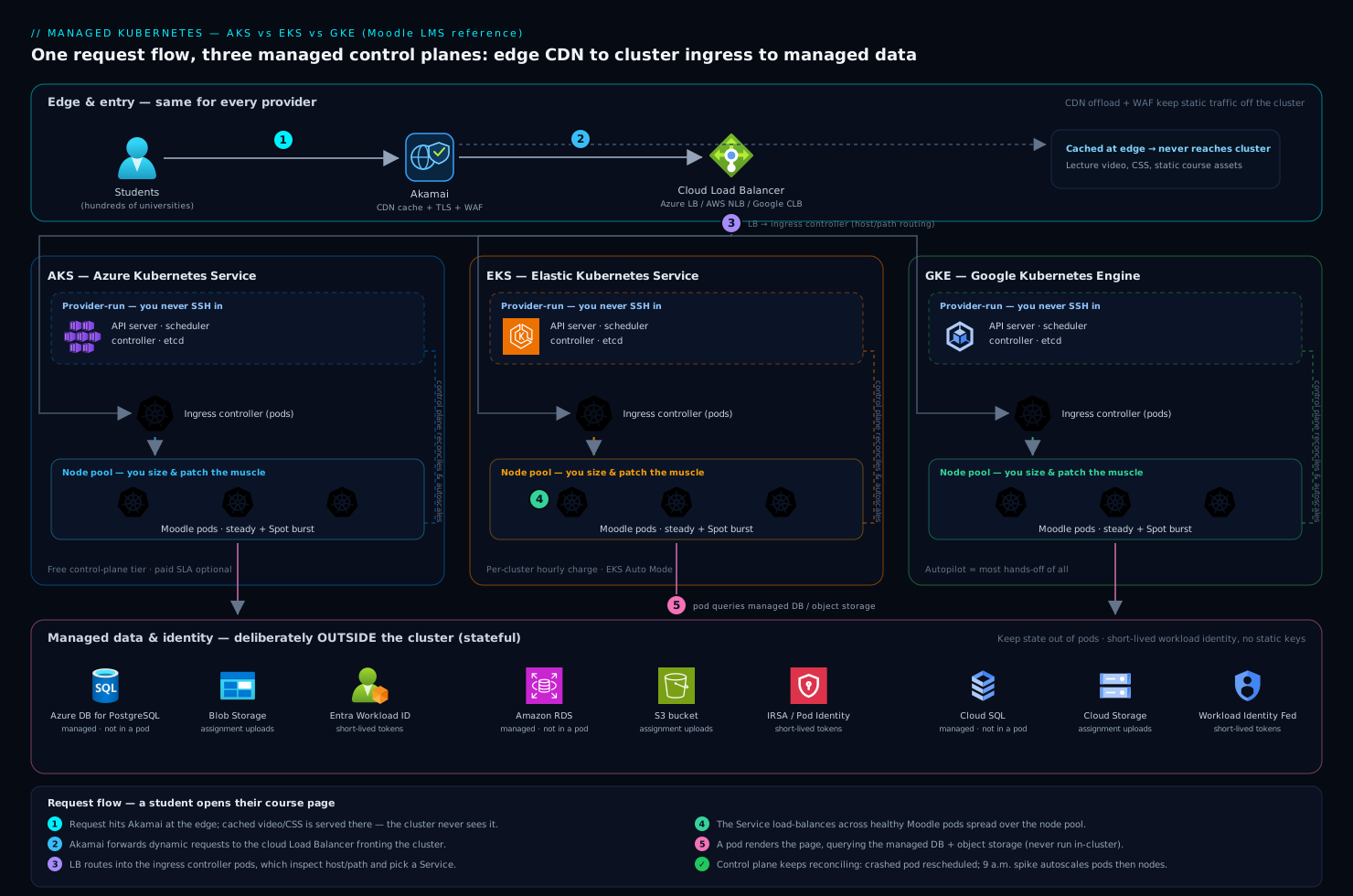
At the shape level, all three providers give you the same picture, and it is worth holding that picture in your head before the differences blur it. There is a managed control plane the provider runs in their own account, invisible to you except through the Kubernetes API endpoint. There is one or more node pool (AKS and GKE call them node pools; EKS calls them managed node groups) — groups of identical worker VMs that actually run your containers. Your Moodle pods, an Nginx ingress, and supporting services run as pods scheduled onto those nodes. Traffic arrives from students at the edge through Akamai, which terminates TLS, serves cached video and static course assets from its CDN so they never touch your cluster, and applies WAF rules to block the credential-stuffing attempts that always spike during enrollment. Akamai forwards the dynamic requests to a cloud load balancer, which routes into the cluster’s ingress, which routes to the Moodle pods.
Following one request — a student opening their course page:
- The request hits Akamai at the edge. If it is a cached lecture video or a CSS file, Akamai serves it directly and the cluster never sees it. A dynamic page request continues on.
- Akamai forwards to the cloud load balancer (an Azure Load Balancer, AWS NLB/ALB, or Google Cloud Load Balancer depending on the provider), which fronts the cluster.
- The load balancer routes to the ingress controller running as pods inside the cluster, which inspects the host and path and forwards to the right Service.
- The Service load-balances across the healthy Moodle pods spread over the node pool. A pod renders the page, querying the managed database (Azure Database for PostgreSQL / Amazon RDS / Cloud SQL — deliberately not run inside the cluster) and a Redis cache for sessions.
- The response streams back out through the same path. Meanwhile the control plane — the part the provider runs — is constantly watching: if a Moodle pod crashes, the scheduler places a new one; if CPU climbs at 9 a.m., the autoscaler adds pods and, if needed, nodes.
The components a beginner most often gets wrong are the ones outside the cluster: the database belongs in a managed database service, not in a pod, and the CDN belongs in front, not bolted on later. Keeping stateful data and heavy static traffic off the cluster is what makes the cluster itself simple enough to scale freely.
Control-plane management: the first real difference
This is where the three diverge first, and it is the difference a beginner feels soonest.
GKE is the most hands-off. In Autopilot mode, you do not manage nodes at all — you submit pods, Google provisions and right-sizes the underlying compute, patches it, and bills you per pod resource request. You think almost entirely in workloads. Even in Standard mode, GKE has the longest operational heritage (Google has run Kubernetes’ ancestor in production the longest) and the most automation around upgrades and repair turned on by default.
AKS sits in the middle and is notable for one thing beginners love: for a long time the control plane was free — you paid only for the worker nodes (a paid uptime-SLA tier exists for production guarantees). It integrates tightly with the rest of Azure, which matters enormously if your identity, networking, and policy already live there.
EKS gives you the most control and asks the most of you in return. The control plane carries a per-cluster hourly charge, and historically EKS expected you to wire up more yourself — the CNI, add-ons, node bootstrapping — though EKS Auto Mode has recently closed much of that gap by managing compute, scaling, and core add-ons automatically. EKS is the natural choice when your organization is already deep in AWS and your team values explicit control over convenience.
| Dimension | AKS (Azure) | EKS (AWS) | GKE (Google) |
|---|---|---|---|
| Control-plane cost | Free tier; paid SLA tier optional | Per-cluster hourly charge | Per-cluster charge (one zonal cluster free) |
| Most hands-off mode | Node auto-provisioning | EKS Auto Mode | Autopilot (most hands-off of all) |
| Default operational posture | Balanced; deep Azure integration | Most control, most assembly | Most automated upgrades/repair |
| Best fit when | You live in Azure / Entra ID | You live in AWS, want control | You want least ops, newest K8s fast |
| Upgrade cadence | Channels; you trigger | You trigger; add-on coordination | Release channels, can auto-upgrade |
There is no “best” row here. The honest rule for a beginner: pick the one that matches the cloud your identity, network, and data already live in. A team whose universities’ SSO, databases, and DNS are already in Azure should not pick GKE to save a few rupees on a control plane — the integration tax will dwarf the saving.
What the control-plane SLA actually promises
A beginner sees “99.95% uptime SLA” and assumes it means their app is guaranteed up. It does not. The control-plane SLA covers the availability of the Kubernetes API endpoint — your ability to run kubectl, and the control plane’s ability to schedule and heal — not the availability of your Moodle pods, which depend on your nodes, your health probes, and your own design. Concretely:
- AKS — the Free tier gives a best-effort target with no financially-backed SLA; the Standard tier (about $0.10 per cluster per hour) adds a 99.95% API-server uptime SLA when nodes span availability zones (99.9% without). The Premium tier adds long-term support for older versions.
- EKS — a flat per-cluster charge (about $0.10/hour) with a 99.95% API-server SLA baked in; there is no free control-plane tier.
- GKE — a per-cluster management fee (about $0.10/hour, with one zonal or Autopilot cluster free per billing account); regional clusters get a 99.95% SLA (control plane spread across zones), zonal clusters 99.5%.
Two practical takeaways. First, the SLA is about the control plane, so your own reliability work — multi-zone nodes, readiness probes, PodDisruptionBudgets — is what actually keeps Moodle up. Second, on all three the control-plane fee is trivial next to the node bill, which is why the “free control plane” argument almost never decides anything (more on cost further down).
Node pools: how you size the muscle
A node pool (or managed node group) is a set of identical VMs. You almost always want more than one, and understanding why is core to running Moodle cheaply through a spike.
The standard pattern is a system node pool for cluster-critical add-ons (CoreDNS, the metrics server, ingress) and one or more user node pools for your actual application. Keeping system components on their own small, stable pool means a flood of Moodle pods during enrollment cannot starve the DNS server that the whole cluster depends on.
For the spike, the Moodle team uses two user pools:
- A steady pool of on-demand nodes sized for normal term-time load.
- A burst pool of cheaper Spot/preemptible nodes (all three clouds offer them at a steep discount) that the autoscaler grows during enrollment and grade-release. Moodle’s web tier is stateless, so a Spot node getting reclaimed just means a pod reschedules — acceptable for the savings.
# A pool of Spot/preemptible nodes is tainted so only spike-tolerant
# workloads land on it. The Moodle web Deployment tolerates this taint.
tolerations:
  - key: "kloudvin.io/spot"
    operator: "Equal"
    value: "true"
    effect: "NoSchedule"
Two layers of autoscaling do the work. The Horizontal Pod Autoscaler adds Moodle pods when CPU or a custom metric (requests-per-second) climbs. When pods cannot be placed because nodes are full, the Cluster Autoscaler (or GKE Autopilot / EKS Auto Mode doing it for you, or Karpenter on EKS) adds nodes from the burst pool. When the spike passes, both scale back down and the Spot nodes are released. The forty-minute outage from last year becomes a graph that goes up and comes back down on its own.
How much of the node lifecycle each provider automates
The clouds differ most in how much of the node you still touch. At one extreme you hand-build node pools and run the Cluster Autoscaler; at the other you never see a node at all. It is worth knowing the whole ladder, because “managed” means very different things across these rows.
| Node model | AKS | EKS | GKE | You manage… |
|---|---|---|---|---|
| Standard managed nodes | Node pools (system + user) | Managed node groups | Node pools | VM size, count, image upgrades |
| Reactive node autoscaling | Cluster Autoscaler | Cluster Autoscaler | Cluster Autoscaler | Min/max per pool |
| Just-in-time provisioning | Node auto-provisioning (Karpenter-based) | Karpenter | Node Auto-Provisioning (NAP) | Almost nothing — it picks VM shapes for pending pods |
| Fully managed / serverless nodes | AKS Automatic | Fargate (per-pod) or EKS Auto Mode | Autopilot (per-pod) | Nothing — you submit pods |
Read that table top-to-bottom as decreasing operational burden. The Moodle team uses standard managed node pools with the Cluster Autoscaler — the middle rows — because it gives them Spot pools and predictable pricing they can reason about during the spike. A smaller team with less Kubernetes experience might jump straight to GKE Autopilot or EKS Auto Mode and never manage a node, trading some cost control and flexibility for near-zero node operations. Neither is wrong; they are different rungs on the same ladder.
Networking models: the part that surprises beginners
Networking is where the three providers differ in ways that have real consequences, and it is the topic most likely to trip up someone new. The crux is how a pod gets an IP address.
In the simplest, most cloud-native mode, every pod gets a real IP from your VNet/VPC — this is Azure CNI on AKS, the AWS VPC CNI on EKS (the default), and VPC-native (alias IP) on GKE. The upside is that pods are first-class citizens on your network: a database firewall rule or a peered network sees the pod’s actual IP. The catch that surprises everyone: you can exhaust IP addresses fast, because every pod consumes one from your subnet. The Moodle team learned to size subnets generously — a /22 or larger for the pod range — because during enrollment they might run thousands of pods, and a subnet sized for “normal” load will refuse to schedule new pods at the worst possible moment.
The alternative is an overlay network (AKS’s Azure CNI Overlay or kubenet, GKE’s routes-based mode), where pods get IPs from a private range that does not consume VNet addresses — cheaper on IPs, but pods are not directly routable from outside without NAT. For a beginner the guidance is simple: start with the provider’s default cloud-native CNI, and size your subnets larger than you think you need.
| Networking concern | AKS | EKS | GKE |
|---|---|---|---|
| Default pod networking | Azure CNI (VNet IPs) or Overlay | AWS VPC CNI (VPC IPs) | VPC-native / alias IPs |
| Pod gets a real VPC/VNet IP | Yes (CNI) / No (Overlay) | Yes | Yes |
| Main beginner pitfall | Subnet IP exhaustion | Subnet IP exhaustion, ENI limits per node | IP range planning up front |
| Network policy engine | Azure NPM / Calico / Cilium | Calico / Cilium | Calico / Dataplane V2 (Cilium) |
One rule cuts across all three: turn on network policies early. By default, every pod can talk to every other pod. A network policy that says “only the ingress pods may reach the Moodle pods, and only Moodle may reach the database” is the difference between a compromised plugin staying contained and it pivoting across the whole cluster.
Identity integration: stop putting cloud keys in pods
This is the single most important security topic for a beginner to internalize, because the wrong way is so tempting and so common. Moodle needs to read uploaded assignments from object storage (Azure Blob / S3 / GCS). The naive approach is to bake a storage access key into the pod as an environment variable. Do not. That key is now in your manifests, your CI logs, and every running container — and it does not rotate.
The right way is workload identity: the pod assumes a cloud IAM identity automatically, with no long-lived key anywhere. Each provider has its own name for the same idea:
- AKS — Microsoft Entra Workload ID: a Kubernetes ServiceAccount is federated to an Entra ID managed identity, and the pod gets short-lived Entra tokens. Since the universities’ SSO already runs on Entra ID (federated from Okta as the upstream workforce IdP for staff logins), this keeps one identity story end to end.
- EKS — IRSA (IAM Roles for Service Accounts) and the newer EKS Pod Identity: a ServiceAccount maps to an AWS IAM role; pods get temporary STS credentials scoped to exactly the S3 bucket they need.
- GKE — Workload Identity Federation: a Kubernetes ServiceAccount binds to a Google IAM service account; pods get short-lived Google credentials.
# EKS IRSA: the ServiceAccount is annotated with the IAM role to assume.
# No access key is ever stored — pods receive temporary STS credentials.
apiVersion: v1
kind: ServiceAccount
metadata:
  name: moodle-storage
  annotations:
    eks.amazonaws.com/role-arn: arn:aws:iam::111122223333:role/moodle-assignment-bucket
The equivalent on the other two clouds is the same pattern with different annotations — a ServiceAccount that names the cloud identity to assume:
# AKS — Entra Workload ID: the ServiceAccount is federated to an Entra
# managed identity via OIDC. Pods receive short-lived Entra tokens.
apiVersion: v1
kind: ServiceAccount
metadata:
  name: moodle-storage
  namespace: moodle
  annotations:
    azure.workload.identity/client-id: "8f3c1e2a-0000-0000-0000-managed-identity"
# GKE — Workload Identity Federation: the KSA binds to a Google IAM
# service account. Pods get short-lived Google credentials, no key file.
apiVersion: v1
kind: ServiceAccount
metadata:
  name: moodle-storage
  namespace: moodle
  annotations:
    iam.gke.io/gcp-service-account: moodle-assets@my-project.iam.gserviceaccount.com
Side by side, the three are the same idea wearing three badges:
| AKS | EKS | GKE | |
|---|---|---|---|
| Feature name | Entra Workload ID | IRSA / EKS Pod Identity | Workload Identity Federation |
| Kubernetes side | ServiceAccount + annotation | ServiceAccount + annotation | ServiceAccount + annotation |
| Cloud side | Entra managed identity | IAM role (via STS) | IAM service account |
| Token the pod gets | Short-lived Entra token | Short-lived STS credential | Short-lived Google credential |
| Long-lived key stored? | No | No | No |
The row that matters is the last: no long-lived key is stored anywhere in any of the three. That is the whole point, and it is identical across clouds — which is exactly why “map this workload’s identity across AKS, EKS, and GKE” is a fair interview question (and a practice challenge below).
For the genuinely application-level secrets that are not cloud IAM — the Moodle database password, the SMTP credentials for grade-notification emails, an LTI integration secret for a third-party tool — the team uses HashiCorp Vault. Vault issues short-lived, dynamically-generated database credentials and injects them into pods via its agent sidecar, so no static database password sits in a Kubernetes Secret. The principle across all of this: identities are short-lived and scoped; standing keys are the thing you are trying to eliminate.
Upgrades and version support: who patches what
Kubernetes ships a new minor version roughly every four months, and old versions fall out of support. Staying current is not optional — it is a recurring operational task, and it is one of the few places where the three clouds ask genuinely different things of you.
Two rules are universal, whichever cloud you are on:
- Upgrade the control plane before the nodes, and never skip a minor version — go 1.30 → 1.31 → 1.32, not 1.30 → 1.32 in one jump. This follows from Kubernetes’ version-skew policy (covered in depth in Going deeper): nodes may lag the control plane, but the control plane must never lag the nodes.
- The provider patches the control plane; you drive the node upgrade. All three publish freshly-patched node images continuously, but on standard node pools applying that image — draining and replacing nodes — is a step you trigger (or delegate to an auto-upgrade channel). This is the mechanics behind the shared-responsibility line from earlier.
The representative commands for a control-plane upgrade look like this (each is a real command; versions are illustrative):
# AKS — upgrade the control plane, then each node pool
az aks upgrade -g rg-moodle -n aks-moodle-prod --kubernetes-version 1.32.0
az aks nodepool upgrade -g rg-moodle --cluster-name aks-moodle-prod -n user --kubernetes-version 1.32.0

# EKS — control plane, then each managed node group, then the add-ons
eksctl upgrade cluster --name moodle-prod --version 1.32 --approve
eksctl upgrade nodegroup --cluster moodle-prod --name user --kubernetes-version 1.32

# GKE — upgrade the control plane; nodes follow the release channel automatically
gcloud container clusters upgrade moodle-prod --master --cluster-version 1.32
Where they differ is cadence, how long an old version stays supported, and how much of the node upgrade they will do for you:
| Upgrade concern | AKS | EKS | GKE |
|---|---|---|---|
| Version support window | ~3 minors (N, N-1, N-2) | ~14 months standard, up to ~26 with paid Extended Support | Depends on release channel (Rapid → Regular → Stable → Extended) |
| Node auto-upgrade | Opt-in channels (patch / stable / node-image) | Manual (or automatic on EKS Auto Mode) | On by default; you set a maintenance window |
| Add-on upgrades | Managed add-ons upgraded with the cluster | You coordinate add-ons (VPC CNI, CoreDNS, kube-proxy) | Managed with the channel |
| Default posture | You trigger, with optional automation | Most manual coordination | Most automated |
The pattern is the same one you have seen all lesson: GKE automates the most, EKS asks the most of you, AKS sits in the middle. For the Moodle team, upgrades are scheduled through a ServiceNow change request in the quiet weeks between enrollment and grade-release — never in September — and staged dev → staging → production so a regression is caught before it reaches a student.
Security, observability, and operations across all three
Because all three are conformant Kubernetes, the enterprise tooling around them is largely identical — which is good news, because it means the operational investment is portable if you ever switch clouds.
Posture and supply chain. Wiz scans the cluster and its cloud account agentlessly for misconfigurations, exposed workloads, and risky attack paths — for example, flagging a Moodle pod that can reach object storage it should not, or a node group exposed to the public internet. Shifting left, Wiz Code scans the Terraform and container images in the pull request before they ever deploy, catching a misconfigured node pool or a vulnerable base image at review time rather than in production.
Runtime threat detection. CrowdStrike Falcon runs as a sensor (a DaemonSet pod on every node) watching container runtime behavior — a process spawning a shell inside a Moodle pod, an unexpected outbound connection — and feeds detections to the security team’s SOC. This catches the live attack that a static scan cannot.
Observability. Datadog (or Dynatrace — the team standardized on one) runs an agent DaemonSet collecting metrics, logs, and distributed traces across all clusters and clouds in one pane of glass. During enrollment the on-call watches pod count, node count, p95 page-render latency, and database connection saturation on a single dashboard, with anomaly detection alerting before students start emailing. A unified observability layer is what makes a multi-cluster (or future multi-cloud) estate operable by a small team.
Network appliances. Some universities require traffic to egress through inspection. Cluster egress is routed through virtual appliances — next-gen firewall NVAs in the cloud network — so outbound calls (to license servers, payment gateways) are logged and filtered to meet those institutions’ compliance requirements.
ITSM and change control. Production cluster changes — a Kubernetes version upgrade, a new node pool — flow through a ServiceNow change request, giving an auditable approval gate, and a CrowdStrike or Wiz critical alert auto-raises a ServiceNow incident so security has a ticket, not just an alert in a channel.
CI/CD and infrastructure as code
The cluster itself and everything in it is defined as code — clicking in a console does not survive an audit and cannot be rebuilt after a disaster.
Terraform provisions the cluster, node pools, networking, and IAM identities, so the same definition stands up dev, staging, and production identically (and stands the whole thing back up in a paired region for DR). Ansible handles the bits that are configuration rather than infrastructure — node-level OS hardening baselines and bootstrap steps on any non-managed compute, like the virtual appliances.
Application delivery is GitOps. A push to the Moodle repo triggers GitHub Actions (or Jenkins on the teams that already run it) to build and test the container image, run the Wiz Code scan as a required gate, and push the image to the registry. Then Argo CD — running inside the cluster, watching the Git repo of Kubernetes manifests — notices the new image tag and rolls it out, so the live cluster state always matches Git and a bad deploy is reverted by reverting a commit. This is the pattern that lets the team deploy on a Tuesday in October without fear, because every change is reviewed, scanned, and reversible.
# Terraform: an AKS cluster with workload identity and a system node pool.
# EKS/GKE equivalents differ in attribute names, not in shape.
resource "azurerm_kubernetes_cluster" "moodle" {
  name                = "aks-moodle-prod"
  location            = "centralindia"
  dns_prefix          = "moodle-prod"
  oidc_issuer_enabled       = true   # required for workload identity
  workload_identity_enabled = true

  default_node_pool {
    name       = "system"
    node_count = 3
    vm_size    = "Standard_D4s_v5"
  }
  identity { type = "SystemAssigned" }
  network_profile { network_plugin = "azure" }  # Azure CNI: real VNet IPs
}
Cost: where the money actually goes
A beginner expects the control-plane fee to dominate the bill. It does not. The control plane is a rounding error next to the worker nodes, which run 24/7 and are the real cost driver.
| Cost lever | Mechanism | Effect for the Moodle platform |
|---|---|---|
| Spot / preemptible nodes | Burst pool on reclaimable VMs for the stateless web tier | Up to ~70–90% off compute on the spike |
| Right-sizing requests | Set pod CPU/memory requests to real usage | Stops over-provisioning every node |
| Cluster Autoscaler scale-down | Release burst nodes after enrollment ends | You pay for the spike only while it lasts |
| Reserved/committed-use | Commit to the steady pool’s baseline | Discount on always-on nodes |
| CDN offload | Akamai serves video/static; pods never see it | Smaller cluster, less egress |
The single biggest saving is the combination of the CDN offloading static and video traffic (so the cluster only handles dynamic requests) and Spot nodes for the burst. Together they mean the autumn spike, which used to require permanently over-provisioned VMs running all year, now costs real money for only the few weeks it actually happens.
Failure modes and reliability
Name the failures before they page you on grade-release morning.
- Node pool runs out of IPs (CNI mode). New pods stay
Pendingbecause the subnet is exhausted — exactly during a spike. Mitigation: size pod subnets generously up front (a /22 or bigger), or use an overlay CNI. - Cluster Autoscaler can’t add nodes. The cloud is out of the requested VM size in that zone, or you hit a quota. Mitigation: spread node pools across multiple availability zones, request quota increases ahead of enrollment, and allow the autoscaler a fallback VM size.
- Stateful data in a pod. Someone runs the database in the cluster “to keep it simple,” a node dies, and data is at risk. Mitigation: keep the database in the managed database service; the cluster holds only stateless workloads.
- Single-zone cluster. A zone outage takes the whole platform down. Mitigation: a regional/multi-AZ cluster spreads nodes and (on GKE regional / EKS / AKS availability-zone) the control plane across zones.
- Bad deploy. A broken Moodle image rolls out to everyone. Mitigation: Argo CD with health checks and a one-commit rollback, plus a canary or rolling strategy so not every pod updates at once.
For DR, because everything is Terraform and the data lives in a managed, geo-redundant database, the recovery story is “re-apply the Terraform in the paired region, restore the database, repoint Akamai.” A realistic target for this platform is RTO of 30 minutes and RPO of 5 minutes, achievable precisely because the cluster is disposable and the state is not in it.
Explicit tradeoffs and how to pick
Accept these or reconsider Kubernetes entirely. Managed Kubernetes removes the control-plane burden but not the conceptual burden: your team still has to understand pods, services, ingress, autoscaling, and RBAC, and that is a real learning curve for an operations team coming from plain VMs. For a genuinely simple, single-container app with modest traffic, a platform-as-a-service (Azure App Service, AWS App Runner, Cloud Run) or a container service like ECS may be the better, simpler answer — Kubernetes earns its complexity when you have many services, need fine-grained scaling and scheduling, or want a portable, cloud-agnostic substrate. The Moodle team chose Kubernetes specifically because the autumn spike, the multiple supporting services, and the desire to avoid lock-in justified the learning curve.
Choosing between AKS, EKS, and GKE — the beginner’s decision tree:
- Already standardized on a cloud? Pick that cloud’s Kubernetes. The integration with your existing identity (Entra ID, IAM), networking, and databases outweighs every other factor. This decides it for most teams.
- Want the absolute least operational overhead and fastest access to new Kubernetes versions? Lean GKE, especially Autopilot — Google’s automation and operational maturity are the strongest, and you think almost purely in workloads.
- Want the most control and explicit configuration, and live in AWS? EKS — it asks more of you but gives the most knobs, and EKS Auto Mode now softens the assembly burden.
- Want balanced operations with deep enterprise-Azure and Entra integration (and a free control-plane tier to start)? AKS — the natural fit when SSO, policy, and data already live in Azure, as they do for this education company.
For this specific team — universities on Entra ID (federated from Okta), data in Azure, a budget-conscious operations group — AKS was the right call, not because it is objectively best, but because it matched the gravity of where everything else already lived. That is the lesson worth carrying away from this comparison: at the beginner stage, the three managed Kubernetes services are close enough in capability that the deciding factor is fit with your existing cloud, identity, and team — not a feature checklist. Get the workloads containerized, get the identity short-lived, keep the state out of the cluster, and let the autoscaler turn next September’s spike into a graph that goes up and quietly comes back down.
Going deeper
You now have the working comparison. This section is for the reader who wants to know how the machinery under each of these choices actually behaves — the internals you do not manage but should understand, and the edges where “it’s all just Kubernetes” stops being true.
The control plane you don’t manage (but should understand)
You never touch it, but knowing how the managed control plane is built explains what that SLA is really promising. Behind the single API endpoint the provider hands you, there is a small fleet: multiple kube-apiserver replicas behind a load balancer, and an etcd cluster running as an odd-numbered quorum (typically three or five members) spread across availability zones. etcd uses the Raft consensus algorithm, so a write is only acknowledged once a majority of members have durably stored it — which is why an odd number matters (three members tolerate one failure; five tolerate two) and why a single-zone control plane is a weaker promise than a regional one. The provider also takes and retains etcd backups, encrypts the datastore, rotates the certificates, and patches all of it — the exact Day-2 work you would otherwise own on a self-managed cluster. The API-endpoint SLA (that 99.95% figure) is a promise about this machinery staying reachable, nothing more. If you want the full internals of how the API server, scheduler, and etcd are wired together, that is its own lesson: Cluster Architecture: Control Plane Deep Dive.
The CNI + IP-exhaustion story, per cloud
Earlier we said “size your subnets larger than you think.” Here is the arithmetic that makes that advice concrete, because IP exhaustion is the failure that most often surprises teams during a spike — the worst possible time.
- EKS (Amazon VPC CNI). Each pod gets a real VPC IP from an ENI (Elastic Network Interface) attached to the node, and every instance type has a hard limit on ENIs × IPs-per-ENI. An
m5.large, for instance, tops out around 29 pods before it runs out of IPs — not CPU, IPs. The fix is prefix delegation: the CNI hands each node a/28prefix (16 IPs) at a time instead of single IPs, pushing density to ~110 pods/node and slashing how fast you burn the subnet. Beginners hit the per-node pod ceiling and blame the scheduler; it is really the CNI’s IP accounting. - AKS (Azure CNI). Same model — every pod consumes a VNet IP — with a default of 30 pods/node on Azure CNI (legacy kubenet, which does not consume a VNet IP per pod, defaults to 110). The subnet must be pre-sized for
nodes × max-pods, and during enrollment that number explodes. Azure CNI Overlay sidesteps it entirely: pods draw from a private overlay CIDR and stop consuming VNet IPs, at the cost of pods no longer being directly routable from outside without NAT. - GKE (VPC-native / alias IPs). Each node is assigned a slice of a secondary (alias) IP range — by default enough for up to 110 pods/node — and the pod range is chosen at cluster creation and is painful to change later. GKE’s trap is less running out mid-spike and more planning the ranges too small up front and having to rebuild.
The cross-cloud lesson: in every “real IP per pod” CNI, pods are first-class network citizens (great for firewalls and observability) but they consume address space fast, and the max-pods-per-node number is an IP-planning decision, not a performance one. When in doubt, go bigger on the pod CIDR and turn on prefix delegation / overlay early. The mechanics of how a CNI actually assigns and routes these addresses are their own topic: Kubernetes CNI & the Pod Networking Model.
Serverless nodes: Autopilot, Fargate, and Auto Mode vs standard
The node-management ladder from earlier has a top rung worth understanding on its own, because it changes the billing and the mental model, not just the ops load.
- GKE Autopilot — you submit pods; Google provisions, right-sizes, patches, and secures the underlying nodes, and bills you per pod’s CPU/memory request rather than per VM. You literally cannot SSH to a node because you do not have nodes. Brilliant for teams who want to think purely in workloads; less flexible if you need a DaemonSet on every host, special hardware, or fine node control.
- AWS Fargate for EKS — each pod runs in its own micro-VM with no shared node; you pay per pod. Strong isolation, but no DaemonSets, limited to certain workload types, and per-pod pricing can exceed a well-packed node at scale.
- EKS Auto Mode — the newer middle path: real nodes still exist (so DaemonSets and GPUs work), but AWS manages provisioning, scaling (via Karpenter under the hood), patching, and core add-ons for you. It closes most of the historical “EKS makes you assemble everything” gap.
The tradeoff across all three serverless-node options is the same: you trade cost-optimisation levers and low-level control for near-zero node operations. For a stateless, spiky web tier like Moodle’s, per-pod billing on a fully-managed node can actually be cheaper during the quiet ten months and only rise with real usage — which is exactly why the team modelled both before choosing standard pools with Spot.
Cluster Autoscaler vs Karpenter vs GKE NAP
Three different answers to “add nodes when pods can’t fit,” and the difference is real:
- Cluster Autoscaler (CA) — the classic, available on all three clouds. It scales the existing node pools you defined: when pods are
Pending, it grows a pool; when nodes are underused, it shrinks it. Simple and predictable, but it can only add the VM shapes you pre-declared in each pool. - Karpenter (native to EKS, and the engine behind AKS node auto-provisioning) — instead of scaling fixed pools, it looks at the actual resource shape of the pending pods and provisions right-sized nodes just-in-time, picking instance types (including Spot) to fit and consolidating workloads onto fewer nodes when it can. Faster and usually cheaper, at the cost of more variability in which VM types show up.
- GKE Node Auto-Provisioning (NAP) — Google’s take: it creates and deletes entire node pools automatically based on pending pods’ requirements, so you do not even pre-define pools. Conceptually close to Karpenter’s just-in-time provisioning, native to GKE.
The through-line: CA scales pools you designed; Karpenter and NAP design the nodes for you. For a bursty workload the just-in-time approaches usually win on both speed and cost, which is why the newest managed modes (EKS Auto Mode, AKS node auto-provisioning) are built on them.
Version skew: the numbers, and coordinated upgrades
The “never skip a minor, control plane first” rule comes straight from Kubernetes’ version-skew policy, and the exact numbers are worth knowing:
- kube-apiserver is the newest component; the others may only be older, never newer.
- kubelet (on your nodes) may run up to three minor versions behind the API server (widened from two in v1.28) — this is why nodes are allowed to lag during a staged upgrade.
- kubectl must be within ±1 minor of the API server.
- Other control-plane components (scheduler, controller-manager) stay within one minor of the API server.
This is exactly why the order is control-plane-first and one-minor-at-a-time: bump the API server, then bring the nodes up underneath it while they are still inside the allowed skew. On EKS you additionally have to coordinate the managed add-ons — the VPC CNI, CoreDNS, and kube-proxy each have a version compatible with each Kubernetes minor — which is the assembly tax EKS is known for and which EKS Auto Mode now hides. AKS and GKE bundle those as managed add-ons upgraded with the cluster.
The real cost model: control plane + nodes + egress + LB
A beginner budgets for the control-plane fee and is then blindsided by the real bill. The honest cost model for any managed cluster has four parts, and the first is the smallest:
- Control plane — about $0.10/cluster/hour (~$73/month) on EKS and GKE, free on AKS’s base tier. A rounding error.
- Worker nodes — the dominant line, running 24/7. This is where Spot pools, right-sizing, reserved/committed-use discounts, and autoscaler scale-down do their work (see the cost table above).
- Data transfer / egress — the quiet killer on a multi-cloud or multi-AZ estate. Cross-AZ traffic is billed on all three clouds, and internet egress more so; a chatty service mesh spread across three zones can run up a surprising bill purely on inter-node chatter. This is a real argument for keeping tightly-coupled services zone-aware.
- Load balancers and public IPs — each cloud LB has an hourly charge plus a throughput/rule component (AWS bills NLB/ALB per LCU; Azure and Google meter similarly). One LB per service adds up; sharing a single ingress across many services is cheaper.
Add the managed database and object storage (deliberately outside the cluster) and you have the whole picture. The lesson for the Moodle team’s budget-conscious owners: the control-plane-fee debate is noise; the money is in nodes and egress, and the CDN-offload + Spot-burst combination attacks exactly those two.
Managed vs self-managed (kubeadm)
Everything so far assumes you let the cloud run the control plane. You do not have to. With kubeadm (the upstream cluster-bootstrapping tool), or distributions like k3s, RKE2, or OpenShift, you stand up and operate the control plane yourself — the API server, the etcd quorum, certificate rotation, and every upgrade become your job. That is a lot of the Day-2 work managed Kubernetes was invented to delete. So when would you choose it?
- On-prem or air-gapped environments where there is no cloud control plane to rent.
- Regulatory or sovereignty requirements that forbid the provider running your control plane.
- Deep customization of control-plane flags the managed services do not expose.
- Learning — building a cluster by hand is the fastest way to understand what the managed service is doing for you.
For everyone else — and certainly for a four-person team supporting hundreds of universities — managed wins decisively, because the control plane is undifferentiated heavy lifting. If you want to feel exactly what you are being spared, the hands-on counterpart is Provisioning Kubernetes with kubeadm: HA Control Plane, etcd & Upgrades.
The multi-cloud portability reality
This lesson opened by promising that Kubernetes is portable, and it is — but with a crucial asterisk that ties this whole course together. The core is portable; the edges are not. Your Pods, Deployments, Services, ConfigMaps, and the kubectl/YAML you write against them move between AKS, EKS, and GKE essentially unchanged, because all three are conformant Kubernetes. What does not move cleanly is everything where the cluster touches the cloud:
- Identity — Entra Workload ID vs IRSA vs GKE Workload Identity are three different wirings (as the table above showed).
- Networking — CNI choices, LoadBalancer annotations, and ingress annotations are cloud-specific.
- Storage — StorageClasses map to Azure Disks vs EBS vs Persistent Disks.
- Add-ons and serverless nodes — Autopilot, Fargate, and Auto Mode have no equivalent on the other clouds; leaning on them is a genuine (often worthwhile) form of lock-in.
So “we run Kubernetes, so we’re cloud-agnostic” is half-true, and a dangerous half to believe. The realistic portability posture is: keep your workload manifests clean and standard (they port for free), and treat the cloud-touching edges as a per-cloud adapter layer you knowingly maintain. That is the same principle the rest of this course keeps returning to — from networking to identity to storage — and it is why the honest final answer to “which managed Kubernetes?” is about fit, not features.
Common beginner mistakes
These are mental-model traps, distinct from the operational failure modes listed above. Nearly every team new to managed Kubernetes hits several. Catch them now.
-
“The cloud is managed, so it patches my nodes.” It patches the control plane and publishes patched node images — but on standard node pools, actually rolling that image onto your nodes is a step you trigger (or delegate to an auto-upgrade channel). A node quietly running a months-old, vulnerable kernel because nobody enabled node auto-upgrade is your incident, not the provider’s. Right model: managed = control plane patched for you; node patching is yours unless you opt into automation.
-
“A /24 pod subnet is plenty.” In any real-IP-per-pod CNI (Azure CNI, AWS VPC CNI, GKE VPC-native), every pod eats an address, and a spike can want thousands. Size a pod subnet for “normal” load and new pods go
Pendingat exactly the worst moment — enrollment morning. Right model: size the pod CIDR for peak, not average; turn on prefix delegation (EKS) or overlay (AKS) early. -
“EKS and GKE cost more because the control plane isn’t free.” The ~$73/month control-plane fee is a rounding error next to the node bill and the egress bill. Choosing a cloud to save it is optimising the smallest line on the invoice while ignoring the largest. Right model: decide on nodes, egress, and fit; the control-plane fee never decides anything real.
-
“We’ll lift-and-shift our VMs onto Kubernetes and be done.” The core manifests port, but the edges — identity, CNI, load balancer and ingress annotations, storage classes — are cloud-specific and are exactly where a naive migration breaks. Teams that budget for “just containerize” and forget the edges lose weeks. Right model: plan the cloud-touching adapter layer (identity, networking, storage) as real migration work.
-
“Managed Kubernetes means we’re cloud-agnostic, so lock-in is solved.” Kubernetes portability is real for workloads and illusory for the edges — and the moment you build on Autopilot, Fargate, or Auto Mode, or wire deep into one cloud’s identity and add-ons, you have chosen a comfortable lock-in. That can be the right call; the mistake is not knowing you made it. Right model: portability is for manifests; the edges and serverless-node modes are deliberate, eyes-open lock-in.
Practice challenges
Work these in order — they escalate from beginner to advanced. Reason each one out first, then open the solution.
Challenge 1 — Who patches the kernel? (beginner). Your security team asks: “On our managed AKS cluster, when a critical Linux kernel CVE drops, who applies the patch to our worker nodes — Azure or us?” Answer, and say why.
<details> <summary>Solution</summary>
You do (unless you have enabled node-image auto-upgrade). Azure patches the control plane and publishes a new, patched node image, but rolling that image onto your nodes — cordon, drain, replace — is your trigger on standard node pools. Why: the shared-responsibility line runs between the control plane (provider) and the nodes (you); a patched image you never apply protects nobody.
</details>
Challenge 2 — Pick a platform and justify it (beginner). A three-person startup, all-in on AWS, wants to run a stateless API on Kubernetes with as little node operations as possible and no dedicated platform engineer. Which managed service and which mode, and why?
<details> <summary>Solution</summary>
EKS in Auto Mode (or Fargate for the simplest cases). They are already on AWS, so identity, networking, and data integration favour EKS; Auto Mode then removes node provisioning, scaling, patching, and core add-on management — the operational load a three-person team cannot carry. Why: the deciding factor is fit with the existing cloud, and within that cloud you pick the most-managed node mode to match the thin team.
Note there is no single “best” answer: had they been on GCP, the same reasoning points to GKE Autopilot. The method (fit first, then most-managed mode) is the point.
</details>
Challenge 3 — Map one workload’s identity across all three (intermediate). Moodle needs read access to one object-storage bucket and nothing else. Describe, for AKS, EKS, and GKE, the chain that gets the pod a short-lived credential with no static key stored.
<details> <summary>Solution</summary>
Same shape, three names:
- AKS — Entra Workload ID: annotate the Kubernetes ServiceAccount with an Entra managed-identity client ID; the SA is federated to that identity via the cluster’s OIDC issuer; the pod receives short-lived Entra tokens scoped to the bucket’s RBAC role.
- EKS — IRSA / Pod Identity: annotate the ServiceAccount with an IAM role ARN (IRSA via the cluster OIDC provider, or the newer Pod Identity agent); the pod receives temporary STS credentials scoped to that one S3 bucket.
- GKE — Workload Identity Federation: annotate the ServiceAccount with a Google IAM service account; the pod receives short-lived Google credentials scoped to the GCS bucket.
Why: all three federate a Kubernetes ServiceAccount to a cloud identity so the pod gets a short-lived, tightly-scoped token — and in every case no long-lived access key is stored in a manifest, image, or Secret.
</details>
Challenge 4 — Will the pods fit? (intermediate). You run an EKS node pool of m5.large instances with the default VPC CNI (no prefix delegation). You have two m5.large nodes and need to schedule 40 pods. Is IP capacity your constraint, and what is the fix?
<details> <summary>Solution</summary>
Yes, IPs are the constraint. An m5.large tops out around 29 pods on the default VPC CNI because of its ENI × IP-per-ENI limit — a per-node ceiling that is about IP accounting, not CPU. Two nodes give ~58 slots in theory, but the ceiling is per-node, so uneven scheduling can wall you off well before 40. The robust fix is prefix delegation, which assigns each node /28 prefixes and lifts density to ~110 pods/node. Why: on real-IP CNIs the pods-per-node ceiling is an IP limit, and prefix delegation changes the accounting.
</details>
Challenge 5 — Order of a version upgrade (advanced). Your cluster is on Kubernetes 1.30 (control plane and nodes). You want to reach 1.32. Write the safe sequence and name the rule that forbids the shortcut.
<details> <summary>Solution</summary>
Go one minor at a time, control plane first: upgrade the control plane 1.30 → 1.31, then the node pools to 1.31; then the control plane 1.31 → 1.32, then the nodes to 1.32. You may not jump 1.30 → 1.32 in one step. Why: the version-skew policy lets the kubelet lag the API server by a few minors but never lets the control plane lag the nodes, and skipping a minor risks an unsupported skew mid-upgrade.
</details>
Challenge 6 — Standard pools or serverless nodes? (advanced). Moodle’s web tier is stateless, idle for ten months, then spikes hard for a few weeks twice a year. Argue the case for GKE Autopilot (per-pod billing) versus standard node pools with a Spot burst pool. Which would you model first?
<details> <summary>Solution</summary>
Both are defensible; you model both. Autopilot / per-pod billing shines during the ten idle months — you pay for the few pods actually running, with zero node operations — but per-pod pricing can exceed a well-packed node during a sustained spike. Standard pools + Spot burst give the cheapest peak compute (Spot is 70–90% off) and full control, at the cost of running and patching nodes year-round and managing the autoscaler. Why: the right answer depends on the idle-to-peak ratio and the team’s appetite for node ops — which is precisely why the Moodle team priced both before committing, and chose standard pools for peak cost-control plus a small team that could handle nodes.
</details>
Glossary
- Managed Kubernetes — a service (AKS, EKS, GKE) where the cloud provider runs and patches the control plane for you; you bring and size the worker nodes and run your apps.
- Control plane — the components that store cluster state and make decisions: the API server,
etcd, scheduler, and controller-manager. On managed Kubernetes the provider runs and hides these. - Worker node — a VM that actually runs your containers; you choose its size, count, and when it gets patched.
- Node pool / managed node group — a set of identical worker VMs managed as a unit (node pool on AKS/GKE, managed node group on EKS).
etcd— the distributed, strongly-consistent key-value store that is the cluster’s source of truth; run as an odd-numbered quorum, backed up and encrypted by the provider.- API server (kube-apiserver) — the front door to the cluster; everything (
kubectl, controllers, kubelets) talks through it. The control-plane SLA is about its availability. - SLA (control-plane) — a promise about the Kubernetes API endpoint’s uptime (e.g. 99.95%), not about your workloads’ uptime.
- Shared-responsibility line — the boundary between what the provider owns (control plane) and what you own (nodes, workloads, network policy, secrets).
- CNI (Container Network Interface) — the plugin that gives pods IP addresses and wires up pod networking (Azure CNI, AWS VPC CNI, GKE VPC-native, Cilium, Calico).
- IP exhaustion — running out of subnet addresses because every pod consumes a real VNet/VPC IP; causes new pods to sit
Pending, classically during a spike. - ENI (Elastic Network Interface) — the AWS network card attached to a node; its ENI × IP-per-ENI limit sets the per-node pod ceiling under the VPC CNI.
- Prefix delegation — an EKS VPC CNI setting that assigns each node
/28IP prefixes instead of single IPs, raising pod density (~110/node) and slowing subnet burn. - Azure CNI Overlay / kubenet — AKS networking modes where pods draw from a private range and do not consume VNet IPs (cheaper on IPs; pods not directly routable without NAT).
- Workload identity — the pattern where a Kubernetes ServiceAccount federates to a cloud IAM identity so pods get short-lived, scoped credentials with no long-lived key stored (Entra Workload ID / IRSA & Pod Identity / GKE Workload Identity Federation).
- IRSA / EKS Pod Identity — the two AWS mechanisms for mapping a ServiceAccount to an IAM role; pods receive temporary STS credentials.
- Cluster Autoscaler (CA) — adds and removes nodes from pre-defined node pools when pods can’t be placed or nodes sit idle.
- Karpenter — a just-in-time node provisioner (native to EKS, engine behind AKS node auto-provisioning) that right-sizes nodes to the pending pods and consolidates workloads.
- Node Auto-Provisioning (NAP) — GKE’s automatic creation/deletion of whole node pools based on pending pods’ needs.
- GKE Autopilot — a fully-managed GKE mode with no nodes to operate; you submit pods and are billed per pod resource request.
- AWS Fargate (for EKS) — serverless pods, each in its own micro-VM, billed per pod; no shared nodes and no DaemonSets.
- EKS Auto Mode — a newer EKS mode where real nodes exist but AWS manages provisioning (via Karpenter), scaling, patching, and core add-ons.
- Spot / preemptible nodes — heavily discounted, reclaimable VMs; ideal for a stateless burst pool where a reclaimed node just reschedules its pods.
- HPA (Horizontal Pod Autoscaler) — scales the number of pods up and down on a metric (CPU, requests-per-second); distinct from node autoscaling.
- Version-skew policy — Kubernetes’ rules for how far components may differ in version (kubelet up to 3 minors behind the API server; kubectl ±1 minor); the reason upgrades go control-plane-first, one minor at a time.
- Release channel — GKE’s (and similar) subscription to a rate of upgrades (Rapid, Regular, Stable, Extended) governing how quickly clusters move to new versions.
- Egress / cross-AZ transfer — outbound and inter-zone network traffic, billed on all three clouds; a frequently-underestimated cost driver.
- LCU (Load Balancer Capacity Unit) — the AWS metering unit for NLB/ALB throughput; the reason “one LB per service” gets expensive.
- Conformant Kubernetes — a distribution that passes the CNCF conformance tests, so standard
kubectland manifests behave identically; AKS, EKS, and GKE are all conformant. kubeadm/ self-managed — running the control plane yourself (via the upstream bootstrap tool or distributions like k3s/RKE2/OpenShift), owningetcd, upgrades, and certs — the work managed Kubernetes removes.