In a nutshell
Every Kubernetes cluster has a head office (the control plane) that makes decisions, and many branch offices (worker nodes) that carry them out. This lesson is about what runs inside one branch office.
Picture a branch office of a bank. Head office decides “open a new account for this customer at the downtown branch.” But head office doesn’t physically do it — the branch has its own staff who receive the instruction, do the work, and phone back a status. A Kubernetes worker node works the same way, and it runs three things to do it:
- The kubelet — the branch manager. It’s the node’s agent: it watches head office (the API server) for pods assigned to its node, tells the container runtime to start them, then keeps phoning home to report “still alive, pods healthy.” When a node goes
NotReady, this is who stopped answering the phone. - The container runtime (containerd or CRI-O), reached through a standard socket called the CRI — the branch’s workshop. The kubelet doesn’t build containers itself; it hands over a spec through the CRI and the runtime actually creates the running container, pulling the image and setting up isolation with Linux cgroups and namespaces.
- kube-proxy — the branch’s switchboard. When anything wants to reach a Service (a stable virtual address for a group of pods), kube-proxy has already programmed the node’s kernel so that traffic to that address is forwarded to a real, healthy pod behind it.
Everything else in this lesson is detail on those three, plus the two Linux kernel features they stand on — cgroups (which cap how much CPU and memory a pod can use) and namespaces (which isolate what a pod can see). If you remember only one sentence: the control plane decides; the node’s kubelet + runtime + kube-proxy make it real.
Level: Advanced · Time: ~30 min · You’ll need: a laptop with Docker/Podman plus one of kind / minikube / k3d for the lab (no cloud, no cost).
If the control plane is the brain of a Kubernetes cluster, the worker node is where the brain’s decisions actually become running processes. You can know the request flow perfectly — apiserver, etcd, scheduler, controllers — and still be helpless when a node goes NotReady, a pod is ContainerCreating for ten minutes, a healthy pod is suddenly Evicted, or kubectl exec returns a cryptic CRI error. Those are not control-plane problems. They live on the node, in three programs and a handful of Linux kernel features that most engineers never look at: the kubelet, the container runtime behind the CRI, and kube-proxy, all sitting on top of cgroups and namespaces.
This lesson is the node-side companion to the control-plane architecture deep-dive. Where that lesson traced a request down to the node and stopped at “the kubelet starts the pod,” this one opens the node and shows you exactly how. We will dissect the kubelet’s main loop (the syncLoop) and the PLEG that feeds it, how a node registers itself and proves it is alive with a lease, how static pods bootstrap the control plane itself, how the kubelet evicts pods under memory or disk pressure, and how it enforces QoS and reserved resources through cgroups so a runaway pod cannot take the node down with it. Then we go under the kubelet to the CRI — what containerd and CRI-O actually do, why “Docker was removed” (and why your Docker images still run), and how RuntimeClass lets you mix gVisor or Kata sandboxes alongside runc. Finally we cover kube-proxy: how it turns a Service’s virtual IP into real packet forwarding, and the trade-offs between its iptables, IPVS, nftables, and eBPF-replacement modes. By the end you will be able to debug a node like an operator and answer the node-internals questions that separate a CKA-level engineer from a tourist.
Learning objectives
By the end of this lesson you will be able to:
- Explain the kubelet’s architecture end to end: the syncLoop, the PLEG (Pod Lifecycle Event Generator), pod workers, and how the kubelet discovers, starts, and reconciles pods on its node.
- Describe node registration, the Node object’s conditions and leases, and exactly how the kubelet’s heartbeat lets the control plane decide a node is dead.
- Explain static pods, why the control-plane components themselves run as static pods on a kubeadm cluster, and how they differ from mirror pods.
- Configure and reason about eviction — soft vs hard thresholds, the signals (
memory.available,nodefs,imagefs,pid.available), eviction order by QoS, and node-pressure vs API-initiated eviction. - Explain how the kubelet enforces resource isolation through cgroups and the QoS classes (Guaranteed, Burstable, BestEffort), and how node-allocatable, kube-reserved, and system-reserved carve up a node.
- Explain the Container Runtime Interface (CRI) — the image and runtime services, containerd vs CRI-O, the dockershim removal, and RuntimeClass for alternative runtimes.
- Compare kube-proxy modes (iptables, IPVS, nftables, eBPF replacement) and pick the right one for a cluster’s scale.
Prerequisites
You should be comfortable at a Linux shell and understand what a container is (an isolated, resource-limited process built from namespaces and cgroups), plus the basic Kubernetes objects — Pods, Deployments, Services, Nodes. It helps a great deal to have read the Kubernetes architecture deep-dive, which establishes the hub-and-spoke model and the kubectl apply request flow that this lesson picks up at the node. No node-administration experience is assumed; every term is defined on first use. For the hands-on lab you will want Docker or Podman plus one free local-cluster tool — kind, minikube, or k3d. Everything here targets Kubernetes v1.30+ and current CNCF runtimes. This lesson sits in the Architecture module of the Kubernetes Zero-to-Hero course, immediately after monitoring and before advanced scheduling.
Core concepts: what a node actually is
A node is a single machine — physical or virtual — that runs your pods. Strip away the abstractions and a node is a Linux box running exactly three Kubernetes-specific things plus the kernel features they lean on:
A worker node = the kubelet (the agent that makes pods real) + a container runtime behind the CRI (the thing that actually runs containers) + kube-proxy (the thing that makes Services work) — all standing on cgroups and namespaces in the Linux kernel.
Hold these definitions, because the rest of the lesson elaborates each:
| Term | One-line definition |
|---|---|
| kubelet | The node agent: watches the apiserver for pods bound to this node and drives the runtime to make them real, then continuously reports status. |
| CRI | Container Runtime Interface — the stable gRPC contract between the kubelet and the runtime (containerd / CRI-O). |
| kube-proxy | The per-node program that implements the Service abstraction by programming the node’s packet-forwarding rules. |
| cgroup | A Linux kernel feature that limits and accounts for a process group’s CPU, memory, PIDs, and I/O. Kubernetes uses cgroups to enforce requests/limits. |
| namespace (Linux) | Kernel isolation of a process’s view of PIDs, network, mounts, etc. Not to be confused with a Kubernetes Namespace object. |
| Node object | The apiserver’s representation of the machine — its capacity, allocatable resources, conditions, and addresses. |
| Lease | A tiny, cheap object the kubelet renews every few seconds to prove the node is alive (the modern heartbeat). |
| PLEG | Pod Lifecycle Event Generator — the kubelet subsystem that detects container state changes by polling the runtime. |
| Static pod | A pod the kubelet runs directly from a manifest file on disk, not from the apiserver — how the control plane bootstraps itself. |
One mental model unifies the whole node: the kubelet runs a reconciliation loop of its own, exactly like the controllers in the control plane. The control plane’s controllers reconcile cluster-wide objects; the kubelet reconciles the pods on its node against the actual containers running there. Everything below is the detail of that loop.
The kubelet, in depth
The kubelet is the most important — and most complex — process on a node. It is the only component that actually starts and stops your containers (via the runtime), and it is the component whose failure turns a node NotReady. Let us take it apart.
Where the kubelet gets its work: three pod sources
The kubelet does not only watch the apiserver. It merges pods from three sources, and knowing all three explains a lot of “where did that pod come from?” confusion:
| Source | What it provides | Typical use |
|---|---|---|
| API server | Pods bound to this node (scheduler set spec.nodeName) |
Your normal workloads — the overwhelming majority |
| Static pod path | Pod manifests in a watched directory (default /etc/kubernetes/manifests) |
The control plane itself (apiserver, etcd, scheduler, controller-manager) on kubeadm clusters |
| HTTP endpoint | Pod manifests fetched from a URL (--manifest-url) |
Rare; legacy bootstrap |
The kubelet treats these as one merged stream of desired pods and reconciles all of them. The apiserver source is the only one that flows back to the control plane in the normal way; static pods get a read-only “mirror” copy (see below).
The syncLoop: the kubelet’s heartbeat of work
At the centre of the kubelet is the syncLoop — an event-driven loop that never stops. It listens on several channels and, whenever something arrives, decides which pods need to be reconciled and dispatches them to per-pod workers. The inputs to the syncLoop are:
- Config updates — adds/updates/deletes of desired pods from the three sources above.
- PLEG events — “container X in pod Y just died / started” (see PLEG next).
- Periodic sync — a timer (default every 1s housekeeping, with a full sync interval) that re-reconciles everything, so nothing is missed even if an event is dropped. This is the level-triggered safety net, exactly as in the control plane.
- Probe results — liveness/readiness/startup probe outcomes that may require restarting a container or flipping readiness.
- Liveness manager / housekeeping — cleanup of dead pods, orphaned volumes, and so on.
For each pod that needs work, the kubelet runs a pod worker (one goroutine per pod) that computes the difference between the pod’s desired spec and the actual containers reported by the runtime, then calls the CRI to create, start, kill, or restart containers to close the gap. This is the node-level reconciliation loop in concrete form: desired pods in, actual containers reconciled, status out.
PLEG: how the kubelet notices container changes
The kubelet must know when a container dies so it can restart it (or mark the pod failed). It learns this through the PLEG — Pod Lifecycle Event Generator. Classically, PLEG works by relisting: it periodically asks the runtime (over the CRI) for the current state of all pods and containers, compares that to the previous snapshot, and generates an event for every change (a container that appeared, disappeared, or changed state). Those events feed the syncLoop.
This relisting has a cost, and it produces one of the most infamous kubelet errors: PLEG is not healthy. If a relist takes longer than its threshold (default 3 minutes), the kubelet declares PLEG unhealthy, which in turn fails the node’s Ready condition — the node goes NotReady even though the machine is up. The usual root cause is a slow or wedged container runtime (containerd hung, disk I/O saturated, too many containers to list). It is a classic real-world incident: the fix is almost always at the runtime/disk layer, not the kubelet itself.
Modern kubelets (v1.26+, default on by v1.27) add Evented PLEG, where the runtime pushes container lifecycle events to the kubelet over the CRI instead of being polled, with relisting kept only as a slower backstop. This cuts CPU use and latency on busy nodes. Either way, the job of PLEG is the same: keep the kubelet’s picture of running containers accurate.
Node registration, the Node object & conditions
When a kubelet starts, it registers its node with the apiserver (unless --register-node=false), creating or updating a Node object that advertises the machine’s identity and resources:
- Addresses — InternalIP, ExternalIP, Hostname.
- Capacity — the machine’s total CPU, memory, ephemeral storage, and pods.
- Allocatable — capacity minus reserved resources (see node-allocatable below) — what is actually available to your pods.
- Labels — including auto-applied ones like
kubernetes.io/hostname,kubernetes.io/os,kubernetes.io/arch,node.kubernetes.io/instance-type, and zone/region labels on cloud. - Info — kernel version, OS image, container runtime version (e.g.
containerd://1.7.x), kubelet and kube-proxy versions.
The Node carries a set of conditions the kubelet maintains and the control plane reacts to:
| Condition | True means |
Notes |
|---|---|---|
| Ready | The node is healthy and can accept pods | The one everyone watches; False/Unknown triggers eviction logic |
| MemoryPressure | Node is low on memory | Set when an eviction signal crosses a threshold; blocks BestEffort scheduling |
| DiskPressure | Node is low on disk (nodefs/imagefs) | Triggers image garbage collection and eviction |
| PIDPressure | Node is low on process IDs | Prevents fork bombs from killing the node |
| NetworkUnavailable | Node’s network route is not configured | Often set/cleared by the CNI or cloud-controller |
Notice that several of these conditions correspond directly to eviction signals — that is not a coincidence; we will connect them shortly.
The node lease: how “is this node alive?” is answered cheaply
Originally, the kubelet proved liveness by updating its entire Node object (status, conditions, capacity) every few seconds. On large clusters that meant thousands of large writes per second hammering etcd — the Node status is a big object. Kubernetes fixed this with the node lease: a tiny Lease object (in the kube-node-lease namespace), one per node, that the kubelet renews every 10 seconds by default. Renewing a lease is a tiny write; updating the full Node status now happens much less often (only when something actually changes, or on a longer interval).
The control plane’s node-lifecycle controller watches these leases. If a node’s lease is not renewed within the node-monitor-grace-period (default 40s), the controller flips the node’s Ready condition to Unknown. After a further grace period, the controller applies the node.kubernetes.io/unreachable taint, and the taint-based eviction logic begins removing pods from the node (subject to each pod’s tolerations and tolerationSeconds, default 300s). This two-tier design — cheap lease for the heartbeat, big Node object only for real changes — is what lets clusters scale to thousands of nodes. It is also the exact mechanism behind the interview question “what happens when a node dies?”: lease stops renewing → Ready goes Unknown → unreachable taint → pods evicted after tolerationSeconds.
Static pods (and mirror pods)
A static pod is a pod the kubelet runs directly from a manifest file on disk, with no involvement from the scheduler or any controller. The kubelet watches a directory — by default /etc/kubernetes/manifests (set via --pod-manifest-path / the staticPodPath config field) — and runs whatever pod manifests it finds there, restarting them if they exit.
This is not a curiosity; it is how the control plane bootstraps itself. On a kubeadm cluster, kube-apiserver, etcd, kube-scheduler, and kube-controller-manager are all static pods. That solves a chicken-and-egg problem: you cannot ask the apiserver to schedule the apiserver, so the kubelet runs it straight from disk. This is also why, in the control-plane lesson’s lab, you saw etcd-..., kube-apiserver-... and friends as pods in kube-system even though no Deployment created them.
For visibility, the kubelet creates a read-only mirror pod in the apiserver for each static pod — a copy you can kubectl get and describe, but cannot edit or delete through the API (deleting the mirror just makes the kubelet recreate it). The source of truth is the file on disk: to change or remove a static pod, you edit or delete its manifest on the node. A static pod’s name has the node name appended (e.g. kube-apiserver-cp1), which is the tell-tale sign you are looking at a mirror pod.
Eviction: how the kubelet protects the node
A node has finite memory and disk. If a pod (or several) consumes too much, the kernel’s OOM killer could start killing processes unpredictably, or the disk could fill and wedge the runtime. To stay ahead of this, the kubelet runs node-pressure eviction: it monitors a set of eviction signals and, when one crosses a configured threshold, proactively evicts pods to reclaim resources before the node falls over.
The signals and what they measure:
| Eviction signal | Measures | Typical default hard threshold |
|---|---|---|
memory.available |
Free memory on the node | < 100Mi |
nodefs.available |
Free space on the kubelet’s root filesystem (volumes, pod logs) | < 10% |
nodefs.inodesFree |
Free inodes on nodefs | < 5% |
imagefs.available |
Free space on the filesystem holding images & container writable layers | < 15% |
imagefs.inodesFree |
Free inodes on imagefs | < 5% |
pid.available |
Free process IDs on the node | (configurable) |
There are two kinds of threshold:
- Hard eviction thresholds — when crossed, the kubelet evicts pods immediately, with no graceful grace period (it bypasses the pod’s
terminationGracePeriodSeconds). These exist to save the node now. - Soft eviction thresholds — when crossed, the kubelet waits for a configured grace period (
eviction-soft-grace-period) before evicting, and honours a boundedeviction-max-pod-grace-period. These give pods a chance to recover or shut down cleanly.
Before evicting for disk pressure, the kubelet first tries to reclaim resources cheaply — deleting dead containers and unused images (garbage collection). Only if that is not enough does it evict pods.
Eviction order is the part interviewers love. The kubelet ranks pods for eviction primarily by QoS class and by how far each pod exceeds its memory requests:
- BestEffort pods (no requests/limits) are evicted first.
- Burstable pods that are using more than their requests go next, ordered by how far over request they are (and by Pod Priority as a tie-breaker on modern versions).
- Guaranteed pods (and Burstable pods within their requests) are evicted last, and ideally never for resource pressure they did not cause.
This is exactly why setting requests and limits matters: they determine your pod’s QoS class, and QoS determines your eviction survival odds. An evicted pod shows status Evicted with a reason like The node was low on resource: memory. Note the distinction from API-initiated eviction (the Eviction API used by kubectl drain and the cluster-autoscaler), which is a graceful, policy-respecting removal that honours PodDisruptionBudgets — a completely different code path from node-pressure eviction, which respects no PDB because it is an emergency.
cgroups, QoS & resource enforcement
The kubelet does not just schedule resources; it enforces them, using Linux cgroups. Every pod and container the kubelet runs is placed in a cgroup hierarchy, and the kubelet sets cgroup parameters from the pod’s requests and limits:
- A container’s CPU request becomes a cgroup
cpu.shares(relative weight under contention); its CPU limit becomes acpu.cfs_quota_us(a hard ceiling that throttles the container when exceeded — CPU is compressible, so it is throttled, not killed). - A container’s memory limit becomes the cgroup
memory.limit_in_bytes(cgroup v1) /memory.max(cgroup v2). Memory is incompressible: exceed the limit and the container is OOM-killed by the kernel (you seeOOMKilled). The memory request is used for scheduling and eviction ranking, not as a hard floor.
The kubelet derives a pod’s QoS class from how its requests and limits are set, and QoS drives both the cgroup layout and the eviction order:
| QoS class | Condition | Behaviour |
|---|---|---|
| Guaranteed | Every container has requests == limits for both CPU and memory | Highest protection; evicted last; eligible for exclusive CPUs under the static CPU Manager policy |
| Burstable | At least one container has a request, but it is not Guaranteed | Can burst above requests up to limits; evicted after BestEffort, by overage |
| BestEffort | No requests or limits on any container | Uses leftover resources; evicted first under pressure |
Two more enforcement features worth naming:
- CPU Manager (
--cpu-manager-policy=static) can give whole, exclusive physical CPUs to Guaranteed pods that request integer CPUs — important for latency-sensitive or NUMA-bound workloads. - Topology Manager coordinates CPU Manager, Memory Manager, and Device Manager so a pod’s CPUs, memory, and devices (e.g. a GPU/NIC) come from the same NUMA node, avoiding cross-socket latency.
Kubernetes runs on cgroup v2 by default on modern distros; v2 gives the kubelet better memory accounting (memory.high for graceful pressure, proper PSI metrics) than the older v1.
Node-allocatable: kube-reserved & system-reserved
If the kubelet gave all of a node’s RAM and CPU to pods, the kubelet and the OS themselves could be starved — and then the node would die under exactly the load you were trying to handle. To prevent this, the kubelet carves the machine into reserved slices and advertises only what is left:
Allocatable = Capacity − kube-reserved − system-reserved − eviction-threshold
| Reservation | Protects | Example flag |
|---|---|---|
| kube-reserved | The kubelet, the container runtime, and other node-level Kubernetes daemons | --kube-reserved=cpu=200m,memory=512Mi |
| system-reserved | The OS itself — kernel, sshd, systemd, logging | --system-reserved=cpu=100m,memory=256Mi |
| eviction-threshold | The hard-eviction headroom (e.g. the 100Mi from memory.available<100Mi) |
(from eviction config) |
The result is Allocatable, the number the scheduler uses when deciding whether a pod fits. With --enforce-node-allocatable=pods (the default), the kubelet also caps all pods combined inside a cgroup sized to Allocatable, so the pod cgroup tree physically cannot consume the reserved slices. Getting these reservations right is core production tuning: too little reserved and the node OOMs the kubelet; too much and you waste capacity you paid for.
Graceful node shutdown
When a node is shut down (e.g. a cloud maintenance event or systemctl poweroff), you do not want pods killed abruptly mid-request. The kubelet’s Graceful Node Shutdown feature (GA on modern versions) integrates with systemd inhibitor locks: on receiving a shutdown signal, the kubelet delays the shutdown and terminates pods in order, giving them their terminationGracePeriodSeconds. It even shuts down pods in priority order via shutdownGracePeriodByPodPriority, so critical/system pods get more time than ordinary workloads. This turns an abrupt power-off into an orderly drain, and is one of those settings that quietly prevents a lot of 5xx errors during routine maintenance.
The Container Runtime Interface (CRI), in depth
The kubelet does not know how to create a Linux container itself. It delegates every container operation to a container runtime through the Container Runtime Interface (CRI) — a stable gRPC API the kubelet calls over a local Unix socket. This abstraction is why you can swap containerd for CRI-O without the kubelet caring.
Two services over one socket
The CRI defines two gRPC services, and understanding the split clarifies a lot of error messages:
| CRI service | Responsible for | Example calls |
|---|---|---|
| RuntimeService | The pod/container lifecycle | RunPodSandbox, CreateContainer, StartContainer, StopContainer, ExecSync, Attach |
| ImageService | Pulling and managing images | PullImage, ListImages, ImageStatus, RemoveImage |
The first concept the RuntimeService introduces is the pod sandbox (the “pause” container / infra container). Before any app container starts, the runtime creates a sandbox: a tiny placeholder container that owns the pod’s Linux namespaces (especially the network namespace, where the pod’s IP lives). All the pod’s real containers then join that sandbox’s namespaces, which is why containers in the same pod share an IP and can talk over localhost. The CNI plugin is invoked when the sandbox is created, not per app container — wire the sandbox once, and every container in the pod inherits the network.
The runtimes: containerd and CRI-O
Today there are two mainstream CRI runtimes, both graduated CNCF projects, and both ultimately use runc (the OCI reference runtime) to create the actual namespaces and cgroups:
| Runtime | Origin / focus | How it talks to the kernel | Notes |
|---|---|---|---|
| containerd | General-purpose runtime (came out of Docker; now CNCF) via the CRI plugin | OCI runtime (runc) | The most widely deployed; default on most managed services and kind |
| CRI-O | Purpose-built only for Kubernetes (Red Hat) | OCI runtime (runc/crun) | Minimal surface; default on OpenShift |
Both are accessed the same way from the kubelet (--container-runtime-endpoint=unix:///run/containerd/containerd.sock or .../crio/crio.sock). The right debugging tool at this layer is crictl, the CRI-level CLI: crictl ps, crictl images, crictl logs, crictl inspect. Crucially, crictl talks directly to the runtime over the CRI, so it can show you containers the apiserver does not know about — invaluable when the kubelet or apiserver is unhappy. (docker ps on a node tells you nothing, because the kubelet has not used Docker for years — see next.)
The dockershim removal: “Docker is dead, long live your images”
This is the single most misunderstood node fact, so let us be precise. Historically the kubelet could not speak CRI to Docker (Docker predates the CRI), so the kubelet shipped an internal shim called dockershim that translated CRI calls into Docker Engine API calls. Maintaining a runtime-specific shim inside the kubelet was a burden, and Docker Engine itself runs containers via containerd anyway — so the shim was an unnecessary middleman.
In Kubernetes v1.24 (2022) the dockershim was removed from the kubelet. The consequences, stated plainly:
- The kubelet no longer talks to Docker Engine. Nodes use a CRI runtime — containerd or CRI-O — directly.
- Your images are completely unaffected. Images built with
docker buildare standard OCI images; containerd/CRI-O run them exactly the same. “Docker images” is just a colloquial name for OCI images. - Docker on your laptop is fine. Developers can keep using the Docker CLI to build and test; nothing about your workflow changed — only the node’s runtime did.
- If you genuinely need the kubelet to use the Docker daemon (almost no one does), the external cri-dockerd adapter exists — but the right move is to use containerd or CRI-O.
The interview-ready summary: the kubelet stopped using the dockershim to talk to Docker Engine; it uses containerd/CRI-O via the CRI now; your OCI images run unchanged.
RuntimeClass: mixing runtimes on one cluster
Sometimes runc’s shared-kernel isolation is not strong enough — you are running untrusted or multi-tenant workloads and want a stronger sandbox. RuntimeClass is the Kubernetes object that lets a pod select which runtime handler the node should use, so you can run most pods on plain runc but route sensitive ones to a sandboxed runtime:
| Runtime handler | Isolation model | Trade-off |
|---|---|---|
| runc (default) | Shared host kernel; namespaces + cgroups | Fastest, lowest overhead; weakest isolation |
gVisor (runsc) |
User-space kernel intercepts syscalls | Strong isolation; some syscall/perf overhead |
| Kata Containers | Lightweight VM per pod (real kernel boundary) | VM-grade isolation; higher startup/memory cost |
You define a RuntimeClass naming a handler that the runtime has been configured to provide, then set spec.runtimeClassName on the pod:
apiVersion: node.k8s.io/v1
kind: RuntimeClass
metadata:
  name: gvisor
handler: runsc          # must match a handler configured in containerd/CRI-O on the node
---
apiVersion: v1
kind: Pod
metadata:
  name: sandboxed
spec:
  runtimeClassName: gvisor
  containers:
  - name: app
    image: nginx
RuntimeClass can also carry scheduling hints (so pods land only on nodes whose runtime supports the handler) and overhead (extra CPU/memory the sandbox itself consumes, accounted for in scheduling). It is the clean, supported way to run mixed-isolation workloads on one cluster.
kube-proxy, in depth
The third node program is kube-proxy, and its job is narrow but vital: make the Service abstraction real at the packet level. A ClusterIP Service is a virtual IP that does not belong to any single pod; something has to intercept traffic to that VIP and load-balance it across the healthy backend pod IPs. That something is kube-proxy (or, increasingly, a CNI that replaces it).
kube-proxy runs on every node, watches Services and EndpointSlices through the apiserver, and programs the node’s networking accordingly. Despite the name, modern kube-proxy does not proxy traffic through itself — it programs the kernel to do the forwarding, and only configures rules. It has several modes:
| Mode | Mechanism | Performance at scale | Notes |
|---|---|---|---|
| iptables (legacy default) | Linear-ish chains of iptables NAT rules; random backend selection | Rule updates and matching degrade as Services/endpoints grow into the thousands | Ubiquitous, well understood; the historical default |
| IPVS | Kernel IP Virtual Server with a real hash-table load balancer | Scales to large clusters; O(1) lookup; multiple LB algorithms (rr, lc, dh, sh…) | Needs IPVS kernel modules; better for big clusters |
| nftables | Modern nftables backend (replacing iptables) |
Much better update/lookup scaling than iptables | The strategic successor to the iptables mode; GA on recent versions |
| eBPF (kube-proxy replacement) | Cilium/Calico replace kube-proxy entirely with eBPF programs | Highest performance; bypasses iptables/conntrack overhead | Not kube-proxy itself — a CNI feature that removes kube-proxy |
A few mechanics worth knowing for both interviews and debugging:
- For a
ClusterIP, kube-proxy installs DNAT rules so packets to the VIP:port are rewritten to a chosen backend pod IP:port; the kernel’s conntrack keeps the flow pinned to that backend. - For
NodePort, it also opens a port on every node and forwards it to the Service. externalTrafficPolicy: Localtells kube-proxy to send external traffic only to pods on the same node (preserving the client source IP and avoiding an extra hop), at the cost of uneven load if some nodes have no backend pods.Cluster(the default) load-balances across all nodes but SNATs the source IP.internalTrafficPolicy: Localdoes the same node-local routing for in-cluster traffic.- If a Service has no healthy endpoints, kube-proxy programs rules that reject the traffic (so you get a connection refused rather than a black hole) — a useful diagnostic signal.
The big trend: eBPF-based dataplanes (Cilium, Calico’s eBPF mode) increasingly replace kube-proxy outright, attaching eBPF programs at the socket/XDP layer to do Service load-balancing without iptables/IPVS or even conntrack in the hot path. Same role — implement Services — different, faster mechanism. For the deeper networking story see the CNI & pod-networking internals lesson; here, the point is that kube-proxy (or its replacement) is the node component that makes ClusterIP/NodePort Services route.
The kubelet ↔ apiserver flow on the node
Putting it together, here is what continuously happens between a node and the control plane — the node-side half of the request flow from the architecture lesson:
- Register. On start, the kubelet creates/updates its Node object (capacity, allocatable, labels, runtime version) and starts renewing its Lease every ~10s.
- Watch for work. The kubelet watches the apiserver for pods whose
spec.nodeNameequals its node, merging them with any static pods from disk. - Reconcile. For each desired pod, the syncLoop dispatches a pod worker, which diffs desired vs actual (the actual coming from the runtime via PLEG) and calls the CRI:
RunPodSandbox(CNI wires the IP) →PullImage→CreateContainer/StartContainerin order (init containers first, then app containers). - Probe & enforce. The kubelet runs startup/readiness/liveness probes, restarts failed containers, and enforces resources via cgroups (throttling CPU, OOM-killing on memory).
- Report status. The kubelet writes pod status back to the apiserver (which records it in etcd); once a pod is
Ready, the EndpointSlice controller adds its IP to the Service, and kube-proxy on every node updates its rules so traffic can reach it. - Stay alive / protect. The kubelet keeps renewing its lease (heartbeat), updates conditions, runs eviction under pressure, and, on shutdown, performs a graceful drain.
Every interaction goes through the apiserver; the node never talks to other nodes’ kubelets. That is the same hub-and-spoke discipline as the control plane — now seen from the node’s side.
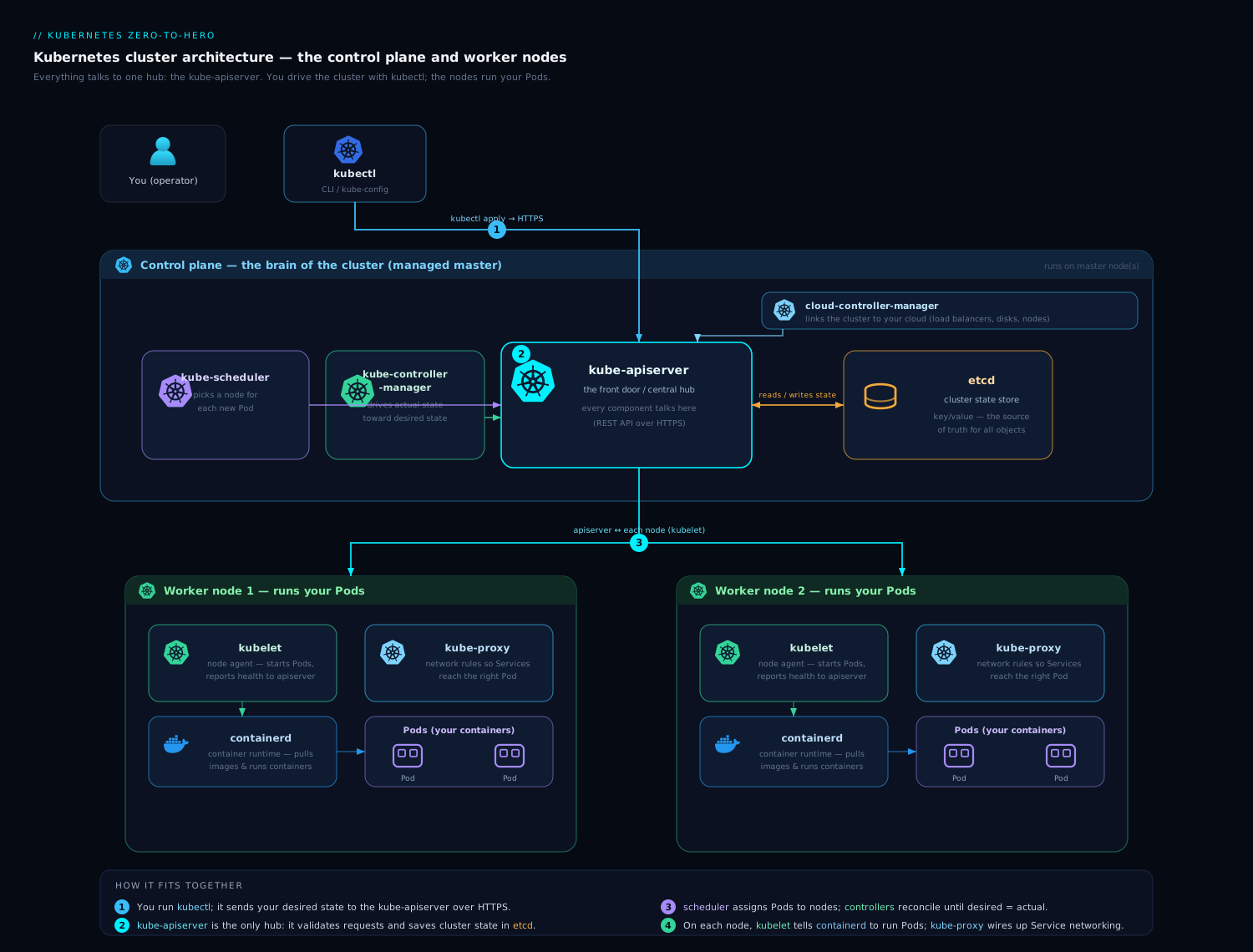
The diagram shows the whole journey, but read it now from the right-hand side: the kubelet watching the apiserver for its bound pods, then driving the CRI (container runtime) and CNI to realise each pod, with kube-proxy programming Service routing — exactly the node-internal loop this lesson dissected, hanging off the same apiserver hub everything else uses.
Going deeper: device plugins, Topology Manager, NRI & the packet path
Everything above is the mainline node. Four extension points turn up constantly in production and interviews, and they are where the node stops being generic and starts serving GPUs, low-latency workloads, and very large Service meshes.
Device plugins: how a node advertises GPUs, NICs & FPGAs
The kubelet only natively understands CPU, memory, ephemeral storage, and pods. It knows nothing about GPUs. So how does resources.limits: {nvidia.com/gpu: 1} work? Through the device plugin framework — a gRPC contract, similar in spirit to the CRI, that lets a vendor daemon teach the kubelet about a new resource without changing Kubernetes itself.
The dance happens over the kubelet’s device-plugin socket (/var/lib/kubelet/device-plugins/kubelet.sock):
- Register. The vendor’s plugin (usually a DaemonSet — e.g. the NVIDIA device plugin) calls
Register, announcing its resource name (nvidia.com/gpu) and its own gRPC socket. - ListAndWatch. The kubelet streams from the plugin a live list of healthy device IDs on the node; those become the node’s Capacity/Allocatable for that resource. Pull a card out and the plugin reports it unhealthy, and the advertised count drops.
- Allocate. When a pod requesting the resource is admitted, the kubelet calls
Allocate, and the plugin returns the device nodes, mounts, and environment variables the container needs (e.g./dev/nvidia0and the driver libraries). The kubelet passes those to the runtime via the CRI.
So a GPU pod is scheduled by the ordinary scheduler (it just sees an extended resource number) but wired to the hardware by the device plugin at admission time. This is why a GPU node whose device-plugin pod has crashed shows nvidia.com/gpu: 0 and refuses GPU pods even though the card is physically present.
apiVersion: v1
kind: Pod
metadata:
  name: cuda-job
spec:
  containers:
  - name: cuda
    image: nvidia/cuda:12.4.0-base-ubuntu22.04
    resources:
      limits:
        nvidia.com/gpu: 1        # advertised by the device plugin, not built into the kubelet
Extended resources are integer-only and non-overcommittable: you cannot request 0.5 of a GPU (fractional sharing needs time-slicing or MIG, which the plugin exposes as more whole devices), and requests must equal limits.
Topology Manager: keeping CPU, memory & devices on one NUMA node
On a multi-socket server, fetching memory or a device across the NUMA boundary costs latency. The kubelet’s Topology Manager is the referee that aligns the three resource managers — CPU Manager, Memory Manager, and Device Manager — so a pod’s cores, RAM, and GPU/NIC all come from the same NUMA node. It has four policies (--topology-manager-policy):
| Policy | Behaviour |
|---|---|
none (default) |
No alignment; the managers act independently |
best-effort |
Prefer aligned topology, but still admit the pod if it can’t be satisfied |
restricted |
Require alignment; if impossible, the pod fails admission with TopologyAffinityError |
single-numa-node |
Strictest — everything must fit on one NUMA node, or the pod is rejected |
Combine --cpu-manager-policy=static (exclusive whole CPUs for Guaranteed, integer-CPU pods) with --topology-manager-policy=single-numa-node and such a pod gets pinned cores plus local memory plus a local device — the recipe for DPDK, high-frequency trading, and ML-training nodes. The scope can be per-container (default) or per-pod (--topology-manager-scope=pod).
NRI: plugging into the runtime without forking it
The CRI is a deliberately narrow contract — it does not let you customise how each container is set up. But sometimes you must: inject a mount, tweak a cgroup parameter, add a device, or apply a custom OCI hook on every container. Historically that meant patching containerd. The Node Resource Interface (NRI) is the supported answer: a common plugin framework, maintained alongside containerd, that lets out-of-tree plugins hook the runtime’s pod and container lifecycle (RunPodSandbox, CreateContainer, and so on) and make controlled adjustments before the container is created — without modifying containerd or CRI-O.
NRI plugins run as long-lived processes that connect to the runtime’s NRI socket (/var/run/nri/nri.sock), subscribe to lifecycle events, and return mutations (Linux resources, mounts, env, annotations, devices). NRI is enabled by default in containerd 2.0, available behind config in 1.7, and supported by CRI-O. Think of it as admission webhooks for the container runtime — the same “extend without forking” idea, one layer below Kubernetes admission control. It underpins newer sidecarless service-mesh and fine-grained resource-management features that need to touch containers the moment they are built.
The packet path: what “kube-proxy programmed the kernel” actually means
When kube-proxy is in iptables mode and you hit a ClusterIP, here is the real path a packet takes — worth being able to draw on a whiteboard:
- A pod sends a packet to the Service VIP (say
10.96.0.10:80). That VIP belongs to no interface; it exists only as iptables rules. - In the
nattable’sPREROUTING/OUTPUTchains, the packet jumps toKUBE-SERVICES, which matches VIP+port and jumps to that Service’sKUBE-SVC-<hash>chain. KUBE-SVC-<hash>uses the iptables statistic module to pick one backendKUBE-SEP-<hash>(service-endpoint) chain, each with equal probability — that is the load balancing.KUBE-SEP-<hash>performs the DNAT: it rewrites the destination to the chosen pod IP:port (e.g.10.244.2.7:8080).- The kernel’s conntrack records the mapping so every packet in that flow — and the return traffic — is translated consistently; the reply is un-DNATed to look like it came from the VIP.
That is a lot of linear rule evaluation. With thousands of Services, KUBE-SERVICES grows long, and a single Service change forces kube-proxy to recompute and reload a large rule set — the root of iptables-mode scaling pain. IPVS replaces steps 2–4 with a kernel hash-table virtual server (O(1) lookup, real LB algorithms). nftables mode (beta since v1.31, the strategic successor to the iptables mode) uses nftables verdict maps, so lookups are near-constant-time and updates are incremental rather than full-table reloads — which, together with iptables itself being deprecated in the Linux kernel in favour of nftables, is why the project is moving there. The eBPF replacement (Cilium, Calico’s eBPF mode) skips this table machinery entirely, doing the load-balancing in an eBPF program at the socket/XDP layer and often removing conntrack from the hot path. For how the pod got the IP that step 4 targets, see the CNI & pod-networking internals lesson.
Hands-on lab
Let us inspect a real node’s internals with our own eyes — for free, on a local single-node cluster. Pick one tool.
Create a cluster (choose one):
# Option A — kind (Kubernetes in Docker)
kind create cluster --name node-lab

# Option B — minikube (containerd runtime)
minikube start -p node-lab --container-runtime=containerd

# Option C — k3d
k3d cluster create node-lab
1. See the node’s runtime, capacity and allocatable.
kubectl get nodes -o wide
kubectl describe node | sed -n '/Capacity:/,/Allocatable:/p'
Expected: the -o wide output names the container runtime (e.g. containerd://1.7.x) in its last column. The describe excerpt shows Capacity vs Allocatable — note that Allocatable is smaller; the difference is the reserved slices we discussed. (On a tiny kind node the reservations may be small, but the two numbers should differ.)
2. Watch the node lease being renewed.
kubectl get leases -n kube-node-lease
kubectl get lease -n kube-node-lease -o jsonpath='{.items[0].spec.renewTime}{"\n"}'
sleep 12
kubectl get lease -n kube-node-lease -o jsonpath='{.items[0].spec.renewTime}{"\n"}'
Expected: one Lease named after your node, and a renewTime that advances between the two reads — that is the heartbeat the control plane relies on, live.
3. See the static pods (mirror pods) of the control plane. On kind/minikube the control plane runs as static pods:
kubectl get pods -n kube-system
Expected (kubeadm-style, as in kind): etcd-node-lab-control-plane, kube-apiserver-node-lab-control-plane, kube-scheduler-..., kube-controller-manager-... — note the node name suffix, the tell that these are mirror pods of static pods on disk. (On k3d these are bundled into one k3s process, so you will see fewer.)
4. Inspect containers at the CRI level with crictl. Exec into the node’s container (kind runs the node as a Docker container) and talk to the runtime directly:
# kind: the node is a container named <cluster>-control-plane
docker exec -it node-lab-control-plane crictl ps | head
docker exec -it node-lab-control-plane crictl images | head
# minikube equivalent:
# minikube ssh -p node-lab -- sudo crictl ps | head
Expected: crictl ps lists running containers as the runtime sees them (including the pause/sandbox containers), proving the kubelet→CRI→containerd chain. This is the view you fall back to when the apiserver or kubelet is misbehaving.
5. Force a pod’s QoS class and read it back. BestEffort vs Guaranteed:
kubectl run be --image=nginx --restart=Never
kubectl run guaranteed --image=nginx --restart=Never \
  --overrides='{"spec":{"containers":[{"name":"guaranteed","image":"nginx","resources":{"requests":{"cpu":"100m","memory":"64Mi"},"limits":{"cpu":"100m","memory":"64Mi"}}}]}}'
kubectl get pod be guaranteed -o custom-columns=NAME:.metadata.name,QOS:.status.qosClass
Expected: be shows QOS: BestEffort (no requests/limits) and guaranteed shows QOS: Guaranteed (requests == limits for both CPU and memory). That QoS class is precisely what decides each pod’s eviction survival order.
6. (Optional) See cgroup enforcement. Read a container’s effective memory limit from inside it:
kubectl exec guaranteed -- cat /sys/fs/cgroup/memory.max 2>/dev/null || \
kubectl exec guaranteed -- cat /sys/fs/cgroup/memory/memory.limit_in_bytes
Expected: roughly 67108864 (64Mi) — the kubelet translated your pod’s memory limit into a kernel cgroup limit. That number is the hard wall the OOM killer enforces.
Validation: you saw (a) the runtime and Capacity-vs-Allocatable, (b) the node lease advancing, © the control-plane static/mirror pods, (d) containers at the CRI level via crictl, (e) QoS classes derived from requests/limits, and (f) a limit pushed down into a cgroup.
Cleanup:
kubectl delete pod be guaranteed --ignore-not-found
kind delete cluster --name node-lab    # or: minikube delete -p node-lab  /  k3d cluster delete node-lab
Cost note: £0 / ₹0. Everything runs in local containers on your own machine; nothing is created in any cloud, so there is no bill.
Practice challenges
Work these on the local lab cluster from the previous section. They escalate from beginner to advanced; each ships a solution, but try it first.
Challenge 1 (Beginner) — Find the runtime and prove Allocatable < Capacity. Identify the container runtime and its version on your node, then show that Allocatable memory is smaller than Capacity and say what the gap is.
<details> <summary>Show solution</summary>
kubectl get node -o wide            # last column names the runtime, e.g. containerd://1.7.x (representative)
kubectl get node -o jsonpath='{.items[0].status.capacity.memory}{"\n"}{.items[0].status.allocatable.memory}{"\n"}'
Allocatable is Capacity minus kube-reserved + system-reserved + the hard-eviction threshold. On a tiny kind node the reservations are small, but the eviction threshold alone (default memory.available<100Mi) makes the two numbers differ. Why: the scheduler fits pods against Allocatable, so the kubelet, runtime, and OS always keep headroom.
</details>
Challenge 2 (Beginner) — Watch the heartbeat, then explain node death. Prove the node’s lease is being renewed, and state exactly what the control plane does if renewals stop.
<details> <summary>Show solution</summary>
kubectl get lease -n kube-node-lease
kubectl get lease -n kube-node-lease -o jsonpath='{.items[0].spec.renewTime}{"\n"}'; sleep 12
kubectl get lease -n kube-node-lease -o jsonpath='{.items[0].spec.renewTime}{"\n"}'
renewTime advances (~every 10s). If it stops for node-monitor-grace-period (~40s), the node-lifecycle controller sets Ready=Unknown, taints the node node.kubernetes.io/unreachable, and pods are evicted after their tolerationSeconds (default 300s). Why: the cheap lease is the heartbeat; the big Node object is only written on real change.
</details>
Challenge 3 (Intermediate) — Manufacture each QoS class.
Create three pods that land in BestEffort, Burstable, and Guaranteed respectively, then read back their qosClass.
<details> <summary>Show solution</summary>
kubectl run be --image=nginx --restart=Never                                    # no requests/limits -> BestEffort
kubectl run burst --image=nginx --restart=Never \
  --overrides='{"spec":{"containers":[{"name":"burst","image":"nginx","resources":{"requests":{"memory":"32Mi"}}}]}}'   # request only -> Burstable
kubectl run guar --image=nginx --restart=Never \
  --overrides='{"spec":{"containers":[{"name":"guar","image":"nginx","resources":{"requests":{"cpu":"100m","memory":"64Mi"},"limits":{"cpu":"100m","memory":"64Mi"}}}]}}'  # requests==limits -> Guaranteed
kubectl get pod be burst guar -o custom-columns=NAME:.metadata.name,QOS:.status.qosClass
Expected QOS: BestEffort, Burstable, Guaranteed. Why it matters: under MemoryPressure the kubelet evicts BestEffort first, Burstable by overage, Guaranteed last — QoS is your survival order.
</details>
Challenge 4 (Intermediate) — Meet a mirror pod, then try (and fail) to delete it via the API. Identify a control-plane mirror pod and show that deleting it through the API does not remove it.
<details> <summary>Show solution</summary>
kubectl get pods -n kube-system -o wide | grep -E 'etcd|apiserver'   # the node-name suffix marks a mirror pod
kubectl delete pod -n kube-system etcd-node-lab-control-plane        # command returns, but...
kubectl get pods -n kube-system | grep etcd                          # it is back immediately
The API object is a read-only mirror of a static pod whose real definition is a file in /etc/kubernetes/manifests/ on the node; the kubelet just recreates the mirror. To truly change it you edit the on-disk manifest. Why: static pods solve the bootstrap chicken-and-egg — you cannot ask the apiserver to schedule the apiserver.
</details>
Challenge 5 (Advanced) — Trace a pod at the CRI level and find its sandbox.
Using crictl on the node, list pods/containers as the runtime sees them and identify the pause/sandbox container. Explain what it owns.
<details> <summary>Show solution</summary>
# kind: the node itself is a Docker container named <cluster>-control-plane
docker exec -it node-lab-control-plane crictl pods          # pod sandboxes
docker exec -it node-lab-control-plane crictl ps            # app containers
docker exec -it node-lab-control-plane crictl ps -a | grep -i pause   # some setups list the pause container
# minikube equivalent: minikube ssh -p node-lab -- sudo crictl pods
The sandbox (pause container) owns the pod’s Linux namespaces — above all the network namespace where the pod IP lives. The pod’s app containers join that namespace, which is exactly why containers in one pod share an IP and reach each other over localhost; the CNI is invoked once, when the sandbox is created. Why: crictl talks straight to the runtime, so it works even when the apiserver/kubelet is unhappy.
</details>
Challenge 6 (Advanced, no cluster needed) — Reason about an eviction incident.
A node reports MemoryPressure=True. It hosts pod A (BestEffort), pod B (Burstable, using 300Mi against a 200Mi request), and pod C (Guaranteed, sitting at its 512Mi limit). In what order does the kubelet evict, and which pod is safe? And what would change if the trigger were an OOM kill instead of node pressure?
<details> <summary>Show solution</summary>
Node-pressure eviction order: A first (BestEffort), then B (Burstable, and 100Mi over its request — a prime target), and C last (Guaranteed, within its limit — ideally never evicted for pressure it did not cause). If instead pod B’s own container breached its memory limit, that is not eviction at all: the kernel OOM-kills that single container (OOMKilled, then restarted per restartPolicy), independent of node pressure or QoS ordering. The distinction: eviction is the kubelet protecting the node; OOMKilled is the kernel enforcing one container’s limit.
</details>
Common mistakes & troubleshooting
| Symptom | Likely cause | Diagnostic / fix |
|---|---|---|
Node NotReady, kubelet logs say PLEG is not healthy |
Container runtime hung or disk I/O saturated, so relisting times out | Check systemctl status containerd/crio, disk latency, and crictl ps responsiveness; restart the runtime if wedged. The kubelet itself is usually the victim, not the cause. |
Pods stuck in ContainerCreating |
Sandbox/CNI failing, image pull failing, or runtime socket wrong | kubectl describe pod events; on the node crictl ps -a and journalctl -u kubelet; verify --container-runtime-endpoint. |
Healthy pods suddenly Evicted |
Node-pressure eviction (memory/disk) | kubectl describe node → conditions (MemoryPressure/DiskPressure) and the pod’s eviction reason; set requests/limits so critical pods are Guaranteed; tune kube-reserved/system-reserved. |
Containers repeatedly OOMKilled |
Memory limit too low for the workload | Memory is incompressible — raise the limit or fix the leak; CPU over-limit only throttles, it does not kill. |
Node NotReady after the machine is clearly up |
kubelet down, or lease not renewing (clock skew, apiserver unreachable from node) | systemctl status kubelet; check the node’s clock and its route to the apiserver; look at the Lease renewTime. |
kubectl edit of a control-plane pod “won’t stick” |
It is a mirror pod of a static pod — the API copy is read-only | Edit the manifest in /etc/kubernetes/manifests/ on the node; the kubelet re-applies it. |
| Service VIP not routing despite Ready pods | kube-proxy not programming rules, or no endpoints | Check the kube-proxy pod/logs, kubectl get endpointslices, and the Service selector; on the node inspect iptables/IPVS rules. |
Pod with runtimeClassName stuck Pending/erroring |
The named handler is not configured on any node’s runtime | Ensure containerd/CRI-O has that handler (e.g. runsc) and the RuntimeClass scheduling/labels match a node. |
Common beginner mistakes
These are misconceptions — the wrong mental model and the right one — distinct from the symptom-lookup table above.
-
“The pod is stuck, so the control plane / scheduler must be broken.” Once a pod has a
nodeName, the scheduler and control plane are finished.ContainerCreating,CrashLoopBackOff, image-pull errors, and mostNotReadysymptoms are node-local — kubelet, runtime, CNI, or disk. Right model: after scheduling, debugging moves onto the node —kubectl describe podevents first, thenjournalctl -u kubeletandcrictlon the node. Blaming the apiserver burns the first hour of an incident. -
“
NotReadymeans the machine is down.” A node can be pingable, SSH-able, and still running containers yet reportNotReady, becauseReadyreflects the kubelet’s health, not the host’s power state. Classic causes: the kubelet process is down, the runtime is wedged (PLEG is not healthy), the CNI isn’t configured (NetworkUnavailable/ no network plugin), or the lease can’t reach the apiserver (clock skew, network partition). Right model:NotReadymeans “the kubelet can’t do its job or can’t phone home,” which is rarely a dead box. -
“
EvictedandOOMKilledare the same thing.” They come from different layers. Eviction is the kubelet proactively removing whole pods to save the node from memory/disk pressure, ranked by QoS. OOMKilled is the Linux kernel killing a single container that breached its own memory limit, regardless of node pressure or QoS. One is node-level triage; the other is per-container limit enforcement. The fixes differ: eviction → set requests/limits and reserve node resources; OOMKilled → raise that container’s limit or fix its leak. -
“CPU limits and memory limits behave the same way under pressure.” CPU is compressible: exceed the limit and the container is throttled (slowed), never killed for it. Memory is incompressible: exceed the limit and the container is OOM-killed. Right model: an over-limit-CPU pod is slow; an over-limit-memory pod is dead. Over-aggressive CPU limits cause mysterious tail latency, not crashes.
-
“kube-proxy proxies my traffic, so switching its mode changes my app.” Modern kube-proxy does not sit in the data path — it only programs the kernel (iptables/IPVS/nftables), which then forwards packets. Changing modes changes how the rules are stored and matched (and how they scale), not your application’s behaviour or its Service semantics. Right model: kube-proxy is a control plane for the node’s dataplane; choosing IPVS or nftables is a scaling decision, not a functional one. (For what Services, EndpointSlices, and DNS actually resolve to, see the Services, Networking Types, Endpoints & DNS lesson.)
-
“
docker pson the node will show my pods.” The kubelet hasn’t used Docker since v1.24; nodes run containerd or CRI-O.docker psshows nothing relevant (or errors outright). Right model: debug at the CRI level withcrictl ps/crictl pods, which talk to the actual runtime — and remember your OCI images still run unchanged.
Best practices
- Always set requests and limits on production workloads. They decide your QoS class, which decides your eviction order — the single biggest lever on whether your pod survives node pressure. Reserve Guaranteed for the things that must not die.
- Reserve resources for the node. Configure
kube-reservedandsystem-reservedso the kubelet, runtime, and OS always have headroom; never let pods consume 100% of the machine, or the node will OOM the very agent keeping it alive. - Keep the runtime and disk healthy. Most “kubelet” incidents (
PLEG is not healthy, stuckContainerCreating) are really runtime or disk problems. Put nodes on decent disks, watch I/O, and keep image GC tuned. - Treat static pods as on-disk config. Manage control-plane static pods by their manifests in
/etc/kubernetes/manifests/, under version control — not viakubectl. - Enable graceful node shutdown so maintenance and scale-down drain pods cleanly instead of dropping in-flight requests.
- Pick the right kube-proxy mode for your scale. iptables is fine for small/medium clusters; move to IPVS or nftables (or an eBPF kube-proxy replacement) as Services/endpoints grow into the thousands.
- Respect the version-skew policy. The kubelet may trail the apiserver by a bounded number of minor versions but must never lead it — upgrade the control plane before the nodes.
Security notes
- Lock down the kubelet API. The kubelet exposes an authenticated API (port 10250); ensure authn/authz is on (
--authorization-mode=Webhook,--anonymous-auth=false) — an unauthenticated kubelet API lets an attacker exec into any pod on the node. This is on by default on managed clusters and modern kubeadm. - Use RuntimeClass for untrusted workloads. runc shares the host kernel; for multi-tenant or untrusted code, route pods to gVisor or Kata via RuntimeClass to get a real isolation boundary.
- Constrain what pods can do on the node. Enforce Pod Security Admission (restricted), drop privileged containers, host namespaces, and hostPath mounts — a container that escapes to the node defeats all the isolation above.
- Protect the container runtime socket. Mounting
/run/containerd/containerd.sock(or the Docker socket) into a pod is effectively root on the node — never do it for untrusted workloads. - Mind node-allocatable as a security control, not just stability. Reservations stop a noisy or malicious pod from starving the kubelet, keeping the node observable and controllable under attack.
- Keep images and runtimes patched. A vulnerable runc/containerd is a node-level escape vector; patch the runtime as diligently as the kubelet.
Interview & exam questions
1. What are the three programs on a worker node, and what does each do? The kubelet (node agent: watches the apiserver for pods bound to this node and drives the runtime to run them, reporting status); the container runtime behind the CRI (containerd/CRI-O — actually creates and runs the containers); and kube-proxy (programs the node’s packet-forwarding rules to implement Services). They sit on top of Linux cgroups and namespaces.
2. What is PLEG and what does “PLEG is not healthy” mean?
The Pod Lifecycle Event Generator detects container state changes by relisting the runtime over the CRI and emitting events to the kubelet’s syncLoop. PLEG is not healthy means a relist exceeded its timeout (default 3 min), usually because the container runtime is hung or the disk is saturated; it fails the node’s Ready condition, so the node goes NotReady. The fix is at the runtime/disk layer. (Evented PLEG, where the runtime pushes events, reduces this.)
3. How does the control plane decide a node is dead?
The kubelet renews a small Lease (in kube-node-lease) every ~10s. If the lease is not renewed within node-monitor-grace-period (~40s), the node-lifecycle controller sets Ready=Unknown, then taints the node node.kubernetes.io/unreachable, and taint-based eviction removes pods after their tolerationSeconds (default 300s). The lease replaced full Node-status heartbeats so the heartbeat is cheap at scale.
4. What is a static pod, and why does the control plane use them?
A pod the kubelet runs directly from a manifest file on disk (default /etc/kubernetes/manifests), with no scheduler or controller involved. The control plane (apiserver, etcd, scheduler, controller-manager) runs as static pods on kubeadm clusters to solve the bootstrap chicken-and-egg — you cannot ask the apiserver to schedule the apiserver. The kubelet publishes a read-only mirror pod for visibility; you manage them by editing the on-disk manifest.
5. Explain eviction: hard vs soft thresholds and the eviction order.
Node-pressure eviction watches signals (memory.available, nodefs.available, imagefs.available, pid.available, inode variants). Hard thresholds evict immediately (no grace period) to save the node; soft thresholds wait a configured grace period first. The kubelet first reclaims via image/container GC, then evicts in QoS order: BestEffort first, then Burstable by how far each exceeds its memory request (Priority as tie-breaker), and Guaranteed last. This is distinct from API-initiated eviction (drain), which respects PodDisruptionBudgets.
6. What are the QoS classes and how are they determined?
Guaranteed — every container has requests == limits for both CPU and memory (evicted last). Burstable — at least one request set, but not Guaranteed. BestEffort — no requests/limits anywhere (evicted first). QoS comes purely from how requests/limits are set, and it drives both cgroup layout and eviction order.
7. How does the kubelet enforce CPU and memory limits, and why is memory different? Via cgroups: a CPU limit becomes a CFS quota that throttles the container (CPU is compressible — slowed, not killed); a memory limit becomes the cgroup memory max, and exceeding it gets the container OOM-killed (memory is incompressible). Requests map to CPU shares and to scheduling/eviction, not to hard floors.
8. What is node-allocatable, and what are kube-reserved and system-reserved?
Allocatable = Capacity − kube-reserved − system-reserved − eviction-threshold. kube-reserved protects the kubelet/runtime/node daemons; system-reserved protects the OS; the eviction threshold is hard-eviction headroom. The scheduler uses Allocatable (not Capacity) to decide if a pod fits, so pods can never starve the agents keeping the node alive.
9. Why was Docker “removed” from Kubernetes, and do my images still work? The kubelet’s internal dockershim (which translated CRI to the Docker API) was removed in v1.24 because it was a redundant middleman — Docker runs containers via containerd anyway. The kubelet now uses containerd/CRI-O directly via the CRI. Your OCI images run unchanged (they were never Docker-specific), and you can still use Docker to build images on your laptop.
10. What is the CRI, and what are its two services?
The Container Runtime Interface — a stable gRPC contract between the kubelet and the runtime. It has the RuntimeService (pod/container lifecycle: sandbox, create/start/stop, exec) and the ImageService (pull/list/remove images). The kubelet calls it over a Unix socket; crictl is the CLI for it. The runtime first creates a pod sandbox (pause container) that owns the network namespace, which all the pod’s containers join.
11. What does kube-proxy do, and what are its modes?
It implements Services by programming the node’s kernel forwarding so traffic to a Service’s virtual IP is load-balanced across healthy pod IPs (it does not proxy through itself). Modes: iptables (legacy default, degrades at scale), IPVS (kernel LB, scales well), nftables (modern successor to iptables), and the eBPF kube-proxy replacement (a CNI feature, e.g. Cilium, that removes kube-proxy entirely). externalTrafficPolicy: Local preserves client source IP by routing only to node-local pods.
12. What is RuntimeClass and when would you use it?
A Kubernetes object that lets a pod select which runtime handler the node uses (spec.runtimeClassName). Use it to run untrusted/multi-tenant workloads in a stronger sandbox — gVisor (syscall interception) or Kata (per-pod VM) — while normal pods stay on runc. It can also carry scheduling constraints and resource overhead for the sandbox.
13. What happens during a graceful node shutdown?
The kubelet uses systemd inhibitor locks to delay shutdown and terminate pods in order, honouring terminationGracePeriodSeconds and shutting down by pod priority (shutdownGracePeriodByPodPriority) so system/critical pods get more time. This turns an abrupt power-off into an orderly drain, avoiding dropped in-flight requests.
Quick check
- Which kubelet subsystem detects that a container has died, and by what mechanism (classically)?
- What small object does the kubelet renew to prove its node is alive, and how often by default?
- Under memory pressure, which QoS class is evicted first and which is evicted last?
- Which Kubernetes version removed the dockershim, and do Docker-built images still run afterward?
- Name the two gRPC services defined by the CRI.
Answers
- PLEG (Pod Lifecycle Event Generator), classically by relisting the runtime over the CRI and diffing snapshots (Evented PLEG instead receives pushed events).
- The node Lease (in
kube-node-lease), renewed about every 10 seconds. - BestEffort is evicted first; Guaranteed is evicted last.
- v1.24 removed the dockershim; yes, OCI images built with Docker run unchanged via containerd/CRI-O.
- The RuntimeService (pod/container lifecycle) and the ImageService (image pull/management).
Exercise
On your local lab cluster, prove the node internals to yourself in writing:
- Run
kubectl describe nodeand copy out Capacity and Allocatable. Compute the difference and, in one sentence each, attribute it tokube-reserved,system-reserved, and the eviction threshold (note which your distro actually sets). - List the control-plane pods with
kubectl get pods -n kube-system -o wide. Identify which are mirror pods of static pods (hint: the name suffix) and explain in one paragraph why the apiserver itself must run as a static pod. - Create one BestEffort pod and one Guaranteed pod (as in lab step 5), confirm their
qosClass, and write the eviction order the kubelet would use if the node hitMemoryPressure— and why. - Using
crictl pson the node, find the pause/sandbox container for one of your pods and explain, in two sentences, what it owns and why the pod’s app containers share its network. - From memory, write the six-step kubelet↔apiserver node flow (register/lease → watch → reconcile via CRI → probe/enforce → report status → protect), then check it against this lesson and note any step you missed.
Certification mapping
- CKA (Certified Kubernetes Administrator): this is core Cluster Architecture, Installation & Configuration and Troubleshooting material. You are expected to manage the kubelet and runtime, read Node conditions, diagnose
NotReadynodes andPLEG/runtime issues, understand static pods (kubeadm runs the control plane as static pods), and reason about eviction and resource reservations.crictl,journalctl -u kubelet, and editing/etc/kubernetes/manifests/are practical exam skills. - KCNA: the kubelet/CRI/kube-proxy roles, the CRI interface, and QoS classes map to the “Kubernetes Fundamentals” and “Container Orchestration” domains.
- CKS (Certified Kubernetes Security Specialist): the kubelet API hardening, RuntimeClass/sandboxed runtimes (gVisor/Kata), runtime socket protection, and node-isolation notes map to the “System Hardening” and “Microservice Vulnerabilities” domains.
Glossary
- kubelet — the node agent that runs and monitors pods bound to its node and reports status to the apiserver.
- syncLoop — the kubelet’s central event-driven loop that reconciles desired pods against actual containers.
- PLEG — Pod Lifecycle Event Generator; detects container state changes (by relisting, or pushed events with Evented PLEG).
- pod worker — a per-pod goroutine that diffs desired vs actual and calls the CRI to converge a single pod.
- Node object — the apiserver’s representation of a machine: capacity, allocatable, conditions, addresses, labels.
- Node condition — a status flag on the Node (Ready, MemoryPressure, DiskPressure, PIDPressure, NetworkUnavailable).
- Lease — a tiny object the kubelet renews (~10s) as a cheap heartbeat; absence triggers node-death handling.
- Static pod — a pod the kubelet runs directly from an on-disk manifest, independent of the apiserver/scheduler.
- Mirror pod — the read-only API copy of a static pod, for visibility only.
- Eviction signal — a measured resource (memory.available, nodefs/imagefs availability/inodes, pid.available) that triggers eviction.
- Hard / soft eviction threshold — immediate eviction vs eviction after a grace period.
- QoS class — Guaranteed / Burstable / BestEffort, derived from requests vs limits; drives eviction order.
- cgroup — Linux kernel mechanism that limits and accounts for CPU/memory/PIDs/I/O of a process group.
- node-allocatable — Capacity minus kube-reserved, system-reserved, and the eviction threshold; what the scheduler can use.
- kube-reserved / system-reserved — resource slices held back for Kubernetes node daemons and the OS respectively.
- CRI — Container Runtime Interface; the gRPC contract between kubelet and runtime (RuntimeService + ImageService).
- pod sandbox / pause container — the infra container that owns a pod’s namespaces (especially the network namespace).
- containerd / CRI-O — the two mainstream CRI runtimes, both using runc (OCI) under the hood.
- dockershim — the removed (v1.24) in-kubelet adapter that let the kubelet talk to Docker Engine.
- RuntimeClass — a Kubernetes object selecting a runtime handler (runc/gVisor/Kata) per pod.
- kube-proxy — the node program that implements Services by programming kernel forwarding (iptables/IPVS/nftables) or being replaced by eBPF.
- externalTrafficPolicy —
Local(node-local backends, preserves client IP) vsCluster(load-balance across nodes, SNAT). - Evented PLEG — a newer kubelet mode where the runtime pushes container lifecycle events instead of being polled by relisting, cutting CPU and latency on busy nodes (beta).
- CPU Manager — kubelet component that can assign exclusive whole CPUs to Guaranteed, integer-CPU pods (
--cpu-manager-policy=static). - Topology Manager — kubelet component that aligns CPU, memory, and device allocations onto the same NUMA node (policies:
none/best-effort/restricted/single-numa-node). - device plugin — a vendor gRPC daemon that advertises extended resources (GPUs, NICs, FPGAs) to the kubelet and wires them into containers at admission (Register → ListAndWatch → Allocate).
- extended resource — an integer-only, non-overcommittable resource (e.g.
nvidia.com/gpu) advertised by a device plugin;requestsmust equallimits. - NRI (Node Resource Interface) — a runtime plugin framework (containerd/CRI-O) for adjusting pods/containers at creation without forking the runtime — “admission webhooks for the runtime.”
- OCI / runc — the Open Container Initiative image & runtime spec; runc is the reference OCI runtime that actually creates namespaces/cgroups, called by both containerd and CRI-O.
- crictl — the CRI-level CLI (
ps/pods/images/logs/inspect) that talks directly to the runtime, independent of the apiserver. - conntrack — the Linux connection-tracking table that pins a NATed flow (and its return traffic) to the backend kube-proxy chose.
- DNAT / SNAT — destination / source NAT; kube-proxy DNATs a Service VIP to a pod IP, and may SNAT for
externalTrafficPolicy: Cluster. - node-monitor-grace-period — how long (~40s) the node-lifecycle controller waits for a lease renewal before marking a node
Ready=Unknown. - taint-based eviction — removal of pods from an unreachable / NotReady node via the
node.kubernetes.io/unreachable/not-readytaints, honouring each pod’stolerationSeconds. - Graceful Node Shutdown — kubelet feature using systemd inhibitor locks to drain pods in priority order before the OS powers off.
- EndpointSlice — the scalable API object listing a Service’s healthy backend IPs; kube-proxy watches it to program forwarding.
- cgroup v2 / PSI — the modern unified cgroup hierarchy; PSI (Pressure Stall Information) gives the kubelet finer CPU/memory/IO pressure signals than cgroup v1.
Next steps
You now understand the node from the kubelet’s syncLoop down to the cgroup and the iptables rule. The natural next move is to take control of where pods land in the first place: Advanced Kubernetes Scheduling: Affinity, Topology Spread, Taints & Preemption — which sits one layer above this one, deciding which node a pod is bound to before the kubelet ever sees it. To revisit the other half of the picture, the Kubernetes Architecture Deep-Dive: Control Plane, etcd, Scheduler & the Request Flow traces the request from your terminal down to the node you just dissected.
Two lateral moves deepen the node itself. For the Service/DNS abstraction kube-proxy implements — what a ClusterIP resolves to and how EndpointSlices are formed — read Services, Networking Types, Endpoints & DNS. And to go hands-on with the sandboxed runtimes from the RuntimeClass section, containerd, nerdctl, Image Encryption & gVisor RuntimeClass drives runc, gVisor, and runtime-level image security directly at the CRI layer.