In a nutshell
Imagine every namespace in your cluster has a bouncer on the door with a dress code. When you try to start a Pod, the bouncer checks the Pod’s security settings against that dress code and either lets it in, lets it in but notes your name in a logbook, or turns it away at the door. Pod Security Admission (PSA) is that bouncer — a security gate built into Kubernetes itself. You do not install anything; you just tell each namespace which dress code to apply.
There are three dress codes, from loosest to strictest: privileged (anything goes), baseline (no obvious break-out tricks), and restricted (hardened, locked down). And there are three ways the bouncer can react, each set independently: enforce (turn violators away), audit (let them in but record it), and warn (let them in but tell you). You choose the code and the reaction per namespace with plain Kubernetes labels — nothing more.
PSA is the successor to PodSecurityPolicy (PSP), an older feature that tried to do the same job but was so awkward to configure safely that Kubernetes removed it in v1.25. PSA deliberately trades PSP’s flexibility for predictability: fewer knobs, no ordering surprises, no RBAC wiring — which is exactly what makes it possible to roll out across a live cluster without an outage.
Level: Advanced · Time: ~30 min
Prerequisites. You should be comfortable applying YAML with kubectl, and you will get far more from this if you have met a Pod’s securityContext — the per-Pod and per-container security fields PSA actually inspects. If those are hazy, read Kubernetes Security Contexts, In Depth: runAsNonRoot, Capabilities, seccomp & AppArmor first. PSA is only one of several gatekeepers inside the API server’s admission chain, so a rough mental model of admission control helps too.
After this lesson you can:
- Explain the three PSA levels (privileged/baseline/restricted) and three modes (enforce/audit/warn), and configure them with namespace labels.
- Read what each level forbids field by field, and fix a Pod that fails
restricted. - Run a safe audit → warn → enforce rollout that never breaks a running workload.
- Pin the standard to a version so a cluster upgrade cannot silently start rejecting Pods.
- Know exactly where PSA stops and a policy engine (Kyverno / Gatekeeper) has to take over.
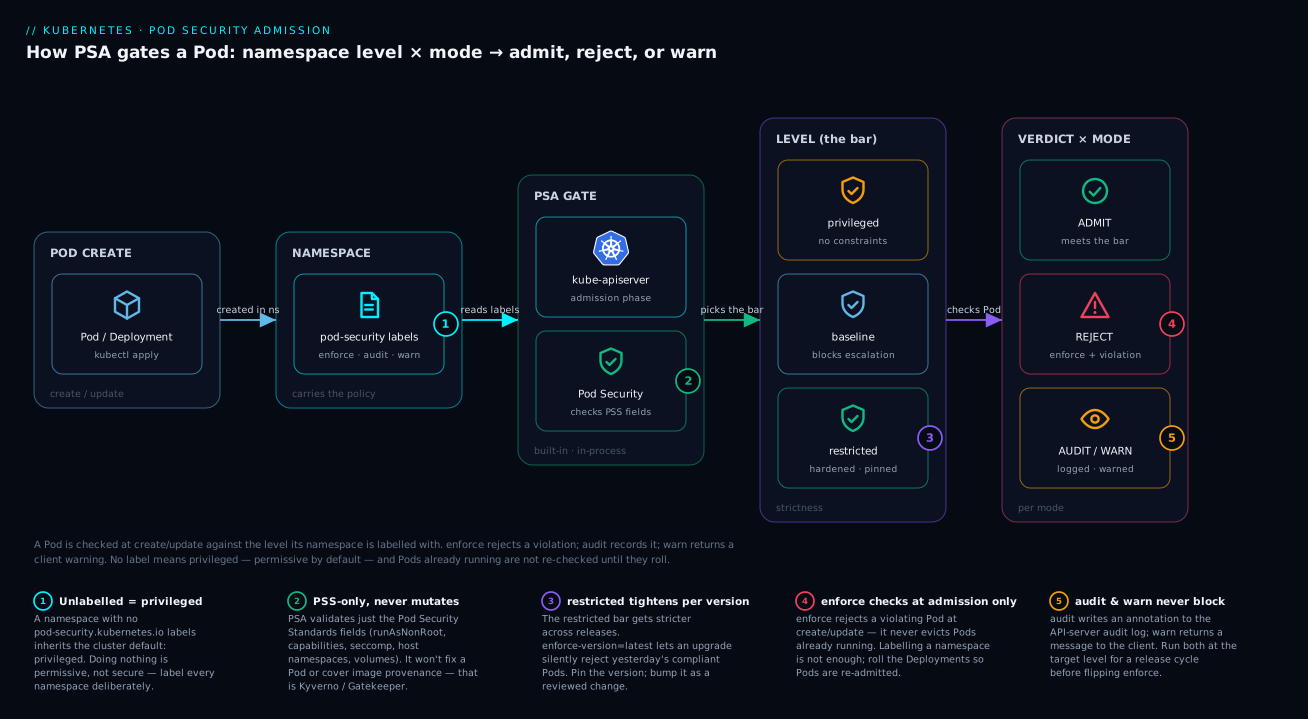
The diagram below is the whole lesson in one picture: a Pod is created in a namespace, PSA reads that namespace’s labels to pick a level, checks the Pod’s fields against it, and — depending on the mode — admits, rejects, or merely records the result. The five numbered notes are the traps that account for almost every PSA surprise; we hit each one in turn.
PodSecurityPolicy was deprecated in Kubernetes 1.21 and removed in 1.25. If your hardening still depends on it, the upgrade that drops it is a cliff, not a ramp. The built-in replacement, Pod Security Admission (PSA), is deliberately simpler: no policy objects, no RBAC to bind, no ordering ambiguity. It trades flexibility for predictability, and that trade is the whole reason a migration can be done without an outage. This is the playbook I run: inventory first, label deliberately, fix the handful of Restricted blockers that account for almost every failure, and flip enforce only when audit has been quiet for a release cycle.
1. The model: three modes, three levels
PSA is a built-in admission controller, enabled by default since 1.25. It evaluates Pods against the Pod Security Standards and applies a verdict per namespace, configured purely through labels. There is nothing to install.
Two axes define behavior. The mode decides what happens on a violation; the level decides how strict the bar is.
| Mode | On violation | Blocks creation? | Use for |
|---|---|---|---|
enforce |
Pod is rejected | Yes | The actual gate |
audit |
Allowed; annotation written to the audit log | No | Inventory without disruption |
warn |
Allowed; warning returned to the client | No | Feedback to whoever applied it |
| Level | Intent | Typical fit |
|---|---|---|
privileged |
Unrestricted, no constraints | System / infra namespaces only |
baseline |
Blocks known privilege escalations; minimally restrictive | Most application workloads |
restricted |
Hardened, current best practice | New workloads, regulated estates |
The three modes are independent and can each point at a different level. That is the single most important property for a safe rollout: you can set enforce to baseline while pointing audit and warn at restricted, so the cluster is protected at one bar while you measure the cost of the stricter one.
PSA controls only the Pod security context fields covered by the Pod Security Standards. It does not do image provenance, network policy, resource quotas, or anything custom. If your requirement is not one of
runAsNonRoot, capabilities, host namespaces, volume types,seccompProfile, and the like, PSA is the wrong tool and you want Kyverno or a validating webhook (step 6).
A namespace with no PSA labels inherits the cluster defaults, which out of the box are privileged for every mode. That means doing nothing leaves you wide open — an empty cluster is not secure by default, it is permissive by default.
How a label becomes a decision. To make the two axes concrete, trace one Pod. Suppose team-payments carries pod-security.kubernetes.io/enforce: baseline and pod-security.kubernetes.io/warn: restricted. You kubectl apply a Deployment whose container sets securityContext.privileged: true. At admission the API server reads the namespace labels, picks baseline for the enforce decision, evaluates the Pod, finds a privileged container (a baseline violation), and rejects the create — the Deployment’s ReplicaSet cannot produce a Pod. Now suppose instead the container is not privileged but also does not set allowPrivilegeEscalation: false. That is fine for baseline (enforce admits it) but violates restricted, so the warn axis fires: the client sees a warning while the Pod still starts. Same Pod, two axes, two independent outcomes — that is the entire mental model, and it is what makes a staged rollout possible.
The labels are ordinary Kubernetes labels. You can set them with kubectl label ns, bake them into the Namespace manifest, or template them from Helm/Kustomize. There is no PodSecurity object to create and no controller to install; the API server reads the label value directly at admission time. That simplicity is the point — and it is the whole reason PSA can be reasoned about where PSP could not.
2. Inventory violations cluster-wide before enforcing anything
Never lead with enforce. Lead with measurement. The fastest read on what a target level would cost is the dry-run check on an existing namespace, which evaluates every running Pod against a level without changing any configuration:
# What would `restricted` reject in this namespace, right now?
kubectl label --dry-run=server --overwrite ns team-payments \
  pod-security.kubernetes.io/enforce=restricted
The server runs the admission check against all current Pods and prints every workload that would be denied, with the exact field at fault. Nothing is persisted. Loop it across the cluster to build the estate-wide picture:
for ns in $(kubectl get ns -o jsonpath='{.items[*].metadata.name}'); do
  echo "== $ns =="
  kubectl label --dry-run=server --overwrite ns "$ns" \
    pod-security.kubernetes.io/enforce=restricted 2>&1 | grep -E 'warn|violate' || echo "clean"
done
For a durable, queryable inventory rather than a one-shot scan, set warn and audit cluster-wide via the AdmissionConfiguration file passed to the API server. This evaluates every new and updated Pod without blocking anything:
# admission-config.yaml — referenced by --admission-control-config-file
apiVersion: apiserver.config.k8s.io/v1
kind: AdmissionConfiguration
plugins:
  - name: PodSecurity
    configuration:
      apiVersion: pod-security.admission.config.k8s.io/v1
      kind: PodSecurityConfiguration
      defaults:
        enforce: "privileged"      # do NOT enforce yet
        enforce-version: "latest"
        audit: "restricted"        # measure the strict bar everywhere
        audit-version: "latest"
        warn: "restricted"
        warn-version: "latest"
      exemptions:
        namespaces:
          - kube-system            # never evaluate control-plane add-ons
          - kube-node-lease
On a managed control plane (EKS, AKS, GKE) you cannot pass API-server flags. There, drive the same outcome with namespace labels at the warn/audit level, or — cleaner at scale — a Kyverno policy in Audit mode that mirrors the standards. Either way the rule holds: collect the full violation set before a single namespace moves to enforce.
Audit verdicts land in the API-server audit log as annotations. If you ship audit logs to a SIEM, that is your dashboard source:
// Azure Monitor / Log Analytics example: PSA audit violations by namespace
AzureDiagnostics
| where Category == "kube-audit"
| extend ann = parse_json(log_s)
| where tostring(ann.annotations["pod-security.kubernetes.io/audit-violations"]) != ""
| summarize violations = count() by namespace = tostring(ann.objectRef.namespace)
| order by violations desc
3. Namespace labeling strategy and exemptions
PSA configuration is three labels per namespace, optionally paired with a version pin (step 7):
apiVersion: v1
kind: Namespace
metadata:
  name: team-payments
  labels:
    pod-security.kubernetes.io/enforce: baseline
    pod-security.kubernetes.io/enforce-version: v1.31
    pod-security.kubernetes.io/audit: restricted
    pod-security.kubernetes.io/warn: restricted
This is the asymmetry that makes the rollout safe: enforce is held at baseline (the bar you have already cleared), while audit and warn run restricted ahead of it. The namespace is genuinely protected, and you have a live readout of the remaining work to reach restricted — without rejecting anything.
The enforce label is evaluated only at Pod create / update admission. Adding it does not evict Pods that already violate it — they keep running until their next rollout. That is a feature for migration (no surprise outage) and a trap for assurance (an unenforced violation can linger for weeks). Roll the affected Deployments deliberately once you flip enforce, and treat “labeled” and “compliant” as different states.
Exemptions are the escape hatch for components that legitimately cannot satisfy any standard — CNI agents, CSI drivers, node-problem-detector, monitoring DaemonSets that read host paths. There are two mechanisms with very different blast radius:
- Cluster-level exemptions in the AdmissionConfiguration (
exemptions.namespaces,.runtimeClasses,.usernames) skip PSA evaluation entirely for those subjects. Use sparingly and only for namespaces you control. - Per-namespace level: set that namespace’s
enforcetoprivileged. The namespace is unchecked, but it is still visible, labeled, and auditable — preferable to a global exemption because it is scoped and greppable.
Never enforce
restrictedorbaselineonkube-system. Core add-ons run privileged by design, and rejecting them will brick the control plane. Exempt it explicitly, then put the privileged components you own in dedicated namespaces (step 5) rather than dumping them intokube-system.
4. Fix the common Restricted blockers
Roughly five fields produce the overwhelming majority of restricted rejections. Knowing them turns “audit the whole estate” into a short, mechanical fixup. Restricted requires all of the following at the Pod and container level:
apiVersion: apps/v1
kind: Deployment
metadata:
  name: api
spec:
  template:
    spec:
      securityContext:
        runAsNonRoot: true              # must not run as UID 0
        seccompProfile:
          type: RuntimeDefault          # required by restricted
      containers:
        - name: api
          image: ghcr.io/acme/api@sha256:...
          securityContext:
            allowPrivilegeEscalation: false   # required
            runAsNonRoot: true
            capabilities:
              drop: ["ALL"]                   # drop everything
            readOnlyRootFilesystem: true      # baseline-recommended, restricted-friendly
The recurring failures and their fixes:
| Blocker | Why it fails | Fix |
|---|---|---|
runAsNonRoot |
Image defaults to root; no runAsUser/runAsNonRoot set |
Set runAsNonRoot: true; ensure the image has a numeric non-root user |
seccompProfile |
Unset — restricted requires it explicitly | seccompProfile.type: RuntimeDefault at Pod or container level |
capabilities |
Not dropped, or adds beyond NET_BIND_SERVICE |
drop: ["ALL"]; the only add restricted permits is NET_BIND_SERVICE |
allowPrivilegeEscalation |
Defaults to true |
Set false explicitly on every container |
| Running as root for ports < 1024 | App binds 80/443 directly | Bind a high port + Service remap, or add: ["NET_BIND_SERVICE"] |
The runAsNonRoot failure catches teams off guard because runAsNonRoot: true is an assertion, not a coercion. It does not change the UID — it tells the kubelet to refuse a container whose image would run as 0. If the image has no non-root user baked in, PSA admits the Pod and the kubelet then fails it with container has runAsNonRoot and image will run as root. The real fix lives in the Dockerfile:
# Give the image a non-root user so runAsNonRoot is satisfiable
RUN addgroup -S app && adduser -S -G app -u 10001 app
USER 10001:10001
One more frequent trap: restricted narrows volumes to a safe list (configMap, csi, downwardAPI, emptyDir, ephemeral, persistentVolumeClaim, projected, secret), and hostPath is also forbidden one rung down at baseline. A sidecar mounting hostPath for logs or metrics will fail no securityContext tweak — it needs a different volume (emptyDir, projected, CSI), or the workload moves to a namespace exempt from PSA (or explicitly pinned to privileged). Dropping to baseline will not save a hostPath mount, because baseline forbids hostPath too.
5. Workloads that genuinely need Privileged
Some workloads cannot be hardened: ebpf agents, GPU device plugins, storage drivers, anything touching host namespaces or devices. The mistake is granting privileged broadly to accommodate them. Quarantine them instead.
Create dedicated, clearly named namespaces, set them to privileged, and compensate with controls outside PSA’s scope — because PSA cannot express “privileged but only for this ServiceAccount”:
apiVersion: v1
kind: Namespace
metadata:
  name: infra-privileged
  labels:
    pod-security.kubernetes.io/enforce: privileged
    pod-security.kubernetes.io/audit: privileged
    pod-security.kubernetes.io/warn: privileged
    purpose: privileged-system-components
Wrap the namespace in defense in depth:
- RBAC: only the platform team and the specific operator ServiceAccounts can create Pods there.
- ResourceQuota / LimitRange: cap how much can run in the blast-radius namespace.
- NetworkPolicy: default-deny egress; privileged Pods are the juiciest pivot target.
- Kyverno: even inside
privileged, forbidhostPID/hostNetworkunless the Pod carries an explicit, reviewed annotation — granularity PSA cannot provide.
The discipline is: privileged is a property of a small, named set of namespaces you can list on one screen — not a default that leaks into application space.
6. Layer Kyverno where PSA is too coarse
PSA is intentionally blunt: a namespace is privileged, baseline, or restricted, full stop. Real estates need finer rules — “restricted everywhere, except this one DaemonSet may add SYS_PTRACE,” or “allow hostPath, but only under /var/log.” That granularity is exactly what PSA omits, and where a policy engine earns its place.
Kyverno can apply the Pod Security profiles itself, with per-control exclusions PSA cannot express:
apiVersion: kyverno.io/v1
kind: ClusterPolicy
metadata:
  name: psa-restricted-with-exception
spec:
  validationFailureAction: Audit     # start in Audit, promote to Enforce later
  background: true
  rules:
    - name: restricted-baseline
      match:
        any:
          - resources:
              kinds: ["Pod"]
      validate:
        podSecurity:
          level: restricted
          version: latest
          exclude:
            # allow ONLY this control, ONLY for the matched images
            - controlName: "Capabilities"
              images: ["ghcr.io/acme/network-agent*"]
The decision rule I use: PSA is the floor, Kyverno is the scalpel. Keep PSA enabled and enforcing baseline/restricted at the namespace level so there is always a backstop that survives a Kyverno outage. Reach for Kyverno only when you need an exception narrower than a whole namespace, or a control PSA does not cover (image signatures, required labels, registry allow-lists). Running both is not redundant — PSA is the dependency-free guarantee; Kyverno is the expressive layer on top.
7. Phased rollout: warn to audit to enforce, with version pinning
The version pin is the underrated control. The Pod Security Standards tighten across Kubernetes releases — restricted in 1.31 forbids things 1.27 allowed. If you pin enforce to latest, a cluster upgrade can silently start rejecting Pods that were compliant yesterday. Pin every enforce to an explicit version, and bump it as a deliberate, reviewed change:
metadata:
  labels:
    pod-security.kubernetes.io/enforce: restricted
    pod-security.kubernetes.io/enforce-version: v1.31   # pinned, not "latest"
    pod-security.kubernetes.io/warn: restricted         # warn can ride latest
    pod-security.kubernetes.io/warn-version: latest
The per-namespace progression I run:
- Warn + audit at the target level (
enforcestillprivilegedorbaseline). No rejections; collect violations from logs and client warnings for a full sprint. - Fix the workloads using step 4. Re-run dry-run until the namespace is clean against the target.
- Enforce at the target, pinned to the current version. Now roll the Deployments so existing Pods are re-admitted under the new bar — labeling alone does not evict them.
- Hold for one release cycle, watching audit annotations for regressions from new deploys, then advance the next namespace.
Stage the levels too: most application namespaces should reach enforce: baseline first (cheap, high value), then graduate to restricted as the Dockerfile and securityContext work lands. Do not try to land restricted everywhere in one change.
Going deeper
The seven steps above are the playbook. This section is the reference and the why behind it: the history that explains PSA’s shape, the exact field rules the audit log points at, and the edges where PSA hands off to a policy engine.
Why PodSecurityPolicy was removed — and what PSA fixed
PSP was Kubernetes’ first built-in pod-hardening mechanism, and it failed in the field for reasons worth understanding, because PSA was designed as a direct answer to each one.
- Authorization-based and silent. A PSP only took effect if the requesting user or the Pod’s ServiceAccount was granted
useon it via RBAC. Miss the binding and the PSP did nothing — with no error. Grant two PSPs and Kubernetes picked one by an opaque rule (roughly, the least-restrictive policy that admits the Pod), so which policy applied depended on alphabetical name and RBAC in ways nobody could predict. - It mutated. PSP could default fields — drop capabilities, set
runAsUser— so the object stored in etcd differed from what you applied. Debugging “why did my Pod get this seccomp profile” meant reverse-engineering which PSP won. - Non-portable and hard to dry-run. You could not easily ask “what would this PSP reject” without wiring up the RBAC first, which made safe rollout nearly impossible.
The community concluded the model was unfixable, deprecated it in 1.21, and removed it in 1.25. PSA is the deliberate opposite: it is authorization-independent (labels on the namespace, not RBAC on a policy), never mutates (it only validates — admit or deny), has no ordering (one level per mode per namespace), and is trivially dry-runnable (kubectl label --dry-run=server). The cost of that simplicity is expressiveness — which is the whole reason a policy engine still has a place (see Where PSA stops).
If you are migrating off PSP-era clusters, the job is not “translate each PSP to a PSA label.” It is “measure what your Pods actually need with audit mode, then choose the coarsest level that holds.” Most PSP estates collapse to two or three namespaces of
privilegedplusbaseline/restrictedeverywhere else.
What each level forbids, field by field
This is the reference the audit annotations point at. Baseline blocks the well-known break-out vectors; restricted adds hardening and, crucially, starts requiring fields to be set rather than only forbidding values. Every rule below applies to spec.containers[*], spec.initContainers[*], and spec.ephemeralContainers[*] unless noted otherwise.
| Baseline control | Field(s) | Allowed |
|---|---|---|
| Privileged containers | securityContext.privileged |
unset or false |
| Host namespaces | spec.hostNetwork, spec.hostPID, spec.hostIPC |
unset or false |
| HostPath volumes | spec.volumes[*].hostPath |
not present |
| Host ports | ports[*].hostPort |
unset or 0 |
| Added capabilities | securityContext.capabilities.add |
only the default runtime set + NET_BIND_SERVICE |
| Seccomp | securityContext.seccompProfile.type |
anything except Unconfined (unset is allowed) |
/proc mount |
securityContext.procMount |
unset or Default |
| AppArmor | securityContext.appArmorProfile.type |
unset, RuntimeDefault, or Localhost |
| SELinux | seLinuxOptions.type/user/role |
only the safe container types; user/role must be empty |
| Sysctls | securityContext.sysctls[*].name |
unset or the kernel safe list |
| HostProcess (Windows) | securityContext.windowsOptions.hostProcess |
unset or false |
Note the shape: baseline is almost entirely “do not turn on the dangerous switch.” Ordinary application workloads that never asked for host access usually pass baseline untouched.
| Restricted adds (on top of all of baseline) | Field(s) | Requirement |
|---|---|---|
| Run as non-root | securityContext.runAsNonRoot |
must be true (Pod or container level) |
| Non-root UID | securityContext.runAsUser |
if set, must not be 0 |
| Privilege escalation | securityContext.allowPrivilegeEscalation |
must be false on every container |
| Drop capabilities | securityContext.capabilities.drop |
must include ALL |
| Add capabilities | securityContext.capabilities.add |
at most NET_BIND_SERVICE, nothing else |
| Seccomp | securityContext.seccompProfile.type |
must be RuntimeDefault or Localhost (stricter than baseline) |
| Volume types | spec.volumes[*] |
only configMap, csi, downwardAPI, emptyDir, ephemeral, persistentVolumeClaim, projected, secret |
The jump from baseline to restricted is a change in kind: baseline forbids values, restricted demands them. That is why a Pod which sails through baseline still fails restricted — it is not doing anything dangerous, it simply has not declared runAsNonRoot: true, allowPrivilegeEscalation: false, capabilities.drop: [ALL], and a seccomp profile. Those four lines are the tax restricted charges, and step 4 shows the exact block to paste.
The restricted profile’s exact requirements — the minimum passing Pod
Stated positively, here is the smallest securityContext that satisfies restricted for a normal web workload:
spec:
  securityContext:
    runAsNonRoot: true
    seccompProfile:
      type: RuntimeDefault
  containers:
    - name: app
      image: ghcr.io/acme/app@sha256:...
      securityContext:
        allowPrivilegeEscalation: false
        capabilities:
          drop: ["ALL"]
      # plus: the image must ship a non-root user (USER 10001 in the Dockerfile)
runAsNonRoot and seccompProfile can live at the Pod level and be inherited by every container; allowPrivilegeEscalation and capabilities.drop must be set on each container, including init and ephemeral containers. Miss one sidecar and the whole Pod is rejected — restricted is evaluated per container, and the strictest result wins.
Where PSA stops: no mutation, coarse granularity
PSA has exactly three limits, and each one is a signpost to a policy engine:
- It never mutates. PSA can only say yes or no. It will not add
drop: ["ALL"]for you, will not inject a seccomp profile, will not set a non-root UID. Every fix is your manifest’s job. If you want the cluster to auto-remediate — quietly hardening Pods on the way in — you need a mutating engine such as Kyverno. - Its unit is the whole namespace. A namespace is privileged, baseline, or restricted — full stop. You cannot say “restricted, except this one DaemonSet may add
SYS_PTRACE.” The moment you need an exception narrower than a namespace, PSA is out of room. - It only knows the Pod Security Standards. Image provenance, registry allow-lists, required labels, resource limits, network posture — none are PSS fields, so PSA is blind to them.
The decision rule, restated: PSA is the floor; a policy engine is the scalpel. Keep PSA enforcing baseline/restricted as a dependency-free backstop that survives a controller outage, and reach for Kyverno or OPA Gatekeeper only for the exceptions and the non-PSS rules — as step 6 shows in practice.
Exemptions and their blast radius
Some subjects legitimately cannot meet any standard, and PSA can exempt them along three dimensions, all set in the cluster-wide AdmissionConfiguration: namespaces, runtimeClasses, and usernames. An exemption is evaluated before the level check, so an exempt subject skips PSA entirely — it is not “privileged,” it is unchecked.
The three differ sharply in blast radius:
- Namespace exemption is scoped and greppable — you can list every exempt namespace on one screen. Prefer it, and prefer even more the per-namespace
enforce: privilegedlabel, which keeps the namespace visible and audited rather than invisible. - runtimeClass exemption applies wherever that RuntimeClass is used — reasonable for a sandboxed runtime (gVisor/Kata), dangerous if the class is broadly used.
- username exemption is the bluntest: any Pod created by that user or ServiceAccount skips PSA anywhere in the cluster. Reserve it for a tiny set of controllers and treat it like cluster-admin.
One caveat that surprises people: PSA evaluates the Pod, not the Deployment or Job. Labels and exemptions are matched against the Pod’s namespace and the creating identity — which for a Deployment is the ReplicaSet controller’s ServiceAccount, not the human who ran kubectl apply. Step 3 covers the operational side; the rule here is exempt the fewest subjects, at the smallest scope, that you can name out loud.
The audit → warn → enforce rollout, as one motion
The three modes are not a sequence you click through on a single setting — they run simultaneously, each pointed at a different level, and that is the actual mechanism of a safe migration. The canonical staggered configuration:
| Phase | enforce |
audit |
warn |
What it buys you |
|---|---|---|---|---|
| Measure | privileged (or current) |
restricted |
restricted |
Full violation inventory, zero rejections |
| Protect + measure | baseline |
restricted |
restricted |
A real backstop now, cost of restricted still visible |
| Enforce | restricted (pinned) |
restricted |
restricted |
The gate is live; audit/warn now catch regressions |
Because audit and warn never block, you can run the strict bar ahead of enforce indefinitely, watching the audit annotation stream go quiet as teams fix workloads. When it has been silent for a release cycle, promoting enforce to that level is a non-event — you already know nothing will break. Step 7 gives the per-namespace command sequence; the idea to hold onto is that “audit-first” is not a phase you leave behind, it is a permanent early-warning layer you keep running above enforce.
Enterprise scenario
A payments platform team ran a 1.24 EKS fleet hardened entirely with PodSecurityPolicies — dozens of PSPs plus the RBAC ClusterRole/RoleBinding web PSP required to take effect. The 1.25 upgrade removed PSP. Because enforcement depended on those bindings, the upgrade did not error loudly; it just silently stopped enforcing. For three days every namespace was effectively privileged and nobody noticed, until a routine CIS benchmark scan flagged the regression.
The constraint: ~140 namespaces, a hard PCI-DSS requirement that workloads not run as root, and zero tolerance for blocking payment Deployments during business hours. A flat enforce: restricted would have rejected legacy services still running as UID 0 and taken down a node-local fraud-scoring DaemonSet mounting a hostPath socket.
What they did, in order:
- Set cluster-wide
audit: restrictedandwarn: restrictedvia the AdmissionConfiguration (self-managed control plane),enforceleft atprivileged. The audit annotations went to the existing Splunk pipeline, producing a ranked list: 31 namespaces clean, 12 needingrunAsNonRoot/seccompProfilefixes, 1 genuinely needing privileged. - Moved the fraud-scoring DaemonSet into a dedicated
infra-privilegednamespace pinned toprivileged, fenced with RBAC, a default-denyNetworkPolicy, and a Kyverno rule blockinghostNetwork. - Promoted the 31 clean namespaces straight to
enforce: restricted, version-pinned tov1.25, rolling each Deployment off-hours. - Fixed the 12 laggards over two sprints — mostly a
USER 10001line in the Dockerfile and addingseccompProfile: RuntimeDefault— then enforced them.
The version pin paid off six months later: the 1.28 upgrade introduced no surprise rejections, because enforce-version was held at the level the workloads were validated against. The graduation to the 1.28 restricted profile was scheduled as its own change with its own dry-run pass.
# the load-bearing config: strict where measured, privileged only where named
defaults:
  enforce: "restricted"
  enforce-version: "v1.25"   # pinned to the validated standard
  audit: "restricted"
  warn: "restricted"
exemptions:
  namespaces: ["kube-system", "kube-node-lease", "infra-privileged"]
Verify
Confirm the enforcement is real, not just labeled.
# 1. Inspect the live PSA labels on a namespace
kubectl get ns team-payments -o jsonpath='{.metadata.labels}' | jq

# 2. Prove enforce actually rejects — this Pod violates restricted and must fail
kubectl run psa-probe --image=nginx -n team-payments
# expected: Error ... violates PodSecurity "restricted:v1.31": allowPrivilegeEscalation != false,
#           unrestricted capabilities, runAsNonRoot != true, seccompProfile ...

# 3. Confirm existing Pods were actually re-admitted (not lingering pre-enforce)
kubectl get pods -n team-payments -o json \
  | jq '.items[].metadata.annotations["pod-security.kubernetes.io/enforce-policy"]'

# 4. Server-side dry-run: does anything STILL violate the target level?
kubectl label --dry-run=server --overwrite ns team-payments \
  pod-security.kubernetes.io/enforce=restricted
Catch regressions before they reach the cluster by running the standards in CI with conftest, so a non-compliant manifest fails the PR rather than the namespace:
# Evaluate rendered manifests against an OPA/Rego PSA policy in the pipeline
helm template ./chart | conftest test --policy ./policy/pod-security.rego -
A green CI gate plus a quiet audit annotation stream for a full release cycle is the signal that a namespace is genuinely converged — not the presence of the label.
Practice challenges
Work these in order; each has a graded solution. Assume Kubernetes 1.29+ with PSA enabled (the default since 1.25). Where a live cluster would print output, it is labelled representative.
Challenge 1 (Beginner) — Turn on warnings without blocking anything. Label the namespace dev-web so that applying a Pod that violates restricted prints a warning but still succeeds.
<details> <summary>Solution</summary>
kubectl label ns dev-web \
  pod-security.kubernetes.io/warn=restricted \
  pod-security.kubernetes.io/warn-version=latest
warn (unlike enforce) never blocks, so latest is safe here — a warning cannot break anything. A non-compliant apply now prints Warning: would violate PodSecurity "restricted:latest": ... and still creates the Pod.
</details>
Challenge 2 (Beginner) — Predict the verdict. team-api has pod-security.kubernetes.io/enforce: baseline. You apply a Pod whose only unusual field is hostNetwork: true. Admit or reject? What if the field were allowPrivilegeEscalation: true instead?
<details> <summary>Solution</summary>
hostNetwork: true → rejected: host namespaces are a baseline control. allowPrivilegeEscalation: true → admitted: that field is only a restricted requirement, so baseline does not care. This is the baseline-vs-restricted line captured in one example.
</details>
Challenge 3 (Intermediate) — Measure before enforcing. Without changing any configuration, find out which workloads in team-payments would be rejected if you set enforce: restricted.
<details> <summary>Solution</summary>
kubectl label --dry-run=server --overwrite ns team-payments \
  pod-security.kubernetes.io/enforce=restricted
Server-side dry-run evaluates every running Pod against the level and prints each violator with the offending field, persisting nothing. This is the single most useful PSA command in a migration. </details>
Challenge 4 (Intermediate) — Fix a failing Pod. This Deployment is rejected by restricted. Add the minimum securityContext to make it pass (assume the image already ships a non-root user).
apiVersion: apps/v1
kind: Deployment
metadata:
  name: web
spec:
  template:
    spec:
      containers:
        - name: web
          image: ghcr.io/acme/web@sha256:abc123
<details> <summary>Solution</summary>
apiVersion: apps/v1
kind: Deployment
metadata:
  name: web
spec:
  template:
    spec:
      securityContext:
        runAsNonRoot: true
        seccompProfile:
          type: RuntimeDefault
      containers:
        - name: web
          image: ghcr.io/acme/web@sha256:abc123
          securityContext:
            allowPrivilegeEscalation: false
            capabilities:
              drop: ["ALL"]
Four requirements: runAsNonRoot and seccompProfile (both inheritable from the Pod), plus allowPrivilegeEscalation: false and capabilities.drop: [ALL] on the container. Miss any one and it is still rejected.
</details>
Challenge 5 (Advanced) — Order the rollout. You must move team-payments (dozens of running Pods, some non-compliant) to enforce: restricted with zero downtime. List the steps in order.
<details> <summary>Solution</summary>
- Set
warn: restrictedandaudit: restricted; leaveenforceatbaseline. Collect violations for a release cycle. - Fix the flagged workloads (step 4) and re-run the dry-run until clean.
- Set
enforce: restrictedwithenforce-versionpinned to your cluster’s version. - Roll the Deployments (
kubectl rollout restart deploy -n team-payments) so existing Pods are re-admitted under the new bar — labelling alone does not evict them. - Hold and watch audit annotations for a cycle before advancing the next namespace.
The load-bearing detail is step 4: enforce only checks Pods at admission, so old Pods keep running until you roll them.
</details>
Challenge 6 (Advanced) — Accommodate a workload that needs hostPath. A node-local log shipper must mount hostPath: /var/log. Your cluster is restricted by default. How do you run it without weakening the whole cluster — and why will dropping its namespace to baseline not help?
<details> <summary>Solution</summary>
hostPath is forbidden at both restricted and baseline, so dropping to baseline changes nothing. Options, best first: (a) put the shipper in a dedicated namespace labelled enforce: privileged (or exempt it in the AdmissionConfiguration), fenced with RBAC, a default-deny NetworkPolicy, and a Kyverno rule permitting only the one hostPath it needs; (b) redesign it to read logs via the Kubernetes logging API or a projected volume instead of hostPath. PSA cannot express “privileged for this one path,” which is exactly why the quarantine-plus-Kyverno pattern exists.
</details>
Common beginner mistakes
These are misconceptions about how PSA thinks — distinct from the operational traps in Pitfalls below. Each is a wrong mental model paired with the right one.
- “I labelled the namespace, so it is secure now.”
enforceis checked only when a Pod is created or updated. Existing Pods that violate the new level keep running untouched until their next rollout. Labelling changes the future, not the present — you must roll the Deployments to make “labelled” mean “compliant.” - “PSA will fix my Pod for me.” PSA never mutates. It will not add
drop: ["ALL"]or inject a seccomp profile; it only rejects or warns. A Pod missing a required field is your manifest’s problem to fix (or a job for a mutating engine like Kyverno). Expecting auto-hardening is the single most common surprise for people arriving from PSP, which did mutate. - “I set it once cluster-wide, so every namespace is covered.” PSA’s unit is the namespace. Unless you configured cluster-wide defaults via the AdmissionConfiguration (impossible on managed EKS/AKS/GKE), a namespace with no labels is
privileged— wide open. New namespaces teams create inherit nothing unless you also enforce a default. Coverage is per-namespace until you make it otherwise. - “
enforce: restrictedwithenforce-version: latestis the safe choice.”latestmeans “whatever this cluster’s version saysrestrictedis” — and that bar tightens on upgrades. A control-plane bump can silently start rejecting Pods that passed yesterday. Pinenforce-versionto a specific version and treat raising it as a reviewed change with its own dry-run. - “Everything should go straight to
restricted.” Some workloads legitimately needbaseline(host access, ahostPathsocket) and a few needprivileged(CNI, CSI, GPU, eBPF agents). Forcingrestrictedfleet-wide either breaks them or tempts you to exempt too broadly. Landbaselinefirst as the cheap, high-value floor; graduate torestrictednamespace by namespace as the securityContext work lands. - “Enforcing PSA on every namespace, including
kube-system, is more secure.” Enforcingbaseline/restrictedonkube-systemrejects the privileged control-plane add-ons and can brick the cluster. Exempt it explicitly, and keep the privileged components you own in dedicated, named namespaces instead.
Checklist
Pitfalls
- Treating “labeled” as “compliant.”
enforceonly checks Pods at admission. Existing violators run untouched until you roll them; an unrolled Deployment can hide a violation indefinitely. - Enforcing on
kube-system. The fastest way to brick a control plane. Core add-ons are privileged by design — exempt the namespace explicitly. - Pinning
enforcetolatest. A cluster upgrade silently tightens the standard and starts rejecting yesterday’s compliant Pods. Pin the version; bump it as a reviewed change. - Confusing
runAsNonRootwith a UID override. It asserts non-root and fails at the kubelet if the image runs as 0. The fix is in the Dockerfile, not the manifest. - Going straight to
enforce: restrictedfleet-wide. Landbaselinefirst, measurerestrictedvia audit, then graduate namespace by namespace. - Assuming managed control planes accept AdmissionConfiguration. On EKS/AKS/GKE you cannot pass API-server flags — drive cluster-wide defaults through namespace labels or a Kyverno policy instead.
Glossary
- Pod Security Admission (PSA) — the built-in admission controller (GA and on by default since Kubernetes 1.25) that validates Pods against the Pod Security Standards using namespace labels. No installation, no CRDs.
- Pod Security Standards (PSS) — the three predefined security profiles PSA enforces: privileged, baseline, restricted. PSA is the enforcement mechanism; PSS is the ruleset.
- PodSecurityPolicy (PSP) — the removed predecessor to PSA (deprecated 1.21, gone in 1.25). RBAC-bound, could mutate, hard to roll out safely.
- Level / profile — how strict the bar is: privileged (no constraints), baseline (blocks known escalations), restricted (hardened best practice).
- Mode — what PSA does on a violation: enforce (reject the Pod), audit (allow, write an audit-log annotation), warn (allow, return a client warning). Each mode is set independently and may target a different level.
- Namespace label — the sole configuration surface for PSA:
pod-security.kubernetes.io/<mode>: <level>, plus an optionalpod-security.kubernetes.io/<mode>-version. - Version pin —
pod-security.kubernetes.io/enforce-version: v1.31freezes the interpretation of the level to one Kubernetes version, so an upgrade cannot silently tighten the bar. - securityContext — the Pod- and container-level fields (
runAsNonRoot,capabilities,seccompProfile,allowPrivilegeEscalation, …) that PSA inspects. - runAsNonRoot — an assertion that the container must not run as UID 0, enforced by the kubelet — not a UID override. If the image has no non-root user, the Pod is admitted but then fails to start.
- seccompProfile — the syscall-filtering profile;
restrictedrequiresRuntimeDefaultorLocalhost. - Capabilities — Linux kernel privileges;
restrictedrequiresdrop: ["ALL"]and permits adding at mostNET_BIND_SERVICE. - allowPrivilegeEscalation — whether a process can gain more privileges than its parent;
restrictedrequiresfalse. - Host namespaces —
hostNetwork,hostPID,hostIPC; sharing the node’s namespaces. Forbidden by baseline. - hostPath — a volume mounting a node directory into the Pod; a classic escape vector, forbidden by both baseline and restricted.
- AdmissionConfiguration — the API-server config file that sets PSA cluster-wide defaults and exemptions. Available only on self-managed control planes.
- Exemption — a namespace, RuntimeClass, or username that skips PSA evaluation entirely.
- Kyverno / OPA Gatekeeper — external policy engines that add what PSA lacks: mutation, per-control exceptions, and non-PSS rules (image signatures, registry allow-lists).
- Dry-run (server-side) —
kubectl label --dry-run=serverevaluates a level against running Pods without persisting the label; the primary PSA inventory tool.
Next steps: wire the conftest PSA gate into the same CI stage as your image-signature verification so admission and pipeline policy never drift, and schedule the standards version bump (e.g., to the 1.31 restricted profile) as a recurring, dry-run-gated change rather than letting a cluster upgrade decide it for you.