In a nutshell
A pod running on GKE almost always needs to talk to a Google API — read a Cloud Storage bucket, publish to Pub/Sub, write a row to BigQuery. Google will only let it in if the pod can prove who it is, and on Google Cloud “who you are” always means an IAM identity. So the question this lesson answers is: how does a specific pod prove it is allowed to call a specific Google API, without anyone ever copying a password or a key file into the container?
The old, dangerous answer was a service account key file — a long-lived JSON file with a private key, baked into the image or mounted as a Secret. That file is a password that never expires. If it leaks (into a git repo, a log line, a stolen image layer), whoever holds it is your service account until a human notices and revokes it. Exported keys are the single most common credential-leak vector on Google Cloud.
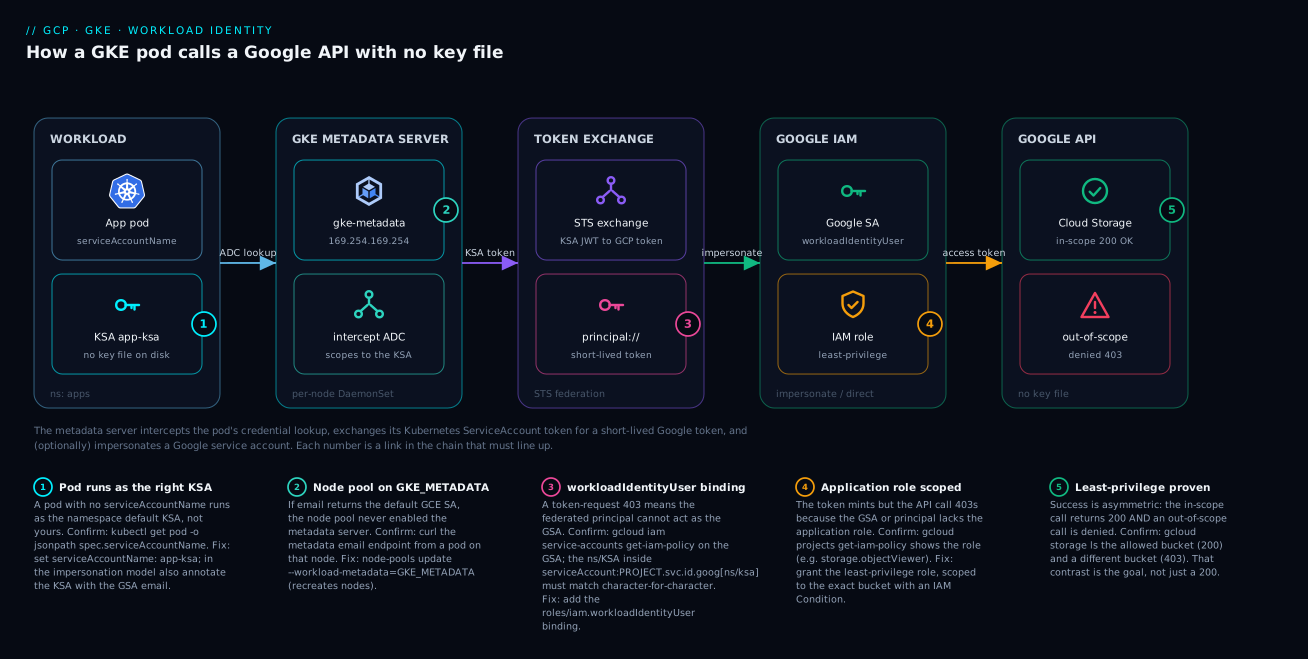
Workload Identity is the safe answer, and the mental model is a building with a photo-ID badge system rather than a shared master key. Instead of handing every pod a copy of a permanent key, GKE runs a tiny “badge desk” on every node — the metadata server. When your code asks for credentials, the badge desk checks which Kubernetes ServiceAccount (KSA) the pod is running as, exchanges that short-lived Kubernetes identity for a short-lived Google token, and hands it back. There is no file on disk to steal, the token expires on its own in minutes, and the whole exchange happens inside the cluster. The pod never sees a private key, because there is no private key.
There are two ways to wire the KSA to Google IAM, and the rest of this lesson is mostly about telling them apart. In the impersonation model (classic), the KSA is allowed to impersonate a Google service account (GSA), and you grant your API permissions to that GSA. In the direct model (newer, preferred for new work), you skip the GSA entirely and grant IAM roles straight to the Kubernetes ServiceAccount. Either way, the payoff is the same: your pod calls Google APIs with a real, auditable, least-privilege identity and zero key files.
Level: Expert — but this nutshell and the practice section start from zero · Time: ~37 min read · After this you can: enable Workload Identity on a cluster and its node pools, bind a KSA to a GSA (impersonation) or grant IAM straight to a KSA (direct), scope a workload to exactly one bucket, exec into a pod and read its real identity off the metadata server, and debug a 403 by working the five-link chain in order.
Prerequisites — read these first if the terms are new. You should be comfortable with what a Kubernetes ServiceAccount is and how a pod gets one (that is the Kubernetes RBAC & ServiceAccounts fundamentals lesson), and you should know the shape of a Google IAM policy — a member (who) granted a role (what) on a resource (where). If you have configured EKS IRSA or Pod Identity before, the EKS IRSA to Pod Identity migration lesson is the AWS mirror image of everything here, and the “cross-cloud comparison” table later maps the two vocabularies onto each other.
Exported service account keys are the single most common credential-leak vector on Google Cloud, and on GKE you do not need them at all. Workload Identity Federation for GKE lets a Kubernetes service account (KSA) impersonate or directly act as a Google IAM principal, with short-lived tokens minted on demand by the cluster metadata server. This is a deep dive into how that machinery actually works, how to wire it up correctly, and how to debug it when a pod starts throwing 403s from the metadata path.
1. The internals: metadata server, KSA-to-GSA mapping, and token minting
When code inside a pod calls a Google API through a client library, the library looks for Application Default Credentials. With Workload Identity enabled, ADC resolves to the GKE metadata server reachable at http://metadata.google.internal (the link-local address 169.254.169.254). This is not the raw GCE metadata server; on Workload Identity node pools it is a per-node gke-metadata-server DaemonSet pod that intercepts metadata traffic and scopes it to the calling pod’s KSA.
Before we trace the flow, it helps to know what “Application Default Credentials” (ADC) actually is, because it is the reason none of your application code changes. ADC is a search order that every official Google client library follows to find credentials, in this sequence: (1) the GOOGLE_APPLICATION_CREDENTIALS environment variable pointing at a key file, (2) the credentials cached by gcloud auth application-default login on a developer machine, and finally (3) the metadata server of the compute environment the code is running in. On a Workload Identity pod, (1) and (2) are absent by design, so the library falls through to (3) — the metadata server — and gets a token. The lesson here is that “using Workload Identity” is mostly a matter of making sure your code has no key file to find, so ADC reaches the metadata server. If someone leaves a GOOGLE_APPLICATION_CREDENTIALS variable set, ADC finds the file first and the pod silently keeps using the old, leakable key.
The flow when a pod requests a token:
pod app -> client library (ADC)
        -> GET metadata.google.internal/.../token
        -> gke-metadata-server (per node)
           1. identifies the calling pod + its KSA
           2. exchanges the KSA token at the STS endpoint
              for a federated access token
           3. (optional) impersonates a GSA via IAM Credentials API
        -> returns a short-lived OAuth2 access token
Walk that chain slowly, because every failure you will ever debug maps to one of these steps. Step 1 depends on the metadata server being able to see which pod is calling and which KSA it runs as — that is purely a function of the node pool running the gke-metadata-server DaemonSet (the GKE_METADATA mode). Step 2 is the token exchange: the metadata server takes the pod’s projected Kubernetes ServiceAccount token — a short-lived, cryptographically signed JWT that Kubernetes mounts into every pod — and presents it to Google’s Security Token Service (STS), which validates the signature against the cluster’s OIDC issuer and hands back a federated Google access token. Step 3 is the optional impersonation hop: if the KSA is annotated to point at a GSA, the metadata server calls the IAM Credentials API to swap the federated token for one that speaks as the GSA. In the direct model there is no step 3 — the federated token itself carries the KSA’s own IAM grants.
The KSA identity is expressed as a federated principal of the form:
serviceAccount:PROJECT_ID.svc.id.goog[NAMESPACE/KSA_NAME]
That string PROJECT_ID.svc.id.goog is the workload identity pool automatically provisioned for the cluster’s project. Every pod running under a given KSA in a given namespace federates to exactly that principal. The bracketed [NAMESPACE/KSA_NAME] is the crucial part: identity is scoped to the pair of namespace and ServiceAccount name, so apps/app-ksa and staging/app-ksa are two entirely different principals even though the KSA name is the same. Get one character wrong in the namespace or the name and IAM treats it as a different (unbound) identity — which is why so many “it should work” failures are really a silent mismatch. There are two models for what happens next:
- Impersonation model (classic): the federated principal is granted
roles/iam.workloadIdentityUseron a Google service account (GSA), and the metadata server impersonates that GSA. The KSA is annotated to point at the GSA. - Direct model (KSA-only): you grant IAM roles directly to the federated principal. No GSA, no annotation, no impersonation hop. This is the newer pattern and the one to prefer for greenfield work.
Callout: tokens are short-lived (minted per request and cached briefly). There is nothing on disk to rotate, exfiltrate, or forget about. That is the entire security win.
To make the caching concrete: the metadata server hands the client library a token with a limited lifetime (on the order of an hour for the underlying access token, refreshed well before expiry), and the library caches it in memory and re-requests a fresh one automatically as it nears expiry. Your code never manages any of this. Contrast that with a key file, whose lifetime is “forever, until a human deletes it” — the difference between a badge that deactivates itself overnight and a master key that works until it is physically collected.
2. Enable Workload Identity on the cluster and node pools
Workload Identity is a cluster-level setting and a node-pool-level setting. Enabling it on the cluster alone is the number-one reason “I configured everything and it still doesn’t work.”
Why two switches for one feature? Because they turn on two different things. The cluster switch (--workload-pool) creates and associates the workload identity pool — it is what makes PROJECT_ID.svc.id.goog exist and tells STS to trust this cluster’s OIDC issuer. The node-pool switch (--workload-metadata=GKE_METADATA) replaces the raw GCE metadata endpoint on those nodes with the gke-metadata-server DaemonSet that does the per-pod interception. A cluster with the pool set but a node pool still on GCE_METADATA will have pods that fall straight through to the node’s identity (the default Compute Engine service account) — which usually has broad, ambient permissions and will make a call “work” for the wrong reason, masking the misconfiguration until you least want it to.
Enable it on the cluster (sets the workload pool):
gcloud container clusters update CLUSTER_NAME \
  --location=REGION \
  --workload-pool=PROJECT_ID.svc.id.goog
Then enable the metadata server on each node pool. New node pools should set it at creation; existing ones need an update (which recreates nodes):
# Existing node pool
gcloud container node-pools update NODE_POOL \
  --cluster=CLUSTER_NAME \
  --location=REGION \
  --workload-metadata=GKE_METADATA

# New node pool
gcloud container node-pools create NODE_POOL \
  --cluster=CLUSTER_NAME \
  --location=REGION \
  --workload-metadata=GKE_METADATA
Confirm the mode actually took on every pool before you trust it — a cluster that “has Workload Identity” but one stray pool on GCE_METADATA is a landmine:
gcloud container node-pools list \
  --cluster=CLUSTER_NAME --location=REGION \
  --format='table(name, config.workloadMetadataConfig.mode)'
Representative output — the pool marked GCE_METADATA is the one that will silently use the node identity:
NAME       MODE
primary    GKE_METADATA
batch      GKE_METADATA
legacy     GCE_METADATA
In Terraform, both halves are explicit:
resource "google_container_cluster" "primary" {
  name     = "prod-cluster"
  location = "us-central1"

  workload_identity_config {
    workload_pool = "${var.project_id}.svc.id.goog"
  }
  # ... remaining cluster config
}

resource "google_container_node_pool" "primary" {
  name     = "primary"
  cluster  = google_container_cluster.primary.name
  location = "us-central1"

  node_config {
    workload_metadata_config {
      mode = "GKE_METADATA"
    }
  }
}
On Autopilot clusters, Workload Identity is enabled by default and the node-pool step does not apply. The KSA/IAM wiring below is identical.
Autopilot removes the node-pool footgun entirely — there are no node pools to forget, so half of section 7’s failure modes simply cannot happen. That is one of the quieter security wins of Autopilot: the feature that is easiest to half-configure on Standard is on-by-default and non-optional on Autopilot. If you are starting fresh and Workload Identity correctness matters (it does), the GKE Autopilot production hardening guide walks through the rest of the secure-by-default posture that pairs with it.
3. Link a KSA to a GSA with IAM bindings (impersonation model)
This is the classic pattern you will meet in most existing clusters. Three pieces must line up: a GSA, an IAM policy binding granting the KSA principal workloadIdentityUser on that GSA, and an annotation on the KSA.
Keep those three pieces in your head as a triangle, because a break in any one produces a different, specific failure: no GSA binding → the token request 403s; no annotation → the pod authenticates as the bare federated principal (which has no application roles) instead of the GSA; no application role on the GSA → the token mints fine but the API call 403s. We will map exactly these symptoms in section 7.
Create the GSA and grant it whatever application roles it needs (example: read objects from a bucket):
gcloud iam service-accounts create app-gsa \
  --display-name="App workload identity GSA"

gcloud projects add-iam-policy-binding PROJECT_ID \
  --member="serviceAccount:app-gsa@PROJECT_ID.iam.gserviceaccount.com" \
  --role="roles/storage.objectViewer"
Bind the federated KSA principal to the GSA via workloadIdentityUser:
gcloud iam service-accounts add-iam-policy-binding \
  app-gsa@PROJECT_ID.iam.gserviceaccount.com \
  --role="roles/iam.workloadIdentityUser" \
  --member="serviceAccount:PROJECT_ID.svc.id.goog[apps/app-ksa]"
Read that last command carefully, because it is the heart of the impersonation model and the single most typo-prone line in the whole setup. You are editing the IAM policy of the GSA (not of the project), adding a rule that says “the Kubernetes ServiceAccount app-ksa in namespace apps, federated through this project’s workload identity pool, is allowed to impersonate me.” The member is the federated-principal form (serviceAccount:...svc.id.goog[ns/ksa]), and the role is roles/iam.workloadIdentityUser — a role whose only job is to permit that impersonation. It grants no application permissions at all; those live on the GSA’s own grants from the previous command. This separation is deliberate and worth internalizing: workloadIdentityUser answers “who may become this GSA,” and the GSA’s other roles answer “what this GSA may do.” Conflating the two is a common source of confusion.
Create the KSA and annotate it to point at the GSA:
apiVersion: v1
kind: ServiceAccount
metadata:
  name: app-ksa
  namespace: apps
  annotations:
    iam.gke.io/gcp-service-account: app-gsa@PROJECT_ID.iam.gserviceaccount.com
kubectl apply -f ksa.yaml
The annotation is the pointer from the Kubernetes side back to the GSA. Its key is exactly iam.gke.io/gcp-service-account and its value is the full GSA email — not the display name, not the short ID, the email. The metadata server reads this annotation at token-request time to know which GSA to impersonate. A missing annotation is not an error; it just means “impersonate nobody,” so the pod runs as the bare federated principal.
Finally, make pods actually use the KSA. A pod that omits serviceAccountName runs as the namespace default KSA, not yours:
spec:
  serviceAccountName: app-ksa
  containers:
    - name: app
      image: REGION-docker.pkg.dev/PROJECT_ID/repo/app:1.0
This is the piece people forget most often because it lives in the Deployment (or Pod) spec, far from all the IAM you just wrote. Everything upstream can be perfect, but if the pod template does not name the KSA, the pod runs as default and inherits none of it. Treat serviceAccountName as part of the identity configuration, not an afterthought in the workload manifest.
4. Fine-grained access with IAM conditions and custom roles
Predefined roles like roles/storage.objectViewer are project-wide and almost always too broad. Tighten them two ways.
The reason predefined roles are too broad is that they are designed for convenience, not least privilege: roles/storage.objectViewer grants read on every bucket in the project, so a workload that only ever reads one bucket is, on paper, allowed to read all of them. If that pod is compromised, the blast radius is every object in the project rather than one bucket. Scoping the grant is what turns “a leaked pod can read everything” into “a leaked pod can read exactly what it was supposed to.”
IAM Conditions scope a grant to specific resources or contexts using CEL. For example, restrict object reads to one bucket:
gcloud projects add-iam-policy-binding PROJECT_ID \
  --member="serviceAccount:app-gsa@PROJECT_ID.iam.gserviceaccount.com" \
  --role="roles/storage.objectViewer" \
  --condition='expression=resource.name.startsWith("projects/_/buckets/my-app-bucket"),title=only-app-bucket'
The expression is a CEL (Common Expression Language) predicate evaluated at request time; if it returns false, the grant does not apply and the call is denied. resource.name.startsWith(...) is the common shape for scoping to a resource prefix. Conditions can also key off request attributes such as time of day or the caller’s IP range, but resource-scoping is the workhorse for workload least-privilege.
Custom roles pare permissions down to the exact set of API calls a workload makes. Define them in YAML and create at project or org level:
title: "App Object Reader"
stage: "GA"
includedPermissions:
  - storage.objects.get
  - storage.objects.list
gcloud iam roles create appObjectReader \
  --project=PROJECT_ID \
  --file=role.yaml
Conditions and custom roles are complementary, not either/or. A custom role answers “which API verbs” (get and list, but not delete); a condition answers “on which resources” (only my-app-bucket). The tightest workloads use both: a custom role with the two permissions the app actually calls, granted with a condition that pins it to the one bucket it actually touches.
Conditions are evaluated on the GSA’s access in the impersonation model, and on the federated principal directly in the KSA-only model. Either way, condition the application grant, not the
workloadIdentityUsergrant.
5. The KSA-only federation model (no GSA)
Newer GKE versions let you skip the GSA entirely and grant IAM roles straight to the federated principal. This removes the impersonation hop, the extra identity to manage, and the annotation. For a KSA app-ksa in namespace apps:
gcloud projects add-iam-policy-binding PROJECT_ID \
  --role="roles/storage.objectViewer" \
  --member="principal://iam.googleapis.com/projects/PROJECT_NUMBER/locations/global/workloadIdentityPools/PROJECT_ID.svc.id.goog/subject/ns/apps/sa/app-ksa"
Note the differences from the impersonation binding:
| Aspect | Impersonation (GSA) | Direct (KSA-only) |
|---|---|---|
| Member format | serviceAccount:PROJECT_ID.svc.id.goog[ns/ksa] |
principal://.../subject/ns/NS/sa/KSA |
Uses PROJECT_NUMBER |
No | Yes (in the principal path) |
| KSA annotation | Required | Not required |
| Extra GSA to manage | Yes | No |
With the direct model there is no annotation on the KSA. The pod still needs serviceAccountName: app-ksa, and that is the whole configuration on the Kubernetes side. Some Google API client paths still expect a GSA email (and a handful of integrations require one), so verify your specific APIs, but for the common cases the KSA-only model is cleaner and is the right default going forward.
There is an important ergonomic difference worth calling out before you standardize on the direct model. In the impersonation model, the member string is short and forgiving (serviceAccount:PROJECT_ID.svc.id.goog[apps/app-ksa]) and there are two places (the annotation and the binding) that name the GSA, so a typo in one often gets caught by a mismatch with the other. In the direct model, the principal:// string is long, embeds the numeric PROJECT_NUMBER, and is the single source of truth — IAM will happily accept a malformed principal and silently grant nothing, because to IAM it is just an opaque string that matches no live identity. The rule that follows is: generate the principal:// string from live values; never hand-type it. The Enterprise scenario later is a case study in exactly this failure.
6. Per-namespace isolation and the default SA trap
Treat the namespace as your identity boundary. Each team/app gets a dedicated KSA in its own namespace, bound to its own least-privilege IAM. Never bind sensitive roles to a default KSA, because every pod that forgets serviceAccountName silently inherits it.
Defang the default KSA in each namespace so an unannotated pod gets nothing rather than ambient access:
apiVersion: v1
kind: ServiceAccount
metadata:
  name: default
  namespace: apps
automountServiceAccountToken: false
Then audit which pods run as which KSA:
kubectl get pods -A \
  -o custom-columns='NS:.metadata.namespace,POD:.metadata.name,KSA:.spec.serviceAccountName'
Anything showing KSA: default (or <none>) is a pod that is not using a scoped identity. Fix it before it ships.
The namespace-as-boundary idea is worth taking seriously because it composes with everything else in this lesson. The federated principal literally encodes the namespace (.../subject/ns/apps/sa/app-ksa), so IAM grants are namespace-scoped by construction — a binding for apps/app-ksa cannot be exercised by a pod in staging, even one with the same KSA name. That means “which namespace can a pod run in” becomes a genuine security control: if you also enforce, via admission policy, that pods in apps may only use approved KSAs, you get a clean chain from namespace membership to Google IAM permissions. This is the GKE analogue of the per-namespace scoping you would build with session tags on EKS, and it is why multi-tenant platforms lean on namespaces as the unit of isolation.
7. Debugging: metadata 403s, missing annotations, DNS and firewall
When access fails, work the path in order from the most common failure to the rarest. First, run an interactive pod as the target KSA and probe the metadata server:
kubectl run -it --rm wi-debug \
  --image=google/cloud-sdk:slim \
  --namespace=apps \
  --overrides='{"spec":{"serviceAccountName":"app-ksa"}}' \
  -- bash
Inside the pod, confirm which identity the metadata server reports and that a token can be minted:
# Which identity does the pod actually resolve to?
curl -s -H "Metadata-Flavor: Google" \
  "http://metadata.google.internal/computeMetadata/v1/instance/service-accounts/default/email"

# Can it mint a token? (200 = good; 403/404 = misconfig)
curl -s -H "Metadata-Flavor: Google" \
  "http://metadata.google.internal/computeMetadata/v1/instance/service-accounts/default/token"

# What gcloud sees
gcloud auth list
Map the symptom to the cause:
| Symptom | Most likely cause |
|---|---|
| Email returns the default GCE SA, not your GSA | Node pool not on GKE_METADATA, or pod using wrong KSA |
email correct but token request 403 |
Missing/incorrect workloadIdentityUser binding |
curl: could not resolve metadata.google.internal |
DNS / NetworkPolicy blocking the metadata server |
| API call 403 but token mints fine | Token works; the GSA/principal lacks the application role |
| Annotation present but ignored | Typo in annotation key iam.gke.io/gcp-service-account |
Specific gotchas to check:
- Annotation key and value. The key is exactly
iam.gke.io/gcp-service-accountand the value is the full GSA email, not the short name. A trailing space or wrong project here fails silently. - Member string mismatch. In the impersonation binding, namespace and KSA name inside the brackets must match the pod’s actual namespace and
serviceAccountNamecharacter-for-character. - NetworkPolicy / firewall. A default-deny egress NetworkPolicy will block
169.254.169.254. Egress to the metadata server must be allowed. Likewise, hardened nodes that block link-local traffic break the metadata path. - Node-pool propagation. After
--workload-metadata=GKE_METADATA, nodes are recreated. Pods scheduled on old nodes during rollout still hit the GCE metadata server. Confirm the pod’s node is new. - Eventual consistency. Fresh IAM bindings can take a short while to propagate; a 403 that resolves itself in a minute or two is propagation, not your config.
The disciplined way to read that table is as a decision tree, not a checklist. Ask the two metadata questions first and in order — “what email does the pod resolve to?” and “does a token mint?” — because their answers partition the whole problem space. If the email is wrong, the failure is below IAM (node-pool mode or wrong KSA) and no amount of IAM editing will help. If the email is right but the token 403s, the failure is in the federation/impersonation binding. If the token mints but the API call fails, the failure is above federation, in the application-role grant. Beginners waste hours re-checking IAM bindings when the email already told them the node pool was the problem. Read the identity first; let it tell you which layer to fix.
8. Auditing effective permissions
Verify what an identity can actually do, not what you think you granted. Test a specific permission against a resource:
gcloud projects get-ancestors-iam-policy PROJECT_ID  # context
gcloud iam service-accounts get-iam-policy \
  app-gsa@PROJECT_ID.iam.gserviceaccount.com  # who can impersonate
Use Policy Analyzer to ask “who has access to what” across the resource hierarchy:
gcloud asset analyze-iam-policy \
  --organization=ORG_ID \
  --identity="serviceAccount:app-gsa@PROJECT_ID.iam.gserviceaccount.com"
Then confirm real usage in Cloud Audit Logs. Data Access logs show the impersonation and the downstream API calls carrying the GSA (or federated principal) as the authentication info:
gcloud logging read \
  'protoPayload.authenticationInfo.principalEmail="app-gsa@PROJECT_ID.iam.gserviceaccount.com"' \
  --limit=20 \
  --format='table(timestamp, protoPayload.methodName, resource.type)'
The distinction between granted and effective access is the whole point of auditing. You granted workloadIdentityUser and an application role; what a pod can actually do is the intersection of those grants, any IAM Conditions on them, org-policy constraints, and (in the impersonation model) the fact that the pod must go through the GSA at all. Policy Analyzer computes that intersection for you, and Audit Logs show what the identity really did, which is the only evidence that survives an incident review. A good habit after any Workload Identity change: run the analyze-iam-policy query to confirm the effective access matches your intent, then check Audit Logs a day later to confirm the workload is using exactly that access and nothing broader.
Going deeper
Everything above gets a workload running. This section is for when you own the platform — the internals you reach for when something behaves unexpectedly, and the design decisions that separate a demo from a fleet.
Workload Identity Federation for GKE, end to end
Under the hood, Workload Identity for GKE is an application of the general Workload Identity Federation machinery that Google Cloud uses to trust external identity providers (AWS, Azure, GitHub Actions, any OIDC issuer). The clever part is that GKE registers the cluster itself as a trusted OIDC issuer inside a Google-managed workload identity pool named PROJECT_ID.svc.id.goog. So the same token-exchange protocol that lets a GitHub Actions job assume a Google identity is what lets your pod do it — the “external” identity provider just happens to be your own cluster’s Kubernetes API server.
The exchange, step by step, when a pod requests a token:
- Kubernetes mints a projected SA token. Every pod gets a short-lived, audience-scoped JWT signed by the cluster’s OIDC issuer, mounted at a well-known path. Its
sub(subject) claim encodessystem:serviceaccount:NAMESPACE:KSA_NAME, and GKE maps that to the federated subjectns/NAMESPACE/sa/KSA_NAME. - The metadata server intercepts the ADC request. The client library asks
metadata.google.internalfor a token; thegke-metadata-serverDaemonSet answers, having identified the calling pod from the connection. - STS validates and exchanges. The metadata server presents the projected JWT to Google’s Security Token Service, which verifies the signature against the cluster’s published OIDC keys and, if valid, returns a federated access token whose identity is the
principal://form. - (Impersonation only) IAM Credentials swaps identity. If the KSA is annotated with a GSA, the metadata server calls
generateAccessTokenon the IAM Credentials API to get a token that speaks as the GSA. This is the step that requiresroles/iam.workloadIdentityUser. - The token is returned and cached. The client library receives an OAuth2 access token and caches it in memory until shortly before expiry.
This is why the two IAM-side identifiers exist. The principal:// form names exactly one federated identity — one KSA in one namespace:
principal://iam.googleapis.com/projects/PROJECT_NUMBER/locations/global/workloadIdentityPools/PROJECT_ID.svc.id.goog/subject/ns/NAMESPACE/sa/KSA_NAME
The principalSet:// form names a set of federated identities selected by an attribute — most usefully, “every KSA in a namespace”:
principalSet://iam.googleapis.com/projects/PROJECT_NUMBER/locations/global/workloadIdentityPools/PROJECT_ID.svc.id.goog/namespace/NAMESPACE
You can also select every workload in an entire cluster:
principalSet://iam.googleapis.com/projects/PROJECT_NUMBER/locations/global/workloadIdentityPools/PROJECT_ID.svc.id.goog/kubernetes.cluster/https://container.googleapis.com/v1/projects/PROJECT_ID/locations/LOCATION/clusters/CLUSTER_NAME
principalSet:// is the direct-model answer to “I want every service in the apps namespace to read the same shared config bucket” — one binding, not one-per-KSA. Use it sparingly and only for genuinely namespace-wide grants; the moment two workloads in a namespace need different access, go back to per-KSA principal:// bindings so least privilege holds.
Impersonation vs direct: which model, when
| Consideration | Impersonation (GSA) | Direct (KSA-only) |
|---|---|---|
| Moving parts | GSA + binding + annotation + role | binding + role |
| Greenfield default | No | Yes |
| Works with every Google API/integration | Yes (widest compatibility) | Mostly; a few paths still want a GSA email |
| Cross-project access | GSA lives in one project, granted elsewhere | principal:// referenced from the resource’s project |
| Namespace-wide grant | Awkward (one GSA, many KSAs annotated) | Natural (principalSet:// on the namespace) |
| Typo blast radius | Lower (two places cross-check) | Higher (one opaque string) |
| Existing clusters you inherit | Almost always this | Increasingly common |
The honest guidance: prefer direct for new workloads, keep impersonation where an integration demands a GSA email or where you are matching an existing pattern across a large estate. Do not mix the two for the same KSA — annotate for impersonation or grant directly, not both, or you will spend an afternoon working out which identity actually won.
Least-privilege GSA (and KSA) design
The identity is only as safe as the roles behind it. A few principles that scale:
- One identity per workload, not per team. Sharing a GSA across five deployments means the union of their permissions is the blast radius of any one of them. A KSA/GSA per Deployment keeps each blast radius minimal.
- Custom role + condition beats a predefined role. As in section 4: the verbs the app calls, scoped to the resources it touches. Predefined roles are a starting point to narrow from, not an endpoint.
- Never reuse the default Compute Engine service account. It is broadly privileged and shared by everything on the node. Disable its automatic key and do not annotate KSAs to it.
- Grant on the tightest resource in the hierarchy. Prefer a binding on the single bucket or dataset over a project-level grant with a condition; both work, but a resource-level grant is easier to audit and harder to accidentally widen.
Workload Identity across projects
A common production shape: the cluster lives in a “runtime” project, but the bucket or Pub/Sub topic it reads lives in a “data” project. Workload Identity handles this cleanly because IAM is global. In the impersonation model, the GSA can live in either project; you grant it the application role in the data project (on the data-project resource) and the workloadIdentityUser binding on the GSA (wherever the GSA lives). In the direct model, you add the principal:// member to the data project’s IAM policy — the workload identity pool path still references the cluster’s project number and pool, but the binding is written on the resource’s project. The mental model: the identity is anchored to the cluster’s project; the grant is written wherever the resource lives.
Fleet Workload Identity for multi-cluster
When you run many clusters — across regions, or even across clouds — per-cluster workload identity pools mean the “same” service (payments/api) is a different principal on every cluster, and a role that all of them need lists every cluster’s pool by hand. Fleet Workload Identity collapses that. When you register clusters to a GKE fleet, the fleet host project provides a single Google-managed workload identity pool, FLEET_PROJECT_ID.svc.id.goog, that becomes the default pool for every cluster in the fleet — including clusters in other projects and other clouds. Any workload with the same namespace/KSA identifier is treated by IAM as the same principal across the whole fleet. So one binding for ns/payments/sa/api covers that workload on all fifty clusters, and adding a cluster to the fleet requires no new IAM at all.
The trade-off is exactly that sameness: because payments/api on cluster A and payments/api on cluster B are now the same IAM principal, you must treat namespace/KSA names as fleet-wide identifiers and prevent accidental collisions (Google’s multi-tenant fleet guidance is about reducing this “identity sameness” risk). Fleet WI is the right tool for a homogeneous platform where the same workload legitimately runs everywhere; it is the wrong tool if two teams independently picked the namespace apps and mean different things by it. (Note that a separate, newer feature called managed workload identity issues SPIFFE X.509 certificates for workload-to-workload mTLS — that is about pods authenticating to each other, not to Google APIs, and is out of scope here.)
Migrating off service account keys
Most real adoption is a migration, not a greenfield build. A practical sequence:
- Find the keys. Search manifests for the tell-tale pattern — a Secret mounted as a file and pointed at by
GOOGLE_APPLICATION_CREDENTIALS:kubectl get pods -A -o json \ | jq -r '.items[] | select( [.spec.containers[].env[]? | select(.name=="GOOGLE_APPLICATION_CREDENTIALS")] | length > 0) | "\(.metadata.namespace)/\(.metadata.name)"' - Stand up the identity in parallel. Create the KSA (and GSA, if impersonation) and grant the same roles the key had — but scoped down with conditions/custom roles while you are here.
- Cut over one workload. Set
serviceAccountName, remove theGOOGLE_APPLICATION_CREDENTIALSenv var and the key Secret mount, and redeploy. ADC now falls through to the metadata server. - Verify from inside the pod (the four-check
Verifysection below), then delete the key. - Close the door. Enforce the org policy constraint
iam.disableServiceAccountKeyCreationso nobody can mint a new leakable key, andiam.disableServiceAccountKeyUploadto block externally-generated keys. Now the leak vector cannot reappear.
The four things that must line up
Almost every Workload Identity failure is one of four misalignments. Internalize this list and you can debug most incidents without opening the docs:
- The pod runs as the intended KSA —
serviceAccountNameset, matching the namespace you configured. - The node pool serves GKE metadata —
--workload-metadata=GKE_METADATAon the pool the pod landed on (a non-issue on Autopilot). - The federation/impersonation binding matches exactly — the
workloadIdentityUsermember[ns/ksa](impersonation) or theprincipal://.../ns/NS/sa/KSA(direct) matches the pod’s real namespace and KSA, character-for-character; and in impersonation, the annotation names the right GSA email. - The application role is granted and scoped — the GSA (impersonation) or the federated principal (direct) actually holds the role the API call needs, on the resource it touches.
The order matters: they map one-to-one onto the metadata-first decision tree in section 7. Check them in this order and the failure declares itself.
Autopilot specifics
On Autopilot, Workload Identity is mandatory and on by default: the workload pool is set, every node serves GKE metadata, and there is no --workload-metadata flag to get wrong because there are no user-managed node pools. That eliminates failure modes 2 (node-pool mode) and the node-pool-propagation gotcha entirely. What remains is pure IAM-and-KSA wiring — models, bindings, annotations, roles — which is identical to Standard. Autopilot also blocks direct access to the underlying node and hostNetwork, so the “hardened node blocks link-local” failure cannot happen either. If you want the strongest default posture with the fewest ways to misconfigure Workload Identity, Autopilot is it.
Cross-cloud comparison: GKE WI vs AKS WI vs EKS IRSA / Pod Identity
The three big clouds converged on the same idea — federate a Kubernetes ServiceAccount to a cloud IAM identity via short-lived tokens, no key files — but the vocabulary differs. If you work across clouds, this table is the Rosetta Stone:
| Concept | GKE Workload Identity | AKS Workload Identity | EKS IRSA / Pod Identity |
|---|---|---|---|
| Cloud identity a pod acts as | Google SA (impersonation) or the KSA itself (direct) | Entra user-assigned managed identity | IAM role |
| Trust anchor | Cluster OIDC issuer in svc.id.goog pool |
Entra app federated credential | Per-cluster OIDC provider (IRSA) or pods.eks.amazonaws.com (Pod Identity) |
| KSA → identity link | iam.gke.io/gcp-service-account annotation, or direct principal:// grant |
azure.workload.identity/client-id annotation |
eks.amazonaws.com/role-arn annotation (IRSA) or an association (Pod Identity) |
| Credential delivery | gke-metadata-server on link-local |
Projected token → Entra token exchange | Projected token → STS (IRSA) or Pod Identity Agent on link-local |
| “Grant to a namespace” | principalSet://.../namespace/NS |
(per-identity) | session-tag conditions (Pod Identity) |
| Multi-cluster sameness | Fleet Workload Identity, one pool per fleet | (per-tenant identities) | Pod Identity associations per cluster |
The single most useful cross-cloud instinct: on all three, the failure you will actually hit is a subject mismatch — the namespace/KSA in the cloud-side trust rule not matching the pod’s real namespace/KSA — and on all three, the fix is to read the effective identity from inside the pod and compare it to the binding, character by character. The EKS IRSA to Pod Identity migration lesson walks the AWS side of this in the same spirit.
Enterprise scenario
A payments platform team ran a multi-tenant GKE cluster where each tenant got its own namespace, and they’d standardized on the KSA-only direct model. A new tenant’s pods could mint a token (/token returned 200) but every Cloud Storage call came back 403 PERMISSION_DENIED, even though the principal:// binding looked identical to working tenants. The grant had been applied with the literal string PROJECT_ID.svc.id.goog instead of the cluster’s actual workload pool, and worse, the principal path embedded the wrong PROJECT_NUMBER (the team had copy-pasted from a sibling project). Because the direct-model member is an opaque string, IAM accepts a malformed principal happily and silently grants nothing.
The fix was to derive both values programmatically instead of hand-editing them, then re-apply:
PROJECT_ID=$(gcloud config get-value project)
PROJECT_NUMBER=$(gcloud projects describe "$PROJECT_ID" --format='value(projectNumber)')

gcloud projects add-iam-policy-binding "$PROJECT_ID" \
  --role="roles/storage.objectViewer" \
  --member="principal://iam.googleapis.com/projects/${PROJECT_NUMBER}/locations/global/workloadIdentityPools/${PROJECT_ID}.svc.id.goog/subject/ns/tenant-42/sa/app-ksa" \
  --condition='expression=resource.name.startsWith("projects/_/buckets/tenant-42-data"),title=tenant-42-bucket'
They then added a CI guard that rejects any IAM diff whose principal:// path doesn’t resolve to the live project number. The broader lesson: in the KSA-only model there is no annotation and no GSA email to typo-check against, so the principal string itself becomes the single point of failure. Generate it; never type it.
Common beginner mistakes
These are the misconceptions that cost the most hours — not obscure edge cases, but wrong mental models that make correct-looking config fail.
- “I’ll just mount the service-account key as a Secret — it’s easier.” This is the exact anti-pattern Workload Identity exists to kill. A key file is a password with no expiry; mounted as a Secret it sits in etcd, in the pod’s filesystem, and in every backup, waiting to leak. The right model is “identity, not secret”: the pod is an identity (its KSA), and the metadata server proves it on demand. If you find yourself creating a key, stop — that is the failure, not the setup.
- “The binding is there, so it should work” — but the namespace or KSA name is off by a character. IAM scopes the federated principal to the exact
[namespace/ksa]pair.apps/app-ksaandapps/app-sa, orapps/app-ksaanddefault/app-ksa, are different identities. A binding on the wrong pair grants nothing to your pod, with no error anywhere — the token just mints as an identity that has no application roles. Always compare the binding against the pod’s real namespace andserviceAccountName, not the one you think it has. - “I enabled Workload Identity on the cluster.” The cluster switch and the node-pool switch are two different settings (section 2). A cluster with the pool set but a node pool still on
GCE_METADATAruns pods as the node’s identity — which often has enough ambient permission to make things “work,” hiding the bug until you tighten the node SA or move to a locked-down pool. VerifyGKE_METADATAon every pool, or use Autopilot where it is automatic. - “Give the GSA
roles/editorso it definitely has access, I’ll narrow it later.” Later never comes, and now a single compromised pod can rewrite half the project. Start from the minimum — the two or three permissions the app actually calls — and add only what a real403proves it needs. Over-broad is the default failure direction; least privilege is a discipline you apply up front. - “It returned 403 right after I applied the binding, so my config is wrong.” IAM changes are eventually consistent; a fresh binding can take a minute or two to propagate. A 403 that clears itself shortly after applying is propagation timing, not a misconfiguration. Give it a moment before you start re-editing (and re-introducing) mistakes.
- “
GOOGLE_APPLICATION_CREDENTIALSis still set, but that’s fine, I added Workload Identity too.” ADC checks that env var first. As long as it points at a key file, the pod uses the key and never reaches the metadata server — your Workload Identity setup is inert. Remove the variable and the key mount so ADC falls through to the metadata server.
Practice challenges
Work these top to bottom — they escalate from “read what’s there” to “design cross-project, namespace-wide access.” Try each before opening its solution; the one-line why matters more than the command. No cluster handy? Reason through the answer, then check it — every command and manifest is copy-paste real.
Challenge 1 (Beginner) — Read a pod’s real identity. You are handed a pod in namespace apps that “should” have access but is getting 403s. Without reading any IAM, find out which Google identity the pod actually resolves to.
<details> <summary>Solution</summary>
kubectl run -it --rm wi-debug --image=google/cloud-sdk:slim \
  --namespace=apps \
  --overrides='{"spec":{"serviceAccountName":"app-ksa"}}' -- \
  curl -s -H "Metadata-Flavor: Google" \
  "http://metadata.google.internal/computeMetadata/v1/instance/service-accounts/default/email"
Why: the metadata server reports the effective identity. If it returns your GSA email, the node-pool/KSA half is fine and the problem is an application-role grant; if it returns the default GCE service account, the node pool isn’t on GKE_METADATA or the pod isn’t using your KSA — a completely different fix. Read the identity first; it tells you which layer to debug.
</details>
Challenge 2 (Beginner) — Bind a KSA to a GSA for one role (impersonation). Create the impersonation wiring so that KSA report-ksa in namespace reporting can read (only read) objects, via GSA report-gsa. Write the three commands/manifest.
<details> <summary>Solution</summary>
# 1. GSA + application role
gcloud iam service-accounts create report-gsa --display-name="Reporting reader"
gcloud projects add-iam-policy-binding PROJECT_ID \
  --member="serviceAccount:report-gsa@PROJECT_ID.iam.gserviceaccount.com" \
  --role="roles/storage.objectViewer"

# 2. Let the KSA impersonate the GSA
gcloud iam service-accounts add-iam-policy-binding \
  report-gsa@PROJECT_ID.iam.gserviceaccount.com \
  --role="roles/iam.workloadIdentityUser" \
  --member="serviceAccount:PROJECT_ID.svc.id.goog[reporting/report-ksa]"
# 3. KSA annotated at the GSA
apiVersion: v1
kind: ServiceAccount
metadata:
  name: report-ksa
  namespace: reporting
  annotations:
    iam.gke.io/gcp-service-account: report-gsa@PROJECT_ID.iam.gserviceaccount.com
Why: the three pieces are application-role-on-GSA, workloadIdentityUser-for-the-KSA-principal, and the annotation pointing back. Break any one and you get a distinct failure (section 3). Don’t forget serviceAccountName: report-ksa on the actual pods.
</details>
Challenge 3 (Intermediate) — Do the same with the direct model, scoped to one bucket. No GSA. Grant KSA report-ksa in reporting read on exactly the bucket finance-reports, using the direct principal:// binding and an IAM Condition. Derive the project number rather than hard-coding it.
<details> <summary>Solution</summary>
PROJECT_ID=$(gcloud config get-value project)
PROJECT_NUMBER=$(gcloud projects describe "$PROJECT_ID" --format='value(projectNumber)')

gcloud projects add-iam-policy-binding "$PROJECT_ID" \
  --role="roles/storage.objectViewer" \
  --member="principal://iam.googleapis.com/projects/${PROJECT_NUMBER}/locations/global/workloadIdentityPools/${PROJECT_ID}.svc.id.goog/subject/ns/reporting/sa/report-ksa" \
  --condition='expression=resource.name.startsWith("projects/_/buckets/finance-reports"),title=finance-reports-only'
Why: the direct model grants IAM straight to the federated principal — no GSA, no annotation. Deriving PROJECT_NUMBER avoids the single most common direct-model bug (a copy-pasted wrong number that IAM silently accepts). The condition turns a project-wide read into a one-bucket read.
</details>
Challenge 4 (Intermediate) — Grant every KSA in a namespace the same read access. A namespace shared-config has a dozen workloads that all read one config bucket. Instead of a binding per KSA, write one binding for the whole namespace.
<details> <summary>Solution</summary>
PROJECT_NUMBER=$(gcloud projects describe "$PROJECT_ID" --format='value(projectNumber)')

gcloud projects add-iam-policy-binding "$PROJECT_ID" \
  --role="roles/storage.objectViewer" \
  --member="principalSet://iam.googleapis.com/projects/${PROJECT_NUMBER}/locations/global/workloadIdentityPools/${PROJECT_ID}.svc.id.goog/namespace/shared-config" \
  --condition='expression=resource.name.startsWith("projects/_/buckets/app-shared-config"),title=shared-config-bucket'
Why: principalSet://.../namespace/NAMESPACE selects all federated identities in the namespace, so one binding covers every current and future KSA there. Use it only when the access is genuinely namespace-wide — the moment two workloads need different access, drop back to per-KSA principal://. Note it is principalSet (a set), not principal (one).
</details>
Challenge 5 (Advanced) — Cross-project, and prove least privilege. The cluster is in project runtime-proj; the bucket tenant-42-data lives in project data-proj. Grant the direct-model KSA apps/app-ksa (federated in runtime-proj) read on that bucket only, then describe the two-command check that proves least privilege.
<details> <summary>Solution</summary>
RUNTIME_NUMBER=$(gcloud projects describe runtime-proj --format='value(projectNumber)')

# Binding is written on the DATA project; the pool path references the RUNTIME project.
gcloud projects add-iam-policy-binding data-proj \
  --role="roles/storage.objectViewer" \
  --member="principal://iam.googleapis.com/projects/${RUNTIME_NUMBER}/locations/global/workloadIdentityPools/runtime-proj.svc.id.goog/subject/ns/apps/sa/app-ksa" \
  --condition='expression=resource.name.startsWith("projects/_/buckets/tenant-42-data"),title=tenant-42-only'
The least-privilege proof is asymmetric — from a pod bound to the KSA:
gcloud storage ls gs://tenant-42-data     # expect: succeeds (in scope)
gcloud storage ls gs://tenant-99-data     # expect: 403 (out of scope)
Why: the identity is anchored to the cluster’s project (runtime-proj pool + number), but the grant is written where the resource lives (data-proj). And a passing least-privilege test isn’t “the allowed call worked” — it’s “the allowed call worked and a sibling call was denied.” A setup that returns 200 for everything is over-privileged, not correct.
</details>
Verify
Run this end-to-end check from a pod bound to the KSA. All four should succeed:
# 1. Metadata server returns the intended identity
curl -s -H "Metadata-Flavor: Google" \
  "http://metadata.google.internal/computeMetadata/v1/instance/service-accounts/default/email"

# 2. A token mints (HTTP 200)
curl -s -o /dev/null -w "%{http_code}\n" -H "Metadata-Flavor: Google" \
  "http://metadata.google.internal/computeMetadata/v1/instance/service-accounts/default/token"

# 3. gcloud auth shows the active principal
gcloud auth list --filter=status:ACTIVE --format="value(account)"

# 4. A real, least-privilege API call succeeds (and nothing more does)
gcloud storage ls gs://my-app-bucket
If all four pass and an out-of-scope call (for example, listing a different bucket) is denied, your least-privilege wiring is correct.
Checklist
Glossary
- Workload Identity (Federation) for GKE — the mechanism that lets a pod’s Kubernetes ServiceAccount act as a Google IAM identity via short-lived, on-demand tokens, with no service-account key files.
- KSA (Kubernetes ServiceAccount) — the in-cluster identity a pod runs as, named
serviceAccountNamein the pod spec; the thing that gets federated to Google IAM. - GSA (Google service account) — a Google Cloud IAM identity (
name@project.iam.gserviceaccount.com) that a KSA can impersonate in the classic model, and that holds the application roles. - Impersonation model — the classic wiring: the KSA is granted
roles/iam.workloadIdentityUseron a GSA and annotated to point at it; the pod acts as the GSA. - Direct (KSA-only) model — the newer wiring: IAM roles are granted straight to the federated KSA principal via a
principal://member; no GSA, no annotation. - Workload identity pool — the Google-managed identity pool
PROJECT_ID.svc.id.goog(orFLEET_PROJECT_ID.svc.id.googfor a fleet) that trusts the cluster’s OIDC issuer and anchors every federated principal. - Metadata server /
gke-metadata-server— the per-node DaemonSet on Workload Identity node pools that intercepts pods’ credential requests atmetadata.google.internal(169.254.169.254) and returns scoped tokens. - ADC (Application Default Credentials) — the search order every Google client library follows to find credentials:
GOOGLE_APPLICATION_CREDENTIALSfile → gcloud cached creds → metadata server. Workload Identity works because the first two are absent, so ADC reaches the metadata server. GKE_METADATA— the node-pool--workload-metadatamode that enables the metadata server; the alternativeGCE_METADATAexposes the raw node identity and defeats Workload Identity.--workload-pool— the cluster-level flag that provisions and associates thesvc.id.googpool; one of the two switches that must both be on.iam.gke.io/gcp-service-account— the KSA annotation whose value is the full GSA email; the impersonation model’s pointer from Kubernetes back to the GSA.roles/iam.workloadIdentityUser— the IAM role granted on a GSA that permits a federated principal to impersonate it; grants no application permissions itself.- Federated principal — the identity a KSA presents to IAM, either as
serviceAccount:PROJECT_ID.svc.id.goog[ns/ksa](impersonation member) orprincipal://.../subject/ns/NS/sa/KSA(direct member). principal://— the IAM principal identifier for exactly one federated KSA in one namespace; used in direct-model bindings.principalSet://— the IAM principal identifier for a set of federated identities selected by attribute — e.g..../namespace/NSfor every KSA in a namespace, or.../kubernetes.cluster/...for a whole cluster.- STS (Security Token Service) — the Google service that validates the pod’s projected OIDC token and exchanges it for a short-lived federated access token.
- IAM Credentials API — the service (
generateAccessToken) the metadata server calls to swap the federated token for one that speaks as the GSA, in the impersonation model. - Projected service-account token — the short-lived, auto-rotated OIDC JWT Kubernetes mounts into every pod for its KSA; the
subclaim (system:serviceaccount:NS:KSA) is what STS validates. - IAM Condition — a CEL expression attached to a grant (e.g.
resource.name.startsWith("projects/_/buckets/my-bucket")) that scopes it to specific resources or contexts. - Custom role — an IAM role you define with an exact
includedPermissionslist, to grant only the API verbs a workload actually calls. - Fleet Workload Identity — the multi-cluster feature where a fleet host project’s single pool (
FLEET_PROJECT_ID.svc.id.goog) is the default for every registered cluster, so one binding covers a workload across many clusters and clouds. - Autopilot — the GKE mode of operation where Workload Identity is mandatory and on by default, with no node pools to misconfigure; eliminates the node-pool-mode class of failures.
- Default Compute Engine service account — the broadly-privileged node identity a pod falls back to when the node pool is on
GCE_METADATA; the “wrong” identity that makes misconfigured setups appear to work. iam.disableServiceAccountKeyCreation— the org-policy constraint that blocks minting new service-account keys, closing the leak vector for good once you have migrated.
Pitfalls and next steps
The two failure modes that account for most lost hours are forgetting the node-pool GKE_METADATA flag and a namespace/KSA mismatch in the IAM member string. Both produce confident-looking config that simply does not work, so when in doubt, exec into a pod and read the identity straight from the metadata server rather than reasoning about it.
For next steps: migrate any remaining mounted SA-key secrets off the cluster (search for secretKeyRef entries feeding GOOGLE_APPLICATION_CREDENTIALS), prefer the KSA-only direct model for new workloads, and disable service account key creation at the org level with the iam.disableServiceAccountKeyCreation constraint so the leak vector cannot reappear. Workload Identity is only as strong as the least-privilege IAM behind it, so treat each KSA as a first-class principal with its own scoped, audited grants. From here, the natural companions are the Kubernetes RBAC & ServiceAccounts fundamentals lesson for the in-cluster half of identity, the GKE Autopilot production hardening guide for the secure-by-default cluster it pairs with, and the EKS IRSA to Pod Identity migration lesson if you also run workloads on AWS and want the same key-free posture there.