In a nutshell
GKE Autopilot is Kubernetes with the machines taken care of for you. A normal Kubernetes cluster runs on a set of servers called nodes that you rent, size, patch, and pay for — even when they sit half-empty. Autopilot removes that entire job: Google runs, sizes, secures, and patches the nodes behind the scenes. You just describe the containers you want to run (a pod) and how much CPU and memory each one needs (its requests), and you pay for exactly that — per pod, by the second — not for whole machines.
Think of it like renting screened, furnished desks in a fully-managed building instead of leasing an entire floor. On GKE Standard you lease floors (nodes): you furnish them, keep the lights on, and pay for the space whether or not anyone is sitting there. On Autopilot you just say “I need desks for these people” — Google finds, furnishes, secures, and right-sizes the space, and bills you only for the desks you asked for. The trade-off is that it is a managed building: you cannot knock down walls (no privileged pods), you cannot get into the basement wiring (no logging into a node), and security screening at the door is mandatory (hardened nodes, Workload Identity).
So what is left for you to get right? That is what this playbook calls hardening — not the building’s structure, which Google owns, but the settings that are still yours. Who your pods authenticate to Google as, how many replicas survive a maintenance window, how tightly you lock the front door, and — the one that surprises every team — how accurately you set each pod’s requests, because on Autopilot the request is the bill. Ask for more than you use and you pay for headroom that idles.
Why a beginner should care: Autopilot is the mode most new GKE clusters should start on, because it deletes the hardest, most error-prone part of running Kubernetes — node operations. But “managed” does not mean “secure and cheap by default in every dimension.” The reliability, security, and cost levers in this lesson are the ones that stay your responsibility. Learn them once and Autopilot becomes genuinely low-effort, without the bill drifting out from under you.
Level: Intermediate–Advanced · Time: ~31 min read
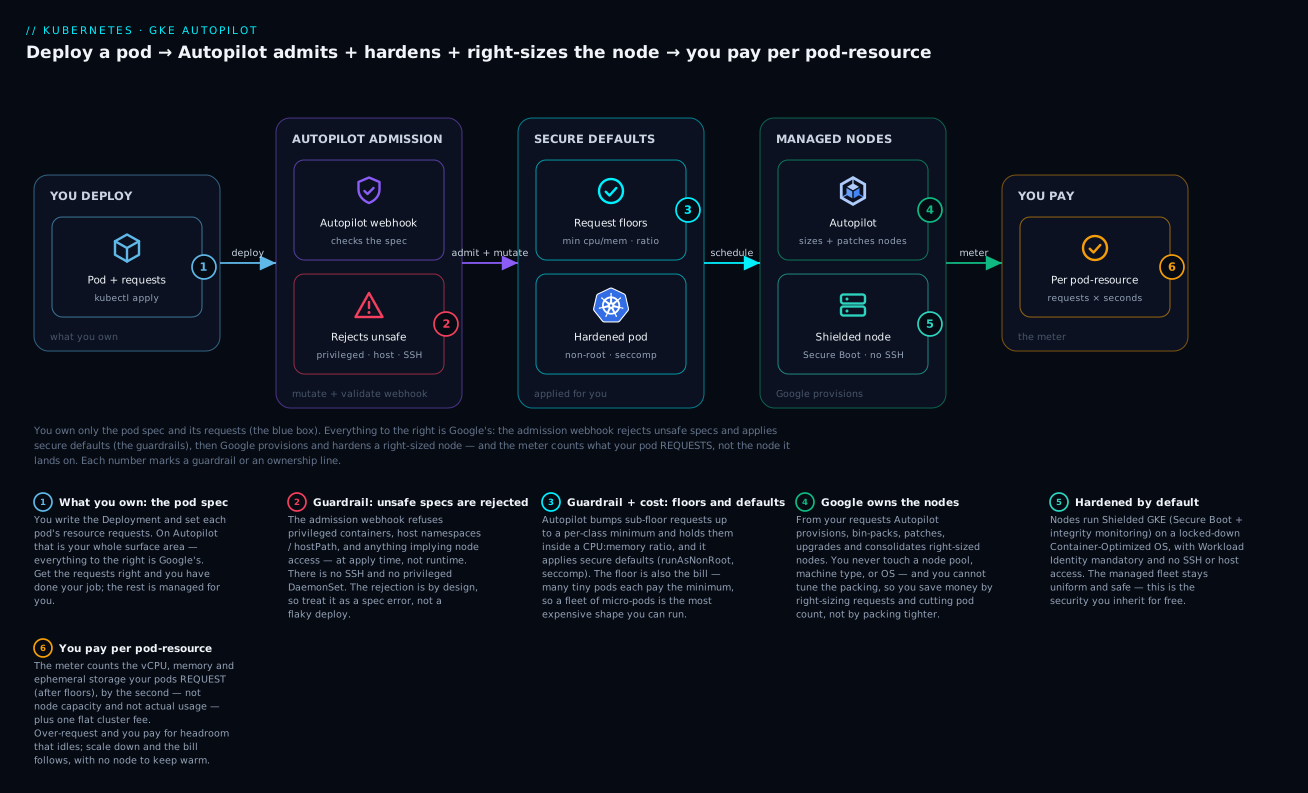
Walkthrough: you own only the blue box — the pod and its requests. Everything to the right is Google’s. The Autopilot admission webhook rejects unsafe specs and applies secure defaults (the guardrails), then Google provisions and hardens a right-sized node — and the meter counts what your pod requests, not the node it lands on.
Autopilot promises a Kubernetes cluster where Google runs the nodes and you pay for pods. That promise is real, but the abstraction leaks in specific, predictable places: you cannot SSH a node, you cannot run a privileged DaemonSet, and your bill is driven by resource requests rather than nodes you can pack. This playbook covers how to run Autopilot for production workloads — provisioning a private cluster, right-sizing without node access, the scheduling levers that still work, the security controls worth turning on, and the cost traps that quietly inflate the invoice.
Autopilot vs Standard: what you are signing up for
Autopilot is not a different Kubernetes; it is a different operational contract. Google manages and SRE-owns the nodes, applies a hardened node configuration you cannot override, and charges you for the CPU, memory, and ephemeral storage your pods request (not the node capacity).
| Dimension | Standard | Autopilot |
|---|---|---|
| Node ownership | You size, patch, scale node pools | Google provisions and manages nodes |
| Billing unit | Node-hours (whatever you provision) | Pod resource requests + cluster fee |
| Node access | SSH, privileged pods, custom DaemonSets | No SSH; privileged and host-namespace pods blocked |
| Bin-packing | Your responsibility (Karpenter-style) | Google packs and scales for you |
| Security defaults | You opt in | Shielded nodes, Workload Identity, hardened OS by default |
The mental shift: on Standard you optimize node utilization; on Autopilot you optimize request accuracy, because over-requesting is the entire cost story. There is one cluster management fee per cluster (the same flat fee as Standard), then per-pod resource billing on top.
Autopilot is the right default for teams that want platform discipline without owning node lifecycle. Reach for Standard when you genuinely need DaemonSets that touch the host, GPUs with custom drivers, Windows nodes, or extreme bin-packing control. Increasingly the two converge — much of the Autopilot security posture is now available as a compute class on Standard — but the billing and node-access contract is what actually differs.
What Autopilot owns vs what stays yours
The whole model collapses to one question: where is the line between Google’s job and yours? On Standard the line is blurry — you own almost everything below the pod. On Autopilot the line is sharp and sits right at the pod boundary:
| Concern | On Autopilot, owned by… | What it means for you |
|---|---|---|
| Node provisioning, sizing, bin-packing | You never create a node pool or pick a machine type | |
| OS, kernel, node patching & upgrades | No node CVEs to chase; you cannot pin a kernel | |
| Node security hardening | Shielded nodes, Secure Boot, locked-down COS — always on | |
| The pod spec & resource requests | You | This is your capacity plan and your bill |
| Which identity a pod authenticates as | You | Workload Identity bindings are yours to scope |
| Availability during maintenance | You | PDBs, replica count, topology spread |
| Ingress, policy, and app config | You | Gateway/Ingress, NetworkPolicy, PSA labels |
Read the table as a division of labour: everything in the “Google” rows is toil you no longer carry; everything in the “You” rows is what “hardening” in this lesson actually means.
The pod-based pricing model, concretely
On Standard you pay node-seconds: provision an e2-standard-4 and it bills 24×7 whether pods fill it or it idles at 5%. On Autopilot you pay pod resource-seconds — the vCPU, memory, and ephemeral storage your pods request (after Autopilot’s floors and ratio adjustments), metered by the second, plus one flat cluster-management fee.
A concrete shape makes the difference obvious. Say you run 20 replicas that each genuinely need 250m CPU and 512Mi:
- Autopilot: you are billed for
20 × 250m = 5 vCPUand20 × 512Mi ≈ 10 GiB, continuously. Scale to 5 replicas overnight and the bill drops to a quarter automatically — there is no node to keep warm. - Standard: you would size a node pool to fit 20 pods (say two
e2-standard-4nodes = 8 vCPU / 32 GiB) and pay for both whole nodes around the clock, even at 5 replicas, until the cluster autoscaler removes a node — and only if the remaining pods, system pods, and DaemonSets let it drain.
Autopilot wins when utilisation is spiky or low, because you cannot be billed for idle node headroom you don’t own. Standard wins when a fleet runs packed and steady above roughly 80% utilisation, because at that point per-node pricing is cheaper than the per-pod premium.
What you cannot do on Autopilot
Because Google owns the nodes, a specific set of things is off the table — by design, to keep the managed fleet uniform and safe. Knowing these up front saves a day of debugging a “mysteriously rejected” pod:
| You cannot… | Why | Do this instead |
|---|---|---|
| SSH to a node or run a node-shell | Nodes are Google-managed and locked | Use ephemeral debug containers (kubectl debug) on the pod |
| Run a privileged container or host namespaces | Breaks the managed-node security contract | Redesign to run unprivileged; move host-level agents to a managed integration |
| Run a DaemonSet that touches the host | Same host-access restriction (DaemonSets are allowed but constrained) | Use GKE’s managed logging/metrics; keep DaemonSets non-privileged and resource-capped |
| Install a custom or privileged CNI | Networking is GKE Dataplane V2 (eBPF/Cilium) | Use built-in NetworkPolicy / Dataplane V2 features |
| Pick a machine type or attach local SSD arbitrarily | No node pools to configure | Select a compute class (balanced, scale-out, accelerator) instead |
| Disable Workload Identity or metadata protection | It is mandatory on Autopilot | Embrace it — it is the correct, keyless way to reach Google APIs |
If your workload genuinely needs one of the left-column items — a privileged host agent, a custom kernel module, an exotic CNI — that is the signal to use Standard (or a Standard node pool alongside), not to fight Autopilot.
Step 1: Provision a private Autopilot cluster
For production, the cluster should be private (nodes have no public IPs) with a control plane reachable only from authorized networks. Autopilot clusters are regional and use VPC-native (alias IP) networking by default.
gcloud container clusters create-auto prod-apps \
  --project my-prod-project \
  --region us-central1 \
  --network projects/my-host-project/global/networks/shared-vpc \
  --subnetwork projects/my-host-project/regions/us-central1/subnetworks/gke-us-central1 \
  --enable-private-nodes \
  --enable-master-authorized-networks \
  --master-authorized-networks 10.0.0.0/8,203.0.113.10/32 \
  --release-channel regular \
  --enable-google-cloud-access
A few choices worth defending:
--enable-private-nodesremoves public IPs from nodes; egress to the internet then flows through Cloud NAT, which you provision separately on the subnet’s region.--enable-master-authorized-networkswith an explicit CIDR list locks the public control-plane endpoint to known sources (your CI ranges, a bastion, corporate egress). For a fully private control plane, also use--enable-private-endpoint, but then your tooling must reach the private endpoint over the VPC.--release-channelis effectively mandatory on Autopilot — Google manages the version.regularis the sane production default;stablelags further behind for risk-averse fleets.--enable-google-cloud-accesslets the private control plane be reached from Google Cloud public IP ranges, which keeps some managed integrations working without opening the endpoint to the world.
In Terraform, pin the same shape so it is reviewable and reproducible:
resource "google_container_cluster" "prod_apps" {
  name             = "prod-apps"
  project          = "my-prod-project"
  location         = "us-central1"
  enable_autopilot = true

  network    = "projects/my-host-project/global/networks/shared-vpc"
  subnetwork = "projects/my-host-project/regions/us-central1/subnetworks/gke-us-central1"

  release_channel {
    channel = "REGULAR"
  }

  private_cluster_config {
    enable_private_nodes    = true
    enable_private_endpoint = false
  }

  master_authorized_networks_config {
    cidr_blocks {
      cidr_block   = "10.0.0.0/8"
      display_name = "internal"
    }
  }

  # Workload Identity is on by default for Autopilot; pinning it is explicit.
  workload_identity_config {
    workload_pool = "my-prod-project.svc.id.goog"
  }
}
Do not set
remove_default_node_poolornode_configblocks on an Autopilot cluster — there are no node pools to manage, and Terraform will reject node-level fields. This is the single most common copy-paste error when porting a Standard config.
Step 2: Right-size pod requests when you cannot touch nodes
On Autopilot, the pod spec is your capacity plan. Two rules govern the cost:
- Autopilot enforces minimum resource requests per pod. A pod requesting less than the floor (commonly around 250m CPU / 0.5 GiB memory for the general-purpose class, more for DaemonSet-style and some compute classes) is bumped up to the floor — and you pay the floor. Ten tiny sidecar-only pods can cost far more than their actual footprint.
- Autopilot enforces a CPU-to-memory ratio range per compute class. Wildly skewed requests (for example 4 CPU with 256 MiB) get adjusted, again changing what you pay.
Inspect what Autopilot actually admitted versus what you asked for:
# What did the mutating webhook set the request to?
kubectl get pod <pod> -o jsonpath='{.spec.containers[*].resources}{"\n"}'

# Mutation/adjustment events are surfaced as warnings on the object
kubectl describe pod <pod> | grep -iE 'autopilot|adjust|limit'
If you deployed a container asking for a tiny 50m CPU, the admitted spec comes back bumped to the class floor — this representative output shows the request Autopilot will actually bill:
// Representative output of the jsonpath above — requested 50m, admitted (and billed) at the floor:
[{"limits":{"cpu":"250m","ephemeral-storage":"1Gi","memory":"512Mi"},
  "requests":{"cpu":"250m","ephemeral-storage":"1Gi","memory":"512Mi"}}]
Set requests deliberately. On Autopilot, if you omit limits, GKE sets limits == requests, so the request is both your guaranteed allocation and your cap — there is no burst above it.
resources:
  requests:
    cpu: "500m"
    memory: "512Mi"
    ephemeral-storage: "1Gi"
  limits:
    cpu: "500m"
    memory: "512Mi"
    ephemeral-storage: "1Gi"
To find the right numbers instead of guessing, enable the Vertical Pod Autoscaler in recommendation-only mode and let it observe real usage before you commit:
apiVersion: autoscaling.k8s.io/v1
kind: VerticalPodAutoscaler
metadata:
  name: api-vpa
spec:
  targetRef:
    apiVersion: apps/v1
    kind: Deployment
    name: api
  updatePolicy:
    updateMode: "Off"   # recommend only; do not mutate live pods
Then read status.recommendation and bake the target into the Deployment. Combine VPA recommendations with HPA on a custom or CPU metric for the number of replicas — but never let VPA and HPA both drive the same CPU/memory signal, or they fight.
Step 3: Scheduling levers that still work
You cannot taint nodes or write node-affinity against node pools you do not control, but the workload-level scheduling primitives are fully available and matter more on a platform that scales nodes underneath you.
PodDisruptionBudgets protect availability during the node upgrades and consolidations Google performs:
apiVersion: policy/v1
kind: PodDisruptionBudget
metadata:
  name: api-pdb
spec:
  minAvailable: 2
  selector:
    matchLabels:
      app: api
A PDB is your contract with Autopilot’s node maintenance. Without one, a node recycle can evict every replica of a 2-pod Deployment at once. Set
minAvailableto leave real headroom; a PDB that allows zero disruptions can also block legitimate upgrades.
Topology spread keeps replicas across zones so a single-zone event does not take the service down:
topologySpreadConstraints:
  - maxSkew: 1
    topologyKey: topology.kubernetes.io/zone
    whenUnsatisfiable: DoNotSchedule
    labelSelector:
      matchLabels:
        app: api
PriorityClasses decide who wins when capacity is briefly tight. Define a high class for latency-critical services and let lower-priority batch work be preempted rather than starving the front door:
apiVersion: scheduling.k8s.io/v1
kind: PriorityClass
metadata:
  name: high-priority
value: 1000000
globalDefault: false
description: "Latency-critical request-path workloads"
For workload separation you select a compute class (for example a general-purpose, scale-out, or balanced class) and, where supported, Spot via a node selector rather than managing pools:
spec:
  nodeSelector:
    cloud.google.com/gke-spot: "true"
Step 4: Harden with Workload Identity, Binary Authorization, and Pod Security
Autopilot ships secure-by-default, but three controls are worth turning on explicitly for production.
Workload Identity Federation for GKE (full deep dive) is the only sane way to reach Google APIs — it is enabled by default on Autopilot, and you should never mount service-account keys. Bind a Kubernetes ServiceAccount to an IAM service account:
# Allow the KSA to impersonate the GSA
gcloud iam service-accounts add-iam-policy-binding \
  api-runtime@my-prod-project.iam.gserviceaccount.com \
  --role roles/iam.workloadIdentityUser \
  --member "serviceAccount:my-prod-project.svc.id.goog[apps/api]"
apiVersion: v1
kind: ServiceAccount
metadata:
  name: api
  namespace: apps
  annotations:
    iam.gke.io/gcp-service-account: api-runtime@my-prod-project.iam.gserviceaccount.com
The pod runs as api, GKE mints a short-lived token, and the workload calls Google APIs as the GSA with no static credential anywhere.
Binary Authorization stops anything but signed, attested images from running. Enable it on the cluster and enforce a policy that requires your CI attestor:
gcloud container clusters update prod-apps \
  --region us-central1 \
  --binauthz-evaluation-mode=PROJECT_SINGLETON_POLICY_ENFORCE
Pair it with a policy whose default rule requires attestations, plus narrow allowlist exemptions for trusted system images. Run in dry-run first and watch the audit logs for what would be blocked before you enforce.
Pod Security Admission enforces the upstream Pod Security Standards at the namespace level. Autopilot already blocks privileged and host-namespace pods, but PSA gives you an explicit, auditable baseline:
apiVersion: v1
kind: Namespace
metadata:
  name: apps
  labels:
    pod-security.kubernetes.io/enforce: restricted
    pod-security.kubernetes.io/warn: restricted
Start with warn/audit to surface violations, then move enforce to restricted once workloads comply.
Step 5: Ingress, Gateway API, and container-native load balancing
Autopilot uses container-native load balancing via Network Endpoint Groups (NEGs) — the load balancer targets pod IPs directly instead of hopping through a node port, which removes a hop and gives accurate health checks. The modern, recommended way to expose services is the Gateway API, which on GKE is backed by Google Cloud Load Balancing.
apiVersion: gateway.networking.k8s.io/v1
kind: Gateway
metadata:
  name: external-gw
  namespace: apps
spec:
  gatewayClassName: gke-l7-global-external-managed
  listeners:
    - name: https
      protocol: HTTPS
      port: 443
      tls:
        mode: Terminate
        certificateRefs:
          - kind: Secret
            name: api-tls
---
apiVersion: gateway.networking.k8s.io/v1
kind: HTTPRoute
metadata:
  name: api-route
  namespace: apps
spec:
  parentRefs:
    - name: external-gw
  rules:
    - matches:
        - path:
            type: PathPrefix
            value: /api
      backendRefs:
        - name: api
          port: 80
The gke-l7-global-external-managed GatewayClass provisions a global external Application Load Balancer; internal and regional classes exist for private and regional needs. NEG-based backends are created automatically for the referenced Service. If you are still on classic Ingress it works, but Gateway API is where header-based routing, traffic splitting, and cross-namespace delegation live.
Step 6: Observability with managed Prometheus and Cloud Logging
Autopilot enables Google Cloud Managed Service for Prometheus and Cloud Logging/Monitoring by default — you get system metrics and logs without running a collector. To scrape your own application metrics, declare a PodMonitoring resource:
apiVersion: monitoring.googleapis.com/v1
kind: PodMonitoring
metadata:
  name: api-metrics
  namespace: apps
spec:
  selector:
    matchLabels:
      app: api
  endpoints:
    - port: metrics
      interval: 30s
Managed Prometheus is fully PromQL-compatible, so existing dashboards and recording rules port over, and you query through Cloud Monitoring or any Prometheus-API client. Note that managed metric samples and log ingestion are billed by volume — high-cardinality labels and verbose debug logging are a real cost line, not just noise.
Step 7: Cost traps that bite teams
The bill surprises come from a handful of mechanics:
| Trap | Why it costs | Mitigation |
|---|---|---|
| Minimum request floors | Tiny pods are billed at the per-pod floor, not actual usage | Consolidate sidecars; right-size with VPA; avoid many micro-pods |
| Over-requested headroom | You pay the request even at 5% utilization | VPA-recommend, then trim; do not pad “just in case” |
limits == requests |
Omitting limits caps burst at the request | Set requests to real peak, not average, for spiky apps |
| Idle replicas | replicas: 3 at night still bills |
HPA with a sane floor; scale-to-floor off-peak |
| High-cardinality metrics/logs | Managed Prometheus and Logging bill by volume | Drop noisy labels; route debug logs away from ingestion |
Balloon (low-priority placeholder) pods are a deliberate technique on Autopilot: schedule pods with a negative PriorityClass that reserve capacity and get preempted the instant a real workload needs the room. This keeps warm headroom so scale-ups do not wait on node provisioning. The catch is that reserved capacity is still billed while the balloon runs — use it to buy latency, and size it so the cost of warm headroom is less than the cost of a cold-start stall.
apiVersion: scheduling.k8s.io/v1
kind: PriorityClass
metadata:
  name: balloon
value: -10   # negative: preempted before any real workload
globalDefault: false
Spot Autopilot is the biggest lever for fault-tolerant work: schedule eligible pods onto Spot capacity with the cloud.google.com/gke-spot selector for a substantial discount, accepting that Google can reclaim them on short notice. Keep request-path services on standard capacity and push batch, async, and stateless retry-safe jobs to Spot.
Enterprise scenario
A fintech platform team migrated forty microservices from a self-managed Standard cluster to Autopilot to shed node-patching toil. The lift-and-shift looked clean until the first month’s invoice came in roughly 30% higher than the old node-based bill. The cause was not the workloads — it was a shared Istio sidecar and a Datadog agent injected into every pod. Each service requested a modest 100m CPU, but Autopilot bumped every pod to the general-purpose floor (~250m CPU / 0.5 GiB), and they were running 600+ pods across staging and prod. They were paying the floor 600 times over for pods that idled at 8% utilization.
The fix was twofold. First, they ran VPA in updateMode: "Off" across the fleet for two weeks and discovered most services peaked well under their requests, so they consolidated the per-pod observability sidecar to a node-level agent on the workloads that genuinely needed it. Second, they moved async and batch consumers onto Spot, which absorbed the floor cost at a steep discount.
# Surface every pod Autopilot bumped above its declared request, fleet-wide
kubectl get pods -A -o json | jq -r '
  .items[] | select(.metadata.annotations["autopilot.gke.io/resource-adjustment"]) |
  "\(.metadata.namespace)/\(.metadata.name)"'
That one query, wired into a weekly review, turned an invisible 30% premium into a tracked, governed line item. The lesson: on Autopilot, pod count and the request floor — not node utilization — are the cost model, and a fleet of tiny pods is the most expensive shape you can run.
Going deeper
Everything above is enough to run Autopilot well. This section is for the reader who wants to know why the guardrails are shaped the way they are — the internals, the edge cases, and the exact boundary where Autopilot stops being the right tool.
The admission webhook: what a rejected pod actually looks like
Autopilot enforces its contract with a mutating + validating admission webhook that runs before your pod is scheduled. It does two jobs. It mutates — filling in defaults such as request floors, ratio adjustments, and securityContext hardening — and it validates — rejecting specs that violate the managed-node contract. Crucially, a privileged pod does not fail at runtime; it is refused at kubectl apply time.
# This pod is REJECTED at admission on Autopilot
apiVersion: v1
kind: Pod
metadata:
  name: host-probe
  namespace: apps
spec:
  hostNetwork: true          # host namespace — not allowed
  containers:
    - name: probe
      image: busybox:1.36
      securityContext:
        privileged: true      # privileged — not allowed
      volumeMounts:
        - name: host-root
          mountPath: /host
  volumes:
    - name: host-root
      hostPath:               # hostPath — not allowed
        path: /
Representative admission error:
Error from server (GKE Warden constraints violations): admission webhook
"warden-validating.common-webhooks.networking.gke.io" denied the request:
GKE Warden rejected the request because it violates one or more constraints:
  {"[denied by autogke-disallow-privilege]":["container probe is privileged;
   not allowed in Autopilot"]}, {"[denied by autogke-no-host-namespaces]":
  ["hostNetwork is not allowed in Autopilot"]}
The practical implication: your CI should treat an Autopilot admission rejection as a spec error, not a flaky deploy. The common rejections are hostNetwork/hostPID/hostPath, privileged: true, adding Linux capabilities beyond the allowed set (NET_RAW and friends), and requesting a resource shape outside the compute-class envelope. Because the webhook also mutates, always diff the admitted object against what you submitted — what you deploy is not always what runs.
DaemonSets, node access, and debugging without a node
Two beginner assumptions break on Autopilot, both rooted in the no-node-access rule:
- DaemonSets are allowed, but constrained. You can run a DaemonSet, but it cannot be privileged, cannot use host namespaces or
hostPath, and each pod is subject to Autopilot’s per-pod resource ceilings. The classic “run a privileged log/security agent on every node” pattern does not port — replace it with GKE’s managed logging/metrics or a vendor’s Autopilot-supported deployment mode. - There is no node to log into.
gcloud compute sshto a node, node-shell tricks, and privileged debugging pods are all gone. Debug the pod instead with an ephemeral container:
# Attach a throwaway debug container to a running pod — no node access needed
kubectl debug -it api-7d9f-abcde -n apps \
  --image=busybox:1.36 --target=api
Node problems you would previously fix by hand — a wedged kubelet, a full disk — are Google’s responsibility now, handled by node auto-repair. That is the trade: you lose the ability to intervene, and in exchange you lose the obligation to.
Security defaults you inherit for free
Autopilot’s node hardening is not something you configure — it is the baseline, and it is genuinely strong:
- Shielded GKE nodes with Secure Boot, virtual TPM, and integrity monitoring, so a tampered boot chain is detected and the node is not trusted.
- Container-Optimized OS (COS) — a minimal, read-mostly, Google-maintained node OS with a small attack surface and automatic patching.
- Workload Identity mandatory — the node metadata server that hands out credentials is concealed from pods, so the old “curl the metadata endpoint to steal the node’s service account” attack is closed. Pods authenticate only as the identity you bind.
- No privileged/host access — the same restrictions that reject unsafe pods also mean a compromised container has far less to escalate into.
Your job is to add the workload-level layer on top: Pod Security Admission at restricted for an explicit, auditable baseline, Binary Authorization so only attested images run, and NetworkPolicy for east-west segmentation. Autopilot secures the floor; PSA, BinAuthz, and NetworkPolicy secure the walls.
Reliability: compute classes, Spot, and the reschedule model
You do not pick machine types, but you do pick a compute class, which is how you express hardware intent on Autopilot:
| Compute class | Use it for | Note |
|---|---|---|
| general-purpose (default) | Most stateless services | Balanced CPU:memory; the cheapest floor |
| balanced | Higher per-pod CPU/memory needs | Wider ratio and higher ceilings than general-purpose |
| scale-out | CPU-heavy, horizontally-scaled work | Arm (or SMT-off x86) — rebuild multi-arch images first |
| accelerator | GPU/ML inference and training | GPUs with Google-managed drivers |
| performance | Latency-sensitive, dedicated capacity | Larger, dedicated pod shapes |
Select one with a node selector, for example cloud.google.com/compute-class: "scale-out", and layer Spot on top for interruptible work. The subtlety with scale-out is that it commonly lands on Arm — an amd64-only image will fail to schedule or crash-loop, so build multi-arch (or pin kubernetes.io/arch).
The reschedule model is the reliability concept most teams miss. Autopilot continuously consolidates and upgrades nodes, and when it does it will evict and reschedule your pods. PodDisruptionBudgets bound how many go at once — but a PDB that permits zero disruptions does not freeze your workload forever; for critical security upgrades GKE can override an over-strict PDB after a grace period. Design for it: graceful terminationGracePeriodSeconds, preStop hooks that drain connections, readiness gates, and enough replicas that losing one is a non-event. On Autopilot, a pod is cattle in the strongest sense — assume it can move at any moment.
Networking: Dataplane V2 and why there is no privileged CNI
Autopilot runs exclusively on GKE Dataplane V2, an eBPF dataplane built on Cilium. That choice is why you cannot install a custom or privileged CNI — the dataplane is part of the managed contract. In exchange you get NetworkPolicy enforcement, FQDN-based egress policy, and network policy logging built in, plus the container-native (NEG) load balancing from Step 5 that targets pod IPs directly. If you have deep networking requirements — L7 policy, Hubble-style flow visibility, or egress gateways — reach for the Dataplane V2 / Cilium features rather than a sidecar CNI (the GKE Dataplane V2 lesson covers the enforcement model in detail). The mental model: on Autopilot, networking is a platform feature you configure, not a component you install.
The cost model you don’t control: bin-packing
On Standard, a large lever for cost is bin-packing — cramming pods tightly onto nodes so you pay for fewer VMs. On Autopilot that lever is Google’s, not yours. You cannot force two pods onto one node, choose a denser machine, or tune the autoscaler’s packing. This has one blunt implication: you cannot optimise your Autopilot bill by packing tighter — only by requesting less and running fewer pods. Every cost tactic in this lesson (VPA right-sizing, sidecar consolidation, Spot, killing idle replicas, watching the request floor) is a variation on those two moves. Balloon pods are the apparent exception, but they buy latency, not savings — the reserved capacity still bills.
Guardrails vs flexibility — and when Autopilot is the wrong choice
Every Autopilot restriction is the same bargain: it trades a capability you might need for a class of mistakes you can’t make and toil you don’t carry. For most stateless, cloud-native workloads that is a clear win. But be honest about when the bargain breaks. Autopilot is the wrong choice when:
- You need privileged host agents, custom kernel modules, custom or privileged CNIs, or DaemonSets that touch the host — a security-tooling or storage stack that must run on the node.
- You run a packed, steady, 24×7 fleet above ~80% utilisation, where per-node pricing beats the per-pod premium and you have the discipline to keep nodes full.
- You need hardware or node-local features Autopilot does not expose — specific local SSD layouts, exotic machine shapes, Windows nodes, or GPUs with custom drivers.
- You have very large single pods that exceed a compute class’s per-pod maxima, or you need bin-packing control for a specialised scheduler.
The clean decision rule: default to Autopilot; switch to Standard only for a concrete capability Autopilot cannot provide or a proven, sustained cost case. “We might need node access someday” is not a reason — it is the toil Autopilot exists to delete.
Verify
Run these after provisioning and after any policy change.
# Cluster is Autopilot, private, on a release channel
gcloud container clusters describe prod-apps --region us-central1 \
  --format="value(autopilot.enabled, privateClusterConfig.enablePrivateNodes, releaseChannel.channel)"

# Authorized networks are scoped, not 0.0.0.0/0
gcloud container clusters describe prod-apps --region us-central1 \
  --format="value(masterAuthorizedNetworksConfig.cidrBlocks)"

# Pods landed across multiple zones (topology spread working)
kubectl get pods -n apps -o wide \
  --sort-by='.spec.nodeName' \
  -l app=api

# Workload Identity resolves to the GSA from inside a pod
kubectl run wi-test -n apps --rm -it --restart=Never \
  --image=google/cloud-sdk:slim --serviceaccount=api \
  -- gcloud auth list

# Managed Prometheus is scraping your target
kubectl get podmonitoring -n apps
Confirm Binary Authorization is enforcing by attempting to deploy an unsigned image into a watched namespace — it should be rejected at admission, and the denial should appear in Cloud Audit Logs.
Production checklist
Practice challenges
Work these in order — they climb from “read the model” to “cut a real bill.” Each has a worked solution; try it before you open it.
1. Predict the bill (beginner). You deploy a container with requests.cpu: 50m and requests.memory: 64Mi on the general-purpose compute class. What does Autopilot admit, and what do you pay for?
<details> <summary>Solution</summary>
Autopilot bumps the request up to the class floor (commonly ~250m CPU / 0.5 GiB for general-purpose) and bills you at the floor, not at 50m/64Mi. Confirm with kubectl get pod <pod> -o jsonpath='{.spec.containers[*].resources}' — the admitted request is the floor. Why: on Autopilot the request is the bill, and there is a per-pod minimum, so many tiny pods each pay the floor. The fix for a genuinely tiny workload is to consolidate it with others, not to run it as its own micro-pod.
</details>
2. Survive a maintenance window (beginner). A 2-replica Deployment api went to zero availability during an Autopilot node upgrade. Add the one object that prevents it.
<details> <summary>Solution</summary>
Add a PodDisruptionBudget so Autopilot cannot evict both replicas at once:
apiVersion: policy/v1
kind: PodDisruptionBudget
metadata:
  name: api-pdb
  namespace: apps
spec:
  minAvailable: 1
  selector:
    matchLabels:
      app: api
Why: Autopilot recycles nodes for upgrades/consolidation; without a PDB there is no contract keeping a replica up. (With only 2 replicas, minAvailable: 1 allows upgrades to proceed while keeping one pod serving — minAvailable: 2 would keep both but can stall maintenance.)
</details>
3. Fix a rejected pod (intermediate). This spec is refused at admission. Rewrite it so it runs on Autopilot without losing the app container.
spec:
  hostNetwork: true
  containers:
    - name: app
      image: myapp:1.4
      securityContext:
        privileged: true
<details> <summary>Solution</summary>
Drop the host namespace and the privilege — neither is allowed on Autopilot — and run unprivileged:
spec:
  securityContext:
    runAsNonRoot: true
    seccompProfile:
      type: RuntimeDefault
  containers:
    - name: app
      image: myapp:1.4
      securityContext:
        allowPrivilegeEscalation: false
        capabilities:
          drop: ["ALL"]
Why: hostNetwork and privileged violate the managed-node contract and are rejected by the Warden webhook. If the app genuinely needed host networking or privilege (a host-level agent), that is a signal to use Standard — but almost always the requirement is an artefact of a legacy manifest, not a real need.
</details>
4. Right-size before you commit (intermediate). You inherited a Deployment requesting 1 CPU / 2Gi but suspect it is over-provisioned. Get a data-backed request without disrupting traffic.
<details> <summary>Solution</summary>
Run VPA in recommendation-only mode for a representative period (include peak traffic), then read the recommendation:
kubectl get vpa api-vpa -n apps \
  -o jsonpath='{.status.recommendation.containerRecommendations[0].target}{"\n"}'
Bake the returned target into the Deployment’s requests (and, for spiky apps, set requests to the peak recommendation since limits == requests caps burst). Why: updateMode: "Off" observes real usage without mutating live pods, so you replace a guess with evidence and stop paying for idle headroom.
</details>
5. Kill an invisible 30% premium (advanced). A fleet runs 300 pods, each a real app plus an injected sidecar, every one requesting 100m CPU. The bill is far higher than usage suggests. Diagnose and cut it.
<details> <summary>Solution</summary>
The 100m requests are being bumped to the ~250m general-purpose floor, and you are paying the floor 300 times for pods that idle. Diagnose fleet-wide:
kubectl get pods -A -o json | jq -r '
  .items[] | select(.metadata.annotations["autopilot.gke.io/resource-adjustment"]) |
  "\(.metadata.namespace)/\(.metadata.name)"'
Cut it three ways: (1) consolidate the per-pod sidecar to a node-level/managed agent where possible, collapsing two floors into one; (2) VPA-recommend and trim over-requested services; (3) move batch/async pods to Spot with cloud.google.com/gke-spot: "true". Why: pod count × the request floor is the cost model — fewer pods and accurate requests are the only levers, since you don’t control bin-packing.
</details>
6. Protect the request path under contention (advanced). Batch jobs occasionally starve your latency-critical API when capacity is briefly tight. Guarantee the API wins and push batch onto cheap capacity.
<details> <summary>Solution</summary>
Give the API a high PriorityClass and place batch on Spot at low (or negative) priority so it is preempted first:
apiVersion: scheduling.k8s.io/v1
kind: PriorityClass
metadata:
  name: request-path
value: 1000000
globalDefault: false
---
# Batch pod spec fragment
spec:
  priorityClassName: low-priority   # a class with a much lower value
  nodeSelector:
    cloud.google.com/gke-spot: "true"
Why: PriorityClasses let the scheduler preempt lower-priority batch to admit the request-path pod, and Spot absorbs the batch cost at a discount with interruption tolerance the batch workload already has.
</details>
Common beginner mistakes
These are misconceptions, not symptoms — the wrong mental model that leads a beginner astray, and the right one to replace it with.
- “Autopilot is cheaper because it’s managed.” Not automatically. You pay a per-pod premium and a request floor, so a fleet of tiny, over-requested pods can cost more than well-packed Standard nodes. Right model: Autopilot deletes node toil; it saves money only when you right-size requests, cut pod count, and use Spot. Cost is your job; ops is Google’s.
- “I’ll just SSH to the node to debug.” There is no node to SSH to — nodes are Google-managed and locked. Right model: debug the pod with
kubectl debugephemeral containers; node-level failures are auto-repaired for you. - “My privileged DaemonSet / host agent will run fine.” It is rejected at admission. DaemonSets run, but not privileged and not touching the host. Right model: use managed integrations for node-level telemetry; if you truly need host access, that workload belongs on Standard.
- “Resource requests are just a scheduling hint.” On Autopilot the request is both the bill and (with
limits == requests) the cap. Right model: treat requests as a deliberate capacity-and-cost decision derived from VPA data, not a round-number guess. - “Managed means secure and reliable by default — nothing left to do.” Autopilot secures the nodes; it does not set your PDBs, scope your Workload Identity bindings, lock your authorized networks, or label your namespaces for PSA. Right model: Google owns the floor; you own the walls — the reliability and security levers in this lesson are still yours.
- “Any compute class works for any workload.” Picking
scale-out(often Arm) for anamd64-only image will crash-loop; a skewed CPU:memory request gets silently adjusted; GPUs need theacceleratorclass. Right model: match the compute class to the workload’s architecture and resource shape, and build multi-arch images before you opt into Arm.
Pitfalls
- Porting a Standard config wholesale. Node pools, taints, custom DaemonSets that touch the host, and
node_configblocks will be rejected. Strip node-level concerns entirely. - Treating requests as suggestions. They are the bill and the cap (with
limits == requests). Under-request and you throttle; over-request and you overpay — both are silent. - No PDBs. Autopilot recycles nodes for upgrades and consolidation; without budgets you will see availability dips you cannot explain.
- Wide-open authorized networks. A private cluster with
0.0.0.0/0in the master-authorized list is not private. Scope it to known CIDRs. - Unbounded observability spend. High-cardinality labels and debug-level logs turn managed Prometheus and Cloud Logging into a surprise line item — govern them like any other cost.
Glossary
- GKE Autopilot — a GKE mode where Google fully manages the nodes (provisioning, sizing, patching, security) and bills per pod resource-request. You manage only pods and workload config.
- GKE Standard — the classic GKE mode where you own node pools: machine types, patching, scaling, and bin-packing. Billed per node.
- Node — a virtual machine that runs your pods. On Autopilot you never see or manage nodes directly.
- Pod — the smallest deployable unit in Kubernetes: one or more containers scheduled together. On Autopilot the pod is your unit of billing and control.
- Resource request — the CPU/memory/ephemeral-storage a container asks for. On Autopilot the request (after floors) is what you are billed for and, when limits are omitted, also the cap.
- Request floor / minimum request — the smallest request Autopilot will admit for a compute class; sub-floor requests are bumped up (and billed) at the floor.
- CPU:memory ratio — the allowed range between a pod’s CPU and memory requests within a compute class; wildly skewed requests are adjusted.
- Compute class — the way you express hardware intent on Autopilot (general-purpose, balanced, scale-out, accelerator, performance) without choosing a machine type.
- Spot Pod — a pod scheduled on discounted, reclaimable capacity via the
cloud.google.com/gke-spotselector; ideal for interruptible batch/async work. - Balloon pod — a placeholder pod with a negative PriorityClass that reserves warm capacity and is preempted the instant a real workload needs it; buys latency, not savings.
- PriorityClass — a named priority value the scheduler uses to decide which pods to admit or preempt when capacity is tight.
- PodDisruptionBudget (PDB) — a policy limiting how many replicas can be voluntarily disrupted at once, protecting availability during Autopilot’s node upgrades and consolidations.
- Topology spread constraint — a scheduling rule that distributes replicas across failure domains (for example zones) to survive a single-zone event.
- Workload Identity Federation for GKE — the keyless mechanism binding a Kubernetes ServiceAccount to a Google IAM identity so pods call Google APIs without static keys; mandatory on Autopilot.
- Shielded GKE nodes — nodes with Secure Boot, a virtual TPM, and integrity monitoring to detect boot-chain tampering; on by default in Autopilot.
- Secure Boot — a firmware feature that only allows signed boot components to run, part of the Shielded-node hardening.
- Container-Optimized OS (COS) — Google’s minimal, hardened, auto-patched node operating system.
- Pod Security Admission (PSA) — the built-in Kubernetes admission controller that enforces the Pod Security Standards (privileged / baseline / restricted) per namespace via labels.
- Binary Authorization — a deploy-time control that blocks any container image not signed/attested by your trusted attestor.
- GKE Dataplane V2 — Autopilot’s eBPF/Cilium-based networking dataplane that enforces NetworkPolicy; it is why a custom or privileged CNI cannot be installed.
- Network Endpoint Group (NEG) — a load-balancer backend that lists pod IPs directly, enabling container-native load balancing (no node-port hop).
- Container-native load balancing — load balancing that targets pod IPs via NEGs, removing a network hop and giving accurate per-pod health checks.
- Gateway API — the modern, role-oriented Kubernetes API for L7 traffic (Gateway + HTTPRoute); on GKE it provisions Google Cloud Load Balancers.
- Vertical Pod Autoscaler (VPA) — a controller that recommends (or sets) pod requests from observed usage; in
updateMode: "Off"it recommends without mutating live pods. - Horizontal Pod Autoscaler (HPA) — a controller that scales the number of replicas on a metric such as CPU; keep it and VPA off the same signal.
- Managed Service for Prometheus / PodMonitoring — GKE’s built-in, PromQL-compatible metrics pipeline; a
PodMonitoringresource tells it to scrape your app’s metrics endpoint. - Admission webhook (mutating / validating) — the Autopilot control that mutates pod specs (defaults, floors, hardening) and rejects specs that break the managed-node contract, at apply time.
- Cloud NAT — managed NAT that provides internet egress for private nodes that have no public IPs.
- Master authorized networks — the allowlist of CIDRs permitted to reach the cluster’s control-plane endpoint; scope it, never leave
0.0.0.0/0. - Bin-packing — the practice of scheduling pods densely onto nodes to reduce cost; on Autopilot this is Google’s job, not a lever you control.
- Release channel — the managed upgrade track (
rapid/regular/stable) that governs when Google upgrades your cluster version; effectively mandatory on Autopilot.
Autopilot trades node control for operational leverage, and for most teams that is the right trade. Master the request model, keep the scheduling and security controls deliberate, and the platform becomes genuinely low-toil — without the bill drifting out from under you.