In a nutshell
Imagine your company advertises a single phone number to the whole world. When anyone calls it, the phone system automatically connects them to the nearest call center that still has staff free — and if that center is closed or swamped, the call quietly overflows to the next-nearest one. The caller dials the same number every time and never learns which building actually answered.
A GKE multi-cluster Gateway is that phone system, but for a web application. You publish one hostname (say store.example.com) behind one IP address, and Google Cloud steers each visitor to the nearest Kubernetes cluster that is healthy and has spare capacity — even though the exact same app is running in several clusters across several regions. If a whole region fails, traffic shifts to a surviving region in seconds, with no DNS change and nobody paged.
To make that possible, the Gateway API — a modern, official Kubernetes networking standard — breaks the old, overloaded Ingress object into a few smaller, typed pieces owned by different teams. The platform team owns the Gateway (the front door: its IP, ports, and TLS). Each application team owns an HTTPRoute (which hostnames and paths go to which app, and in what proportion). On GKE, the GatewayClass you pick decides which kind of real Google Cloud load balancer gets built behind the scenes, and Google-specific behavior — health checks, timeouts, WAF, session affinity, TLS — moves out of cryptic annotation strings and into first-class policy objects you attach to a target.
This lesson builds both ends of that story: the single-cluster Gateway (one front door for one cluster) and the multi-cluster Gateway (one front door for many clusters, tied together by a Fleet). Along the way it shows how weighted traffic splitting, health-based routing, and cross-region failover actually behave — and how to prove they work using status conditions rather than hope.
Level: Expert · Time: ~35 min
Prerequisites and what you’ll be able to do
You will get the most from this lesson if a few earlier topics are already comfortable:
- Kubernetes Services, Endpoints, and DNS — a Gateway ultimately forwards to
Servicebackends, so you need the Service and Endpoints mental model. - Ingress controllers, TLS, and routing — the Gateway API is Ingress’s successor; knowing where Ingress hurts is the whole “why”.
- Gateway API: HTTPRoute and traffic-splitting migration — the vendor-neutral Gateway API that this lesson specializes to GKE.
- Managed Kubernetes: AKS vs EKS vs GKE compared — where GKE, Autopilot, and Fleets sit in the wider picture.
After working through it you will be able to:
- Choose the right GatewayClass for a workload — global vs regional, external vs internal, single- vs multi-cluster — and know which Google load balancer each one provisions.
- Provision a single-cluster Gateway with a reserved static IP and attach an HTTPRoute doing host matching, header-based canary matching, and weighted splitting.
- Attach GKE policies —
HealthCheckPolicy,GCPBackendPolicy,GCPGatewayPolicy— to pin health checks, backend timeouts, session affinity, Cloud Armor, and TLS. - Stand up a multi-cluster Gateway on a Fleet: enable MCS, nominate a config cluster, export a Service from every member, and route to the derived
ServiceImport. - Configure capacity-based cross-region overflow and failover, and validate it with
Programmed/ResolvedRefsstatus instead of trusting thatkubectl applysucceeded. - Migrate an existing GKE Ingress to the Gateway API without downtime.
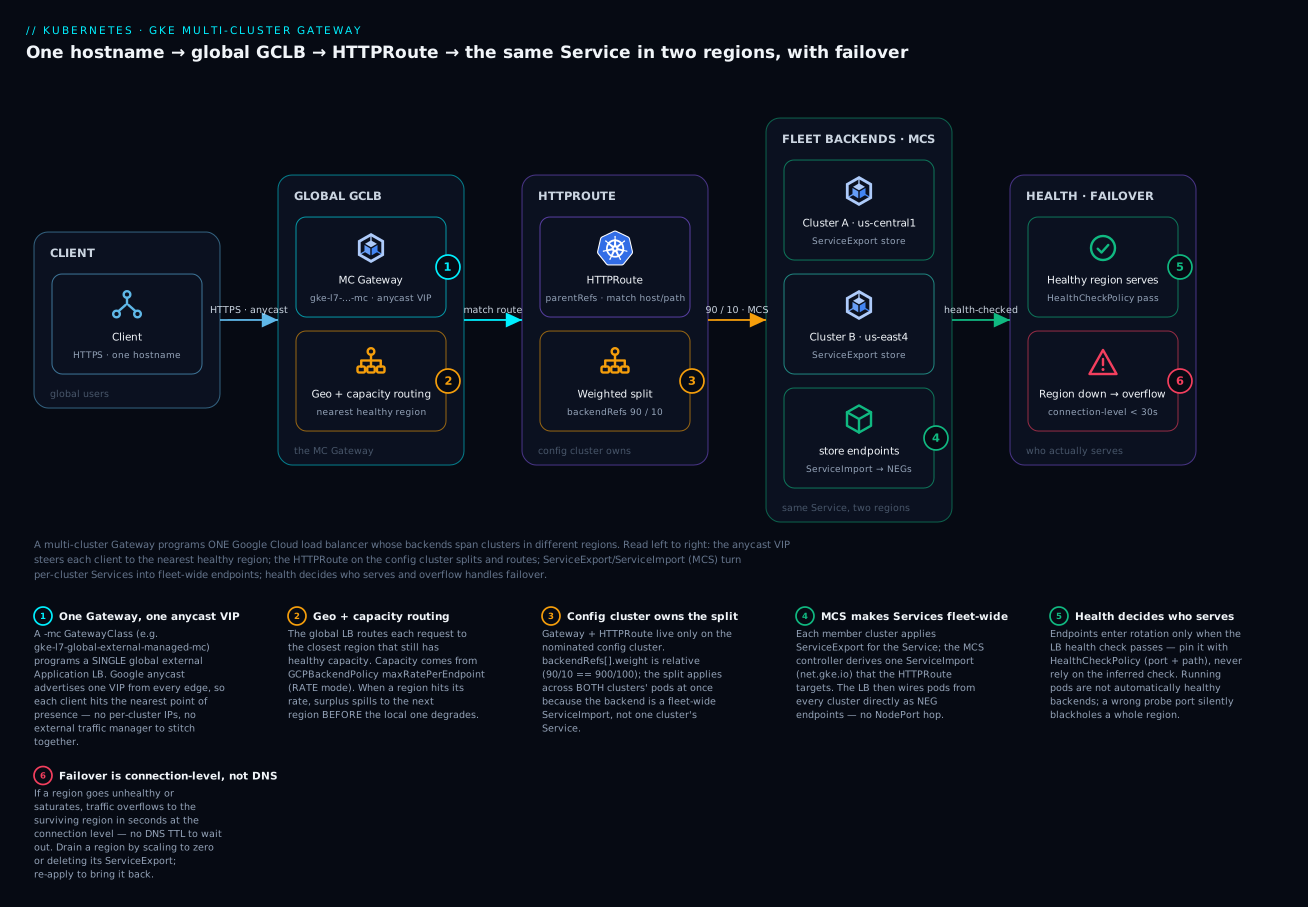
The diagram traces one request end to end. A client hits a single anycast VIP fronted by a multi-cluster Gateway (an -mc GatewayClass programming a global Google Cloud load balancer). The balancer applies geo + capacity routing to choose the nearest healthy region. The HTTPRoute on the config cluster splits traffic — here 90/10 — across a fleet-wide ServiceImport. MCS turns each cluster’s ServiceExport (us-central1 and us-east4) into that shared set of endpoints, wired directly as NEGs. Finally, health checks decide who serves: a failed or saturated region overflows to its neighbor at the connection level in seconds, no DNS TTL involved.
Ingress on GKE always felt like a compromise. A single object had to express routing, TLS, health checks, Cloud Armor, CDN, and backend timeouts, and it did so through kubernetes.io/ingress annotations that were undiscoverable, unvalidated, and impossible to delegate safely. The Gateway API replaces that one overloaded resource with a role-oriented set of typed objects: infrastructure teams own Gateway, application teams own HTTPRoute, and Google-specific behavior moves into first-class policy resources that attach to a target instead of hiding in an annotation string. On GKE this is not a thin shim over Ingress — the GKE Gateway controller provisions real Google Cloud load balancers (the same global and regional Envoy-based ALBs), and the multi-cluster variant programs a single load balancer across a Fleet. This walkthrough builds single-cluster and multi-cluster Gateways end to end, attaches the policies a platform team needs, and covers the migration and debugging realities.
Step 1: Gateway API vs Ingress — roles, resources, and GatewayClasses
Before any YAML, hold the core idea: the Gateway API is one job (get outside traffic to Services) split across three objects owned by different people. Ingress crammed all of it into one resource, which meant one team held both the shared front door and every app’s routing rules — and any edit risked everyone. The Gateway API draws a clean line down the middle of that responsibility.
The Gateway API splits the old monolith along ownership boundaries. Three resource kinds matter:
| Resource | Owner | Role | Analogue in Ingress world |
|---|---|---|---|
| GatewayClass | Cloud provider | Defines an implementation (the controller + LB type) | IngressClass |
| Gateway | Platform / infra team | Listeners: ports, protocols, TLS, allowed routes | The frontend half of an Ingress |
| HTTPRoute | Application team | Host/path/header matching, splitting, filters | The rules half of an Ingress |
Read that table as a chain of trust: the GatewayClass is a template Google publishes, a Gateway is one concrete front door built from that template, and an HTTPRoute is one app’s rules bolted onto that front door. HTTP is not the only protocol — the same model has GRPCRoute (GA on GKE, for gRPC services) and the experimental TCPRoute / TLSRoute / UDPRoute for non-HTTP traffic — but HTTPRoute carries the vast majority of real web workloads and is the focus here.
The key design property is route delegation: a Gateway in an infra-owned namespace can permit HTTPRoute attachment only from labelled namespaces, so application teams attach routes without ever editing the shared frontend. That is the capability Ingress never had. It is the difference between “file a ticket so the networking team edits the shared Ingress” and “commit an HTTPRoute in your own namespace and it just attaches.”
GKE ships several managed GatewayClasses. You pick one; you never create a GatewayClass yourself (they are cluster-scoped objects the controller installs). The important ones:
| GatewayClass | Scope | Load balancer provisioned |
|---|---|---|
gke-l7-global-external-managed |
Single cluster | Global external Application LB |
gke-l7-regional-external-managed |
Single cluster | Regional external Application LB |
gke-l7-rilb |
Single cluster | Regional internal Application LB |
gke-l7-gxlb-mc |
Fleet (multi-cluster) | Global external Application LB |
gke-l7-global-external-managed-mc |
Fleet (multi-cluster) | Global external Application LB |
gke-l7-rilb-mc |
Fleet (multi-cluster) | Regional internal Application LB |
The -mc suffix is the multi-cluster signal. Those classes are owned by the MultiClusterGateway controller running against a Fleet host project, not by an individual cluster. The distinction between gke-l7-global-external-managed and gke-l7-gxlb is lineage: gxlb is the classic global external LB, while global-external-managed is the newer, Envoy-based global external ALB with the richer traffic-management feature set — reach for the global-external-managed family on new work.
The Gateway API CRDs are bundled with GKE — on a sufficiently recent cluster (GKE 1.26+ for the GA gateway.networking.k8s.io/v1 API) the controller and CRDs are installed automatically. Confirm they exist before doing anything else:
kubectl get gatewayclass
# Expect: gke-l7-global-external-managed, gke-l7-rilb, gke-l7-regional-external-managed, ...

kubectl api-resources --api-group=gateway.networking.k8s.io
# gateways, httproutes, grpcroutes, referencegrants, ...
If kubectl get gatewayclass returns nothing, enable the Gateway controller explicitly:
gcloud container clusters update CLUSTER_NAME \
  --location=us-central1 \
  --gateway-api=standard
Mental model for beginners.
GatewayClassis toGatewaywhat a class is to an object in programming, or what anIngressClassis to anIngress: a reusable template that says “use this controller and build this kind of load balancer.” You choose from Google’s menu; you never write one. TheGatewayis the instance you actually create.
Step 2: Provision a single-cluster Gateway
A listener is the part of the front door that says “I accept connections on this port and protocol, and I will let these namespaces hang their routes on me.” That is all a Gateway is: one or more listeners plus a class. It deliberately knows nothing about your apps yet.
Start with a global external Gateway. The Gateway declares listeners; it does not know about your apps. Reserve a static anycast IP first so the address survives Gateway recreation:
gcloud compute addresses create web-gw-ip \
  --global \
  --ip-version=IPV4
Reserving the IP up front matters more than it looks: it is the value you point DNS at. If you let the Gateway allocate an ephemeral IP and later delete and recreate the Gateway, you get a new address and every DNS record and allow-list referencing the old one breaks. A reserved global address is a fixed anchor the LB attaches to.
Now the Gateway. Bind it to the reserved address with an annotation, and open an HTTP listener that permits routes from any namespace (tighten this later):
kind: Gateway
apiVersion: gateway.networking.k8s.io/v1
metadata:
  name: external-http
  namespace: infra-gateways
  annotations:
    networking.gke.io/gateway-ip-name: web-gw-ip
spec:
  gatewayClassName: gke-l7-global-external-managed
  listeners:
  - name: http
    protocol: HTTP
    port: 80
    allowedRoutes:
      namespaces:
        from: All
allowedRoutes.namespaces.from is the delegation control. All is permissive; the production pattern is Selector with a namespace label, so only sanctioned namespaces can bind:
    allowedRoutes:
      namespaces:
        from: Selector
        selector:
          matchLabels:
            gateway-access: "true"
Apply it and the controller begins programming a Google Cloud load balancer. This takes a few minutes the first time — the controller is creating forwarding rules, a target proxy, a URL map, and backend services behind the scenes.
The Gateway is intentionally inert without routes. A Gateway with zero attached HTTPRoutes provisions the LB frontend but has no backends, so it returns 404 from the default backend. That is correct behavior, not a failure.
Step 3: HTTPRoute — header matching, traffic splitting, and request mirroring
Here is where application teams live, and where a beginner’s intuition needs one correction: an HTTPRoute does not send traffic to Pods directly. It targets a Service, and GKE quietly turns that Service’s Pods into load-balancer backends using a NEG (Network Endpoint Group) — a list of Pod IP:port endpoints the Google LB can hit without bouncing through a node port.
The HTTPRoute is where application teams live. It references a parent Gateway and routes to Kubernetes Service backends. GKE reads the Service’s cloud.google.com/neg annotation (Autopilot and recent Standard clusters create the standalone NEG automatically for VPC-native clusters) and wires the Service’s pods directly as a backend via NEGs — there is no NodePort hop.
An HTTPRoute rule can match on several dimensions before it decides where to send a request. The common ones:
| Match type | Field | Typical use |
|---|---|---|
| Host | hostnames |
Route store.example.com vs api.example.com to different apps |
| Path | matches[].path (PathPrefix / Exact) |
Send /api and / to different Services |
| Header | matches[].headers |
Steer a cohort (x-canary: true) to a canary build |
| Query param | matches[].queryParams |
A/B experiments keyed on a URL parameter |
| Method | matches[].method |
Split GET reads from POST writes |
A route doing host matching, weighted splitting between two backends, and a header match for a canary cohort:
kind: HTTPRoute
apiVersion: gateway.networking.k8s.io/v1
metadata:
  name: store
  namespace: store
spec:
  parentRefs:
  - name: external-http
    namespace: infra-gateways
  hostnames:
  - "store.example.com"
  rules:
  # 1. Internal cohort header -> canary, full weight
  - matches:
    - headers:
      - name: x-canary
        value: "true"
    backendRefs:
    - name: store-canary
      port: 8080
  # 2. Everyone else -> 95/5 weighted split
  - matches:
    - path:
        type: PathPrefix
        value: /
    backendRefs:
    - name: store-stable
      port: 8080
      weight: 95
    - name: store-canary
      port: 8080
      weight: 5
Rule order matters: the header-matched rule is evaluated with higher specificity, so internal traffic carrying x-canary: true always lands on the canary regardless of the weighted split below it. Weights are relative, not percentages — weight: 95 and weight: 5 happen to sum to 100 here, but 30/10 would mean 75%/25%.
That relative-weight rule trips up almost everyone once. The load balancer normalizes whatever integers you give it against their sum, so the numbers are ratios:
backendRefs weights |
Realized split | Note |
|---|---|---|
95 / 5 |
95% / 5% | Sums to 100, reads like a percentage (coincidence) |
30 / 10 |
75% / 25% | Same ratio as 3/1 |
1 / 0 |
100% / 0% | Blue-green: store-canary is ready but dark |
0 / 0 |
undefined → 5xx |
All-zero has no valid backend; the LB has nowhere to send |
Because weight 0 keeps a backend attached-but-dark, you can flip a blue-green cutover by patching weights with zero rebuilds — no annotation churn, no new manifest, just a kubectl patch moving the numbers.
Request mirroring (shadow traffic) is a filter, not a backend, so the mirror target receives a copy and its response is discarded. This is how you load-test a new version against real production traffic with zero user impact:
  rules:
  - matches:
    - path:
        type: PathPrefix
        value: /api
    filters:
    - type: RequestMirror
      requestMirror:
        backend:
          name: api-v2-shadow
          port: 8080
    backendRefs:
    - name: api-v1
      port: 8080
The URLRewrite and RequestHeaderModifier filters cover path rewriting and header injection, replacing the old rewrite-target and custom-header annotations with validated fields.
Step 4: Policy attachment — HealthCheckPolicy, GCPBackendPolicy, timeouts
This is where GKE’s Google-specific behavior lives, and it is the single biggest improvement over Ingress. Instead of stuffing health check and backend config into annotations, you attach policy objects to a target via a targetRef. Two policies carry most of the weight.
The mental model is attachment by reference: a policy object names a target (targetRef) — usually a Service — and its settings apply to whatever the controller built for that target. There is no field on the Service or HTTPRoute that “turns on” the policy; the policy finds the target. Get the target kind right (see the table below) or the policy silently attaches to nothing.
HealthCheckPolicy controls the load balancer health check — without it GKE infers a check from your pod’s readiness probe, which is often wrong (wrong port, wrong path). Pin it explicitly:
kind: HealthCheckPolicy
apiVersion: networking.gke.io/v1
metadata:
  name: store-stable-hc
  namespace: store
spec:
  default:
    config:
      type: HTTP
      httpHealthCheck:
        port: 8080
        requestPath: /healthz
    checkIntervalSec: 5
    timeoutSec: 5
    healthyThreshold: 1
    unhealthyThreshold: 3
  targetRef:
    group: ""
    kind: Service
    name: store-stable
GCPBackendPolicy configures the backend service itself: timeouts, connection draining, session affinity, Cloud Armor, IAP, and Cloud CDN. Set a backend timeout and connection draining here — note this is the backend service timeout (how long the LB waits for a response), distinct from the route-level request timeout:
kind: GCPBackendPolicy
apiVersion: networking.gke.io/v1
metadata:
  name: store-stable-backend
  namespace: store
spec:
  default:
    timeoutSec: 30
    connectionDraining:
      drainingTimeoutSec: 60
    sessionAffinity:
      type: CLIENT_IP
  targetRef:
    group: ""
    kind: Service
    name: store-stable
Request-level timeouts and retries live on the HTTPRoute rule directly, using the upstream Gateway API timeouts field — this is the time budget for the whole request including retries:
  rules:
  - matches:
    - path:
        type: PathPrefix
        value: /
    timeouts:
      request: "10s"
      backendRequest: "2s"
    backendRefs:
    - name: store-stable
      port: 8080
A GCPBackendPolicy attaches to a Service; a HealthCheckPolicy attaches to a Service. There is also GCPGatewayPolicy for frontend-level concerns (like SSL policy) that attaches to a Gateway. Keep the target kinds straight — attaching a backend policy to a Gateway is a common and silent mistake.
To keep the three GKE policies straight at a glance:
| Policy | targetRef kind |
Governs | Example knobs |
|---|---|---|---|
HealthCheckPolicy |
Service / ServiceImport |
The LB health check for that backend | port, requestPath, thresholds, interval |
GCPBackendPolicy |
Service / ServiceImport |
The backend service | timeoutSec, connectionDraining, sessionAffinity, securityPolicy, IAP, CDN, maxRatePerEndpoint |
GCPGatewayPolicy |
Gateway |
The frontend | SSL policy, frontend-wide behavior |
Step 5: Securing Gateways with Cloud Armor, TLS, and certificate maps
TLS. Terminate TLS by adding an HTTPS listener and referencing a certificate. The cleanest approach on GKE is a Google-managed certificate via Certificate Manager certificate maps, referenced by annotation, which lets one Gateway serve many domains and decouples cert lifecycle from the Gateway:
# Certificate Manager: managed cert + map + map entry
gcloud certificate-manager certificates create store-cert \
  --domains="store.example.com"

gcloud certificate-manager maps create store-cert-map

gcloud certificate-manager maps entries create store-entry \
  --map=store-cert-map \
  --certificates=store-cert \
  --hostname=store.example.com
kind: Gateway
apiVersion: gateway.networking.k8s.io/v1
metadata:
  name: external-https
  namespace: infra-gateways
  annotations:
    networking.gke.io/gateway-ip-name: web-gw-ip
    networking.gke.io/certmap: store-cert-map
spec:
  gatewayClassName: gke-l7-global-external-managed
  listeners:
  - name: https
    protocol: HTTPS
    port: 443
    allowedRoutes:
      namespaces:
        from: Selector
        selector:
          matchLabels:
            gateway-access: "true"
When a certificate map is referenced via networking.gke.io/certmap, the LB sources its certs from the map, so you omit tls.certificateRefs from the listener — the annotation wins. For Secret-based certs instead, drop the annotation and set tls.mode: Terminate with a certificateRefs entry pointing at a Kubernetes Secret.
Cloud Armor. A Cloud Armor security policy attaches through GCPBackendPolicy, putting WAF and rate limiting per backend service:
kind: GCPBackendPolicy
apiVersion: networking.gke.io/v1
metadata:
  name: store-armor
  namespace: store
spec:
  default:
    securityPolicy: store-edge-policy   # name of an existing Cloud Armor policy
  targetRef:
    group: ""
    kind: Service
    name: store-stable
Create the policy and its rules with gcloud compute security-policies as usual; the Gateway controller only references it by name. Because it attaches to the backend, different backends behind the same Gateway can carry different WAF postures — a public marketing backend and a partner API backend need not share a rate-limit rule.
Step 6: Multi-cluster Gateways with Fleet and the MC Gateway controller
Everything so far lived in one cluster. The multi-cluster story adds exactly one new idea: a group of clusters is treated as a single unit (a Fleet), one of them is nominated to hold the routing config, and a Service can be published fleet-wide so the load balancer treats Pods in every cluster as one pool. Keep that sentence in mind and the objects below fall into place.
A multi-cluster Gateway programs one Google Cloud load balancer whose backends span clusters in different regions, all registered to a Fleet. This is the native way to do active-active, geo-distributed serving on GKE without stitching together per-cluster Ingresses behind an external traffic manager.
The model has three pieces:
- A Fleet (GKE Hub) with member clusters registered.
- A designated config cluster that hosts the
GatewayandHTTPRouteresources for the Fleet. - The MultiClusterGateway and MultiClusterService controllers, enabled as Fleet features.
Enable the features and nominate a config cluster:
# Enable multi-cluster Services (the prerequisite) and the MC Gateway controller
gcloud container fleet multi-cluster-services enable

gcloud container fleet ingress enable \
  --config-membership=projects/PROJECT_ID/locations/us-central1/memberships/cluster-west
Order matters here in a way that bites people: MCS must be enabled before the MC Gateway. The multi-cluster Gateway resolves its backends to ServiceImport objects, and those only exist if the MCS controller is running. Enable ingress first and your routes sit at ResolvedRefs=False until you go back and enable multi-cluster-services.
cluster-west is now the config cluster. Apply Gateway and HTTPRoute objects there only. The multi-cluster Gateway uses an -mc GatewayClass:
kind: Gateway
apiVersion: gateway.networking.k8s.io/v1
metadata:
  name: external-mc
  namespace: infra-gateways
spec:
  gatewayClassName: gke-l7-global-external-managed-mc
  listeners:
  - name: http
    protocol: HTTP
    port: 80
    allowedRoutes:
      namespaces:
        from: All
Backends in a multi-cluster Gateway are not plain Services — they are ServiceExport objects. Each member cluster exports its Service; the MCS controller synthesizes a Fleet-wide ServiceImport that the HTTPRoute targets. Export the same Service from every cluster:
# Apply in EACH member cluster, in the workload's namespace
kind: ServiceExport
apiVersion: net.gke.io/v1
metadata:
  name: store
  namespace: store
The HTTPRoute on the config cluster references the derived ServiceImport as its backend group:
kind: HTTPRoute
apiVersion: gateway.networking.k8s.io/v1
metadata:
  name: store-mc
  namespace: store
spec:
  parentRefs:
  - name: external-mc
    namespace: infra-gateways
  hostnames:
  - "store.example.com"
  rules:
  - backendRefs:
    - group: net.gke.io
      kind: ServiceImport
      name: store
      port: 8080
The single global LB now load-balances across pods in both clusters, with Google’s anycast steering each client to the nearest healthy region.
The config cluster is a control-plane role, not a data-plane hop. Requests never “go through” the config cluster. It is simply the one cluster whose
GatewayandHTTPRouteobjects the MC controller reads to program the LB. If the config cluster’s control plane is briefly down, the already-programmed LB keeps serving from every region — you just can’t change routing until it’s back (or until you nominate a new config membership).
Step 7: Cross-cluster failover and capacity-based routing
The reason to use a multi-cluster Gateway over DNS-based failover is the data plane behaves like one global ALB with proximity routing and automatic failover built in. Two behaviors do the heavy lifting:
Proximity-based routing and overflow. The global LB routes a client to the closest region with healthy capacity. If the nearest region is saturated or unhealthy, traffic overflows to the next region automatically — no DNS TTL to wait out, failover is at the connection level in seconds.
Capacity-based routing. Overflow is governed by backend capacity, which you set with GCPBackendPolicy using maxRatePerEndpoint (RATE balancing mode). Once a region’s endpoints hit their configured rate, the LB spills surplus to other regions before the local region degrades:
kind: GCPBackendPolicy
apiVersion: networking.gke.io/v1
metadata:
  name: store-capacity
  namespace: store
spec:
  default:
    maxRatePerEndpoint: 100    # requests/sec per endpoint before overflow
  targetRef:
    group: net.gke.io
    kind: ServiceImport
    name: store
To drain a region for maintenance, scale its workload to zero or kubectl delete serviceexport store in that cluster; the MCS controller removes those endpoints from the global LB and all traffic shifts to the surviving cluster. Re-applying the ServiceExport brings it back into rotation.
The subtle part is that “healthy” and “at capacity” are two different overflow triggers, and both are wired here. maxRatePerEndpoint defines the capacity ceiling per Pod; the HealthCheckPolicy from Step 4 defines health. A region overflows when it is either unhealthy (failed checks) or full (rate exceeded), and the global LB picks the next-nearest region that is neither.
Verify
Programming an LB is asynchronous, so trust status, not the apply. Walk the chain from Gateway to route to policy.
# 1. Gateway: PROGRAMMED=True and an assigned address
kubectl get gateway external-http -n infra-gateways -o wide
kubectl describe gateway external-http -n infra-gateways
# Look in Status.Conditions for: Accepted=True, Programmed=True
# Status.Addresses holds the VIP once the LB is live

# 2. HTTPRoute: Accepted=True and ResolvedRefs=True per parent
kubectl describe httproute store -n store
# ResolvedRefs=False usually means a backend Service or its NEG is missing

# 3. Policies attached and accepted
kubectl describe healthcheckpolicy store-stable-hc -n store
kubectl describe gcpbackendpolicy store-stable-backend -n store

# 4. Multi-cluster: the derived ServiceImport exists on the config cluster
kubectl get serviceimport store -n store
The two most common stuck states: Programmed=False lingering past ~10 minutes points at an IAM, quota, or NEG problem in the resource graph (check the controller events in kubectl describe gateway), and ResolvedRefs=False on the route means the backend Service exists but its standalone NEG was never created — confirm the cluster is VPC-native and the Service has a cloud.google.com/neg annotation. Send a live request once Programmed=True:
ADDR=$(kubectl get gateway external-http -n infra-gateways \
  -o jsonpath='{.status.addresses[0].value}')

curl -s -o /dev/null -w "%{http_code}\n" \
  -H "Host: store.example.com" "http://${ADDR}/"

# Header-matched canary path
curl -s -H "Host: store.example.com" -H "x-canary: true" "http://${ADDR}/"
Enterprise scenario
A payments platform team ran an active-passive setup: primary GKE cluster in us-central1, a warm standby in us-east4, failover orchestrated by flipping a Cloud DNS record. During a regional control-plane event they measured real failover at just under nine minutes — DNS TTL plus resolver caching plus client connection pools holding the dead IP. For a payments SLO that was a quarter’s worth of error budget burned in one incident.
The constraint that ruled out a naive fix: the standby cluster sat idle, doubling cost, and they could not simply run active-active because their existing two Ingresses produced two independent VIPs with no shared capacity awareness. They moved to a multi-cluster Gateway on a Fleet. Both clusters now export the payments Service; a single global-external-managed-mc Gateway fronts both with one anycast VIP. They set per-endpoint capacity so each region carries steady-state load but absorbs the other’s traffic on failure, and the LB overflows at the connection level rather than waiting on DNS.
kind: GCPBackendPolicy
apiVersion: networking.gke.io/v1
metadata:
  name: payments-capacity
  namespace: payments
spec:
  default:
    maxRatePerEndpoint: 80
    timeoutSec: 15
    connectionDraining:
      drainingTimeoutSec: 60
  targetRef:
    group: net.gke.io
    kind: ServiceImport
    name: payments
The result: measured failover dropped from ~9 minutes to under 30 seconds in their next game day, the standby capacity now serves live traffic instead of sitting idle, and DNS was removed from the failover path entirely. The single behavioral change they had to socialize widely was that “the standby region” no longer existed as a concept — both regions were always live, which simplified on-call reasoning more than any runbook.
Migration playbook and debugging programming status
Migrating from Ingress is not a flag flip; run both in parallel and cut over by DNS. A pragmatic sequence:
- Inventory each Ingress and map its annotations to the new model:
kubernetes.io/ingress.global-static-ip-name->networking.gke.io/gateway-ip-name;BackendConfig(timeouts, Cloud Armor, IAP, CDN) ->GCPBackendPolicy;BackendConfighealth check ->HealthCheckPolicy;FrontendConfigSSL policy/redirects ->GCPGatewayPolicyand a redirect filter; managed-cert annotation -> Certificate Manager cert map. - Stand up the Gateway and HTTPRoutes on a new reserved IP, alongside the live Ingress. Nothing is cut over yet.
- Validate against the new VIP directly with
Hostheaders and synthetic checks; confirmProgrammed=Trueand exercise every route including TLS and Cloud Armor. - Shift DNS to the new VIP gradually (weighted records), monitor, then retire the Ingress and its old IP.
For debugging, the conditions are the contract. Accepted means the controller understood the spec; Programmed means the Google Cloud LB is actually configured and serving. A Gateway stuck at Accepted=True, Programmed=False is almost always one of: insufficient quota (forwarding rules, backend services), missing IAM on the GKE service account, a NEG that never materialized because the cluster is not VPC-native, or a referenced Cloud Armor / cert-map resource that does not exist. Read the events:
kubectl get events -n infra-gateways --sort-by=.lastTimestamp | tail -20
kubectl describe gateway external-https -n infra-gateways
Cross-reference what the controller built against the Cloud Console load-balancing view — every Gateway maps to a forwarding rule, target proxy, URL map, and backend services you can inspect directly. When the Kubernetes status and the GCP resource graph disagree, the controller events name the missing piece.
Going deeper
Everything above is enough to ship. This section is for the reader who owns the platform and needs the internals — the class matrix, the multi-cluster mechanics, the load-balancing behavior, and the sharp edges.
The full GatewayClass decision matrix
Step 1 listed the common classes; here is the decision framework. Pick along three axes — reach (global vs regional), exposure (external vs internal), and span (single cluster vs Fleet) — and the class name almost writes itself.
| GatewayClass | Reach | Exposure | Span | When to reach for it |
|---|---|---|---|---|
gke-l7-global-external-managed |
Global | External | Single | Public app, users worldwide, one cluster |
gke-l7-regional-external-managed |
Regional | External | Single | Public app pinned to one region (data residency) |
gke-l7-rilb |
Regional | Internal | Single | Internal service, VPC-only, one region |
gke-l7-cross-regional-internal-managed |
Cross-region | Internal | Single | Internal service needing multi-region resilience |
gke-l7-global-external-managed-mc |
Global | External | Fleet | Active-active public serving across regions |
gke-l7-gxlb-mc |
Global | External | Fleet | Same, on the classic global LB lineage |
gke-l7-rilb-mc |
Regional | Internal | Fleet | Internal multi-cluster within a region |
The trap is choosing regional when you meant global. A regional external class builds a load balancer anchored to one region with a regional (non-anycast) IP; it will never give you cross-region proximity routing or failover no matter how many clusters you export into it. Global anycast serving requires a global class — and the multi-cluster failover story specifically requires a global -mc class.
Multi-cluster mechanics: the config cluster, Fleet, and MCS
A Fleet (formerly “GKE Hub”) is a first-class grouping of clusters that share identity and can share config. Each cluster joins as a membership. On top of a Fleet, two controllers give you multi-cluster networking:
- MCS (Multi-Cluster Services) is the plumbing. When you apply a
ServiceExportin a member cluster, the MCS controller publishes that Service’s endpoints to the Fleet and derives aServiceImportobject that appears in every member (and, crucially, on the config cluster). TheServiceImportis the fleet-wide handle: its endpoints are the union of all exporting clusters’ Pods. - MC Gateway is the routing. It reads
GatewayandHTTPRouteonly from the nominated config cluster and programs one Google Cloud LB whose backends are thoseServiceImportendpoints.
The data path is worth saying explicitly because the object graph hides it: a request goes client → global LB → Pod in some region. It does not traverse the config cluster, and it does not hop between clusters. The clusters are just endpoint sources; Google’s LB fabric is the thing in the request path. This is why a config-cluster outage doesn’t drop traffic — the LB was already programmed.
Moving the config-cluster role is a supported operation: re-run gcloud container fleet ingress enable --config-membership=<other-cluster>. You would do this if the current config cluster is being decommissioned. Because the Gateway/HTTPRoute objects are just YAML, you keep them in Git and re-apply to the new config cluster — the LB is reprogrammed from the same source of truth.
Global load balancing: proximity, capacity, and failover internals
The global external ALB advertises one anycast IP from every Google edge point of presence. A client’s packets enter at the nearest PoP, and from there the LB chooses a backend using, in order: health (only healthy endpoints are candidates), proximity (prefer the closest region), and capacity (don’t exceed a region’s configured rate). These combine into the overflow behavior:
- With
RATEbalancing mode andmaxRatePerEndpoint, each region’s serving capacity isendpoints × maxRatePerEndpoint. Below that, the nearest region serves locally. Above it, surplus spills to the next-nearest region with headroom. - Health is continuous. When a region’s endpoints start failing the LB health check, they leave the candidate set within a few check intervals, and the LB re-steers to healthy regions — connection-level, no DNS involved.
Two tuning implications follow. First, set maxRatePerEndpoint from a real load test, not a guess: too low and you overflow to distant regions under normal load (raising latency); too high and a saturated region keeps taking traffic it can’t serve before overflow kicks in. Second, size each region to absorb its neighbor’s share on failure — if two regions each run at 50% of capacity steady-state, either can absorb the other; if each runs at 80%, a failover overloads the survivor.
Weighted canaries and the filter chain
Weighted backendRefs (Step 3) are the whole progressive-delivery primitive: shift a canary from 1 to 5 to 50 to 100 by patching integers, with the LB re-normalizing each time. Weight 0 is the blue-green idle state — attached and health-checked but receiving nothing — so a cutover is a single patch and a rollback is its inverse. The one failure mode is all weights 0: there is no valid backend and the LB returns 5xx.
Beyond splitting, HTTPRoute filters run in the request/response path and replace whole families of Ingress annotations with validated fields:
| Filter | Replaces (Ingress-era) | Effect |
|---|---|---|
RequestRedirect |
redirect annotations | HTTP→HTTPS, host/path redirects with a status code |
URLRewrite |
rewrite-target |
Rewrite path prefix or host before forwarding |
RequestHeaderModifier |
custom-header annotations | Add/set/remove request headers |
ResponseHeaderModifier |
response-header annotations | Add/set/remove response headers |
RequestMirror |
(no clean equivalent) | Shadow a copy to a test backend, discard its response |
Filters apply per rule, so different paths on the same host can rewrite, redirect, or mirror independently.
TLS on GKE Gateway: three certificate paths
There are three ways to give a Gateway a certificate, and mixing them up is a common source of Programmed=False:
- Certificate Manager cert map (
networking.gke.io/certmapannotation) — the recommended path for real domains. One map can hold many certs for many hostnames; cert lifecycle is decoupled from the Gateway. When set, you omittls.certificateRefs— the annotation wins. - Kubernetes Secret via
tls.mode: Terminate+certificateRefspointing at a TLS Secret — good for bring-your-own certs managed in-cluster. A cross-namespacecertificateRefsneeds aReferenceGrantin the Secret’s namespace. ManagedCertificateCRD — the older, Ingress-era Google-managed cert object. It is associated with the Ingress path, not the Gateway path; on Gateway, use Certificate Manager instead. Reaching forManagedCertificateon a Gateway is a frequent wrong turn.
Frontend SSL policy (min TLS version, cipher suites) is not a listener field — it attaches via GCPGatewayPolicy on the Gateway.
Policy attachment: default vs override and target kinds
GKE’s policies follow the upstream policy attachment pattern. Two fields shape how a policy’s values combine with others:
spec.default— values that apply unless something more specific overrides them. This is what you almost always use.spec.override— values that win regardless of anything more specific. Reserved for platform guardrails a team must not be able to loosen.
The targetRef picks what the policy attaches to, and the kind is not interchangeable: HealthCheckPolicy and GCPBackendPolicy target a Service (single cluster) or a ServiceImport (multi-cluster); GCPGatewayPolicy targets a Gateway. In a multi-cluster Gateway, a backend policy that still says kind: Service attaches to nothing — the fleet-wide backend is the ServiceImport, so targetRef.group: net.gke.io, kind: ServiceImport is required. This single-cluster-to-multi-cluster target swap is one of the most common migration bugs.
Gateway vs Ingress on GKE — and when Ingress is still fine
The Gateway API is the strategic direction on GKE, but Ingress is not deprecated and remains fully supported. A quick decision aid:
| Need | Gateway API | Ingress |
|---|---|---|
| Role separation (infra owns frontend, apps own routes) | Yes, native | No — one object, one owner |
| Weighted splitting / mirroring without annotations | Yes, first-class | Awkward, annotation-driven |
| Multi-cluster single-VIP serving + failover | Yes (-mc classes) |
No |
| gRPC / TCP / TLS routing | Yes (GRPCRoute, alpha TCP/TLS) |
HTTP(S) only |
| A simple single-service HTTPS site, nothing fancy | Works, slightly more objects | Perfectly fine, fewer objects |
| An existing, stable Ingress you aren’t changing | Migrate when you touch it | Leave it |
The honest guidance: choose Gateway API for anything new, anything multi-cluster, and anything that wants clean team boundaries; leave a working single-service Ingress alone until you have a reason to touch it, then migrate it with the playbook above.
Practice challenges
Work these in order — they escalate from “confirm the basics” to “wire multi-cluster failover.” Each solution is one manifest or command plus a one-line why. No cluster required; the point is to write schema-correct manifests and reason about behavior.
1. (Beginner) Confirm the controller and find your class. The Gateway API seems installed. List the GatewayClasses and identify which one gives a global external load balancer.
<details> <summary>Solution</summary>
kubectl get gatewayclass
Look for gke-l7-global-external-managed (global external Application LB). If the list is empty, enable the controller with gcloud container clusters update CLUSTER_NAME --location=... --gateway-api=standard. Why: the class name encodes reach + exposure — global-external is the anycast, internet-facing option.
</details>
2. (Beginner → Intermediate) A 90/10 weighted split. On store.example.com, send 90% of traffic to store-v1 and 10% to store-v2 (both port 8080), parented to the external-http Gateway in infra-gateways.
<details> <summary>Solution</summary>
kind: HTTPRoute
apiVersion: gateway.networking.k8s.io/v1
metadata:
  name: store-split
  namespace: store
spec:
  parentRefs:
  - name: external-http
    namespace: infra-gateways
  hostnames:
  - "store.example.com"
  rules:
  - backendRefs:
    - name: store-v1
      port: 8080
      weight: 90
    - name: store-v2
      port: 8080
      weight: 10
Why: weights are relative ratios; 90/10 realizes 90%/10%, and you shift the canary later with kubectl patch — no rebuild.
</details>
3. (Intermediate) Pin the health check. The LB is health-checking store-v1 on the wrong port, so it never marks endpoints healthy. Attach an HTTP health check on port 8080, path /healthz.
<details> <summary>Solution</summary>
kind: HealthCheckPolicy
apiVersion: networking.gke.io/v1
metadata:
  name: store-v1-hc
  namespace: store
spec:
  default:
    config:
      type: HTTP
      httpHealthCheck:
        port: 8080
        requestPath: /healthz
  targetRef:
    group: ""
    kind: Service
    name: store-v1
Why: without an explicit HealthCheckPolicy, GKE infers the check from the readiness probe and frequently guesses the wrong port/path, blackholing healthy Pods.
</details>
4. (Intermediate → Advanced) Make a Service fleet-wide and route to it. Two member clusters, cluster-west and cluster-east, both run store. Behind one multi-cluster Gateway (external-mc), route store.example.com to Pods in both clusters. Give the per-cluster export and the config-cluster route.
<details> <summary>Solution</summary>
Apply in each member cluster:
kind: ServiceExport
apiVersion: net.gke.io/v1
metadata:
  name: store
  namespace: store
Apply on the config cluster only:
kind: HTTPRoute
apiVersion: gateway.networking.k8s.io/v1
metadata:
  name: store-mc
  namespace: store
spec:
  parentRefs:
  - name: external-mc
    namespace: infra-gateways
  hostnames:
  - "store.example.com"
  rules:
  - backendRefs:
    - group: net.gke.io
      kind: ServiceImport
      name: store
      port: 8080
Why: ServiceExport (per cluster) publishes endpoints to the Fleet; the MCS controller derives one ServiceImport whose endpoints are the union — the route targets that, not any single cluster’s Service.
</details>
5. (Advanced) Capacity-based overflow. Configure store so each endpoint serves up to 100 rps before the region overflows to its neighbor. Target the fleet-wide backend.
<details> <summary>Solution</summary>
kind: GCPBackendPolicy
apiVersion: networking.gke.io/v1
metadata:
  name: store-capacity
  namespace: store
spec:
  default:
    maxRatePerEndpoint: 100
  targetRef:
    group: net.gke.io
    kind: ServiceImport
    name: store
Why: maxRatePerEndpoint sets RATE-mode capacity per Pod; once endpoints × 100 rps is exceeded, the global LB spills surplus to the next-nearest region before the local one degrades. Note targetRef is the ServiceImport, not a Service.
</details>
6. (Advanced) Force HTTPS and terminate TLS. On store.example.com, terminate TLS with a Certificate Manager cert map named store-cert-map, and redirect any HTTP request to HTTPS with a 301.
<details> <summary>Solution</summary>
Gateway (HTTPS listener + certmap; add an HTTP listener too):
metadata:
  annotations:
    networking.gke.io/certmap: store-cert-map
spec:
  listeners:
  - name: https
    protocol: HTTPS
    port: 443
    allowedRoutes:
      namespaces: { from: Same }
Redirect route (attach to the HTTP listener):
  rules:
  - filters:
    - type: RequestRedirect
      requestRedirect:
        scheme: https
        statusCode: 301
Why: the certmap annotation sources certs from Certificate Manager (so you omit certificateRefs), and a RequestRedirect filter replaces the old redirect annotation with a validated field — no backend needed on the redirect rule.
</details>
Common beginner mistakes
These are misconceptions, not typos — each one produces a plausible-looking config that silently doesn’t work.
- Applying
Gateway/HTTPRouteto a member cluster instead of the config cluster. In a multi-cluster setup, only the nominated config cluster’s Gateway and HTTPRoute objects are read. YAML applied to any other member is ignored by the MC controller. Right model: one config cluster owns the routing objects; every member (including the config cluster if it also runs the workload) applies onlyServiceExportand the Pods. - Enabling the MC Gateway before MCS.
gcloud container fleet ingress enablewithout first runningmulti-cluster-services enableleaves your routes atResolvedRefs=Falseforever, because theServiceImportthey target never gets created. Right model: MCS is the prerequisite; enable it first, confirmkubectl get serviceimportshows the derived object, then wire the route. - Choosing a regional GatewayClass and expecting global failover. A
regional-externalclass builds a single-region LB with a regional IP; exporting more clusters into it does nothing for cross-region proximity or failover. Right model: global anycast serving and multi-region failover require a global-mcclass (gke-l7-global-external-managed-mc). - Assuming
RunningPods are healthy backends. A Pod can beRunningand passing its readiness probe while the load balancer’s health check (a separate thing) fails on the wrong port or path — so the LB routes nothing to it and, in multi-cluster, treats the whole region as down. Right model: pin the LB check withHealthCheckPolicy; verify endpoints are healthy in the backend-service view, not just that Pods areRunning. - TLS cert-map confusion. Referencing a
certmapthat doesn’t exist, a map entry whose hostname doesn’t match the listener, or setting both thecertmapannotation andtls.certificateRefs— each leaves the HTTPS listener notProgrammed. Right model: pick one path (certmap or Secret), and when using certmap, ensure the map entry’s hostname exactly matches the listener hostname and omitcertificateRefs. - Attaching a backend policy to the wrong kind.
GCPBackendPolicyorHealthCheckPolicywithtargetRef.kind: Gateway(or, in multi-cluster,kind: Servicewhen the backend is aServiceImport) attaches to nothing and applies nothing — silently. Right model: backend/health policies targetService(single) orServiceImport(multi); frontend concerns go onGCPGatewayPolicytargeting theGateway.
Checklist
Glossary
- Gateway API — the official Kubernetes networking standard (
gateway.networking.k8s.io) that succeeds Ingress, splitting one object into role-oriented typed resources. - GatewayClass — a cluster-scoped template naming a controller + load-balancer type (like
IngressClass). On GKE you pick one of Google’s managed classes; you never author one. - Gateway — a concrete front door built from a GatewayClass: listeners (ports, protocols, TLS) and which namespaces may attach routes. Owned by the platform team.
- HTTPRoute — an application’s routing rules (host/path/header matching, weighted splitting, filters) attached to a Gateway via
parentRefs. Owned by the app team. - GRPCRoute — the gRPC-native sibling of HTTPRoute (GA on GKE) for gRPC backends.
- listener — one port+protocol entry on a Gateway, with its own TLS config and
allowedRoutesdelegation rule. - parentRefs — the field on an HTTPRoute that points it at a Gateway (and optionally a specific listener/hostname).
- backendRefs — the field on an HTTPRoute rule listing target Services/ServiceImports and their relative
weight. - weight — a relative integer (0–1,000,000) controlling a backend’s share of a split; ratios, not percentages.
0= attached but dark; all-zero =5xx. - filter — an in-path transform on an HTTPRoute rule:
RequestRedirect,URLRewrite,RequestHeaderModifier,ResponseHeaderModifier,RequestMirror. - ReferenceGrant — an object in a target namespace that permits a cross-namespace reference (e.g. a route’s backendRef or a listener’s certificateRef into another namespace).
- Application Load Balancer (ALB) — Google’s L7 (HTTP/S) load balancer; the GKE Gateway controller programs global or regional ALBs.
- NEG (Network Endpoint Group) — a list of Pod
IP:portendpoints the Google LB targets directly, skipping the NodePort hop. Requires a VPC-native cluster. - VPC-native cluster — a cluster whose Pods get real VPC IPs (alias IP ranges), a prerequisite for NEGs and Gateway.
- anycast VIP — one IP advertised from every Google edge; clients enter at the nearest PoP, enabling global proximity routing from a single address.
- Fleet (GKE Hub) — a first-class grouping of clusters sharing identity and config; the substrate for multi-cluster networking.
- membership — a cluster’s registration in a Fleet.
- config cluster — the one Fleet member whose
Gateway/HTTPRouteobjects the MC controller reads to program the LB. A control-plane role, never a data-plane hop. - MCS (Multi-Cluster Services) — the Fleet feature that publishes a Service fleet-wide and derives cross-cluster endpoints.
- ServiceExport — an object applied in each member cluster (
net.gke.io/v1) that publishes its Service to the Fleet. - ServiceImport — the derived fleet-wide handle (
net.gke.io/v1) whose endpoints are the union of all exporting clusters’ Pods; HTTPRoutes and policies target it in multi-cluster mode. - GCPBackendPolicy — a GKE policy (
networking.gke.io/v1) attaching backend-service config (timeouts, draining, session affinity, Cloud Armor, IAP, CDN, capacity) to a Service/ServiceImport. - HealthCheckPolicy — a GKE policy pinning the LB’s health check (port, path, thresholds) to a Service/ServiceImport.
- GCPGatewayPolicy — a GKE policy for frontend concerns (e.g. SSL policy) attached to a Gateway.
- targetRef — the field on a policy naming what it attaches to; the
kind(Service vs ServiceImport vs Gateway) must match the concern. - default / override — policy-attachment fields:
defaultvalues apply unless overridden;overridevalues win regardless (platform guardrails). - Certificate Manager / cert map — Google Cloud’s managed-certificate service; a cert map holds many certs for many hostnames and attaches to a Gateway via
networking.gke.io/certmap. - ManagedCertificate — the older Ingress-era Google-managed cert CRD; on Gateway use Certificate Manager instead.
- Cloud Armor — Google’s WAF / DDoS / rate-limiting service, attached per backend via
GCPBackendPolicy.securityPolicy. - maxRatePerEndpoint — the per-Pod requests/sec ceiling (RATE balancing mode) that defines regional capacity and triggers cross-region overflow.
- proximity routing — the global LB’s preference for the nearest healthy region, with automatic overflow to the next-nearest when saturated or unhealthy.
- Accepted / Programmed / ResolvedRefs — status conditions:
Accepted= the controller understood the spec;Programmed= the Google LB is actually configured;ResolvedRefs= every backend/cert reference resolved. Trust these, notkubectl apply. - observedGeneration — the spec generation a status reflects; if it lags
metadata.generation, the status you’re reading is stale.