Jenkins is the grandparent of modern CI/CD, and despite a decade of younger, YAML-native rivals it still runs an enormous share of the world’s build pipelines — because it is free, self-hosted, endlessly extensible through plugins, and, crucially, yours. Where GitHub Actions and GitLab CI live inside someone else’s platform, a Jenkins controller is a server you own: it runs where you put it, talks to whatever you let it, and bends to almost any workflow through its plugin ecosystem. That power is also the trap. Jenkins gives you so many ways to do the same thing — freestyle jobs, scripted pipelines, declarative pipelines, the UI, the Groovy console — that teams routinely build something that works, ship it, and never understand the model underneath. Then the controller dies, or a plugin update breaks the build, and nobody can rebuild it.
This lesson removes that mystery for the modern, correct way to use Jenkins: the pipeline-as-code model, written as a Jenkinsfile checked into your repository. We walk the declarative pipeline from top to bottom and explain every load-bearing block — pipeline, agent, options, parameters, environment, triggers, the stages/stage/steps hierarchy, and post — then contrast it with the older scripted syntax and tell you when each is right. We cover every kind of build agent (from any to ephemeral Kubernetes pods), parallel and matrix stages, conditional execution with when, human gates with input, the credentials store and how secrets are bound and masked, the full set of triggers (SCM polling, webhooks, cron, upstream), and multibranch pipelines that discover a Jenkinsfile per branch automatically. This is the foundational companion to the advanced lesson in this track — building a scalable Jenkins platform with shared libraries and JCasC — which owns the org-wide governance story (versioned shared libraries, Configuration-as-Code, Kubernetes agent tuning, Vault, unit-testing your Groovy). Here we build the ground floor that platform stands on.
In a nutshell
Think of Jenkins as the kitchen of a busy restaurant. The controller is the head chef expediting at the pass — it reads the order tickets, decides what gets cooked and in what order, and keeps every recipe and secret ingredient list, but it should never stand at a stove itself. The agents are the line cooks at their stations; each has its own counter (a workspace) and can work on several dishes at once (its executors). The Jenkinsfile is the recipe, written down and kept with the dish’s other ingredients (in your Git repo) so anyone can read it, improve it, and cook the exact same thing tomorrow — instead of a recipe that lives only in one chef’s head (a clicked-together “freestyle” job that vanishes when the controller dies).
In plain terms: Jenkins automates the steps between “I pushed code” and “it’s built, tested, and shipped.” You describe those steps as a pipeline — a series of stages (Build, Test, Deploy), each made of steps (sh 'make') — in a plain-text Jenkinsfile that lives in your repository. Jenkins watches your repo, and when something changes it runs the recipe on an agent and tells you whether it passed.
There are two ways to write that recipe. Declarative (pipeline { … }) is a structured, form-like syntax that Jenkins checks for mistakes before it starts cooking — it is what you should write 95% of the time and what this lesson teaches. Scripted (node { … }) is a full Groovy program for the rare dynamic case. Everything else here — agents, credentials, triggers, multibranch — is detail hung off that one idea: your build process is code, checked into your repo, run on a machine you own.
Level: Beginner-friendly → Intermediate · Time: ~45 min read + ~30 min hands-on lab. You need: Git basics and a shell; Docker on your laptop for the lab (everything is free and local). By the end you can read and write a real declarative Jenkinsfile from pipeline to post, pick the right agent, inject secrets safely, gate and fan out stages, and stand up a multibranch pipeline that reads the Jenkinsfile from SCM.
Learning objectives
By the end of this lesson you will be able to:
- Explain Jenkins’ architecture (controller, agents, executors, the workspace) and why pipeline-as-code beats clicking freestyle jobs.
- Choose between declarative and scripted pipelines and justify the choice.
- Author a declarative
Jenkinsfileend to end —agent,options,parameters,environment,triggers,stages, andpost— and explain every directive. - Select the right agent for a job (
any,none,label,docker,kubernetes) and apply per-stage agents. - Build the stage graph with sequential, parallel, and matrix stages, gate them with
when, and pause for a human withinput. - Inject secrets safely from the credentials store with
credentials()andwithCredentials, and understand masking and its limits. - Trigger builds by SCM webhook, polling, cron, and upstream jobs, and stand up a multibranch pipeline that reads the
Jenkinsfilefrom SCM.
Prerequisites & where this fits
You should be comfortable with Git basics (commit, branch, push — covered in Git in depth) and the vendor-neutral anatomy of CI/CD (the pipeline → stage → step model, triggers, agents, artifacts versus cache), because this lesson is the concrete Jenkins realisation of exactly those abstractions. A little familiarity with the shell helps, as pipeline steps ultimately run sh/bat commands (shell scripting for DevOps goes deep on that glue). This lesson sits in the CI/CD module of the DevOps Zero-to-Hero course as the tool-specific deep dive for Jenkins, parallel to the GitHub Actions fundamentals, GitLab CI fundamentals, and Azure Pipelines fundamentals lessons. To do the lab you need nothing but Docker on your laptop — we run a throwaway Jenkins controller in a container, for free.
Core concepts: how Jenkins is built
Before any syntax, internalise the moving parts. Jenkins is not one process doing everything — it is a controller that orchestrates work onto agents.
| Term | What it is | Notes |
|---|---|---|
| Controller (formerly “master”) | The brain: schedules builds, serves the web UI, stores config, holds plugins | Should run zero builds itself in production (set executors to 0) — it is too important to risk |
| Agent (formerly “slave”) / node | A machine (or container/pod) that actually runs build steps | Connects to the controller over JNLP/SSH; can be static or dynamically provisioned |
| Executor | One concurrent build slot on an agent | An agent with 4 executors runs 4 builds at once |
| Node | The generic term for “a machine Jenkins can run on” — the controller is a node, every agent is a node | node('label') in scripted picks one |
| Workspace | The directory on an agent where a build’s files live (checkout, build outputs) | Reused across builds on the same agent unless cleaned — a classic source of “works for me” flakiness |
| Job / Project | A configured unit of work (a pipeline, a multibranch project, a folder) | The pipeline job is the one we care about |
| Build / Run | One execution of a job, with a number (#42) and a result |
Result is one of SUCCESS, FAILURE, UNSTABLE, ABORTED, NOT_BUILT |
| Plugin | A versioned extension that adds capability (Git, Docker, Slack, credentials types, …) | Jenkins core is small; almost everything useful is a plugin — see the plugin section |
Two facts shape everything that follows. First, the controller is precious and the agents are disposable — you want builds to run on agents (ideally ephemeral ones) so a runaway build or a malicious Jenkinsfile can’t take down the brain. Second, a build always has a workspace on whatever node it runs on, and within one node the files persist between steps — but a different agent (or a parallel branch on another node) sees a different workspace, which is why moving files between stages-on-different-agents needs stash/unstash or an artifact.
Why pipeline-as-code, not freestyle jobs? Jenkins’ original model was the freestyle job: you configure build steps by clicking through web forms. It still exists, but it is a dead end — the configuration lives only in the controller’s XML, it can’t be code-reviewed, it drifts, and it vanishes if the controller is lost. A pipeline defined in a
Jenkinsfilecommitted to your repo is versioned, reviewable, diffable, and rebuildable. Treat freestyle jobs as legacy; write pipelines.
Declarative vs scripted: two pipeline syntaxes
Jenkins pipelines come in two flavours, and choosing correctly is the first real decision. Both ultimately run on the same Pipeline engine (and both are Groovy under the hood), but they trade structure for flexibility very differently.
Scripted pipeline is essentially a Groovy program. It starts with a node { } block and you write imperative Groovy — variables, if/for, try/catch, function calls — with pipeline steps (sh, git, stage) available as functions:
// Scripted pipeline — imperative Groovy
node('linux') {
    stage('Build') {
        checkout scm
        sh 'make build'
    }
    stage('Test') {
        try {
            sh 'make test'
        } catch (err) {
            echo "Tests failed: ${err}"
            currentBuild.result = 'UNSTABLE'
        } finally {
            junit '**/test-results/*.xml'
        }
    }
}
Declarative pipeline is a structured, opinionated DSL. It starts with pipeline { }, enforces a fixed set of top-level sections (agent, stages, post, …), and validates the whole file before running a single step. It is the recommended style for the overwhelming majority of pipelines:
// Declarative pipeline — structured DSL
pipeline {
    agent { label 'linux' }
    stages {
        stage('Build') {
            steps { sh 'make build' }
        }
        stage('Test') {
            steps { sh 'make test' }
            post { always { junit '**/test-results/*.xml' } }
        }
    }
}
The differences that should drive your choice:
| Aspect | Declarative | Scripted |
|---|---|---|
| Top-level block | pipeline { } |
node { } |
| Structure | Fixed sections, strictly validated | Free-form Groovy, no required shape |
| Validation | Syntax-checked before the build starts (fail fast) | Errors surface at runtime, mid-build |
| Learning curve | Low — readable by non-Groovy devs | High — you’re writing a program |
| Flow control | when, post, built-in stages; limited inline logic |
Full Groovy: if, for, while, try/catch |
| Restart from stage | Yes (declarative supports stage restart/checkpoints) | No |
| Blue Ocean visualisation | First-class | Partial |
| Escape hatch | script { } block to drop into Groovy when needed |
N/A (it’s already Groovy) |
| When to use | Almost always — the default | Genuinely dynamic pipelines that generate stages programmatically |
The practical rule: start declarative, and stay declarative. When you hit something the DSL can’t express — a loop building a dynamic set of parallel branches, complex conditional logic — reach for a script { } block inside a declarative stage rather than rewriting the whole thing scripted:
stage('Dynamic') {
    steps {
        script {                       // escape hatch into full Groovy
            def services = ['api', 'web', 'worker']
            def branches = [:]
            services.each { s ->
                branches[s] = { sh "deploy ${s}" }
            }
            parallel branches          // build parallel stages at runtime
        }
    }
}
If you find your Jenkinsfile is mostly script { }, that’s the signal the logic belongs in a shared library src/ class, not inline. The rest of this lesson is declarative, because that is what you should write.
The declarative Jenkinsfile, top to bottom
A declarative pipeline has a fixed skeleton. Here is the complete shape with every common section in the order Jenkins expects them — internalise this layout and the rest is detail:
pipeline {
    agent any                       // WHERE the pipeline runs (required, top-level)

    options {                       // pipeline-wide behaviour
        timeout(time: 1, unit: 'HOURS')
        buildDiscarder(logRotator(numToKeepStr: '20'))
        disableConcurrentBuilds()
        timestamps()
    }

    parameters {                    // inputs collected at build time (a form)
        string(name: 'VERSION', defaultValue: '1.0.0', description: 'Release version')
        booleanParam(name: 'DEPLOY', defaultValue: false, description: 'Deploy after build?')
        choice(name: 'ENVIRONMENT', choices: ['dev', 'staging', 'prod'], description: 'Target')
    }

    environment {                   // env vars for all stages (incl. credentials())
        REGISTRY  = 'registry.example.com'
        APP_NAME  = 'payments-api'
        NPM_TOKEN = credentials('npm-token')   // binds a secret, masked in logs
    }

    triggers {                      // how builds start automatically
        pollSCM('H/15 * * * *')     // poll SCM every ~15 min
        cron('H 2 * * *')           // nightly at ~02:00
    }

    tools {                         // auto-install configured tool versions
        jdk    'temurin-21'
        maven  'maven-3.9'
    }

    stages {                        // THE WORK — at least one stage required
        stage('Build') {
            steps { sh 'make build' }
        }
        stage('Test') {
            steps { sh 'make test' }
        }
    }

    post {                          // runs after stages, on condition
        always  { junit '**/test-results/*.xml' }
        success { echo 'Build OK' }
        failure { mail to: 'team@example.com', subject: 'Build failed', body: "${env.BUILD_URL}" }
    }
}
| Section | Required? | Purpose |
|---|---|---|
agent |
Yes | Where the whole pipeline (or a stage) executes |
stages → stage → steps |
Yes | The actual work; at least one stage with steps |
options |
No | Pipeline-wide behaviour (timeouts, retention, concurrency, retries) |
parameters |
No | Build-time inputs presented as a form |
environment |
No | Environment variables visible to steps; the home of credentials() |
triggers |
No | Automatic build triggers (poll, cron, upstream) |
tools |
No | Auto-install and put a configured tool (JDK, Maven, Node…) on PATH |
post |
No | Steps that run after the stages, conditioned on the result |
parallel / matrix |
No | Inside a stage, fan work out |
when |
No | Inside a stage, decide whether it runs |
input |
No | Inside a stage, pause for human approval |
Two strict rules trip up beginners: agent is mandatory at the top level (use agent none if you set agents per-stage instead), and directives have a required order — agent, then options, parameters, environment, triggers, tools, then stages, then post. Put them out of order and the pre-flight validator rejects the file before the build starts. That fail-fast validation is one of declarative’s biggest advantages: a typo is caught in seconds, not twenty minutes into a build.
agent: where the pipeline runs
The agent directive answers “on what machine do these steps execute?” It is required at the top level and can be overridden per stage. This is the single most important block for isolating builds and getting reproducible environments.
| Agent form | Meaning | When to use |
|---|---|---|
agent any |
Run on any available agent with a free executor | Simple setups; you don’t care where |
agent none |
No global agent — each stage must declare its own | Pipelines where stages need different environments |
agent { label 'x' } |
Run on an agent whose label matches the expression | Pin to OS/capability (linux, windows, gpu) |
agent { node { label 'x'; customWorkspace '/w' } } |
Like label but with extra node options |
Need a fixed workspace path |
agent { docker { image '…' } } |
Spin up a Docker container from the image and run steps inside it | Reproducible toolchain per build — the common modern choice |
agent { dockerfile true } |
Build a container from a Dockerfile in the repo, then run inside it |
The build environment is itself versioned with the code |
agent { kubernetes { … } } |
Provision an ephemeral pod in a cluster, one per build | Scalable, isolated, pay-per-build (see the platform lesson) |
The two label forms — picking a static agent:
// Run everything on a Linux agent
pipeline {
    agent { label 'linux && docker' }   // boolean label expression
    stages { /* ... */ }
}
Label expressions support &&, ||, ! and parentheses, so linux && docker && !arm means “a Linux agent that has Docker and is not ARM.” This is how you route builds to capable machines.
Docker agents: reproducible toolchains
The docker agent runs your steps inside a container, so the build gets exactly the tools in that image — no “but it works on my agent” drift. The agent must itself have Docker installed.
pipeline {
    agent {
        docker {
            image 'node:20-bookworm'
            label 'docker'                 // run on agents labelled 'docker'
            args  '-v $HOME/.npm:/root/.npm'   // extra `docker run` args (mount a cache)
            reuseNode true                 // use the same workspace/node as the surrounding agent
            registryUrl 'https://registry.example.com'
            registryCredentialsId 'registry-creds'   // pull from a private registry
        }
    }
    stages {
        stage('Build') { steps { sh 'node --version && npm ci && npm run build' } }
    }
}
docker option |
Purpose |
|---|---|
image |
The image to run steps inside (required) |
label |
Which agent(s) (that have Docker) may host the container |
args |
Extra arguments passed to docker run (mounts, env, network) |
reuseNode |
Reuse the outer agent’s workspace instead of a fresh one |
registryUrl / registryCredentialsId |
Pull the image from a private registry |
alwaysPull |
Always docker pull to get the latest tag |
The dockerfile form builds the image from a Dockerfile checked into the repo, so the build environment is versioned alongside the code — change the toolchain in a PR and the pipeline picks it up:
agent {
    dockerfile {
        filename 'ci/Dockerfile'     // path to the Dockerfile (default: ./Dockerfile)
        dir 'ci'                     // build context directory
        label 'docker'
        additionalBuildArgs '--build-arg JDK=21'
    }
}
Kubernetes agents: ephemeral pods (teaser)
For scale, the Kubernetes plugin launches a fresh pod per build and deletes it afterwards — you define which containers the build can run in, and steps target them with container('name'):
agent {
    kubernetes {
        yaml '''
            apiVersion: v1
            kind: Pod
            spec:
              containers:
                - name: maven
                  image: maven:3.9-eclipse-temurin-21
                  command: ['sleep']
                  args: ['infinity']
        '''
    }
}
// then inside steps: container('maven') { sh 'mvn -B package' }
This is the production-grade pattern — agents scale to zero between builds, every build is isolated, and there is no static state to rot. The full treatment (pod templates, resource requests/limits, container caps, the jnlp gotcha, retention) lives in the Jenkins platform lesson; for this foundational lesson, know that agent { kubernetes { … } } is the way you make Jenkins agents disposable at scale.
Per-stage agents
With agent none at the top, each stage runs on its own agent — ideal when stages need different environments (build on Linux, sign on Windows, deploy from a tooling container):
pipeline {
    agent none
    stages {
        stage('Build')  { agent { label 'linux' }              steps { sh 'make' } }
        stage('Package'){ agent { docker { image 'goreleaser/goreleaser' } } steps { sh 'goreleaser release' } }
        stage('Deploy') { agent { label 'deploy-runner' }      steps { sh './deploy.sh' } }
    }
}
The catch with multiple agents: each agent has its own workspace, so a file built in Build is not present in Deploy. Move files between agents with stash (in the producing stage) and unstash (in the consuming one), or publish an artifact:
stage('Build')  { agent { label 'linux' } steps { sh 'make'; stash name: 'app', includes: 'dist/**' } }
stage('Deploy') { agent { label 'deploy' } steps { unstash 'app'; sh './deploy.sh dist/' } }
options: pipeline-wide behaviour
The options block configures how the pipeline behaves regardless of its stages — timeouts, log retention, concurrency, retries. These are the knobs that keep a fleet of pipelines well-behaved.
options {
    timeout(time: 1, unit: 'HOURS')                    // abort if it runs too long
    retry(2)                                           // retry the whole pipeline on failure
    buildDiscarder(logRotator(numToKeepStr: '20',      // keep last 20 builds
                              daysToKeepStr: '30',     // …or 30 days
                              artifactNumToKeepStr: '5'))
    disableConcurrentBuilds()                          // one build of this job at a time
    disableConcurrentBuilds(abortPrevious: true)       // …cancel the running one when a new build starts
    skipDefaultCheckout()                              // don't auto-checkout SCM
    skipStagesAfterUnstable()                          // stop once a stage marks the build UNSTABLE
    timestamps()                                       // prefix every log line with a timestamp
    ansiColor('xterm')                                 // render ANSI colour in the console
    quietPeriod(15)                                    // wait 15s before starting (batch rapid triggers)
    parallelsAlwaysFailFast()                          // any failed parallel branch aborts the siblings
    preserveStashes(buildCount: 5)                     // keep stashes for stage-restart
    newContainerPerStage()                             // (with a docker agent) fresh container per stage
}
| Option | Effect | Why it matters |
|---|---|---|
timeout(...) |
Abort the build after a duration | Stops a hung step from holding an executor forever |
retry(n) |
Re-run the pipeline on failure | For genuinely flaky external dependencies (use sparingly) |
buildDiscarder(logRotator(...)) |
Cap how many builds/artifacts are kept | Essential — unbounded build history fills the controller’s disk |
disableConcurrentBuilds() |
Serialise builds of this job | Deploys, anything stateful; abortPrevious: true cancels the stale run |
skipDefaultCheckout() |
Suppress the automatic checkout scm |
When you check out manually or don’t need the code |
timestamps() |
Timestamp each log line | Debugging slow stages |
quietPeriod(n) |
Coalesce rapid triggers | Avoid five builds for five quick pushes |
parallelsAlwaysFailFast() |
Fail-fast across parallel branches | Fast feedback on PRs |
disableResume() |
Don’t resume after a controller restart | For pipelines that must not half-replay |
buildDiscarder deserves emphasis: without it, build records and archived artifacts accumulate forever and eventually fill the controller’s disk — a classic way to take Jenkins down. Set a sensible logRotator on every pipeline (or globally).
There are also stage-level options — a subset that can sit inside a single stage (e.g. timeout, retry, skipDefaultCheckout), letting you bound one stage without affecting the rest.
parameters: build-time inputs
The parameters block defines inputs the user supplies when triggering the build — they render as a form on “Build with Parameters” and are exposed to steps as environment variables (and via the params object).
parameters {
    string(name: 'VERSION', defaultValue: '1.0.0', description: 'Release version')
    text(name: 'RELEASE_NOTES', defaultValue: '', description: 'Multi-line notes')
    booleanParam(name: 'RUN_TESTS', defaultValue: true, description: 'Run the test suite?')
    choice(name: 'ENVIRONMENT', choices: ['dev', 'staging', 'prod'], description: 'Deploy target')
    password(name: 'API_KEY', defaultValue: '', description: 'One-off secret (prefer credentials)')
}
| Parameter type | Renders as | Read as |
|---|---|---|
string |
Single-line text box | params.VERSION / ${VERSION} |
text |
Multi-line text area | params.RELEASE_NOTES |
booleanParam |
Checkbox | params.RUN_TESTS (a real boolean) |
choice |
Drop-down | params.ENVIRONMENT (first choice is the default) |
password |
Masked text box | params.API_KEY (for one-off secrets; long-lived ones belong in credentials) |
Reference parameters via the params object (params.ENVIRONMENT) — they’re also injected as environment variables of the same name. Two gotchas: the first run of a new pipeline often ignores parameter changes (Jenkins has to execute the Jenkinsfile once to learn the parameters, so they take effect from the second build); and choice parameters always treat the first option as the default. Combine parameters with when to gate stages on a choice (when { expression { params.ENVIRONMENT == 'prod' } }).
environment: variables and the home of credentials()
The environment block sets environment variables visible to all steps (or, placed inside a stage, just that stage). It is also where you bind secrets from the credentials store using the special credentials() helper.
environment {
    APP_NAME = 'payments-api'
    REGISTRY = 'registry.example.com'
    IMAGE    = "${REGISTRY}/${APP_NAME}"          // can reference earlier vars
    GIT_SHA  = "${env.GIT_COMMIT.take(12)}"       // can read built-in env

    // Secrets — bound and MASKED in the log:
    NPM_TOKEN  = credentials('npm-token')         // secret text -> $NPM_TOKEN
    DOCKER_CRED = credentials('docker-hub')       // username/password -> see below
}
stages {
    stage('Build') {
        environment { LOG_LEVEL = 'debug' }       // stage-scoped, overrides pipeline-level
        steps { sh 'echo "Building $APP_NAME ($GIT_SHA)"' }
    }
}
The credentials() helper is the single most useful thing in this block, and its behaviour depends on the credential’s type:
Credential type bound via credentials('id') |
What you get |
|---|---|
| Secret text | One variable: $VARNAME holds the secret |
| Username/password | $VARNAME = user:pass, plus $VARNAME_USR and $VARNAME_PSW split out |
| Secret file | $VARNAME holds a path to a temp file containing the secret |
| SSH key | $VARNAME holds a path to the private key file |
So DOCKER_CRED = credentials('docker-hub') gives you $DOCKER_CRED_USR and $DOCKER_CRED_PSW automatically — perfect for docker login -u "$DOCKER_CRED_USR" -p "$DOCKER_CRED_PSW". Every value bound this way is masked: if the secret string appears verbatim in the console output, Jenkins replaces it with ****.
Built-in environment variables you’ll use constantly: env.BUILD_NUMBER, env.BUILD_ID, env.BUILD_URL, env.JOB_NAME, env.WORKSPACE, env.GIT_COMMIT, env.GIT_BRANCH, env.BRANCH_NAME (in multibranch), env.CHANGE_ID (the PR number, in multibranch), and env.NODE_NAME. Set a variable for later steps from within a sh step by writing to a file and reading it back, or use the script { env.FOO = '...' } escape hatch.
stages, stage, and steps: the work
The stages block holds one or more stages, each with a steps block (or a nested stages/parallel/matrix). A stage is a logical phase (Build, Test, Deploy) that shows as a segment in the pipeline visualisation; steps are the individual actions inside it.
stages {
    stage('Build') {
        steps {
            sh 'make build'                       // run a shell command (Linux/macOS)
            bat 'build.cmd'                        // run a batch command (Windows)
            echo 'Built successfully'              // log a message
        }
    }
    stage('Archive') {
        steps {
            archiveArtifacts artifacts: 'dist/**', fingerprint: true
            junit testResults: '**/surefire-reports/*.xml', allowEmptyResults: true
        }
    }
}
The most common steps (most come from plugins, but these are near-universal):
| Step | Purpose |
|---|---|
sh 'cmd' / bat 'cmd' / pwsh 'cmd' |
Run a shell / Windows batch / PowerShell command |
echo 'msg' |
Print to the build log |
checkout scm |
Check out the source the job is configured with |
git url: '…', branch: '…' |
Check out a specific Git repo/branch |
dir('subdir') { … } |
Run nested steps in a sub-directory |
withEnv(['K=V']) { … } |
Add env vars for the nested steps |
withCredentials([...]) { … } |
Bind secrets for the nested steps (see Credentials) |
stash / unstash |
Save/restore files between stages on different agents |
archiveArtifacts |
Persist build outputs on the controller, downloadable from the build page |
junit |
Publish JUnit-format test results (drives the trend graph, can mark UNSTABLE) |
input |
Pause for human approval |
timeout/retry/sleep |
Flow-control wrappers around nested steps |
error 'msg' |
Fail the build deliberately |
readFile/writeFile/fileExists |
Workspace file operations |
A vital distinction: sh runs a command on the agent’s shell; a non-zero exit code fails the stage (and the build) by default. To capture output or the exit status instead of failing, use returnStdout/returnStatus:
def out    = sh(script: 'git rev-parse HEAD', returnStdout: true).trim()
def status = sh(script: 'make check', returnStatus: true)   // 0 = ok, non-zero captured
Parallel stages
Run stages concurrently with a parallel block — the classic use is testing across platforms or splitting a slow suite:
stage('Test') {
    parallel {
        stage('Unit') {
            agent { label 'linux' }
            steps { sh 'make test-unit' }
        }
        stage('Integration') {
            agent { label 'linux' }
            steps { sh 'make test-integration' }
        }
        stage('Lint') {
            steps { sh 'make lint' }
        }
    }
}
Each parallel branch can have its own agent, when, and post. By default a failing branch lets its siblings finish; add failFast true inside the parallel (or parallelsAlwaysFailFast() in options) to abort the others on the first failure. Remember each branch may run on a different node with a different workspace — stash/unstash to share files.
Matrix: multi-axis fan-out
A matrix runs the same stages across every combination of one or more axes — the cleanest way to test against multiple OSes, versions, or architectures without copy-pasting stages:
stage('Test matrix') {
    matrix {
        axes {
            axis { name 'PLATFORM'; values 'linux', 'windows', 'mac' }
            axis { name 'NODE';     values '18', '20', '22' }
        }
        excludes {                          // remove specific combinations
            exclude {
                axis { name 'PLATFORM'; values 'mac' }
                axis { name 'NODE';     values '18' }
            }
        }
        agent { label "${PLATFORM}" }        // axis values are available as env vars
        stages {
            stage('Test') {
                steps { sh 'node --version && make test' }
            }
        }
    }
}
The matrix produces the Cartesian product (3 platforms × 3 Node versions = 9 cells), minus any excludes. Each cell is a full mini-pipeline with its own agent, when, environment, and post, and the axis values (PLATFORM, NODE) are exposed as environment variables. Matrix is declarative-only and far more readable than building parallel branches by hand in a script block.
when: conditional stages
The when directive decides whether a stage runs, evaluated after the stage’s agent is allocated (unless you reorder it). It is how you gate “deploy only on main” or “run integration tests only on PRs.”
stage('Deploy to prod') {
    when {
        allOf {
            branch 'main'                                   // only on the main branch
            expression { params.ENVIRONMENT == 'prod' }     // and the param says prod
            not { changeRequest() }                         // and it's not a PR build
        }
        beforeAgent true        // evaluate BEFORE allocating an agent (don't waste a node)
    }
    steps { sh './deploy.sh prod' }
}
The built-in when conditions:
| Condition | True when |
|---|---|
branch 'pattern' |
The branch name matches (glob; e.g. branch 'release/*') |
tag 'pattern' |
Building a tag matching the pattern |
buildingTag() |
Building any tag |
changeRequest() |
This is a PR/MR build (supports target: 'main', branch:, author: filters) |
changeset 'glob' |
The changes touched files matching the glob (e.g. changeset 'src/**') |
changelog 'regex' |
A commit message in the changelog matches the regex |
environment name: 'X', value: 'Y' |
An env var equals a value |
equals expected: a, actual: b |
Two values are equal |
expression { groovy } |
An arbitrary Groovy expression is truthy |
triggeredBy 'cause' |
The build was triggered by a given cause (e.g. 'TimerTrigger', 'UserIdCause') |
not { … }, allOf { … }, anyOf { … } |
Logical combinators |
Two performance flags matter: beforeAgent true evaluates the condition before spinning up an agent (so a skipped stage doesn’t waste a Docker pull or a pod), and beforeInput true / beforeOptions true control ordering relative to input and stage options. Always set beforeAgent true on a when that might skip — otherwise Jenkins allocates the agent and then decides not to use it.
input: human approval gates
The input step (or the stage-level input directive) pauses the pipeline and waits for a human to approve — the canonical “deploy to production?” gate.
stage('Deploy to prod') {
    input {
        message "Deploy ${params.VERSION} to production?"
        ok "Deploy"
        submitter "release-managers,sre"          // only these users/groups may approve
        parameters {                              // collect input at approval time
            choice(name: 'STRATEGY', choices: ['rolling', 'canary'], description: 'Rollout')
        }
    }
    steps { sh "./deploy.sh ${params.VERSION} --strategy ${STRATEGY}" }
}
input field |
Purpose |
|---|---|
message |
The prompt shown to the approver |
ok |
Label on the approve button |
submitter |
Comma-separated users/groups allowed to approve (authorisation!) |
submitterParameter |
Capture who approved into a variable (for the audit trail) |
parameters |
Extra inputs collected at approval time |
A critical gotcha: when written as the stage-level input directive, the pipeline holds the agent/executor while it waits — a build sitting on an approval for hours ties up a slot. Use the stage-level input directive (which releases the node while waiting, especially with agent none) rather than the input step inside steps {} for long waits, and always restrict submitter so not just anyone can approve a production deploy. Wrap approvals in a timeout so a forgotten gate doesn’t block forever:
options { timeout(time: 30, unit: 'MINUTES') } // auto-abort if nobody approves
triggers: how builds start
The triggers block declares how the pipeline starts automatically. (Note: for multibranch pipelines, webhook-driven branch/PR builds are configured on the multibranch project itself, not here — see that section.)
triggers {
    cron('H 2 * * 1-5')                 // ~02:00 on weekdays (nightly build)
    pollSCM('H/15 * * * *')             // check SCM for changes every ~15 minutes
    upstream(upstreamProjects: 'lib-build', threshold: hudson.model.Result.SUCCESS)
}
| Trigger | Fires when | Notes |
|---|---|---|
cron('spec') |
On a schedule | Build regardless of changes (nightly, periodic) |
pollSCM('spec') |
When polling finds new commits | Jenkins asks the SCM on a schedule; builds only if something changed |
upstream(...) |
When a named upstream job completes | Chain pipelines (build the lib → build the app) |
The five-field cron spec is minute hour day-of-month month day-of-week. The killer feature is the H (hash) symbol: instead of a fixed value, H lets Jenkins pick a stable but spread-out value derived from the job name, so 200 jobs scheduled with H 2 * * * don’t all stampede the controller at exactly 02:00 — they spread across the hour. Always prefer H over a literal where you can: H/15 * * * * means “every 15 minutes, offset by a per-job hash,” and H H(0-7) * * * means “once a day, sometime between midnight and 8am.”
The big distinction is poll vs webhook:
pollSCMhas Jenkins repeatedly ask the repository “anything new?” on a schedule. It works everywhere (no inbound network access to Jenkins needed) but is wasteful and laggy — you build up to one poll-interval late, and you hammer the SCM.- Webhooks have the repository tell Jenkins the instant a push happens (the SCM POSTs to Jenkins’ hook URL, e.g.
/github-webhook/or/gitlab-webhook/). This is immediate and efficient — the right choice whenever your Jenkins is reachable from the SCM. With the GitHub/GitLab plugins you typically don’t even need atriggersblock; you tick “GitHub hook trigger for GITScm polling” (or it’s implicit for multibranch), and the webhook drives builds.
The modern best practice is webhook-driven multibranch, falling back to pollSCM only when Jenkins can’t be reached inbound (e.g. behind a firewall with no hook path). Reserve cron for genuinely time-based work (nightlies, cache warmers).
post: what runs after the stages
The post block runs after all stages complete (or after a single stage, if nested in one), with sub-blocks selected by the build’s result. This is where notifications, cleanup, and result publishing belong — they run regardless of how the stages ended (depending on the condition you choose).
post {
    always {
        junit testResults: '**/surefire-reports/*.xml', allowEmptyResults: true
        archiveArtifacts artifacts: 'logs/**', allowEmptyArchive: true
    }
    success  { echo 'All good' }
    failure  { slackSend channel: '#ci', color: 'danger',  message: "FAILED: ${env.JOB_NAME} ${env.BUILD_URL}" }
    unstable { slackSend channel: '#ci', color: 'warning', message: "UNSTABLE: ${env.BUILD_URL}" }
    changed  { echo 'Result differs from the previous build' }
    fixed    { slackSend channel: '#ci', color: 'good', message: "Back to green: ${env.JOB_NAME}" }
    cleanup  { cleanWs() }                 // always last — wipe the workspace
}
post condition |
Runs when |
|---|---|
always |
Every time, no matter the result (publish results, archive) |
success |
The build succeeded |
failure |
The build failed |
unstable |
The build is UNSTABLE (e.g. test failures via junit, but not a hard error) |
aborted |
The build was aborted (timeout, manual cancel) |
unsuccessful |
Anything that isn’t SUCCESS (failure ∪ unstable ∪ aborted) |
changed |
The result differs from the previous build (green→red or red→green) |
fixed |
Previous build failed/unstable and this one succeeded |
regression |
Previous build succeeded and this one failed/unstable/aborted |
cleanup |
Always, after all other post conditions — for teardown |
The distinction that interviewers probe: always vs cleanup — both run unconditionally, but cleanup runs last, after every other post block, so it’s the right place to wipe the workspace (cleanWs()) without racing your result-publishing steps. And UNSTABLE vs FAILURE: a junit step that finds failing tests marks the build UNSTABLE (yellow) rather than FAILED (red) — unstable {} catches that, failure {} does not. Use failure for hard breakages, unstable for test regressions.
Credentials: the store, binding, and masking
Secrets in Jenkins never belong in a Jenkinsfile. They live in the Credentials store (Manage Jenkins → Credentials), scoped and access-controlled, and the pipeline binds them into the build only for the steps that need them, masked in the log. This is the foundational version of the secrets discipline that the platform lesson extends with Vault.
The store organises credentials by domain and scope:
| Concept | Meaning |
|---|---|
| Credential types | Secret text, Username/password, SSH key, Secret file, Certificate, plus plugin types (Docker, AWS, GitHub App, …) |
| Scope: System | Usable only by Jenkins itself (e.g. connecting to an agent) — not exposed to pipelines |
| Scope: Global | Usable by any pipeline/job (the common scope for build secrets) |
| Folder-scoped | Stored on a folder; only jobs in that folder can use them (good multi-tenant isolation) |
| Credential ID | The stable handle you reference from the pipeline (credentials('npm-token')) |
There are two ways to consume a credential. The first you’ve seen — credentials() inside environment binds it for the whole pipeline/stage. The second, withCredentials, binds it for just a wrapped block, which is tighter and supports more shapes:
steps {
    withCredentials([
        usernamePassword(credentialsId: 'docker-hub',
                         usernameVariable: 'REG_USER', passwordVariable: 'REG_PASS'),
        string(credentialsId: 'npm-token', variable: 'NPM_TOKEN'),
        file(credentialsId: 'kubeconfig', variable: 'KUBECONFIG'),
        sshUserPrivateKey(credentialsId: 'deploy-key', keyFileVariable: 'SSH_KEY')
    ]) {
        sh '''
            echo "$REG_PASS" | docker login -u "$REG_USER" --password-stdin registry.example.com
            npm config set //registry.npmjs.org/:_authToken "$NPM_TOKEN"
            kubectl --kubeconfig "$KUBECONFIG" apply -f k8s/
        '''
    }
    // Outside the block, $REG_USER/$REG_PASS/etc. no longer exist
}
withCredentials binding |
What it exposes |
|---|---|
string(credentialsId, variable) |
A single secret-text variable |
usernamePassword(credentialsId, usernameVariable, passwordVariable) |
Split username and password vars |
usernameColonPassword(credentialsId, variable) |
One user:pass variable |
file(credentialsId, variable) |
A variable holding a path to a temp file with the secret |
sshUserPrivateKey(credentialsId, keyFileVariable, ...) |
A path to the private key (plus optional user/passphrase vars) |
certificate(credentialsId, keystoreVariable, ...) |
A path to a keystore + password |
Masking and its limits. Jenkins automatically replaces any bound secret with **** wherever its exact string appears in the console. But masking is literal — if you transform the secret (base64-encode it, embed it in a URL, take a substring) the transformed value is not masked and will leak. So: never echo a secret, avoid set -x/sh -x in a block that handles one, prefer --password-stdin over passing a secret on the command line (where it shows in ps and sometimes the log), and don’t write secrets into files that get archived. For team-wide secret hygiene, rotation, and the “secrets in Git” cardinal sin, see secrets & configuration management; to broker secrets from an external store instead of holding them in Jenkins, see the Vault section of the platform lesson.
Multibranch pipelines: a Jenkinsfile per branch from SCM
So far we’ve assumed one pipeline per repo. The multibranch pipeline is the modern way Jenkins consumes a repository: you point it at a Git repo, and it scans the repo, and for every branch (and pull request) that contains a Jenkinsfile, it automatically creates and runs a pipeline. Add a branch with a Jenkinsfile, and a pipeline appears; delete the branch, and it’s cleaned up. No clicking “New Item” per branch.
This is the single most important “real Jenkins” pattern, and it changes a few things:
- The pipeline definition comes from SCM — the
Jenkinsfileon that branch — so different branches can have different pipelines, and changes to the pipeline are reviewed in the same PR as the code. - You get extra environment variables:
env.BRANCH_NAME(the branch being built),env.CHANGE_ID/env.CHANGE_TARGET/env.CHANGE_BRANCH(PR metadata when building a pull request), andenv.TAG_NAMEfor tag builds. - Discovery behaviours (configured on the multibranch project, via traits) control what gets built: branches, PRs from the origin repo, PRs from forks, tags. PR-from-fork discovery is the security-sensitive one — see Security notes.
- Webhooks drive it: configure the SCM to POST to Jenkins and new pushes build immediately; the periodic scan (a folder trigger) is the fallback to discover new/closed branches.
// A multibranch-aware Jenkinsfile checked into each branch
pipeline {
    agent { label 'linux' }
    stages {
        stage('Build') { steps { sh 'make build' } }
        stage('Test')  { steps { sh 'make test' }  post { always { junit '**/test-results/*.xml' } } }
        stage('Deploy preview') {
            when { changeRequest() }                 // only for PR builds
            steps { sh "./deploy-preview.sh pr-${env.CHANGE_ID}" }
        }
        stage('Deploy prod') {
            when { branch 'main'; beforeAgent true } // only on main
            steps { sh './deploy.sh prod' }
        }
    }
}
At the next level up, an Organization Folder scans an entire GitHub/Bitbucket org and creates a multibranch project for every repo containing a Jenkinsfile — onboarding a repo becomes “add a Jenkinsfile,” nothing more. That org-scale, self-onboarding pattern (defined as code via Job DSL, with a GitHub App credential for rate limits) is covered in the platform lesson; for now, internalise that multibranch + Jenkinsfile-from-SCM is how Jenkins is meant to consume a repository.
Blue Ocean
Blue Ocean is Jenkins’ modern pipeline UI — a clean visual representation of stages, parallel branches, and per-step logs, plus a graphical pipeline editor. It’s excellent for visualising multibranch and declarative pipelines (you can see exactly which stage failed and read just that stage’s log) and for newcomers exploring runs. Note that Blue Ocean is in maintenance mode in 2026 (no major new features), and the built-in Pipeline: Stage View plus the standard UI cover most needs — but it remains a popular, friendlier way to read a running declarative pipeline, and it understands declarative far better than scripted.
The plugin model — power and risk
Almost everything useful in Jenkins is a plugin: Git integration, the Docker and Kubernetes agents, the credentials store types, Slack notifications, the junit step, even the declarative pipeline engine (Pipeline plugins) itself. The core is deliberately small; the ~1,800-plugin ecosystem is what makes Jenkins do anything. That extensibility is its greatest strength and its greatest operational liability.
The risks you must manage:
- Supply-chain & security surface. Each plugin is third-party code running with the controller’s privileges. Plugins are a frequent source of CVEs (the Jenkins project publishes regular security advisories). Install only what you need, keep plugins updated, and watch the advisories.
- Version coupling & breakage. Plugins depend on each other and on a minimum core version. A careless “update all” can break a working controller; updates sometimes change behaviour or remove steps. Pin versions, test updates on a staging controller, and have a rollback.
- Drift. Plugins installed by clicking around aren’t recorded anywhere reviewable — the next person can’t reproduce the controller. The fix is to declare the plugin set as code (a
plugins.txtconsumed by the Docker image, managed alongside JCasC) so the controller is rebuildable. - Abandoned plugins. Some popular plugins are unmaintained; prefer actively-maintained ones and the increasingly capable core.
The discipline: treat plugins like any other dependency — minimal set, declared as code, updated deliberately, and audited against security advisories. The platform lesson shows the rebuildable-controller approach (plugins + JCasC in one repo) that makes this manageable at scale.
Diagram: the anatomy of a declarative pipeline
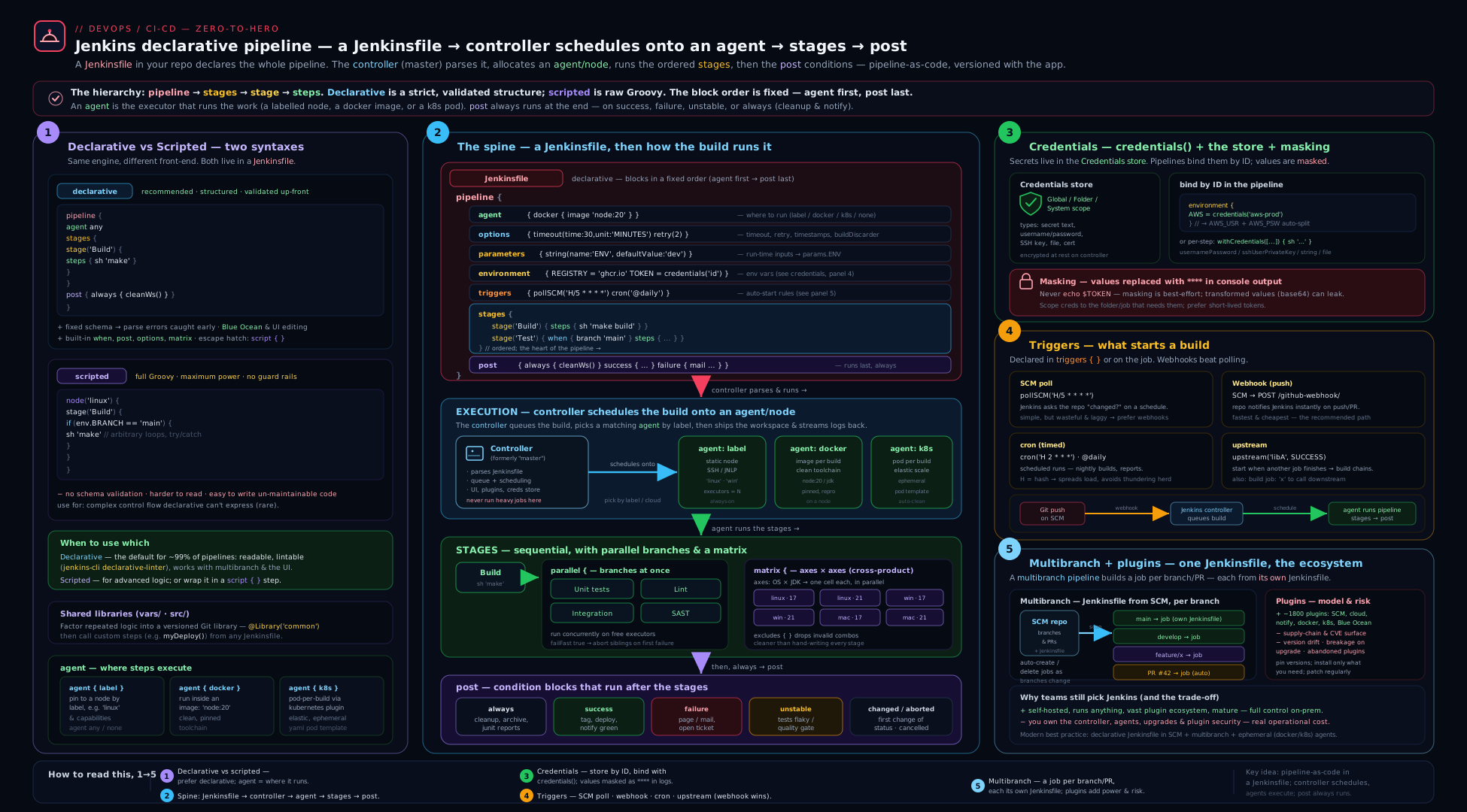
The diagram traces a build from the top: a trigger (webhook, poll, cron, or upstream) fires; the controller reads the Jenkinsfile from SCM (per branch, for multibranch); the declarative blocks wrap the run — options set behaviour, parameters collect inputs, environment injects variables and credentials() from the store; the controller then schedules each stage onto an agent (static label, Docker container, or ephemeral Kubernetes pod), where steps (sh/bat) execute in the agent’s workspace; parallel/matrix fan stages out, when gates them, input pauses for a human; and finally post runs on the result to publish tests, notify, and clean up. Keep this picture in mind — every directive in this lesson maps onto one part of it.
Going deeper
You can write great pipelines with everything above. This section is for when you want to know why Jenkins behaves the way it does — the execution model under the DSL, how a running build survives a restart, and the two “config as code” mechanisms (JCasC and shared libraries) that turn a hand-clicked controller into a reproducible platform. It also pins down the current (2026) Jenkins surface so you’re not learning a stale version.
The CPS execution model — why pipeline Groovy is not normal Groovy
A Jenkinsfile looks like Groovy, but it does not run like an ordinary Groovy script. The Pipeline engine transforms your code with CPS (Continuation-Passing Style) so that the build’s entire program state can be serialised to disk after every step. That is the magic behind Jenkins’ headline feature — a build can survive a controller restart and resume exactly where it left off — but it imposes rules that surprise everyone at least once:
- Local variables must be
Serializable. If you hold a non-serialisable object (aMatcherfrom a regex, aJsonSlurperresult, a file handle) across a pipeline step, the build throwsjava.io.NotSerializableException. Fix: don’t keep such objects alive across steps, or process them inside a@NonCPSmethod. @NonCPSmethods run as plain Groovy. Mark a helper@NonCPSand it executes normally (fast, full language) — but it cannot call pipeline steps (sh,echo,checkout) and its state isn’t serialised. Use it for pure data-crunching (parsing, transforming a list), not for orchestration.- Some Groovy idioms misbehave. Iterating a
Mapwith.each { }and a closure can replay oddly under CPS; a plainfor (x in list)loop is safer inside CPS code. This is another reason heavy logic belongs in a compiled shared-library class, not inlined in theJenkinsfile.
Mental model: the Jenkinsfile is an orchestration script that is constantly checkpointed, not a batch program that runs to completion in one JVM breath. When Groovy behaves strangely in a pipeline, CPS is almost always why.
Durability and resumability
Because state is checkpointed, you can trade durability for speed. The pipeline durability setting (global, or per-pipeline in the job config) ranges from MAX_SURVIVABILITY (write every step to disk — a build survives an abrupt controller crash, at an I/O cost) to PERFORMANCE_OPTIMIZED (write less often — faster, but an unclean crash can lose the last few steps’ progress). On a busy controller with lots of small steps, PERFORMANCE_OPTIMIZED is a common, deliberate choice. If you never want a build to replay after a restart, set options { disableResume() } so an interrupted run fails cleanly instead of resuming. Declarative’s restart-from-stage and stage-level input rely on this same checkpointing (and on preserveStashes for the files).
JCasC — Configuration as Code for the controller itself
Everything so far versions the pipeline. Jenkins Configuration as Code (JCasC) versions the controller: security realm, authorization, credentials wiring, clouds, tool installers, and most global settings, all in one YAML file instead of hand-clicked forms. You install the configuration-as-code plugin, point the CASC_JENKINS_CONFIG environment variable at a jenkins.yaml, and the controller applies it on boot — a rebuildable, code-reviewed controller instead of a snowflake.
# jenkins.yaml — applied on boot via CASC_JENKINS_CONFIG (representative)
jenkins:
  systemMessage: "Managed by Configuration-as-Code — do not edit in the UI"
  numExecutors: 0                    # the controller runs zero builds
  securityRealm:
    local:
      allowsSignup: false
      users:
        - id: "admin"
          password: "${ADMIN_PASSWORD}"     # from an env var / secret, never inline
  authorizationStrategy:
    roleBased:
      roles:
        global:
          - name: "admin"
            permissions: ["Overall/Administer"]
            assignments: ["admin"]
credentials:
  system:
    domainCredentials:
      - credentials:
          - string:
              scope: GLOBAL
              id: "npm-token"
              secret: "${NPM_TOKEN}"          # resolved from a secret at load time
unclassified:
  location:
    url: "https://jenkins.example.com/"
The ${VAR} placeholders are resolved from environment variables (or a secrets source) at load time, so no secret sits in the YAML. Pair this file with a declared plugin list (plugins.txt baked into a jenkins/jenkins:lts-jdk21-based image) and the whole controller — plugins, config, credentials wiring — is reproducible from Git. This lesson gives you the intro; the full JCasC + plugins + agent-tuning treatment is in the Jenkins platform lesson.
Shared libraries — factor pipeline logic out of the Jenkinsfile
When the same twenty lines of Groovy appear in every repo’s Jenkinsfile, that logic belongs in a shared library: a separate Git repo of reusable pipeline code, referenced with @Library. It has a fixed layout — vars/ holds global steps (a file vars/notifySlack.groovy becomes a step you call as notifySlack(...)), src/ holds Groovy classes (org/acme/Build.groovy), and resources/ holds static files you can libraryResource. You register it once (Manage Jenkins → System → Global Trusted Pipeline Libraries), then consume it:
// vars/notifySlack.groovy in the shared-library repo — defines the notifySlack step
def call(Map cfg = [:]) {
    slackSend channel: cfg.channel ?: '#ci',
              color:   cfg.color   ?: 'good',
              message: "${cfg.status}: ${env.JOB_NAME} #${env.BUILD_NUMBER} (${env.BUILD_URL})"
}
// A consuming Jenkinsfile — pin the library to a tag/branch for reproducibility
@Library('platform-pipelines@v3') _        // the trailing _ is required
pipeline {
    agent any
    stages { stage('Build') { steps { sh 'make' } } }
    post {
        success { notifySlack(status: 'OK') }
        failure { notifySlack(status: 'FAILED', color: 'danger') }
    }
}
“Trusted” libraries run outside the Groovy sandbox (full language, but only maintainers should be able to change them); “untrusted” folder-level libraries run sandboxed. Versioning the library with @Library('name@v3') means a pipeline-logic change is a reviewed version bump, not an invisible edit. The governance story — versioning strategy, unit-testing the Groovy, testing frameworks — is the platform lesson’s job; here, just know the vars//src/ shape and how to call a custom step.
The current Jenkins surface (2026) and version caveats
- Java: recent Jenkins LTS releases require Java 17 or 21 to run the controller and agents — Java 8 and 11 are no longer supported. The lab image
jenkins/jenkins:lts-jdk21bundles Java 21. - Release lines: the weekly line ships features fast; the LTS (Long-Term Support) line — a stabilised weekly, patched for ~12 weeks — is what you run in production. Track the plugin BOM so plugin versions are known-good against your core.
- UI: Blue Ocean is in maintenance mode (no major new features) — the built-in Pipeline: Stage View and the modern console cover most needs; don’t build new workflows that depend on Blue Ocean.
- Freestyle is legacy: the project’s own direction favours pipeline-as-code; treat freestyle jobs as something to migrate, not adopt.
- Groovy sandbox & script approval: pipeline Groovy runs sandboxed by default; a blocked method surfaces as “Scripts not permitted to use method …” and must be approved (Manage Jenkins → In-process Script Approval) or moved into a trusted shared library — prefer the latter.
- Security cadence: the Jenkins project publishes security advisories regularly, usually for plugins; running current LTS plus patched plugins is the baseline, and JCasC-plus-
plugins.txtmakes those updates a reviewable change rather than a click.
Hands-on lab
You’ll run a throwaway Jenkins controller in Docker and build a complete declarative pipeline with parameters, an environment, parallel stages, a when-gated stage, an input approval, and a post block — entirely free on your laptop.
Step 1 — Run Jenkins in Docker
docker run -d --name jenkins-lab \
  -p 8080:8080 -p 50000:50000 \
  -v jenkins_home:/var/jenkins_home \
  jenkins/jenkins:lts-jdk21

# Get the initial admin password
docker exec jenkins-lab cat /var/jenkins_home/secrets/initialAdminPassword
Open http://localhost:8080, paste the password, choose Install suggested plugins (this gives you Git, Pipeline, and the basics), and create an admin user. You now have a working controller.
Step 2 — Add a credential
In Manage Jenkins → Credentials → System → Global credentials → Add Credentials, add a Secret text credential: ID demo-token, secret super-secret-value. We’ll prove it gets masked.
Step 3 — Create a Pipeline job
New Item → Pipeline, name it declarative-lab. Scroll to Pipeline, leave the definition as Pipeline script, and paste:
pipeline {
    agent any

    options {
        timeout(time: 15, unit: 'MINUTES')
        buildDiscarder(logRotator(numToKeepStr: '10'))
        timestamps()
    }

    parameters {
        choice(name: 'ENVIRONMENT', choices: ['dev', 'staging', 'prod'], description: 'Target')
        booleanParam(name: 'RUN_SLOW', defaultValue: false, description: 'Run the slow suite?')
    }

    environment {
        APP_NAME  = 'lab-app'
        API_TOKEN = credentials('demo-token')   // bound and masked
    }

    stages {
        stage('Build') {
            steps {
                echo "Building ${APP_NAME} for ${params.ENVIRONMENT}"
                sh 'echo "compiling..." && sleep 2 && echo "done"'
            }
        }

        stage('Test') {
            parallel {
                stage('Unit')  { steps { sh 'echo unit tests && sleep 2' } }
                stage('Lint')  { steps { sh 'echo linting && sleep 1' } }
                stage('Slow')  {
                    when { expression { params.RUN_SLOW }; beforeAgent true }
                    steps { sh 'echo slow suite && sleep 3' }
                }
            }
        }

        stage('Secret check') {
            steps {
                // This will print **** , not the real value:
                sh 'echo "Token is: $API_TOKEN"'
            }
        }

        stage('Approve prod') {
            when { expression { params.ENVIRONMENT == 'prod' }; beforeAgent true }
            input {
                message "Deploy to PROD?"
                ok "Deploy"
            }
            steps { echo 'Deploying to production...' }
        }
    }

    post {
        always  { echo "Result: ${currentBuild.currentResult}" }
        success { echo 'Pipeline succeeded' }
        failure { echo 'Pipeline failed' }
        cleanup { echo 'Cleaning up' }   // would be cleanWs() with the Workspace Cleanup plugin
    }
}
Save.
Step 4 — Build and observe
Click Build with Parameters. First, run with ENVIRONMENT=dev, RUN_SLOW=false:
Expected behaviour:
- The Build stage runs, then Test fans into parallel Unit and Lint (the Slow branch is skipped because
RUN_SLOWis false — you’ll see it greyed out). - Secret check prints
Token is: ****— masking works; the real value never appears. - Approve prod is skipped (environment is
dev, notprod). postprints the result andcleanupruns last.
Now run again with ENVIRONMENT=prod, RUN_SLOW=true:
- Slow now runs in parallel with Unit/Lint.
- The pipeline pauses at Approve prod waiting for you — click Deploy (or Abort to see the
abortedpath).
Step 5 — Validation
# Confirm the build ran and the secret was masked (not leaked) in the console log
docker exec jenkins-lab bash -c \
  "grep -c 'super-secret-value' /var/jenkins_home/jobs/declarative-lab/builds/1/log || true"
# Expected: 0  (the real secret never appears)

docker exec jenkins-lab bash -c \
  "grep -c 'Token is: ' /var/jenkins_home/jobs/declarative-lab/builds/1/log"
# Expected: 1  (the line is there, but masked as ****)
A successful lab: a green build with parallel test stages, a skipped when-gated stage on the dev run, the prod run pausing for input, and the secret showing as **** (grep for the raw secret returns 0 hits).
Cleanup
docker rm -f jenkins-lab
docker volume rm jenkins_home
Cost note
Everything here runs locally in Docker, so it is completely free. In a real deployment the cost is the compute for the controller (keep it small — it shouldn’t run builds) plus the agents; ephemeral Kubernetes agents that scale to zero between builds mean you pay only for active build time, which is the cost story the platform lesson optimises.
Common beginner mistakes
These are conceptual traps — wrong mental models rather than typos. Fixing the model fixes a whole class of bugs at once.
- “The controller runs my builds.” It shouldn’t, and in a healthy setup it doesn’t. The controller schedules work, serves the UI, and holds every secret and plugin — it is the head chef at the pass, not a line cook. Right model: set the controller’s executors to 0 and run every build on an agent, so a runaway or malicious build can’t take down the brain.
- “Files I create in one stage are there in the next.” Only if both stages run on the same node. Each agent has its own workspace; a parallel branch or a per-stage agent sees a different directory. Right model: treat each agent as a separate desk — pass files with
stash/unstashor publish an artifact, never assume they travel for free. - “I need scripted pipelines to do anything real.” Declarative and scripted run on the same engine; declarative just adds structure and pre-flight validation. Right model: write declarative, and drop into a
script { }block for the rare dynamic bit. If the file is mostlyscript, the logic belongs in a shared library, not in scripted. - “A secret bound with
credentials()is safe whatever I do with it.” Masking replaces only the verbatim secret string. Base64-encode it, take a substring, or embed it in a URL and the transformed value prints in the clear. Right model: never transform-then-log a secret, avoidsh -xnear one, and prefer--password-stdin. - “
whenskips the stage, so it costs nothing.” WithoutbeforeAgent true, Jenkins allocates the agent (pulls the Docker image / spins up the pod) and then decides to skip. Right model: putbeforeAgent trueon anywhenthat might skip, so the decision happens before a node is provisioned. - “My new parameters/triggers should work on this build.” Jenkins learns a pipeline’s
parametersandtriggersby running theJenkinsfileonce; they take effect from the next build. Right model: after adding params, run once (it may ignore them), then use them. - “
agent anyis fine for production builds.”anypins nothing — the build lands on whatever node is free, with whatever tools happen to be installed there, which is exactly the “works on my agent” drift pipeline-as-code is meant to kill. Right model: pin the toolchain with adocker/dockerfile/kubernetesagent so the environment is reproducible and versioned. - “More plugins = more capability, so install freely.” Every plugin is third-party code running with the controller’s privileges and is a recurring CVE surface. Right model: install the minimal set, declare it as code (
plugins.txt), update deliberately against the security advisories, and prefer the increasingly capable core.
Common mistakes & troubleshooting
| Symptom | Likely cause | Fix |
|---|---|---|
Jenkinsfile rejected before the build starts |
Directives in the wrong order, or missing top-level agent |
Follow the required order; add agent any or agent none |
| A file from an earlier stage is “not found” in a later one | The stages ran on different agents/workspaces | stash/unstash the files, or use a single agent, or an artifact |
| Secret appears in plaintext in the log | The value was transformed (base64/substring/URL-embedded) before printing, or set -x was on |
Don’t transform before logging; avoid sh -x; use --password-stdin |
when stage still spins up an agent then skips |
Missing beforeAgent true |
Add beforeAgent true so the condition is checked before allocating a node |
| Build hangs forever on an approval | input with no timeout, or nobody is allowed to approve |
Wrap in timeout; set a correct submitter |
| Parameter changes don’t take effect | First run of a new/changed pipeline | Run once so Jenkins learns the params; they apply from the next build |
| Controller disk fills up; Jenkins gets slow/crashes | No buildDiscarder — unbounded build history/artifacts |
Add logRotator to options (or set it globally) |
sh step fails the build unexpectedly |
A command returned non-zero (the default fails the stage) | Use returnStatus: true to capture the code, or fix the command; set -e semantics apply |
| Webhook pushes don’t trigger builds | Hook URL/firewall wrong, or polling not enabled | Verify the SCM webhook hits Jenkins; for multibranch ensure scan/webhook is configured |
“Scripts not permitted to use method …” in scripted/script |
Groovy sandbox blocked a method | Approve it in In-process Script Approval, or move logic to a trusted shared library |
| Multibranch builds nothing | No Jenkinsfile on the branch, or discovery traits exclude it |
Add a Jenkinsfile; check the branch/PR discovery behaviours |
Best practices
- Write declarative, keep it declarative. Drop into
script { }only for genuinely dynamic bits; if aJenkinsfileis mostly script, the logic belongs in a shared library. - Run builds on agents, not the controller. Set the controller’s executors to 0; isolate builds (ideally ephemeral Docker/Kubernetes agents) so a bad build can’t harm the brain.
- Always set
buildDiscarderso build history and artifacts don’t fill the disk. - Pin your toolchain with a
docker/dockerfileagent for reproducible builds instead of relying on whatever is installed on a static agent. - Secrets only from the credentials store, bound with
withCredentials/credentials()and never echoed; never put a secret in theJenkinsfile. - Use
beforeAgent trueon skippablewhenstages to avoid wasting agents. - Prefer webhooks over
pollSCM, and useHin cron specs so jobs don’t stampede. - Use multibranch (and org folders) so the pipeline lives with the code, per branch, reviewed in the PR.
- Put real work in checked-in scripts (
./scripts/build.sh) called from shortshsteps — testable, lintable, and free of Groovy-string-escaping pain. - Wrap approvals and long waits in
timeoutso a forgotten gate doesn’t block an executor forever. - Manage the controller as code — plugins (
plugins.txt) + JCasC — so it’s rebuildable, not a hand-clicked snowflake.
Security notes
- Treat the
Jenkinsfileas code that runs with build privileges. Anyone who can push a branch can change the pipeline — combine with branch protection and PR review so pipeline changes are reviewed. - Lock down PR-from-fork discovery. In multibranch, building untrusted fork PRs can run attacker-supplied
Jenkinsfile/code on your agents and reach secrets. Use the “build PRs from forks only after a trusted user approves” discovery behaviour, and never expose privileged credentials to fork builds. - Restrict
inputsubmitters. A production approval gate with nosubmitterlets anyone deploy — always name the authorised users/groups, and capture who approved withsubmitterParameter. - Mind masking limits. Only verbatim secrets are masked; transformed values leak. Avoid
sh -xnear secrets, use--password-stdin, and don’t archive files that contain secrets. - Scope credentials tightly. Use folder-scoped credentials for multi-tenant controllers so a job can’t read another team’s secrets; keep production credentials away from non-prod jobs.
- Keep plugins minimal and updated. Each plugin runs with controller privileges and is a CVE surface; track the Jenkins security advisories and patch.
- Disable or constrain the Script Console and scripted sandbox bypass. The Groovy console runs arbitrary code as Jenkins; limit who has
Overall/RunScripts, and prefer trusted shared libraries over approving sandbox method bypasses. - Authenticate and authorise properly — use a real identity provider and a least-privilege authorisation strategy (e.g. role-based), not “logged-in users can do anything.”
Interview & exam questions
1. What is the difference between declarative and scripted pipelines, and which should you use?
Declarative (pipeline { }) is a structured, validated DSL with a fixed shape and fail-fast pre-flight checks; scripted (node { }) is free-form Groovy with full imperative control. Use declarative by default for readability, validation, and stage-restart support; drop into a script { } block (or scripted) only for genuinely dynamic pipelines.
2. Name the top-level sections of a declarative pipeline and which are mandatory.
agent, options, parameters, environment, triggers, tools, stages, and post. Only agent (top-level) and stages (with at least one stage/steps) are mandatory; the order is enforced.
3. What does agent none mean and what must you then do?
There is no global agent, so every stage must declare its own agent. It’s used when stages need different environments. Watch out: each agent has its own workspace, so move files with stash/unstash.
4. How does credentials() behave for a username/password credential?
It binds three variables: $VAR (user:pass), $VAR_USR (username), and $VAR_PSW (password) — all masked in the log. For secret text you get just $VAR; for a secret file/SSH key, $VAR is a path to a temp file.
5. Explain the limits of secret masking in Jenkins.
Jenkins masks only the verbatim secret string. If you base64-encode it, take a substring, or embed it in a URL, the transformed value is not masked and leaks. Avoid sh -x near secrets, use --password-stdin, and don’t echo or archive secrets.
6. What is the difference between pollSCM and a webhook trigger?
pollSCM has Jenkins repeatedly ask the SCM “anything new?” on a schedule — works everywhere but is laggy and wasteful. A webhook has the SCM POST to Jenkins the instant a push happens — immediate and efficient. Prefer webhooks; fall back to polling only when Jenkins isn’t reachable inbound.
7. Why use H in a cron/poll schedule?
H (hash) makes Jenkins pick a stable, per-job-spread value instead of a fixed one, so many jobs scheduled at the “same” time don’t all fire simultaneously and overload the controller. E.g. H/15 * * * * spreads the 15-minute polls across jobs.
8. What is a multibranch pipeline and what does it give you?
A project that scans a repo and auto-creates a pipeline for every branch/PR containing a Jenkinsfile. The pipeline comes from SCM (per branch, reviewed in the PR), and you get BRANCH_NAME, CHANGE_ID, etc. New branches appear automatically; deleted ones are cleaned up.
9. What’s the difference between the always and cleanup post conditions?
Both run regardless of result, but cleanup runs last, after every other post block — so it’s the right place for cleanWs() and teardown that must not race result-publishing steps in always.
10. When does a build become UNSTABLE versus FAILURE, and which post block catches each?
A junit step finding failing tests (or currentBuild.result = 'UNSTABLE') marks the build UNSTABLE (yellow); a hard error or non-zero sh marks it FAILURE (red). unstable {} catches the former, failure {} the latter; unsuccessful {} catches both.
11. How do you fan a stage out across multiple OS/version combinations declaratively?
Use a matrix with axes (each axis has a name and values); it runs the stages for every combination, minus any excludes. Axis values are exposed as env vars. It’s cleaner than hand-building parallel branches in a script block.
12. Why should the Jenkins controller run zero builds, and how do you keep secrets and untrusted code off it? The controller holds all config, credentials, and plugins — a runaway or malicious build there could compromise everything. Set its executors to 0 and run builds on (ideally ephemeral) agents; restrict fork-PR builds, scope credentials, and limit the Script Console.
13. Why does Groovy sometimes behave oddly in a Jenkinsfile, and what is @NonCPS for?
Pipeline code is transformed with CPS so the build’s state can be serialised to disk after each step (enabling resume-after-restart), which forces local variables to be Serializable and makes some closures replay oddly. @NonCPS marks a method to run as plain, non-serialised Groovy — fast and unrestricted, but it cannot call pipeline steps, so use it only for pure data-crunching.
14. What does JCasC give you that a Jenkinsfile does not?
A Jenkinsfile versions one pipeline; JCasC versions the controller — security, authorization, credentials wiring, clouds, and global config — as a jenkins.yaml applied on boot via CASC_JENKINS_CONFIG, making the controller reproducible from Git instead of a hand-clicked snowflake.
Quick check
- Which two declarative sections are mandatory, and what’s the rule about
agent? - How do you move a built file from a stage on agent A to a stage on agent B?
- What three environment variables does
credentials('x')create for a username/password credential? - What does
beforeAgent truedo in awhenblock, and why use it? - Which
postcondition runs last and is meant for workspace cleanup?
Answers
agent(top-level) andstages(at least onestagewithsteps).agentis required at the top level — useagent noneif you set agents per stage.stashthe files in the producing stage andunstashthem in the consuming stage (or publish/consume an artifact).$X(user:pass),$X_USR(username), and$X_PSW(password) — all masked.- It evaluates the
whencondition before allocating an agent, so a skipped stage doesn’t waste a node (Docker pull / pod spin-up). cleanup— it runs after all otherpostblocks, ideal forcleanWs().
Practice challenges
Work these in order — each builds on the last. Try it before opening the solution; the one-line why is the point, not just the snippet. You can run any of them in the Docker lab controller from earlier.
1 (Beginner) — The minimal valid pipeline. Write the smallest declarative pipeline that is valid and prints a message in one Build stage. Which two blocks are mandatory?
<details><summary>Solution</summary>
pipeline {
    agent any
    stages {
        stage('Build') {
            steps { echo 'Hello from Jenkins' }
        }
    }
}
Why: agent (top-level) and stages (with at least one stage/steps) are the only mandatory blocks — everything else is optional.
</details>
2 (Beginner) — Parameterise it. Add a choice parameter ENVIRONMENT (dev/staging/prod) and a booleanParam RUN_TESTS, and echo the chosen environment. Why might your first build ignore the new parameters?
<details><summary>Solution</summary>
pipeline {
    agent any
    parameters {
        choice(name: 'ENVIRONMENT', choices: ['dev', 'staging', 'prod'], description: 'Target')
        booleanParam(name: 'RUN_TESTS', defaultValue: true, description: 'Run tests?')
    }
    stages {
        stage('Build') { steps { echo "Deploying to ${params.ENVIRONMENT}" } }
    }
}
Why: Jenkins only learns a pipeline’s parameters by executing the Jenkinsfile once, so they apply from the second build; choice also defaults to its first value.
</details>
3 (Intermediate) — Bind a secret without leaking it. Using a Username/password credential with ID docker-hub, log in to a registry with withCredentials, passing the password via --password-stdin. Why is that safer than -p "$PASS"?
<details><summary>Solution</summary>
steps {
    withCredentials([usernamePassword(credentialsId: 'docker-hub',
                     usernameVariable: 'REG_USER', passwordVariable: 'REG_PASS')]) {
        sh 'echo "$REG_PASS" | docker login -u "$REG_USER" --password-stdin registry.example.com'
    }
}
Why: --password-stdin keeps the secret off the command line (out of ps and the log), and withCredentials masks the verbatim value and unbinds it after the block.
</details>
4 (Intermediate) — Parallelise and share files across agents. Run Unit and Integration in a parallel block that fails fast, where Build runs on one agent and stashes dist/** for a Deploy stage on a different agent.
<details><summary>Solution</summary>
pipeline {
    agent none
    stages {
        stage('Build') {
            agent { label 'linux' }
            steps { sh 'make'; stash name: 'app', includes: 'dist/**' }
        }
        stage('Test') {
            failFast true
            parallel {
                stage('Unit')        { agent { label 'linux' } steps { sh 'make test-unit' } }
                stage('Integration') { agent { label 'linux' } steps { sh 'make test-integration' } }
            }
        }
        stage('Deploy') {
            agent { label 'deploy' }
            steps { unstash 'app'; sh './deploy.sh dist/' }
        }
    }
}
Why: each agent has its own workspace, so files must travel via stash/unstash; failFast true aborts sibling branches on the first failure for quicker feedback.
</details>
5 (Advanced) — Matrix with an exclusion. Test across PLATFORM (linux, windows) × NODE (20, 22), route each cell to an agent by its platform label, and exclude the windows + 20 combination.
<details><summary>Solution</summary>
stage('Test matrix') {
    matrix {
        axes {
            axis { name 'PLATFORM'; values 'linux', 'windows' }
            axis { name 'NODE';     values '20', '22' }
        }
        excludes {
            exclude {
                axis { name 'PLATFORM'; values 'windows' }
                axis { name 'NODE';     values '20' }
            }
        }
        agent { label "${PLATFORM}" }
        stages { stage('Test') { steps { sh 'node --version && make test' } } }
    }
}
Why: matrix expands the Cartesian product (4 cells − 1 excluded = 3), each cell a full mini-pipeline; axis names become env vars usable in the agent label.
</details>
6 (Advanced) — A governed prod gate with a shared-library notifier. Gate a Deploy prod stage on main (and not a PR), require an authorised approver via input wrapped in a timeout, and notify through a shared-library step notifySlack on fixed and failure.
<details><summary>Solution</summary>
@Library('platform-pipelines@v3') _
pipeline {
    agent any
    options { timeout(time: 30, unit: 'MINUTES') }
    stages {
        stage('Deploy prod') {
            when { allOf { branch 'main'; not { changeRequest() } }; beforeAgent true }
            input {
                message 'Deploy to production?'
                ok 'Deploy'
                submitter 'release-managers,sre'
            }
            steps { sh './deploy.sh prod' }
        }
    }
    post {
        fixed   { notifySlack(status: 'Back to green') }
        failure { notifySlack(status: 'FAILED', color: 'danger') }
    }
}
Why: beforeAgent true avoids provisioning a node for a skipped stage, submitter restricts who can approve (authorisation, not just a button), the timeout stops a forgotten gate from pinning resources, and notifySlack centralises notification logic in a versioned library instead of copy-paste.
</details>
Exercise
Turn the lab pipeline into a realistic multibranch deploy pipeline:
- Convert the job to a multibranch pipeline pointing at a small Git repo with the
Jenkinsfilecommitted (use a local repo or a free GitHub repo). Confirm a pipeline appears per branch. - Add a
dockeragent (e.g.node:20) so the build runs in a reproducible container, and prove the Node version is pinned regardless of the host agent. - Add a matrix that tests across two Node versions (
20,22) and excludes one combination. - Gate a Deploy preview stage on
when { changeRequest() }(PR builds only) and a Deploy prod stage onwhen { branch 'main'; beforeAgent true }with aninputapproval restricted to asubmitter, wrapped in atimeout. - Add a
postblock that publishes JUnit results inalways, notifies onfailureandfixed, and runscleanWs()incleanup.
Success criteria: pushing to a feature branch builds and runs the preview deploy; opening a PR runs the matrix; merging to main pauses for an authorised approver and then “deploys”; the build is UNSTABLE (not FAILED) when a test fails; and the workspace is wiped at the end.
Certification mapping
- Microsoft AZ-400 (DevOps Engineer Expert) — “Design and implement build and release pipelines”: Jenkins pipeline-as-code, agents, triggers, approvals/gates (
input), and secrets management map directly onto the CI/CD and security objectives, complementing the Azure Pipelines lesson. - AWS DOP-C02 (DevOps Engineer – Professional) — the CI/CD domain (pipelines, parallel/matrix execution, manual approval gates, artifact handling, credentials) transfers directly; Jenkins is a common self-managed CI in AWS estates.
- Vendor-neutral CI/CD foundations — declarative pipeline structure, agents/runners, triggers (poll vs webhook), conditional stages, and credentials are the concepts every CI tool shares; pair this with the CI/CD anatomy lesson.
Glossary
- Controller — the central Jenkins server that schedules builds, serves the UI, and stores config; should run no builds itself.
- Agent / node — a machine (or container/pod) that runs build steps; connects to the controller.
- Executor — one concurrent build slot on an agent.
- Workspace — the directory on an agent where a build’s files live; per-node, persists between steps on the same node.
- Pipeline — a build process defined as code (the recommended model), declarative or scripted.
- Jenkinsfile — the file (usually in the repo root) containing the pipeline definition.
- Declarative pipeline — the structured, validated
pipeline { }DSL (the default style). - Scripted pipeline — the free-form
node { }Groovy style for dynamic pipelines. - Agent directive — the block declaring where steps run (
any,none,label,docker,kubernetes). - Stage / step — a logical phase (Build/Test/Deploy) / an individual action (
sh,echo) within it. when— a directive that conditionally runs a stage.input— a step/directive that pauses for human approval.post— a block that runs after stages, conditioned on the result (always,success,failure, …).- Credentials store — Jenkins’ access-controlled secret store; referenced by credential ID.
- Multibranch pipeline — a project that auto-creates a pipeline per branch/PR containing a
Jenkinsfile. - Organization folder — a project that auto-creates multibranch pipelines for every repo in an org.
- Blue Ocean — Jenkins’ modern visual pipeline UI (maintenance mode in 2026).
- Plugin — a versioned extension; almost all Jenkins capability is plugins.
- Freestyle job — the legacy UI-configured job type whose config lives only in the controller’s XML; superseded by pipeline-as-code.
steps— the block of individual actions inside a stage (sh,echo,withCredentials, …).stash/unstash— save files in one stage and restore them in another, used to move build outputs between agents/workspaces.- Artifact — a build output persisted on the controller (
archiveArtifacts) and downloadable from the build page. withCredentials— a step that binds credentials into a wrapped block only — tighter than pipeline-widecredentials().parallel— run stages concurrently inside one stage; each branch may have its own agent.matrix— run the same stages across every combination of one or more axes (OS × version …), minusexcludes.beforeAgent— awhenflag that evaluates the condition before allocating an agent, so a skipped stage wastes no node.H(hash) symbol — in a cron/poll spec, a per-job-stable value that spreads scheduled jobs out so they don’t all fire at once.- Webhook — the SCM POSTs to Jenkins the instant a push happens (immediate); contrast
pollSCM, where Jenkins asks on a schedule. - Masking — Jenkins replacing a bound secret’s verbatim string with
****in logs; transformed values are not masked. - CPS (Continuation-Passing Style) — the transform that lets a pipeline serialise its state after each step and resume after a restart.
@NonCPS— marks a method to run as ordinary (non-serialised) Groovy; fast, but it cannot call pipeline steps.- Durability — how often a running pipeline checkpoints to disk (
MAX_SURVIVABILITY↔PERFORMANCE_OPTIMIZED), trading I/O for crash-resilience. - JCasC (Configuration as Code) — the
configuration-as-codeplugin applying a YAML file (CASC_JENKINS_CONFIG) so the whole controller is reproducible. - Shared library — a separate Git repo of reusable pipeline code (
vars/,src/,resources/) referenced with@Library. - Global variable (
vars/) — a file in a shared library that becomes a custom pipeline step (e.g.vars/notifySlack.groovy→notifySlack(...)). - Groovy sandbox / script approval — the security layer that restricts pipeline Groovy; blocked methods need approval or a trusted shared library.
- LTS (Long-Term Support) — the stabilised, ~12-week-patched Jenkins release line for production; contrast the fast-moving weekly line.
Next steps
You now know the foundational Jenkins pipeline model end to end. From here:
- Glue real logic into your steps with shell & bash scripting for DevOps, the natural next lesson in this module.
- Turn this into a governed, org-wide platform with shared libraries and JCasC — versioned pipeline logic, Configuration-as-Code, ephemeral Kubernetes agents, Vault, and unit-tested Groovy.
- Compare the model with the other CI tools: GitHub Actions, GitLab CI, and Azure Pipelines fundamentals.
- Step back to the vendor-neutral model in CI/CD anatomy, and apply gate design in CI/CD pipeline design.