In a nutshell
Every build you run pulls software parts off the internet — Java JARs from Maven Central, JavaScript packages from npm, base images from Docker Hub. Sonatype Nexus Repository is one server that sits between your builds and those public sources and does two jobs at once: it caches the public parts locally (so you download each one once, and a public outage can’t stop your release), and it stores your own private parts (the libraries and images your teams publish for each other).
Think of it as a company library. A proxy repository is the interlibrary-loan desk: the first time someone needs a book from the big public library it fetches one copy and keeps it on the shelf, so everyone after that gets it instantly — and you still have it even if the public library closes for the day. A hosted repository is the shelf for books your own staff wrote — private publications that exist nowhere else. A group is the single front desk: readers ask one place and get whatever exists, private or public, without needing to know which shelf it came from. The blob store underneath is just the warehouse where the actual bytes are shelved.
Get this right and the payoff is large: CI stops flaking when Docker Hub throttles you, your internal libraries get a real home instead of a shared drive, and storage stops being a 2 a.m. fire drill.
Level: Intermediate · Time: ~35 min
This lesson assumes basic Linux (systemd, curl) and a nodding familiarity with at least one of Maven, npm, or Docker as a client. After it you can: stand up Nexus 3 as a service; explain when to reach for a proxy, hosted, or group repo; wire Maven, npm, and Docker clients at the right URLs for read vs. publish; keep storage bounded with blob stores plus cleanup policies; and scope who can publish what with roles and content selectors.
A 90-engineer product company has its builds wedged on the public internet. Every mvn install pulls straight from Maven Central, every npm ci hammers the public registry, and every docker pull hits Docker Hub — so the morning Docker Hub’s anonymous rate limit bites, half the CI fleet goes red at once and nobody can ship. Worse, the two internal Java libraries that three teams depend on are passed around as JARs in a shared drive, and there is no place to publish the private npm packages the platform team keeps threatening to extract. The mandate from the head of engineering is blunt: “One artifact server. Cache the public stuff so a Docker Hub outage can’t stop a release, give us a real private registry for our own packages, and don’t let the disk fill up.” This guide stands that up with Sonatype Nexus Repository — proxy repositories that cache Maven Central, npm, and Docker Hub; hosted repositories for the org’s own artifacts; group repositories that give every developer one URL to point at; file-backed blob stores; and scheduled cleanup so storage stops being a fire drill.
Prerequisites
- A Linux VM (Ubuntu 22.04 or RHEL 9) with 4 vCPU / 8 GB RAM minimum (Nexus wants
-Xmxof 2–4 GB plus OS headroom), and a separate data disk of 200 GB+ mounted at/opt/sonatype-workfor blob stores. - OpenJDK 17 (Nexus Repository 3.61+ runs on and requires Java 17).
- Docker Engine on developer and CI machines for the Docker repository walkthrough.
- DNS records you control:
nexus.kloudvin.internalfor the UI/API, plusdocker.kloudvin.internalas the connector hostname for the Docker registry (Docker needs a hostname, not a path). - A TLS certificate for those names (we terminate TLS at a reverse proxy / Akamai edge, not in Nexus).
- Admin access to your Okta or Microsoft Entra ID tenant if you want SSO, and a HashiCorp Vault instance for the publish credentials CI will use.
curlandjqon your workstation for the scripted steps.
Target topology
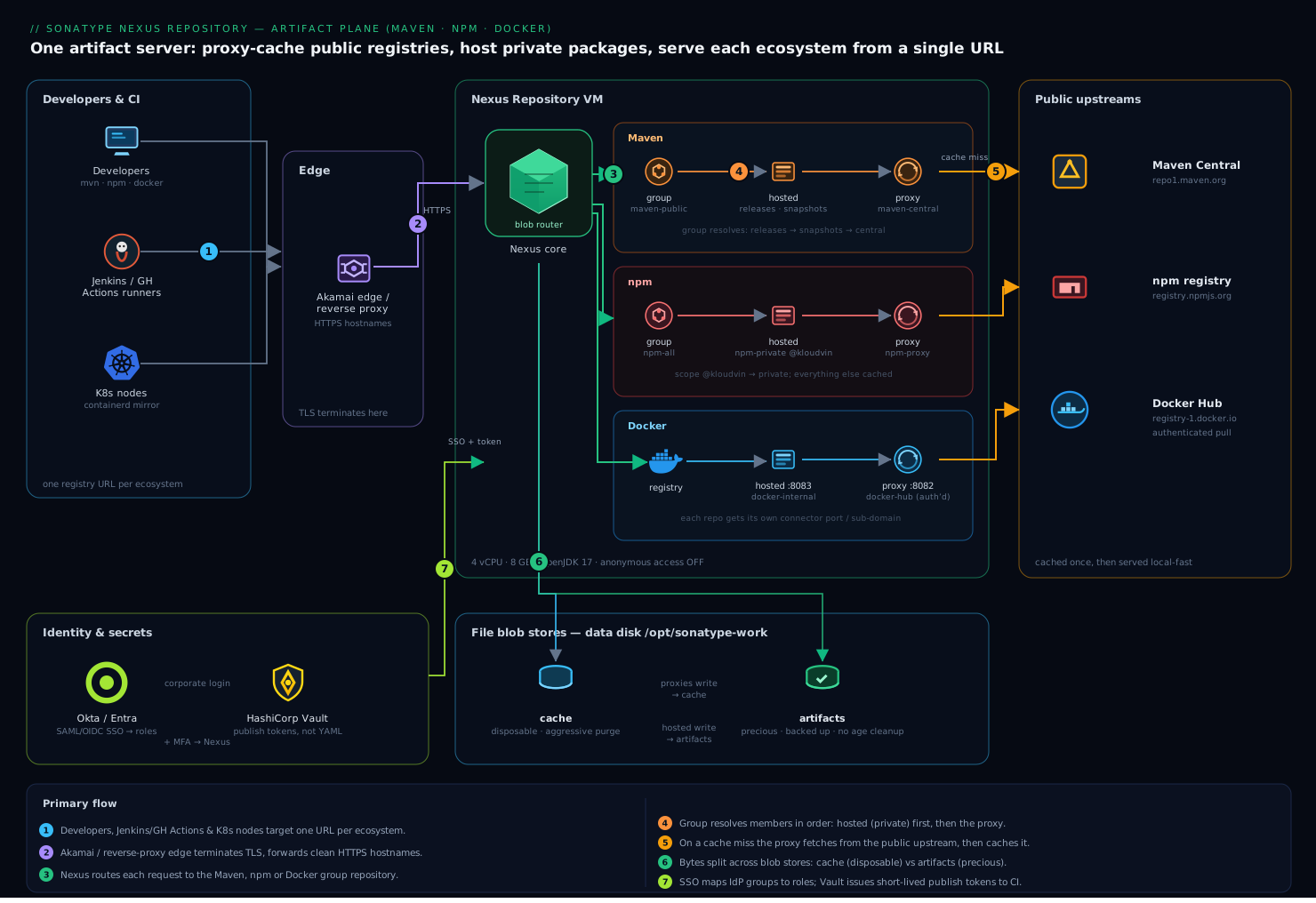
Read the picture left to right: clients hit one reverse proxy, which fans out to a per-format group URL; each group unifies a hosted repo (your own artifacts) with a proxy repo (cached public upstream); and the two blob stores at the bottom split disposable cache from precious releases.
The shape is deliberately simple, because an artifact server that is hard to reason about is an artifact server people route around. Developers and Jenkins/GitHub Actions runners talk to a single Nexus instance behind a reverse proxy. For each ecosystem there are three logical repositories: a proxy that caches the public upstream, a hosted repo that holds the org’s own artifacts, and a group that unifies the two behind one URL so a developer configures one registry and gets both private and cached-public packages transparently. Underneath, two file blob stores separate concerns — one for cached public bytes (disposable, aggressively cleaned) and one for the org’s own published artifacts (precious, lightly cleaned). Identity federates from Okta/Entra so logins use corporate credentials and group membership maps to Nexus roles; publish tokens live in Vault, not in pipeline YAML.
We will deploy Nexus, lay down the blob stores first, then create the Maven, npm, and Docker repositories, point clients at them, attach cleanup policies, and finish with validation, rollback, security, and cost notes.
Proxy, hosted, group: the three repository types (and the formats they speak)
Almost everything in Nexus is one of three repository types, and the whole product clicks into place once those three are second nature. Learn them once and the pattern repeats identically for every language ecosystem.
- Proxy — a read-through cache of a public upstream (Maven Central, npmjs.org, Docker Hub). It is lazy: it does not mirror the upstream up front. The first request for
commons-lang3-3.14.0.jaris fetched from the remote and written to a blob store; every request after that is served locally, fast, with zero upstream traffic. Two features make it resilient — a negative cache that remembers 404s so a typo doesn’t hammer the upstream, and auto-block, which temporarily stops sending requests to a remote that is failing and retries on a schedule so one flaky upstream can’t stall every build. - Hosted — a repository whose contents you publish. Your private
@kloudvin/*npm packages, your internal Java libraries, your own Docker images live here and nowhere else. “Hosted” means Nexus hosts your artifacts — it has nothing to do with web hosting. - Group — a single URL that fans out across an ordered list of members (usually hosted repos then proxies). Clients point at the group and read transparently from all of them; Nexus resolves members in order, first match wins. You never publish to a group — a group is read-only. You read from the group and publish to a hosted repo. That one rule prevents most beginner confusion.
The proxy-cache pattern is also your resilience story. In March 2016 an author unpublished a tiny npm package called left-pad; thousands of builds worldwide that resolved it live from the public registry broke within minutes. A team fronting npm with a Nexus proxy shrugged: the version they used was already cached, so their npm ci kept working while the internet scrambled. The same logic covers a Docker Hub outage, a Maven Central slowdown, or a rate-limit wall at 9 a.m. — if the byte has been fetched once, an upstream having a bad day cannot stop your release.
Read from the group, publish to the hosted repo is the single mental rule for wiring every client:
| Client action | Point at | Why |
|---|---|---|
| Install / resolve dependencies | the group URL | one URL serves private + cached-public transparently |
| Publish / deploy your own artifact | the hosted URL | groups are read-only; the version policy is enforced here |
| Debug “where did this come from?” | the proxy or hosted member directly | groups hide which member answered |
The three types are format-agnostic — Nexus 3 speaks a long list of packaging formats and each one gets the same proxy/hosted/group treatment:
| Format (Nexus name) | Serves clients | Typical proxy upstream |
|---|---|---|
maven2 |
Maven, Gradle, sbt | repo1.maven.org |
npm |
npm, yarn, pnpm | registry.npmjs.org |
pypi |
pip, poetry, uv | pypi.org |
docker |
Docker, containerd, Podman, OCI | registry-1.docker.io |
nuget |
.NET / NuGet | api.nuget.org |
apt |
Debian/Ubuntu apt |
archive.ubuntu.com |
yum |
RHEL/Rocky dnf/yum |
a distro mirror |
helm |
Helm CLI | a chart repo |
raw |
anything over HTTP (curl, wget) |
any static file server |
go, cargo, rubygems, conan, r, conda |
Go, Rust, Ruby, C/C++, R, Conda | each ecosystem’s public index |
This lesson wires Maven, npm, and Docker in full; the Practice challenges extend the same three-type pattern to raw, pypi, and apt so the muscle memory sticks.
1. Install and start Nexus Repository
Create a dedicated service account and lay Nexus down under /opt. Never run it as root — Nexus will refuse some operations and it is a needless blast radius.
sudo useradd -r -m -U -d /opt/nexus -s /bin/bash nexus
sudo mkdir -p /opt/nexus /opt/sonatype-work
sudo chown -R nexus:nexus /opt/nexus /opt/sonatype-work

# Fetch the latest 3.x (pin a version in real life; latest shown for brevity)
cd /tmp
curl -fSL -o nexus.tar.gz \
  https://download.sonatype.com/nexus/3/nexus-unix.tar.gz
sudo tar -xzf nexus.tar.gz -C /opt/nexus --strip-components=1
sudo chown -R nexus:nexus /opt/nexus
Point the work directory at the data disk and size the heap. Edit /opt/nexus/bin/nexus.vmoptions so memory matches the box (these two lines, plus the data dir):
-Xms2703m
-Xmx2703m
-XX:MaxDirectMemorySize=2703m
-Dkaraf.data=/opt/sonatype-work/nexus3
-Djava.io.tmpdir=/opt/sonatype-work/nexus3/tmp
Run it as a systemd service rather than the bundled wrapper, so it restarts cleanly on reboot:
# /etc/systemd/system/nexus.service
[Unit]
Description=Sonatype Nexus Repository
After=network.target

[Service]
Type=forking
LimitNOFILE=65536
ExecStart=/opt/nexus/bin/nexus start
ExecStop=/opt/nexus/bin/nexus stop
User=nexus
Group=nexus
Restart=on-abort
TimeoutStartSec=180

[Install]
WantedBy=multi-user.target
sudo systemctl daemon-reload
sudo systemctl enable --now nexus
# First boot writes a one-time admin password; grab it:
sudo cat /opt/sonatype-work/nexus3/admin.password
Browse to http://nexus.kloudvin.internal:8081, sign in as admin with that password, complete the setup wizard, set a strong admin password, and disable anonymous access when prompted (we will hand out scoped accounts instead). From here on, every step works through either the UI (Administration → Repository) or the REST API; the API examples below are the reproducible path you would commit to Terraform/Ansible later.
2. Lay down file blob stores first
A blob store is where the bytes physically live, and you cannot move a repository to a different blob store after creation without a migration — so decide this up front. Create two file-backed stores: one for disposable cached public artifacts, one for the org’s own. Set the API base URL and admin credentials once:
NEXUS=http://nexus.kloudvin.internal:8081
AUTH='admin:CHANGE_ME_STRONG_ADMIN_PW'
# Disposable cache store (proxies write here)
curl -fsu "$AUTH" -X POST "$NEXUS/service/rest/v1/blobstores/file" \
  -H 'Content-Type: application/json' -d '{
    "name": "cache",
    "path": "/opt/sonatype-work/nexus3/blobs/cache",
    "softQuota": { "type": "spaceUsedQuota", "limit": 80000000000 }
  }'

# Precious store for hosted/published artifacts
curl -fsu "$AUTH" -X POST "$NEXUS/service/rest/v1/blobstores/file" \
  -H 'Content-Type: application/json' -d '{
    "name": "artifacts",
    "path": "/opt/sonatype-work/nexus3/blobs/artifacts",
    "softQuota": { "type": "spaceUsedQuota", "limit": 120000000000 }
  }'
The softQuota does not block writes; it raises an alert when the store crosses the limit so you fix storage on your schedule, not at 2 a.m. Splitting cache from artifacts is the move that makes cleanup safe later: you can wipe cached bytes aggressively without ever risking a published release.
3. Create the Maven proxy, hosted, and group
Maven needs three repos. The proxy caches Maven Central; the hosted repo holds your private libraries split into releases (immutable) and snapshots (mutable); the group stitches them into one URL.
# Proxy of Maven Central -> writes to the cache blob store
curl -fsu "$AUTH" -X POST "$NEXUS/service/rest/v1/repositories/maven/proxy" \
  -H 'Content-Type: application/json' -d '{
    "name": "maven-central",
    "online": true,
    "storage": { "blobStoreName": "cache", "strictContentTypeValidation": true },
    "proxy": { "remoteUrl": "https://repo1.maven.org/maven2/", "contentMaxAge": 1440, "metadataMaxAge": 1440 },
    "negativeCache": { "enabled": true, "timeToLive": 1440 },
    "httpClient": { "blocked": false, "autoBlock": true },
    "maven": { "versionPolicy": "RELEASE", "layoutPolicy": "STRICT", "contentDisposition": "INLINE" }
  }'

# Hosted releases (no redeploy -> releases are immutable)
curl -fsu "$AUTH" -X POST "$NEXUS/service/rest/v1/repositories/maven/hosted" \
  -H 'Content-Type: application/json' -d '{
    "name": "maven-releases",
    "online": true,
    "storage": { "blobStoreName": "artifacts", "strictContentTypeValidation": true, "writePolicy": "ALLOW_ONCE" },
    "maven": { "versionPolicy": "RELEASE", "layoutPolicy": "STRICT" }
  }'

# Hosted snapshots (redeploy allowed)
curl -fsu "$AUTH" -X POST "$NEXUS/service/rest/v1/repositories/maven/hosted" \
  -H 'Content-Type: application/json' -d '{
    "name": "maven-snapshots",
    "online": true,
    "storage": { "blobStoreName": "artifacts", "strictContentTypeValidation": true, "writePolicy": "ALLOW" },
    "maven": { "versionPolicy": "SNAPSHOT", "layoutPolicy": "STRICT" }
  }'

# Group: members resolved in order, first match wins
curl -fsu "$AUTH" -X POST "$NEXUS/service/rest/v1/repositories/maven/group" \
  -H 'Content-Type: application/json' -d '{
    "name": "maven-public",
    "online": true,
    "storage": { "blobStoreName": "cache", "strictContentTypeValidation": true },
    "group": { "memberNames": ["maven-releases", "maven-snapshots", "maven-central"] }
  }'
writePolicy: ALLOW_ONCE on maven-releases is the rule that makes a release version reproducible forever — once 1.4.0 is published it cannot be overwritten, which is exactly the guarantee the shared-drive JARs never had.
Now point Maven at the group for reads and at the hosted repos for deploys. In a developer’s ~/.m2/settings.xml:
<settings>
  <mirrors>
    <mirror>
      <id>nexus</id>
      <mirrorOf>*</mirrorOf>
      <url>http://nexus.kloudvin.internal:8081/repository/maven-public/</url>
    </mirror>
  </mirrors>
  <servers>
    <server><id>nexus-releases</id><username>ci-deployer</username><password>${env.NEXUS_TOKEN}</password></server>
    <server><id>nexus-snapshots</id><username>ci-deployer</username><password>${env.NEXUS_TOKEN}</password></server>
  </servers>
</settings>
And in the project pom.xml, the publish targets:
<distributionManagement>
  <repository>
    <id>nexus-releases</id>
    <url>http://nexus.kloudvin.internal:8081/repository/maven-releases/</url>
  </repository>
  <snapshotRepository>
    <id>nexus-snapshots</id>
    <url>http://nexus.kloudvin.internal:8081/repository/maven-snapshots/</url>
  </snapshotRepository>
</distributionManagement>
A mvn deploy now lands snapshots and releases in the right hosted repo automatically, version policy enforced by Nexus.
4. Create the npm proxy, hosted, and group
Same three-repo pattern for npm. The proxy caches the public registry; the hosted repo holds your scoped private packages; the group serves both from one registry URL.
curl -fsu "$AUTH" -X POST "$NEXUS/service/rest/v1/repositories/npm/proxy" \
  -H 'Content-Type: application/json' -d '{
    "name": "npm-proxy", "online": true,
    "storage": { "blobStoreName": "cache", "strictContentTypeValidation": true },
    "proxy": { "remoteUrl": "https://registry.npmjs.org", "contentMaxAge": 1440, "metadataMaxAge": 1440 },
    "negativeCache": { "enabled": true, "timeToLive": 1440 },
    "httpClient": { "blocked": false, "autoBlock": true }
  }'

curl -fsu "$AUTH" -X POST "$NEXUS/service/rest/v1/repositories/npm/hosted" \
  -H 'Content-Type: application/json' -d '{
    "name": "npm-private", "online": true,
    "storage": { "blobStoreName": "artifacts", "strictContentTypeValidation": true, "writePolicy": "ALLOW" }
  }'

curl -fsu "$AUTH" -X POST "$NEXUS/service/rest/v1/repositories/npm/group" \
  -H 'Content-Type: application/json' -d '{
    "name": "npm-all", "online": true,
    "storage": { "blobStoreName": "cache", "strictContentTypeValidation": true },
    "group": { "memberNames": ["npm-private", "npm-proxy"] }
  }'
Developers and CI point npm at the group for installs. Create a project .npmrc:
registry=http://nexus.kloudvin.internal:8081/repository/npm-all/
# scope private packages to the hosted repo so publishes land correctly
@kloudvin:registry=http://nexus.kloudvin.internal:8081/repository/npm-private/
always-auth=true
Get an auth token without pasting a password by hitting Nexus’s npm-compatible login endpoint, then npm ci resolves private @kloudvin/* packages and proxies everything else through the cache:
# Mint a bearer token for the configured registry
curl -fsu "ci-deployer:$NEXUS_TOKEN" -X PUT \
  "$NEXUS/repository/npm-private/-/user/org.couchdb.user:ci-deployer" \
  -H 'Content-Type: application/json' \
  -d '{"name":"ci-deployer","password":"'"$NEXUS_TOKEN"'"}'

# Publish a private package
npm publish --registry http://nexus.kloudvin.internal:8081/repository/npm-private/
5. Create the Docker Hub proxy and a hosted Docker registry
Docker is the one that bites teams, both because of Hub rate limits and because the Docker client addresses a registry by hostname, not a URL path — so each Docker repository needs its own HTTP connector port (or a unique sub-domain via the reverse proxy). We give the proxy port 8082 and the hosted registry port 8083, then map sub-domains in the proxy.
# Proxy of Docker Hub with anonymous-pull pre-auth to dodge rate limits
curl -fsu "$AUTH" -X POST "$NEXUS/service/rest/v1/repositories/docker/proxy" \
  -H 'Content-Type: application/json' -d '{
    "name": "docker-hub", "online": true,
    "storage": { "blobStoreName": "cache", "strictContentTypeValidation": true },
    "proxy": { "remoteUrl": "https://registry-1.docker.io", "contentMaxAge": 1440, "metadataMaxAge": 1440 },
    "negativeCache": { "enabled": true, "timeToLive": 1440 },
    "httpClient": { "blocked": false, "autoBlock": true },
    "dockerProxy": { "indexType": "HUB", "cacheForeignLayers": false },
    "docker": { "v1Enabled": false, "forceBasicAuth": true, "httpPort": 8082 }
  }'

# Hosted registry for the org's own images
curl -fsu "$AUTH" -X POST "$NEXUS/service/rest/v1/repositories/docker/hosted" \
  -H 'Content-Type: application/json' -d '{
    "name": "docker-internal", "online": true,
    "storage": { "blobStoreName": "artifacts", "strictContentTypeValidation": true, "writePolicy": "ALLOW" },
    "docker": { "v1Enabled": false, "forceBasicAuth": true, "httpPort": 8083 }
  }'
To avoid Docker Hub’s anonymous limit entirely, give the proxy a Docker Hub account to authenticate as: Administration → Repository → docker-hub → HTTP → set Authentication to Username with a Hub login. That converts your anonymous pulls into authenticated ones with a far higher ceiling, served once and cached forever after.
Front both connectors with the reverse proxy / Akamai edge so clients use clean HTTPS hostnames (docker-proxy.kloudvin.internal → :8082, docker.kloudvin.internal → :8083) and the Docker daemon never sees a plain-HTTP port. On the client:
# One-time login (token, not password, sourced from Vault in CI)
echo "$NEXUS_TOKEN" | docker login docker.kloudvin.internal -u ci-deployer --password-stdin

# Pull a public image THROUGH the cache
docker pull docker-proxy.kloudvin.internal/library/python:3.12-slim

# Tag and push an internal image to the hosted registry
docker tag myapp:1.0.0 docker.kloudvin.internal/myapp:1.0.0
docker push docker.kloudvin.internal/myapp:1.0.0
For the cluster side, point Kubernetes nodes’ containerd config (or the kubelet image pull secret) at docker-proxy.kloudvin.internal as a registry mirror so every node benefits from the cache, and store the pull secret in Vault with the Vault Agent injecting it — not as a long-lived Kubernetes Secret committed to a repo.
6. Attach cleanup policies and a compact task
Storage is the failure mode the head of engineering named, so make it self-managing. A cleanup policy is a rule (by age, last-download, or — for Docker — tag regex) that flags components for deletion; the actual reclamation happens when the Cleanup unused asset blobs task runs and compacts the blob store.
Create a cleanup policy via the API and assign it to the proxies (cached bytes nobody has pulled in 30 days are dead weight):
# Delete proxy components not downloaded in 30 days
curl -fsu "$AUTH" -X POST "$NEXUS/service/rest/v1/cleanup-policies" \
  -H 'Content-Type: application/json' -d '{
    "name": "purge-stale-proxy-cache",
    "format": "ALL",
    "criteriaLastBlobUpdated": null,
    "criteriaLastDownloaded": 30,
    "criteriaReleaseType": null
  }'
Then add it to each proxy repo (set "cleanup": { "policyNames": ["purge-stale-proxy-cache"] } in the repository’s config via a PUT, or tick it in the UI under the repo’s Cleanup section). For the Docker hosted registry, add a second policy keyed on prerelease/snapshot tags so untagged and -rc images don’t accumulate, while keeping released tags. Critically, do not put a download-age cleanup on maven-releases or npm-private — a release that is simply unpopular for a year is still a release someone may pin tomorrow.
Schedule the reclamation tasks (Administration → System → Tasks → Create task), or by API:
# Nightly cleanup-policy execution
curl -fsu "$AUTH" -X POST "$NEXUS/service/rest/v1/tasks" \
  -H 'Content-Type: application/json' -d '{
    "name": "cleanup-policies-nightly",
    "type": "repository.cleanup",
    "schedule": { "type": "daily", "startTime": "02:00" }
  }' 2>/dev/null || echo "Create via UI if task REST is unavailable on your version"
Also enable Admin - Compact blob store on each store (weekly, off-hours) — cleanup only marks assets deleted; compaction is what returns the space to the filesystem.
Validation
Prove every path end to end before you tell teams to switch:
# 1. Maven group resolves a public artifact through the proxy
mvn -s ~/.m2/settings.xml dependency:get \
  -Dartifact=org.apache.commons:commons-lang3:3.14.0
# then confirm it is cached:
curl -fsI -u "$AUTH" \
  "$NEXUS/repository/maven-central/org/apache/commons/commons-lang3/3.14.0/commons-lang3-3.14.0.jar"

# 2. npm group serves both private and public
npm view @kloudvin/internal-utils --registry http://nexus.kloudvin.internal:8081/repository/npm-all/
npm view lodash --registry http://nexus.kloudvin.internal:8081/repository/npm-all/

# 3. Docker proxy cache hit (second pull is local-fast, no Hub traffic)
docker rmi docker-proxy.kloudvin.internal/library/python:3.12-slim
time docker pull docker-proxy.kloudvin.internal/library/python:3.12-slim

# 4. Health + repository inventory
curl -fsu "$AUTH" "$NEXUS/service/rest/v1/status/check" | jq .
curl -fsu "$AUTH" "$NEXUS/service/rest/v1/repositories" | jq -r '.[].name'

# 5. Blob store space accounting reflects the cache filling up
curl -fsu "$AUTH" "$NEXUS/service/rest/v1/blobstores" | jq -r '.[] | "\(.name): \(.totalSizeInBytes) bytes"'
A green status/check, an artifact landing in the proxy after first use, a fast second Docker pull with zero Hub egress, and both blob stores reporting sane sizes mean the platform is doing its job. Wire the same status/check into Dynatrace or Datadog as a synthetic so you find out about a wedged blob store before a developer does.
Rollback / teardown
Because everything was created through the REST API, teardown is scriptable and clean. Delete in dependency order — a blob store cannot be removed while a repository still references it, and a group cannot be removed… actually groups go first since members can’t be deleted while grouped.
# 1. Remove groups first (they reference members)
for r in maven-public npm-all; do
  curl -fsu "$AUTH" -X DELETE "$NEXUS/service/rest/v1/repositories/$r"; done

# 2. Remove member repositories
for r in maven-central maven-releases maven-snapshots \
         npm-proxy npm-private docker-hub docker-internal; do
  curl -fsu "$AUTH" -X DELETE "$NEXUS/service/rest/v1/repositories/$r"; done

# 3. Now the blob stores are unreferenced and can go
for b in cache artifacts; do
  curl -fsu "$AUTH" -X DELETE "$NEXUS/service/rest/v1/blobstores/$b"; done

# 4. Full host teardown
sudo systemctl disable --now nexus
sudo rm -rf /opt/nexus /opt/sonatype-work
For a partial rollback (say, a bad cleanup policy ate something), the durable safety net is the database/blob backup: Nexus’s Admin - Backup task writes a consistent DB snapshot, and the blob stores on the data disk hold the bytes. Restore is “stop Nexus, drop the backup over db/, restart.” Take that backup before you ever run a destructive cleanup the first time.
Going deeper
Everything above gets a working platform. This section is what separates “it runs” from “I understand it well enough to debug it at 2 a.m. and defend the design in a review.”
Under the hood: components, assets, and the metadata datastore
Nexus separates metadata from bytes. Every artifact is modelled as a component (a logical thing, e.g. commons-lang3 version 3.14.0) that owns one or more assets (the actual files — the .jar, the .pom, the .sha1). The component/asset graph lives in a metadata database; the asset content lives in a blob store. They are joined by a reference.
Where that metadata lives has changed, and it matters for upgrades. Classic Nexus 3 shipped with an embedded OrientDB. Sonatype deprecated OrientDB and moved to a SQL datastore; recent Nexus 3 (3.70+) has fully retired OrientDB. A single node now keeps component/asset metadata in an embedded H2 database by default, and Pro HA deployments require an external PostgreSQL. If you inherit an older instance, budget for the one-way OrientDB→H2/PostgreSQL migration before you cross that version boundary — it is not a config toggle.
How a blob store actually stores bytes
A file blob store writes each blob as an immutable pair: a .bytes file (the content) and a .properties sidecar (its metadata — size, hashes, the repo it belongs to, and crucially a deleted flag). Deleting a component does not erase the .bytes; it flips deleted=true in the .properties. Space comes back only when the Compact blob store task runs and physically removes soft-deleted blobs. This is why “I deleted 40 GB but the disk is still full” is a support FAQ — you deleted the metadata; you have not compacted.
Two more tasks earn their keep on a mature instance: Reconcile component database from blob store rebuilds metadata from the blobs after a corruption or a botched restore, and the integrity check re-verifies asset hashes. Know they exist before you need them.
Fine-grained security with content selectors
Roles and privileges get you “this team can read the group, CI can publish to releases.” When you need sub-repository control — “team A may deploy only under com.kloudvin.*” — you reach for a content selector. A selector is a CSEL (Content Selector Expression Language) expression evaluated per request, e.g.:
format == "maven2" and path =^ "/com/kloudvin/"
=^ means starts with; there is also =~ for regex. You bind the selector into a repository-content-selector privilege (with actions like READ, BROWSE, ADD) scoped to a repo, then grant that privilege through a role. The result is path-scoped publishing that a plain repo privilege cannot express — exactly the guardrail that stops one team from stomping another team’s coordinates. The final Practice challenge walks the full three-call setup.
Staging and promotion
Nexus 2 had first-class staging — staging profiles, a close/promote/release workflow, the classic Maven Central OSSRH flow. Nexus 3 deliberately dropped that heavyweight model. Today you stage one of two ways: with repository tagging and the staging REST API (a Pro feature — tag a build’s components, then move/promote or delete by tag atomically), or, on OSS, with a plain separate hosted “staging” repo plus a scripted promotion (validate, then re-deploy or move to the real releases repo). Note too that publishing to Maven Central itself moved off legacy OSSRH to Sonatype’s Central Portal — a separate concern from your internal Nexus, but the one people conflate with staging.
Docker/OCI specifics worth knowing
The Docker registry protocol (now the OCI Distribution Spec) is a token-authenticated HTTP API rooted at /v2/. forceBasicAuth: true tells Nexus to require credentials on every request instead of Docker’s default anonymous-then-bearer dance — cleaner behind a reverse proxy. The reason each Docker repo needs its own connector port is that the client derives the repository from the hostname, so two repos cannot share host+port; Nexus Pro adds a single-port sub-domain connector that routes by hostname, but OSS gives each Docker repo a distinct port (which is what we did). Leave cacheForeignLayers: false unless you deliberately need to re-host Docker’s foreign (Windows base) layers — turning it on quietly balloons the blob store. And because it is OCI, the same registry happily stores Helm OCI charts and other OCI artifacts, not just container images. If you are weighing a purpose-built container registry instead, Harbor covers the CNCF alternative, and the Docker images for CI/CD lesson covers the client side in depth.
Scale, HA, and failure modes
A single well-backed VM with file blob stores comfortably serves ~100 engineers. Past that, Pro offers a clustered active/active deployment backed by external PostgreSQL and S3 (or Azure Blob) blob stores, which also unlocks blob-store groups and geo-replication. The failure modes to rehearse: a full blob store (soft-quota alerts are your early warning — wire them to Datadog); auto-block tripping when an upstream is down (expected and self-healing, but it looks like “Nexus is broken” to a developer — teach people to read the repo Health status); orphaned blobs after a crash mid-write (reconcile task); and negative-cache masking, where a transient upstream 404 gets cached for its TTL — shorten negativeCache.timeToLive on a flaky remote or invalidate it manually.
User tokens caveat
The security section hands CI a “Nexus user token.” First-class User Tokens — a per-user token that replaces the password in tools — is a Pro capability. On OSS you get equivalent hygiene through format-native bearer tokens (the npm/NuGet login flow shown earlier) and scoped service accounts whose credentials live in Vault and are injected at job time. Either way, the principle holds: pipelines authenticate with a rotatable credential, never a human’s password.
Nexus vs the alternatives
Nexus is not the only artifact plane. Where it sits:
| Tool | Formats | Hosting model | HA / scale | Security add-on | Best when |
|---|---|---|---|---|---|
| Sonatype Nexus Repository | Very broad (Maven, npm, PyPI, Docker/OCI, apt, yum, NuGet, Go, Cargo, Helm, raw…) | Self-managed; OSS free single-node, Pro adds HA | Pro: clustered + PostgreSQL + S3 blobs | Nexus Firewall / IQ Server | You want one broad, self-hosted plane and OSS to start |
| JFrog Artifactory | Broadest of all | Self-managed or SaaS; paid (limited free tier) | First-class HA + replication | JFrog Xray | Large enterprise, heavy multi-site replication |
| Cloud-native (Google Artifact Registry, AWS CodeArtifact, Azure Artifacts) | Fewer, per-cloud (Docker, Maven, npm, Python, apt/yum on some) | Fully managed | Managed by the cloud | IAM-native scanning | You are all-in on one cloud and want zero servers |
| Harbor (CNCF) | Container/OCI + Helm only | Self-managed, free | Registry-focused HA | Trivy scanning built in | Kubernetes-first, container images only |
The honest summary: for a broad, self-hosted, start-free artifact plane spanning many languages, Nexus is the default. Reach for cloud-native registries when you never want to run the server and live inside one cloud; reach for Harbor when the workload is only container images on Kubernetes.
Common beginner mistakes
These are conceptual traps — the wrong mental model, not a mistyped flag (those live under Common pitfalls above).
- “The proxy mirrors the whole upstream up front.” It does not. A proxy is a lazy, on-demand cache — it holds only what has actually been requested at least once. You are not offline-safe for a dependency until something has pulled it through. If air-gap resilience is the goal, pre-warm the cache by running a representative build before you cut the cord.
- “I’ll publish to the group URL.” Groups are read-only. Publishing must target a hosted repo; you only read from the group. Point installs at the group, point
mvn deploy/npm publish/docker pushat the hosted repo. - “Hosted means Nexus is hosting a website for me.” No — hosted is Nexus’s word for stores your own artifacts. It is the opposite of proxy (stores cached copies of someone else’s), nothing to do with web hosting.
- “I deleted the artifact, so the disk space is back.” Deletion is a soft-delete (a flag). Space returns only after the Compact blob store task runs. Watch the actual filesystem, not the UI count.
- “Docker should just work off the one Nexus URL like Maven does.” The Docker client resolves the registry from the hostname, so each Docker repo needs its own connector port or sub-domain. Maven/npm ride URL paths on the single
:8081; Docker cannot. - “Group member order is cosmetic.” It is first-match-wins, and it is a security boundary. Put hosted before proxy so an internal package name can’t be silently shadowed by a same-named public one (or vice versa) — this is the crux of dependency-confusion attacks. Order the members deliberately.
Practice challenges
Escalating from beginner to advanced. Try each before opening the solution; every solution ends with a one-line why. Use the $NEXUS / $AUTH variables from Step 2.
1. (Beginner) Stand up a raw repository and upload a file. Teams need somewhere to drop build reports and static tarballs. Create a raw hosted repo on the artifacts blob store and upload a file to it.
<details> <summary>Solution</summary>
curl -fsu "$AUTH" -X POST "$NEXUS/service/rest/v1/repositories/raw/hosted" \
  -H 'Content-Type: application/json' -d '{
    "name": "raw-hosted", "online": true,
    "storage": { "blobStoreName": "artifacts", "strictContentTypeValidation": false, "writePolicy": "ALLOW" }
  }'

# Upload any file with a plain PUT to its target path
curl -fu "$AUTH" --upload-file build-manifest.json \
  "$NEXUS/repository/raw-hosted/reports/2026/build-manifest.json"
Why: raw is the escape hatch for anything without a native format — you PUT to the path and GET it back over HTTP, no client tooling required.
</details>
2. (Beginner) Add PyPI so pip resolves through Nexus. Create a pypi proxy of pypi.org and a pypi group, then point pip at the group.
<details> <summary>Solution</summary>
curl -fsu "$AUTH" -X POST "$NEXUS/service/rest/v1/repositories/pypi/proxy" \
  -H 'Content-Type: application/json' -d '{
    "name": "pypi-proxy", "online": true,
    "storage": { "blobStoreName": "cache", "strictContentTypeValidation": true },
    "proxy": { "remoteUrl": "https://pypi.org/", "contentMaxAge": 1440, "metadataMaxAge": 1440 },
    "negativeCache": { "enabled": true, "timeToLive": 1440 },
    "httpClient": { "blocked": false, "autoBlock": true }
  }'

curl -fsu "$AUTH" -X POST "$NEXUS/service/rest/v1/repositories/pypi/group" \
  -H 'Content-Type: application/json' -d '{
    "name": "pypi-all", "online": true,
    "storage": { "blobStoreName": "cache", "strictContentTypeValidation": true },
    "group": { "memberNames": ["pypi-proxy"] }
  }'
# /etc/pip.conf  (or ~/.config/pip/pip.conf)
[global]
index-url = http://nexus.kloudvin.internal:8081/repository/pypi-all/simple
Why: it is the identical proxy/group pattern — only the format and the /simple index path change. Add a pypi hosted repo to the group later when you have private wheels to publish.
</details>
3. (Intermediate) Kill the Docker Hub rate limit by authenticating the proxy. Update the docker-hub proxy so it authenticates to a Docker Hub account instead of pulling anonymously.
<details> <summary>Solution</summary>
# PUT replaces the full config; add httpClient.authentication
curl -fsu "$AUTH" -X PUT "$NEXUS/service/rest/v1/repositories/docker/proxy/docker-hub" \
  -H 'Content-Type: application/json' -d '{
    "name": "docker-hub", "online": true,
    "storage": { "blobStoreName": "cache", "strictContentTypeValidation": true },
    "proxy": { "remoteUrl": "https://registry-1.docker.io", "contentMaxAge": 1440, "metadataMaxAge": 1440 },
    "negativeCache": { "enabled": true, "timeToLive": 1440 },
    "httpClient": {
      "blocked": false, "autoBlock": true,
      "authentication": { "type": "username", "username": "kloudvin-bot", "password": "DOCKERHUB_TOKEN_PLACEHOLDER" }
    },
    "dockerProxy": { "indexType": "HUB", "cacheForeignLayers": false },
    "docker": { "v1Enabled": false, "forceBasicAuth": true, "httpPort": 8082 }
  }'
Why: Docker Hub’s ceiling is per-account, not per-image, and it is far higher for authenticated pulls — one bot login lifts the limit for your entire fleet, and the byte is cached after the first fetch anyway. (Use a Hub access token, never the account password.) </details>
4. (Intermediate) Auto-purge prerelease Docker tags. Write a cleanup policy that deletes docker-internal images whose tag matches -rc/-alpha/-beta/-snapshot and haven’t been updated in 14 days, then attach it.
<details> <summary>Solution</summary>
curl -fsu "$AUTH" -X POST "$NEXUS/service/rest/v1/cleanup-policies" \
  -H 'Content-Type: application/json' -d '{
    "name": "purge-docker-prerelease",
    "format": "docker",
    "criteriaLastBlobUpdated": 14,
    "criteriaLastDownloaded": null,
    "criteriaReleaseType": null,
    "criteriaAssetRegex": ".*-(rc|alpha|beta|snapshot).*"
  }'
Then attach via the repo’s cleanup.policyNames (PUT the docker-internal config, or tick it in the UI), and make sure the nightly repository.cleanup task is scheduled.
Why: criteriaAssetRegex is the Docker-friendly knob (Maven uses release/prerelease version policy; Docker tags are freeform strings, so you match them by regex). Released tags without those suffixes are untouched.
</details>
5. (Advanced) Path-scope publishing with a content selector. Grant a kloudvin-publishers role permission to deploy only under com.kloudvin.* in maven-releases — nowhere else.
<details> <summary>Solution</summary>
# 1. the content selector (CSEL): starts-with our coordinates
curl -fsu "$AUTH" -X POST "$NEXUS/service/rest/v1/security/content-selectors" \
  -H 'Content-Type: application/json' -d '{
    "name": "kloudvin-maven-paths",
    "description": "Our own Maven coordinates",
    "expression": "format == \"maven2\" and path =^ \"/com/kloudvin/\""
  }'

# 2. a privilege bound to that selector + the releases repo, with publish actions
curl -fsu "$AUTH" -X POST "$NEXUS/service/rest/v1/security/privileges/repository-content-selector" \
  -H 'Content-Type: application/json' -d '{
    "name": "kloudvin-maven-publish",
    "description": "Deploy under com.kloudvin only",
    "actions": ["READ","BROWSE","EDIT","ADD"],
    "format": "maven2",
    "repository": "maven-releases",
    "contentSelector": "kloudvin-maven-paths"
  }'

# 3. a role that carries the privilege (then map an IdP group to this role)
curl -fsu "$AUTH" -X POST "$NEXUS/service/rest/v1/security/roles" \
  -H 'Content-Type: application/json' -d '{
    "id": "kloudvin-publishers", "name": "kloudvin-publishers",
    "description": "May publish only com.kloudvin.* releases",
    "privileges": ["kloudvin-maven-publish"]
  }'
Why: a plain repository privilege is all-or-nothing for the whole repo; the content selector evaluates path =^ "/com/kloudvin/" per request, so the role can deploy your coordinates but is denied a push to anyone else’s — the guardrail against one team overwriting another’s artifacts.
</details>
6. (Advanced) Cache OS packages too — an apt proxy for Ubuntu. Stand up an apt proxy of the Ubuntu archive and point a host’s apt at it.
<details> <summary>Solution</summary>
curl -fsu "$AUTH" -X POST "$NEXUS/service/rest/v1/repositories/apt/proxy" \
  -H 'Content-Type: application/json' -d '{
    "name": "apt-ubuntu", "online": true,
    "storage": { "blobStoreName": "cache", "strictContentTypeValidation": true },
    "proxy": { "remoteUrl": "http://archive.ubuntu.com/ubuntu/", "contentMaxAge": 1440, "metadataMaxAge": 1440 },
    "negativeCache": { "enabled": true, "timeToLive": 1440 },
    "httpClient": { "blocked": false, "autoBlock": true },
    "apt": { "distribution": "jammy", "flat": false }
  }'
# /etc/apt/sources.list.d/nexus.list  on the client
deb http://nexus.kloudvin.internal:8081/repository/apt-ubuntu/ jammy main restricted universe multiverse
Why: the same pattern extends to OS packages, so a fleet rebuild doesn’t stampede archive.ubuntu.com. Note the asymmetry: an apt proxy relays upstream’s existing GPG signatures, but an apt hosted repo needs its own aptSigning keypair to sign what you publish. The yum format is the RHEL/Rocky equivalent (POST /repositories/yum/proxy, then a .repo file with a baseurl pointing at the Nexus repo).
</details>
Common pitfalls
- Forgetting
strictContentTypeValidationor the right Maven version policy. ASNAPSHOTartifact pushed to aRELEASE-policy hosted repo is rejected, and teams blame Nexus — it is working as designed. MatchversionPolicyto intent. - One Docker port for everything. The Docker client cannot disambiguate two registries on the same hostname/port. Give each Docker repo its own connector port (or sub-domain) — this is the single most common Docker-on-Nexus mistake.
cacheForeignLayers: trueby accident. It re-hosts Docker’s foreign (Windows base) layers and quietly balloons your blob store. Leave it off unless you specifically need air-gapped Windows images.- Cleanup on hosted release repos. A download-age policy on
maven-releaseswill eventually delete a release nobody fetched recently but everyone’s lockfile still pins. Cleanup belongs on proxies and snapshot/prerelease tags, never on immutable releases. - Heap mis-sized. Leaving the default
-Xmx2703mon a busy multi-format instance causes GC stalls; size it to ~half of RAM with direct memory to match, and never exceed the documented ceiling. - Anonymous Docker Hub proxy. If you leave the proxy unauthenticated, you inherit Hub’s anonymous rate limit and the original outage simply moves behind Nexus. Authenticate the proxy to a Hub account.
Security notes
Turn off anonymous access and disable the legacy Docker v1 API and Bearer-token shortcuts (forceBasicAuth: true, set above). Federate logins to Okta or Microsoft Entra ID via Nexus’s SAML/OIDC support so engineers authenticate with corporate credentials and MFA, and map IdP groups to Nexus roles — developers get read on the groups and publish on snapshots, only CI’s ci-deployer role can deploy releases. The CI publish credential is a Nexus user token, minted short-lived and stored in HashiCorp Vault, injected into Jenkins/GitHub Actions at job time rather than living in pipeline YAML — so a leaked repo never leaks a publish key. Run Wiz / Wiz Code against the Nexus VM and its IaC to catch a blob disk that drifts to public or an over-broad role binding, and put CrowdStrike Falcon on the host for runtime threat detection since this server now sits on the critical path of every release. A failed login spike or a quarantined artifact raises a ServiceNow incident so security gets a ticket, not just a log line. If you license Nexus Firewall / Repository Pro, enable policy-based quarantine so a known-vulnerable or malicious package is blocked at proxy time before it ever enters a build.
Cost notes
The biggest lever is the cache itself: every artifact served from a Nexus proxy is bandwidth you do not pay to egress repeatedly and a Docker Hub pull that does not count against a rate limit — one mid-size org typically recovers the VM cost in saved CI minutes and avoided Hub Pro seats within a quarter. Keep the running cost honest with the blob-store split and cleanup policies from Step 6: disposable cache on cheap storage with aggressive purging, precious artifacts on durable storage with backups and no age-based deletion. Right-size the VM — 4 vCPU / 8 GB comfortably serves ~100 engineers; scale up only when status/check or Datadog shows real pressure. For HA or very large estates, Sonatype offers a clustered Pro deployment and S3-backed blob stores, but for the scenario here a single well-backed VM with file blob stores is the correct, cheap answer. Provision the whole thing with Terraform (VM, disk, DNS) and Ansible (install, repos via the same REST calls) so the box is reproducible and a rebuild is a pipeline run, not a memory test.
Glossary
- Artifact — a built, versioned unit of software you store or fetch: a Maven JAR, an npm tarball, a Docker image, a Python wheel.
- Repository — a named store for artifacts of one format, of a single type (proxy, hosted, or group).
- Proxy repository — a read-through cache of a public upstream. Lazy: it holds only what has been requested at least once.
- Hosted repository — a repository whose contents you publish; your private artifacts live here and nowhere else.
- Group repository — one URL that fans out across an ordered list of members (hosted + proxy), resolved first match wins. Read-only.
- Blob store — where the actual bytes physically live (a directory on a data disk, or S3 in Pro). Chosen at repo creation and not movable without migration.
- Component — a logical artifact (e.g.
commons-lang3:3.14.0). Owns one or more assets. - Asset — an individual file belonging to a component (the
.jar, the.pom, the.sha1). - Format — the packaging ecosystem a repo speaks:
maven2,npm,pypi,docker,apt,yum,raw, and more. - SNAPSHOT vs RELEASE — Maven’s mutable in-development versions (
1.4.0-SNAPSHOT, redeployable) vs immutable published versions (1.4.0, deploy-once). writePolicy—ALLOW(redeploy freely),ALLOW_ONCE(write a version once, then immutable), orDENY(read-only).- Negative cache — remembers upstream 404s for a TTL so repeated misses don’t hammer the remote.
- Auto-block — automatically stops sending requests to a failing upstream and retries on a schedule, so one flaky remote can’t stall builds.
- Cleanup policy — a rule (by age, last-download, release type, or asset regex) that flags components for deletion.
- Compaction — the Compact blob store task that physically removes soft-deleted blobs and returns space to the filesystem.
- Soft quota — an alerting threshold on a blob store; it warns, it does not block writes.
- Content selector / CSEL — an expression (Content Selector Expression Language) like
path =^ "/com/kloudvin/"that scopes a privilege to a subset of a repo. - Connector (Docker) — the HTTP port a Docker repository listens on; each Docker repo needs its own (or a Pro sub-domain), because Docker addresses registries by hostname.
- Foreign layers — Docker layers hosted elsewhere (e.g. Windows base images);
cacheForeignLayers: falseavoids re-hosting them. - OCI — the Open Container Initiative spec that standardises the Docker registry protocol; Nexus’s Docker repos are OCI-compatible and can hold Helm OCI charts too.
- User token — a per-user, rotatable credential that replaces a password in tooling (first-class in Pro; approximated with bearer tokens + service accounts on OSS).
- Nexus Firewall / IQ Server — Sonatype’s policy engine that can quarantine a known-vulnerable or malicious package at proxy time, before it enters a build.
- Staging — a hold-and-promote workflow for release candidates; tag-based in Nexus 3 Pro, or a separate hosted repo + scripted promotion on OSS.