In a nutshell
A static secret is a password or API key you create once, paste into your pipeline’s secret store, and reuse for years. It is the credential most likely to leak — it sits in a repo secret, gets copied into a fork, shows up in a build log — and because a hundred services share it, nobody dares rotate it. A dynamic secret flips the model: the credential does not exist until a build asks for it, it is scoped to that one build, and it self-destructs on a timer. There is nothing long-lived to steal.
HashiCorp Vault is the tool that mints those credentials on demand. A secrets engine (for a database, for AWS/Azure/GCP, for issuing certificates) creates a fresh, uniquely-named credential each time a pipeline reads from it, hands it over with a lease (an expiry clock), and deletes it when the lease runs out. The pipeline proves who it is with a signed OIDC token its CI system already gives it — so there is not even a “password to get the passwords” stored on the runner.
Analogy: a static secret is a house key you copy for every contractor and never re-cut — lose track of one copy and you must re-key the whole house. A dynamic secret is a hotel keycard: the front desk cuts a new one when you check in, it only opens your room, and it stops working at checkout whether you hand it back or not. Vault is the front desk; the OIDC token is your booking confirmation that proves you are the guest.
Level: Advanced · Time: ~26 min
Before you start, you should be comfortable with: what a secret is versus config, and why a committed secret must be rotated not just deleted (see Secrets & configuration management); keyless cloud auth from a pipeline (see GitHub Actions OIDC keyless deploys); and the shape of a CI job (steps, permissions, secrets). Basic SQL and IAM literacy helps for the database and cloud engines.
After this lesson you will be able to:
- Explain leases, TTL hierarchy, renewal, and revocation, and why “shortest TTL wins”.
- Authenticate a GitHub Actions or GitLab job to Vault with the
jwtauth method — no stored secret on the runner. - Lock a role to a specific repo, ref/environment, and audience with
bound_claimsso a fork PR can never assume prod. - Issue dynamic database, AWS/Azure/GCP, and PKI credentials with tight TTLs.
- Wrap a secret for one-shot handoff, run Vault Agent as a sidecar, and execute an emergency
lease revoke -prefixbreak-glass runbook.
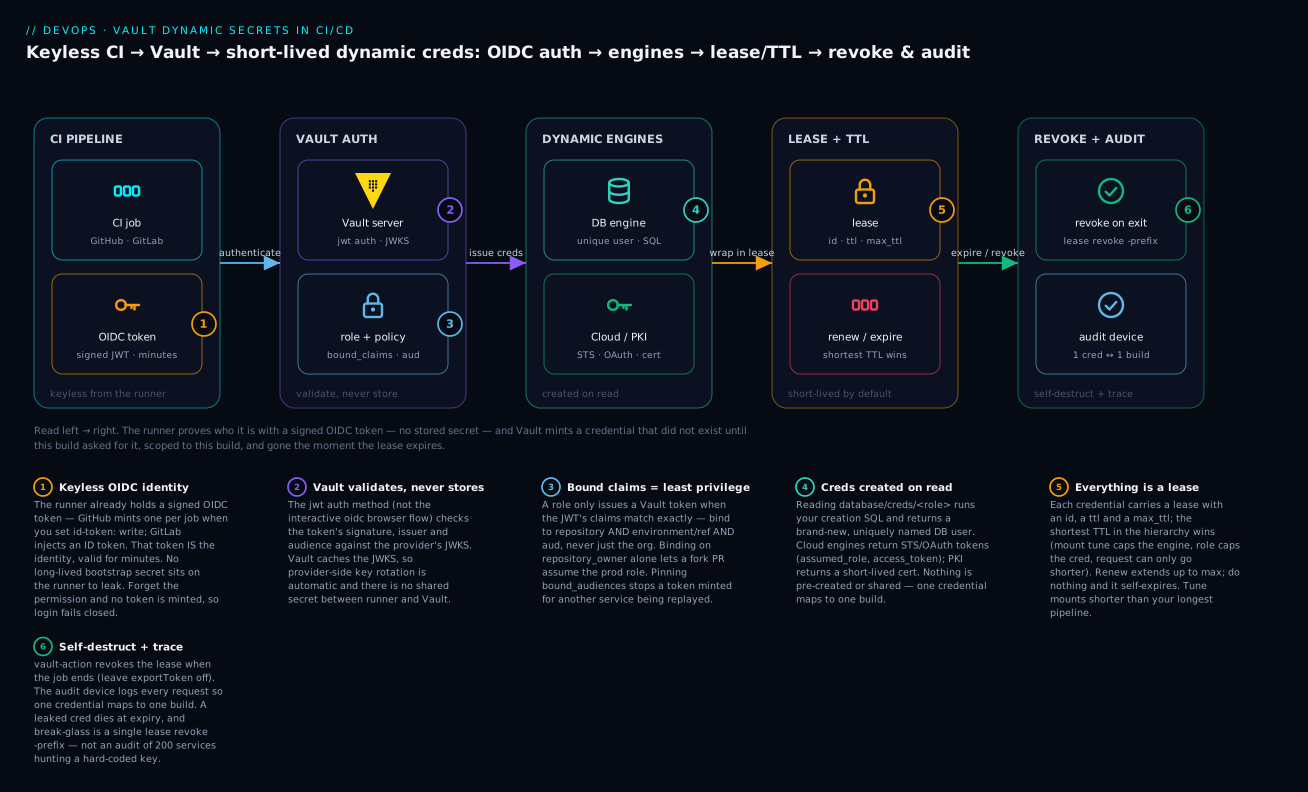
Read the diagram left to right: the CI job presents a signed OIDC token (no stored secret), Vault validates it against the provider JWKS and checks the role’s bound claims, a dynamic engine creates the credential on read, it is wrapped in a lease with a short TTL, and it is revoked on job exit while the audit device records one credential per build.
Most pipeline credential leaks are not exotic. They are a static AWS access key pasted into a repo secret two years ago, copied into a fork, and never rotated. The fix is not “rotate harder” — it is to stop storing the credential at all. With HashiCorp Vault dynamic secrets, the credential does not exist until a build asks for it, it is scoped to that build, and it self-destructs when the lease expires. The pipeline authenticates with its own native identity token, so there is no bootstrap secret to leak either.
This guide wires a real CI estate to Vault: JWT/OIDC auth from GitHub Actions and GitLab, least-privilege role binding with bound claims, then dynamic database, cloud (AWS/Azure/GCP), and PKI credentials, finishing with response wrapping, audit, and an emergency-revoke runbook. Everything assumes Vault 1.15+ and CLI vault.
Static vs dynamic secrets: why short-lived beats long-lived
Before any commands, fix the mental model. The whole lesson is one idea applied five ways: do not store a credential — issue one that expires. Here is the same credential, both ways:
| Property | Static secret (the old way) | Dynamic secret (Vault) |
|---|---|---|
| When it exists | Created once, lives for years | Created the instant a build reads it |
| Who holds it | Many services share one value | One build owns a unique value |
| Where it lives | Repo secret / CI variable / .env |
Nowhere at rest on the runner — issued per read |
| Lifetime | Until someone remembers to rotate | Minutes (a lease TTL); self-destructs |
| Blast radius if leaked | Every service using it, indefinitely | One build, until the lease expires |
| Rotation | Manual, coordinated, scary, so it never happens | Automatic — every read is a rotation |
| Audit (“who used it?”) | “One of 40 builds used app_rw” |
One credential maps to one build, by name |
| Revocation | Rotate the shared value + redeploy everything | vault lease revoke -prefix — one call |
Why does short-lived beat long-lived even when both are “in a vault”? Because time is the attacker’s enemy. A leaked static key is useful the day it leaks and a year later. A leaked dynamic credential with a 15-minute TTL is usually worthless before the attacker finishes reading the build log — and because it was uniquely named and lease-bound, you can prove exactly which build issued it and kill it with a single prefix revoke. You are trading a standing risk (a credential that is always valid, everywhere) for a bounded one (a credential valid for one build, for minutes). That trade is the entire value of Vault dynamic secrets in a pipeline.
One nuance worth flagging up front: Vault also supports static roles on the database engine — Vault owns and rotates an existing named account on a schedule, but does not create a new user per read. Static roles are the right tool for the rare consumer that cannot handle a changing username (a legacy app pinned to one login). For CI, prefer true dynamic roles: a unique user per build is what gives you per-build audit and instant revoke.
1. The secret-engine model: leases, TTL hierarchy, and revocation
Every dynamic credential Vault issues is wrapped in a lease. A lease has an ID, a TTL, and a max TTL. When you read from a dynamic engine, Vault creates the backend object (an IAM user, a database role, a signed cert), records the lease, and hands you both the credential and the lease_id.
Three lifecycle operations matter:
| Operation | Command | Effect |
|---|---|---|
| Renew | vault lease renew <lease_id> |
Extends TTL, capped by max TTL |
| Revoke | vault lease revoke <lease_id> |
Deletes the backend object now |
| Revoke prefix | vault lease revoke -prefix <mount>/ |
Kills every lease under a mount (break-glass) |
TTL resolves through a hierarchy, and the shortest wins: system max (max_lease_ttl in the mount tune) caps the engine, the engine/role config caps the credential, and an explicit request TTL can only go shorter. For CI you want aggressive defaults — a build rarely needs more than its own runtime:
# Tune a mount so nothing under it can outlive the longest pipeline
vault secrets tune -default-lease-ttl=15m -max-lease-ttl=1h database/
The key property: if a build dies, its token’s leases are revoked when the token expires, even if the pipeline never called revoke. Orphaned credentials are the exception, not the default.
2. Authenticating CI to Vault with JWT/OIDC
CI runners already hold a signed identity token. GitHub Actions mints one per job (issuer https://token.actions.githubusercontent.com); GitLab injects CI_JOB_JWT_V2 / an ID token with issuer your GitLab base URL. Vault’s jwt auth method validates that token against the provider’s JWKS — no secret stored in the runner.
Enable and configure the method once per provider. For GitHub Actions:
vault auth enable -path=github-actions jwt

vault write auth/github-actions/config \
  oidc_discovery_url="https://token.actions.githubusercontent.com" \
  bound_issuer="https://token.actions.githubusercontent.com" \
  default_role="ci-build"
For GitLab self-managed, point discovery at your instance:
vault auth enable -path=gitlab jwt

vault write auth/gitlab/config \
  oidc_discovery_url="https://gitlab.example.com" \
  bound_issuer="https://gitlab.example.com"
Vault fetches the JWKS from the discovery URL and caches it, so key rotation on the provider side is automatic. Use jwt, not oidc — the oidc flow is an interactive browser redirect for humans; jwt is the non-interactive machine path.
3. Binding roles to policies with bound claims (least privilege)
A role decides which tokens may log in and what they get. Least privilege lives in bound_claims: the role only issues a Vault token if the incoming JWT’s claims match exactly. Lock to a specific repo, ref, and environment — never just the org.
vault write auth/github-actions/role/deploy-prod \
  role_type="jwt" \
  user_claim="sub" \
  bound_claims_type="glob" \
  bound_claims='{"repository":"my-org/payments-svc","environment":"prod"}' \
  bound_audiences="https://vault.example.com" \
  token_policies="db-prod-read,aws-deploy" \
  token_ttl=20m \
  token_max_ttl=30m
Two details that catch teams out:
bound_audiencesmust match theaudyour CI requests. In GitHub Actions you control it:core.getIDToken('https://vault.example.com'). Pinning the audience is your defense against a token minted for another service being replayed at Vault.- Scope on
environment(orref) so a PR from a fork — which cannot access protected-environment OIDC claims — can never assume the prod role. Binding onrepository_owneralone is the classic over-broad mistake.
The policies the token carries are ordinary Vault policy. Keep them narrow:
# db-prod-read.hcl — only the one role, only read
path "database/creds/payments-ro" {
  capabilities = ["read"]
}
In the pipeline, the login exchanges the JWT for a Vault token:
# .github/workflows/deploy.yml
permissions:
  id-token: write   # required to mint the OIDC token
  contents: read
jobs:
  deploy:
    environment: prod
    runs-on: ubuntu-latest
    steps:
      - uses: hashicorp/vault-action@v3
        with:
          url: https://vault.example.com
          method: jwt
          path: github-actions
          role: deploy-prod
          # Pull a dynamic DB credential in the same step
          secrets: |
            database/creds/payments-ro username | DB_USER ;
            database/creds/payments-ro password | DB_PASS
vault-action injects the values as masked env vars and revokes the lease when the job ends unless you set exportToken. That last part is what makes the credential short-lived in practice, not just in theory.
4. Dynamic database credentials
The database secrets engine generates a real DB user on demand, runs your creation SQL, hands the build a unique username/password, and drops the user when the lease expires. The build never sees a shared service account.
vault secrets enable database

# Connection: Vault uses an admin/rotation account, never shared with CI
vault write database/config/payments \
  plugin_name="postgresql-database-plugin" \
  allowed_roles="payments-ro,payments-migrate" \
  connection_url="postgresql://{{username}}:{{password}}@pg.internal:5432/payments?sslmode=require" \
  username="vault_admin" \
  password="$PG_ADMIN_PW"

# Immediately rotate the admin password so even you no longer know it
vault write -force database/rotate-root/payments
Run
rotate-rootright after configuring. After it, the admin password lives only inside Vault. Storing the literal admin password anywhere defeats the purpose.
Define a role with the creation statements and tight TTLs:
vault write database/roles/payments-ro \
  db_name="payments" \
  creation_statements="CREATE ROLE \"{{name}}\" WITH LOGIN PASSWORD '{{password}}' VALID UNTIL '{{expiration}}'; \
                       GRANT SELECT ON ALL TABLES IN SCHEMA public TO \"{{name}}\";" \
  revocation_statements="DROP ROLE IF EXISTS \"{{name}}\";" \
  default_ttl="15m" \
  max_ttl="30m"

vault read database/creds/payments-ro
# Key      Value
# lease_id database/creds/payments-ro/8x...
# username v-github-payments-ro-Hh3...
# password A1a-...
Each read yields a fresh, uniquely named role — so an audit log entry maps one credential to one build. No more “which of the 40 builds used the shared app_rw user?”
5. Short-lived cloud credentials: AWS, Azure, GCP
AWS
The AWS engine can issue STS-federated or assumed-role credentials. Prefer assumed_role (or federation_token) so you get true short-lived STS tokens rather than IAM users that need cleanup:
vault secrets enable aws
vault write aws/config/root \
  access_key="$VAULT_AWS_AK" \
  secret_key="$VAULT_AWS_SK" \
  region="eu-west-1"

vault write aws/roles/deploy \
  credential_type="assumed_role" \
  role_arns="arn:aws:iam::111122223333:role/ci-deploy" \
  default_sts_ttl="15m" max_sts_ttl="1h"

vault read aws/creds/deploy -ttl=15m
The ci-deploy IAM role’s trust policy must allow Vault’s own principal to assume it. STS caps assumed-role sessions at 1h here; design pipelines around that, not against it.
Azure
The Azure engine creates a service principal (or assigns a role to an existing one) scoped to a subscription/resource group:
vault secrets enable azure
vault write azure/config \
  subscription_id="$ARM_SUBSCRIPTION_ID" \
  tenant_id="$ARM_TENANT_ID" \
  client_id="$ARM_CLIENT_ID" \
  client_secret="$ARM_CLIENT_SECRET"

vault write azure/roles/deploy ttl=20m max_ttl=1h azure_roles=-<<EOF
[
  {
    "role_name": "Contributor",
    "scope": "/subscriptions/$ARM_SUBSCRIPTION_ID/resourceGroups/rg-payments"
  }
]
EOF

vault read azure/creds/deploy
Azure AD propagation lag is real: a freshly minted SP may not be usable for a few seconds. Vault retries internally, but if your first
azcall 403s, a short backoff-and-retry in the pipeline is the correct fix, not a longer TTL.
GCP
The GCP engine mints OAuth2 access tokens (recommended — nothing to clean up) or short-lived service-account keys:
vault secrets enable gcp
vault write gcp/config credentials=@vault-gcp-sa.json

vault write gcp/roleset/deploy \
  project="my-project" \
  secret_type="access_token" \
  token_scopes="https://www.googleapis.com/auth/cloud-platform" \
  bindings=-<<EOF
resource "//cloudresourcemanager.googleapis.com/projects/my-project" {
  roles = ["roles/storage.admin"]
}
EOF

vault read gcp/token/deploy
access_token rolesets return a ~1h OAuth token bound to a Vault-managed SA — no key material on disk, nothing to revoke later.
6. On-demand PKI for mTLS between stages
When your build stage hands off to a deploy stage (or talks to an internal artifact service), mint a short-lived client cert per run instead of shipping a long-lived key.
vault secrets enable -path=pki_int pki
vault secrets tune -max-lease-ttl=72h pki_int

# Assume an intermediate CA is already configured and signed by your root.
vault write pki_int/roles/ci-client \
  allowed_domains="ci.internal" \
  allow_subdomains=true \
  client_flag=true server_flag=false \
  key_type="ec" key_bits=256 \
  max_ttl="30m"

vault write pki_int/issue/ci-client \
  common_name="build-${GITHUB_RUN_ID}.ci.internal" ttl="20m"
The response includes certificate, private_key, and issuing_ca. The deploy service trusts your intermediate CA and validates the client cert; because each run’s cert lives 20 minutes, a leaked artifact is worthless almost immediately. Set client_flag=true/server_flag=false so the cert cannot be repurposed as a server identity.
7. Response wrapping, the agent sidecar, and secret-zero
Secret-zero is the bootstrap credential the runner needs to reach Vault. With JWT/OIDC you have largely eliminated it — the OIDC token is the identity, signed by the provider, valid for minutes. But two patterns harden the remaining edges.
Response wrapping lets one process fetch a single-use, TTL-limited token that wraps a secret; only the intended consumer can unwrap it, and unwrap is one-shot. Useful when an orchestrator hands a secret to a child job:
# Orchestrator wraps a token; child unwraps exactly once
WRAP=$(vault token create -wrap-ttl=90s -policy=db-prod-read -field=wrapping_token)
# ... pass $WRAP to the child ...
vault unwrap "$WRAP"     # second attempt fails; tampering is detectable
Vault Agent as a sidecar handles auto-auth and templating so application code never touches Vault directly:
# agent.hcl
auto_auth {
  method "jwt" {
    mount_path = "auth/github-actions"
    config = {
      role = "deploy-prod"
      path = "/var/run/secrets/oidc-token"   # CI writes its JWT here
    }
  }
  sink "file" { config = { path = "/run/vault-token" } }
}

template {
  contents    = "DB_DSN=postgres://{{ with secret \"database/creds/payments-ro\" }}{{ .Data.username }}:{{ .Data.password }}{{ end }}@pg.internal/payments"
  destination  = "/run/secrets/db.env"
}
The agent renews leases and rewrites the template before expiry, so a long-running job never holds a stale credential. Critically, the OIDC token file is the only thing on disk, and it is itself short-lived.
8. Audit devices, lease monitoring, and emergency revoke
Turn on an audit device before any of this carries real traffic — every request and response (with secrets HMAC’d) is logged:
vault audit enable file file_path=/var/log/vault/audit.log
Watch active leases and active credentials in flight:
vault list sys/leases/lookup/database/creds/payments-ro   # active DB creds
vault list auth/github-actions/role                        # configured roles
Emergency revoke runbook — a credential leaked from a build log:
- Identify the mount/prefix from the audit log (
request.path). - Revoke everything under it immediately:
vault lease revoke -prefix -sync aws/creds/deploy - If a Vault token itself leaked, revoke it and its children:
vault token revoke <accessor-or-id> - Rotate the engine’s backing root if the platform account is suspect:
vault write -force database/rotate-root/payments vault write -force aws/config/rotate-root - Confirm zero active leases remain under the prefix via
sys/leases/lookup.
Because every credential was dynamic and lease-bound, revoke is a single prefix call — not an audit of 200 services hunting for a hard-coded key.
Verify
Run these end to end before declaring the pipeline migrated:
# 1. CI identity actually authenticates (run from a real job, not your laptop)
vault write auth/github-actions/login role=deploy-prod jwt="$ACTIONS_ID_TOKEN"

# 2. A dynamic DB cred is issued and is unique per read
vault read -field=username database/creds/payments-ro
vault read -field=username database/creds/payments-ro   # different value

# 3. The lease really expires: read with a short TTL, wait, confirm login fails
vault read database/creds/payments-ro -ttl=1m

# 4. Cloud creds are short-lived STS, not static keys
vault read -format=json aws/creds/deploy | jq '.lease_duration'

# 5. Revoke works
vault lease revoke -prefix -sync database/creds/payments-ro
vault list sys/leases/lookup/database/creds/payments-ro   # empty
If step 2 returns the same username twice, you are reading a static secret, not a dynamic one. If step 5 leaves leases, your revocation statements are failing — check the audit log.
Enterprise scenario
A payments platform team ran ~180 microservice pipelines in GitHub Actions, each holding a static app_rw Postgres password and a long-lived AWS IAM user key in repo secrets. An auditor flagged that a fork PR had once exfiltrated the DB password via printenv in a build log; rotating it meant a coordinated redeploy of every service, so it had not been rotated in 14 months.
The constraint: they could not pause deploys for a migration window, and the database team refused to grant Vault a permanent superuser. The solution was a phased cutover. First they configured the database engine with a dedicated vault_admin role that held only CREATEROLE and GRANT on the app schemas — not superuser — and ran rotate-root so even the DBA no longer knew the password:
vault write database/config/payments \
  plugin_name="postgresql-database-plugin" \
  allowed_roles="payments-ro,payments-migrate" \
  connection_url="postgresql://{{username}}:{{password}}@pg.internal:5432/payments?sslmode=require" \
  username="vault_admin" password="$BOOTSTRAP_PW" \
  password_policy="payments-strong"
vault write -force database/rotate-root/payments
Then they shipped both old and new credentials in parallel for two weeks: the pipeline preferred the Vault-issued dynamic user but fell back to the static one if the Vault step failed, with a metric on which path each build took. Once the fallback rate hit zero, they deleted the repo secret and the static app_rw role in the same change. AWS followed the same pattern via assumed_role against a per-team ci-deploy role. Net result: zero static DB or cloud credentials, every build’s database access traceable to a uniquely named role in the audit log, and emergency revoke reduced from a multi-day redeploy to a single lease revoke -prefix.
Going deeper
The commands above get a pipeline off static secrets. Running Vault as a hard dependency of every deploy, at scale, surfaces a second layer of concerns. This is the part that separates a demo from a platform.
Lease accounting is not free — the count explosion
Every dynamic read creates a lease, and Vault tracks each one in its storage backend so it can revoke it later. A busy estate — hundreds of pipelines each pulling several creds per run — can accumulate hundreds of thousands of live leases, and lease revocation storms (a mass revoke -prefix, or a token expiry wave) become a storage-backend load event. Mitigations, in order of leverage:
- Short TTLs are also a scale lever, not only a security one. A 15-minute lease that expires on its own is a lease Vault cleans up without you; a 24-hour lease is 96× the standing count. Aggressive TTLs keep the live-lease table small.
- Don’t renew when you can re-read. A CI job that finishes in minutes should let its lease expire, not renew it. Renewal keeps the backend object (and its lease) alive longer than the build needs.
max_leases(Vault 1.16+) caps total leases as a safety valve so a runaway workflow cannot exhaust storage. Alert on the live-lease gauge (vault.expire.num_leases) long before it fires.
Batch tokens can’t hold leases — a sharp CI edge
Vault has two token types. Service tokens (the default) are persisted, can be renewed and revoked, and can own leases. Batch tokens (token_type="batch") are encrypted blobs that are not written to storage — cheap and fast, ideal for very high request volumes — but they cannot hold leases and cannot be renewed. If you set token_type=batch on a role and then read a dynamic DB credential, you lose per-token lease tracking and the “revoke the token, cascade-revoke its creds” guarantee. For most CI, keep the default service tokens; reach for batch only for extreme-throughput, read-KV-only paths where you understand the trade-off.
The OIDC trust chain and confused-deputy defense
The security of the whole scheme rests on three checks Vault makes against the JWT, and each maps to a real attack:
- Signature (via JWKS) — proves the provider minted the token. Vault caches the JWKS with a TTL; if you rotate a self-hosted GitLab’s signing key, allow for the cache.
jwks_ca_pempins the CA for a private JWKS endpoint. bound_issuer— proves which provider. Without it, any OIDC provider Vault can reach could be an issuer.bound_audiences+bound_claims— proves the token was minted for Vault and by this workload. Skippingbound_audiencesis the confused-deputy hole: a token GitHub minted for some other downstream (audiencehttps://sts.amazonaws.com, say) could be replayed at Vault if Vault accepts any audience.
On GitHub specifically, the sub claim format is customizable per-repo (job_workflow_ref, environment, etc.) via the OIDC customization API. Reusable/shared workflows change what sub looks like — if you bind on sub with a glob, verify the actual claim shape from a real token (jwt.io on a throwaway token, or the audit log) rather than assuming. Add clock_skew_leeway / expiration_leeway only if runner clocks genuinely drift; leaving them at 0 is stricter.
Failure modes: Vault is now on the deploy critical path
Moving to dynamic secrets makes Vault a hard dependency of every deploy. That is a deliberate, usually-good trade — but plan for it:
- Vault sealed or unreachable ⇒ no new credentials ⇒ deploys fail closed. This is correct (fail closed, not open), but it means Vault’s own availability (HA with Integrated Storage/Raft, auto-unseal via a cloud KMS, monitored
sys/health) is now a release-blocking SLO. The payments team’s two-week dual-run above was partly a hedge against exactly this. - Revocation runs on the active node. During a leadership change or a performance-standby serving reads, a
revoke -prefixstill routes to the active node; a partitioned backend can delay revocation. Test break-glass during a failover game day, not for the first time in an incident. - Engine-side drift. If someone manually drops the
vault_adminDB user, or an SCP change blocks Vault’s AWS principal fromsts:AssumeRole, creation fails at the worst time — inside a deploy. Synthetic-monitor a canary read of each engine (database/creds/canary) so you learn before a real build does.
Multi-tenancy and Enterprise surfaces
At platform scale, Vault Enterprise namespaces give each team its own isolated set of mounts, policies, and auth methods under one cluster — so team A’s github-actions mount and roles never collide with team B’s, and delegated admins manage their own namespace. Performance replication serves reads (including some engines) from regional clusters to keep auth latency low for globally distributed runners, while writes and lease creation for many engines still funnel to the primary — know which of your engines are local vs forwarded before you assume a regional read is free.
Version and API caveats to pin
- GitLab
CI_JOB_JWT/CI_JOB_JWT_V2were deprecated and removed (16.0+). Use ID tokens (id_tokens:with an explicitaud:) instead — they are per-job, audience-scoped, and the modern equivalent. Old blog posts usingCI_JOB_JWT_V2will not work on current GitLab. hashicorp/vault-action@v3is the current major; it revokes leases on job completion unlessexportToken: true. Pin the major and read the changelog before bumping.azure_rolespropagation and Azure AD eventual consistency mean a just-minted SP may 403 briefly — retry in the pipeline; never lengthen TTL to paper over it.- Prefer
credential_type="assumed_role"/federation_token(AWS) andaccess_tokenrolesets (GCP) so there is genuinely nothing to clean up. The IAM-user and SA-key paths create objects that need their own revocation and are easy to leak.
Practice challenges
Work these in order — each builds on the last, and difficulty climbs from a single command to a full break-glass drill. Solutions are folded; try before you peek. (No live Vault is needed to reason through them; the commands are schema-correct for Vault 1.15+.)
1. (Beginner) Enable and configure jwt auth for GitHub Actions. Turn on the method at path github-actions and point it at GitHub’s OIDC issuer.
<details> <summary>Solution</summary>
vault auth enable -path=github-actions jwt
vault write auth/github-actions/config \
  oidc_discovery_url="https://token.actions.githubusercontent.com" \
  bound_issuer="https://token.actions.githubusercontent.com"
Why: jwt (not oidc) is the non-interactive machine path; oidc_discovery_url lets Vault fetch and cache the provider’s JWKS so it can verify signatures with no shared secret.
</details>
2. (Beginner) Cap every credential under a mount to 30 minutes. Tune the database/ mount so nothing it issues can live longer than your longest pipeline.
<details> <summary>Solution</summary>
vault secrets tune -default-lease-ttl=15m -max-lease-ttl=30m database/
Why: the mount’s max_lease_ttl is the top of the TTL hierarchy — “shortest wins”, so no role or request under database/ can exceed 30m even if it asks for more.
</details>
3. (Intermediate) Write a least-privilege role locked to one repo, its prod environment, and your Vault audience. Only my-org/payments-svc deploying to prod may log in, and only tokens minted for https://vault.example.com.
<details> <summary>Solution</summary>
vault write auth/github-actions/role/deploy-prod \
  role_type="jwt" user_claim="sub" \
  bound_claims_type="glob" \
  bound_claims='{"repository":"my-org/payments-svc","environment":"prod"}' \
  bound_audiences="https://vault.example.com" \
  token_policies="db-prod-read" \
  token_ttl=20m token_max_ttl=30m
Why: bound_claims on both repository and environment stops a fork PR (which cannot read protected-environment claims) from assuming prod; bound_audiences blocks a token minted for another service being replayed here.
</details>
4. (Intermediate) Create a dynamic Postgres role that grants read-only access for 15 minutes. It must create a uniquely-named login on read and drop it on expiry.
<details> <summary>Solution</summary>
vault write database/roles/payments-ro \
  db_name="payments" \
  creation_statements="CREATE ROLE \"{{name}}\" WITH LOGIN PASSWORD '{{password}}' VALID UNTIL '{{expiration}}'; \
                       GRANT SELECT ON ALL TABLES IN SCHEMA public TO \"{{name}}\";" \
  revocation_statements="DROP ROLE IF EXISTS \"{{name}}\";" \
  default_ttl="15m" max_ttl="30m"
Why: {{name}}/{{password}}/{{expiration}} are Vault templates — each read substitutes a fresh unique user, so one credential maps to one build; the revocation_statements are what actually drop the user when the lease ends.
</details>
5. (Advanced) Hand a secret to a child job so it can be read exactly once. Use response wrapping with a 90-second wrap TTL, and explain what happens on a second unwrap.
<details> <summary>Solution</summary>
# Orchestrator: create a wrapping token around a scoped token
WRAP=$(vault token create -wrap-ttl=90s -policy=db-prod-read -field=wrapping_token)
# pass $WRAP to the child job, then:
vault unwrap "$WRAP"      # succeeds once; the child now holds the real token
vault unwrap "$WRAP"      # fails — a used or expired wrapping token is dead
Why: unwrap is single-use and the wrapping token self-destructs at 90s, so an interceptor either finds it already consumed (tampering is detectable) or expired — the secret is never exposed in transit. </details>
6. (Advanced) Break-glass: an AWS credential leaked from a build log. Kill every lease under the AWS deploy path, then prove none remain. Add the step that makes Vault’s own backing key safe if the platform account is suspect.
<details> <summary>Solution</summary>
# 1. Revoke every lease under the mount path (synchronous)
vault lease revoke -prefix -sync aws/creds/deploy

# 2. Prove zero active leases remain
vault list sys/leases/lookup/aws/creds/deploy   # empty

# 3. If the backing platform account itself is suspect, rotate Vault's root
vault write -force aws/config/rotate-root
Why: because every cred was dynamic and lease-bound, break-glass is one prefix revoke instead of hunting a hard-coded key across services; rotate-root changes the credential Vault uses to talk to AWS so a compromised operator can no longer mint new creds.
</details>
Common beginner mistakes
-
Using the
oidcauth method instead ofjwt. Theoidcflow is an interactive browser redirect built for humans logging in at a laptop. A CI runner has no browser. The machine path isjwt— it validates a token the runner already holds. Right model:oidc= human login,jwt= machine login. -
Binding the role to the org (or
repository_owner) only. It feels “scoped enough”, but any repo in the org — including a fork’s PR build — can then satisfy the claim and assume the role. Bind onrepositoryandenvironment/ref. A protected-environment claim is exactly what a fork PR cannot forge. -
Forgetting
permissions: id-token: writein the workflow. Without it, GitHub never mints the OIDC token, and the Vault login fails with a confusing “no token” error that looks like a Vault problem but is a workflow-permissions problem. It defaults to no id-token access. -
Not pinning
bound_audiences. People set the issuer and claims but leave the audience open, thinking the claims are enough. The audience is your replay defense: it ensures the token was minted for Vault, not for some other service that a build also talks to. Pin it on both sides (core.getIDToken(<aud>)andbound_audiences). -
Setting long TTLs “to be safe”. A 24-hour lease “so the pipeline never runs out” throws away the entire benefit — you have rebuilt a long-lived credential with extra steps, and multiplied your live-lease count. Right model: TTL should match the build’s runtime, minutes not hours. If a job genuinely runs long, use Vault Agent to renew, not a big static TTL.
-
Giving Vault a database superuser. It is easy, but now Vault’s backing account can do anything, and a compromise is catastrophic. Grant the admin account only
CREATEROLE+GRANTon the app schemas, then runrotate-rootso even you no longer know its password. -
Skipping
rotate-rootafter configuring an engine. If you configuredatabase/configwith a real admin password and never rotate it, that password still exists in your shell history, your provisioning script, or your Terraform state.rotate-rootmoves the only copy inside Vault. -
Leaving
exportToken: true(or expecting the lease to outlive the job). Withvault-action, the lease is revoked on job exit by design. If you export the token or fetch the credential in a way that Vault doesn’t track, you have recreated a leaked long-lived credential. Let the job’s end be the credential’s end. -
Thinking “delete the committed secret” fixes a leak. Deleting a secret from a file and pushing does not remove it from git history, forks, or clones. This is why dynamic secrets matter: with a static secret you must rotate; with a dynamic one there was never a standing value to leak in the first place.
Glossary
- Static secret — a credential created once and reused indefinitely (a repo secret, an API key). The thing dynamic secrets exist to replace.
- Dynamic secret — a credential Vault creates on demand when a client reads it, scoped and time-limited, deleted when its lease ends.
- Secrets engine — a Vault plugin that issues credentials for a specific system:
database,aws,azure,gcp,pki,kv, etc. Enabled at a mount path. - Mount — the path an engine or auth method is enabled at (e.g.
database/,auth/github-actions/). Tunable (default-lease-ttl,max-lease-ttl). - Lease — the wrapper around a dynamic credential: an ID, a TTL, and a max TTL. Vault uses it to renew or revoke the underlying object.
- TTL / max TTL — how long a credential (or token) is valid, and the ceiling it can be extended to. In the hierarchy, the shortest applicable value wins.
- Renew / revoke — extend a lease’s TTL (up to max), or destroy the backend object now.
revoke -prefixkills every lease under a mount (break-glass). - JWT — a signed JSON Web Token. A CI runner’s OIDC identity token is a JWT.
- OIDC — OpenID Connect; the standard by which a provider (GitHub, GitLab) issues signed identity tokens. Here it is the runner’s keyless proof of identity.
jwtauth method — Vault’s non-interactive method that validates a presented JWT against a provider’s JWKS. The machine path (contrast the interactiveoidcmethod).- JWKS — JSON Web Key Set; the provider’s public keys, fetched from the discovery URL, that Vault uses to verify a JWT’s signature. Cached, so provider key rotation is automatic.
bound_issuer— the exact issuer (iss) Vault will accept, proving which provider minted the token.bound_claims— key/value claims the incoming JWT must match for the role to log it in (e.g.repository,environment). Where least privilege lives.bound_audiences— the audience (aud) the token must carry; must match what CI requested. Defense against token replay / confused-deputy.user_claim/sub— the JWT claim Vault uses as the token’s identity;sub(subject) is the usual choice.- Role — decides which tokens may log in (via bound claims/audiences) and what Vault token they receive (policies, TTLs).
- Policy — a Vault ACL granting
capabilities(read, list, …) on specific paths. Attach narrowly (only the onecreds/<role>a pipeline needs). - Service token vs batch token — service tokens are persisted, renewable, revocable, and can own leases (the CI default); batch tokens are cheap unpersisted blobs that cannot hold leases or be renewed.
- Orphan token — a token with no parent, so it is not revoked when a parent is; use sparingly, since its leases outlive the caller.
assumed_role/federation_token(AWS) — AWS engine credential types that return short-lived STS tokens (nothing to clean up), versus creating IAM users.- Roleset (GCP) — GCP engine config; an
access_tokenroleset returns a ~1h OAuth token bound to a Vault-managed service account, with no key on disk. rotate-root— rotates the admin/root credential an engine uses to talk to its backend, so the only copy lives inside Vault.- PKI engine / intermediate CA — Vault’s certificate authority; an intermediate CA (signed by your root) issues short-lived leaf certs per run.
client_flag/server_flag— PKI role flags marking a cert usable as a client identity, a server identity, or both. For CI mTLS clients: client on, server off.- Response wrapping — Vault returns a single-use, TTL-limited token that wraps a secret; only the intended consumer can unwrap it, exactly once. Tampering is detectable.
- Secret-zero — the bootstrap credential a client needs to reach Vault. JWT/OIDC largely eliminates it: the signed identity token is the credential.
- Vault Agent — a sidecar that auto-authenticates, writes a token to a sink, and renders secrets via templates, renewing leases so a long-running job never holds a stale credential.
- Sink / template (Agent) — where the agent writes the acquired token (sink) and how it renders secrets into a file for the app (template).
- Audit device — a log of every request/response (secrets HMAC’d), enabled before production traffic; the source of truth for “which build used which credential”.
- Break-glass — the emergency procedure to revoke everything fast (
lease revoke -prefix,token revoke,rotate-root) when a credential is suspected leaked.