Every org with more than a handful of repos eventually drowns in copy-pasted CI YAML: the same Node setup, the same actions/checkout, the same brittle deploy block duplicated 200 times with subtle drift. This guide shows how to build a versioned, governed GitHub Actions platform that hundreds of teams consume without you becoming a bottleneck.
In a nutshell
A reusable GitHub Actions platform is a shared standard library for your CI/CD. Instead of every repository carrying its own hand-written copy of “check out the code, set up Node, run tests, deploy,” you write each of those once, in a central place, version it like a product, and let every other repository call it by name.
The analogy that holds up is a franchise. A burger chain doesn’t let each restaurant invent its own recipe, kitchen layout, and food-safety checklist — head office writes one operations manual, ships it to every location, and updates it in one place when the health code changes. Your .github platform repo is head office; the reusable workflows and composite actions are the operations manual; the hundreds of team repos are the franchise locations that follow it. When a new mandatory step appears — a security scan, an SBOM — you change the manual once instead of filing 200 identical change requests.
GitHub gives you two “manual” formats, and the whole lesson turns on picking the right one. A composite action is a reusable bundle of steps — a function you call from inside a job (“set up Node and cache the deps”). A reusable workflow is a reusable set of whole jobs — invoked with on: workflow_call, it brings its own runners, permissions, and matrix (“build, test, and deploy this service”). The one-liner to memorize: composite = share steps; reusable workflow = own the pipeline.
The rest of the lesson is what turns a shared library into a governed platform: versioning it so teams upgrade on their own schedule (a sliding @v1 tag plus immutable @v1.4.2), pinning third-party actions by commit SHA so a supply-chain attack can’t ship you malicious code, forcing standards with org rulesets and required workflows, replacing long-lived cloud secrets with keyless OIDC, and rolling it all out to hundreds of teams in stages so nobody’s pipeline breaks on a Tuesday.
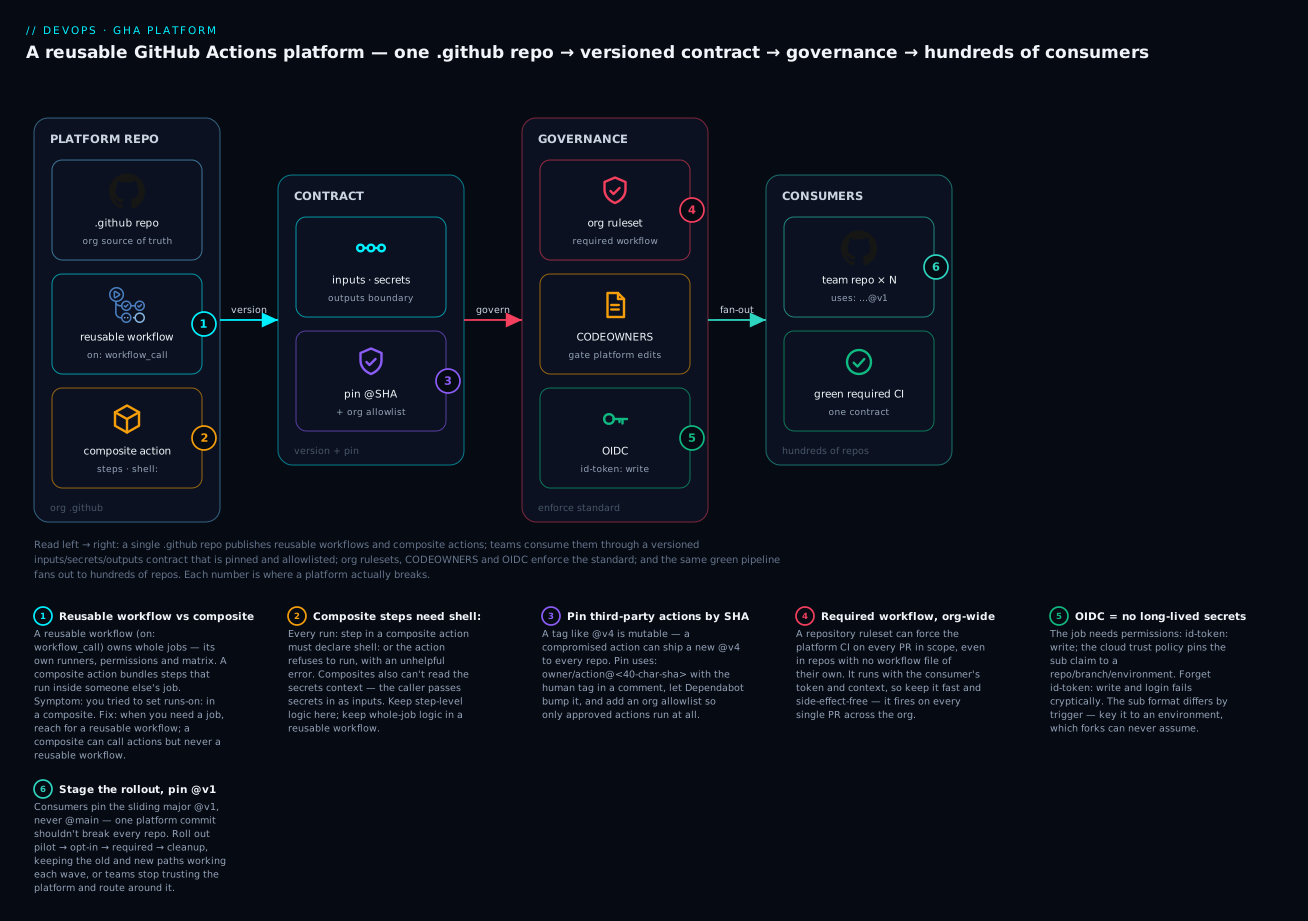
Read the diagram left to right: a single .github repo publishes reusable workflows and composite actions; teams consume them through a versioned inputs/secrets/outputs contract that is pinned to a SHA and allowlisted; org rulesets, CODEOWNERS, and OIDC enforce the standard; and the same green pipeline fans out to hundreds of consuming repos — each numbered spot marks where a platform actually breaks.
Level: Intermediate → Advanced · Time: ~35 min
Prerequisites & what you’ll be able to do
Know this first. This lesson sits at the platform-engineering end of the GitHub Actions track. You’ll move faster if you’ve already met:
- GitHub Actions fundamentals: workflows, jobs, runners & secrets — what a workflow, job, step, runner, and
GITHUB_TOKENactually are. Everything here builds on that vocabulary. - GitHub Actions OIDC: keyless deploys to multi-cloud — the deep dive on the federated-identity handshake we centralize in section 6.
- Supply-chain security: SLSA, SBOM & Sigstore provenance — the wider context for why we pin actions by SHA.
If you’re earlier in the journey, The DevOps architecting ladder: from a single pipeline to a platform frames where this lesson fits. You don’t need to be an expert — the sections build up — but you should be comfortable reading a YAML workflow file and know what uses:, runs-on:, and steps: mean.
After this lesson you can:
- Choose correctly between a composite action and a reusable workflow for any piece of shared CI, and explain why composites compose downward but never upward.
- Stand up a central
.githubplatform repo with reusable workflows, composite actions, and starter workflows, laid out so consumers can find them. - Version the platform like an API — a sliding
@v1plus immutable@vX.Y.Ztags — and publish a deprecation policy teams can plan around. - Pin third-party actions by commit SHA, wire up Dependabot to bump them, and lock the org to an allowlist so only approved actions ever run.
- Pass inputs, secrets, and outputs across the
workflow_callboundary correctly, and reason about the least-privilegepermissions+ OIDC model that replaces long-lived cloud secrets. - Enforce the platform org-wide with rulesets, required workflows, and CODEOWNERS, and roll it out to hundreds of repos in stages without a big-bang migration.
1. The copy-paste pipeline problem
When each repo owns a full copy of its .github/workflows/ci.yml, you have no leverage. A CVE in a third-party action means 200 pull requests. A new mandatory SBOM step means 200 more. Worse, every copy diverges, so “our CI” stops meaning anything concrete.
A workflow platform solves four things: deduplication (one source of truth per pipeline shape), governance (you can mandate a step org-wide), safe change (semantic versioning so consumers opt into upgrades), and least-privilege auth (centralized OIDC instead of long-lived secrets sprayed across repos).
2. Choosing the right abstraction
GitHub gives you three building blocks. Picking the wrong one is the most common early mistake.
| Abstraction | What it is | Use when |
|---|---|---|
| Composite action | A bundle of steps that runs inside a job | You want to reuse a sequence of steps (setup, cache, login) within a caller’s job |
| Reusable workflow | An entire workflow called via workflow_call |
You want to own whole jobs: build, test, deploy, with their own runners and permissions |
| Starter workflow | A template copied into a repo once | You want a starting point teams then own and edit themselves |
The mental model: composite actions are functions you call from a step; reusable workflows are jobs you call from a workflow. Starter workflows are scaffolding you hand off and forget. For a governed platform you mostly want reusable workflows (to own the pipeline) plus composite actions (to share step-level logic inside them).
Callout: A reusable workflow can call composite actions, but a composite action cannot call a reusable workflow. Compose downward, not upward.
The one-line decision most teams need: if you’re sharing a few steps that slot into a job someone else owns, write a composite action; if you’re owning the shape of the job itself — its runner, its permissions, its matrix, its deploy gate — write a reusable workflow. A useful tell is that the moment you find yourself wanting to set runs-on:, permissions:, or strategy.matrix in shared code, you’ve outgrown a composite action and need a reusable workflow. And the two aren’t rivals: the reusable workflow owns the job, and composite actions live inside it for the step-level logic you want to share across several workflows.
3. A versioned org-level .github repo
GitHub treats a repo literally named .github in your org as a special home for org defaults. Create one and lay it out so reusable workflows and shared actions live together.
gh repo create my-org/.github --private --clone
cd .github
mkdir -p .github/workflows
mkdir -p actions/setup-node-build
mkdir -p workflow-templates
git checkout -b main
Note the distinction: files under .github/workflows/ in this repo are the reusable workflows other repos call. Files under workflow-templates/ are starter workflows surfaced in the org’s “New workflow” UI. They are not the same thing.
A reusable workflow declares a workflow_call trigger:
# .github/workflows/node-ci.yml
name: node-ci
on:
  workflow_call:
    inputs:
      node-version:
        type: string
        default: "20"
      run-lint:
        type: boolean
        default: true
    secrets:
      NPM_TOKEN:
        required: false
    outputs:
      image-tag:
        description: "Built image tag"
        value: ${{ jobs.build.outputs.image-tag }}

jobs:
  build:
    runs-on: ubuntu-latest
    permissions:
      contents: read
    outputs:
      image-tag: ${{ steps.meta.outputs.tag }}
    steps:
      - uses: actions/checkout@v4
      - uses: my-org/.github/actions/setup-node-build@v1
        with:
          node-version: ${{ inputs.node-version }}
      - if: ${{ inputs.run-lint }}
        run: npm run lint
      - run: npm test
      - id: meta
        run: echo "tag=sha-${GITHUB_SHA::12}" >> "$GITHUB_OUTPUT"
The composite action it references:
# actions/setup-node-build/action.yml
name: "Setup Node and build deps"
description: "Checkout-agnostic Node setup with cache"
inputs:
  node-version:
    description: "Node major version"
    required: true
runs:
  using: "composite"
  steps:
    - uses: actions/setup-node@v4
      with:
        node-version: ${{ inputs.node-version }}
        cache: "npm"
    - run: npm ci
      shell: bash
Callout: Every
runstep in a composite action must declareshell:. This is the single most common composite-action failure, and the error message is not obvious.
Semantic tags and a deprecation policy
Consumers should pin to a moving major tag (@v1) that you advance, plus you publish immutable patch tags (@v1.4.2) for teams that want to freeze. Maintain the major tag as a sliding pointer:
git tag -a v1.4.2 -m "node-ci: add SBOM step"
git tag -fa v1 -m "advance v1 -> v1.4.2"
git push origin v1.4.2
git push origin v1 --force
Publish a written policy: major tags get 90 days of support after the next major ships; breaking changes only land on a new major; deprecations are announced via a pinned discussion and an annotation emitted from the workflow itself:
- run: echo "::warning::node-ci v1 is deprecated; migrate to v2 by 2026-09-01"
Pinning third-party actions by commit SHA (supply chain)
Everything above versions your platform for your consumers. But your workflows also depend on third-party actions (actions/checkout, aws-actions/configure-aws-credentials, community actions), and a mutable tag is a supply-chain hole. @v4 is a pointer the action’s author can move at any time, so a compromised or malicious release can ship straight into every repo that pins @v4 — running with your GITHUB_TOKEN in hand.
The hardening rule: pin third-party actions to a full 40-character commit SHA, keeping the human-readable tag in a trailing comment so you still know what version you’re on.
jobs:
  build:
    runs-on: ubuntu-latest
    steps:
      # Pin to a full 40-char commit SHA; keep the human tag in a comment.
      - uses: actions/checkout@11bd71901bbe5b1630ceea73d27597364c9af683 # v4.2.2 (SHA illustrative)
      - uses: aws-actions/configure-aws-credentials@ececac1a45f3b08a01d2dd070d28d111c5fe6722 # v4.0.1 (SHA illustrative)
        with:
          role-to-assume: ${{ vars.AWS_ROLE_ARN }}
          aws-region: us-east-1
A SHA is immutable — it names one exact tree of code — so nobody can swap it out from under you. Resolve the SHA a tag currently points at instead of trusting a number blindly:
# What commit does actions/checkout v4.2.2 actually point to right now?
gh api repos/actions/checkout/git/refs/tags/v4.2.2 --jq '.object.sha'
Pinning by SHA freezes you in place, so pair it with Dependabot to get automated, reviewable bump PRs:
# .github/dependabot.yml
version: 2
updates:
  - package-ecosystem: "github-actions"
    directory: "/"
    schedule:
      interval: "weekly"
    groups:
      actions:
        patterns: ["*"]
Dependabot rewrites the pinned SHA and the comment tag, and the groups block collapses a week’s action bumps into a single PR instead of ten. The trade-off is deliberate: SHA + Dependabot buys you supply-chain safety without freezing you on stale, unpatched actions.
Callout: Pin your own platform references (
my-org/.github/...@v1) to the moving major tag so teams get your fixes automatically — you control that repo. Pin third-party actions to a SHA — you don’t control those, so trust nothing you can’t name exactly.
4. Inputs, secrets, and outputs across workflow_call
The boundary is strict and that is a feature. A called workflow sees only what the caller explicitly passes.
# consumer repo: .github/workflows/ci.yml
name: ci
on: [push, pull_request]

jobs:
  ci:
    uses: my-org/.github/.github/workflows/node-ci.yml@v1
    with:
      node-version: "20"
    secrets:
      NPM_TOKEN: ${{ secrets.NPM_TOKEN }}
    permissions:
      contents: read
Three rules that bite people:
- Secrets are not inherited automatically. Either name each one, or use
secrets: inheritto forward all of the caller’s secrets (use sparingly; it widens blast radius). ${{ secrets.* }}and${{ env.* }}cannot be used in theuses:line, so the workflow reference itself cannot be dynamic.- Permissions in the caller can only narrow, never expand, what the workflow’s
GITHUB_TOKENis allowed to do.
Outputs flow back through the outputs: map you declared, and downstream jobs read them via needs:
  deploy:
    needs: ci
    runs-on: ubuntu-latest
    steps:
      - run: echo "Deploying ${{ needs.ci.outputs.image-tag }}"
5. Enforcing standards with rulesets and CODEOWNERS
A platform nobody is required to use is just a library. GitHub required workflows (configured at the org level via repository rulesets) let you force a reusable workflow to run on every PR in scope, even if the target repo has no workflow file of its own.
In Org Settings -> Rules -> Rulesets, create a branch ruleset targeting your default branches that:
- Requires the platform CI workflow as a status check.
- Requires pull requests and at least one approving review.
- Blocks force-pushes and deletions on protected branches.
Gate changes to the platform repo itself with CODEOWNERS so only the platform team can alter shared workflows:
# .github/CODEOWNERS
/.github/workflows/   @my-org/platform-team
/actions/             @my-org/platform-team
Callout: Required workflows run with the consumer repo’s context and token. Keep them fast and side-effect-free, because they execute on every single PR across the org.
6. Keyless auth with OIDC to Azure and AWS
Stop storing cloud credentials in repo secrets. With OIDC, GitHub mints a short-lived token per run, and the cloud exchanges it for temporary credentials scoped to that repo and branch. Any job using it needs id-token: write.
Azure via a federated credential on an app registration:
az ad app federated-credential create \
  --id "$APP_OBJECT_ID" \
  --parameters '{
    "name": "github-main",
    "issuer": "https://token.actions.githubusercontent.com",
    "subject": "repo:my-org/my-service:ref:refs/heads/main",
    "audiences": ["api://AzureADTokenExchange"]
  }'
  deploy-azure:
    runs-on: ubuntu-latest
    permissions:
      id-token: write
      contents: read
    steps:
      - uses: azure/login@v2
        with:
          client-id: ${{ vars.AZURE_CLIENT_ID }}
          tenant-id: ${{ vars.AZURE_TENANT_ID }}
          subscription-id: ${{ vars.AZURE_SUBSCRIPTION_ID }}
      - run: az group list -o table
AWS via an IAM OIDC identity provider and a role whose trust policy pins the sub claim:
{
  "Effect": "Allow",
  "Principal": { "Federated": "arn:aws:iam::123456789012:oidc-provider/token.actions.githubusercontent.com" },
  "Action": "sts:AssumeRoleWithWebIdentity",
  "Condition": {
    "StringEquals": { "token.actions.githubusercontent.com:aud": "sts.amazonaws.com" },
    "StringLike": { "token.actions.githubusercontent.com:sub": "repo:my-org/my-service:ref:refs/heads/main" }
  }
}
      - uses: aws-actions/configure-aws-credentials@v4
        with:
          role-to-assume: arn:aws:iam::123456789012:role/gha-deploy
          aws-region: us-east-1
The win for a platform: centralize this in the shared deploy workflow once. Each consumer only supplies its own client ID or role ARN as a repo variable, and the federation subject/sub condition enforces that repo X can only assume role X.
Callout: Scope the
subject/subclaim as tightly as you can.repo:my-org/*trusts the entire org; pin to a specific repo, branch, orenvironment:instead.
7. Versioning, testing, and releasing
Test workflows locally before tagging. act runs jobs in Docker against a chosen event:
act pull_request -j build --container-architecture linux/amd64
act does not perfectly emulate workflow_call chaining or OIDC token minting, so back it with a real integration smoke test: a throwaway consumer repo that pins @main, runs the full pipeline against live runners on a schedule, and fails loudly on drift.
Lint the YAML in the platform repo’s own CI:
npm install -g @action-validator/cli
action-validator .github/workflows/node-ci.yml
Cut releases deterministically. Conventional commits plus a release step that advances both the patch tag and the sliding major keeps the contract honest. Treat the major-tag move as the actual “ship” event, since that is what most consumers track.
Enterprise scenario
A fintech platform team rolled out a shared node-ci.yml to ~180 repos pinned at @v1. Weeks later, deploys to a regulated workload started failing intermittently with AssumeRoleWithWebIdentity errors, but only on PRs from forks and on release/* branches. The trust policy pinned sub to repo:org/svc:ref:refs/heads/main, so anything off main got no credentials, and the failure surfaced inside the consumer’s job context, making it look like a per-repo problem rather than a platform one.
The real gotcha: they had assumed id-token: write and a single sub condition covered every trigger. It did not. The OIDC sub claim format differs by trigger, branch vs. tag vs. environment, and fork PRs intentionally receive a read-only token with no id-token write capability at all, by GitHub design.
The fix was to stop matching on branch refs and key the trust on the deployment environment instead, which GitHub stamps into the claim and which forks can never assume:
{
  "Condition": {
    "StringEquals": {
      "token.actions.githubusercontent.com:aud": "sts.amazonaws.com",
      "token.actions.githubusercontent.com:sub": "repo:org/svc:environment:production"
    }
  }
}
Consumers then gated the deploy job with environment: production, which also forced required-reviewer approval before any token was minted. Fork PRs cleanly skipped deploy instead of erroring. One trust-policy claim, scoped to an environment rather than a ref, removed an entire class of confusing cross-repo failures.
Going deeper
Sections 1–7 are enough to build a platform. This section is for the engineer running one at scale — the internals, limits, and failure modes that separate “it works in the demo” from “it works across 300 repos on a Friday.”
Composite action vs reusable workflow — the full matrix
The section-2 table gives the mental model; this one is the full capability comparison you reach for when a design decision is genuinely on the fence.
| Capability | Composite action | Reusable workflow |
|---|---|---|
| Called via | uses: inside steps: |
uses: at the job level (jobs.<id>.uses) |
| Unit of reuse | a sequence of steps | one or more whole jobs |
| Runs on | the caller’s runner/job | its own runs-on: runners |
Declares its own permissions: |
no — inherits the job’s token | yes |
Declares its own strategy.matrix |
no | yes |
Reads the secrets context |
no — caller passes them as inputs |
yes — declares secrets: |
| Can call composite actions | yes | yes |
| Can call a reusable workflow | no | yes (up to the nesting limit) |
Per-step if: / control |
yes | at the job level |
| Appears as separate jobs in the UI | no (steps inline in the caller) | yes (nested jobs) |
The two lines people trip on: a composite action can’t declare permissions:, runs-on:, or matrix: (it borrows whatever job it’s dropped into), and it can’t read the secrets context — the caller must forward a secret as an ordinary input, which means it can appear unmasked in logs if you’re careless.
steps:
  - uses: my-org/.github/actions/publish@v1
    with:
      registry-token: ${{ secrets.NPM_TOKEN }}   # a composite reads secrets only via inputs
A reusable workflow has all of those powers but is heavier: it spins up its own jobs and runners and shows as nested jobs in the run graph.
The supply-chain surface: org allowlists and immutable actions
Section 3 pinned actions by SHA inside a workflow. At the org level you can go further and decide which actions are even allowed to run. In Org Settings → Actions → General → Policies, switch from “Allow all actions” to “Allow <org>, and select non-<org>, actions and reusable workflows,” then supply an allowlist. The same is scriptable:
gh api -X PUT orgs/my-org/actions/permissions/selected-actions --input - <<'JSON'
{
  "github_owned_allowed": true,
  "verified_allowed": false,
  "patterns_allowed": ["aws-actions/*", "azure/login@*", "my-org/*"]
}
JSON
Now a team can’t quietly add random-person/deploy-magic@v1 to their pipeline — it’s blocked before it runs, so your SHA-pinning discipline can’t be bypassed by the next new hire in a hurry. Combine three layers: allowlist (which actions may run at all) → SHA pin (which exact version) → Dependabot (how it stays current). GitHub is also rolling out immutable action releases — tags backed by the package registry that can’t be moved after publish; until that’s universal, the SHA pin is your guarantee.
Reusable-workflow nesting and reference limits
workflow_call can chain — a reusable workflow can call another — but not infinitely. GitHub caps the depth at four levels of nested reusable workflows, and a single workflow file can reference at most twenty unique reusable workflows across the whole tree. Deep composition (“platform calls language-workflow calls deploy-workflow calls notify-workflow…”) hits that wall and fails with an error that doesn’t mention nesting at all. The guidance that keeps you clear of it: keep the call tree shallow and wide — one caller invoking a handful of reusable workflows — rather than deep and narrow.
There’s a related constraint that’s actually a gift for auditing: ${{ secrets.* }} and ${{ env.* }} cannot appear in a uses: line, so the reference can never be computed at runtime. The version a repo runs is always statically visible in the file — which is exactly what makes “what pipeline is this repo on?” answerable by grep.
How GITHUB_TOKEN permissions actually resolve
Three layers decide what the GITHUB_TOKEN in a called workflow can do, and they only ever narrow:
- The org/repo default (Settings → Actions → Workflow permissions) sets the ceiling — set it to read-only org-wide so nothing is write-by-default.
- The caller workflow’s
permissions:block can lower it further for the job that calls in. - The reusable workflow’s own
permissions:(workflow- and job-level) can lower it again.
The effective set is the intersection — a called workflow can never grant itself more than the caller’s token already has. The platform pattern is to declare permissions: {} (none) at the top of every reusable workflow and then add back only the specific scope each job needs:
name: node-ci
on:
  workflow_call:
permissions: {}            # deny by default at the workflow level
jobs:
  build:
    runs-on: ubuntu-latest
    permissions:
      contents: read       # add back only what this job needs
    steps:
      - uses: actions/checkout@11bd71901bbe5b1630ceea73d27597364c9af683 # v4.2.2
      - run: npm ci && npm test
Now the blast radius of any single job is exactly what it requires and nothing more — a compromised step in the build job literally cannot open a PR or push a package, because the token was never granted pull-requests: write or packages: write.
The OIDC sub claim differs by trigger
This is the single most confusing thing about OIDC at platform scale, and the root cause of the enterprise scenario above. The default sub (subject) claim GitHub mints changes shape depending on what triggered the run:
| Trigger / context | Default sub claim |
|---|---|
| Push to a branch | repo:ORG/REPO:ref:refs/heads/BRANCH |
| A tag build | repo:ORG/REPO:ref:refs/tags/TAG |
| A pull request | repo:ORG/REPO:pull_request |
| A deployment environment | repo:ORG/REPO:environment:ENV_NAME |
A trust policy that pins sub to ...:ref:refs/heads/main silently denies credentials to every tag build, every release/* branch, and every environment deploy — the token is minted, but the cloud rejects it because the sub doesn’t match, which reads like a credentials bug. The robust pattern for a shared deploy workflow is to key trust on the environment (repo:ORG/REPO:environment:production) and gate the deploy job with environment: production: fork PRs can never assume an environment, and the environment’s required reviewers must approve before a token is even requested. If the defaults don’t fit, you can customize the sub template per repo via the OIDC customization API.
Calling a reusable workflow from a matrix
A common scale need is to run the same reusable pipeline across a fan of services or regions. Put a matrix on the calling job and vary the with: inputs per cell:
jobs:
  ci:
    strategy:
      fail-fast: false
      matrix:
        service: [api, web, worker]
    uses: my-org/.github/.github/workflows/node-ci.yml@v1
    with:
      node-version: "20"
      workdir: services/${{ matrix.service }}
    secrets: inherit
The ${{ matrix.* }} context is available in with: and secrets:, but — as noted above — not in the uses: line, so every cell runs the same pinned version. This turns one reusable workflow into a per-service fan-out without duplicating a line of pipeline logic.
Cross-repo access and cost at org scale
Two operational realities of hundreds of consumers:
- Private reusable workflows need explicit access. If your
.githubrepo (or a dedicatedplatform-workflowsrepo) is private, consuming repos can’t call its workflows until you grant it: in the platform repo’s Settings → Actions → General → Access, allow access from repositories in the organization. Miss this and consumers get a confusing “workflow not found” on a file that plainly exists. - Concurrency and minutes are shared, finite resources. A required workflow that fires on every PR across 300 repos multiplies your Actions minutes and can saturate concurrency limits during a busy afternoon. Guard expensive jobs with a
concurrencygroup so redundant runs cancel, and keep the required workflow lean — push slow integration and deploy work into workflows that run on merge, not on every push.
concurrency:
  group: ci-${{ github.workflow }}-${{ github.ref }}
  cancel-in-progress: true
At org scale the platform’s cost profile is as much a design constraint as its correctness — a 30-second required check billed 10,000 times a week is a real budget line.
Verify
# 1. Confirm the reusable workflow resolves and a run was created
gh workflow list --repo my-org/my-service
gh run list --repo my-org/my-service --workflow ci --limit 3

# 2. Inspect a run; confirm the called workflow + OIDC job executed
gh run view --repo my-org/my-service --log | grep -E "node-ci|id-token|AssumeRole"

# 3. Confirm the required workflow is enforced by the ruleset
gh api repos/my-org/my-service/rules/branches/main \
  --jq '.[].type'

# 4. Verify the major tag points where you expect
git ls-remote --tags https://github.com/my-org/.github v1
A green run, a non-empty rules list including the required workflow, and a v1 tag pointing at your latest patch SHA mean the platform is wired correctly.
Rollout checklist
Rollout strategy: migrating 50+ repos safely
Never flip the whole org at once. Stage it:
- Pilot (3-5 repos): the platform team’s own repos consume
@v1. Shake out edge cases where it costs you, not other teams. - Opt-in wave: announce, document, and let willing teams migrate. Provide a one-PR migration that deletes their old YAML and adds the
uses:call. Automate it with a script that opens PRs in bulk viagh. - Required wave: enable the required-workflow ruleset on increasing scopes (by team, then org-wide). Run it in a non-blocking mode first if you can, watching failure rates before making it a hard gate.
- Cleanup: delete starter-workflow leftovers and dead secrets once OIDC is universal.
Keep both the old and new path working during each wave. The moment migration becomes all-or-nothing, teams stop trusting the platform.
Common beginner mistakes
- “A composite action and a reusable workflow are basically the same thing.” They live at different layers. A composite action is a step (
uses:insidesteps:) that borrows the job it lands in; a reusable workflow is a job (uses:atjobs.<id>) that brings its own runner and permissions. Right model: sharing steps → composite; owning the pipeline → reusable workflow. - “I’ll pin everything to
@mainso teams always get the latest.”@mainmeans any commit you push instantly runs in every consumer — one bad merge breaks the whole org at once, with no way for teams to opt out. Right model: consumers pin the sliding@v1major tag; reserve@mainfor your own smoke-test repo. - “
@v4is a safe way to pin a third-party action.” A tag is a movable pointer the action’s author controls, not you — a compromised release can re-point@v4at malicious code that runs with your token. Right model: pin third-party actions to a 40-char commit SHA and let Dependabot bump it. - “Secrets flow into a called workflow automatically.” The
workflow_callboundary passes nothing you don’t name. A reusable workflow sees only the secrets you list (or the bluntsecrets: inherit), and a composite action can’t read thesecretscontext at all — you hand secrets to it as inputs. Right model: name each secret you forward; treatsecrets: inheritas a blast-radius decision, not a convenience. - “
id-token: writeis set once for the whole workflow.” OIDC token minting is a per-job permission. Adeployjob withoutid-token: writegets no token, and the cloud login fails with a cryptic error that looks like a credentials problem. Right model: addpermissions: id-token: writeto each job that authenticates to a cloud. - “A composite action’s
runsteps work like a normal job’s.” Everyrun:in a composite action must declareshell:— omit it and the action refuses to run with an unhelpful message. Right model: putshell: bash(orpwsh, etc.) on everyrunstep inside a composite. - “If the workflow file exists, teams can call it.” A private platform repo’s workflows are invisible to other repos until you grant cross-repo Actions access in its settings; consumers get “workflow not found” on a file that’s right there. Right model: enable Access → allow the organization in the platform repo’s Actions settings.
Practice challenges
Work these in order — each leans on the concept before it. Try to answer before opening the solution.
1 — Beginner: pick the abstraction. For each need, say whether you’d build a composite action or a reusable workflow: (a) “check out, set up Node 20, and restore the npm cache,” shared by five different pipelines; (b) “build, test, scan, and deploy a service” that you want to own end-to-end for every team; © a login-and-configure-cloud step reused inside several jobs.
<details> <summary>Solution</summary>
(a) composite action — it’s a bundle of steps that slots into a job someone else owns. (b) reusable workflow — you’re owning whole jobs, with their own runners and permissions. © composite action — again step-level logic reused inside jobs.
Why: the dividing line is steps-inside-a-job (composite) versus jobs-you-own (reusable workflow).
</details>
2 — Beginner: fix the composite action. This composite action fails to run. What’s wrong, and what’s the one-line fix?
# actions/notify/action.yml
name: "Notify"
description: "Post a build result"
runs:
  using: "composite"
  steps:
    - run: echo "build finished for $GITHUB_REPOSITORY"
<details> <summary>Solution</summary>
    - run: echo "build finished for $GITHUB_REPOSITORY"
      shell: bash
Why: every run: step in a composite action must declare shell: — it’s the most common composite-action failure, and the error message doesn’t point at the missing key.
</details>
3 — Intermediate: pin and keep current. A workflow uses actions/checkout@v4 and aws-actions/configure-aws-credentials@v4. Rewrite the two uses: lines to be supply-chain-safe, and add the config that keeps them from going stale.
<details> <summary>Solution</summary>
- uses: actions/checkout@11bd71901bbe5b1630ceea73d27597364c9af683 # v4.2.2
- uses: aws-actions/configure-aws-credentials@ececac1a45f3b08a01d2dd070d28d111c5fe6722 # v4.0.1
# .github/dependabot.yml
version: 2
updates:
  - package-ecosystem: "github-actions"
    directory: "/"
    schedule:
      interval: "weekly"
Why: a SHA is immutable, so a moved tag can’t inject code; Dependabot then raises reviewable PRs that bump the SHA and its comment, so you’re safe and current. (Resolve a tag’s SHA with gh api repos/OWNER/REPO/git/refs/tags/TAG --jq '.object.sha'; the SHAs above are illustrative.)
</details>
4 — Intermediate: wire the contract. Write the consumer side that calls the platform’s node-ci.yml@v1, passes node-version: "20", forwards only the NPM_TOKEN secret (not all of them), grants the token read-only contents, and then runs a deploy job that echoes the image-tag output the reusable workflow returns.
<details> <summary>Solution</summary>
name: ci
on: [push, pull_request]

jobs:
  ci:
    uses: my-org/.github/.github/workflows/node-ci.yml@v1
    with:
      node-version: "20"
    secrets:
      NPM_TOKEN: ${{ secrets.NPM_TOKEN }}
    permissions:
      contents: read

  deploy:
    needs: ci
    runs-on: ubuntu-latest
    steps:
      - run: echo "Deploying ${{ needs.ci.outputs.image-tag }}"
Why: naming NPM_TOKEN forwards just that one secret (not the blast-radius-widening secrets: inherit); outputs declared by the reusable workflow are read downstream via needs.<job>.outputs.*.
</details>
5 — Advanced: least-privilege OIDC deploy. Turn a shared deploy into a reusable workflow that (a) takes an environment input, (b) gates the deploy on that environment, © grants only the permissions OIDC needs, and (d) is safe for fork PRs. Then state the one-line trust-policy sub condition the cloud side should use.
<details> <summary>Solution</summary>
name: reusable-deploy
on:
  workflow_call:
    inputs:
      environment:
        type: string
        required: true
permissions: {}
jobs:
  deploy:
    runs-on: ubuntu-latest
    environment: ${{ inputs.environment }}
    permissions:
      id-token: write
      contents: read
    steps:
      - uses: aws-actions/configure-aws-credentials@ececac1a45f3b08a01d2dd070d28d111c5fe6722 # v4.0.1
        with:
          role-to-assume: ${{ vars.AWS_ROLE_ARN }}
          aws-region: us-east-1
      - run: echo "deploying to ${{ inputs.environment }}"
Trust-policy sub: repo:my-org/my-service:environment:production
Why: keying trust on environment: (not a branch ref) means fork PRs — which can never assume an environment — cleanly skip deploy instead of erroring, and the environment’s required reviewers approve before a token is minted; permissions: {} plus per-job grants keeps the blast radius minimal.
</details>
6 — Advanced: diagnose the org-scale failure. You roll node-ci.yml@v1 to 180 repos. It’s green on main everywhere, but every build triggered by a tag push (v*) fails at the cloud-login step with AssumeRoleWithWebIdentity denied — even though id-token: write is set. What’s the cause, and what’s the fix that doesn’t require touching 180 repos?
<details> <summary>Solution</summary>
The AWS trust policy pins sub to repo:org/*:ref:refs/heads/main, so a tag build presents ...:ref:refs/tags/v1.2.3, which doesn’t match — the token is minted but the cloud rejects it. Because the sub format differs by trigger (branch vs. tag vs. environment), a single branch-scoped condition can’t cover tag releases. Fix it once, on the cloud side: re-key the trust to the deployment environment and have the shared workflow gate deploys with environment: production:
{
  "Condition": {
    "StringEquals": {
      "token.actions.githubusercontent.com:aud": "sts.amazonaws.com",
      "token.actions.githubusercontent.com:sub": "repo:org/svc:environment:production"
    }
  }
}
Why: the environment claim is identical whether the run came from a branch, a tag, or a manual dispatch, so one trust condition covers every trigger — and forks still can’t assume it. One change on the IAM role removes an entire class of per-repo-looking failures.
</details>
Pitfalls
- Pinning to
@mainin consumers: any platform commit can break every repo instantly. Pin to a major tag; reserve@mainfor your smoke test. secrets: inheriteverywhere: convenient, but it hands every forwarded secret to the called workflow. Name secrets explicitly for sensitive ones.- Forgetting
id-token: write: OIDC silently fails to mint a token and you fall back to nothing. The job error is cryptic. - Reusable-workflow nesting limits: GitHub caps how deep
workflow_callcan chain (a small number of levels). Deep composition hits a hard wall, so keep the call tree shallow. - Missing
shell:in composite steps: the action refuses to run. Always set it.
Build the contract first, version it like an API, and let teams upgrade on their own schedule. That is the difference between a platform people adopt and a mandate they route around.
Glossary
- Reusable workflow — an entire workflow triggered by
on: workflow_calland invoked from another workflow’sjobs.<id>.uses. It brings its own jobs, runners, permissions, and matrix. The unit for “own the whole pipeline.” - Composite action — an action whose
runs.usingis"composite", bundling a sequence of steps that execute inside the caller’s job. The unit for “share a few steps.” - Starter workflow (workflow template) — a YAML template placed in the
.githubrepo’sworkflow-templates/folder that appears in the “New workflow” UI and is copied into a repo, which then owns and edits it. .githubrepo — a repository literally named.githubin an org; GitHub treats it as the home for org-wide defaults (community health files, starter workflows) and a convenient host for shared reusable workflows and actions.workflow_call— the trigger that makes a workflow reusable; it declares theinputs,secrets, andoutputsa caller may pass and receive.- Caller / consumer — the workflow (and repo) that invokes a reusable workflow or composite action. The “franchise location” in the analogy.
- Inputs — typed parameters (
string,boolean,number) a caller passes to a reusable workflow or action viawith:. - Secrets — sensitive values a caller forwards across the
workflow_callboundary, named individually undersecrets:. Nothing is passed unless named. secrets: inherit— a shorthand that forwards all of the caller’s secrets to the called workflow. Convenient but widens blast radius; prefer naming sensitive secrets.- Outputs — values a reusable workflow returns to the caller through its
outputs:map; downstream jobs read them vianeeds.<job>.outputs.*. GITHUB_TOKEN— the automatically provisioned, per-run token a workflow uses to call the GitHub API. Its scopes are controlled bypermissions:and can only be narrowed across the caller → callee boundary.permissions:— the block that grants theGITHUB_TOKENspecific scopes (contents: read,packages: write,id-token: write, …). Best practice ispermissions: {}then add back only what each job needs.- OIDC (OpenID Connect) — the protocol GitHub uses to mint a short-lived identity token per run so a cloud can issue temporary credentials — no long-lived secrets stored in the repo.
id-token: write— the per-job permission required to request an OIDC token. Absent it, cloud login fails cryptically.- Federated credential / trust policy — the cloud-side configuration (Azure federated credential, AWS IAM role trust policy) that decides which GitHub OIDC tokens may exchange for cloud credentials.
sub(subject) claim — the field in the OIDC token identifying the run’s origin (repo:ORG/REPO:ref:...or...:environment:...). Its format differs by trigger — the classic source of “works on main, fails on tags.”- Environment (deployment environment) — a named GitHub environment (e.g.
production) with optional required reviewers and secrets; gating a job withenvironment:also stamps...:environment:NAMEinto the OIDCsub, which forks can never assume. - Ruleset — an org- or repo-level rule set (the successor to branch protection) that can require status checks, reviews, and specific workflows, and block force-pushes and deletions.
- Required workflow — a reusable workflow forced to run on every PR in a ruleset’s scope, even in repos with no workflow file of their own. Runs with the consumer’s token and context.
- CODEOWNERS — a file mapping paths to reviewing teams; used here to gate edits to the shared workflows and actions to the platform team.
- SHA pinning — referencing an action by its full 40-character commit SHA (
uses: owner/action@<sha>) instead of a movable tag, so a compromised release can’t change the code you run. - Dependabot — GitHub’s automated dependency updater; with
package-ecosystem: "github-actions"it raises reviewable PRs that bump pinned action SHAs (and their comment tags) on a schedule. - Action allowlist — an org policy (
patterns_allowed) restricting which actions and reusable workflows may run at all, blocking unapproved third-party actions before they execute. - Sliding major tag — a mutable tag like
@v1that the platform team advances to the latest compatible release, so consumers get fixes automatically without changing their reference. - Immutable tag — a fixed patch tag like
@v1.4.2that never moves, for teams that want to freeze on an exact version. - Nesting limit — GitHub’s cap on
workflow_callchains: up to four levels deep, and at most twenty unique reusable workflows referenced from one file. act— a tool that runs GitHub Actions jobs locally in Docker for fast iteration; it doesn’t fully emulateworkflow_callchaining or OIDC, so pair it with a live smoke test.- Matrix —
strategy.matrix, which fans a job across parameter combinations; you can put it on the calling job to run one reusable workflow across many services or regions. - Concurrency group — the
concurrency:key that serializes or cancels overlapping runs sharing a group name; essential for keeping a required, org-wide workflow from saturating minutes and runners.