In a nutshell
A CI/CD pipeline is the assembly line your code rides from a git push to running software: it builds the app, tests it, packages it, and ships it. GitLab describes that assembly line in one file at the root of your repo, .gitlab-ci.yml. This lesson takes a slow, single-file assembly line and rebuilds it into a fast, parallel one — using three upgrades that map onto three everyday frustrations.
The first frustration is waiting in line for no reason. A classic GitLab pipeline runs in stages, and a stage is a wall: nothing in the test stage may start until everything in build has finished, even a lint job that reads none of the build’s output. The fix is a DAG (directed acyclic graph): with one keyword, needs:, each job starts the instant its specific inputs are ready, ignoring the stage walls. Think of it as opening every checkout lane that has nobody blocking it instead of funnelling the whole store through one till.
The second frustration is re-doing slow work on every run. Each pipeline job runs on a fresh, empty machine (a runner), so it re-downloads the same dependencies from scratch every time. A distributed cache is a shared stockroom in object storage (S3) that every runner reads from and writes back to, so npm install and Go module downloads are warm across machines and across pipelines.
The third frustration is reviewing code you cannot actually run. A merge request hands a reviewer a diff and a green tick, but nothing to click. A review app fixes that: the pipeline deploys the branch to its own throwaway URL like mr-482.review.example.com, then tears it down automatically when the merge request closes — so “looks good to me” means someone actually used it.
Get those three ideas — a DAG that beats the stage barrier, a cache that survives ephemeral runners, and an environment that lives and dies with a merge request — and the rest of this lesson is wiring.
Level: Intermediate · Time: ~32 min
A 30-engineer platform team ships a Go API and a React frontend out of a single monorepo, and their GitLab pipeline has become the bottleneck everyone complains about in standup. It runs as one long linear staircase — build waits for nothing, test waits for build, lint waits for test even though it touches none of its output — so a one-line frontend change blocks on a fifteen-minute backend test suite, and every pipeline re-downloads the same node_modules and Go module cache from scratch. Worse, when a reviewer opens a merge request they get a diff and a green checkmark but no running thing to click, so “looks good to me” really means “the code compiles.” This guide rebuilds that pipeline three ways at once: convert the staircase into a needs-based DAG so independent jobs run the moment their inputs are ready, add a distributed cache backed by object storage so every runner shares one warm cache, and stand up an ephemeral review-app environment per merge request that auto-deploys the branch and auto-deletes when the MR closes. The result is a pipeline that finishes in a third of the time and hands each reviewer a real URL.
Prerequisites
- A GitLab project (self-managed 16.x+ or GitLab.com) where you can edit
.gitlab-ci.ymland project CI/CD variables. - At least one GitLab Runner with the
dockerorkubernetesexecutor registered to the project or group. The Kubernetes executor is assumed for review apps. - A Kubernetes cluster (EKS, GKE, AKS, or self-managed) with
kubectlaccess, a wildcard DNS record (*.review.example.com) pointed at the ingress controller, and a wildcard or cert-manager-issued TLS certificate. - An S3-compatible bucket for the distributed cache (AWS S3, GCS in interop mode, or MinIO).
- A container registry — the built-in GitLab Container Registry is fine.
- HashiCorp Vault reachable from runners, used here to issue short-lived cloud and registry credentials to jobs via JWT auth instead of long-lived secrets in CI variables.
- CLI tools locally:
glab(GitLab CLI),kubectl,helm, and the AWS CLI (ormcfor MinIO).
If GitLab CI is new to you, do GitLab CI fundamentals first — this lab assumes you already know what a stage, a job, and a runner are, and builds a production pipeline on top of them. The Vault handshake used throughout is covered end-to-end in Vault dynamic secrets for CI/CD, and the runner fleet in self-hosted autoscaling runners.
After working through this lab you will be able to:
- Convert a stage-ordered pipeline into a
needs:-driven DAG and read the resulting graph in the pipeline’s Needs view. - Back a GitLab Runner fleet with an S3 distributed cache and key it per lockfile so a dependency change busts it and an unchanged one reuses it.
- Tell cache from artifacts and pick the right one for speed versus a guaranteed handoff.
- Stand up a dynamic review-app environment per merge request, with
on_stopteardown andauto_stop_inso nothing leaks. - Gate whole-pipeline creation with
workflow:rules, run jobs conditionally withrules, and DRY the config withinclude,extends, and CI/CD Components. - Compose pipelines out of parent-child and multi-project triggers, and serialize risky deploys with
resource_group.
Target topology
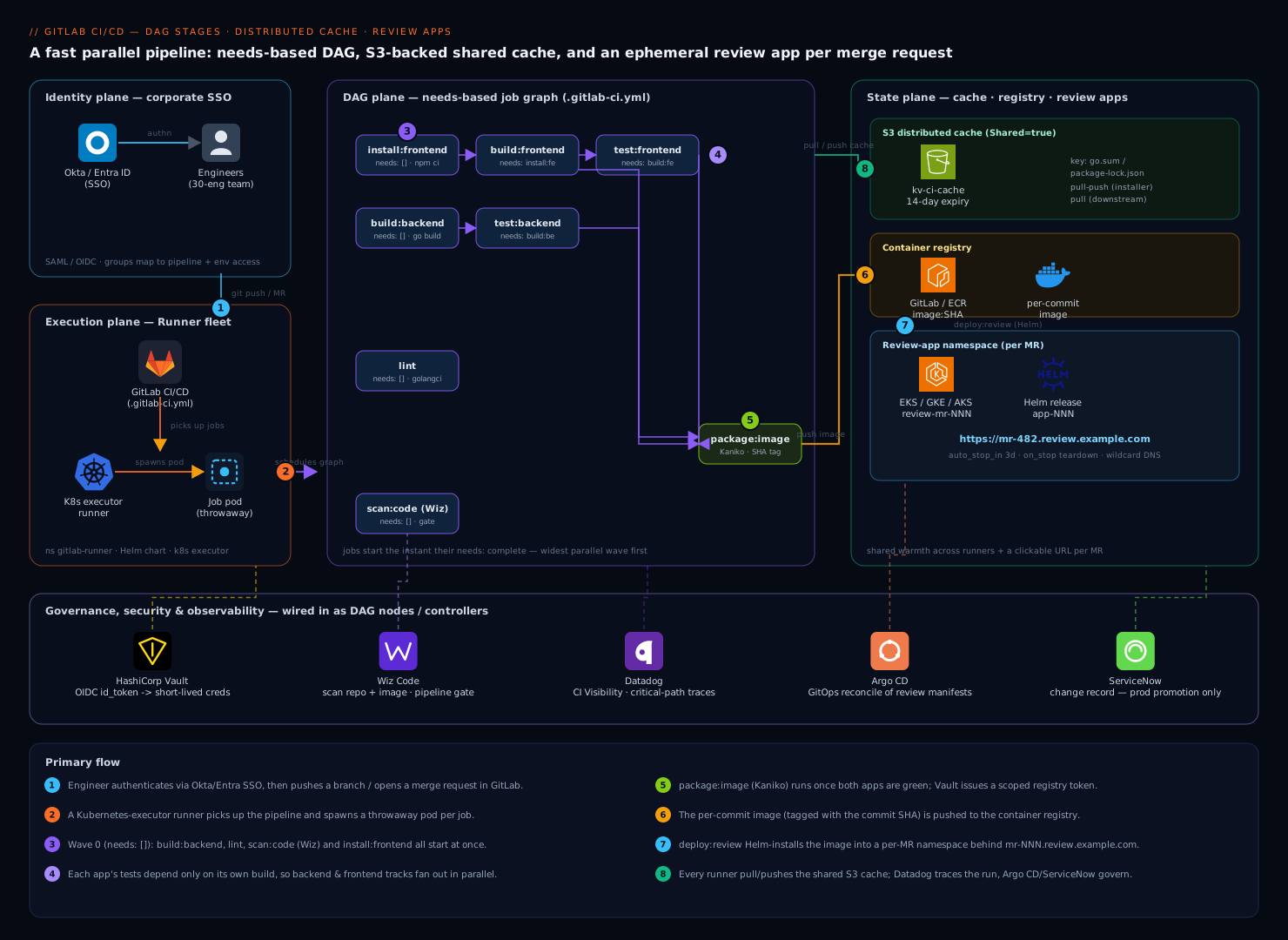
Read the diagram as three horizontal planes stacked on one identity spine — execution at the bottom, the DAG in the middle, and shared state on top. The pipeline has three planes that this guide builds in order. The execution plane is the GitLab Runner fleet: a set of Kubernetes-executor runners that pick up jobs, each job a throwaway pod. The DAG plane is the dependency graph encoded in .gitlab-ci.yml with needs: — jobs are no longer gated by stage order, only by the specific artifacts they consume, so the scheduler runs the widest possible set in parallel. The state plane is everything a job needs to be fast and to leave something behind: the S3 distributed cache that every runner reads and writes so dependency installs are warm across machines and across pipelines; the container registry that holds the per-commit image; and the review-app namespace in Kubernetes where a branch’s image is deployed behind a unique URL like mr-482.review.example.com.
Identity threads through all three planes. Engineers authenticate to GitLab through Okta (or Entra ID) via SAML/OIDC SSO, so pipeline-trigger and environment-access permissions map to corporate groups. Jobs themselves never carry static cloud keys: a runner job presents its GitLab JWT (CI_JOB_JWT_V2) to HashiCorp Vault, which validates it against the project’s claims and hands back a short-lived AWS credential for the cache bucket and a Kubernetes token for the deploy. Around the edges, Wiz Code scans the repo and the built image for vulnerabilities and misconfigurations as a pipeline gate, Datadog ingests the pipeline’s CI Visibility traces so you can see exactly which job is slow, and Argo CD is the GitOps controller that reconciles the review-app manifests the pipeline writes. ServiceNow receives a change record only when the pipeline promotes to a protected production environment — review apps deliberately skip the gate so engineers stay fast.
1. Register a Kubernetes-executor runner
Review apps need a runner that can talk to your cluster and create pods. Install the GitLab Runner Helm chart into a dedicated namespace and register it against your project or group.
First create a runner in the GitLab UI (Settings → CI/CD → Runners → New project runner) with tags k8s and review, and copy the authentication token. Then:
kubectl create namespace gitlab-runner

helm repo add gitlab https://charts.gitlab.io
helm repo update

helm upgrade --install gitlab-runner gitlab/gitlab-runner \
  --namespace gitlab-runner \
  --set gitlabUrl="https://gitlab.example.com/" \
  --set runnerToken="glrt-XXXXXXXXXXXXXXXXXXXX" \
  --set runners.executor=kubernetes \
  --set runners.config="$(cat <<'TOML'
[[runners]]
  [runners.kubernetes]
    namespace = "gitlab-runner"
    image = "alpine:3.20"
    cpu_request = "500m"
    memory_request = "512Mi"
    service_account = "gitlab-runner"
    poll_timeout = 600
  [runners.cache]
    Type = "s3"
    Shared = true
    [runners.cache.s3]
      ServerAddress = "s3.amazonaws.com"
      BucketName = "kv-ci-cache"
      BucketLocation = "ap-south-1"
TOML
)"
Shared = true on the cache is the single most important flag here — it lets every runner pod read and write the same cache object keys, which is what makes the cache truly distributed instead of node-local. Confirm the runner is online:
glab runner list --status online
2. Stand up the S3 distributed cache
A node-local cache helps one machine; a distributed cache helps the whole fleet and survives the ephemeral pods that the Kubernetes executor throws away after every job. Create the bucket and a tightly-scoped policy.
aws s3api create-bucket \
  --bucket kv-ci-cache \
  --region ap-south-1 \
  --create-bucket-configuration LocationConstraint=ap-south-1

# Expire cache objects after 14 days so the bucket does not grow forever
aws s3api put-bucket-lifecycle-configuration \
  --bucket kv-ci-cache \
  --lifecycle-configuration '{
    "Rules": [{
      "ID": "expire-ci-cache",
      "Status": "Enabled",
      "Filter": { "Prefix": "" },
      "Expiration": { "Days": 14 }
    }]
  }'
Rather than mint a static IAM access key and paste it into GitLab CI/CD variables — exactly the kind of long-lived secret that ends up leaked in a log — configure the runner to fetch credentials from Vault using GitLab’s JWT. Enable the JWT auth backend in Vault and bind a role to your project:
vault auth enable -path=gitlab jwt

vault write auth/gitlab/config \
  oidc_discovery_url="https://gitlab.example.com" \
  bound_issuer="https://gitlab.example.com"

vault write auth/gitlab/role/ci-cache \
  role_type="jwt" \
  user_claim="project_id" \
  bound_claims_type="glob" \
  bound_claims='{"project_path":"platform/monorepo","ref_protected":"true"}' \
  policies="ci-cache" \
  ttl=20m
The ci-cache Vault policy grants read on an AWS secrets-engine role that issues a 20-minute S3 credential. In the pipeline, a job authenticates and exports the credential before the cache is touched. With this in place, the cache: block in .gitlab-ci.yml keys per lockfile so a dependency change busts the cache and an unchanged lockfile reuses it:
.go-cache: &go-cache
  key:
    files:
      - go.sum
  paths:
    - .go/pkg/mod/
  policy: pull-push

.node-cache: &node-cache
  key:
    files:
      - frontend/package-lock.json
  paths:
    - frontend/node_modules/
  policy: pull
Note policy: pull on the node cache for downstream jobs that only read it — only the install job needs pull-push. Splitting the policy this way avoids the race where two parallel jobs both try to write the same cache archive.
3. Convert the linear pipeline into a needs-based DAG
This is where the staircase becomes a graph. In classic GitLab CI, a job in stage test cannot start until every job in build has finished. Adding needs: overrides that: a job starts the instant the specific jobs it lists have completed, regardless of stage. Stages still exist (they order the UI and act as a fallback), but needs: drives actual scheduling.
Here is the DAG for the monorepo. The backend and frontend build in parallel; each one’s tests depend only on its own build; lint depends on nothing but the source; and the image only builds after both apps are green.
stages: [install, build, test, package, deploy, cleanup]

variables:
  GOPATH: "$CI_PROJECT_DIR/.go"

install:frontend:
  stage: install
  image: node:20-alpine
  cache: *node-cache
  script:
    - cd frontend && npm ci --prefer-offline
  artifacts:
    paths: [frontend/node_modules/]
    expire_in: 1 hour

build:backend:
  stage: build
  image: golang:1.23
  needs: []                       # nothing to wait for — starts immediately
  cache: *go-cache
  script:
    - go build -o bin/api ./cmd/api
  artifacts:
    paths: [bin/api]

build:frontend:
  stage: build
  image: node:20-alpine
  needs: ["install:frontend"]     # only waits on its own install
  cache: *node-cache
  script:
    - cd frontend && npm run build
  artifacts:
    paths: [frontend/dist/]

test:backend:
  stage: test
  image: golang:1.23
  needs: ["build:backend"]        # NOT blocked by build:frontend
  cache: *go-cache
  script:
    - go test ./... -race -coverprofile=cover.out

test:frontend:
  stage: test
  image: node:20-alpine
  needs: ["build:frontend"]
  cache: *node-cache
  script:
    - cd frontend && npm run test:ci

lint:
  stage: test
  image: golangci/golangci-lint:v1.61
  needs: []                       # source-only, runs in parallel with everything
  script:
    - golangci-lint run ./...
The needs: [] on build:backend and lint is the key trick: an empty needs means “do not wait for any prior stage,” so those jobs launch in the very first scheduling wave alongside install:frontend. You can see the resulting graph in the pipeline’s Needs tab, and the practical effect is that total wall-clock time collapses to the longest path through the DAG (build → test on the slower app) rather than the sum of all stages.
Wire the security and observability gates in as DAG nodes too, so they parallelize instead of serializing:
scan:code:
  stage: test
  needs: []
  image:
    name: wizcli/wizcli:latest
    entrypoint: [""]
  script:
    - wizcli auth --id "$WIZ_CLIENT_ID" --secret "$WIZ_CLIENT_SECRET"
    - wizcli dir scan --path . --policy "Default vulnerabilities policy"
  allow_failure: false
Wiz Code here runs static analysis on the repository — secrets, IaC misconfigurations, and dependency CVEs — and fails the pipeline on a policy breach before anything gets packaged. Because it has needs: [] it costs you zero added wall-clock time; it runs in the first wave next to the builds.
4. Package the image with credentials from Vault
Once both apps are green, build a single image tagged with the commit SHA. Use Kaniko so no Docker daemon is required in the Kubernetes executor, and pull the registry credential from Vault rather than relying on the ambient CI_REGISTRY_PASSWORD when you want a scoped, auditable token.
package:image:
  stage: package
  needs: ["test:backend", "test:frontend", "build:frontend"]
  image:
    name: gcr.io/kaniko-project/executor:v1.23.2-debug
    entrypoint: [""]
  variables:
    VAULT_ADDR: "https://vault.example.com"
  id_tokens:
    VAULT_ID_TOKEN:
      aud: https://vault.example.com
  script:
    - export VAULT_TOKEN="$(vault write -field=token auth/gitlab/login role=ci-registry jwt=$VAULT_ID_TOKEN)"
    - export REG_PASS="$(vault kv get -field=token secret/ci/registry)"
    - echo "{\"auths\":{\"$CI_REGISTRY\":{\"username\":\"deploy\",\"password\":\"$REG_PASS\"}}}" > /kaniko/.docker/config.json
    - /kaniko/executor
        --context "$CI_PROJECT_DIR"
        --dockerfile "$CI_PROJECT_DIR/Dockerfile"
        --destination "$CI_REGISTRY_IMAGE:$CI_COMMIT_SHORT_SHA"
        --cache=true
The id_tokens: block is GitLab’s modern, per-job OIDC token (the successor to CI_JOB_JWT_V2), scoped to the Vault audience. Vault validates it, confirms the project and ref claims, and returns a token that lets the job read exactly one registry secret — no standing credential, and every issuance is logged in Vault’s audit device.
5. Deploy a review app per merge request
Now the payoff for reviewers. A dynamic environment uses CI variables in its name and url so each merge request gets its own deployment and its own URL. The job runs only on merge-request pipelines, deploys the just-built image into a per-MR namespace, and registers a teardown job via on_stop.
deploy:review:
  stage: deploy
  needs: ["package:image"]
  image: alpine/helm:3.16.1
  rules:
    - if: '$CI_PIPELINE_SOURCE == "merge_request_event"'
  environment:
    name: review/$CI_MERGE_REQUEST_IID
    url: https://mr-$CI_MERGE_REQUEST_IID.review.example.com
    on_stop: stop:review
    auto_stop_in: 3 days
  script:
    - export KUBECONFIG="$(vault kv get -field=kubeconfig secret/ci/review-cluster)"
    - NS="review-mr-$CI_MERGE_REQUEST_IID"
    - kubectl create namespace "$NS" --dry-run=client -o yaml | kubectl apply -f -
    - helm upgrade --install "app-$CI_MERGE_REQUEST_IID" ./charts/app
        --namespace "$NS"
        --set image.repository="$CI_REGISTRY_IMAGE"
        --set image.tag="$CI_COMMIT_SHORT_SHA"
        --set ingress.host="mr-$CI_MERGE_REQUEST_IID.review.example.com"
        --wait --timeout 5m
Three details make this production-grade. auto_stop_in: 3 days tells GitLab to automatically run the stop job if the MR sits idle, so abandoned branches do not leak namespaces and cloud spend. The per-MR namespace gives each review app hard isolation — its own secrets, quotas, and network policy. And the Helm chart’s ingress host is templated from CI_MERGE_REQUEST_IID, which resolves against your *.review.example.com wildcard DNS so the URL just works.
If you prefer GitOps over the pipeline calling helm directly, the deploy job instead writes a rendered manifest into an apps/review-mr-NNN/ path in a config repo and pushes; Argo CD watches that repo with an ApplicationSet and reconciles the review app into the cluster. That keeps cluster credentials out of CI entirely (Argo CD holds them) and gives you a single dashboard of every live review environment. The teardown then becomes a git rm of the directory rather than a kubectl delete.
6. Auto-teardown when the MR closes
The stop job is what keeps a fleet of review apps from becoming a cloud bill. It is referenced by on_stop above and must use the same environment name, run manually-or-on-close, and not need any artifacts.
stop:review:
  stage: cleanup
  image: alpine/helm:3.16.1
  needs: []
  rules:
    - if: '$CI_PIPELINE_SOURCE == "merge_request_event"'
      when: manual
  allow_failure: true
  environment:
    name: review/$CI_MERGE_REQUEST_IID
    action: stop
  script:
    - export KUBECONFIG="$(vault kv get -field=kubeconfig secret/ci/review-cluster)"
    - NS="review-mr-$CI_MERGE_REQUEST_IID"
    - helm uninstall "app-$CI_MERGE_REQUEST_IID" --namespace "$NS" || true
    - kubectl delete namespace "$NS" --ignore-not-found
action: stop is what tells GitLab this job tears the environment down; when the merge request is merged or closed, GitLab triggers it automatically, and the auto_stop_in timer triggers it on idle. The whole environment — Helm release, namespace, ingress, and DNS-backed URL — disappears.
Validation
Verify each layer independently rather than trusting one green pipeline.
# 1. DAG: confirm jobs report needs and run in parallel waves
glab ci view              # interactive; the "Needs" view shows the graph
glab ci status

# 2. Cache: confirm the archive is uploaded to and restored from S3
#    In the job log you should see:
#      "Creating cache go.sum-... and uploading to s3"
#      "Restoring cache" with "Downloading cache from s3" on the next run
aws s3 ls s3://kv-ci-cache/ --recursive | head

# 3. Review app: confirm the environment exists and the URL is live
glab api "projects/:id/environments?states=available" | jq '.[].name'
curl -fsS -o /dev/null -w "%{http_code}\n" https://mr-482.review.example.com/healthz
kubectl get pods -n review-mr-482
A correct run shows: independent jobs starting in the same timestamped wave (not staggered by stage); a second pipeline on an unchanged lockfile logging a cache restore and skipping the dependency download; and a 200 from the review app’s health endpoint. In Datadog, open CI Visibility and confirm the pipeline trace shows the parallel fan-out as concurrent spans and flags the critical path — that view is how you find the next bottleneck. Datadog’s CI Visibility ingests GitLab pipeline events here to give per-job duration trends, flaky-test detection, and the longest-path analysis that tells you which job to optimize next.
Rollback and teardown
To roll a review app back to a previous commit, redeploy the prior image tag without rebuilding:
helm upgrade app-482 ./charts/app -n review-mr-482 \
  --set image.tag=<previous-short-sha> --wait
To remove a stuck review environment manually when the stop job did not fire:
glab api --method POST "projects/:id/environments/<env_id>/stop"
helm uninstall app-482 -n review-mr-482 || true
kubectl delete namespace review-mr-482 --ignore-not-found
To revert the whole pipeline change, the safest path is to delete .gitlab-ci.yml’s needs: keys (which restores stage-ordered execution) and remove the deploy:review/stop:review jobs, keeping the cache config — caching is independently safe. To fully decommission, uninstall the runner (helm uninstall gitlab-runner -n gitlab-runner), empty and delete the cache bucket (aws s3 rb s3://kv-ci-cache --force), and revoke the Vault roles (vault delete auth/gitlab/role/ci-cache).
Going deeper
The six steps above build a correct, fast pipeline. This section is the layer beneath: the GitLab CI surface — DAG rules, cache-versus-artifacts, rules/workflow, include, parent-child and multi-project pipelines, and executors — that decides whether the pipeline stays fast and correct as the repo, the team, and the GitLab version all change under it.
needs:, stages, and the real shape of the DAG
Stages never go away, and understanding what they still do is the difference between a DAG that works and one that mysteriously serializes. A stage does two jobs: it orders the pipeline visually, and it acts as the default dependency for any job that has no needs:. The moment a job declares needs:, stage order stops gating it — it waits only for the jobs it lists, and needs: [] means it waits for nothing at all and joins the first scheduling wave.
A few rules and edge cases decide the harder cases:
- A job’s
needs:can list up to 50 jobs (the default limit; self-managed admins raise it viaCI_MAX_NEEDS). Past that you are usually better off with a parent-child split. - Each
needs:entry can be a bare job name or an object withoptional: true(do not error if the job is absent from this pipeline — essential whenrulesmay skip it) andartifacts: false(depend on completion but skip downloading that job’s artifacts). - Artifacts follow needs. By default a job downloads artifacts from all jobs in earlier stages; once you add
needs:, it downloads only from the needed jobs. Trim further withdependencies:(dependencies: []downloads none). - A
rules-skipped job that another job needs fails the pipeline unless that need is markedoptional: true. This is the single most common “my DAG is invalid” error once you combineneedswithrules:changes.
test:backend:
  stage: test
  needs:
    - job: build:backend
      artifacts: true
    - job: lint          # gate on lint finishing, but do not pull its artifacts
      artifacts: false
      optional: true     # if rules skipped lint on this pipeline, do not error
Cache vs. artifacts — they solve opposite problems
Beginners treat these as interchangeable because both move files between jobs. They are opposites, and picking the wrong one is a class of intermittent bug that only shows up on a cache miss.
| cache | artifacts | |
|---|---|---|
| Purpose | Speed up repeated work (deps, compiled objects) | Pass files between jobs / keep build outputs |
| Guaranteed? | No — best-effort; may be missing or stale | Yes — uploaded on success, downloaded by dependents |
| Keyed by | key (lockfile hash, branch, or custom) |
The producing job’s name |
| Scope | Shared across pipelines and branches | This pipeline; expires via expire_in |
| Moved by | cache: (with policy) |
artifacts: + needs:/dependencies: |
| Wrong use | Relying on it to hand build output to the next job | Using it as a dependency cache (re-uploads every run) |
The rule of thumb: cache is an optimization you can afford to lose; artifacts are a contract you cannot. Never move a compiled binary from build to test through the cache — a miss silently gives the next job stale or absent files. Use artifacts for that (artifacts:paths + needs:), exactly as the lesson’s build:backend → test:backend handoff does.
Current cache surface worth knowing:
cache:key:fileshashes up to two files (usually your lockfiles) into the key; addcache:key:prefixto segment by environment or language.cache:fallback_keys(a list) lets a new branch warm-start from another key’s cache instead of a stone-cold miss.cache:when: on_success | on_failure | alwaysdecides whether the cache is saved when the job fails;alwaysis useful to keep partial work.- A single job may declare multiple caches (a list), each with its own key, paths, and policy.
policy: pull(read only),push(write only),pull-push(default). One canonical installer pushes; every consumer pulls — the race-avoidance rule from step 2.
build:frontend:
  cache:
    - key:
        files: [frontend/package-lock.json]
        prefix: node
      paths: [frontend/node_modules/]
      policy: pull-push
      fallback_keys: [node-default]
      when: on_success
rules vs. only/except vs. workflow:rules
Three different mechanisms decide whether things run, and they operate at different scopes:
only/exceptare the legacy per-job filters. They still work but are frozen (no new features), and they cannot be mixed withrules:in the same job. Treat them as read-only history.rules:on a job decides, top-down and first-match-wins, whether the job joins the pipeline and with what attributes. Keys:if:,changes:,exists:, pluswhen:(on_success/manual/never/delayed),allow_failure:, andvariables:.workflow:rulessits at the top of the file and decides whether the whole pipeline is created at all. Its killer use is stopping duplicate pipelines: without it, pushing to a branch that already has an open MR creates two pipelines — a branch pipeline and an MR pipeline — for the same commit, doubling your runner bill.
workflow:
  rules:
    - if: $CI_PIPELINE_SOURCE == "merge_request_event"      # allow MR pipelines
    - if: $CI_COMMIT_BRANCH && $CI_OPEN_MERGE_REQUESTS
      when: never                                            # ...but not a duplicate branch pipeline
    - if: $CI_COMMIT_BRANCH                                  # allow branch pipelines with no open MR
rules:changes runs a job only when matching paths changed — in a monorepo this is how the frontend jobs skip a backend-only MR. Pair it with compare_to: so the diff base is explicit and you do not get surprising “everything changed” behavior on a freshly-created branch:
test:frontend:
  rules:
    - if: $CI_PIPELINE_SOURCE == "merge_request_event"
      changes:
        paths: [frontend/**/*]
        compare_to: main
include, extends, and CI/CD Components — don’t repeat yourself
The lesson already reuses its cache block with YAML anchors (&go-cache / *go-cache). Anchors have one hard limit: they work only within a single file. The moment your config spans multiple files — and any real platform’s does — you need GitLab’s own composition tools instead. This is where the YAML for DevOps pipelines mechanics pay off:
include:pulls in other YAML:include:local(same repo),include:project(another repo, withref+file),include:remote(a URL),include:template(GitLab’s bundled templates), andinclude:component(a versioned CI/CD Component from the catalog).extends:deep-merges a hidden template job (a.namejob) into a real job, and unlike anchors it works across included files.!reference[...]reuses one specific key from another job — even a nested one — without inheriting the whole job.
include:
  - project: platform/ci-templates
    ref: v3.2.0
    file: /jobs/go.yml
  - component: gitlab.example.com/platform/security/sast@1.4.0
    inputs: { stage: test }

.go-base:
  image: golang:1.23
  cache: !reference [.go-cache]      # reuse just the cache block from another job

build:backend:
  extends: .go-base                  # deep-merge the template job
  script: [go build -o bin/api ./cmd/api]
CI/CD Components (include:component, with typed inputs:) are the current, versioned successor to copy-pasted templates and to the older include:template catalog: publish a component once, version it with a Git tag, and every project consumes it with @version. Pin the version — never a moving branch ref — so a template change cannot silently rewrite hundreds of pipelines at once.
Parent-child and multi-project pipelines
One .gitlab-ci.yml becomes unwieldy past a few dozen jobs. Two composition patterns scale it out:
- Parent-child: a
trigger:job launches a child pipeline from another YAML file in the same project. The child runs independently, keeping the parent graph small.strategy: dependmakes the parent job mirror the child’s status, so a failing child fails the parent.
trigger:frontend:
  stage: build
  trigger:
    include: frontend/.gitlab-ci.yml
    strategy: depend
- Dynamic child pipelines: generate the child YAML at runtime (for example, a script that emits one job per changed service) as an artifact, then trigger it. This is how a monorepo builds only what changed.
generate:
  stage: build
  script: ./ci/generate-pipeline.sh > child.yml   # writes valid GitLab CI YAML
  artifacts: { paths: [child.yml] }

run-generated:
  stage: test
  trigger:
    include:
      - artifact: child.yml
        job: generate
    strategy: depend
- Multi-project:
trigger:project:starts a pipeline in a different project — the backbone of a deployment pipeline that fans out to downstream services.needs:project:(withpipeline,job, andref) pulls artifacts across that project boundary.
deploy:downstream:
  stage: deploy
  trigger:
    project: platform/deployer
    branch: main
    strategy: depend
Runners, executors, and serializing deploys
A runner is the agent that executes jobs; its executor decides where each job runs:
| Executor | Runs the job in | Best for |
|---|---|---|
shell |
A process on the runner host | Simple, trusted, host-tool builds |
docker |
A fresh container per job | The common isolated build |
kubernetes |
A pod per job (this lesson) | Elastic, ephemeral, cluster-native |
docker-autoscaler |
On-demand cloud VMs, each running Docker | Bursty load without a cluster |
instance |
A whole cloud VM per job | Nested virtualization / full-VM isolation |
(docker-autoscaler and instance are the current autoscaling executors that replace the deprecated docker+machine.) Jobs land on a runner whose tags match the job’s tags: — the lesson’s k8s/review tags are how review-app jobs reach the Kubernetes runner. Two attributes tame concurrency:
resource_group:serializes jobs that share the group name so two pipelines never deploy to the same environment at once — essential for production.interruptible: truemarks a job safe to cancel; with auto-cancel of redundant pipelines (workflow:auto_cancel:on_new_commit: interruptible), a newer push cancels the superseded pipeline’s not-yet-critical jobs and reclaims runner-minutes.
deploy:production:
  stage: deploy
  resource_group: production        # never two prod deploys at once
  environment: { name: production }
  rules:
    - if: $CI_COMMIT_BRANCH == "main"
  script: [./deploy.sh]
Version and API caveats
CI_JOB_JWTandCI_JOB_JWT_V2were removed in GitLab 16.0. Theid_tokens:block used in step 4 is the current, only-supported mechanism; the topology’s mention ofCI_JOB_JWT_V2describes the pattern’s lineage, not today’s token. Write new pipelines withid_tokens:exclusively.only/exceptreceive no new features — treatrulesas the single forward path, and never mix the two in one job.- CI/CD Components reached GA (GitLab 16.9+) and are the recommended replacement for the older template catalog; pin components by version tag.
- The default
needs:limit is 50 jobs; a very wide fan-in requires an admin to raiseCI_MAX_NEEDSon self-managed. - A review-app URL needs wildcard DNS and a matching ingress host — a mismatch between the two strings is the most common “
environment:urlis dead” cause.
Practice challenges
Work these in order; each has a copy-pasteable solution and the one reason it matters. Everything is GitLab CI YAML you can drop into a .gitlab-ci.yml — no runner needed to read and reason about them.
1. (Beginner) Break the stage barrier. A lint job sits in the test stage and reads only source, yet it waits for the whole build stage. Make it start in the first wave.
<details> <summary>Solution</summary>
lint:
  stage: test
  needs: []          # ignore stage order; start immediately
  script: [golangci-lint run ./...]
Why: an empty needs: detaches the job from stage ordering, so it launches in the first scheduling wave instead of waiting for every build job to finish.
</details>
2. (Beginner) Cache dependencies keyed on the lockfile. Cache node_modules so it is reused when package-lock.json is unchanged and rebuilt when it changes, and make downstream jobs read-only.
<details> <summary>Solution</summary>
install:
  cache:
    - key: { files: [package-lock.json] }
      paths: [node_modules/]
      policy: pull-push        # the one installer writes
  script: [npm ci]

test:
  cache:
    - key: { files: [package-lock.json] }
      paths: [node_modules/]
      policy: pull             # everyone else only reads
  script: [npm test]
Why: keying on the lockfile busts the cache exactly when dependencies change; pull-push on the installer alone stops two jobs racing to write the same archive.
</details>
3. (Intermediate) Pass a binary reliably — cache won’t do it. Move a compiled bin/api from build to test so test always gets this pipeline’s binary.
<details> <summary>Solution</summary>
build:
  script: [go build -o bin/api ./cmd/api]
  artifacts:
    paths: [bin/api]
    expire_in: 1 hour

test:
  needs: [build]        # pulls build's artifacts
  script: [./bin/api --selftest]
Why: artifacts are a guaranteed handoff tied to the producing job; cache is best-effort, and a miss would hand test a stale or missing binary. Artifacts for correctness, cache for speed.
</details>
4. (Intermediate) Kill duplicate pipelines and run frontend tests only when the frontend changed. Stop the branch+MR double-build, and skip test:frontend on a backend-only MR.
<details> <summary>Solution</summary>
workflow:
  rules:
    - if: $CI_PIPELINE_SOURCE == "merge_request_event"
    - if: $CI_COMMIT_BRANCH && $CI_OPEN_MERGE_REQUESTS
      when: never
    - if: $CI_COMMIT_BRANCH

test:frontend:
  rules:
    - if: $CI_PIPELINE_SOURCE == "merge_request_event"
      changes:
        paths: [frontend/**/*]
        compare_to: main
  script: [cd frontend && npm run test:ci]
Why: the middle workflow rule suppresses the redundant branch pipeline while an MR is open, and rules:changes skips the job entirely on a backend-only MR — both cut runner-minutes.
</details>
5. (Advanced) Serialize production deploys and auto-cancel superseded runs. Ensure two pipelines never deploy prod at once, and a new push cancels the old pipeline’s in-flight non-critical jobs — but never a deploy mid-flight.
<details> <summary>Solution</summary>
workflow:
  auto_cancel:
    on_new_commit: interruptible

build:
  interruptible: true             # safe to cancel if a newer commit lands
  script: [make build]

deploy:production:
  resource_group: production      # one prod deploy at a time
  interruptible: false            # never cancel a deploy mid-flight
  environment: { name: production }
  rules:
    - if: $CI_COMMIT_BRANCH == "main"
  script: [./deploy.sh]
Why: resource_group serializes same-named deploy jobs across pipelines; interruptible plus auto_cancel:on_new_commit cancels stale builds while leaving the deploy protected.
</details>
6. (Advanced) Build only changed services with a dynamic child pipeline. Generate a child pipeline at runtime and trigger it, mirroring its status onto the parent.
<details> <summary>Solution</summary>
generate:
  stage: build
  script:
    - ./ci/generate.sh > child.yml     # emits valid .gitlab-ci.yml, one job per changed service
  artifacts:
    paths: [child.yml]

run:
  stage: test
  trigger:
    include:
      - artifact: child.yml
        job: generate
    strategy: depend                    # parent fails if the child fails
Why: the child YAML is produced as an artifact and triggered from it, so the pipeline’s shape adapts to what actually changed; strategy: depend propagates the child’s result to the parent.
</details>
Common beginner mistakes
- “Stages already run my jobs in parallel.” Jobs in the same stage run in parallel, but the stages themselves are sequential walls —
testwaits for all ofbuild. Right model: parallelism across stages comes only fromneeds:, which replaces the wall with a per-job dependency. - “
needs:just makes a job start sooner but it still respects its stage.” No — once a job hasneeds:, stage order stops gating it entirely; it waits solely for the jobs it names, andneeds: []waits for nothing. - “cache and artifacts are two words for the same thing.” They are opposite tools. Cache is a best-effort speed-up you can lose without breaking anything; artifacts are a guaranteed handoff. Right model: never pass build output through the cache — a miss silently feeds the next job stale files.
- “
policy: pull-pushon every job is the safe default.” Two jobs writing the same cache archive concurrently race and can corrupt it. Right model: exactly one canonical installer usespull-push; every consumer usespull. - “
only/exceptis how you control when jobs run.” That is the frozen legacy syntax, and mixing it withrulesin one job is a hard error. Right model: userules:everywhere, and reach forworkflow:rulesto gate the whole pipeline. - “Every push should just build everything.” A branch with an open MR builds twice (branch + MR pipeline) unless you dedupe, and a monorepo rebuilds untouched services. Right model:
workflow:rulesto kill duplicates,rules:changesto build only what moved. - “A review app cleans itself up.” Nothing is automatic unless you wire it:
environment:on_stopnaming a stop job,action: stopon that job, andauto_stop_infor idle MRs. Skip them and namespaces — and the cloud bill — pile up forever. - “The stop job can reuse the deploy job’s artifacts.” When an MR is closed weeks later, the source pipeline’s artifacts have expired, so a stop job that needs them fails and the environment leaks. Right model: a stop job is self-contained —
needs: [], no artifacts. - “
id_tokensis just another CI/CD variable I set once.” It is a short-lived OIDC token GitLab mints per job and Vault verifies against the project/ref claims — nothing static is stored, and each issuance is audited. Treating it like a stored secret misses the entire point.
Common pitfalls
- A job lists
needs:for a job in a later stage.needs:can only point backward in stage order; a forward reference is a config error. Reorder the stages so dependencies precede dependents. - The cache silently never restores. Almost always a key mismatch — if
key:files:points at a path that does not exist on a given branch, GitLab falls back to adefaultkey and you get cache misses. Check the exact key printed in the job log. - Two parallel jobs both write the same cache and the last write wins (or corrupts). Use
policy: pullon every job except the one canonical installer, andpolicy: pull-pushonly on that installer. - Review apps pile up because the stop job needs an artifact. A stop job must have
needs: []and reference no artifacts — when an MR is closed weeks later, the source pipeline’s artifacts have expired and the stop job would fail. Keep it self-contained. environment:urldoes not resolve. The wildcard DNS*.review.example.comis not pointed at the ingress, or the Helm chart’s ingress host does not match theurl. They must be identical strings.- Kaniko cannot push. The in-pod
config.jsonis missing or malformed; echo it to a file and confirm the registry host key matches$CI_REGISTRYexactly.
Security notes
Keep static cloud and registry secrets out of CI/CD variables entirely. The pattern above issues every privileged credential — S3 for the cache, the registry token, the review cluster’s kubeconfig — from Vault in exchange for the job’s short-lived OIDC id_token, bound to the project path and ref_protected claim, so a fork or an unprotected branch cannot mint production credentials and every issuance is auditable. Gate the pipeline with Wiz Code so a vulnerable dependency or a leaked key in the diff fails the build before it is packaged, and run image scanning on the pushed tag so a known-bad base image never reaches even a review namespace. Authenticate humans to GitLab through Okta or Entra ID via SSO so that the right to trigger pipelines, approve MRs, and access protected environments maps to corporate group membership and is revoked centrally on offboarding. Isolate each review app in its own namespace with a NetworkPolicy and a ResourceQuota so a buggy branch cannot reach another team’s data or starve the cluster. Reserve a ServiceNow change record for promotion to protected production environments only — review apps are deliberately ungated to stay fast, while production deploys raise a CR automatically for the audit trail.
Cost notes
The economics of this pattern are mostly about not paying for idle. Review-app sprawl is the biggest hidden cost: every open MR running a full deployment adds up fast, which is exactly why auto_stop_in and the on_stop teardown are non-negotiable — they reclaim namespaces and their nodes automatically. Right-size review pods with small requests/limits in the Helm values; these are throwaway environments, not production. The distributed cache trades a few cents of S3 storage and transfer for minutes of compute per pipeline — a strongly positive trade given runner-minute pricing — and the 14-day lifecycle rule keeps the bucket from growing unbounded. The DAG itself saves money by collapsing wall-clock time: fewer billed runner-minutes per pipeline, and engineers unblocked sooner. If you run autoscaling runners on spot/preemptible nodes, the Kubernetes executor’s ephemeral pods are ideal — they tolerate interruption, and you pay only for the seconds a job actually runs. Watch the one metric that ties it together in Datadog: runner-minutes per merged MR, trended over time, tells you whether the pipeline is getting cheaper or quietly regressing.
Glossary
.gitlab-ci.yml— the file at the repo root that defines the whole pipeline: its stages, jobs, and rules.- Pipeline — one end-to-end run of your
.gitlab-ci.ymlfor a commit: all the jobs and their ordering. - Job — a single unit of work (a
script) that runs on a runner, e.g.test:backend. - Stage — a named, sequential phase (
build,test, …). Jobs within a stage can run in parallel; the next stage waits for the whole previous one — unlessneeds:overrides it. needs:— the keyword that turns stage order into a DAG: a job starts as soon as the jobs it lists finish, regardless of stage.needs: []means “start immediately.”- DAG (directed acyclic graph) — the dependency graph
needs:builds; wall-clock time collapses to the longest path through it rather than the sum of the stages. - Runner — the agent process that picks up jobs and executes them. A fleet of runners gives you parallelism.
- Executor — how a runner runs a job:
shell,docker,kubernetes,docker-autoscaler, orinstance. - Tags — labels on a runner; a job with
tags:only runs on a runner carrying all of those tags. - Cache — a best-effort, reusable store of files (dependencies, compiled objects) keyed by
key, shared across pipelines to skip repeated work. May be missing; never rely on it for correctness. - Distributed cache — a cache backed by shared object storage (S3) so every runner in the fleet reads and writes the same objects, surviving ephemeral pods.
policy(pull / push / pull-push) — whether a job reads the cache, writes it, or both. One installer writes; consumers read.cache:key:files— derives the cache key from the hash of up to two files (usually lockfiles), so a dependency change busts the cache.fallback_keys— alternate cache keys to try when the primary key misses, warm-starting a new branch.- Artifacts — files a job declares with
artifacts:paths; unlike cache, they are a guaranteed handoff to dependent jobs and expire viaexpire_in. - Review app — an ephemeral deployment of a branch to its own URL, created per merge request so reviewers can use the running change.
- Dynamic environment — a GitLab
environment:whosename/urlinclude CI variables (like$CI_MERGE_REQUEST_IID), giving each MR its own environment. on_stop— points an environment at a stop job that tears it down.action: stop— marks that stop job as the teardown; GitLab runs it when the MR merges or closes.auto_stop_in— a timer that stops an idle environment automatically (e.g.3 days), reclaiming namespaces and cost.rules:— per-job conditions (if,changes,exists,when) that decide whether and how a job runs. The modern replacement foronly/except.only/except— legacy, frozen job filters; cannot be combined withrulesin the same job.workflow:rules— top-level rules that decide whether the whole pipeline is created; the standard cure for duplicate MR+branch pipelines.rules:changes— runs a job only when matching paths changed; pair withcompare_tofor a stable diff base.include— pulls configuration from other files:local,project,remote,template, orcomponent.extends— deep-merges a hidden template job (.name) into a real job, across included files (unlike YAML anchors, which are single-file only).!reference— reuses one specific key from another job without inheriting the whole job.- CI/CD Component — a versioned, reusable pipeline unit from the catalog, consumed via
include:component … @versionwith typedinputs:; the current successor to copy-pasted templates. - YAML anchor (
&/*) — native YAML reuse (as used for.go-cache); works only within a single file. - Parent-child pipeline — a
trigger:job that launches a child pipeline from another YAML file in the same project;strategy: dependmirrors the child’s status. - Dynamic child pipeline — a child whose YAML is generated at runtime and passed as an artifact, so the pipeline adapts to what changed.
- Multi-project pipeline — a
trigger:project:that starts a pipeline in a different project;needs:project:pulls artifacts across the boundary. resource_group— serializes jobs sharing the group name so, e.g., two pipelines never deploy production at once.interruptible— marks a job safe to auto-cancel when a newer commit supersedes the pipeline.id_tokens— a per-job OIDC JWT GitLab mints and an external system (Vault) verifies against the project/ref claims; the current keyless-auth mechanism, replacing the removedCI_JOB_JWT_V2.- Kaniko — a tool that builds container images inside an unprivileged pod without a Docker daemon.
environment— a named deploy target (production,review/…) GitLab tracks, with its own URL, history, and access control.- Protected environment / branch — an environment or branch whose deploys/pushes are restricted to authorized users; where production change controls apply.
- Predefined variables (
CI_*) — variables GitLab injects into every job (CI_COMMIT_SHORT_SHA,CI_MERGE_REQUEST_IID,CI_PIPELINE_SOURCE, …).