You cannot escape YAML in modern DevOps. Your CI/CD pipelines are YAML. Your Kubernetes manifests are YAML. Helm charts, Ansible playbooks, Docker Compose files, GitHub Actions workflows, Azure Pipelines, GitLab CI, Argo CD applications, Prometheus rules, cloud-init — all YAML. It is the lingua franca of declarative infrastructure, and yet almost nobody is taught it properly. People learn it by copy-paste, absorb its quirks by osmosis, and then lose an afternoon to a pipeline that fails because a country code got parsed as a boolean.
This lesson fixes that. We will treat YAML as a language worth understanding deeply, because the cost of misunderstanding it is real: a silently mis-typed value, a duplicated 200-line job that drifts out of sync, a production deploy gated on a string that was actually false. By the end you will read and write YAML with confidence, use anchors and merge keys to stay DRY, recognise every famous foot-gun on sight, and know where YAML stops and a templating engine begins.
This is a foundation lesson in the DevOps Zero-to-Hero course. It assumes you have met DevOps culture and the CI/CD lifecycle already; everything that follows in the course — pipeline design, deployment strategies, GitOps — is expressed in the syntax you learn here.
In a nutshell
YAML is how you write down structured data — lists, settings, key/value pairs — in a format that is easy for a human to read and easy for a machine to parse. Nearly every DevOps tool takes its instructions as YAML: your CI/CD pipeline, your Kubernetes manifests, your Helm charts, your Ansible playbooks. Learn YAML well and every one of those tools gets easier; learn it by copy-paste and it will bite you at the worst possible moment.
Here is the whole mental model in one image. Think of a YAML file as a strict fill-in-the-blank form, not a program. The form has a rigid layout — indentation is the ruling that says which blank belongs to which section — and a few fields where the tool “helpfully” guesses what you meant: write NO and it may hear “false”, write 1.10 and it may hear “one-point-one”. The entire craft of YAML is (1) getting the indentation right and (2) telling the form “no, I meant this literally” by putting quotes around a value.
Everything clever-looking layered on top — the {{ loops }} and {% ifs %} you see in Helm and Ansible, the ${{ }} in GitHub Actions — is a different tool filling in the form for you before YAML ever reads it. YAML itself has no loops, no conditions, no variables. If you keep those two ideas straight — YAML is an inert form, and templating is a separate machine that fills it in — you will already debug YAML faster than most engineers around you.
Level: Junior · Time: ~42 min · You need: a terminal, Python 3, and pip (no cloud account, everything here is free and local).
Learning objectives
By the end of this lesson you will be able to:
- Read and write valid YAML fluently — scalars, sequences, mappings, and the two collection styles (block and flow).
- Choose the right multi-line string style (
|,>, and their chomping/indentation modifiers) for config files, scripts, and certificates. - Use anchors (
&), aliases (*), and merge keys (<<) to remove duplication, and know exactly where they do and do not work. - Spot and defuse the classic type-coercion gotchas — the Norway problem, octal numbers, sexagesimals, empty values, and unquoted versions.
- Explain the boundary between YAML and a templating layer, and read Jinja2, Helm/Go templates, Kustomize, ytt, and pipeline expression syntax.
- Structure a CI/CD pipeline file (stages → jobs → steps) and validate it locally with yamllint, JSON Schema, and kubeconform before you push.
Prerequisites
You need a terminal, a text editor with a YAML mode (VS Code with the Red Hat YAML extension is ideal — it gives you schema-aware autocomplete and inline errors), Python 3 available for a couple of quick experiments, and pip so we can install yamllint. No cloud account is required; everything in the lab runs locally and for free. Familiarity with the command line and the idea of a CI/CD pipeline is assumed but we will define terms as we go.
What YAML is (and is not)
YAML stands, recursively and with a wink, for “YAML Ain’t Markup Language”. It is a data-serialisation language: a human-friendly way to represent the same data structures every programming language already has — strings, numbers, booleans, lists, and dictionaries. It is, in fact, a strict superset of JSON, which means any valid JSON document is also valid YAML. The current specification is YAML 1.2.2 (released 2021), although — and this matters enormously for the gotchas later — a great many tools in the wild still parse with YAML 1.1 semantics.
The single most important mental model: YAML is data, not logic. It has no loops, no conditionals, no variables, and no functions. When you see a for loop or an if in something that “looks like YAML” — a Helm chart, an Ansible playbook, a GitHub Actions expression — that logic is not YAML. It is a templating or expression layer that runs before or around the YAML parser. Keeping that boundary crisp in your head is the difference between a junior who is confused by Helm and a senior who knows precisely which layer just broke.
| Concept | YAML’s job | Not YAML’s job |
|---|---|---|
| Represent structure | Maps, lists, scalars | — |
| Reuse a block | Anchors, aliases, merge keys | Conditional reuse |
| Loops / conditionals | — | Jinja2, Go templates, expressions |
| Variable substitution | — | Templating engine or the CI runner |
| Validation | — | JSON Schema / a linter |
Core syntax: structure by indentation
YAML’s defining feature is that structure is expressed through indentation, the way Python expresses blocks. There are three hard rules and you must internalise them:
- Indent with spaces, never tabs. A tab character is a syntax error in YAML. Configure your editor to insert spaces. Two spaces per level is the near-universal convention.
- Indentation must be consistent within a block. The number of spaces defines nesting depth; misalign by one and you change the meaning or break the parse.
- A colon-space (
:) separates a key from its value; a dash-space (-) introduces a list item. The space is mandatory.
YAML has exactly three node types, and everything is a composition of them.
Scalars are single values — a string, number, boolean, or null:
name: web-frontend
replicas: 3
enabled: true
owner: ~          # ~ is null; null and an empty value also mean null
Sequences (lists) use a leading - in block style:
ports:
  - 80
  - 443
  - 8080
Mappings (dictionaries) are key: value pairs:
resources:
  cpu: 500m
  memory: 256Mi
These nest arbitrarily. A list of maps — the shape of almost every pipeline’s steps: — looks like this:
steps:
  - name: checkout
    uses: actions/checkout@v4
  - name: build
    run: make build
Note the alignment carefully: the name and uses keys of the first list item are indented under the -, and they line up with each other. This is the single most common place beginners go wrong.
Block style versus flow style
The examples above are block style (newlines and indentation). YAML also offers flow style, which borrows JSON’s brackets and braces for compact inline collections:
ports: [80, 443, 8080]
resources: { cpu: 500m, memory: 256Mi }
Both styles are equivalent and can be mixed. Flow style is handy for short lists; block style is far more readable for anything with depth, and is what you should default to in pipeline and manifest files.
Comments, documents, and keys
A # begins a comment to end of line — YAML has no block-comment syntax. A --- marks the start of a document, and a single file may contain several documents separated by --- (a ... optionally ends one). This multi-document feature is why kubectl apply -f happily takes a file holding a Deployment, a Service, and a ConfigMap stacked together:
---
apiVersion: v1
kind: ConfigMap
# ...
---
apiVersion: apps/v1
kind: Deployment
# ...
Keys are usually simple strings, but they can technically be any scalar — and the values true, false, null, yes, and no used as keys are a classic source of surprise, as we will see.
Scalars and quoting: the three string styles
A scalar string can be written three ways, and the choice has real consequences:
| Style | Example | Escapes? | Interpolation | Use when |
|---|---|---|---|---|
| Plain (unquoted) | name: web |
No | No | Simple, unambiguous values |
| Single-quoted | path: 'C:\temp' |
Only '' → ' |
No | Literal strings, backslashes, leading special chars |
| Double-quoted | msg: "line\tbreak" |
Yes (\n, \t, \uXXXX) |
No | When you need escape sequences |
The crucial rule: quoting forces a value to be a string and switches off type guessing. Plain (unquoted) scalars are subject to YAML’s type-inference rules, which is exactly where the gotchas live. When in doubt — for versions, ports written as strings, country codes, booleans you want as text, anything that “looks like” another type — quote it.
Single quotes are the safest for literal data because the only escape is a doubled ''. Double quotes give you C-style escapes (\n, \t, unicode) but mean a stray backslash needs doubling. Note that neither single nor double quotes do any variable interpolation — YAML never substitutes $VAR. Any ${{ }} or {{ }} you see is the surrounding tool’s templating, not YAML.
Multi-line strings: block scalars
Configuration is full of multi-line values — embedded shell scripts, certificates, SQL, JSON blobs. YAML handles these with block scalars, and getting them right is a genuine skill. There are two indicators and a set of modifiers.
The literal indicator | preserves newlines exactly as written — what you see is what you get:
script: |
  set -euo pipefail
  echo "building"
  make build
The folded indicator > folds single newlines into spaces (paragraphs become one long line), while blank lines become real newlines. Good for prose and long single-line commands wrapped for readability:
description: >
  This is one long line of text that has been
  wrapped across several source lines purely
  for readability in the file.
Each indicator takes an optional chomping modifier that controls the trailing newline:
| Modifier | Name | Effect on trailing newlines |
|---|---|---|
| (none) | clip | Keep a single trailing newline (the default) |
- |
strip | Remove all trailing newlines |
+ |
keep | Keep all trailing newlines |
So |- gives you the text with no trailing newline (perfect for a value that must not end in \n, like some tokens), and |+ keeps every blank line at the end. There is also an optional explicit indentation indicator digit (e.g. |2) for the rare case where your content itself starts with spaces and you must tell the parser where the block’s indentation baseline is.
A quick reference you will reach for constantly:
| Want | Use |
|---|---|
A shell script, newlines preserved, one trailing \n |
` |
| The same but with no trailing newline | ` |
| Wrapped prose folded to spaces | > |
| A PEM certificate (preserve exactly, strip trailing) | ` |
Anchors, aliases & merge keys: DRY YAML
Here is YAML’s one and only native mechanism for reuse, and it is genuinely useful in pipelines where the same block repeats across jobs.
An anchor (&name) labels a node. An alias (*name) references it, inserting a copy of that node wherever it appears:
default-retries: &retries 3

job-a:
  retries: *retries   # → 3
job-b:
  retries: *retries   # → 3
Change default-retries once and both jobs follow. Anchors work on any node — a scalar, a list, or a whole map:
common-env: &common-env
  LOG_LEVEL: info
  REGION: eu-west-1

service-a:
  environment: *common-env
service-b:
  environment: *common-env
The merge key (<<) goes one step further: instead of replacing a value, it merges the keys of one or more mappings into the current map, and lets you override individual keys. This is the pattern you will actually use for “same base job, one field different”:
base-job: &base-job
  image: node:20
  retries: 2
  timeout: 600

test-job:
  <<: *base-job        # pull in image, retries, timeout
  script: npm test     # add a key

deploy-job:
  <<: *base-job
  retries: 0           # override just this one
  script: ./deploy.sh
You can merge several maps at once with a list — <<: [*defaults, *overrides] — with earlier entries taking precedence over later ones, and explicit local keys winning over all merged ones.
Three caveats you must know, because they bite people:
- Merge keys (
<<) are a YAML 1.1 feature and were dropped from the YAML 1.2 core. Most tools still support them, but support is not universal — notably, strict 1.2 parsers and some newer tools do not. Anchors and aliases themselves are in 1.2 and are safe. - GitHub Actions does not support anchors or aliases at all. Its workflow parser rejects them. Use Actions’ own reuse mechanisms instead — reusable workflows and composite actions. (GitLab CI, Azure Pipelines templates, Docker Compose, and Argo all do support anchors.)
- Anchors are resolved at parse time and are file-local. You cannot reference an anchor defined in another file, and the expansion is a copy — there is no live “link” after parsing.
A subtle trap that we will return to under Going deeper: the merge key is a shallow merge. If both the base and the overriding map have a key whose value is itself a nested map, the local one replaces the merged one wholesale — it does not deep-merge the inner keys. Beginners assume deep-merge and quietly lose fields.
The gotchas: where YAML quietly betrays you
This section is why senior engineers respect YAML. Plain (unquoted) scalars are run through type-inference rules, and under YAML 1.1 — still the effective behaviour of many parsers — those rules are wide and surprising.
The Norway Problem
The single most famous YAML bug. Under YAML 1.1, the unquoted tokens yes, no, true, false, on, and off (in several capitalisations) are all parsed as booleans. So this:
countries:
  - GB
  - NO      # Norway's ISO code → parsed as the boolean false!
  - FR
…gives you a list of ["GB", false, "FR"]. A list of country codes silently corrupts because Norway’s code is NO. The fix is simply to quote: - "NO". The same trap catches a config like mysql: { ssl: on } (becomes true) and a value like version: 1.0 colliding with floats — and famously, a US state abbreviation or a database password that happens to be no.
Octal and number coercion
Leading-zero numbers are interpreted as octal under YAML 1.1, so an unquoted ZIP code or a deliberate identifier loses its leading zero or changes value entirely:
zip: 01234        # 1.1: octal → 668 (decimal). 1.2: 1234 or string, depending on parser
build: 010        # might become 8
YAML 1.2 changed the octal prefix to 0o (like modern languages), which is itself a source of cross-version inconsistency. The defence is the same: quote anything that is an identifier rather than a quantity — ZIP codes, account numbers, phone numbers, version strings.
Sexagesimals (the time-colon trap)
Under YAML 1.1, colon-separated digits are read as base-60 numbers (a relic intended for times and angles):
time: 12:34:56     # 1.1: 45296 (seconds), not the string "12:34:56"
mac: 00:11:22      # surprising integer, not a MAC fragment
Quote times, MAC-address fragments, and ratios.
Empty values, null, and the version trap
An empty value, ~, and the literals null/Null/NULL all mean null:
name:              # this is null, not an empty string ""
retries: ~         # null
If a tool expected an empty string it now gets null, which behaves differently. And the perennial one — a software version that looks like a float:
version: 1.10      # parsed as the float 1.1 — the trailing zero vanishes!
node: "20.04"      # quote it, always, or 20.04 may surprise you
A consolidated cheat-sheet of the danger values:
| You wrote (unquoted) | YAML may give you | Write instead |
|---|---|---|
NO, no, off, yes, on |
boolean | "NO", "no" … |
01234 |
octal / dropped zero | "01234" |
12:34:56 |
base-60 integer | "12:34:56" |
1.10 |
float 1.1 |
"1.10" |
1e3 |
float 1000.0 |
"1e3" |
(empty) / ~ / null |
null | "" if you meant empty |
0xFF |
int 255 |
"0xFF" |
The meta-lesson: when a value is an identifier, code, version, or anything you want preserved verbatim, quote it. Quoting is free insurance, and consistent quoting of “stringy” values is a hallmark of production YAML.
Templating: where YAML stops and logic begins
YAML cannot loop, branch, or substitute variables — so every ecosystem bolts a templating or expression layer on top. Understanding that this is a separate pass is the key insight; the template engine produces text, and only then does a YAML parser read it. The three you will meet most:
Jinja2 (Ansible, Salt, and many config generators). A Python templating language with {{ expression }} for substitution and {% statement %} for logic. Ansible playbooks are YAML files whose values are Jinja2 expressions:
tasks:
  - name: Deploy {{ app_name }} to {{ env }}
    template:
      src: app.conf.j2
      dest: "/etc/{{ app_name }}/app.conf"
    when: env == "prod"          # 'when' takes a Jinja2 expression
The danger zone is the collision of delimiters: {{ }} is meaningful to both Jinja2 and to YAML flow-mapping syntax, so a value that starts with {{ must be quoted — "{{ var }}" — or YAML tries to read it as a flow map and errors.
Helm / Go templates (Kubernetes packaging). Helm renders Go’s text/template syntax — also {{ }} — before the result is parsed as a Kubernetes manifest. It adds pipelines ({{ .Values.image | quote }}), control flow ({{- if .Values.ingress.enabled }}), and whitespace trimming with {{- and -}}. Because Helm operates on raw text with no awareness of YAML structure, indentation is your responsibility — hence the ubiquitous {{ .Values.labels | nindent 4 }} to inject correctly-indented blocks:
metadata:
  name: {{ .Release.Name }}-web
  labels:
    {{- include "app.labels" . | nindent 4 }}
spec:
  replicas: {{ .Values.replicaCount | default 1 }}
Pipeline expressions (GitHub Actions, Azure Pipelines, GitLab). These are not general templating — they are restricted expression languages the CI runner evaluates. GitHub Actions uses ${{ <expression> }} for contexts and functions:
jobs:
  build:
    runs-on: ubuntu-latest
    if: ${{ github.ref == 'refs/heads/main' }}
    steps:
      - run: echo "Deploying ${{ github.sha }}"
Azure Pipelines distinguishes compile-time template expressions ${{ }} (expanded before the run, used for conditional structure and template parameters) from runtime macro $(var) and $[ ] expressions. The practical takeaway across all three: the expression layer runs first and emits YAML/values; if your file breaks, work out which layer failed — a Helm template error and a Kubernetes schema error look different and live in different passes.
| Layer | Delimiter | Has logic? | Runs | Indentation aware? |
|---|---|---|---|---|
| Jinja2 | {{ }} / {% %} |
Yes | Before parse | No |
| Go/Helm | {{ }} / {{- -}} |
Yes | Before parse | No (use nindent) |
| GitHub Actions | ${{ }} |
Expressions only | At runtime | n/a |
| Azure Pipelines | ${{ }}, $( ), $[ ] |
Expressions only | Compile + runtime | n/a |
The wider landscape: templating vs overlay vs native reuse
Templating is only one of three families of tools for not hand-writing every line, and naming all three keeps you oriented when you switch ecosystems. They solve the same duplication problem at different layers, with a steep trade-off between power and safety:
- Templating (Jinja2, Helm/Go, ytt) — a program emits YAML text. Most powerful, least safe: the engine has no idea it is producing YAML, so indentation and quoting are your job, and a schema cannot help until after rendering.
- Overlay / patch (Kustomize, ytt overlays) — you start from real, valid, parseable YAML (a base) and layer typed patches on top. Because every input and output is genuine YAML, an editor and a schema validate each stage. No
{{ }}is ever introduced. - Native reuse (anchors, GitLab
extends/!reference, GitHub Actions reusable workflows) — the tool’s own DRY mechanism, evaluated by the tool itself, no external engine.
Kustomize ships inside kubectl (kubectl apply -k) and is template-free. A base is an ordinary manifest; an overlay declares patches:
# base/deployment.yaml — real, valid, parseable YAML
apiVersion: apps/v1
kind: Deployment
metadata:
  name: web
spec:
  replicas: 1
  template:
    spec:
      containers:
        - name: web
          image: web:latest
# overlays/prod/kustomization.yaml — typed patches over the base
resources:
  - ../../base
replicas:
  - name: web
    count: 3
images:
  - name: web
    newTag: "1.4.2"     # quoted so the version is never coerced
ytt (from the Carvel toolkit) is a templating engine with a clever twist: its logic lives in #@ comments, so a ytt file is still valid YAML to an ordinary parser (the annotations are just comments). That keeps editors and linters working, unlike Helm’s raw-text approach:
#@ load("@ytt:data", "data")
apiVersion: apps/v1
kind: Deployment
metadata:
  name: #@ data.values.name       # to plain YAML this key is null + a comment
spec:
  replicas: #@ data.values.replicas
GitLab CI offers two native mechanisms that go beyond anchors. extends: merges a hidden “template” job into a real one and — crucially — resolves across include: files, which file-local anchors cannot. The !reference tag pulls a specific value verbatim out of another job:
.build-template:            # a hidden job (leading dot) used as a template
  image: node:20
  before_script:
    - npm ci

.setup:
  script:
    - echo "setting up"

build:
  extends: .build-template  # deep-merges the template in; works across includes
  stage: build
  script:
    - !reference [.setup, script]   # pull the script list from .setup, verbatim
    - npm run build
GitHub Actions has no anchors, so its native reuse is reusable workflows (a whole workflow you call with uses: and typed inputs) and composite actions (a bundle of steps). The callee declares on: workflow_call; the caller invokes it:
# .github/workflows/reusable-build.yml  (the callee)
on:
  workflow_call:
    inputs:
      node-version:
        required: true
        type: string
jobs:
  build:
    runs-on: ubuntu-latest
    steps:
      - uses: actions/checkout@v4
      - uses: actions/setup-node@v4
        with:
          node-version: ${{ inputs.node-version }}
      - run: npm ci && npm run build
# .github/workflows/ci.yml  (the caller)
jobs:
  call-build:
    uses: ./.github/workflows/reusable-build.yml
    with:
      node-version: "20"     # quoted — a version is always a string
| Family | Examples | Output valid YAML at every stage? | Schema-checkable pre-render? | Cross-file? |
|---|---|---|---|---|
| Native reuse | Anchors, GitLab extends/!reference, GHA reusable workflows |
Yes | Yes | Anchors: no · extends: yes · GHA: yes |
| Overlay / patch | Kustomize, ytt overlays | Yes | Yes | Yes |
| Templating | Jinja2, Helm/Go, ytt (data values) | No (raw text until rendered) | No | Yes |
The rule of thumb: reach for the least powerful tool that solves your duplication. Anchors or extends before Kustomize; Kustomize before Helm; Helm only when you genuinely need logic, loops, and packaging.
Pipeline YAML structure: stages, jobs, steps
Almost every CI/CD system shares the same three-level hierarchy, even when the keywords differ. Internalise the shape once and you can read any of them:
- A pipeline / workflow is the whole file.
- It contains stages (logical phases — build, test, deploy) that run in order.
- Each stage contains jobs, which run on an agent/runner and can run in parallel.
- Each job contains steps (or tasks), which run sequentially within that job.
Here is the same trivial build expressed in three dialects so the common skeleton is obvious. GitHub Actions:
name: ci
on:
  push:
    branches: [main]
jobs:
  build:
    runs-on: ubuntu-latest
    steps:
      - uses: actions/checkout@v4
      - run: make build
GitLab CI (.gitlab-ci.yml), which uses top-level stages: and jobs that name their stage — and supports anchors for reuse:
stages: [build, test]

.base: &base          # a hidden job used as an anchor template
  image: node:20

build:
  <<: *base
  stage: build
  script: make build

test:
  <<: *base
  stage: test
  script: npm test
Azure Pipelines (azure-pipelines.yml), with explicit stages → jobs → steps and template reuse:
trigger: [main]
stages:
  - stage: Build
    jobs:
      - job: build
        pool:
          vmImage: ubuntu-latest
        steps:
          - script: make build
The mapping between dialects is direct: GitHub’s jobs.*.steps, GitLab’s job script:, and Azure’s stages.jobs.steps are the same idea wearing different keys. Once you see the stage/job/step spine, a new CI system is just new vocabulary over a structure you already know.
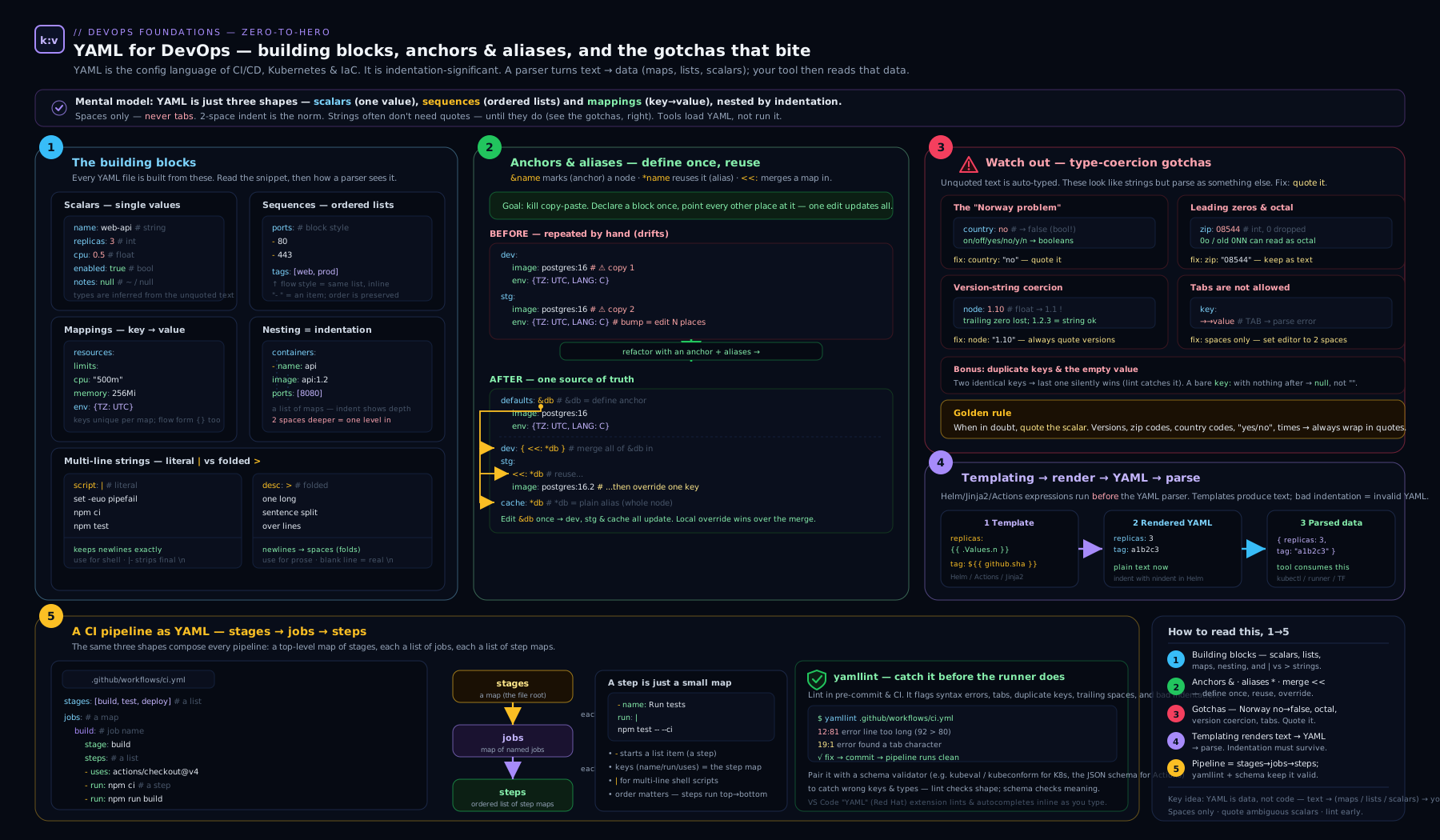
Read the diagram left to right: YAML’s three node types and scalar styles feed the anchor/alias/merge reuse mechanism, and the templating-then-parse pipeline shows how Jinja2/Helm/expressions render plain text that only afterwards becomes the manifest a tool consumes — the layer boundary this entire lesson turns on.
Going deeper
Everything above lets you read and write YAML correctly. This section is for the engineer who wants to understand why the gotchas exist, debug across parsers, and wire YAML validation into a pipeline. It is the difference between “I quote versions because a blog told me to” and “I know exactly which schema resolved that scalar.”
How a parser actually reads your file: nodes, tags, and schemas
A conforming YAML parser does not hand you strings and ints directly — it first builds a representation graph. Every scalar, sequence, and mapping becomes a node, and every node carries a tag that names its type. You rarely see tags because they are resolved implicitly: the plain scalar 3 is given the tag tag:yaml.org,2002:int (spelled !!int), true gets !!bool, and web-frontend gets !!str. Every gotcha in this lesson is, underneath, a story about implicit tag resolution — the rules a parser uses to guess a plain scalar’s tag.
You can always override the guess with an explicit tag:
port: !!str 8080     # force the string "8080", not the int 8080
count: !!int "42"    # force the int 42 from a quoted source
answer: !!str yes    # the string "yes", never a boolean
Which guesses a parser makes is decided by its schema. YAML 1.2 defines three. The failsafe schema knows only strings, maps, and sequences — no bools or ints at all. The JSON schema adds JSON’s types (and, importantly, no yes/no booleans). The core schema is the friendly default and is still fairly liberal. YAML 1.1 predates all of this and has the widest, most surprising type rules of all — and here is the fact that keeps the Norway problem alive in 2026: many real-world parsers still ship 1.1 behaviour, or a 1.1-flavoured core. Python’s PyYAML resolves NO, on, 010, and 12:34:56 with 1.1 rules to this day. When two tools disagree about your file, they are almost always resolving tags under different schemas.
Merge keys are shallow — and other anchor sharp edges
The merge key is a shallow merge, and this surprises everyone once. If a key’s value is itself a nested map, a local occurrence replaces the whole merged map rather than deep-merging into it:
base: &base
  resources:
    limits: { cpu: "1", memory: 512Mi }
  retries: 2
prod:
  <<: *base
  resources:
    limits: { memory: 1Gi }     # cpu is GONE — the whole 'resources' was replaced
After parsing, prod.resources.limits is { memory: 1Gi } — the cpu: "1" from the base has silently vanished, because << only merges top-level keys and a local resources: overrides the merged one entirely. If you need genuine deep-merge, you need the tool’s own mechanism (GitLab extends deep-merges; Helm/Kustomize have their own semantics) — plain YAML cannot do it.
Two more sharp edges worth committing to memory:
- Merge-list precedence. With
<<: [*a, *b], earlier entries win. Givena: {x: 1, y: 1}andb: {y: 2, z: 2}, the merged map is{x: 1, y: 1, z: 2}—ycomes froma, notb— and any local key beats them all. Get the order wrong and you silently pick up the wrong default. - Aliases are copies, not links. After parsing there is no live reference; changing the anchored node at runtime does not change the aliases (there is no runtime — it is all resolved once, at parse). And they are file-local: an anchor cannot cross an
include:boundary, which is exactly why GitLab addedextends.
There is also a security dimension. A maliciously self-referential alias graph causes exponential expansion — the classic “billion laughs” denial of service, where a few kilobytes of YAML expand to gigabytes in memory. Hardened parsers (libyaml, SnakeYAML, Go’s yaml.v3) cap alias expansion or nesting depth; do not parse untrusted YAML with a parser that has those limits switched off.
Schema validation: from editor squiggles to a CI gate
yamllint checks that YAML is well-formed and tidy. It does not know whether your Kubernetes Deployment has a valid spec. For that you need structural validation against a schema, and you want it at two points: live in your editor, and as a blocking check in CI.
In the editor, the YAML language server (the Red Hat VS Code extension) reads a modeline and validates as you type:
# yaml-language-server: $schema=https://raw.githubusercontent.com/compose-spec/compose-spec/master/schema/compose-spec.json
Thousands of ready-made JSON Schemas for common file types (Compose, GitHub Actions, GitLab CI, Renovate, and more) live on SchemaStore, and the extension auto-associates many by filename. For Kubernetes manifests the maintained CLI is kubeconform (the successor to the now-archived kubeval). It converts each manifest to JSON and validates it against the Kubernetes OpenAPI-derived schemas:
# validate every manifest in a directory against the built-in k8s schemas
kubeconform -strict -summary manifests/

# also validate Custom Resources by pointing at extra schema locations
kubeconform -strict \
  -schema-location default \
  -schema-location 'https://raw.githubusercontent.com/datreeio/CRDs-catalog/main/{{.Group}}/{{.ResourceKind}}_{{.ResourceAPIVersion}}.json' \
  manifests/
The -strict flag rejects unknown fields — the fastest way to catch a typo’d key like replias: that YAML itself considers perfectly valid. Wire it into a pull-request check so a structurally-broken manifest fails review, not the cluster:
name: manifests
on: [pull_request]
jobs:
  validate:
    runs-on: ubuntu-latest
    steps:
      - uses: actions/checkout@v4
      - name: Install kubeconform
        run: |
          curl -sSL -o /tmp/kc.tar.gz \
            https://github.com/yannh/kubeconform/releases/latest/download/kubeconform-linux-amd64.tar.gz
          tar -xzf /tmp/kc.tar.gz -C /usr/local/bin kubeconform
      - name: Validate manifests
        run: kubeconform -strict -summary manifests/
For arbitrary YAML (not Kubernetes), author a JSON Schema and validate with a general tool such as check-jsonschema or ajv. The principle is universal: yamllint proves it is YAML; a schema proves it is the right YAML.
Round-trips, ordering, and programmatic edits
Two facts about YAML semantics catch people writing tooling. First, mappings are unordered by specification. Most parsers preserve insertion order in practice, but nothing in the spec guarantees a key order, so never rely on ordering for meaning. Second, a naive load-then-dump destroys comments and may reorder keys — yaml.safe_load() followed by yaml.safe_dump() returns a stripped-down file. When you must edit YAML programmatically and keep comments and layout (common in GitOps repos), use a round-trip-preserving library such as Python’s ruamel.yaml, or the Go CLI yq (mikefarah’s yq, not the older Python jq-wrapper of the same name):
# bump a replica count in place, preserving comments and formatting
yq -i '.spec.replicas = 3' deployment.yaml

# read a nested value for a shell script
image=$(yq '.spec.template.spec.containers[0].image' deployment.yaml)
This matters for GitOps: Argo CD and Flux diff your rendered manifests against the cluster, so deterministic, comment-stable output keeps those diffs clean and reviewable instead of noisy with reordered keys.
A field guide to parser differences
Because “which YAML version does this tool use” decides which gotchas fire, keep this map handy. Behaviour is for unquoted values:
| Parser / tool | Effective version | NO |
010 |
<< merge key |
Anchors |
|---|---|---|---|---|---|
PyYAML safe_load (Python) |
1.1 | false |
octal → 8 |
supported | yes |
| ruamel.yaml (default) | 1.2 | "NO" (string) |
10 / string |
supported | yes |
Go gopkg.in/yaml.v2 |
~1.1 | false |
octal → 8 |
supported | yes |
Go gopkg.in/yaml.v3 |
~1.2 | "NO" (string) |
10 |
supported | yes |
| js-yaml (default) | 1.2 | "NO" |
10 |
not by default | yes |
Kubernetes (sigs.k8s.io/yaml) |
via JSON | "NO" |
10 |
n/a (JSON route) | yes (client-side) |
| GitHub Actions workflow parser | custom | false |
— | rejected | rejected |
Two takeaways. First, the parser you test with may not be the parser that runs in production — a manifest that looks fine under Go’s yaml.v3 can still be mangled by a PyYAML-based generator upstream. Second, Kubernetes converts YAML to JSON before applying (via sigs.k8s.io/yaml), so on that path JSON’s stricter rules apply and NO survives as a string — but any templating tool that touched the file earlier used its own parser, and that is where the corruption usually happens. When in doubt, quote, and validate against a schema — the two defences that work regardless of which parser is downstream.
Hands-on lab
We will install yamllint, write a small pipeline-style file, deliberately trigger the Norway gotcha, and prove the difference with a parser — all locally and free.
Step 1 — install the linter and confirm Python’s parser is present.
python3 -m pip install --user yamllint
yamllint --version          # expect: yamllint 1.x
python3 -c "import yaml; print('PyYAML OK')" 2>/dev/null \
  || python3 -m pip install --user pyyaml
Step 2 — create a file that demonstrates anchors, merge keys, and a gotcha. Save as pipeline.yml:
---
defaults: &defaults
  image: node:20
  retries: 2

build:
  <<: *defaults
  script: make build

test:
  <<: *defaults
  retries: 0
  script: npm test

countries:
  - GB
  - NO            # the trap: unquoted Norway
  - FR
Step 3 — see how a YAML 1.1-style parser reads it. PyYAML uses 1.1 semantics, so this exposes the Norway problem:
python3 -c "import yaml,json; print(json.dumps(yaml.safe_load(open('pipeline.yml')), indent=2))"
Expected output (abridged) — note false where Norway should be, and that the merge key correctly expanded image into both jobs:
{
  "defaults": { "image": "node:20", "retries": 2 },
  "build": { "image": "node:20", "retries": 2, "script": "make build" },
  "test":  { "image": "node:20", "retries": 0, "script": "npm test" },
  "countries": ["GB", false, "FR"]
}
Step 4 — fix the gotcha and re-run. Quote Norway: change - NO to - "NO", re-run the Step 3 command, and confirm countries is now ["GB", "NO", "FR"].
Step 5 — lint it. Run yamllint with a relaxed ruleset:
yamllint -d relaxed pipeline.yml
Now make a config to enforce something useful — forbid yes/no/on/off-style truthy values and require consistent indentation. Create .yamllint:
extends: relaxed
rules:
  truthy:
    allowed-values: ["true", "false"]
  indentation:
    spaces: 2
  document-start: enable
Re-run yamllint pipeline.yml. yamllint will now flag any stray yes/on truthy value and any inconsistent indentation — exactly the class of bug that breaks pipelines.
Step 6 — schema validation (optional, powerful). In VS Code with the Red Hat YAML extension, add a modeline comment to the top of a Kubernetes or Compose file:
# yaml-language-server: $schema=https://raw.githubusercontent.com/compose-spec/compose-spec/master/schema/compose-spec.json
The editor now autocompletes valid keys and red-underlines invalid ones as you type — the cheapest possible feedback loop.
Cleanup. Remove the lab files:
rm -f pipeline.yml .yamllint
Cost note. Zero. Everything here is local CLI and free, open-source tooling — no cloud resources are created.
Practice challenges
Work these in order; they escalate from beginner to advanced. Each has a hidden solution — try it yourself first, then expand. A local Python 3 with PyYAML installed (python3 -m pip install --user pyyaml) is enough to check every answer; no cloud is needed.
Challenge 1 — Defuse the coercion bombs (beginner). The snippet below has five values that a YAML 1.1 parser will mis-read. Identify them and rewrite the file so every value keeps the meaning a human intends.
country: NO
zip: 01234
version: 1.10
maintenance: off
window: 09:30
<details> <summary>Solution</summary>
Every value here is an identifier or literal, not a quantity, so all five need quoting:
country: "NO"        # was boolean false
zip: "01234"         # was octal / dropped leading zero
version: "1.10"      # was float 1.1 (trailing zero lost)
maintenance: false   # if you truly meant a boolean, write it; if a string, "off"
window: "09:30"      # was a base-60 (sexagesimal) integer
Why: quoting switches off implicit tag resolution, forcing each scalar to the !!str type instead of letting the parser guess !!bool, !!int, or !!float.
</details>
Challenge 2 — Pick the right block scalar (beginner). You must embed two multi-line values in one file: (a) a shell script whose newlines must be preserved exactly, and (b) an API token that must not end in a trailing newline. Choose the correct indicator for each and write them.
setup: ???
token: ???
<details> <summary>Solution</summary>
setup: |
  set -euo pipefail
  make build
token: |-
  eyJhbGciOiJIUzI1NiJ9.PLACEHOLDER
Why: | is the literal indicator (newlines preserved, one trailing \n kept by default), correct for a script; |- adds the strip chomping modifier so the token carries no trailing newline — a stray \n in a bearer token is a classic auth failure.
</details>
Challenge 3 — Refactor to DRY with an anchor + merge key (intermediate). These two jobs share most of their configuration. Collapse the duplication using an anchor and a merge key, overriding only what differs.
unit:
  image: python:3.12
  retries: 2
  tags: [docker]
  script: pytest -q

deploy:
  image: python:3.12
  retries: 2
  tags: [docker]
  script: ./deploy.sh
<details> <summary>Solution</summary>
.defaults: &defaults
  image: python:3.12
  retries: 2
  tags: [docker]

unit:
  <<: *defaults
  script: pytest -q

deploy:
  <<: *defaults
  retries: 0            # deploy overrides just this one field
  script: ./deploy.sh
Why: &defaults labels the shared map; <<: *defaults merges its keys into each job, and a local key (retries: 0, script:) overrides the merged value. Confirm with python3 -c "import yaml,json;print(json.dumps(yaml.safe_load(open('jobs.yml')),indent=2))".
</details>
Challenge 4 — A multi-document file with a lint gate (intermediate). Write a single file holding two documents — a ConfigMap and a Deployment — where one config value is a country code, and a .yamllint config that would fail CI on any unquoted yes/no/on/off value or a tab.
<details> <summary>Solution</summary>
---
apiVersion: v1
kind: ConfigMap
metadata:
  name: app-config
data:
  LOG_LEVEL: "info"
  COUNTRY: "NO"          # quoted, or it becomes false
---
apiVersion: apps/v1
kind: Deployment
metadata:
  name: app
spec:
  replicas: 3
# .yamllint
extends: default
rules:
  truthy:
    allowed-values: ["true", "false"]   # forbids yes/no/on/off
  indentation:
    spaces: 2                            # tabs are already a hard YAML error
  document-start: enable
Why: --- separates independent documents in one file (how kubectl apply -f takes stacked resources); the truthy rule with allowed-values is precisely the check that catches an unquoted Norway before it reaches production.
</details>
Challenge 5 — Port an anchor-based workflow to GitHub Actions (advanced). A team migrating from GitLab has this anchor-based reuse. GitHub Actions rejects anchors — reproduce the shared setup using a reusable workflow with a typed input.
.base: &base
  image: node:20
  before: npm ci
build:
  <<: *base
  run: npm run build
<details> <summary>Solution</summary>
Callee — .github/workflows/reusable-node.yml:
on:
  workflow_call:
    inputs:
      node-version:
        required: true
        type: string
jobs:
  run:
    runs-on: ubuntu-latest
    steps:
      - uses: actions/checkout@v4
      - uses: actions/setup-node@v4
        with:
          node-version: ${{ inputs.node-version }}
      - run: npm ci && npm run build
Caller — .github/workflows/ci.yml:
jobs:
  build:
    uses: ./.github/workflows/reusable-node.yml
    with:
      node-version: "20"
Why: Actions’ parser has no anchors/aliases, so DRY is achieved with its own mechanisms — reusable workflows (on: workflow_call + uses:) or composite actions. Note "20" is quoted: a version is a string.
</details>
Challenge 6 — Prove the shallow-merge trap, then guard it with a schema (advanced). Show that a merge key does not deep-merge nested maps (a field goes missing), then describe the validation that would catch the resulting broken manifest before it deploys.
base: &base
  resources:
    limits: { cpu: "1", memory: 512Mi }
  retries: 2
prod:
  <<: *base
  resources:
    limits: { memory: 1Gi }
<details> <summary>Solution</summary>
Load it and inspect prod:
python3 -c "import yaml,json; d=yaml.safe_load(open('m.yml')); print(json.dumps(d['prod']['resources']))"
# -> {"limits": {"memory": "1Gi"}}   ← cpu is gone
The local resources: replaced the merged one wholesale — cpu: "1" vanished because << is a shallow merge. In a real Deployment that silently drops a CPU limit. The guard is structural schema validation: run kubeconform -strict manifests/ (or the editor’s YAML language server) — a schema that requires both cpu and memory, or a policy engine like Conftest/OPA, flags the missing field before it reaches the cluster.
Why: plain YAML has no deep-merge; if you need one, use the tool’s own layering (GitLab extends, Kustomize, Helm) and never assume << recurses.
</details>
Common beginner mistakes
These are misconceptions rather than syntax slips — the wrong mental model that produces a whole class of bugs. Each pairs the belief with the model that replaces it.
- “YAML can loop and branch.” It cannot — YAML has no logic at all. The
{% for %}in an Ansible file or{{- if }}in a Helm chart belongs to a templating engine that runs first. Right model: YAML is inert data; any logic you see is a separate pre-pass generating that data. - “Quoting is just cosmetic.” Quotes are a type declaration. An unquoted scalar is offered to the parser’s type-guessing; a quoted one is forced to
!!str. Right model: quote whenever you mean “treat this literally” — versions, codes, IDs, anything that resembles another type. - “Tabs are fine if I’m consistent.” A tab used for structure is a hard syntax error, full stop — not a style preference. Right model: spaces only, two per level, enforced by the editor and a linter.
- “Anchors work in every YAML tool.” GitHub Actions rejects them outright, and strict YAML 1.2 parsers drop the
<<merge key. Right model: reuse is per-platform — confirm the target supports anchors before relying on them, and reach for the tool’s native reuse otherwise. - “
<<deep-merges my nested maps.” It merges only top-level keys; a local nested map replaces the merged one entirely, silently dropping fields. Right model: merge key = shallow; use the tool’s own layering when you need deep-merge. - “
|and>are interchangeable.”>folds newlines into spaces and will turn a shell script into one mangled line. Right model: use|(literal) whenever newlines carry meaning; reserve>for wrapped prose. - “
{{ }}is YAML syntax.” It is the templating or expression engine, not YAML. When a line with{{breaks, the fault is usually in the render pass, not the parse. Right model: on any error, first ask “which layer failed — the template, or the YAML it produced?” - “The parser I test with is the one production uses.” PyYAML (1.1), Go yaml.v3 (~1.2), and a CI runner’s custom parser resolve
NOand010differently. Right model: know your downstream parser’s version, and defend with quoting plus a schema so it does not matter.
Common mistakes & troubleshooting
| Symptom | Cause | Fix |
|---|---|---|
| “found character that cannot start any token” | A tab used for indentation | Replace tabs with spaces; set editor to insert spaces |
A value is true/false when you wanted text |
Norway problem — yes/no/on/off/NO unquoted |
Quote the value: "no", "NO" |
| A ZIP/version lost a digit or changed value | Octal (leading zero) or float coercion (1.10→1.1) |
Quote identifiers and versions |
mapping values are not allowed here |
A colon-space inside an unquoted value | Quote the whole value, e.g. "a: b" |
| List items ignored or merged into the wrong key | Inconsistent indentation under - |
Align all keys of a list item under the dash |
| GitHub Actions: “anchors are not supported” | Used &/* in an Actions workflow |
Use reusable workflows / composite actions |
| Helm output has broken indentation | Injected a block without nindent/indent |
Pipe through ` |
Merge key << ignored |
A strict YAML 1.2 parser that dropped merge keys | Avoid << for that tool; duplicate or use the tool’s own templating |
| A multi-line script runs as one mangled line | Used > (folded) where you needed ` |
` (literal) |
A nested field disappears after a << merge |
Shallow-merge — a local nested map replaced the merged one | Re-add the dropped keys, or use the tool’s deep-merge (extends, Kustomize) |
Best practices
- Quote stringy values by default. Versions, ports-as-strings, country/region codes, account numbers, anything that looks like another type. Consistency here eliminates an entire class of bugs.
- Two-space indentation, spaces only, enforced by a linter in CI — make malformed YAML fail the build, not production.
- Pin a
.yamllintconfig in the repo and run it as a pre-commit hook and a pipeline step so every contributor gets the same rules. - Prefer block style for anything nested; reserve flow style for short, flat lists.
- Use anchors/merge keys to stay DRY only where the tool supports them — superb in GitLab CI and Compose, unavailable in GitHub Actions (reach for reusable workflows there instead).
- Keep templating obvious. When mixing Jinja2/Helm with YAML, quote any value that begins with
{{, and lean onnindent/indentin Helm so structure stays correct. - Validate against a schema in your editor (the YAML language server) and in CI (kubeconform for Kubernetes, a JSON Schema for anything else) — catch errors before commit and before deploy.
- Reach for the least powerful reuse tool that works — anchors or
extendsbefore Kustomize, Kustomize before Helm — so more of your file stays plain, schema-checkable YAML. - One concern per document; use
---separators rather than deeply nesting unrelated things.
Security notes
- Never commit secrets in YAML. Pipeline files, Compose files, and manifests live in version control; an inline password or token is leaked the moment it is pushed and remains in history forever. Use the platform’s secret store (GitHub/GitLab CI secrets, Azure Pipelines secret variables, Kubernetes Secrets sourced from a vault) and reference them.
- Be wary of
yaml.loadin code. In Python, plainyaml.load()could historically construct arbitrary objects and enable remote code execution from a malicious document; always useyaml.safe_load(). The same “do not deserialise untrusted YAML with a full loader” caution applies in other languages. - Treat anchors with a billion-laughs eye. Maliciously nested aliases can cause exponential expansion (a YAML “billion laughs” denial-of-service); only parse trusted documents, and use parsers with expansion limits where you accept external input.
- Mask secret outputs. When a CI expression echoes a value, ensure secrets are registered as masked so they are not printed in logs.
- Review template-rendered output for injection — a user-controlled value flowing unquoted into Jinja2/Helm can change the document’s structure, not just a value.
Interview & exam questions
1. What is the difference between | and > in YAML?
| is a literal block scalar — it preserves newlines exactly. > is a folded block scalar — it folds single newlines into spaces, keeping blank lines as real newlines. Use | for scripts and certs, > for wrapped prose.
2. Explain anchors, aliases, and merge keys.
An anchor &name labels a node; an alias *name inserts a copy of it; a merge key <<: *name merges the keys of a referenced mapping into the current one, allowing per-key overrides. They are YAML’s only native reuse mechanism.
3. What is the “Norway problem”?
Under YAML 1.1, unquoted yes/no/on/off/true/false (various cases) parse as booleans. Norway’s ISO code NO therefore becomes false. Fix: quote such values.
4. Why might version: 1.10 be dangerous?
It is parsed as the float 1.1, dropping the trailing zero, so 1.10 and 1.1 collide. Quote versions: "1.10".
5. Why does 01234 not stay 01234?
A leading zero triggers octal interpretation under YAML 1.1 (and 0o under 1.2), corrupting ZIP/account numbers. Quote identifiers.
6. Does GitHub Actions support YAML anchors? No. The Actions workflow parser rejects anchors and aliases. Use reusable workflows and composite actions for reuse instead. (GitLab CI, Azure templates, and Compose do support anchors.)
7. Is YAML a superset of JSON? Yes. Every valid JSON document is valid YAML, because YAML’s flow style mirrors JSON’s brackets and braces.
8. Where does YAML end and templating begin in a Helm chart?
Helm renders Go text/template ({{ }}) over the file’s raw text first; the rendered output is then parsed as YAML/Kubernetes manifests. The template pass is not YAML and is not indentation-aware — hence nindent.
9. Why prefer yaml.safe_load() over yaml.load()?
A full loader can instantiate arbitrary Python objects from a document, enabling code execution from untrusted input. safe_load restricts construction to basic types.
10. How do you represent the same value as a string when YAML would coerce it? Quote it (single or double). Quoting disables type inference, forcing the scalar to be a string.
11. Tabs or spaces for YAML indentation? Spaces only — a tab is a syntax error. The convention is two spaces per level.
12. What does --- do in a YAML file?
It marks the start of a document; multiple ----separated documents can live in one file (the basis of stacking several Kubernetes resources in one manifest).
13. Is the merge key << a deep merge?
No — it is shallow. It merges only top-level keys; if a key’s value is a nested map, a local occurrence replaces the merged one entirely, silently dropping inner fields. Use the tool’s own layering (extends, Kustomize, Helm) for deep-merge.
14. What is a YAML tag, and when would you use an explicit one?
A tag names a node’s type (e.g. !!str, !!int). Parsers resolve tags implicitly for plain scalars — the source of every gotcha — and you can override the guess with an explicit tag such as !!str 8080 to force a string.
Quick check
- Which block scalar style strips all trailing newlines?
- True or false: GitHub Actions supports YAML anchors.
- What will unquoted
country: NOevaluate to under a YAML 1.1 parser? - Which Python function should you use to safely parse untrusted YAML?
- In the stage/job/step hierarchy, which level runs on an agent and can run in parallel?
- After a
<<merge, a job’s nestedresourcesmap is missing a field you set in the base. Why?
Answers
|-(literal with the strip-chomping modifier).- False — it does not; use reusable workflows or composite actions.
- The boolean
false(the Norway problem). yaml.safe_load().- The job — jobs run on a runner/agent and can run in parallel; steps within a job run sequentially.
- The merge key is shallow: the job’s own
resources:replaced the merged map wholesale rather than deep-merging into it, so the base’s inner field was dropped.
Exercise
Take this duplicated, gotcha-ridden GitLab-style file and refactor it. Your goals: (a) eliminate the duplication between staging and production using an anchor and a merge key; (b) fix every type-coercion bug; © write a .yamllint config that would have caught the truthy bug; (d) confirm with python3 -c "import yaml,json; print(json.dumps(yaml.safe_load(open('deploy.yml'))))" that the values are what you intend.
staging:
  image: registry/app:1.20
  replicas: 010
  enabled: yes
  regions: [GB, NO, FR]
  script:
    - ./deploy.sh staging

production:
  image: registry/app:1.20
  replicas: 010
  enabled: yes
  regions: [GB, NO, FR]
  approval: on
  script:
    - ./deploy.sh production
A correct solution quotes "1.20", "010", "NO", replaces yes/on with real booleans true, hoists the shared keys into a &base anchor merged via <<: *base, and overrides only what differs in production. The .yamllint should set truthy.allowed-values: ["true", "false"].
Certification mapping
YAML literacy is assumed — rarely a named objective, always a prerequisite — across the DevOps certification landscape. It directly underpins the DevOps Institute DevOps Foundation “automation and tooling” themes; the pipeline-as-code portions of AWS DevOps Engineer (DOP-C02), Azure DevOps Engineer (AZ-400), and Google Cloud Professional DevOps Engineer; the manifest-authoring expected in CKA/CKAD (where you hand-write Kubernetes YAML under time pressure); the HashiCorp Terraform Associate by way of HCL’s YAML-adjacent structure and YAML-encoded variables; and the GitHub Actions and GitLab certifications, whose entire syntax is the workflow YAML covered here. If you can read and debug YAML fluently, every one of these exams gets easier.
Glossary
- Scalar — a single value: string, number, boolean, or null.
- Sequence — an ordered list (block
-items or flow[ ]). - Mapping — a set of key/value pairs (a dictionary).
- Node — any element in a parsed YAML document (a scalar, sequence, or mapping) in the parser’s representation graph.
- Tag — the type label a parser attaches to a node (e.g.
!!str,!!int,!!bool); resolved implicitly for plain scalars, or set explicitly to override the guess. - Block style — collections expressed with indentation and newlines.
- Flow style — collections expressed inline with
[ ]/{ }(JSON-like). - Block scalar — a multi-line string introduced by
|(literal) or>(folded). - Chomping — control of trailing newlines in a block scalar: clip (default), strip (
-), keep (+). - Anchor (
&) — a label attached to a node for later reuse. - Alias (
*) — a reference that inserts a copy of an anchored node. - Merge key (
<<) — merges the keys of a referenced mapping into the current one (YAML 1.1); a shallow merge. - Document — one YAML structure; multiple are separated by
---in a single file. - YAML 1.1 vs 1.2 — the two spec generations; 1.1’s wide type rules cause most gotchas, and many tools still ship 1.1 behaviour despite 1.2 being current.
- Schema (failsafe / JSON / core) — the set of implicit type-resolution rules a YAML 1.2 parser applies; determines which plain scalars become bools, ints, etc.
- Norway problem — unquoted
NO(and similar tokens) parsing as a boolean. - Type coercion — YAML’s inference of a plain scalar’s type, the source of most gotchas.
- Truthy — the yamllint rule (and general term) for
yes/no/on/off/true/false-style boolean-looking tokens. - Templating layer — a separate pass (Jinja2, Helm/Go templates, ytt, CI expressions) that generates YAML text before it is parsed.
- Overlay / patch — a reuse family (Kustomize, ytt overlays) that layers typed changes over a valid base without emitting raw text.
extends(GitLab) — GitLab CI’s native job-inheritance keyword; deep-merges and works acrossinclude:files, unlike file-local anchors.!reference(GitLab) — a GitLab tag that pulls a specific value out of another job verbatim.- Reusable workflow / composite action — GitHub Actions’ native reuse mechanisms, used because Actions rejects anchors.
- Kustomize — a template-free Kubernetes overlay tool built into
kubectl(kubectl apply -k). - ytt — a Carvel templating engine whose logic lives in
#@comments, keeping files valid YAML. - yamllint — a linter that checks YAML for syntax errors and stylistic/semantic issues.
- JSON Schema — a schema language used to structurally validate YAML (via a language-server modeline or a CLI).
- kubeconform — the maintained CLI (successor to
kubeval) that validates Kubernetes manifests against their schemas. - Round-trip — loading and re-emitting YAML while preserving comments and layout (e.g. with ruamel.yaml or
yq). yq— a command-line YAML processor (mikefarah’s Go tool) for reading and editing YAML programmatically.- Billion laughs — a denial-of-service where nested aliases expand exponentially in memory.
Next steps
With YAML mastered, you are ready to design the pipelines it describes. Continue with CI/CD Pipeline Design: Stages, Quality Gates, Artifacts & Security Scans to turn this syntax into a real, gated delivery pipeline. For the reuse mechanisms YAML cannot provide on every platform, see GitHub Actions reusable workflows. And when a manifest misbehaves in CI, the diagnostic method in DevOps Troubleshooting: Pipelines, Builds, Deployments, Runners & Artifacts will get you unstuck fast.