In a nutshell
Picture a busy restaurant kitchen. An order ticket comes in (someone pushed code). The kitchen runs that ticket through a fixed routine — prep, cook, plate, and a final check at the pass before the dish leaves. Different stations (grill, salad, sauce) work at the same time, each at its own counter, and the finished plate is handed over deliberately at the pass; nobody expects the grill cook to find the salad station’s half-made dish just sitting on their counter. A CI/CD pipeline is that kitchen for software: an event (the ticket) starts a pipeline (the routine), which is organised into stages (prep → cook → plate) made of jobs (the stations), and each job runs a sequence of steps on its own agent (the cook at that counter). Anything that must survive the hand-off — the built app, the test report — is passed explicitly as an artifact, and the final step deploys to an environment (dev, staging, production), sometimes behind an approval at the pass.
The one big idea of this lesson: every CI/CD tool is that same kitchen — the same skeleton — spoken in a different dialect. GitHub Actions, GitLab CI, Azure Pipelines and Jenkins all take an event, grab a machine, check out your code, run commands in order, save the outputs, and report green or red. Learn the anatomy once (the parts, and how they fit) and picking up a new tool becomes “where does this one spell the thing I already know?” rather than “memorise a whole new YAML schema from scratch.”
Why should a beginner care? Because CI/CD is the backbone of almost every DevOps role — you will design, debug, and speed up pipelines constantly — and the people who get stuck are the ones who memorised one tool’s buttons instead of the shared model underneath. Get the anatomy here and every tool-specific lesson that follows slots straight into it.
Level: Junior · Time: ~50 min · You’ll need: comfort with Git (commits, branches, tags, pull requests) and a reading knowledge of YAML — nothing installed. Total beginners: read the kitchen analogy above, then follow the sections in order; every term is defined in the Glossary at the end.
Every CI/CD tool you will ever touch — GitHub Actions, GitLab CI, Azure Pipelines, Jenkins, CircleCI, Tekton, Buildkite, Drone, Bitbucket Pipelines — is a different dialect of the same language. They all take an event (“someone pushed”), spin up a machine, check out your code, run a sequence of commands, save the outputs, and report green or red. Once you can see that shared skeleton, learning a new tool stops being “memorise a new YAML schema” and becomes “find where this tool spells the concept I already know”. An engineer who has internalised the anatomy can move from Jenkins to GitHub Actions in an afternoon; one who only memorised steps: keys has to start over.
This lesson teaches that anatomy — the universal, vendor-neutral mental model — one part at a time, exhaustively. We will define CI, CD and CD precisely; dissect the pipeline → stage → job → step hierarchy; enumerate every kind of trigger; explain the agent/runner executor model that actually does the work; and work through workspaces, variables and secrets, artifacts versus caching, fan-out/fan-in, matrix builds, conditions, environments and approvals. Throughout, a running concept-mapping table shows exactly how each idea is spelled in GitHub Actions, GitLab CI, Azure Pipelines and Jenkins, so the vocabulary transfers immediately.
This is the anatomy lesson. Its companion, CI/CD Pipeline Design: Stages, Quality Gates, Artifacts & Security Scans, is the design lesson — how to architect a production pipeline (the stage flow, which gates to place where, artifact promotion strategy, OIDC, supply-chain hardening). This one gives you the parts and how they fit; that one tells you how to assemble them well. Read this first.
Learning objectives
By the end of this lesson you will be able to:
- Distinguish continuous integration, continuous delivery and continuous deployment precisely, and say where each begins and ends.
- Describe the pipeline hierarchy (pipeline → stage → job → step/task) and explain what unit of isolation and parallelism each level provides.
- Enumerate the full trigger taxonomy — push, pull/merge request, tag, schedule/cron, manual, API/webhook and upstream/pipeline triggers — and choose the right one for a job.
- Explain the agent/runner executor model: hosted vs self-hosted, labels/pools/tags, ephemeral vs persistent, and how a job is matched to a machine.
- Reason about workspaces and checkout, variable and secret scopes with masking, and the crucial difference between artifacts (durable outputs to pass on) and caching (a disposable speed optimisation).
- Build fan-out/fan-in graphs, matrix expansions and conditional execution, and gate deployments behind environments with approvals.
- Map any of these concepts onto GitHub Actions, GitLab CI, Azure Pipelines or Jenkins using a single reference table.
Prerequisites & where this fits
You should be comfortable with Git — commits, branches, tags, and pull/merge requests — because triggers fire on Git events and the anatomy assumes you know what “a push to a branch” or “a tag” is; the companion Git, In Depth lesson covers exactly that. A basic reading knowledge of YAML helps, since most pipelines are defined in it (see YAML for DevOps for the syntax, anchors and gotchas). You do not need a cloud account or any tool installed: the lab runs on the free tier of GitHub Actions in the browser. This lesson sits early in the Fundamentals / CI/CD track of the DevOps Zero-to-Hero course — after Git and YAML, and before the tool-specific deep dives (GitHub Actions, In Depth) and the pipeline design lesson. Get the anatomy here; specialise next.
Core concepts: CI vs CD vs CD, precisely
Three terms are thrown around interchangeably and they are not the same thing. Pin them down, because the distinction is a near-guaranteed interview question.
| Term | What it automates | Human still decides… | Ends at |
|---|---|---|---|
| Continuous Integration (CI) | Merging every change to a shared mainline often, and automatically building + testing it | n/a (it is fully automatic up to here) | A built, tested, publishable artifact |
| Continuous Delivery (CD) | Everything CI does, plus automatically preparing the artifact for release so it is always deployable | When to release to production (a push-button / approval) | A change sitting one approval away from production |
| Continuous Deployment (CD) | Everything continuous delivery does, plus the release itself — every change that passes all gates ships with no human step | nothing — fully automatic | Running in production, automatically |
Two traps to avoid. First, both CDs share the initials, so always disambiguate in conversation (“delivery” vs “deployment”). The only difference between them is a single manual gate: delivery keeps a human (or policy) in the loop to choose when to ship; deployment removes even that. Second, CI is a practice, not a product — “we use a CI tool” does not mean you do CI. Genuine CI means everyone integrates to mainline at least daily and the build stays green; a tool that runs long-lived feature branches that merge monthly is automating something, but it is not continuous integration.
The other foundational idea, which the whole anatomy serves: a pipeline is automation expressed as code, living in your repository. The definition file (.github/workflows/*.yml, .gitlab-ci.yml, azure-pipelines.yml, Jenkinsfile) is versioned with the code it builds, reviewed in pull requests, and rolls back with git revert. Everything below is a building block of that file.
The pipeline hierarchy: pipeline → stage → job → step
This is the single most important structure to internalise, because every tool implements some version of it. From the outside in:
| Level | What it is | Runs where | Isolation & parallelism | Fails how |
|---|---|---|---|---|
| Pipeline / Workflow | The whole automated process triggered by an event — the top-level unit | Spans many machines | The entire run for one trigger | One pipeline run succeeds or fails as a whole |
| Stage | A named phase grouping related jobs (e.g. build, test, deploy); a sequencing/gating boundary | Spans the machines of its jobs | Stages usually run in order; a stage starts only when the previous one succeeds | A failed stage normally stops later stages |
| Job | A set of steps that runs together on one agent, in one workspace | One agent/runner (one machine/container) | Jobs are the unit of parallelism and the unit of isolation — different jobs get different, fresh machines | A failed step fails its job |
| Step / Task | A single unit of work — a shell command or a pre-packaged action/task | Inside its job’s agent, sharing that workspace | Steps run sequentially within a job, sharing files and (often) shell state | A failing step fails the job (unless told to continue) |
Three consequences fall out of this structure, and they explain most “why doesn’t my pipeline work?” confusion:
- The job is the boundary of everything that is shared. Steps in the same job share a filesystem (the workspace), environment variables you export, and the same machine. The moment you cross into another job, you are on a different machine with a clean workspace — nothing carries over automatically. To pass a built file from a build job to a deploy job you must explicitly publish an artifact (covered below); to pass a small value you must declare a job output. This is the number-one beginner surprise.
- The job is the unit of parallelism. Want two things to run at once? Put them in separate jobs. Want them to run in order? Make one job depend on the other. Stages give you coarse ordering (“all of build before any of test”); job dependencies give you a fine-grained graph.
- Stages are optional sugar over job dependencies. GitHub Actions has no explicit stage keyword — you express the same ordering with
needs:between jobs. GitLab CI and Azure Pipelines have first-classstages. They achieve the same thing: a partial order over jobs. Do not be thrown when a tool omits one of the levels; it is modelling the order some other way.
A note on naming: what one tool calls a step, another calls a task — they are identical (one unit of work inside a job). And what runs the job is the agent (Azure Pipelines, Jenkins) or runner (GitHub Actions, GitLab CI) — again the same concept. We map all of this explicitly later.
Triggers: every way a pipeline starts
A pipeline does nothing until an event starts it. The set of events a pipeline listens for is its trigger configuration. This is the entry point of the whole system, and there are more kinds than beginners expect. Here is the full taxonomy:
| Trigger | Fires when… | Typical use | Watch out for |
|---|---|---|---|
| Push (branch) | Commits are pushed to a branch (often filtered to main, or by changed path) |
Build/test the mainline; deploy on push to main |
Path/branch filters matter — an unfiltered push trigger runs on every branch |
| Pull/Merge request | A PR/MR is opened, updated (new commits), reopened or its target changes | Pre-merge validation — the gate that keeps mainline green | Fork PRs run with reduced permissions and (by design) no access to secrets — security boundary, not a bug |
| Tag | A Git tag is pushed (often v* for releases) |
Release pipelines — build & publish a versioned release on tag | Tag triggers are separate from branch triggers; you must opt in |
| Schedule / cron | A clock time matches a cron expression | Nightly builds, dependency scans, cleanup, periodic e2e suites | Cron is usually UTC; scheduled runs typically use the default branch’s pipeline definition |
| Manual | A human clicks “Run” (optionally supplying input parameters) | On-demand deploys, one-off ops jobs, “run with these inputs” | Needs explicit support (workflow_dispatch, when: manual, parameters) and permission control |
API / webhook (repository_dispatch) |
An external system POSTs to the CI API with a custom event name + payload | Trigger from a chatops bot, an external service, or another system | The endpoint is privileged — protect the token that can fire it |
| Upstream / pipeline trigger | Another pipeline finishes (chaining pipeline B after pipeline A) | Multi-repo / multi-stage delivery: app build triggers infra deploy | Creates cross-pipeline coupling; pass context explicitly (commit, version) |
| Resource change (container/package/PR review/issue, etc.) | A non-Git resource changes — a new base image, a published package, a comment | Rebuild when a base image updates; respond to a /deploy comment |
Tool-specific; availability varies |
Two cross-cutting ideas sit on top of triggers:
- Filters narrow a trigger. Almost every trigger can be scoped by branch (only
main, orrelease/*), by path (only when files undersrc/changed — path filtering, the key to monorepo efficiency), or by tag pattern. Filtering is how you stop a pipeline from running on changes it does not care about, which is both a speed and a cost lever. - Concurrency controls what happens to overlapping runs. If three pushes land in a minute, do you want three deploys racing? Concurrency groups (with optional cancel-in-progress) ensure only one run per group (e.g. per branch, or per environment) proceeds, cancelling or queuing the rest. This is essential for deploy pipelines — you almost never want two deploys to the same environment at once.
Mentally, the trigger answers “what woke the pipeline up, and with what context?” — and that context (the commit SHA, the branch, the PR number, the actor, the event payload) is then available to every job through variables.
Agents and runners: the executor model
A pipeline definition is just instructions. Something has to actually run them — and that something is the agent (Azure Pipelines, Jenkins) or runner (GitHub Actions, GitLab CI). Understanding this executor model is what separates people who can debug pipelines from those who cannot, because “it works locally but fails in CI” is almost always a property of where and how the job ran.
The lifecycle of one job on an agent:
- The pipeline emits a job and a set of requirements (which OS, which labels/tags, which pool).
- The CI system matches the job to an eligible agent — a free machine that advertises the required labels/capabilities.
- The agent prepares a workspace (a working directory) and checks out the code (or you do, as a step).
- The agent runs the steps in order on that machine, streaming logs back.
- The agent uploads artifacts/caches as instructed and reports the result (pass/fail), then is cleaned up or returned to the pool.
The big architectural choice is who owns and runs the agent:
| Model | What it is | Pros | Cons / when to use |
|---|---|---|---|
| Hosted (cloud-provided) | A fresh, managed VM or container per job, run by the CI vendor (GitHub-hosted runners, GitLab SaaS runners, Microsoft-hosted agents) | Zero maintenance; clean machine every run; instant scale; multiple OS images available | Per-minute cost; no access to your private network by default; fixed hardware specs; queue/concurrency limits |
| Self-hosted | A machine you own and register with the CI system (a VM, a bare-metal box, your laptop) | Reaches private networks/databases; custom hardware (GPU, lots of RAM); pre-warmed caches; cost control at high volume | You patch, secure and scale it; state can leak between jobs unless cleaned; idle capacity costs money even unused |
| Ephemeral / autoscaling | Self-hosted agents that are created fresh per job and destroyed after — typically as Kubernetes pods (GitHub Actions Runner Controller, GitLab Kubernetes executor, Azure scale-set agents) | Private-network reach and clean-per-job isolation; scales to zero (no idle cost) | Needs a cluster and operational know-how to run |
How a job finds its agent — the matching mechanism — also has a shared shape with tool-specific names:
- Labels / tags / demands / capabilities. You annotate agents with labels (
linux,gpu,prod-network) and the job declares what it needs; the scheduler matches them. GitHub usesruns-on:with labels, GitLab uses runner tags, Azure uses demands against a pool’s capabilities, Jenkins uses labels onagent { label '…' }. - Pools / queues. Agents are grouped into pools (Azure), groups (GitHub runner groups), or simply a labelled fleet. The job targets a pool; the pool’s free agents serve it.
Three executor truths worth committing to memory:
- Each job typically gets a clean machine. That is why nothing is shared between jobs and why you must re-checkout code and re-install dependencies in each job (caching softens the cost). On persistent self-hosted agents this is not guaranteed — leftover files and processes from a previous job can poison the next one, which is a classic flaky-build cause.
- The agent’s environment is the source of “works locally, fails in CI”. Different OS, different tool versions, missing environment variables, a different working directory, no display/TTY — the agent is a different computer than your laptop. Pin tool versions and treat the agent as the real environment.
- Self-hosted agents are a security boundary. Never run untrusted code (e.g. a pull request from a fork) on a persistent self-hosted agent — the code can read other jobs’ files, cached credentials, and the agent’s own token. Use ephemeral agents and require approval for fork PRs. (The design lesson goes deeper on this.)
Workspaces and checkout
When a job starts on its agent, it gets a workspace — a working directory that all of that job’s steps share. Two things matter:
- Checkout is often an explicit step, not magic. In GitHub Actions you must add
uses: actions/checkout@v4; in GitLab CI and Azure Pipelines the checkout happens by default but is configurable (depth, submodules, LFS, which path). If your build complains it “can’t find the source”, you probably skipped or misconfigured checkout. - Shallow vs full clone. CI usually does a shallow clone (
--depth=1) for speed — only the latest commit, no history. That is fine until a step needs history: computing a version from tags, generating a changelog, or a “diff against the base branch” check. Then you must request a deeper (or full) fetch. This is a frequent, confusing failure: the tool works on your laptop (full history) and fails in CI (shallow).
The workspace is wiped between jobs (on hosted/ephemeral agents). Within a job it persists across steps — which is the whole reason multi-step jobs are useful: step 1 installs dependencies into the workspace, step 2 compiles using them, step 3 packages the result.
Variables and secrets: scopes and masking
Pipelines are parameterised by variables (non-sensitive configuration) and secrets (sensitive values like tokens and passwords). The mental model has two axes: scope (where the value is visible) and sensitivity (whether it is masked and protected).
Scope — variables can be defined at several levels, and a narrower scope usually overrides a broader one:
| Scope | Visible to | Typical use |
|---|---|---|
| Organisation / global | Every pipeline in the org/instance | Company-wide config, shared registry URL |
| Project / repository | Every pipeline in that repo/project | Repo-wide settings, default region |
| Pipeline / workflow | One pipeline definition | A value used across that pipeline’s jobs |
| Stage | One stage | Phase-specific config |
| Job | One job | Job-local config |
| Step | One step | A value used by a single command |
| Environment-scoped | Only when deploying to a named environment | Per-environment secrets (the prod DB password only exists for the prod deploy) |
Sensitivity — the difference between a variable and a secret:
- Plain variables are stored and displayed in clear text; fine for non-sensitive config. They are available to steps as environment variables or expressions.
- Secrets / masked variables are encrypted at rest, never printed in logs (the platform masks them — if the secret string appears in output it is replaced with
***), and often not exposed to untrusted contexts (notably, secrets are withheld from pull-request runs triggered by forks). Masking is best-effort string replacement, not magic: if you transform a secret (e.g. base64-decode it) the transformed value is not masked, which is how secrets leak. Neverechoa secret, even “to debug”.
There is also a crucial distinction between predefined/built-in variables the platform injects (the commit SHA, branch name, build number, repository, the actor who triggered the run, a temporary auth token) and user-defined ones you set. The built-ins are how a step learns the context the trigger captured. And modern pipelines increasingly replace stored cloud secrets entirely with OIDC short-lived federated credentials — covered in the design lesson and the OIDC deep dive.
Artifacts vs caching: the distinction everyone confuses
Both “save files from one job and use them later”, so beginners conflate them. They are completely different mechanisms with opposite guarantees, and confusing them causes both broken deploys and slow pipelines.
| Artifacts | Caching | |
|---|---|---|
| Purpose | Pass deliverable outputs between jobs, or keep them after the run (the build output, test reports, the packaged binary/image) | Speed up rebuilds by restoring expensive, reproducible inputs (dependency directories, build/layer caches) |
| Guarantee | Durable — if you published it, it is there; correctness can depend on it | Best-effort — a cache miss is normal and must be safe; never depend on cache contents for correctness |
| Keying | Named explicitly; retrieved by name | Keyed on a hash (usually a lockfile) so it invalidates when inputs change |
| Lifetime | Retention you set (days/weeks); release artifacts often kept long | Evicted on size/age; transient by nature |
| If missing | The consuming job fails (the thing it needed is gone) | The job just rebuilds from scratch (slower, still correct) |
The rule of thumb: if losing it would make the pipeline produce a wrong result, it is an artifact; if losing it only makes the pipeline slower, it is a cache. Your compiled binary, the container image, the test/coverage report you publish, the Terraform plan you hand to the apply job — artifacts. Your node_modules, ~/.m2, the pip cache, Docker layer cache — caches. (Promoting artifacts between environments — “build once, deploy many” — is a design topic covered in the companion lesson; here we only care that artifacts are the durable inter-job hand-off mechanism.)
The mechanics: a job publishes/uploads a named artifact; a later job consumes/downloads it by name. For tiny values (a version string, a computed tag) you do not need a file artifact — you use a job output, a small key/value a downstream job reads via the dependency.
Fan-out / fan-in, matrix and parallelism
Once you have jobs and dependencies, you can shape the graph of execution. Three patterns cover almost everything:
- Fan-out — one upstream job, many parallel downstream jobs. After
build, rununit-tests,lint,sastandscasimultaneously (they are independent). This is how you keep a pipeline fast: do independent work at the same time. - Fan-in — many parallel jobs, one downstream that waits for all of them. A
packagejob that depends on[unit-tests, lint, sast, sca]runs only after every one passes — a natural gate. Fan-out then fan-in is the canonical “do these four checks in parallel, then proceed only if all green” shape. - Matrix — a single job definition automatically expanded into many parallel jobs over a set of parameters.
os: [ubuntu, windows, macos] × node: [18, 20, 22]produces nine jobs from one block. A matrix is the DRY way to test across versions/platforms, and to shard a big test suite across N runners. Companion settings: fail-fast (cancel the rest the moment one combination fails — fast feedback) vs running all to completion (full picture), and max-parallel (cap how many matrix legs run at once, to respect concurrency limits or licence seats).
These build the dependency graph that the stage/job ordering executes. Parallelism is the main lever on pipeline lead time — and lead time is a DORA metric, so this is not academic. Two cautions: caches sharing a key across parallel jobs can race, and unbounded parallelism can blow past your hosted-runner concurrency limit or self-hosted capacity.
Conditions: running steps and jobs only when they should
Real pipelines are not straight lines — they branch. Conditional execution (if: / when: / condition: / Jenkins when {}) decides whether a step, job or stage runs, based on context: the branch (only deploy from main), the event type (only on a tag), the result of a previous step (run cleanup even if the build failed), a variable’s value, or a manual approval.
The two subtle, must-know behaviours:
always()/ “run even on failure”. By default a step is skipped once an earlier step failed. To run something regardless — publish test results, post a notification, tear down test infrastructure — you mark it to run always (or “on failure”). Forgetting this is why “my test report doesn’t upload when tests fail” — the upload step got skipped because the test step went red.- Success/failure/conditional gating. Jobs can be made to run only if upstream succeeded (the default), only if it failed (a rollback/notify job), or unconditionally. This is how you wire alerting and cleanup that must happen no matter what.
Conditions are also how a single pipeline serves many situations — the same file auto-deploys to dev on every push, but the prod-deploy job is if branch is main and it is a tag, gated behind an approval. One definition, many behaviours, all visible in version control.
Environments and approvals/gates
An environment is a named deployment target — dev, staging, production — that you deploy to. Treating environments as first-class objects (rather than just a variable) unlocks the controls that make deployment safe:
- Required approvals. A deploy to
productioncan require one or more named reviewers to click “approve” before it proceeds — a manual gate attached to the environment, not buried in the pipeline body. The same pipeline then auto-deploys to dev, waits for one approver to staging, and two for prod, with no forking of the definition. - Wait timers / delays. Force a cooling-off window before a prod deploy proceeds.
- Branch/source restrictions. Only allow deploys to
productionfrommain(or from tags) — so a feature branch can never deploy to prod. - Environment-scoped secrets. The production database password exists only in the production environment’s scope, so a dev-environment job literally cannot read it.
- Deployment history & rollback target. The environment records what was deployed and when — your audit trail and your “what is the last-good version to roll back to?”.
Critically, approvals belong to the environment, not the pipeline. Configuring the gate on the environment (GitHub Environments, GitLab protected environments, Azure environment checks/approvals, Jenkins input plus folder permissions) keeps one pipeline definition serving every stage with different protection levels. This is the anatomical home of “manual approval before prod”.
Idempotent and ephemeral builds
Two properties make a pipeline trustworthy, and both follow from the executor model:
- Ephemeral — each run starts from a clean, disposable environment and leaves nothing behind. Hosted and Kubernetes-based runners are ephemeral by construction; persistent self-hosted agents are not unless you clean them. Ephemerality is what kills the “passes on a re-run / build A poisoned build B” class of flakiness, and it is a security property too (no leftover credentials).
- Idempotent / reproducible — running the same commit through the pipeline yields the same result every time. Threats to this: unpinned dependency versions (
latestresolving differently), reliance on cache contents for correctness, build timestamps embedded in output, network calls to mutable resources, and tests with hidden ordering/timing dependencies (flaky tests). Pin versions, key caches on lockfiles, and treat non-determinism as a defect — because a pipeline you cannot trust to be reproducible is one people route around.
Put together: the ideal job runs on a fresh ephemeral agent, checks out an exact commit, restores a lockfile-keyed cache (safe to miss), runs deterministic steps, and publishes durable artifacts — so the same input always gives the same, trustworthy output.
The build → test → package → deploy flow
Tie the anatomy together with the canonical flow a change travels — the shape every pipeline approximates (the design lesson covers how to engineer each phase well; here we name the phases so the parts have a home):
- Build / compile — turn source into runnable form (compile, transpile, bundle), restoring dependencies (from cache).
- Test — prove correctness: unit → integration → end-to-end, fanned out in parallel, collecting reports as artifacts.
- Package — produce the deployable artifact (a container image, a
.jar/.whl, a zip), versioned and published to a registry. - Deploy — place that published artifact into an environment, gated by approvals where needed.
Build → test → package is the CI half (it ends with a trustworthy artifact and never touches a live system); deploy is the CD half (it moves that artifact through environments). The boundary is the artifact registry — exactly the build-once line from the design lesson.
Mapping the concepts across the four major tools
This is the payoff. Every concept above, spelled in the four most common tools. Learn the left column once; this table translates it anywhere.
| Universal concept | GitHub Actions | GitLab CI | Azure Pipelines | Jenkins (declarative) |
|---|---|---|---|---|
| Definition file | .github/workflows/*.yml |
.gitlab-ci.yml |
azure-pipelines.yml |
Jenkinsfile |
| Pipeline / top level | Workflow | Pipeline | Pipeline | Pipeline |
| Stage | (no keyword — order via needs:) |
stages: + stage: |
stages: + - stage: |
stages { stage('…') } |
| Job | jobs.<id>: |
top-level job key | - job: (under a stage) |
stage body / parallel stages |
| Step / task | steps: (run or uses) |
script: lines |
steps: (- script / - task) |
steps { sh '…' } |
| Executor name | Runner | Runner | Agent | Agent / node |
| Select an agent | runs-on: (labels) |
tags: |
pool: + demands: |
agent { label '…' } |
| Hosted executor | GitHub-hosted runners | GitLab SaaS runners | Microsoft-hosted agents | (none — you host) |
| Push trigger | on: push (+ branches,paths) |
rules/only on push |
trigger: (+ branches,paths) |
triggers { } / SCM webhook |
| PR/MR trigger | on: pull_request |
merge_request_event rule |
pr: trigger |
Multibranch / GH-PR plugin |
| Tag trigger | on: push: tags: |
rules on $CI_COMMIT_TAG |
trigger: tags: |
tag condition in when |
| Schedule / cron | on: schedule: cron |
rules + pipeline schedules |
schedules: - cron |
triggers { cron('…') } |
| Manual run | workflow_dispatch (+ inputs) |
when: manual (+ pipeline run) |
manual / parameters |
parameters {} + Build button |
| API / external trigger | repository_dispatch / API |
pipeline trigger token / API | REST API / webhook | build API / Generic Webhook |
| Upstream pipeline | workflow_run / reusable call |
trigger: (child/multi-project) |
pipeline resource trigger | build job: step |
| Job dependency (order) | needs: |
needs: (or stage order) |
dependsOn: |
stage order / parallel |
| Concurrency control | concurrency: |
resource_group: / interruptible |
(queueing settings) | disableConcurrentBuilds / lock |
| Variable | env: / vars |
variables: |
variables: |
environment {} |
| Secret | secrets.* (repo/env/org) |
masked/protected CI variables | secret variables / Key Vault | Credentials + credentials() |
| Built-in context | ${{ github.* }} |
CI_* predefined vars |
$(Build.*) / predefined |
env.* (e.g. BUILD_NUMBER) |
| Artifact (durable) | actions/upload/download-artifact |
artifacts: (+ dependencies) |
PublishPipelineArtifact task |
archiveArtifacts / stash-unstash |
| Cache (speed) | actions/cache / cache: input |
cache: (keyed) |
Cache@2 task |
plugin / scripted cache |
| Job output (small value) | outputs: + needs.*.outputs |
dotenv artifact |
output variables isOutput=true |
script { } returns / env |
| Matrix / fan-out | strategy.matrix |
parallel: matrix: |
strategy.matrix |
matrix {} / parallel {} |
| Fail-fast / max parallel | fail-fast,max-parallel |
parallel: count |
maxParallel |
matrix failFast |
| Condition | if: (+ always(),success()) |
rules: / when: |
condition: (+ always()) |
when {} / post {} |
| Environment | Environments (+ required reviewers) | Environments (protected) | Environments (+ checks) | folder + input approval |
| Approval gate | environment required reviewers | protected env + approvals | environment approvals/checks | input step |
| Reuse / templating | reusable workflows, composite actions | include: / extends: |
template: / extends: |
Shared libraries |
A few translation notes that trip people up when they switch tools:
- GitHub Actions has no
stages. It models ordering purely withneeds:. If you came from GitLab/Azure looking for a stage keyword, that is why you cannot find it. - Jenkins predates “pipeline as YAML”. Its
Jenkinsfileis Groovy (declarative or scripted), it does not provide hosted executors (you run all agents), and its secret story is the Credentials store rather than inline secret variables. Same anatomy, very different surface. - “Step” vs “task” is purely a naming difference (GitHub/GitLab/Jenkins say step; Azure says step but its packaged steps are tasks). “Runner” vs “agent” likewise — identical concept.
- Triggers in GitLab are increasingly
rules:-driven rather than the olderonly/except; the concept (push/MR/tag/schedule/manual) is identical, just expressed in one unifiedrulesblock.
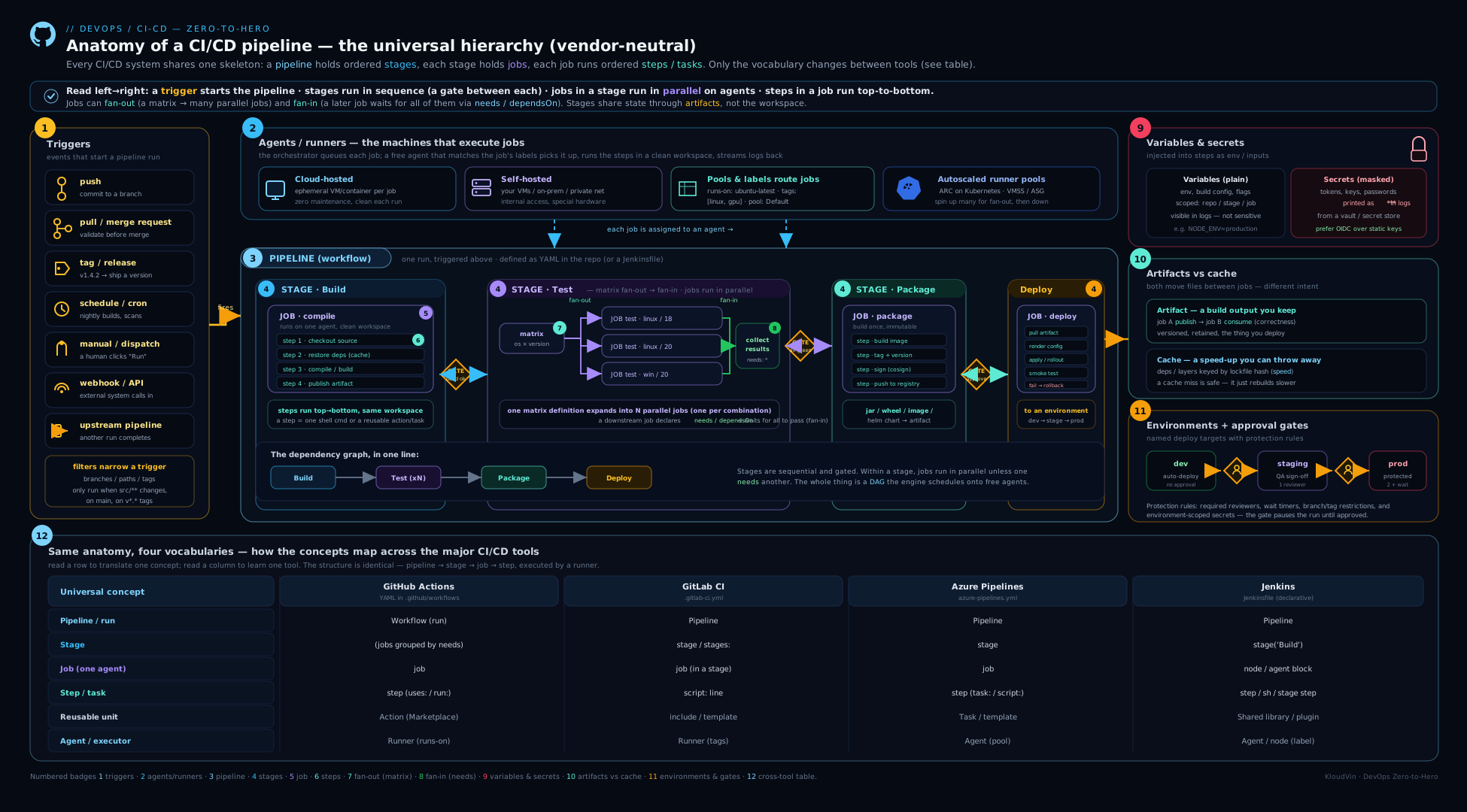
Read the diagram top to bottom and it is the anatomy: a trigger (push/PR/tag/schedule/manual/API) wakes a pipeline, which holds ordered stages; each stage holds jobs that run in parallel, each on its own agent/runner, and each job is a sequence of steps sharing one workspace; artifacts flow forward from build jobs into deploy jobs while caches are restored side-on to speed each job up, and the final deploy jobs target gated environments (dev → staging → prod) with an approval on the prod gate — every noun in this lesson, in one picture.
Hands-on lab
We will build a small pipeline on GitHub Actions (free tier, runs entirely in the browser — no installs) that demonstrates every core part of the anatomy in one place: multiple triggers, a fan-out/fan-in job graph, a matrix, an artifact hand-off, a cache, a job output, a condition, and an environment gate. The point is to see the anatomy, not to ship anything.
1. Create a repo. On GitHub, create a new public repository (e.g. cicd-anatomy-lab) with a README so it has a default branch.
2. Add an environment with an approval. In the repo: Settings → Environments → New environment, name it production, and under Deployment protection rules tick Required reviewers and add yourself. This is the approval gate, attached to the environment.
3. Add the pipeline. Create the file .github/workflows/anatomy.yml (use Add file → Create new file in the web UI):
name: anatomy-demo

# --- TRIGGERS: several kinds at once ---
on:
  push:
    branches: [main]          # push trigger, branch-filtered
  pull_request:               # PR trigger (validation)
  workflow_dispatch:          # manual trigger with an input
    inputs:
      note: { description: "why are you running this?", default: "manual run" }
  schedule:
    - cron: "0 3 * * *"       # nightly at 03:00 UTC

# Only one run per branch at a time; cancel the older one.
concurrency:
  group: anatomy-${{ github.ref }}
  cancel-in-progress: true

permissions:
  contents: read

jobs:
  # --- BUILD job: produces an ARTIFACT and a job OUTPUT ---
  build:
    runs-on: ubuntu-latest                 # select a HOSTED runner by label
    outputs:
      version: ${{ steps.ver.outputs.v }}  # a small value passed downstream
    steps:
      - uses: actions/checkout@v4          # CHECKOUT is an explicit step
      - id: ver
        run: echo "v=1.0.${GITHUB_RUN_NUMBER}" >> "$GITHUB_OUTPUT"   # built-in context
      - name: Produce a build artifact
        run: |
          mkdir -p out
          echo "built version ${{ steps.ver.outputs.v }} from ${GITHUB_SHA::7}" > out/app.txt
      - uses: actions/upload-artifact@v4   # publish a DURABLE artifact
        with: { name: app, path: out/ }

  # --- TEST job: a MATRIX (fan-out) that also uses a CACHE ---
  test:
    needs: build                            # runs after build (ordering)
    runs-on: ubuntu-latest
    strategy:
      fail-fast: false                      # see every leg's result
      matrix:
        suite: [unit, integration, lint]    # one job def -> three parallel jobs
    steps:
      - uses: actions/checkout@v4
      - uses: actions/cache@v4              # CACHE keyed on a lockfile-like key
        with:
          path: ~/.cache/demo
          key: demo-${{ runner.os }}-${{ hashFiles('**/README.md') }}
      - run: echo "running ${{ matrix.suite }} tests for ${{ needs.build.outputs.version }}"

  # --- DEPLOY job: FAN-IN + CONDITION + ENVIRONMENT gate ---
  deploy:
    needs: [build, test]                    # fan-in: waits for build AND all test legs
    if: github.ref == 'refs/heads/main'     # CONDITION: only from main
    runs-on: ubuntu-latest
    environment: production                  # the APPROVAL gate fires here
    steps:
      - uses: actions/download-artifact@v4  # CONSUME the artifact from build
        with: { name: app }
      - run: |
          echo "Deploying $(cat app.txt)"
          echo "version=${{ needs.build.outputs.version }}"
4. Run it and watch the anatomy. Commit to main. Open the Actions tab and click the run. You will see:
- A build job, then a fan of three
testjobs (unit,integration,lint) running in parallel — the matrix fan-out. - A deploy job that does not start until build and all three test legs finish — the fan-in, via
needs:. - The deploy job pauses for your approval (“Review deployments”) because of the
productionenvironment gate. Approve it and it continues.
5. Validate each concept.
- Triggers: open a pull request from a branch — the run starts via the
pull_requesttrigger, and the deploy job is skipped (theif: maincondition is false). Use Run workflow (the manualworkflow_dispatchbutton) and supply thenoteinput — it triggers via the manual path. - Artifact hand-off: in the finished run, expand
deploy→ the download step prints the line written bybuild. Under the run summary, theappartifact is downloadable. That file existed only because build published it and deploy consumed it — proof that jobs share nothing implicitly. - Job output: the deploy log prints the
version=1.0.Nvalue computed in build and passed viaoutputs— a small value crossing the job boundary without a file. - Cache: the first run shows “Cache not found”; a second run shows “Cache restored from key…” — best-effort, safe to miss.
- Concurrency: push twice quickly; the first run is cancelled in favour of the second (same
concurrencygroup). - Condition /
always()idea: note the deploy job’s “skipped” state on the PR run — that isif:in action.
Validation checklist: a parallel matrix of test jobs; a deploy that waits on fan-in and a manual approval; an artifact produced by one job and consumed by another; a cache hit on the second run; the deploy job skipped on a non-main trigger.
Cleanup. Delete the workflow file (or the whole repo: Settings → Delete this repository). Artifacts auto-expire; you can delete them sooner from the run’s summary page. The production environment disappears with the repo.
Cost note. Public-repo Actions minutes and storage are free. Private repos get a monthly free allotment of minutes and artifact storage; beyond it, hosted minutes bill per minute (Linux cheapest; Windows/macOS multiplied) and artifacts bill on storage. The cost levers are the same anywhere: parallelism (more concurrent minutes), artifact retention, and hosted vs self-hosted runners.
Practice challenges
Work these in order — each builds on the last. Try to answer before opening the solution. They escalate from beginner to advanced and cover the whole anatomy: the CI/CD distinction, the hierarchy, triggers, artifacts vs caching, the fan-out/fan-in DAG, matrix, conditions, and environment gates. The YAML is current GitHub Actions syntax; the concepts translate via the mapping table above.
1 (Beginner) — Name the practice. Three teams describe how they ship. Label each as continuous integration only, continuous delivery, or continuous deployment — and say what tells them apart. (a) Every merge to main auto-builds, tests, and publishes a versioned artifact; a human clicks “Deploy to prod” when they choose. (b) Every merge to main that passes all automated gates is released to production with no human step. © Every push builds and tests, but releases happen from long-lived release branches merged once a month.
<details><summary>Solution</summary>
(a) Continuous delivery — always releasable, but a human decides when. (b) Continuous deployment — the last manual gate is gone. © This is not continuous integration at all — automated builds on branches that merge monthly is the opposite of “integrate to mainline at least daily and keep it green”; the tool is running, the practice is missing.
Why: CI/CD are practices, not products. The only thing separating the two CDs is a single manual gate, and “we run a CI tool” never proves “we do CI”.
</details>
2 (Beginner) — The sharing boundary. Which level of the pipeline hierarchy is the unit of parallelism and isolation, and what does that imply about files created in one place being visible in another? Then write the minimal GitHub Actions skeleton that makes a deploy job run only after a build job.
<details><summary>Solution</summary>
The job. Each job runs on its own fresh agent and clean workspace, so nothing created in one job is visible in another automatically — to cross the boundary you publish an artifact (a file) or expose a job output (a small value).
jobs:
  build:
    runs-on: ubuntu-latest
    steps:
      - run: echo "build"
  deploy:
    needs: build          # deploy starts only after build succeeds
    runs-on: ubuntu-latest
    steps:
      - run: echo "deploy"
Why: needs: expresses both the order and the dependency; without it the two jobs would run in parallel on separate machines and share nothing.
</details>
3 (Intermediate) — Wire the triggers. Write a single GitHub Actions on: block that validates every pull request, runs on pushes to main (the deploy path), runs a nightly job at 02:00 UTC, and offers a manual button with a free-text reason input.
<details><summary>Solution</summary>
on:
  pull_request:                     # PR validation on every PR
  push:
    branches: [main]                # mainline pushes (deploy path)
  schedule:
    - cron: "0 2 * * *"             # nightly 02:00 UTC (cron is UTC)
  workflow_dispatch:                # manual button
    inputs:
      reason:
        description: "why are you running this?"
        required: false
        default: "manual run"
Why: one workflow can listen for several event types at once; you then branch behaviour per-event inside jobs with if: (e.g. if: github.event_name == 'push' for the deploy job). Remember cron is UTC and scheduled runs use the default branch’s definition.
</details>
4 (Intermediate) — Artifact or cache? Classify each as an artifact or a cache: (a) the compiled .jar, (b) the ~/.m2 Maven repository, © the JUnit test report, (d) node_modules, (e) the container image you will deploy, (f) the Terraform plan you hand to apply. Then write (1) the step to publish the .jar and (2) a cache step for ~/.m2 keyed on the lockfile.
<details><summary>Solution</summary>
Artifacts (durable; correctness depends on them): (a) .jar, © test report, (e) container image, (f) Terraform plan. Caches (best-effort; safe to miss): (b) ~/.m2, (d) node_modules.
steps:
  # publish the deliverable — a later job needs it
  - uses: actions/upload-artifact@v4
    with:
      name: app-jar
      path: target/*.jar
  # speed up rebuilds — safe to miss
  - uses: actions/cache@v4
    with:
      path: ~/.m2/repository
      key: m2-${{ runner.os }}-${{ hashFiles('**/pom.xml') }}
      restore-keys: |
        m2-${{ runner.os }}-
Why: rule of thumb — if losing it makes the pipeline produce a wrong result it is an artifact; if it only makes the pipeline slower it is a cache. Keying the cache on the pom.xml hash invalidates it exactly when dependencies change.
</details>
5 (Advanced) — Build the DAG. Write GitHub Actions job skeletons for this graph: build fans out to unit, lint and sast (parallel); package fans in (waits for all three); deploy runs only from main, only after package, behind a production environment gate; and a notify job runs even if something upstream failed.
<details><summary>Solution</summary>
jobs:
  build:
    runs-on: ubuntu-latest
    steps: [ { run: "echo build" } ]
  unit:
    needs: build
    runs-on: ubuntu-latest
    steps: [ { run: "echo unit" } ]
  lint:
    needs: build
    runs-on: ubuntu-latest
    steps: [ { run: "echo lint" } ]
  sast:
    needs: build
    runs-on: ubuntu-latest
    steps: [ { run: "echo sast" } ]
  package:
    needs: [unit, lint, sast]             # fan-in: waits for all three
    runs-on: ubuntu-latest
    steps: [ { run: "echo package" } ]
  deploy:
    needs: package
    if: github.ref == 'refs/heads/main'   # only from main
    runs-on: ubuntu-latest
    environment: production               # approval gate lives on the environment
    steps: [ { run: "echo deploy" } ]
  notify:
    needs: [build, unit, lint, sast, package, deploy]
    if: always()                          # runs regardless of upstream success/failure
    runs-on: ubuntu-latest
    steps: [ { run: "echo notify" } ]
Why: unit/lint/sast sharing needs: build is the fan-out; package with needs: [unit, lint, sast] is the fan-in (all must pass); the environment: carries the approval so one definition serves every stage; if: always() overrides the default “skip once something failed” so notify always fires.
</details>
6 (Advanced) — Shard, cap, and carry a value. Turn a single test job into a 4-way shard matrix, cap it at 2 legs running at once, and do not cancel the other legs when one fails. Separately, compute a version string in build and read it in deploy — without a file artifact.
<details><summary>Solution</summary>
jobs:
  build:
    runs-on: ubuntu-latest
    outputs:
      version: ${{ steps.v.outputs.version }}   # expose a small value
    steps:
      - id: v
        run: echo "version=1.4.$GITHUB_RUN_NUMBER" >> "$GITHUB_OUTPUT"
  test:
    needs: build
    runs-on: ubuntu-latest
    strategy:
      fail-fast: false           # let every shard finish (full picture)
      max-parallel: 2            # at most 2 shards run at once
      matrix:
        shard: [1, 2, 3, 4]      # one job def -> four parallel legs
    steps:
      - run: echo "shard ${{ matrix.shard }} of 4 for ${{ needs.build.outputs.version }}"
  deploy:
    needs: [build, test]
    runs-on: ubuntu-latest
    steps:
      - run: echo "deploying ${{ needs.build.outputs.version }}"
Why: a matrix expands one definition into N parallel legs (here shards of a suite); fail-fast: false keeps the others running for a complete result; max-parallel caps concurrency against runner limits or licence seats; a job output carries a small value across the job boundary without an artifact file.
</details>
Common beginner mistakes
These are conceptual traps — the wrong mental model, and the right one — distinct from the symptom→cause→fix table in the next section. Here the fix is a corrected way of thinking about the anatomy.
- “CI, delivery and deployment are basically the same thing.” People say “CI/CD” as one word and treat the three as synonyms. They are three distinct things, and the difference between the two CDs is exactly one manual gate. Right model: CI ends at a tested artifact; continuous delivery keeps it always-releasable with a human choosing when; continuous deployment removes even that gate. And running a CI tool is not the same as practising CI.
- “Jobs in the same pipeline share a filesystem.” Because steps in one job share files, beginners assume the next job sees them too — then spend an hour debugging a “missing file” in deploy. Right model: the job is the isolation boundary; every job is a different, clean machine. Move files across it with an artifact, and small values with a job output — nothing crosses implicitly.
- “A cache and an artifact are two words for ‘save files between jobs’.” Both persist files, so they feel interchangeable — until someone depends on a cache for correctness and a cache-miss breaks the build. Right model: an artifact is durable and correctness may depend on it (a miss fails the consumer); a cache is a best-effort speed trick keyed on a lockfile (a miss just rebuilds). If losing it makes the result wrong, it is an artifact.
- “
runnervsagent,stepvstask— different things to learn per tool.” Switching tools, beginners try to re-learn the whole vocabulary. Right model: these are the same concepts in different dialects. The machine that runs a job is a runner (GitHub/GitLab) or agent (Azure/Jenkins); a unit of work is a step (most tools) or task (Azure’s packaged steps). Learn the anatomy once; translate the word with the mapping table. - “The CI machine is basically my laptop in the cloud.” So when it “works locally, fails in CI” it feels like a bug in the tool. Right model: the agent is a specific, different computer — different OS image, tool versions, no TTY, a shallow clone with no history, its own environment variables. Pin tool versions, install what you need per job, and treat the agent as the real environment.
- “I need stages to make jobs run in order.” Coming from GitLab/Azure, people look for a
stages:keyword in GitHub Actions and conclude it cannot sequence work. Right model: stages are optional sugar over job dependencies. GitHub Actions has no stage keyword and orders jobs purely withneeds:— the same partial order, expressed job-to-job. - “Put the ‘require approval before prod’ logic in the pipeline YAML.” Beginners wire an
if:or a manualinputinto the pipeline body and fork the file per environment. Right model: approvals belong to the environment (GitHub Environments, GitLab protected environments, Azure environment checks), not the pipeline. One definition then serves dev/staging/prod with different reviewers, wait timers, scoped secrets and a clean audit trail.
Common mistakes & troubleshooting
| Symptom | Likely cause | Fix |
|---|---|---|
| “File from the build job is missing in deploy” | Expecting jobs to share a filesystem — they run on different, clean machines | Publish an artifact in the producer job and download it in the consumer (or use a job output for small values) |
| Step works locally, fails in CI with “command not found” / wrong version | The agent is a different machine — different OS, tool versions, no env vars | Pin tool versions in the pipeline; install what you need per job; treat the agent as the real environment |
| “fatal: not a git repository” or “no such commit” | Checkout skipped or shallow clone lacks needed history (tags, base branch) | Add/keep the checkout step; request a deeper/full fetch when you need history (version/changelog/diff) |
| Test report / notification doesn’t appear when the build fails | The reporting step was skipped because an earlier step failed | Mark it to run with always() / “on failure” so it runs regardless |
| New gate/scan deploys to prod from a feature branch | Missing branch condition on the deploy job/environment | Add if: branch is main and restrict the environment’s allowed source branches |
| Two deploys to the same environment race | No concurrency control on overlapping runs | Add a concurrency group (per branch/environment) with cancel-in-progress or queueing |
| Pipeline is reliably slow | Everything serial; no caching; no parallelism | Fan out independent jobs; add lockfile-keyed caches; shard big test suites via a matrix |
| Secret appears in the logs | The value was transformed (so masking missed it) or echo-ed for “debugging” |
Never print secrets; remember masking is literal string replacement — a decoded/derived secret is not masked |
| Fork PR can’t see secrets / can’t deploy | By design — fork PR runs get reduced permissions and no secrets | Don’t rely on secrets in fork-PR validation; gate privileged work behind approval on the protected branch |
Best practices
- Think in the hierarchy. Put independent work in separate jobs (parallelism + isolation), sequential work in steps of one job (shared workspace), and use
needs/dependsOnto express the order explicitly. - Filter your triggers. Scope by branch and path so the pipeline only runs on changes it cares about — the cheapest speed and cost win in a monorepo.
- Treat every job as a clean room. Re-checkout, re-install (from cache), pin versions; never assume state survives between jobs. Prefer ephemeral runners so it cannot.
- Artifacts for correctness, caches for speed. Publish durable artifacts for anything a later job needs; key caches on lockfiles and make them safe to miss.
- Gate on environments, not pipeline forks. Put required reviewers, wait timers and source restrictions on the environment so one definition serves dev/staging/prod with different protection.
- Control concurrency on deploy pipelines so two runs never touch the same environment at once.
- Pin everything for reproducibility — tool versions and third-party actions/tasks (to a commit SHA) — so the same commit always builds the same way.
- Keep the definition in the repo, reviewed in PRs. Pipeline-as-code is the whole point; click-configured pipelines drift and cannot be reviewed.
- Name jobs and steps clearly. A readable run graph is half of debugging.
Security notes
The pipeline runs your code on a machine that holds tokens and can write to production, so it is a high-value target. Treat secrets carefully: store them in the platform’s encrypted secret store (never in the YAML), scope them as narrowly as possible (environment-scoped for prod), and never print them — masking is best-effort string replacement that a transformed value defeats. Remember the fork-PR boundary: pull requests from forks deliberately run with reduced permissions and no secrets, so an attacker’s PR cannot exfiltrate them — do not “fix” this by loosening it. Never run untrusted code on a persistent self-hosted agent; a fork could read other jobs’ files, cached credentials and the agent token — use ephemeral agents and require approval for fork PRs. Pin third-party actions/tasks to a commit SHA so a hijacked tag cannot silently run attacker code with your tokens. Grant each job least-privilege permissions (a read-only token unless it genuinely needs to write). Where you authenticate to a cloud, prefer OIDC short-lived federated credentials over a stored static key. And make the pipeline auditable — who approved which deploy to which environment, and when. The companion design lesson goes deeper on OIDC, supply-chain signing and SBOMs.
Interview & exam questions
-
What is the difference between continuous integration, continuous delivery and continuous deployment? CI merges every change to mainline often and validates it automatically, ending at a tested, publishable artifact. Continuous delivery keeps that artifact always-releasable but a human/policy decides when to release (an approval). Continuous deployment removes that last gate — every change passing all automated gates ships to production automatically.
-
Walk me through the pipeline hierarchy. A pipeline/workflow (the whole run for one trigger) contains stages (ordered phases), which contain jobs (the unit of parallelism and isolation — each runs on one agent in one workspace), which contain steps/tasks (single commands/actions that run sequentially and share the job’s filesystem). GitHub Actions omits an explicit stage keyword and uses
needs:for ordering instead. -
Why can’t a later job see files a previous job created, and what do you do about it? Because each job typically runs on a different, clean machine with its own workspace — nothing is shared across jobs. To pass a file you publish an artifact and download it; to pass a small value you use a job output.
-
Name the trigger types and give a use for each. Push (build/deploy mainline), pull/merge request (pre-merge validation), tag (release pipelines), schedule/cron (nightly scans/cleanup), manual (on-demand deploys with inputs), API/webhook
repository_dispatch(trigger from external systems/chatops), and upstream/pipeline triggers (chain one pipeline after another). -
Hosted vs self-hosted vs ephemeral runners — when each? Hosted: zero maintenance, clean per job, pay per minute — the default. Self-hosted: when you need private-network reach, special hardware or cost control at scale — but you secure/scale it and risk state leakage. Ephemeral/autoscaling (e.g. ARC, Kubernetes executors): self-hosted reach with hosted-style clean-per-job isolation and scale-to-zero.
-
Explain artifacts vs caching. Artifacts are durable, named outputs passed between jobs or kept after the run; correctness can depend on them, and a missing one fails the consumer. Caches are a best-effort speed optimisation (dependency/build outputs keyed on a lockfile hash); a miss is normal and the job just rebuilds. Rule: if losing it makes the result wrong it’s an artifact; if it only makes the run slower it’s a cache.
-
What is fan-out/fan-in, and how is a matrix related? Fan-out is one job triggering many parallel jobs; fan-in is many jobs converging on one that waits for all (a natural gate). A matrix expands a single job definition into many parallel jobs over parameter combinations (versions/OSes) or to shard a test suite — a DRY form of fan-out.
-
How do you make a step run even when an earlier step failed, and why would you? Mark it with
always()(or “on failure”). You need it for steps that must run regardless of outcome — uploading test reports, sending notifications, tearing down test infrastructure. Without it they’re skipped the moment something fails. -
Where do deployment approvals belong, and why there? On the environment (GitHub Environments, GitLab protected environments, Azure environment checks), not in the pipeline body. That way one pipeline definition auto-deploys to dev, requires one approver for staging and two for prod, with environment-scoped secrets and a clean audit trail — no forking the YAML.
-
What does “ephemeral and idempotent build” mean, and why does it matter? Ephemeral = each run starts clean and leaves nothing behind (kills “passes on re-run” flakiness and leftover-credential risk). Idempotent/reproducible = the same commit yields the same result every time (requires pinned versions, lockfile-keyed caches, no reliance on mutable inputs). Together they make the pipeline trustworthy.
-
How are secrets protected, and how do they still leak? They’re encrypted at rest, masked in logs (the string is replaced with
***), and withheld from fork-PR runs. They leak when you transform a secret (e.g. base64-decode it) so the new value isn’t masked, or when you print one “to debug” — masking is literal string matching, not magic. -
What is concurrency control in a pipeline and when is it essential? A mechanism that limits overlapping runs in the same group (per branch or per environment), cancelling or queuing the rest. It’s essential for deploy pipelines so two deploys never race against the same environment.
-
Give the GitLab/Azure/Jenkins equivalents of:
runs-on,needs,uses,secrets.*.runs-on→ GitLabtags:, Azurepool:/demands, Jenkinsagent { label }.needs→ GitLabneeds:, AzuredependsOn, Jenkins stage order/parallel.uses(an action) → there’s no direct equivalent (GitLabinclude/templates, Azuretask, Jenkins shared-library steps fill the role).secrets.*→ GitLab masked/protected variables, Azure secret variables/Key Vault, Jenkins Credentials +credentials().
Quick check
- Which level of the pipeline hierarchy is the unit of parallelism and isolation, and what does that imply about sharing files?
- You need to pass a compiled binary from a
buildjob to adeployjob. Artifact or cache — and why? - Name three distinct triggers and a use for each.
- A teammate says “just put the test-report upload as the last step and it’ll always run”. Why are they wrong, and what’s the fix?
- Where should a “require two approvers before production” rule be configured, and why there rather than in the pipeline body?
Answers
- The job — each job runs on its own clean machine/workspace, so nothing is shared between jobs automatically; you must publish artifacts or declare outputs to pass anything across the job boundary.
- Artifact. The binary is a durable deliverable the deploy job needs — if it’s missing, deploy must fail, not silently rebuild. Caches are best-effort and safe to miss, which is the wrong guarantee for a deliverable.
- Any three of: push (build/deploy mainline), pull/merge request (pre-merge validation), tag (release pipeline), schedule/cron (nightly scan/cleanup), manual (on-demand deploy with inputs), API/webhook (trigger from an external system).
- By default a step is skipped once an earlier step fails, so if tests fail the upload never runs. Mark the upload step with
always()(or “on failure”) so it runs regardless of the build outcome. - On the environment (e.g. GitHub Environments / GitLab protected environments / Azure environment checks). Putting it there lets one pipeline definition serve dev/staging/prod with different protection levels and environment-scoped secrets, and gives a clean audit trail — no forked YAML.
Exercise
Take the lab pipeline and deepen the anatomy:
- Add an upstream/pipeline trigger. Create a second tiny workflow that triggers when the first one completes (
workflow_run), and have it print the version the first run produced — proving cross-pipeline chaining and context passing. - Add a tag-triggered release path. Add a job that runs only on a pushed tag (
ifis a tag /on: push: tags:), builds the artifact, and “releases” it (just print, for the lab). Push av1.0.0tag and confirm only that path runs. - Shard the test matrix. Convert the
suitematrix into a sharded unit-test matrix (shard: [1, 2, 3, 4]) and addmax-parallel: 2— observe two legs running at a time. Note the effect on total time. - Add a failure-only notify job. Add a job that runs only if the build failed (a “rollback/notify” placeholder) using a failure condition — and verify it stays skipped on a green run and fires on a red one (break a step to test).
- Re-map it. Pick one other tool (GitLab CI, Azure Pipelines or Jenkins) and translate your workflow into it using the mapping table — even just on paper. The act of translation is what cements the anatomy.
Record in your notes: the run graph showing fan-out → fan-in → gated deploy, and your one-page translation of the same pipeline into a second tool.
Certification mapping
| Exam / certification | Relevant objectives |
|---|---|
| Microsoft Azure DevOps Engineer Expert (AZ-400) | Designing and implementing pipelines with Azure Pipelines — stages, jobs, steps/tasks, triggers, agents/pools, variables & secret variables, artifacts, environments and approvals; the CI/CD concepts underpinning all of it |
| AWS Certified DevOps Engineer – Professional (DOP-C02) | CI/CD concepts and pipeline structure (CodePipeline stages/actions, CodeBuild jobs), triggers, artifacts, environment/stage gating and approvals |
| Google Cloud Professional DevOps Engineer | CI/CD fundamentals, Cloud Build triggers/steps, build artifacts, and release/promotion concepts |
| GitHub Actions certification | Workflow/event/job/step model, runners, contexts & variables, secrets, artifacts vs caching, matrix, environments — this lesson is the conceptual core |
| GitLab certifications | Pipeline/stage/job structure, runners & tags, rules-based triggers, artifacts/cache, environments and protected environments |
| DevOps Foundation / DevSecOps Foundation | CI vs CD vs continuous deployment, pipeline flow and feedback loops, the build→test→package→deploy lifecycle |
Glossary
- Pipeline / workflow — the entire automated process triggered by one event; the top level of the hierarchy.
- Stage — a named, ordered phase grouping related jobs (a sequencing/gating boundary). GitHub Actions models ordering with
needs:instead. - Job — a set of steps that runs together on one agent in one workspace; the unit of parallelism and isolation.
- Step / task — a single unit of work (a command or a packaged action/task) inside a job; steps run in order and share the workspace.
- Trigger / event — what starts a pipeline (push, PR/MR, tag, schedule, manual, API/webhook, upstream).
- Continuous integration (CI) — the practice of merging every change to a shared mainline often and building + testing it automatically; ends at a tested, publishable artifact. A discipline, not a product.
- Continuous delivery — CI plus keeping that artifact always releasable; a human or policy decides when to ship (one push-button/approval away from production).
- Continuous deployment — continuous delivery with the last manual gate removed: every change that passes all automated gates ships to production with no human step.
- Pipeline-as-code — the pipeline defined in a file (
.github/workflows/*.yml,.gitlab-ci.yml,azure-pipelines.yml,Jenkinsfile) versioned in the repo, reviewed in PRs, and rolled back withgit revert. - Agent / runner — the machine (VM or container) that executes a job. Hosted (vendor-run), self-hosted (yours), or ephemeral (fresh per job).
- Hosted vs self-hosted runner — hosted runners are vendor-managed and clean per job but cannot reach your private network by default; self-hosted runners are machines you own that reach private resources and custom hardware but that you must patch, secure and scale.
- Label / tag / pool / demand — how a job is matched to an eligible agent.
- Workspace — the working directory a job’s steps share; wiped between jobs on clean agents.
- Checkout — the step that fetches your source into the workspace (often shallow by default).
- Shallow clone — a depth-limited checkout (e.g.
--depth=1) with only the latest commit and no history; fast, but breaks steps that need tags/history (versioning, changelogs, base-branch diffs). - Variable / secret — non-sensitive config vs sensitive, masked, scope-restricted values.
- Masking — the platform’s best-effort replacement of a secret string with
***in logs; it is literal string matching, so a transformed/derived secret is not masked. - Built-in / predefined variable — context the platform injects (commit SHA, branch, build number, actor, a temporary token) — how a step learns what the trigger captured.
- Artifact — a durable, named output passed between jobs or kept after the run; correctness may depend on it.
- Cache — a best-effort speed optimisation (deps/build outputs keyed on a lockfile); safe to miss.
- Job output — a small key/value a job exposes to downstream jobs without a file.
- Fan-out / fan-in — one job spawning many parallel jobs / many jobs converging on one that waits for all.
- DAG (directed acyclic graph) — the dependency graph the
needs:/dependsOnrelationships form; it is what the scheduler executes. - Matrix — a single job definition expanded into many parallel jobs over parameter combinations.
- Shard / sharding — splitting one big test suite across N parallel legs (often via a matrix) to cut wall-clock time.
- Fail-fast — a matrix setting that cancels the remaining legs the moment one fails (fast feedback); turning it off runs all legs for a full picture.
- Condition — an
if:/when:rule deciding whether a step/job/stage runs;always()runs it regardless of failure. - Concurrency group — a limit on overlapping runs in the same group (cancel or queue).
- Path filtering — scoping a trigger to runs where files under given paths changed; the key monorepo speed/cost lever.
- Environment — a named deployment target carrying approvals, restrictions and scoped secrets.
- Approval / gate — a manual or automated checkpoint a change must pass; deployment approvals belong to the environment.
- OIDC (federated credentials) — short-lived, per-run identity tokens a job exchanges for cloud access, replacing stored static cloud keys.
- Ephemeral / idempotent — runs start clean and leave nothing behind / the same commit always yields the same result.
Next steps
You now hold the vendor-neutral mental model behind every CI/CD tool — the parts and how they fit. Next, specialise on the most popular tool with GitHub Actions, In Depth: Workflow Syntax, Events, Jobs, Runners, Contexts & Secrets, where each concept here gets its concrete GitHub spelling. Then move from anatomy to architecture with the companion CI/CD Pipeline Design: Stages, Quality Gates, Artifacts & Security Scans — how to place gates, promote artifacts and harden the supply chain. The Git and YAML for DevOps lessons underpin everything here if you need to shore up the foundations.