In a nutshell
Every time you push code, a CI job needs a computer to run on — to check out your repo, install dependencies, run tests, and build an image. GitHub calls that computer a runner; Azure DevOps calls it an agent. You can rent one from the vendor by the minute (a hosted runner), or you can bring your own (a self-hosted runner). This lesson is about a specific, modern way to bring your own: runners that live inside a Kubernetes cluster, are created fresh for a single job, and are thrown away the instant that job finishes.
The mental model is a hotel, not a house. A traditional build server is a house you own: it is always there, always costing you, and it accumulates clutter — leftover caches, stray files, credentials from the last job. A hotel room is different. You check in, the room is spotless, you use it for exactly one stay, and when you leave, housekeeping strips it back to a clean state for the next guest, who never sees a trace of you. An ephemeral runner is that hotel room: one job checks in, gets a pristine environment, does its work, and checks out; the pod is deleted and the next job gets a brand-new one. And when the hotel is empty at 3 a.m., you are not paying for a single room — the fleet scales to zero.
Two forces make this worth the effort. The first is security: because nothing survives between jobs, a malicious pull request cannot leave a backdoor for the next build to inherit — a whole class of attack simply evaporates. The second is cost: instead of a fixed pool of always-on machines sized for your 9 a.m. peak and idle all night, you provision one machine per queued job and release it seconds later, so you pay for work done, not capacity owned.
The engine that makes this happen on GitHub is ARC — the Actions Runner Controller — a Kubernetes operator that watches your GitHub job queue and creates exactly one runner pod per queued job. The rest of this lesson shows how to deploy it, how to do the equivalent for Azure DevOps, how to autoscale on queue depth down to zero, how to harden the pods against untrusted code, how to keep builds fast without a persistent disk, and how to give jobs cloud access without storing a single secret.
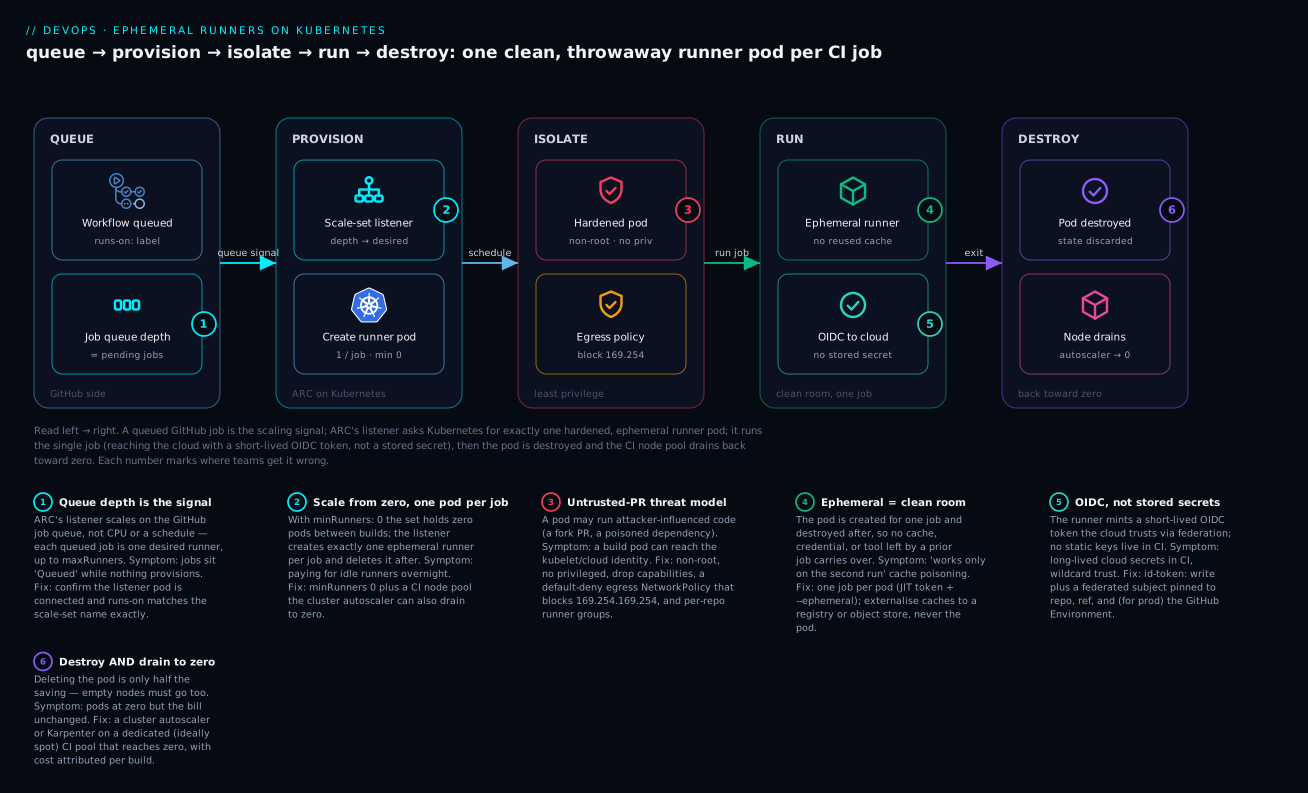
Read it left to right: a queued GitHub job is the scaling signal; ARC’s listener asks Kubernetes for exactly one hardened, ephemeral runner pod; that pod runs the single job — reaching the cloud with a short-lived OIDC token rather than a stored secret — and is then destroyed, with the CI node pool draining back toward zero behind it.
Level: Advanced — but the on-ramp above and the practice challenges below start from zero · Time: ~28 min · You’ll need (to try it): a Kubernetes cluster you can kubectl into, Helm 3, and either a GitHub org where you can create a GitHub App or an Azure DevOps org. No CI cluster handy? Read it straight through — every manifest is real and schema-correct, and you can apply it later.
Prerequisites & what you’ll be able to do
You should be comfortable with the basics of a CI pipeline (a job triggered by a push that runs some steps — see GitHub Actions fundamentals) and with core Kubernetes objects: Pod, Deployment, Namespace, Secret. You do not need to have run an operator or written a NetworkPolicy before — both are explained here. For the AWS/Karpenter flavour of this same pattern, the companion ARC runners with Karpenter autoscaling walks a full EKS build end to end.
After this lesson you can:
- Explain the queue → provision → run → destroy lifecycle of an ephemeral runner and why “ephemeral” is a security control, not just a cost trick.
- Deploy ARC runner scale sets for GitHub and an equivalent KEDA-scaled Job pattern for Azure DevOps, both scaling to zero.
- Decide self-hosted vs hosted on cost and control, and estimate the break-even.
- Harden a runner pod against untrusted pull-request code: non-root, no privilege, an egress NetworkPolicy, and per-repo runner groups.
- Give jobs cloud access with OIDC federation instead of static secrets, scoped tightly enough that a fork cannot assume a privileged role.
The lifecycle in one pass
Everything below is a variation on five steps, so fix them now:
- Queue. A workflow whose
runs-on:names your runner set is pushed. GitHub places the job in a queue and marks it waiting for a runner. Queue depth — not CPU, not a schedule — is the scaling signal. - Provision. ARC’s listener is already long-polling GitHub for exactly this event. It sees one more job than it has runners and asks Kubernetes for one more ephemeral runner pod.
- Register. The new pod registers itself with GitHub using a single-use, just-in-time token and announces it is ready for exactly one job.
- Run. GitHub hands the job to that runner. It checks out code, runs your steps, and — if it needs the cloud — mints a short-lived OIDC token. It is a clean room: nothing from any previous job is present.
- Destroy. The job ends, the runner deregisters, and the pod is deleted. With
minRunners: 0the set returns to zero pods; the cluster autoscaler then removes the now-empty node. The next job starts this list again from step 1 with a brand-new pod.
Keep that loop in mind and every configuration choice below — why the pod is non-root, why caches live outside it, why the OIDC subject must be pinned — is really a question about one of these five steps.
Self-hosted vs hosted: when self-hosted wins
Hosted runners are the right default for most teams: zero to operate, isolated and ephemeral by design, and free for public repositories. You reach for self-hosted runners on Kubernetes when at least one of these bites:
- Volume. At thousands of build-minutes a day, per-minute hosted pricing overtakes the cost of running your own pods on spot nodes.
- Access. Builds must reach private networks, on-prem systems, or a database that will never be exposed to the vendor’s cloud.
- Hardware. You need bigger machines, GPUs, specific CPU architectures, or nested virtualization that hosted tiers do not offer cheaply.
- Control. Compliance requires the build plane to run inside your own cloud account, with your own logging, image provenance, and network controls.
The cost trade is structural, not a discount. Hosted runners bill per minute with a monthly free allotment; self-hosted runners carry no per-minute vendor fee but you pay for the nodes, storage, egress, and the engineering time to operate them.
| Hosted | Self-hosted on Kubernetes (ARC) | |
|---|---|---|
| Billing model | Per build-minute (free tier, then per-minute) | Node/infra cost; no per-minute vendor fee |
| Idle cost | None (nothing to run) | None if you scale pods and nodes to zero |
| Isolation | Fresh VM per job, vendor-managed | Fresh pod per job, you own the hardening |
| Public-repo forks | Safe (vendor’s sandbox) | Risky — untrusted code on your infra |
| Ops burden | Zero | Cluster, controller, image, upgrades |
| Best for | Most teams, public repos, spiky low volume | High volume, private-network access, special hardware |
A useful back-of-envelope (numbers representative, check current rates): a standard 2-vCPU hosted Linux runner bills around $0.008/build-minute beyond the free tier. If you burn ~200,000 build-minutes a month, that is ~$1,600. The same load on a spot-backed ARC pool sized honestly often lands well under half that — but only after you have paid the one-time cost of building and operating it. Below that break-even, hosted wins on total cost of ownership. This is why the enterprise example later measures cost-per-build: it is the number that tells you which side of the line you are on.
A pool of always-on VM build agents is a standing liability: it accrues state between jobs, it sits idle (and billed) overnight, and a poisoned job leaks into the next one. This guide replaces that pattern with ephemeral, per-job runner pods on Kubernetes that autoscale on queue depth, scale to zero between builds, and authenticate to your cloud with OIDC instead of static secrets.
1. Why ephemeral runners
Three problems with persistent agents are worth naming precisely:
- Security and reproducibility. A long-lived agent carries dependencies, caches, and credentials from job to job. One compromised pull request can plant a backdoor that the next job inherits. A fresh pod per job gives you a clean room every time and removes a whole class of cross-job contamination.
- The cost of idle. Persistent agents are sized for peak and billed at all times. Most CI fleets run 15-30% utilization, so you pay for capacity that does nothing two-thirds of the day.
- Drift. Hand-patched agents diverge. When the runner image is the only artifact and pods are disposable, “what ran my build” is answerable by a digest.
The trade-off is cold-start latency (pulling the runner image, scheduling a pod) and the need to externalize caches, since nothing survives the pod. Both are solvable, and the rest of this guide does so.
Callout: Ephemeral does not mean stateless caching. It means job state is discarded. You still want layer caches and dependency caches — just stored outside the pod, in object storage or a registry.
2. Deploying GitHub Actions Runner Controller (ARC)
Modern ARC uses runner scale sets managed by two Helm charts: a single cluster-wide controller, and one listener+ephemeral-runner release per scale set. This is the supported model; the older RunnerDeployment/HorizontalRunnerAutoscaler CRDs are legacy and you should not start there.
Install the controller once:
helm install arc \
  --namespace arc-systems --create-namespace \
  oci://ghcr.io/actions/actions-runner-controller-charts/gha-runner-scale-set-controller
Authentication to GitHub should use a GitHub App (scoped, rotating installation tokens) rather than a personal access token. Create the App, install it on the org, and store the credentials as a secret the scale set will reference:
kubectl create namespace arc-runners

kubectl create secret generic arc-github-app \
  --namespace arc-runners \
  --from-literal=github_app_id=123456 \
  --from-literal=github_app_installation_id=7891011 \
  --from-file=github_app_private_key=./app-private-key.pem
Now install a scale set. githubConfigUrl can target an org, an enterprise, or a single repo; the installation-name becomes the runs-on label your workflows select:
helm install platform-runners \
  --namespace arc-runners \
  --set githubConfigUrl="https://github.com/my-org" \
  --set githubConfigSecret=arc-github-app \
  --set minRunners=0 \
  --set maxRunners=50 \
  oci://ghcr.io/actions/actions-runner-controller-charts/gha-runner-scale-set
Workflows opt in by name:
jobs:
  build:
    runs-on: platform-runners
    steps:
      - uses: actions/checkout@v4
      - run: ./ci/build.sh
For anything beyond defaults, drive the install from a values file you keep in Git. The template block is a real pod spec, which is where isolation and resources get set later:
# platform-runners-values.yaml
githubConfigUrl: "https://github.com/my-org"
githubConfigSecret: arc-github-app
minRunners: 0
maxRunners: 50
runnerScaleSetName: platform-runners
template:
  spec:
    securityContext:
      runAsNonRoot: true
      runAsUser: 1001
    containers:
      - name: runner
        image: ghcr.io/actions/actions-runner:latest
        resources:
          requests:
            cpu: "1"
            memory: 2Gi
          limits:
            cpu: "2"
            memory: 4Gi
helm upgrade --install platform-runners \
  --namespace arc-runners -f platform-runners-values.yaml \
  oci://ghcr.io/actions/actions-runner-controller-charts/gha-runner-scale-set
3. Azure DevOps scale-set agents on the same cluster
Azure DevOps does not ship a Kubernetes controller equivalent to ARC. Its native elastic option is VM scale-set agents, where you point an agent pool at an Azure VMSS and Azure DevOps scales the VM count on demand. That is the right call when jobs need full-VM isolation or nested virtualization.
If you want Azure DevOps jobs to run as ephemeral pods on the same cluster, run the agent in a Kubernetes Job with the --once flag so the container processes exactly one job and exits. Register against an agent pool with a PAT (or, better, a managed identity once your org supports it):
# azdo-agent-job.yaml
apiVersion: batch/v1
kind: Job
metadata:
  name: azdo-agent
  namespace: azdo-runners
spec:
  ttlSecondsAfterFinished: 120
  backoffLimit: 0
  template:
    spec:
      restartPolicy: Never
      securityContext:
        runAsNonRoot: true
        runAsUser: 1001
      containers:
        - name: agent
          image: myregistry.azurecr.io/azdo-agent:2.x
          env:
            - name: AZP_URL
              value: "https://dev.azure.com/my-org"
            - name: AZP_POOL
              value: "k8s-ephemeral"
            - name: AZP_TOKEN
              valueFrom:
                secretKeyRef:
                  name: azdo-pat
                  key: token
          args: ["--once"]
The agent container’s entrypoint runs config.sh --unattended --replace then run.sh --once. Driving creation of these Jobs from queue depth needs an external scaler, covered next. For most teams the pragmatic split is: VMSS elastic agents for Azure DevOps when you need VM isolation, ARC for GitHub where pod-per-job is native.
| Need | GitHub | Azure DevOps |
|---|---|---|
| Native pod-per-job | ARC runner scale sets | Job + --once (DIY scaling) |
| Full-VM isolation / nested virt | larger runners | VMSS elastic agents |
| Scale to zero | built in (minRunners: 0) |
VMSS min count 0 / KEDA on Jobs |
4. Autoscaling on queue depth and scaling to zero
ARC’s listener watches the GitHub job queue and creates one ephemeral runner per queued job, up to maxRunners, then deletes the pod when the job ends. With minRunners: 0 the scale set sits at zero pods between builds — you pay nothing but node baseline.
For the Azure DevOps Job pattern, use KEDA with the azure-pipelines scaler, which reads the pending job count for a pool and scales a ScaledJob:
# azdo-scaledjob.yaml
apiVersion: keda.sh/v1alpha1
kind: ScaledJob
metadata:
  name: azdo-agents
  namespace: azdo-runners
spec:
  minReplicaCount: 0
  maxReplicaCount: 30
  pollingInterval: 15
  jobTargetRef:
    template:
      spec:
        restartPolicy: Never
        containers:
          - name: agent
            image: myregistry.azurecr.io/azdo-agent:2.x
            args: ["--once"]
  triggers:
    - type: azure-pipelines
      metadata:
        poolName: "k8s-ephemeral"
        organizationURLFromEnv: "AZP_URL"
      authenticationRef:
        name: azdo-trigger-auth
Scaling pods to zero is only half the win. Empty pods still need empty nodes to vanish, so pair this with cluster-level node autoscaling (the Kubernetes Cluster Autoscaler or Karpenter) on a dedicated CI node pool. Otherwise you scale pods to zero but keep paying for the nodes they used to sit on.
Callout: KEDA scales workloads; it does not scale nodes. The node count drops only when your cluster autoscaler removes empty nodes. Validate that both layers actually reach zero.
5. Hardening: per-job pods, non-root, network policies, dind alternatives
Ephemerality buys you isolation between jobs. These controls harden the pod itself.
Run as non-root and drop privileges. Set this in the runner pod template:
template:
  spec:
    securityContext:
      runAsNonRoot: true
      runAsUser: 1001
      seccompProfile:
        type: RuntimeDefault
    containers:
      - name: runner
        securityContext:
          allowPrivilegeEscalation: false
          readOnlyRootFilesystem: true
          capabilities:
            drop: ["ALL"]
Restrict egress with a NetworkPolicy. Untrusted PR code should not be able to reach your cluster’s internal services or metadata endpoints. Default-deny, then allow only what builds need (DNS, your registry, GitHub/Azure DevOps):
apiVersion: networking.k8s.io/v1
kind: NetworkPolicy
metadata:
  name: runners-egress
  namespace: arc-runners
spec:
  podSelector: {}
  policyTypes: ["Egress"]
  egress:
    - to:
        - namespaceSelector:
            matchLabels:
              kubernetes.io/metadata.name: kube-system
      ports:
        - protocol: UDP
          port: 53
    - to:
        - ipBlock:
            cidr: 0.0.0.0/0
            except:
              - 169.254.169.254/32   # block instance metadata
      ports:
        - protocol: TCP
          port: 443
Avoid Docker-in-Docker. Privileged dind sidecars are the classic escape hatch and a real risk on shared clusters. Build images without a Docker daemon instead:
- BuildKit /
buildkitdrunning as a separate, controlled service that runners call over its API. - Kaniko or Buildah, which build from a Dockerfile in userspace without a privileged daemon.
If a job genuinely needs nested virtualization or a real Docker socket, isolate it: send it to VMSS elastic agents, or to a separate node pool fronted by a sandboxed runtime such as gVisor or Kata Containers, rather than granting privileged: true on your general fleet.
6. Build caching that survives ephemerality
Since pods are thrown away, caching must live elsewhere. Two layers matter.
Dependency cache. For GitHub, actions/cache already stores keyed archives in GitHub-hosted storage, so it works unchanged on self-hosted runners — no local disk assumptions.
Layer cache for image builds. This is where ephemeral runners hurt without help, because every build starts with a cold daemon. BuildKit supports remote caches you export and import across runs. Push the cache to your registry alongside the image:
docker buildx build \
  --cache-to   type=registry,ref=myregistry.azurecr.io/app:buildcache,mode=max \
  --cache-from type=registry,ref=myregistry.azurecr.io/app:buildcache \
  --push -t myregistry.azurecr.io/app:$GIT_SHA .
mode=max exports intermediate layers too, which gives far better hit rates than the default min. Kaniko has an equivalent with --cache=true --cache-repo=<registry>/cache.
For heavy, repeated builds, a persistent BuildKit service with its own cache volume (a small, long-lived Deployment that ephemeral runners talk to) outperforms per-job cache import/export, because the cache stays hot in one place instead of being re-pulled each build. The runners stay ephemeral; only the builder is durable.
| Cache type | Where it lives | Mechanism |
|---|---|---|
| Dependencies | GitHub cache / object storage | actions/cache, keyed restore |
| Image layers (simple) | Container registry | BuildKit --cache-to/--cache-from registry |
| Image layers (heavy) | Persistent BuildKit volume | Shared buildkitd service |
7. Securing cloud access with OIDC, not secrets
The biggest secret-sprawl win is deleting cloud credentials from CI entirely. Both GitHub Actions and Azure DevOps can mint short-lived OIDC tokens that your cloud trusts via a federated identity. No static keys to leak, no rotation to manage.
Azure (GitHub Actions). Create an app registration with a federated credential bound to your repo and branch, then log in with no client secret:
az ad app federated-credential create \
  --id "$APP_ID" \
  --parameters '{
    "name": "gh-main",
    "issuer": "https://token.actions.githubusercontent.com",
    "subject": "repo:my-org/my-repo:ref:refs/heads/main",
    "audiences": ["api://AzureADTokenExchange"]
  }'
permissions:
  id-token: write
  contents: read
steps:
  - uses: azure/login@v2
    with:
      client-id: ${{ secrets.AZURE_CLIENT_ID }}
      tenant-id: ${{ secrets.AZURE_TENANT_ID }}
      subscription-id: ${{ secrets.AZURE_SUBSCRIPTION_ID }}
The id-token: write permission is mandatory — without it the runner cannot request an OIDC token and azure/login falls back to looking for a secret.
AWS (GitHub Actions). Register GitHub as an OIDC provider and assume a role scoped by the same sub claim:
permissions:
  id-token: write
  contents: read
steps:
  - uses: aws-actions/configure-aws-credentials@v4
    with:
      role-to-assume: arn:aws:iam::111122223333:role/github-ci
      aws-region: us-east-1
Azure DevOps. Use an Azure Resource Manager service connection configured with workload identity federation, which removes the stored service principal secret from the connection. Tasks like AzureCLI@2 then authenticate with a federated token automatically.
Scope the trust tightly. The federated subject/sub should pin the exact repo and ref (and, for production, the GitHub Environment), so a fork or a feature branch cannot assume a privileged role.
Verify
Confirm the controller and a scale set are healthy, and prove scale-to-zero:
# Controller and listener pods running
kubectl get pods -n arc-systems
kubectl get pods -n arc-runners

# AutoscalingRunnerSet registered with GitHub
kubectl get autoscalingrunnerset -n arc-runners

# At rest: zero ephemeral runners
kubectl get ephemeralrunner -n arc-runners
Trigger a workflow targeting runs-on: platform-runners, then watch a pod appear and disappear:
kubectl get pods -n arc-runners -w
For Azure DevOps + KEDA, confirm the scaler reads the queue and that the Job runs once:
kubectl get scaledjob -n azdo-runners
kubectl get jobs -n azdo-runners
Then verify cost behavior directly: with no builds running, the CI node pool should drain to its minimum (ideally zero) within the autoscaler’s scale-down window. If pods are at zero but nodes are not, your node autoscaler — not KEDA or ARC — is the thing to fix.
Checklist
Capacity, spot nodes, and cost-per-build
CI is the ideal spot/low-priority workload: jobs are short, retriable, and tolerant of eviction. Put runners on a dedicated spot node pool, tainted so only CI lands there, and let runner pods tolerate it.
# AKS example: a low-cost CI pool, scalable to zero, tainted for CI only
az aks nodepool add \
  --resource-group rg-ci --cluster-name aks-ci \
  --name cispot --priority Spot \
  --eviction-policy Delete --spot-max-price -1 \
  --enable-cluster-autoscaler --min-count 0 --max-count 20 \
  --node-taints "workload=ci:NoSchedule"
Add the matching toleration (and a nodeSelector) to the runner pod template so builds schedule onto the spot pool. Size requests honestly: over-requesting CPU/memory inflates node count and silently doubles your bill.
For cost-per-build, attribute spend per job: tag the CI node pool, and label runner pods with the repo/workflow so a tool like OpenCost or Kubecost can roll up cost by pipeline. Dividing CI node spend by build count over a week gives the single number that justifies this whole architecture to finance.
Enterprise scenario
A fintech platform team moved ~600 daily GitHub Actions jobs from always-on VMs to ARC scale sets on AKS, with minRunners: 0 on a Karpenter-managed spot pool. Builds passed; cost dropped. Then audit failed them: every job was assuming the same broadly-scoped Azure role through OIDC, because the federated credential subject was repo:org/*:ref:refs/heads/*. A developer on any fork-derived branch could mint a token with write access to production Key Vaults.
The fix had two parts. First, pin the subject to the GitHub Environment, not the branch, so privileged access requires an environment with required reviewers:
az ad app federated-credential create --id "$APP_ID" --parameters '{
  "name": "gh-prod-deploy",
  "issuer": "https://token.actions.githubusercontent.com",
  "subject": "repo:org/payments-api:environment:production",
  "audiences": ["api://AzureADTokenExchange"]
}'
Second, the gotcha that bit them: pull_request triggers from forks cannot read id-token: write against protected environments anyway, but their internal-branch PRs still inherited repo-level access. They split identities — a read-only role for CI builds, a deploy role reachable only from the production environment job — and added a default-deny egress NetworkPolicy so a poisoned dependency in a build pod could not reach the metadata endpoint (169.254.169.254) to scrape the kubelet’s identity. Scale-to-zero economics were never the hard part; bounding the blast radius of an ephemeral pod that briefly holds a cloud token was.
Pitfalls
- Scaling pods, not nodes. ARC and KEDA empty the pods; only the cluster autoscaler empties the nodes. Tune scale-down or you keep paying for idle capacity.
- Cold-start tax. Large runner images make every job wait on a pull. Keep images lean and pre-pull on CI nodes, or hit rate suffers.
- Loose OIDC subjects. A wildcard
subclaim lets any branch or fork assume your role. Pin repo, ref, and environment. - Reaching for dind. Privileged daemons undo the isolation you just built. Use daemonless builders and quarantine the rare job that truly needs a socket.
- Mixing ARC generations. The legacy
RunnerDeploymentCRDs and the new scale-set charts are different systems. Standardize on runner scale sets and do not blend the two.
The self-hosted runner threat model (untrusted PRs)
The single most important security fact about self-hosted runners is one line from GitHub’s own documentation: do not use them with public repositories. Understanding why is the difference between a safe fleet and remote code execution on your cloud account.
The core problem. A CI job runs whatever code the repository tells it to. On a public repository, anyone can open a pull request from a fork — and a workflow triggered by that PR runs their code on your runner. On a hosted runner that is fine: the job runs in a throwaway VM in the vendor’s cloud, with no secrets and a read-only token. On a self-hosted runner, that same untrusted code is now executing inside your network, on your Kubernetes cluster. Ephemerality means the attacker cannot persist — but it does nothing to stop them exfiltrating during the job: scraping the node’s cloud identity from the metadata endpoint, port-scanning internal services, or stealing anything the job can reach.
The dangerous trigger. pull_request from a fork gets no secrets and a read-only GITHUB_TOKEN by default. The trap is pull_request_target: it runs in the context of the base repo — with secrets and a read-write token — while tempting you to check out the PR’s head code. Do that and you have handed a fork’s code your secrets. Never check out and execute untrusted head code under pull_request_target.
The controls, in order of importance:
- Private repositories only for self-hosted runners, unless you have a very deliberate sandbox. This alone removes the anonymous-attacker case.
- Require approval to run workflows from outside or first-time contributors (repo/org Actions → Fork pull request workflows). A maintainer must click before a fork’s job runs.
- Runner groups scope which repositories and workflows may target a set of runners, at the org or enterprise level. Put production-adjacent runners in a group only trusted repos can reach; never let an arbitrary repo schedule onto a fleet that can see production.
- Least privilege on the pod — non-root, no privilege escalation, dropped capabilities, read-only root filesystem — so even a job that runs hostile code has a small blast radius.
- Default-deny egress NetworkPolicy that blocks the instance metadata endpoint (
169.254.169.254) and your internal service ranges, so a poisoned build cannot reach the node’s cloud credentials or lateral targets. - Ephemeral + OIDC scoped to repo, ref, and environment so that even a leaked token is short-lived and cannot assume a privileged role from the wrong branch.
Ephemerality is the foundation — it bounds persistence — but it is the last of these, not the first. The blast radius of one pod that briefly holds a cloud token is what you are really bounding; the enterprise scenario above failed its audit on exactly this point.
Going deeper
The current ARC surface (2026)
ARC has two generations and it matters which you are on. The legacy project (originally summerwind/actions-runner-controller) used RunnerDeployment and HorizontalRunnerAutoscaler CRDs. The current, GitHub-supported model is runner scale sets, shipped as two Helm charts published as OCI artifacts under ghcr.io/actions/actions-runner-controller-charts/:
gha-runner-scale-set-controller— the operator. One per cluster. It owns the CRDs and reconciles them.gha-runner-scale-set— one release per runner set. Installing it creates anAutoscalingRunnerSetplus its listener.
The CRDs you will actually see are AutoscalingRunnerSet, AutoscalingListener, EphemeralRunnerSet, and EphemeralRunner. Standardize on scale sets; do not mix the two generations in one cluster.
How the listener really scales
The magic in step 2 of the lifecycle is the listener. It opens an authenticated long-poll session to the GitHub Actions service for your scale set and blocks, waiting for messages. When jobs are assigned, GitHub sends the listener a message with the new desired count; the listener patches the AutoscalingRunnerSet, and the controller creates or removes EphemeralRunner resources to match. There is no metrics-server, no CPU threshold, no polling loop you tune — scaling is event-driven off the job queue itself, which is why it is near-instant and why minRunners/maxRunners are the only knobs.
Each EphemeralRunner is registered with a just-in-time (JIT) runner token — a single-use registration — and the runner process runs with --ephemeral, so GitHub itself guarantees it takes exactly one job and then deregisters. That JIT + --ephemeral pairing, not merely “we delete the pod”, is what makes the clean-room property airtight.
Container builds inside the pod: dind vs Kubernetes mode
Jobs that build images need a builder. ARC offers two containerMode options:
dind— a rootless Docker-in-Docker sidecar. Convenient, but even rootless dind is a larger attack surface and needs care on shared clusters.kubernetes— ARC’s runner container hooks translate a workflow’scontainer:andservices:into real pods scheduled by Kubernetes, with the runner’s_workdirectory on a PVC. No Docker daemon at all. It needs a volume and RBAC to create pods, but it is the daemonless default to prefer.
# values.yaml — Kubernetes container mode (no privileged Docker daemon)
containerMode:
  type: kubernetes
  kubernetesModeWorkVolumeClaim:
    accessModes: ["ReadWriteOnce"]
    storageClassName: managed-csi
    resources:
      requests:
        storage: 10Gi
For pure image builds, skip both and call a BuildKit service or run Kaniko/Buildah, as section 6 covers.
Warm pools, cold starts, and graceful termination
minRunners: 0 is cheapest but pays a cold-start tax on the first job after idle: pull the runner image, schedule the pod, maybe launch a node. Set minRunners to a small number (a warm pool) during business hours to trade a little idle spend for lower P50 queue time. Keep the runner image lean and pre-pull it onto CI nodes so the pull is not on the critical path.
Ephemeral runners finish the job they hold before terminating; set terminationGracePeriodSeconds generously so a rolling upgrade or scale-down does not kill an in-flight build. On spot nodes, a reclaim can kill a job mid-run — acceptable because CI is retriable, but wire your node autoscaler’s interruption handling so the pod is drained on the eviction notice where possible, and route long, non-retriable jobs to on-demand capacity.
Runner groups and identity scoping
At org/enterprise scale, runner groups are your primary tenancy boundary: they decide which repositories and which workflows may schedule onto a set of runners. Combine them with distinct GitHub Apps or scale sets per trust tier so a low-trust repo physically cannot land a pod on the fleet that can reach production. Pair that with OIDC subjects pinned to the GitHub Environment (not the branch) so privileged cloud roles require an environment gated by required reviewers — the exact fix in the enterprise scenario.
Azure DevOps: how the KEDA scaler decides
For the Azure DevOps ScaledJob pattern, KEDA’s azure-pipelines scaler polls the Azure DevOps REST API on pollingInterval for pending jobs in the target pool, optionally matching agent demands (capabilities) so specialized jobs only wake specialized agents. It then creates one Job per pending request up to maxReplicaCount, each agent running --once. Authentication is a TriggerAuthentication referencing a PAT or, better, workload identity — never an inline token.
Controller availability and version skew
Run the controller with leader election if you want resilience, but note the listener for a given scale set is a single logical consumer — design for fast recovery, not active-active. Above all, keep the controller chart and the scale-set chart on the same version. The AutoscalingRunnerSet is reconciled by the matching controller; a mismatched pair is the most common “runners just stopped appearing” outage.
Common beginner mistakes
- “Ephemeral means I don’t need to harden the pod.” Ephemerality stops an attacker from persisting to the next job. It does nothing to stop this job exfiltrating secrets, scraping the metadata endpoint, or scanning your network while it runs. Right model: ephemeral is the floor, not the ceiling — layer non-root, no-privilege, and a default-deny egress policy on top.
- “Self-hosted runners are fine on our public repo.” They are not. A fork PR runs a stranger’s code on your infrastructure. Right model: self-hosted → private repos only, or a deliberately sandboxed, network-isolated pool with fork-approval required.
- “I set
minRunners: 0, so my bill is zero when idle.” You scaled the pods to zero; the nodes they sat on may still be running and billing. Right model: scaling pods and scaling nodes are two different systems — the cluster autoscaler (or Karpenter) must also reach zero on a dedicated CI node pool. - “Caching won’t work because the pod is deleted.” It works fine — you just cannot rely on the pod’s local disk. Right model: push caches outside the pod:
actions/cachefor dependencies, a registry-backed BuildKit cache (mode=max) or a shared BuildKit service for image layers. - “OIDC is on, so cloud access is secure.” OIDC removes stored secrets, but a wildcard trust subject (
repo:org/*:ref:refs/heads/*) lets any branch or fork assume the role. Right model: pin the federatedsubjectto the exact repo, ref, and — for production — the GitHub Environment. - “I’ll just add a privileged dind sidecar to build images.” A privileged container on a shared cluster undoes the isolation you built and is a node-takeover waiting to happen. Right model: daemonless builders (Kubernetes container mode, BuildKit, Kaniko, Buildah); quarantine the rare job that truly needs a socket to isolated capacity.
- “The controller and the scale-set chart versions don’t need to match.” They do. Right model: pin both to the same version and upgrade them together, or watch runners silently stop registering.
Practice challenges
Work these top to bottom — they escalate from “point a job at the fleet” to “make the whole thing reach zero cost”. Try each before opening the solution.
1. (Beginner) Target the fleet. You installed a scale set with runnerScaleSetName: platform-runners. Make a workflow’s build job run on it instead of a hosted runner.
<details> <summary>Solution</summary>
jobs:
  build:
    runs-on: platform-runners
Why: runs-on selects a runner by its scale-set name/label; the ARC listener sees the queued job and provisions one ephemeral pod for it.
</details>
2. (Beginner) Prove scale-to-zero. With no builds running, prove the set is truly at zero so you are paying nothing for runners.
<details> <summary>Solution</summary>
kubectl get ephemeralrunner -n arc-runners       # expect: No resources found
kubectl get autoscalingrunnerset -n arc-runners  # CURRENT column = 0
Why: minRunners: 0 means zero EphemeralRunner pods at rest. If pods are zero but nodes remain, it is your cluster autoscaler — not ARC — that has not scaled down.
</details>
3. (Intermediate) Harden the pod. Make the runner container run non-root, forbid privilege escalation, and drop all Linux capabilities.
<details> <summary>Solution</summary>
template:
  spec:
    securityContext:
      runAsNonRoot: true
      runAsUser: 1001
      seccompProfile: { type: RuntimeDefault }
    containers:
      - name: runner
        securityContext:
          allowPrivilegeEscalation: false
          readOnlyRootFilesystem: true
          capabilities: { drop: ["ALL"] }
Why: these four controls shrink the blast radius of hostile job code to near nothing without affecting normal builds. </details>
4. (Intermediate) Lock down egress. Write a NetworkPolicy for the runner namespace that denies all egress except DNS and outbound HTTPS, and explicitly blocks the cloud metadata endpoint.
<details> <summary>Solution</summary>
apiVersion: networking.k8s.io/v1
kind: NetworkPolicy
metadata:
  name: runners-egress
  namespace: arc-runners
spec:
  podSelector: {}
  policyTypes: ["Egress"]
  egress:
    - to:
        - namespaceSelector:
            matchLabels: { kubernetes.io/metadata.name: kube-system }
      ports: [{ protocol: UDP, port: 53 }]
    - to:
        - ipBlock:
            cidr: 0.0.0.0/0
            except: ["169.254.169.254/32"]
      ports: [{ protocol: TCP, port: 443 }]
Why: default-deny plus an except on 169.254.169.254/32 stops a poisoned build from scraping the node’s cloud identity while still letting it resolve DNS and pull over HTTPS.
</details>
5. (Advanced) Scope OIDC to an environment. A federated credential currently trusts repo:org/app:ref:refs/heads/main. Change it so only the production GitHub Environment — gated by required reviewers — can assume the role, and explain why that is safer.
<details> <summary>Solution</summary>
az ad app federated-credential create --id "$APP_ID" --parameters '{
  "name": "gh-prod",
  "issuer": "https://token.actions.githubusercontent.com",
  "subject": "repo:org/app:environment:production",
  "audiences": ["api://AzureADTokenExchange"]
}'
Why: an environment: subject requires the job to run in a protected Environment (with reviewers), so no arbitrary branch — and no fork — can mint a token for the privileged role.
</details>
6. (Advanced) Find the break-even. You run ~600 GitHub jobs/day averaging 6 minutes. Estimate the monthly hosted cost, then describe the two-layer change that makes a self-hosted ARC fleet actually reach zero cost when idle.
<details> <summary>Solution</summary>
600 jobs × 6 min × 30 days = 108,000 build-minutes/month. At ~$0.008/min beyond the free tier ≈ ~$864/month hosted (representative). A self-hosted fleet reaches true idle-zero only when both layers scale down: minRunners: 0 (pods) and a cluster autoscaler/Karpenter min-count 0 on a dedicated, tainted CI node pool (nodes). Put that pool on spot for ~70% off and attribute cost-per-build with OpenCost/Kubecost to know your real break-even.
Why: the saving is structural — pods and nodes must both hit zero, or you have simply moved the idle bill from GitHub to your cloud provider. </details>
Glossary
- Runner (GitHub) / Agent (Azure DevOps) — the machine, VM, or pod that actually executes a CI job’s steps.
- Self-hosted runner — a runner you own and operate, rather than renting per-minute from the CI vendor.
- Hosted runner — a runner the vendor provisions on demand in their cloud; ephemeral and isolated by default, billed per minute.
- Ephemeral runner — a runner created for exactly one job and destroyed afterward, so nothing carries over between builds.
- ARC (Actions Runner Controller) — GitHub’s Kubernetes operator that creates and deletes runner pods based on the job queue.
- Runner scale set — the current ARC unit: a named pool of ephemeral runners, installed via the
gha-runner-scale-setHelm chart. - AutoscalingRunnerSet / EphemeralRunner — the Kubernetes CRDs ARC uses; the set defines the pool, each
EphemeralRunneris one pod for one job. - Listener — the ARC pod that long-polls GitHub for queued jobs and drives the desired runner count.
- JIT (just-in-time) runner token — a single-use registration token so a runner can join, take one job, and deregister.
runs-on— the workflow field that selects which runner (by label or scale-set name) a job executes on.- Scale to zero — running no runner pods (and ideally no nodes) when there are no jobs, so idle cost is nil.
minRunners/maxRunners— the floor and ceiling on runner count for an ARC scale set;minRunners: 0enables scale-to-zero.- Cluster autoscaler / Karpenter — the layer that adds and removes nodes to match pending pods; distinct from pod-level scaling.
- KEDA / ScaledJob — a Kubernetes autoscaler that scales workloads (here, Azure DevOps agent Jobs) from external signals like queue depth.
containerMode— how ARC runs a job’s containers:dind(Docker-in-Docker sidecar) orkubernetes(real pods via runner hooks).- dind (Docker-in-Docker) — running a Docker daemon inside the runner pod; a privilege/attack-surface risk on shared clusters.
- BuildKit / Kaniko / Buildah — daemonless image builders that avoid a privileged Docker socket.
- OIDC federation — a trust relationship that lets CI mint short-lived cloud tokens instead of storing static keys.
- Federated subject (
sub) — the claim your cloud checks to decide who may assume a role; pin it to repo, ref, and environment. - NetworkPolicy — a Kubernetes firewall rule for pod traffic; used here to default-deny egress and block the metadata endpoint.
- Metadata endpoint (
169.254.169.254) — the link-local address a node uses to fetch its cloud identity; a prime exfiltration target to block. - Runner group — an org/enterprise boundary that limits which repositories and workflows may use a set of runners.
pull_request_target— a trigger that runs with base-repo secrets; dangerous if it checks out and runs untrusted fork code.- Spot / low-priority node — cheap, reclaimable capacity ideal for short, retriable CI jobs.
- Cold start — the latency to bring a fresh runner online (image pull + pod schedule + maybe a node launch) after idle.
- Cost-per-build — CI infra spend divided by build count; the metric that decides self-hosted vs hosted.