In a nutshell
Every GitHub Actions job needs a computer to run on. GitHub will rent you one of theirs — a GitHub-hosted runner — but on a busy engineering org that gets expensive fast and gives you little control over the machine. The alternative is a self-hosted runner: a computer you provide, that GitHub hands jobs to. The classic mistake is to stand up a few beefy servers and leave them running 24/7 as your runners. They cost money while sitting idle all night, they melt down when every squad pushes at 9am, and because they live for months, one poisoned build can quietly infect the next job that lands on the same box.
This lesson builds the modern answer to all three problems. Actions Runner Controller (ARC) runs inside a Kubernetes cluster (here, Amazon EKS) and creates a brand-new runner — a throwaway Pod — for each queued job, then destroys it the instant that job ends. Karpenter watches those Pods and, when they have nowhere to run, boots a right-sized (usually cheap Spot) EC2 machine just for them, then switches it off seconds after the job finishes. Capacity follows demand: zero at 3am, hundreds of cores at 9am, billed by the second.
Think of it like a restaurant that hires a cook per order and only fires up a stove when there’s a dish to make. No orders, no cooks, no gas bill — but the moment ten tickets hit the rail, ten cooks appear at ten stoves, each makes one dish, and clocks out. ARC is the host seating exactly one cook per ticket; Karpenter is the manager flipping stoves on and off so you never heat a burner you’re not cooking on.
If you are new to Actions runners, skim GitHub Actions Fundamentals: Workflows, Jobs, Runners, Secrets and Self-Hosted Runners: Autoscaling, Ephemeral, Kubernetes first — this lesson is the production-grade, cost-optimised build of exactly that idea.
Level: Advanced · Time: ~35 min
A platform team at a mid-sized fintech is paying for two dozen always-on c5.4xlarge EC2 runners that sit at 4% utilisation overnight and then bottleneck hard at 9am when every squad pushes at once. The bill is real, the queue times are worse, and a security review just flagged that the runners are long-lived pets — one compromised job can poison the next build on the same box. The mandate from engineering leadership is precise: ephemeral runners that exist only for the duration of one job, scale from zero to hundreds in minutes, and run on Spot to cut the bill by ~70%. This guide builds exactly that on EKS — GitHub’s Actions Runner Controller (ARC) to manage runner lifecycle, and Karpenter to provision and terminate the underlying nodes just-in-time. Every command below is real; run them top to bottom and you will have a working autoscaling runner fleet.
Prerequisites
- An EKS cluster on Kubernetes 1.28+ with an OIDC provider associated (
aws eks describe-cluster ... --query cluster.identity.oidc). - Karpenter v1.x installed, or follow step 3 here. Requires the Karpenter controller IAM role and a node IAM role/instance profile (
KarpenterNodeRole). - CLI tooling:
awsv2,kubectl,helmv3.14+,eksctl, andjq. - A GitHub organization where you can register a GitHub App (org owner) — the recommended auth path over a PAT.
- HashiCorp Vault reachable from the cluster (used here to store the GitHub App private key out of plain Kubernetes Secrets).
- Cluster admin via
kubectl, and Terraform if you manage IAM as code (snippets included).
After this lesson you will be able to:
- Register an org-level GitHub App and store its private key in Vault instead of a plaintext Kubernetes Secret.
- Install ARC’s runner scale set and Karpenter, and wire a runner Pod’s
requests/tolerationsto a SpotNodePoolso nodes appear per job and vanish after. - Configure
minRunners/maxRunners, scale-to-zero, and a warm pool — and reason clearly about the queue-time vs cost trade-off. - Choose safely between kubernetes container mode and dind for jobs that build images.
- Survive Spot interruptions using an interruption queue, disruption budgets, and an on-demand fallback pool.
- Explain — and defend in a security review — why ephemeral runners beat long-lived ones.
Target topology
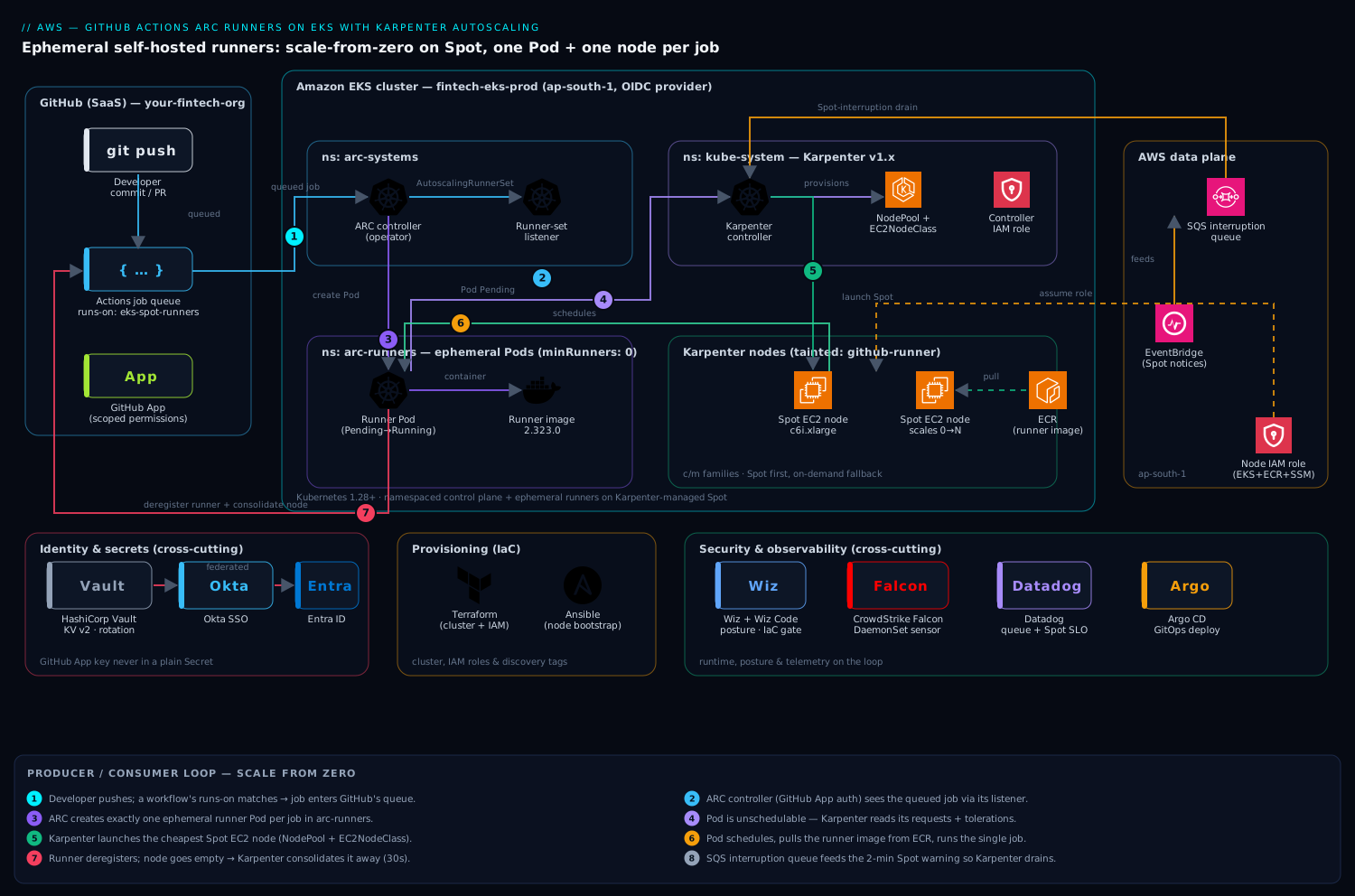
The control flow is a clean producer/consumer loop. A developer pushes; a workflow whose runs-on matches a runner label enters GitHub’s job queue. ARC’s controller watches GitHub via the GitHub App for queued jobs and, through its AutoscalingRunnerSet/listener, creates exactly one ephemeral runner Pod per job. Those Pods are unschedulable for a moment because no node has room — which is precisely the signal Karpenter waits for. Karpenter reads the pending Pods’ resource requests and constraints, launches the cheapest Spot instance that fits (via a NodePool + EC2NodeClass), the runner Pod schedules, executes the single job, then deregisters and terminates. Seconds later Karpenter sees the now-empty node and consolidates it away. Capacity tracks demand with no idle fleet.
Two cross-cutting layers ride alongside: identity and secrets — the GitHub App key sourced from HashiCorp Vault (which issues and rotates short-lived secrets) rather than living forever in a Secret, with cluster-admin SSO fronted by Okta federated to Entra ID; and security and observability — Wiz (and Wiz Code in the pipeline) for cloud posture and IaC scanning, CrowdStrike Falcon as the runtime sensor on every Karpenter node, and Datadog for cluster, runner-queue, and Spot-interruption telemetry. We wire each in at the step where it actually belongs.
1. Create the GitHub App and store its key in Vault
ARC authenticates to GitHub as a GitHub App (finer-grained and higher rate limits than a PAT). At the org level, create an App with these repository permissions: Actions: Read & write, Administration: Read & write (to register self-hosted runners), Metadata: Read-only, and for org-level runner sets, Self-hosted runners: Read & write on the org. Install it on the org (all or selected repos), then note three values: the App ID, the Installation ID, and a generated private key (.pem).
Do not paste that key into a manifest. Put it in HashiCorp Vault, which holds it encrypted and lets you rotate it without redeploying:
# Store the GitHub App credentials in Vault's KV v2 engine
vault kv put secret/arc/github-app \
  app_id="123456" \
  installation_id="78901234" \
  private_key=@arc-runner-app.2026-06-10.private-key.pem

# Confirm (metadata only; never echo the key)
vault kv metadata get secret/arc/github-app
The cluster will read this through the Vault Secrets Operator or the CSI provider so the private key only ever lands in a tmpfs-mounted file inside the controller Pod, never in etcd in cleartext. Human access to Vault and to the cluster is gated by Okta SSO federated to Entra ID, so the engineers who can read this path are the same identities your conditional-access policies already govern. (For the deeper pattern of issuing short-lived CI credentials from Vault, see Vault Dynamic Secrets for CI/CD: Short-Lived Credentials.)
2. Create a dedicated namespace and project the GitHub App secret
Keep ARC’s control plane and its runners in separate namespaces — it makes RBAC and network policy far cleaner.
kubectl create namespace arc-systems   # ARC controller lives here
kubectl create namespace arc-runners   # ephemeral runner Pods land here
If you use the Vault Secrets Operator (VSO), declare a VaultStaticSecret that syncs the App key into a native Secret in arc-runners:
# vault-static-secret.yaml
apiVersion: secrets.hashicorp.com/v1beta1
kind: VaultStaticSecret
metadata:
  name: github-app-secret
  namespace: arc-runners
spec:
  type: kv-v2
  mount: secret
  path: arc/github-app
  destination:
    name: github-app-secret        # the K8s Secret ARC will consume
    create: true
    overwrite: true
    transformation:
      excludes: [".*"]
      templates:
        github_app_id:              { text: "{{ .Secrets.app_id }}" }
        github_app_installation_id: { text: "{{ .Secrets.installation_id }}" }
        github_app_private_key:     { text: "{{ .Secrets.private_key }}" }
  refreshAfter: 1h
  vaultAuthRef: vault-auth-arc
kubectl apply -f vault-static-secret.yaml
# Verify the three keys exist (values stay hidden)
kubectl -n arc-runners get secret github-app-secret -o jsonpath='{.data}' | jq 'keys'
ARC expects exactly those three keys (github_app_id, github_app_installation_id, github_app_private_key), so the templating above maps Vault’s field names onto ARC’s contract.
3. Install (or verify) Karpenter
If Karpenter is already running, skip to step 4. Otherwise install the controller via Helm using OCI, pinning the version and pointing it at your cluster. Export the basics first:
export CLUSTER_NAME="fintech-eks-prod"
export AWS_REGION="ap-south-1"
export KARPENTER_VERSION="1.3.3"
export KARPENTER_IAM_ROLE_ARN="arn:aws:iam::111122223333:role/KarpenterController-${CLUSTER_NAME}"

helm upgrade --install karpenter oci://public.ecr.aws/karpenter/karpenter \
  --version "${KARPENTER_VERSION}" \
  --namespace kube-system \
  --set "settings.clusterName=${CLUSTER_NAME}" \
  --set "settings.interruptionQueue=${CLUSTER_NAME}" \
  --set "serviceAccount.annotations.eks\.amazonaws\.com/role-arn=${KARPENTER_IAM_ROLE_ARN}" \
  --set controller.resources.requests.cpu=1 \
  --set controller.resources.requests.memory=1Gi \
  --wait
The interruptionQueue is an SQS queue fed by EventBridge rules for Spot interruption notices, rebalance recommendations, and instance state changes. Karpenter drains a node gracefully on the 2-minute Spot warning instead of letting a job die abruptly — essential when your fleet is Spot-heavy. If you manage IAM with Terraform, the node role is straightforward:
# karpenter-node-role.tf — the role nodes Karpenter launches assume
resource "aws_iam_role" "karpenter_node" {
  name               = "KarpenterNodeRole-${var.cluster_name}"
  assume_role_policy = data.aws_iam_policy_document.ec2_assume.json
}

resource "aws_iam_role_policy_attachment" "node" {
  for_each = toset([
    "arn:aws:iam::aws:policy/AmazonEKSWorkerNodePolicy",
    "arn:aws:iam::aws:policy/AmazonEKS_CNI_Policy",
    "arn:aws:iam::aws:policy/AmazonEC2ContainerRegistryReadOnly",
    "arn:aws:iam::aws:policy/AmazonSSMManagedInstanceCore",
  ])
  role       = aws_iam_role.karpenter_node.name
  policy_arn = each.value
}
Your subnets and security groups must carry the discovery tag karpenter.sh/discovery = ${CLUSTER_NAME} so the EC2NodeClass below can find them. We provision the cluster, IAM, and these tags with Terraform, and Ansible handles any node-bootstrap config that lives outside the AMI.
4. Define a Karpenter NodePool and EC2NodeClass for runners
This is where Spot economics get encoded. Create an EC2NodeClass describing how nodes look (AMI, role, networking) and a NodePool describing what Karpenter may launch and when to reclaim it. We taint runner nodes so only runner Pods land on them.
# karpenter-runners.yaml
apiVersion: karpenter.k8s.aws/v1
kind: EC2NodeClass
metadata:
  name: arc-runners
spec:
  amiFamily: AL2023
  amiSelectorTerms:
    - alias: al2023@latest
  role: "KarpenterNodeRole-fintech-eks-prod"
  subnetSelectorTerms:
    - tags: { karpenter.sh/discovery: "fintech-eks-prod" }
  securityGroupSelectorTerms:
    - tags: { karpenter.sh/discovery: "fintech-eks-prod" }
  metadataOptions:
    httpTokens: required          # enforce IMDSv2 — Wiz will flag anything less
  blockDeviceMappings:
    - deviceName: /dev/xvda
      ebs: { volumeSize: 100Gi, volumeType: gp3, encrypted: true, deleteOnTermination: true }
---
apiVersion: karpenter.sh/v1
kind: NodePool
metadata:
  name: arc-runners
spec:
  template:
    metadata:
      labels: { workload: "github-runner" }
    spec:
      nodeClassRef: { group: karpenter.k8s.aws, kind: EC2NodeClass, name: arc-runners }
      taints:
        - key: "github-runner"
          value: "true"
          effect: "NoSchedule"      # keep general workloads off runner nodes
      requirements:
        - key: karpenter.sh/capacity-type
          operator: In
          values: ["spot", "on-demand"]   # Spot first; on-demand is the fallback
        - key: kubernetes.io/arch
          operator: In
          values: ["amd64"]
        - key: karpenter.k8s.aws/instance-category
          operator: In
          values: ["c", "m"]
        - key: karpenter.k8s.aws/instance-generation
          operator: Gt
          values: ["5"]
      expireAfter: 168h
  limits:
    cpu: "2000"                      # hard ceiling so a misfire can't launch 1000 nodes
  disruption:
    consolidationPolicy: WhenEmpty   # reclaim a node the instant its job ends
    consolidateAfter: 30s
kubectl apply -f karpenter-runners.yaml
Three choices carry the design. capacity-type: [spot, on-demand] lets Karpenter prefer Spot and automatically fall back to on-demand when Spot is exhausted — pricey CI is better than stalled CI. consolidationPolicy: WhenEmpty with a 30s delay is what makes the fleet ephemeral: the moment a runner Pod finishes and the node is empty, Karpenter terminates it, so you pay for seconds, not hours. The limits.cpu is a guardrail against a runaway workflow fanning out into a four-figure EC2 bill.
5. Install the ARC controller
ARC ships as two Helm charts: the controller (the operator) and the runner scale set (one per runner pool). Install the controller into arc-systems:
helm upgrade --install arc \
  oci://ghcr.io/actions/actions-runner-controller-charts/gha-runner-scale-set-controller \
  --namespace arc-systems \
  --version 0.12.1 \
  --set flags.watchSingleNamespace=arc-runners \
  --wait

kubectl -n arc-systems get deploy
# NAME                            READY   UP-TO-DATE   AVAILABLE
# arc-gha-rs-controller           1/1     1            1
Pinning watchSingleNamespace scopes the controller’s RBAC to just arc-runners, a least-privilege win. Confirm the CRDs landed:
kubectl get crd | grep actions.github.com
# autoscalingrunnersets.actions.github.com
# autoscalinglisteners.actions.github.com
# ephemeralrunners.actions.github.com
6. Deploy the AutoscalingRunnerSet bound to Karpenter
Now the keystone: an AutoscalingRunnerSet that registers a runner scale set with your GitHub org, scales from zero, and — critically — gives its runner Pods the toleration, nodeSelector, and resource requests that make Karpenter launch a dedicated Spot node per job. Install it via the runner-scale-set chart with an inline values override:
helm upgrade --install arc-runner-set \
  oci://ghcr.io/actions/actions-runner-controller-charts/gha-runner-scale-set \
  --namespace arc-runners \
  --version 0.12.1 \
  --set githubConfigUrl="https://github.com/your-fintech-org" \
  --set githubConfigSecret=github-app-secret \
  --set minRunners=0 \
  --set maxRunners=100 \
  --set runnerScaleSetName="eks-spot-runners" \
  -f runner-values.yaml \
  --wait
# runner-values.yaml — pins runners onto Karpenter's Spot NodePool
template:
  spec:
    tolerations:
      - key: "github-runner"
        operator: "Equal"
        value: "true"
        effect: "NoSchedule"
    nodeSelector:
      workload: "github-runner"
    containers:
      - name: runner
        image: ghcr.io/actions/actions-runner:2.323.0
        command: ["/home/runner/run.sh"]
        resources:
          requests: { cpu: "2", memory: "4Gi" }    # drives Karpenter's instance sizing
          limits:   { cpu: "4", memory: "8Gi" }
The requests block is the contract between ARC and Karpenter: Karpenter sums pending runner Pods’ requests and picks the cheapest Spot instance from the c/m families that fits them. Verify the listener connected to GitHub:
kubectl -n arc-runners get autoscalingrunnerset
# NAME                MINIMUM   MAXIMUM   CURRENT   STATE
# eks-spot-runners    0         100       0
kubectl -n arc-systems get pods -l app.kubernetes.io/component=runner-scale-set-listener
In your repos, target the pool by its scale-set name:
# .github/workflows/ci.yml
jobs:
  build:
    runs-on: eks-spot-runners        # matches runnerScaleSetName
    steps:
      - uses: actions/checkout@v4
      - run: make test
The Jenkins jobs the team is migrating off stay parallel-run for a sprint; once green, Argo CD owns the GitOps deployment that follows a successful build, while GitHub Actions does build, test, and the Wiz Code IaC scan as a required gate.
Validation
Prove the loop end to end. Push a commit (or use gh workflow run ci.yml) and watch the chain react:
# 1) Runner Pods appear, briefly Pending (no node fits yet)
kubectl -n arc-runners get pods -w

# 2) Karpenter provisions a node for those pending Pods — watch it decide
kubectl -n kube-system logs -l app.kubernetes.io/name=karpenter -f | grep -E "nominat|launch|registered"

# 3) The new node is Spot, freshly born
kubectl get nodes -L karpenter.sh/capacity-type,node.kubernetes.io/instance-type \
  -l workload=github-runner
# NAME                STATUS   CAPACITY-TYPE   INSTANCE-TYPE
# ip-10-0-3-187...    Ready    spot            c6i.xlarge

# 4) After the job, the runner deregisters and Karpenter consolidates the node away
kubectl get nodes -l workload=github-runner -w   # node disappears ~30s after idle
A scale-from-zero job typically goes from queued to running in 60–120s (Spot launch + kubelet join + image pull). Confirm in the GitHub UI under Settings → Actions → Runners that eks-spot-runners shows runners appearing and vanishing per job. Datadog is your durable view here: install the Agent and watch karpenter.nodeclaims, aws.ec2.spot_interruptions, and the GitHub-Actions job-queue-duration metric on one dashboard — the SLO that justified the project is queue time, so alert on it.
Rollback / teardown
Tear down in reverse dependency order so nothing is orphaned and no node is leaked:
# 1) Remove the runner scale set (deregisters runners from GitHub, stops new Pods)
helm uninstall arc-runner-set -n arc-runners

# 2) Remove the ARC controller
helm uninstall arc -n arc-systems

# 3) Remove the Karpenter NodePool/EC2NodeClass — Karpenter drains & terminates its nodes
kubectl delete -f karpenter-runners.yaml
# Confirm no runner nodes linger
kubectl get nodes -l workload=github-runner   # expect: No resources found

# 4) (Optional) full Karpenter removal
helm uninstall karpenter -n kube-system

# 5) Clean up secrets and namespaces
kubectl delete -f vault-static-secret.yaml
kubectl delete namespace arc-runners arc-systems
To roll back just a bad runner image or version, you do not need any of the above — bump the chart/image and helm upgrade; in-flight jobs finish on old Pods and new jobs land on the new spec. If GitHub auth breaks (App key rotated), revoke fast by deleting the App installation in GitHub; ARC stops creating runners within a reconcile cycle. Always finish a teardown by checking the EC2 console for any instance tagged karpenter.sh/nodepool=arc-runners that outlived its node object.
Common pitfalls
- Runner Pods stay
Pendingforever. The toleration/nodeSelector inrunner-values.yamldoes not match theNodePooltaint/label, so Karpenter never claims the Pods. The key, value, and effect must match exactly. - Karpenter ignores the Pods. Subnets or security groups are missing the
karpenter.sh/discoverytag, so theEC2NodeClassselects nothing and logsno instance type satisfied. Tag them. - Jobs killed mid-run. Spot reclaim with no interruption handling. Confirm
settings.interruptionQueueis set and the EventBridge→SQS plumbing exists; Karpenter then cordons and drains on the 2-minute notice. For jobs that genuinely cannot tolerate interruption, give that poolcapacity-type: ["on-demand"]only. maxRunnershit at peak. The cap is too low orlimits.cpuon theNodePoolis throttling node launches before ARC’s cap. Raise both together, deliberately.- GitHub 403 / auth errors in the listener logs. Wrong App permissions (needs Administration: R/W) or the Vault-projected Secret key names don’t match ARC’s expected
github_app_*fields. Re-check step 2’s templating. dockernot found in jobs. The default runner image is rootless and has no Docker daemon. For container builds use Kubernetes mode (containerMode.type: kubernetes) so each step runs as a Pod, or use Buildkit — do not grant privileged Docker-in-Docker on shared Spot nodes.
Security notes
Ephemerality is the headline security control: each runner executes one job then is destroyed, so a compromised job cannot persist or taint the next build — the exact pet-runner risk that triggered this project. Layer on top: scope the GitHub App to the minimum permissions above and keep its key in HashiCorp Vault with rotation, never in a long-lived Secret; enforce IMDSv2 (httpTokens: required) so a job can’t steal node credentials via the metadata endpoint; taint runner nodes so untrusted CI never co-schedules with platform workloads; and run CrowdStrike Falcon as a DaemonSet sensor on every Karpenter node for runtime threat detection, with detections piped to the SOC. Wiz continuously scans cloud posture (public exposure, IAM drift, missing encryption) and Wiz Code gates the IaC and container images in the GitHub Actions pipeline before they ship. Restrict runs-on to trusted workflows, and disallow self-hosted runners on public-fork PRs — a fork that can target your Spot fleet is remote code execution on your AWS account.
Cost notes
The win is structural, not a discount. Spot typically saves ~70% versus on-demand for the same instances, and the [spot, on-demand] fallback keeps CI moving when Spot is scarce. Scale-to-zero (minRunners: 0) plus Karpenter’s WhenEmpty consolidation means the overnight idle fleet that started this story drops to literally nothing — you pay only for the seconds a job actually runs. Karpenter’s bin-packing chooses the cheapest fitting instance across the c/m families rather than a fixed type you over-provisioned. Keep limits.cpu on the NodePool and maxRunners on the scale set as the two ceilings that stop a fan-out workflow from running up a surprise bill, and put Datadog Cloud Cost Management on the runner node tag so engineering sees CI spend per team and can be charged back. Net effect for the fintech: the two-dozen always-on c5.4xlarge fleet becomes a fleet that is empty at 3am and a few hundred cores at 9am, billed by the second.
Going deeper
Two autoscalers, one feedback loop
The single most important mental model: there are two independent autoscalers stacked on top of each other, and they communicate only through pending Pods.
- ARC scales runners (Pods). Its listener asks GitHub “how many jobs are queued for this scale set?” and sets the desired count of ephemeral runner Pods to match, bounded by
minRunners/maxRunners. - Karpenter scales nodes (EC2 instances). It never talks to GitHub at all. It only sees Kubernetes Pods that are
Pendingbecause no node has room, and launches the cheapest instance that satisfies their requests and constraints.
Neither knows the other exists. The contract between them is the kube-scheduler: ARC makes Pods, the scheduler can’t place them, Karpenter notices the unschedulable Pods and makes nodes. That decoupling is why you could swap Karpenter for Cluster Autoscaler, or ARC for a different runner controller, without either side caring — a property worth remembering when someone proposes “just merge the two.”
How the ARC listener actually works
There is no busy loop hammering the GitHub API. When you install the runner scale set, ARC creates an AutoscalingListener Pod in arc-systems that opens a long-lived HTTPS long-poll session to GitHub’s Actions service, authenticated with a token minted from your GitHub App. GitHub pushes a message down that session whenever a job is assigned to the scale set. The listener translates “N jobs acquired” into a desired replica count on the EphemeralRunnerSet, and the controller reconciles that into EphemeralRunner Pods.
Each ephemeral runner registers with a just-in-time (JIT) config token — a single-use registration good for exactly one runner — and starts with --ephemeral, so it accepts one job and then exits cleanly. The controller sees it complete and deletes the Pod. There is never a runner sitting around after a job, and no runner is ever reused. That is the exact property your security review cares about, and it is enforced by GitHub’s own JIT mechanism, not by best-effort cleanup you have to trust.
Container modes: default, dind, and kubernetes
The stock runner image is rootless and has no Docker daemon, so docker build fails out of the box. Three ways forward, in ascending order of safety:
- Default (no containers). Fine for jobs that just run scripts,
make test, or a language toolchain. Nothing to configure. - Docker-in-Docker (
containerMode.type: dind). Adds a privileged dind sidecar sodocker/docker buildwork. Convenient — but privileged on shared Spot nodes is a real blast-radius risk. Avoid for untrusted or multi-tenant CI. - Kubernetes mode (
containerMode.type: kubernetes). Each job step that would run in a container instead runs as its own Pod, via the runner’s container hooks. No privileged daemon. It needs a work volume, so you give it a PVC template:
# values fragment: rootless container builds without a privileged dind sidecar
containerMode:
  type: "kubernetes"
  kubernetesModeWorkVolumeClaim:
    accessModes: ["ReadWriteOnce"]
    storageClassName: "gp3"
    resources:
      requests:
        storage: 20Gi
Kubernetes mode is the right default for a security-conscious platform: no privilege escalation, and each container step is itself isolated. The trade is that a handful of Actions that assume a local Docker socket need adjusting, and the runner’s service account needs RBAC to create Pods in arc-runners (the chart wires this for you).
Karpenter v1 disruption — the knobs that decide your bill and your safety
consolidationPolicy has two values in Karpenter v1:
WhenEmpty(used in step 4) — reclaim a node only once it has no workload Pods. This is the safest choice for CI: a node running a job is never voluntarily touched, and the instant the job ends the node is empty and terminates afterconsolidateAfter.WhenEmptyOrUnderutilized— also actively repacks half-used nodes onto cheaper/fewer nodes. Great for steady services, wrong for CI, because it can evict a running job to bin-pack.
Two more v1 controls matter when jobs are long or precious:
# NodePool spec fragment — protect in-flight work, cap voluntary churn
spec:
  template:
    spec:
      terminationGracePeriod: 1h      # hard cap on drain; keep >= your longest job for CI
  disruption:
    consolidationPolicy: WhenEmpty
    consolidateAfter: 30s
    budgets:
      - nodes: "20%"                  # never voluntarily disrupt more than 20% at once
And on the runner Pod itself, the annotation karpenter.sh/do-not-disrupt: "true" tells Karpenter never to voluntarily disrupt (consolidate, drift, or expire) the node while that Pod runs. Crucial caveat: it does not stop an involuntary Spot reclaim — nothing can. It governs only Karpenter’s own decisions. Note also that in the v1 API the old v1beta1 names changed: WhenUnderutilized became WhenEmptyOrUnderutilized, do-not-evict/do-not-consolidate collapsed into do-not-disrupt, and ttlSecondsAfterEmpty/ttlSecondsUntilExpired became consolidateAfter/expireAfter.
Spot interruption and long jobs
A Spot instance can be reclaimed with a 2-minute warning. The interruption queue (step 3) delivers that notice to Karpenter, which cordons and drains the node so no new Pod lands and running Pods receive SIGTERM. For a CI job the honest outcome is: if the job finishes inside two minutes, great; if not, it dies and GitHub marks it failed. Mitigations, from blunt to surgical:
- Keep jobs short — the natural fit for Spot; most CI jobs are minutes.
- Let GitHub re-run — a workflow with retries re-queues the failed job, and a fresh runner picks it up. Ephemerality makes this clean: the retry starts from a pristine runner.
- Pin the sensitive pool to on-demand — a second runner scale set whose NodePool is
capacity-type: ["on-demand"], targeted only by jobs that genuinely cannot be interrupted (a 40-minute release build, a DB migration). Pay on-demand where it’s worth it; Spot everywhere else.
There is no way to make a single Spot node “un-interruptible.” The architectural answer is to route interruption-intolerant jobs to on-demand capacity, not to fight physics on a Spot node.
The warm pool: buying latency back
minRunners: 0 is the cheapest possible fleet, but it pays a cold-start every time the queue goes from empty: Spot launch + kubelet join + image pull, typically 60–120s. If a team’s SLO can’t stomach that, set minRunners: N to keep N idle runners registered and waiting. Those N runners hold N nodes warm (Karpenter won’t consolidate a node whose runner Pod still exists), so you trade a fixed baseline cost for near-instant pickup on the first N concurrent jobs. Tune N to the number of concurrent jobs you want to have zero latency, not to total daily volume — a subtlety teams get wrong when they crank minRunners chasing throughput they should be getting from maxRunners instead.
Version and API caveats
- Karpenter v1 API groups.
NodePool/NodeClaimarekarpenter.sh/v1;EC2NodeClassiskarpenter.k8s.aws/v1. If you inheritedv1beta1manifests, run them through the conversion webhook and review the diffs rather than assuming a clean rename. - This is the modern ARC — GitHub’s maintained
gha-runner-scale-setchart with theAutoscalingRunnerSetCRD — not the older communityactions-runner-controller(the summerwind lineage) withRunnerDeployment/HorizontalRunnerAutoscaler. They are different projects and their manifests are not interchangeable. New builds should be on the scale-set chart, which is what every command in this lesson uses. - Pin the runner image by version or digest, never
:latest. GitHub deprecates old runner versions on a schedule, and a digest-addressed image is both reproducible and a supply-chain control — Wiz Code can then verify exactly what shipped.
Practice challenges
Work these in order; each builds on the last. Try before opening the solution.
1. (Beginner) Route a workflow to the Spot fleet. Your repo’s build job currently uses runs-on: ubuntu-latest (GitHub-hosted). Point it at the ephemeral Spot fleet from this lesson, and say how you’d confirm it actually ran there.
<details><summary>Solution</summary>
jobs:
  build:
    runs-on: eks-spot-runners   # must equal the chart's runnerScaleSetName
Confirm under Settings → Actions → Runners that runners for eks-spot-runners appear while the job runs and vanish after, and that kubectl -n arc-runners get pods -w shows a Pod born and deleted.
Why: runs-on is matched against the scale-set name, not a machine — that string is the entire routing contract between the workflow and ARC.
</details>
2. (Beginner) Keep two runners warm to kill cold-start. A frontend squad complains the first CI run after lunch takes ~90s just to get a runner. Cut that to near-zero for up to two concurrent jobs, and name the cost you just accepted.
<details><summary>Solution</summary>
helm upgrade arc-runner-set \
  oci://ghcr.io/actions/actions-runner-controller-charts/gha-runner-scale-set \
  -n arc-runners --reuse-values --set minRunners=2
You now keep 2 idle runners — and, because their Pods exist, ~2 warm Spot nodes — running 24/7.
Why: the warm pool trades a fixed baseline spend for eliminating cold-start on the first N concurrent jobs; size N to your desired zero-latency concurrency, not to total volume. </details>
3. (Intermediate) Bound the blast radius. A misconfigured matrix build fanned out to 400 jobs overnight. Put two independent ceilings in place so the worst case is bounded, and explain why one ceiling isn’t enough.
<details><summary>Solution</summary>
- On the scale set:
--set maxRunners=100caps how many runner Pods ARC will ever create. - On the NodePool:
limits: { cpu: "2000" }caps total vCPUs Karpenter will ever launch.
Why: maxRunners bounds Pods, limits.cpu bounds nodes/vCPU — a fan-out with large per-job requests can blow the compute budget while staying under the Pod cap, so you cap both dimensions.
</details>
4. (Intermediate) Add a Graviton (arm64) pool. Half your builds are Go binaries that build fine on ARM. Add a Graviton pool so those jobs run on cheaper arm64 Spot, without disturbing the amd64 pool.
<details><summary>Solution</summary>
# NodePool addition (arm64)
apiVersion: karpenter.sh/v1
kind: NodePool
metadata: { name: arc-runners-arm64 }
spec:
  template:
    metadata: { labels: { workload: "github-runner-arm64" } }
    spec:
      nodeClassRef: { group: karpenter.k8s.aws, kind: EC2NodeClass, name: arc-runners }
      taints: [{ key: "github-runner", value: "true", effect: "NoSchedule" }]
      requirements:
        - { key: kubernetes.io/arch, operator: In, values: ["arm64"] }
        - { key: karpenter.sh/capacity-type, operator: In, values: ["spot","on-demand"] }
        - { key: karpenter.k8s.aws/instance-category, operator: In, values: ["c","m"] }
Then create a second runner scale set with nodeSelector: { workload: "github-runner-arm64" }, and target it with runs-on: eks-spot-arm-runners.
Why: the actions-runner image is multi-arch, so the only real work is a NodePool that requires arch: arm64 plus a runner set whose nodeSelector steers its Pods onto it; the shared github-runner taint keeps both pools off platform nodes.
</details>
5. (Advanced) Rootless container builds. A job needs docker build. Enable it without granting privileged Docker-in-Docker on your shared Spot nodes.
<details><summary>Solution</summary>
# runner-values.yaml addition
containerMode:
  type: "kubernetes"
  kubernetesModeWorkVolumeClaim:
    accessModes: ["ReadWriteOnce"]
    storageClassName: "gp3"
    resources: { requests: { storage: 20Gi } }
Re-helm upgrade the runner set with the new values. Steps that use container: now run as their own Pods via the runner’s container hooks — no privileged daemon anywhere.
Why: kubernetes mode replaces a privileged daemon with per-step Pods, removing the privilege-escalation blast radius that dind adds to shared nodes. </details>
6. (Advanced) A release job that must never be Spot-interrupted. Your 35-minute release build cannot be killed by a Spot reclaim. Design the pool and routing, and state why you had to leave Spot to get that guarantee.
<details><summary>Solution</summary>
Create a dedicated on-demand-only NodePool and a matching runner scale set:
spec:
  template:
    metadata: { labels: { workload: "github-runner-ondemand" } }
    spec:
      requirements:
        - { key: karpenter.sh/capacity-type, operator: In, values: ["on-demand"] }
  disruption:
    consolidationPolicy: WhenEmpty
    consolidateAfter: 30s
    budgets: [{ nodes: "0", schedule: "@daily", duration: 1h }]  # optional freeze window
Runner set: nodeSelector: { workload: "github-runner-ondemand" }; the release workflow uses runs-on: eks-ondemand-runners. Optionally annotate the runner Pod karpenter.sh/do-not-disrupt: "true".
Why: on-demand removes involuntary Spot reclaim — the one thing you truly cannot survive on Spot — and do-not-disrupt then blocks Karpenter’s voluntary churn; together they keep the node stable for the whole build. You leave Spot because no Spot node can be made non-interruptible.
</details>
Common beginner mistakes
- “Self-hosted runner means a server I install and babysit.” That is the old model this lesson replaces. Here a runner is a Pod that lives for one job. Right model: runners are cattle, not pets — you never SSH into one, never patch one, you let it be born and die per job.
- “ARC and Karpenter are the same autoscaler, so I only need one.” They operate on different objects. ARC scales runner Pods to match the GitHub queue; Karpenter scales EC2 nodes to fit unschedulable Pods. Remove either and the loop breaks — no ARC means no Pods to trigger scaling; no Karpenter means Pods stuck
Pending. Right model: two autoscalers stacked, connected only by the scheduler. - “
minRunners: 0means jobs will hang, or no runner will ever exist.” Zero is the idle floor, not a cap. The listener spins a runner up the instant a job is queued; you simply don’t pay for idle runners between jobs. Right model: scale-to-zero means zero when idle, not zero ever. - “Spot is too risky for CI — it’ll randomly kill my builds.” Uncontrolled, perhaps. With an interruption queue, short ephemeral jobs, an on-demand fallback, and GitHub’s re-queue, an occasional reclaim is a retried job, not a lost day — for roughly 70% off. Right model: Spot and ephemerality are complementary; both assume any single runner is disposable.
- “A PAT is simpler than a GitHub App, and just as good.” A PAT is bound to a human, carries broad scope, and hits lower rate limits — when that person leaves, your runners break. The App is an org-owned identity with least-privilege permissions and higher limits. Right model: the App is the production auth path; a PAT is a demo shortcut.
- “Raising
maxRunnersmakes CI faster.” Past a point it doesn’t: throughput is bounded by node provisioning, Spot availability, andlimits.cpu. Raising the cap without raising the vCPU limit just queues Pods against nodes that can’t launch. Right model: the lever for latency is the warm pool and a queue-time SLO; the cap is a safety ceiling, not a throttle.
Glossary
- GitHub-hosted runner — a throwaway VM GitHub owns and rents you per job. Zero setup, but you pay GitHub’s per-minute rate and can’t customise the machine.
- Self-hosted runner — a machine you provide that GitHub sends jobs to. More control and (at scale) cheaper, but you own its lifecycle and security.
- Ephemeral runner — a runner that accepts exactly one job then destroys itself. The security backbone here: nothing survives to taint the next build.
- ARC (Actions Runner Controller) — GitHub’s maintained Kubernetes operator that creates and destroys runner Pods to match the job queue.
- Runner scale set — an ARC-managed pool of interchangeable runners, addressed by a single name in
runs-on. Installed by thegha-runner-scale-setHelm chart. - AutoscalingRunnerSet — the CRD that represents a scale set in the cluster; its
minRunners/maxRunnersbound the pool. - AutoscalingListener — the Pod ARC runs to hold a long-poll session to GitHub and translate queued jobs into a desired runner count.
- EphemeralRunner — the CRD (and its Pod) for a single, one-shot runner.
- JIT (just-in-time) config — a single-use runner registration token; each ephemeral runner gets its own, so a token can never be reused.
- GitHub App — an org-owned identity ARC authenticates as; finer-grained permissions and higher rate limits than a personal token.
- PAT (Personal Access Token) — a token tied to a human user; workable for demos, weaker than an App for production.
- Karpenter — an EC2 node autoscaler that launches right-sized instances for unschedulable Pods and removes them when idle.
- NodePool — Karpenter config for what it may launch (instance families, capacity type, limits) and when to reclaim it.
- EC2NodeClass — Karpenter config for how a node looks (AMI, IAM role, subnets, security groups, disk).
- NodeClaim — Karpenter’s internal record of one node it launched, reconciled against a real EC2 instance.
- Spot instance — spare EC2 capacity at up to ~90% off, reclaimable by AWS with a 2-minute warning.
- Spot interruption notice — the 2-minute warning; delivered via the interruption queue so Karpenter can drain the node in time.
- Interruption queue — an SQS queue fed by EventBridge that carries Spot and instance-health events to Karpenter.
- Capacity type —
spotoron-demand; a NodePool can list both to prefer Spot and fall back automatically. - Consolidation — Karpenter reclaiming empty or underused nodes to cut cost.
WhenEmptyonly touches empty ones. - Disruption budget — a limit on how many nodes Karpenter may voluntarily disrupt at once.
do-not-disrupt— a Pod annotation that blocks Karpenter’s voluntary disruption of that Pod’s node (but not a Spot reclaim).- Scale-to-zero — running zero runners/nodes when idle (
minRunners: 0), so the overnight bill is nothing. - Warm pool —
minRunners: Nidle runners kept ready to remove cold-start latency for the first N concurrent jobs. - Taint / toleration — a taint repels Pods from a node; a matching toleration lets specific Pods (runners) land there anyway, keeping CI off platform nodes.
- Container mode — how a runner runs container steps:
dind(privileged Docker sidecar) orkubernetes(each step as its own Pod, no privilege). - IMDSv2 — the session-token-protected EC2 metadata endpoint (
httpTokens: required) that stops a job from trivially stealing node credentials. - Bin-packing — fitting Pods onto the fewest/cheapest nodes; Karpenter simulates this to choose an instance type.