In a nutshell
Every time your CI builds a container image, it is following a recipe (the Dockerfile) to produce a shippable crate (the image). Plain docker build is like a short-order cook who starts from a bare kitchen on every shift: re-chops every vegetable, re-reads every step, and throws the whole pantry in the bin when the shift ends. On a fresh CI runner that pantry is always empty, so every build pays full price.
BuildKit is the same kitchen run by a smart head chef. Before cooking, the chef turns your recipe into a dependency chart — which steps depend on which ingredients — and only re-cooks the steps whose ingredients actually changed. It keeps a shared pantry of pre-prepped ingredients (downloaded Go modules, npm packages, apt archives) that survives between shifts. It can run the same line in two countries at once to plate both an Intel and an Arm version of the dish. It can produce byte-for-byte the identical crate twice, so an auditor can rebuild last month’s release and confirm nothing was swapped in. And it staples two documents to every crate: a packing list of exactly what is inside (an SBOM) and a signed logbook of how it was made (provenance).
Those five superpowers — a precise cache, a portable pantry, multi-architecture output, reproducibility, and built-in supply-chain paperwork — are what this lesson wires together. You drive all of them with docker buildx, the BuildKit-powered front-end to docker build.
Two ideas carry through the whole lesson. First, the cache key is computed from content, not timestamps, which is why the cache is portable across machines and stable across time. Second, attestations are a side effect of the build, not a separate scan step, which is why what they describe is exactly what was built. Get those two mental models and the rest is plumbing.
Level: Advanced · Time: ~30 min
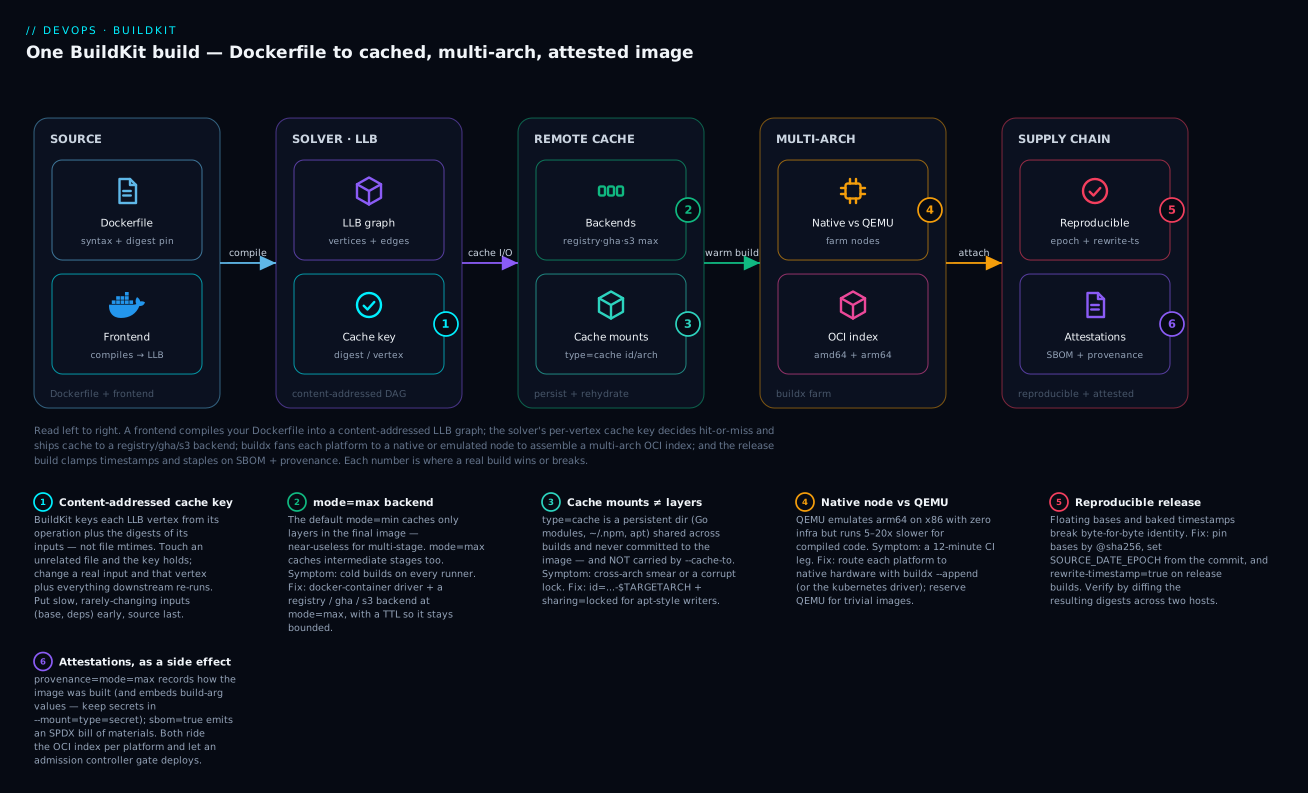
Read the diagram left to right: a frontend compiles your Dockerfile into a content-addressed LLB graph; the solver’s per-vertex cache key decides hit-or-miss and ships cache to a registry / gha / s3 backend; buildx fans each platform to a native or emulated node to assemble a multi-arch OCI index; and the release build clamps timestamps for reproducibility and staples on SBOM + provenance. The six numbers mark where a real build wins or breaks.
Prerequisites & what you’ll be able to do
This is an advanced lesson. It assumes you have already written and built a container image the ordinary way. Before starting you should be comfortable with:
- Writing a multi-stage Dockerfile and pushing to a registry — from Docker container images for CI/CD. This lesson assumes you know what a layer and a registry are; here we make the build fast, portable, and attested.
- Running a CI pipeline (GitHub Actions, GitLab CI, or similar) and the idea of an ephemeral runner that starts from nothing on every job.
- The command line,
git, and enough shell to read the snippets here. - Optionally, why supply-chain attestations matter — the SLSA supply chain, SBOM & provenance lesson is the “why”; this lesson is the “how you emit them straight from the build”.
After working through it you will be able to:
- Explain how BuildKit compiles a Dockerfile into an LLB graph and why its content-addressed cache key makes cache portable across runners.
- Choose the right remote cache backend (registry, gha, or s3) and know why
mode=maxis non-negotiable for multi-stage builds. - Add package-manager cache mounts without poisoning them across concurrent or cross-architecture builds.
- Build a multi-arch image and decide, per workload, between QEMU emulation and a native builder farm (which pairs with self-hosted autoscaling runners).
- Produce a reproducible release image — pinned digests,
SOURCE_DATE_EPOCH,rewrite-timestamp— and verify it across two hosts. - Emit and inspect SBOM and SLSA provenance attestations, and hand them to an admission policy (see Sigstore keyless signing & admission).
Most container builds are slow for the same two reasons: the cache is thrown away between CI runs, and the build is treated as a black box that emits a tarball nobody can reason about. BuildKit fixes both. Its execution model is a content-addressed graph with a precise cache key, so you can ship that cache to a registry or object store and rehydrate it on a fresh runner. The same engine emits SBOM and SLSA provenance attestations as a side effect of the build, and can rewrite layer timestamps so two independent machines produce byte-identical images. This article wires all of that together: remote cache, a multi-arch builder farm, reproducibility controls, attestations, and the CI plumbing to make it stick. The commands assume Buildx >= 0.13 and BuildKit >= 0.13.
1. BuildKit internals: LLB, frontends, and the cache key
BuildKit does not interpret a Dockerfile line by line. A frontend (the dockerfile.v0 frontend is the default; docker/dockerfile:1 is the upgradable image form) compiles your Dockerfile into LLB – a low-level, content-addressed build graph. Each vertex is an operation (run this command, copy these files, pull this image) and edges are dependencies. Because the graph is a DAG, independent branches run concurrently, and only the vertices whose inputs changed get re-executed.
Read “content-addressed” as: every input is identified by a hash of its bytes, not by its name or its clock. Two files with identical contents have the same address even on different machines and different days — that property is what makes everything else in this lesson portable.
The cache key is the heart of it. For each vertex BuildKit computes a key from the operation definition and the content digests of its inputs. A COPY is keyed by the digest of the files copied, not their mtimes; a RUN is keyed by the command string plus the digests of every input mount. This is why reordering instructions or touching an unrelated file no longer busts the whole cache – the key only moves when content that actually feeds the step moves.
Two consequences drive everything below:
- Layer order still matters, because a cache miss on vertex N invalidates every vertex downstream of N. Put rarely-changing inputs (base image, OS packages, dependency manifests) early; put your source last.
- The cache is portable precisely because keys are content digests. A key computed on a fresh runner matches a key computed last week, so an exported cache can be imported and reused anywhere.
# syntax=docker/dockerfile:1
FROM golang:1.23-bookworm AS build
WORKDIR /src
# Copy manifests first: this layer's cache key only moves when deps change.
COPY go.mod go.sum ./
RUN --mount=type=cache,target=/go/pkg/mod go mod download
# Source copied last: editing app code does not re-download modules.
COPY . .
RUN --mount=type=cache,target=/go/pkg/mod \
    --mount=type=cache,target=/root/.cache/go-build \
    CGO_ENABLED=0 go build -trimpath -o /out/app ./cmd/app

FROM gcr.io/distroless/static-debian12:nonroot
COPY --from=build /out/app /app
ENTRYPOINT ["/app"]
2. Remote cache backends: registry, gha, and S3 with mode=max
A docker build on the stock docker driver only keeps cache in the local image store, which a fresh CI runner does not have. Switch to the docker-container driver and you unlock --cache-to/--cache-from exporters that persist the cache externally.
First, the mode distinction, because it is the single biggest hit-rate lever:
| Mode | What is cached | Hit rate | Storage |
|---|---|---|---|
mode=min (default) |
Only layers present in the final image | Lower – intermediate stages are not cached | Smaller |
mode=max |
Every layer, including intermediate build-stage layers | Higher – multi-stage builds reuse compiler/test stages | Larger |
For multi-stage builds (build stage + tiny runtime stage) mode=min caches almost nothing useful, because the expensive compile layers never reach the final image. Use mode=max on any non-trivial build.
Registry backend – the most portable; cache lives as an image alongside your app:
docker buildx create --name kvbuilder --driver docker-container --use --bootstrap

docker buildx build \
  --cache-to   type=registry,ref=registry.example.com/app/cache,mode=max,image-manifest=true,oci-mediatypes=true \
  --cache-from type=registry,ref=registry.example.com/app/cache \
  --tag registry.example.com/app:1.4.2 \
  --push .
image-manifest=true writes the cache as a real OCI image manifest so registries that reject the older “cache manifest” media type (ECR, some Artifactory configs) still accept it.
GitHub Actions backend (gha) – stores cache in the Actions cache service. Parameters: url (defaults to $ACTIONS_CACHE_URL), token (defaults to $ACTIONS_RUNTIME_TOKEN), scope (defaults to buildkit; give each image a distinct scope), and mode:
docker buildx build \
  --cache-to   type=gha,scope=app-amd64,mode=max \
  --cache-from type=gha,scope=app-amd64 \
  --tag registry.example.com/app:1.4.2 --push .
S3 backend – best when you self-host runners and want cache near them. Required params are region and bucket; name defaults to buildkit, mode defaults to min. Credentials are read from the standard AWS environment / config chain, so on a runner with an instance role you pass none:
docker buildx build \
  --cache-to   type=s3,region=us-east-1,bucket=acme-buildkit-cache,prefix=app/,mode=max \
  --cache-from type=s3,region=us-east-1,bucket=acme-buildkit-cache,prefix=app/ \
  --tag 1234567890.dkr.ecr.us-east-1.amazonaws.com/app:1.4.2 --push .
Put a lifecycle / TTL policy on the cache location.
mode=maxcache for an active monorepo grows fast; an S3 lifecycle rule expiring objects after 14 days, or a scheduled GC of the registry cache tag, keeps storage bounded without hurting steady-state hit rate.
3. Cache mounts for package managers – and avoiding poisoning
The RUN --mount=type=cache mounts in step 1 are distinct from the layer cache. A cache mount is a writable, persistent directory shared across builds (the Go module cache, ~/.npm, apt lists, pip wheels) that is not committed into the image. It survives even when the surrounding layer is a cache miss, so a one-character source change re-runs go build but reuses the compiled-object cache underneath it.
The footgun is cache poisoning across concurrent or cross-arch builds. Two builds writing the same cache mount path can interleave, and an amd64 build and an arm64 build sharing one apt cache will smear architecture-specific artifacts together. Defend with id and sharing:
RUN --mount=type=cache,id=apt-$TARGETARCH,target=/var/cache/apt,sharing=locked \
    --mount=type=cache,id=apt-lists-$TARGETARCH,target=/var/lib/apt/lists,sharing=locked \
    apt-get update && apt-get install -y --no-install-recommends ca-certificates
idnamespaces the cache. Keying it on$TARGETARCHgives each architecture its own apt/pip/npm cache – no cross-arch contamination.sharing=lockedserializes writers (one build holds the mount, others wait). The defaultsharedallows concurrent writers, which is fine for append-only caches like Go modules but wrong for apt.sharing=privategives each concurrent build a fresh mount.
For secrets used during a build (registry tokens, private repo credentials) use --mount=type=secret, never a build arg – build args are recorded in provenance (see step 6) and leak into image history.
4. Multi-arch builds: QEMU emulation vs. a native builder farm
A multi-platform image is an OCI index pointing at one manifest per architecture. (Older Docker tooling calls this same object a “manifest list” – an OCI image index and a Docker manifest list are the same idea: a thin top-level document that maps each os/arch to the digest of that platform’s real manifest. A client pulling the image picks the entry matching its own platform.) There are two ways to produce the non-native ones.
QEMU emulation is the zero-infrastructure path: register binfmt handlers once and a single x86 node builds arm64 by emulating it.
# Install binfmt handlers on the host (idempotent; re-run after host reboots).
docker run --privileged --rm tonistiigi/binfmt --install all

docker buildx build --platform linux/amd64,linux/arm64 \
  --tag registry.example.com/app:1.4.2 --push .
It is correct but slow. Anything CPU-bound – compiling Go/Rust, running a test suite, transpiling – can run 5-20x slower under emulation, and some toolchains hit emulator edge cases. For trivial images it is fine; for real software it dominates your build time.
A native builder farm routes each platform to real hardware. Create one builder, then --append an arm64 node reachable over an SSH Docker context. Buildx schedules each platform to the node that natively supports it.
# Register a Docker context for the remote arm64 host.
docker context create arm-node --docker "host=ssh://ci@arm-builder.internal"

# Initial node: native amd64 on the local/default engine.
docker buildx create --name farm --driver docker-container \
  --platform linux/amd64 --use --bootstrap

# Append the native arm64 node.
docker buildx create --name farm --append \
  --node farm-arm64 --platform linux/arm64 \
  --driver docker-container arm-node

docker buildx build --builder farm \
  --platform linux/amd64,linux/arm64 \
  --tag registry.example.com/app:1.4.2 --push .
Each node maintains its own cache; combine the farm with the registry or s3 cache backend so both nodes warm a shared external cache. In practice, native arm64 (Graviton runners, Apple-silicon self-hosted, GitHub’s arm64 runners) is the difference between a 90-second and a 12-minute build for compiled languages.
5. Reproducibility: SOURCE_DATE_EPOCH, pinned digests, rewrite-timestamp
Two builds of the same source should be byte-identical. Three things break that: floating base images, build timestamps baked into layer metadata, and non-deterministic file ordering.
Pin base images by digest. A tag like golang:1.23-bookworm is mutable; pin the digest so the input graph is fixed:
FROM golang:1.23-bookworm@sha256:6dca9f8c0b...e91 AS build
Set SOURCE_DATE_EPOCH. Buildx (>= 0.10) automatically propagates a SOURCE_DATE_EPOCH value from the client environment into the build, and BuildKit clamps the timestamps it controls (image config created, history entries) to that epoch. Derive it from the commit:
export SOURCE_DATE_EPOCH="$(git log -1 --pretty=%ct)"
Rewrite layer file timestamps. SOURCE_DATE_EPOCH alone fixes image config metadata, but files inside layers still carry their original mtimes. The image exporter option rewrite-timestamp=true (BuildKit >= 0.13) clamps every file’s timestamp to the epoch, which is what actually makes layer digests reproducible:
docker buildx build \
  --build-arg SOURCE_DATE_EPOCH="$(git log -1 --pretty=%ct)" \
  --output type=image,name=registry.example.com/app:1.4.2,push=true,rewrite-timestamp=true \
  --provenance=mode=max --sbom=true .
It is off by default because rewriting layers costs time and breaks layer-cache identity from a non-rewritten build, so reserve it for release builds, not every PR. Verify reproducibility by building the same commit on two machines and diffing the resulting digests.
6. Emitting SBOM and SLSA provenance attestations
BuildKit can attach attestations to the image index as a build side effect – no separate scan step, and the SBOM describes exactly what the build produced rather than a re-pull approximation.
- Provenance records how the image was built: source repo and revision, build platform, materials, and (in
max) the full LLB definition. Shorthand--provenance=mode=max, or--attest type=provenance,mode=max,version=v1. Notemode=maxprovenance embeds build-arg values – another reason secrets belong in--mount=type=secret, not build args. - SBOM is a Software Bill of Materials generated by the
buildkit-syft-scannerplugin (built on Anchore Syft). Shorthand--sbom=true, or--attest type=sbom. Swap the scanner withgenerator=.
docker buildx build \
  --platform linux/amd64,linux/arm64 \
  --provenance=mode=max \
  --sbom=true \
  --attest type=sbom,generator=docker/buildkit-syft-scanner:latest \
  --cache-to type=registry,ref=registry.example.com/app/cache,mode=max,image-manifest=true \
  --cache-from type=registry,ref=registry.example.com/app/cache \
  --tag registry.example.com/app:1.4.2 \
  --push .
Attestations are stored as separate manifests in the OCI image index, referenced from each platform manifest – so a multi-arch image gets a per-platform SBOM and provenance. They travel with the image and can be consumed by an admission policy (cosign / policy-controller verifying the SLSA provenance predicate before a pod is allowed to run).
Verify
Confirm the image is genuinely multi-arch, carries attestations, and is reproducible.
# 1. Confirm both architectures plus attestation manifests in the index.
docker buildx imagetools inspect registry.example.com/app:1.4.2

# 2. Dump the SBOM (top-level) and per-platform.
docker buildx imagetools inspect registry.example.com/app:1.4.2 \
  --format '{{ json .SBOM.SPDX }}'
docker buildx imagetools inspect registry.example.com/app:1.4.2 \
  --format '{{ json (index .SBOM "linux/arm64").SPDX }}'

# 3. List packages and versions from the SBOM.
docker buildx imagetools inspect registry.example.com/app:1.4.2 \
  --format '{{ range .SBOM.SPDX.packages }}{{ .name }}@{{ .versionInfo }}{{ println }}{{ end }}'

# 4. Inspect provenance.
docker buildx imagetools inspect registry.example.com/app:1.4.2 \
  --format '{{ json .Provenance }}'
# 5. Prove reproducibility: same commit, two builders, identical digest.
git checkout v1.4.2
export SOURCE_DATE_EPOCH="$(git log -1 --pretty=%ct)"
docker buildx build --output type=oci,dest=a.tar,rewrite-timestamp=true \
  --build-arg SOURCE_DATE_EPOCH="$SOURCE_DATE_EPOCH" .
# ...repeat on a second host into b.tar, then compare config+layer digests.
diff <(tar -xOf a.tar index.json) <(tar -xOf b.tar index.json)
To measure cache effectiveness, read the structured build trace.
# Per-vertex CACHED/RUN status reveals which layers missed.
docker buildx build --progress=rawjson . 2>build.log
grep -c '"cached":true'  build.log   # vertices served from cache
grep -c '"cached":false' build.log   # vertices that executed
7. Wiring BuildKit into GitHub Actions, GitLab, and Tekton
GitHub Actions. Use docker/setup-buildx-action (sets up the docker-container driver) and docker/setup-qemu-action only if you lack native arm64 runners. With docker/build-push-action the gha cache url/token are populated automatically; calling gha from a raw buildx command needs crazy-max/ghaction-github-runtime to export the variables.
name: build
on: { push: { tags: ["v*"] } }
permissions:
  contents: read
  packages: write
  id-token: write   # for keyless cosign / OIDC if you verify attestations later
jobs:
  image:
    runs-on: ubuntu-24.04
    steps:
      - uses: actions/checkout@v4
      - uses: docker/setup-qemu-action@v3
      - uses: docker/setup-buildx-action@v3
      - uses: docker/login-action@v3
        with:
          registry: registry.example.com
          username: ${{ secrets.REG_USER }}
          password: ${{ secrets.REG_TOKEN }}
      - id: epoch
        run: echo "v=$(git log -1 --pretty=%ct)" >> "$GITHUB_OUTPUT"
      - uses: docker/build-push-action@v6
        with:
          platforms: linux/amd64,linux/arm64
          push: true
          tags: registry.example.com/app:${{ github.ref_name }}
          build-args: SOURCE_DATE_EPOCH=${{ steps.epoch.outputs.v }}
          provenance: mode=max
          sbom: true
          cache-from: type=gha,scope=app
          cache-to: type=gha,scope=app,mode=max
          outputs: type=image,rewrite-timestamp=true
GitLab CI. No Docker socket on shared runners, so run BuildKit’s buildkitd and use buildctl. Authenticate the cache to the GitLab registry with the job token.
build:
  image: moby/buildkit:v0.18.0-rootless
  variables:
    BUILDKITD_FLAGS: --oci-worker-no-process-sandbox
  before_script:
    - mkdir -p ~/.docker
    - echo "{\"auths\":{\"$CI_REGISTRY\":{\"auth\":\"$(printf '%s:%s' "$CI_REGISTRY_USER" "$CI_REGISTRY_PASSWORD" | base64 -w0)\"}}}" > ~/.docker/config.json
  script:
    - export SOURCE_DATE_EPOCH="$(git log -1 --pretty=%ct)"
    - |
      buildctl-daemonless.sh build \
        --frontend dockerfile.v0 --local context=. --local dockerfile=. \
        --opt build-arg:SOURCE_DATE_EPOCH="$SOURCE_DATE_EPOCH" \
        --output type=image,name=$CI_REGISTRY_IMAGE:$CI_COMMIT_TAG,push=true,rewrite-timestamp=true \
        --opt attest:provenance=mode=max --opt attest:sbom= \
        --export-cache type=registry,ref=$CI_REGISTRY_IMAGE/cache,mode=max,image-manifest=true \
        --import-cache type=registry,ref=$CI_REGISTRY_IMAGE/cache
Tekton. The community buildkit Task / a buildkitd sidecar pattern is standard; point --export-cache/--import-cache at the same registry tag so every PipelineRun on ephemeral pods shares cache. The buildctl invocation is identical to the GitLab one above.
Enterprise scenario
A platform team at a fintech ran ~600 service builds/day on GitHub-hosted runners. They had recently added linux/arm64 images for Graviton deployment and turned on QEMU. The Go-heavy services went from ~2-minute builds to 11-18 minutes each under emulation, CI queues backed up past their 20-minute SLA, and runner-minute spend roughly doubled. Their constraint: GitHub-hosted arm64 runners were not yet approved by their security team, and they could not move builds off the GitHub control plane.
The fix was a hybrid farm with shared registry cache. They stood up a small pool of self-hosted Graviton runners inside their VPC (which security had approved, since they were already running Graviton in prod) and registered them as an --append node over an SSH context. The GitHub-hosted amd64 runner remained the build orchestrator; only the arm64 leg shipped to the native node. Both legs read and wrote a single mode=max registry cache in their internal registry, so a cache warmed by one architecture’s shared stages cut the other’s cold time. They moved rewrite-timestamp=true to tag builds only, keeping PR builds on plain mode=max cache for maximum hit rate.
      - uses: docker/build-push-action@v6
        with:
          builder: farm                 # amd64 local + appended native arm64 node
          platforms: linux/amd64,linux/arm64
          push: true
          tags: reg.internal/app:${{ github.ref_name }}
          provenance: mode=max
          sbom: true
          cache-from: type=registry,ref=reg.internal/app/cache
          cache-to: type=registry,ref=reg.internal/app/cache,mode=max,image-manifest=true
Result: p50 multi-arch build dropped to ~3 minutes (native arm64 plus warm cache), CI minutes fell below the pre-arm64 baseline because the amd64 leg also benefited from shared cache, and every released image now carried per-platform SBOM and SLSA provenance that their admission controller verified at deploy.
Going deeper
The six sections above get a correct, fast, attested build. This section is the layer beneath: the interactions and edge cases that decide whether it stays fast and correct under real scale, real security review, and real version churn.
The layer cache and the cache mount are two different systems
Beginners conflate them because both say “cache”, but they persist differently and this trips people at scale:
| Layer / step cache | Cache mount (type=cache) |
|
|---|---|---|
| What it holds | The result of a vertex (a built layer) | A live directory used during a RUN (Go mod, ~/.npm, apt) |
| Keyed by | Content digest of the vertex’s inputs | The id you give it (or the target path) |
| Committed to image? | Yes – it becomes a layer | No – never in the image |
Carried by --cache-to/--cache-from? |
Yes | No |
| Lives where | The remote backend (registry/gha/s3) and local | Only in the builder’s local state |
The consequence bites on truly ephemeral runners: --cache-from type=gha restores layer results, so a go build vertex can come back CACHED. But if that vertex does re-run (any source change), the cache mount it uses starts empty, because mounts are never exported. The mount only speeds things up on a builder whose state survives between builds – a long-lived docker-container builder, a persistent runner, or a kubernetes-driver pod with a PersistentVolume. On a fresh throwaway VM every job, cache mounts buy you nothing; the remote layer cache is what saves you. Design for whichever you actually have.
Cache growth, GC, and the gha 10 GB wall
mode=max cache grows without bound. Each backend fails differently:
ghauses the GitHub Actions cache, capped at 10 GB per repository with LRU eviction. Amode=maxcache for a big multi-stage build blows past that and starts evicting your own entries mid-flight, so hit rate collapses. Mitigate by scoping tightly (scope=app-amd64vsscope=app-arm64), caching only the heaviest stages, or graduating to registry/s3.registry/s3have no built-in cap. You own the GC: a scheduled job that deletes the cache tag/prefix, or an S3 lifecycle rule (Expirationafter N days). Without it, storage cost creeps and old blobs pile up.- Prune a long-lived local builder with
docker buildx prune --filter until=168h(and--keep-storageto set a ceiling); inspect usage withdocker buildx du.
Reproducibility beyond timestamps
rewrite-timestamp and SOURCE_DATE_EPOCH fix time, not content. The remaining non-determinism sources:
- Unpinned packages.
apt-get install curlorpip install requestsresolves to whatever is latest today. Pin versions (curl=7.88.1-10+deb12u5) or build against a frozen snapshot (e.g.snapshot.debian.org) so the bytes are fixed. - Embedded build IDs and paths. Compilers stamp absolute source paths and random build IDs. Go:
-trimpath(already in the step-1 example) plus-buildvcscontrol; C/C++:-ffile-prefix-mapand a deterministic linker build-id. - File ordering and metadata. Non-deterministic
tarordering, locale-dependent sorts, and__pycache__/.pycfiles with embedded timestamps. Prefer tools that sort deterministically; delete generated caches before the finalCOPY. - Per-arch, not global. Each architecture is reproduced independently – the
amd64layer digests match across hosts, thearm64ones match across hosts, but the two arches never share a digest. That is expected.
Verifying attestations at deploy (emitting is not enforcing)
Emitting SBOM/provenance is inert until something checks it. The provenance BuildKit writes is an in-toto statement carrying a SLSA provenance predicate; --attest type=provenance,version=v1 selects the SLSA v1.0 predicate (the default is v0.2). Downstream you extract and verify it:
# Pull the raw provenance predicate for one platform.
docker buildx imagetools inspect registry.example.com/app:1.4.2 \
  --format '{{ json (index .Provenance "linux/amd64").SLSA }}'

# Cryptographically verify a signed provenance attestation (keyless / Fulcio).
# Match the predicate type to the version you emitted:
#   slsaprovenance1  ->  version=v1     slsaprovenance  ->  default v0.2
cosign verify-attestation --type slsaprovenance1 \
  --certificate-identity-regexp '^https://github.com/acme/.+/\.github/workflows/.+@refs/tags/v.+' \
  --certificate-oidc-issuer https://token.actions.githubusercontent.com \
  registry.example.com/app:1.4.2
An admission controller (Sigstore policy-controller, Kyverno, or Connaisseur) then refuses any pod whose image lacks a valid provenance from your build identity. That closes the loop – see Sigstore keyless signing & admission for the cluster-side policy, and SLSA supply chain for the threat model these attestations defend against. A subtle default worth knowing: docker/build-push-action emits some provenance by default on pushed images, which turns a single-arch build into an OCI index. If a legacy registry or a tool expects one manifest and gets an index, set provenance: false deliberately (or image-manifest=true on the cache) rather than being surprised.
Drivers: docker-container is not your only option
docker buildx create --driver picks where BuildKit runs:
docker– the default engine; no--cache-to/--cache-from, no multi-node. Fine for a laptop, useless for CI cache.docker-container– runsbuildkitdin a container; the workhorse for everything in this lesson.kubernetes– runsbuildkitdas pods, scales to zero, and gives you a native multi-arch farm without SSH: schedule one deployment per architecture with a node selector.remote– connect to an already-runningbuildkitdover TCP/mTLS; good for a shared, centrally-managed build service.
# Native multi-arch on Kubernetes: one pod per arch, no QEMU, no SSH.
docker buildx create --name k8sfarm --driver kubernetes \
  --node builder-amd64 --platform linux/amd64 \
  --driver-opt namespace=buildkit,nodeselector="kubernetes.io/arch=amd64"
docker buildx create --name k8sfarm --append \
  --node builder-arm64 --platform linux/arm64 \
  --driver-opt namespace=buildkit,nodeselector="kubernetes.io/arch=arm64"
This pairs naturally with autoscaling ephemeral runners: the build pods live in the same cluster and scale with demand.
Driving many images with buildx bake
Hand-writing cache and attestation flags on every buildx build invocation does not scale to a repo of twenty images. buildx bake reads a declarative file (HCL, JSON, or Compose) so the cache/provenance policy lives in one place and targets inherit it:
# docker-bake.hcl -- `docker buildx bake app` builds this target.
target "_common" {
  platforms  = ["linux/amd64", "linux/arm64"]
  cache-from = ["type=registry,ref=registry.example.com/cache"]
  cache-to   = ["type=registry,ref=registry.example.com/cache,mode=max,image-manifest=true"]
  attest     = ["type=provenance,mode=max", "type=sbom"]
}
target "app" {
  inherits = ["_common"]
  context  = "."
  tags     = ["registry.example.com/app:1.4.2"]
}
Rootless, hermetic, and secret-safe builds
- Rootless.
moby/buildkit:*-rootless(used in the GitLab snippet) runs without privileged containers – important on locked-down runners. QEMU’s binfmt install is the one step that still needs--privileged, and it is a one-time host setup, not per build. - Secrets and SSH.
--mount=type=secret,id=npmrc,target=/root/.npmrcexposes a secret on a tmpfs for oneRUNonly – never in a layer, history, or provenance.--mount=type=sshforwards your agent forgit cloneof a private module without baking a key into the image. - Hermetic steps.
--allowandnetwork=noneon aRUNlet you forbid network access for a step that must be reproducible, so a build cannot silently reach the internet and pull something unpinned.
Version and API caveats
rewrite-timestampneeds BuildKit >= 0.13;SOURCE_DATE_EPOCHauto-propagation needs Buildx >= 0.10 – older toolchains silently skip the reproducibility fix.- The
ghabackend moved to a new cache service (v2). Pindocker/setup-buildx-actionanddocker/build-push-actionto current majors so the cache protocol matches. - Some registries reject the classic cache-manifest media type –
image-manifest=true,oci-mediatypes=trueon the registry backend is the compatibility switch (ECR, older Artifactory/Nexus). mode=maxprovenance embeds build-arg values. Re-read that every time you are tempted to pass a token as--build-arg.
Practice challenges
Work these in order; each has a copy-pasteable solution and the one reason it matters. You need a machine with docker and docker buildx (>= 0.13). Use any small multi-stage Dockerfile; the step-1 Go example is ideal.
1. (Beginner) Create a cache-capable builder and confirm the driver.
The default docker driver cannot export remote cache. Create a docker-container builder and prove it is active.
<details> <summary>Solution</summary>
docker buildx create --name kv --driver docker-container --use --bootstrap
docker buildx inspect --bootstrap        # look for: Driver: docker-container
Why: only the docker-container (or kubernetes/remote) driver runs a buildkitd you can attach --cache-to/--cache-from exporters to. On the stock docker driver every remote-cache flag is silently a no-op.
</details>
2. (Beginner) Persist and rehydrate a remote cache, and see a hit.
Build with a registry cache, then build a second time and watch vertices come back CACHED.
<details> <summary>Solution</summary>
docker buildx build --builder kv \
  --cache-to   type=registry,ref=registry.example.com/app/cache,mode=max,image-manifest=true \
  --cache-from type=registry,ref=registry.example.com/app/cache \
  --tag registry.example.com/app:demo --push .
# run the exact same command again -> the build stages print CACHED
Why: mode=max writes the intermediate build-stage layers to the registry, so a fresh builder (or CI runner) rehydrates the expensive compile stages instead of redoing them. mode=min would cache almost nothing here.
</details>
3. (Intermediate) Stop a cross-architecture cache-mount from poisoning itself.
Give the apt cache mount an arch-scoped id and a safe sharing mode so an amd64 and an arm64 build never smear artifacts together.
<details> <summary>Solution</summary>
RUN --mount=type=cache,id=apt-$TARGETARCH,target=/var/cache/apt,sharing=locked \
    --mount=type=cache,id=apt-lists-$TARGETARCH,target=/var/lib/apt/lists,sharing=locked \
    apt-get update && apt-get install -y --no-install-recommends ca-certificates
Why: id=apt-$TARGETARCH gives each architecture its own mount, and sharing=locked serializes writers so two concurrent builds do not corrupt the apt lists. The default shared mode is only safe for append-only caches like Go modules.
</details>
4. (Intermediate) Build multi-arch and prove both platforms are in the index.
Produce linux/amd64 + linux/arm64 and confirm the pushed image is a real OCI index with two manifests.
<details> <summary>Solution</summary>
docker run --privileged --rm tonistiigi/binfmt --install all      # QEMU, if no native arm64
docker buildx build --builder kv --platform linux/amd64,linux/arm64 \
  --tag registry.example.com/app:multi --push .
docker buildx imagetools inspect registry.example.com/app:multi   # lists linux/amd64 AND linux/arm64
Why: a multi-arch image is one OCI index pointing at a per-platform manifest; imagetools inspect shows the platforms so you can confirm both were built and pushed, not just the native one.
</details>
5. (Advanced) Make a release build reproducible and verify it.
Pin the base by digest, derive SOURCE_DATE_EPOCH from the commit, build twice with rewrite-timestamp=true, and prove the outputs are byte-identical.
<details> <summary>Solution</summary>
# Dockerfile: FROM golang:1.23-bookworm@sha256:<digest> AS build
export SOURCE_DATE_EPOCH="$(git log -1 --pretty=%ct)"
docker buildx build --output type=oci,dest=a.tar,rewrite-timestamp=true \
  --build-arg SOURCE_DATE_EPOCH="$SOURCE_DATE_EPOCH" .
docker buildx build --output type=oci,dest=b.tar,rewrite-timestamp=true \
  --build-arg SOURCE_DATE_EPOCH="$SOURCE_DATE_EPOCH" .
diff <(tar -xOf a.tar index.json) <(tar -xOf b.tar index.json) && echo "REPRODUCIBLE"
Why: the pinned digest fixes the input graph, SOURCE_DATE_EPOCH clamps config metadata, and rewrite-timestamp=true clamps every file mtime inside the layers – together they make the layer digests, and therefore the whole index, identical.
</details>
6. (Advanced) Emit, inspect, and verify SBOM + provenance. Attach both attestations, read them back from the index, and cryptographically verify the provenance.
<details> <summary>Solution</summary>
docker buildx build --builder kv --platform linux/amd64,linux/arm64 \
  --provenance=mode=max --sbom=true \
  --tag registry.example.com/app:attested --push .

docker buildx imagetools inspect registry.example.com/app:attested \
  --format '{{ json .Provenance }}'                     # provenance present
docker buildx imagetools inspect registry.example.com/app:attested \
  --format '{{ json .SBOM.SPDX }}'                       # SBOM present

# Verify a signed provenance attestation (keyless). slsaprovenance1 for version=v1.
cosign verify-attestation --type slsaprovenance1 \
  --certificate-identity-regexp '^https://github.com/acme/.+@refs/tags/.+' \
  --certificate-oidc-issuer https://token.actions.githubusercontent.com \
  registry.example.com/app:attested
Why: attestations ride the OCI index as separate manifests, one set per platform. Emitting them is only half the job – cosign verify-attestation (and an admission controller that runs the same check) is what actually enforces that a deployed image came from your build.
</details>
Common beginner mistakes
- “
docker buildalready caches, so I don’t need any of this.” The stock local layer cache dies with the ephemeral runner – it never existed on this fresh VM. Right model: BuildKit’s cache is content-addressed and portable, so you must export it to a registry/gha/s3 backend and import it next run. - “
mode=maxis just bigger; I’ll leave the default.” The defaultmode=mincaches only layers that reach the final image. In a multi-stage build the expensive compile/test stages never reach the final image, somode=mincaches nothing useful. Usemode=maxfor anything multi-stage. - “I’ll pass the registry token as a
--build-arg.” Build args are recorded in image history and embedded verbatim inmode=maxprovenance – you just published your token. Right model:--mount=type=secret, which exposes the secret on a tmpfs for oneRUNand never persists it. - “Multi-arch is free – I just add
--platform.” True, but the non-native leg runs under QEMU emulation, 5-20x slower for compiled code. On real software that turns a 90-second build into a 12-minute one. Right model: native nodes (a farm, or the kubernetes driver) for compiled languages; QEMU only for trivial images. - “
SOURCE_DATE_EPOCHmakes my build reproducible.” It only clamps image config metadata; the files inside your layers still carry their original mtimes, so layer digests still differ. You also needrewrite-timestamp=true, pinned base digests, and pinned package versions. - “I turned on SBOM and provenance, so my supply chain is secure.” Emitting is not enforcing. An attestation nobody verifies is decoration. Right model: an admission controller (
cosign verify-attestation/ policy-controller) must require a valid attestation at deploy for it to mean anything. - “A moving tag like
golang:1.23is fine for the base.” Tags are mutable – the digest behindgolang:1.23changes under you, so the input graph shifts and reproducibility breaks silently. Pin by@sha256:...digest and bump it deliberately. - “My gha cache hit, so my Go modules are warm.” The remote cache restores layer results, not cache-mount contents. If the vertex re-runs,
--mount=type=cachestarts empty on an ephemeral worker. Only a persistent builder keeps mounts warm.
Glossary
- BuildKit – the modern build engine behind
docker build/buildx. Compiles a Dockerfile into a graph, executes it concurrently with precise caching, and emits attestations. - buildx – the Docker CLI plugin (
docker buildx ...) that drives BuildKit: builders, multi-arch, remote cache, attestations,bake. - Frontend – the component that translates a build definition into LLB.
dockerfile.v0is built in;# syntax=docker/dockerfile:1pulls an upgradable frontend image. - LLB (Low-Level Build) – BuildKit’s intermediate representation: a content-addressed DAG of operations (
RUN,COPY, image pulls) with dependency edges. - Vertex – one node/operation in the LLB graph. Each vertex has its own cache key and can be
CACHEDor executed. - Solver – the part of BuildKit that walks the LLB graph, computes cache keys, decides hit vs. miss, and runs the misses.
- Content-addressed – identified by a hash of the bytes, not by name or timestamp. The reason the cache is portable across machines and stable over time.
- Cache key – the digest BuildKit computes per vertex from the operation plus its input digests. Same key = reuse the cached result.
- Layer / step cache – the cached result of a vertex (a built layer); exported and imported by
--cache-to/--cache-from. - Cache mount (
--mount=type=cache) – a persistent directory used during aRUN(Go modules,~/.npm, apt) that is never committed to the image and never exported by the remote cache. - Remote cache backend – where the layer cache is persisted:
registry(an image),gha(Actions cache), ors3(object store). mode=min/mode=max– min caches only final-image layers; max also caches intermediate build-stage layers. Max is required for multi-stage builds.- Driver – where BuildKit runs:
docker(no remote cache),docker-container(default for buildx),kubernetes(pods),remote(externalbuildkitd). - QEMU / binfmt – CPU emulation that lets one architecture build images for another. Zero-infra but slow for compute-heavy steps.
- Native builder farm – multiple builder nodes, one per architecture, so each platform builds on real hardware instead of emulation. Added with
buildx create --append. - Platform – an
os/archpair likelinux/arm64.$TARGETPLATFORM,$TARGETARCH,$BUILDPLATFORMare auto-set build args. - OCI index / manifest list – the thin top-level document of a multi-arch image mapping each platform to that platform’s manifest digest. Same concept, two names.
- Reproducible build – same source in, byte-identical image out, on any machine. Requires pinned inputs plus timestamp clamping.
SOURCE_DATE_EPOCH– a Unix timestamp (usually the commit time) BuildKit uses to clamp image config/history timestamps.rewrite-timestamp– an image-exporter option (BuildKit >= 0.13) that clamps every file mtime inside layers to the epoch, making layer digests reproducible.- Digest pin – referencing a base image by
@sha256:...instead of a mutable tag, so the input never changes under you. - Attestation – signed metadata attached to an image describing a fact about it. BuildKit emits two kinds: SBOM and provenance.
- SBOM (Software Bill of Materials) – a machine-readable inventory of the packages/versions in the image; BuildKit emits SPDX via the syft scanner.
- Provenance / SLSA – an in-toto statement recording how the image was built (source, revision, materials, build platform); SLSA is the framework whose predicate it carries.
--mount=type=secret– exposes a secret on a tmpfs for a singleRUN, never persisting it into a layer, history, or provenance.imagetools inspect– the buildx subcommand for reading an image’s platforms, attestations, SBOM, and provenance from a registry without pulling it.sharing(locked/shared/private) – concurrency mode for a cache mount: serialize writers, allow concurrent writers, or give each build its own copy.