In a nutshell
Think of running a production service like running a city fire department. Most days nothing is burning — but you still keep a crew on-call around the clock, because when something does ignite at 3am, minutes matter. When the alarm goes off you don’t want a panicking mob; you want a drill everyone has rehearsed: one person becomes the Incident Commander who directs the response (and pointedly does not grab a hose), someone keeps the public informed, and the rest fight the fire. You rate every call by severity — a smoking toaster is not a chemical-plant blaze — because that decides who gets woken and how fast. And the first move at any fire is always the same: stop it spreading before you work out how it started.
This lesson is that fire service, for software. Site Reliability Engineering (SRE) is the discipline of running systems this way on purpose instead of by panic. At its centre is a deceptively simple idea: perfect reliability is neither possible nor worth paying for, so you decide up front how much unreliability you can tolerate — an error budget — and then spend it deliberately, shipping fast while budget remains and slowing down to harden things when it runs low. On-call is the crew; the incident lifecycle (detect → triage → mitigate → resolve → learn) is the drill; the blameless postmortem is the fire investigation that rewrites the building codes so the same blaze can’t happen twice; and toil is all the tedious manual work that, left unchecked, has you re-stacking sandbags every shift instead of building better firebreaks.
Why should a beginner care before ever holding a real pager? Because this is the half of software engineering that decides whether users trust you, and it is almost entirely learnable process rather than any single tool. You do not need a running cluster to practise writing a severity table, facilitating a tabletop incident, or producing a blameless postmortem — and doing those calmly under pressure is exactly what a senior interview, and a real 3am page, will test. Everything below is defined from scratch; if you already know what an SLO and an error budget are (from the Observability Fundamentals lesson) you’ll move faster, but it is not a prerequisite.
Level: Intermediate · Time: ~38 min · You’ll need: a rough picture of a production service (an app serving requests, shipped by a pipeline, emitting alerts). SLI/SLO/error-budget help but are recapped here; every other term is defined as it appears.
There is a moment, somewhere between “we built it” and “it has been running for two years”, where the hard part of software stops being writing it and becomes operating it. The pipeline is green, the feature shipped, the demo dazzled — and then it is 3am on a Saturday and a pager is screaming because checkout has been failing for eleven minutes and nobody yet knows why. Everything you do in that moment — who gets woken, who decides what, what gets communicated to customers, how the system is restored, and what the organisation learns afterwards so it never happens the same way again — is the domain of Site Reliability Engineering and incident management. It is the least glamorous and most consequential part of the whole DevOps story, because reliability is the feature your users notice only when it is absent.
This lesson is about the practice of operating reliably, deliberately paired with the Observability Fundamentals lesson. That lesson owns the mechanics — the three pillars, the golden signals, how to define an SLI and an SLO, how to compute an error budget, and how burn-rate alerting fires. This lesson owns the discipline that sits on top of those numbers: what SRE is and how it relates to DevOps; the error-budget policy that turns the budget from an interesting metric into a release-gating rule with teeth; on-call done humanely — rotations, primary and secondary, paging, escalation, follow-the-sun, and the war against alert fatigue; the incident-response lifecycle with its severity levels and its Incident Commander / Communications Lead / Operations Lead roles; the blameless postmortem that converts pain into permanent improvement; and toil — what it is, how to measure it, why Google caps it at 50%, and how to automate it away. We close with a teaser for chaos engineering, the practice of finding the failure before it finds you. Throughout I assume you have either read the observability lesson or are comfortable with SLI/SLO/error-budget as terms; where we need a number, we recap just enough and point back.
Learning objectives
By the end of this lesson you will be able to:
- Explain what Site Reliability Engineering is in Google’s original sense, and articulate precisely how SRE differs from (and complements) DevOps.
- Take an error budget and turn it into an error-budget policy — a written, agreed rule that gates releases and triggers a change freeze when the budget is exhausted.
- Design a healthy on-call rotation — primary/secondary, paging vs notification, escalation paths, follow-the-sun — and recognise and fight alert fatigue and on-call burnout.
- Run the incident-response lifecycle end to end (detect → triage → mitigate → resolve → communicate), classify an incident by severity, and staff the Incident Commander, Communications and Operations roles.
- Facilitate a blameless postmortem: build a timeline, apply the five whys, separate root cause from contributing factors, write SMART action items, and explain why blamelessness is non-negotiable.
- Define toil, measure it, apply the ≤50% cap, and prioritise reliability work using the error budget and error-budget-based prioritisation.
Prerequisites & where this fits
You should already understand, at least roughly, what an SLI, an SLO and an error budget are — if not, read Observability Fundamentals first, because this lesson uses those as building blocks rather than re-deriving them. A working mental model of a production service (an HTTP/gRPC application, deployed by a CI/CD pipeline, emitting metrics and alerts) is enough; no prior operations-team experience is assumed and every term is defined as it appears. This lesson sits in the Observability strand of the DevOps Zero-to-Hero course, immediately after observability fundamentals and before the hands-on Prometheus & Grafana monitoring stack lesson. It is also the human-process counterpart to DORA Metrics: two of the four DORA metrics — change failure rate and failed-deployment recovery time (MTTR) — are exactly what incident management and postmortems exist to drive down.
Core concepts: what SRE actually is
Site Reliability Engineering (SRE) is a discipline that applies software-engineering thinking to operations problems. The phrase and the practice come from Google, where Ben Treynor Sloss — who coined the term in 2003 — has described SRE memorably as “what happens when you ask a software engineer to design an operations team”. The premise is simple and radical: instead of staffing reliability with a traditional operations team that does manual, repetitive work, you staff it with engineers who would rather write software to do the operations work, and who treat reliability itself as an engineering problem with measurable targets.
Three foundational ideas flow from that premise and recur through everything below:
- Reliability is a number you manage, not an absolute you chase. A service does not need to be “up”; it needs to be reliable enough — at a level expressed as an SLO and policed by an error budget. 100% is the wrong target (it is impossible, infinitely expensive, and would forbid you from ever deploying). The budget is the permission to spend a controlled amount of unreliability on velocity.
- Engineering, not firefighting, is the job. SRE deliberately caps operational work (“toil”) at 50% so that the majority of an SRE’s time goes to building systems — automation, better tooling, capacity planning, removing classes of failure — that reduce future operational load. An SRE team that spends all day firefighting has failed at its own mission.
- Blamelessness and shared incentives. Because humans operate inside systems that set them up to succeed or fail, SRE treats failures as systems problems, runs blameless postmortems, and uses the error budget as a shared currency that aligns the historically opposed incentives of developers (who want to ship) and operators (who want stability).
SRE vs DevOps
Newcomers conflate the two constantly, and the relationship is genuinely subtle: they overlap enormously and were born of the same frustration with the “throw it over the wall” divide between development and operations. The cleanest way to hold them in your head is the line attributed to the SRE community: “class SRE implements interface DevOps” — DevOps is a philosophy (a set of principles and a culture), and SRE is one concrete, opinionated, prescriptive implementation of that philosophy.
| Dimension | DevOps | SRE |
|---|---|---|
| Nature | A culture/philosophy — break down silos, shared ownership, “you build it, you run it” | A specific implementation/role with prescriptive practices and metrics |
| Origin | Grassroots movement (~2009, Patrick Debois et al.) | Google (~2003, Ben Treynor Sloss); codified in the SRE Book (2016) |
| Core question | “How do we deliver software faster and more reliably together?” | “How do we make reliability an engineering discipline with measurable targets?” |
| Signature artefacts | CI/CD, IaC, value-stream thinking, the DORA metrics | SLI/SLO/error budgets, error-budget policy, toil cap (50%), blameless postmortems |
| How it handles the dev↔ops tension | Cultural — shared goals, empathy, collaboration | Mechanical — the error budget makes the trade-off objective and self-enforcing |
| Reduces silos by | Shared responsibility and tooling | Same software engineers do dev and reliability; error budget aligns incentives |
The practical takeaway: most SRE practices are good DevOps practices, and you can adopt error budgets, blameless postmortems and toil limits whether or not you have anyone with “SRE” in their job title. What SRE adds to a generic DevOps culture is rigour and specific mechanisms — above all, the error budget as an enforceable contract, which is where we go next.
SLIs, SLOs and the error budget — the recap you need
The observability lesson derives these in full; here is the compressed version this lesson stands on, so the policy that follows makes sense.
- A Service Level Indicator (SLI) is a measured number — typically a ratio of good events to valid events, e.g. “the proportion of HTTP requests served in under 300ms without a 5xx”. It is the user’s-eye measurement of one dimension of quality.
- A Service Level Objective (SLO) is the target you set on an SLI over a window, e.g. “99.9% of requests fast and successful over a rolling 30 days”. It is internal and aspirational-but-real.
- A Service Level Agreement (SLA) is the external contract with customers, usually looser than your SLO and carrying financial penalties if breached. Always set your internal SLO tighter than your external SLA so you react before you owe a refund.
- The error budget is the allowed unreliability:
100% − SLO. A 99.9% SLO over 30 days permits 0.1% failure ≈ 43 minutes of “down” budget per month (the full “nines” table lives in the observability lesson). The budget is consumed by every failed request, every minute of an outage, every bad deploy — and it refills as the rolling window moves forward.
That last sentence is the hinge of this entire lesson. The error budget is not a vanity metric on a dashboard; it is a quantity of permission that an organisation chooses to spend. How it chooses to spend it — and what happens when it runs out — is the error-budget policy.
The error-budget policy — making the budget gate releases
An error budget that nobody acts on is just a graph. The thing that gives it power is the error-budget policy: a short, written, pre-agreed document, signed off by both the engineering teams and the business/product owners, that states exactly what the organisation does at each level of budget consumption — before any incident, while everyone is calm. The whole point is that the hard decision (“do we stop shipping features and fix reliability?”) is made in advance and dispassionately, so that in the heat of a budget overspend nobody has to win an argument; the policy already decided.
What a policy contains
A good error-budget policy answers, for each SLO:
- The SLO and window it governs (e.g. 99.9% availability over a rolling 28 days).
- Thresholds and the actions at each — typically tiered (budget healthy / budget low / budget exhausted / budget significantly overspent).
- Who has authority to declare a freeze, to grant an exception, and to lift the freeze.
- The exception (“get-out-of-jail”) process — e.g. a security hotfix or a legally required change is always allowed to ship even during a freeze, with sign-off.
- What “reliability work” means when the budget is spent (the team’s backlog of hardening, rollback automation, fixing the top error sources).
- Escalation if the policy itself is disputed (usually to a shared VP who owns both product and reliability).
A worked, tiered policy
| Budget remaining | State | Release policy | Team focus | Who decides |
|---|---|---|---|---|
| > 50% | Healthy | Ship freely; take risks — feature flags, canaries, chaos experiments | Features and velocity | Teams self-serve |
| 10–50% | Caution | Ship normally but watch burn rate; postpone the riskiest changes | Features + start picking off reliability items | Team lead awareness |
| 0–10% / burning fast | At risk | Increase scrutiny: extra review, smaller batches, slower rollouts | Reliability work prioritised alongside features | On-call lead / SRE flags it |
| Exhausted (≤ 0%) | Freeze | Change freeze — only reliability fixes and approved exceptions ship | Reliability only until budget recovers | SRE/eng lead declares; product agrees per policy |
| Significantly overspent (repeatedly) | Hard stop | Freeze + executive review of the SLO itself and of investment | Root-cause the systemic reliability gap | Shared VP / leadership |
The mechanism is beautifully self-regulating. When a team ships a great deal and reliability is fine, the budget stays healthy and they keep shipping — they are rewarded for being reliable with the freedom to move fast. When they ship recklessly and burn the budget, the policy automatically reallocates their effort to reliability — not because ops “won” a fight, but because the team agreed, in advance, that this is what happens. It converts the eternal developers-want-to-ship vs operators-want-stability tension from a recurring political battle into an objective, data-driven, self-enforcing rule. Crucially, it also protects velocity: as long as you stay within budget, nobody can block your release on vague reliability fears — the data says you are fine.
How the gate is actually enforced
The policy lives in a document, but the freeze is enforced concretely in the delivery system:
- A pipeline gate. A CI/CD stage queries the live error-budget (from Prometheus, the SLO platform, or a tool like Sloth/Pyrra/Nobl9) and fails the deploy if the budget is exhausted, unless an “exception” label/approval is present. This is the literal “budget gates releases” wiring.
- Deployment-strategy coupling. Canary analysis (covered in the deployment-strategies lesson) watches the canary’s SLIs and auto-rolls-back a release that would burn budget too fast — the budget gating the individual release in real time.
- Backlog reprioritisation. When frozen, the reliability backlog is pulled to the top of the sprint; feature work is paused. Many teams keep a standing “reliability epic” precisely so there is always well-scoped hardening work to do during a freeze.
- Burn-rate alerts as the early warning. The multi-window burn-rate alerts from the observability lesson are what tell you the budget is about to be a problem, so the “at risk” tier kicks in before you hit zero.
A subtle but important rule: error budgets are about user pain, so planned, zero-impact maintenance generally should not consume the budget — but anything users actually experience does, including a botched maintenance window. And one anti-pattern to name: if a team never exhausts its budget, the SLO may be too loose (they could safely ship faster or invest less in reliability); a budget that is always exhausted means the SLO is too tight or the system is genuinely too fragile. A healthy team lands near the budget — using most of it, occasionally tipping over, and adjusting.
On-call — humane by design
Someone has to be reachable when the system breaks at 3am. On-call is the rotation of engineers who carry that responsibility. Done well, it is a fair, bounded, well-supported duty that the whole team shares; done badly, it is the fastest route to burnout, attrition and — ironically — worse reliability, because exhausted, desensitised humans miss real incidents. SRE treats on-call health as a first-class engineering concern, not an afterthought.
Rotation structures
| Concept | What it is | Why it matters |
|---|---|---|
| Rotation | A schedule that cycles the on-call duty through team members (e.g. one week each) | Spreads load fairly; no single hero; everyone keeps operational skills sharp |
| Primary | The first responder who is paged for an alert | Single clear owner of “right now” |
| Secondary (backup) | Paged if the primary does not acknowledge in time, or to assist on a big incident | Safety net for missed pages / for when one person is not enough |
| Shadow | A new team member who joins on-call alongside an experienced one without being the responder | Safe on-call onboarding — learn before you carry the pager alone |
| Follow-the-sun | Handing the pager between teams in different time zones so each covers their daytime | Eliminates routine night shifts entirely for globally distributed teams |
| Escalation policy | The ordered chain of who is paged next if an alert is not acknowledged/resolved in N minutes | Guarantees someone responds; defines the path up to seniors/management |
Primary/secondary is the baseline: the primary handles the page; if they do not acknowledge within a few minutes, the alerting tool (PagerDuty, Opsgenie, Grafana OnCall, VictorOps, etc.) escalates to the secondary, then up the chain. Follow-the-sun is the gold standard for large organisations — with teams in, say, Bangalore, Dublin and California, each is on-call only during its working day, and the world is covered without anyone losing sleep. Most teams cannot achieve full follow-the-sun and instead run a single rotation with humane safeguards.
Paging vs notifying — and severity-aware routing
Not every alert deserves to wake a human. A core discipline (developed in depth in the observability lesson’s alerting philosophy) is matching the notification channel to the urgency:
| Channel | When | Examples |
|---|---|---|
| Page (phone call / push that overrides Do-Not-Disturb) | Urgent and actionable right now — a human must act immediately | SLO fast-burn, customer-facing outage, data-loss risk |
| Notify (Slack/Teams/email ticket) | Important but can wait for business hours | Slow budget burn, a flaky non-critical job, a warning trend |
| Dashboard/log only | Context, no action needed | Cause-level signals (CPU 80%), informational events |
The golden rule, restated for on-call: every page must be both urgent and actionable — if a human does not need to do something now, it must not page. Routing alerts by severity (next section) into the right channel is how you keep the page count low and meaningful.
Healthy on-call — the non-negotiables
SRE has well-established norms for keeping on-call sustainable, because an unsustainable rotation degrades both people and reliability:
- Compensation or time off. On-call is work; Google’s model explicitly compensates it (overtime or time-in-lieu), and caps it so it stays a fraction of the job.
- A page budget. Google’s guidance is that on-call engineers should receive no more than ~2 incidents per 12-hour shift on average — enough that each can be handled properly with time to do a postmortem. Consistently exceeding that is a signal to fix the system or add staff, not to toughen up the human.
- Reasonable rotation size. A rotation needs enough people (commonly 6–8+) that any individual is on-call infrequently and gets long stretches off; too small and it burns people out.
- Every page is actionable and has a runbook. No page should be a mystery; each links a runbook (what it means, how to confirm, first mitigations, escalation) so the responder is never starting from zero.
- Handover. Each rotation ends with a written/verbal handover of ongoing issues, watch-items and context to the next on-call.
- Psychological safety. The person who is paged must feel safe to escalate, to declare an incident, and to say “I don’t know” — which is the bridge to blameless culture.
Alert fatigue — the on-call killer
Alert fatigue is the desensitisation that sets in when people receive too many alerts — especially false, flapping or non-actionable ones. Its danger is insidious: an on-call engineer drowning in noise starts ignoring or auto-acknowledging pages, and the one page that mattered is lost in the flood. It is a leading cause of both missed incidents and on-call attrition. The cure is relentless alert hygiene: delete every alert nobody acts on; alert on symptoms (user-facing SLO breaches via burn rate) not causes (every CPU blip); tune thresholds and use multi-window burn-rate alerting to kill flapping; and treat a noisy alert as a bug to be fixed, reviewed regularly in the team’s operational review. A small number of high-signal pages is the goal; a wall of low-signal noise is a reliability risk in itself.
The incident-response lifecycle
When something does break badly enough to matter, you have an incident — an unplanned disruption or degradation that requires a coordinated response. The difference between a chaotic, prolonged outage and a calm, short one is almost entirely process: a known lifecycle, clear severity, and clear roles. Here is the lifecycle, stage by stage.
The stages
- Detect. The incident is noticed — ideally by your monitoring/alerting (a burn-rate page) before a customer tweets, sometimes by a customer report or a support ticket. Time-to-detect is the first component of MTTR, and good observability is what shrinks it.
- Declare & triage. Someone declares an incident (a deliberate act — “this is an incident”, spin up the channel/bridge) and assesses scope and impact to assign a severity. Declaring early and downgrading later is far better than under-reacting; a healthy culture makes declaring cheap and blameless.
- Assemble the response. The right people are paged in and roles are assigned — an Incident Commander at minimum, plus Communications and Operations leads for larger incidents. A dedicated incident channel (Slack/Teams) and, for big ones, a video bridge/war room are opened.
- Investigate & diagnose. Responders form and test hypotheses — “did this start with the last deploy?” (check deployment markers), narrow the blast radius, read the dashboards, traces and logs. The IC keeps the investigation focused and avoids the room thrashing.
- Mitigate. Stop the bleeding first — restore service before you fully understand the cause. Mitigation is often a rollback, a feature-flag kill-switch, failover to another region, scaling up, or shedding load. Mitigation is not resolution — the goal here is to end customer pain as fast as possible, even with a temporary fix.
- Resolve. The underlying issue is fixed and the service is confirmed fully healthy (SLIs back to normal, error budget no longer burning). The incident is declared resolved and stood down.
- Communicate (throughout). From declaration to resolution, stakeholders and customers are kept informed — internal updates on a cadence and external updates via a status page. Communication runs in parallel with every other stage, not at the end.
- Learn (postmortem). After resolution, a blameless postmortem captures the timeline, causes and action items so the same failure cannot recur the same way. This is covered in full in its own section below — it is where an incident pays for itself.
A compact way to remember the operational heart of it: Detect → Triage → Mitigate → Resolve, with Communicate wrapped around all of them and Learn following. Two timing metrics frame the whole flow: MTTD (mean time to detect) and MTTR (mean time to recover/restore — the DORA “failed-deployment recovery time”). Incident process exists to drive both down.
Severity levels
Severity classifies how bad an incident is, and it drives everything downstream — who is paged, how fast, who is informed, and whether you wake an executive. Organisations vary, but a typical SEV scale (lower number = worse) looks like this:
| Severity | Meaning | Example | Response | Comms |
|---|---|---|---|---|
| SEV1 (Critical) | Major outage; core function down or data loss; large customer impact | Checkout down for all users; data corruption; full region outage | All-hands, IC required, war room, executives notified, work until resolved | Customer status page + exec updates, frequent |
| SEV2 (Major) | Significant degradation; important function impaired or a subset of users hard-hit | Search broken; one major customer down; severe latency | IC + on-call engaged urgently; senior awareness | Status page likely; regular internal updates |
| SEV3 (Minor) | Partial/limited impact; workaround exists; non-critical feature degraded | A non-core feature flaky; minor latency; single non-critical job failing | Handled by on-call in business hours; standard process | Internal; usually no public status page |
| SEV4 / SEV5 (Low) | Negligible/no customer impact; cosmetic or internal-only | Typo in UI; internal dashboard slow; near-miss | Ticket, normal backlog | None |
Two practitioner notes. First, define your severities in writing, with concrete examples, so that under stress the classification is mechanical, not a debate — and err on the side of higher severity; you can always downgrade. Second, severity should be tied to customer/business impact, not to how hard the fix looks — a one-line config change that takes the whole site down is a SEV1 regardless of how trivial the fix turns out to be.
Incident-response roles
The single most important structural idea in incident management is the separation of roles, borrowed from emergency services (the Incident Command System). In a serious incident, one person trying to fix the system, update the CEO, and coordinate three other engineers will do all three badly. Splitting the roles is what keeps a big incident calm.
| Role | Who | Responsibilities | Does NOT |
|---|---|---|---|
| Incident Commander (IC) | The coordinator — often not the most senior engineer; deliberately can be anyone trained | Owns the incident. Drives the response, assigns roles and tasks, keeps the timeline, makes decisions (or delegates them), decides severity, declares resolution | Usually does not dig into the fix themselves — they coordinate, they don’t tunnel-vision on a keyboard |
| Communications Lead (Comms / Scribe) | A person dedicated to information flow | Writes status updates, owns the status page and stakeholder/exec comms, keeps the running timeline/log of what happened and when | Does not make technical fixes; shields responders from “any update?” pings |
| Operations / Subject-Matter Lead (Ops) | The hands-on engineer(s) actually investigating and applying fixes | Forms hypotheses, runs diagnostics, executes the mitigation (rollback, failover, flag), reports findings to the IC | Does not field stakeholder questions or coordinate — that is the IC/Comms job |
Key principles that make roles work:
- The IC owns the incident, not the fix. Their value is coordination and clear decisions, which is why the IC is frequently not the deepest technical expert in the room — that person is needed as Ops, hands on keyboard, not distracted by coordination.
- One IC at a time, clearly handed over. If the IC needs a break (long incidents), they explicitly hand the role to a named successor and announce it.
- Anyone can be IC. Many organisations train a broad pool and run an IC on-call rotation separate from the engineering on-call, so a trained commander is always available regardless of which system broke.
- Scale the roles to the incident. A SEV3 might be one on-call engineer wearing all hats; a SEV1 has a dedicated IC, Comms and several Ops. Don’t bureaucratise small incidents; don’t under-staff big ones.
- The IC shields the responders. A major reason the role exists is so that engineers fixing the problem are not interrupted by “what’s the ETA?” — those go to the IC/Comms.
Communication and the status page
Communication during an incident is its own skill. Internally, the incident channel is the single source of truth (decisions, timeline, current owner), and the IC/Comms posts updates on a regular cadence (e.g. every 15–30 minutes for a SEV1) even when the update is “still investigating, next update in 30 min” — silence breeds panic and duplicate questions. Externally, a status page (Statuspage, Instatus, a self-hosted page) communicates to customers in calm, honest, non-technical language: what is affected, that you are on it, and when the next update is due. Good external comms acknowledges impact without over-promising a fix time, and is updated at every state change (investigating → identified → monitoring → resolved). Be honest — customers forgive outages far more readily than they forgive being misled.
Blameless postmortems
An incident you do not learn from is an incident you will have again. The postmortem (also called a post-incident review, PIR, retrospective, or — to dodge the word’s morbid tone — a learning review) is the written analysis produced after an incident. Its entire purpose is organisational learning: to understand what happened and why deeply enough that the system (technical and human) is changed so the same failure cannot recur the same way.
Why blameless — and what it means
The defining adjective is blameless, and it is the most important word in this section. A blameless postmortem assumes everyone involved acted with good intentions and the best information they had at the time, and focuses entirely on the systemic and contextual factors that made the failure possible — never on punishing the individual whose action was proximate to it. The reasoning is not soft-hearted; it is hard-nosed and practical:
- Blame destroys the truth. The instant people fear punishment, they hide details, omit the embarrassing step, and stop reporting near-misses. You lose exactly the information you need to actually fix things. Psychological safety is the precondition for accurate postmortems.
- “Human error” is a symptom, not a cause. If a single engineer running a routine command could take down production, the failure is the system that allowed it — no guardrail, no review, a misleading UI, an unsafe default — not the human who ran it. Asking “how did the system let this happen?” produces fixes; asking “who did this?” produces fear and no fixes.
- The replacement test. A useful heuristic: would a different, competent engineer, in the same situation with the same information and tools, plausibly have made the same mistake? If yes — and it usually is — the answer is to change the situation, not the person.
Blameless does not mean accountability-free: the team is collectively accountable for the action items. It means the analysis is about systems and learning, not individuals and punishment.
Anatomy of a postmortem document
A good postmortem is a written document (so it is searchable and shareable) with, at minimum, these sections:
| Section | What it captures |
|---|---|
| Summary | A few sentences: what happened, impact, duration — readable by anyone |
| Impact | Quantified: users/requests affected, duration, error-budget burned, revenue/SLA implications |
| Timeline | A precise, timestamped sequence — detection, key decisions, mitigation, resolution (the Comms log is gold here) |
| Root cause(s) & contributing factors | The deep “why” (see five whys) — the trigger vs the underlying causes vs the contributing factors |
| Detection | How it was found, and how long that took (could detection be faster/automated?) |
| Resolution / mitigation | What actually stopped the bleeding and what fully fixed it |
| What went well / what went poorly / where we got lucky | Honest reflection — including “got lucky”, which surfaces latent risks that didn’t bite this time |
| Action items | The concrete, owned, tracked follow-ups (see below) — the only part that prevents recurrence |
| Lessons learned | Broader takeaways for the wider organisation |
Finding cause: the five whys, root cause vs contributing factors
The classic technique for getting past the superficial to the systemic is the five whys: starting from the symptom, repeatedly ask “why?” (roughly five times, as a guide not a rule) until you reach a systemic cause you can actually act on.
The checkout API returned 500s for 11 minutes.
  Why? → A deploy rolled out a build that crashed on start-up.
    Why? → A required config key was missing in the production values file.
      Why? → The key was added in code review but the prod config PR was never merged.
        Why? → There is no check that config and code land together; they're separate repos.
          Why? → We never built a guardrail because config drift had never bitten us before.
ROOT/SYSTEMIC CAUSE: no automated coupling/validation between code and its required config.
ACTION: add a CI check that fails the build if a referenced config key is absent in the target env.
Two refinements that mature teams insist on:
- Distinguish root cause from contributing factors. Modern incident analysis rejects the idea of a single “root cause” for complex systems; failures are usually the result of several contributing factors lining up (the “Swiss cheese” model — multiple holes aligning). The deploy crash above had a trigger (the deploy), a primary cause (missing config), and contributing factors (separate repos, no validation, a deploy process that didn’t health-check before shifting traffic, an alert that fired a bit late). Fixing only the single named root cause leaves the other holes open. List them all.
- The five whys is a starting tool, not gospel. Asked naïvely it can tunnel onto one causal chain and stop at “human error”. Use it to open up the analysis, then broaden to contributing factors and the question “what would have caught this earlier?”.
Action items that actually get done
The single most common way postmortems fail is that the action items never get done — the document is written, filed, and the same incident recurs six months later. To prevent that, action items must be:
- SMART — Specific, Measurable, Assigned (a named owner, not a team), Realistic, Time-bound.
- Tracked in the normal work system — created as tickets/issues in the backlog (Jira, GitHub Issues, Linear), prioritised against other work, and reviewed until closed. An action item that lives only inside the postmortem PDF is a wish, not a plan.
- Prioritised by leverage — favour items that eliminate a class of failure (add the guardrail, fix the unsafe default, automate the toil) over one-off patches. Prefer prevention and faster detection over “be more careful”.
- Reviewed. Many teams run a periodic postmortem review meeting to ratify the document, ensure the action items are good and owned, and share the learnings widely — a postmortem read by one team helps one team; a postmortem shared org-wide helps everyone.
A final cultural point: the best organisations celebrate good postmortems rather than treating them as a walk of shame. A blameless, well-written postmortem with sharp action items is a gift to the organisation — recognising it publicly is what builds the learning culture that makes the next incident shorter.
Toil — and why it’s capped at 50%
If error budgets are how SRE manages reliability, toil is how it manages its own time — and protects the “Engineering” in Site Reliability Engineering. The concept is one of SRE’s most distinctive and practical contributions.
What toil is (and isn’t)
Toil is the kind of operational work that is manual, repetitive, automatable, tactical, devoid of enduring value, and that scales linearly with the size of the service. Per Google’s SRE Book, work is toil if it has these characteristics:
| Characteristic | Meaning |
|---|---|
| Manual | A human has to do it by hand (e.g. running a script, clicking through a console) |
| Repetitive | You do it again and again — not a one-off |
| Automatable | A machine could do it; it doesn’t require human judgement |
| Tactical / reactive | Interrupt-driven, reactive — not strategic, proactive work |
| No enduring value | When you’re done, the service is in the same state as before — nothing improved |
| Scales linearly (O(n)) with the service | More traffic/servers/users ⇒ proportionally more of this work |
Crucially, toil is not the same as “work I dislike” or “overhead”. Answering email, attending meetings, doing expense reports, hiring, and planning are overhead — necessary work that isn’t toil. And work that requires genuine engineering judgement, produces a permanent improvement, or is a one-off is not toil even if it is tedious. The litmus test: does this task leave the system permanently better, or does it just keep the lights on until I have to do it again? Examples of toil: manually restarting a stuck service, hand-applying the same config to ten servers, copy-pasting metrics into a weekly report, manually provisioning an account for every new user, responding to a page with the same five rote steps every time.
Why toil is dangerous
Toil is not merely unpleasant; left unchecked it is corrosive:
- It scales with the service, so a successful, growing product generates ever more toil until the team is buried — the opposite of leverage.
- It crowds out engineering. Every hour on toil is an hour not spent building the automation that would eliminate toil — a vicious cycle where the team gets busier and the underlying problems never get fixed.
- It causes burnout, boredom and attrition — engineers did not join to copy-paste between consoles, and the best ones leave.
- It is error-prone — repetitive manual work is exactly where humans make the mistakes that cause incidents.
- It is invisible debt — it rarely shows up in planning, so it silently consumes capacity.
The 50% cap
Google’s signature rule: SREs should spend no more than 50% of their time on toil; at least 50% must go to engineering work — automation, software development, and projects that reduce future toil and increase reliability. This is a hard, measured limit with real teeth:
- Measure it. Track the proportion of time spent on toil (via time tracking, on-call/ticket analysis, or surveys). You cannot manage what you don’t measure.
- It’s a ceiling, not a target. Below 50% is good; the aim is to drive toil down over time, not to fill 50% with it.
- When toil exceeds 50%, it’s a signal — act on it. The prescribed responses: prioritise automation to eliminate the top toil sources; push work back to the developer teams (the “you build it, you run it” principle) so a single SRE team isn’t absorbing everyone’s toil; temporarily redirect excess toil/overflow to the product team; or, if structurally necessary, hire — but automation first. The cap is what forces the organisation to invest in the engineering that breaks the vicious cycle.
- It protects the mission. The whole reason SRE can keep improving reliability is that half its time is reserved, by policy, for building things — not firefighting. Without the cap, an SRE team silently degenerates into a traditional ops team doing manual work forever.
Automating toil away
The point of identifying and capping toil is to eliminate it. The playbook:
- Identify and quantify the toil — which recurring tasks, how often, how many person-hours. Rank by total time consumed.
- Attack the biggest first — automate the highest-volume toil for the best return (a script, a self-service tool, an operator/controller, auto-remediation).
- Prefer self-service and prevention over automation of the symptom — better than automating “provision an account on request” is letting users self-serve it; better than auto-restarting a crashing service is fixing the crash.
- Auto-remediation for known, safe, repetitive responses — if a page always leads to the same five steps, encode those steps so the system heals itself (carefully, with guardrails) and the page disappears.
- Feed it from postmortems — postmortem action items frequently are toil-elimination (“automate the manual failover we did by hand at 3am”).
There is judgement in how far to automate: automating something done once a year may cost more than it saves, and over-automating with no human oversight can turn a small error into a large, fast one. The rule of thumb is to automate work that recurs often enough that the automation pays back, and to keep humans in the loop for the rare and the dangerous.
Putting it together: error-budget-based prioritisation
These pieces — budget, on-call, incidents, postmortems, toil — interlock into a single operating loop, and the connective tissue is error-budget-based prioritisation: using the budget as the objective arbiter of where engineering effort goes.
- Budget healthy → the team ships features and takes risks; on-call is quiet; toil-reduction projects proceed on their own merits.
- Budget burning / exhausted → the policy reprioritises to reliability: the top sources of budget burn (surfaced by incidents and postmortems) jump to the front of the backlog; risky releases pause; the team fixes what is hurting users.
- Postmortems feed the backlog → action items (often toil-elimination and guardrails) are prioritised by how much budget the underlying problem costs.
- Toil cap protects capacity → because ≥50% of time is reserved for engineering, there is always capacity to do the reliability and automation work the budget points to.
The result is a system where what to work on is decided by data and pre-agreed policy, not by whoever argues loudest. Reliability work is justified quantitatively (“this class of incident burned 40% of our budget last quarter”) rather than by appeals to fear, and feature velocity is protected whenever the data says reliability is fine.
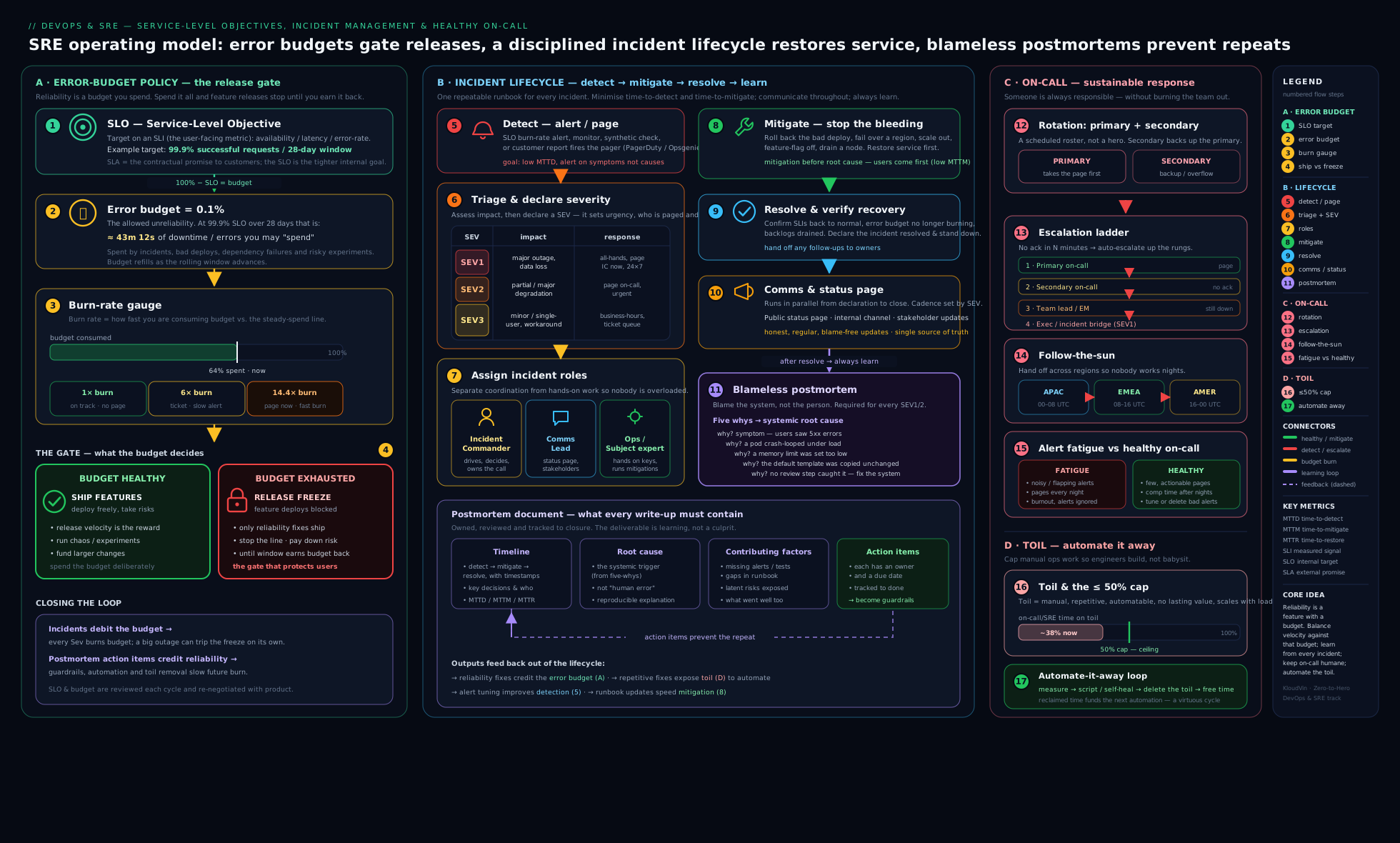
The diagram shows the closed loop: SLO and error budget at the centre gating the release pipeline (ship freely when healthy, freeze when exhausted); an alert paging the on-call rotation into the incident lifecycle (detect → triage → severity → IC/Comms/Ops roles → mitigate → resolve → status-page comms); resolution flowing into a blameless postmortem whose action items (often toil elimination) return to the prioritised backlog; and the ≤50% toil cap reserving engineering time so that backlog can actually be done.
Hands-on lab
This lab is process, not infrastructure — the deliverables of SRE are documents and policies as much as code, and being able to write a crisp error-budget policy, run a clean incident, and produce a sharp blameless postmortem is exactly what an interviewer (and a real on-call shift) will test. Everything here is free; you need only a text editor and, optionally, a timer. Do it solo or, better, with two or three colleagues role-playing the incident roles.
1. Write an error-budget policy (10 min). For a hypothetical checkout service with SLO = 99.9% availability over a rolling 28 days, write a one-page policy. It must state: the SLO and window; the error-budget value (compute it — 0.1% of 28 days ≈ ~40 minutes); the tiered actions (healthy / at-risk / exhausted) including an explicit change-freeze rule at exhaustion; who declares and lifts the freeze; and the exception process (security/legal hotfixes always allowed, with sign-off). Use the policy table earlier in this lesson as a template.
2. Define your severity levels (5 min). Write a SEV1–SEV4 table for the same service with a concrete example for each level (e.g. SEV1 = “checkout returns errors for all users”; SEV3 = “order-history page slow”). The test of a good severity definition: a teammate handed a fresh incident can classify it in under a minute without debate.
3. Run a tabletop incident (15 min). Role-play this scenario with the lifecycle and roles. Scenario: “At 14:03 burn-rate alerting pages — checkout 5xx rate has spiked to 30%. The last deploy went out at 13:58.”
- Declare the incident and assign severity (it’s customer-facing and widespread → SEV1/SEV2).
- Assign roles: Incident Commander, Comms, Ops (one each, or one person narrating all three if solo).
- Comms opens an incident channel and posts the first update; sets a status page to “investigating”.
- Ops forms the obvious hypothesis (the 13:58 deploy) and mitigates — roll back first, before root-causing.
- Confirm SLIs recover; IC declares resolved; Comms posts “resolved”.
- Keep a timestamped timeline as you go — you’ll need it for step 4.
4. Write the blameless postmortem (15 min). From the tabletop, produce a postmortem document with: summary, impact (estimate users affected, duration, and error budget burned — e.g. ~11 min of 5xx against a ~40-min monthly budget ≈ ~27% of the budget gone), timeline, five-whys analysis ending at a systemic cause, root cause vs contributing factors (list at least three contributing factors), and 3 SMART action items with named owners. Deliberately phrase everything blamelessly — “the deploy process allowed an unhealthy build to take traffic”, never “Priya pushed a bad deploy”.
5. Classify toil (5 min). List five recurring operational tasks for your real or imagined service. For each, mark whether it is toil (manual/repetitive/automatable/no-enduring-value/scales with the service) or not toil (overhead, or genuine engineering). For the top two by time-cost, write a one-line automation plan.
Validation checklist:
- The error-budget policy has a numeric budget, a tiered set of actions, an explicit freeze rule, and a named decision-maker and exception process.
- Severity levels each have a concrete example and a clear customer-impact basis.
- The incident run produced a timestamped timeline, an assigned IC, a mitigation that came before root-cause (rollback first), and a clean resolved declaration.
- The postmortem is blameless (no individual named as cause), quantifies error-budget burn, reaches a systemic cause via five-whys, lists multiple contributing factors, and has owned, SMART action items.
- The toil list correctly separates toil from overhead/engineering and has automation plans for the worst offenders.
Cleanup. Nothing to tear down — keep the four documents (policy, severity table, postmortem, toil list) as portfolio artefacts; they demonstrate SRE competence far better than any certificate. Cost note: entirely free — the only resource consumed is time, which is fitting for a lesson about protecting it.
Practice challenges
Six exercises that escalate from beginner to advanced, built around the incident scenarios this lesson is about. Try each before opening the solution — the value is in reasoning it through, exactly as you would at 3am.
1. (Beginner) Size an error budget and state the freeze rule. Your checkout service has an SLO of 99.95% availability over a rolling 30 days. Roughly how many minutes of “down” budget is that per month? According to a typical error-budget policy, what happens when that budget hits zero — and who decided that, and when?
<details> <summary>Solution</summary>
30 days ≈ 43,200 minutes; the budget is 100% − 99.95% = 0.05% of that ≈ ~21.6 minutes/month. When it is exhausted the policy triggers a change freeze — only reliability fixes and pre-approved exceptions (security/legal hotfixes) ship — until the budget recovers. It was decided in advance, in calm times, by engineering and product together in the written error-budget policy.
Why: the whole point is that the hard “stop shipping features” decision is made dispassionately ahead of time, so nobody has to win an argument mid-crisis. </details>
2. (Beginner) Page, notify, or dashboard-only? Route each alert to the right channel: (a) checkout 5xx rate is spiking right now and customers can’t buy; (b) last night’s non-critical analytics export job failed; © a node is sitting at 80% CPU with no user-visible impact.
<details> <summary>Solution</summary>
(a) Page — urgent and actionable now, a human must act immediately. (b) Notify (Slack/ticket) — important but can wait for business hours. © Dashboard/log only — a cause-level signal with no action required.
Why: the golden rule of on-call is page only on what is both urgent and actionable — routing everything else away from the pager is how you prevent alert fatigue. </details>
3. (Intermediate) Staff the incident. A SEV1 has just been declared: checkout is returning errors for all users. Name the three core incident roles, give one thing each does and one thing each must not do, and say whether your single best debugger should be the Incident Commander.
<details> <summary>Solution</summary>
- Incident Commander (IC) — does coordinate, assign tasks, decide severity, keep the timeline, declare resolution; does not tunnel-vision into the fix on a keyboard.
- Communications Lead — does own the status page, stakeholder/exec updates and the running log; does not make technical changes.
- Operations Lead — does form hypotheses and execute the mitigation (rollback/failover/flag); does not field “what’s the ETA?” questions.
Your single best debugger should usually be Ops, not IC — their value is hands-on-keyboard, and you don’t want that person distracted by coordination.
Why: separating “who decides and communicates” from “who fixes” is the one structural idea that keeps a big incident calm. </details>
4. (Intermediate) Mitigate first. At 14:03 burn-rate alerting pages: checkout 5xx has jumped to 30%. The last deploy went out at 13:58. Write the order of actions, and say plainly whether you root-cause or roll back first — and what the difference between mitigate and resolve is here.
<details> <summary>Solution</summary>
Declare + assign severity → assign IC/Comms/Ops → roll back the 13:58 deploy immediately → confirm SLIs recover and Comms posts an update → then investigate the actual bug → resolve → postmortem. Roll back first. Mitigate = stop customer pain with the fastest available action (here, the rollback); resolve = the underlying defect is actually fixed and the service confirmed fully healthy. They are different steps.
Why: every minute spent understanding the bug while customers are down is error budget and trust burned for nothing — restore service, then diagnose in calm. </details>
5. (Advanced) Make it blameless, then find the real causes. An incident summary reads: “On-call engineer ran kubectl delete and wiped the payments namespace.” Rewrite the cause blamelessly, run a short five-whys to a systemic cause, and list three contributing factors rather than a single root cause.
<details> <summary>Solution</summary>
Blameless framing: “The system allowed a single manual command to delete a production namespace with no guardrail or confirmation” — never “Sam deleted payments”. Five-whys: why did one command delete prod? → destructive ops had no confirmation/scoping → why? → on-call holds broad cluster-admin → why? → there is no least-privilege break-glass flow → systemic cause: destructive production actions have no guardrail or approval step. Contributing factors (Swiss-cheese holes): over-broad RBAC; no --dry-run/typed-confirmation on destructive commands; prod and staging contexts look identical at the prompt; no protective admission policy; the alert fired late.
Why: apply the replacement test — a different competent engineer could plausibly have done the same, so change the system (guardrails), not the person; fixing only “be more careful” leaves every other hole open. </details>
6. (Advanced) Audit the toil, apply the cap. Your SRE team reports 70% of its time on toil this quarter. Classify each task as toil / overhead / engineering: (a) manually restarting a wedged service ~3×/week; (b) the weekly planning meeting; © writing an operator that auto-restarts that service; (d) hand-provisioning a database account for every new tenant. Then give the first two responses the SRE playbook prescribes when toil exceeds 50%.
<details> <summary>Solution</summary>
(a) Toil — manual, repetitive, automatable, no lasting value, scales with the service. (b) Overhead — necessary non-toil (planning isn’t automatable rote work). © Engineering — judgement plus a lasting improvement that reduces future toil. (d) Toil — scales linearly with tenants and should become self-service. Over 50%, the playbook says: measure it, then automate the biggest sources first and push work back to the dev teams (“you build it, you run it”) — redirect overflow to product, and only hire after automation.
Why: the 50% cap exists precisely to force the investment in ©-type engineering that breaks the vicious cycle where a growing service buries the team in ever more (a) and (d). </details>
Common beginner mistakes
These are conceptual traps — the wrong mental model — and are distinct from the symptom→cause→fix troubleshooting table below.
- “We should aim for 100% uptime and zero errors.” 100% is impossible, ruinously expensive, and it forbids you from ever deploying or experimenting. Right model: pick the right number of nines for your users and treat the error budget as permission to fail a little so you can ship — a team that never spends its budget has set the SLO too loose.
- “Let’s not overreact — it’s only a real incident once we’re sure it’s serious.” Waiting for certainty is exactly how a five-minute blip becomes a one-hour outage. Right model: make declaring an incident cheap and blameless, err toward higher severity, and downgrade later — declaring early costs a Slack channel, declaring late costs customers.
- “The most senior engineer should run the incident.” If your best debugger is also coordinating, updating execs and assigning tasks, they do all of it badly and the fix stalls. Right model: the Incident Commander coordinates and decides but does not hold the keyboard; the deepest expert is most valuable as Ops, shielded from interruptions by the IC.
- “Find the one root cause, then tell that person to be more careful.” Complex systems fail because several holes line up (the Swiss-cheese model), and “human error” is a symptom of a system that let a human err. Right model: identify the trigger, primary cause and contributing factors, fix as many holes as you can, and apply the replacement test — if any competent engineer could have made the same mistake, change the system.
- “Don’t roll back until we understand the bug.” Understanding can take an hour; customers are down now, and mitigation is not the same as resolution. Right model: stop the bleeding first (rollback, feature-flag kill-switch, failover), then root-cause at leisure — mitigate restores service, resolve fixes the cause.
- “The error-budget policy / postmortem is a document we write and file.” A policy nobody enforces is just a graph, and an action item that lives only in a PDF is a wish. Right model: wire the budget into a pipeline gate, get the policy pre-signed by product, and track postmortem action items as SMART, owned backlog tickets — otherwise the same incident returns in six months.
- “Alert on everything so we never miss anything.” A wall of low-signal pages is how you do miss the real one — it drowns in the noise, and the on-call human starts auto-acknowledging. Right model: page only on urgent and actionable symptoms (user-facing, burn-rate based), send everything else to a ticket or dashboard, and treat a flapping alert as a bug to fix.
- “Toil just means boring work, and firefighting all day means we’re earning our keep.” Boring-but-strategic work (planning, design) isn’t toil, and a team buried in manual repetition is failing its mission, not fulfilling it. Right model: toil is manual, repetitive, automatable, no-lasting-value work that scales with the service — cap it at 50% so at least half your time builds the automation that removes it.
Common mistakes & troubleshooting
| Symptom | Likely cause | Fix |
|---|---|---|
| Error budget is tracked but nothing ever changes when it’s spent | No error-budget policy with teeth — the budget is a graph, not a rule | Write a signed-off policy with an explicit change-freeze at exhaustion and a pipeline gate that enforces it |
| Releases keep getting blocked on vague “reliability concerns” even when metrics are fine | No objective gate; reliability decided by opinion/fear | Use the error budget as the arbiter — within budget, releases are not blockable |
| On-call engineers ignore/auto-ack pages | Alert fatigue — too many false/non-actionable alerts | Alert on symptoms + burn rate, delete non-actionable alerts, treat each noisy alert as a bug; add runbooks |
| Incidents are chaotic — duplicate work, no clear decisions, execs interrupting responders | No roles assigned; one person doing everything | Assign an Incident Commander (coordination, not the fix), plus Comms and Ops; IC shields responders |
| Outages last too long; nobody “owns” the incident | No one declared an incident or took the IC role | Make declaring cheap and blameless; assign an IC immediately; train an IC rotation |
| Same incident recurs months later | Postmortem action items never done | Make action items SMART with named owners, file them as backlog tickets, and review until closed |
| Postmortems are shallow / people withhold details | Blame culture — fear of punishment | Make postmortems explicitly blameless; focus on systems; celebrate good postmortems |
| Team is always firefighting, never improving | Toil > 50% crowding out engineering | Measure toil, enforce the 50% cap, automate the top sources, push work back to dev teams |
| Team never hits its error budget | SLO too loose (or over-investing in reliability) | Tighten the SLO or ship faster — a healthy team lands near the budget |
| The fix went in but customers were furious about the silence | Poor incident communication | Post updates on a cadence (even “no news yet”); keep an honest status page; be transparent |
Best practices
- Write the error-budget policy before you need it. Agree, in calm times and with product sign-off, exactly what happens at each budget tier — including the freeze at exhaustion and the exception process — so the decision is never an in-the-moment fight.
- Enforce the budget in the pipeline. A deploy gate that fails when the budget is spent (with an exception path) is what turns policy into practice; couple it with canary auto-rollback for per-release protection.
- Keep on-call humane. Adequate rotation size (6–8+), compensation, a page budget (~≤2/shift), runbooks on every alert, clear escalation, and a real handover. An unsustainable rotation is a reliability risk.
- Ruthlessly fight alert fatigue. Page only on urgent + actionable symptoms; review and delete noisy alerts; a flapping alert is a bug.
- Define severities and roles in writing. Concrete examples per SEV; a trained IC pool; the IC coordinates and shields, Ops fixes, Comms informs. Scale the ceremony to the severity.
- Mitigate before you root-cause. Stop customer pain first (rollback, flag, failover); understand it fully afterwards.
- Communicate relentlessly and honestly. Internal cadence updates and an honest external status page; transparency beats spin.
- Run blameless postmortems with tracked action items. Timeline, five-whys plus contributing factors, SMART owned action items in the backlog, shared widely; celebrate good ones.
- Measure and cap toil at 50%. Reserve ≥50% for engineering; automate the biggest toil first; push work back to dev teams; prefer self-service and prevention.
- Prioritise by error budget. Let data and policy decide reliability-vs-features, not the loudest voice.
Security notes
Incident management and security are deeply intertwined, and a few SRE-specific security considerations matter. First, a security incident is still an incident — the same lifecycle, severity, IC and comms discipline applies — but with crucial differences: security incidents usually invoke a separate, confidential channel and a dedicated security/IR team, may be subject to legal and regulatory breach-notification timelines (GDPR’s 72-hour rule, contractual obligations), and demand evidence preservation (don’t destroy logs/forensics while mitigating — capture state before you wipe and rebuild). Build a path in your incident process to escalate to the security team the moment an incident looks like an intrusion, not after. Second, postmortems and incident channels themselves carry sensitive data — they may contain credentials seen in logs, customer PII, internal topology, and attack detail; control access to them, scrub secrets (and rotate any credential exposed during an incident — a credential seen in an incident channel is a leaked credential), and be careful what goes into a publicly shared postmortem. Third, your observability and alerting are part of security detection — error spikes, anomalous traffic and saturation are often the first visible sign of an attack, so reliability alerts can be the trigger that surfaces a breach; route security-relevant signals to the right responders. Finally, on-call tooling and runbooks are privileged — the on-call engineer often holds powerful access, and paging/escalation tools (PagerDuty et al.) are a target; protect them with strong auth and least privilege, and never put live secrets in a runbook.
Interview & exam questions
-
What is SRE, and how does it differ from DevOps? SRE is a discipline that applies software engineering to operations (Treynor Sloss: “what happens when you ask a software engineer to design an operations team”). DevOps is a broad culture/philosophy for breaking the dev↔ops silo; SRE is one prescriptive implementation of it — “class SRE implements interface DevOps”. SRE adds specific mechanisms: SLO/error-budget policy, the 50% toil cap, and blameless postmortems. Most SRE practices are good DevOps practices.
-
What is an error-budget policy and how does it gate releases? It is a pre-agreed, written rule (signed off by engineering and product) stating what happens at each level of error-budget consumption. While budget remains, teams ship freely; when it is exhausted, the policy triggers a change freeze — only reliability fixes and approved exceptions ship — until the budget recovers. Enforced concretely by a pipeline gate that fails deploys when the budget is spent. It converts the dev-vs-ops tension into an objective, self-enforcing rule.
-
What happens when the error budget is exhausted? And if a team never exhausts it? Exhausted → freeze risky changes, prioritise reliability work, per the policy (with a defined exception path for security/legal hotfixes). Never exhausted → the SLO is probably too loose (the team could ship faster or over-invested in reliability); a budget that is always gone means the SLO is too tight or the system too fragile. A healthy team lands near its budget.
-
Describe the incident-response lifecycle. Detect (ideally via alerting) → declare & triage (assign severity) → assemble (page people, assign roles) → investigate/diagnose → mitigate (stop the bleeding — rollback/flag/failover before full root-cause) → resolve (fully fixed, SLIs healthy) → learn (blameless postmortem). Communication (internal cadence + external status page) runs throughout. MTTD and MTTR are the framing metrics.
-
What are severity levels and why do they matter? Severity (e.g. SEV1 critical → SEV4 low) classifies an incident by customer/business impact, and it drives the entire response: who is paged, how fast, who is informed, whether execs are woken, and whether a status page is used. Define them in writing with concrete examples, tie them to impact (not how hard the fix looks), and err on the side of higher (you can downgrade).
-
Explain the three incident-response roles. Incident Commander (IC): owns and coordinates the incident, assigns tasks, decides severity, keeps the timeline, declares resolution — and notably does not do the hands-on fix (often deliberately not the most senior engineer). Communications Lead: owns status updates, the status page, stakeholder/exec comms, and the running log; shields responders from “any update?” pings. Operations Lead: the hands-on engineer(s) investigating and applying the mitigation. Separating them is what keeps a big incident calm.
-
Why must the Incident Commander usually not be the one fixing the problem? Because the IC’s value is coordination and clear decision-making, and someone simultaneously fixing, communicating to execs, and coordinating others will do all three badly. The deepest technical expert is most valuable as Ops (hands on keyboard), not distracted by coordination — so the IC is frequently a different, trained person whose job is to run the response.
-
What is a blameless postmortem and why blameless? A written post-incident analysis focused on what happened and why, assuming everyone acted in good faith with the information they had, and targeting systemic fixes — never individual punishment. Blameless because blame destroys the truth (people hide details and stop reporting near-misses), and because “human error” is a symptom of a system that allowed the error. The replacement test: would another competent engineer have made the same mistake? If yes, fix the system.
-
Root cause vs contributing factors — and what is the five whys? The five whys repeatedly asks “why?” from the symptom until you reach a systemic, actionable cause. But complex failures rarely have a single root cause — they result from several contributing factors lining up (Swiss-cheese model). Mature postmortems list the trigger, the primary cause, and the contributing factors, and fix as many holes as possible — not just the one named “root cause”.
-
What makes postmortem action items effective? They must be SMART (Specific, Measurable, Assigned to a named owner, Realistic, Time-bound), tracked as real backlog tickets and prioritised against other work until closed, and biased toward eliminating a class of failure (guardrails, automation, safer defaults) over one-off patches and “be more careful”. Action items that live only in the document are the #1 reason the same incident recurs.
-
Define toil. What is not toil? Toil is operational work that is manual, repetitive, automatable, tactical/reactive, of no enduring value, and scales linearly with the service. It is not the same as overhead (email, meetings, hiring, planning — necessary non-toil) nor work requiring genuine engineering judgement or producing a lasting improvement or that is a one-off, even if tedious. Test: does it leave the system permanently better, or just keep the lights on?
-
Why does SRE cap toil at 50%, and what do you do when it’s exceeded? Because toil scales with the service and crowds out the engineering that would eliminate it — uncapped, an SRE team degenerates into a manual ops team and burns out. The cap reserves ≥50% for engineering (automation, projects that reduce future toil/raise reliability). When exceeded: measure it, automate the biggest sources, push work back to dev teams (“you build it, you run it”), redirect overflow to the product team, and only then hire — automation first.
-
What is follow-the-sun on-call, and what makes on-call healthy? Follow-the-sun hands the pager between teams in different time zones so each covers its daytime, eliminating night shifts. Healthy on-call also means: primary/secondary with escalation, an adequate rotation size, compensation, a page budget (~≤2 actionable pages/shift), a runbook on every alert, a real handover, and psychological safety to escalate and to declare incidents.
-
What is alert fatigue and how do you fight it? The desensitisation from too many (often false/non-actionable) alerts, causing on-call to ignore pages and miss the one that matters — a leading cause of missed incidents and burnout. Fight it by alerting on symptoms via burn rate not causes, deleting non-actionable alerts, tuning out flapping (multi-window alerts), adding runbooks, and treating noisy alerts as bugs to fix.
Quick check
- Complete the phrase that captures the SRE↔DevOps relationship: “class SRE _______ interface DevOps”, and say what it means.
- Your error budget hits zero. According to a typical error-budget policy, what changes — and who decided that, and when?
- In a SEV1, why is the Incident Commander usually not the person typing the fix?
- In a blameless postmortem, why do we say “the deploy process allowed an unhealthy build to take traffic” instead of naming the engineer who deployed?
- Which of these is toil: (a) a weekly meeting, (b) manually restarting a stuck service every few days, © designing a new autoscaler? And what is the cap on toil?
Answers
- “implements” — DevOps is a philosophy/culture; SRE is one concrete, prescriptive implementation of it (with error budgets, the toil cap, blameless postmortems, etc.).
- A change freeze kicks in — only reliability fixes and approved exceptions ship, and the team’s focus shifts to reliability until the budget recovers. It was decided in advance, in calm times, by engineering and product together via the written error-budget policy (and the freeze is typically declared by the SRE/eng lead per that policy).
- Because the IC’s job is coordination and clear decisions; doing the fix and coordinating and communicating means doing all three badly. The deepest expert is more valuable hands-on as Ops, while a (often different) trained IC runs the response and shields the responders.
- Because postmortems are blameless — “human error” is a symptom of a system that allowed the error; blame makes people hide the truth and stops near-miss reporting. Focusing on the system produces fixes (add a health-check/guardrail); blaming the person produces fear and no fixes.
- (b) is toil — manual, repetitive, automatable, no enduring value, scales with the service. (a) is overhead (necessary non-toil); © is engineering (judgement + lasting value). The cap: no more than 50% of an SRE’s time on toil (≥50% reserved for engineering).
Exercise
Take a real or realistic service you know and build its complete SRE operating kit, then keep the artefacts in your portfolio:
- Error-budget policy. Pick one SLO (e.g. 99.95% over 30 days), compute the budget in minutes, and write a tiered policy with an explicit freeze rule, decision-maker, and exception process. Then sketch the pipeline gate — describe (or write pseudo-code for) a CI step that queries the live budget and fails the deploy when it’s spent, honouring an exception label.
- On-call design. Design a rotation for a team of seven: primary/secondary, escalation chain (with timeouts), and the page-vs-notify routing for three example alerts. State how you keep it humane (rotation cadence, page budget, runbook requirement).
- Incident runbook + severity matrix. Write a SEV1–SEV4 matrix with concrete examples, and a generic incident runbook: how to declare, how to assign IC/Comms/Ops, the comms cadence, and the “mitigate before root-cause” rule.
- Postmortem. Take a real incident you’ve experienced (or the lab’s tabletop) and write a full blameless postmortem — timeline, five-whys, root cause and ≥3 contributing factors, impact with error-budget burn, and ≥3 SMART action items with owners.
- Toil audit. List your team’s top ten recurring operational tasks, classify each as toil / overhead / engineering, estimate hours/month for the toil, and write an automation roadmap that would get total toil under the 50% line — biggest offenders first.
Capture your reflections: which single action item or automation would remove the most pain, and why error-budget-based prioritisation would (or wouldn’t) work in your organisation’s culture.
Certification mapping
| Exam / certification | Relevant objectives |
|---|---|
| AWS Certified DevOps Engineer – Professional (DOP-C02) | Incident and event response; monitoring/alerting that drives detection and recovery; automated remediation (reducing toil); operational excellence and MTTR |
| Microsoft Azure DevOps Engineer Expert (AZ-400) | Develop an actionable alerting strategy; design a failure-prediction/health strategy; manage incident response; implement blameless retrospectives/feedback loops; SLIs/SLOs |
| Google Cloud Professional DevOps Engineer | This exam is SRE-centric: SLIs/SLOs/error budgets and the error-budget policy, toil identification and reduction, on-call and incident management, blameless postmortem culture, eliminating alert fatigue |
| DevOps Institute SRE Foundation / SRE Practitioner | Core SRE: error budgets and policy, toil and automation, on-call, the incident lifecycle, blameless postmortems, reducing organisational silos, anti-fragility/chaos engineering |
| PagerDuty / incident-management vendor certifications | Incident command, severity classification, roles (IC/Comms/Ops), escalation policies, status-page communication, postmortem process |
Glossary
- SRE (Site Reliability Engineering) — applying software engineering to operations; reliability as a measured, engineered discipline (Google origin).
- SLI / SLO / SLA — measured indicator / internal target / external contract (see the observability lesson for the mechanics).
- Error budget — the allowed unreliability (
100% − SLO) over a window; a quantity of permission to spend on velocity. - Error-budget policy — the pre-agreed, written rule for what the organisation does at each level of budget consumption, including the release-gating freeze.
- Change freeze — the policy-mandated halt on risky releases when the error budget is exhausted; only reliability fixes/exceptions ship.
- On-call — the rotation of engineers responsible for responding to alerts/incidents out of hours.
- Primary / secondary — first responder / backup escalated to if the primary doesn’t acknowledge.
- Escalation policy — the ordered chain of who is paged next if an alert isn’t acknowledged/resolved in time.
- Follow-the-sun — handing on-call between time zones so each team covers its daytime, eliminating night shifts.
- Paging vs notifying — urgent + actionable alerts that override Do-Not-Disturb vs lower-urgency notifications/tickets.
- Alert fatigue — desensitisation from too many (often non-actionable) alerts, causing missed real incidents.
- Incident — an unplanned disruption/degradation requiring a coordinated response.
- Declaring an incident — the deliberate act of naming a situation an incident and spinning up the response (channel, roles, timeline); kept cheap and blameless so people declare early rather than late.
- Severity (SEV) — the impact-based classification of an incident (SEV1 critical → SEV4 low) that drives the response.
- Incident Commander (IC) — the coordinator who owns and runs an incident (not the hands-on fixer).
- Communications Lead — owns status updates, the status page and the incident timeline/log.
- Operations Lead — the hands-on engineer(s) investigating and applying the mitigation.
- Incident channel / war room — the single source of truth for an incident: a dedicated chat channel (and, for big ones, a video bridge) where decisions, timeline and current owner live.
- Mitigate vs resolve — stop the customer pain (rollback/flag/failover) vs fully fix the underlying cause.
- MTTD / MTTR — mean time to detect / mean time to recover (restore); the framing metrics of incident response (MTTR ↔ DORA recovery time).
- Status page — the external page communicating incident status to customers in calm, honest terms.
- Runbook — a short, per-alert document: what the alert means, how to confirm it, first mitigations, and when/how to escalate — so a responder never starts from zero.
- Postmortem (post-incident review / PIR) — the written analysis after an incident, focused on learning.
- Blameless — analysis that assumes good intent and targets systemic fixes, never individual punishment.
- Five whys — repeatedly asking “why?” to reach a systemic, actionable cause.
- Contributing factors — the multiple conditions that lined up to cause a failure (Swiss-cheese model), beyond a single “root cause”.
- Swiss-cheese model — the idea that failures happen when multiple independent holes (weaknesses) line up; the basis for listing several contributing factors rather than one root cause.
- Action items (SMART) — the owned, tracked follow-ups from a postmortem; the only part that prevents recurrence.
- Toil — manual, repetitive, automatable, tactical, no-enduring-value work that scales linearly with the service.
- The 50% toil cap — SREs spend ≤50% of time on toil; ≥50% on engineering that reduces future toil/raises reliability.
- Error-budget-based prioritisation — using the error budget as the objective arbiter of where engineering effort goes: ship features while healthy, reprioritise to reliability when burning/exhausted.
- Auto-remediation — encoding a known, safe, repetitive response so the system heals itself and the page disappears.
- Page budget — the norm that an on-call engineer should receive no more than ~2 actionable pages per 12-hour shift on average; exceeding it is a signal to fix the system or add staff.
- Handover — the written/verbal transfer of ongoing issues, watch-items and context from one on-call shift (or Incident Commander) to the next.
- Shadow (on-call) — a new engineer who rides along on-call beside an experienced responder without being the one paged — safe on-call onboarding.
- Tabletop exercise — a role-played, no-infrastructure incident drill used to practise the lifecycle, roles and comms before a real page.
- Chaos engineering — deliberately injecting controlled failure to find weaknesses before they cause real incidents.
Next steps
You can now operate a service reliably as a discipline: set an error-budget policy that gates releases and freezes them when the budget is spent; run a humane on-call rotation; drive an incident through its lifecycle with clear severity and IC/Comms/Ops roles; turn the aftermath into a blameless postmortem with tracked action items; and measure and cap toil so the team keeps engineering rather than firefighting. The natural next move is to make the monitoring concrete: build the stack that produces the very signals and burn-rate alerts this lesson reacts to, in Prometheus & Grafana, In Depth: Scraping, PromQL, Alertmanager & Dashboards (Hands-On). Revisit the Observability Fundamentals lesson if you want the SLI/SLO/burn-rate mechanics in depth, and connect reliability to delivery throughput with Instrumenting DORA Metrics — where the change-failure-rate and recovery-time metrics this lesson improves are measured and tracked.
One frontier to grow into is chaos engineering: rather than waiting for the next incident to teach you where your system is fragile, you deliberately inject controlled failure — kill a pod, add latency, fail a dependency, drain a zone — in a hypothesis-driven experiment (“if the cache dies, the site should still serve from the database within SLO”), starting small and with a tested abort. Pioneered by Netflix’s Chaos Monkey and the Principles of Chaos Engineering, and now supported by tools such as the open-source Chaos Mesh and LitmusChaos and the managed AWS Fault Injection Service and Azure Chaos Studio, it is the proactive complement to everything in this lesson: error budgets give you the permission to run these experiments (spend a little budget to find a big weakness), and your incident-response muscle is what they exercise. Practised well, chaos engineering turns reliability from something you hope for into something you verify — the fitting endpoint of the SRE journey.