In a nutshell
Imagine your service is a busy hospital, and at 3am something is going wrong with a patient. Monitoring is the bank of bedside alarms: someone decided in advance which vital signs matter, set thresholds, and an alarm beeps when one trips. That is genuinely useful — but it can only ever warn you about problems somebody already thought of. Observability is being the doctor who can order any new test on the spot and reason from the results to diagnose an illness nobody has seen before. That is the whole game: instrument your systems so richly that, from their outputs alone, you can answer questions you never thought to ask in advance.
You build that ability from three kinds of telemetry — the three pillars. Metrics are the cheap, always-on vital signs (“error rate just jumped”). Traces follow one single request through every service it touches, like CCTV following one person room by room (“it was the payments call that was slow”). Logs are the detailed notes of exactly what happened at each step (“card declined, gateway timed out after 240ms”). No single pillar is enough on its own; correlated by a shared ID, together they take you from something is wrong to exactly what, and where in minutes rather than hours.
The second half of the lesson turns reliability into a number you manage. You pick a target — an SLO like “99.9% of requests fast and successful” — which hands you an error budget (the small, deliberate amount of failure you are allowed), and you alert when you are burning that budget too fast. This is what lets a team ship quickly and stay reliable, instead of arguing about which one wins. The whole stack is vendor-neutral thanks to OpenTelemetry, the industry standard you instrument against once and can point at any backend.
Level: Intermediate · Time: ~37 min · You’ll need: basic HTTP (status codes, latency, what a “request” is) and the ability to read YAML — every other term is defined as we go.
You cannot fix what you cannot see. The moment a deployment leaves your pipeline and starts serving real traffic, the only thing standing between a healthy service and a 3am incident is your ability to ask the running system questions and get truthful answers. Observability is that ability: the practice of instrumenting systems so that, from their external outputs alone, you can understand any internal state — including failure modes you never anticipated and therefore never built a dashboard for. It is the difference between “the site is slow, I wonder why” and “checkout p99 latency tripled twelve minutes ago, isolated to the payments service, correlated with a spike in database connection saturation right after release v2.8.1”.
This lesson builds that capability from first principles, vendor-neutrally. We cover the three pillars — logs, metrics and traces — exhaustively, then the analysis frameworks that turn raw telemetry into decisions: the four golden signals, the RED and USE methods. We then make reliability a number you manage with SLIs, SLOs, SLAs, error budgets and burn-rate alerting, before standardising the whole instrumentation layer on OpenTelemetry. Throughout we ground the concepts in a concrete free stack — Prometheus, Grafana, Loki and Tempo — but every idea transfers to Datadog, New Relic, Honeycomb, Azure Monitor, CloudWatch or Google Cloud Operations.
Learning objectives
By the end of this lesson you will be able to:
- Distinguish monitoring from observability, and explain why the three pillars exist and what question each answers.
- Produce structured, levelled, correlated logs; choose counter / gauge / histogram / summary metric types correctly and reason about cardinality; and instrument distributed traces with proper context propagation.
- Apply the four golden signals and the RED and USE methods to decide what to measure for any service or resource.
- Define SLIs and SLOs, compute an error budget, and configure multi-window, multi-burn-rate alerts that page on symptoms, not causes.
- Adopt OpenTelemetry (API, SDK, Collector, OTLP) as a vendor-neutral instrumentation standard and understand where the Collector sits.
- Wire observability into the delivery pipeline — deployment markers, DORA signals and post-deploy verification — and write alerts that humans can actually act on.
Prerequisites
You should be comfortable with the shape of a modern service — an HTTP/gRPC application, probably containerised, deployed by a CI/CD pipeline — and with reading YAML. A basic grasp of HTTP status codes, latency, and what a “request” is will carry you through the examples. Familiarity with Docker helps for the lab, which runs Prometheus and Grafana locally. No prior monitoring-tool experience is assumed; we define every term. This lesson sits in the Observability module of the DevOps Zero-to-Hero course, after the containers and CI/CD anatomy lessons and before Secrets & Configuration Management. The reliability targets you learn to set here are what the deployment-strategy and DORA lessons use to decide whether a release is safe.
Core concepts: monitoring vs observability
The two words are used interchangeably in marketing and precisely by practitioners. The distinction is worth pinning down because it shapes how you instrument.
Monitoring is checking known conditions: you decide in advance what could go wrong (CPU above 90%, error rate above 1%, disk nearly full), build a check or dashboard for each, and get alerted when a threshold trips. Monitoring answers questions you already thought to ask. It is necessary but bounded — it cannot tell you about a failure mode you did not predict, because nobody built the check.
Observability is a property of the system: how well you can understand its internal state from its external outputs without shipping new code. A highly observable system lets you ask new, arbitrary questions during an incident — “show me p99 latency for requests from EU customers, on the new pod template, hitting the v3 API, that also touched the cache” — and get an answer from telemetry you already emit. The term is borrowed from control theory, where a system is “observable” if its internal state can be inferred from its outputs. The practical test, popularised by the observability community, is whether you can debug a novel problem (“unknown unknowns”) with existing data, or whether you have to add logging and redeploy first.
| Monitoring | Observability | |
|---|---|---|
| Question type | Known unknowns (“is X above threshold?”) | Unknown unknowns (“why is this specific slice slow?”) |
| Set up | Predefined dashboards & alerts | Rich, high-dimensional telemetry you can query ad hoc |
| Cardinality | Low (aggregate counters) | High (per-request attributes: user, route, region, version) |
| Failure it catches | The ones you anticipated | Ones you did not |
| Typical output | Red/green, threshold alerts | Exploratory queries, traces, correlations |
Observability is built from three complementary data types — the three pillars — plus, increasingly, the connective tissue between them (exemplars, trace-to-log links). No single pillar is sufficient: metrics tell you something is wrong cheaply, traces tell you where in a request, logs tell you exactly what happened. Modern practice treats them as one connected dataset, not three silos.
The three pillars overview
| Pillar | What it is | Best at answering | Shape of data | Cost driver |
|---|---|---|---|---|
| Logs | Timestamped, discrete event records | “What exactly happened in this event/request?” | High-volume text/JSON events | Volume (bytes ingested/retained) |
| Metrics | Numeric measurements aggregated over time | “Is the system healthy? What’s the trend/rate?” | Compact numeric time series | Cardinality (number of series) |
| Traces | The causal path of one request across services | “Where did this request spend time / fail?” | Trees of timed spans, sampled | Span volume × sampling |
The defining trade-off: metrics are cheap and aggregate but lose per-event detail (you cannot ask a counter which user failed); logs are detailed but expensive at volume and hard to aggregate; traces show causality across services but are usually sampled so any single trace may be absent. You want all three, correlated by shared identifiers (a trace_id in your logs, an exemplar linking a metric bucket to a trace). The rest of this lesson takes each in turn.
Pillar 1 — Logs
A log is a timestamped record of a discrete event: “user 4711 logged in”, “order 88 failed validation”, “connection pool exhausted”. Logs are the oldest and most intuitive telemetry, and the most frequently done badly.
Structured vs unstructured
The single highest-leverage change you can make to your logging is to emit structured logs — typically JSON — instead of free-text lines.
# Unstructured (hard to query): you must regex this at 3am
2026-06-15 10:42:01 ERROR order 88 failed for user 4711: card declined (took 240ms)
{ "ts":"2026-06-15T10:42:01Z", "level":"error", "msg":"order failed",
  "order_id":88, "user_id":4711, "reason":"card_declined",
  "duration_ms":240, "service":"payments", "trace_id":"a1b2c3d4..." }
The structured version is machine-parseable: your aggregation backend can index reason, filter level:error AND service:payments, and aggregate duration_ms — none of which is reliable against free text. Structured logging is the prerequisite for everything else (correlation, alerting on log-derived metrics, fast search). Emit logs to stdout/stderr as JSON and let the platform (Docker, Kubernetes, systemd) collect them — this is the twelve-factor “logs as event streams” rule: the app should not know or care where logs are written.
Log levels
Levels let you control verbosity per environment and filter noise. The conventional hierarchy, most-to-least severe:
| Level | Meaning | Example | Page a human? |
|---|---|---|---|
| FATAL / CRITICAL | Service cannot continue; about to exit | Cannot bind port, config missing at boot | Yes |
| ERROR | A request/operation failed; needs attention | Unhandled exception, payment gateway down | Maybe (via SLO, not per-line) |
| WARN | Unexpected but handled; potential problem | Retry succeeded, deprecated API used, near quota | No (review trends) |
| INFO | Normal significant events | Service started, request completed, job ran | No |
| DEBUG | Detailed flow for diagnosing | Variable values, branch taken | No (off in prod) |
| TRACE | Extremely fine-grained | Every function entry/exit | No (rare in prod) |
Run INFO in production by default, DEBUG in development. The classic mistake is logging at the wrong level: an ERROR for an expected, handled condition trains people to ignore errors (alert fatigue’s quieter cousin). Reserve ERROR for things that genuinely failed and WARN for “noteworthy but handled”.
Correlation IDs and contextual fields
In a distributed system, one user action fans out across many services. To follow it, every log line must carry a correlation ID (a.k.a. request ID) — generated at the edge (load balancer or first service), propagated downstream via a header (commonly traceparent from W3C Trace Context, or a custom X-Request-ID), and attached to every log entry. With OpenTelemetry, the trace_id and span_id are your correlation IDs, which is what lets you jump from a log line straight to the full distributed trace.
Other fields you should attach as standard context: service, version (the release SHA — invaluable for “did this start after the deploy?”), env, region/pod, and the relevant business IDs (user_id, order_id). Add them once via a logger middleware so every line is consistent.
Aggregation, retention and PII
Logs are useless scattered across hosts that get destroyed when a pod restarts. A log aggregation pipeline ships them to a central, queryable store:
- Collection / shipping: an agent on each node tails container stdout and forwards it — e.g. Promtail/Grafana Alloy, Fluent Bit, Vector, Filebeat, or the OpenTelemetry Collector.
- Storage / query: Loki (label-indexed, cheap — the focus here), the ELK/OpenSearch stack (full-text indexed, powerful but heavier), or a vendor backend (Datadog, Splunk, CloudWatch Logs, Azure Monitor Logs).
- Retention: logs are the most expensive pillar by volume, so tier it — keep full-fidelity logs hot for days, then downsample/archive (or drop DEBUG) for cost. Define retention by value, not by default.
- PII & secrets: logs are a notorious leak vector. Never log passwords, tokens, full card numbers or personal data; scrub or hash sensitive fields at the source, and treat the log store as in-scope for compliance (GDPR, PCI). A logged secret is a leaked secret — rotate it.
A worked Loki query (LogQL) — error rate from logs, for one service, as a metric:
sum(rate({service="payments"} | json | level="error" [5m]))
This selects the payments log stream, parses JSON, filters errors, and computes a per-second rate — turning logs into a metric you can graph and alert on.
Pillar 2 — Metrics
A metric is a numeric measurement captured over time: a time series of (timestamp, value) points, identified by a name plus key/value labels (dimensions). Metrics are cheap to store and fast to query in aggregate, which makes them the backbone of dashboards and alerting. The dominant open model is Prometheus, whose data model and conventions OpenTelemetry and most vendors now mirror.
The four metric types
Choosing the right type is the most common metrics mistake. The four standard types:
| Type | What it represents | Can it go down? | Example | How you query it |
|---|---|---|---|---|
| Counter | A cumulative total that only increases (resets to 0 on restart) | No (monotonic) | http_requests_total, errors_total, bytes sent |
Wrap in rate() / increase() — never graph the raw counter |
| Gauge | A value that can go up or down — a snapshot | Yes | temperature, queue_depth, memory_bytes, in-flight requests |
Graph directly; avg/max/min |
| Histogram | Buckets counting observations ≤ a boundary, plus _sum and _count |
Buckets are counters | Request latency, response size distribution | histogram_quantile() for percentiles; aggregatable |
| Summary | Client-side pre-computed quantiles (e.g. p50/p99) plus _sum/_count |
Quantiles vary | Same domains as histogram, computed in-process | Read quantile series directly; cannot aggregate across instances |
The counter-vs-gauge distinction matters because you never plot a raw counter — a line that only ever climbs is meaningless; you plot its rate (rate(http_requests_total[5m]) = requests/sec). Counters survive restarts because tools detect the reset.
Histogram vs summary is the classic interview question. A histogram ships raw bucket counts and computes quantiles at query time on the server — crucially, histograms are aggregatable across instances, so you can compute a fleet-wide p99 from ten pods’ buckets. A summary computes quantiles inside the application and ships the results — accurate per instance, lower query cost, but you cannot average percentiles, so you cannot get a correct cluster-wide p99 from summaries. Modern guidance: prefer histograms (especially Prometheus native/exponential histograms, which give high accuracy with far fewer series). Use a summary only when you need an exact quantile from a single instance and cannot pick bucket boundaries in advance.
Computing percentiles from a histogram
# p99 request latency over 5m, aggregated across all instances, by route
histogram_quantile(
  0.99,
  sum(rate(http_request_duration_seconds_bucket[5m])) by (le, route)
)
le (“less than or equal”) is the bucket-boundary label; summing the bucket rates across instances before histogram_quantile is exactly why histograms aggregate and summaries do not.
Cardinality — the thing that bankrupts you
Cardinality is the number of unique time series = the product of all label-value combinations. A metric http_requests_total{method, status, route} with 4 methods × 6 statuses × 50 routes = 1,200 series. Add a label user_id with 1,000,000 values and you have 1.2 billion series — a cardinality explosion that will exhaust memory and grind your TSDB to a halt. This is the cardinal sin of metrics.
Rules to live by:
- Labels must be bounded. Never put unbounded values —
user_id,email,request_id, raw URLs with IDs, timestamps — in metric labels. - High-cardinality belongs in logs/traces, not metrics. If you need per-user or per-request detail, that is what the other two pillars are for.
- Normalise routes. Use
/orders/:id, not/orders/88,/orders/89, … as the label value. - Watch the multiplicative effect: every new label multiplies, it does not add.
This trade-off — metrics are cheap because they are low-cardinality aggregates — is the through-line of the three pillars.
Pull vs push, scraping, and PromQL basics
Prometheus uses a pull model: it scrapes an HTTP /metrics endpoint on each target every scrape_interval (commonly 15–30s). Targets are found by service discovery (Kubernetes, EC2, Consul, file). Pull makes “is the target up?” trivial (the scrape either works or doesn’t → the up metric) and avoids every app needing push credentials. For short-lived batch jobs that die before a scrape, you push to a Pushgateway; OpenTelemetry and some vendors use a push model via OTLP instead. Both models are valid; know which your tool uses.
A handful of PromQL patterns cover most needs:
rate(http_requests_total[5m])                              # per-second request rate
sum(rate(http_requests_total[5m])) by (status)             # rate grouped by status
sum(rate(http_requests_total{status=~"5.."}[5m]))          # error (5xx) rate, regex match
/ sum(rate(http_requests_total[5m]))                       #   as a ratio of all requests
avg(node_memory_MemAvailable_bytes) by (instance)          # gauge, averaged per host
histogram_quantile(0.95, sum(rate(latency_seconds_bucket[5m])) by (le))  # p95 latency
Key idea: rate() over a counter gives per-second change; sum(... ) by (label) aggregates while keeping a dimension; =~ is a regex matcher. These five lines underpin the golden signals and SLOs below.
Pillar 3 — Traces
A distributed trace records the end-to-end journey of a single request as it flows through multiple services, as a tree of spans. It is the pillar that answers where a request spent its time or failed, across service boundaries that metrics and logs (per-service) cannot connect on their own.
Spans, trace context and propagation
- A span is one timed unit of work — an HTTP handler, a DB query, a function — with a name, start/end timestamps (hence a duration), a status (ok/error), and attributes (key/values like
http.route,db.statement,user.id). - A trace is all spans sharing one
trace_id. Spans form a tree via parent span IDs: the root span is the entry request; child spans are downstream calls. This tree, drawn on a timeline, is the familiar waterfall that shows exactly which call was the bottleneck. - Context propagation is what stitches it together. When service A calls service B, it injects the trace context into the outgoing request headers; B extracts it and continues the same trace. The standard is W3C Trace Context — the
traceparentheader carriesversion-trace_id-parent_span_id-flags. Propagation is the make-or-break step: get it wrong and you get disconnected single-service spans instead of one end-to-end trace.
traceparent: 00-4bf92f3577b34da6a3ce929d0e0e4736-00f067aa0ba902b7-01
             ^^ ^------------ trace_id ------------^ ^-- parent --^ ^flags
Sampling
Traces are high-volume; capturing every request at scale is expensive, so you sample.
| Strategy | When the decision is made | Pro | Con |
|---|---|---|---|
| Head-based | At the start of the trace (e.g. keep 5%) | Simple, cheap, decided once and propagated | May miss the rare error trace you most wanted |
| Tail-based | After the trace completes, in the Collector | Can keep all errors and slow traces, drop boring fast ones | Needs buffering all spans → more Collector resources |
A common production setup: a small head sample for baseline, plus tail-based sampling in the OpenTelemetry Collector that always keeps traces with errors or high latency. Always propagate the sampling decision so a trace is wholly kept or wholly dropped.
Exemplars — linking metrics to traces
An exemplar attaches a sample trace_id to a metric data point (e.g. one slow request’s trace ID on a latency histogram bucket). In Grafana you then click a spike on the latency graph and jump straight to an example trace of a slow request. Exemplars are the connective tissue that turns three pillars into one investigative flow: metric (something’s slow) → exemplar → trace (which call) → trace-to-logs (what it logged).
Tracing backends include Tempo (the focus here, cheap object-storage-backed), Jaeger, Zipkin, and vendor APMs (Datadog, New Relic, Honeycomb, Azure Application Insights, AWS X-Ray). Almost all now ingest OpenTelemetry natively.
OpenTelemetry — the vendor-neutral standard
The historical problem with observability was lock-in: each vendor shipped its own agent and SDK, so adopting Datadog meant Datadog libraries everywhere, and switching meant re-instrumenting your entire estate. OpenTelemetry (OTel) — a CNCF project, now the de facto standard and the one to learn — solves this. You instrument once against a vendor-neutral API and can send the data to any compatible backend. It is the merger of the earlier OpenTracing and OpenCensus projects and covers all three pillars (traces and metrics are stable; logs, historically last, have now reached stability in the specification and Collector with solid SDK support across major languages) under one model.
The components, and where each sits:
| Component | What it is | You touch it when |
|---|---|---|
| API | The language-neutral interface your code calls to create spans/metrics/logs — no backend dependency | Adding manual instrumentation in app code |
| SDK | The concrete implementation: sampling, batching, resource detection, exporters | Configuring how telemetry is processed/exported |
| Instrumentation libraries | Drop-in auto-instrumentation for common frameworks (HTTP servers/clients, gRPC, DB drivers, queues) | Getting traces/metrics with zero code changes |
| OTLP | OpenTelemetry Protocol — the standard wire format (gRPC/HTTP) for shipping telemetry | Sending data app → Collector → backend |
| Collector | A standalone agent/gateway that receives → processes → exports telemetry | Decoupling apps from backends; central processing |
| Semantic conventions | Standard attribute names (http.route, db.system, service.name) |
Keeping telemetry consistent and portable |
Two distinctions matter. Auto- vs manual instrumentation: auto-instrumentation (an agent or library) gives you spans and HTTP/DB metrics with no code changes — start here; add manual spans/attributes for business-specific operations (charge.amount, tenant.id). The Collector is the keystone of a clean architecture: instead of every app exporting straight to a backend, apps send OTLP to a Collector (run as a per-node agent and/or a central gateway) which then batches, filters, redacts PII, tail-samples, and fans out to one or many backends (e.g. metrics → Prometheus, traces → Tempo, logs → Loki). This means changing or adding a backend is a Collector config change, not an app redeploy — the practical payoff of “no vendor lock-in”. A minimal Collector pipeline:
receivers:
  otlp: { protocols: { grpc: {}, http: {} } }      # apps push OTLP here
processors:
  batch: {}                                         # batch before export
  tail_sampling:                                    # keep all errors, sample the rest
    policies:
      - name: errors, type: status_code, status_code: { status_codes: [ERROR] }
exporters:
  prometheus: { endpoint: "0.0.0.0:8889" }          # metrics → Prometheus scrape
  otlp/tempo: { endpoint: "tempo:4317", tls: { insecure: true } }  # traces → Tempo
service:
  pipelines:
    traces:  { receivers: [otlp], processors: [tail_sampling, batch], exporters: [otlp/tempo] }
    metrics: { receivers: [otlp], processors: [batch], exporters: [prometheus] }
The practical recommendation for any new service: adopt OpenTelemetry from day one with auto-instrumentation plus a Collector. You get all three correlated pillars, portability across every backend in this lesson, and a single place to control sampling, cost and PII redaction.
The four golden signals
Knowing how to emit telemetry leaves the question of what to measure. Google’s SRE book gives the canonical starting point for any user-facing service: the four golden signals. If you measure nothing else, measure these.
| Signal | What it is | How to measure | Why it matters |
|---|---|---|---|
| Latency | Time to serve a request | Histogram → p50/p95/p99; split success vs error latency | Slow is the new down; tail latency is what users feel |
| Traffic | Demand on the system | Requests/sec (counter rate()), or queries/sec, connections |
Context for the others; capacity planning |
| Errors | Rate of failed requests | Rate of 5xx (and failed 2xx by content), as a ratio of traffic | Direct measure of broken-ness |
| Saturation | How “full” the service is | Most-constrained resource utilisation (CPU, memory, queue depth, connection pool) vs its limit | The leading indicator of imminent failure |
Two subtleties interviewers probe. First, measure latency for failed requests separately — a fast 500 can otherwise drag your “average latency” down and hide an outage. Second, saturation is a leading signal: errors and latency tell you that you are already hurting; saturation (a queue filling, a pool nearing its cap, memory climbing) warns you before it tips over, so it is your best early-warning metric.
RED and USE — two methods that scale
The golden signals are the goal; RED and USE are the two practical recipes for getting there, one for services and one for resources.
RED — for request-driven services (every microservice, API, web app). For each service, measure:
- Rate — requests per second.
- Errors — number/percentage of those requests that failed.
- Duration — the distribution (histogram) of how long they took.
RED is a subset of the golden signals (Rate=Traffic, Errors=Errors, Duration=Latency) deliberately omitting saturation, because it gives you a uniform dashboard for every service — same three panels, instantly comparable. It is the default mental model for instrumenting microservices.
USE — for resources (CPUs, disks, network interfaces, memory pools, connection pools). For each resource, measure:
- Utilisation — the percentage of time the resource was busy (or % of capacity used).
- Saturation — the degree of extra work queued because the resource is full (run-queue length, swap, queued connections).
- Errors — error events for that resource (disk errors, dropped packets, allocation failures).
USE (Brendan Gregg’s method) is the recipe for infrastructure and capacity investigation: walk every resource, check U/S/E, and you systematically find the bottleneck. Errors appears in both, which is why “is it broken?” is always part of the answer.
| RED | USE | |
|---|---|---|
| Applies to | Services / request flows | Resources (CPU, memory, disk, queues) |
| Question | “Is my service serving users well?” | “Which resource is the bottleneck?” |
| Metrics | Rate, Errors, Duration | Utilisation, Saturation, Errors |
| Use it for | Microservice dashboards, SLOs | Node/host/cluster capacity & saturation |
Use both: RED tells you the service is unhealthy; USE tells you which underlying resource to blame.
SLIs, SLOs, SLAs and error budgets
Dashboards full of graphs do not, by themselves, tell you whether your service is reliable enough or whether you can risk a deploy. For that you need to turn reliability into a managed number. This is the heart of Site Reliability Engineering.
The three letters
| Term | Full name | What it is | Example |
|---|---|---|---|
| SLI | Service Level Indicator | A measured number: the quantitative measure of one aspect of service quality | “Proportion of HTTP requests served in <300ms and without a 5xx” = 99.93% this week |
| SLO | Service Level Objective | Your internal target for an SLI over a window | “99.9% of requests fast & successful over 30 days” |
| SLA | Service Level Agreement | An external, contractual promise to customers, usually with penalties | “99.9% uptime or you get a 10% credit” |
The relationships that matter: an SLI is the measurement, an SLO is the goal you set on it, and an SLA is a contract that wraps an (usually looser) SLO with consequences. Always set your internal SLO tighter than your external SLA — if you promise customers 99.9% but target 99.95% internally, you get warned and react before you breach the contract. Not every service needs an SLA; every important service should have SLOs.
Choosing good SLIs
A good SLI is from the user’s perspective and expressed as a ratio of good events to valid events:
SLI = good events / valid events
    = (requests served < 300ms AND status != 5xx) / (all valid requests)
Common SLI types: availability (successful / total requests), latency (fast / total requests — note: a threshold, not an average), quality/correctness, freshness (for data pipelines), durability. Measure at the load balancer or service edge, count only valid requests (exclude, say, client 4xx that are the user’s fault, depending on your definition), and prefer request-based ratios over time-based “uptime”, which hides partial degradation.
Error budgets — the killer concept
If your SLO is 99.9%, then 0.1% of requests are allowed to fail. That allowance is your error budget: the maximum acceptable unreliability over the window.
Error budget = 100% - SLO = 100% - 99.9% = 0.1%
Over 30 days (≈ 43,200 minutes): 0.1% ≈ 43.2 minutes of "down" budget
Or, per ~100,000 requests/day → 3,000,000/month: 0.1% = 3,000 failed requests allowed/month
The famous “nines” of allowed downtime per 30-day month:
| SLO | Allowed unreliability | ≈ downtime / 30 days | ≈ downtime / year |
|---|---|---|---|
| 99% (“two nines”) | 1% | ~7.2 hours | ~3.65 days |
| 99.9% (“three nines”) | 0.1% | ~43.2 minutes | ~8.76 hours |
| 99.95% | 0.05% | ~21.6 minutes | ~4.38 hours |
| 99.99% (“four nines”) | 0.01% | ~4.32 minutes | ~52.6 minutes |
| 99.999% (“five nines”) | 0.001% | ~26 seconds | ~5.26 minutes |
The error budget is what makes reliability a shared decision instead of an argument. It aligns the eternal dev-vs-ops tension:
- Budget remaining → ship freely. Reliability is fine; spend the budget on velocity, feature flags, risky deploys, chaos experiments.
- Budget exhausted → freeze risky changes. The team’s priority shifts to reliability work (hardening, rollback, fixing the top sources of errors) until the budget recovers.
100% is the wrong target for everything: it is impossible, infinitely expensive, and removes your ability to ever deploy. The budget gives you permission to fail a little, which is what lets you move fast safely. It also directly informs deployment strategy — a canary that consumes too much budget is auto-rolled-back.
Burn-rate alerting
The naïve SLO alert — “page me whenever the error budget for the month is gone” — pages too late (the damage is done). The naïve threshold alert — “page on any error rate > 0” — pages constantly. Burn-rate alerting (from the Google SRE workbook) solves both.
Burn rate is how fast you are consuming the error budget relative to the rate that would exhaust it exactly at the window’s end.
- A burn rate of 1× spends the whole budget exactly over the SLO window (e.g. 30 days) — sustainable, no alert.
- A burn rate of 10× spends it in a tenth of the window — at 10× a 30-day budget is gone in 3 days.
- A burn rate of 14.4× burns 2% of a 30-day budget in 1 hour — a fast, serious problem.
You alert on burn rate, scaled to severity, using multiple windows to balance speed against false alarms:
| Severity | Burn rate | Budget consumed | Windows (long + short) | Action |
|---|---|---|---|---|
| Fast burn | 14.4× | 2% in 1 hour | 1h and 5m both hot | Page immediately |
| Slower burn | 6× | 5% in 6 hours | 6h and 30m both hot | Page |
| Slow burn | 1×–3× | 10% in 3 days | 3d and 6h both hot | Ticket (not a page) |
Two design ideas make this work:
- Multi-window (a long window confirms the problem is real and sustained; a short window confirms it is still happening now) — both must fire to alert. This kills the false page from a brief blip (long window stays cold) and the lingering page after recovery (short window goes cold immediately).
- Multi-burn-rate — a fast burn pages day or night; a slow, grinding burn that will still breach the SLO opens a ticket rather than waking someone. You alert proportionally to how quickly you will run out of budget.
A Prometheus alerting rule for the fast-burn case:
groups:
- name: slo-burn-rate
  rules:
  - alert: ErrorBudgetFastBurn
    # error ratio over BOTH a 1h and a 5m window exceeds 14.4x the 0.1% budget
    expr: |
      (
        sum(rate(http_requests_total{status=~"5.."}[1h]))
          / sum(rate(http_requests_total[1h]))
      ) > (14.4 * 0.001)
      and
      (
        sum(rate(http_requests_total{status=~"5.."}[5m]))
          / sum(rate(http_requests_total[5m]))
      ) > (14.4 * 0.001)
    for: 2m
    labels: { severity: page }
    annotations:
      summary: "Burning error budget 14.4x — 2% of 30-day budget in 1h"
      runbook: "https://runbooks.example.com/payments-error-budget"
The crucial property: you alert on the symptom the user feels (requests failing fast) at a rate tied to business impact (budget burn), not on a cause (one node’s CPU) that may or may not matter.
Alerting philosophy: symptoms, fatigue and runbooks
Good telemetry is wasted if the alerts on top of it are bad. Three principles:
Alert on symptoms, not causes. Page on what the user experiences — “checkout error rate breaching SLO”, “p99 latency too high” — not on every underlying cause (“CPU 85%”, “pod restarted”). Causes are numerous, often self-healing, and create noise; symptoms are few and always matter. A high CPU that is not hurting users is not worth waking someone. Cause-level signals belong on dashboards and as context attached to a symptom alert, not as independent pages.
Every page must be actionable and urgent. The test: does a human need to do something, right now? If not, it is a ticket or a dashboard, not a page. Alert fatigue — the desensitisation that comes from too many alerts, especially false or non-actionable ones — is a leading cause of missed real incidents and on-call burnout. Ruthlessly delete alerts that nobody acts on. Symptom-plus-burn-rate alerting exists precisely to keep the page count low and the signal high.
Runbooks and on-call. Every alert should link a runbook: a short, specific document — what this alert means, how to confirm it, the first diagnostic queries, mitigation steps, and escalation. Pair this with a sane on-call rotation (humane hours, clear escalation, blameless post-incident reviews) and an error budget policy that says what happens when the budget is spent. Tie severity to response: page (urgent, human now) vs ticket (handle in business hours) vs log/dashboard (no notification).
Dashboards
Dashboards turn telemetry into shared situational awareness. A few rules separate useful dashboards from wallpaper:
- One overview per service built on RED (rate, errors, duration) so every service looks the same and is instantly comparable, plus a saturation row (USE) for its key resources.
- Lead with the SLO and remaining error budget — the single most decision-relevant number — then the golden signals, then drill-downs.
- Template by label (service, environment, region) using Grafana variables so one dashboard serves many services.
- Annotate deploys (see below) so every change is visible on the timeline.
- Avoid the “wall of 80 graphs” — design top-down: overview → service → instance, following the investigative path.
Where observability plugs into the pipeline
Observability is not a post-launch afterthought; it is part of the delivery loop and closes it.
- Deployment markers / annotations. Have the CD pipeline emit an event/annotation at each deploy (service, version/SHA, time). Overlaid on dashboards, this answers the single most common incident question — “did this start with the last release?” — in one glance, and it is the join key between your
versionlabel and a latency regression. - Post-deploy verification. The pipeline’s Verify stage watches the new version’s golden signals / SLO and automatically rolls back if they degrade — the bridge from this lesson to deployment strategies (canary analysis is literally “watch the SLIs of the canary and promote or abort”).
- DORA metrics. Two of the four DORA metrics are reliability/observability signals: change failure rate (the fraction of deploys causing a failure — derived from your error/SLO signals and rollbacks) and failed-deployment recovery time / MTTR (how fast you detect and restore — driven directly by your alerting and runbooks). Good observability is what makes these measurable and improvable.
- Service-level instrumentation as a release gate. “No SLO, no production” is an increasingly common platform policy: a service must emit RED metrics and declare SLOs before it is allowed to ship.
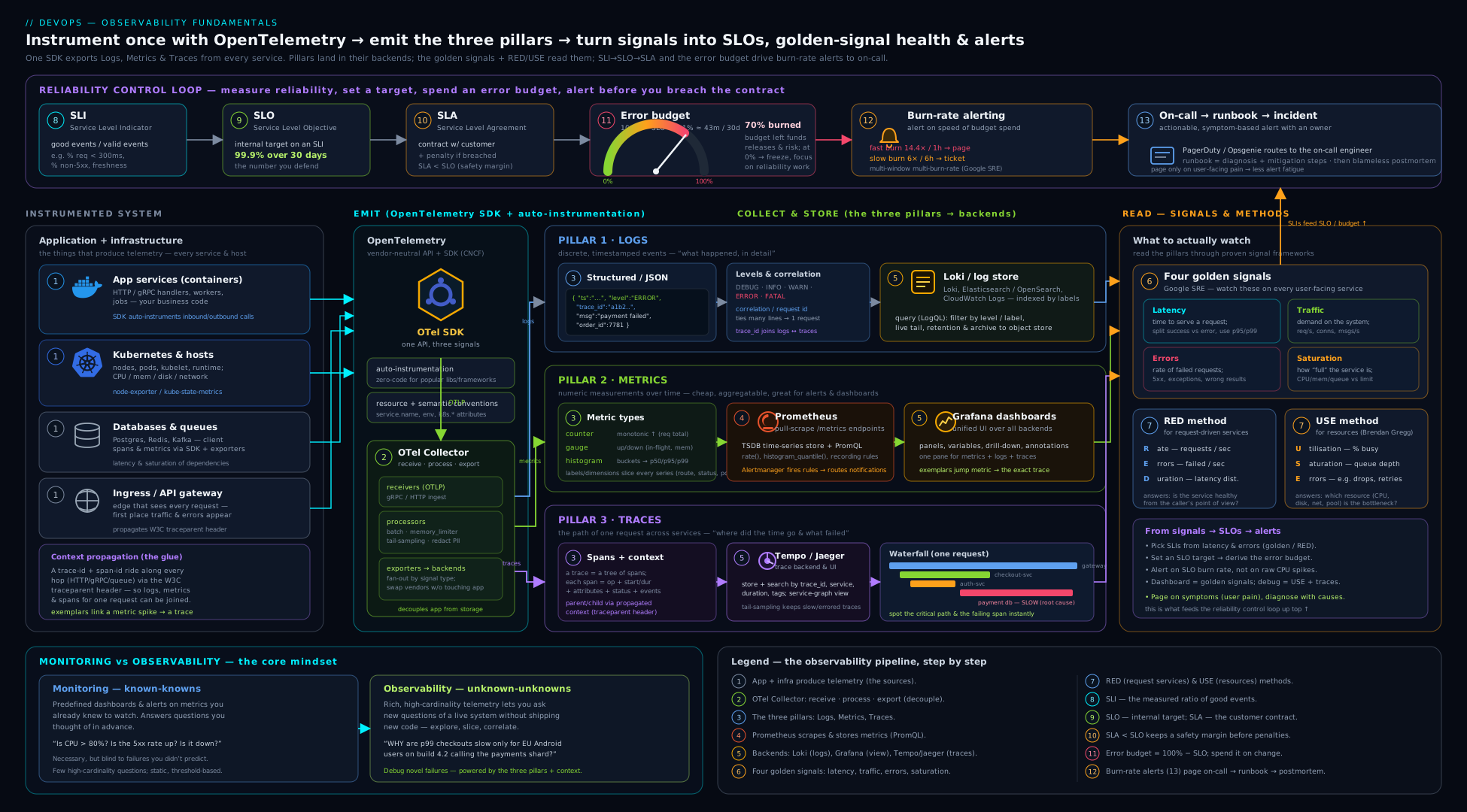
Read it left to right: the three pillars (logs, metrics, traces) leave an instrumented service, pass through a single OpenTelemetry Collector, and land in their backends (Loki, Prometheus, Tempo), all unified for querying in Grafana; above that data plane, the four golden signals feed the RED/USE dashboards and the SLI → SLO → error-budget → burn-rate-alert loop, while a deployment marker emitted by the pipeline is overlaid on the timeline so every change is visible right where you investigate.
Going deeper
Everything above is the working knowledge. This section is for the reader who wants to know why the tools behave as they do — the internals, the scale limits, and the sharp edges you meet in a real production estate.
Under the hood: how a metrics TSDB stores series (and why cardinality really hurts)
A time-series database like Prometheus does not store “a metric”; it stores one independent series per unique combination of metric name and labels, each series being a compressed stream of (timestamp, value) samples. To find series fast, it keeps an inverted index in memory — for every label pair (status="500", route="/pay") a posting list of the series that carry it — plus a head block holding the most recent couple of hours of samples, backed by a write-ahead log (WAL) for crash recovery. Two consequences fall straight out of this design:
- Memory scales with active series, not with sample volume. A high scrape frequency is cheap; a high label cardinality is not. Each new series adds index entries and a fresh chunk to the head — this is why an unbounded label bankrupts you.
- “Cardinality churn” is a hidden tax. Every deploy that changes a
pod,instanceorversionlabel mints a whole new set of series; the old ones stay in the head (and the index) until they age out of the retention window. A service that redeploys 40 times a day can quietly carry an order of magnitude more series than it has “live” ones. Watchprometheus_tsdb_head_seriesand treat a rising floor as churn.
The practical levers: normalise labels at the source, drop offenders at scrape time with metric_relabel_configs, and pre-aggregate the series you actually query with recording rules so the raw high-cardinality series can have short retention.
scrape_configs:
  - job_name: app
    static_configs: [{ targets: ["app:8080"] }]
    metric_relabel_configs:
      # Drop a high-cardinality label that slipped into instrumentation
      - regex: "user_id"
        action: labeldrop
Native (exponential) histograms
The classic Prometheus histogram forces you to pick bucket boundaries in advance (le="0.1", le="0.25", …). Choose them wrong and every percentile you compute is wrong — and each boundary is a separate _bucket series, so good resolution costs a lot of cardinality. Native histograms (OTel calls the same idea exponential histograms) fix both problems: buckets are defined by an exponential schema that auto-scales, giving high relative resolution across many orders of magnitude while storing the whole distribution in a single series instead of a dozen-plus. You still query them with histogram_quantile(), but they aggregate far more cheaply. They travel over OTLP and are supported by Prometheus behind a feature flag as they finish stabilising — reach for them for any high-traffic latency metric where bucket choice or cardinality has bitten you.
The Collector in production: agent + gateway, and correct tail sampling
A real deployment usually runs the Collector in two tiers: an agent (a DaemonSet, one per node, close to the apps, doing cheap local work — receive OTLP, add resource attributes, batch) feeding a gateway (a horizontally scaled Deployment that does the expensive central work — tail sampling, PII redaction, fan-out). Two rules make this reliable:
Processor order matters. Put memory_limiter first so the Collector sheds load before an OOM, and batch last so you export efficiently; sampling/redaction sit in between.
Tail sampling needs a whole trace on one instance. The tail-sampling processor can only decide “did this trace error?” if it has seen every span of that trace. If a load balancer sprays a trace’s spans across three gateway replicas, each replica sees a fragment and the decision is wrong (you lose most of the error traces you meant to keep). The fix is a tier-1 agent with a loadbalancing exporter that routes by trace ID, so all spans of a given trace always land on the same gateway replica, which then tail-samples correctly:
# Tier 1 (agent, per node): route all spans of a trace to the SAME gateway
exporters:
  loadbalancing:
    protocol:
      otlp:
        tls: { insecure: true }
    resolver:
      dns: { hostname: otel-gateway, port: "4317" }
service:
  pipelines:
    traces:
      receivers: [otlp]
      processors: [batch]
      exporters: [loadbalancing]
# Tier 2 (gateway): every trace now arrives whole, so tail-sampling is correct
processors:
  memory_limiter:
    check_interval: 1s
    limit_percentage: 80
    spike_limit_percentage: 25
  tail_sampling:
    decision_wait: 10s               # buffer spans this long before deciding
    policies:
      - name: keep-errors
        type: status_code
        status_code: { status_codes: [ERROR] }
      - name: keep-slow
        type: latency
        latency: { threshold_ms: 500 }
      - name: baseline-sample
        type: probabilistic
        probabilistic: { sampling_percentage: 5 }
  batch: {}
service:
  pipelines:
    traces:
      receivers: [otlp]
      processors: [memory_limiter, tail_sampling, batch]
      exporters: [otlp/tempo]
decision_wait is the trade-off dial: longer means you catch late-arriving spans of slow traces but buffer more in memory. This two-tier pattern is the single most common “why is my tail sampling dropping errors?” fix in production.
Metric temporality: cumulative vs delta
A subtle OTel-vs-Prometheus gotcha. Prometheus counters are cumulative (monotonic totals; rate() computes the change). Some sources — StatsD, certain client libraries, some AWS/GCP metrics — are delta (each export is the increment since the last one). Feed delta data into a system that assumes cumulative, or vice-versa, and your rates are silently nonsense. OTel supports both temporalities and the Collector ships cumulativetodelta / deltatocumulative processors to convert. The rule: know what temporality your backend expects (Prometheus = cumulative) and convert at the Collector if your source disagrees.
Context, baggage, span links and span events
Trace context propagation (traceparent) is what ties spans into one trace — but OTel propagates a second thing, baggage (the W3C baggage header): arbitrary key/value pairs you set once and read anywhere downstream (e.g. tenant.tier=enterprise for routing or sampling decisions). Baggage is powerful and dangerous: it is copied onto every downstream request header, so it bloats requests and can exfiltrate sensitive data if you put PII in it — keep it tiny and non-secret. Two more span features round out the model: span links relate a span to spans in other traces (essential for batch jobs and fan-in, where one consumer span is caused by many producer traces), and span events are timestamped annotations inside a span — the OTel-native way to attach a structured “log line” to the exact point in a trace where it happened.
Request-based vs time-based SLOs, and recording rules for burn rate
There are two ways to count an SLO. Time-based (good minutes / total minutes) is easy but coarse — a minute in which 1% of requests failed counts as fully “bad” or fully “good” depending on your threshold, hiding partial degradation. Request-based (good events / valid events) is finer and generally preferred: it counts every request, so a 1% failure is exactly 1% of budget. The catch is cost — you evaluate the same ratios at several windows on every alert cycle. The fix is to precompute the SLI ratios with recording rules and have the alerts reference the cheap precomputed series, keeping the windows consistent across your fast-burn page and slow-burn ticket:
groups:
  - name: slo-sli-recording
    interval: 30s
    rules:
      - record: job:slo_errors:ratio_rate5m
        expr: |
          sum(rate(http_requests_total{job="payments",status=~"5.."}[5m]))
            / sum(rate(http_requests_total{job="payments"}[5m]))
      - record: job:slo_errors:ratio_rate30m
        expr: |
          sum(rate(http_requests_total{job="payments",status=~"5.."}[30m]))
            / sum(rate(http_requests_total{job="payments"}[30m]))
      - record: job:slo_errors:ratio_rate1h
        expr: |
          sum(rate(http_requests_total{job="payments",status=~"5.."}[1h]))
            / sum(rate(http_requests_total{job="payments"}[1h]))
      - record: job:slo_errors:ratio_rate6h
        expr: |
          sum(rate(http_requests_total{job="payments",status=~"5.."}[6h]))
            / sum(rate(http_requests_total{job="payments"}[6h]))
  - name: slo-burn-alerts
    rules:
      - alert: ErrorBudgetFastBurn
        expr: |
          job:slo_errors:ratio_rate1h > (14.4 * 0.001)
            and job:slo_errors:ratio_rate5m > (14.4 * 0.001)
        for: 2m
        labels: { severity: page }
        annotations:
          summary: "Fast burn 14.4x: 2% of the 30-day budget in 1h"
      - alert: ErrorBudgetSlowBurn
        expr: |
          job:slo_errors:ratio_rate6h > (6 * 0.001)
            and job:slo_errors:ratio_rate30m > (6 * 0.001)
        for: 15m
        labels: { severity: ticket }
        annotations:
          summary: "Slow burn 6x: 5% of the 30-day budget in 6h"
You rarely hand-write all of this: tools like Sloth and Pyrra generate the full set of recording and multi-window burn-rate rules from a short SLO declaration, and the OpenSLO spec is an emerging vendor-neutral YAML format for defining SLOs as code.
High availability and long-term storage
A single Prometheus is a single point of failure with only local, time-limited retention — fine for one team, not for an org-wide view. The standard scale-out is remote_write to a horizontally scalable backend — Thanos, Grafana Mimir, Cortex or VictoriaMetrics — which gives you a global query view across many Prometheis, HA pairs (run two identical Prometheis, deduplicate at query time), downsampling (5-minute and 1-hour rollups for cheap long-range queries) and object-storage retention measured in years. Grafana sits on top as the single query layer across metrics (Mimir/Prometheus), logs (Loki) and traces (Tempo).
The emerging surface: eBPF auto-instrumentation and continuous profiling
Two developments are reshaping the field. eBPF-based auto-instrumentation (Grafana Beyla, Odigos, Pixie) hooks the Linux kernel to emit RED metrics and traces for a service with zero code changes and no redeploy — you get baseline golden signals for free, then add manual OTel spans for business context. And continuous profiling (Grafana Pyroscope, Parca) is emerging as a fourth pillar: where a trace tells you which service/call was slow, a profile tells you which line of code burned the CPU or allocated the memory, sampled continuously in production at low overhead. OpenTelemetry has accepted profiling as a signal and the data model/OTLP support is maturing — expect “metrics, logs, traces and profiles” to become the standard four before long. For user-facing systems, RUM (real user monitoring) and synthetic checks extend the same telemetry to the browser and to outside-in probes.
Hands-on lab
We will stand up a tiny but complete metrics-and-alerting stack locally with Docker Compose — Prometheus scraping a sample app, Grafana visualising it — and define a golden-signals dashboard plus an SLO burn-rate alert. Everything is free and runs on your machine; nothing leaves it.
1. Project layout. Create a folder with these files.
docker-compose.yml:
services:
  prometheus:
    image: prom/prometheus:v3.1.0
    ports: ["9090:9090"]
    volumes: ["./prometheus.yml:/etc/prometheus/prometheus.yml:ro",
              "./rules.yml:/etc/prometheus/rules.yml:ro"]
  grafana:
    image: grafana/grafana:11.5.0
    ports: ["3000:3000"]
    environment: { GF_AUTH_ANONYMOUS_ENABLED: "true", GF_AUTH_ANONYMOUS_ORG_ROLE: "Admin" }
  # A sample app that exposes Prometheus metrics on /metrics out of the box:
  app:
    image: prom/node-exporter:v1.8.2
    ports: ["9100:9100"]
prometheus.yml:
global:
  scrape_interval: 15s
rule_files: ["rules.yml"]
scrape_configs:
  - job_name: prometheus
    static_configs: [{ targets: ["localhost:9090"] }]
  - job_name: sample-app
    static_configs: [{ targets: ["app:9100"] }]
rules.yml (a recording rule + a simple alert so you see the mechanics):
groups:
  - name: demo
    rules:
      - record: job:up:count
        expr: count(up) by (job)
      - alert: TargetDown
        expr: up == 0
        for: 1m
        labels: { severity: page }
        annotations:
          summary: "Target {{ $labels.instance }} is down"
          runbook: "https://runbooks.example/target-down"
2. Start the stack.
docker compose up -d
docker compose ps        # all three should be "running"/"healthy"
3. Confirm scraping. Open http://localhost:9090/targets — all three jobs should show UP. Then run a query in the Prometheus UI (http://localhost:9090/graph):
up                                   # 1 for each healthy target
rate(node_cpu_seconds_total[5m])     # a counter turned into a per-second rate
job:up:count                         # your recording rule's output
Expected: up returns a 1 per target; the rate(...) returns several per-mode CPU series.
4. Wire Grafana to Prometheus and build a panel. Open http://localhost:3000 (anonymous admin is enabled). Add a Prometheus data source with URL http://prometheus:9090. Create a dashboard → a Time series panel with the query below (the USE “utilisation” signal for CPU):
100 * (1 - avg(rate(node_cpu_seconds_total{mode="idle"}[5m])))
This is CPU utilisation as a percentage — a golden-signal/USE panel.
5. Trigger and observe an alert. Stop the sample app so a target goes down:
docker compose stop app
Within ~1 minute, http://localhost:9090/alerts shows TargetDown moving from Pending to Firing (the for: 1m clause is the wait). Restart it (docker compose start app) and watch it resolve.
Validation checklist: all targets UP on /targets; up and a rate() query return data; a Grafana panel renders CPU utilisation; the TargetDown alert fires when the app is stopped and resolves when restarted.
Cleanup.
docker compose down -v # stop and remove containers + volumes
Then delete the folder if it was throwaway.
Cost note. Entirely free — all images are open-source and run locally; no cloud account or egress involved. The only “cost” at production scale is the storage/cardinality of your metrics (keep label cardinality bounded) and log volume (tier retention) — the two levers covered above.
Practice challenges
Six exercises, escalating from beginner to advanced. Try each before opening the solution. They build directly on the PromQL, SLO and Collector material above.
1. (Beginner) Rate from a counter. You have a counter http_requests_total. Write the PromQL for the per-second request rate over the last 5 minutes, and say in one line why you must not just graph http_requests_total.
<details> <summary>Solution</summary>
rate(http_requests_total[5m])
A raw counter only ever climbs (and resets to 0 on restart), so its line is meaningless; rate() turns it into the per-second change — the quantity you actually care about.
</details>
2. (Beginner) Make a log correlatable. Rewrite this line as a structured JSON log with the fields needed to correlate it with metrics and traces: 2026-06-15 10:42:01 ERROR order 88 failed for user 4711: card declined (240ms).
<details> <summary>Solution</summary>
{ "ts":"2026-06-15T10:42:01Z", "level":"error", "msg":"order failed",
  "order_id":88, "user_id":4711, "reason":"card_declined", "duration_ms":240,
  "service":"payments", "version":"v2.8.1", "trace_id":"a1b2c3d4..." }
The trace_id is what lets you jump from this log to the full trace; service/version answer “did it start after the deploy?”; and JSON makes every field queryable instead of regex-only.
</details>
3. (Intermediate) Fleet-wide p95 from a histogram. Three pods each export http_request_duration_seconds_bucket. Write the PromQL for a p95 latency by route across all three pods, and state why a summary metric could not give you this.
<details> <summary>Solution</summary>
histogram_quantile(
  0.95,
  sum(rate(http_request_duration_seconds_bucket[5m])) by (le, route)
)
You sum the raw bucket rates across pods first, then compute the quantile — histograms aggregate. A summary pre-computes each pod’s p95 in-process, and you cannot average percentiles, so there is no correct fleet-wide p95 to recover. </details>
4. (Intermediate) Size an error budget and write the SLI. Your SLO is 99.9% over 30 days and you serve 3,000,000 requests/month. How many failed requests and roughly how many minutes is the budget? Then write the request-based SLI (good/valid ratio) for “not a 5xx”.
<details> <summary>Solution</summary>
Budget = 100% − 99.9% = 0.1%. Of 3,000,000 requests that is 3,000 failed requests/month; of ~43,200 minutes that is ≈43.2 minutes.
sum(increase(http_requests_total{status!~"5.."}[30d]))
  / sum(increase(http_requests_total[30d]))
increase(...[30d]) counts events over the whole window; good/valid = (non-5xx) / (all valid) is the request-based SLI, finer than any time-based “uptime”.
</details>
5. (Advanced) Two-window fast-burn alert from recording rules. Assume job:slo_errors:ratio_rate1h and job:slo_errors:ratio_rate5m exist (a 99.9% SLO). Write the fast-burn (14.4×) alert that pages, and justify the two windows in one line.
<details> <summary>Solution</summary>
- alert: ErrorBudgetFastBurn
  expr: |
    job:slo_errors:ratio_rate1h > (14.4 * 0.001)
      and job:slo_errors:ratio_rate5m > (14.4 * 0.001)
  for: 2m
  labels: { severity: page }
  annotations:
    summary: "Fast burn 14.4x: 2% of the 30-day budget in 1h"
The 1h window confirms the problem is real and sustained; the 5m window confirms it is still happening now — requiring both kills the false page from a brief blip and the lingering page after recovery. </details>
6. (Advanced) Debug lossy tail sampling. Your Collector’s tail-sampling policy says “keep all errors”, yet only ~40% of error traces reach Tempo. The gateway runs three replicas behind a normal load balancer. Diagnose it and give the fix.
<details> <summary>Solution</summary>
The load balancer sprays a single trace’s spans across all three gateway replicas, so no replica ever sees the whole trace and cannot tell it errored — most error traces are silently dropped. Put a tier-1 agent with a loadbalancing exporter that resolves by trace ID in front, so every span of a given trace lands on the same gateway replica; tail-sample there.
exporters:
  loadbalancing:
    protocol: { otlp: { tls: { insecure: true } } }
    resolver: { dns: { hostname: otel-gateway, port: "4317" } }
Tail sampling is only correct when each trace is complete on one instance — trace-ID-aware routing is what guarantees that. </details>
Common beginner mistakes
These are conceptual traps — the wrong mental model — distinct from the symptom→fix table below.
- “Observability just means buying a tool / installing an agent.” A vendor agent gives you data, not observability. Observability is a property you engineer: rich, high-cardinality, correlated telemetry that lets you answer questions you did not predict. A pile of pre-built dashboards still cannot debug an unknown-unknown. Right model: instrument for questions you haven’t thought of yet, then pick a tool to store it.
- “More logs = more observability.” Volume is not insight. A firehose of unstructured lines is expensive to store and impossible to query at 3am. Right model: structured, levelled, correlated, sampled telemetry beats raw volume every time — a few good fields (
trace_id,service,version) are worth a gigabyte of prose. - “I’ll add a
user_idlabel so I can slice metrics per user.” That is a cardinality bomb — one unbounded label multiplies your series into the millions and can OOM the TSDB. Right model: metrics are for bounded aggregates; per-entity detail lives in logs and traces, which are built for high cardinality. - “Average latency looks fine, so we’re fine.” Averages hide the tail, and a burst of fast 500s actually drags the mean down, masking an outage. Right model: use percentiles (p95/p99) from a histogram, and measure error latency separately from success latency.
- “Our goal is 100% reliability / zero errors.” 100% is impossible, infinitely expensive, and it forbids you from ever deploying. Right model: pick the right number of nines for your users and treat the error budget as permission to fail a little so you can ship.
- “Alert on everything so we never miss anything.” That is exactly how you do miss the real one: too many alerts cause alert fatigue and desensitisation. Right model: page only on symptoms (user-facing) at a burn rate tied to business impact; everything else is a ticket or a dashboard.
- “Metrics, logs and traces are three separate tools.” Treating them as silos is the old world. Right model: they are one connected dataset —
trace_idin every log, exemplars from metric spikes to traces — so an investigation flows metric → trace → log without switching mental context.
Common mistakes & troubleshooting
| Symptom | Likely cause | Fix |
|---|---|---|
| Prometheus OOMs / queries crawl | Cardinality explosion — an unbounded label (user_id, request_id, raw URL) |
Remove high-cardinality labels; move that detail to logs/traces; normalise routes |
| A counter graph only ever goes up and is unreadable | Plotting the raw counter | Wrap it in rate()/increase(); never graph a counter directly |
| Fleet-wide p99 looks wrong / can’t be aggregated | Using a summary (client-side quantiles) across instances | Switch to a histogram; aggregate _bucket rates then histogram_quantile() |
| Traces appear as disconnected single-service spans | Context propagation broken (header not forwarded/extracted) | Propagate W3C traceparent; use auto-instrumentation; verify the header crosses each hop |
| Pages constantly; on-call ignores them | Alert fatigue — alerting on causes / non-actionable thresholds | Alert on symptoms + burn rate; delete non-actionable alerts; add runbooks |
| Alert only fires after the outage is over | Alerting on total monthly budget, not burn rate | Use multi-window multi-burn-rate alerts (fast 14.4×, slow 6×/1×) |
| “Average latency is fine” but users complain | Averaging hides the tail; fast errors drag the mean down | Use percentiles (p95/p99) from a histogram; measure error latency separately |
| Tail sampling drops errors it should keep | Trace’s spans split across Collector replicas | Front the gateway with a loadbalancing (trace-ID) exporter so each trace is whole on one instance |
| Can’t tell if an incident started with a release | No deployment markers | Emit deploy annotations (service+SHA+time) from CD; overlay on dashboards; add a version label |
| Secret/PII found in logs | Logging sensitive fields | Scrub/hash at source; never log secrets; rotate the leaked credential; gate with log redaction |
Best practices
- Instrument with OpenTelemetry from day one — vendor-neutral, future-proof, one API for all three pillars.
- Structured (JSON) logs to stdout, with consistent context fields (
service,version,trace_id, env) added via middleware; let the platform collect. - Right metric type, bounded labels. Counters for totals (then
rate()), gauges for snapshots, histograms for distributions; never an unbounded label. - Measure the golden signals; standardise on RED per service and USE per resource so every dashboard is comparable.
- Define SLOs from the user’s perspective as good/valid ratios; keep internal SLOs tighter than external SLAs; manage the error budget to balance velocity and reliability.
- Alert on symptoms with multi-window burn rates, page only on the urgent-and-actionable, ticket the slow burns, and link a runbook to every alert.
- Correlate the pillars — trace IDs in logs, exemplars from metrics to traces — so investigation flows metric → trace → log.
- Mark deploys on dashboards and run post-deploy verification so observability closes the delivery loop and feeds DORA.
- Control cost deliberately: bound cardinality, tier log retention, and sample traces (tail-sample to keep all errors).
Security notes
Telemetry is sensitive data and a real attack surface. Never log secrets, tokens or PII — scrub or hash at the source, and treat log/metric/trace stores as in-scope for GDPR/PCI/SOC2 with appropriate retention and access controls; a credential that lands in a log is leaked and must be rotated. Lock down the telemetry plane itself: Prometheus, Grafana, Alertmanager and the OTel Collector should not be world-exposed — put them behind authentication and network policy (an open Prometheus /metrics or unauthenticated Grafana leaks your entire internal topology, hostnames and versions to an attacker). Use least-privilege for scrape and query access, encrypt telemetry in transit (OTLP over TLS), and authenticate Collector ingest so attackers cannot inject fake metrics to mask an attack or trip false alerts. Be mindful that high-cardinality user attributes in traces — and anything you put in baggage, which is copied onto every downstream request — can themselves be personal data. Finally, observability is part of your security detection: error spikes, anomalous traffic and saturation are often the first visible signs of an attack, so route security-relevant signals to the right team.
Interview & exam questions
-
What is the difference between monitoring and observability? Monitoring checks predefined, known conditions (thresholds, dashboards you built in advance) — it catches problems you anticipated. Observability is a property of the system: how well you can understand its internal state from external outputs, letting you ask new, arbitrary questions and debug unknown unknowns without shipping new code. Monitoring is a subset of what an observable system enables.
-
What are the three pillars, and what is each best at? Logs — discrete timestamped events; best for “what exactly happened”. Metrics — aggregated numeric time series; cheap, best for health/trends and alerting. Traces — the causal path of one request across services; best for “where did this request spend time / fail”. They are complementary and should be correlated by shared IDs.
-
Counter vs gauge vs histogram vs summary — when each? Counter: monotonic total (requests, errors) — always query via
rate(). Gauge: up-and-down snapshot (queue depth, memory). Histogram: bucketed observations for distributions/percentiles — aggregatable across instances (compute fleet p99). Summary: client-side quantiles — accurate per instance but cannot be aggregated. Prefer histograms for latency. -
Why can’t you average percentiles, and what does that imply for histograms vs summaries? A percentile is a position in a distribution, not an additive quantity — averaging two instances’ p99s gives a meaningless number. So summaries (which pre-compute quantiles per instance) cannot produce a correct fleet-wide percentile, whereas histograms ship raw buckets that you sum across instances and then compute the quantile, giving a correct aggregate.
-
What is cardinality and why does it matter? Cardinality is the number of unique time series = the product of all label-value combinations. Adding an unbounded label (user ID, request ID, raw URL) causes a cardinality explosion that exhausts memory and kills query performance. Keep labels bounded; push per-request detail to logs/traces instead.
-
What are the four golden signals? Latency (time to serve, with success and error latency split), Traffic (demand, e.g. req/s), Errors (rate of failed requests), Saturation (how full the most-constrained resource is). Saturation is the leading indicator — it warns before errors/latency show damage.
-
RED vs USE — what’s the difference and when do you use each? RED (Rate, Errors, Duration) is for request-driven services — a uniform dashboard per microservice. USE (Utilisation, Saturation, Errors) is for resources (CPU, disk, queues) — to find the bottleneck. Use both: RED says the service is unhealthy, USE says which resource is to blame.
-
Define SLI, SLO and SLA, and how they relate. SLI = the measured quality indicator (e.g. % of requests <300ms and non-5xx). SLO = your internal target on that SLI (e.g. 99.9% over 30 days). SLA = an external contract with customers, usually with penalties. Set the internal SLO tighter than the external SLA so you react before breaching the contract.
-
What is an error budget and how does it change how a team works? It is the allowed unreliability:
100% − SLO(a 99.9% SLO ⇒ 0.1% budget ≈ 43 min/30 days). While budget remains, the team can ship fast and take risks; when it is exhausted, the policy freezes risky changes and prioritises reliability. It turns the dev-vs-ops tension into a shared, data-driven decision and is why 100% is the wrong target. -
What is burn-rate alerting and why multi-window, multi-burn-rate? Burn rate is how fast you are spending the error budget relative to the rate that would exhaust it exactly at window’s end (1× = sustainable; 14.4× = 2% of a 30-day budget in 1 hour). You alert proportionally: a fast burn pages, a slow burn tickets. Multi-window (a long window confirms it’s real, a short window confirms it’s still happening, both must fire) eliminates false pages from brief blips and lingering pages after recovery.
-
What is distributed tracing context propagation, and what breaks without it? Each service injects the trace context (W3C
traceparent: trace ID + parent span ID + flags) into outgoing requests and the next service extracts and continues it, so all spans share onetrace_id. Without correct propagation you get disconnected single-service spans instead of one end-to-end trace — the whole point of tracing is lost. -
What problem does OpenTelemetry solve, and what is the Collector? OpenTelemetry is a vendor-neutral standard (API + SDK + OTLP protocol) for generating logs, metrics and traces, so you instrument once and can switch backends without re-instrumenting — no vendor lock-in. The Collector is a standalone agent/gateway that receives, processes (batch, filter, tail-sample, redact) and exports telemetry to one or many backends, decoupling your apps from the backend.
-
Why alert on symptoms rather than causes? Symptoms (user-facing errors/latency breaching SLO) are few and always matter; causes (high CPU, a pod restart) are numerous, often self-healing, and create noise that leads to alert fatigue and missed real incidents. Cause signals belong on dashboards as context, not as independent pages.
-
Histogram vs native/exponential histogram — what changed and why care? A classic histogram needs bucket boundaries chosen in advance (wrong buckets → wrong percentiles) and each boundary is a separate series. A native/exponential histogram auto-scales buckets by an exponential schema, giving high resolution across many orders of magnitude in a single series — far less cardinality and no bucket-guessing. Prefer it for high-traffic latency metrics.
Quick check
- In one sentence each, what question is each of the three pillars best at answering?
- You need a fleet-wide p99 latency across 10 pods. Do you use a histogram or a summary, and why?
- Which of the four golden signals is the leading indicator, and why?
- Your SLO is 99.95% over 30 days. Roughly how many minutes of “down” is your error budget?
- What two windows fire together in a fast-burn SLO alert, and why both?
Answers
- Logs — “what exactly happened in this event?”; Metrics — “is the system healthy / what’s the trend?”; Traces — “where did this request spend time or fail across services?”
- A histogram — it ships raw buckets you can sum across instances then apply
histogram_quantile(); a summary’s pre-computed per-instance quantiles cannot be averaged into a correct fleet p99. - Saturation — it shows the most-constrained resource filling up before it tips into errors/latency, giving early warning.
- 0.05% of ~43,200 minutes ≈ ~21.6 minutes over 30 days.
- A long window (e.g. 1h) to confirm the problem is real and sustained, and a short window (e.g. 5m) to confirm it is still happening now; requiring both eliminates false pages from brief blips and lingering pages after recovery.
Exercise
Take a small service of your own (or extend the lab app) and make it observable end to end:
- Instrument RED with OpenTelemetry: emit a request counter (with
route,statuslabels — bounded only), a latency histogram, and structured JSON logs carryingservice,versionand thetrace_id. - Define one SLO: “99.5% of requests served <500ms and non-5xx over 30 days.” Write the PromQL SLI (good/valid ratio) and compute the error budget in failed-requests-per-month for your traffic.
- Build a golden-signals dashboard in Grafana: rate, error ratio, p95/p99 latency, and a saturation panel — plus a single stat showing the remaining error budget.
- Write a multi-window burn-rate alert for the fast-burn case (14.4× over 1h and 5m) with a
severity: pagelabel and arunbookannotation. - Add a deployment annotation: have a script (or your CI) post an annotation to Grafana on each “deploy”, and confirm it appears on the dashboard timeline.
Capture in your notes: the SLI query, the error-budget number, and a screenshot of the burn-rate alert moving from pending to firing when you inject errors.
Certification mapping
| Exam / certification | Relevant objectives |
|---|---|
| Microsoft Azure DevOps Engineer Expert (AZ-400) | Implement monitoring/observability; instrument apps; integrate logging/telemetry; define and track KPIs/SLIs; Azure Monitor / Application Insights; alerts & dashboards |
| AWS Certified DevOps Engineer – Professional (DOP-C02) | Monitoring & logging (CloudWatch metrics/logs/alarms, X-Ray tracing); incident/event response; defining metrics and dashboards; automated remediation |
| Google Cloud Professional DevOps Engineer | SLIs/SLOs/error budgets (this exam leans heavily on SRE); Cloud Monitoring/Logging/Trace; alerting strategy; reducing toil and alert fatigue |
| DevOps Foundation / SRE Foundation | Observability vs monitoring, three pillars, golden signals, SLI/SLO/SLA, error budgets, on-call & runbooks, feedback loops |
| Prometheus Certified Associate (PCA) | Prometheus data model, metric types, PromQL, histograms vs summaries, exporters/scraping, alerting & recording rules, cardinality |
Glossary
- Observability — the degree to which a system’s internal state can be understood from its external outputs; lets you debug unknown unknowns without new code.
- Three pillars — logs (events), metrics (aggregated numbers), traces (request paths) — the complementary telemetry types.
- Structured logging — emitting logs as machine-parseable key/values (JSON) rather than free text.
- Correlation ID / trace ID — an identifier propagated across services to tie together all logs/spans of one request.
- Counter / gauge / histogram / summary — the metric types: monotonic total / up-down snapshot / bucketed distribution / client-side quantiles.
- Native / exponential histogram — a histogram whose buckets auto-scale by an exponential schema, giving high resolution across many magnitudes in a single series (far less cardinality than fixed buckets).
- Cardinality — the number of unique time series (product of label-value combinations); explodes with unbounded labels.
- Cardinality churn — new series minted every deploy as
pod/versionlabels change; they linger in the head/index until they age out, inflating memory. - TSDB / head block / WAL — the time-series database, its in-memory block of recent samples, and the write-ahead log that makes the head crash-safe.
- Recording rule — a precomputed PromQL expression stored as a new series, used to make dashboards/alerts cheap and consistent.
- PromQL — Prometheus query language;
rate(),sum() by,histogram_quantile()are the staples. - Span / trace / propagation — one timed unit of work / the tree of spans for a request / passing trace context (W3C
traceparent) across services. - Baggage — arbitrary key/values propagated alongside trace context (W3C
baggageheader) to all downstream services; keep it tiny and non-sensitive. - Span link / span event — a relation from a span to spans in other traces (batch/fan-in) / a timestamped annotation inside a span (a trace-native “log line”).
- Sampling (head/tail) — keeping a subset of traces, decided at the start (head) or after completion (tail, can keep all errors).
- Exemplar — a sample trace ID attached to a metric data point, linking a metric spike to an example trace.
- Temporality (cumulative / delta) — whether a counter reports a running total (Prometheus) or the increment since last export (StatsD, some clients); mismatched temporality yields wrong rates.
- Collector (agent / gateway) / OTLP — the OTel component that receives→processes→exports telemetry, run per-node (agent) and/or centrally (gateway) / its wire protocol.
loadbalancingexporter — an OTel exporter that routes spans by trace ID so every span of a trace reaches the same downstream Collector — the prerequisite for correct tail sampling.- Four golden signals — latency, traffic, errors, saturation.
- RED / USE — Rate-Errors-Duration (services) / Utilisation-Saturation-Errors (resources) instrumentation methods.
- SLI / SLO / SLA — measured indicator / internal target / external contract.
- Error budget — the allowed unreliability (
100% − SLO); manage it to balance velocity and reliability. - Burn rate — how fast the error budget is being consumed relative to the sustainable (1×) rate; the basis of multi-window alerts.
- OpenTelemetry (OTel) / OTLP / Collector — the vendor-neutral telemetry standard / its wire protocol / the agent that receives, processes and exports telemetry.
- Remote write / Thanos / Mimir / Cortex — shipping Prometheus samples to a horizontally scalable backend for global view, HA, downsampling and long-term retention.
- eBPF auto-instrumentation — kernel-level, zero-code generation of RED metrics and traces (Beyla, Odigos, Pixie).
- Continuous profiling — always-on, low-overhead CPU/memory profiling (Pyroscope, Parca); the emerging “fourth pillar” that pinpoints the hot line of code.
- Alert fatigue — desensitisation from too many (often non-actionable) alerts, causing missed real incidents.
- Runbook — a per-alert document of what it means and how to diagnose/mitigate it.
Next steps
You can now instrument a service across all three pillars, decide what to measure with the golden signals and RED/USE, and manage reliability as an error budget with burn-rate alerts. Next, turn this telemetry into delivery insight with Instrumenting DORA Metrics: Building a Deployment Frequency and Lead-Time Pipeline — change-failure rate and recovery time are derived from exactly the signals you set up here. Then continue the foundations track with Secrets & Configuration Management, In Depth: 12-Factor Config, Secret Stores & Rotation, and see how SLOs gate releases in Deployment Strategies: Rolling, Blue/Green, Canary, Progressive Delivery & Rollback.