In a nutshell
Every package you publish has a version number, and every bump is really a promise to the people who install it. A patch (1.4.2 → 1.4.3) promises “nothing you depend on changed — safe to take.” A minor (1.4.2 → 1.5.0) promises “new things exist, but your old code still works.” A major (1.4.2 → 2.0.0) is a warning: “something you were relying on changed — read before you upgrade.” That numbering scheme is Semantic Versioning (SemVer), and consumers, tools, and CI pipelines all trust it to mean exactly that.
The trouble is that humans are terrible at keeping that promise by hand. Someone bumps a patch when it was really a breaking change, the changelog gets written from memory three weeks later, the git tag ends up on the wrong commit, and the publish runs off a laptop with a personal token. Every one of those is a broken promise, and every one is avoidable.
Think of semantic-release as an automated release clerk who reads your commit messages like a rulebook. Each merged commit is written in a tiny grammar called Conventional Commits — a fix: earns a patch, a feat: earns a minor, a commit flagged breaking earns a major. On every push the clerk reads every commit since the last release tag, applies the single highest bump anyone earned, writes the changelog straight from those messages, cuts the git tag, and publishes to the registry. Nobody types a version number anywhere. If no commit since the last tag deserves a release, the clerk quietly does nothing — so you can run it on every merge and it self-throttles.
This guide builds that pipeline twice: once with semantic-release for a single-package repo, and once with Changesets for a monorepo where each package (@acme/ui, @acme/api) must version and publish on its own schedule. Both consume Conventional Commits, both produce changelogs, both publish from CI with provenance. By the end you will know which to reach for and how to recover when a release half-fails.
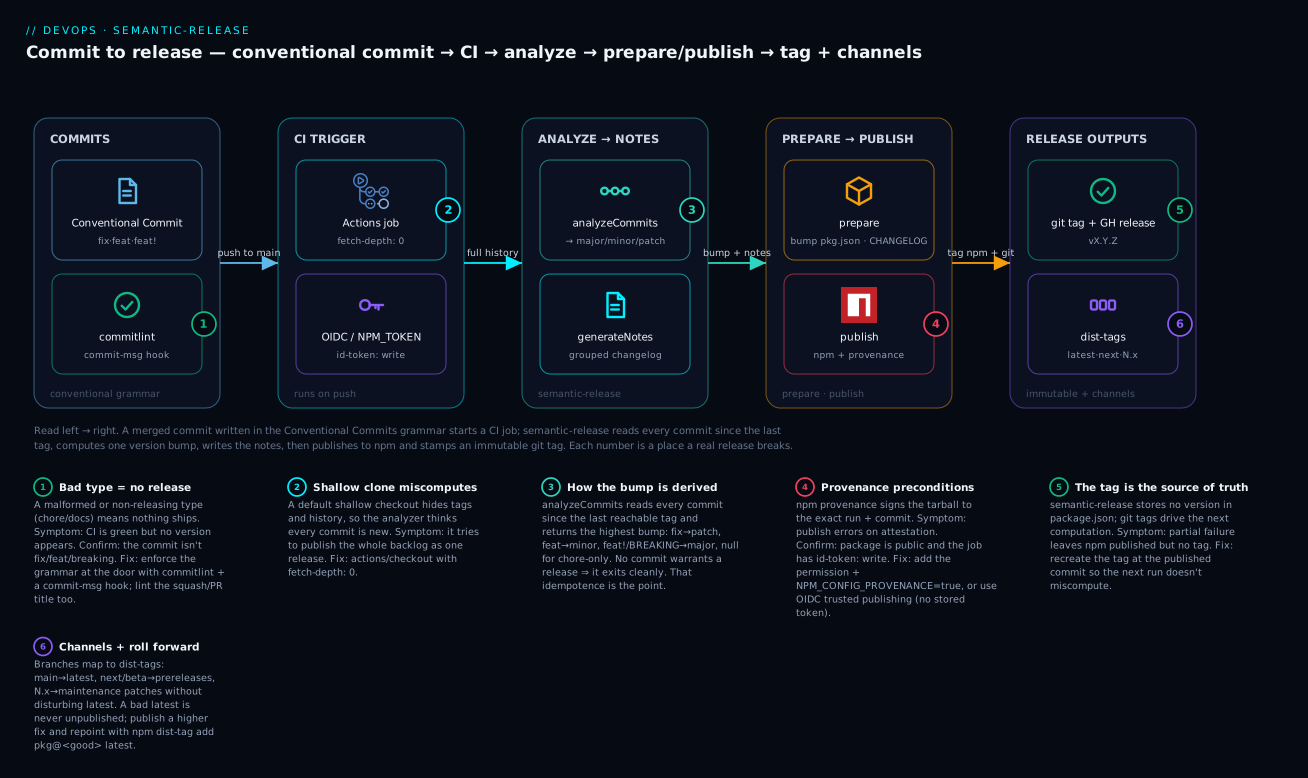
Read the diagram left to right: a commit that passes the grammar check triggers CI, the analyzer turns commit history into exactly one version bump, and the outputs — npm publish, git tag, GitHub release, dist-tags — all fall out of that single decision. Each numbered badge is a place a real release commonly breaks.
Level: Intermediate · Time: ~27 min
After this lesson you can:
- Write Conventional Commits and enforce them locally with commitlint + a Husky hook so a malformed message never reaches trunk.
- Explain exactly how semantic-release derives the next version from git tags + commit history, and predict a bump before you run it.
- Read and configure the plugin pipeline (
verifyConditions → analyzeCommits → generateNotes → prepare → publish → success) and know which plugin runs in which hook. - Wire the release into GitHub Actions with least-privilege permissions,
fetch-depth: 0, and either an automation token or OIDC trusted publishing with provenance. - Choose between fixed and independent versioning for a monorepo, and drive independent publishing with Changesets (or semantic-release-monorepo / Nx Release).
- Recover from a half-failed release the right way — roll forward and repoint dist-tags, never
npm unpublish.
Prerequisites
- Comfort with git basics (commits, branches, tags) and a Node.js project that has a
package.json. If branching and tags are fuzzy, skim Git Deep Dive: Internals, Branching, Merge & Rebase Workflows first. - A CI provider — this guide uses GitHub Actions. New to it? GitHub Actions Fundamentals: Workflows, Jobs, Runners & Secrets covers the primitives used here.
- An npm registry to publish to (public npmjs.org or a private one). For provenance/keyless publishing, the OIDC idea from GitHub Actions OIDC: Keyless Deploys to Multiple Clouds transfers directly.
- Node.js 20.8.1 or newer (semantic-release v24 requires it) and npm 9.5+ if you want provenance.
Which tool for which repo
Both tools automate the same path; they differ in where the release intent comes from and how many versions the repo has. Pick before you configure anything:
| semantic-release | Changesets | |
|---|---|---|
| Repo shape | Single package, one version line | Monorepo, each package versions independently |
| Where intent lives | Inferred from commit messages | Declared in a .changeset/*.md file per change |
| Version source of truth | git tags (nothing in package.json) |
each package’s package.json version |
| Release trigger | runs on every push; self-throttles | a “Version Packages” PR you merge when ready |
| Changelog | generated from commits | generated from changeset summaries |
| Best when | libraries, CLIs, single services | design systems, SDK suites, platform monorepos |
Rule of thumb: one package that ships on every meaningful merge → semantic-release. Many packages that ship on their own schedules → Changesets. The rest of this guide builds both, so you can see the trade-off in code rather than in the abstract.
Manual releases are where good engineering teams quietly bleed time and ship mistakes. Someone forgets to bump the version, the changelog is written from memory three weeks after the fact, a tag points at the wrong commit, and the npm publish runs from a laptop with a personal token. None of that should exist in 2026. The version, the changelog, the git tag, and the publish should all be deterministic functions of your commit history, executed by CI, with nobody touching a keyboard.
This guide builds that pipeline twice: once with semantic-release for single-package repos, and once with Changesets for monorepos where each package versions independently. Both consume Conventional Commits, both produce changelogs, and both publish from CI with provenance. By the end you will know which to reach for and how to recover when a release half-fails.
Why manual versioning fails
If you have never felt the pain, here is the concrete failure list that automation removes. Each row is a real broken promise:
| Manual habit | What goes wrong | What automation guarantees |
|---|---|---|
| A human decides “patch or minor?” | Breaking change shipped as a patch; consumers’ builds break on ^ ranges |
The bump is a function of the commits — a breaking change cannot ship as a patch |
| Changelog written after the fact | Entries missing, vague, or invented from memory | Every entry is generated from the commit that caused it |
git tag typed by hand |
Tag on the wrong commit, or forgotten entirely | The tag is created by the tool at the exact published commit |
npm publish from a laptop |
Personal token, no provenance, no audit trail, race conditions | Publish runs only in CI with a scoped token and a signed attestation |
Version bumped in package.json by hand |
Merge conflicts on every release; the number drifts from reality | The version is derived, not stored — no conflicts |
Automation does not just save time; it makes an entire class of mistakes structurally impossible. That is the real reason to adopt it.
1. Conventional Commits, enforced at the door
Everything downstream keys off commit message structure. The Conventional Commits spec is a tiny grammar:
<type>(<optional scope>): <description>

<optional body>

<optional footer>
The mapping that drives versioning:
| Commit | Version impact (SemVer) |
|---|---|
fix: ... |
patch (1.4.2 -> 1.4.3) |
feat: ... |
minor (1.4.2 -> 1.5.0) |
feat!: ... or a BREAKING CHANGE: footer |
major (1.4.2 -> 2.0.0) |
chore:, docs:, refactor:, test:, ci: |
no release by default |
Read the grammar against a real example so the parts are concrete:
feat(auth): add refresh-token rotation

Rotate the refresh token on every use and revoke the previous one.

Closes #212
BREAKING CHANGE: refresh tokens issued before this release are invalid.
featis the type — normally a minor bump.(auth)is the scope — which part of the codebase; in a monorepo this routes the change to a package.- The line after the blank line is the body (free prose, ignored by the version math).
Closes #212andBREAKING CHANGE:are footers. ThatBREAKING CHANGE:footer overrides the type and forces a major bump, even though the type wasfeat. This is the single most important escalation rule to internalise.
Do not trust humans to follow this voluntarily. Enforce it with commitlint and a Husky hook so a malformed message never reaches the remote.
npm install --save-dev @commitlint/cli @commitlint/config-conventional husky
npx husky init
// commitlint.config.js
export default {
  extends: ['@commitlint/config-conventional'],
  rules: {
    // Fail commits whose subject line exceeds 100 chars
    'header-max-length': [2, 'always', 100],
    // Force a scope so monorepo commits route to the right package
    'scope-empty': [2, 'never'],
  },
};
Wire the hook. husky init creates a pre-commit file; add the commit-message check:
echo 'npx --no-install commitlint --edit "$1"' > .husky/commit-msg
Enforce the same rule in CI on the PR title if you squash-merge, because the squash commit message is the one that lands on trunk.
commitlintreads the title with--from/--toover the PR commit range, or use a dedicated PR-title linter action. The local hook protects authors; the CI check protects trunk.
2. How semantic-release derives the next version
semantic-release does not store the version in package.json and does not read it from there. It treats your git tags as the source of truth. On each run it:
- Finds the last release tag reachable on the current branch (e.g.
v1.4.2). - Parses every commit since that tag with the commit-analyzer.
- Computes the highest version bump implied by those commits.
- Generates notes, writes the changelog, publishes, tags, and (optionally) opens a GitHub release.
If no commit since the last tag warrants a release (all chore/docs), it exits cleanly and does nothing. That idempotence is the whole point: you can run it on every push to main and it self-throttles.
Install the core plus the plugins you need:
npm install --save-dev semantic-release \
  @semantic-release/commit-analyzer \
  @semantic-release/release-notes-generator \
  @semantic-release/changelog \
  @semantic-release/npm \
  @semantic-release/github \
  @semantic-release/git
A worked trace: several commits become one release
Nothing makes the model click like watching it run against a concrete history. Suppose the last tag is v1.4.2, and since then five commits landed on main:
$ git log v1.4.2..HEAD --oneline
a1b2c3d chore: bump eslint to 9.9
d4e5f6a docs: clarify the retry section in the README
9f8e7d6 fix(api): stop dropping the trace-id header on retry
1c2b3a4 feat(ui): add a dark-mode toggle
7a6b5c4 refactor(core): extract the token cache
Here is exactly what the analyzer does with that list:
choreanddocsandrefactor(no configured rule) → no release on their own.fix(api): ...→ patch.feat(ui): ...→ minor.- It takes the highest bump present. A
featbeats afix, so the release type is minor. - Next version =
1.4.2with a minor bump =1.5.0.
generateNotes then groups the releasing commits by type into a changelog block (non-releasing commits are omitted):
## [1.5.0](https://github.com/acme/app/compare/v1.4.2...v1.5.0) (2026-06-08)

### Features

* **ui:** add a dark-mode toggle ([1c2b3a4](https://github.com/acme/app/commit/1c2b3a4))

### Bug Fixes

* **api:** stop dropping the trace-id header on retry ([9f8e7d6](https://github.com/acme/app/commit/9f8e7d6))
(Representative output — the compare/commit links are generated from your repo URL.) That block is prepended to CHANGELOG.md, the tag v1.5.0 is created, and 1.5.0 is published. Had even one of those commits carried a BREAKING CHANGE: footer, the whole release would have jumped to 2.0.0 regardless of the feat/fix mix. Highest wins, breaking beats everything.
3. The plugin pipeline
semantic-release is an ordered set of lifecycle hooks (verifyConditions, analyzeCommits, generateNotes, prepare, publish, success). Each plugin opts into the hooks it cares about. Order in the plugins array matters: it defines execution order within each step.
{
  "branches": ["main", { "name": "next", "prerelease": true }],
  "plugins": [
    "@semantic-release/commit-analyzer",
    "@semantic-release/release-notes-generator",
    ["@semantic-release/changelog", { "changelogFile": "CHANGELOG.md" }],
    "@semantic-release/npm",
    ["@semantic-release/github", {
      "successComment": false,
      "failComment": false
    }],
    ["@semantic-release/git", {
      "assets": ["CHANGELOG.md", "package.json", "package-lock.json"],
      "message": "chore(release): ${nextRelease.version} [skip ci]\n\n${nextRelease.notes}"
    }]
  ]
}
Save this as .releaserc.json (or a release key in package.json). What each plugin does:
- commit-analyzer runs in
analyzeCommitsand returns the release type (major/minor/patch/null). - release-notes-generator runs in
generateNotesand turns commits into formatted markdown grouped by type. - changelog runs in
prepareand prepends those notes toCHANGELOG.md. - npm runs in
prepare(writes the version intopackage.json) andpublish(runsnpm publish). - github runs in
publishto create the GitHub Release and attach the notes. - git runs in
prepareto commit the updated changelog and manifest back, then the tag is created.
The [skip ci] in the git commit message is load-bearing: without it, the release commit re-triggers your CI pipeline and you risk an infinite loop. Most CI providers honor [skip ci] in the commit message.
Tuning the analyzer
You can extend which commit types trigger a release. For example, treat perf: as a patch and a custom revert as a patch:
["@semantic-release/commit-analyzer", {
  "preset": "conventionalcommits",
  "releaseRules": [
    { "type": "perf", "release": "patch" },
    { "type": "refactor", "scope": "core", "release": "patch" }
  ]
}]
4. Wiring it into CI with provenance and protected credentials
The non-negotiables: the publish runs in CI, never locally; the npm token is a CI-only automation token (or, better, OIDC trusted publishing); and the artifact carries provenance.
npm provenance (--provenance, surfaced by @semantic-release/npm via NPM_CONFIG_PROVENANCE=true) makes the registry generate a signed attestation linking the published tarball to the exact GitHub Actions run and commit that built it. It requires a public package and id-token: write permission.
# .github/workflows/release.yml
name: release
on:
  push:
    branches: [main, next]

permissions:
  contents: read # least privilege at the top

jobs:
  release:
    runs-on: ubuntu-latest
    permissions:
      contents: write      # push the changelog commit + tag
      issues: write         # semantic-release comments on resolved issues
      pull-requests: write
      id-token: write       # npm provenance + OIDC
    steps:
      - uses: actions/checkout@v4
        with:
          fetch-depth: 0    # semantic-release needs full history + tags
          persist-credentials: false
      - uses: actions/setup-node@v4
        with:
          node-version: 20
          registry-url: https://registry.npmjs.org
      - run: npm ci
      - run: npm audit signatures   # verify dependency provenance pre-publish
      - run: npx semantic-release
        env:
          GITHUB_TOKEN: ${{ secrets.GITHUB_TOKEN }}
          NPM_TOKEN: ${{ secrets.NPM_TOKEN }}
          NPM_CONFIG_PROVENANCE: true
Two things people get wrong here:
fetch-depth: 0. A shallow clone hides tags and history, so the analyzer thinks every commit is new and tries to publish the entire backlog as one release.- The
GITHUB_TOKENfromsecretsis the built-in token. It cannot trigger downstream workflows, which is actually what you want given the[skip ci]strategy. If you genuinely need the release to trigger another workflow, use a GitHub App token instead, not a PAT.
If your package is public, prefer npm trusted publishing (OIDC) over a stored NPM_TOKEN entirely: configure the GitHub repo as a trusted publisher in the npm package settings, and the id-token: write permission lets npm exchange the OIDC token for publish rights with no secret stored anywhere.
5. Pre-releases, channels, and maintenance branches
semantic-release maps git branches to distribution channels and release types. This is its most underused capability and it directly models a real branching strategy.
{
  "branches": [
    "+([0-9])?(.{+([0-9]),x}).x",
    "main",
    { "name": "next", "channel": "next", "prerelease": true },
    { "name": "beta", "channel": "beta", "prerelease": true }
  ]
}
Decoding this:
mainis the default channel; publishing here updates the npmlatestdist-tag.nextandbetapublish prereleases like2.0.0-next.1, tagged on npm undernext/betadist-tags. Consumers opt in withnpm install pkg@next.- The regex
+([0-9])?(.{+([0-9]),x}).xmatches maintenance branches like1.xor1.2.x. Pushing afix:to1.xreleases1.4.3to the1.xchannel without disturbing thelatest2.x line. This is how you ship security patches to an old major that customers are pinned to.
The workflow: cut a 1.x branch from the last 1.y.z tag, backport the fix as a fix: commit, push. semantic-release publishes a patched 1.x and tags it so the next backport computes correctly. No manual version math.
6. Independent versioning of monorepo packages with Changesets
semantic-release is single-version by design. For a monorepo where @acme/ui and @acme/api must version and publish independently, reach for Changesets. It inverts the model: instead of inferring intent from commits, contributors declare intent in a small markdown file per change.
npm install --save-dev @changesets/cli
npx changeset init
This creates .changeset/config.json:
{
  "$schema": "https://unpkg.com/@changesets/config@3.0.0/schema.json",
  "changelog": "@changesets/changelog-github",
  "commit": false,
  "fixed": [],
  "linked": [],
  "access": "public",
  "baseBranch": "main",
  "updateInternalDependencies": "patch",
  "ignore": []
}
When a contributor changes a package, they run npx changeset, pick the affected packages, choose the bump level, and write a human summary. That produces a file like:
---
"@acme/ui": minor
"@acme/api": patch
---

Add a `variant` prop to Button and fix the corresponding API serializer.
These changeset files accumulate in .changeset/ and travel with the PR, so the bump intent is reviewed alongside the code. Key config knobs:
fixed: packages that must always bump together (lock-step major).linked: packages that share a version line only when they actually change.updateInternalDependencies: when@acme/apidepends on@acme/ui, bumpinguiautomatically bumpsapi’s dependency range and triggers its own patch.
7. Generating and committing changelogs without polluting trunk
Changesets uses a two-phase model that keeps version churn off your feature branches. changeset version consumes all pending changeset files, applies the bumps to each package.json, regenerates each package’s CHANGELOG.md, and deletes the consumed changeset files. You never run that on a feature branch.
The clean pattern is the Changesets release bot, which opens a dedicated “Version Packages” PR:
# .github/workflows/release.yml
name: release
on:
  push:
    branches: [main]

concurrency: release-${{ github.ref }}

permissions:
  contents: read

jobs:
  release:
    runs-on: ubuntu-latest
    permissions:
      contents: write
      pull-requests: write
      id-token: write
    steps:
      - uses: actions/checkout@v4
        with:
          fetch-depth: 0
      - uses: actions/setup-node@v4
        with:
          node-version: 20
          registry-url: https://registry.npmjs.org
      - run: npm ci
      - uses: changesets/action@v1
        with:
          version: npm run version       # runs `changeset version`
          publish: npm run release       # runs `changeset publish`
        env:
          GITHUB_TOKEN: ${{ secrets.GITHUB_TOKEN }}
          NODE_AUTH_TOKEN: ${{ secrets.NPM_TOKEN }}
          NPM_CONFIG_PROVENANCE: true
// package.json scripts
{
  "scripts": {
    "version": "changeset version",
    "release": "changeset publish"
  }
}
How the loop works:
- PRs merge to
maincarrying changeset files. No version bump happens yet. - The action sees pending changesets and opens or updates a “Version Packages” PR that applies all the bumps and changelogs. Trunk stays clean.
- When you merge that PR, the action runs again, finds no pending changesets but a version change, and runs
changeset publishto push every changed package to npm and create git tags per package.
This separation is the feature: day-to-day merges never carry version noise, and the actual release is a single reviewable PR you merge when ready. changeset publish only publishes packages whose version in package.json is newer than what is on the registry, so it is safe to re-run.
Verify
Prove the pipeline works before you trust it.
# 1. semantic-release: full dry run, no publish, no tag, no commit
npx semantic-release --dry-run

# 2. Confirm the computed next version and notes in the log output,
#    e.g. "The next release version is 1.5.0"

# 3. Changesets: see exactly what WOULD be bumped and published
npx changeset status --verbose

# 4. Validate commit linting catches a bad message
echo "broke everything" | npx commitlint   # should exit non-zero

# 5. After a real release, confirm the dist-tags and provenance
npm dist-tag ls @acme/ui
npm view @acme/ui --json | jq '.dist'      # look for provenance/attestation
For semantic-release specifically, --dry-run skips prepare/publish but still runs analyzeCommits and generateNotes, so the log tells you the exact version and changelog it would produce. Treat a clean dry run on a throwaway branch as your gate before enabling the main trigger.
8. Rollback, re-publishing, and partial failures
Published versions are immutable by policy. npm forbids re-publishing the same version, and npm unpublish is restricted (72-hour window, and blocked entirely if anything depends on it). So “rollback” almost never means deleting; it means rolling forward.
| Failure | What actually happened | Recovery |
|---|---|---|
| Publish failed, no tag, no npm artifact | Pipeline died before publish |
Fix CI, re-run the job. semantic-release is idempotent. |
| npm published, but tag/commit push failed | Partial release (the dangerous one) | Manually create the matching git tag at that commit; never re-publish that version. |
Bad version published to latest |
Broken build shipped to everyone | Publish a fix: immediately for a higher patch; then npm dist-tag add pkg@<good> latest to repoint. |
| Wrong version on a dist-tag | Mistagged prerelease | npm dist-tag rm / add to correct it; no unpublish needed. |
The dist-tag repoint is the fastest real-world recovery: it does not delete the bad version, it just stops new installs from resolving to it.
# Stop the bleeding: point latest back at a known-good version
npm dist-tag add @acme/ui@1.4.2 latest
# Verify
npm dist-tag ls @acme/ui
For the partial-failure case (npm succeeded, git push failed), the critical invariant is that the git tag must end up pointing at the commit that was published. Recreate it deliberately rather than letting the next semantic-release run miscompute against a missing tag:
git tag v1.5.0 <published-commit-sha>
git push origin v1.5.0
Enterprise scenario
A platform team at a fintech ran a 40-package internal monorepo on Changesets, publishing to a private Artifactory-backed npm registry. Their constraint: a regulated SOC 2 / change-management process required that every published artifact be traceable to an approved change ticket, and that no human could publish from a workstation. They had been letting team leads run changeset publish locally with a shared token, which auditors flagged hard.
The failure mode that triggered the redesign: two leads merged version PRs within minutes of each other, both ran changeset publish locally, and the second clobbered the first’s in-flight git tags, leaving three packages published to Artifactory with no corresponding tags. Provenance was unprovable.
The fix had three parts. First, they removed all human publish tokens and moved publishing entirely into a CI job gated by a concurrency: release group so two release runs could never overlap. Second, they kept the changeset summary as the authoritative change record and added a CI check that every changeset file referenced a ticket ID in its summary, failing the PR otherwise. Third, they used the bot’s “Version Packages” PR as the formal approval gate: merging that PR (which required a CODEOWNERS approval from release engineering) was the single auditable action that authorized a publish.
The enforcing piece was a pre-publish guard that refused to publish if the working tree did not match the merged version PR, eliminating the local-publish path for good:
- name: Block ad-hoc publishes
  run: |
    if [ -n "$(git status --porcelain)" ]; then
      echo "::error::Working tree dirty. Publishes must run from the merged Version PR."
      exit 1
    fi
- name: Verify on release commit
  run: |
    git log -1 --pretty=%s | grep -q '^chore(release)' \
      || { echo "::error::Not a release commit; refusing to publish."; exit 1; }
Result: zero local publishes, every artifact traceable from npm provenance back through the Version PR to a ticket, and the concurrency lock made the double-publish race structurally impossible. Auditors signed off on the Version PR as the change-control artifact.
Going deeper
You have a working pipeline. This section is what separates “it releases” from “I can debug it at 2 a.m. and reason about it in a 60-package monorepo.”
The full plugin lifecycle, not just the happy path
The six hooks in Section 3 are the ones you touch most, but the real lifecycle has nine, and knowing the extras explains a lot of behaviour:
| Hook | When | What a plugin does here |
|---|---|---|
verifyConditions |
first, before anything | Fail fast: check auth, env vars, config. @semantic-release/npm verifies the token; @semantic-release/git checks push access. |
analyzeCommits |
after verify | commit-analyzer returns major/minor/patch/null. |
verifyRelease |
after a release type is known | Last chance to reject (e.g. a plugin enforcing a minimum changelog). |
generateNotes |
before prepare | release-notes-generator builds the markdown. |
prepare |
before publish | changelog write, package.json version write, git stages assets. |
publish |
the actual release | npm publish, GitHub Release created. |
addChannel |
when a commit becomes available on a new channel | Adds a dist-tag when merging next → main, without re-building. |
success |
after a successful publish | Comment on fixed issues/PRs, notifications. |
fail |
on any error | Open an issue, post to Slack — your failure alerting. |
A semantic-release “plugin” is just a Node module that exports functions named after these hooks. That is why verifyConditions runs everything upfront: it collects the verifyConditions export from every plugin and runs them all before a single commit is analyzed, so a missing NPM_TOKEN fails in seconds instead of after the changelog is already written. The addChannel hook is the subtle one — it is how a version built on the next prerelease channel gets promoted to latest when next merges into main, reusing the exact tarball rather than rebuilding.
Config resolution trips people up too. semantic-release looks for, in order: a release key in package.json, then .releaserc, .releaserc.json, .releaserc.yaml/.yml, .releaserc.js/.cjs/.mjs, then release.config.js/.cjs/.mjs. The first one found wins — a leftover .releaserc.json silently shadows the release.config.js you thought was active.
Monorepo strategies: fixed vs independent, and the three tool families
“Monorepo release” is not one problem. The first fork is fixed vs independent versioning:
| Fixed (lock-step) | Independent | |
|---|---|---|
| Version numbers | every package shares one version; all bump together | each package has its own version, bumps only when it changes |
| A changelog | one repo-wide changelog | one per package |
| Good for | tightly-coupled suites released as a unit (a design system that always ships together) | large SDK suites where a typo fix in one package should not re-version 40 others |
| Failure mode | one package’s patch drags 39 others to a new version (install churn) | dependency graph must be tracked so dependents bump when a dependency does |
Then the tool families, each solving independent versioning differently:
- Changesets (used above) — declared intent. Contributors write the bump into a file; the tool reads the files. Best signal-to-noise for humans; the “Version Packages” PR is a first-class review artifact.
fixedandlinkedconfig give you lock-step or shared lines when you want them. - semantic-release-monorepo — inferred intent, per package. A wrapper (
semantic-release-monorepo) that runs semantic-release once per package and filters commits to those touching that package’s directory, so each package gets its own version from its own commits. You keep the commit-message workflow but pay the cost of running the analyzer N times and getting the commit-path filtering exactly right. - Nx Release — graph-aware, batteries included.
nx release version,nx release changelog, andnx release publishuse Nx’s project graph to bump only affected projects and their dependents, in eitherindependentorfixedmode (release.projectsRelationship). If you are already on Nx, it removes the glue code entirely. (pnpm/turboreposhops often pair Turbo’s task graph with Changesets for the same effect.)
Decision shortcut: already on Nx → Nx Release. Want humans to declare intent in review → Changesets. Committed to the commit-message-only workflow across every package → semantic-release-monorepo. All three publish from CI; none of them changes the immutability and provenance rules below.
The token, precisely
The credential model is where security review lives. Four options, in rough order of preference:
- OIDC trusted publishing (best). No stored secret. You register the repo/workflow as a trusted publisher in the npm package settings;
id-token: writelets the npm CLI exchange the short-lived Actions OIDC token for publish rights. Nothing to leak, nothing to rotate. Public packages, current npm. - npm automation token. A CI-scoped token that bypasses 2FA for publishing, stored as
NPM_TOKEN. Rotate it; scope it to the one package/org if your registry supports granular tokens. - GitHub App installation token. Needed only when the release must trigger a downstream workflow — the built-in
GITHUB_TOKENdeliberately cannot, to prevent recursion. Mint a short-lived App token instead of a PAT. - Personal Access Token (avoid). Tied to a human, broad scope, outlives the person’s access. Auditors hate it and they are right.
GITHUB_TOKEN vs App token is the nuance most teams get wrong: the built-in token’s inability to trigger other workflows is a feature here (it reinforces [skip ci]), but it means “publish then kick off a docs deploy” needs the App token path.
Supply chain: what provenance actually buys you
NPM_CONFIG_PROVENANCE=true makes npm generate a signed attestation (a SLSA-style provenance statement) that ties the exact tarball hash to the GitHub Actions run, workflow file, and commit SHA that produced it, recorded in a public transparency log. A consumer running npm audit signatures can then verify that the package they installed was built by the workflow it claims, not swapped out by a compromised maintainer account. This is the same trust chain covered end to end in SLSA, Supply-Chain Security, SBOM & Sigstore Provenance. Provenance needs a public package and id-token: write; private registries increasingly support their own attestation flows but the public-npm path is the reference implementation.
Failure modes and idempotence at scale
- The double-publish race (from the enterprise scenario) is the canonical monorepo failure: two release runs overlap and clobber each other’s tags. The
concurrencygroup is not optional at scale — it is what makes the whole thing safe to run on every merge. changeset publishis idempotent by version comparison: it only publishes packages whose localpackage.jsonversion is newer than the registry’s. That is why re-running a half-failed publish is safe — already-published packages are skipped.- Large-monorepo analyze cost:
semantic-release-monoreporuns the analyzer once per package; on 60 packages that is 60 git-log walks. Changesets and Nx Release read the graph/config once, which is why they scale better on big trees. - The
@semantic-release/gitdebate: committingCHANGELOG.mdandpackage.jsonback to the repo (thegitplugin) is convenient but adds a commit-and-push step that can fail after npm already published — the exact partial-failure case in Section 8. Some teams drop thegitplugin entirely and treat git tags (not a committedpackage.json) as the sole source of truth, generating changelogs as release-notes only. Fewer moving parts, one less place to half-fail.
Version and API caveats worth knowing
- semantic-release v24 requires Node.js ≥ 20.8.1 and ships as ESM. If your
.releaserc.jsis CommonJS in a project without"type": "module", use.releaserc.cjsor JSON to avoid the module-format error. - Provenance needs npm ≥ 9.5 on the runner.
actions/setup-nodewith a recent Node version gives you this, but a pinned-old Node can silently drop the attestation. - The default commit-analyzer preset is
angular, notconventionalcommits. They agree onfix/feat/BREAKING CHANGE, but differ on the long tail of types and on some formatting. If you standardized on the Conventional Commits preset for commitlint, set"preset": "conventionalcommits"on the analyzer and the notes generator so both ends agree. persist-credentials: falseon checkout (in the workflow above) prevents the defaultGITHUB_TOKENfrom lingering in.git/config; semantic-release uses its ownGITHUB_TOKENenv var to push, so you lose nothing and shrink the credential blast radius.
Practice challenges
Work these against a throwaway repo (or on paper for the prediction ones). Each has a worked solution — try first, then check.
1. (Beginner) Write the commit for a bug fix that closes an issue. You fixed a null-pointer in the auth refresh path; it should ship as a patch and link issue #212.
<details> <summary>Solution</summary>
fix(auth): stop null token from crashing refresh

Closes #212
Why: the fix type maps to a patch bump, and the Closes #212 footer lets @semantic-release/github comment on the issue when the release ships.
</details>
2. (Beginner) Predict the version. The last tag is v2.3.1. Since then: one feat:, two fix:, one docs:. What does semantic-release publish, and what does docs: contribute?
<details> <summary>Solution</summary>
Next version is 2.4.0. The analyzer takes the highest bump present: feat (minor) beats fix (patch), so it is a minor. docs: contributes nothing — it is a no-release type and is omitted from the changelog too.
Why: highest-bump-wins is the core rule; non-releasing types never move the number. </details>
3. (Intermediate) Gate on a dry run before going live. Give the command that shows the computed next version and generated notes without publishing, tagging, or committing — and say which hooks still run.
<details> <summary>Solution</summary>
npx semantic-release --dry-run
# To test a branch that isn't in your `branches` config, add:
npx semantic-release --dry-run --branches "$(git branch --show-current)"
--dry-run still runs verifyConditions, analyzeCommits, and generateNotes (so the log prints “The next release version is X.Y.Z” and the notes), but skips prepare, publish, and success.
Why: a clean dry run on a throwaway branch is your gate — it proves the version math and changelog before you ever arm the main trigger.
</details>
4. (Intermediate) Force a major bump two different ways. Current version is 1.9.0. Write a commit that ships 2.0.0 using the ! shorthand, and an equivalent that uses the footer form.
<details> <summary>Solution</summary>
feat(api)!: drop the v1 request signature

# --- equivalent, footer form ---

feat(api): switch to the v2 request signature

BREAKING CHANGE: the v1 signature header is no longer accepted.
Why: either the ! after the type/scope or a BREAKING CHANGE: footer signals a breaking change and forces a major bump — even though the type is feat, which would otherwise be a minor.
</details>
5. (Advanced) Ship a security patch to an old major without touching latest. latest is 3.4.0. A customer pinned to 2.x needs a fix. What branch, what commit, and what config makes it publish 2.7.4 to a 2.x channel while latest stays on 3.x?
<details> <summary>Solution</summary>
# 1. Cut a maintenance branch from the last 2.y.z tag
git checkout -b 2.x v2.7.3
# 2. Backport the fix as a Conventional Commit
git commit -m "fix(auth): patch CVE-2026-1234 token replay"
git push -u origin 2.x
// .releaserc.json — this range already matches 2.x
{ "branches": ["+([0-9])?(.{+([0-9]),x}).x", "main",
    { "name": "next", "prerelease": true }] }
semantic-release recognises 2.x as a maintenance branch, publishes 2.7.4, and tags it under the 2.x dist-tag — the latest 3.x line is untouched.
Why: branch→channel mapping is exactly how you serve patches to pinned consumers without forcing them onto a new major. </details>
6. (Advanced) Independent monorepo bump with an internal dependency. In a Changesets repo, @acme/api depends on @acme/ui. You add a feature to ui and a bugfix to api. Write the changeset file and predict what changeset version does to all three version lines (ui, api, and api’s dependency on ui).
<details> <summary>Solution</summary>
---
"@acme/ui": minor
"@acme/api": patch
---

Add a `variant` prop to Button; fix the API serializer to accept it.
Running changeset version: @acme/ui gets a minor bump, @acme/api gets a patch from your declared intent. Because updateInternalDependencies is patch (the default), bumping ui also bumps api’s dependency range on ui — which on its own would trigger a patch, but api was already getting a patch, so it stays a single patch. Each package’s CHANGELOG.md is regenerated and the changeset file is deleted.
Why: Changesets composes declared intent with derived internal-dependency propagation, so a consumer of a changed package can never be left pinned to a version that no longer exists. </details>
Common beginner mistakes
- “I’ll bump the version in
package.jsonmyself first.” semantic-release ignores the version inpackage.json— git tags are the source of truth, and thenpmplugin overwrites the field duringprepare. Hand-editing it just creates merge conflicts and confusion. Right model: you never type a version anywhere; the commits decide it. - “My
chore:/docs:commit should have released.” By default onlyfix,feat, and breaking changes release. A branch full ofchore/docs/refactorproduces no release and that is correct behaviour, not a bug. If you genuinely wantperf:or a scopedrefactor:to release, add areleaseRulesentry — don’t mislabel the commit as afix. - Leaving
actions/checkoutshallow. The default clone has no tags and truncated history, so the analyzer sees “everything” as new and tries to publish your whole backlog as one giant release. Alwaysfetch-depth: 0for a release job. - Publishing from a laptop “just this once.” A local publish has no provenance, uses a human token, and can race a CI run — exactly the failure that cost the fintech team three untagged packages. Right model: the only thing allowed to publish is CI. Local runs are
--dry-runonly. - Forgetting
[skip ci]on the release commit. When thegitplugin commits the changelog and version back, that commit re-triggers yourpushworkflow, which releases again, which commits again… an infinite loop. The[skip ci]in the commit message is what breaks it. - Assuming the squash-merge keeps your nice commit message. If you squash-merge PRs, the squash subject is the commit that lands on trunk — not the tidy
feat:inside the PR. Lint the PR title, or the analyzer reads the wrong thing. - Expecting
conventionalcommitsbehaviour from the default analyzer. The analyzer defaults to the angular preset. It agrees on the big three but differs on the tail. Set"preset": "conventionalcommits"explicitly on both the analyzer and notes generator if that’s the spec you enforce with commitlint. - Trying to
npm unpublisha bad release. Published versions are immutable; unpublish is time-boxed and blocked if anything depends on it. The fix is always to roll forward: publish a higher patch andnpm dist-tag add pkg@<good> latestto repoint installs.
Glossary
- SemVer (Semantic Versioning) — the
MAJOR.MINOR.PATCHcontract: patch = safe fix, minor = backward-compatible feature, major = breaking change. - Conventional Commits — the
type(scope): descriptioncommit grammar that machines can parse to decide a version bump. - Type / scope / footer — the parts of a Conventional Commit:
featis the type,(auth)the scope,BREAKING CHANGE:/Closes #212are footers. The footer can override the type’s bump. - commit-analyzer — the semantic-release plugin that reads commits and returns a release type (
major/minor/patch/null). - commitlint — a linter that checks a commit message against the Conventional Commits rules; usually run in a Husky
commit-msghook. - Husky — a tool that installs git hooks (
pre-commit,commit-msg) from your repo so checks run locally before code leaves the machine. - Release notes / changelog — the human-readable summary of what changed, generated from commits (semantic-release) or changeset summaries (Changesets) and written to
CHANGELOG.md. - git tag — an immutable pointer to a commit (e.g.
v1.5.0); for semantic-release it is the source of truth for the current version. - dist-tag — an npm label pointing a name at a version (
latest,next,beta,2.x);npm install pkg@nextresolves thenextdist-tag. - Channel / prerelease — a non-
latestrelease line (e.g.2.0.0-next.1) that consumers opt into; semantic-release maps branches to channels. - Maintenance branch — a branch like
1.x/2.7.xthat ships patches to an older major without disturbinglatest. - Idempotent — safe to run repeatedly with the same result; semantic-release does nothing when no commit warrants a release, and
changeset publishskips already-published versions. [skip ci]— a marker in a commit message that tells CI providers not to trigger a build for that commit; prevents the release-commit loop.- provenance — a signed attestation linking a published tarball to the exact CI run, workflow, and commit that built it; verified with
npm audit signatures. - OIDC trusted publishing — publishing to npm using a short-lived OpenID Connect token exchanged at publish time, so no long-lived
NPM_TOKENis stored anywhere. - automation token — a CI-scoped npm token that can publish without an interactive 2FA prompt.
fetch-depth: 0— theactions/checkoutoption that fetches full history and all tags, required so the analyzer can see the last release tag.GITHUB_TOKEN— the built-in, auto-scoped token GitHub Actions injects per run; it deliberately cannot trigger downstream workflows.- changeset — a small markdown file declaring which packages bump and by how much, plus a human summary; the unit of release intent in Changesets.
- fixed vs linked (Changesets) —
fixedpackages always bump together (lock-step);linkedpackages share a version line only when they actually change. - fixed vs independent versioning — whether a monorepo’s packages all share one version (fixed/lock-step) or each version on its own (independent).
- updateInternalDependencies — the Changesets setting that bumps a package’s dependency range (and triggers its own bump) when an internal dependency it uses is released.
Release engineering checklist
Wire it once, verify with dry runs, and releases stop being an event. They become a side effect of merging good commits, fully attributable from the npm artifact back to the line of code that caused the bump.