In a nutshell
Imagine your engineering organisation as a large airport. There is a departures board listing every flight (your services), a check-in desk where you hand over a short form and staff handle the rest (self-service), and a safety inspection that certifies each aircraft as fit to fly (production-readiness). An internal developer portal is that terminal for software: one website where any engineer can find every service the company runs, request common platform tasks without filing a ticket, and see at a glance whether a service is genuinely ready for production. Port is one such portal.
Port’s trick is that you describe your world as data rather than building a UI by hand. If you have used a spreadsheet-database like Airtable, this will feel familiar: you define the shape of your data (a service has a tier, an owner, a runbook), the rows fill in automatically from GitHub, Kubernetes and your cloud, and Port renders the portal for you. There is no React to write and nothing to host — it is no-code, configured through a handful of JSON and YAML files. That is the headline difference from Backstage, the other well-known portal, which is a framework you build and run yourself.
Three pillars sit on top of that data model. The software catalog is the searchable map of everything you run. Self-service actions are forms that fire a real backend pipeline — click “new service” and a GitHub Actions workflow scaffolds a repo, Terraform, and a deploy. Scorecards grade each service against rules (has an owner, has a runbook, no critical CVEs) so “production-ready” becomes a measured state, not an opinion. Wire those three together and you get a golden path: the easy, well-lit way to do a task that happens to also be the compliant, secure way.
Level: Advanced · Time: ~40 min for the full hands-on (~15 min to read).
A mid-size fintech has 38 engineering teams and a platform team of six, and the platform team has become a ticket queue. Every new microservice means a Slack thread asking for a repo, a Kubernetes namespace, a database, and a CI pipeline, and every audit means a frantic spreadsheet asking which of 400 services actually have on-call set up, a runbook, and a passing vulnerability scan. Nobody can answer “is this service production-ready?” without a person reading a wiki. The platform lead’s mandate is blunt: give engineers a single front door where they can find any service, scaffold a new one without filing a ticket, and where “production-ready” is a measured, enforced state — not a vibe. That front door is Port, a developer portal you configure as data (blueprints, entities, actions, scorecards) rather than a UI you click together. This guide stands it up end to end: catalog modelled from GitHub, a working self-service action that creates a real service, and scorecards that gate promotion to production.
Prerequisites
- A Port account (the free tier is enough to follow along) and an org admin login.
- GitHub org admin rights — you will install the Port GitHub app and create an Actions workflow with org-level secrets.
- The Port CLI (
pip install port-cli) or justcurl+jq; examples use both. A Port API client ID and secret from Settings → Credentials. - A Microsoft Entra ID (or Okta) tenant where you can register an enterprise app, for SSO and group-to-team mapping.
- HashiCorp Vault reachable from your GitHub Actions runners, holding the cloud and Port credentials the action workflows need.
- Optional but assumed by the scorecards: Wiz (or Wiz Code) for vulnerability findings, Datadog or Dynatrace for service monitors, PagerDuty/ServiceNow for on-call, and Argo CD if you deploy via GitOps.
After this lesson you can: explain the catalog/actions/scorecards/golden-path model in your own words; model a small catalog with service and team blueprints; auto-populate it from GitHub so it stays live; wire a self-service action to a real GitHub Actions backend; author production-readiness scorecards fed by ingested truth; and turn a scorecard from a dashboard into an enforced promotion gate.
Target topology
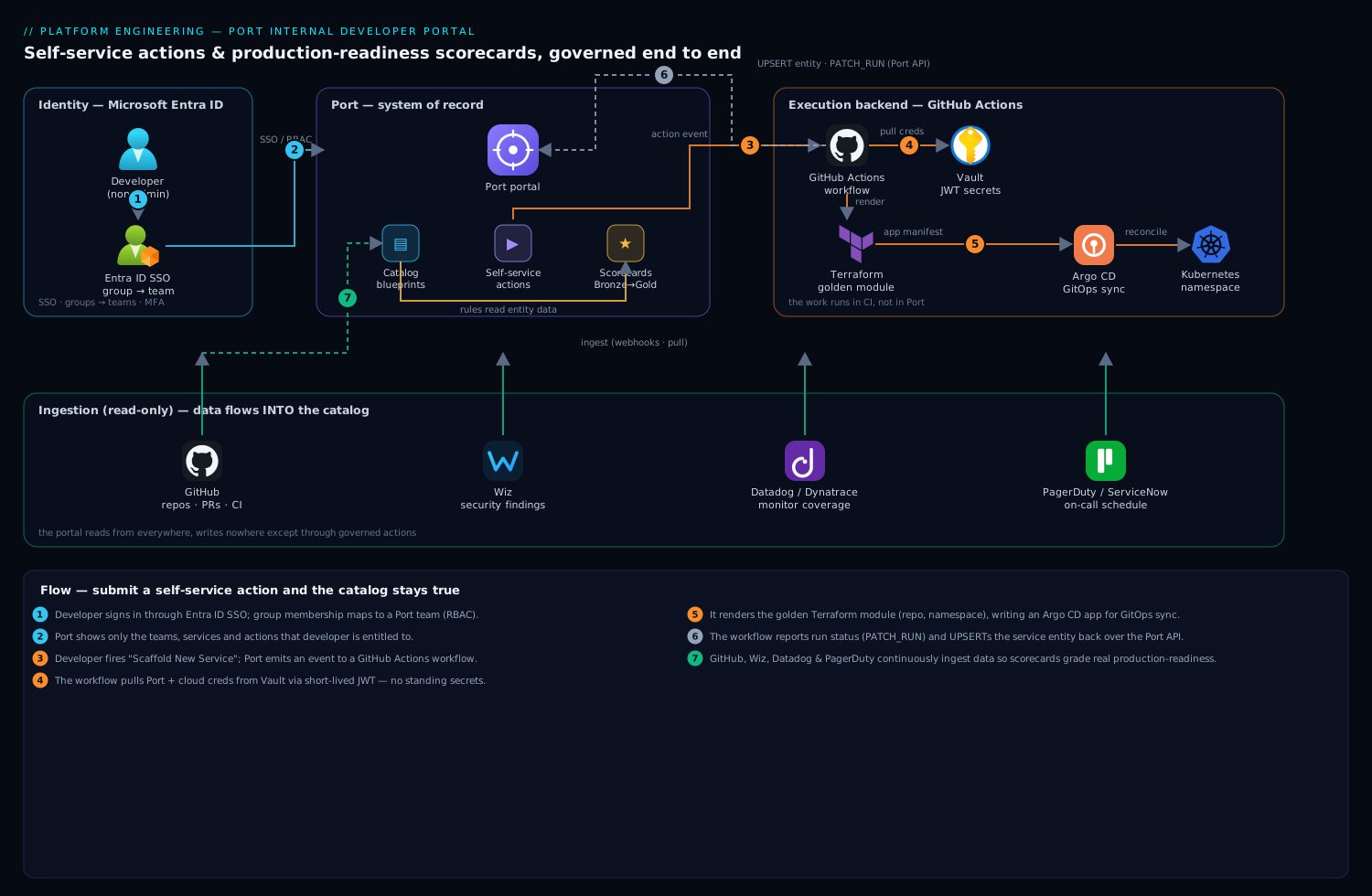
Read the diagram as three planes: identity on the left, the portal in the middle, and the systems it reads from and writes to on the right. Port is the system of record and the UI; it holds blueprints (the schema of your catalog), entities (the data), self-service actions (forms that fire a backend), and scorecards (rules over entities). It is deliberately not the executor. When a developer submits an action, Port emits an event to a backend — here a GitHub Actions workflow — which does the real work (create a repo, render Terraform, open a PR) and reports the result back to Port over the API. Identity flows from Entra ID so a developer sees only the teams and actions they are entitled to. Data flows into the catalog from GitHub (repos, PRs, workflows), from Wiz (security findings), and from Datadog/Dynatrace (monitors), so a scorecard can ask real questions: does this service have an owner, a passing scan, a deploy in the last 30 days. The portal reads from everywhere and writes nowhere except through governed actions — that separation is the whole design.
The four ideas Port is built on
Before the hands-on, get these four ideas straight — every numbered step below is an application of one of them.
1. The data model: blueprints, entities, relations
Everything in Port is one of three things. A blueprint is a schema — the definition of a kind of thing you track, written as JSON Schema with typed properties and relations. An entity is a single instance of a blueprint — one real service, checkout-api, with its properties filled in. A relation is a typed link from one entity to another — checkout-api owned by the payments team — which turns the catalog from a flat list into a graph you can query.
If you think in databases, the mapping is exact:
| Port concept | Relational database | Everyday analogy |
|---|---|---|
| Blueprint | Table definition (schema) | A blank form template |
| Property | Column (typed) | A field on the form |
| Entity | Row | One filled-in form |
| Relation | Foreign key | An “owned by” link between two forms |
| Scorecard | Saved query + grade | A report card computed from the rows |
Properties come in more than the obvious flavour. A basic property is a value you store (tier). A mirror property reaches across a relation to show a related entity’s value (a service showing its team’s Slack channel). A calculation property runs a small jq expression over the entity. An aggregation property counts or sums related entities (open incidents per service). You will meet the basic kind in step 2 and the rest in Going deeper — they are what let scorecards ask rich questions without duplicating data.
2. Self-service actions: a form in front of a pipeline
An action is a form Port renders plus an invocationMethod — the backend that does the work. Port itself never creates a repo or runs Terraform; it validates the form, emits an event to GitHub Actions / GitLab / Jenkins / a webhook, and tracks the resulting run. This separation is the entire point: the business logic lives in your CI, where it is version-controlled, reviewable and testable, and Port is only the governed front door. Step 5 builds one end to end.
3. Scorecards: rules bucketed into levels
A scorecard is a set of rules — boolean conditions over an entity’s properties — grouped into levels (classically Bronze / Silver / Gold, though you can define your own). A service reaches a level when it satisfies every rule at that level and below. Crucially, a scorecard measures; it does not block anything by itself. It becomes a gate only when you wire an action or an RBAC policy to require a level — which is exactly how step 6 turns “should be production-ready” into “cannot go to production until it is.”
4. Golden paths: the paved road
The reason platform teams build portals at all is the golden path (or paved road): the single, supported, opinionated way to accomplish a common task, with the right defaults — security, observability, CI, ownership — baked in. A golden path does not forbid other routes; it just makes the compliant route the one of least resistance, so engineers choose it because it is easier, not because a policy forces them. In this lesson the golden path is concrete: the “Scaffold New Service” action in front of a golden Terraform module. Get this right and platform engineering stops being a ticket queue and becomes a product. (For where a portal sits on the wider journey, see From single pipeline to platform.)
1. Get API credentials and a working token
Everything Port-side is an API. Grab a machine token first so every later step is scriptable and idempotent.
In Port: Settings → Credentials → Generate. Then exchange the client credentials for a bearer token (tokens last ~1 hour; the CLI refreshes automatically, but raw curl is shown so you understand the wire):
export PORT_CLIENT_ID="<your-client-id>"
export PORT_CLIENT_SECRET="<your-client-secret>"

PORT_TOKEN=$(curl -s -X POST 'https://api.getport.io/v1/auth/access_token' \
  -H 'Content-Type: application/json' \
  -d "{\"clientId\":\"${PORT_CLIENT_ID}\",\"clientSecret\":\"${PORT_CLIENT_SECRET}\"}" \
  | jq -r '.accessToken')

# sanity check: list existing blueprints
curl -s 'https://api.getport.io/v1/blueprints' \
  -H "Authorization: Bearer ${PORT_TOKEN}" | jq '.blueprints[].identifier'
Store PORT_CLIENT_ID/PORT_CLIENT_SECRET in Vault now (vault kv put secret/port/api client_id=... client_secret=...); the Actions workflows in step 5 read them from there, never from a plaintext secret you might leak.
2. Model the catalog with blueprints
A blueprint is a JSON Schema with relations. Start with the two that matter: a service and the team that owns it. Resist the urge to model everything on day one — a portal nobody trusts because half the fields are empty is worse than a small accurate one.
Create team.json:
{
  "identifier": "team",
  "title": "Team",
  "icon": "Group",
  "schema": {
    "properties": {
      "slackChannel": { "type": "string", "title": "Slack Channel" },
      "onCallTool":   { "type": "string", "title": "On-call Tool",
                        "enum": ["PagerDuty", "ServiceNow", "OpsGenie"] }
    },
    "required": []
  }
}
Create service.json with a relation back to team and the properties your scorecards will read:
{
  "identifier": "service",
  "title": "Service",
  "icon": "Microservice",
  "schema": {
    "properties": {
      "lifecycle":   { "type": "string", "title": "Lifecycle",
                       "enum": ["experimental", "production", "deprecated"],
                       "enumColors": { "production": "green", "deprecated": "red" } },
      "tier":        { "type": "string", "title": "Tier",
                       "enum": ["tier-1", "tier-2", "tier-3"] },
      "repo":        { "type": "string", "title": "Repository", "format": "url" },
      "runbookUrl":  { "type": "string", "title": "Runbook", "format": "url" },
      "hasOnCall":   { "type": "boolean", "title": "On-call configured" }
    },
    "required": ["lifecycle", "tier"]
  },
  "relations": {
    "owningTeam": { "title": "Owning Team", "target": "team",
                    "required": true, "many": false }
  }
}
Apply both. With the CLI:
port blueprint apply -f team.json
port blueprint apply -f service.json
Or straight over the API (the same call the CLI makes — useful in CI):
curl -s -X POST 'https://api.getport.io/v1/blueprints' \
  -H "Authorization: Bearer ${PORT_TOKEN}" \
  -H 'Content-Type: application/json' \
  -d @service.json | jq '.blueprint.identifier'
Manage these blueprint files in their own Git repo. They are infrastructure: review them in PRs, and consider applying them with Terraform using the port-labs/port provider so the catalog schema itself is version-controlled and drift-checked alongside the rest of your IaC.
3. Auto-populate the catalog from GitHub
An empty catalog is the most common reason a portal dies in week two. Wire the Port GitHub app so repos flow in automatically and stay current, instead of asking humans to register services by hand.
Install it from the GitHub integration page in Port (Builder → Data sources → GitHub → Install), grant it the org and the repositories you want catalogued. The app uses a YAML mapping that translates GitHub objects into Port entities. Commit this as .github/port.yml or paste it in the data-source UI:
resources:
  - kind: repository
    selector:
      query: 'true'   # ingest every repo; tighten with a JQ expression if needed
    port:
      entity:
        mappings:
          identifier: ".name"
          title: ".name"
          blueprint: '"service"'
          properties:
            repo: ".html_url"
            lifecycle: '"experimental"'   # default until a human promotes it
            tier: '"tier-3"'
Within a minute the catalog fills with one service entity per repo. Extend the mapping to ingest pull-request, workflow, and workflow-run kinds too — those feed the “has CI” and “deployed recently” scorecard rules in step 6. The app keeps everything live via webhooks, so a new repo appears in the portal without anyone touching Port.
Map ownership the same way, ideally from your CODEOWNERS file or a catalog-info.yaml in each repo, so the owningTeam relation is set automatically rather than guessed.
4. Connect SSO and map teams from Entra ID
Before exposing self-service, get identity right — otherwise every developer sees every team’s actions and your audit story collapses.
In Port: Settings → SSO → SAML/OIDC. Register Port as an enterprise application in Microsoft Entra ID (or an OIDC app in Okta if that is your workforce IdP), and configure SAML with Port’s ACS URL and entity ID from that screen. The crucial part is the groups claim: have Entra emit group memberships, then map Entra groups to Port teams so that a developer’s Entra group membership decides which teams — and therefore which services and actions — they can see and run.
Entra group "eng-payments"  ->  Port team "payments"
Entra group "eng-platform"  ->  Port team "platform"  (admin)
This makes the portal a Zero-Trust front door: a payments engineer cannot fire the “decommission service” action against a service owned by another team, because the action’s RBAC is scoped by team membership that traces all the way back to Entra. Enforce conditional access (device + MFA) on the Port enterprise app in Entra so portal access inherits the same guardrails as everything else.
5. Build a self-service action wired to GitHub
This is the payoff: a developer fills a form, and a new, compliant service is born — no ticket. Port renders the form and emits an event; GitHub Actions is the backend that does the work.
Define the action against the service blueprint. Create scaffold-service.json:
{
  "identifier": "scaffold_service",
  "title": "Scaffold New Service",
  "icon": "Rocket",
  "trigger": {
    "type": "self-service",
    "operation": "CREATE",
    "blueprintIdentifier": "service",
    "userInputs": {
      "properties": {
        "name":  { "type": "string", "title": "Service name",
                   "pattern": "^[a-z][a-z0-9-]{2,40}$" },
        "tier":  { "type": "string", "title": "Tier",
                   "enum": ["tier-1", "tier-2", "tier-3"], "default": "tier-3" },
        "team":  { "type": "string", "title": "Owning team",
                   "blueprint": "team", "format": "entity" }
      },
      "required": ["name", "tier", "team"]
    }
  },
  "invocationMethod": {
    "type": "GITHUB",
    "org": "your-org",
    "repo": "platform-actions",
    "workflow": "scaffold-service.yml",
    "workflowInputs": {
      "name": "{{ .inputs.name }}",
      "tier": "{{ .inputs.tier }}",
      "team": "{{ .inputs.team }}",
      "port_run_id": "{{ .run.id }}"
    },
    "reportWorkflowStatus": true
  }
}
Apply it: port action apply -f scaffold-service.json.
Now the backend. In your platform-actions repo, create .github/workflows/scaffold-service.yml. It pulls credentials from Vault, renders a service from a Terraform module (repo, namespace, Argo CD app), opens a PR, and reports each stage back to Port so the developer watches live progress in the portal:
name: scaffold-service
on:
  workflow_dispatch:
    inputs:
      name:        { required: true }
      tier:        { required: true }
      team:        { required: true }
      port_run_id: { required: true }

jobs:
  scaffold:
    runs-on: ubuntu-latest
    permissions: { contents: write, id-token: write }
    steps:
      - uses: actions/checkout@v4

      # Pull Port + cloud creds from Vault (no long-lived secrets in GitHub)
      - uses: hashicorp/vault-action@v3
        with:
          url: ${{ secrets.VAULT_ADDR }}
          method: jwt
          role: github-platform-actions
          secrets: |
            secret/data/port/api  client_id   | PORT_CLIENT_ID ;
            secret/data/port/api  client_secret | PORT_CLIENT_SECRET ;
            secret/data/aws/platform  role_arn | AWS_ROLE_ARN

      - name: Tell Port we started
        uses: port-labs/port-github-action@v1
        with:
          clientId: ${{ env.PORT_CLIENT_ID }}
          clientSecret: ${{ env.PORT_CLIENT_SECRET }}
          operation: PATCH_RUN
          runId: ${{ github.event.inputs.port_run_id }}
          logMessage: "Rendering Terraform for ${{ github.event.inputs.name }}..."

      - name: Render service from the golden module
        run: |
          terraform -chdir=modules/service init -input=false
          terraform -chdir=modules/service apply -auto-approve \
            -var "name=${{ github.event.inputs.name }}" \
            -var "tier=${{ github.event.inputs.tier }}" \
            -var "team=${{ github.event.inputs.team }}"

      - name: Report success + create the catalog entity in Port
        uses: port-labs/port-github-action@v1
        with:
          clientId: ${{ env.PORT_CLIENT_ID }}
          clientSecret: ${{ env.PORT_CLIENT_SECRET }}
          operation: UPSERT
          identifier: ${{ github.event.inputs.name }}
          blueprint: service
          properties: |
            { "lifecycle": "experimental", "tier": "${{ github.event.inputs.tier }}" }
          relations: |
            { "owningTeam": "${{ github.event.inputs.team }}" }
          runId: ${{ github.event.inputs.port_run_id }}
The same pattern scales to a whole action catalog — “add a Datadog monitor,” “request a database,” “rotate a secret” — each a Port form in front of a governed GitHub workflow. Where you deploy via GitOps, have the Terraform step write an Argo CD Application manifest into the GitOps repo instead of applying directly, so the cluster change still goes through Argo’s reconciliation and audit. Teams using Jenkins instead of Actions can swap invocationMethod.type to WEBHOOK and point it at a Jenkins job; the Port-side contract is identical.
6. Define production-readiness scorecards
Scorecards turn “is this production-ready?” into a measured, visible grade. A scorecard is a set of rules over a blueprint’s entities, bucketed into levels (Bronze/Silver/Gold). Attach this one to service.
Create prod-readiness.json:
{
  "identifier": "production_readiness",
  "title": "Production Readiness",
  "rules": [
    {
      "identifier": "has_owner",
      "title": "Has an owning team",
      "level": "Bronze",
      "query": { "combinator": "and", "conditions": [
        { "property": "$team", "operator": "isNotEmpty" }
      ]}
    },
    {
      "identifier": "has_runbook",
      "title": "Has a runbook",
      "level": "Silver",
      "query": { "combinator": "and", "conditions": [
        { "property": "runbookUrl", "operator": "isNotEmpty" }
      ]}
    },
    {
      "identifier": "on_call_set",
      "title": "On-call configured",
      "level": "Silver",
      "query": { "combinator": "and", "conditions": [
        { "property": "hasOnCall", "operator": "=", "value": true }
      ]}
    },
    {
      "identifier": "no_critical_vulns",
      "title": "No critical Wiz findings",
      "level": "Gold",
      "query": { "combinator": "and", "conditions": [
        { "property": "criticalFindings", "operator": "=", "value": 0 }
      ]}
    }
  ]
}
Apply it: port scorecard apply --blueprint service -f prod-readiness.json.
The rules are only as honest as the data feeding them, which is why steps 3 and 4 mattered. The no_critical_vulns rule reads a criticalFindings property you populate by ingesting Wiz (or Wiz Code) findings into the service blueprint — install the Wiz integration in Port and map issues onto the matching service, so a critical CVE in production immediately drops that service off Gold. An is_monitored rule reads a property fed from Datadog or Dynatrace monitor coverage; on_call_set reflects a real PagerDuty/ServiceNow schedule, ingested rather than self-attested. Now the portal can answer the auditor’s question at a glance, per service and rolled up per team.
Finally, gate on it: in the scaffold_service action’s RBAC, or in a separate “Promote to Production” action, require the service to hold at least Silver before its lifecycle can flip to production. The scorecard stops being a dashboard and becomes a control.
Validation
Prove each layer works before you announce the portal.
# 1. Blueprints exist
curl -s 'https://api.getport.io/v1/blueprints' \
  -H "Authorization: Bearer ${PORT_TOKEN}" \
  | jq '.blueprints[] | select(.identifier=="service" or .identifier=="team") | .identifier'

# 2. Catalog populated from GitHub (expect a non-zero count)
curl -s 'https://api.getport.io/v1/blueprints/service/entities' \
  -H "Authorization: Bearer ${PORT_TOKEN}" | jq '.entities | length'

# 3. The action is registered
curl -s 'https://api.getport.io/v1/actions/scaffold_service' \
  -H "Authorization: Bearer ${PORT_TOKEN}" | jq '.action.identifier'

# 4. Scorecard results computed for a known service
curl -s 'https://api.getport.io/v1/blueprints/service/entities/checkout-api' \
  -H "Authorization: Bearer ${PORT_TOKEN}" \
  | jq '.entity.scorecards.production_readiness.level'
Then run the real end-to-end test: log in as a non-admin developer (to confirm Entra group scoping), fire Scaffold New Service from the UI, and watch the run page stream the GitHub Actions logs. Success means a new repo PR opened, a service entity created with the right owningTeam, and the run marked complete in Port. Re-running the action with the same name should fail cleanly on the GitHub side (repo exists), not corrupt the catalog — the UPSERT is idempotent.
Rollback and teardown
Everything created here is declarative, so teardown is clean. Reverse the order of creation: actions and scorecards first, then entities, then blueprints (a blueprint cannot be deleted while entities reference it).
# Remove the action and scorecard
port action delete scaffold_service
port scorecard delete production_readiness --blueprint service

# Delete entities, then the blueprints (relations must go first)
curl -s -X DELETE 'https://api.getport.io/v1/blueprints/service/all-entities?delete_dependents=true' \
  -H "Authorization: Bearer ${PORT_TOKEN}"
port blueprint delete service
port blueprint delete team
To pause rather than destroy, just disable the GitHub data source in Port (catalog stops updating but stays browsable) and toggle the action to a “disabled” state — far less disruptive than deleting blueprints, and the safer choice if you are only rolling back a bad mapping. Anything the action itself provisioned (the new repo, the Terraform resources) is rolled back through its own pipeline — terraform destroy on the rendered module, or reverting the Argo CD app — not from Port; Port only ever held the catalog record.
Common pitfalls
- Launching with an empty catalog. A portal with no data is abandoned in a week. Wire the GitHub integration (step 3) before you invite anyone, so day one shows every real service.
- Modelling too much, too early. Twelve blueprints with mostly-empty properties read as broken. Ship
service+team, prove value, then grow the model. - Self-attested scorecard fields. A
hasOnCallboolean a human ticks is a lie waiting to happen. Feed rules from ingested truth — Wiz, Datadog/Dynatrace, PagerDuty — so a green grade reflects reality, not optimism. - Putting business logic in Port. Port renders the form and tracks the run; the work belongs in GitHub Actions/Jenkins so it is reviewable, testable, and auditable in your CI, not buried in portal config.
- Skipping the run-status callback. If your backend never calls
PATCH_RUN, the developer sees a spinner forever and stops trusting actions. Always report start, progress, and terminal status. - Loose action RBAC. An action without team-scoped permissions lets anyone decommission anyone’s service. Tie every mutating action to the Entra-mapped team from step 4.
Security notes
The portal is a high-value target: it can create infrastructure and it indexes your whole estate. Lock it down with three habits. First, no standing secrets: the action workflow pulls Port and cloud credentials from Vault via short-lived JWT auth at run time (step 5), so there is nothing long-lived in GitHub to leak — the cardinal rule after any past credential exposure. Second, identity end to end: SSO through Entra ID with conditional access and MFA, group-mapped to teams, and every mutating action scoped by that team membership, so the blast radius of a compromised developer is one team’s services. Third, least privilege on the backend: the GitHub Actions role assumes a narrowly-scoped cloud role (OIDC, not a stored key), and Wiz Code scans the platform-actions repo and the golden Terraform module in CI so a misconfiguration never ships through the very pipeline that scaffolds everyone else’s service.
Cost notes
Port itself is priced per active user, so the lever is keeping active developers aligned to real usage rather than provisioning the whole org — start with the teams that file the most tickets, where the portal pays for itself fastest. The larger saving is indirect and real: every self-service action that scaffolds a service is platform-engineer time not spent on a manual ticket, and scorecards turn a quarterly multi-day audit scramble into a live dashboard. Watch one second-order cost — the GitHub Actions minutes the backends consume; keep scaffold workflows lean (cache Terraform providers, avoid re-running a full plan on every status callback) so a popular action does not quietly run up CI spend. The ingestion integrations (GitHub, Wiz, Datadog) are pull-based and cheap; the value they unlock — knowing, at any instant, which services are production-ready — is the number that justifies the platform to the people who fund it.
Common beginner mistakes
These are misconceptions about what Port is, distinct from the operational pitfalls above. Fixing the mental model first saves hours.
- “Port runs my deployments.” It does not. Port is a control plane: it renders the form, validates input, and tracks the run — the actual work happens in the backend you point it at (GitHub Actions, Jenkins, Terraform). Right model: Port is the conductor holding the score, not the orchestra playing it. If you find yourself wanting to “make Port deploy faster,” you are looking in the wrong place — tune the pipeline.
- “Port is a monitoring tool.” It ingests signals from Datadog, Wiz and PagerDuty; it does not collect metrics or traces itself. Think of it as the index and graph over your tooling, not another observability backend. A scorecard rule reads a monitoring fact you fed in; it does not run the monitor.
- “Blueprint and entity are the same thing.” A blueprint is the class/table — defined once, rarely changed. An entity is an instance/row — created constantly, mostly by ingestion. Editing a blueprint changes the shape of every entity; creating an entity just adds a row. Confusing the two leads people to hand-craft blueprints per service, which is like writing a new database table for every customer.
- “A red scorecard blocks the deploy.” By default a scorecard only measures and grades. Nothing stops a Bronze service from shipping until you explicitly wire a gate — an action RBAC/policy that requires a level, or a promotion action that refuses below Silver (step 6). Grading and enforcing are two separate switches.
- “A golden path locks developers into one way.” A paved road is the easy, supported default — not a walled garden. Teams can still go off-road for an unusual need; they simply forgo the built-in guarantees and take on the maintenance. The goal is to make the compliant path the path of least resistance, not to ban every alternative.
- “I have to register every service by hand.” The opposite: hand registration is the anti-pattern that leaves the catalog stale. Ingestion from GitHub, Kubernetes and your cloud (steps 3 and Going deeper) populates and continuously updates entities via webhooks. If you are typing service names into a form, your integrations are not wired.
Going deeper
Port vs Backstage: no-code portal vs framework
The two names you will hear for “internal developer portal” are Port and Backstage, and they sit at opposite ends of a build-vs-buy spectrum. Backstage is an open-source framework (originally Spotify’s, now CNCF): you assemble your portal from React/TypeScript plugins, host it, run it, and upgrade it yourself. Port is a SaaS product configured as data — you declare blueprints and mappings and it renders the portal, with nothing to host.
| Dimension | Port | Backstage |
|---|---|---|
| What it is | SaaS product, config-as-data | Open-source framework you build on |
| Hosting / ops | None — the vendor runs it | You deploy, run, and upgrade it |
| Extend by | Blueprints + JSON/YAML (no-code) | Writing React + TypeScript plugins |
| Catalog source | Ingested via Ocean integrations | catalog-info.yaml + entity providers |
| Self-service | Actions → GitHub/GitLab/Jenkins/webhook | Software Templates (Scaffolder) |
| Scorecards | Built in | Add-on plugins (e.g. Tech Insights) |
| Time to value | Hours to days | Weeks to months |
| Trade-off | Speed, low maintenance; less bespoke UI | Total flexibility; real engineering cost |
Neither is strictly “better.” Choose Backstage when you have a platform team that wants to build product and needs deeply custom UX; choose Port when you want the operating model — catalog, golden paths, scorecards — standing this quarter without staffing a portal team. Many orgs also evaluate managed Backstage (Roadie) or other SaaS IDPs (Cortex, OpsLevel) in the same bracket as Port. For the framework side of the same idea, see Backstage software templates.
Ingesting beyond Git: Kubernetes and cloud
Git repos are only the start. Port’s integration framework, Ocean, ships exporters for Kubernetes and the major clouds so the catalog reflects what is actually running, not just what is in source control. The Kubernetes exporter is a Helm-installed pod that watches your cluster and maps live resources to entities via the same mapping DSL as the GitHub app:
resources:
  - kind: apps/v1/deployments
    selector:
      query: 'true'
    port:
      entity:
        mappings:
          identifier: .metadata.name
          title: .metadata.name
          blueprint: '"k8sDeployment"'
          properties:
            replicas: .spec.replicas
            namespace: .metadata.namespace
          relations:
            service: '.metadata.labels."app.kubernetes.io/part-of"'
The relations.service line ties each Deployment back to its service entity through a standard label, so a scorecard can now ask “is this service actually running, with the replica count it should have?” AWS/GCP/Azure exporters do the same for buckets, databases and IAM roles. This is what upgrades a scorecard from self-reported to observed: the “deployed recently” rule reads real workflow-run and cluster state, not a checkbox.
Property power: mirror, calculation, aggregation
Basic properties are only the beginning. The three derived kinds let a scorecard reason across the graph without copying data:
{
  "mirrorProperties": {
    "teamSlackChannel": { "title": "Team Slack", "path": "owningTeam.slackChannel" }
  },
  "calculationProperties": {
    "isProd": { "title": "Is production", "type": "boolean",
                "calculation": ".properties.lifecycle == \"production\"" }
  },
  "aggregationProperties": {
    "openIncidents": { "title": "Open incidents", "target": "incident",
                       "calculationSpec": { "calculationBy": "entities", "func": "count" } }
  }
}
A mirror property surfaces the owning team’s Slack channel on the service (no duplication — it follows the relation). A calculation property derives a value with jq at read time. An aggregation property counts related incident entities. A rule like “production services with zero open incidents reach Gold” is now expressible without any human maintaining a number.
Querying the graph: the search API
The same query language behind scorecards powers a live search API. Want every tier-1 service not yet at Gold — the exact list an auditor asks for?
curl -s -X POST 'https://api.getport.io/v1/entities/search' \
  -H "Authorization: Bearer ${PORT_TOKEN}" -H 'Content-Type: application/json' \
  -d '{ "combinator": "and", "rules": [
        { "property": "$blueprint", "operator": "=", "value": "service" },
        { "property": "tier", "operator": "=", "value": "tier-1" },
        { "property": "$scorecards.production_readiness.level", "operator": "!=", "value": "Gold" } ]}' \
  | jq '.entities[].identifier'
This is what dashboards and automations run under the hood; scripting it means your readiness posture is a query, not a spreadsheet.
Day-2 actions, approvals, and automations
Actions are not only for creation. The operation can be CREATE, DAY-2 (act on an existing entity — scale, add a monitor, rotate a secret), or DELETE. Sensitive actions can require sign-off:
{
  "identifier": "promote_to_production",
  "title": "Promote to Production",
  "trigger": {
    "type": "self-service",
    "operation": "DAY-2",
    "blueprintIdentifier": "service",
    "userInputs": { "properties": {} }
  },
  "requiredApproval": true,
  "approvalNotification": { "type": "email" }
}
Beyond human-triggered actions, Automations run actions on events — an entity changing, a scorecard level dropping, or a timer expiring — with no click:
{
  "identifier": "alert_on_gold_drop",
  "trigger": {
    "type": "automation",
    "event": { "type": "ENTITY_UPDATED", "blueprintIdentifier": "service" }
  },
  "invocationMethod": { "type": "WEBHOOK", "url": "https://hooks.example.com/slack" }
}
Now a service that loses Gold (say a critical Wiz finding lands) can auto-notify its owning team’s Slack channel or open a ticket. Combined with custom scorecard levels (you are not limited to Bronze/Silver/Gold — define your own titles and colours), this is the difference between a portal that shows drift and one that reacts to it.
RBAC internals and the on-prem agent
Port ships roles (Admin, Member, and custom roles) plus team ownership via the built-in $team relation. Action permissions are scoped by team membership, and for finer control you can attach dynamic permissions — a policy expression that decides, per invocation, who may run or approve based on the input and the actor’s teams. Because Port is SaaS, actions that must run entirely inside your network — hitting an internal Jenkins with no public ingress — use the Port agent: it consumes action invocations from a Kafka topic and calls your internal endpoint outbound-only, so there is no inbound hole to open. Every run is recorded in an audit log, which is what makes “who decommissioned that service, and were they allowed to?” answerable. Pair the agent pattern with keyless cloud auth — see GitHub Actions OIDC keyless deploys — and short-lived secrets from Vault dynamic secrets so the backend never holds a standing key.
Scale, performance, and API caveats
A few realities show up as the estate grows. Ingestion is incremental (webhooks push deltas) with a periodic resync that reconciles state — mind the resync window and API rate limits on very large orgs, and prefer bulk upsert endpoints over per-entity calls in CI. Bearer tokens last ~1 hour, so long-running jobs must refresh (the CLI does this for you). Blueprint changes are effectively migrations: add a required property to a blueprint that already has entities and those entities become invalid until you backfill, so evolve schemas the way you would a database — additively, with a plan to populate. Finally, watch the version surface: Port migrated self-service actions to the trigger + invocationMethod shape used throughout this lesson (the older flat invocationMethod/userInputs layout is deprecated), so copy examples from the current docs, not year-old blog posts.
Practice challenges
Work these against a free Port account. Each has a worked solution — try first, then expand.
-
(Beginner) Mint a token and count your services. From client credentials, get a bearer token and print how many
serviceentities exist.<details><summary>Solution</summary>
PORT_TOKEN=$(curl -s -X POST 'https://api.getport.io/v1/auth/access_token' \
  -H 'Content-Type: application/json' \
  -d "{\"clientId\":\"$PORT_CLIENT_ID\",\"clientSecret\":\"$PORT_CLIENT_SECRET\"}" \
  | jq -r '.accessToken')
curl -s 'https://api.getport.io/v1/blueprints/service/entities' \
  -H "Authorization: Bearer $PORT_TOKEN" | jq '.entities | length'
Why: the whole portal is API-first — a token plus one GET is the fastest proof that auth and ingestion are working. </details>
-
(Beginner) Evolve a blueprint. Add a
costCenterstring property to theteamblueprint and re-apply.<details><summary>Solution</summary>
Add to
team.jsonunderschema.properties, then re-apply (apply is an upsert):"costCenter": { "type": "string", "title": "Cost Center" }port blueprint apply -f team.jsonWhy: a blueprint is just JSON Schema — evolving the model is editing a file and re-applying, ideally reviewed in a PR like any other infrastructure change. </details>
-
(Intermediate) Ingest a deploy signal. Extend the GitHub mapping so successful
workflow-runs become entities you can later use for a “deployed recently” rule (assume aworkflowRunblueprint related toservice).<details><summary>Solution</summary>
- kind: workflow-run
  selector:
    query: '.conclusion == "success"'
  port:
    entity:
      mappings:
        identifier: .id | tostring
        title: .name
        blueprint: '"workflowRun"'
        properties:
          createdAt: .created_at
        relations:
          service: .repository.name
Why: readiness rules are only as good as the facts you ingest — a successful-run entity is the raw evidence behind “this service actually deployed lately.” </details>
-
(Intermediate) Add a monitoring rule. Add an
is_monitoredrule at the Silver level, backed by anisMonitoredboolean fed from Datadog.<details><summary>Solution</summary>
Add
isMonitored(boolean) to theserviceblueprint, then add toprod-readiness.jsonrules:{ "identifier": "is_monitored", "title": "Has monitoring", "level": "Silver", "query": { "combinator": "and", "conditions": [ { "property": "isMonitored", "operator": "=", "value": true } ]}}port scorecard apply --blueprint service -f prod-readiness.jsonWhy: the value must come from an ingested Datadog/Dynatrace fact, not a human checkbox, or the grade drifts from reality. </details>
-
(Advanced) Query the graph. Without opening the UI, list every tier-1 service that is not yet Gold.
<details><summary>Solution</summary>
curl -s -X POST 'https://api.getport.io/v1/entities/search' \
  -H "Authorization: Bearer $PORT_TOKEN" -H 'Content-Type: application/json' \
  -d '{ "combinator":"and","rules":[
        {"property":"$blueprint","operator":"=","value":"service"},
        {"property":"tier","operator":"=","value":"tier-1"},
        {"property":"$scorecards.production_readiness.level","operator":"!=","value":"Gold"} ]}' \
  | jq '.entities[].identifier'
Why: it is the same query language behind scorecards and dashboards — your readiness posture becomes a scriptable query, not a manual audit. </details>
-
(Advanced) Make the scorecard a gate. Build a
promote_to_productionDAY-2 action that requires approval and flipslifecycletoproduction, and require Silver before it can run.<details><summary>Solution</summary>
{
  "identifier": "promote_to_production",
  "title": "Promote to Production",
  "trigger": {
    "type": "self-service", "operation": "DAY-2",
    "blueprintIdentifier": "service", "userInputs": { "properties": {} }
  },
  "requiredApproval": true,
  "invocationMethod": {
    "type": "GITHUB", "org": "your-org", "repo": "platform-actions",
    "workflow": "promote.yml",
    "workflowInputs": { "service": "{{ .entity.identifier }}", "port_run_id": "{{ .run.id }}" }
  }
}
Scope it so only services at Silver+ can run it by adding a permission
policy(or approval condition) on$scorecards.production_readiness.level; the backendpromote.ymlPATCHeslifecycletoproductionand reports the run.Why: a scorecard only becomes a control when an action or RBAC policy refuses to proceed below a level — measuring and enforcing are separate switches. </details>
Glossary
- Internal Developer Portal (IDP): a single self-service front door for engineers — catalog, actions, and readiness in one place. Port and Backstage are two implementations.
- Software catalog: the searchable, always-current inventory of everything you run (services, teams, resources) and how they relate.
- Blueprint: the schema for a kind of entity — a JSON Schema with typed properties and relations. The class/table in the data model.
- Entity: one instance of a blueprint — a specific service or team, with its properties filled in. The row.
- Relation: a typed link between entities (service → owning team), turning the catalog into a queryable graph. The foreign key.
- Property: a typed field on a blueprint. Basic (stored), mirror (pulled across a relation), calculation (jq over the entity), or aggregation (count/sum of related entities).
- Self-service action: a form Port renders whose submission fires a backend pipeline. Port governs and tracks it; it does not execute the work.
- Invocation method: the backend an action calls —
GITHUB,GITLAB,WEBHOOK, Jenkins, etc. Where the real work happens. - Run: one execution of an action, with live status Port tracks via
PATCH_RUNcallbacks from the backend. - Day-2 action: an action that operates on an existing entity (scale, add a monitor, promote) rather than creating one.
- Scorecard: a set of rules over a blueprint’s entities, grouped into levels, that grades maturity/quality/readiness.
- Level: a tier of a scorecard (Bronze/Silver/Gold, or custom) reached by passing all rules at that level and below.
- Golden path / paved road: the supported, opinionated, low-friction way to do a common task, with security and best practice baked in — the reason to build a portal.
- Platform engineering: the discipline of building internal products (portals, golden paths, self-service) that let product teams ship without filing tickets.
- Ingestion / Ocean: Port’s framework and exporters that pull entities from GitHub, Kubernetes, cloud, Datadog, Wiz and more, and keep them live via webhooks.
- Port agent: an outbound-only relay (Kafka-backed) that lets Port trigger actions inside a private network without opening inbound ingress.
- Automation: an action triggered by an event (entity change, scorecard drop, timer) rather than a human click.
- RBAC /
$team: role- and team-based access control; the built-in$teamrelation scopes who can see and run actions, mapped from your IdP groups. - UPSERT / idempotent: create-or-update semantics — re-running the same action or apply converges to one correct state instead of duplicating.
- Backstage: the open-source portal framework (CNCF); powerful and fully customisable, but you build, host and maintain it — the framework counterpart to Port’s no-code SaaS.