In a nutshell
Imagine a library so vast its shelf is effectively infinite, and every book on it is filed in strict alphabetical order by the label printed on its spine. There is no catalogue and no card index. To find anything quickly you have exactly two moves: walk straight to one exact spine label, or grab a run of books sitting shoulder-to-shoulder on the shelf. That shelf is Google Cloud Bigtable, the books are your rows, and the spine label is the row key — the one and only thing the database sorts and indexes.
Everything that makes Bigtable brilliant or miserable comes from that picture. Because books are sorted by spine label, the rows you always read together should be labelled so they sit together (a cheap “grab a run” scan). And because everyone rushes in to file brand-new books at the same time, their labels must spread out across the shelf — if every new label sorts to the same spot, one librarian gets mobbed while the rest stand idle. That mobbed librarian is a hotspot, and avoiding it is the whole craft of row-key design.
Concretely, Bigtable is a fully managed wide-column NoSQL database built for enormous read/write throughput at single-digit-millisecond latency, scaling by simply adding server nodes. The price of that speed is that you give up SQL’s conveniences — no JOIN, no GROUP BY, no secondary indexes, no arbitrary WHERE. In their place you get one supremely important design decision, the row key, and this lesson is mostly about getting it right.
Level: Intermediate · Time: ~45 min
New to Bigtable? Read top to bottom. Already comfortable? Skim to Going deeper for the storage-engine internals, replication conflict resolution, hard limits, and the newer capabilities (SQL, Data Boost, change streams, authorized views).
When an application has to absorb hundreds of thousands or millions of reads and writes per second with single-digit-millisecond latency — telemetry from a fleet of devices, ad-tech event streams, financial tick data, user-activity feeds, the storage layer behind a graph or a time-series system — a general-purpose database starts to creak. Google Cloud Bigtable is the service built for exactly that shape of problem: a fully managed, horizontally scalable, wide-column NoSQL store that serves enormous throughput at low, predictable latency, and that scales linearly simply by adding nodes. It is the same database that has run Google Search, Maps, Analytics and Gmail internally for the better part of two decades, exposed to you as a managed service with an open-source-compatible HBase API.
The catch — and it is the whole reason this lesson exists — is that Bigtable hands almost all of the schema-design responsibility back to you, and concentrates it into a single decision: the row key. There are no secondary indexes, no WHERE clause across arbitrary columns, no JOIN, no server-side aggregation. Bigtable is, at heart, a gigantic, distributed, lexicographically sorted map from a row key to a set of cells. Every efficient access pattern you will ever have is a function of how you designed that key. Get it right and Bigtable is astonishingly fast and cheap per operation; get it wrong — the classic mistake being a key that funnels writes onto one node, a hotspot — and a cluster of any size will crawl while most of it sits idle.
This lesson is the exhaustive version. We will build the data model from first principles, then spend the bulk of our time on row-key design because it is, by a wide margin, the most important thing to understand about this service. We will cover instances, clusters and nodes, the SSD-versus-HDD choice, autoscaling and the nodes-to-throughput relationship, replication and app profiles (the mechanism that turns Bigtable into a multi-region, highly available store), how to diagnose performance with the Key Visualizer, the access surface (HBase API and the cbt CLI), and the architect’s decision at the end: when Bigtable is the right tool and when Firestore, BigQuery or Spanner is. Commands are real gcloud bigtable and cbt against current Bigtable (2026), with console steps called out alongside.
Learning objectives
By the end of this lesson you will be able to:
- Describe the Bigtable data model precisely — row key, column families, column qualifiers, cells, timestamps and versions, and what “sparse” means — and contrast it with a relational table.
- Design a row key for a given access pattern, and recognise and fix the failure modes: hotspotting, monotonically increasing keys, oversized rows, and unbounded versions — using field promotion, salting and reverse-timestamp techniques deliberately.
- Explain why Bigtable has no secondary indexes and how you satisfy multiple query patterns regardless.
- Provision and size an instance: clusters, zones, nodes, SSD vs HDD, and autoscaling, and reason from the nodes-throughput-storage relationship to a node count.
- Configure replication and app profiles — single-cluster vs multi-cluster routing, failover, and the consistency implications (eventual consistency and read-your-writes).
- Diagnose performance with the Key Visualizer and the tall-versus-wide trade-off, access Bigtable through the HBase API and
cbt, and decide confidently between Bigtable, Firestore, BigQuery and Spanner.
Prerequisites & where this fits
You should be comfortable with the Google Cloud resource hierarchy (organisation, folders, projects) and basic IAM, have the gcloud CLI installed and initialised, and understand the difference between a relational and a NoSQL store at a high level. No prior HBase experience is required — we define everything — but if you have used HBase or Cassandra the mental model will feel familiar. This is the Data track’s wide-column lesson in the GCP Zero-to-Hero course, sitting after the Memorystore deep dive and before the Artifact Registry deep dive; it pairs naturally with the BigQuery deep dive, because Bigtable and BigQuery are frequently confused and just as frequently used together.
Core concepts: the mental model
Almost every Bigtable mistake is a mental-model mistake, so fix the vocabulary before touching a single setting.
- Table. A Bigtable table is a single, enormous, sorted collection of rows. It is schemaless in the sense that rows do not have to share the same columns, and there is no fixed schema for columns — only column families are declared up front. A project’s tables live inside an instance.
- Row key. A single, unique byte string (not a number, not a struct — bytes) that identifies a row. Rows are stored sorted lexicographically by this key. This is the only thing Bigtable indexes, and the entire performance story flows from it.
- Column family. A named group of columns, declared at table-creation time. Data in a family is stored together physically. A table has a small number of families (think single digits — a handful, not hundreds). Each family has its own garbage-collection (GC) policy for old cell versions.
- Column qualifier. The column name within a family. Unlike families, qualifiers are not declared — you can create a new qualifier simply by writing to it, and different rows can have entirely different qualifiers. A full column address is
family:qualifier. Because qualifiers are dynamic and stored per cell, qualifiers can themselves carry data (a powerful, slightly mind-bending idea we will use later). - Cell. The intersection of a row and a
family:qualifier, holding a value (bytes) and a timestamp. A cell is the atomic unit of storage. - Timestamp & versions. Every cell value is stamped with a timestamp (microseconds since epoch by default, or one you supply). Bigtable keeps multiple timestamped versions of the same cell, newest first, until a family’s GC policy removes them. This is how Bigtable stores history natively.
- Sparse. Bigtable stores only the cells that exist. A row with one populated column and a row with a thousand cost storage only for what they hold; empty cells cost nothing and there is no
NULL. A table can have millions of possible columns while any given row uses a few — this is what “wide-column” and “sparse” mean together. - Instance. The top-level container that holds one or more clusters and your tables. Tables belong to the instance and are replicated to every cluster in it.
- Cluster. The thing that actually serves and stores data, located in a single zone, with a number of nodes. An instance can have multiple clusters in different zones/regions — that is how replication works.
- Node. A unit of compute that serves requests and points at storage. Nodes do not store the data themselves — storage lives in Colossus (Google’s distributed file system) underneath; nodes are the serving layer. You scale throughput by adding nodes.
- Tablet. Behind the scenes Bigtable splits a table’s sorted key range into contiguous chunks called tablets (HBase calls them regions), and distributes tablets across the cluster’s nodes, rebalancing automatically. You never manage tablets directly, but understanding that a contiguous key range is served by one node is the key to understanding hotspots.
The single most important sentence in this lesson: Bigtable is a sorted map from a byte-string row key to cells, sharded into contiguous tablets across nodes — so reads and writes that target one narrow key range hit one node, and reads that span a key range scan sequentially. Everything about performance — and every row-key technique — follows from that one fact.
The data model in full
Picture a table as a spreadsheet that is allowed to be billions of rows tall and millions of columns wide, where almost every cell is blank, the rows are kept in sorted order by their key, and each filled cell secretly keeps a stack of past values.
| Element | What it is | Declared up front? | Notes |
|---|---|---|---|
| Row key | Unique byte string identifying the row | Implicitly (it is the key) | Sorted lexicographically; the only index; ≤ 4 KB |
| Column family | Named group of columns stored together | Yes, at create time | Small number per table; owns the GC policy |
| Column qualifier | Column name within a family | No — created on write | Dynamic; can carry data; family:qualifier |
| Cell | Value + timestamp at (row, column) | No | Bytes; the atomic unit |
| Timestamp/version | Per-cell version stamp | No | Multiple versions kept until GC; newest first |
A worked example. Suppose we store per-device sensor readings. We declare two column families, meta and sensor. A row might be:
Row key: device#0a1f#20260615T1030
  meta:model      -> "TempSensor-X1"   @ t0
  sensor:temp     -> "21.4"            @ t1  (and "21.3" @ t0 as an older version)
  sensor:humidity -> "47"              @ t1
Another device’s row in the same table might have no meta:model and an extra sensor:pressure qualifier — that is fine, because the table is sparse and qualifiers are dynamic. There is no schema migration to add a column; you just write a new qualifier.
A few hard rules and limits worth committing to memory:
- A row key is ≤ 4 KB; a single cell value is ≤ 100 MB; the recommended maximum total size of a single row is ~256 MB, and you should treat 100 MB per row as a soft ceiling for good performance. Rows are not a place to put unbounded collections.
- All of a single row’s data is served by exactly one node (a row never spans tablets). This is why a “too-tall” row — one that grows without bound — becomes a hotspot of its own.
- Writes to a single row are atomic, even across multiple column families. There are no multi-row transactions (with one exception: single-row read-modify-write and check-and-mutate operations are atomic).
- There is no server-side query language, no JOIN, no GROUP BY, and crucially no secondary index. You read a single row by key, or you scan a contiguous range of keys (optionally with filters applied as rows stream back). That is the entire read API.
That last point is not a limitation to be worked around so much as the defining design constraint, and it leads directly to the heart of the lesson.
Row-key design: the single most important decision
If you remember one thing from this lesson, make it this section. In Bigtable, the row key is your schema, your primary index, and your performance model all at once. There are no other indexes to fall back on, so the key must encode the access pattern. Design it well and the database is effortless; design it badly and no amount of nodes will save you.
The two ways you read, and why the key must serve them
You can do exactly two kinds of read:
- Point read — fetch a single row by its exact key.
- Range scan — fetch a contiguous run of rows between a start key and an end key (a prefix scan is the common form — “all rows whose key starts with
device#0a1f#”).
Because rows are stored sorted by key, a range scan is a sequential read of adjacent data — extremely fast. The art of row-key design is arranging your keys so that the rows you want to read together are adjacent, and so that the rows you write at any instant are spread across the cluster, not piled on one node. Those two goals — adjacency for reads and distribution for writes — are in constant tension, and resolving that tension is the job.
A sorting gotcha every beginner hits: keys sort as bytes, not as numbers
Bigtable sorts row keys lexicographically, byte by byte — the way a dictionary orders words, not the way a human orders numbers. This trips up nearly everyone the first time. Consider four device keys:
device10
device100
device2
device9
A human expects device2, device9, device10, device100. Bigtable stores them in the order shown above — device10 before device2, because it compares character positions left to right and '1' (0x31) sorts before '2' (0x32). The number 100 sorts before 9 for the same reason.
The fix is zero-padding any numeric component to a fixed width, so lexicographic order matches numeric order:
device0002
device0009
device0010
device0100
Now the byte order and the numeric order agree. The same rule applies to any number you embed in a key — counters, shard numbers, and especially the reverse timestamps below (which is exactly why they are a fixed-width large integer). Whenever a key contains a number and you care about its order, pad it to a constant width.
Hotspotting: the failure mode that defines the rules
A hotspot is the situation where a disproportionate share of traffic targets a small, contiguous key range — and therefore one node — while the rest of the cluster idles. Because a contiguous range lives on one node, a key design that makes “now” always sort to the same place sends every current write to the same node. Add nodes and nothing improves: you have a one-lane bridge in front of a ten-lane motorway.
The classic hotspot generators:
- A timestamp (or sequence number) at the start of the key. Keys like
20260615T103000#device42all sort together at the “newest” end, so every write at the current instant lands in one tablet. This is the number-one Bigtable mistake. - A monotonically increasing ID (auto-increment, a Snowflake-style sequence) at the start — same problem: every new row sorts to the end.
- A low-cardinality field at the start (e.g.
country#...where 90% of traffic is one country) — concentrates that country’s traffic onto a narrow range.
The cure is always the same idea: make the leading portion of the key high-cardinality and well-distributed, so that simultaneous writes scatter across the key space and therefore across nodes. The techniques below are the toolbox.
Technique 1 — Field promotion
Field promotion means moving a high-cardinality, frequently-queried attribute into (or near) the front of the row key. If you usually query “all readings for device X”, then device_id belongs at the front:
Bad : 20260615T1030#device0a1f      (time first -> write hotspot, and you can't prefix-scan by device)
Good: device0a1f#20260615T1030      (device first -> writes scatter by device, prefix-scan "device0a1f#" is trivial)
Promoting the device ID does two jobs at once: it distributes writes (different devices hash to different parts of the key space) and it makes the natural query a prefix scan. This is the most common and most important technique, and you should reach for it first. The rule of thumb: lead with the field you filter on, ordered by descending cardinality, then append the field you sort on within it (usually time).
Technique 2 — Reverse timestamp (for “latest first”)
A very common requirement is “give me the most recent N readings for device X”. Because Bigtable sorts ascending, a plain timestamp suffix returns oldest-first, and getting the newest means scanning to the end. The trick is to append a reverse timestamp — a large constant minus the timestamp (e.g. Long.MAX_VALUE - millis) — so that newer rows sort first within the device:
device0a1f#9223370512345  (newer -> smaller reverse value -> sorts FIRST)
device0a1f#9223370598765  (older -> larger reverse value  -> sorts later)
Now a limited prefix scan of device0a1f# returns the latest readings immediately, no full scan required. Reverse timestamps are the idiomatic Bigtable answer to “latest first”. (Note that Bigtable also keeps cell versions newest-first within a cell — that is a different mechanism for a single column’s history; reverse timestamps are for ordering whole rows.)
Technique 3 — Salting (use sparingly and deliberately)
When you genuinely cannot avoid a sequential leading component — say you must ingest a global, monotonically increasing event stream and you have no natural high-cardinality field to promote — you can salt the key: prepend a short, deterministic prefix derived from the rest of the key (e.g. hash(key) % N) so writes scatter across N buckets:
03#20260615T1030#evt...   (salt 03)
17#20260615T1030#evt...   (salt 17)
This distributes writes across N ranges and therefore nodes. The cost is that a range scan over a time window must now be fanned out across all N salt buckets and merged — you trade read simplicity for write distribution. Choose N roughly in line with your node count, make the salt deterministic (so you can recompute it to read a specific row), and prefer field promotion first — salting is the tool for when you have run out of natural high-cardinality fields. A poorly chosen salt that you cannot recompute makes point reads impossible.
Technique 4 — Use multiple fields, ordered deliberately
Real keys are usually compound: several fields joined by a separator (a byte that will never appear inside a field — #, /, or 0x00 are common). Order them most-significant first, matching how you want rows grouped and scanned. For per-user, per-day metrics you might use userId#metricType#reverseTimestamp; to read one user’s CPU metric latest-first you prefix-scan userId#cpu#. The general pattern:
<high-cardinality filter field> # <secondary filter field> # <sort field, often reverse-time>
What makes a good row key — the checklist
| Property | Why it matters |
|---|---|
| High-cardinality leading field | Distributes writes across nodes; avoids hotspots |
| Encodes the primary query as a prefix | Turns the common read into a cheap range scan |
| Distributes writes across the key space at any instant | No single tablet/node takes all current traffic |
| Avoids monotonic leading components (time, sequence) | Monotonic = write hotspot |
| Reasonable length (short but sufficient) | Keys ≤ 4 KB, but every key is stored with every cell — short keys save space |
| Fields ordered by significance, clear separators | Predictable, recomputable, prefix-friendly |
| Stable (no reusing/rewriting keys in tight loops) | Avoids version churn and rewrite hotspots |
Anti-patterns to avoid
- Timestamp or sequence as the leading field (write hotspot). Promote a field first; reverse-time as a suffix is fine.
- Hashing the entire key when you still need range scans — a full hash distributes writes beautifully but destroys adjacency, so you can only ever do point reads. Hash only when point-read-only is genuinely acceptable.
- Domain names or emails left-to-right (
www.example.com) — these cluster by the least-significant part. Some designs reverse them (com.example.www) so related hosts group together; choose based on your scan pattern. - Encoding mutable data in the key. The key is immutable; if a field in it changes, you must write a new row and delete the old. Keep volatile attributes in columns, not the key.
- Letting rows grow unbounded (a “too-tall” row, e.g. one row per device with a new column per second forever). Because one row lives on one node, an ever-growing row becomes its own hotspot. Bound rows by time-bucketing the key (
device#2026-06-15) so each day is a fresh, well-distributed row.
Why there are no secondary indexes — and how you cope
Bigtable deliberately offers no secondary indexes: the only access paths are point read and range scan on the row key. This is what keeps it linearly scalable and predictable at massive throughput — there is no index to maintain, contend on, or fan out across. So how do you serve a second query pattern that the key does not support? Three standard answers:
- Design the key for the dominant pattern, and accept full/large scans (with filters) for rare ones.
- Maintain a second table as a manual “index”: write the same data (or just key pointers) under a different row key optimised for the other pattern. You write twice; you read cheaply. This is the most common approach for two equally-hot patterns.
- Offload analytics to BigQuery. If the secondary need is ad-hoc analytical querying, export or federate to BigQuery rather than bending Bigtable to do aggregation. (We compare the two at the end.)
This is the row-key mindset in one line: you cannot query your way out of a bad key, so you design the key — and, if needed, a second table — to be the index.
Tall vs wide tables
Bigtable schemas trend in two shapes, and naming them helps you reason about a design.
- Tall (narrow) tables have many rows and few columns per row — typically one event per row, with the entity and time encoded in the key (
device#reverseTs). This is the idiomatic shape for time-series and event data: writes scatter naturally, range scans pull a time window, and rows stay small. Prefer tall by default. - Wide tables have fewer rows and many columns per row — for example one row per entity with many attributes or a running set of values as qualifiers. Wide rows are appropriate when you genuinely want to read the whole entity at once and the column set is bounded, but they risk the too-tall-row hotspot if a single row grows without limit.
A neat Bigtable idiom uses qualifiers as data: to store a user’s followers, you might use one row per user and a column qualifier per follower ID (with an empty value), making “is X a follower of Y?” a single-cell lookup and “list followers” a single-row read. This exploits the sparse, dynamic-qualifier model — millions of possible qualifiers, only the ones that exist stored. Use it when the per-row cardinality is bounded enough to keep the row well under ~100 MB.
Instances, clusters and nodes
With the model and the key settled, the rest is operational. An instance is the management container; the work is done by clusters and nodes.
Creating an instance: every setting
When you create an instance (gcloud bigtable instances create, or Console → Bigtable → Create instance) you choose:
| Setting | What it is | Choices / default | When to pick which · gotcha |
|---|---|---|---|
| Instance ID & display name | Permanent identifier + friendly name | Your choice; ID is immutable | The ID cannot be changed later. |
| Instance type | Production vs Development sizing model | Production (≥ 1 node, SLA, autoscaling) — Development is deprecated/folded into low-node production | Always Production; you can run a single 1-node cluster cheaply for dev. |
| Storage type | The disk medium for all clusters | SSD (default) or HDD | Permanent — set once at instance creation and never changeable. Choose carefully (table below). |
| Cluster(s) | One or more serving locations | 1 cluster minimum; add up to the regional limit for replication | Add a second cluster for HA/geo (the replication section). |
| Cluster ID & region/zone | Where each cluster lives | Any supported region/zone | Multi-cluster instances must keep clusters in allowed region combinations. |
| Node scaling mode | Fixed node count or autoscaling | Manual (set node count) or Autoscaling (min/max nodes + target CPU% and storage-utilisation target) | Autoscaling for variable load; manual for steady, predictable load. |
| Node count / autoscaling range | The serving capacity | ≥ 1 node per cluster; autoscaling sets min and max | Throughput scales ~linearly with nodes (see below). |
Note what is not here: there is no engine, no schema, no instance size SKU beyond the storage type and node count. Bigtable’s simplicity is the point.
SSD vs HDD — the irreversible storage choice
This is set once per instance and can never be changed (to switch, you create a new instance and copy the data). It governs both performance and cost.
| Dimension | SSD | HDD |
|---|---|---|
| Latency | Low, single-digit ms; consistent | Much higher, especially for random reads |
| Throughput per node | High for both reads and writes | Good for sequential reads/writes and writes; poor for random reads |
| Storage cost | Higher per GB | Much cheaper per GB |
| Best for | The default — any latency-sensitive or random-access workload (most workloads) | Very large (multi-TB+), throughput- or batch-oriented, infrequently/sequentially read archival-ish data where cost dominates |
| Recommendation | Choose SSD unless you have a specific reason not to | Only for huge, cost-sensitive, sequential/batch datasets |
The trap is choosing HDD to save money on a workload that does random point reads; the latency penalty is severe and you cannot undo it without a migration. When in doubt, SSD.
Nodes, throughput and storage — the relationship to internalise
Each node provides a roughly fixed budget of throughput and can address a maximum amount of storage. The mental model:
- Throughput scales approximately linearly with node count. As a planning rule of thumb on SSD, a node delivers on the order of ~10,000 reads/sec or ~10,000 writes/sec at ~6 ms latency for small (1 KB) rows (HDD is lower, especially for random reads). Double the nodes, roughly double the throughput — provided the row key spreads load evenly. (A hotspot defeats this entirely: 100 nodes behind a hotspot perform like one.)
- Each node addresses a maximum amount of storage (on the order of several TB on SSD, more on HDD). If your stored data per node climbs past that limit, you must add nodes regardless of CPU — storage utilisation, not just CPU, can force scale-up. That is why autoscaling has both a CPU target and a storage-utilisation target.
- Aim to keep average CPU around 50–70% (the common autoscaling target) so there is headroom for spikes and for rebalancing.
So node count is the maximum of (throughput need ÷ per-node throughput) and (stored bytes ÷ per-node storage limit), with headroom. This is the calculation interviewers expect you to articulate.
Autoscaling
Bigtable autoscaling adjusts node count per cluster automatically between a minimum and maximum you set, driven by a CPU-utilisation target and a storage-utilisation target. Configure it at creation or later; each cluster in a replicated instance can have its own autoscaling profile. Use autoscaling for spiky or growing workloads; use a fixed node count when load is steady (it avoids scaling lag on sudden bursts — for known spikes, you can also pre-scale manually). Scaling adds/removes serving nodes; because storage is in Colossus underneath, adding nodes does not move data — it just adds serving capacity and lets Bigtable rebalance tablets, so scaling is fast and online.
Replication and app profiles
A single-cluster instance is a single point of failure (one zone) and serves from one location. Replication fixes both, and app profiles are how you control its behaviour. This is, alongside row-key design, the other concept interviewers love.
How replication works
Add a second (or third…) cluster in a different zone or region to the same instance, and Bigtable automatically replicates all tables to every cluster, in both directions (multi-primary). Replication is eventually consistent and asynchronous — a write to one cluster is acknowledged locally and propagated to the others within (typically) seconds. There is no separate “replica” object as in a relational database; every cluster is a full, writable, serving copy of the data.
Why add clusters:
- High availability / failover. If a zone or region goes down, traffic fails over to another cluster (automatically, with the right app profile).
- Geographic locality. Put clusters near your users/applications to cut read latency; an app in Europe reads the European cluster, one in the US reads the US cluster.
- Workload isolation. Route latency-sensitive serving traffic to one cluster and heavy batch/analytics traffic to another, so a batch job cannot starve your live reads.
- Higher read throughput. Reads can be spread across clusters.
The trade-offs: replication multiplies cost (you pay for nodes and storage in every cluster), and it introduces eventual consistency between clusters (a read on cluster B may briefly not see a write just made on cluster A). Replication does not create or restore backups, and it does not protect against a bad write — a corrupt write replicates to every cluster. (For point-in-time protection use Bigtable backups — on-demand or scheduled table backups — which are separate from replication.)
App profiles — the control surface for routing and consistency
An app profile tells Bigtable how a particular application should connect: which cluster(s) to route requests to and with what guarantees. Every request is made under an app profile (there is a default one); you create named profiles per application or workload.
The core choice is the routing policy:
| Routing policy | Behaviour | Consistency | When to use |
|---|---|---|---|
| Single-cluster routing | All requests go to one specified cluster; on its failure you must fail over (manually, or it errors) | Lets you get read-your-writes and strong consistency for that one cluster (all traffic on one copy) | Workloads that need read-your-writes/strong consistency, or workload isolation (pin batch to one cluster) |
| Multi-cluster routing | Requests are routed to the nearest available cluster, with automatic failover to another cluster if one is unavailable | Eventual consistency (a read may hit a cluster that hasn’t yet received a recent write from elsewhere) | High availability and low latency where eventual consistency is acceptable (most serving) |
This is the crux: multi-cluster routing buys you automatic failover and locality at the price of eventual consistency; single-cluster routing buys you read-your-writes / strong consistency at the price of no automatic failover. You cannot have automatic multi-cluster failover and strong cross-cluster consistency at once — choose per workload.
Two more app-profile settings:
- Read-your-writes consistency. Achieved with single-cluster routing (your reads and writes go to the same cluster, so you always see your own writes). Across clusters, replication lag means a read on another cluster might not yet reflect your write.
- Single-row transactions toggle. App profiles can allow or block single-row read-modify-write and check-and-mutate operations. These conflict-prone operations are only safe with single-cluster routing (running them under multi-cluster routing could apply conflicting mutations on different clusters), so multi-cluster profiles disallow them by default. If your app needs atomic increments/CAS, use a single-cluster profile.
A common production pattern: a multi-cluster profile for the latency-sensitive serving path (HA + locality, eventual consistency fine), plus a single-cluster profile pinned to a “batch” cluster for heavy pipelines (isolation + read-your-writes), all on the same replicated instance.
Diagnosing performance: the Key Visualizer and friends
Because performance is almost always a row-key story, Bigtable ships a purpose-built diagnostic: the Key Visualizer. It renders a heatmap of access patterns across the key space over time — the x-axis is time, the y-axis is the (bucketed) row-key range, and brightness shows activity (reads, writes, CPU, etc.). A hotspot shows up unmistakably as a bright horizontal band: one narrow key range taking disproportionate traffic while the rest is dark. It is the fastest way to see a hotspot and confirm a key redesign fixed it. (Key Visualizer scans generate automatically for tables above a size threshold.)
Alongside it:
- Cloud Monitoring metrics — CPU utilisation (overall and of the hottest node, which exposes a hotspot even when average CPU looks fine), request latency, throughput, storage utilisation, and replication latency. Watch hottest-node CPU, not just average.
- The 50–70% CPU target — sustained CPU above ~70% (or hottest-node CPU pegged at 100% while average is low) means scale up or fix the key. If average CPU is low but latency is bad, suspect a hotspot, not capacity.
- Replication latency metric — how far behind a cluster is, important when reasoning about eventual consistency.
Accessing Bigtable: APIs and the cbt CLI
Bigtable’s access surface:
- Cloud Bigtable client libraries (Java, Go, Python, Node.js, C++, etc.) — the native, recommended path for applications; they speak the Bigtable gRPC API and handle retries, channel pooling and app-profile selection.
- The HBase-compatible API. Bigtable implements the Apache HBase API via an open-source client/adapter, so existing HBase applications and tooling can run against Bigtable with minimal change. This is a major migration on-ramp from on-prem HBase and from the Hadoop ecosystem.
- The
cbtCLI — a lightweight command-line tool (installed viagcloud components install cbt) for ad-hoc work: create tables and families, read/write/scan rows, set GC policies, manage instances. Ideal for exploration and the lab below; not for production data paths. - Dataflow / Dataproc connectors — for bulk import/export and stream processing; the standard way to load large datasets or run batch jobs against Bigtable.
- SQL support. Bigtable now offers a GoogleSQL query interface for reads (a convenience for point/range queries and simple filters) — but it does not turn Bigtable into a relational engine; the underlying constraints (key-based access, no JOINs across arbitrary columns) still apply.
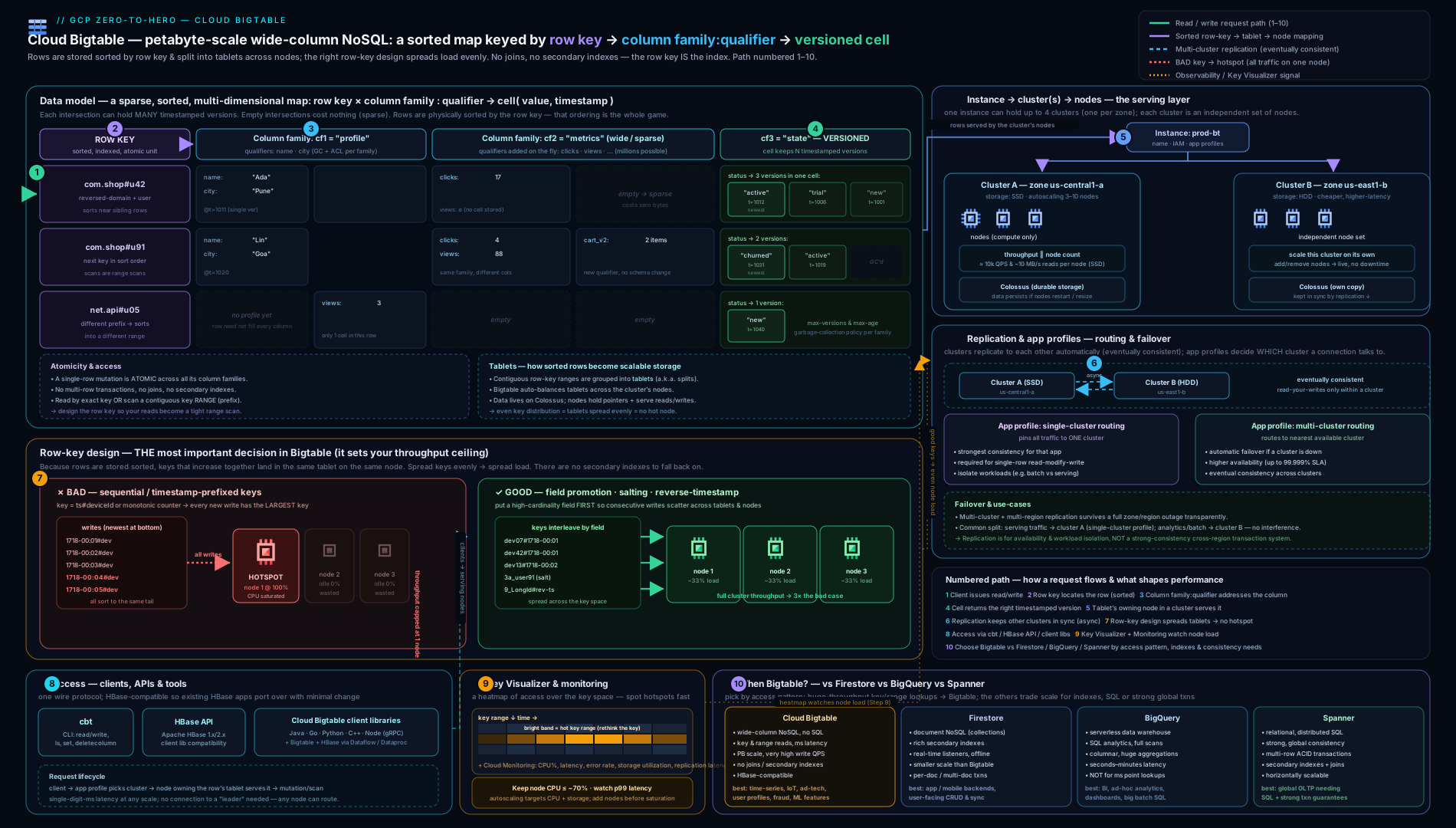
The diagram shows the whole picture at once: an instance containing replicated clusters in separate zones, each cluster’s nodes serving contiguous tablets of the sorted key space (with storage in Colossus beneath), and applications connecting through app profiles whose routing policy decides which cluster handles each request — the structure every section above has been building toward.
Going deeper
Everything so far is enough to design and run Bigtable well. This section is for the reader who wants to know why it behaves the way it does — the storage engine, the mechanics of splitting and replication, the lazy nature of garbage collection, the hard limits you design against, and the newer capabilities that have quietly widened what Bigtable can do.
Under the hood: the LSM tree, memtables and SSTables
Bigtable is a log-structured merge-tree (LSM-tree) store, and that single fact explains most of its performance characteristics. A write does not update data in place. Instead it is appended to a commit log (for durability) and inserted into an in-memory sorted buffer called a memtable. The write is acknowledged as soon as those two things happen — which is why writes are fast and why write latency is so consistent.
When a memtable fills, it is flushed to Colossus as an immutable, sorted file called an SSTable (sorted string table). SSTables are never modified after they are written. Over time a tablet accumulates several SSTables plus the live memtable, and a read must merge them: it looks in the memtable and the relevant SSTables, takes the newest cell version for each requested column, and returns the result. To keep the number of files from growing without bound, a background process called compaction periodically merges SSTables into fewer, larger ones, discarding overwritten values and cells that a GC policy has expired.
Three consequences fall out of this design:
- Deletes are writes. Deleting a cell writes a small marker called a tombstone; the data is not physically removed until a later compaction. So a delete costs storage and read effort until compaction catches up.
- HDD random reads are slow because a read may touch several SSTables. On spinning disks each SSTable lookup is a seek; on SSD those seeks are cheap, which is exactly why SSD is the default and HDD is only for large sequential/batch workloads.
- A read block, not a single cell, is the I/O unit. SSTables are divided into ~64 KB blocks; Bigtable caches hot blocks in a block cache, so reads with good locality (the run-of-adjacent-rows pattern) stay in cache and fly.
How tablets split and rebalance
Recall that a table’s sorted key range is divided into tablets, each served by exactly one node. Two things trigger a tablet split: a tablet growing past a size threshold, or a tablet receiving disproportionate load. When Bigtable rebalances, it reassigns which node serves which tablet — it does not move the underlying data, because the data lives in Colossus and every node can reach it. That is the deep reason adding nodes is fast and online: you are adding serving capacity and shuffling tablet assignments, not copying terabytes.
It is also the deep reason a hotspot cannot be fixed by adding nodes. A single tablet is the unit of assignment, and one tablet is served by one node. If your key funnels all current writes into one tablet, that tablet cannot be split usefully (splitting a range that is all “the same hot point” does not help) and cannot be served by more than one node. The fix is upstream, in the key. For a known load spike you can pre-split a table at chosen key boundaries so the range is already spread across nodes before traffic arrives, rather than waiting for Bigtable to discover the hot spots and split reactively.
Replication internals and conflict resolution
Replication is asynchronous and multi-primary: every cluster accepts writes and streams them to the others, typically within seconds. Because two clusters can be written independently, Bigtable needs a rule to resolve conflicting writes to the same cell — and that rule is last-write-wins by cell timestamp. The version with the newest timestamp survives; if two writes carry the identical timestamp, Bigtable breaks the tie deterministically (by value) so all clusters converge on the same answer.
This has a subtle, important implication: if you set cell timestamps yourself, clock skew or reused timestamps can make an “older” write win. When you let Bigtable assign the server timestamp, this is rarely an issue; when you supply timestamps (common when back-filling historical data), be deliberate about them. The client API also lets you request bounded staleness and reason about consistency, but across clusters the only way to guarantee you see your own write is to route reads and writes to the same cluster — which is exactly what a single-cluster app profile does.
Two more nuances: replication is not point-in-time recovery (a bad or deleted write propagates everywhere — take backups for that), and each cluster reports a replication latency metric so you can see how far behind it is when reasoning about consistency.
Garbage collection is lazy — design for it
A family’s GC policy (maxversions, maxage, or a combination) does not delete data the instant it qualifies. GC happens during compaction, so an expired or excess cell version may still be readable and still billed for storage for some time after it “should” be gone. Two rules follow: never rely on GC timing for correctness (if a value must be unreadable immediately, delete it explicitly — and even then it lingers as a tombstone until compaction), and never rely on GC for security deletion guarantees. Also understand the combination semantics: maxversions=N and maxage=D collects a cell only when it is both beyond N versions and older than D; using or collects it when either is true. The and form keeps at least N versions no matter how old; the or form is stricter.
Hard limits and quotas to design against
| Limit | Value (design against these) |
|---|---|
| Row key size | ≤ 4 KB |
| Single cell value | ≤ 100 MB |
| Recommended max single row | ~256 MB (treat 100 MB as the soft performance ceiling) |
| Column families per table | Keep to a handful (tens at most; not hundreds) |
| Qualifiers per row | Effectively unbounded (sparse) — but bounded by the row-size limit |
| Nodes per cluster / clusters per instance | Governed by per-project, per-region quotas — check current values before capacity planning |
| Minimum nodes | 1 per cluster (there is no scale-to-zero) |
The two that bite hardest in design are the row-size ceiling (which forces time-bucketing of “too-tall” rows) and the no-scale-to-zero floor (which sets your minimum monthly cost).
Newer capabilities worth knowing (2026)
Bigtable has grown well beyond the classic key/scan API. These are current, and some of them soften old “Bigtable can’t do that” reflexes:
- GoogleSQL for Bigtable. A read-oriented SQL surface for point and range queries and simple filters over a table. It is a convenience layer, not a relational engine — no JOINs across arbitrary columns, and the key-based access model still governs performance.
- Continuous materialized views. Bigtable can maintain a SQL-defined materialized view that incrementally updates as base-table data is written — letting you keep a rolled-up or re-keyed projection (a form of managed “second table/index”) without hand-writing the dual-write logic.
- Change streams (CDC). Bigtable can emit a change stream of row mutations that you consume with Dataflow (or a client) to feed BigQuery, Pub/Sub, or downstream systems — the clean way to fan changes out for analytics or search indexing.
- Data Boost. Serverless compute that runs high-throughput batch reads and SQL against your table without consuming your serving cluster’s CPU, isolating heavy analytical/export jobs from latency-sensitive traffic — an alternative to spinning up a dedicated batch cluster.
- Authorized Views. Coarse-grained access control within a table: an authorized view exposes only chosen row-key prefixes and column families/qualifiers, so you can grant a consumer access to a subset without giving them the whole table. This softens the old “no sub-table access control” limitation for many cases (though it is prefix/family-scoped, not arbitrary per-row ACLs).
None of these change the core discipline — the row key is still the master decision — but they widen the set of secondary patterns you can serve without leaving Bigtable.
Hands-on lab: create, design a key, read it back, and clean up
We will create a small single-node instance, declare a table with a column family and GC policy, write a few rows with a field-promoted, reverse-timestamp key, scan them, then add a second cluster to see replication, and tear it all down. This stays within modest spend; remember Bigtable has no always-free tier, so do it in one sitting and delete promptly (new accounts can apply the $300 free-trial credit).
1. Set your project and install cbt.
gcloud config set project YOUR_PROJECT_ID
gcloud components install cbt   # the Bigtable CLI
gcloud services enable bigtable.googleapis.com bigtableadmin.googleapis.com
2. Create a single-cluster SSD instance with one node.
gcloud bigtable instances create lab-bt \
  --display-name="Bigtable Lab" \
  --cluster-config=id=lab-c1,zone=us-central1-b,nodes=1 \
  --cluster-storage-type=SSD \
  --instance-type=PRODUCTION
Expected: the instance and cluster are created (a minute or so). One node on SSD is the cheapest production footprint.
3. Point cbt at the instance (a .cbtrc saves repetition) and create a table + family with a GC policy.
echo "project = $(gcloud config get-value project)" > ~/.cbtrc
echo "instance = lab-bt" >> ~/.cbtrc

cbt createtable sensors
cbt createfamily sensors sensor
# Keep at most 3 versions of any cell, and nothing older than 7 days:
cbt setgcpolicy sensors sensor maxversions=3 and maxage=7d
cbt ls            # list tables
cbt ls sensors    # show families + GC policy
Expected: sensors listed, with family sensor and the GC policy shown.
4. Write rows using a field-promoted, reverse-timestamp key. We promote device to the front and suffix a reverse timestamp so the newest reading sorts first within a device.
# Key pattern: device<id>#<reverseTs>   (smaller reverseTs = newer = sorts first)
cbt set sensors "deviceA1F#9223370512000" sensor:temp="21.4" sensor:humidity="47"
cbt set sensors "deviceA1F#9223370598000" sensor:temp="21.1" sensor:humidity="46"
cbt set sensors "deviceB22#9223370515000" sensor:temp="30.7" sensor:humidity="55"
5. Read it back — point read, then a prefix range scan (latest-first within the device).
cbt lookup sensors "deviceA1F#9223370512000"     # one row by exact key
cbt read sensors prefix="deviceA1F#" count=10     # all of deviceA1F's rows, newest first
Expected: the lookup returns the single row’s cells; the prefix read returns deviceA1F’s two rows with the smaller reverse-timestamp (the newer reading) first — demonstrating that the key design, not a query clause, produced “latest-first”.
6. (Optional) Add a second cluster to see replication, then a multi-cluster app profile.
gcloud bigtable clusters create lab-c2 \
  --instance=lab-bt --zone=us-east1-c --num-nodes=1

gcloud bigtable app-profiles create multi \
  --instance=lab-bt --route-any \
  --description="multi-cluster routing, eventual consistency"
--route-any creates multi-cluster routing (nearest cluster + automatic failover, eventual consistency). A few seconds after creating the cluster, your sensors data exists in both — verify with cbt -instance lab-bt read sensors (Bigtable serves from whichever cluster the request routes to).
7. Inspect in the Key Visualizer (Console). Open Bigtable → lab-bt → Monitoring → Key Visualizer. (On a lab-sized table there is little data, but in production this is where you would spot a hotspot as a bright band.)
8. Validation. Confirm: cbt ls shows the table; the prefix scan returns rows newest-first; (if you added a cluster) both clusters serve the same data.
Cleanup — do this promptly; nodes bill per hour and there is no free tier.
gcloud bigtable instances delete lab-bt --quiet
Deleting the instance removes its clusters, nodes, tables and data and stops all charges.
Cost note. Bigtable bills for nodes per hour (the dominant cost — every node in every cluster, whether busy or idle), storage per GB-month (SSD costs more than HDD), and network egress (cross-region replication traffic and reads to other regions). A single SSD node runs continuously, so a 1-node instance left up for a day costs a few dollars; the lab above, deleted within an hour or two, is well under a dollar but only if you delete it. There is no scale-to-zero and no always-free tier — an idle Bigtable instance keeps charging for its nodes and storage. The biggest real-world lever is node count (and replication multiplies it), followed by storage type (HDD for huge cold data) and avoiding needless cross-region egress.
Practice challenges
Six graded exercises, beginner to advanced. Try each before opening the solution. Commands are cbt/gcloud against current Bigtable; no live cluster is needed to reason them out.
1. (Beginner) Spot the hotspot. You inherit a table whose row key is 20260615T090000#sensorA. Traffic is fine at night but the cluster falls over every morning even though average CPU is low. What is wrong, and what key would you use instead?
<details> <summary>Solution</summary>
The timestamp leads the key, so every write at the current instant sorts to the same “newest” range and lands on one node — a classic write hotspot; adding nodes won’t help. Promote the entity and push time to a reverse-timestamp suffix: sensorA#<reverseTs>. Why: the high-cardinality sensorA distributes writes across sensors, and the reverse-timestamp suffix makes “latest first” a cheap prefix scan.
</details>
2. (Beginner) Create a table with a retention policy. Write the cbt commands to create a table events with a single column family data that keeps at most 1 version of each cell and nothing older than 90 days.
<details> <summary>Solution</summary>
cbt createtable events
cbt createfamily events data
cbt setgcpolicy events data maxversions=1 or maxage=90d
Why: or collects a cell version when either condition is true (more than 1 version or older than 90d) — the right choice for “keep just the latest, and expire after 90 days.” Use and only if you want to guarantee keeping a version regardless of age.
</details>
3. (Intermediate) Fix numeric ordering. A colleague’s keys are user9#…, user10#…, user100#…, user2#… and range scans return them in a baffling order. Put them in the order Bigtable actually stores them, then change the key so numeric and stored order agree.
<details> <summary>Solution</summary>
Bigtable sorts lexicographically by bytes, so the stored order is user10, user100, user2, user9. Zero-pad the numeric part to a fixed width — user0002, user0009, user0010, user0100 — and byte order matches numeric order. Why: lexicographic comparison is left-to-right per byte; fixed-width padding makes the digits align.
</details>
4. (Intermediate) Salt a sequential stream. You must ingest a global, monotonically increasing event ID with no natural high-cardinality field, and you still need time-range scans. Design the key, pick the salt count, and state the read cost.
<details> <summary>Solution</summary>
Prepend a deterministic salt: key = saltPrefix#<eventKey> where saltPrefix = hash(eventKey) % N, zero-padded (e.g. 03#…). Choose N roughly in line with node count so writes scatter across N ranges/nodes. Read cost: a time-range scan must fan out across all N salt buckets and merge the results — you trade read simplicity for write distribution. Why: the salt breaks the monotonic run into N distributed streams; determinism lets you recompute the salt to point-read a specific event.
</details>
5. (Advanced) Serve a second query with no secondary index. Your telemetry table is keyed device#reverseTs for “latest readings per device.” Product now needs “list all devices currently in alert state,” which the key can’t answer cheaply. Design a solution and describe the write path.
<details> <summary>Solution</summary>
Maintain a second table as a manual index — e.g. a small alerts table keyed device, holding a row only while that device is in alert (or a device_state table keyed state#device). On every state change, dual-write: update the telemetry row and upsert/delete the row in the index table. “List alerting devices” becomes a cheap scan of the alerts table (or a prefix scan of alert#). Why: Bigtable has no secondary indexes, so you build one by writing the same fact under a second, purpose-designed key — write twice, read cheaply. A continuous materialized view or a change stream into a second table can automate the dual-write.
</details>
6. (Advanced) Atomic counters plus regional HA. You need atomic read-modify-write counters and automatic failover across two regions. Explain the app-profile tension and give a pragmatic design.
<details> <summary>Solution</summary>
Single-row read-modify-write / check-and-mutate are safe only under single-cluster routing (multi-cluster routing could apply conflicting mutations on two clusters, so it disallows them). But automatic cross-region failover needs multi-cluster routing — you cannot have both at once. Pragmatic design: a single-cluster app profile pinned to a primary cluster for the counter workload (accepting manual/scripted failover for it), plus a multi-cluster profile for the rest of the latency-sensitive serving path; or move pure counters to a store built for them. Why: atomicity requires all conflicting ops on one copy; automatic failover requires many copies — the routing policy forces the trade-off per workload. </details>
Common beginner mistakes
These are misconceptions, not symptoms — the wrong mental model that leads people astray, and the right one to replace it with. (The symptom → cause → fix table follows this section.)
- “I’ll design the key for now and add an index for the other query later.” There is no “later” — Bigtable has no secondary indexes, ever. Right model: decide your access patterns up front, encode the dominant one in the key, and serve a second hot pattern with a second table (or a materialized view / change stream), not an index you’ll never get.
- “It’s basically a fast SQL database — I’ll just add a
WHERE/JOIN.” Bigtable is a sorted map from a byte key to cells, not a query engine. There is no JOIN, GROUP BY, or arbitrary filter-by-column that performs at scale. Right model: your only fast operations are point read and range scan on the key — model the query into the key, or push analytics to BigQuery. - “Put the timestamp first so data is stored in time order.” Time-ordered storage is exactly what creates a write hotspot: every current write sorts to the same place and hits one node. Right model: promote a high-cardinality field to the front and use a reverse-timestamp suffix for “latest first.”
- “Latency is bad, so I’ll add nodes.” If the cause is a hotspot, more nodes do nothing — one hot tablet is served by one node regardless of fleet size. Right model: check hottest-node CPU and the Key Visualizer first; fix the key, then scale.
- “Replication is my backup.” Replication is multi-primary and near-immediate, so a bad or deleted write propagates to every cluster. Right model: replication is for availability and locality; use Bigtable backups (scheduled/on-demand) for point-in-time recovery.
- “Multi-cluster routing gives me strong consistency everywhere.” It gives eventual consistency across clusters plus automatic failover. Right model: for read-your-writes, route reads and writes to the same cluster with a single-cluster profile.
- “Empty columns waste space, so I must define every column and fill NULLs.” Bigtable is sparse and schemaless at the column level — only cells that exist are stored, there is no NULL, and qualifiers are created on write. Right model: store only what a row has; a table can have millions of possible columns while a row uses a few.
- “HDD to save money.” On a random-read workload the latency penalty is severe, and the SSD-vs-HDD choice is permanent for the life of the instance. Right model: SSD by default; reserve HDD for very large, sequential/batch, cold datasets where cost dominates.
- “One row per device, growing forever, is fine.” A single row lives on one node, so an ever-growing row becomes its own hotspot and eventually breaches the row-size ceiling. Right model: time-bucket the key (
device#2026-06-15) so each period is a fresh, well-distributed row.
Common mistakes & troubleshooting
| Symptom | Likely cause | Fix |
|---|---|---|
| High latency but low average CPU | A hotspot — one node pegged while others idle (key leads with time/sequence/low-cardinality field) | Open Key Visualizer (bright band) and check hottest-node CPU; redesign the row key (field promotion, salting, reverse-time) |
| Latency rises as data grows; can’t scale CPU down | Storage per node near its limit — storage, not CPU, forces scale-up | Add nodes (or set a storage-utilisation autoscaling target); consider time-bucketing keys |
| Reads return stale data right after a write | Multi-cluster routing + replication lag (eventual consistency) | Use a single-cluster app profile for read-your-writes, or tolerate the lag |
read-modify-write / CAS rejected or behaving oddly |
These need single-cluster routing; multi-cluster profiles block/aren’t safe for them | Use a single-cluster app profile for atomic single-row ops |
| One row is huge and slow | A too-tall row (unbounded growth) — one row lives on one node | Time-bucket the key (entity#date) so each period is a fresh, distributed row; keep rows < ~100 MB |
| Costs higher than expected on an idle cluster | Bigtable has no scale-to-zero / free tier — nodes bill 24×7, and replication multiplies node cost | Right-size/autoscale node count; delete dev instances when idle; don’t over-replicate |
| Can’t filter by a non-key attribute efficiently | There are no secondary indexes | Design the key for the dominant query; maintain a second “index” table; or push analytics to BigQuery |
| Adding nodes didn’t improve throughput | A hotspot caps you at one node’s capacity regardless of fleet size | Fix the key distribution first; nodes only help once load is spread |
Best practices
- Design the row key before anything else, from the access pattern: lead with the high-cardinality field you filter on (field promotion), suffix the sort field, use reverse timestamps for “latest first”, and reserve salting for when no natural high-cardinality field exists. Treat the key as your schema.
- Keep rows bounded (time-bucket entities; rows well under ~100 MB) and tables tall by default — one event per row is the idiomatic time-series shape.
- Use a small number of column families with deliberate GC policies (
maxversionsand/ormaxage) so old cell versions are reclaimed automatically. - Right-size nodes from the throughput-and-storage relationship, keep CPU around 50–70%, and use autoscaling (with both CPU and storage targets) for variable load.
- Add clusters for HA and locality, and separate workloads with app profiles — a multi-cluster serving profile plus a single-cluster batch profile is a clean, common pattern.
- Use the Key Visualizer routinely, not just in a crisis, to catch emerging hotspots early; watch hottest-node CPU in Monitoring.
- Take backups (scheduled/on-demand) — replication is not a backup; it propagates bad writes.
- Batch and pre-warm: use bulk writes for ingest, and pre-split a table (or pre-scale nodes) before a known load spike so tablets are already distributed.
Security notes
- IAM controls access to instances, clusters and tables via predefined roles —
roles/bigtable.admin(full control),roles/bigtable.user(read/write data),roles/bigtable.reader(read-only data), androles/bigtable.viewer(metadata only). Grant the least-privileged role; use Workload Identity so applications authenticate as a service account withbigtable.user, never as keys. - Encryption at rest is on by default; you can use customer-managed encryption keys (CMEK) in Cloud KMS for instances that require key control/compliance (set per cluster). In transit, traffic is encrypted (gRPC/TLS).
- Network exposure: Bigtable is reached over Google APIs; use Private Google Access / VPC Service Controls to keep access on Google’s network and prevent data exfiltration, and avoid embedding broad access in client environments.
- No row/column-level ACLs: Bigtable does not have arbitrary fine-grained per-row or per-column access control. If you need that, enforce it in your application/service layer (or model it into separate tables with different IAM), or use a different store. (Contrast with BigQuery’s fine-grained access — cross-linked below.) Current update: Authorized Views now provide coarse sub-table access — scoped to row-key prefixes and column families/qualifiers — which covers many previously-unservable cases (see Going deeper); it is prefix/family-scoped, not arbitrary per-row ACLs.
- Audit access with Cloud Audit Logs (admin activity and, optionally, data access), and use app profiles to attribute and isolate workloads.
Interview & exam questions
-
What is the single most important design decision in Bigtable, and why? The row key. Bigtable is a sorted map with no secondary indexes, so the key is the only index and the entire performance model: it determines which rows are adjacent (cheap range scans) and whether writes spread across nodes or hotspot on one. You cannot query your way out of a bad key.
-
What is hotspotting and how do you avoid it? When a disproportionate share of traffic hits a narrow, contiguous key range — and therefore one node — while the rest idle. Cause: a monotonic or low-cardinality leading field (timestamp, sequence, dominant country). Cure: make the leading field high-cardinality via field promotion, use salting when no natural field exists, and reverse timestamps as a suffix (never a monotonic leading component).
-
Explain field promotion, salting and reverse timestamps, and when to use each. Field promotion — move a high-cardinality, queried field to the front (distributes writes and makes the query a prefix scan); use first. Salting — prepend a deterministic
hash % Nprefix to scatter an otherwise sequential stream across N buckets (cost: range scans must fan out across buckets); use when no high-cardinality field exists. Reverse timestamp — appendMAX - tsso newer rows sort first, giving “latest N” as a cheap prefix scan. -
Why does Bigtable have no secondary indexes, and how do you serve a second query pattern? Omitting them is what keeps it linearly scalable and predictable at massive throughput (no index to maintain or fan out). To serve another pattern: design the key for the dominant one and scan-with-filter for the rare one; maintain a second table keyed for the other pattern (write twice, read cheaply); or push analytics to BigQuery.
-
What’s the difference between an instance, a cluster and a node? An instance is the management container holding tables and one-or-more clusters. A cluster is a serving+storage location in one zone with a number of nodes. A node is serving compute — it does not store data (storage is in Colossus); you scale throughput by adding nodes. Tables are replicated to every cluster in the instance.
-
How does throughput relate to node count, and what else can force you to add nodes? Throughput scales roughly linearly with nodes (≈10k reads or writes/sec per SSD node for small rows) if the key spreads load — a hotspot caps you at one node regardless of fleet size. Separately, each node addresses a maximum amount of storage, so storage utilisation (not just CPU) can force scale-up; autoscaling therefore has both a CPU and a storage target.
-
SSD vs HDD — what’s the trade-off and can you change it? SSD: low, consistent latency and high throughput for random access — the default. HDD: far cheaper per GB but poor for random reads, suitable only for huge, sequential/batch, cold datasets. The choice is permanent for the life of the instance — to switch you migrate to a new instance.
-
How does replication work in Bigtable, and what consistency does it provide? Add clusters in other zones/regions to an instance and Bigtable replicates all tables to all clusters automatically and bidirectionally (multi-primary), asynchronously — so it is eventually consistent between clusters (typically seconds of lag). Every cluster is a full, writable copy. It gives HA, locality, isolation and read scaling — but it is not a backup (bad writes replicate).
-
What is an app profile, and what does the routing policy control? An app profile defines how an application connects: which cluster(s) it routes to and with what guarantees. Single-cluster routing sends all traffic to one cluster (enables read-your-writes / strong consistency and single-row transactions, but no automatic failover). Multi-cluster routing routes to the nearest available cluster with automatic failover (but eventual consistency). You can’t have both automatic multi-cluster failover and strong cross-cluster consistency.
-
You need atomic increments (read-modify-write). What must you configure? Use a single-cluster routing app profile. Single-row read-modify-write and check-and-mutate are atomic but only safe on one cluster; multi-cluster profiles disallow them (concurrent conflicting mutations on different clusters would be unsafe).
-
A table has low average CPU but terrible latency. What’s wrong and how do you confirm it? A hotspot: one node saturated while the average looks fine. Confirm with the Key Visualizer (a bright horizontal band over a narrow key range) and hottest-node CPU in Monitoring — then redesign the row key to distribute load.
-
When would you choose Bigtable over Firestore, BigQuery or Spanner? Bigtable for very high throughput, low-latency key/range access at huge scale with a single, well-understood access pattern (time-series, telemetry, ad-tech, feeds). Firestore for app-centric document data with secondary indexes, real-time listeners and easy multi-field queries at smaller scale. BigQuery for analytical SQL over large datasets (not low-latency point reads). Spanner for relational schema, SQL, JOINs and strong global transactional consistency.
Quick check
- Bigtable has how many indexes, and on what?
- Your key is
timestamp#deviceId. What will go wrong, and what’s the fix? - You want “the latest 50 readings for device X” as a cheap scan. What key technique gives you that?
- True/false: adding a second cluster to an instance creates a read-only replica you must promote for writes.
- Which app-profile routing policy gives automatic failover, and what consistency does it imply?
Answers
- Exactly one index, on the row key (the table is sorted by it). No secondary indexes.
- A write hotspot — every current write sorts to the same range/node, so the cluster can’t scale. Fix: field-promote
deviceIdto the front (deviceId#...) and use a reverse timestamp suffix. - A reverse timestamp suffix after a field-promoted device ID (
deviceX#<MAX-ts>), so newer rows sort first and a limited prefix scan returns the latest first. - False. Every cluster is a full, writable copy (multi-primary); writes can go to any cluster and replicate bidirectionally, eventually consistent.
- Multi-cluster routing — automatic failover to the nearest available cluster, implying eventual consistency across clusters.
Exercise
Design and partially build a Bigtable schema for a fleet-telemetry workload in a sandbox project:
- Write down the access patterns: “latest N readings for one device”, “all readings for one device in a time window”, and “is device X currently in alert state?”.
- Design the row key for the first two patterns (field-promote
deviceId, suffix a reverse timestamp). Justify in a sentence how it distributes writes and serves both reads as prefix scans. Decide how you’d serve the third pattern without a secondary index (a small second “current-state” table or a wide row). - Create a single-node SSD instance and a table with one column family and a GC policy of
maxversions=5 and maxage=30d. - Bulk-write several devices’ worth of rows with your key, then prove “latest-first” with a limited prefix scan.
- Add a second cluster and a multi-cluster app profile; observe the data appear on both. Add a single-cluster app profile and explain which workload you’d point at each.
- Open the Key Visualizer and the hottest-node CPU metric; describe what a hotspot would look like.
- Delete the instance and confirm charges stop. Write a short paragraph on why your key avoids hotspotting and what would have happened with a time-leading key.
Certification mapping
- Professional Data Engineer (PDE): the headline service here — choosing Bigtable for high-throughput, low-latency NoSQL; row-key/schema design to avoid hotspots; SSD vs HDD; nodes/throughput sizing; replication and app profiles; and Bigtable vs BigQuery vs Firestore vs Spanner all appear directly and repeatedly.
- Professional Cloud Architect (PCA): selecting the right data store for a scale/latency/consistency requirement, designing for HA via replication and app-profile routing, and the cost trade-offs of node count and replication.
- Associate Cloud Engineer (ACE): provisioning and managing instances/clusters/nodes, autoscaling, IAM roles, and basic operations with
gcloud/cbt. - Professional Cloud Database Engineer (PCDE): the deep end — schema/row-key design, performance diagnosis with the Key Visualizer, replication/consistency, backups, and migration from HBase.
Glossary
- Row key — unique byte string (≤ 4 KB) identifying a row; the only index; rows are stored sorted lexicographically by it.
- Column family — declared-up-front group of columns stored together; owns the cell GC policy.
- Column qualifier — dynamic column name within a family (
family:qualifier); not declared; can itself carry data. - Cell — value + timestamp at (row, column); the atomic unit; sparse (only existing cells are stored).
- Version / GC policy — Bigtable keeps multiple timestamped cell versions; the family’s garbage-collection policy (
maxversions,maxage) reclaims old ones. - Tablet — a contiguous range of the sorted key space (HBase “region”), distributed across nodes; the unit of rebalancing.
- Instance — management container holding tables and one-or-more clusters.
- Cluster — serving + storage location in one zone with a node count; a full copy of the instance’s data.
- Node — serving compute; does not store data (storage is in Colossus); throughput scales with node count.
- Hotspot — disproportionate traffic to a narrow key range (one node) while the rest idle; the central failure mode.
- Field promotion — moving a high-cardinality, queried field to the front of the key to distribute writes and enable prefix scans.
- Salting — prepending a deterministic
hash % Nprefix to scatter otherwise-sequential keys across N buckets. - Reverse timestamp — appending
MAX - tsso newer rows sort first (“latest first” as a prefix scan). - Replication — automatic, bidirectional, eventually-consistent copying of all tables to every cluster in an instance.
- App profile — per-application connection config: routing policy (single- vs multi-cluster) and consistency/transaction settings.
- Single- vs multi-cluster routing — pin to one cluster (read-your-writes, no auto-failover) vs nearest-available with auto-failover (eventual consistency).
- Key Visualizer — heatmap of access across the key space over time; the tool for spotting hotspots.
- cbt — the Bigtable command-line tool for ad-hoc table/data operations.
- Lexicographic order — byte-by-byte (dictionary) sort order Bigtable uses for row keys; why numeric fields must be zero-padded to a fixed width to sort numerically.
- LSM-tree — the log-structured merge-tree storage design: writes buffer in a memtable and flush to immutable SSTables that compaction later merges.
- Memtable — the in-memory sorted write buffer; a write is durable once it is in the commit log and memtable.
- SSTable — an immutable, sorted on-disk (Colossus) file of cells; never modified after it is written.
- Compaction — background merging of SSTables that reclaims overwritten/expired cells and applies tombstones.
- Tombstone — a delete marker; the deleted data physically remains until a later compaction reclaims it.
- Colossus — Google’s distributed file system where Bigtable’s data (SSTables) actually lives, separate from the serving nodes.
- Block cache — in-node cache of ~64 KB SSTable blocks; hot, well-localised reads are served from it.
- Last-write-wins — the cross-cluster conflict-resolution rule: the cell version with the newest timestamp survives (identical timestamps broken deterministically).
- Tablet split — dividing a hot or oversized tablet; rebalancing reassigns which node serves a tablet without moving data (data stays in Colossus).
- Pre-splitting — creating tablet boundaries ahead of a known load spike so the key range is already spread across nodes.
- Time-bucketing — putting a coarse time component in the key (
entity#date) so an entity’s data spreads across many bounded rows instead of one unbounded row. - Backup — an on-demand or scheduled point-in-time copy of a table; separate from replication and the way to recover from bad writes.
- Data Boost — serverless compute for high-throughput batch reads/SQL that does not consume the serving cluster’s CPU.
- Change stream — a consumable stream of a table’s row mutations (CDC) for feeding Dataflow / BigQuery / Pub/Sub.
- Materialized view (Bigtable) — a SQL-defined, incrementally-maintained projection of a table.
- Authorized View — coarse sub-table access control scoped to row-key prefixes and column families/qualifiers.
- CMEK — customer-managed encryption keys in Cloud KMS, set per cluster for key control/compliance.
- GoogleSQL (Bigtable) — the read-oriented SQL surface for point/range queries and simple filters; not a relational engine.
Next steps
- The analytics counterpart: the BigQuery deep dive — Bigtable and BigQuery are constantly confused and often paired (operational store + analytics warehouse); learn where each belongs and how to move data between them.
- The supply-chain next lesson: the Artifact Registry deep dive — repository modes, formats, scanning and cleanup policies.
- Compare the document model: the Firestore deep dive for when you want secondary indexes, real-time listeners and easy multi-field queries instead of raw throughput.
Bigtable vs Firestore vs BigQuery vs Spanner: choosing the right store
Architects are expected to place Bigtable correctly among the other GCP data services. All four are managed and scalable; they differ in data model, access pattern and consistency.
| Dimension | Bigtable | Firestore | BigQuery | Spanner |
|---|---|---|---|---|
| Model | Wide-column NoSQL (sorted key→cells) | Document NoSQL (collections/documents) | Columnar analytical warehouse | Relational, distributed SQL |
| Access pattern | Point read + range scan on row key | Document reads + rich queries with secondary indexes | Analytical SQL (scans/aggregations) | SQL with JOINs/transactions |
| Indexes | None (row key only) | Automatic + composite secondary indexes | N/A (columnar scan) | Primary + secondary indexes |
| Throughput / latency | Very high throughput, single-digit-ms | Moderate; real-time listeners | High scan throughput; not low-latency point reads | High, with strong consistency |
| Consistency | Single-row atomic; eventual across clusters | Strong (with offline/real-time) | N/A (warehouse) | Strong, externally consistent, global |
| Scale | Linear with nodes; petabyte+ | Serverless, large but app-scale | Petabyte-scale analytics | Horizontal, global |
| Best for | Time-series, telemetry, ad-tech, feeds, huge OLTP-style key access | App/mobile data, profiles, real-time UIs | Analytics, dashboards, ad-hoc SQL over big data | Global relational apps, ledgers, inventory needing JOINs + strong consistency |
| Cost shape | Nodes/hr + storage (no free tier, no scale-to-zero) | Per-operation + storage | Per-query/slot + storage | Provisioned compute + storage (premium) |
How to decide:
- Choose Bigtable when you need massive throughput and low-latency access by key or key range with a single, well-understood pattern — time-series, IoT/telemetry, ad-tech, financial ticks, activity feeds, the backing store for graphs or other systems — and you can encode the access pattern into the row key. It is unbeatable per-operation at scale, but you forgo secondary indexes, JOINs and ad-hoc queries.
- Choose Firestore for application data where you want secondary indexes, easy multi-field queries and real-time listeners at app scale, not raw throughput.
- Choose BigQuery for analytical SQL over large datasets — dashboards, reporting, ad-hoc exploration — not for low-latency point reads (it is a warehouse, not a serving store). Bigtable + BigQuery together is a common pairing: serve live from Bigtable, analyse in BigQuery.
- Choose Spanner when you need a relational schema, SQL with JOINs and strong, globally-consistent transactions beyond what a single primary gives — and you are willing to pay for it and to design the schema to avoid hotspots.
The exam framing is consistent: high-throughput low-latency key/range access → Bigtable; indexed app/document data with real-time → Firestore; analytical SQL → BigQuery; global relational + strong consistency → Spanner.