In a nutshell
Cloud Storage is where Google Cloud keeps your files — not on a disk you manage, but in a giant, managed object store you reach over the network. Think of a bucket as a warehouse you rent in one particular city. You drop in sealed boxes (objects); you never open a box to edit it, you swap it for a new sealed box. The warehouse never loses a box (eleven nines of durability), but it will happily hand one to anyone you put on the guest list — so most Cloud Storage disasters are about who could reach the data and what happened when someone deleted it, not about hardware failing.
A few knobs make the warehouse cheap and safe. The storage class is which shelf a box sits on: the front shelf (Standard) costs more rent but you grab boxes instantly and for free; the deep basement vault (Archive) is almost free to store but you pay a fee — and a minimum rental — every time you pull a box out. Autoclass is a robot that shuffles boxes to cheaper shelves when you stop touching them and brings them forward when you ask, without charging retrieval fees. Lifecycle rules are standing instructions (“move boxes older than 30 days to the basement; shred duplicate copies after a year”). Versioning, soft delete, and retention are three overlapping safety nets: a photocopy of every box you replace, a dumpster you can fish deleted boxes out of for a week, and a legal seal that stops anyone shredding a box early. Every box is locked (encrypted) at all times; the only choice is who holds the key. And a guard at the door (IAM) decides who gets in, with single-use visitor passes (signed URLs) for one-off guests and a hard rule (public access prevention) that the warehouse can never be left open to the street.
This lesson turns that picture into the real settings — every one you choose at creation, every one you can change later, and the traps that turn a cheap, durable service into a surprise bill or a breach.
Level: Intermediate · Time: ~49 min
Cloud Storage is the object store that quietly underpins almost everything you build on Google Cloud. It holds your application uploads and static website assets, it is the landing zone for BigQuery loads and Dataflow pipelines, it backs Cloud Run source deploys and container build artefacts, and it is where Terraform keeps its state. It is also where the most expensive and embarrassing mistakes happen: a bucket left publicly readable becomes a data-breach headline; a single-region bucket becomes an outage when that region has a bad day; an Archive object that someone needs right now costs a small fortune to pull back early; versioning switched on without lifecycle rules becomes a budget leak that nobody notices for months. Get the options right at creation and Cloud Storage is one of the safest, cheapest, most durable services in the cloud — eleven nines of annual durability. Get them wrong and it is the resource your next security review, cost review, or “where did our data go” incident lands on.
This lesson is the exhaustive tour. Every option that matters when you create a bucket, every setting you can (and cannot) change afterwards, and the load-bearing concepts — location types, storage classes, Autoclass, lifecycle, versioning, soft delete, Bucket Lock, the three encryption models, and the access model — explained in full, with real gcloud storage commands throughout. It is written to be read once by someone new and leave them able to design, operate, and defend a bucket in production, and to answer the questions an interviewer or a Google certification exam will throw at them.
Learning objectives
By the end of this lesson you will be able to:
- Choose the correct location type (region, dual-region, multi-region) for a bucket and explain the availability, latency, and cost trade-offs.
- Pick the right storage class (Standard, Nearline, Coldline, Archive) per object and decide when Autoclass beats hand-written lifecycle rules.
- Write lifecycle rules that tier classes down and reap old versions safely, and explain how lifecycle interacts with retention.
- Compose object versioning, soft delete, and retention with Bucket Lock into overlapping safety nets, and say exactly where each one stops.
- Choose between the three encryption models — Google-managed, customer-managed (CMEK), and customer-supplied (CSEK) — and apply them.
- Design the access model: uniform bucket-level access versus fine-grained ACLs, IAM roles, signed URLs, and public access prevention.
- Configure turbo replication, requester pays, Storage Transfer Service, and composite objects, and reason about cost.
Prerequisites & where this fits
You should have a Google Cloud project with billing enabled, the gcloud CLI installed and initialised (gcloud init), and a basic grasp of the resource hierarchy (organisation → folders → projects) and IAM from the earlier fundamentals lessons. Everything here uses the modern gcloud storage command surface, which supersedes the older standalone gsutil tool; where a behaviour is gsutil-only or named differently there, I call it out. This is the Storage lesson in the GCP Zero-to-Hero course’s Intermediate tier — it sits after the compute and serverless deep dives and before the databases. Its advanced companion, Cloud Storage Data Protection: Retention Lock, Soft Delete, Versioning, and Replication, goes deeper on composing the protection controls for ransomware resilience and WORM compliance; this lesson is the complete foundation underneath it.
Core concepts
Cloud Storage has a refreshingly small mental model, which is part of why it is so widely used.
- Bucket — the top-level container. Every object lives in exactly one bucket. A bucket has a globally unique name, a single location (fixed at creation), a default storage class, and a set of policies (IAM, versioning, lifecycle, encryption, retention). There is no folder hierarchy in the storage layer; buckets are flat.
- Object — an immutable blob of data plus metadata. “Immutable” is the key word: you never edit an object in place. To “change” an object you upload a new one with the same name, which replaces it (and, if versioning is on, keeps the old one as a noncurrent version). Objects can be up to 5 TiB each.
- Object name (key) — a UTF-8 string up to 1024 bytes. The slashes you see in a name like
logs/2026/06/app.logare just characters; they create the illusion of folders. The console and CLI render them as a tree, but the storage system stores a flat key space. This matters for performance and listing. - Namespace — bucket names share one global namespace across all of Google Cloud, which is why
my-datais almost certainly taken. Object names are scoped to their bucket. - Storage class — a per-object property (with a bucket default) that sets the price/availability/minimum-storage-duration trade-off: Standard, Nearline, Coldline, Archive.
- Location — where the bytes physically sit and how they are replicated: a single region, a dual-region (two specific regions), or a multi-region (a broad geography like the US or EU). Set once at creation; immutable.
- Eleven nines of durability — 99.999999999% annual durability for objects, achieved by storing redundant copies (and erasure-coded fragments) across devices, and across zones or regions depending on location type. Durability (not losing data) is separate from availability (being able to read it right now), which the location type drives.
Two ideas trip up newcomers and are worth stating plainly. First, everything is encrypted at rest, always — there is no “off”. The only choice is who manages the key. Second, deletion is the real risk, not disk failure — durability protects you from hardware, but nothing protects you from a fat-fingered rm -r or a compromised credential except versioning, soft delete, and retention, which is why those get their own sections.
Bucket naming rules
Names are globally unique and have constraints worth memorising because creation fails loudly on them:
- 3–63 characters (a name containing dots may be up to 222 characters total, with each dot-separated component ≤ 63).
- Lowercase letters, numbers, hyphens (
-), underscores (_), and dots (.) only. Must start and end with a letter or number. - Cannot be formatted as an IP address (e.g.
192.168.1.1). - Cannot begin with
googor containgoogleor close misspellings of it. - Dots are only allowed if you intend to use the name as a domain for a verified domain-named bucket (e.g.
assets.example.com); these require domain verification and are a niche feature.
A practical convention: prefix buckets with your org or project short-name to dodge collisions and signal ownership, e.g. kv-prod-app-uploads, kv-data-lake-raw. Avoid putting environment-changing data in the name if you ever rename across environments — you cannot rename a bucket, only create a new one and copy.
Location types: region, dual-region, multi-region
This is the single most consequential decision because it is immutable — you cannot move a bucket between location types; you create a new bucket and copy the data. It governs latency, availability, the geographic spread of your data (a compliance concern), and cost.
| Location type | What it is | Availability SLA | Geo-redundant? | Latency | Typical cost (Standard) | When to choose |
|---|---|---|---|---|---|---|
| Region | One specific region, e.g. us-central1. Data replicated across zones within it. |
99.9% | No (single region) | Lowest — co-locate with compute in the same region | Cheapest storage; no inter-region replication charge | Default for data accessed by compute in one region; analytics staging; anything latency-sensitive |
| Dual-region | Two specific regions you choose, e.g. us-central1 + us-east1, or a predefined pair. Single bucket spanning both. |
99.95% | Yes (two regions) | Low from either region | Higher storage rate; async replication between regions | Regional outage resilience with controlled data residency; HA pipelines; pair with turbo replication for a 15-min RPO |
| Multi-region | A large geography: US, EU, ASIA. Data spread across regions inside it (Google picks). |
99.95% | Yes (multiple regions) | Low for users across the geography; serves from nearest | Highest storage rate | Globally/continent-served content, public assets behind Cloud CDN, BigQuery datasets that must be co-located in a multi-region |
Key points the exam and real incidents probe:
- Region buckets are not geo-redundant. If that region has an outage, the bucket is unavailable (though your data is not lost — durability is intact). For resilience you need dual-region or multi-region.
- Co-location for latency and egress cost. Put a region bucket in the same region as the Compute Engine / GKE / Cloud Run that reads it. Reading across regions adds latency and inter-region egress charges; reading from the same region is free of network egress.
- BigQuery co-location. A BigQuery dataset can only load from / export to a bucket in a compatible location. If your warehouse is in
EUmulti-region, your load buckets should beEUtoo. - Dual-region gives you a single namespace fronting two regions — reads are served transparently from the surviving region during an outage, so there is no failover step to perform. This is a genuine advantage over having to fail over a database.
# Region bucket (cheapest, single region)
gcloud storage buckets create gs://kv-prod-uploads \
  --location=us-central1 \
  --default-storage-class=STANDARD \
  --uniform-bucket-level-access

# Predefined dual-region (nam4 = us-central1 + us-east1)
gcloud storage buckets create gs://kv-ha-pipeline \
  --location=nam4 \
  --uniform-bucket-level-access

# Configurable dual-region (you choose the two regions) + turbo replication
gcloud storage buckets create gs://kv-critical \
  --location=us \
  --placement=us-central1,us-east1 \
  --rpo=ASYNC_TURBO \
  --uniform-bucket-level-access

# Multi-region (continent-wide)
gcloud storage buckets create gs://kv-public-assets \
  --location=US \
  --uniform-bucket-level-access
Storage classes: Standard, Nearline, Coldline, Archive
The storage class trades a lower storage price for a higher retrieval/operations price plus a minimum storage duration (you pay for at least that long even if you delete early). All four classes share the same eleven-nines durability and the same millisecond first-byte latency — Archive is not slow to read, unlike tape-backed cold tiers on some platforms; you pay a retrieval fee, not a delay.
| Storage class | Designed for | Min. storage duration | Storage cost | Retrieval cost | Availability SLA (multi/dual) | Typical use |
|---|---|---|---|---|---|---|
| Standard | Hot, frequently accessed | None | Highest | None (free retrieval) | 99.95% / 99.9% (region) | Active app data, website assets, analytics in flight |
| Nearline | Accessed < once/month | 30 days | Lower | Per-GB retrieval fee | 99.9% / 99.0% (region) | Backups, longtail content, monthly reporting data |
| Coldline | Accessed < once/quarter | 90 days | Lower still | Higher per-GB retrieval | 99.9% / 99.0% (region) | Disaster-recovery copies, infrequent archives |
| Archive | Accessed < once/year | 365 days | Lowest | Highest per-GB retrieval | 99.9% / 99.0% (region) | Long-term compliance retention, “almost never read” archives |
The gotchas that cost real money:
- Early-deletion charges. Delete (or overwrite, or lifecycle-transition) a Nearline object before 30 days and you are still billed the full 30 days; Coldline 90; Archive 365. Putting high-churn data in a cold class is a classic, expensive mistake — the early-deletion fees dwarf the storage saving.
- Retrieval and operation fees climb as the class gets colder. Reading a lot of Archive data, or listing/getting many cold objects, can cost more than just keeping it in Standard. Cold classes are for data you genuinely rarely touch.
- Class is per object, with a bucket default. New objects inherit the bucket’s default storage class, but you can set a class per object on upload, and lifecycle rules change it over time. There is no single “bucket class” that forces all objects.
# Upload an object into a specific class, overriding the bucket default
gcloud storage cp backup.tar gs://kv-prod-uploads/backups/backup.tar \
  --storage-class=NEARLINE

# Change an existing object's class (counts as a rewrite; min-duration clock resets)
gcloud storage objects update gs://kv-prod-uploads/backups/backup.tar \
  --storage-class=COLDLINE
Autoclass: hands-off class management
Autoclass moves each object between classes automatically based on its access pattern, with no lifecycle rules to write. An object not accessed for a while is demoted toward colder classes; read it and it is promoted back to Standard — and, critically, Autoclass charges no retrieval fees and no early-deletion fees for the transitions it makes. You pay a small per-object management fee instead.
| Autoclass | Manual lifecycle class transitions | |
|---|---|---|
| Effort | Zero — set once at creation | You write and maintain rules |
| Trigger | Per-object access recency | Object age / conditions you define |
| Retrieval fees on transition | None | You pay retrieval when reading cold data |
| Early-deletion fees | None for Autoclass moves | Yes, if you transition/delete before min duration |
| Reaches Archive? | Optional (configurable) — can include Archive | Yes, explicitly |
| Extra cost | Per-object management fee | None (but you bear retrieval/early-deletion) |
| Best when | Unpredictable or unknown access patterns | Predictable age-based tiering at scale |
Autoclass is enabled at bucket creation (it can be toggled later, but enabling it sets the bucket default to Standard and you cannot also have manual class-transition lifecycle rules on the same bucket). Choose Autoclass when access is unpredictable and you would rather pay a small management fee than risk retrieval/early-deletion surprises; choose explicit lifecycle rules when your tiering is genuinely age-based and predictable at large scale.
# Enable Autoclass at creation, allowing demotion all the way to Archive
gcloud storage buckets create gs://kv-mixed-access \
  --location=us-central1 \
  --enable-autoclass \
  --autoclass-terminal-storage-class=ARCHIVE \
  --uniform-bucket-level-access
Lifecycle management
Lifecycle rules are bucket-level policies that act on objects when conditions match, taking an action. They are how you tier data down by age and reap old versions so versioning does not become a budget leak. Rules are evaluated asynchronously (changes may take up to 24 hours to take effect), and you are not billed for the lifecycle operations themselves.
Actions:
SetStorageClass— transition to a colder (or any) class.Delete— delete the object (for a noncurrent/versioned object, permanently remove that generation).AbortIncompleteMultipartUpload— clean up the parts of resumable/multipart uploads that were never finished (these otherwise accrue silent storage cost).
Common conditions (combined with AND within a rule):
age— days since the object was created.createdBefore/customTimeBefore— absolute-date cutoffs (customTimeis a user-settable per-object timestamp).daysSinceCustomTime— days since the object’s custom time.isLive—truematches the live (current) version;falsematches noncurrent versions (versioning only).numNewerVersions— matches when at least N newer versions exist (keeps the most recent N).daysSinceNoncurrentTime— days an object has been noncurrent.matchesStorageClass— restrict the rule to objects currently in given classes (prevents repeatedly “transitioning” already-cold objects).matchesPrefix/matchesSuffix— scope by name prefix/suffix.
{
  "rule": [
    {
      "action": {"type": "SetStorageClass", "storageClass": "NEARLINE"},
      "condition": {"age": 30, "matchesStorageClass": ["STANDARD"]}
    },
    {
      "action": {"type": "SetStorageClass", "storageClass": "COLDLINE"},
      "condition": {"age": 90, "matchesStorageClass": ["NEARLINE"]}
    },
    {
      "action": {"type": "SetStorageClass", "storageClass": "ARCHIVE"},
      "condition": {"age": 365, "matchesStorageClass": ["COLDLINE"]}
    },
    {
      "action": {"type": "Delete"},
      "condition": {
        "daysSinceNoncurrentTime": 30,
        "numNewerVersions": 3,
        "isLive": false
      }
    },
    {
      "action": {"type": "AbortIncompleteMultipartUpload"},
      "condition": {"age": 7}
    }
  ]
}
gcloud storage buckets update gs://kv-prod-uploads --lifecycle-file=lifecycle.json

# Inspect the active policy
gcloud storage buckets describe gs://kv-prod-uploads --format="json(lifecycle)"
That policy tiers live objects Standard → Nearline → Coldline → Archive by age, keeps the three most recent noncurrent versions then deletes ones noncurrent for 30+ days, and cleans up abandoned multipart uploads after a week. The single most important interaction to remember: a Delete action will never remove an object still under an active retention policy or hold — retention always wins over lifecycle. That means you can run aggressive cleanup on a compliance bucket without fear of violating immutability.
Object versioning, soft delete & retention
These three controls all protect against deletion and overwrite, but they answer different questions, and a serious bucket uses several at once.
Object versioning
Switched off by default. When enabled, every overwrite or delete of a live object keeps the previous bytes as a noncurrent version (identified by a generation number). Noncurrent versions live forever until lifecycle or you remove them — which is exactly why you pair versioning with the numNewerVersions / daysSinceNoncurrentTime lifecycle rules above. Versioning is your tool for deliberate version history and rollback of overwrites.
gcloud storage buckets update gs://kv-app-state --versioning

# List all generations and restore (copy) a specific one back to live
gcloud storage ls --all-versions gs://kv-app-state/config.json
gcloud storage cp "gs://kv-app-state/config.json#1718000000000000" \
  gs://kv-app-state/config.json
Soft delete
On by default for every new bucket, with a default retention window of 7 days (configurable 0–90 days; set to 0d to disable). It retains deleted and overwritten objects — even in buckets without versioning — for the window, and it survives gcloud storage rm. It is your “oops” net for accidental and malicious deletes, including the case where someone deletes all versions.
# Set a 30-day soft-delete window
gcloud storage buckets update gs://kv-app-state --soft-delete-duration=30d

# List and restore soft-deleted objects
gcloud storage ls --soft-deleted gs://kv-app-state/
gcloud storage restore gs://kv-app-state/path/to/object.parquet
| Property | Versioning | Soft delete |
|---|---|---|
| Default state | Off | On (7 days) |
| Configurable expiry | None (until lifecycle/manual) | 0–90 day window |
| Covers overwrite | Yes (noncurrent version) | Yes |
Covers rm of live object |
Yes | Yes |
| Covers deletion of all versions | No | Yes |
| Cost model | Store all versions indefinitely | Store deleted bytes for the window |
| Best for | Deliberate history, rollback | Accidental/malicious-delete recovery |
They stack: versioning for intentional history, soft delete as a time-boxed catch-all. Run both on stateful buckets.
Retention policy and Bucket Lock
A bucket retention policy sets a minimum lifetime that every object must reach before it can be deleted or replaced — a server-side floor, enforced regardless of IAM. On its own it is mutable (an admin can shorten or remove it). For regulated immutability (SEC 17a-4, FINRA, internal legal-hold standards) you lock it with Bucket Lock, which is irreversible: once locked, the period can only be increased, never decreased or removed, and the bucket cannot be deleted while it holds objects under retention.
# 7-year retention (in seconds)
gcloud storage buckets update gs://kv-compliance-archive \
  --retention-period=220752000s

# Irreversible — there is no undo. Increasing the period later is the only allowed edit.
gcloud storage buckets update gs://kv-compliance-archive --lock-retention-period
The clock is based on each object’s storage time, not when the policy was applied: applying a 7-year policy today does not retroactively extend protection on a 6-year-old object — it already satisfies the floor. For per-object WORM with heterogeneous durations in one bucket, use Object Retention Lock (enabled at bucket creation with --enable-per-object-retention), and for preserving specific objects use holds (--temporary-hold, or default --default-event-based-hold) — both are covered exhaustively in the data-protection companion lesson. The rule to internalise: an object with any hold, or under an unexpired retention period, cannot be deleted even by an admin and even after lifecycle would otherwise act. Protection wins.
Encryption: Google-managed, CMEK & CSEK
Cloud Storage encrypts every object at rest, always — there is no way to turn it off. The only decision is who controls the key.
| Model | Who holds/manages the key | How configured | Key rotation | When to use | Gotcha |
|---|---|---|---|---|---|
| Google-managed (default) | Google, transparently | Nothing to do — automatic | Google handles it | Default; fine for the vast majority of data | No control or visibility into the key; some compliance regimes require more |
| CMEK (customer-managed) | You, via Cloud KMS keys you create | Set a default KMS key on the bucket or per object | You set rotation in KMS; can disable/destroy key versions | Compliance needing key ownership, central key policy, the ability to revoke access by disabling the key, and audit logs of key use | The Cloud Storage service agent must have roles/cloudkms.cryptoKeyEncrypterDecrypter on the key, or writes/reads fail; disabling the key makes objects unreadable (that is the point, but be deliberate) |
| CSEK (customer-supplied) | You — you generate and send the AES-256 key with every request | Provide the key on each upload/download; Google uses it then discards it | Entirely your responsibility (rewrite objects to re-key) | Rare: you must keep keys entirely outside Google | If you lose the key, the data is permanently unrecoverable — Google cannot help. No lifecycle/transcoding conveniences. Heavy operational burden |
# CMEK: set a default Cloud KMS key for all new objects in a bucket
gcloud storage buckets update gs://kv-prod-uploads \
  --default-encryption-key=projects/kv-prod/locations/us-central1/keyRings/kv-ring/cryptoKeys/gcs-key

# Grant the Cloud Storage service agent permission to use the key (required)
gcloud kms keys add-iam-policy-binding gcs-key \
  --keyring=kv-ring --location=us-central1 \
  --member="serviceAccount:service-PROJECT_NUMBER@gs-project-accounts.iam.gserviceaccount.com" \
  --role="roles/cloudkms.cryptoKeyEncrypterDecrypter"

# CSEK: supply your own AES-256 key on upload (key never stored by Google)
gcloud storage cp secret.bin gs://kv-prod-uploads/secret.bin \
  --encryption-key="$(cat my-base64-aes256.key)"
Architecturally: leave Google-managed on unless you have a concrete reason to manage keys; reach for CMEK when compliance or a desire for a centrally governed, revocable, audited key warrants it (this is the common “enterprise” answer); reach for CSEK only when policy forbids Google ever holding the key — and accept the operational weight and the unforgiving “lose the key, lose the data” reality.
The access model
Who can do anything at all with a bucket or object is governed by IAM and (optionally) ACLs; protection controls only govern deletion and mutation. Getting this layer right is the difference between a private data lake and a breach.
Uniform bucket-level access vs fine-grained ACLs
Cloud Storage has two access-control systems, and modern practice is to use one of them.
- Uniform bucket-level access (UBLA) — access is controlled only by IAM, at the bucket level. Per-object ACLs are disabled entirely. This is auditable, simple, the Google-recommended default, and what most org-policy guardrails require. Enable it at creation with
--uniform-bucket-level-access. (Once enabled and left on for 90+ days it becomes permanent; within 90 days you can revert.) - Fine-grained ACLs — the legacy model where each object (and the bucket) carries its own Access Control List granting read/write to specific principals. Powerful for per-object sharing but a nightmare to audit at scale, and easy to get wrong (this is how objects accidentally go public). Used only when you genuinely need per-object grants that IAM cannot express.
| Uniform bucket-level access (UBLA) | Fine-grained ACLs | |
|---|---|---|
| Controlled by | IAM only, at bucket level | IAM and per-object/bucket ACLs |
| Auditability | High — one place to look | Low — must inspect every object |
| Per-object grants | No (use signed URLs instead) | Yes |
| Public-exposure risk | Low | High (a stray ACL exposes an object) |
| Recommendation | Default — use this | Legacy/special cases only |
# Enable UBLA on an existing bucket (recommended)
gcloud storage buckets update gs://kv-prod-uploads --uniform-bucket-level-access
IAM roles
With UBLA on, you grant Cloud Storage predefined roles at the bucket (or project/folder/org) level. The ones you will actually use:
| Role | Grants | Use for |
|---|---|---|
roles/storage.objectViewer |
Read/list objects | Read-only consumers, analytics readers |
roles/storage.objectCreator |
Create objects only — cannot overwrite or delete | Append-only ingest writers (the safe writer role) |
roles/storage.objectUser |
Read, create, overwrite, delete objects | App service accounts that fully manage their objects |
roles/storage.objectAdmin |
Full object control incl. ACLs | Object-level administration |
roles/storage.admin |
Full control of buckets and objects (create/delete buckets, set policies) | Platform/storage admins only — heavily restricted |
The single most useful security tip: the dangerous verb is storage.objects.delete. For workloads that only append, grant roles/storage.objectCreator rather than objectAdmin/objectUser, so a compromised writer cannot wipe history.
# Append-only writer: can create but not delete or overwrite
gcloud storage buckets add-iam-policy-binding gs://kv-app-state \
  --member="serviceAccount:ingest@kv-prod.iam.gserviceaccount.com" \
  --role="roles/storage.objectCreator"
Signed URLs
A signed URL grants time-bounded access to a single operation (GET/PUT/etc.) on a single object, to anyone holding the URL, without any IAM change. It is the correct way to let external users upload or download a specific object — far safer than broadening IAM or making a bucket public. The URL carries a cryptographic signature and an expiry; when it expires, access ends on its own. Sign using a service account (ideally via impersonation rather than exported keys).
# Read-only, 15-minute access to one object — no IAM change, no public bucket
gcloud storage sign-url gs://kv-prod-uploads/reports/q1.pdf \
  --http-verb=GET \
  --duration=15m \
  --impersonate-service-account=url-signer@kv-prod.iam.gserviceaccount.com
Public access prevention (PAP)
Public access prevention is a guardrail that blocks any IAM grant or ACL that would expose the bucket to allUsers or allAuthenticatedUsers — even if someone tries. It can be enforced at the bucket level, and far better, enforced organisation-wide via an org policy (storage.publicAccessPrevention) so no bucket in the org can ever be made public by accident. This is the control that prevents the classic “public bucket” data breach. Turn it on everywhere unless you are deliberately hosting public content (e.g. a static site / CDN origin), in which case scope the exception narrowly.
# Enforce public access prevention on a bucket
gcloud storage buckets update gs://kv-prod-uploads --public-access-prevention

# (Only for genuinely public content) make a bucket readable by anyone
gcloud storage buckets add-iam-policy-binding gs://kv-public-assets \
  --member=allUsers --role=roles/storage.objectViewer
Replication, requester pays, Storage Transfer & composite objects
A few more capabilities round out the service.
Turbo replication — for dual-region buckets only, set at creation, it adds an RPO guarantee: Google targets replicating newly written objects to the second region within 15 minutes (default async replication is best-effort with no contractual recovery point). RTO is effectively zero because the dual-region bucket is one namespace fronting both regions; a read is transparently served from the surviving region with no failover step. Turbo only protects objects written after it is enabled.
gcloud storage buckets create gs://kv-critical \
  --location=us --placement=us-central1,us-east1 \
  --rpo=ASYNC_TURBO --uniform-bucket-level-access

# Check replication config
gcloud storage buckets describe gs://kv-critical --format="json(rpo,customPlacementConfig)"
Requester pays — normally the bucket owner pays for storage and for the egress/operations of reads. With requester pays enabled, the requester’s project is billed for access (egress and operation costs), while the owner still pays storage. Use it for publicly shared datasets where you do not want to fund everyone’s downloads. Requests against such a bucket must include a billing project (--billing-project).
gcloud storage buckets update gs://kv-open-dataset --requester-pays
gcloud storage cp gs://kv-open-dataset/big.csv . --billing-project=my-consumer-project
Storage Transfer Service — a managed service for moving large volumes of data into Cloud Storage: from another cloud (S3, Azure Blob), from another GCS bucket, from on-prem over the network, or from a public URL list, on a schedule, with retries, checksums, and bandwidth controls. Use it instead of scripting gcloud storage cp for big or recurring migrations and for cross-cloud transfers; for one-off local uploads, gcloud storage cp -r (which parallelises automatically) is fine.
Composite objects — you can build a single object by composing up to 32 source objects into one (server-side, no re-upload), and chain compositions to assemble very large objects from many uploaded parts. This underpins parallel composite uploads (splitting a big file into chunks, uploading them concurrently, then composing). The trade-off: a composite object has no whole-object MD5 (only a CRC32C), which can matter for downstream integrity checks.
# Compose three parts into one object
gcloud storage objects compose \
  gs://kv-prod-uploads/part-1 gs://kv-prod-uploads/part-2 gs://kv-prod-uploads/part-3 \
  gs://kv-prod-uploads/assembled.bin
Diagram
The diagram below ties the whole service together: a bucket with its immutable location type, the storage-class ladder with Autoclass and lifecycle transitions, the versioning/soft-delete/retention safety nets, the three encryption models, and the access model (UBLA/IAM/signed URLs/PAP) around the edge.
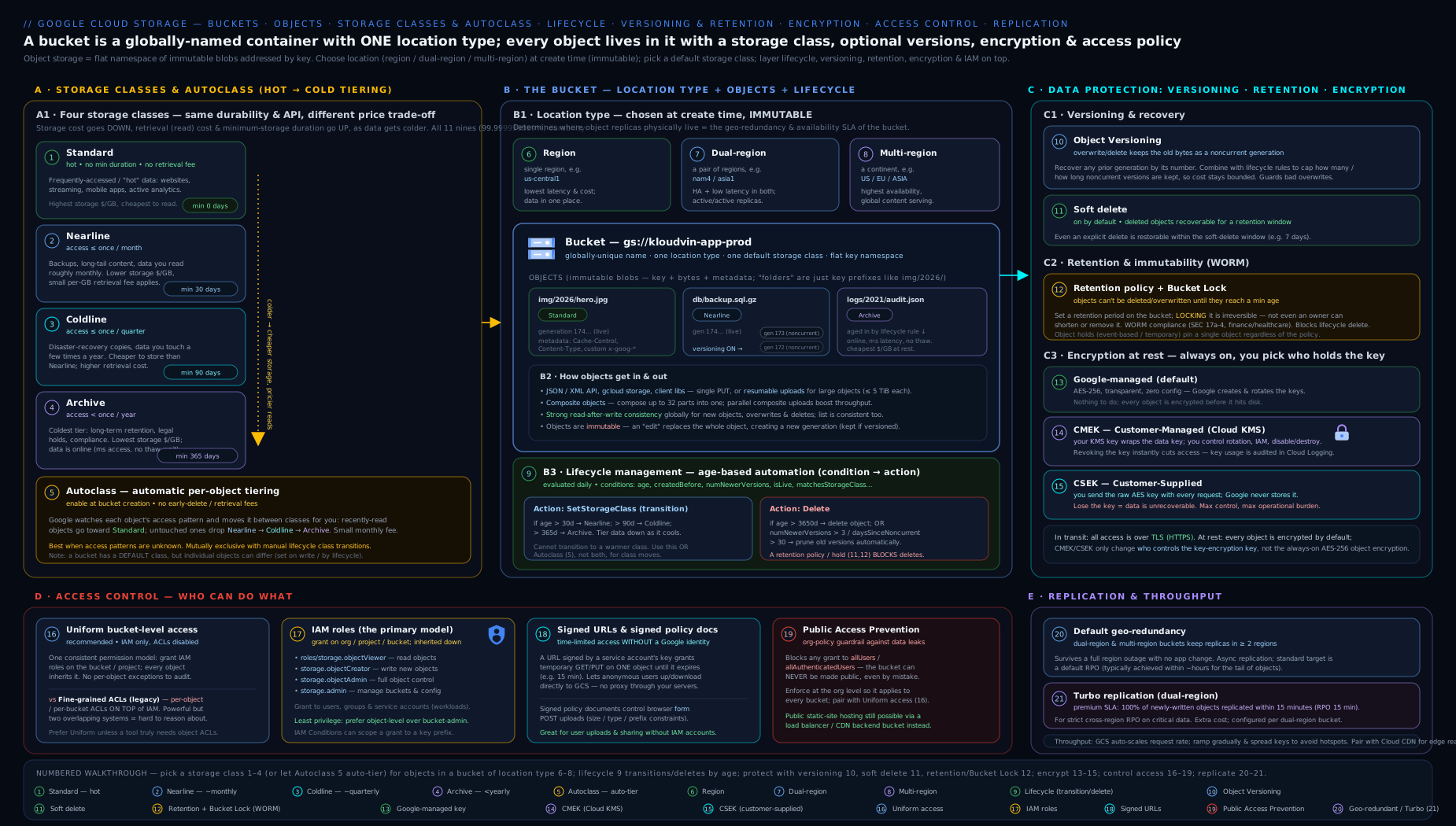
Read it as the six-question checklist you run on every bucket you design: where does it live, what class, how is it tiered, how is it protected from deletion, who holds the key, and who can reach it.
Going deeper
The sections above are everything you need to design a correct bucket. This section is for the internals and edge cases that separate someone who uses Cloud Storage from someone who can debug it under load, pass the harder exam questions, and defend the design in an architecture review.
Strong global consistency — and why it matters
Cloud Storage is strongly consistent for the operations that matter. The moment a write (upload, overwrite, or delete) returns success, every subsequent read — from any client, in any region — sees the new state. This applies to:
- read-after-write for new objects (a freshly uploaded object is immediately gettable),
- read-after-update and read-after-delete (an overwrite or delete is immediately visible),
- list-after-write (a new object appears in a bucket/object listing immediately),
- IAM/ACL grant reads (a permission change takes effect immediately).
This was not always true — early object stores (and GCS’s own bucket listing years ago) were only eventually consistent, so a just-written object could briefly seem to vanish from a listing. Today you can build read-your-writes pipelines (a Dataflow job that writes then immediately lists, a Cloud Run request that writes then reads) without a retry-until-visible loop. The one thing that is not instantaneous is a bucket-level configuration change such as a new lifecycle policy — lifecycle runs asynchronously (up to ~24 h). Object data and metadata: strong and immediate. Bucket policy application: give it a moment.
Request rate, auto-scaling, and key-name hotspots
A single bucket auto-scales to very high request rates, but it does so by learning your access pattern and splitting the index range behind the scenes. Two facts fall out of that:
- Ramp up gradually. A bucket starts comfortable at roughly 1,000 object writes/sec and 5,000 object reads/sec. If you need more, increase load gradually — a good rule is to no more than double the request rate every ~20 minutes — so the backend has time to repartition. Slamming a cold bucket with a sudden 50,000 writes/sec spike yields
429/503throttling, not a smooth ramp. - Avoid sequential key prefixes. Object names are indexed lexicographically. If every object is named with a timestamp or a monotonic ID prefix (
2026-06-14T…,0000001,0000002), all writes hit the same narrow slice of the index and create a hotspot that caps throughput. Spread load by putting a short random or hashed component early in the key (a1/2026-06-14…,f9/2026-06-14…). For low-volume buckets this is irrelevant; for high-throughput ingest it is the difference between scaling and throttling.
Related limit: update any single object no more than about once per second. Rapid-fire overwrites of the same object name are rate-limited (and, without preconditions, race). If you need a high-frequency counter or lock, an object is the wrong primitive — reach for Firestore, Spanner, or Bigtable.
Optimistic concurrency: generation & metageneration preconditions
Every object has a generation number (bumped on every overwrite of the object’s content) and a metageneration number (bumped on every change to its metadata). These enable compare-and-swap writes so concurrent writers don’t silently clobber each other:
--if-generation-match=N(API:ifGenerationMatch, XML headerx-goog-if-generation-match) — “only perform this write/delete if the object’s current generation is exactly N.”--if-generation-match=0— a special case meaning “only if the object does not exist yet” — the canonical safe create-if-absent. (gcloud storage cp --no-clobberis the simpler variant when you only want to skip objects that already exist.)--if-metageneration-match=N— guard on the metadata generation, e.g. for safe ACL/metadata edits.
# Create only if it doesn't already exist (lose the race safely instead of overwriting)
gcloud storage cp config.json gs://kv-app-state/config.json --if-generation-match=0

# Read the live generation, then write back only if nobody changed it meanwhile
GEN=$(gcloud storage objects describe gs://kv-app-state/config.json --format="value(generation)")
gcloud storage cp config.json gs://kv-app-state/config.json --if-generation-match="$GEN"
Without preconditions, two writers doing read-modify-write on the same object produce a lost update — the second write wins and the first is gone (though versioning would at least keep the overwritten bytes as a noncurrent generation). Preconditions turn that silent loss into a clean 412 Precondition Failed you can catch and retry.
Parallel composite uploads and the CRC32C caveat
The compose you saw assembles up to 32 source objects server-side; chaining compositions lets you build objects from thousands of parts. This is the machinery behind parallel composite uploads: a large file is split into chunks, the chunks are uploaded concurrently, then composed into the final object — dramatically faster for big files on fat pipes. gcloud storage cp performs this automatically for large uploads.
The load-bearing caveat: a composite object has a CRC32C checksum but no whole-object MD5. If a downstream consumer insists on validating an MD5 (some do), it will fail on composite objects. Two consequences worth remembering:
- To validate the integrity of composite objects, the client must be able to compute CRC32C (older tooling needed a compiled
crcmodC extension; without it, checks silently degrade to slow or skipped). - A failed parallel composite upload can leave orphaned component objects behind in the bucket — clean them with an
AbortIncompleteMultipartUploadlifecycle rule or a prefix sweep, or they accrue silent storage cost.
If uniform MD5s matter more than upload speed (e.g. a partner pipeline keyed on MD5), disable parallel composite uploads for that path.
CMEK internals: envelope encryption, key location, rotation, and EKM
CMEK is envelope encryption. Each object is encrypted with a unique data encryption key (DEK); Cloud Storage then wraps (encrypts) that DEK with your Cloud KMS key — the key encryption key (KEK) — and stores the wrapped DEK next to the object. To read the object, GCS asks KMS to unwrap the DEK; if your KMS key is disabled, the unwrap fails and the object is unreadable. That is precisely the revocation lever CMEK buys you.
Three internals that trip people up:
- Key location must match the bucket. The Cloud KMS key ring has to sit in a location compatible with the bucket’s location (a
us-central1bucket needs aus-central1key; aUSmulti-region bucket needs ausmulti-region key). Mismatched locations fail at bucket-config time. - Rotation does not re-encrypt existing objects. Rotating the KMS key creates a new primary version used to wrap DEKs for new writes. Objects already written keep the DEK wrapped by the old version and are re-wrapped only when you rewrite the object (e.g.
gcloud storage objects update … --storage-class=…, or a copy over itself). So “rotate the key” alone does not touch your historical data — plan a rewrite pass if a compliance regime demands re-keying. - Cloud EKM for keys Google never stores. If policy requires the KEK to live outside Google, Cloud External Key Manager (Cloud EKM) lets the KMS key be backed by a supported external HSM/key manager (Fortanix, Thales, Virtru, etc.) — you get CMEK’s integration (default bucket key, lifecycle, audit) while the key material stays external, which is often the better answer than the operationally brutal CSEK.
CSEK, by contrast, stores only a SHA-256 hash of your supplied key (to match it on future requests) and never the key itself — and forgoes the default-key convenience, lifecycle transcoding, and any hope of recovery if you lose the key.
Signed URLs (V4) and signed policy documents
Signed URLs use the V4 signing scheme (an AWS-SigV4-style canonical-request signature). Two practical limits and one sibling feature:
- Maximum expiry is 7 days (604,800 seconds) for a V4 signed URL. Anything longer is rejected — signed URLs are for short-lived delegation, not permanent links.
- The signer needs signing rights. Signing via impersonation requires
roles/iam.serviceAccountTokenCreator(theiam.serviceAccounts.signBlobpermission) on the target service account; this is safer than exporting a long-lived SA key just to sign. - Signed policy documents are the upload-form sibling: instead of a single-operation URL, you sign a policy — a set of conditions (key prefix, content-length range, content-type, expiry) — that lets a browser HTML form POST an object straight into your bucket without proxying the bytes through your server and without any IAM grant to the uploader. They are generated with the client libraries (not a one-line gcloud), and they are how you build “drag a file onto the web page and it lands in GCS” safely.
Quotas and limits worth memorising
| Limit | Value (representative) | Why it bites |
|---|---|---|
| Max object size | 5 TiB | Bigger data must be split (then composed) |
| Max object name | 1024 bytes UTF-8 | Long hierarchical keys can overflow |
| Compose sources per call | 32 | Assembling many parts means chaining composes |
| Bucket create/delete rate | ~1 per 2 seconds per project | Don’t script mass bucket churn |
| Single-bucket metadata update rate | ~1 per second | Rapid policy edits get throttled |
| Single-object update rate | ~1 per second | Objects are not high-frequency counters |
| Initial request rate | ~1,000 writes/s, 5,000 reads/s, auto-scaling | Ramp gradually; avoid key hotspots |
These are Google’s published guideline figures, not hard cliffs (auto-scaling raises the request rates over time), but designing within them keeps you off the throttling path.
A worked cost decision: is Coldline actually cheaper?
Cold classes save on storage and charge on retrieval and early deletion — so “colder = cheaper” is only true for data you rarely read and keep a long time. Walk a concrete case. Suppose you have 1 TB of logs and ask whether to keep them Standard or move them to Coldline after ingest:
- If you store them for a year and read the full 1 TB about twice, Coldline’s much lower storage rate dominates and it wins comfortably.
- If those same logs are re-read weekly (say 50+ full reads/year), Coldline’s per-GB retrieval fees stack up and can exceed the storage saving — Standard (free reads) ends up cheaper despite the higher storage rate.
- If you delete or re-tier them at day 45, Coldline’s 90-day minimum bills the remaining 45 days anyway — you pay for storage you didn’t use.
The rule the math always produces: tier cold only data that is long-lived AND rarely read. When you cannot predict the read pattern, let Autoclass make the call per object rather than guessing — the per-object management fee is cheap insurance against a retrieval-fee surprise.
Hands-on lab
This lab creates a bucket and exercises classes, versioning, soft delete, lifecycle, a signed URL, and cleanup, entirely within the Always Free tier (5 GB-months of Standard storage in a US region, well within these few small objects) or the $300 free-trial credit. It uses only gcloud storage.
1. Set your project and a unique bucket name.
gcloud config set project YOUR_PROJECT_ID
BUCKET="gs://kv-lab-$(date +%s)"   # timestamp keeps it globally unique
echo "$BUCKET"
2. Create a region bucket with the safe defaults (UBLA + PAP), versioning on, a 14-day soft-delete window.
gcloud storage buckets create "$BUCKET" \
  --location=us-central1 \
  --default-storage-class=STANDARD \
  --uniform-bucket-level-access \
  --public-access-prevention

gcloud storage buckets update "$BUCKET" \
  --versioning \
  --soft-delete-duration=14d
3. Upload an object, overwrite it, and confirm versioning kept the old generation.
echo "v1" > sample.txt && gcloud storage cp sample.txt "$BUCKET/sample.txt"
echo "v2" > sample.txt && gcloud storage cp sample.txt "$BUCKET/sample.txt"

# Expect TWO generations listed (v1 noncurrent, v2 live)
gcloud storage ls --all-versions "$BUCKET/sample.txt"
4. Upload an object into a colder class and verify.
echo "cold" > cold.txt
gcloud storage cp cold.txt "$BUCKET/cold.txt" --storage-class=NEARLINE
gcloud storage objects describe "$BUCKET/cold.txt" --format="value(storageClass)"
# Expect: NEARLINE
5. Apply a lifecycle rule (keep 1 newer version, delete older noncurrent after 7 days) and read it back.
cat > lifecycle.json <<'EOF'
{ "rule": [ { "action": {"type": "Delete"},
  "condition": {"numNewerVersions": 1, "daysSinceNoncurrentTime": 7, "isLive": false} } ] }
EOF
gcloud storage buckets update "$BUCKET" --lifecycle-file=lifecycle.json
gcloud storage buckets describe "$BUCKET" --format="json(lifecycle)"
6. Delete the live object, then restore it from soft delete.
gcloud storage rm "$BUCKET/cold.txt"
gcloud storage ls --soft-deleted "$BUCKET/"        # see it retained
gcloud storage restore "$BUCKET/cold.txt"          # bring it back
gcloud storage ls "$BUCKET/cold.txt"               # confirm live again
7. Generate a 5-minute read-only signed URL (no IAM change). This needs a service account with the Service Account Token Creator role on itself, or you can use an SA key; in Cloud Shell the simplest path is impersonation of an SA you control.
gcloud storage sign-url "$BUCKET/sample.txt" \
  --http-verb=GET --duration=5m \
  --impersonate-service-account=YOUR_SA@YOUR_PROJECT.iam.gserviceaccount.com
# Open the printed URL in a browser within 5 minutes to download the object.
Validation. You should have seen: two generations of sample.txt; cold.txt reported as NEARLINE; the lifecycle rule echoed back; cold.txt listed under --soft-deleted and then restored to live; and a working time-limited signed URL.
Cleanup. Soft delete retains deleted objects, so to fully empty the bucket delete all versions, then the bucket.
gcloud storage rm --all-versions --recursive "$BUCKET/**"
gcloud storage buckets delete "$BUCKET"
Cost note. A handful of tiny objects in Standard US is within the Always Free 5 GB-months and costs effectively nothing; the operations are a few cents at most on the trial credit. The one thing to watch even in a lab: a Nearline object deleted before 30 days incurs the early-deletion minimum (pennies here, but the principle scales). Cleaning up --all-versions ensures soft-deleted and noncurrent bytes are not silently retained.
Practice challenges
Work these in order; they escalate from a first bucket to production-grade concurrency and encryption. Each has a solution — try it before you open it. Everything fits the Always Free tier / $300 trial; clean up with the lab’s --all-versions teardown when done. Replace YOUR_PROJECT and YOUR_SA, and swap UNIQUE for a timestamp or random suffix so the bucket name is globally unique.
1. (Beginner) Create a safe-by-default bucket and prove it.
Create a regional bucket in us-central1 with uniform bucket-level access and public access prevention enforced, then show both settings are on.
<details> <summary>Solution</summary>
gcloud storage buckets create gs://kv-ex1-UNIQUE \
  --location=us-central1 \
  --uniform-bucket-level-access \
  --public-access-prevention
gcloud storage buckets describe gs://kv-ex1-UNIQUE \
  --format="value(uniform_bucket_level_access, public_access_prevention)"
# Expect: True   enforced
Why: these two flags are the guardrails you want on essentially every bucket — IAM-only access and no accidental public exposure. </details>
2. (Beginner) Put an object in a cold class and reason about the cost. Upload a file as Coldline, confirm its class, then answer: what does it cost you if you delete it on day 10?
<details> <summary>Solution</summary>
echo "archive me" > report.txt
gcloud storage cp report.txt gs://kv-ex1-UNIQUE/report.txt --storage-class=COLDLINE
gcloud storage objects describe gs://kv-ex1-UNIQUE/report.txt --format="value(storageClass)"
# Expect: COLDLINE
Why: Coldline has a 90-day minimum storage duration, so deleting on day 10 still bills the full 90 days — cold classes punish early deletion. </details>
3. (Intermediate) Write a real lifecycle policy. Author and apply a policy that: transitions Standard→Nearline at 30 days, Nearline→Coldline at 90 days, deletes noncurrent versions older than 60 days while keeping the 2 newest, and aborts incomplete multipart uploads after 7 days. Read it back.
<details> <summary>Solution</summary>
cat > lifecycle.json <<'EOF'
{ "rule": [
  {"action":{"type":"SetStorageClass","storageClass":"NEARLINE"},
   "condition":{"age":30,"matchesStorageClass":["STANDARD"]}},
  {"action":{"type":"SetStorageClass","storageClass":"COLDLINE"},
   "condition":{"age":90,"matchesStorageClass":["NEARLINE"]}},
  {"action":{"type":"Delete"},
   "condition":{"daysSinceNoncurrentTime":60,"numNewerVersions":2,"isLive":false}},
  {"action":{"type":"AbortIncompleteMultipartUpload"},"condition":{"age":7}}
]}
EOF
gcloud storage buckets update gs://kv-ex1-UNIQUE --lifecycle-file=lifecycle.json
gcloud storage buckets describe gs://kv-ex1-UNIQUE --format="json(lifecycle)"
Why: matchesStorageClass stops a transition rule from re-firing on already-cold objects, and the noncurrent Delete rule is what keeps versioning from becoming a silent budget leak.
</details>
4. (Intermediate) Version, overwrite, and roll back.
Enable versioning, write three generations of state.json, list all generations, then restore the first generation to live.
<details> <summary>Solution</summary>
gcloud storage buckets update gs://kv-ex1-UNIQUE --versioning
for v in 1 2 3; do echo "v$v" > state.json; gcloud storage cp state.json gs://kv-ex1-UNIQUE/state.json; done
gcloud storage ls --all-versions gs://kv-ex1-UNIQUE/state.json   # note the FIRST generation number
gcloud storage cp "gs://kv-ex1-UNIQUE/state.json#GENERATION" gs://kv-ex1-UNIQUE/state.json
gcloud storage cat gs://kv-ex1-UNIQUE/state.json                 # Expect: v1
Why: restoring is just copying an old generation back over live — the generation number (#…) is the address of one specific version.
</details>
5. (Advanced) Encrypt a bucket with your own KMS key (CMEK). Create a KMS key in the bucket’s region, grant the Cloud Storage service agent use of it, set it as the bucket default key, upload an object, and confirm it is CMEK-encrypted. Then say what happens to that object when you later rotate the key.
<details> <summary>Solution</summary>
# 1. Key ring + key IN THE SAME LOCATION as the bucket
gcloud kms keyrings create kv-ring --location=us-central1
gcloud kms keys create gcs-key --location=us-central1 --keyring=kv-ring --purpose=encryption

# 2. Let the GCS service agent use the key
PROJ_NUM=$(gcloud projects describe YOUR_PROJECT --format="value(projectNumber)")
gcloud kms keys add-iam-policy-binding gcs-key --location=us-central1 --keyring=kv-ring \
  --member="serviceAccount:service-${PROJ_NUM}@gs-project-accounts.iam.gserviceaccount.com" \
  --role="roles/cloudkms.cryptoKeyEncrypterDecrypter"

# 3. Set the bucket default key and upload
gcloud storage buckets update gs://kv-ex1-UNIQUE \
  --default-encryption-key=projects/YOUR_PROJECT/locations/us-central1/keyRings/kv-ring/cryptoKeys/gcs-key
echo "secret" > s.txt && gcloud storage cp s.txt gs://kv-ex1-UNIQUE/s.txt
gcloud storage objects describe gs://kv-ex1-UNIQUE/s.txt --format="value(kmsKeyName)"
# Expect: .../cryptoKeys/gcs-key/cryptoKeyVersions/1
Why: rotating the key mints a new version used for new writes only; s.txt stays wrapped by version 1 until you rewrite it, so rotation alone never re-keys historical data.
</details>
6. (Advanced) Make concurrent writes safe with a precondition.
Two processes both want to update counter.json. Show the create-if-absent write and the compare-and-swap update that prevents a lost update, and name the error you get when the precondition fails.
<details> <summary>Solution</summary>
# Create only if it does not exist yet
echo '{"n":0}' > counter.json
gcloud storage cp counter.json gs://kv-ex1-UNIQUE/counter.json --if-generation-match=0

# Compare-and-swap: only overwrite if nobody changed it since we read it
GEN=$(gcloud storage objects describe gs://kv-ex1-UNIQUE/counter.json --format="value(generation)")
echo '{"n":1}' > counter.json
gcloud storage cp counter.json gs://kv-ex1-UNIQUE/counter.json --if-generation-match="$GEN"
Why: a mismatched generation returns HTTP 412 Precondition Failed instead of silently overwriting the other writer’s value — the object-store way to avoid lost updates. (--if-generation-match=0 = “only if absent”.)
</details>
Common beginner mistakes
These are misconceptions, not error messages — the wrong mental model that leads to a bad design. (For symptom→cause→fix of concrete errors, see the troubleshooting table below.)
-
“I’ll move the bucket to a cheaper/closer region later.” You can’t. Location is fixed at creation — changing it means creating a new bucket and copying every object (and paying egress if it crosses regions). Right model: decide location type and region deliberately up front; it is the one truly irreversible bucket setting alongside a locked retention policy.
-
“Archive is like tape, so reads will be slow.” No. Every class — including Archive — has the same millisecond first-byte latency. Cold classes cost more to read (a retrieval fee) and carry a longer minimum-storage duration; they are not slower. Right model: colder = cheaper to store, pricier to read, longer minimum — never “slower.”
-
“Colder classes are always cheaper.” Only for data you rarely read and keep a long time. Retrieval fees and 30/90/365-day minimums can make Coldline/Archive more expensive than Standard for churny or frequently-read data. Right model: match class to access pattern; when unsure, let Autoclass decide per object.
-
“I turned on versioning, so I’m protected.” Versioning keeps noncurrent generations forever until a lifecycle rule reaps them — with no cleanup rule it is a silent, unbounded bill. And versioning alone does not cover someone deleting all versions. Right model: versioning plus a
numNewerVersions/daysSinceNoncurrentTimeDeleterule plus soft delete — the three stack. -
“Making one object public is a quick way to share it.” Public objects (via a stray ACL or an
allUsersgrant) are the classic data-breach headline, and hard to audit. Right model: share single objects with short-TTL signed URLs, and enforce public access prevention org-wide so nothing can be made public by accident. -
“Encryption is a feature I switch on.” It is always on — there is no “off.” The only decision is who holds the key: Google-managed (default), CMEK (your Cloud KMS key), or CSEK (you carry the only copy). Right model: pick a key-management model, not an on/off toggle.
-
“The slashes in my object names make folders.” The keyspace is flat;
logs/2026/app.logis one 1024-byte string and the slashes are just characters the console renders as a tree. Right model: prefixes are a naming convention (and a performance lever — avoid sequential prefixes at high volume), not real directories. -
“
rmdeleted it, so it’s gone.” With soft delete on by default (7 days), a deleted object is recoverable for the window; with versioning, the bytes survive as a noncurrent generation; with retention/holds, the delete may be refused outright. Right model: real cleanup needs--all-versionsand waiting out (or shortening) soft delete — and protection always wins over a delete. -
“CMEK key rotation re-encrypts my data.” Rotation only changes the key version used for new writes. Existing objects keep their old wrapped key until you rewrite them. Right model: if a policy requires re-keying historical data, schedule an explicit rewrite pass.
Common mistakes & troubleshooting
| Symptom | Likely cause | Fix |
|---|---|---|
403 / “does not have storage.objects.get” on read |
Caller lacks an IAM role on the bucket (or bucket is private and you expected public) | Grant roles/storage.objectViewer; verify with gcloud storage buckets get-iam-policy |
| Bucket creation fails: name unavailable / invalid | Name already taken (global namespace) or breaks naming rules (uppercase, starts with goog, looks like an IP) |
Pick a unique, lowercase, prefixed name |
| Surprise early-deletion charges | Deleted/overwrote/transitioned Nearline/Coldline/Archive objects before their 30/90/365-day minimum | Put high-churn data in Standard; use Autoclass for unpredictable access |
| Versioning enabled but storage bill keeps climbing | No lifecycle rule reaping noncurrent versions | Add numNewerVersions + daysSinceNoncurrentTime Delete rules |
| Objects unexpectedly went public | Fine-grained ACLs granted allUsers, or PAP not enforced |
Enable UBLA and public access prevention (ideally org-wide) |
| CMEK bucket: writes/reads fail with permission error on the key | Cloud Storage service agent lacks cryptoKeyEncrypterDecrypter on the KMS key |
Grant that role to service-PROJECT_NUMBER@gs-project-accounts.iam.gserviceaccount.com |
rm “succeeds” but object reappears / cannot be removed |
Object under an active retention policy or hold (protection wins over delete/lifecycle) | Wait out retention, or release the hold (if allowed); locked retention cannot be shortened |
| Lifecycle rule “not working” | Rules run asynchronously (up to ~24 h); or condition combination never matches | Wait; re-check matchesStorageClass/isLive/numNewerVersions logic |
Uploads throttle (429/503) under heavy ingest |
Ramped too fast, or sequential key prefixes hotspotting the index | Ramp gradually (double ≤ every ~20 min); add a random/hashed prefix component |
412 Precondition Failed on write |
A generation/metageneration precondition didn’t match — another writer changed the object | Re-read the current generation and retry the compare-and-swap |
Best practices
- Default to safe creation flags:
--uniform-bucket-level-accessand public access prevention (org-wide) on every bucket; you almost never want ACLs or accidental public exposure. - Co-locate region buckets with the compute that reads them to avoid inter-region egress and latency; use dual/multi-region only when you need geo-resilience or broad serving.
- Tier deliberately: Autoclass for unpredictable access, explicit lifecycle rules for predictable age-based tiering — and always pair versioning with lifecycle cleanup.
- Split the delete permission out: append-only workloads get
roles/storage.objectCreator, notobjectAdmin. - Share narrowly with short-TTL signed URLs instead of broadening IAM or going public.
- Use CMEK when you need key ownership/revocation/audit; reserve CSEK for the rare “Google must never hold the key” mandate.
- Right-size soft delete to your recovery objective rather than leaving the 7-day default if you need longer; lock retention (with a second approver) only when compliance truly demands irreversibility.
- Design keys for scale: avoid monotonic/sequential prefixes on high-throughput buckets, and guard concurrent writers with generation preconditions.
- Rehearse recovery: actually restore from soft delete, roll back a version, and confirm a retention block in a drill — the untested net is the one that fails in the incident.
Security notes
- Encryption is always on; the security decision is key management. Use CMEK to gain the ability to revoke access by disabling a key and to get key-usage audit logs.
- Public access prevention enforced org-wide is the highest-leverage control against the classic public-bucket breach.
- Uniform bucket-level access makes access auditable from one place; fine-grained ACLs are an audit liability.
- VPC Service Controls can wrap buckets in a perimeter to stop data exfiltration even by a credentialed insider (covered in the networking/security tracks).
- Audit logging: enable Data Access audit logs for sensitive buckets to record reads/writes; admin activity is logged by default.
- Least privilege the writer:
objectCreatorfor ingest blocks a compromised credential from deleting or overwriting history; combine with versioning + soft delete for defence in depth. - Signed URLs leak if shared — keep TTLs short (V4 caps at 7 days) and scope to a single verb and object; prefer SA impersonation over long-lived exported keys for signing.
Cost & sizing
The bill has a few independent levers — moving the wrong one is how cold storage gets more expensive than hot:
- Storage (GB-month) by class — colder is cheaper to store. This is the lever lifecycle/Autoclass pull.
- Retrieval & class-A/B operations — colder is more expensive to read and to list/get. High read volume on cold data can dwarf the storage saving.
- Early-deletion minimums — 30/90/365 days for Nearline/Coldline/Archive; deleting early bills the remainder.
- Network egress — free within the same region to GCP services; charged for inter-region and internet egress. Co-location and Cloud CDN cut this; requester-pays shifts egress to consumers.
- Replication — dual/multi-region cost more to store; turbo replication adds a premium for the 15-minute RPO.
- Autoclass management fee — a small per-object fee in exchange for no retrieval/early-deletion surprises.
- Versioning/soft-delete bytes — noncurrent and soft-deleted objects are billed storage; lifecycle and
--all-versionscleanup keep them in check.
Rule of thumb: tier cold only data you genuinely rarely read; keep anything read frequently in Standard; let Autoclass decide when access is unpredictable.
Interview & exam questions
-
Q: Name the three Cloud Storage location types and the headline trade-off of each. A: Region (single region — cheapest, lowest latency, not geo-redundant, 99.9% availability); dual-region (two specific regions — geo-redundant, single namespace, optional 15-min RPO via turbo, 99.95%); multi-region (a continent like US/EU — broad serving, highest storage cost, 99.95%). Location is immutable.
-
Q: All storage classes have the same durability and read latency — so what actually differs? A: Storage price, retrieval/operation price (climbs as the class gets colder), and minimum storage duration (none/30/90/365 days). Archive is cheap to store but expensive to read and bills 365 days minimum; it is not slow to retrieve.
-
Q: When would you choose Autoclass over hand-written lifecycle rules? A: When access patterns are unpredictable or unknown. Autoclass moves objects by access recency, charges no retrieval or early-deletion fees on its transitions (just a per-object management fee), and promotes back to Standard on read. Lifecycle rules are better for predictable age-based tiering at large scale where you want to avoid the management fee.
-
Q: Versioning vs soft delete — how do they differ and do you use both? A: Versioning (off by default) keeps a noncurrent generation on every overwrite/delete, forever until lifecycle removes it — for deliberate history. Soft delete (on by default, 7 days, 0–90 configurable) retains deleted/overwritten objects for a window even without versioning and even survives
rm— for accidental/malicious-delete recovery, including deletion of all versions. Use both; they stack. -
Q: What does Bucket Lock do and what is irreversible about it? A: It locks a bucket retention policy so the minimum object lifetime can only be increased, never decreased or removed, and the bucket can’t be deleted while holding objects under retention. The lock action itself is irreversible — there is no undo — so it needs a second approver.
-
Q: A
Deletelifecycle rule and a retention policy both apply to an object. Which wins? A: Retention. Lifecycle (and even an admin) cannot delete an object under an unexpired retention period or any hold. Protection always wins over lifecycle. -
Q: Compare the three encryption models. A: Google-managed (default, transparent, no control); CMEK (your Cloud KMS keys — ownership, rotation, revocation by disabling the key, audit logs; requires granting the GCS service agent encrypt/decrypt on the key); CSEK (you supply the AES-256 key per request, Google never stores it — maximum control but lose the key and the data is unrecoverable, and you forgo lifecycle conveniences).
-
Q: Uniform bucket-level access vs fine-grained ACLs — which and why? A: UBLA: access via IAM only, no per-object ACLs — auditable, recommended default, required by most org guardrails. Fine-grained ACLs: per-object grants, powerful but an audit liability and the usual cause of accidental public objects. Use UBLA unless you have a specific need ACLs alone can meet.
-
Q: A partner needs to download one specific object for the next hour without you changing IAM or making the bucket public. How? A: A signed URL scoped to GET on that object with a 1-hour expiry, signed via a service account (ideally impersonation). It grants time-bounded single-object access with no IAM change and expires automatically.
-
Q: What is public access prevention and where should it live? A: A guardrail that blocks any IAM/ACL grant exposing a bucket to
allUsers/allAuthenticatedUsers. Best enforced organisation-wide via thestorage.publicAccessPreventionorg policy so no bucket can be made public by accident; scope narrow exceptions for genuinely public content. -
Q: What does turbo replication guarantee, and what is the RTO? A: A 15-minute RPO target for newly written objects on a dual-region bucket (set at creation; protects only objects written after enabling). RTO is effectively zero — the dual-region bucket is one namespace, so reads are served transparently from the surviving region with no failover.
-
Q: What is requester pays and when is it appropriate? A: It bills the requester’s project for egress/operation costs (the owner still pays storage). Use it for large public datasets so you don’t fund everyone’s downloads; requests must specify a billing project.
-
Q: Is Cloud Storage strongly or eventually consistent? A: Strongly consistent for object read-after-write, read-after-update/delete, and object/bucket listing, globally. The asynchronous exception is lifecycle, which is evaluated in the background (up to ~24 h).
-
Q: Your ingest job hits
429/503as you scale up writes. What are the two usual causes and fixes? A: (1) Ramping too fast — increase load gradually, no more than doubling every ~20 minutes, so the bucket repartitions. (2) Sequential/lexicographic key prefixes hotspotting one index range — add a short random or hashed component early in the object name. -
Q: How do you prevent two writers from silently clobbering the same object? A: Generation preconditions (optimistic concurrency). Read the object’s
generation, then write with--if-generation-match=<gen>(or=0for create-if-absent); a mismatch returns412 Precondition Failedto retry, rather than a lost update.
Quick check
- Which location type is not geo-redundant?
- What is the minimum storage duration for Coldline?
- True or false: enabling versioning automatically deletes old versions over time.
- Which IAM role lets a service account create objects but not overwrite or delete them?
- Which encryption model makes your data permanently unrecoverable if you lose the key?
- What is the maximum expiry of a V4 signed URL?
Answers
- Region (single-region buckets are not geo-redundant; their data is still durable across zones, but a regional outage makes them unavailable).
- 90 days (delete/transition earlier and you are billed the full 90 days).
- False — versioning keeps noncurrent versions indefinitely; you must add lifecycle rules (
numNewerVersions/daysSinceNoncurrentTime) to reap them. roles/storage.objectCreator— the append-only writer role.- CSEK (customer-supplied encryption keys) — Google never stores the key, so losing it means the data cannot be decrypted.
- 7 days (604,800 seconds) — signed URLs are short-lived delegation, not permanent links.
Exercise
Design and build a bucket for an application that stores user-uploaded documents with these requirements: it must survive a single-region outage; documents are read often for 30 days then rarely; the team needs to recover from accidental deletes for 60 days and roll back overwrites; nothing may ever be public; and a compliance subset of documents must be retained, immutably, for 7 years. Produce the gcloud storage commands to (a) create the bucket with the right location type and safe access defaults, (b) configure versioning and the 60-day soft-delete window, © write a lifecycle policy that tiers documents to Nearline after 30 days and keeps the two most recent noncurrent versions while deleting older ones after 60 days, and (d) describe how you would enforce the 7-year immutability for the compliance subset (which mechanism, and why per-object rather than a bucket-wide locked policy). Then write the verification commands that prove each control works, and the full --all-versions cleanup.
Certification mapping
- Associate Cloud Engineer (ACE): “Planning and configuring data storage” — choosing storage classes and location types, configuring lifecycle, versioning, IAM on buckets, and signed URLs. This lesson covers the storage portion of that domain end to end.
- Professional Cloud Architect (PCA): designing for durability/availability and cost (location types, classes, Autoclass, turbo replication), and the security model (UBLA, CMEK, public access prevention, signed URLs) for data at rest.
- Also reinforces Professional Cloud Security Engineer (encryption models, CMEK, access control) and Professional Data Engineer (storage for analytics, co-location with BigQuery, Storage Transfer Service) themes.
Glossary
- Bucket — top-level container for objects; globally unique name, immutable location and default class.
- Object — an immutable blob + metadata, up to 5 TiB; “editing” means re-uploading.
- Location type — region / dual-region / multi-region; sets geo-redundancy and latency; immutable.
- Storage class — Standard/Nearline/Coldline/Archive; trades storage price for retrieval price + minimum duration.
- Autoclass — automatic per-object class movement by access recency, with no retrieval/early-deletion fees, for a per-object management fee.
- Lifecycle rule — bucket policy that takes an action (SetStorageClass / Delete / AbortIncompleteMultipartUpload) when conditions (age, version count, class, etc.) match.
- Object versioning — keeps noncurrent generations on overwrite/delete; off by default; pair with lifecycle.
- Soft delete — retains deleted/overwritten objects for a window (default 7 days, 0–90); on by default.
- Retention policy / Bucket Lock — minimum object lifetime; locking makes it irreversibly only-increaseable (WORM).
- CMEK / CSEK — customer-managed (Cloud KMS) / customer-supplied encryption keys; vs the default Google-managed keys.
- Uniform bucket-level access (UBLA) — IAM-only access control; disables per-object ACLs.
- Signed URL — time-bounded, single-operation, single-object access without an IAM change; V4 signing, max 7-day expiry.
- Public access prevention (PAP) — guardrail blocking grants that would make a bucket public.
- Turbo replication — dual-region 15-minute RPO target for new writes.
- Requester pays — bills the requester’s project for egress/operations; owner pays storage.
- Composite object — an object assembled server-side from up to 32 source objects.
- Strong consistency — a successful write is immediately visible to every later read/list from any client; GCS is strongly consistent for object read/write/delete and listing.
- Generation / metageneration — per-object counters: generation bumps on content overwrite, metageneration on metadata change; used as write preconditions.
- Precondition — a compare-and-swap guard (
ifGenerationMatch/--if-generation-match);=0means “only if the object does not exist.” - Envelope encryption — data encrypted with a per-object data key (DEK) that is itself wrapped by a key-encryption key (KEK); with CMEK the KEK is your Cloud KMS key.
- Cloud EKM (External Key Manager) — a Cloud KMS key backed by an external/HSM key manager, so the key material never resides in Google — CMEK integration without Google holding the key.
- Parallel composite upload — splitting a large file into chunks, uploading them concurrently, and composing them into one object; the result is a composite object (CRC32C only, no MD5).
- Signed policy document — a signed set of conditions that lets a browser HTML form POST an object directly into a bucket without an IAM grant on the uploader.
- Service agent — the Google-managed service account (
service-PROJECT_NUMBER@gs-project-accounts.iam.gserviceaccount.com) that Cloud Storage uses to call KMS for CMEK; must hold encrypt/decrypt on the key. - Hotspotting — throughput bottleneck from sequential/lexicographic key prefixes concentrating load on one index range; fixed by adding a random/hashed prefix component.
Next steps
- Go deeper on protecting data with Cloud Storage Data Protection: Retention Lock, Soft Delete, Versioning, and Replication — composing these controls for ransomware resilience and per-object WORM compliance.
- Continue the course with Google Cloud SQL, In Depth: Engines, HA, Read Replicas, Backups & Connectivity — the managed relational databases.
- For encryption keys in depth, see Google Cloud KMS & Secret Manager to master CMEK, envelope encryption, and secret handling.