In a nutshell
Picture the mailroom of a large office building. Things keep happening around the building: a pallet lands on the loading dock, someone drops a memo in a pigeonhole, the security desk logs a door being opened. A mailroom clerk reads a rule sheet — “finalized pallets for the ingest dock go to the receiving team” — and hand-delivers a standard delivery slip to exactly the right worker. That clerk is Eventarc, the rule sheet is a trigger with filters, and the standard slip is a CloudEvent: no matter where the event came from, it arrives in one predictable shape.
The “worker” is your Cloud Functions 2nd gen function — and here is the one idea that makes the whole platform stop feeling like magic: the worker is not a lone person, it is a whole Cloud Run desk that can spin up more clerks when the queue grows, or keep several parcels on one desk at once (that is concurrency). Your function is a container, it scales like Cloud Run, and it bills like Cloud Run.
Two consequences fall straight out of that. First, because the clerk keeps re-delivering the slip until someone signs for it (at-least-once delivery), your worker has to be perfectly fine receiving the same slip twice — it must be idempotent. Second, a parcel that nobody can ever process must eventually go to a “problem parcels” shelf (a dead-letter topic) instead of jamming the line forever. Get those two right and event-driven GCP is calm; ignore them and the very features meant to add resilience become your outage.
Prerequisites & what you’ll be able to do
Before this lesson, be comfortable with: what a container and a Cloud Run service are and how they scale (see the Cloud Run deep dive); Pub/Sub topics, subscriptions, and at-least-once delivery (see the Pub/Sub deep dive); and basic gcloud and IAM. If you want the runtimes-and-triggers tour first, the Cloud Functions gen2 deep dive is the companion to this event-driven design lesson.
After this lesson you can:
- Explain why a 2nd gen function is a Cloud Run service, and inspect it as one.
- Choose between a direct Eventarc trigger and an Audit Log trigger, and write the filters for each.
- Read a CloudEvent and use its
idas an idempotency key. - Tune concurrency, min/max instances, and CPU/memory so scaling can never exceed a downstream limit.
- Enable retries safely and bound poison events with a dead-letter topic.
- Secure a function with a dedicated invoker service account, restricted ingress, and VPC egress.
Level: Advanced · Time: ~27 min
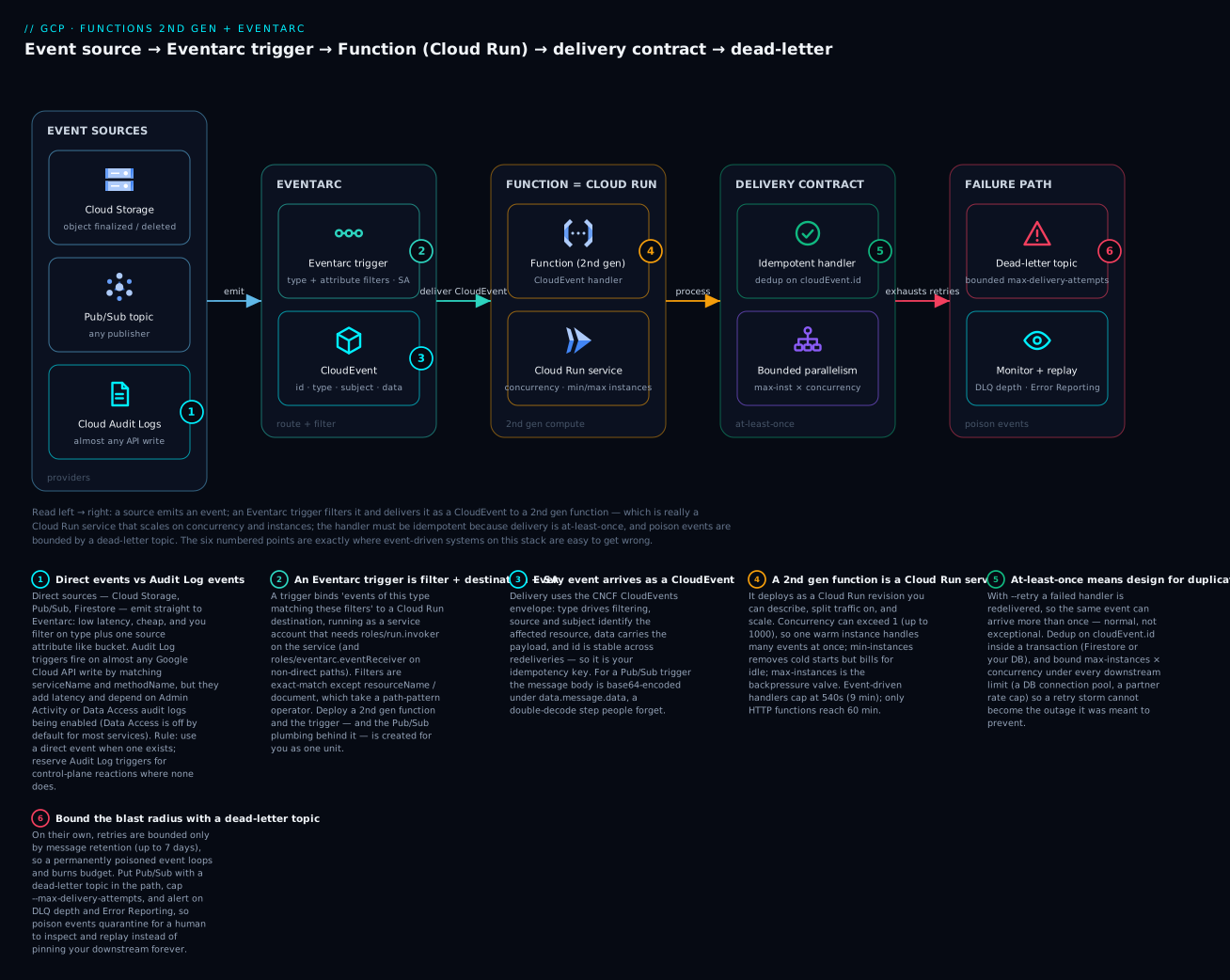
Read the diagram left to right: an event source (Cloud Storage, Pub/Sub, or Cloud Audit Logs) emits; an Eventarc trigger filters and delivers the event as a CloudEvent to a 2nd gen function that is really a Cloud Run service scaling on concurrency and instances; the handler must be idempotent because delivery is at-least-once, and a dead-letter topic bounds poison events — the six numbered points are exactly where this stack is easy to get wrong.
Cloud Functions 2nd gen is not a bigger version of the old runtime. It is Cloud Run with a function-shaped front door and Eventarc wired to the back. Once you internalize that, the whole platform stops being magic: your function is a container, it scales like Cloud Run, it bills like Cloud Run, and every event that reaches it arrives as a CloudEvent delivered over an Eventarc trigger. This guide builds the operational mental model for designing event-driven systems on that stack – how events route and filter, how to tune concurrency and scaling, and how to make handlers survive retries without corrupting state.
Everything below uses the current gcloud functions (Gen2) and gcloud eventarc surfaces. Where a default bites you, I call it out.
1. What actually changed from 1st gen
1st gen functions ran on a Google-managed, function-specific platform with their own event plumbing. 2nd gen functions are deployed as Cloud Run services and triggered through Eventarc. That single architectural decision drives every meaningful difference:
| Concern | 1st gen | 2nd gen |
|---|---|---|
| Underlying compute | Proprietary functions runtime | Cloud Run service (a real revision you can inspect) |
| Event delivery | Built-in, per-source plumbing | Eventarc + CloudEvents |
| Concurrency | 1 request per instance, always | Up to 1000 requests per instance |
| Request timeout | 540s max | Up to 3600s (HTTP-triggered) |
| Instance size | Capped (up to 8 GiB / 4 vCPU) | Larger CPU/memory ceilings via Cloud Run |
| Traffic splitting | No | Yes, via Cloud Run revisions |
| Min instances | Limited | First-class, set per function |
The practical consequence: a 2nd gen function shows up in the Cloud Run console as a service, you can gcloud run services describe it, and the same concurrency, min-instances, and CPU levers apply. You still deploy with gcloud functions deploy --gen2, which generates the source build, the Cloud Run service, and (for event triggers) the Eventarc trigger as one unit.
A minimal HTTP function for context:
gcloud functions deploy http-echo \
  --gen2 \
  --runtime=nodejs20 \
  --region=us-central1 \
  --source=. \
  --entry-point=echo \
  --trigger-http \
  --no-allow-unauthenticated
2. Eventarc architecture: providers, triggers, CloudEvents
Eventarc is the routing layer. Three concepts:
- Provider – the system that emits events (Cloud Storage, Pub/Sub, Firestore, or any service that writes Cloud Audit Logs).
- Event type – a specific thing that happened, identified by a
typestring such asgoogle.cloud.storage.object.v1.finalized. - Trigger – the binding that says “events of this type, matching these filters, go to this destination,” with an associated service account.
Every event Eventarc delivers is a CloudEvent (the CNCF spec). Direct events arrive in structured or binary content mode; your function receives a typed CloudEvent object. The attributes you will reference constantly:
| Attribute | Meaning |
|---|---|
type |
The event type (drives filtering) |
source |
The emitting resource |
subject |
The specific object affected (e.g. objects/path/to/file.csv) |
id |
Unique event id – your idempotency key |
time |
Event timestamp |
data |
The payload (object metadata, Pub/Sub message, Firestore document) |
A Node.js handler using the Functions Framework’s CloudEvent signature:
const functions = require('@google-cloud/functions-framework');

functions.cloudEvent('handleObject', (cloudEvent) => {
  const { id, type, subject } = cloudEvent;
  const file = cloudEvent.data; // storage object metadata
  console.log(JSON.stringify({
    severity: 'INFO',
    message: 'received event',
    eventId: id,
    eventType: type,
    bucket: file.bucket,
    object: file.name,
  }));
});
3. Direct events vs Audit Log events, and trigger filtering
Eventarc delivers events two ways, and the distinction governs latency, cost, and which filters are legal.
Direct events come straight from sources that natively emit to Eventarc – Cloud Storage object events, Pub/Sub messages, Firestore document changes. They are low-latency and the supported path for those sources. You filter on type plus source-specific attributes (e.g. the bucket).
Cloud Audit Log events let you trigger on almost any Google Cloud API write, by matching the audit log entry. This is the catch-all when a service has no direct event: you filter on serviceName, methodName, and optionally resourceName. The cost is latency (audit logs are written then routed) and you must have Admin Activity or Data Access audit logs enabled for that service. Data Access logs are off by default for most services.
Filtering supports exact match and, for resourceName, a path-pattern operator. Create a Cloud Storage direct trigger:
gcloud eventarc triggers create gcs-finalize-trigger \
  --location=us-central1 \
  --destination-run-service=handle-object \
  --destination-run-region=us-central1 \
  --event-filters="type=google.cloud.storage.object.v1.finalized" \
  --event-filters="bucket=acme-prod-ingest" \
  --service-account=eventarc-invoker@acme-prod.iam.gserviceaccount.com
An Audit Log trigger – fire when anyone sets an IAM policy on a bucket:
gcloud eventarc triggers create iam-setpolicy-audit \
  --location=us-central1 \
  --destination-run-service=audit-handler \
  --destination-run-region=us-central1 \
  --event-filters="type=google.cloud.audit.log.v1.written" \
  --event-filters="serviceName=storage.googleapis.com" \
  --event-filters="methodName=storage.setIamPermissions" \
  --service-account=eventarc-invoker@acme-prod.iam.gserviceaccount.com
Audit Log triggers are powerful but the wrong default. If a direct event exists for your source, use it – it is faster, cheaper, and does not depend on audit log configuration that another team can change out from under you. Reserve Audit Log triggers for control-plane reactions (someone changed a firewall, someone created a service account key) where no direct event is available.
When deploying a 2nd gen function, the trigger is created for you. The equivalent of the GCS trigger above, expressed as a function deploy:
gcloud functions deploy handle-object \
  --gen2 \
  --runtime=nodejs20 \
  --region=us-central1 \
  --source=. \
  --entry-point=handleObject \
  --trigger-event-filters="type=google.cloud.storage.object.v1.finalized" \
  --trigger-event-filters="bucket=acme-prod-ingest" \
  --trigger-service-account=eventarc-invoker@acme-prod.iam.gserviceaccount.com
4. Cloud Storage, Pub/Sub, and Firestore triggers in practice
Cloud Storage. The event types you will use: object.v1.finalized (created or overwritten), object.v1.deleted, object.v1.archived, object.v1.metadataUpdated. A subtlety that causes duplicate processing: overwriting an object emits finalized again. Treat finalized as “an object version exists now,” not “a new file was uploaded.” The bucket must be in the same region (or a compatible location) as the trigger, and the bucket’s Pub/Sub publishing requires the Cloud Storage service agent to have the pubsub.publisher role – Eventarc wires this on first use, but in tight org-policy environments you grant it explicitly.
Pub/Sub. A Pub/Sub trigger is the most flexible primitive: any system that can publish a message can drive your function. Eventarc creates (or reuses) a subscription behind the trigger.
gcloud functions deploy process-message \
  --gen2 --runtime=nodejs20 --region=us-central1 \
  --source=. --entry-point=processMessage \
  --trigger-topic=orders-events
The message body is base64-encoded under cloudEvent.data.message.data:
functions.cloudEvent('processMessage', (cloudEvent) => {
  const msg = cloudEvent.data.message;
  const payload = msg.data
    ? Buffer.from(msg.data, 'base64').toString()
    : '';
  const order = JSON.parse(payload);
  // ... handle order, using msg.messageId or cloudEvent.id for idempotency
});
Firestore. Trigger on document writes with a document-path pattern. Event types: document.v1.created, updated, deleted, written (any of the three). The path supports wildcards: a single-segment {userId} or a multi-segment {path=**}.
gcloud functions deploy on-order-write \
  --gen2 --runtime=nodejs20 --region=us-central1 \
  --source=. --entry-point=onOrderWrite \
  --trigger-event-filters="type=google.cloud.firestore.document.v1.written" \
  --trigger-event-filters="database=(default)" \
  --trigger-event-filters-path-pattern="document=customers/{customerId}/orders/{orderId}"
Note --trigger-event-filters-path-pattern for the wildcarded path versus plain --trigger-event-filters for exact matches.
5. Concurrency, min instances, and per-function scaling
Because a 2nd gen function is a Cloud Run service, the scaling story is the Cloud Run scaling story. The single biggest behavioral difference from 1st gen: concurrency can exceed 1. With concurrency 1 (the 1st gen default), every concurrent event spins a new instance. Raising concurrency lets one instance handle many events at once – dramatically cheaper for I/O-bound handlers, dangerous for ones that hold scarce resources.
gcloud functions deploy process-message \
  --gen2 --runtime=nodejs20 --region=us-central1 \
  --source=. --entry-point=processMessage \
  --trigger-topic=orders-events \
  --concurrency=20 \
  --cpu=1 --memory=512Mi \
  --min-instances=1 \
  --max-instances=50
Decision guidance:
--concurrency– set above 1 only when your handler is concurrency-safe and mostly waiting on network. Each in-flight event shares the instance’s CPU and memory; size memory for the peak of concurrent handlers, not one.--min-instances– the antidote to cold starts. For latency-sensitive event paths, keep 1+ warm. You pay for idle instances, so reserve this for functions where cold-start tail latency matters.--max-instances– a backpressure valve. A function that writes to Cloud SQL must not be allowed to open thousands of connections; cap max-instances (times concurrency) below your connection budget.--cpu/--memory– raising concurrency without raising these starves handlers. The productmax-instances x concurrencyis your true peak parallelism against downstream systems.
The classic 2nd gen outage: team raises concurrency to 80 to save money, the function talks to a database with a 100-connection pool, max-instances is 50, and a traffic spike opens far more connections than the pool allows. The fix is arithmetic, not heroics: bound
max-instances x concurrencyunder the downstream limit, or front the database with a connection pooler.
6. Retry, dead-lettering, and idempotency
Event-triggered functions can be configured to retry on failure. With retries enabled, a handler that throws (or returns a non-2xx) is redelivered. Without it, the event is dropped on first failure. Enable retries only with idempotent handlers, because at-least-once delivery means duplicates are normal, not exceptional.
gcloud functions deploy handle-object \
  --gen2 --runtime=nodejs20 --region=us-central1 \
  --source=. --entry-point=handleObject \
  --trigger-event-filters="type=google.cloud.storage.object.v1.finalized" \
  --trigger-event-filters="bucket=acme-prod-ingest" \
  --retry
Idempotency. Use cloudEvent.id (stable across redeliveries of the same event) as a dedup key. Record processed ids in Firestore or another store and short-circuit duplicates:
const { Firestore } = require('@google-cloud/firestore');
const db = new Firestore();

functions.cloudEvent('handleObject', async (cloudEvent) => {
  const ref = db.collection('processed_events').doc(cloudEvent.id);
  const created = await db.runTransaction(async (tx) => {
    const snap = await tx.get(ref);
    if (snap.exists) return false;        // already handled
    tx.set(ref, { at: Date.now() });
    return true;
  });
  if (!created) {
    console.log(`duplicate ${cloudEvent.id}, skipping`);
    return;
  }
  // ... do the real, side-effecting work exactly once
});
Dead-lettering. Cloud Functions retries do not bound themselves by default – a permanently poisoned event can retry indefinitely (capped by the event’s max retention window). The robust pattern is to put Pub/Sub between the source and your function and attach a dead-letter topic with --max-delivery-attempts. Then failures land in a DLQ you can inspect and replay instead of looping forever.
# Trigger subscription with a dead-letter topic and bounded attempts
gcloud pubsub subscriptions create orders-events-sub \
  --topic=orders-events \
  --dead-letter-topic=orders-events-dlq \
  --max-delivery-attempts=5 \
  --min-retry-delay=10s --max-retry-delay=600s
For direct Cloud Storage or Firestore triggers where you cannot interpose Pub/Sub easily, enforce a poison-pill guard in code: read the delivery attempt header / count, and after N tries write the event to a DLQ topic yourself and return success so Eventarc stops retrying.
7. Securing functions: ingress, IAM invokers, VPC egress
Because the function is a Cloud Run service, you secure it like one.
Ingress. Lock down who can reach the URL. internal-only restricts to VPC and internal sources; internal-and-gclb adds traffic fronted by an external HTTPS load balancer (so you can put Cloud Armor in front).
gcloud functions deploy handle-object --gen2 --region=us-central1 \
  --source=. --entry-point=handleObject \
  --ingress-settings=internal-only \
  ...
IAM invoker. Eventarc delivers events by invoking the underlying Cloud Run service, so the trigger’s service account needs roles/run.invoker on it. Grant least privilege – a dedicated invoker SA per trigger, not the default compute SA:
gcloud run services add-iam-policy-binding handle-object \
  --region=us-central1 \
  --member="serviceAccount:eventarc-invoker@acme-prod.iam.gserviceaccount.com" \
  --role="roles/run.invoker"
For Audit Log and other Eventarc paths, the trigger SA also needs roles/eventarc.eventReceiver.
VPC egress. To reach private resources (Cloud SQL private IP, an internal API, on-prem over Interconnect), attach the function to a VPC. Direct VPC egress is the modern path; route all outbound through it so nothing escapes to the public internet:
gcloud functions deploy handle-object --gen2 --region=us-central1 \
  --source=. --entry-point=handleObject \
  --network=projects/acme-prod/global/networks/prod-vpc \
  --subnet=projects/acme-prod/regions/us-central1/subnetworks/run-egress \
  --vpc-connector-egress-settings=all-traffic \
  ...
If your function suddenly cannot reach a private database after you “secured” it, check egress settings first.
private-ranges-onlysends only RFC 1918 traffic through the VPC;all-traffic(a.k.a. all-egress) forces everything through it. Mismatched egress is the most common 2nd gen connectivity failure.
8. Observability: structured logs, traces, error reporting
Logs from 2nd gen functions land in Cloud Logging under the Cloud Run service resource. Emit structured JSON to stdout/stderr so the severity and your custom fields become first-class log fields. The handler in section 2 already does this; the payoff is queryability.
Find every event a function failed to process, in Logs Explorer (Logging Query Language):
resource.type="cloud_run_revision"
resource.labels.service_name="handle-object"
severity>=ERROR
Correlate a single event end-to-end by its CloudEvent id:
resource.type="cloud_run_revision"
jsonPayload.eventId="1234567890-abcdef"
Traces. Cloud Run / Functions 2nd gen integrates with Cloud Trace; instrument with OpenTelemetry and propagate context to downstream calls so a slow event handler shows its database span. Error Reporting automatically groups stack traces from your logs – emit exceptions with a stack to stderr and they aggregate into trackable issues with notifications, which is how you catch a poison-pill loop before it burns your retry budget.
Watch these signals in particular: Cloud Run instance count (scaling against your downstream limits), request latency p99 (cold starts and slow handlers), and Pub/Sub dead-letter topic depth (your poison-pill detector).
Verify
Confirm the wiring end-to-end before declaring victory.
# 1. The function deployed as a Gen2 Cloud Run service
gcloud functions describe handle-object --gen2 --region=us-central1 \
  --format="value(state, serviceConfig.uri)"

# 2. The Eventarc trigger exists and points at the service
gcloud eventarc triggers describe handle-object \
  --location=us-central1 \
  --format="yaml(eventFilters, destination, serviceAccount)"

# 3. The trigger SA can invoke the underlying service
gcloud run services get-iam-policy handle-object --region=us-central1

# 4. Drive a real event and watch it land
echo "verify-$(date +%s)" > /tmp/probe.txt
gcloud storage cp /tmp/probe.txt gs://acme-prod-ingest/probe.txt

# 5. Confirm processing in logs (look for your eventId)
gcloud functions logs read handle-object --gen2 --region=us-central1 --limit=20
A healthy result: step 1 shows ACTIVE, step 2 shows your filters and the invoker SA, step 3 lists that SA with roles/run.invoker, and step 5 shows a log line with the bucket/object you just wrote. If the upload succeeds but no log appears, the trigger SA almost always lacks invoker permission, or an Audit Log trigger is waiting on logs that are not enabled.
Enterprise scenario
A payments platform team ingested settlement files via a Cloud Storage finalized trigger that parsed each file and posted ledger entries to a downstream API. It worked in staging and fell over in production the first month-end. Two failures compounded:
- Their batch system re-uploaded a handful of files after a transient failure. Each overwrite emitted another
finalizedevent, and because the handler was not idempotent, those settlements were posted to the ledger twice – a reconciliation incident, not just a bug. - They had enabled
--retryfor resilience. When the downstream ledger API was briefly overloaded, handlers threw, events retried, instances multiplied, and the retry storm kept the ledger API pinned – the retries became the outage.
The constraint: ledger posts had to be exactly-once against a partner API with a hard rate limit, and the team could not modify the upstream batch system that re-uploaded files.
The fix had three moves. First, idempotency keyed on cloudEvent.id plus the object generation, recorded in a Firestore processed_events collection inside a transaction (the section 6 pattern), so a re-uploaded file’s duplicate event short-circuited. Second, they stopped triggering the parser directly and put Pub/Sub with a dead-letter topic in the path, bounding --max-delivery-attempts=5 so a poisoned file landed in a DLQ for a human instead of retrying forever. Third, they bounded max-instances x concurrency under the partner’s rate limit so the function could never out-pace the API.
# Bound parallelism against the partner rate limit, and bound retries via DLQ
gcloud functions deploy settlement-parser \
  --gen2 --runtime=nodejs20 --region=us-central1 \
  --source=. --entry-point=parseSettlement \
  --trigger-topic=settlement-files \
  --concurrency=4 --max-instances=10 \
  --cpu=1 --memory=512Mi

gcloud pubsub subscriptions update settlement-files-sub \
  --dead-letter-topic=settlement-files-dlq \
  --max-delivery-attempts=5
Net effect: 40 instances x 4 = 160 max in-flight, comfortably under the partner limit; duplicates de-duped at the door; poison files quarantined in a DLQ with an alert on its depth. Month-end since has been quiet. The lesson is the one this whole platform rewards: at-least-once delivery plus retries is a correctness contract, not a convenience – design the handler for duplicates and bound the blast radius, or the resilience features become the incident.
Going deeper
The eight sections above are the operating manual. This section is the internals and the edge cases – what the abstraction is hiding, and where it leaks.
One deploy, three resources you can inspect
gcloud functions deploy --gen2 is a facade over three distinct resources: a Cloud Build build that produces a container image in Artifact Registry, a Cloud Run service (a concrete revision), and – for event triggers – an Eventarc trigger with a Pub/Sub subscription behind it. Each is inspectable and tunable on its own:
# The Cloud Run service underneath the function
gcloud run services describe handle-object --region=us-central1

# The Eventarc trigger and its transport (the Pub/Sub subscription it created)
gcloud eventarc triggers describe handle-object --location=us-central1 \
  --format="value(transport.pubsub.subscription)"

# The built image in Artifact Registry
gcloud artifacts docker images list \
  us-central1-docker.pkg.dev/PROJECT_ID/gcf-artifacts
This decoupling is why Cloud Run-only levers – CPU always-allocated, startup CPU boost, traffic splitting across revisions – apply to a “function.” When a deploy half-fails, you debug the specific layer that broke instead of a black box: a build error is in Cloud Build, a permission error is on the service or trigger, a “no events arriving” is on the trigger’s subscription.
Eventarc is Pub/Sub most of the way down
Under almost every trigger sits Pub/Sub. A Cloud Storage trigger is GCS -> Pub/Sub notification -> Eventarc -> Cloud Run. A Pub/Sub trigger is your topic -> an Eventarc-managed subscription -> Cloud Run. An Audit Log trigger is Cloud Audit Logs -> a Logging sink -> Pub/Sub -> Eventarc -> Cloud Run. That one fact explains the platform’s retry, ordering, and dead-letter behaviour: they all bottom out in Pub/Sub semantics. It also tells you where to attach a DLQ – on the subscription Eventarc created – and why --retry is really toggling redelivery on that subscription. If you want the full delivery contract those subscriptions obey, the Pub/Sub exactly-once and dead-letter lesson is the companion read.
What --retry actually does, precisely
An event-driven function acks the underlying Pub/Sub message when the handler returns a 2xx. Without --retry, a thrown error still lets the platform drop the event – it is acked and gone, no second chance. With --retry, a non-2xx nacks the message and Pub/Sub redelivers with backoff until the handler succeeds or the message hits its retention limit – up to 7 days by default. So “retries forever” is really “retries for up to a week,” which is long enough to feel infinite and long enough to burn a lot of budget. That bounded-but-huge window is exactly why a poison event needs a DLQ, not patience: you want it out of the hot path in five attempts, not seven days.
CloudEvent content modes and the Pub/Sub double-decode
Eventarc delivers in one of two CloudEvents content modes: structured (the whole event is a single JSON body) or binary (the CloudEvent attributes ride HTTP headers and the payload is the raw body). The Functions Framework hides this from you – you get a typed cloudEvent object either way. The gotcha is Pub/Sub payloads specifically: cloudEvent.data.message.data is base64, so you decode once to get the message bytes, then parse them. Any attributes you published (including an ordering key) surface under cloudEvent.data.message.attributes. People lose an afternoon to a JSON.parse that chokes because they parsed the base64 string instead of decoding it first.
Concurrency math, cold starts, and the idle bill
Restated as a rule: your true peak parallelism against any downstream is max-instances x concurrency, and it must sit under the tightest downstream limit (a DB connection pool, a partner rate cap, a quota). Two nuances the flags do not shout at you:
- Min-instances is billed. 2nd gen charges warm idle instances at a reduced (idle) CPU/memory rate – reduced, not zero. Reserve warm instances only where cold-start tail latency is worth the standing cost. Startup CPU boost (a Cloud Run setting) shortens the cold start itself by granting extra CPU during container start, without keeping instances warm – often the cheaper lever.
- Memory is per-instance, shared by all concurrent handlers. At
--concurrency=20, size--memoryfor the peak of twenty in-flight handlers, not one. Under-sizing shows up as instance restarts (OOM) under load, not a clean error you can grep for.
The event-driven timeout is 9 minutes, not 60
The 60-minute (3600s) ceiling is HTTP-triggered only. Event-driven (CloudEvent) functions cap at 540s (9 minutes), and there is no way to extend past it. A handler that legitimately needs longer should not hold the event – hand the work to a Cloud Run job, a Workflow, or Cloud Tasks and return quickly. Holding a Pub/Sub lease near nine minutes already flirts with redelivery, so long-running-in-the-handler is a design smell before it is a limit.
Migrating 1st gen -> 2nd gen
There is no in-place flip. You deploy the 2nd gen function alongside the 1st gen one, cut traffic/triggers over, then delete the old one. Two things bite during the cutover:
- The handler signature changes. 1st gen background functions took
(data, context); 2nd gen takes a singlecloudEvent. The event payloads are reshaped into the CloudEvents envelope, so field paths differ – a Storage object’s fields sit oncloudEvent.datadirectly, whereas a Pub/Sub message sits undercloudEvent.data.message. Port the handler, do not just re-point the trigger. - Be explicit with
--gen2. The gcloud default has been migrating toward 2nd gen over time; passing the flag guarantees a deploy can never land on the generation you did not intend.gcloud functions listshows the environment (1st vs 2nd gen) per function, which is the fastest way to catch a stray 1st gen deploy.
Quotas and limits worth memorizing
| Limit | Value (current) |
|---|---|
| Concurrency per instance | 1-1000 (functions default to 1) |
| Max instances ceiling | 1000 (higher via a quota request) |
| Event-driven timeout | 540s (9 min) |
| HTTP timeout | 3600s (60 min) |
| Max event / message size | 10 MB (Pub/Sub / Eventarc) |
| Retry retention bound | up to 7 days (Pub/Sub default) |
| Storage trigger location | bucket must match the trigger’s region/location |
These are the numbers that turn “why is this failing?” into “of course” – a 12 MB payload that never arrives (over the 10 MB cap), a Storage trigger that fires nothing (bucket in a different location than the trigger), a handler killed at nine minutes (event-driven, not HTTP).
Practice challenges
Work these in a scratch project. They escalate from a single flag to a full diagnosis. Replace PROJECT_ID, PROJECT_NUMBER, and BUCKET_NAME placeholders.
1. (Beginner) Prove a 2nd gen function is a Cloud Run service. Deploy a trivial HTTP function, then show it as a Cloud Run service.
<details> <summary>Solution</summary>
gcloud functions deploy http-echo \
  --gen2 --runtime=nodejs20 --region=us-central1 \
  --source=. --entry-point=echo \
  --trigger-http --no-allow-unauthenticated

# The very same function, viewed as a Cloud Run service:
gcloud run services describe http-echo --region=us-central1 \
  --format="value(metadata.name, status.url)"
Why: if gcloud run services describe returns the service and URL, you have proven the whole mental model in one command – a 2nd gen function is a Cloud Run service.
</details>
2. (Beginner) Fire on every object finalized in a bucket, from a function deploy. Create the trigger as part of the deploy, not as a standalone eventarc triggers create.
<details> <summary>Solution</summary>
gcloud functions deploy handle-object \
  --gen2 --runtime=nodejs20 --region=us-central1 \
  --source=. --entry-point=handleObject \
  --trigger-event-filters="type=google.cloud.storage.object.v1.finalized" \
  --trigger-event-filters="bucket=BUCKET_NAME"
Why: --trigger-event-filters on the deploy provisions the Eventarc trigger for you as one unit; finalized fires on both new uploads and overwrites (remember that when you design for idempotency).
</details>
3. (Intermediate) Trigger only on writes under a Firestore sub-collection. Fire on any write to customers/{customerId}/orders/{orderId} in the default database, and note why one flag differs from challenge 2.
<details> <summary>Solution</summary>
gcloud functions deploy on-order-write \
  --gen2 --runtime=nodejs20 --region=us-central1 \
  --source=. --entry-point=onOrderWrite \
  --trigger-event-filters="type=google.cloud.firestore.document.v1.written" \
  --trigger-event-filters="database=(default)" \
  --trigger-event-filters-path-pattern="document=customers/{customerId}/orders/{orderId}"
Why: wildcarded paths use --trigger-event-filters-path-pattern; a plain --trigger-event-filters is exact-match and cannot express {orderId}.
</details>
4. (Intermediate) Size scaling against a connection pool. Your handler writes to a Cloud SQL instance with a 100-connection pool. Pick --concurrency and --max-instances that cannot exhaust it and still leave headroom, then deploy.
<details> <summary>Solution</summary>
# Peak parallelism is max-instances x concurrency. 10 x 8 = 80, leaving 20 spare.
gcloud functions deploy process-message \
  --gen2 --runtime=nodejs20 --region=us-central1 \
  --source=. --entry-point=processMessage \
  --trigger-topic=orders-events \
  --concurrency=8 --max-instances=10 \
  --cpu=1 --memory=512Mi
Why: the number that matters is the product (10 x 8 = 80), not either flag alone; keeping it under 100 leaves connections for migrations, admin sessions, and other clients.
</details>
5. (Advanced) Bound poison events with a dead-letter topic – and wire the IAM so it works. Attach a DLQ to the subscription behind a Pub/Sub-triggered function, cap attempts at 5, and grant the Pub/Sub service agent what it needs.
<details> <summary>Solution</summary>
gcloud pubsub topics create settlement-files-dlq

# Find the subscription Eventarc created for the trigger (its name is generated):
SUB=$(gcloud eventarc triggers describe settlement-parser --location=us-central1 \
  --format="value(transport.pubsub.subscription)")

gcloud pubsub subscriptions update "$SUB" \
  --dead-letter-topic=settlement-files-dlq \
  --max-delivery-attempts=5

# The Pub/Sub service agent must publish to the DLT and subscribe to the source:
PROJECT_NUMBER=$(gcloud projects describe PROJECT_ID --format='value(projectNumber)')
SA="service-${PROJECT_NUMBER}@gcp-sa-pubsub.iam.gserviceaccount.com"
gcloud pubsub topics add-iam-policy-binding settlement-files-dlq \
  --member="serviceAccount:${SA}" --role="roles/pubsub.publisher"
gcloud pubsub subscriptions add-iam-policy-binding "$SUB" \
  --member="serviceAccount:${SA}" --role="roles/pubsub.subscriber"
Why: without both service-agent grants, dead-lettering silently fails and poison events keep retrying up to the 7-day retention – the bound you configured never takes effect. </details>
6. (Advanced) Diagnose “upload succeeds, function never runs” – and make the fix safe. A Cloud Storage upload completes but the function logs nothing. Find the usual cause, fix it, and make the handler safe once the backlog redelivers.
<details> <summary>Solution</summary>
# 1) Most common cause: the trigger SA cannot invoke the Cloud Run service.
gcloud run services get-iam-policy handle-object --region=us-central1
gcloud run services add-iam-policy-binding handle-object \
  --region=us-central1 \
  --member="serviceAccount:eventarc-invoker@PROJECT_ID.iam.gserviceaccount.com" \
  --role="roles/run.invoker"

# 2) If it is an Audit Log trigger, confirm Data Access logs are enabled (off by default).
# 3) Make the handler idempotent so redelivery of the backlog is safe:
const { Firestore } = require('@google-cloud/firestore');
const db = new Firestore();

functions.cloudEvent('handleObject', async (cloudEvent) => {
  const ref = db.collection('processed_events').doc(cloudEvent.id);
  const first = await db.runTransaction(async (tx) => {
    if ((await tx.get(ref)).exists) return false;   // seen it
    tx.set(ref, { at: Date.now() });
    return true;
  });
  if (!first) return;                                // duplicate -- skip
  // ... side-effecting work, exactly once
});
Why: “upload works, no log” is almost always a missing roles/run.invoker on the trigger SA (or an Audit Log trigger waiting on logs that are not enabled); dedup on cloudEvent.id makes the fix safe when retries suddenly redeliver the whole backlog.
</details>
Common beginner mistakes
- “2nd gen is just a newer runtime version of the same thing.” No – it is a different architecture. Your function is deployed as a Cloud Run service and triggered through Eventarc; it appears in the Cloud Run console and you can
gcloud run services describeit. Everything about scaling and billing follows Cloud Run, not the old functions runtime. - “
finalizedmeans a new file was uploaded.” It means an object version exists now. Overwriting the same object firesfinalizedagain, so treating it as “new upload” double-processes. Right model: idempotent on the object plus its generation. - “Turning on
--retrymakes my function reliable.” It makes delivery at-least-once. Without an idempotent handler it multiplies side effects on every redelivery; without a DLQ a poison event retries up to the retention window (7 days). Reliability = idempotency + bounded retries, not the flag alone. - “Audit Log triggers can catch any event.” Only if the matching audit log is enabled. Admin Activity logs are on by default, but Data Access logs are off, and audit-log routing adds latency. Prefer a direct event whenever the source offers one.
- “Raising concurrency is free throughput.” All concurrent handlers share one instance’s CPU and memory and multiply load on every downstream. Size memory for the peak of concurrent handlers, and bound
max-instances x concurrencyunder each downstream limit. - “The trigger can just use the default compute service account.” It can, but that SA is broadly privileged. Use a dedicated invoker SA with only
roles/run.invoker(plusroles/eventarc.eventReceiveron non-direct paths). Least privilege here limits the blast radius if the function is ever compromised. - “
cloudEvent.idchanges on every retry, so it is useless for dedup.” It is stable across redeliveries of the same event – which is exactly why it is the idempotency key. A publisher re-publishing the same business fact is a different event with a new id, so dedup on business identity too where that matters. - “
--min-instancesgets rid of cold starts for free.” You pay for warm idle instances continuously (at a reduced rate, not zero). Use it only where cold-start tail latency actually hurts; otherwise let the function scale from zero and consider startup CPU boost instead.
Glossary
- Cloud Functions 2nd gen – Functions deployed as a Cloud Run service and triggered via Eventarc; the successor to the 1st gen proprietary runtime.
- Functions Framework – The open-source library (
@google-cloud/functions-framework) that wraps your handler as an HTTP/CloudEvent server the platform can run. - CloudEvent – The CNCF-standard event envelope every Eventarc event arrives in; carries
id,type,source,subject,time, anddata. - Eventarc – GCP’s event-routing layer: it matches events to destinations via triggers and filters.
- Provider – The system that emits events (Cloud Storage, Pub/Sub, Firestore, or any service writing Cloud Audit Logs).
- Event type – A string identifying what happened, e.g.
google.cloud.storage.object.v1.finalized; the primary filter. - Trigger – The binding “events of this type, matching these filters, go to this destination,” with an associated service account.
- Direct event – An event a source emits natively to Eventarc (Storage, Pub/Sub, Firestore): low latency, cheap, minimal setup.
- Audit Log event – An event derived from a Cloud Audit Log entry (
google.cloud.audit.log.v1.written); fires on almost any API write but needs the log enabled and adds latency. - Content mode (structured / binary) – The two CloudEvents wire formats; the Functions Framework hands you a typed object regardless of which arrives.
subject– The CloudEvent attribute naming the specific affected resource (e.g.objects/path/file.csv).cloudEvent.id– The unique, redelivery-stable event id; your idempotency key.- Concurrency – How many requests one instance handles at once (1-1000); above 1, handlers share the instance’s CPU and memory.
- Min instances – Warm instances kept running to avoid cold starts; billed while idle at a reduced rate.
- Max instances – The ceiling on instances; the backpressure valve that caps load on downstream systems.
- Cold start – The latency of booting a new instance (container start plus your init) before it can serve a request.
- Startup CPU boost – A Cloud Run setting that grants extra CPU during startup to shorten cold starts without keeping instances warm.
- At-least-once – The delivery guarantee: every event arrives one or more times; duplicates are legal and expected.
--retry– Enables redelivery of failed event-driven invocations via the underlying Pub/Sub subscription.- Idempotent handler – One where processing the same event twice has the same effect as processing it once.
- Dead-letter topic (DLT / DLQ) – A Pub/Sub topic poison messages are forwarded to after
--max-delivery-attempts, so the main path keeps flowing. - Poison pill – An event that always fails processing and would otherwise retry until retention.
roles/run.invoker– The IAM role the trigger’s service account needs to invoke the function’s Cloud Run service.roles/eventarc.eventReceiver– The IAM role the trigger’s service account needs on non-direct (e.g. Audit Log) Eventarc paths.- Ingress settings – Who can reach the function URL:
all,internal-only, orinternal-and-gclb. - Direct VPC egress – Routing the function’s outbound traffic through a VPC subnet to reach private resources.
- Service agent – A Google-managed account (e.g.
service-PROJECT_NUMBER@gcp-sa-pubsub.iam.gserviceaccount.com) that performs platform actions like dead-letter forwarding; needs explicit IAM grants. - Revision – An immutable Cloud Run deployment version of the function; enables traffic splitting and rollback.
- Traffic splitting – Sending a percentage of requests to different Cloud Run revisions of the same function.