In a nutshell
Suppose you need a small piece of code to run whenever something happens — a form is submitted, a file lands in a bucket, a message arrives on a queue, or a scheduler ticks over to 2 a.m. You do not want to rent a server that sits idle 99% of the time, patch its OS, or babysit an autoscaler. Cloud Functions lets you hand Google a single function and nothing else: Google wraps it in a web server, builds it into a container, runs it when a request or event arrives, spins up more copies under load, drops back to zero when idle, and bills you only for the milliseconds it actually ran.
The mental model: think of a staffing agency for code. You write one instruction card — the function — and hand it over. The agency (Google) supplies the desk, phone, security badge, and building; hires a worker the instant a job arrives; hires more workers automatically when the queue grows; and sends everyone home the moment it goes quiet. You pay only for minutes worked, never for empty desks. Cloud Run, one rung below on the ladder, is like leasing the whole office and staffing it yourself; Cloud Functions is the agency that does the hiring for you — you bring a function, not a container.
One naming heads-up before we dive in: in 2024 Google folded 2nd-gen Cloud Functions into the Cloud Run product and rebranded it “Cloud Run functions.” The gcloud functions commands and the function-shaped developer experience are unchanged, but in the console your 2nd-gen functions now live under Cloud Run, and the newest documentation calls them Cloud Run functions. Throughout this lesson “2nd gen” and “Cloud Run functions” mean the same thing; wherever the name actually matters, we flag it.
Level: Intermediate — but written so a total beginner can follow, with an advanced Going deeper section for veterans · Time: ~50 min · You’ll need: a Google Cloud project and Cloud Shell (no local setup).
Google Cloud Functions is Google’s functions-as-a-service (FaaS) platform: you write a single function — a handler that responds to an HTTP request or to an event — push the source, and Google builds it into a container, deploys it, scales it from zero to many copies as load arrives, scales it back to zero when idle, and bills you only while it runs. There are no servers to provision, no containers to write, no autoscaler to tune. It sits one rung above Cloud Run on the abstraction ladder: with Cloud Run you bring a whole container; with Cloud Functions you bring just a function and Google builds the container for you. It is the fastest way on Google Cloud to turn a snippet of code into a deployed, scalable, event-driven endpoint.
This lesson is deliberately exhaustive. The single most important thing to understand first is that there are two generations, and 2nd gen is a completely different machine underneath — it is Cloud Run plus Eventarc with a function-shaped front door, while 1st gen is the original, Google-managed FaaS platform. We cover that split in full with a comparison table, then walk every trigger type (HTTP, Pub/Sub, Cloud Storage, Firestore, generic Eventarc/CloudEvents, and scheduled invocation via Cloud Scheduler), every language runtime (Node.js, Python, Go, Java, .NET, Ruby, PHP) with its exact function signature, source layout, and the buildpacks that turn source into an image, and then the entire scaling model: minimum and maximum instances, per-instance concurrency (a 2nd-gen superpower), scale-to-zero, cold starts, CPU and memory sizing, and the request timeout. We finish with networking (VPC connector vs Direct VPC egress, ingress controls), environment variables and Secret Manager, service identity and the invoker IAM role, and the decision interviewers and the ACE and Professional Cloud Architect exams love: Cloud Functions vs Cloud Run vs App Engine. Every option gets the same treatment — what it is · the choices · the default · when to pick which · the trade-off · the limit · the cost impact · the gotcha — and every core operation comes with a real gcloud command. Everything below reflects the current (2026) surface, where 2nd gen is the default and the recommended choice for almost all new work.
Learning objectives
By the end of this lesson you can:
- Explain why 2nd gen Cloud Functions is Cloud Run plus Eventarc under the hood, and choose between 1st and 2nd gen from a comparison of their limits and capabilities.
- Wire up every trigger type — HTTP, Pub/Sub, Cloud Storage, Firestore, generic Eventarc/CloudEvents, and Cloud Scheduler — and reason about push delivery, retries, and event filtering.
- Pick the right language runtime, write the correct function signature for both HTTP and CloudEvent handlers, lay out the source correctly, and understand how buildpacks build it.
- Tune the scaling model end to end: set
min-instances/max-instances, exploit per-instance concurrency in 2nd gen, reason about scale-to-zero and cold starts, and size CPU, memory, and the request timeout. - Configure networking (VPC connector vs Direct VPC egress, ingress settings), inject environment variables and secrets from Secret Manager, and attach a least-privilege service account.
- Secure invocation with the invoker IAM role and decide correctly between Cloud Functions, Cloud Run, and App Engine for a given workload.
Prerequisites & where this fits
You should already understand Google Cloud’s resource hierarchy — organisation → folder → project → resource — what a region is, how to run gcloud from Cloud Shell or a local SDK install (covered in the Fundamentals module), and the idea of an event (a message describing that something happened). It helps to have seen a container image conceptually, but you do not need to write one — that is precisely the point of Cloud Functions. This is the serverless functions lesson of the Compute module in the GCP Zero-to-Hero course. It sits directly above Cloud Run on the abstraction ladder and shares its engine in 2nd gen, so reading the Cloud Run deep dive first will make every scaling and networking concept here click instantly. Once you can deploy and tune a function fluently, pair this with the architecture-focused Event-Driven Architecture with Cloud Functions 2nd Gen and Eventarc to design whole event-driven systems rather than single handlers.
Core concepts
Before the options, fix six mental models. They explain why every setting is shaped the way it is.
A function is your code; Google builds and runs everything around it. You provide one entry-point function plus a manifest of dependencies. Google’s build system (Cloud Build) runs a buildpack that wraps your code in a tiny web server (the Functions Framework for your language), installs your dependencies, and produces an OCI container image stored in Artifact Registry — all without you writing a Dockerfile. You are responsible for the function body and the dependency list; Google is responsible for the base image, the server, the build, the host, request routing, TLS, and scaling.
There are two generations, and 2nd gen is a different platform. 1st gen is the original Google-managed FaaS runtime with its own event plumbing and tight per-function limits. 2nd gen deploys your function as a Cloud Run service and delivers events to it through Eventarc. That one architectural decision drives every meaningful difference: 2nd gen inherits Cloud Run’s longer timeouts, bigger instances, request concurrency (many requests per instance), traffic splitting/revisions, and Eventarc’s huge catalogue of event sources. Internalise this and the platform stops being magic — your 2nd-gen function is a Cloud Run service that you can even see and manage in the Cloud Run console.
Functions come in two shapes: HTTP and event-driven. An HTTP function is invoked by a web request and returns a response (a webhook, an API endpoint). An event-driven (background/CloudEvent) function is invoked by an event — a message published to Pub/Sub, an object finalised in a bucket, a Firestore document written — and returns nothing to a caller; it just does work. The function signature you write differs between the two, and between generations.
Instances are ephemeral and stateless. Each running copy of your function is an instance. The autoscaler creates and destroys them freely; there is no durable local disk beyond an in-memory /tmp (which counts against your memory limit and vanishes with the instance). Anything that must persist belongs in an external store. Design so any request or event can land on any instance.
Scaling is automatic and bounded by instances (and, in 2nd gen, concurrency). You never set an instance count. You set bounds — min-instances (default 0, i.e. scale to zero) and max-instances — and the platform sizes the fleet to load. In 1st gen, each instance handles exactly one request at a time (concurrency is effectively 1). In 2nd gen, you set per-instance concurrency (up to 1000), so one instance can serve many requests at once — fewer instances, fewer cold starts, lower cost.
Billing is pay-per-use with a generous free tier. You pay for invocations, for the compute (vCPU-seconds and GiB-seconds) consumed while your function runs, and for networking egress. When nothing is running (and min-instances is 0), you pay nothing for compute. Both generations include a monthly free allotment of invocations and compute. Key terms used throughout: generation (1st vs 2nd), trigger (what invokes the function), runtime (the language and version), Functions Framework (the per-language server that adapts your function to HTTP), CloudEvent (the standard event envelope 2nd gen uses), instance (a running copy), concurrency (simultaneous requests per instance), cold start (latency to spin up a fresh instance), and service account (the function’s identity).
1st gen vs 2nd gen: the defining split
This is the first and most consequential decision, and a guaranteed interview question. 2nd gen is built on Cloud Run (for execution) and Eventarc (for events); 1st gen is the legacy, self-contained platform. As of 2026, gcloud functions deploy defaults to 2nd gen, and Google recommends 2nd gen for all new functions. Choose 1st gen only for a narrow set of legacy needs (e.g. certain direct event types not yet fronted by Eventarc, or to match an existing 1st-gen deployment).
| Capability | 1st gen | 2nd gen (Cloud Run + Eventarc) |
|---|---|---|
| Execution engine | Google-managed FaaS runtime | Cloud Run service (visible in Cloud Run) |
| Event delivery | Built-in, function-specific plumbing | Eventarc (CloudEvents) + native Pub/Sub/HTTP |
| Concurrency per instance | 1 (one request at a time) | Up to 1000 (configurable; default 1 for safety) |
| Max request timeout | 9 minutes (540 s) | 60 minutes (3600 s) for HTTP; 9 min for event funcs |
| Max memory | 8 GiB | 32 GiB |
| Max vCPU | tied to memory (up to ~2 vCPU) | up to 8 vCPU (independently selectable) |
| Max instances | 3,000 | 1,000 per function (can request higher via Cloud Run) |
| Min instances (warm) | Supported | Supported |
| Traffic splitting / revisions | No | Yes (inherited from Cloud Run) |
| Eventarc event sources | Limited direct sources | Eventarc full catalogue (90+ Google sources via Audit Logs, plus Pub/Sub, Storage, Firestore) |
| CloudEvents format | No (legacy event formats) | Yes (industry-standard CloudEvents) |
| VPC egress | VPC connector only | VPC connector or Direct VPC egress |
| Networking ingress controls | Basic | Full Cloud Run ingress (all / internal / internal+LB) |
| Deploy command | gcloud functions deploy --no-gen2 |
gcloud functions deploy --gen2 (default) |
| Pricing model | Per-invocation + GB/GHz-seconds | Cloud Run pricing (request- or instance-based) |
How to read this table. Almost every row favours 2nd gen, and the reasons all trace back to the engine: because 2nd gen is Cloud Run, it gets Cloud Run’s concurrency, big instances, long timeouts, revisions, and networking; because it routes events through Eventarc, it gets Eventarc’s enormous source catalogue and the standard CloudEvents envelope. The one place 1st gen “wins” — a higher max-instances ceiling and a couple of niche direct event types — rarely matters. The gotcha: a 1st-gen and a 2nd-gen function are different resources even with the same name; you cannot “upgrade” in place — you redeploy as 2nd gen (Google provides a migration path/tool, but treat it as a new deployment and re-test). Cost note: 2nd-gen concurrency is the biggest lever — serving 10 requests per instance instead of 1 can cut compute cost ~10× for I/O-bound workloads.
Select the generation explicitly so there are no surprises:
# 2nd gen (the default and recommended)
gcloud functions deploy myfn --gen2 --region=us-central1 ...

# 1st gen (legacy)
gcloud functions deploy myfn --no-gen2 --region=us-central1 ...
Everything from here uses 2nd gen unless a row explicitly contrasts the generations.
Triggers: every way to invoke a function
A trigger is what causes your function to run. There are two families: HTTP (a web request) and event-driven (something happened). In 2nd gen, all event-driven triggers are ultimately Eventarc triggers delivering CloudEvents, but gcloud gives you convenient shorthands for the common sources.
| Trigger | Flag(s) | Delivery | Function shape | Retries | Typical use |
|---|---|---|---|---|---|
| HTTP | --trigger-http |
Synchronous request/response over HTTPS | HTTP handler | Client/LB retries | Webhooks, APIs, manual invoke |
| Pub/Sub | --trigger-topic=TOPIC |
Push from a Pub/Sub subscription (managed for you) | CloudEvent handler | Yes, until ack/expiry | Async fan-out, decoupling |
| Cloud Storage | --trigger-bucket=BUCKET --trigger-event-filters="type=..." |
Eventarc (via Cloud Storage events) | CloudEvent handler | Yes | React to object create/delete/finalize |
| Firestore | --trigger-event-filters="type=google.cloud.firestore.document.v1.written" ... |
Eventarc | CloudEvent handler | Yes | React to document writes |
| Eventarc (generic) | --trigger-event-filters=... (+ --trigger-event-filters-path-pattern) |
Eventarc — any supported source | CloudEvent handler | Yes | Audit-Log events from 90+ Google services |
| Cloud Scheduler | (deploy HTTP, then create a scheduler job) | Scheduler calls the HTTP URL on a cron | HTTP handler | Scheduler retry policy | Cron / periodic jobs |
HTTP triggers
An HTTP function is reachable at an HTTPS URL and returns a response. This is the shape for webhooks, REST/JSON APIs, and anything you invoke directly.
- What it is:
--trigger-httpmakes the function listen for HTTP(S) requests. Google provisions a stable*.run.app-style URL (2nd gen) and terminates TLS for you. - Authentication: by default the function requires authentication — callers need the
roles/run.invokerrole (2nd gen) and must present an identity token. To make it publicly callable, add--allow-unauthenticated(this grantsrun.invokertoallUsers). The gotcha:--allow-unauthenticatedis the single most common way people accidentally expose an endpoint to the internet; default to authenticated and open up deliberately. - Methods/payload: your handler sees the method, headers, query string, and body; you write the response and status code.
- Timeout: up to 60 minutes for 2nd-gen HTTP functions (
--timeout=3600s). - Cost impact: request-driven; you pay per request plus compute while handling it.
gcloud functions deploy http-hello \
  --gen2 --region=us-central1 --runtime=python312 \
  --source=. --entry-point=hello --trigger-http --allow-unauthenticated
Pub/Sub triggers
- What it is:
--trigger-topic=TOPICruns the function once per message published to a Pub/Sub topic. Cloud Functions creates and manages a push subscription behind the scenes; you do not manage it directly. - Delivery & retries: delivery is at-least-once; a message is redelivered until your function acknowledges success (returns without error) or the message expires. Design idempotently — the same message can arrive more than once.
- Payload: the message arrives as a CloudEvent; the Pub/Sub message data is base64-encoded inside it (decode it in your handler).
- The gotcha: if your function throws, the message is retried — possibly forever within the retention window — which can cause hot loops; configure a dead-letter topic on the subscription (or use the Eventarc/Pub/Sub controls) and make handlers idempotent.
gcloud functions deploy on-message \
  --gen2 --region=us-central1 --runtime=nodejs20 \
  --source=. --entry-point=onMessage --trigger-topic=orders
Cloud Storage triggers
- What it is: run the function when an object changes in a bucket. In 2nd gen this is an Eventarc trigger over Cloud Storage events.
- Event types (the choices):
google.cloud.storage.object.v1.finalized(object created/overwritten — the common one),...deleted,...archived,...metadataUpdated. Pick the precise type so you do not fire on the wrong change. - Payload: a CloudEvent describing the object (bucket, name, generation, size, content type).
- The gotcha: writing a new object from inside the function into the same bucket can re-trigger the function — an infinite loop. Write to a different bucket/prefix, or filter precisely.
gcloud functions deploy on-upload \
  --gen2 --region=us-central1 --runtime=python312 \
  --source=. --entry-point=on_upload \
  --trigger-bucket=my-uploads-bucket
# or explicitly with event filters:
#   --trigger-event-filters="type=google.cloud.storage.object.v1.finalized" \
#   --trigger-event-filters="bucket=my-uploads-bucket"
Firestore triggers
- What it is: run the function when a Firestore (Native mode) document changes, via Eventarc.
- Event types (the choices):
google.cloud.firestore.document.v1.created,.updated,.deleted, and.written(any of create/update/delete). Combine with a document path pattern to scope which documents fire it. - Path patterns: use
--trigger-event-filters-path-pattern="document=users/{userId}"with wildcards ({var}) and multi-segment matches. - Payload: a CloudEvent containing the document’s old and new values (as applicable).
gcloud functions deploy on-user-write \
  --gen2 --region=us-central1 --runtime=nodejs20 \
  --source=. --entry-point=onUserWrite \
  --trigger-location=us-central1 \
  --trigger-event-filters="type=google.cloud.firestore.document.v1.written" \
  --trigger-event-filters="database=(default)" \
  --trigger-event-filters-path-pattern="document=users/{userId}"
Eventarc (generic / CloudEvents) triggers
- What it is: the general case. Eventarc can deliver events from 90+ Google Cloud services — anything that writes a Cloud Audit Log entry — plus Pub/Sub and the direct Storage/Firestore sources above, all as standard CloudEvents. You select events with event filters on
type,serviceName,methodName, etc. - Why it matters: this is how you react to things like “a BigQuery job completed”, “a Compute instance was created”, “an IAM policy changed” — without those services having a bespoke trigger.
- Audit-Log events: require Data Access audit logs to be enabled for the relevant service/type; the trigger filters on
serviceNameandmethodName. - The gotcha: Audit-Log-based events have a small delivery latency and require the audit logs to be on; forgetting to enable them is the usual reason “my trigger never fires”.
gcloud functions deploy on-bq-job \
  --gen2 --region=us-central1 --runtime=python312 \
  --source=. --entry-point=on_bq_job \
  --trigger-event-filters="type=google.cloud.audit.log.v1.written" \
  --trigger-event-filters="serviceName=bigquery.googleapis.com" \
  --trigger-event-filters="methodName=jobservice.jobcompleted"
Cloud Scheduler (cron) triggers
- What it is: Cloud Functions has no built-in cron. The pattern is: deploy an HTTP function, then create a Cloud Scheduler job that calls its URL on a cron schedule.
- Schedule format: standard unix-cron (
"0 2 * * *"= 02:00 daily) plus a time zone. - Authentication: have Scheduler invoke the function with an OIDC token from a service account that holds
roles/run.invoker, so the function can stay authenticated (not public). - Retries: Scheduler has its own retry policy (max attempts, backoff).
# 1) deploy an authenticated HTTP function (note: no --allow-unauthenticated)
gcloud functions deploy nightly-job \
  --gen2 --region=us-central1 --runtime=python312 \
  --source=. --entry-point=nightly --trigger-http

URL=$(gcloud functions describe nightly-job --gen2 --region=us-central1 \
      --format='value(serviceConfig.uri)')

# 2) schedule it (Scheduler authenticates with an OIDC token)
gcloud scheduler jobs create http nightly-trigger \
  --location=us-central1 --schedule="0 2 * * *" --time-zone="Asia/Kolkata" \
  --uri="$URL" --http-method=POST \
  --oidc-service-account-email=scheduler-sa@PROJECT_ID.iam.gserviceaccount.com
Runtimes: every language, signature, and source layout
A runtime is the language and version your function runs on. Google provides managed runtimes for seven languages; each has a Functions Framework library that adapts your function to HTTP and CloudEvents. List what is available with gcloud functions runtimes list --region=us-central1.
| Language | Recent runtime IDs (2026) | Source entry file | Dependency manifest |
|---|---|---|---|
| Node.js | nodejs22, nodejs20, nodejs18 |
index.js (or main in package.json) |
package.json |
| Python | python312, python311, python310 |
main.py |
requirements.txt |
| Go | go122, go121 |
*.go in package, exported func |
go.mod |
| Java | java21, java17, java11 |
class implementing a framework interface | pom.xml / build.gradle |
| .NET | dotnet8, dotnet6 |
class implementing IHttpFunction/ICloudEventFunction |
*.csproj |
| Ruby | ruby33, ruby32 |
app.rb |
Gemfile |
| PHP | php83, php82 |
index.php |
composer.json |
Pick the version explicitly with --runtime=<id>. The gotcha: runtimes reach end of support on the language’s schedule; deploying to a deprecated runtime is eventually blocked, so pin to a current major and plan upgrades.
Buildpacks: how source becomes a container
You never write a Dockerfile. Google’s buildpacks (the open-source GCP buildpacks / Cloud Native Buildpacks) detect your language from the manifest, install dependencies, inject the Functions Framework, and produce an OCI image pushed to Artifact Registry, all via Cloud Build. You influence the build with:
--entry-point— the name of your function (the exported symbol the framework calls). Must match the function/class name in your source.--source— the directory (or a Cloud Storage/Source Repo location) to build.--build-env-vars-file/ build-time settings, and a.gcloudignoreto exclude files from the upload.- Optional
gcf-builder/buildpack settings; advanced users can supply aProcfileor run-time configuration, but the defaults work for the vast majority.
The gotcha: the --entry-point must exactly match the symbol your code exports, and your dependency manifest must be present at the source root — a missing requirements.txt/package.json is the most common build failure.
HTTP function signatures (per language)
An HTTP function receives a request and writes a response.
// Node.js (index.js) — uses @google-cloud/functions-framework
const functions = require('@google-cloud/functions-framework');
functions.http('hello', (req, res) => {
  res.status(200).send(`Hello ${req.query.name || 'world'}`);
});
# Python (main.py) — uses functions-framework (Flask request)
import functions_framework

@functions_framework.http
def hello(request):
    name = request.args.get("name", "world")
    return f"Hello {name}", 200
// Go (function.go) — package + init registration
package p
import (
  "fmt"; "net/http"
  "github.com/GoogleCloudPlatform/functions-framework-go/functions"
)
func init() { functions.HTTP("Hello", Hello) }
func Hello(w http.ResponseWriter, r *http.Request) {
  fmt.Fprint(w, "Hello world")
}
// Java — implements HttpFunction
import com.google.cloud.functions.*;
import java.io.*;
public class Hello implements HttpFunction {
  public void service(HttpRequest req, HttpResponse res) throws IOException {
    res.getWriter().write("Hello world");
  }
}
// .NET (C#) — implements IHttpFunction
using Google.Cloud.Functions.Framework;
using Microsoft.AspNetCore.Http;
public class Hello : IHttpFunction {
  public async Task HandleAsync(HttpContext context) =>
    await context.Response.WriteAsync("Hello world");
}
# Ruby (app.rb) — Functions Framework
require "functions_framework"
FunctionsFramework.http("hello") do |request|
  "Hello world"
end
// PHP (index.php)
use Psr\Http\Message\ServerRequestInterface;
function hello(ServerRequestInterface $request): string {
  return 'Hello world';
}
CloudEvent (event-driven) function signatures
An event-driven function receives a CloudEvent and returns nothing to a caller. Use the framework’s CloudEvent registration:
# Python — CloudEvent handler (e.g. Pub/Sub or Storage)
import base64, functions_framework

@functions_framework.cloud_event
def on_event(cloud_event):
    data = cloud_event.data
    # Pub/Sub: payload is base64 in data["message"]["data"]
    print("event id:", cloud_event["id"], "type:", cloud_event["type"])
// Node.js — CloudEvent handler
const functions = require('@google-cloud/functions-framework');
functions.cloudEvent('onEvent', (cloudEvent) => {
  console.log('type', cloudEvent.type, 'subject', cloudEvent.subject);
});
The gotcha: in 2nd gen, all event functions receive the CloudEvents format — if you are porting 1st-gen background functions (which used the legacy (data, context) signature), you must switch to the CloudEvent signature.
Scaling: instances, concurrency, cold starts, and sizing
This is where 2nd gen earns its keep. You never set an instance count; you set bounds and per-instance behaviour, and the platform sizes the fleet.
| Lever | Flag | Default | Range / choices | Effect |
|---|---|---|---|---|
| Min instances | --min-instances |
0 (scale to zero) | 0 … max | Keep N warm to avoid cold starts; you pay to keep them alive |
| Max instances | --max-instances |
platform default (e.g. 100) | up to 1,000 (2nd gen) | Cap the fan-out (protect downstreams, bound cost) |
| Concurrency (2nd gen) | --concurrency |
1 (safe default) | 1 … 1000 | Requests handled simultaneously per instance |
| CPU | --cpu |
derived from memory | up to 8 vCPU | Compute per instance |
| Memory | --memory |
256 MiB | up to 32 GiB (2nd gen) | RAM per instance (includes /tmp) |
| Timeout | --timeout |
60 s | up to 3600 s HTTP (2nd gen) | Max wall-clock per request |
| CPU boost | --cpu-boost (inherited from Cloud Run) |
off | on/off | Extra CPU during startup to cut cold-start latency |
Min and max instances, and scale-to-zero
- Scale-to-zero (
--min-instances=0, the default): when idle, the function drops to zero instances and costs nothing for compute. The price is a cold start on the next request. - Min instances (
--min-instances=N): keep N instances always warm to eliminate cold starts for steady or latency-sensitive traffic. Cost impact: warm instances bill even when idle (in 2nd gen this maps to Cloud Run’s always-allocated CPU for the warm pool) — use the smallest N that meets your latency goal. - Max instances (
--max-instances=N): hard cap on concurrent instances. Why it matters: an unbounded function hammering a small Cloud SQL instance can exhaust its connections; cap it. The gotcha: set max too low and you get throttling/429s under spikes; too high and a bug can run up a large bill or overwhelm a dependency.
Per-instance concurrency (the 2nd-gen superpower)
In 1st gen, one instance = one request at a time, full stop. In 2nd gen, --concurrency=N lets a single instance serve up to N requests simultaneously (default 1, max 1000). For I/O-bound work (calling APIs, waiting on a DB), raising concurrency to, say, 80 means one instance does the work of dozens — far fewer instances, far fewer cold starts, far lower cost.
- The arithmetic: instances ≈ in-flight requests ÷ concurrency. Double concurrency, roughly halve instance count (and compute cost) for I/O-bound loads.
- The trade-off: higher concurrency means requests share one instance’s CPU/memory; CPU-bound code or per-request memory growth will degrade. Size CPU/memory for the concurrent load, and ensure your code is thread/async-safe (no shared mutable global state per request).
- The gotcha: the default is 1 — many people leave it there and wonder why 2nd gen costs the same as 1st gen. Raise it deliberately for I/O-bound functions.
gcloud functions deploy api \
  --gen2 --region=us-central1 --runtime=nodejs20 \
  --source=. --entry-point=api --trigger-http \
  --concurrency=80 --cpu=1 --memory=512Mi \
  --min-instances=1 --max-instances=100
Cold starts
A cold start is the latency of spinning up a fresh instance: pull the image, boot the runtime, run your initialisation code, then handle the request. Reduce it by:
--min-instances ≥ 1to keep warm instances ready (the most effective lever).--cpu-boostto grant extra CPU during startup.- Lean dependencies and lazy initialisation — do heavy setup (clients, model loads) at module scope so it is reused across requests on a warm instance, but keep the first run light.
- Right-size CPU — too little CPU lengthens boot.
CPU, memory, and timeout sizing
- Memory (
--memory): from 128/256 MiB up to 32 GiB (2nd gen). Includes your code, runtime, and the in-memory/tmp. The gotcha: filling/tmp(e.g. downloading a large file) counts against memory and can OOM the instance. - CPU (
--cpu): up to 8 vCPU in 2nd gen, selectable independently of memory (in 1st gen CPU is tied to the memory tier). More CPU speeds CPU-bound work and shortens cold starts. - Timeout (
--timeout): max wall-clock per invocation — up to 3600 s for 2nd-gen HTTP functions, 540 s (9 min) for event-driven functions and for 1st gen. The gotcha: long timeouts plus retries on event triggers can stack up duplicate work; keep handlers fast and idempotent.
Networking: ingress, VPC connector, and Direct VPC egress
By default a function reaches the public internet for egress and is reachable per its trigger. To talk to private resources (a VM, Cloud SQL via private IP, an internal load balancer) or to lock down who can reach it, configure networking.
Egress to your VPC: two options
| Option | Flag | How it works | When to use | Trade-off |
|---|---|---|---|---|
| Serverless VPC Access connector | --vpc-connector=NAME |
Routes egress through a managed connector (a small managed instance group) in a /28 subnet |
Mature, works in both gens; cross-project/shared-VPC patterns | You provision and pay for the connector; it can be a throughput bottleneck |
| Direct VPC egress | --network=NET --subnet=SUBNET |
Assigns the function instances IPs directly in your subnet — no connector | 2nd gen, lower latency, higher throughput, lower cost | Newer; consumes subnet IPs; some constraints vs connector |
- Egress routing: with either option,
--vpc-egress-settings=private-ranges-only(default — only RFC 1918 traffic goes via the VPC) orall-traffic(all egress, e.g. to use a NAT gateway with a static IP). - The gotcha: to reach Cloud SQL by private IP, the Serverless VPC Access API (or Direct egress) plus the right firewall rules must be in place; the connector’s
/28subnet must not overlap others.
Ingress: who can reach the function
--ingress-settings (2nd gen, inherited from Cloud Run):
all(default) — reachable from the internet (still subject to IAM auth unless--allow-unauthenticated).internal-only— only from within the same VPC network / VPC-SC perimeter (and via certain Google front ends).internal-and-cloud-load-balancing— internal sources plus an external HTTPS load balancer in front (the pattern for adding Cloud Armor/WAF and a custom domain).
gcloud functions deploy private-fn \
  --gen2 --region=us-central1 --runtime=python312 \
  --source=. --entry-point=handler --trigger-http \
  --network=my-vpc --subnet=my-subnet \
  --vpc-egress-settings=private-ranges-only \
  --ingress-settings=internal-only
Environment variables and Secret Manager
- Environment variables (
--set-env-vars=KEY=VALUE,--env-vars-file=env.yaml,--update-env-vars,--remove-env-vars): inject configuration at deploy time. Never put credentials here — env vars are visible to anyone with view access to the function config. - Build-time env vars (
--set-build-env-vars): available during the buildpack build (e.g. a private package index token), not at runtime. - Secrets from Secret Manager: the right way to handle credentials. Mount a secret as an environment variable or as a file:
- As env var:
--set-secrets=DB_PASSWORD=projects/PROJECT/secrets/db-pass:latest - As a mounted file:
--set-secrets=/secrets/key=projects/PROJECT/secrets/key:latest - The function’s service account needs
roles/secretmanager.secretAccessoron the secret. Pin a version (:1) for stability or use:latestto pick up rotations on the next deploy/instance start.
- As env var:
- The gotcha: reserved keys (e.g. those starting with
GOOGLE_,K_, and the runtime-providedPORT,FUNCTION_TARGET,K_SERVICE) are managed by the platform — do not set them.
gcloud functions deploy with-secret \
  --gen2 --region=us-central1 --runtime=python312 \
  --source=. --entry-point=handler --trigger-http \
  --set-env-vars=LOG_LEVEL=info \
  --set-secrets=DB_PASSWORD=projects/PROJECT_ID/secrets/db-pass:latest
Service identity and the invoker role
Every function runs as a service account — its identity for calling other Google Cloud APIs — and access to invoke it is controlled separately by IAM.
- Runtime service account (
--service-account=SA_EMAIL): the identity the function uses. If unset, 2nd gen uses the default compute service account (over-privileged — avoid). Best practice: create a dedicated, least-privilege SA per function and grant only the roles it needs (e.g.roles/secretmanager.secretAccessor,roles/datastore.user). - Invoker IAM (who may call it): for an HTTP 2nd-gen function, callers need
roles/run.invokeron the underlying Cloud Run service.--allow-unauthenticatedgrants this toallUsers(public). Grant it to a specific principal to keep it private:
gcloud run services add-invoker-policy-binding api \
  --region=us-central1 \
  --member="serviceAccount:caller@PROJECT_ID.iam.gserviceaccount.com"
# (or the gcloud functions add-invoker-policy-binding shorthand)
- Event triggers: the Eventarc trigger and Pub/Sub push need their own service-account permissions to deliver events to the function;
gcloudwires up the common roles, but in tight projects you may need to grantroles/run.invokerto the Eventarc/Pub/Sub service agent explicitly. - The gotcha: the two roles are different —
run.invokercontrols calling the function; the runtime SA’s roles control what the function can do. Confusing them causes either “403 on invoke” or “permission denied inside the function”.
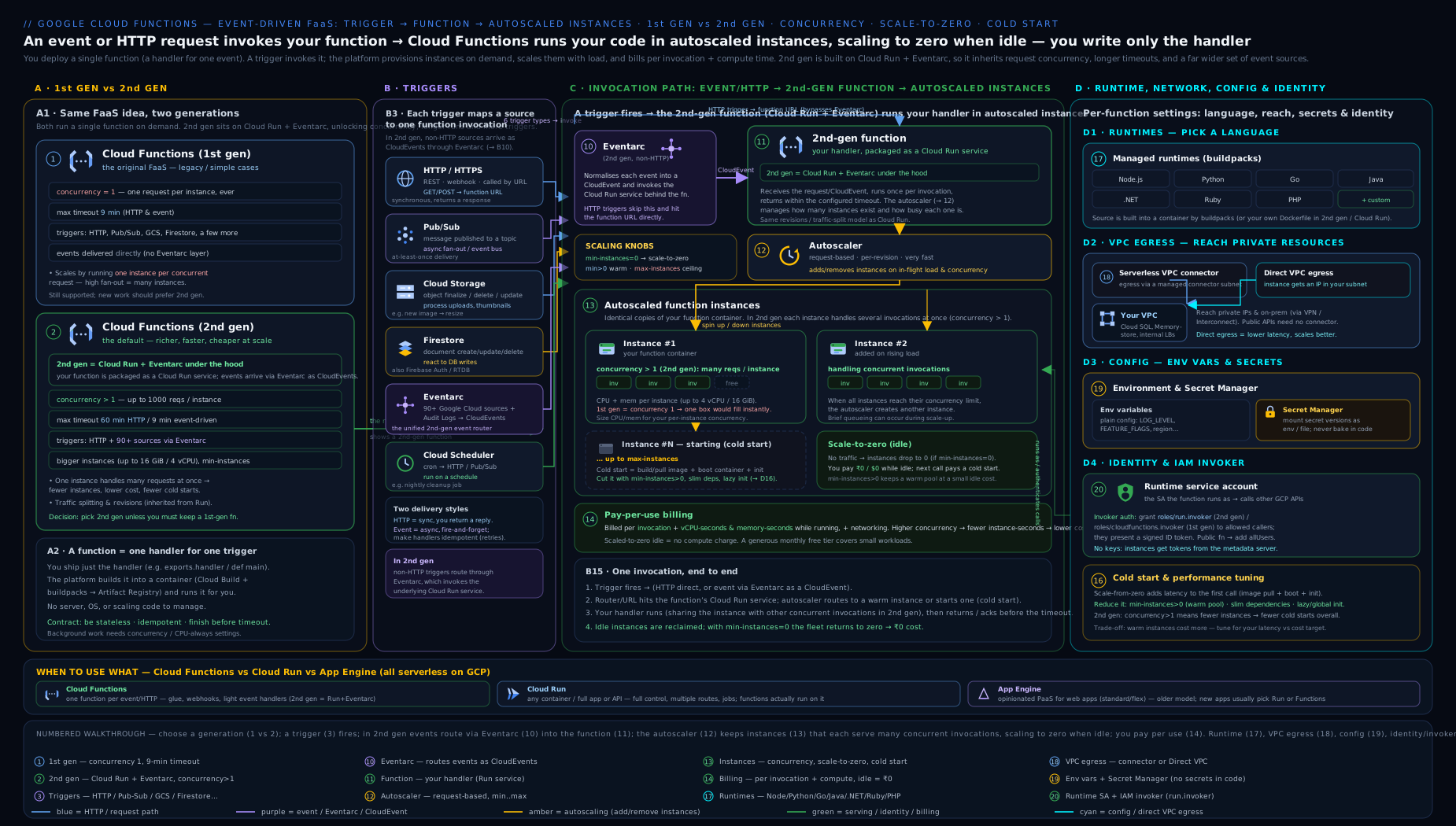
The diagram traces a single request or event left-to-right: from its trigger (HTTP, Pub/Sub, Storage, Firestore, generic Eventarc, or Scheduler), through the 2nd-gen engine — a Cloud Run service (now branded Cloud Run functions) with Eventarc delivering CloudEvents — into your runtime (built from source by buildpacks), where the autoscaler sizes the fleet by min/max instances and per-instance concurrency, while VPC egress reaches private resources and the function’s service account governs what it may call.
Going deeper
Everything above is enough to deploy and tune real functions. This section is for when you operate them at scale, debug the weird cases, or answer a Professional-level exam or interview question. It opens the hood on the parts that are invisible from a single gcloud functions deploy.
The deploy pipeline: what gcloud functions deploy really does
When you run gcloud functions deploy for a 2nd-gen function, a surprising amount happens in sequence. Knowing the steps turns most “why did my deploy fail?” questions into a quick diagnosis:
- Source upload. The CLI tars your
--sourcedirectory (minus anything matched by.gcloudignore) and uploads it to a Google-managed staging bucket in Cloud Storage. - Build (Cloud Build + buildpacks). Cloud Build runs the GCP buildpacks: they detect the language from your manifest (
requirements.txt,package.json, …), install dependencies, inject the Functions Framework, and emit an OCI image. - Push to Artifact Registry. The image lands in an Artifact Registry repo in your project (named
gcf-artifactsby default) — you are billed for that image storage. - Create/update the Cloud Run service. A new Cloud Run revision is created from the image with your CPU, memory, concurrency, timeout, env vars, and secrets baked in.
- Wire the trigger. For HTTP, you get a stable
run.appURL. For events, gcloud provisions an Eventarc trigger — and, under the hood, a Pub/Sub topic + push subscription (carrying an OIDC token) that delivers CloudEvents to the Cloud Run service. - Grant the plumbing IAM. gcloud grants the Eventarc/Pub/Sub service agents
run.invokeron the service so delivery actually works.
Why this matters: each step needs an API enabled and an IAM grant. The classic first-deploy failure is a disabled API (run, cloudbuild, eventarc, artifactregistry, pubsub) or the default compute / Cloud Build service account lacking a role. And the two log streams live in different places: build logs are in Cloud Build; runtime logs are in Cloud Logging under the Cloud Run service. Knowing which is which halves your debugging time.
Revisions and traffic splitting (the Cloud Run inheritance)
Because a 2nd-gen function is a Cloud Run service, every deploy creates an immutable revision, and you inherit Cloud Run’s traffic controls for free — something 1st gen simply cannot do. You can pin traffic to a known-good revision or canary a new one:
# List the revisions behind your function
gcloud run revisions list --service=api --region=us-central1

# Canary: 10% to the newest revision, 90% to the previous good one
gcloud run services update-traffic api --region=us-central1 \
  --to-revisions=api-00007-abc=10,api-00006-xyz=90

# Roll back instantly: 100% to the known-good revision
gcloud run services update-traffic api --region=us-central1 \
  --to-revisions=api-00006-xyz=100
The nuance: gcloud functions deploy normally routes 100% of traffic to the new revision immediately. If you want canaries, deploy with traffic pinned (the underlying gcloud run deploy --no-traffic semantics) and shift deliberately. Event triggers always target the service’s latest ready revision, so traffic-splitting is really an HTTP-function tool.
Concurrency, CPU allocation, and the instance arithmetic
The scaling section gave the rule of thumb; here is the engineering. Model your fleet with Little’s Law:
instances ≈ (requests per second × average seconds per request) ÷ concurrency
A function handling 50 rps at 200 ms each with concurrency = 1 needs ≈ 50 × 0.2 ÷ 1 = 10 instances. Raise concurrency to 10 and you need ≈ 1 instance for the same load — a ~10× cut in instance-seconds, hence roughly 10× less compute cost, for I/O-bound work. Two hard constraints bound how high you can push it:
- CPU contention. All concurrent requests on an instance share its vCPUs. If each request burns real CPU (image resize, compression, crypto), concurrency of 10 means each request gets ~1/10th of the CPU — latency balloons. Concurrency is a lever for I/O-bound work (waiting on APIs, DBs), not CPU-bound work.
- Per-request memory. Ten concurrent requests each buffering a 50 MiB payload need ~500 MiB plus your baseline — size
--memoryfor the concurrent peak or you will OOM.
CPU allocation mode is the subtle Cloud Run inheritance most people miss:
- CPU always allocated (
--no-cpu-throttling; the mode you want when--min-instances ≥ 1or you do background work): the instance’s CPU runs even between requests, so async work you kick off after returning a response still completes — but idle warm instances bill for CPU. - CPU only during request processing (the cheaper default for scale-to-zero services): CPU is throttled to near-zero between requests. Any work you start after sending the response may be paused — a classic source of “my background write silently didn’t happen.”
Set it explicitly on the underlying service if you rely on post-response work:
gcloud run services update api --region=us-central1 --no-cpu-throttling # CPU always on
Cold starts, dissected
A cold start is not one thing; it is a pipeline, and each stage is separately optimisable:
- Scheduling + image pull — the platform places the instance and pulls your container image. Lever: keep the image small (lean dependencies); a first pull in a region is slower.
- Sandbox boot — the instance starts inside a gVisor sandbox. Mostly fixed cost.
- Runtime + framework init — the language runtime and Functions Framework start.
- Global/module scope — your top-level code runs (imports, client construction, model loads). This is the stage you control most. Heavy top-level work (loading a 200 MB model, opening 50 DB connections) is paid on every cold start.
- First request handled.
Levers, in order of impact: --min-instances ≥ 1 (keep warm instances so most requests never cold-start — the biggest lever); --cpu-boost (extra CPU during startup, then settle to steady-state — a cheap win for heavy-init functions); lazy initialisation (construct expensive clients at module scope so they are reused on a warm instance, but defer truly optional work until first use so the very first cold start stays light); and trimming dependencies (every package imported at startup is cold-start tax).
The advanced gotcha: with concurrency > 1, a single cold start is amortised over many requests, so raising concurrency indirectly reduces the cold-start rate — another reason the default of 1 is expensive.
Retries, delivery semantics, and idempotency
- HTTP functions do not retry on the server side — the caller decides whether to retry. Build retry/backoff into clients and load balancers.
- Event functions retry. In 1st gen you opted in with
--retry. In 2nd gen, retries are governed by the Eventarc trigger’s underlying Pub/Sub subscription: a failed (non-2xx) delivery is redelivered per the subscription’s retry policy until it succeeds or hits the dead-letter policy. Tune it on the subscription, not the function:
# Find the subscription Eventarc created, then bound its retries + dead-letter it
gcloud pubsub subscriptions update SUBSCRIPTION_ID \
  --dead-letter-topic=projects/PROJECT_ID/topics/dead-letter \
  --max-delivery-attempts=5
Because delivery is at-least-once, the only safe design is idempotent handlers. Three patterns, cheapest first:
- Natural idempotency — make the effect a no-op if repeated (e.g.
SETa value rather thanINCREMENTit; upsert by a deterministic key). - Dedupe by event ID — every CloudEvent carries a unique
id. Record processed IDs in a fast store (Firestore, Memorystore/Redis) with a TTL and skip duplicates. - Idempotency keys / transactional outbox — for effects you cannot make naturally idempotent (charging a card), gate the effect behind a key stored transactionally with the result.
For the full delivery model — ordering, exactly-once, dead-letter, flow control — see the Pub/Sub exactly-once, ordering & dead-letter deep dive.
Quotas, limits, and sizes worth knowing
Beyond the per-function limits in the tables above, a few platform limits shape real designs (representative current figures — always confirm the quotas page for your project/region):
| Limit | 1st gen | 2nd gen (Cloud Run functions) |
|---|---|---|
| Max deploy source size (uncompressed) | ~500 MiB | ~500 MiB |
| Max HTTP request/response size | 10 MiB (32 MiB response, with limits) | up to 32 MiB (larger with streaming) |
| Max event (Pub/Sub message) size | 10 MiB | 10 MiB |
| Max instances (default ceiling) | 3,000 | 1,000 (raise via Cloud Run quota) |
| Concurrency per instance | 1 | 1 – 1,000 |
| Build concurrency | Cloud Build quota | Cloud Build quota |
/tmp (in-memory) |
counts against memory | counts against memory |
The gotcha that bites at scale: max-instances × concurrency is your theoretical peak in-flight requests. If a downstream (Cloud SQL, a partner API) accepts only 100 connections, then max-instances=1000 × concurrency=1 can open ~1,000 connections and knock it over. Size --max-instances against the weakest downstream, and put a connection pool / proxy (the Cloud SQL Auth Proxy, PgBouncer) in front of databases.
Encryption, VPC-SC, and supply-chain controls
For regulated or high-security workloads the serverless surface has the same controls as the rest of GCP:
- CMEK (customer-managed encryption keys). By default Google encrypts your function’s source, image, and build artifacts with Google-managed keys. To hold the key yourself, deploy with
--kms-key(a Cloud KMS key); the Cloud Functions/Cloud Run and Artifact Registry service agents needroles/cloudkms.cryptoKeyEncrypterDecrypteron it. - VPC Service Controls. Place the function inside a service perimeter so it cannot exfiltrate data to projects outside the perimeter; pair with
--ingress-settings=internal-onlyso it is unreachable from the public internet. - Binary Authorization. Because 2nd gen runs on Cloud Run, you can require that only images meeting an attestation policy are deployed — supply-chain assurance for the built image.
- Least privilege, restated. A dedicated runtime SA with only the roles it needs;
run.invokergranted to named principals, neverallUsers, unless the endpoint is deliberately public.
For rotation and CMEK specifics tailored to functions, see Secret Manager rotation & CMEK for Cloud Functions.
Observability and the two billing models
- Logs, metrics, traces. Everything your function writes to stdout/stderr flows to Cloud Logging; the platform emits metrics (instance count, active instances, request count, execution latencies, memory utilisation) to Cloud Monitoring; and requests are sampled into Cloud Trace. For 2nd gen, look under the Cloud Run service in the console and metrics explorer.
- Two billing models (2nd gen / Cloud Run). Request-based billing charges only while a request is in flight — ideal for spiky, scale-to-zero workloads. Instance-based billing charges for the whole life of an instance (CPU always allocated) — better when you keep min-instances warm or do background work. The choice interacts with the CPU allocation mode above; watch the billable-instance-time and active-instance-time metrics to see which regime you are actually in.
- The observability gotcha: with high concurrency, one slow request can inflate the latency others see (CPU contention) without any single request “failing.” Watch p99 latency and instance CPU utilisation together, not request count alone.
gen1 → gen2 migration reality
You cannot flip a switch. A 1st-gen and a 2nd-gen function are different resources even at the same name and region. In practice:
- Google provides an in-place migration path (
gcloud functions deploy … --gen2on an existing 1st-gen function can migrate it, retaining the HTTP URL in supported cases), but treat every migration as a re-deploy + re-test: the event signature changes (legacy(data, context)→ CloudEvent), concurrency defaults differ, and networking/IAM may need re-wiring. - Re-test triggers especially. 1st-gen background functions become 2nd-gen CloudEvent functions; the payload shape and the way you decode Pub/Sub data both change.
- Watch the URL. 1st-gen and 2nd-gen HTTP URLs differ in form; if callers hardcode the URL, front the function with a load balancer or custom domain so migration is invisible to them.
Hands-on lab
Deploy an HTTP function and an event-driven function on the Free Tier, exercise scaling, and clean up. Use Cloud Shell (no local setup) and a project where you can create functions. Cloud Functions includes a generous monthly free allotment, so this lab should cost effectively ₹0.
1. Set defaults and enable APIs.
gcloud config set project YOUR_PROJECT_ID
gcloud config set functions/region us-central1
gcloud services enable cloudfunctions.googleapis.com run.googleapis.com \
  cloudbuild.googleapis.com eventarc.googleapis.com artifactregistry.googleapis.com \
  pubsub.googleapis.com
2. Create an HTTP function (Python).
mkdir cf-lab && cd cf-lab
cat > main.py <<'PY'
import functions_framework

@functions_framework.http
def hello(request):
    name = request.args.get("name", "world")
    return f"Hello {name} from Cloud Functions 2nd gen\n", 200
PY
cat > requirements.txt <<'TXT'
functions-framework==3.*
TXT

gcloud functions deploy http-hello \
  --gen2 --runtime=python312 --source=. --entry-point=hello \
  --trigger-http --allow-unauthenticated \
  --concurrency=80 --cpu=1 --memory=256Mi \
  --min-instances=0 --max-instances=5
3. Validate the HTTP function.
URL=$(gcloud functions describe http-hello --gen2 --region=us-central1 \
      --format='value(serviceConfig.uri)')
curl "$URL?name=Vinod"
# Expected: Hello Vinod from Cloud Functions 2nd gen
4. Confirm it is really a Cloud Run service (the 2nd-gen proof).
gcloud run services list --region=us-central1 --filter="metadata.name=http-hello"
# The function appears as a Cloud Run service — that is the engine.
5. Create a Pub/Sub-triggered function.
gcloud pubsub topics create demo-topic

cat > main.py <<'PY'
import base64, functions_framework

@functions_framework.cloud_event
def on_message(cloud_event):
    msg = cloud_event.data["message"]
    data = base64.b64decode(msg.get("data", "")).decode() if msg.get("data") else ""
    print(f"Received message: {data!r}")
PY

gcloud functions deploy on-message \
  --gen2 --runtime=python312 --source=. --entry-point=on_message \
  --trigger-topic=demo-topic --min-instances=0 --max-instances=3
6. Validate the event function.
gcloud pubsub topics publish demo-topic --message="hello events"
# Read logs after a few seconds:
gcloud functions logs read on-message --gen2 --region=us-central1 --limit=20
# Expected: a line like  Received message: 'hello events'
7. Cleanup (do this to avoid lingering resources).
gcloud functions delete http-hello --gen2 --region=us-central1 --quiet
gcloud functions delete on-message --gen2 --region=us-central1 --quiet
gcloud pubsub topics delete demo-topic --quiet
# Optional: remove the Eventarc trigger if it lingers
gcloud eventarc triggers list --location=us-central1
Cost note. Both functions scale to zero (--min-instances=0), so they cost nothing when idle, and a handful of test invocations sits well within the monthly free tier. The only thing that would cost money is leaving --min-instances ≥ 1 running, or a runaway retry loop on the Pub/Sub function — which is why we cap --max-instances and clean up.
Common mistakes & troubleshooting
| Symptom | Likely cause | Fix |
|---|---|---|
| Build fails: “entry point not found” | --entry-point doesn’t match the exported function/class name |
Make them identical; check the file is at the source root |
| Build fails: missing dependencies | No requirements.txt/package.json at source root, or wrong name |
Add the manifest at the root; verify .gcloudignore isn’t excluding it |
| HTTP function returns 403 on invoke | Function requires auth; caller lacks run.invoker (or no token) |
Grant roles/run.invoker, or --allow-unauthenticated for public |
| Event trigger never fires | Audit Data Access logs not enabled, or wrong event-type/filter | Enable the logs; verify type/serviceName/methodName filters |
| Pub/Sub function loops / re-runs | Handler throws → message redelivered (at-least-once) | Make idempotent; add a dead-letter topic; return success on success |
| Storage function loops forever | Function writes back into the same bucket it triggers on | Write to a different bucket/prefix or filter precisely |
| 2nd gen costs as much as 1st gen | Concurrency left at default 1 | Raise --concurrency for I/O-bound workloads |
| Cold starts hurt latency | Scale-to-zero + heavy init | Set --min-instances≥1, enable --cpu-boost, lazy-init clients |
| Can’t reach Cloud SQL / private IP | No VPC egress configured | Add --vpc-connector or Direct VPC egress; fix firewall rules |
| Permission denied inside the function | Runtime service account lacks the API role | Grant the needed role to the function’s --service-account |
Common beginner mistakes
The troubleshooting table above is symptom → cause → fix. These are misconceptions — wrong mental models that quietly steer you into the traps. Each one below is the belief, why it is wrong, and the model to replace it with.
-
“2nd gen is just 1st gen with a bigger version number.” Wrong: it is a different platform. 2nd gen = Cloud Run + Eventarc, so concurrency, timeouts, instance sizes, the event format (CloudEvents), networking, and revisions all change. Right model: choosing a generation is choosing an engine, not a patch level.
-
“Scale-to-zero means it’s basically free.” Wrong: you still pay per invocation and for compute while running, and the moment you set
--min-instances ≥ 1those warm instances bill even when idle. Right model: free at rest, paid while working (and paid to stay warm). -
“I’ll set
--concurrency=1000to make it cheap and fast.” Wrong: concurrency only helps I/O-bound work. For CPU-bound handlers, packing many requests onto one instance starves each of CPU and latency gets worse. Right model: raise concurrency for waiting work, keep it low for compute-heavy work, and size CPU/memory for the concurrent peak. -
“Environment variables are a fine place for the DB password.” Wrong: env vars are visible to anyone with view access on the function config. Right model: config in env vars, secrets in Secret Manager via
--set-secrets, withsecretAccessorscoped to the exact secret. -
“My event trigger isn’t firing, so my code must be broken.” Wrong more often than not: the usual causes are disabled Data Access audit logs, a wrong
type/serviceName/methodNamefilter, or normal Eventarc delivery latency. Right model: check the trigger and its Pub/Sub subscription (and audit-log settings) before you touch the handler. -
“The invoker role and the runtime service account are the same thing.” Wrong: they are independent axes.
run.invoker= who may call the function; the runtime SA’s roles = what the function may do. Right model: confusing them yields either 403-on-invoke or permission-denied-inside — always ask “call it, or run as it?” -
“I’ll just write the function’s output back into the bucket that triggered it.” Wrong: the new object fires the same trigger → infinite loop (and a surprise bill). Right model: separate source and destination buckets/prefixes, or filter the event type/path precisely.
-
“
gcloud functions deployis basically instant.” Wrong: every deploy runs a full container build (Cloud Build + buildpacks + push to Artifact Registry), and first deploys also enable APIs — minutes, not seconds. Right model: iterate locally with the Functions Framework, then deploy when it works.
Best practices
- Default to 2nd gen. Use 1st gen only for a specific legacy reason. You get concurrency, bigger/longer limits, revisions, and the full Eventarc catalogue.
- Set concurrency deliberately. For I/O-bound functions, raise
--concurrency(e.g. 40–80) to slash instance count and cost; keep it at 1 only for CPU-bound or non-thread-safe code. - Bound the fleet. Always set
--max-instancesto protect downstreams (databases, third-party APIs) and cap cost; set--min-instancesonly where cold-start latency matters. - One least-privilege service account per function. Never use the default compute SA; grant only the roles the function needs.
- Secrets via Secret Manager, config via env vars. Mount secrets; never bake credentials into env vars or source.
- Make event handlers idempotent. Delivery is at-least-once; design for duplicates and add dead-letter topics for Pub/Sub.
- Keep functions small and single-purpose. One trigger, one job. If it grows tabs and routes, consider Cloud Run.
- Pin runtimes and dependencies. Pin the runtime major and lock dependency versions; track runtime end-of-support dates.
Security notes
- Authenticate by default. Leave HTTP functions authenticated; reserve
--allow-unauthenticatedfor endpoints that are genuinely public (and front those with a load balancer + Cloud Armor where possible). - Lock ingress. Use
internal-onlyorinternal-and-cloud-load-balancingfor functions that should not be on the open internet. - Least privilege everywhere. Tight runtime SA roles; grant
run.invokerto specific principals, notallUsers, unless intentional. - Secret Manager for credentials, with
secretAccessorscoped to the exact secret; rotate and pin versions intentionally. - VPC Service Controls can place functions inside a perimeter to prevent data exfiltration; combine with
internal-onlyingress. - Validate and sanitise input in HTTP handlers; treat all event payloads as untrusted; never log secrets.
- Audit logs: function admin activity is logged; enable Data Access logs where you need an invocation/data trail (also required for Audit-Log Eventarc triggers).
Interview & exam questions
1. Why is 2nd-gen Cloud Functions “Cloud Run plus Eventarc”, and why does it matter? 2nd gen deploys your function as a Cloud Run service and delivers events through Eventarc. It matters because the function inherits Cloud Run’s request concurrency, larger instances (up to 8 vCPU / 32 GiB), longer timeouts (up to 60 min HTTP), revisions/traffic splitting, and Cloud Run networking — and Eventarc’s 90+ event sources delivered as standard CloudEvents.
2. What is the single biggest cost/scaling difference between 1st and 2nd gen?
Per-instance concurrency. 1st gen serves one request per instance; 2nd gen can serve up to 1000 per instance (--concurrency). For I/O-bound workloads, higher concurrency means far fewer instances, fewer cold starts, and dramatically lower cost.
3. A function must run only when a Firestore document under users/{id} is updated. How do you wire it?
Deploy a 2nd-gen function with an Eventarc Firestore trigger: --trigger-event-filters="type=google.cloud.firestore.document.v1.updated", --trigger-event-filters="database=(default)", and --trigger-event-filters-path-pattern="document=users/{userId}".
4. Your Pub/Sub-triggered function keeps re-processing the same message. Why, and what do you do? Pub/Sub delivery is at-least-once; if the handler throws (or doesn’t finish), the message is redelivered. Make the handler idempotent, ensure it returns success on success, and configure a dead-letter topic to stop infinite retries.
5. How do you eliminate cold starts for a latency-sensitive function, and what’s the cost?
Set --min-instances ≥ 1 to keep warm instances ready (and optionally --cpu-boost). The cost is that those warm instances bill even when idle, so pick the smallest count that meets the latency target.
6. How does a function reach a Cloud SQL instance over private IP?
Give it VPC egress — either a Serverless VPC Access connector (--vpc-connector) or Direct VPC egress (--network/--subnet) — with appropriate egress settings and firewall rules. Without VPC egress the function can only reach public endpoints.
7. What’s the difference between the invoker role and the function’s service account?
roles/run.invoker controls who may call the function. The function’s runtime service account controls what the function can do (which Google APIs it can call). They are independent; confusing them yields either 403-on-invoke or permission-denied-inside.
8. How do you implement a nightly cron job with Cloud Functions?
Deploy an HTTP function (authenticated), then create a Cloud Scheduler job that calls its URL on a unix-cron schedule using an OIDC token from a service account with run.invoker. Cloud Functions has no built-in scheduler.
9. When would you choose Cloud Run over Cloud Functions? When you need a full container (multiple endpoints/routes, a web framework, custom runtime, system libraries, gRPC), more than one function’s worth of code, or behaviours like fine-grained traffic management — i.e. when “one function” no longer fits. (2nd-gen Functions is Cloud Run, so it’s really “function-shaped vs container-shaped”.)
10. How do you keep an HTTP function private?
Don’t use --allow-unauthenticated; require auth and grant run.invoker only to specific principals. Optionally set --ingress-settings=internal-only (or internal-and-LB) so it isn’t reachable from the public internet at all.
11. What are the max timeout values, and how do they differ by generation/trigger? 1st gen: 9 minutes (540 s) for all functions. 2nd gen: 60 minutes (3600 s) for HTTP functions, 9 minutes for event-driven functions.
12. Why might a Cloud Storage trigger loop infinitely? Because the function writes a new object back into the same bucket it is triggered on, which fires the trigger again. Write outputs to a different bucket/prefix, or filter the event type/path precisely.
13. In 2nd gen, where do you configure retry behaviour for an event function, and why there?
On the Eventarc trigger’s underlying Pub/Sub subscription (retry policy, --max-delivery-attempts, dead-letter topic) — not on the function — because 2nd gen delivers events through Pub/Sub, so the subscription owns delivery and retry semantics.
14. Your background write “sometimes doesn’t happen” after the response is sent. What’s the likely cause?
The service is in CPU-only-during-request mode, so CPU is throttled after you return and post-response work is paused. Either finish the work before responding, or set CPU always allocated (--no-cpu-throttling, typically with --min-instances ≥ 1).
Quick check
- What two Google products are the engine of 2nd-gen Cloud Functions?
- What is the default per-instance concurrency in 2nd gen, and what’s the max?
- Which flag keeps warm instances to avoid cold starts?
- Which IAM role lets a caller invoke an HTTP function?
- Name the two ways a function can send egress traffic into your VPC.
Answers
- Cloud Run (execution) and Eventarc (event delivery).
- Default 1; maximum 1000 (
--concurrency). --min-instances(set to ≥ 1).roles/run.invoker(on the underlying Cloud Run service).- Serverless VPC Access connector (
--vpc-connector) and Direct VPC egress (--network/--subnet).
Practice challenges
Six graded exercises, beginner → advanced. Try each before opening the solution. They assume the cf-lab source from the Hands-on lab (a main.py with a hello HTTP handler and an on_msg/on_message CloudEvent handler) and us-central1; adapt names/regions freely. Clean up with gcloud functions delete … --gen2 --quiet when done.
Challenge 1 (beginner) — Deploy and call a public HTTP function.
Deploy a Python 3.12 HTTP function named hello-pub that is publicly callable, then curl it.
<details> <summary>Solution</summary>
gcloud functions deploy hello-pub \
  --gen2 --region=us-central1 --runtime=python312 \
  --source=. --entry-point=hello --trigger-http --allow-unauthenticated
URL=$(gcloud functions describe hello-pub --gen2 --region=us-central1 \
      --format='value(serviceConfig.uri)')
curl "$URL"
Why: --allow-unauthenticated grants run.invoker to allUsers, so the run.app URL answers without a token.
</details>
Challenge 2 (beginner) — Lock it down and call it authenticated.
Remove public access from hello-pub, prove an anonymous call now fails, then call it with your own identity token.
<details> <summary>Solution</summary>
# Revoke public access
gcloud functions remove-invoker-policy-binding hello-pub \
  --gen2 --region=us-central1 --member="allUsers"

curl -i "$URL"                                   # now returns 403
curl -H "Authorization: Bearer $(gcloud auth print-identity-token)" "$URL"  # 200
Why: revoking allUsers restores IAM auth; a valid identity token from a principal that holds run.invoker gets through, while the anonymous call is rejected.
</details>
Challenge 3 (intermediate) — Prove at-least-once delivery.
Deploy a Pub/Sub function whose handler raises on a message body of boom, publish boom, and observe the redelivery loop in the logs.
<details> <summary>Solution</summary>
# main.py: raise ValueError("boom!") when the decoded message == "boom"
gcloud functions deploy retry-demo --gen2 --region=us-central1 \
  --runtime=python312 --source=. --entry-point=on_message --trigger-topic=demo-topic
gcloud pubsub topics publish demo-topic --message="boom"
gcloud functions logs read retry-demo --gen2 --region=us-central1 --limit=50
Why: a thrown handler returns a non-2xx, so Pub/Sub redelivers (at-least-once) — you see the same message processed again and again, which is exactly why idempotency and a dead-letter topic matter. </details>
Challenge 4 (intermediate) — Tune scaling and prove the engine.
Redeploy an HTTP function api with concurrency 50, min 1, max 20, 1 vCPU / 512 MiB, then show it is a Cloud Run service and list its revisions.
<details> <summary>Solution</summary>
gcloud functions deploy api --gen2 --region=us-central1 --runtime=nodejs20 \
  --source=. --entry-point=api --trigger-http \
  --concurrency=50 --min-instances=1 --max-instances=20 --cpu=1 --memory=512Mi
gcloud run services describe api --region=us-central1 --format='value(metadata.name)'
gcloud run revisions list --service=api --region=us-central1
Why: a 2nd-gen function is a Cloud Run service, so gcloud run sees it; concurrency 50 means one instance serves 50 in-flight requests — by Little’s Law, ~1/50th the instances a gen1 (concurrency-1) function would need.
</details>
Challenge 5 (advanced) — Authenticated nightly cron.
Schedule an authenticated (not public) HTTP function nightly to run at 02:00 IST via Cloud Scheduler with an OIDC token from a dedicated service account.
<details> <summary>Solution</summary>
gcloud functions deploy nightly --gen2 --region=us-central1 --runtime=python312 \
  --source=. --entry-point=nightly --trigger-http     # note: no --allow-unauthenticated
URL=$(gcloud functions describe nightly --gen2 --region=us-central1 \
      --format='value(serviceConfig.uri)')

# Let the scheduler SA invoke it
gcloud run services add-invoker-policy-binding nightly --region=us-central1 \
  --member="serviceAccount:sched@PROJECT_ID.iam.gserviceaccount.com"

gcloud scheduler jobs create http nightly-job --location=us-central1 \
  --schedule="0 2 * * *" --time-zone="Asia/Kolkata" \
  --uri="$URL" --http-method=POST \
  --oidc-service-account-email=sched@PROJECT_ID.iam.gserviceaccount.com
Why: Cloud Functions has no built-in cron; Scheduler calls the URL and mints an OIDC token from an SA holding run.invoker, so the endpoint stays private while still being triggerable on a schedule.
</details>
Challenge 6 (advanced) — Dead-letter + idempotency, end to end.
Give the Pub/Sub function a dead-letter after 5 attempts, and make the handler idempotent by de-duping on the CloudEvent id.
<details> <summary>Solution</summary>
# 1) dead-letter topic, then bound retries on the Eventarc-created subscription
gcloud pubsub topics create demo-dlq
SUB=$(gcloud pubsub subscriptions list --format='value(name)' | grep -i eventarc | head -1)
gcloud pubsub subscriptions update "$SUB" \
  --dead-letter-topic=projects/PROJECT_ID/topics/demo-dlq \
  --max-delivery-attempts=5
# 2) idempotent handler: skip already-seen event ids (Firestore as the dedupe store)
import functions_framework
from google.cloud import firestore
db = firestore.Client()

@functions_framework.cloud_event
def on_message(cloud_event):
    eid = cloud_event["id"]
    ref = db.collection("processed").document(eid)
    if ref.get().exists:
        return                       # duplicate delivery: no-op
    # ... do the real, side-effecting work here ...
    ref.set({"done": True})
Why: the dead-letter policy stops infinite retries after 5 failures (the poison message parks in demo-dlq), and de-duping on the unique CloudEvent id makes at-least-once delivery safe to process exactly once in effect.
</details>
Exercise
Build a small image-thumbnail pipeline, exhausting several options at once:
- Create two buckets:
SRC-uploadsandSRC-thumbs(replaceSRCwith a unique prefix). - Deploy a 2nd-gen Cloud Storage function on
SRC-uploadsforgoogle.cloud.storage.object.v1.finalizedthat reads the uploaded image and writes a resized copy intoSRC-thumbs. Set--memory=512Mi,--cpu=1,--concurrency=10,--max-instances=5, and a dedicated least-privilege service account with object read on the source and write on the thumbs bucket. - Use Secret Manager to store a dummy “watermark key” and mount it with
--set-secrets; grant the SAsecretAccessor. - Upload an image to
SRC-uploads, confirm a thumbnail appears inSRC-thumbs, and read the logs. - Deliberately demonstrate the loop gotcha: explain (in a comment) why writing the thumbnail back into
SRC-uploadswould re-trigger the function, and confirm your design writes toSRC-thumbsinstead. - Tear everything down: delete the function, the buckets, and the secret.
Success criteria: a thumbnail is produced for each upload, the function runs as a least-privilege SA, the secret is mounted (not in env vars), and you can articulate why the source/destination split prevents an infinite loop.
Certification mapping
- Associate Cloud Engineer (ACE): deploying and managing Cloud Functions (1st and 2nd gen), choosing triggers, setting scaling bounds, configuring the runtime service account and IAM invoker, and basic VPC connectivity — all core ACE skills in the “deploying and implementing” domain.
- Professional Cloud Architect (PCA): choosing Cloud Functions vs Cloud Run vs App Engine for a workload, designing event-driven architectures with Eventarc/Pub/Sub, and applying networking/identity/security controls (ingress, VPC egress, least-privilege SAs, Secret Manager) to serverless designs.
- Also relevant to Professional Cloud Developer (function signatures, buildpacks, idempotent event handlers) and Professional Cloud DevOps Engineer (deployment, min/max instances, observability of serverless).
Glossary
- Generation (1st/2nd gen): the two Cloud Functions platforms; 2nd gen = Cloud Run + Eventarc.
- Cloud Run functions: the 2024 rebrand of 2nd-gen Cloud Functions — the same product, now surfaced under the Cloud Run part of the console.
- Trigger: what invokes a function (HTTP, Pub/Sub, Storage, Firestore, Eventarc, Scheduler).
- Runtime: the language and version (e.g.
python312,nodejs20). - Functions Framework: the per-language library that adapts your function to HTTP/CloudEvents.
- Buildpack: the build system that turns source + manifest into a container image (no Dockerfile).
- Artifact Registry: where the built container image is stored (repo
gcf-artifactsby default) and billed. - CloudEvent: the standard event envelope 2nd-gen event functions receive; carries a unique
id. - Eventarc: Google’s event-routing service that delivers CloudEvents from 90+ sources to targets like Cloud Run functions.
- Instance: a running copy of your function; created/destroyed by the autoscaler.
- Concurrency: the number of requests one instance handles simultaneously (2nd gen).
- Revision: an immutable snapshot of a Cloud Run (functions) deployment; traffic can be split across revisions.
- Cold start: the latency of starting a fresh instance to handle a request.
- CPU boost: extra CPU granted during instance startup to shorten cold starts.
- CPU allocation (always-allocated vs during-request): whether an instance’s CPU runs between requests; governs post-response background work and idle billing.
- Scale to zero: dropping to zero instances when idle (
--min-instances=0). - Little’s Law: the queueing identity used to size the fleet — instances ≈ (rps × latency) ÷ concurrency.
- At-least-once delivery: the guarantee that an event is delivered one or more times — so duplicates are possible.
- Idempotency: the property that processing the same event more than once has the same effect as processing it once.
- Dead-letter topic: a Pub/Sub topic that captures messages which fail delivery after N attempts, stopping infinite retries.
- VPC connector / Direct VPC egress: the two ways a function sends egress into your VPC.
- Ingress settings: who can reach the function (all / internal-only / internal-and-LB).
- Invoker role (
roles/run.invoker): IAM permission to call an HTTP function. - Runtime service account: the identity the function uses to call other Google APIs.
- OIDC token: the signed identity token a caller (e.g. Cloud Scheduler) presents so an authenticated function accepts the call.
- CMEK: customer-managed encryption key (Cloud KMS) used to encrypt the function’s artifacts instead of Google-managed keys.
Next steps
- Go deeper on the architecture you can build on this engine: Event-Driven Architecture with Cloud Functions 2nd Gen and Eventarc.
- Understand the engine itself end to end: Google Cloud Run, In Depth: Services, Jobs, Concurrency, Scaling & Traffic.
- Next in the Databases track: Google Cloud Firestore, In Depth: Native vs Datastore Mode, Documents, Indexes & Queries (
/article/gcp-firestore-deep-dive-native-datastore-modes-indexes/). </content> </invoke>