In a nutshell
Imagine you run a coffee shop, but instead of keeping baristas standing around all day waiting for customers, you had a magical staffing agency: the moment someone walks in, a fully-trained barista appears behind the counter; when the queue grows, more baristas appear; when the shop empties, they all go home and you stop paying them entirely. You never hire, schedule, or manage anyone — you just say “here’s how to make our coffee” and the agency handles the rest. That is Cloud Run. You hand Google a container (a box holding your app and everything it needs to run), and Google starts copies of it when requests arrive, adds more copies under load, and shuts them all down — to zero — when nobody is calling. You pay, for the common case, only for the seconds a copy is actually serving a request.
Cloud Run comes in two shapes. A service answers requests all day (a website, an API) and scales with traffic. A job does a chunk of work and finishes (a nightly data crunch, a batch of emails) — like sending the whole staff on a one-off stocktake instead of serving customers. This lesson walks every dial you can turn: how many requests one copy handles at once (concurrency), how few or many copies can exist (min/max instances, scale-to-zero), how to ship a new version to 10% of users before everyone (traffic splitting), how the container must behave to be welcome here (the container contract), and how to wire it to private databases and lock down who can call it (networking and identity).
If you remember one sentence: Cloud Run runs your container on demand, scales it between zero and many based on incoming requests, and bills you mostly per request — you bring the box, Google runs everything under it.
Level: Intermediate · Time: ~48 min · You’ll need: a Google Cloud project with billing enabled and either Cloud Shell or a local gcloud install. New to the platform? Skim the Fundamentals module first; every term here is also defined in the Glossary at the end.
Google Cloud Run is Google’s fully managed serverless container platform: you hand it a container image, and it runs that container on demand, scales it from zero to many copies as traffic arrives, scales it back to zero when traffic stops, and bills you (for the common case) only while a request is being handled. There are no nodes to patch, no clusters to size, no autoscaler to tune at the infrastructure level — Google runs all of that on its own infrastructure (built on the same internal platform, Borg, plus the open-source Knative serving model). You bring a container that listens on a port; Cloud Run does the rest. It is the sweet spot between Cloud Functions (where you bring a single function and Google builds the container) and GKE (where you bring and run the whole Kubernetes cluster).
This lesson is deliberately exhaustive. We cover the two execution resources — services (request-driven, long-lived, scale-to-zero) and jobs (run-to-completion batch work) — and then every knob that governs how a service behaves: the container contract (the PORT env var, statelessness, the request vs instance billing models), concurrency (how many requests one instance handles at once) and autoscaling (minimum and maximum instances, scale-to-zero, cold starts, CPU always-allocated vs throttled, and startup CPU boost), revisions and traffic splitting for blue-green and canary rollouts by percentage, networking (ingress controls, egress via Serverless VPC Access connector or Direct VPC egress, and fronting Cloud Run with a load balancer), environment variables and secrets, and service identity. We finish with the decision that interviewers and the ACE and Professional Cloud Architect exams love: Cloud Run vs Cloud Functions vs GKE. Every option gets the same treatment — what it is · the choices · the default · when to pick which · the trade-off · the limit · the cost impact · the gotcha — and every core operation comes with a real gcloud command. Everything below uses the current v2 surface (gcloud run with current flags); where a default flipped or a flag changed, I call it out.
Learning objectives
By the end of this lesson you can:
- Distinguish a Cloud Run service from a job, and choose the right one for request-serving versus run-to-completion work.
- State the container contract — listen on
$PORT, be stateless, start fast — and explain the request-based vs instance-based billing models. - Tune concurrency and autoscaling correctly: set
min-instances/max-instances, reason about scale-to-zero and cold starts, and choose CPU always-allocated vs throttled and startup CPU boost. - Use revisions and traffic splitting to perform blue-green and percentage-based canary rollouts, and to roll back instantly.
- Configure networking: set ingress (all / internal / internal-and-load-balancing), route egress through a VPC connector or Direct VPC egress, and front the service with an external load balancer.
- Inject environment variables and secrets (from Secret Manager) and attach a least-privilege service account as the service identity.
- Choose correctly between Cloud Run, Cloud Functions, and GKE for a given workload and justify the trade-off.
Prerequisites & where this fits
You should already understand Google Cloud’s resource hierarchy — organisation → folder → project → resource — what a region is, how to run gcloud from Cloud Shell or a local SDK install (covered in the Fundamentals module), and the basics of a container image (a packaged application plus its dependencies, addressable by a registry path). Having read the Compute Engine deep dive helps — Cloud Run is where you go when you want to stop managing VMs entirely — but it is not required; we define every term. This is the serverless containers lesson of the Compute module in the GCP Zero-to-Hero course. It sits between raw VMs/MIGs and full Kubernetes: once you can drive a Cloud Run service and job fluently, you can ship most stateless web apps, APIs, and batch jobs without ever touching a node. For the production networking angle — private ingress, Direct VPC egress patterns, and PSC — pair this with Cloud Run in Production: Services, Jobs, VPC Egress, and Concurrency Tuning.
Core concepts
Before the options, fix six mental models. They explain why every setting is shaped the way it is.
You bring a container; Google runs everything below it. Cloud Run is serverless at the container level. You are responsible for the image (your code, runtime, and OS libraries inside it); Google is responsible for the host, the OS kernel, the autoscaler, request routing, TLS termination, and the regional fleet your instances run on. The unit you deploy is an OCI container image pulled from Artifact Registry (the modern registry; Container Registry is deprecated). You can build that image yourself with a Dockerfile, or let Cloud Run build it from source for you with Cloud Build and Buildpacks (gcloud run deploy --source .).
A service is a stack of immutable revisions, and traffic is a separate decision. When you deploy a service, Cloud Run creates a new revision — an immutable snapshot of the container image plus its entire configuration (env vars, secrets, CPU/memory, concurrency, scaling bounds, the service account). Revisions are never edited; every change produces a new one. Routing traffic to a revision is a separate operation from creating it. This separation is the whole basis of safe deploys: you can create a new revision that receives 0% of traffic, test it, then shift traffic to it gradually (canary) or all at once (blue-green), and roll back instantly by shifting traffic back — no rebuild, no redeploy.
An instance is a running copy of one revision; the autoscaler manages the count. Cloud Run runs your container as instances (sometimes called container instances). The autoscaler watches incoming load and the per-instance concurrency setting, then creates or removes instances to keep up — down to min-instances (zero by default) and up to max-instances. You do not pick instance count; you pick the bounds and the concurrency, and the platform sizes the fleet. This is the opposite of a Managed Instance Group, where you reason about VM counts directly.
Requests are the primary scaling signal; concurrency is requests-per-instance. Unlike a VM that handles whatever you throw at it, a Cloud Run service instance has a concurrency limit: the maximum number of requests it will process simultaneously (default 80, max 1000). The autoscaler does the arithmetic — roughly instances needed ≈ requests-in-flight ÷ concurrency — and adds instances when in-flight requests exceed current capacity. Higher concurrency means fewer instances (cheaper) but more contention inside each container; lower concurrency means more instances (more isolation, higher cost, more cold starts).
Billing is (usually) per-request and to 100 ms. In the default request-based billing model you pay for the vCPU and memory your instances use only while they are handling requests (plus a small per-request fee and a short startup/shutdown allowance), metered to the nearest 100 milliseconds. When no requests are in flight, an idle instance that is still alive is not billed for CPU (CPU is throttled to near-zero). The alternative instance-based billing model bills for the entire lifetime of each instance (CPU always allocated) regardless of requests — you choose this when you need background work or always-on CPU. Cloud Run also has a generous monthly free tier.
Statelessness is the contract, not a suggestion. Instances are ephemeral: the autoscaler can create and destroy them at any time, and there is no sticky storage on the instance beyond an in-memory writable filesystem (which counts against your memory limit and vanishes when the instance does). Anything that must persist — sessions, uploads, state — belongs in an external store (Cloud Storage, a database, Memorystore). Design for any request to land on any instance. Key terms used throughout: service (request-driven app), job (run-to-completion task), revision (immutable config+image snapshot), instance (a running container), concurrency (max simultaneous requests per instance), cold start (the latency of spinning up a fresh instance), and ingress/egress (who can call your service / how your service reaches other resources).
Services vs jobs: the two execution resources
Cloud Run gives you two top-level resources. Choosing the right one is the first decision, and a common interview question.
| Aspect | Cloud Run service | Cloud Run job |
|---|---|---|
| Trigger | An HTTP(S)/gRPC request (or a Pub/Sub push, Eventarc event, scheduled HTTP) | An explicit execution (gcloud run jobs execute, Cloud Scheduler, Workflows, Eventarc) |
| Lifecycle | Long-lived; scales up on traffic, scales to zero when idle | Runs to completion, then exits; no listening server |
| Listens on a port? | Yes — must serve on $PORT |
No — runs your command and exits |
| Scaling unit | Instances driven by request concurrency | Tasks — N parallel copies of the same job |
| Retries | Per-request (client/LB retries) | Built-in task retries (--max-retries) and parallelism |
| Billing | Per-request (default) or per-instance | For the duration each task runs |
| Typical use | Web apps, REST/gRPC APIs, webhooks, SSR front-ends, microservices | Batch ETL, data migrations, report generation, scheduled maintenance, fan-out processing |
| Timeout | Per-request, default 5 min, max 60 min | Per-task, default 10 min, max 24 hours |
The mental test: if it answers requests, it is a service; if it does a unit of work and finishes, it is a job. A web API is a service. A nightly “regenerate all thumbnails” task is a job. A job with --tasks=100 --parallelism=20 runs 100 tasks, 20 at a time, with each task reading its index from the CLOUD_RUN_TASK_INDEX env var to pick its slice of work — a clean fan-out pattern without standing up a queue and workers. Create one of each:
# A service (serves HTTP on $PORT, scales to zero)
gcloud run deploy hello-svc --image=us-docker.pkg.dev/cloudrun/container/hello --region=us-central1

# A job (runs to completion; no port)
gcloud run jobs create nightly-etl --image=REGION-docker.pkg.dev/PROJECT/repo/etl:latest \
  --region=us-central1 --tasks=10 --parallelism=5 --max-retries=3 --task-timeout=30m
gcloud run jobs execute nightly-etl --region=us-central1
The rest of this lesson focuses mainly on services, because that is where concurrency, autoscaling, revisions, and traffic splitting live; the container, networking, env/secrets, and identity material applies to both.
The container contract
Cloud Run will run any container that obeys a small contract. Break it and the deploy fails the health check or the service misbehaves. These are the rules.
| Requirement | What it means | Default / value | Gotcha |
|---|---|---|---|
Listen on $PORT (services) |
Your server must bind 0.0.0.0:$PORT, the port Cloud Run injects |
PORT=8080 by default; override with --port |
Binding localhost or a hard-coded port other than $PORT = “container failed to start and listen” |
| HTTP/1, HTTP/2, gRPC, or WebSockets | The protocol your server speaks | HTTP/1 by default; opt in to HTTP/2 end-to-end (--use-http2) |
WebSockets/streaming work but are bounded by the request timeout |
| Stateless | Any request may hit any instance; instances come and go | n/a | Never rely on local disk or in-memory state surviving — use external stores |
| Start quickly | Listen on the port within the startup window or fail | Startup probe deadline (configurable) | Heavy init (model loading, warm caches) lengthens cold starts; use a startup probe and/or CPU boost |
| Writable filesystem is in-memory | /tmp (and the container FS) is a tmpfs backed by RAM |
Counts against the memory limit | Large temp files can OOM the instance; mount a GCS volume for big I/O |
| Listen, don’t poll, for work | A service does CPU work during a request; outside requests CPU is throttled (request billing) | n/a | Background threads after the response may be paused unless CPU is always-allocated |
| Max request/response size & timeout | Bounded request duration and (for buffered) size | Request timeout default 5 min, max 60 min | Long jobs belong in a Cloud Run job, not a long-held request |
Two contract points deserve emphasis. First, $PORT: read it from the environment rather than hard-coding, e.g. const port = process.env.PORT || 8080. Second, statelessness with an in-memory FS: writing to /tmp is fine for scratch within a request, but it lives in RAM and disappears with the instance — for durable or large files, attach a Cloud Storage FUSE volume or an NFS/Filestore volume (--add-volume / --add-volume-mount), or just call the storage API directly.
Concurrency: requests per instance
Concurrency is the single most important cost-and-performance lever on a Cloud Run service: the maximum number of requests one instance will process at the same time.
| Setting | What it controls | Range / default | When to raise | When to lower |
|---|---|---|---|---|
Concurrency (--concurrency) |
Max simultaneous requests per instance | 1–1000; default 80 | I/O-bound apps (waiting on DB/HTTP) that can multiplex cheaply | CPU-bound work, or libraries that are not thread-safe / not concurrency-safe |
How to reason about it:
- Higher concurrency = fewer instances = lower cost, because each instance does more work. An I/O-bound API (mostly waiting on a database or an upstream service) can often run 80, 250, even 1000 concurrent requests per instance with plenty of headroom, dramatically cutting instance count and bill.
- Lower concurrency = more instances = more isolation but more cost and more cold starts. Set
--concurrency=1for CPU-bound or memory-heavy work (e.g. image processing, ML inference) where one request saturates the instance, or for code that simply is not safe to run concurrently. Concurrency 1 means each request gets a dedicated instance — predictable, but you pay for one instance per in-flight request and feel cold starts more. - Concurrency interacts with CPU/memory. If you raise concurrency, give the instance enough vCPU and memory to handle that many requests at once, or latency degrades under load. The autoscaler uses concurrency (and CPU utilisation) to decide when to add instances.
The relationship the autoscaler approximates: instances ≈ ceil(concurrent requests ÷ concurrency). So 800 concurrent requests at concurrency 80 ≈ 10 instances; the same load at concurrency 1 ≈ 800 instances. Tune concurrency by load-testing: raise it until p99 latency or error rate starts to climb, then back off. Gotcha: a too-high concurrency on a CPU-bound app produces slow, contended requests with few instances — the bill looks great but users suffer. A too-low concurrency on an I/O-bound app produces a huge instance count and a surprise invoice.
Autoscaling: min/max instances, scale-to-zero, cold starts
The autoscaler turns load into an instance count between two bounds you set.
| Setting | What it is | Default | Trade-off / cost | Gotcha |
|---|---|---|---|---|
Minimum instances (--min-instances) |
Instances kept warm even at zero traffic | 0 (scale-to-zero) | >0 removes cold starts but you pay to keep them idle (at the idle/throttled rate unless CPU is always-on) | Set ≥1 for latency-sensitive services; costs accrue 24/7 |
Maximum instances (--max-instances) |
Upper bound on instances for the revision | 100 (raisable via quota) | Caps cost and protects downstreams (e.g. a DB) from being overwhelmed | Too low = 429/throttling under spikes; too high = a runaway bill or an overwhelmed database |
| Scale-to-zero | Service drops to 0 instances when idle | On (when min=0) | Cheapest possible (pay nothing when idle) | First request after idle pays a cold start |
| Maximum concurrent requests | (see Concurrency) | 80 | Governs how aggressively the autoscaler adds instances | — |
The concepts behind the knobs:
- Scale-to-zero is Cloud Run’s signature: with
min-instances=0, an idle service costs nothing for compute. The trade-off is the cold start — the latency to schedule a new instance, pull the image, start the container, and pass the startup probe — paid by the first request after a period of no traffic (and by any request that needs a brand-new instance during a scale-up). - Cold starts range from tens of milliseconds to several seconds depending on image size, runtime, and your app’s init work. Reduce them by: keeping the image small, doing less work before listening on
$PORT, enabling startup CPU boost (below), settingmin-instances ≥ 1so at least one instance is always warm, and using a lazy-init pattern for expensive resources. There is no separate “provisioned concurrency” product —min-instancesis the warm-pool control. - Minimum instances keep N instances warm permanently. Crucially, idle min-instances are billed at the throttled (idle) CPU rate in request-based billing — cheaper than active, but not free. If you set
--no-cpu-throttling(CPU always allocated), min-instances are billed at the full instance rate around the clock. - Maximum instances is your blast-radius and budget cap. It also protects fragile downstreams: a sudden spike could otherwise open thousands of database connections. Pair a sensible
max-instanceswith connection pooling. When traffic exceedsmax-instances × concurrency, Cloud Run queues briefly and then returns429 Too Many Requests.
gcloud run services update hello-svc --region=us-central1 \
  --min-instances=1 --max-instances=20 --concurrency=80
CPU allocation: always-on vs throttled, and CPU boost
How Cloud Run allocates CPU changes both behaviour and billing. There are two independent choices: when CPU is available and whether to boost CPU at startup.
| Mode | What you get | Billing model | When to use | Gotcha |
|---|---|---|---|---|
| CPU throttled / “allocated during requests” (default for services) | CPU is full speed while a request is being handled, then throttled to near-zero between requests | Request-based — pay only during requests (to 100 ms) | Standard request/response web apps and APIs; cheapest for spiky traffic | Background work after you send the response may be paused; timers/async jobs won’t run reliably |
CPU always allocated (--no-cpu-throttling) |
CPU is available for the entire instance lifetime, even with no requests | Instance-based — pay for the whole instance lifetime | Background processing, streaming, async work after response, in-memory caches/warm pools, services needing min-instances doing work | Costs more (billed even when idle); pairs naturally with min-instances |
Startup CPU boost (--cpu-boost) |
Temporarily gives the instance more CPU during startup to cut cold-start time | Adds to startup cost slightly; large net win on latency | Almost always for latency-sensitive services and JIT/JVM/Node apps with heavy init | Only helps the startup window; doesn’t change steady-state CPU |
The two settings answer different questions. CPU throttled vs always-allocated answers “do I need CPU between requests?” — the default (throttled, request-billed) is correct for the overwhelming majority of stateless request/response services and is the cheapest. Switch to always-allocated (--no-cpu-throttling, which moves you to instance-based billing) when you must run work outside the request lifecycle: a background goroutine, a streaming response that keeps computing, periodic in-process tasks, or a warm in-memory cache that must stay warm. Startup CPU boost answers “are my cold starts slow because startup is CPU-starved?” — it gives extra CPU only during container start, which meaningfully shortens cold starts for JVM/Node/Python apps that do heavy initialisation. The two combine freely.
You also size the instance directly:
gcloud run services update hello-svc --region=us-central1 \
  --cpu=1 --memory=512Mi --cpu-boost            # request-billed, boosted cold starts
# vs an always-on background worker:
gcloud run services update worker-svc --region=us-central1 \
  --cpu=1 --memory=512Mi --no-cpu-throttling --min-instances=1
CPU can be set in fractions (e.g. 0.5, 1, 2, up to 8) and memory from 128 MiB up to 32 GiB, within valid CPU/memory combinations (more CPU requires more minimum memory; >4 vCPU requires that startup not be CPU-throttled in some configurations). Choose the smallest shape that meets your latency and concurrency targets.
Revisions and traffic splitting: blue-green and canary
This is the operational heart of Cloud Run and a guaranteed interview topic.
Every deploy creates a new immutable revision. A revision bundles the image and the full config; it never changes. By default, deploying a new revision routes 100% of traffic to it immediately (a straight cut-over). But because routing is separate from deploying, you can decouple them and roll out safely.
- Deploy without taking traffic (
--no-traffic): create the new revision but leave it at 0%. Smoke-test it via its revision-specific URL (each revision gets a stable tagged URL when you assign a tag), then promote when satisfied. - Tag a revision (
--tag=NAME): gives the revision a permanent, addressable URL likehttps://NAME---service-hash.run.appso you can test a specific revision directly, independent of the traffic split. - Split traffic by percentage across revisions for canary: send 10% to the new revision and 90% to the old, watch metrics, then ramp 25 → 50 → 100.
- Blue-green: keep the old revision fully provisioned at 0% traffic, flip 100% to the new revision in one command, and if anything is wrong, flip 100% back instantly — an instant rollback with no rebuild.
| Operation | Command | Effect |
|---|---|---|
| Deploy and take all traffic (default) | gcloud run deploy SVC --image=... |
New revision gets 100% |
| Deploy with no traffic + a tag | gcloud run deploy SVC --image=... --no-traffic --tag=candidate |
New revision at 0%, testable at its candidate---… URL |
| Canary: 10% to the new tagged revision | gcloud run services update-traffic SVC --to-tags=candidate=10 |
10% canary, 90% stays on current |
| Ramp to 50/50 | gcloud run services update-traffic SVC --to-revisions=NEW=50,OLD=50 |
Even split |
| Promote to 100% (blue-green flip) | gcloud run services update-traffic SVC --to-latest (or --to-revisions=NEW=100) |
New revision serves all traffic |
| Instant rollback | gcloud run services update-traffic SVC --to-revisions=OLD=100 |
Old revision serves all traffic immediately |
A typical canary flow:
# 1. Build a new revision but take no traffic; give it a tag for testing.
gcloud run deploy hello-svc --image=REGION-docker.pkg.dev/PROJECT/repo/app:v2 \
  --region=us-central1 --no-traffic --tag=v2

# 2. Smoke-test the candidate directly (the tagged URL), then send it 10% of live traffic.
gcloud run services update-traffic hello-svc --region=us-central1 --to-tags=v2=10

# 3. Watch errors/latency, then ramp.
gcloud run services update-traffic hello-svc --region=us-central1 --to-revisions=hello-svc-v2=50
gcloud run services update-traffic hello-svc --region=us-central1 --to-latest   # 100%

# 4. If anything looks wrong at any step, roll back instantly.
gcloud run services update-traffic hello-svc --region=us-central1 --to-revisions=hello-svc-00001-abc=100
Gotchas: by default deploys cut over to 100% — pass --no-traffic if you want a controlled rollout. Old revisions linger (cost nothing while at 0% with min-instances 0) and are great for rollback; clean up truly dead ones periodically. Traffic percentages are integers and must sum to 100. Tags also let you wire per-revision URLs into tests without touching the live split.
Networking: ingress, egress, and load balancing
Cloud Run’s defaults expose a public HTTPS URL with a Google-managed TLS certificate. Production needs tighter control over who can reach the service (ingress) and how the service reaches private resources (egress).
Ingress — who can call the service
| Ingress setting | Who can reach the service | When to use | Gotcha |
|---|---|---|---|
all (default) |
The public internet (the *.run.app URL) |
Public APIs and sites | Still gated by IAM authentication unless you allow unauthenticated invocations |
internal |
Only traffic from your VPC(s), VPC-SC perimeter, and other internal Google traffic (e.g. Pub/Sub, Eventarc, Workflows) | Internal microservices not meant for the internet | The *.run.app URL stops working from outside; callers must be on the VPC |
internal-and-cloud-load-balancing |
Internal traffic plus an external HTTPS load balancer in front | Public service that must sit behind Cloud Armor / a custom domain / CDN | You must build the LB + serverless NEG; direct *.run.app is restricted |
Separately, authentication controls identity: by default Cloud Run requires the caller to present a valid IAM token (roles/run.invoker). Allowing unauthenticated access (--allow-unauthenticated, granting allUsers the invoker role) makes the service publicly callable — appropriate for a public website, not for an internal API. Ingress and auth are independent: a service can be ingress=all but still require authentication.
Egress — how the service reaches private resources
By default a Cloud Run instance reaches the public internet directly but cannot reach private VPC resources (a Cloud SQL private IP, a Memorystore instance, an internal API, an on-prem host over VPN). Two mechanisms connect it to your VPC.
| Mechanism | What it is | Egress modes | When to use | Gotcha |
|---|---|---|---|---|
| Serverless VPC Access connector | A managed set of e2-micro-class VMs that bridge serverless → VPC; you provision a connector with a /28 range |
“Private ranges only” (default) or “all traffic” | The established option; works everywhere; needed for shared-VPC patterns in some setups | You pay for and scale the connector instances; an extra hop; the /28 must not overlap |
| Direct VPC egress | The instance gets an IP directly on a VPC subnet — no connector VMs | Route private ranges, or all egress, through the VPC | The modern, lower-latency, lower-cost default; higher throughput, scales with the service | Needs spare subnet IP space (sized to max instances); newer, check region/feature support |
| Static outbound IP | Pin egress to a fixed IP via Cloud NAT (with connector or Direct VPC egress) | n/a | When an upstream must allowlist your source IP | Requires routing egress through the VPC + Cloud NAT with a reserved IP |
Choose Direct VPC egress for new services (cheaper, faster, no connector to manage); use a connector where Direct VPC egress is not yet an option or an existing architecture standardises on it. Set --vpc-egress=private-ranges-only to send only RFC 1918 traffic through the VPC (internet still goes direct, cheaper) or all-traffic to force everything through the VPC (so a Cloud NAT can give you a fixed, allowlistable outbound IP and all egress is subject to your firewall/inspection).
# Direct VPC egress (modern): put instances on a subnet, route private ranges through the VPC
gcloud run services update hello-svc --region=us-central1 \
  --network=my-vpc --subnet=run-subnet --vpc-egress=private-ranges-only

# Or via a Serverless VPC Access connector (classic)
gcloud run services update hello-svc --region=us-central1 \
  --vpc-connector=my-connector --vpc-egress=private-ranges-only
Fronting Cloud Run with a load balancer
To put Cloud Run behind a global external Application Load Balancer — for a custom domain, Cloud CDN, Cloud Armor WAF/DDoS, or to blend Cloud Run with other backends — you create a serverless network endpoint group (NEG) that points at the service and wire it into the LB’s backend service. Set the service’s ingress to internal-and-cloud-load-balancing so it only accepts traffic via the LB (and internal sources), closing the public *.run.app URL. This is the standard production front door; the building blocks (forwarding rule → target proxy → URL map → backend service → serverless NEG) are covered in the load balancing module.
Environment variables, secrets, and service identity
A service needs configuration, secrets, and an identity to act as.
Environment variables
Plain configuration is injected as environment variables, available to the container as a new revision is created.
gcloud run services update hello-svc --region=us-central1 \
  --set-env-vars=LOG_LEVEL=info,FEATURE_X=true        # replace the whole set
gcloud run services update hello-svc --region=us-central1 \
  --update-env-vars=LOG_LEVEL=debug                    # add/change one, keep the rest
gcloud run services update hello-svc --region=us-central1 \
  --remove-env-vars=FEATURE_X                          # remove one
Gotcha: --set-env-vars replaces all env vars; use --update-env-vars/--remove-env-vars for incremental changes. Reserved names (like PORT) are managed by Cloud Run and cannot be set. Never put secrets in plain env vars — they are visible in the revision config to anyone with read access.
Secrets (from Secret Manager)
Sensitive values belong in Secret Manager and are referenced by the service, never baked into the image or plain env. Two delivery shapes:
| Delivery | How it appears | When to use | Gotcha |
|---|---|---|---|
| As an environment variable | The secret’s value is the env var’s value at instance start | Simple secrets (API keys, connection strings) | Read once at startup; rotating the secret needs a new revision unless you pin :latest and let new instances pick it up |
| Mounted as a file (volume) | The secret appears as a file at a mount path | Certificates, multi-line secrets, apps that read files; supports live-ish updates | Path-based access; the service account needs roles/secretmanager.secretAccessor |
# Inject a specific secret version as an env var
gcloud run services update hello-svc --region=us-central1 \
  --set-secrets=DB_PASSWORD=db-password:latest

# Or mount a secret as a file
gcloud run services update hello-svc --region=us-central1 \
  --set-secrets=/etc/secrets/tls.key=tls-key:3
Pin a specific version for reproducibility and controlled rotation, or :latest to always get the newest (new instances pick it up). The runtime service account must have roles/secretmanager.secretAccessor on the secret, or the instance fails to start.
Service identity (the runtime service account)
Every Cloud Run service and job runs as a service account — its identity for calling other Google Cloud APIs (Cloud Storage, Pub/Sub, BigQuery, Secret Manager, a database via IAM auth). By default it uses the Compute Engine default service account, which is broad; best practice is a dedicated, least-privilege service account per service.
gcloud iam service-accounts create hello-svc-sa --display-name="hello-svc runtime"
gcloud run services update hello-svc --region=us-central1 \
  --service-account=hello-svc-sa@PROJECT.iam.gserviceaccount.com
# then grant only what it needs, e.g.:
gcloud projects add-iam-policy-binding PROJECT \
  --member=serviceAccount:hello-svc-sa@PROJECT.iam.gserviceaccount.com \
  --role=roles/secretmanager.secretAccessor
Authentication uses the metadata server (Application Default Credentials) — the SDKs pick up the service account’s token automatically, with no key files. Two identities are in play and often confused: the runtime identity (what the service acts as, above) and the invoker identity (who is allowed to call the service, via roles/run.invoker). For service-to-service calls, give the caller’s service account roles/run.invoker on the callee and have the caller send an ID token.
Cloud Run vs Cloud Functions vs GKE
The classic “which compute” decision. All three run your code; they differ in what you bring and what you manage.
| Dimension | Cloud Run | Cloud Functions (2nd gen) | GKE (Autopilot/Standard) |
|---|---|---|---|
| You bring | A container image (any language/runtime) | A single function (source); Google builds the container | Containers and the Kubernetes cluster/workloads |
| Unit of deploy | Service or job (a container) | A function bound to a trigger | Pods/Deployments/Jobs on nodes |
| Scaling | Request-driven, scale-to-zero | Event/request-driven, scale-to-zero | Pod + node autoscaling; scale-to-zero needs add-ons |
| State / longevity | Stateless, ephemeral instances | Stateless, short-lived | Stateful sets, DaemonSets, anything Kubernetes supports |
| Networking control | Ingress modes, VPC egress, LB + NEG | Similar (2nd gen runs on Cloud Run infra) | Full VPC-native networking, network policy, service mesh |
| Operational burden | Minimal (no nodes) | Minimal (no container build, no nodes) | Highest (you own cluster ops, even on Autopilot you own workloads) |
| Best for | Web apps, APIs, microservices, batch jobs, event consumers | Small event-driven glue, single-purpose triggers, lightweight webhooks | Complex/stateful systems, multi-service platforms, custom controllers, anything needing full Kubernetes |
| Cost shape | Per-request (or per-instance) | Per-invocation + compute | Per-node (you pay for the fleet) |
The heuristics:
- Reach for Cloud Run by default for stateless containers — web apps, REST/gRPC APIs, SSR front-ends, webhooks, and batch jobs. You get scale-to-zero, request-based billing, and zero node management while keeping full control of the container image. (Cloud Functions 2nd gen actually runs on Cloud Run’s infrastructure — it is Cloud Run with the build and triggering handled for you.)
- Reach for Cloud Functions when the unit of work is genuinely a single function tied to one trigger and you would rather not maintain a
Dockerfile— small event glue, a Pub/Sub or Storage-triggered handler, a quick webhook. It is the lowest-ceremony option, at the cost of the container-level control Cloud Run gives you. - Reach for GKE when you need what only Kubernetes provides: stateful workloads, DaemonSets, custom operators/controllers, a service mesh, fine-grained networking and scheduling, very high sustained throughput where a continuously running fleet is cheaper, or a large multi-service platform with complex inter-service policy. You take on cluster operations in exchange for that power.
A useful one-liner for interviews: Cloud Functions = bring a function; Cloud Run = bring a container; GKE = bring a cluster. Move up the ladder only when the layer below cannot express what you need.
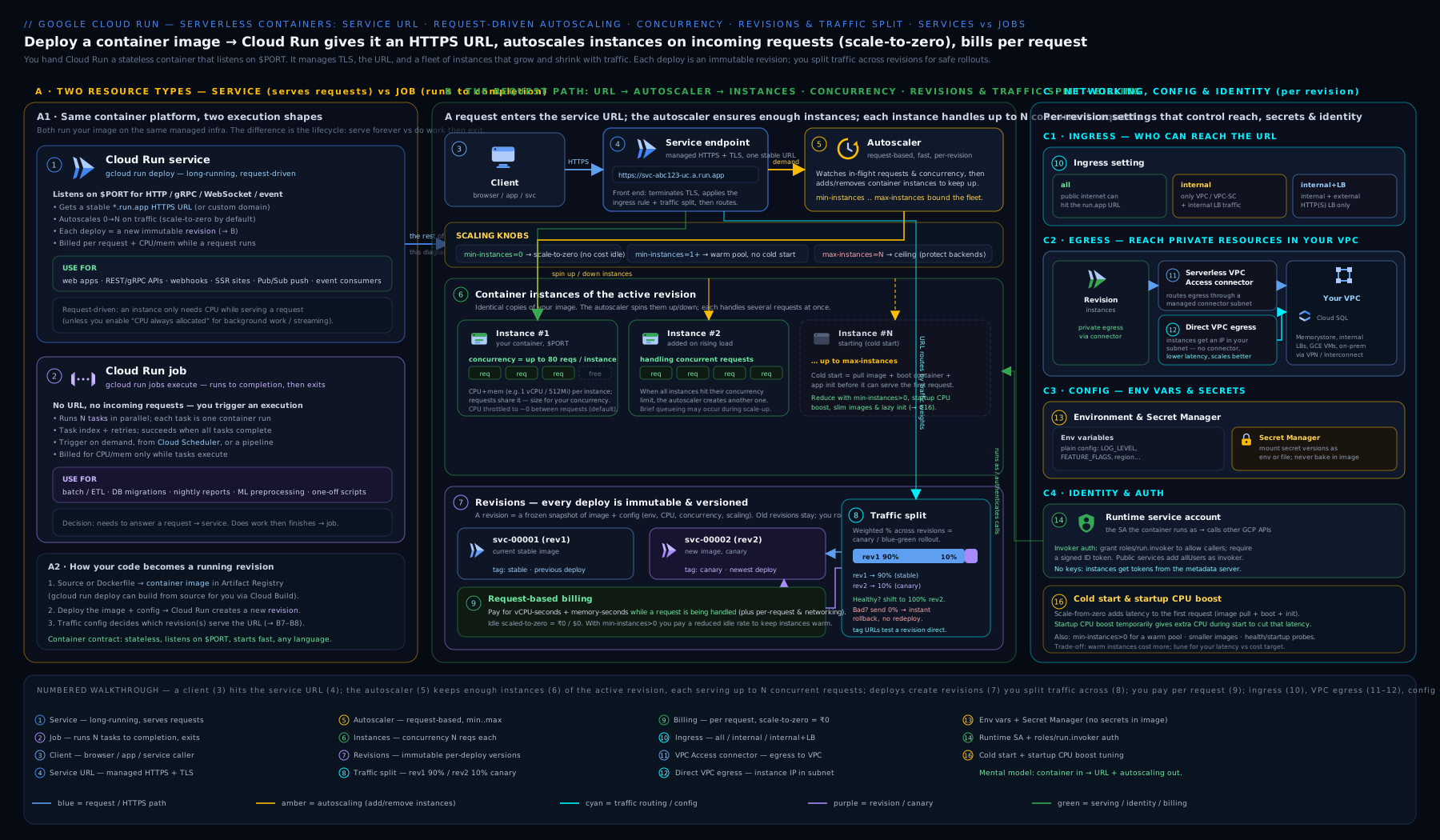
Read the diagram as the request path from left to right: a service is built from immutable revisions, and a traffic split routes percentages between them (the basis of blue-green and canary); the autoscaler sizes instances between min and max from request concurrency (with scale-to-zero and the cold start it implies); each instance carries a CPU allocation choice (throttled/request-billed vs always-on/instance-billed) plus optional startup CPU boost; ingress controls who may call in while the VPC egress path (connector or Direct VPC egress) reaches private resources; the service account gives the instance its identity and pulls secrets from Secret Manager; and off to the side, a separate job runs parallel tasks to completion.
Going deeper
The core above is enough to ship. This section is for the production engineer who has to tune, secure, and cost-optimise Cloud Run at scale — the internals and the less-obvious knobs that separate a demo from a fleet.
Execution environments: first vs second generation
Every Cloud Run instance runs inside a sandbox, and there are two to choose from. You select with --execution-environment=gen1|gen2.
First generation (gen1) |
Second generation (gen2) |
|
|---|---|---|
| Sandbox | Lightweight gVisor userspace kernel | Full Linux (a microVM, same family as Compute Engine) |
| Cold start | Fastest | Slightly slower to start; near-full speed once warm |
| Linux compatibility | Partial syscall emulation (most apps fine; some fail) | Full Linux compatibility |
| CPU / network / filesystem speed | Good | Faster (notably network throughput and file I/O) |
| Network file systems (NFS/Filestore) | Not supported | Supported |
| Default | Services default here | Jobs always run here |
| Choose when | Spiky traffic, minimise cold starts, ordinary web apps | CPU/network-heavy work, NFS mounts, apps needing full Linux |
The rule of thumb: leave services on gen1 for the fast cold starts unless you hit a wall — an app that uses an unsupported syscall, needs an NFS volume, or is bottlenecked on network/file throughput — then switch to gen2. Jobs are always gen2, so batch work already gets full Linux.
gcloud run services update hello-svc --region=us-central1 --execution-environment=gen2
Multi-container instances (sidecars)
A Cloud Run instance can run more than one container — one ingress container that serves $PORT, plus one or more sidecar containers alongside it. They share the instance’s network (talk over localhost), its memory/CPU budget (summed across containers), and any mounted volumes — but only the ingress container receives external requests. This is the same sidecar pattern as a Kubernetes Pod, minus the cluster.
Typical sidecars: an Envoy/Nginx proxy, an OpenTelemetry Collector shipping traces, the Cloud SQL Auth Proxy, a metrics agent, or a service-mesh proxy. Deploy with repeated --container blocks:
gcloud run deploy web --region=us-central1 \
  --container app --image=REGION-docker.pkg.dev/PROJECT/repo/app:latest --port=8080 \
  --container collector --image=otel/opentelemetry-collector:latest
Or declaratively in a service YAML (gcloud run services replace service.yaml), which is the cleaner way to express probes, per-container resources, and startup ordering. Gotchas: the containers share the instance’s total CPU/memory, so budget for both; only one container can be the ingress (serve $PORT); and a crash in any container can take the whole instance down.
Health checks: startup and liveness probes
Cloud Run supports two probe types (there is no readiness probe — that is a Kubernetes concept):
- Startup probe — gates when the container is considered started. Traffic is withheld until it passes; if it keeps failing past the threshold, the instance is killed and retried. The default is a TCP check on
$PORT. - Liveness probe — runs after startup to check the container is still healthy; if it fails past the threshold, Cloud Run restarts the container.
Probes can be httpGet, tcpSocket, or grpc, and are most cleanly expressed in the service YAML:
# service.yaml — apply with: gcloud run services replace service.yaml
apiVersion: serving.knative.dev/v1
kind: Service
metadata:
  name: web
spec:
  template:
    spec:
      containers:
        - image: REGION-docker.pkg.dev/PROJECT/repo/app:latest
          ports:
            - containerPort: 8080
          startupProbe:
            httpGet:
              path: /startupz
            periodSeconds: 5
            failureThreshold: 3
            timeoutSeconds: 2
          livenessProbe:
            httpGet:
              path: /healthz
            periodSeconds: 10
            failureThreshold: 3
Use a startup probe to stop traffic reaching an instance before its caches/connections are ready (fewer error spikes on cold start), and a liveness probe to auto-heal a wedged instance. Keep probe endpoints cheap and dependency-free — a liveness check that calls your database will cascade a database blip into mass restarts.
Request timeout, streaming, and protocols
The request timeout (--timeout, default 300s, max 3600s = 60 min) bounds how long a single request may run before Cloud Run terminates it. It governs long-polling, Server-Sent Events, streaming responses, and WebSockets (all supported, all capped by the timeout). Raise it for legitimately long requests; but a high timeout also means a stuck request holds an instance longer, so genuinely long or background work belongs in a job or an async pattern, not a 60-minute request.
Two protocol knobs: --use-http2 serves HTTP/2 (h2c) end-to-end to your container (needed for gRPC streaming into the container), and --session-affinity enables best-effort session affinity — Cloud Run sets a cookie to route a given client back to the same instance. Affinity is best-effort (not guaranteed; instances still come and go), useful for in-memory per-session caches, never a substitute for real external state.
gcloud run services update hello-svc --region=us-central1 \
  --timeout=120 --use-http2 --session-affinity
Volumes: mounting storage into the instance
Beyond the in-memory /tmp, you can mount real volumes with --add-volume + --add-volume-mount:
| Volume type | What it gives you | Notes |
|---|---|---|
| Cloud Storage (GCS FUSE) | A bucket mounted as a directory | Great for read-heavy shared assets; not a POSIX-strict filesystem |
| NFS / Filestore | A shared network filesystem | Requires gen2; true shared read-write across instances |
In-memory (emptyDir) |
A RAM-backed scratch dir beyond /tmp |
Counts against the memory limit |
| Secret | A Secret Manager secret as a file | Pair with secretAccessor on the runtime SA |
| Cloud SQL | A unix socket to a Cloud SQL instance | Via --add-cloudsql-instances |
How the autoscaler and cold starts really work
The autoscaler continuously compares in-flight requests to capacity (instances × concurrency) and adds instances within seconds when demand exceeds it, then removes them gradually after load falls (an idle instance may linger briefly before termination, which is why a burst right after a lull sometimes avoids a cold start). There is a maximum scale-up rate, so a vertical spike from zero still incurs cold starts on the first wave. A cold start is a chain: schedule the instance → pull the image (cached per-region after the first pull) → start the container → pass the startup probe. Everything you do to shrink each stage — a small image, --cpu-boost, deferring heavy init until after you bind $PORT, min-instances≥1 — attacks cold-start latency. There is deliberately no “provisioned concurrency” product: min-instances is the warm pool.
Cost internals and discounts
- Request-based billing meters vCPU and memory only during request handling (to the nearest 100 ms), plus a per-request fee and a startup/shutdown allowance; idle instances aren’t billed for CPU. Instance-based billing (
--no-cpu-throttling) charges the instance’s whole lifetime at a lower per-second rate — the cross-over happens at fairly high utilisation, so always-on only wins when instances are busy most of the time or you truly need background CPU. - Min-instance idle time is billed at a reduced (throttled) rate unless CPU is always-allocated; it is not free.
- Committed Use Discounts (CUDs) give a meaningful discount for a 1-year spend commitment on steady Cloud Run usage.
- The free tier (monthly free vCPU-seconds, memory-seconds, and 2M requests) resets monthly and applies before you pay anything.
Current-surface extras worth knowing
- GPUs: Cloud Run services can attach an NVIDIA L4 GPU (
--gpu=1 --gpu-type=nvidia-l4) for ML inference — GA, in select regions, and it still scales to zero (you don’t pay for the GPU when idle). - Multi-region HA: a Cloud Run service is regional; for HA or global latency, deploy the same service to several regions and put a global external Application Load Balancer with one serverless NEG per region in front.
- Worker pools (preview): a newer resource for pull-based, non-request workloads (e.g. a Kafka/Pub-Sub consumer) that need always-on instances without serving
$PORT— flagged preview; for run-to-completion batch keep using jobs. - Source deploys:
gcloud run deploy --source .builds your image with Cloud Build + Buildpacks (noDockerfileneeded) and deploys it in one step.
Hands-on lab
We will deploy a Cloud Run service, exercise concurrency, scaling, revisions, and a canary traffic split, then create and run a job, and finally clean up. The Cloud Run free tier (monthly free vCPU-seconds, memory-seconds, and requests) plus the $300 free-trial credit covers this comfortably; with scale-to-zero, the service costs nothing once idle.
1. Set your project, region, and enable the APIs.
gcloud config set project YOUR_PROJECT_ID
gcloud config set run/region us-central1
gcloud services enable run.googleapis.com artifactregistry.googleapis.com cloudbuild.googleapis.com
2. Deploy the sample service (Google’s public hello image; no build needed). Allow unauthenticated access so you can curl it.
gcloud run deploy hello-svc \
  --image=us-docker.pkg.dev/cloudrun/container/hello \
  --allow-unauthenticated \
  --concurrency=80 --cpu=1 --memory=512Mi \
  --min-instances=0 --max-instances=10 --cpu-boost
Expected output: a deploy summary ending with a Service URL like https://hello-svc-xxxxxxxx-uc.a.run.app.
3. Validate. Hit the URL and confirm a 200:
URL=$(gcloud run services describe hello-svc --format='value(status.url)')
curl -s -o /dev/null -w "%{http_code}\n" "$URL"     # expect: 200
Inspect the live configuration — concurrency, scaling bounds, and the active revision:
gcloud run services describe hello-svc \
  --format="value(spec.template.spec.containerConcurrency, status.latestReadyRevisionName)"
4. Create a second revision and run a canary. Re-deploy with a tag and no traffic, then send the new revision 20% of traffic.
# New revision, 0% traffic, tagged for direct testing
gcloud run deploy hello-svc \
  --image=us-docker.pkg.dev/cloudrun/container/hello \
  --update-env-vars=RELEASE=v2 --no-traffic --tag=v2

# Test the candidate directly via its tagged URL
TAG_URL=$(gcloud run services describe hello-svc --format='value(status.traffic)' | tr ' ' '\n' | grep -o 'https://v2---[^,]*' | head -1)
curl -s -o /dev/null -w "%{http_code}\n" "$TAG_URL"   # expect: 200

# Canary: 20% to v2, 80% to the previous revision
gcloud run services update-traffic hello-svc --to-tags=v2=20
gcloud run services describe hello-svc --format="value(status.traffic)"
5. Promote, then roll back — practise the blue-green flip and instant rollback.
gcloud run services update-traffic hello-svc --to-latest        # 100% to newest (promote)
# ...if something were wrong, roll back to a named earlier revision:
gcloud run revisions list --service=hello-svc --format="value(metadata.name)"
gcloud run services update-traffic hello-svc --to-revisions=PASTE_OLD_REVISION=100
6. Create and run a job (run-to-completion, parallel tasks).
gcloud run jobs create hello-job \
  --image=us-docker.pkg.dev/cloudrun/container/hello \
  --tasks=4 --parallelism=2 --max-retries=2 --task-timeout=5m
gcloud run jobs execute hello-job --wait
gcloud run jobs executions list --job=hello-job --format="value(metadata.name, status.succeededCount)"
Expected: the execution completes with all tasks succeeded.
7. Cleanup. Delete the service and job to stop all charges (scale-to-zero means the service was free while idle, but remove it to be tidy).
gcloud run services delete hello-svc --quiet
gcloud run jobs delete hello-job --quiet
Cost note. Cloud Run’s free tier grants a large monthly allowance of vCPU-seconds, memory-seconds, and 2 million requests; this lab stays well inside it. With min-instances=0 the service bills nothing while idle. The two cost traps to remember: setting min-instances > 0 (you pay to keep instances warm 24/7) and --no-cpu-throttling (instance-based billing charges for the whole instance lifetime, not just requests) — both are the right call sometimes, but neither is free. Deleting the resources above returns you to zero.
Practice challenges
Work these in your own project (Free Tier + the $300 credit covers them). Each has a solution — try it first, then check.
- (Beginner) Deploy and curl. Deploy Google’s hello image as a public service named
practice-svcinus-central1, then confirm it returns200.
<details> <summary>Solution</summary>
gcloud run deploy practice-svc \
  --image=us-docker.pkg.dev/cloudrun/container/hello \
  --region=us-central1 --allow-unauthenticated
URL=$(gcloud run services describe practice-svc --region=us-central1 --format='value(status.url)')
curl -s -o /dev/null -w "%{http_code}\n" "$URL"   # expect: 200
Why: --allow-unauthenticated grants allUsers the invoker role so an unauthenticated curl succeeds; the public address comes from status.url.
</details>
- (Beginner) Right-size scaling. Update
practice-svcto keep 1 instance warm, cap at 15, and set concurrency to 40. Which of these three costs you money even at zero traffic?
<details> <summary>Solution</summary>
gcloud run services update practice-svc --region=us-central1 \
  --min-instances=1 --max-instances=15 --concurrency=40
Why: --min-instances=1 bills 24/7 (at the idle/throttled rate) to keep one instance warm; max-instances and concurrency are just bounds and cost nothing on their own.
</details>
- (Intermediate) Canary a new revision. Deploy a second revision of
practice-svc(change an env var) with no traffic and tagv2, send it 10%, then promote to 100%.
<details> <summary>Solution</summary>
gcloud run deploy practice-svc --region=us-central1 \
  --image=us-docker.pkg.dev/cloudrun/container/hello \
  --update-env-vars=RELEASE=v2 --no-traffic --tag=v2
gcloud run services update-traffic practice-svc --region=us-central1 --to-tags=v2=10
# watch metrics, then:
gcloud run services update-traffic practice-svc --region=us-central1 --to-latest
Why: --no-traffic --tag creates a testable revision at 0%; --to-tags=v2=10 splits 10/90 for the canary; --to-latest cuts the rest over (the blue-green promote).
</details>
- (Intermediate) Reliable background work. You have a
worker-svcthat must keep processing a queue between requests. Which two settings make that reliable, and what is the billing consequence?
<details> <summary>Solution</summary>
gcloud run services update worker-svc --region=us-central1 \
  --no-cpu-throttling --min-instances=1
Why: --no-cpu-throttling keeps CPU allocated between requests (the default throttling would pause background work) and --min-instances=1 keeps an instance alive to do it — together they move you to instance-based billing, charged for the full instance lifetime.
</details>
- (Advanced) Private egress + least privilege. Deploy an authenticated service with a dedicated runtime service account, Direct VPC egress for private ranges, and a secret injected from Secret Manager.
<details> <summary>Solution</summary>
gcloud iam service-accounts create practice-sa --display-name="practice runtime"
gcloud secrets add-iam-policy-binding db-password \
  --member=serviceAccount:practice-sa@PROJECT.iam.gserviceaccount.com \
  --role=roles/secretmanager.secretAccessor
gcloud run deploy practice-svc --region=us-central1 \
  --image=REGION-docker.pkg.dev/PROJECT/repo/app:latest \
  --no-allow-unauthenticated \
  --service-account=practice-sa@PROJECT.iam.gserviceaccount.com \
  --network=my-vpc --subnet=run-subnet --vpc-egress=private-ranges-only \
  --set-secrets=DB_PASSWORD=db-password:latest
Why: the dedicated SA with secretAccessor on only that one secret is least privilege; --no-allow-unauthenticated keeps the service private (callers need roles/run.invoker); Direct VPC egress puts the instance on a subnet to reach private IPs without a connector.
</details>
- (Advanced) Fan-out job. Create a job that runs 100 work items, 20 at a time, retrying failures up to 3 times with a 30-minute per-task cap, then execute it and wait.
<details> <summary>Solution</summary>
gcloud run jobs create fanout-job --region=us-central1 \
  --image=REGION-docker.pkg.dev/PROJECT/repo/etl:latest \
  --tasks=100 --parallelism=20 --max-retries=3 --task-timeout=30m
gcloud run jobs execute fanout-job --region=us-central1 --wait
Why: --tasks=100 --parallelism=20 runs 100 tasks 20 at a time (each reads CLOUD_RUN_TASK_INDEX to pick its slice); --max-retries and --task-timeout bound failure and runtime; --wait blocks until the execution finishes.
</details>
Common mistakes & troubleshooting
| Symptom | Likely cause | Fix |
|---|---|---|
| Deploy fails: “container failed to start and listen on the port” | App binds a hard-coded port or localhost, not 0.0.0.0:$PORT |
Read $PORT from the env and bind 0.0.0.0; or set --port to match |
| First request after idle is very slow | Cold start with scale-to-zero | Set --min-instances=1, enable --cpu-boost, shrink the image, defer heavy init |
429 Too Many Requests under load |
Hit max-instances × concurrency ceiling |
Raise --max-instances (and quota) and/or --concurrency; check downstream limits |
| Background/async work never finishes after the response | Default CPU throttling pauses CPU between requests | Use --no-cpu-throttling (instance billing) or move the work to a Cloud Run job |
| New deploy broke prod immediately | Default deploy cut 100% to the new revision | Deploy with --no-traffic --tag=..., canary, then promote; roll back with update-traffic |
| Service can’t reach Cloud SQL private IP / internal API | No VPC egress configured | Add Direct VPC egress (--network/--subnet) or a VPC connector; set --vpc-egress |
| Instance fails to start citing a secret | Runtime SA lacks roles/secretmanager.secretAccessor |
Grant the accessor role on the secret to the service’s service account |
| Surprise bill on an idle service | min-instances > 0 and/or --no-cpu-throttling |
Drop min-instances to 0 for spiky traffic; use request-based (throttled) CPU unless you need always-on |
Common beginner mistakes
These are misconceptions, not error messages — the mental-model fixes that save hours.
- “Serverless means no servers, so no containers either.” Cloud Run is serverless at the operations level — you don’t manage nodes — but you very much bring a container that must obey the contract (listen on
$PORT, be stateless, start fast). “Serverless” describes who runs the infrastructure, not the absence of one. - “I’ll just write files to disk or keep state in memory.” Instances are ephemeral and any request can land on any instance. Local files live in an in-memory filesystem that vanishes when the instance dies, and there is no shared disk by default. Put durable or shared state in Cloud Storage, a database, or Memorystore — design as if every request hits a brand-new instance.
- “Higher concurrency is always cheaper, so crank it up.” Higher concurrency is cheaper for I/O-bound apps, but on CPU-bound code it just makes every request slow and contended while the instance count barely drops. Match concurrency to what one instance can actually handle; set it to 1 for CPU-heavy or non-thread-safe work.
- “A deploy is safe because I can roll back the code.” By default a deploy sends 100% of traffic to the new revision immediately — the damage is done before you notice. Use
--no-traffic --tag, canary a small slice, watch metrics, then promote. That is the safety mechanism, not the rebuild. - “Scale-to-zero is free performance.” Scaling to zero is free money but costs latency: the first request after idle pays a cold start. For latency-sensitive services,
min-instances≥1(which is not free) is the trade you make. - “My background thread keeps running after I return the response.” With the default (CPU throttled, request-based billing), CPU is paused between requests, so that timer or goroutine may never run. Use
--no-cpu-throttlingfor real background work, or move it to a job. - “
min-instancesis like provisioned concurrency and it’s free.”min-instancesis the warm-pool control, but warm instances bill 24/7 (at the idle rate, or the full rate with always-on CPU). There is no separate free warm pool. - “The runtime service account and the invoker are the same thing.” They are two different identities: the runtime SA is what the service acts as when calling other APIs; the invoker (
roles/run.invoker) is who may call the service. Widening one to fix the other is a classic security mistake.
Best practices
- Default to a dedicated, least-privilege service account per service; never run on the broad Compute Engine default SA in production.
- Keep images small and start fast — small base image, lazy-init expensive resources, enable
--cpu-boost— to minimise cold starts. - Tune concurrency by load-testing: raise it for I/O-bound apps to cut instances and cost; set it to 1 for CPU-bound or non-thread-safe code.
- Roll out safely: deploy with
--no-traffic --tag, canary a small percentage, watch metrics, then promote; keep the prior revision for instant rollback. - Set
max-instancesto protect both your budget and fragile downstreams (a database connection storm), and pair it with connection pooling. - Use
min-instances ≥ 1only for latency-sensitive services that cannot tolerate cold starts, and remember it bills 24/7. - Put secrets in Secret Manager (mounted or as env from a pinned version) — never bake them into the image or plain env vars.
- Lock down ingress and auth:
internalorinternal-and-cloud-load-balancingfor non-public services, require authentication (roles/run.invoker) for internal APIs, and put public services behind a load balancer with Cloud Armor when you need WAF/DDoS/CDN. - Prefer Direct VPC egress over a connector for new services; route
all-trafficthrough the VPC + Cloud NAT only when you need a static, allowlistable outbound IP.
Security notes
- Require authentication by default. A service is private unless you grant
allUserstheroles/run.invokerrole (--allow-unauthenticated); only do that for genuinely public endpoints. - Least-privilege runtime identity. Attach a dedicated service account and grant only the roles the service uses; rely on the metadata token / ADC — no key files.
- Separate invoker from runtime. For service-to-service calls, grant the caller’s SA
roles/run.invokeron the callee and send an ID token; don’t widen the runtime SA to compensate. - Secrets via Secret Manager, pinned to a version where reproducibility matters, with
secretAccessorgranted narrowly on each secret. - Constrain the network: use
internalingress for private services, route sensitive egress through the VPC for firewalling/inspection, and front public services with Cloud Armor. - Encrypt with CMEK where policy requires (Cloud Run supports customer-managed encryption keys for the service), and keep images in Artifact Registry with vulnerability scanning enabled.
- Use Binary Authorization to ensure only signed, attested images can be deployed, and pin to image digests rather than mutable tags for supply-chain integrity.
Interview & exam questions
- What is the difference between a Cloud Run service and a job? A service is request-driven, listens on
$PORT, scales with traffic, and can scale to zero — for web apps and APIs. A job runs a command to completion (no port), supports parallel tasks and retries, and is triggered explicitly or on a schedule — for batch work. If it answers requests it’s a service; if it does work and exits it’s a job. - Explain the container contract. The container must listen on
0.0.0.0:$PORT, be stateless (any instance may handle any request; no durable local disk — only an in-memory FS), and start quickly (pass the startup probe). It speaks HTTP/1, HTTP/2, gRPC, or WebSockets. - How does concurrency affect cost and performance? Concurrency is the max simultaneous requests per instance (default 80, max 1000). Higher concurrency packs more work per instance → fewer instances → lower cost, good for I/O-bound apps; lower concurrency (down to 1) isolates requests → more instances → higher cost, needed for CPU-bound or non-thread-safe code.
- What is scale-to-zero and what is the trade-off? With
min-instances=0an idle service runs zero instances and costs nothing for compute; the trade-off is a cold start on the first request after idle. Mitigate withmin-instances≥1, CPU boost, and a small image. - What is a cold start and how do you reduce it? The latency to schedule, pull, start, and health-check a fresh instance. Reduce it by shrinking the image, deferring heavy initialisation, enabling startup CPU boost, and keeping
min-instances≥1warm. - CPU always-allocated vs throttled — when each? Throttled (default, request-based billing) gives CPU only during requests — cheapest, correct for standard request/response apps. Always-allocated (
--no-cpu-throttling, instance-based billing) keeps CPU on for the instance’s whole life — needed for background work, streaming, or warm caches; costs more. - What does startup CPU boost do? It grants extra CPU only during container startup to shorten cold starts (great for JVM/Node/Python heavy-init apps); it does not change steady-state CPU.
- How do revisions and traffic splitting enable safe deploys? Each deploy creates an immutable revision, and routing is a separate operation. You can deploy at 0% traffic (
--no-traffic), test via a tagged URL, then canary by percentage and promote (blue-green), or roll back instantly by shifting traffic to a prior revision — no rebuild. - How do you do a canary with Cloud Run? Deploy the new revision with
--no-traffic --tag=v2, smoke-test it, thenupdate-traffic --to-tags=v2=10, watch metrics, and ramp 25→50→100, rolling back withupdate-trafficif needed. - Connector vs Direct VPC egress? A Serverless VPC Access connector bridges serverless to your VPC via managed VMs (you pay for/scale the connector). Direct VPC egress puts the instance directly on a subnet — lower latency and cost, higher throughput, no connector to manage — the modern default; it needs spare subnet IPs.
- How do you make a Cloud Run service private? Set ingress to
internal(orinternal-and-cloud-load-balancing) so only VPC/internal traffic reaches it, and require authentication (don’t grantallUsersinvoker). For a public service behind a WAF, useinternal-and-cloud-load-balancing+ a serverless NEG + Cloud Armor. - Cloud Run vs Cloud Functions vs GKE? Cloud Functions = bring a single function (Google builds the container); Cloud Run = bring any container (scale-to-zero, request billing, no nodes); GKE = bring the whole Kubernetes cluster (stateful, custom controllers, full networking — most operational burden). Move up only when the layer below can’t express your needs.
- First vs second generation execution environment? gen1 is a lightweight gVisor sandbox with the fastest cold starts and partial Linux compatibility (the default for services); gen2 is a full-Linux microVM with faster CPU/network/file I/O and NFS support at a slightly slower cold start (the default, and only option, for jobs). Switch a service to gen2 when it needs full Linux, an NFS mount, or higher throughput.
- What are sidecars on Cloud Run? A multi-container instance: one ingress container serves
$PORTand one or more sidecars run alongside sharing the network and volumes (e.g. a proxy, an OpenTelemetry Collector, the Cloud SQL Auth Proxy). Only the ingress container takes external requests; all containers share the instance’s CPU/memory budget. - Startup probe vs liveness probe? A startup probe gates when a container is considered started (traffic waits until it passes; repeated failure kills and retries the instance); a liveness probe runs afterwards and restarts the container if it goes unhealthy. There is no readiness probe on Cloud Run.
Quick check
- Which Cloud Run resource runs to completion with parallel tasks rather than listening on a port?
- What is the default concurrency for a service, and what is the maximum?
- Which setting keeps instances warm to avoid cold starts, and what does it cost?
- Which flag makes a new deploy take 0% of traffic so you can test it first?
- What is the modern, connector-free way to give a Cloud Run service access to private VPC resources?
Answers
- A job (executed via
gcloud run jobs execute), which runs N tasks with configurable parallelism and retries and then exits. - Default concurrency is 80; the maximum is 1000 (set to 1 for CPU-bound or non-thread-safe work).
min-instances(≥1) keeps instances warm; you pay for them 24/7 (at the idle/throttled CPU rate, or the full instance rate with--no-cpu-throttling).--no-traffic(usually with--tag=NAME), so the new revision is created but receives no live traffic until you shift it.- Direct VPC egress (
--network/--subnetwith--vpc-egress), which places the instance directly on a subnet without a Serverless VPC Access connector.
Exercise
Ship a small service safely and add a batch job. Using gcloud: (a) create a dedicated runtime service account with only roles/secretmanager.secretAccessor; (b) put a value in Secret Manager and deploy a Cloud Run service that mounts it (or injects it as env from a pinned version), with --concurrency=40, --cpu=1 --memory=512Mi, --min-instances=0 --max-instances=5, --cpu-boost, requiring authentication (no --allow-unauthenticated), and the dedicated SA attached; © deploy a second revision with --no-traffic --tag=v2, smoke-test the tagged URL with an ID token, then canary 10% to it and promote to 100%; (d) add Direct VPC egress so the service can reach a private range; (e) create a job with --tasks=6 --parallelism=3 --max-retries=2 and execute it; then (f) delete the service, the job, the secret, and the service account. In a sentence, explain why you required authentication and used a dedicated service account rather than the default.
Certification mapping
- Associate Cloud Engineer (ACE): “Deploying and implementing serverless workloads” — deploying a Cloud Run service from an image, setting concurrency, min/max instances, and CPU/memory, managing revisions and traffic splits, and configuring authentication map directly to exam objectives; expect questions on scale-to-zero, cold starts, and request vs instance billing.
- Professional Cloud Architect (PCA): designing serverless compute that meets cost, latency, and security requirements — choosing Cloud Run vs Functions vs GKE, ingress/egress design (internal ingress, Direct VPC egress, LB + serverless NEG + Cloud Armor), canary/blue-green rollout strategy, and least-privilege service identity are recurring design-scenario themes.
- Both exams probe the service-vs-job, concurrency-and-autoscaling, CPU throttled-vs-always-on, and traffic-splitting/rollback distinctions covered above.
Glossary
- Service — a request-driven Cloud Run app that listens on
$PORT, scales with traffic, and can scale to zero. - Job — a run-to-completion Cloud Run resource that runs N tasks (with parallelism and retries) and exits; no port.
- Task — one of the N parallel units a job runs; each reads its index from
CLOUD_RUN_TASK_INDEXto pick its slice of work. - Revision — an immutable snapshot of a service’s image plus its full configuration; every change creates a new one.
- Instance — a running copy of a revision’s container; the autoscaler manages the count between min and max.
- Concurrency — the maximum number of requests one instance handles simultaneously (default 80, max 1000).
- Scale-to-zero — dropping to zero instances when idle (
min-instances=0), so an idle service costs nothing for compute. - Cold start — the latency to schedule, pull, start, and health-check a fresh instance on the first request after idle.
- CPU throttling / always-allocated — CPU available only during requests (request-based billing) vs for the whole instance lifetime (instance-based billing,
--no-cpu-throttling). - Startup CPU boost — extra CPU during container startup to shorten cold starts (
--cpu-boost). - Traffic split — the per-revision percentage routing that enables canary and blue-green rollouts and instant rollback.
- Tag (revision tag) — a permanent, addressable URL for a specific revision, for testing independent of the live split.
- Ingress — who can reach the service (
all/internal/internal-and-cloud-load-balancing). - Serverless VPC Access connector — managed VMs that bridge serverless egress to a VPC.
- Direct VPC egress — placing an instance directly on a VPC subnet (no connector) for private access.
- Serverless NEG — a network endpoint group pointing at a Cloud Run service, used to put it behind a load balancer.
- Runtime service account — the identity a service/job acts as; invoker (
roles/run.invoker) is who may call it. - Execution environment — the sandbox an instance runs in: first generation (gVisor, fastest cold start, partial Linux) or second generation (microVM, full Linux, NFS support; the default for jobs). Set with
--execution-environment. - Sidecar / multi-container — extra containers running in the same instance as the ingress container, sharing its network and volumes (e.g. a proxy or telemetry collector).
- Startup probe — a health check that gates when a container is considered started; traffic waits until it passes.
- Liveness probe — a periodic health check after startup; failing it restarts the container.
- Session affinity — best-effort routing of a client’s requests back to the same instance (
--session-affinity, cookie-based). - Request timeout — the maximum duration of a single request (
--timeout, default 5 min, max 60 min) before Cloud Run terminates it. - Volume mount — attaching external storage (Cloud Storage/GCS FUSE, NFS/Filestore, in-memory, Secret Manager) into the instance’s filesystem via
--add-volume/--add-volume-mount. - Buildpacks — the mechanism behind
gcloud run deploy --source .that builds a container from source with noDockerfile. - Artifact Registry — Google’s container/artifact registry that Cloud Run pulls images from (Container Registry is deprecated).
- Worker pool — (preview) a Cloud Run resource for pull-based, non-request workloads that need always-on instances without serving
$PORT.
Next steps
You can now drive a Cloud Run service and job end to end — the container contract, concurrency and autoscaling, CPU allocation, revisions and traffic splitting, networking, secrets, and identity. For the deep production networking angle — private ingress patterns, Direct VPC egress at scale, internal load balancers, IAP, and Private Service Connect — read Cloud Run in Production: Services, Jobs, VPC Egress, and Concurrency Tuning. Then continue into the storage layer your stateless services depend on with Google Cloud Storage, In Depth: Buckets, Storage Classes, Lifecycle, Versioning & Encryption, and when a single container is no longer enough, step up to the Google Kubernetes Engine deep dive.