In a nutshell
Cloud Run runs your container for you and handles the “how many copies do I need right now” problem automatically. You hand it an image; it starts copies (instances) when requests arrive, adds more as traffic climbs, and removes them — down to zero — when the street empties. You never touch a VM, a node pool, or an autoscaler config. That is the whole pitch, and for a hello-world it really is that simple. The depth in this lesson is about the knobs that decide your bill and whether your service can even reach your database.
Think of a service as a food truck. It opens its window when customers show up, serves up to N people at once (that N is concurrency), and the fleet manager parks more identical trucks during the lunch rush and tows them away when it’s quiet. A job is a catering order instead: you cook a fixed amount for one event and you’re done — no window, no walk-ins, it runs to completion and exits. Same kitchen (a container), completely different job shape.
The networking half is the private service road behind the trucks. By default a truck can drive on public roads (the internet) but is not allowed through the gate into your private neighbourhood (your VPC) where the pantry — your database — lives. To let it in you either give each truck a gate pass onto the private road (Direct VPC egress) or funnel every truck through one shared checkpoint (a Serverless VPC Access connector). And ingress is the bouncer at the truck window deciding who is even allowed to walk up and order — the public, or only people already inside the neighbourhood.
Nail those four ideas — service vs job, concurrency, egress into the VPC, and ingress at the door — and the rest of Cloud Run is tuning.
Level: Advanced · Time: ~28 min
Prerequisites & what you’ll be able to do
Before this lesson, be comfortable deploying a container image to Cloud Run at all, and know basic VPC vocabulary (subnet, RFC 1918 private ranges, firewall rule) and IAM roles. If Cloud Run itself is new, start with the foundational Cloud Run deep dive and come back — this lesson is the production networking and tuning layer on top of it.
After this lesson you will be able to:
- Decide service vs job for any workload, and fan a job across shards with tasks and parallelism.
- Tune concurrency, CPU, and min/max instances to the shape of a workload (CPU-bound vs I/O-bound) instead of guessing.
- Choose request-based vs instance-based CPU billing deliberately, and know which one a background worker needs.
- Attach a service to a VPC with Direct VPC egress, size the subnet correctly, and set the right
--vpc-egressmode. - Lock ingress to internal or internal-and-LB, require authenticated callers, and front a service with an internal ALB, IAP, or PSC.
- Reach Cloud SQL and private backends securely, and ship revisions with a staged rollout and a one-command rollback.
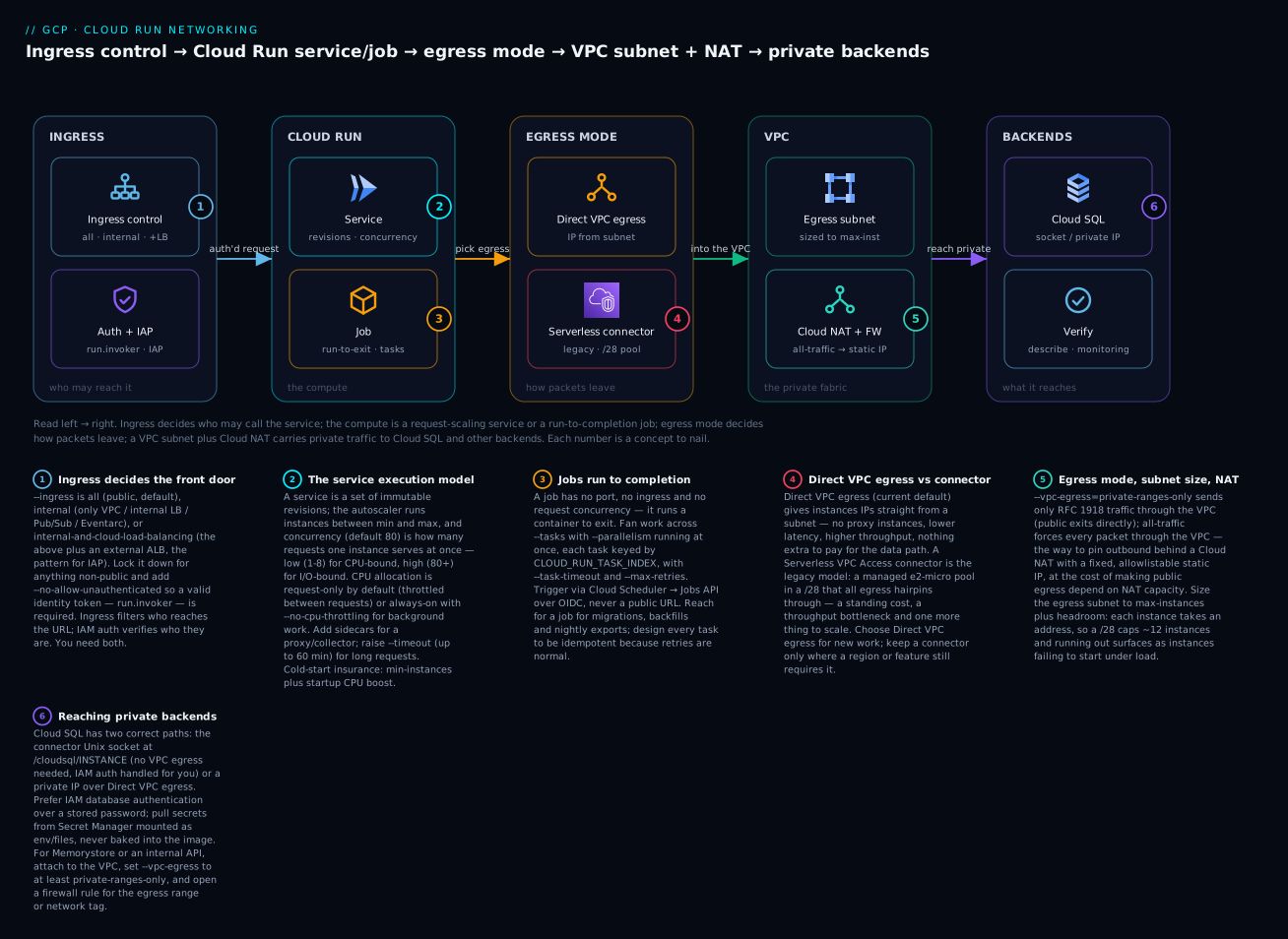
The diagram traces one request left to right: ingress control decides who may reach the service, the compute is a request-scaling service or a run-to-completion job, the egress mode (Direct VPC egress or a legacy connector) decides how packets leave, and a VPC subnet plus Cloud NAT carry private traffic to Cloud SQL and other backends — the six badges are the concepts this lesson makes you fluent in.
Cloud Run gets sold as “just give us a container,” and for a hello-world it is. In production it is a request-scaling, scale-to-zero compute platform with a specific billing model and a set of networking knobs that, if you misread them, produce either a surprise invoice or a service that silently can’t reach your database. This guide is the operational mental model: how instances spin up and bill, when to reach for a job instead of a service, how concurrency and CPU allocation interact, and how to wire private ingress and VPC egress without leaking traffic to the public internet.
Everything below uses the v2 API surface (gcloud run with current flags). Where a flag changed names or a default flipped, I call it out.
1. The execution model: requests, concurrency, instance lifecycle
A Cloud Run service is a set of revisions. Each revision is an immutable container config (image, env, resources, scaling bounds). Traffic is routed to revisions by a traffic-split policy. The autoscaler creates instances of the active revision to absorb load and removes them when load drops, down to min-instances (zero by default).
The unit that matters for both behavior and billing is the instance, and the lever that governs how many you need is concurrency – the maximum number of requests one instance handles simultaneously. Default concurrency is 80. If your container can genuinely serve 80 concurrent requests, one instance covers a lot of traffic. If each request pins a CPU or holds a scarce backend connection, 80 is a way to overload and time out.
The autoscaler’s rough target: keep instances at about 60% of the concurrency setting. So with concurrency 80 it aims to add instances as you approach ~50 in-flight requests per instance. You do not control that 60% directly; you control concurrency, min/max instances, and CPU.
The billing distinction that trips people up: by default (request-based billing) you are billed for CPU and memory only during request processing, rounded up, plus a small per-request fee. Outside a request the instance still exists for a while (warm) but is not billing CPU. Switch to instance-based billing (
--no-cpu-throttling, covered below) and you pay for the full lifetime of the instance instead – the right choice for background work, the wrong choice for bursty request traffic.
2. Services vs jobs: long-running APIs vs batch and scheduled work
A service answers requests on a port and scales on request load. A job runs a container to completion and exits – no port, no ingress, no request concurrency. Reach for a job when the workload is “do this and finish”: a nightly export, a database migration, a Pub/Sub-triggered batch, a one-shot data backfill.
Deploy a service from source or image:
gcloud run deploy orders-api \
  --image=us-docker.pkg.dev/acme-prod/apps/orders-api:1.42.0 \
  --region=us-central1 \
  --project=acme-prod \
  --concurrency=40 \
  --cpu=1 --memory=512Mi \
  --min-instances=1 --max-instances=50 \
  --no-allow-unauthenticated \
  --port=8080
A job is defined once, then executed (manually, on a schedule, or from an event). Jobs support parallelism via task arrays: --tasks is how many tasks run, --parallelism is how many run at once, and each task gets its index in CLOUD_RUN_TASK_INDEX.
# Define a job that fans a backfill across 100 shards, 10 at a time
gcloud run jobs create nightly-backfill \
  --image=us-docker.pkg.dev/acme-prod/apps/backfill:2.3.0 \
  --region=us-central1 \
  --project=acme-prod \
  --tasks=100 --parallelism=10 \
  --task-timeout=3600s \
  --max-retries=3 \
  --cpu=2 --memory=2Gi

# Run it now and stream until completion
gcloud run jobs execute nightly-backfill --region=us-central1 --wait
Schedule it with Cloud Scheduler hitting the Jobs Admin API via OIDC – no public endpoint, no secret to rotate:
gcloud scheduler jobs create http nightly-backfill-trigger \
  --location=us-central1 \
  --schedule="0 2 * * *" --time-zone="Etc/UTC" \
  --uri="https://run.googleapis.com/v2/projects/acme-prod/locations/us-central1/jobs/nightly-backfill:run" \
  --http-method=POST \
  --oauth-service-account-email=scheduler-invoker@acme-prod.iam.gserviceaccount.com
The scheduler service account needs roles/run.invoker on the job (or roles/run.developer). Jobs read their workload from env/args, not from a request body, so design them to be re-runnable and idempotent – retries and manual re-execution are normal.
3. Concurrency, CPU allocation, and CPU-always-on
Three settings interact and you must tune them together, not in isolation:
| Setting | Flag | What it controls |
|---|---|---|
| Concurrency | --concurrency |
Max simultaneous requests per instance (1-1000) |
| CPU | --cpu |
vCPU per instance (0.08 up to 8; values <1 cap concurrency) |
| CPU throttling | --cpu-throttling / --no-cpu-throttling |
Whether CPU is throttled outside request processing |
The rule of thumb: CPU-bound work wants low concurrency; I/O-bound work wants high concurrency. A handler that does heavy serialization or image processing should run at concurrency 1-8 so requests don’t starve each other on a shared core. A handler that mostly awaits a downstream API or database can run at 80+ because the CPU sits idle during the wait and a single instance multiplexes cheaply.
Fractional CPU has a hard constraint worth memorizing: any allocation below 1 vCPU forces concurrency to 1 and is incompatible with CPU-always-on. Sub-1-vCPU instances are for cheap, strictly serial, latency-tolerant endpoints – not your main API.
CPU throttling is the other half. By default, outside request processing CPU is throttled to near zero. That breaks anything that needs to keep working between requests: a background goroutine flushing a buffer, an async logging/telemetry exporter, a queue consumer that ack’s after the response is sent. Turn it off:
gcloud run services update telemetry-relay \
  --region=us-central1 \
  --no-cpu-throttling \
  --min-instances=1
--no-cpu-throttling is instance-based billing: you pay for the full instance lifetime, so pin a sane min-instances and max-instances and don’t leave it scaling to zero-and-back all day. If your code finishes all work before returning the response and needs nothing in between, leave throttling on and save the money.
4. Cold starts: min instances, startup CPU boost, startup probes
A cold start is the time from “autoscaler decides it needs an instance” to “that instance serves its first request”: pull/start the container, run your startup code, pass the startup probe. You attack it from three directions.
Min instances keep warm capacity so the common path never pays a cold start:
gcloud run services update orders-api \
  --region=us-central1 \
  --min-instances=2
Warm idle instances outside a request are billed at a reduced idle rate under request-based billing – cheap insurance for a latency-sensitive front door, but it is not free, so size it to real traffic.
Startup CPU boost temporarily allocates extra CPU during container startup so initialization (JIT warm-up, framework boot, connection pools) finishes faster. It is on by default in v2; keep it on for JVM/Node services with heavy boot:
gcloud run services update orders-api \
  --region=us-central1 \
  --cpu-boost
Startup probes define when an instance is considered ready. Get this right or the autoscaler routes traffic into a process that hasn’t bound its port yet, producing 503s that look like cold-start failures. A correct startup probe gives slow boots room without making fast boots wait:
# service.yaml (knative-style; apply with: gcloud run services replace service.yaml)
apiVersion: serving.knative.dev/v1
kind: Service
metadata:
  name: orders-api
spec:
  template:
    spec:
      containers:
        - image: us-docker.pkg.dev/acme-prod/apps/orders-api:1.42.0
          ports:
            - containerPort: 8080
          startupProbe:
            httpGet:
              path: /healthz/startup
            initialDelaySeconds: 0
            periodSeconds: 5
            failureThreshold: 12   # up to ~60s to become ready
          livenessProbe:
            httpGet:
              path: /healthz/live
            periodSeconds: 30
Keep startup and liveness checks separate. A liveness probe that also validates a database connection will restart your instance during a transient DB blip and turn a 30-second backend hiccup into a self-inflicted outage.
5. Direct VPC egress vs Serverless VPC Access connectors
By default a Cloud Run service reaches the internet directly and cannot reach RFC 1918 addresses in your VPC. To talk to private resources you attach the service to a VPC. There are two mechanisms.
Serverless VPC Access connector is the older model: a managed set of e2-micro-class instances (a connector) that you provision in a /28, sized by throughput, and that all your serverless egress hairpins through. It works, but it is a standing cost, a throughput bottleneck, and one more thing to scale.
Direct VPC egress is the current default choice: Cloud Run instances get IPs directly from a subnet in your VPC – no connector instances, lower latency, higher throughput ceiling, and you pay nothing extra for the data path. Give it its own subnet with enough address space for peak instance count plus headroom.
# Direct VPC egress: attach the service straight to a subnet
gcloud run services update orders-api \
  --region=us-central1 \
  --network=prod-vpc \
  --subnet=run-egress-subnet \
  --vpc-egress=private-ranges-only \
  --network-tags=cloud-run-orders
The --vpc-egress value is the decision that determines where your traffic goes:
| Value | Behavior |
|---|---|
private-ranges-only |
Only RFC 1918 / private traffic goes through the VPC; public traffic exits directly via Google |
all-traffic |
All egress, including internet-bound, routes through the VPC |
Use all-traffic when you need every outbound packet to leave through Cloud NAT with a known, allowlistable static IP – the classic “the partner’s firewall only accepts our two NAT IPs” requirement. It also means public traffic now depends on your NAT being healthy and adequately provisioned with ports, so plan NAT capacity accordingly. The --network-tags you assign let VPC firewall rules and Cloud NAT target this service specifically. (For the full Cloud NAT and egress-control picture, see Cloud NAT and egress control.)
Subnet sizing is a real capacity decision. Each running instance consumes an address. A
/28(16 IPs, minus reserved) caps you at roughly a dozen concurrent instances. Ifmax-instancesis 100, you need at least a/25. Running out of addresses surfaces as instances failing to start under load – exactly when you can least afford it. Size the subnet to max-instances with margin and don’t share it with anything else.
6. Private ingress: internal load balancers, IAP, and PSC endpoints
Egress is half the story; ingress is the other. Lock down who can reach the service with --ingress:
| Ingress setting | Reachable by |
|---|---|
all |
The public internet (default) |
internal |
Internal LBs, VPC sources, and the same project’s VPC; also Pub/Sub, Eventarc, Workflows |
internal-and-cloud-load-balancing |
The above plus an external Application Load Balancer |
gcloud run services update orders-api \
  --region=us-central1 \
  --ingress=internal
--ingress=internal plus an internal Application Load Balancer is the standard private front door: the service has no public URL that resolves to anything routable, and clients reach it only from inside the VPC (or across VPN/Interconnect). You point the ILB at the service with a serverless NEG:
gcloud compute network-endpoint-groups create orders-neg \
  --region=us-central1 \
  --network-endpoint-type=serverless \
  --cloud-run-service=orders-api

gcloud compute backend-services create orders-backend \
  --load-balancing-scheme=INTERNAL_MANAGED \
  --region=us-central1

gcloud compute backend-services add-backend orders-backend \
  --region=us-central1 \
  --network-endpoint-group=orders-neg \
  --network-endpoint-group-region=us-central1
For browser-facing internal apps that need user identity at the edge, front the service with an external Application Load Balancer (set ingress to internal-and-cloud-load-balancing) and enable Identity-Aware Proxy on the backend service. IAP authenticates every request against your IdP before it reaches the container, so the app gets a verified identity in a signed header and never sees unauthenticated traffic. (Identity-Aware Proxy deep dive covers the zero-trust pattern end to end.)
To reach a Cloud Run service from another VPC or another project’s network without an external LB, use a Private Service Connect endpoint targeting the Google APIs bundle and call the service through run.app over that private path – traffic never touches the public internet, and you keep a single private IP as the reach point. (See the Private Service Connect deep dive for producer/consumer mechanics.)
7. Connecting to Cloud SQL and private services securely
Two correct ways to reach Cloud SQL; pick deliberately.
Cloud SQL connector (Unix socket). The platform mounts a socket at /cloudsql/INSTANCE_CONNECTION_NAME. This path does not need VPC egress at all and handles IAM auth and encryption for you. Best default for most apps:
gcloud run services update orders-api \
  --region=us-central1 \
  --add-cloudsql-instances=acme-prod:us-central1:orders-db \
  --set-env-vars=DB_SOCKET=/cloudsql/acme-prod:us-central1:orders-db
Your code connects to the socket path (e.g. host=/cloudsql/acme-prod:us-central1:orders-db for Postgres) and authenticates – prefer IAM database authentication with the service’s own service account over a stored password, so there is no DB credential to leak or rotate.
Private IP over Direct VPC egress. If the instance has a private IP and you’ve enabled the Service Networking / private connection, connect straight to that IP through the VPC attachment from section 5 – lower latency, no socket proxy, and the natural choice when you’re already on Direct VPC egress for other reasons.
For other private dependencies (Memorystore, an internal API, a partner service behind PSC), the pattern is identical: attach to the VPC, set --vpc-egress to at least private-ranges-only, and make sure a firewall rule allows the egress subnet’s range (or the network tag) to reach the target port. Pull secrets from Secret Manager mounted as env or files rather than baking them into the image:
gcloud run services update orders-api \
  --region=us-central1 \
  --set-secrets=DB_PASSWORD=orders-db-password:latest
8. Revisions, traffic splitting, and gradual rollouts with tags
Every deploy creates a revision. By default 100% of traffic shifts to the newest one – fine for dev, reckless for a tier-1 API. Decouple deploy from promote so you can ship a revision, smoke-test it on a private URL, then move traffic in steps.
Deploy without taking traffic, and assign a tag that mints a stable, revision-specific URL:
gcloud run deploy orders-api \
  --image=us-docker.pkg.dev/acme-prod/apps/orders-api:1.43.0 \
  --region=us-central1 \
  --no-traffic \
  --tag=canary
That gives you https://canary---orders-api-<hash>-<region>.run.app, addressable for tests while live traffic stays on the old revision. Promote in stages once it’s healthy:
# 10% canary
gcloud run services update-traffic orders-api \
  --region=us-central1 \
  --to-tags=canary=10

# Full cutover when SLOs hold
gcloud run services update-traffic orders-api \
  --region=us-central1 \
  --to-latest
Instant rollback is a one-liner to a known-good revision – which is the entire reason revisions are immutable:
gcloud run services update-traffic orders-api \
  --region=us-central1 \
  --to-revisions=orders-api-00041-abc=100
Verify
Confirm the running config and behavior match intent before you call it done.
# Effective scaling, concurrency, CPU, ingress, egress on the live revision
gcloud run services describe orders-api \
  --region=us-central1 \
  --format="yaml(spec.template.spec.containerConcurrency,
                 spec.template.metadata.annotations,
                 status.traffic)"

# Confirm ingress is locked down (expect 'internal')
gcloud run services describe orders-api --region=us-central1 \
  --format="value(metadata.annotations['run.googleapis.com/ingress'])"

# Authenticated call (no --allow-unauthenticated, so a token is required)
curl -H "Authorization: Bearer $(gcloud auth print-identity-token)" \
  https://orders-api-<hash>-uc.a.run.app/healthz/live

# Prove private egress: from a hardened endpoint, a public address must NOT resolve a route
# (with --vpc-egress=all-traffic, confirm the source IP seen downstream is your Cloud NAT IP)

# Jobs: inspect the last execution and per-task outcomes
gcloud run jobs executions list --job=nightly-backfill --region=us-central1
gcloud run jobs executions describe <execution-id> --region=us-central1 \
  --format="value(status.succeededCount,status.failedCount)"
Watch the autoscaler under load in Cloud Monitoring: run.googleapis.com/container/instance_count (split by state to see active vs idle), container/cpu/utilizations, and request_latencies. If instance count is pinned at max-instances while latency climbs, you are concurrency- or CPU-starved – raise concurrency for I/O-bound work or raise max-instances and CPU for compute-bound work.
Enterprise scenario
A fintech platform team ran a payments-reconciliation API on Cloud Run behind an external LB. The card-network partner enforced an IP allowlist: outbound calls to the settlement endpoint had to originate from two pre-registered static IPs, or they were dropped at the partner’s firewall. The service worked in staging (open egress) and failed intermittently in production – some pods happened to egress through Google IPs the partner had once seen, most didn’t.
The constraint: every outbound packet to the partner had to leave from a fixed, allowlisted IP, while the service still scaled to dozens of instances and still served low-latency public ingress.
The fix was Direct VPC egress with all-traffic, forcing all egress through a Cloud NAT configured with two reserved static IPs – the exact pair the partner had registered. The team gave the egress subnet a /24 (max-instances was 80, and they wanted headroom plus room for other serverless egress), tagged the service, and scoped a firewall rule and the NAT to that tag:
gcloud compute addresses create recon-nat-ip-1 recon-nat-ip-2 \
  --region=us-central1

gcloud compute routers nats create recon-nat \
  --router=prod-router --region=us-central1 \
  --nat-custom-subnet-ip-ranges=run-egress-subnet \
  --nat-external-ip-pool=recon-nat-ip-1,recon-nat-ip-2

gcloud run services update recon-api \
  --region=us-central1 \
  --network=prod-vpc --subnet=run-egress-subnet \
  --vpc-egress=all-traffic \
  --network-tags=recon-egress
After cutover, 100% of partner-bound traffic egressed from the two registered IPs, the intermittent drops stopped, and the allowlist held. The hidden cost they planned for: routing all traffic through NAT meant NAT port exhaustion was now a production risk, so they bumped --min-ports-per-vm and alerted on the NAT dropped_sent_packets metric. The lesson the team wrote down: all-traffic is not a networking detail, it is a dependency – your public egress now lives and dies with Cloud NAT capacity.
Production checklist
Going deeper
The eight sections above are the working knowledge. This section is for the reader who owns the platform and has to answer the awkward questions: what the sections quietly left out, what happens under the hood, and where scale, cost, and security bite.
Request timeout, streaming, and long-lived connections
Every service request has a maximum duration. The default is 300 seconds (5 minutes); you can raise it up to 3600 seconds (60 minutes) with --timeout. Past that, Cloud Run terminates the request with a 504 regardless of what your handler is doing.
gcloud run services update reports-api \
  --region=us-central1 \
  --timeout=900        # 15-minute cap for slow report generation
Two subtleties that catch teams out:
- A streaming connection counts for its whole lifetime. WebSockets, Server-Sent Events, and long gRPC streams are billed and timed as one long request, and each open connection consumes one unit of concurrency. A service holding 500 idle WebSockets at concurrency 80 needs at least seven instances just to hold the sockets. Raise
--timeoutfor long-lived streams and size concurrency for connection count, not request rate. - Jobs use a different knob. A job task’s ceiling is
--task-timeout(as high as you need for a batch), not--timeout. If a batch step genuinely runs for hours, that is a signal it belongs in a job, not a service — services are for request/response, even long ones.
For gRPC or HTTP/2 end-to-end (not just at the edge), deploy with --use-http2. For best-effort sticky routing so a client keeps hitting the same instance, add --session-affinity — useful for in-memory session caches, but never a correctness guarantee; instances still come and go.
Sidecars and multi-container revisions
A revision is not limited to one container. It can run a multi-container set: exactly one ingress container binds the $PORT and receives requests; the rest are sidecars that share the instance’s network namespace (they reach each other over localhost) and its CPU/memory budget. This is the Cloud Run analogue of a Kubernetes pod.
Classic uses: a Cloud SQL Auth Proxy sidecar, an OpenTelemetry Collector batching telemetry, an Envoy/nginx front proxy, or a secret-materializing helper. Deploy it with a YAML spec (the CLI also supports repeated --container flags):
# service.yaml — apply with: gcloud run services replace service.yaml
apiVersion: serving.knative.dev/v1
kind: Service
metadata:
  name: orders-api
  annotations:
    # collector must be up before the app container starts
    run.googleapis.com/container-dependencies: '{"app":["collector"]}'
spec:
  template:
    spec:
      containers:
        - name: app                 # ingress container: only this one has a port
          image: us-docker.pkg.dev/acme-prod/apps/orders-api:1.43.0
          ports:
            - containerPort: 8080
          resources:
            limits:
              cpu: "1"
              memory: 512Mi
        - name: collector           # sidecar: no port, reachable at localhost:4317
          image: otel/opentelemetry-collector:latest
          resources:
            limits:
              cpu: "0.5"
              memory: 256Mi
Two things to internalize. Billing is the sum of all containers’ resources — the example above is a 1.5 vCPU / 768 Mi instance, not a 1 vCPU one, so multi-container is never free. And startup ordering is not automatic: without the container-dependencies annotation the app might start and emit before the collector is listening. Declare the dependency so the ingress container waits.
Execution environments and volume mounts
Cloud Run services run in one of two execution environments, chosen with --execution-environment:
gen1 (first generation) |
gen2 (second generation) |
|
|---|---|---|
| Cold start | Faster, lower minimum cost | Slightly slower to start |
| Linux compatibility | Partial syscall emulation | Full Linux, faster CPU & network |
| Volume mounts (NFS/GCS FUSE) | Not supported | Supported |
| Best for | Bursty, latency-sensitive, scale-to-zero web apps | Heavy I/O, network filesystems, full-compat workloads |
gen2 is what unlocks volume mounts — mounting a Cloud Storage bucket (via Cloud Storage FUSE) or a Filestore/NFS share into the container filesystem:
gcloud run services update media-api \
  --region=us-central1 \
  --execution-environment=gen2 \
  --add-volume=name=assets,type=cloud-storage,bucket=acme-media-assets \
  --add-volume-mount=volume=assets,mount-path=/mnt/assets
Reach for gen2 when you mount volumes, need full syscall compatibility, or are network/CPU-bound; stay on gen1 (often the default for the cheapest scale-to-zero services) when cold-start latency and per-request cost dominate.
The billing model, precisely
The single biggest source of Cloud Run surprise invoices is not reading which billing mode a service is in.
- Request-based billing (default). You pay for CPU and memory only while a request is in flight, metered in 100 ms increments, plus a small per-request fee. Between requests the CPU is throttled to near zero and costs nothing.
min-instancesyou keep warm are billed at a reduced idle CPU rate while parked. This is the correct, cheapest model for spiky request traffic — most web APIs. - Instance-based billing (
--no-cpu-throttling). CPU is always allocated for the entire lifetime of every instance, from start to shutdown, and there is no per-request fee. You are effectively renting the instance. This is the correct model for anything that must work between requests — background flushers, queue consumers, telemetry exporters — and the wrong, expensive model for bursty traffic that scales to zero and back all day.
The autoscaler’s ~60%-of-concurrency target is the other half of the cost math: at concurrency 80 it aims for ~50 in-flight per instance before adding capacity, so effective per-instance load — and therefore instance count and cost — is a function of concurrency, not just request rate. Doubling concurrency on a truly I/O-bound service can roughly halve instance count and bill; doing the same on a CPU-bound service just adds latency.
Networking internals, quotas, and hardening
- IP consumption is real and it caps scale. Under Direct VPC egress each running instance draws one address from the egress subnet. Your effective
max-instancesis bounded bymin(max-instances flag, usable subnet addresses). A/28silently caps you near a dozen; size tomax-instanceswith headroom and never share the subnet. - Private Google Access on the egress subnet. When you route
--vpc-egress=all-traffic, the instance can no longer reach Google APIs (Storage, Secret Manager, Logging) over the public path — turn on Private Google Access on the subnet, or those calls fail in a way that looks like a permissions bug. - Give every service its own identity. Deploy with
--service-account=orders-api@acme-prod.iam.gserviceaccount.comand grant that SA least privilege. Never let a service run as the default compute service account, which is broadly privileged; a compromised container inherits exactly what its SA can do. - Perimeter the API. Put
run.googleapis.cominside a VPC Service Controls perimeter so that even a valid token cannot be used to deploy or invoke across the perimeter boundary — the control that turns a leaked credential from an exfiltration into a blocked request. Pair with Binary Authorization to refuse any image that isn’t signed by your CI. - Graceful shutdown. When Cloud Run scales an instance down (or a revision is replaced) it sends
SIGTERMand gives the container a short grace period beforeSIGKILL. TrapSIGTERM, stop accepting new work, drain in-flight requests, and flush buffers — otherwise a routine scale-down drops the tail of your traffic and loses un-flushed telemetry.
Practice challenges
Work these top to bottom; they escalate from a first private deploy to a full multi-container rollout. Try each before opening the solution.
Challenge 1 — Deploy a private, authenticated service (beginner)
Deploy inventory-api from us-docker.pkg.dev/acme-prod/apps/inventory-api:1.0.0 in us-central1 so that it is not reachable from the public internet and requires a valid identity token to call.
<details> <summary>Solution</summary>
gcloud run deploy inventory-api \
  --image=us-docker.pkg.dev/acme-prod/apps/inventory-api:1.0.0 \
  --region=us-central1 \
  --ingress=internal \
  --no-allow-unauthenticated
Why: --ingress=internal removes public network reachability and --no-allow-unauthenticated requires roles/run.invoker — you need both, because ingress controls the network path and IAM controls identity.
</details>
Challenge 2 — Tune a CPU-bound handler (beginner→intermediate)
thumbnailer resizes images; each request pins a core for ~2 seconds. It is currently at the default concurrency 80 and --cpu=1, and under load latency explodes. Set concurrency and CPU so requests don’t starve each other.
<details> <summary>Solution</summary>
gcloud run services update thumbnailer \
  --region=us-central1 \
  --concurrency=4 \
  --cpu=4 --memory=1Gi \
  --max-instances=40
Why: CPU-bound work wants low concurrency — with 4 vCPU and concurrency 4, each in-flight resize gets roughly a dedicated core instead of 80 requests fighting over one; you scale out on instances, not on packing more requests per instance. </details>
Challenge 3 — Fan a backfill across a job (intermediate)
Create a job reindex (.../apps/reindex:3.1.0) that processes 500 shards, running 20 at a time, with a 30-minute per-task ceiling and 3 retries. Then run it and wait for completion.
<details> <summary>Solution</summary>
gcloud run jobs create reindex \
  --image=us-docker.pkg.dev/acme-prod/apps/reindex:3.1.0 \
  --region=us-central1 \
  --tasks=500 --parallelism=20 \
  --task-timeout=1800s --max-retries=3 \
  --cpu=1 --memory=1Gi

gcloud run jobs execute reindex --region=us-central1 --wait
Why: --tasks is the total, --parallelism the concurrent slice; each task reads its shard from CLOUD_RUN_TASK_INDEX, and because retries are normal the per-shard work must be idempotent.
</details>
Challenge 4 — Pin egress to a static IP (intermediate→advanced)
A partner API accepts traffic only from one allowlisted IP. Make payments-api send all outbound traffic through a Cloud NAT with a single reserved static IP, using Direct VPC egress on subnet run-egress-subnet in prod-vpc.
<details> <summary>Solution</summary>
gcloud compute addresses create payments-nat-ip --region=us-central1

gcloud compute routers nats create payments-nat \
  --router=prod-router --region=us-central1 \
  --nat-custom-subnet-ip-ranges=run-egress-subnet \
  --nat-external-ip-pool=payments-nat-ip

gcloud run services update payments-api \
  --region=us-central1 \
  --network=prod-vpc --subnet=run-egress-subnet \
  --vpc-egress=all-traffic \
  --network-tags=payments-egress
Why: only --vpc-egress=all-traffic forces internet-bound packets through the VPC (and thus the NAT); private-ranges-only would let partner traffic exit directly via Google IPs and defeat the allowlist — and remember public egress now depends on NAT port capacity.
</details>
Challenge 5 — Add a Cloud SQL Auth Proxy sidecar (advanced)
Convert ledger-api to a multi-container revision: the app container on port 8080 plus a cloud-sql-proxy sidecar, with the app waiting for the proxy to be ready before it starts. Sketch the service.yaml.
<details> <summary>Solution</summary>
apiVersion: serving.knative.dev/v1
kind: Service
metadata:
  name: ledger-api
  annotations:
    run.googleapis.com/container-dependencies: '{"app":["sql-proxy"]}'
spec:
  template:
    spec:
      containers:
        - name: app
          image: us-docker.pkg.dev/acme-prod/apps/ledger-api:2.0.0
          ports:
            - containerPort: 8080
          env:
            - name: DB_HOST
              value: "127.0.0.1"          # reach the proxy over localhost
        - name: sql-proxy
          image: gcr.io/cloud-sql-connectors/cloud-sql-proxy:latest
          args: ["--port=5432", "acme-prod:us-central1:ledger-db"]
Apply with gcloud run services replace service.yaml.
Why: sidecars share the instance’s localhost, so the app talks to 127.0.0.1:5432 and the proxy handles IAM auth and TLS to Cloud SQL; the container-dependencies annotation makes the app wait so it never opens a connection before the proxy is listening.
</details>
Challenge 6 — Ship a canary and roll it back (advanced)
Deploy revision 2.1.0 of orders-api without taking traffic, tag it next, send it 10% of traffic, then (pretend SLOs broke) roll 100% back to the pinned revision orders-api-00057-xyz.
<details> <summary>Solution</summary>
# 1. Deploy dark, addressable at a tagged URL
gcloud run deploy orders-api \
  --image=us-docker.pkg.dev/acme-prod/apps/orders-api:2.1.0 \
  --region=us-central1 --no-traffic --tag=next

# 2. Move 10% to the tagged revision
gcloud run services update-traffic orders-api \
  --region=us-central1 --to-tags=next=10

# 3. SLOs broke — instant rollback to the known-good revision
gcloud run services update-traffic orders-api \
  --region=us-central1 --to-revisions=orders-api-00057-xyz=100
Why: --no-traffic --tag decouples deploy from promote so you can smoke-test on a private URL; because every revision is immutable, rollback is just re-pointing traffic at a pinned revision — no rebuild, no redeploy.
</details>
Common beginner mistakes
- “Scale to zero means it’s free.” Scale-to-zero removes idle compute cost, but the first request after idle pays a cold start, and the moment you add
min-instancesto avoid that, you are paying to keep warm capacity. Free at rest, not free in production. Right model: pickmin-instancesfrom real latency requirements and traffic, and know it has a price. - “Higher concurrency is always better throughput.” Concurrency 80 only helps I/O-bound handlers that sit idle awaiting a backend. Point it at a CPU-bound handler and 80 requests fight over one core — latency climbs and you never scale out, because the autoscaler sees CPU, not queueing. Right model: low concurrency for CPU-bound, high for I/O-bound.
- “
--ingress=internalmeans callers are authenticated.” Ingress is a network filter (who can reach the URL), not an identity check (who they are). Aninternalservice is still callable unauthenticated by anything inside the VPC unless you also set--no-allow-unauthenticated. Right model: ingress and IAM are two independent locks; set both. - “
--vpc-egress=all-trafficis the safe, locked-down choice.” It routes everything — including your calls to Google APIs and the public internet — through the VPC and its Cloud NAT, making public egress depend on NAT port capacity and Private Google Access. Useprivate-ranges-onlyunless you specifically need a fixed, allowlistable egress IP. Right model:all-trafficis a deliberate dependency, not a default. - “A
/28egress subnet is plenty.” Every running instance consumes one subnet IP under Direct VPC egress, so a/28caps you near a dozen instances and you fail to scale exactly under load. Right model: size the subnet tomax-instancesplus headroom. - “The liveness probe should verify the database.” A liveness check that pings the DB turns a 20-second backend blip into a restart storm across every instance. Right model: liveness is shallow (“am I alive?”); dependency health belongs in a startup/readiness path and your monitoring, not in liveness.
- “
--no-cpu-throttlingis a performance setting.” It is a billing-model switch to instance-based billing — CPU is always allocated and you pay for the full instance lifetime. Flip it on a bursty scale-to-zero service and the bill balloons. Right model: use it only where real between-request work exists, withmin/maxpinned.
Glossary
- Service — A Cloud Run workload that answers HTTP/gRPC requests on a port and scales on request load. Has ingress, concurrency, and revisions.
- Job — A Cloud Run workload that runs a container to completion and exits. No port, no ingress, no request concurrency; used for batch, migrations, and scheduled work.
- Revision — An immutable snapshot of a service’s container config (image, env, resources, scaling bounds). Every deploy creates one; traffic is split across revisions.
- Instance — A single running copy of a revision’s container. The autoscaler creates and destroys instances; the instance is the unit of both behavior and billing.
- Concurrency — The maximum number of requests one instance serves simultaneously (1–1000, default 80). The primary lever for how many instances a given load needs.
- Cold start — The latency from “autoscaler needs an instance” to “that instance serves its first request”: container pull/start, your startup code, and the startup probe.
- Min / max instances — Floor and ceiling on instance count.
min-instanceskeeps warm capacity (fights cold starts, costs money);max-instancescaps scale (and cost, and blast radius). - CPU allocation / throttling — Whether CPU is available only during a request (request-based, throttled between requests, default) or for the instance’s whole life (instance-based,
--no-cpu-throttling). A billing model, not just a performance knob. - Startup CPU boost — Temporary extra CPU during container startup to speed heavy boot (JVM/Node). On by default in v2 (
--cpu-boost). - Startup probe / liveness probe — Startup probe defines when an instance is ready to receive traffic; liveness probe restarts an unhealthy instance. Keep them separate; liveness must not check external dependencies.
- Request timeout — Maximum duration of one service request (default 300 s, max 3600 s,
--timeout). Streaming connections count for their whole lifetime. Jobs use--task-timeoutinstead. - Tasks / parallelism — For jobs:
--tasksis the total number of task runs,--parallelismhow many run at once; each task readsCLOUD_RUN_TASK_INDEX. - Direct VPC egress — Current default way to reach a VPC: instances get IPs directly from a subnet — no proxy instances, lower latency, higher throughput, no extra data-path cost.
- Serverless VPC Access connector — Legacy VPC path: a managed
e2-micropool in a/28that all serverless egress hairpins through. A standing cost and throughput bottleneck. - Ingress (
--ingress) — Network reachability of a service:all(public),internal(VPC and internal LB), orinternal-and-cloud-load-balancing(adds an external ALB). Not an identity check. - Egress mode (
--vpc-egress) — Which traffic goes through the VPC:private-ranges-only(just RFC 1918) orall-traffic(everything, e.g. to force a Cloud NAT static IP). - Serverless NEG — Network Endpoint Group that points a load balancer’s backend service at a Cloud Run service; the glue between an ILB/external ALB and Cloud Run.
- Identity-Aware Proxy (IAP) — Authenticates each request against your IdP at the load balancer before it reaches the container, passing a verified identity in a signed header.
- Private Service Connect (PSC) — Reaches a service (or the Google APIs bundle) over a single private IP from another VPC/project, with no peering and no public exposure.
- Sidecar / multi-container — A revision running more than one container: one ingress container binds the port, sidecars share
localhostand the resource budget (e.g. Cloud SQL Auth Proxy, OTel Collector). Billing sums all containers. - Execution environment —
gen1(faster cold start, partial Linux) vsgen2(full Linux, faster CPU/network, supports volume mounts). Set with--execution-environment. - Cloud SQL connector (socket) — Reaches Cloud SQL through a mounted Unix socket at
/cloudsql/INSTANCE_CONNECTION_NAMEwith IAM auth handled for you; needs no VPC egress. - Traffic tag — A named, stable, revision-specific URL (
--tag) for smoke-testing a revision before it takes production traffic. Enables--no-trafficdeploys and staged promotion. - Network tag — A label on the service’s VPC egress used by firewall rules and Cloud NAT to target that service’s traffic specifically (
--network-tags).