In a nutshell
Imagine two companies in the same office tower that want one team in Company A to reach one specific desk in Company B — the fraud-scoring desk. VPC Peering is knocking down the wall between the two offices: now everyone can wander into everyone’s rooms, and because the two companies numbered their rooms independently, you first have to renumber one side so no two rooms share a number. That is a huge, permanent change for one desk’s worth of traffic. Private Service Connect (PSC) is the opposite: Company B runs a single private intercom line to that one desk, and Company A dials one internal extension. The two phone systems never merge, the rest of both offices stay invisible to each other, and nobody has to renumber anything.
In GCP terms: a producer publishes exactly one service (behind a load balancer) through a service attachment, and a consumer reaches it through a single private IP — a PSC endpoint — in their own VPC. No route exchange, no peering, no shared address space. Even if both VPCs use 10.20.0.0/16 internally, it just works, because PSC never merges the two networks — it carries traffic across Google’s fabric to one destination. This same mechanism is how managed services (Cloud SQL, Memorystore, Confluent, MongoDB Atlas) reach into your network, and it is the right way for a platform team to expose an internal service to tenant projects.
There is a second flavour: PSC for Google APIs, where the endpoint targets Google’s own API bundle instead of a producer’s service. That gives you a private IP for storage.googleapis.com and friends, inside your own address space, with DNS you control — a more flexible replacement for Private Google Access.
Level: Advanced · Time: ~24 min
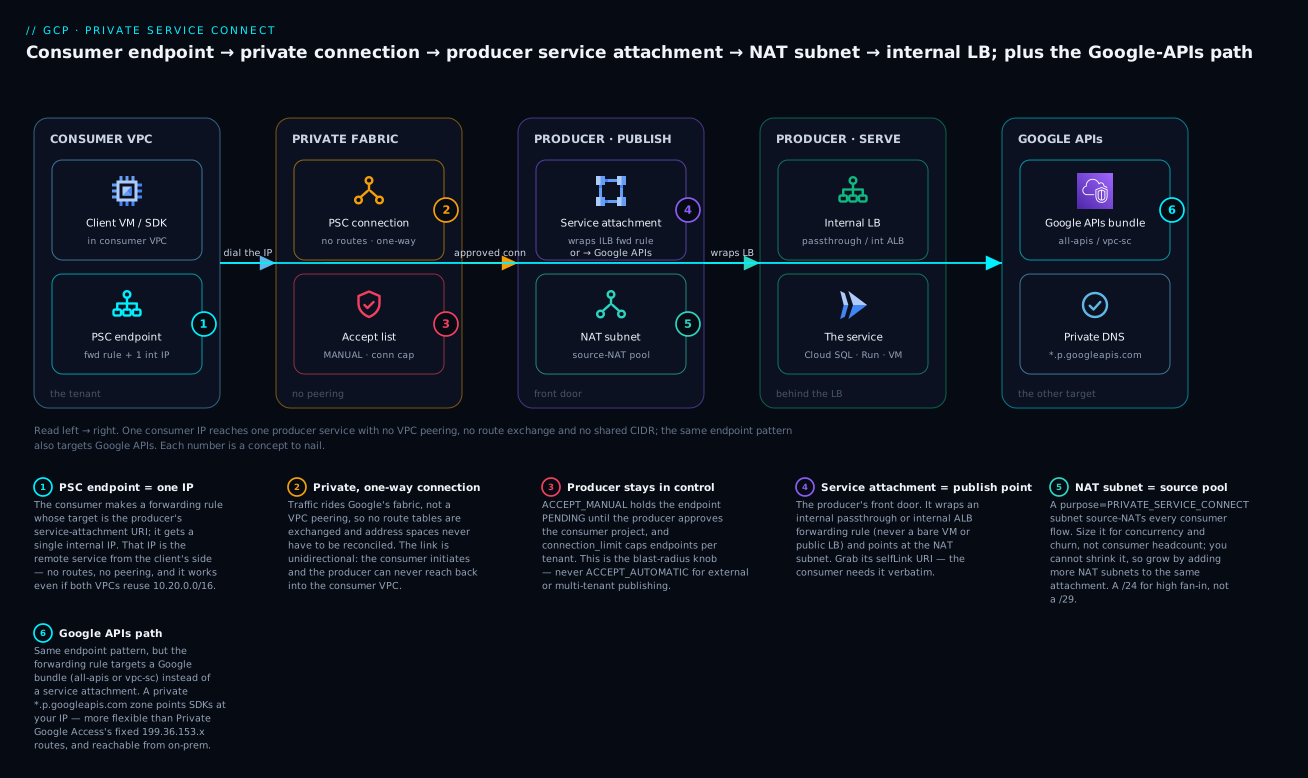
Follow the spine left to right — client VM → PSC endpoint (one IP) → private connection (approved by the producer’s accept list) → service attachment → NAT subnet → internal LB → the actual service — and note the branch at the endpoint: the very same forwarding rule can instead point at the Google APIs bundle, resolved through a private *.p.googleapis.com zone.
Prerequisites and what you’ll be able to do
You’ll get the most from this lesson if you’re already comfortable with GCP VPCs, subnets and firewall rules, and have seen an internal load balancer before. If any of that is shaky, skim these first:
- VPC deep dive: subnets, routes, firewall, NAT — subnets, routes and stateful firewalls, the substrate PSC sits on.
- Shared VPC: multi-project network architecture — how host and service projects share a network, which shapes where PSC endpoints live.
- Cloud Load Balancing deep dive — internal passthrough vs internal ALB, since a service attachment must wrap one of these.
- Cloud DNS private zones, peering, response policies — private zones, which make PSC endpoints resolvable by name.
After this lesson you will be able to:
- Explain the producer/consumer model and pick endpoint vs backend for a given need.
- Publish a service with a service attachment, an
ACCEPT_MANUALaccept list, and a correctly-sized NAT subnet. - Create a consumer PSC endpoint (and a PSC backend NEG behind your own LB), and drive its connection state to
ACCEPTED. - Stand up PSC for Google APIs with a private
*.p.googleapis.comzone so SDKs need zero config change. - Secure, observe, and scale a PSC deployment without bouncing tenants — and say precisely how PSC differs from VPC peering and Private Google Access.
VPC Peering is the wrong default for exposing a service across organizational boundaries: it forces non-overlapping CIDRs on parties who never coordinated and leaks the entire route table of both sides. Private Service Connect (PSC) inverts the model: a producer publishes exactly one service behind a load balancer, and a consumer reaches it through a single private IP in their own VPC, with no route exchange, no peering, and no shared address space. This is how managed services on GCP (Cloud SQL, Memorystore, Confluent, MongoDB Atlas) reach you, and it is how your platform team should publish internal services to tenant projects.
This walkthrough builds the full seam: the producer-side service attachment, the consumer-side endpoint and backend, NAT subnet sizing, PSC for Google APIs, DNS automation, security, and a troubleshooting playbook for the connection states you will actually hit.
PSC vs the alternatives at a glance
Before the mechanics, anchor the mental model. These three give “private” reachability, but they are not interchangeable:
| Dimension | VPC Peering | Private Service Connect | Private Google Access |
|---|---|---|---|
| What it connects | Two whole VPCs | One consumer IP → one published service (or Google API bundle) | VMs with no external IP → Google APIs |
| Route exchange | Full — subnet routes shared both ways | None — nothing is routed between VPCs | Uses a default route to fixed Google ranges |
| CIDR overlap allowed | No — must be non-overlapping | Yes — spaces never merge | N/A (Google-owned ranges) |
| Directionality | Bidirectional reachability | Unidirectional (consumer → producer) | Egress to Google only |
| Address you dial | The peer’s real subnet IPs | An IP you own in your VPC | Fixed 199.36.153.4/30 or .8/30 |
| Transitivity | Not transitive | Not transitive (but no need — 1:1) | N/A |
| Best for | Trusted, co-designed networks | Publishing/consuming a service across org boundaries | Cheap private egress to Google APIs from a locked-down VM |
The rest of this lesson is really an expansion of the middle column.
1. The PSC connectivity models
PSC has three consumer-side constructs and one producer-side construct. Knowing which is which prevents most of the confusion.
| Construct | Side | What it is |
|---|---|---|
| Service attachment | Producer | The publish point; wraps an internal load balancer’s forwarding rule and references a NAT subnet |
| PSC endpoint | Consumer | A forwarding rule whose target is the producer’s service attachment; gets one internal IP |
| PSC backend | Consumer | A NEG (PRIVATE_SERVICE_CONNECT type) pointing at the attachment, used as a backend behind a consumer-owned load balancer |
| PSC for Google APIs | Consumer | A special endpoint targeting a Google-managed bundle (all-apis or vpc-sc) instead of a service attachment |
The distinction that matters: an endpoint is a flat 1:1 reach (one IP -> one service). A backend puts PSC behind your own load balancer, which you need for a global anycast IP, your own TLS termination, Cloud Armor, or health-checked failover across regional producers. Start with endpoints; graduate to backends when you need an LB feature.
The connection is unidirectional. The consumer initiates; the producer never reaches back into the consumer VPC. Traffic from the producer to the consumer’s client appears to originate from the producer’s NAT subnet, which is why that subnet exists and why its sizing is a real capacity decision, not a formality.
2. Producer side: internal load balancer and service attachment
The producer publishes a service that already sits behind an internal passthrough or internal Application Load Balancer. PSC wraps the load balancer’s forwarding rule. You cannot publish a bare VM or a public LB.
First, the load balancer. Assume an internal Application Load Balancer already exists with a forwarding rule named producer-ilb-fr in us-central1. The new requirement is a dedicated NAT subnet with purpose=PRIVATE_SERVICE_CONNECT. This subnet is not for VMs; it is the address pool from which PSC source-NATs consumer traffic.
# Dedicated PSC NAT subnet in the producer VPC (see section 4 for sizing)
gcloud compute networks subnets create psc-nat-subnet \
  --project=producer-prj \
  --network=producer-vpc \
  --region=us-central1 \
  --range=10.100.0.0/24 \
  --purpose=PRIVATE_SERVICE_CONNECT
Now publish the service attachment. The critical decision is the connection-acceptance policy. --connection-preference=ACCEPT_MANUAL requires you to approve each consumer project explicitly; ACCEPT_AUTOMATIC accepts anyone who can guess the attachment URI. For anything multi-tenant or external, use ACCEPT_MANUAL.
gcloud compute service-attachments create producer-sa \
  --project=producer-prj \
  --region=us-central1 \
  --producer-forwarding-rule=producer-ilb-fr \
  --connection-preference=ACCEPT_MANUAL \
  --nat-subnets=psc-nat-subnet \
  --consumer-accept-list=consumer-prj-a=10 \
  --consumer-reject-list=blocked-prj \
  --enable-proxy-protocol
A few things earn their place here:
--consumer-accept-list=consumer-prj-a=10both allows projectconsumer-prj-aand caps it at 10 endpoints (the connection limit). This is your per-tenant quota and your blast-radius control.--enable-proxy-protocolprepends a PROXY protocol header so the backend can recover the consumer’s original PSC connection ID. Without it, every consumer’s traffic arrives sourced from the NAT subnet and you lose all attribution. Enable it only if your backend parses PROXY protocol; otherwise it corrupts the stream.
In Terraform the same attachment is reviewable and idempotent:
resource "google_compute_service_attachment" "producer_sa" {
  name                  = "producer-sa"
  project               = "producer-prj"
  region                = "us-central1"
  enable_proxy_protocol = true
  connection_preference = "ACCEPT_MANUAL"
  nat_subnets           = [google_compute_subnetwork.psc_nat.id]
  target_service        = google_compute_forwarding_rule.producer_ilb_fr.id

  consumer_accept_lists {
    project_id_or_num = "consumer-prj-a"
    connection_limit  = 10
  }
}
Capture the attachment URI; the consumer needs it verbatim:
gcloud compute service-attachments describe producer-sa \
  --project=producer-prj --region=us-central1 \
  --format="value(selfLink)"
# projects/producer-prj/regions/us-central1/serviceAttachments/producer-sa
3. Consumer side: endpoints and backends
3a. The simple case: a PSC endpoint
The consumer creates a global or regional internal address, then a forwarding rule that targets the producer’s attachment. The forwarding rule is the endpoint.
# Reserve an internal IP in the consumer subnet for the endpoint
gcloud compute addresses create psc-endpoint-ip \
  --project=consumer-prj-a \
  --region=us-central1 \
  --subnet=consumer-subnet \
  --addresses=10.20.0.50

# Create the PSC endpoint (a forwarding rule targeting the attachment)
gcloud compute forwarding-rules create psc-endpoint-fr \
  --project=consumer-prj-a \
  --region=us-central1 \
  --network=consumer-vpc \
  --address=psc-endpoint-ip \
  --target-service-attachment=projects/producer-prj/regions/us-central1/serviceAttachments/producer-sa
That IP, 10.20.0.50, is now the service from the consumer’s perspective. Clients in consumer-vpc connect to it; PSC carries the packets to the producer’s load balancer. No peering, no routes, no overlap concern even if both VPCs use 10.20.0.0/16 internally.
3b. The powerful case: a PSC backend behind your own LB
When you need a consumer-owned anycast frontend, your own Cloud Armor policy, or failover across two regional producers, target the attachment with a PRIVATE_SERVICE_CONNECT NEG and put it behind a consumer LB.
# A NEG that points at the producer's service attachment
gcloud compute network-endpoint-groups create psc-neg \
  --project=consumer-prj-a \
  --region=us-central1 \
  --network-endpoint-type=PRIVATE_SERVICE_CONNECT \
  --psc-target-service=projects/producer-prj/regions/us-central1/serviceAttachments/producer-sa

# Wire it into a backend service used by your own (e.g. global ALB) LB
gcloud compute backend-services add-backend my-consumer-bes \
  --project=consumer-prj-a \
  --global \
  --network-endpoint-group=psc-neg \
  --network-endpoint-group-region=us-central1
PSC NEGs do not take a health check; the producer’s load balancer owns health. For multi-region resilience you create one PSC NEG per regional service attachment and add both as backends, letting your LB shift traffic if one region’s attachment stops accepting connections.
3c. Explicit connection approval
With ACCEPT_MANUAL, the endpoint comes up PENDING until the producer approves. The consumer’s project ID must already be on the accept list (section 2) or the producer cannot approve it. The producer accepts by connection identity:
# Producer lists who is knocking
gcloud compute service-attachments describe producer-sa \
  --project=producer-prj --region=us-central1 \
  --format="value(connectedEndpoints[].status,connectedEndpoints[].pscConnectionId)"

# Producer accepts a specific consumer project (and sets its endpoint cap)
gcloud compute service-attachments update producer-sa \
  --project=producer-prj --region=us-central1 \
  --update-consumer-accept-list=consumer-prj-a=10
The consumer watches the forwarding rule’s pscConnectionStatus flip from PENDING to ACCEPTED.
4. Sizing and isolating the PSC NAT subnet
This is where teams self-inflict outages. The NAT subnet supplies source addresses for all consumer traffic flowing through the attachment. Each PSC connection consumes source-port space from one NAT IP. A /29 looks fine in a demo and exhausts under real fan-in.
How to size it:
- PSC allocates source ports from the NAT subnet IPs. The usable host count is
total addresses - 4(GCP reserves the first two, the last, and the network/broadcast equivalents). A/24yields ~252 usable NAT IPs. - Each NAT IP offers tens of thousands of source ports, but the practical ceiling is connection concurrency and churn, not a clean per-IP number. Treat the subnet as a pool and over-provision: a high-fan-in data service (think a shared Kafka or a database proxy with thousands of consumer connections) should start at a
/24, not a/28. - The subnet
purpose=PRIVATE_SERVICE_CONNECTis single-use. It cannot host VMs, it cannot be shared with another attachment’s NAT role, and you cannot resize it down once allocated. You can attach multiple NAT subnets to one service attachment to grow the pool, which is the supported way to scale without recreating the attachment.
# Grow capacity by adding a second NAT subnet to the existing attachment
gcloud compute networks subnets create psc-nat-subnet-2 \
  --project=producer-prj --network=producer-vpc --region=us-central1 \
  --range=10.100.1.0/24 --purpose=PRIVATE_SERVICE_CONNECT

gcloud compute service-attachments update producer-sa \
  --project=producer-prj --region=us-central1 \
  --nat-subnets=psc-nat-subnet,psc-nat-subnet-2
The isolation rule: give every service attachment its own NAT subnet, carved from a CIDR block you reserve specifically for PSC NAT. Do not let it overlap your VM subnets, GKE pod/service ranges, or anything you might peer. The NAT range only appears as a source inside the producer VPC, so it need not be globally unique, but a dedicated supernet (e.g. 10.100.0.0/16 for “all PSC NAT”) makes firewall rules and audits trivial.
5. PSC for Google APIs: custom endpoints instead of Private Google Access
Private Google Access routes API traffic to Google over the default 199.36.153.8/30 (restricted) or .4/30 (private) ranges. PSC for Google APIs replaces that with an endpoint you own, inside your address space, which is what unlocks consistent on-prem reach over Interconnect and per-VPC API control.
You create a global internal address and a global forwarding rule whose target is a Google API bundle, not a service attachment. Use all-apis for the general bundle or vpc-sc when you require VPC Service Controls enforcement on the path.
# Reserve a global internal IP for the API endpoint
gcloud compute addresses create psc-googleapis-ip \
  --project=consumer-prj-a \
  --global \
  --purpose=PRIVATE_SERVICE_CONNECT \
  --addresses=10.250.0.5 \
  --network=consumer-vpc

# Point a global forwarding rule at the Google APIs bundle
gcloud compute forwarding-rules create psc-googleapis-fr \
  --project=consumer-prj-a \
  --global \
  --network=consumer-vpc \
  --address=psc-googleapis-ip \
  --target-google-apis-bundle=all-apis
Now any request to that IP reaches Google APIs. The next section makes clients use it transparently.
6. DNS automation: PSC zones and the p.googleapis.com pattern
An IP nobody resolves to is useless. PSC for Google APIs has a designated hostname pattern: <endpoint>-p.googleapis.com and the wildcard *.p.googleapis.com, which Google publishes as PSC-routable. You create a private DNS zone that maps these names to your endpoint IP so existing SDKs and gcloud keep using normal hostnames.
# Private zone for the PSC Google APIs domain, attached to the consumer VPC
gcloud dns managed-zones create psc-googleapis-zone \
  --project=consumer-prj-a \
  --dns-name="p.googleapis.com." \
  --visibility=private \
  --networks=consumer-vpc \
  --description="PSC endpoint for Google APIs"

# A wildcard A record so every *.p.googleapis.com resolves to the endpoint
gcloud dns record-sets create "*.p.googleapis.com." \
  --project=consumer-prj-a \
  --zone=psc-googleapis-zone \
  --type=A --ttl=300 \
  --rrdatas=10.250.0.5
For the standard service hostnames clients already use (storage.googleapis.com, bigquery.googleapis.com), add CNAMEs into the googleapis.com private zone pointing at the corresponding p.googleapis.com name, so a storage.googleapis.com lookup ultimately resolves to your PSC IP without touching application config. For a producer-published service attachment (not Google APIs), the producer can supply a --domain-names value on the attachment and you front it with your own private zone mapping that domain to the endpoint IP.
Set a modest TTL (300s here). When you migrate the endpoint IP or fail over regions, you do not want clients pinned to a stale record for an hour.
7. Securing and observing PSC
PSC is private but not automatically safe. Three controls matter.
Firewall the NAT source on the producer. Producer-side traffic arrives sourced from the NAT subnet. Lock the backend so only PSC-originated traffic on the service port is allowed, denying lateral movement from elsewhere in the producer VPC.
gcloud compute firewall-rules create allow-psc-ingress \
  --project=producer-prj \
  --network=producer-vpc \
  --direction=INGRESS \
  --action=ALLOW \
  --rules=tcp:443 \
  --source-ranges=10.100.0.0/16 \
  --target-tags=psc-backend
Cap connections per consumer. The connection_limit on the accept list (sections 2 and 3c) is the enforcement point. Set it per tenant; an unbounded limit means one consumer can exhaust the NAT pool for everyone.
Turn on flow logs and check capacity. Enable VPC Flow Logs on the NAT subnet and the consumer subnet to get the 5-tuple for every PSC flow, then watch the attachment’s connection count against its limit.
gcloud compute networks subnets update psc-nat-subnet \
  --project=producer-prj --region=us-central1 \
  --enable-flow-logs \
  --logging-aggregation-interval=interval-30-sec \
  --logging-flow-sampling=0.5
In Cloud Logging, the producer can confirm which consumer connection IDs are live and whether any are being dropped near the limit:
resource.type="gce_subnetwork"
logName=~"compute.googleapis.com%2Fvpc_flows"
jsonPayload.connection.dest_port="443"
jsonPayload.src_vpc.subnetwork_name="psc-nat-subnet"
Verify
Run these end to end before declaring victory.
# 1) Producer: attachment is up and lists the expected consumers as ACCEPTED
gcloud compute service-attachments describe producer-sa \
  --project=producer-prj --region=us-central1 \
  --format="table(connectedEndpoints[].pscConnectionId, connectedEndpoints[].status)"

# 2) Consumer: the endpoint forwarding rule shows ACCEPTED, not PENDING/REJECTED
gcloud compute forwarding-rules describe psc-endpoint-fr \
  --project=consumer-prj-a --region=us-central1 \
  --format="value(pscConnectionStatus)"

# 3) Consumer VM: the endpoint IP actually answers on the service port
curl -sS -o /dev/null -w "%{http_code}\n" https://10.20.0.50/healthz

# 4) PSC for Google APIs: the hostname resolves to YOUR endpoint IP
nslookup storage.googleapis.com    # expect 10.250.0.5, not a public Google IP

# 5) From the consumer, confirm an actual API call traverses the endpoint
gcloud storage ls --project=consumer-prj-a   # succeeds with no public egress
A green run means: attachment ACCEPTED, endpoint ACCEPTED, the service IP returns 200, Google API hostnames resolve into your PSC range, and a real API call works with no Private Google Access route in play.
Enterprise scenario
A payments platform team ran a shared transaction-fraud scoring service in a central producer-prj, published over PSC with ACCEPT_MANUAL to roughly 40 tenant projects. They sized the NAT subnet at /26 (~60 usable IPs) because “we only have 40 consumers.” During a regional promotion event, three high-volume tenants opened thousands of concurrent gRPC streams each. New connections began failing intermittently while existing ones held; the producer LB looked healthy, and CPU was flat. Flow logs on the NAT subnet showed source-port pressure on the /26 pool and a rising count of dropped SYNs that never reached the backend.
The constraint: PSC source-NATs every consumer connection through the NAT subnet’s IPs, and a /26 simply did not have the source-address headroom for that connection churn. You cannot resize a PSC NAT subnet down, and they did not want to recreate the attachment (which would have bounced all 40 tenants).
The fix used the supported scale path: add NAT subnets to the existing attachment, non-disruptively.
gcloud compute networks subnets create psc-nat-2 \
  --project=producer-prj --network=producer-vpc --region=us-central1 \
  --range=10.100.2.0/24 --purpose=PRIVATE_SERVICE_CONNECT

gcloud compute networks subnets create psc-nat-3 \
  --project=producer-prj --network=producer-vpc --region=us-central1 \
  --range=10.100.3.0/24 --purpose=PRIVATE_SERVICE_CONNECT

# Attach both alongside the original; no consumer reconnection required
gcloud compute service-attachments update producer-sa \
  --project=producer-prj --region=us-central1 \
  --nat-subnets=psc-nat-subnet,psc-nat-2,psc-nat-3
They also tightened connection_limit per tenant so a single noisy consumer could no longer monopolize the pool, and moved their PSC NAT allocations into a documented 10.100.0.0/16 supernet so the next capacity bump is a one-line CIDR pull, not an archaeology project. Lesson: NAT subnet sizing is a concurrency-and-churn decision, not a headcount of consumers.
Going deeper
Everything above gets a working PSC seam. This section is the layer you reach for when you are debugging a stuck endpoint at 2 a.m., architecting for scale, or defending the design in a review.
What actually moves the packets
There is no tunnel and no peering under PSC. The endpoint forwarding rule is programmed into Google’s SDN data plane, so a packet to 10.20.0.50 is intercepted at the consumer VM’s host and delivered to the producer’s load balancer front end over the Google backbone. On the way, it is source-NATed to an address from the NAT subnet, which is why the producer never sees the consumer’s real client IP unless you enable PROXY protocol. Two consequences fall out of this:
- PSC is L4 passthrough of the load balancer’s front end. TLS is terminated by the producer’s backend, not by PSC. The consumer cannot inspect or MITM the payload, and the producer cannot see inside the consumer VPC. End-to-end confidentiality is whatever the producer’s LB and backend negotiate.
pscConnectionIdis the correlation key. It is minted per consumer forwarding rule and is what the producer sees (via PROXY protocol or the attachment’sconnectedEndpointslist) to attribute a flow to a tenant. Log it on both sides; it is the only stable join key between a consumer’s endpoint and the producer’s view.
Connection states you will actually hit
The endpoint’s pscConnectionStatus (consumer) and the attachment’s per-endpoint status (producer) are the first things to read when something is wrong:
| State | Where | Meaning / what to do |
|---|---|---|
PENDING |
both | Waiting for producer approval. With ACCEPT_MANUAL, the consumer project must be on the accept list, then the producer approves. Automatic mode should flip to ACCEPTED in seconds. |
ACCEPTED |
both | Live. Traffic flows. |
REJECTED |
consumer | Producer rejected the project (reject list) or removed it from the accept list. The consumer must be re-added; the endpoint does not auto-retry into acceptance. |
CLOSED |
consumer | The producer deleted the service attachment out from under the endpoint. Delete and recreate the endpoint against a valid attachment. |
NEEDS_ATTENTION |
consumer | The attachment exists but the producer flagged the connection (often quota/limit or a config change). Inspect the attachment; do not assume it will self-heal. |
Removing a project from the accept list, or lowering its connection_limit below its current endpoint count, does not gracefully drain — existing endpoints can be moved to NEEDS_ATTENTION/REJECTED. Change accept lists in a maintenance window for high-value tenants.
Global access and cross-region reach
A published-service PSC endpoint is a regional forwarding rule, so by default only clients in the same region reach it. Add global access to let clients in other regions (and on-prem over Interconnect/VPN) use the same endpoint IP:
gcloud compute forwarding-rules update psc-endpoint-fr \
  --project=consumer-prj-a --region=us-central1 \
  --allow-global-access
Note the trade-off: global access means cross-region traffic to the endpoint traverses Google’s backbone (with the latency and inter-region data-processing implications that carries). For genuine multi-region resilience — not just reach — prefer the backend-NEG pattern (3b) with one PSC NEG per regional attachment behind a global load balancer, so a regional producer failure fails over rather than just adding a hop.
IAM and Shared VPC nuances
- Creating an endpoint needs
compute.forwardingRules.createpluscompute.addresses.createin the consumer project, and — critically in a Shared VPC —roles/compute.networkUseron the host-project subnet the endpoint’s IP comes from. A missing subnet-levelnetworkUseris the classic “why can’t the service project make the endpoint” failure. - Approving a connection needs
compute.serviceAttachments.updatein the producer project (roles/compute.networkAdmincovers it). Keep approval as a reviewed, least-privilege action — it is what gates a new tenant onto the service. - In Shared VPC, decide deliberately whether endpoints live in the host project (central control, one place to audit) or service projects (tenant self-service). Both work; the accept list is still the producer’s gate either way.
VPC Service Controls interplay
PSC for Google APIs with the vpc-sc bundle is the supported way to keep API traffic inside a VPC Service Controls perimeter — the endpoint routes only to services allowed by the perimeter, and requests from outside are denied at the perimeter, not just at the firewall. For published services, remember that a service attachment and its consumers can straddle perimeters; if the producer sits in a perimeter, model the consumer projects as an ingress rule or bridge, or the connection is allowed at the network layer but the API/data call is blocked by VPC-SC. Network reachability and VPC-SC authorization are two separate gates; PSC only handles the first.
Cost and quota reality
- PSC endpoints for published services carry a per-endpoint hourly charge plus a per-GB data-processing charge on the consumer side — real money at fan-out scale. PSC for Google APIs endpoints are not billed for the endpoint itself, but you still pay normal API usage and any egress. Always confirm current numbers on the official pricing page before you model a fleet.
- Quotas to watch: endpoints per consumer VPC network,
connection_limitper consumer on the attachment, forwarding rules per project (PSC endpoints consume forwarding-rule quota), and — the sneaky one — NAT subnet source-address exhaustion, which is a design limit rather than a named quota. Alert on connection count approachingconnection_limitand on flow-log SYN drops, not just on the named quotas.
Automatic DNS via the producer domain
Producers can attach --domain-names=service.example.com. to the service attachment. When a consumer creates the endpoint, PSC can populate DNS automatically (via a Service Directory-backed zone), so consumers reach the service by a stable name without each tenant hand-authoring records. It is the polished path for a managed offering; the manual private-zone approach in section 6 is the fallback and the one to understand first.
Practice challenges
Work these in order; each <details> holds a runnable answer and a one-line why. Use placeholder project IDs — nothing here needs a live project to reason about, and every command is schema-correct against the current gcloud surface.
1. (Beginner) Carve the producer NAT subnet. Create a dedicated PSC NAT subnet named psc-nat-a in producer-vpc, region us-central1, range 10.100.0.0/24.
<details> <summary>Solution</summary>
gcloud compute networks subnets create psc-nat-a \
  --project=producer-prj --network=producer-vpc --region=us-central1 \
  --range=10.100.0.0/24 --purpose=PRIVATE_SERVICE_CONNECT
Why: the purpose=PRIVATE_SERVICE_CONNECT flag is what makes this a source-NAT pool rather than a VM subnet; without it the attachment cannot use it.
</details>
2. (Beginner) Publish the service. Create a service attachment sa-fraud wrapping an existing internal ALB forwarding rule producer-ilb-fr, using ACCEPT_MANUAL, the NAT subnet from challenge 1, and allowing consumer-prj-a to a limit of 5 endpoints.
<details> <summary>Solution</summary>
gcloud compute service-attachments create sa-fraud \
  --project=producer-prj --region=us-central1 \
  --producer-forwarding-rule=producer-ilb-fr \
  --connection-preference=ACCEPT_MANUAL \
  --nat-subnets=psc-nat-a \
  --consumer-accept-list=consumer-prj-a=5
Why: ACCEPT_MANUAL + an explicit accept list means only consumer-prj-a can connect, and only up to 5 endpoints — the per-tenant blast-radius cap.
</details>
3. (Intermediate) Consume it. In consumer-prj-a, reserve 10.20.0.50 in consumer-subnet, create a PSC endpoint targeting sa-fraud, and read back the connection status.
<details> <summary>Solution</summary>
gcloud compute addresses create psc-ep-ip \
  --project=consumer-prj-a --region=us-central1 \
  --subnet=consumer-subnet --addresses=10.20.0.50

gcloud compute forwarding-rules create psc-ep-fr \
  --project=consumer-prj-a --region=us-central1 \
  --network=consumer-vpc --address=psc-ep-ip \
  --target-service-attachment=projects/producer-prj/regions/us-central1/serviceAttachments/sa-fraud

gcloud compute forwarding-rules describe psc-ep-fr \
  --project=consumer-prj-a --region=us-central1 \
  --format="value(pscConnectionStatus)"
Why: the forwarding rule is the endpoint; its pscConnectionStatus will read PENDING until the producer approves (challenge 4).
</details>
4. (Intermediate) Unstick a PENDING endpoint. The endpoint from challenge 3 is stuck PENDING. As the producer, confirm who is knocking and approve consumer-prj-a.
<details> <summary>Solution</summary>
# See the pending connection and its ID
gcloud compute service-attachments describe sa-fraud \
  --project=producer-prj --region=us-central1 \
  --format="value(connectedEndpoints[].status,connectedEndpoints[].pscConnectionId)"

# Approve (idempotent re-assert of the accept list entry)
gcloud compute service-attachments update sa-fraud \
  --project=producer-prj --region=us-central1 \
  --update-consumer-accept-list=consumer-prj-a=5
Why: with ACCEPT_MANUAL the producer must have the consumer project on the accept list for the state to move to ACCEPTED; the consumer cannot self-approve.
</details>
5. (Advanced) Private Google APIs with transparent DNS. Stand up a global PSC endpoint at 10.250.0.5 targeting the all-apis bundle, then make storage.googleapis.com resolve to it inside consumer-vpc. Show the DNS pieces.
<details> <summary>Solution</summary>
gcloud compute addresses create psc-api-ip \
  --project=consumer-prj-a --global \
  --purpose=PRIVATE_SERVICE_CONNECT \
  --addresses=10.250.0.5 --network=consumer-vpc

gcloud compute forwarding-rules create psc-api-fr \
  --project=consumer-prj-a --global \
  --network=consumer-vpc --address=psc-api-ip \
  --target-google-apis-bundle=all-apis

# Wildcard for the PSC-routable domain
gcloud dns managed-zones create psc-api-zone \
  --project=consumer-prj-a --dns-name="p.googleapis.com." \
  --visibility=private --networks=consumer-vpc
gcloud dns record-sets create "*.p.googleapis.com." \
  --project=consumer-prj-a --zone=psc-api-zone \
  --type=A --ttl=300 --rrdatas=10.250.0.5

# Point the real hostname at the PSC name
gcloud dns managed-zones create googleapis-zone \
  --project=consumer-prj-a --dns-name="googleapis.com." \
  --visibility=private --networks=consumer-vpc
gcloud dns record-sets create "storage.googleapis.com." \
  --project=consumer-prj-a --zone=googleapis-zone \
  --type=CNAME --ttl=300 --rrdatas="storage-p.googleapis.com."
Why: the wildcard *.p.googleapis.com resolves to your endpoint, and a CNAME from storage.googleapis.com into the p.googleapis.com space routes SDK calls through PSC with zero client-side config. nslookup storage.googleapis.com should return 10.250.0.5.
</details>
6. (Advanced) Scale and harden without an outage. A /26 NAT subnet is exhausting under connection churn and one tenant is monopolizing it. Grow capacity without recreating the attachment (which would bounce every consumer) and cap the noisy tenant to 3 endpoints — and reach the producer’s regional endpoint from a client in another region.
<details> <summary>Solution</summary>
# Add NAT subnets to the EXISTING attachment (non-disruptive)
gcloud compute networks subnets create psc-nat-b \
  --project=producer-prj --network=producer-vpc --region=us-central1 \
  --range=10.100.1.0/24 --purpose=PRIVATE_SERVICE_CONNECT
gcloud compute service-attachments update sa-fraud \
  --project=producer-prj --region=us-central1 \
  --nat-subnets=psc-nat-a,psc-nat-b

# Cap the noisy tenant
gcloud compute service-attachments update sa-fraud \
  --project=producer-prj --region=us-central1 \
  --update-consumer-accept-list=consumer-prj-a=3

# Let clients in other regions reach the regional endpoint
gcloud compute forwarding-rules update psc-ep-fr \
  --project=consumer-prj-a --region=us-central1 \
  --allow-global-access
Why: you can only add NAT subnets (never shrink), so growing the pool on the live attachment avoids recreating it; connection_limit=3 fences the tenant; --allow-global-access opens the regional endpoint to cross-region and on-prem clients. For true regional failover, use a backend NEG per region instead.
</details>
Common beginner mistakes
- “PSC is just VPC peering with fewer clicks.” No. Peering exchanges routes and merges reachability between two whole VPCs and forbids overlapping CIDRs. PSC is a one-way, single-service private line with no route exchange — the two address spaces never touch, so they can even overlap. Different tool, different job.
- “I’ll just publish my VM (or my public load balancer) directly.” The service attachment must wrap an internal passthrough or internal ALB forwarding rule. A bare VM or a public LB cannot be a PSC target — put an internal LB in front first.
- “The NAT subnet is a formality, a
/29is fine.” It is the source-NAT pool for every consumer flow, and you cannot shrink it later. Size for concurrency and churn, reserve a/16supernet for all PSC NAT, and scale by adding subnets — not by trying (and failing) to resize. - “
ACCEPT_AUTOMATICis simpler, so I’ll use it.” Anyone who learns the attachment URI can then connect. Fine for a fully-internal, trusted setup; dangerous for anything external or multi-tenant. Default toACCEPT_MANUAL+ accept list +connection_limit. - “Turn on
--enable-proxy-protocolso I can see the client IP.” Only if your backend actually parses the PROXY protocol header. If it does not, the header is prepended to the byte stream and corrupts every request. Enable it deliberately, in lockstep with the backend. - “PSC for Google APIs is the same as Private Google Access.” PGA routes to fixed Google ranges over a default route and gives you no address of your own. PSC for Google APIs gives you an IP in your space, DNS you control, on-prem reachability, and optional VPC-SC enforcement. Related goal, very different mechanism.
- “The endpoint says
ACCEPTED, so the service works.” Acceptance is a control-plane fact about the connection, not a data-plane health check. PSC NEGs carry no health check — the producer’s LB owns backend health. A green endpoint can still front an unhealthy service; test the actual port. - “DNS TTL doesn’t matter for an internal record.” A one-hour TTL pins clients to a stale IP right when you are failing over or migrating the endpoint. Keep it around 300s so a cutover is not blocked by cached records.
Glossary
- Private Service Connect (PSC): A GCP model for privately publishing and consuming one service across VPC/organization boundaries, without peering, route exchange, or shared address space.
- Producer: The party that publishes a service (via a service attachment). Owns the internal LB, backend, and NAT subnet.
- Consumer: The party that reaches the service (via an endpoint or backend). Owns the endpoint IP in its own VPC.
- Service attachment: The producer-side publish point. Wraps an internal LB forwarding rule and references the NAT subnet; identified by a
selfLinkURI. - PSC endpoint: A consumer-side forwarding rule with one internal IP whose target is the producer’s service attachment (or a Google API bundle). The IP is the service from the consumer’s side.
- PSC backend (NEG): A
PRIVATE_SERVICE_CONNECTnetwork endpoint group pointing at a service attachment, placed behind a consumer-owned load balancer to add anycast, Cloud Armor, TLS, or multi-region failover. - NAT subnet: A subnet with
purpose=PRIVATE_SERVICE_CONNECTthat source-NATs consumer traffic on the producer side. Cannot host VMs; cannot be shrunk; scale by adding more. - Forwarding rule: The GCP object that binds an IP (and protocol/port) to a target. In PSC it is both the consumer endpoint and the producer LB’s front end.
- Internal passthrough / internal ALB: The two load-balancer types a service attachment can wrap. Public LBs and bare VMs cannot be published.
ACCEPT_MANUAL/ACCEPT_AUTOMATIC: The attachment’s connection preference — approve each consumer explicitly, or accept anyone who reaches the attachment URI.- Accept list / reject list: The producer’s per-project allow/deny for connections; the accept-list entry also carries the
connection_limit. connection_limit: The max endpoints a given consumer project may open against the attachment — the per-tenant blast-radius cap.pscConnectionId: The per-endpoint identifier the producer uses to attribute a flow to a specific consumer connection (surfaced via PROXY protocol andconnectedEndpoints).pscConnectionStatus: The endpoint’s state:PENDING,ACCEPTED,REJECTED,CLOSED, orNEEDS_ATTENTION.- PROXY protocol: An optional header (
--enable-proxy-protocol) that carries the original connection identity to the producer backend; only usable if the backend parses it. - PSC for Google APIs: A PSC endpoint whose target is a Google-managed bundle (
all-apisorvpc-sc) rather than a producer service attachment. all-apis/vpc-scbundle: The two Google API target bundles — the general set, or the set enforced under VPC Service Controls.- Private Google Access (PGA): The older mechanism that routes VMs without external IPs to Google APIs over fixed ranges (
199.36.153.4/30/.8/30); PSC for Google APIs is the more flexible successor. - VPC Peering: Bidirectional connection of two whole VPCs with full route exchange and non-overlapping CIDRs — the model PSC deliberately avoids for service publishing.
p.googleapis.com: The PSC-routable hostname domain for Google APIs; a private*.p.googleapis.comzone maps it to your endpoint IP.--allow-global-access: A forwarding-rule flag that lets clients in other regions (and on-prem) reach a regional PSC endpoint.- VPC Service Controls (VPC-SC): A perimeter around Google-managed services to prevent data exfiltration; the
vpc-scPSC bundle keeps API traffic inside the perimeter. - Service Directory: The registry that backs automatic DNS for producer-published services when the attachment sets
--domain-names.