In a nutshell
Cloud DNS is a directory service, and it hands you five different kinds of directory entry. Some entries hold a phone number (records). Some entries say “I don’t know that number — go ask a different operator” (a redirect). Some entries sit in front of the whole directory and override or refuse an answer before anyone even looks it up. The skill in this lesson is not memorising commands; it is knowing which of the five to reach for, and the fixed order in which Cloud DNS consults them for every single query.
Picture a big company’s receptionist. The company’s internal staff directory is a private zone — it holds real extensions, but only people badged into the building (a bound VPC) may look names up in it, and the same name can even point to a different desk in a different building (that is split-horizon, and it is a feature). For “anyone at the partner firm down the road,” the receptionist doesn’t keep those numbers; she forwards the call to the partner’s own switchboard — that is a forwarding zone pointing at your on-prem DNS. A satellite office that keeps no directory at all and just says “for any internal lookup, ask head office and do whatever they’d do” is a peering zone delegating to a hub VPC. And a supervisor standing in front of the receptionist with a red pen — crossing out one number and writing his own (an override), or refusing to connect a blocked number (a sinkhole) — is a response policy, and he always acts first, before the directory is opened.
Why should a beginner care? Because DNS is the quiet load-bearing wall of every cloud network, and almost every “why won’t this resolve” outage is really the wrong entry type or the wrong evaluation order — not a broken record. If you internalise one thing, make it the order: response policy → alternate name-server policy (if set) → zones by most-specific suffix → the public internet. Everything else in this lesson hangs off that spine.
Level: Advanced · Time: ~25 min
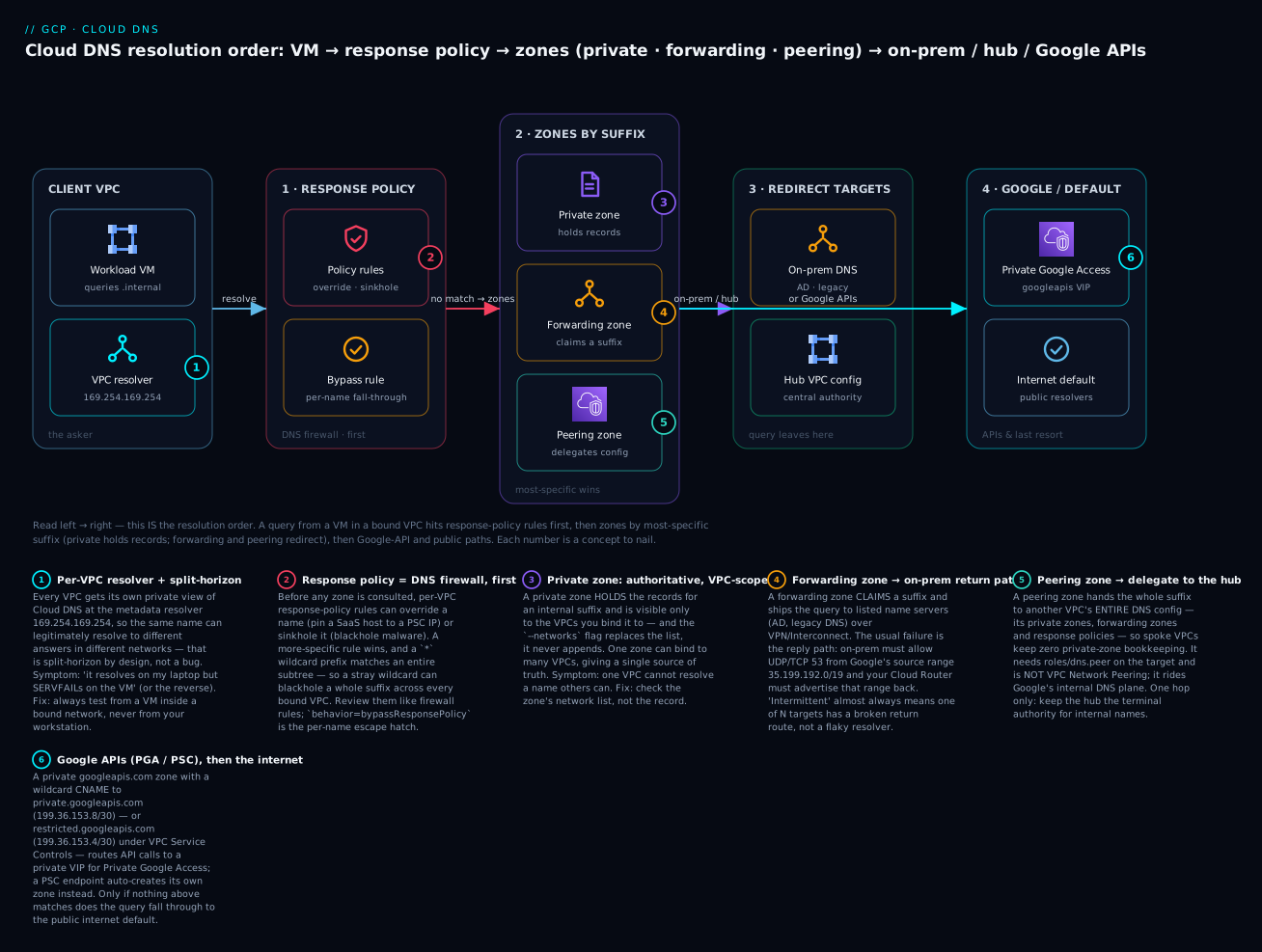
Follow the spine left to right — it is literally the order Cloud DNS evaluates every query: the VM’s resolver hits response-policy rules first (override or sinkhole), then the authoritative zones by longest matching suffix (a private zone holds the record, a forwarding zone ships it to on-prem, a peering zone hands the whole thing to the hub), and only names nobody claims fall through to the Google-APIs private VIP or the public internet. Each numbered badge is a concept to nail.
Prerequisites and what you’ll be able to do
You’ll get the most from this lesson if you’re already comfortable with GCP VPCs, subnets and firewall rules, and have at least seen VPN/Interconnect to on-prem. If any of that is shaky, skim these siblings first:
- VPC deep dive: subnets, routes, firewall and NAT — the network your zones bind to.
- Shared VPC multi-project network architecture — where hub-and-spoke DNS lives.
- HA VPN, Cloud Router and BGP hybrid connectivity — the return path that makes forwarding actually work.
After this lesson you will be able to: create a private zone and bind it to several VPCs; centralise resolution in a hub with DNS peering; forward a suffix out to on-prem AD and let on-prem resolve cloud names back; sinkhole and override answers with response policies; sign a public zone with DNSSEC and complete the DS handoff; route *.googleapis.com to a private VIP for Private Google Access; and — most importantly — reason about resolution order well enough to diagnose a split-horizon mystery instead of blaming the cluster.
DNS is the quiet load-bearing wall of every cloud network. It rarely shows up in an architecture diagram, yet a single misconfigured forwarding zone or an overlapping split-horizon record can take down an entire estate in ways that look like a routing problem, a firewall problem, or “the cluster is down” — anything but DNS. Cloud DNS gives you five primitives — public zones, private zones, forwarding zones, peering zones, and response policies — and the engineering is in composing them into one coherent resolution path across GCP, on-prem, and managed services. This walkthrough builds that path end to end, then shows how to diagnose it when resolution order betrays you.
Step 1: Understand the four zone types (plus response policies)
Cloud DNS zones are not interchangeable. Each visibility/type combination answers a different question, and picking the wrong one is the root cause of most “why won’t this resolve” tickets.
| Zone type | What it does | Authoritative? | Typical use |
|---|---|---|---|
| Public | Serves records to the internet | Yes | External domains, DNSSEC-signed apex |
| Private | Serves records to bound VPCs only | Yes | Internal domains (*.corp.internal) |
| Forwarding | Forwards queries to specific name servers | No | On-prem resolution, conditional forwarding |
| Peering | Delegates resolution to another VPC’s DNS config | No | Centralizing resolution in a hub VPC |
The mental model: public and private zones hold records; forwarding and peering zones redirect the query elsewhere. A response policy sits in front of all of them and can override or block answers before the authoritative lookup ever happens. That ordering — response policy, then alternate name server (if set), then zones in most-specific-suffix order, then the internet default — is the single most important thing to internalize, and we will return to it when diagnosing.
Set defaults once so every command in this guide is shorter:
gcloud config set project HUB_PROJECT_ID
gcloud config set compute/region us-central1
Step 2: Create a private zone and bind it to multiple VPCs
A private zone is authoritative for an internal domain and is only visible to the VPC networks you bind to it. Crucially, one zone can be bound to many networks, which is how you make a single source of truth resolvable across a Shared VPC and any peered or standalone VPCs that need it.
gcloud dns managed-zones create corp-internal \
  --description="Authoritative internal records" \
  --dns-name="corp.example.internal." \
  --visibility=private \
  --networks="projects/HUB_PROJECT_ID/global/networks/hub-vpc"
To extend visibility to additional VPCs, update the binding with the full set of networks (the flag replaces, it does not append):
gcloud dns managed-zones update corp-internal \
  --networks="projects/HUB_PROJECT_ID/global/networks/hub-vpc,projects/HUB_PROJECT_ID/global/networks/data-vpc"
Add records the way you would in any authoritative zone, using a transaction so the change is atomic:
gcloud dns record-sets transaction start --zone=corp-internal
gcloud dns record-sets transaction add 10.10.0.42 \
  --name="api.corp.example.internal." --ttl=300 --type=A --zone=corp-internal
gcloud dns record-sets transaction execute --zone=corp-internal
A private zone is only resolvable from VMs (and serverless egress) inside a bound network. If a workload in
data-vpccannot resolveapi.corp.example.internal, the first thing to check is whetherdata-vpcis actually in the zone’s network list — not the record.
The HCL equivalent keeps the binding reviewable and avoids the append/replace footgun entirely:
resource "google_dns_managed_zone" "corp_internal" {
  name        = "corp-internal"
  dns_name    = "corp.example.internal."
  description = "Authoritative internal records"
  visibility  = "private"

  private_visibility_config {
    networks {
      network_url = google_compute_network.hub.id
    }
    networks {
      network_url = google_compute_network.data.id
    }
  }
}
Step 3: Centralize resolution with a peering zone
Multi-network bindings work when you control every VPC. They do not scale when resolution config lives in a hub you do not want every spoke to re-implement — forwarding targets, response policies, and dozens of private zones. DNS peering solves this: a spoke VPC creates a peering zone that says “for this DNS suffix, use the consumer/producer VPC’s entire DNS configuration.” The query leaves the spoke, lands in the hub, and is resolved there using the hub’s private zones, forwarding zones, and response policies.
This is a one-way delegation and is distinct from VPC Network Peering — DNS peering does not require the networks to be VPC-peered at the IP layer. It rides on Google’s internal DNS plane.
# Created in the SPOKE project; --target-network is the HUB VPC
gcloud dns managed-zones create peer-to-hub \
  --description="Send all internal resolution to the hub" \
  --dns-name="corp.example.internal." \
  --visibility=private \
  --networks="projects/SPOKE_PROJECT_ID/global/networks/spoke-vpc" \
  --target-project=HUB_PROJECT_ID \
  --target-network=hub-vpc
The identity that creates the peering zone needs roles/dns.peer on the target (hub) project. A common pattern is a single peering zone for the root internal suffix so the hub becomes the resolution authority for everything internal, while spokes keep zero private-zone bookkeeping.
Peering is transitive for the query but not for zone authority: the spoke uses the hub’s config, but if the hub itself peers onward to a third VPC, that second hop is not followed. Keep your hub the terminal authority for internal names.
Step 4: Outbound forwarding to on-prem resolvers
For names owned by your data center (Active Directory, legacy DNS), you forward queries out of GCP to on-prem name servers. A forwarding zone is authoritative for a suffix only in the sense that it claims the suffix and ships the query to the listed targets.
gcloud dns managed-zones create onprem-forward \
  --description="Forward AD domain to on-prem DNS" \
  --dns-name="ad.example.com." \
  --visibility=private \
  --networks="projects/HUB_PROJECT_ID/global/networks/hub-vpc" \
  --forwarding-targets="10.100.0.10,10.100.0.11"
Forwarding-target reachability is where this breaks. Cloud DNS has two forwarding modes:
- Standard (default for private RFC 1918 targets): the query is sourced so on-prem sees it coming from Google and the return path uses your VPC’s hybrid connectivity (VPN/Interconnect). Use this for private IPs reachable over your tunnels.
- Private: forces the egress through the VPC. You select it with
--private-forwarding-targets, which guarantees the lookup traverses your private connectivity rather than the public internet.
# Force forwarding through private connectivity (VPN/Interconnect)
gcloud dns managed-zones create onprem-forward \
  --dns-name="ad.example.com." \
  --visibility=private \
  --networks="projects/HUB_PROJECT_ID/global/networks/hub-vpc" \
  --private-forwarding-targets="10.100.0.10,10.100.0.11"
On-prem firewalls must allow UDP/TCP 53 from the Google DNS forwarding source range 35.199.192.0/19, and your Cloud Router must advertise that range to on-prem so the replies route back. Forgetting the route advertisement is the single most common reason outbound forwarding “works” intermittently — queries leave, replies have nowhere to go.
Step 5: Inbound forwarding so on-prem can resolve GCP names
The reverse direction needs an inbound server policy on the VPC. This allocates one internal forwarding IP per region (from your subnet ranges) that on-prem resolvers can target as a conditional forwarder for your GCP-managed suffixes.
gcloud dns policies create hub-inbound \
  --description="Inbound DNS forwarding entrypoint" \
  --networks="projects/HUB_PROJECT_ID/global/networks/hub-vpc" \
  --enable-inbound-forwarding
Discover the allocated entrypoint IPs — these are the addresses you hand to the on-prem DNS team:
gcloud compute addresses list \
  --filter="purpose=DNS_RESOLVER" \
  --format="table(address, region, subnetwork)"
Point on-prem conditional forwarders for corp.example.internal at those IPs, open 53 inbound across the tunnel, and on-prem now resolves your private zones. Combined with Step 4, you have bidirectional hybrid resolution: GCP resolves AD, on-prem resolves cloud-internal.
You can also override the VPC’s default resolver behavior with an --alternative-name-servers policy, which replaces the internal 169.254.169.254 resolution path entirely for that VPC. Reach for it rarely — it bypasses Cloud DNS private zones unless you also set the zones up correctly, and it is a frequent split-horizon culprit (see Step 8).
Step 6: Response policies for overrides and sinkholing
A response policy is a per-VPC firewall for DNS answers, evaluated before zones. It is the right tool for three jobs: overriding a record without owning its zone, sinkholing malicious or unwanted domains, and bypassing a record locally during an incident. Each policy attaches to one or more networks and contains rules keyed by DNS name.
# 1) Create the policy and bind it to the VPC
gcloud dns response-policies create org-rpz \
  --description="Org DNS overrides and sinkhole" \
  --networks="projects/HUB_PROJECT_ID/global/networks/hub-vpc"
Override a name to point somewhere you control (for example, pin a SaaS hostname to a PSC endpoint IP) by supplying inline local-data:
gcloud dns response-policies rules create pin-vendor \
  --response-policy=org-rpz \
  --dns-name="files.vendor.example.com." \
  --local-data=name="files.vendor.example.com.",type="A",ttl=60,rrdatas="10.10.5.20"
Sinkhole a domain by returning an explicit answer (here, a safe RFC 5737 documentation address) so clients fail fast instead of reaching it:
gcloud dns response-policies rules create block-malware \
  --response-policy=org-rpz \
  --dns-name="known-bad.example.net." \
  --local-data=name="known-bad.example.net.",type="A",ttl=60,rrdatas="192.0.2.1"
The escape hatch matters in incidents: a behavior=bypassResponsePolicy rule for a specific name lets that one query skip the policy and fall through to normal resolution, without deleting the whole policy.
gcloud dns response-policies rules create allow-exception \
  --response-policy=org-rpz \
  --dns-name="known-bad.example.net." \
  --behavior=bypassResponsePolicy
Response policy rules match on the query name, support a
*wildcard prefix for an entire subtree, and a more specific rule wins over a less specific one. Because they evaluate before any zone, an accidental wildcard here can blackhole a whole suffix across every bound VPC — treat them as production-changing config and review them like firewall rules.
Step 7: DNSSEC for public zones — signing, rotation, and the DS handoff
DNSSEC applies to public zones, not private ones (there is no untrusted resolver path to spoof inside your VPC). Cloud DNS manages signing for you, but the chain of trust is only complete once the parent zone holds your DS record. That handoff is the step teams forget, leaving a “signed but unvalidated” zone.
# Enable DNSSEC on an existing public zone
gcloud dns managed-zones update example-com-public --dnssec-state=on
Cloud DNS uses a two-key model: a Key Signing Key (KSK) signs the DNSKEY set, a Zone Signing Key (ZSK) signs the records. To complete the chain, fetch the KSK DS record and submit it to your registrar / parent zone:
gcloud dns dns-keys list --zone=example-com-public \
  --filter="type=keySigning" \
  --format="value(ds_record(keyTag))"
Key rotation is largely automated — Cloud DNS pre-publishes successor keys so rollovers do not break validation — but KSK rotation requires you to update the DS record at the registrar within the rollover window, because only the parent can vouch for a new KSK. ZSK rollovers are fully transparent. Set the algorithm and key specs explicitly at creation when compliance requires it:
gcloud dns managed-zones create example-com-public \
  --dns-name="example.com." \
  --description="Public apex, DNSSEC" \
  --dnssec-state=on \
  --ksk-algorithm=rsasha256 --ksk-key-length=2048 \
  --zsk-algorithm=rsasha256 --zsk-key-length=1024
The most common DNSSEC outage is a transfer or registrar change that drops the DS record while signing stays on. Validating resolvers then return SERVFAIL for the entire domain. Before any registrar migration, either turn DNSSEC off, migrate, and re-sign, or pre-stage the matching DS at the new registrar.
Step 8: Private Google Access and PSC DNS with custom zones
Workloads without external IPs reach Google APIs via Private Google Access, but only if DNS sends *.googleapis.com to a private VIP. The clean way is a private zone for googleapis.com with a wildcard CNAME to the access endpoint, plus an A record for the endpoint itself.
gcloud dns managed-zones create googleapis-private \
  --description="Route Google APIs to private VIP" \
  --dns-name="googleapis.com." \
  --visibility=private \
  --networks="projects/HUB_PROJECT_ID/global/networks/hub-vpc"

gcloud dns record-sets transaction start --zone=googleapis-private
# private.googleapis.com VIP range is 199.36.153.8/30
gcloud dns record-sets transaction add 199.36.153.8 199.36.153.9 199.36.153.10 199.36.153.11 \
  --name="private.googleapis.com." --ttl=300 --type=A --zone=googleapis-private
gcloud dns record-sets transaction add "private.googleapis.com." \
  --name="*.googleapis.com." --ttl=300 --type=CNAME --zone=googleapis-private
gcloud dns record-sets transaction execute --zone=googleapis-private
Use restricted.googleapis.com (199.36.153.4/30) instead when you enforce VPC Service Controls — it only resolves APIs that support the perimeter. For Private Service Connect endpoints to published services, Cloud DNS auto-creates a private zone for the service’s DNS name when you create the endpoint with a DNS name configured; you can also manage that zone manually if you need custom records. Verify which mechanism is in play before adding overlapping records, or you get two authoritative sources for the same name.
Verify
Resolution behaves differently from inside a VPC than from your laptop, so test from a VM in a bound network.
# From a VM in hub-vpc: private zone resolves to the internal record
dig +short api.corp.example.internal

# Outbound forwarding: on-prem name resolves via the forwarder
dig +short host01.ad.example.com

# Private Google Access: APIs resolve to the private VIP, not a public IP
dig +short storage.googleapis.com   # expect 199.36.153.x

# Response policy override is taking effect
dig +short files.vendor.example.com  # expect the pinned 10.10.5.20
Inspect the control plane to confirm intent matches reality:
# Every zone, its type, and visibility in one view
gcloud dns managed-zones list \
  --format="table(name, dnsName, visibility, peeringConfig.targetNetwork.networkUrl)"

# DNSSEC chain: state on, and a DS record exists to hand to the registrar
gcloud dns managed-zones describe example-com-public \
  --format="value(dnssecConfig.state)"

# Inbound forwarding entrypoint IPs handed to on-prem
gcloud compute addresses list --filter="purpose=DNS_RESOLVER"
For on-prem-to-cloud, run nslookup api.corp.example.internal <inbound-entrypoint-ip> from a data-center host to prove the inbound path before flipping conditional forwarders for real users.
Enterprise scenario
A retail platform team ran a hub-and-spoke topology: one hub VPC with the authoritative corp.example.internal private zone and an ad.example.com forwarding zone to on-prem domain controllers, with every spoke using a DNS peering zone back to the hub. It worked for months. Then a new GKE-heavy spoke started reporting that pods could resolve internal services fine but intermittently failed to resolve their own on-prem AD-joined dependencies with SERVFAIL, roughly one query in five.
The constraint: the on-prem team had given Cloud DNS two domain-controller IPs as standard forwarding targets, and those DCs were reachable over an HA VPN whose Cloud Router advertised the VPC subnets — but not the Google DNS forwarding source range 35.199.192.0/19. One of the two on-prem DCs sat behind an asymmetric path where replies to that source range were silently dropped; the other DC returned answers. Cloud DNS round-robined between the targets, so failures tracked the DC selection, not the workload — which is exactly why it looked random and dodged every “it’s the cluster” hypothesis.
The fix had two parts. First, advertise the forwarding source range from the Cloud Router so replies route deterministically:
gcloud compute routers update-bgp-peer hub-router \
  --peer-name=onprem-peer \
  --region=us-central1 \
  --advertisement-mode=custom \
  --set-advertisement-ranges=10.10.0.0/16,35.199.192.0/19
Second, they switched the forwarding zone to private forwarding so the lookup was pinned to the VPC’s private connectivity instead of risking a public egress attempt, and opened UDP/TCP 53 from 35.199.192.0/19 on the on-prem firewall fronting both DCs. SERVFAILs went to zero. The lesson the team wrote into their runbook: outbound DNS forwarding is only as reliable as the return path for 35.199.192.0/19, and “intermittent” almost always means “one of N targets has a broken route,” not a flaky resolver.
Going deeper
The eight steps compose the resolution path. This section is the machinery underneath it — the exact order, the overlap rules, the forwarding internals, and the quota/cost realities that only bite at scale.
The exact resolution order (and the split-horizon it creates)
For a query from a VM using the metadata resolver 169.254.169.254, Cloud DNS evaluates in a fixed sequence, and every “impossible” resolution bug is a violation of your mental model of it:
- Response policies bound to the VPC. A matching rule (override, sinkhole, or explicit
bypassResponsePolicy) is applied first and can short-circuit everything below it. - Alternate name-server policy, if the network has a server policy with
--alternative-name-serversset. This is the dangerous one: it takes over the default resolution path for the whole VPC, so any name not already caught can be sent to your servers instead of Google’s — which is precisely why a broadly-scoped alternate-NS policy makes internal names that “obviously exist” start failing. - Authoritative zones — private, forwarding, and peering — matched by longest (most-specific) suffix. This is where split-horizon lives.
- Public internet DNS as the last resort for anything unclaimed.
Split-horizon is not a bug you enable by accident; it is the direct consequence of step 3 being per-VPC. Each VPC has its own private view, so api.corp.example.internal can legitimately be 10.10.0.42 in the hub and, via a different private zone bound to a dev VPC, 10.30.0.42 in dev. The failure mode is when you forget it: you test from your laptop (which sees only public DNS), get NXDOMAIN, and conclude the record is broken — when in fact it resolves perfectly from any bound VM.
Most-specific suffix wins — a worked overlap
Suppose the hub has a private zone for corp.example.internal. and a forwarding zone for db.corp.example.internal. A query for orders.db.corp.example.internal matches both zones by suffix, but the forwarding zone’s suffix is longer, so it wins — the query is forwarded, and the private zone is never consulted for that name. A query for api.corp.example.internal matches only the private zone and resolves locally. This is how teams carve a sub-suffix out to on-prem without moving the whole domain: create a more-specific forwarding (or peering) zone for just the sub-suffix. The trap is the reverse — a stray broad zone (or a * response-policy rule) that is more specific than you intended quietly shadowing a whole subtree.
Forwarding internals: source range, modes, and target selection
Every outbound-forwarded query is sourced from 35.199.192.0/19 (standard mode makes on-prem see Google as the client; private mode pins egress to your VPC’s hybrid links). Cloud DNS round-robins across the listed targets and has no health-based steering of its own — so if one of N targets has a broken return route or a closed firewall, roughly 1/N of queries fail, and the failures look random because they track target selection, not workload. That is the shape of the enterprise scenario above. Two operational rules follow: keep every forwarding target symmetrically reachable (same firewall rule, same advertised return route for 35.199.192.0/19), and prefer --private-forwarding-targets whenever the targets are RFC 1918 reachable over VPN/Interconnect, so a lookup can never silently attempt a public egress.
Private zones across projects, Shared VPC, and GKE
A private zone and the networks it binds to do not have to live in the same project. In a Shared VPC design, the zone typically lives in the host project (or a dedicated DNS project) and binds to the host network that service projects attach to — one authoritative zone, visible to every service project’s workloads, with no per-project duplication. The identity managing the zone needs roles/dns.admin in the zone’s project and the ability to reference the target networks. GKE adds a wrinkle: clusters run their own in-cluster DNS (kube-dns/Cloud DNS for GKE) and forward external names up to the node’s resolver, so a Pod resolving api.corp.example.internal only works if the node’s VPC is bound to the private zone — the Pod inherits the node network’s DNS view, not a separate one.
DNSSEC internals: two keys, NSEC3, and the DS window
Cloud DNS signs with a KSK (signs the DNSKEY RRset) and a ZSK (signs everything else), which lets you rotate the ZSK transparently and rotate the KSK only in coordination with the parent. It uses NSEC3 by default for authenticated denial of existence (proving a name does not exist without letting an attacker walk the whole zone, which plain NSEC allows). The one window you cannot automate away is the DS handoff: signing goes live the moment you set --dnssec-state=on, but validating resolvers only trust the chain once the parent zone (your registrar) publishes the matching DS record — and they cache the parent’s negative/positive state per TTL. So the failure is asymmetric and delayed: enable signing, forget the DS, and nothing breaks until a validating resolver’s cache expires and it starts returning SERVFAIL for the entire domain. Turn DNSSEC off before any registrar transfer, or pre-stage the DS at the destination.
Response policy evaluation, wildcards, and limits
A response policy binds to one or more networks (and, optionally, GKE clusters) and holds rules keyed by DNS name. Two behaviors exist: inline local-data (return this answer) and bypassResponsePolicy (skip the policy for this name and fall through to normal resolution). Matching is most-specific-name wins, and a * prefix matches an entire subtree — so *.trackers.example.net. sinkholes the subtree while a more-specific metrics.trackers.example.net. bypass rule punches one hole through it. Because the whole policy is evaluated before any zone, it is genuinely a DNS firewall: the blast radius of a bad rule is every bound VPC, instantly, with no zone-level safety net. Treat rule changes like firewall changes — reviewed, versioned in Terraform, and never a broad wildcard added “temporarily.”
Observability: DNS query logging
By default you cannot see what resolved to what. A server policy with logging fixes that — it records every query (name, type, source VM/VPC, response, and which zone or policy answered) to Cloud Logging:
gcloud dns policies create hub-logging \
  --description="DNS query logging for hub-vpc" \
  --networks="projects/HUB_PROJECT_ID/global/networks/hub-vpc" \
  --enable-logging
This is the single highest-leverage observability switch for the failure modes in this lesson: it turns “resolution is flaky” into a log query that shows exactly which name, which VM, and which zone/policy produced the answer (or the SERVFAIL). Logs flow to Cloud Logging at standard ingestion pricing, so scope logging to the VPCs where you actually need it.
Quotas, limits, and cost
Cloud DNS bills two ways: a small per-managed-zone monthly fee and a per-query charge (private-zone queries are billed too), plus Cloud Logging ingestion if you enable query logging. The limits that shape a design are the number of networks you can bind to one zone, response-policy rules per policy, and records per zone — all raisable via quota request, but worth checking before you assume a single zone can fan out to hundreds of VPCs. At real scale the cost driver is rarely the zones; it is query volume (chatty microservices with short TTLs re-resolving constantly) and log ingestion. Right-size TTLs (300s is a sane internal default — long enough to cut query volume, short enough to not block a cutover) and scope logging deliberately.
Practice challenges
Work these in order; each <details> holds a runnable answer and a one-line why. Use placeholder project IDs — nothing here needs a live project to reason about, and every command is schema-correct against the current gcloud surface.
1. (Beginner) Stand up an internal zone. Create a private zone corp-internal for corp.example.internal. bound to hub-vpc in HUB_PROJECT_ID, then add an A record api.corp.example.internal. → 10.10.0.42 with a 300s TTL.
<details> <summary>Solution</summary>
gcloud dns managed-zones create corp-internal \
  --description="Authoritative internal records" \
  --dns-name="corp.example.internal." \
  --visibility=private \
  --networks="projects/HUB_PROJECT_ID/global/networks/hub-vpc"

gcloud dns record-sets create api.corp.example.internal. \
  --zone=corp-internal --type=A --ttl=300 --rrdatas=10.10.0.42
Why: visibility=private plus a bound network is what makes the zone resolvable only inside hub-vpc; record-sets create is the one-shot form of the start/add/execute transaction.
</details>
2. (Beginner) Extend visibility without breaking it. Make the same zone resolvable from data-vpc as well, without losing the existing hub-vpc binding.
<details> <summary>Solution</summary>
gcloud dns managed-zones update corp-internal \
  --networks="projects/HUB_PROJECT_ID/global/networks/hub-vpc,projects/HUB_PROJECT_ID/global/networks/data-vpc"
Why: --networks replaces the entire list, it never appends — omit hub-vpc here and you would silently unbind it. Always pass the full set.
</details>
3. (Intermediate) Forward a suffix to on-prem, reliably. Create a forwarding zone onprem-forward for ad.example.com. bound to hub-vpc, targeting on-prem DCs 10.100.0.10 and 10.100.0.11 over private connectivity, and name the two hybrid-network requirements that make replies route back.
<details> <summary>Solution</summary>
gcloud dns managed-zones create onprem-forward \
  --description="Forward AD to on-prem DNS" \
  --dns-name="ad.example.com." \
  --visibility=private \
  --networks="projects/HUB_PROJECT_ID/global/networks/hub-vpc" \
  --private-forwarding-targets="10.100.0.10,10.100.0.11"
Requirements: the on-prem firewall must allow UDP/TCP 53 from 35.199.192.0/19, and the Cloud Router must advertise 35.199.192.0/19 to on-prem. Why: --private-forwarding-targets pins the lookup to VPN/Interconnect, but without the return-route advertisement the query leaves and the answer has nowhere to go — the classic “intermittent forwarding” failure.
</details>
4. (Intermediate) Delegate a spoke to the hub. In SPOKE_PROJECT_ID, create a peering zone peer-to-hub for corp.example.internal. on spoke-vpc that delegates to hub-vpc in HUB_PROJECT_ID, and state the IAM role the creating identity needs.
<details> <summary>Solution</summary>
gcloud dns managed-zones create peer-to-hub \
  --description="Delegate internal resolution to the hub" \
  --dns-name="corp.example.internal." \
  --visibility=private \
  --networks="projects/SPOKE_PROJECT_ID/global/networks/spoke-vpc" \
  --target-project=HUB_PROJECT_ID \
  --target-network=hub-vpc
The creating identity needs roles/dns.peer on HUB_PROJECT_ID. Why: a peering zone delegates the whole suffix to the hub’s DNS config; roles/dns.peer on the target authorizes the cross-VPC delegation. It is not VPC Network Peering — the two VPCs need no IP-layer peering.
</details>
5. (Advanced) Blocklist a subtree with one exception. In the org-rpz response policy (bound to hub-vpc), sinkhole the entire *.trackers.example.net. subtree to 192.0.2.1, but let metrics.trackers.example.net. resolve normally.
<details> <summary>Solution</summary>
# Sinkhole the whole subtree
gcloud dns response-policies rules create block-trackers \
  --response-policy=org-rpz \
  --dns-name="*.trackers.example.net." \
  --local-data=name="*.trackers.example.net.",type="A",ttl=60,rrdatas="192.0.2.1"

# Punch one hole through: a more-specific bypass wins over the wildcard
gcloud dns response-policies rules create allow-metrics \
  --response-policy=org-rpz \
  --dns-name="metrics.trackers.example.net." \
  --behavior=bypassResponsePolicy
Why: the * rule sinkholes the subtree, and a more-specific bypassResponsePolicy rule for one host wins over the wildcard and falls through to normal resolution. This is how you blocklist a category but allow a needed exception — and why an accidental wildcard is dangerous (it hits every bound VPC before any zone).
</details>
6. (Advanced) Private Google APIs under VPC-SC, made observable. Route *.googleapis.com to the restricted VIP (VPC Service Controls) inside hub-vpc, then enable DNS query logging so you can see exactly what resolved.
<details> <summary>Solution</summary>
gcloud dns managed-zones create googleapis-restricted \
  --description="Google APIs via restricted VIP (VPC-SC)" \
  --dns-name="googleapis.com." \
  --visibility=private \
  --networks="projects/HUB_PROJECT_ID/global/networks/hub-vpc"

gcloud dns record-sets create restricted.googleapis.com. \
  --zone=googleapis-restricted --type=A --ttl=300 \
  --rrdatas=199.36.153.4,199.36.153.5,199.36.153.6,199.36.153.7
gcloud dns record-sets create "*.googleapis.com." \
  --zone=googleapis-restricted --type=CNAME --ttl=300 \
  --rrdatas="restricted.googleapis.com."

# Make resolution observable
gcloud dns policies create hub-logging \
  --description="DNS query logging for hub-vpc" \
  --networks="projects/HUB_PROJECT_ID/global/networks/hub-vpc" \
  --enable-logging
Why: restricted.googleapis.com (199.36.153.4/30) only resolves APIs allowed by your VPC-SC perimeter; the wildcard CNAME funnels every *.googleapis.com to it, and you still need the A record for the VIP itself. --enable-logging ships per-query records to Cloud Logging so “it’s flaky” becomes a log query.
</details>
Common beginner mistakes
- “A private zone is global — create it once and every VPC sees it.” No. A private zone is only resolvable from the VPCs you explicitly bind with
--networks, and that flag replaces the list. Right model: visibility is an allow-list of networks; a workload that can’t resolve a name is almost always not in the zone’s network list — check that before you touch the record. - “DNS peering is just VPC Network Peering for DNS.” Different mechanism entirely. DNS peering delegates resolution to another VPC’s DNS config, rides Google’s internal DNS plane, and needs
roles/dns.peer; the VPCs do not have to be VPC-peered at the IP layer. One is about routes, the other about who answers the query. - “Forwarding works because the query left GCP.” Queries leaving is only half the path. If your Cloud Router doesn’t advertise
35.199.192.0/19back to on-prem (and the on-prem firewall doesn’t allow 53 from it), replies have nowhere to go — you get intermittent SERVFAILs that look like a flaky resolver but are really a broken return path on one of N targets. - “Response policies and zones are the same kind of thing.” No. A response policy is a per-VPC DNS firewall evaluated before any zone, keyed by query name, with wildcard and most-specific precedence. An accidental
*there can blackhole an entire suffix across every bound VPC. Treat rules like firewall rules, not records. - “DNSSEC will protect my private zone.” DNSSEC applies to public zones only — there is no untrusted resolver path to spoof inside a VPC, so signing a private zone is meaningless. The real DNSSEC trap is public: signing goes live instantly, but you’re unvalidated until the DS record reaches the registrar, and a registrar transfer that drops the DS while signing stays on returns SERVFAIL for the whole domain.
- “I’ll point
*.googleapis.comat the private VIP and PGA just works.” Only with the right VIP:private.googleapis.com(199.36.153.8/30) for general APIs,restricted.googleapis.com(199.36.153.4/30) under VPC-SC. Mixing them, or forgetting the A record for the VIP itself, breaks API calls in confusing ways. - “An
--alternative-name-serverspolicy is a harmless override.” It takes over the default resolution path for the whole VPC, so any name not caught earlier goes to those servers instead of Google’s — and internal names that “obviously exist” can suddenly fail. Scope it narrowly or avoid it; it is the classic split-horizon culprit. - “It resolves from my laptop, so the record is fine.” Private zones are only visible inside bound VPCs — your laptop sees a completely different (public) DNS world by design. Always test from a VM in a bound network with
dig, never from your workstation. - “TTL doesn’t matter for an internal record.” A long TTL pins clients to a stale IP exactly when you’re failing over or migrating an endpoint. Keep internal records around 300s so a cutover isn’t blocked by cached answers, and so a bad change ages out fast.
Checklist
Pitfalls and next steps
The failure modes cluster around resolution order and return paths. Internalize the order — response policy, then alternate name servers, then private/forwarding/peering zones by most-specific suffix, then the internet default — because nearly every “split-horizon” mystery is a more-specific zone or a response policy quietly shadowing the answer you expected. An --alternative-name-servers policy that bypasses Cloud DNS is the classic trap: it overrides private zones for the whole VPC, so workloads stop resolving internal names that “obviously” exist.
From here, turn on DNS query logging via a server policy to make resolution observable, codify all zones and policies in Terraform so the network/return-path coupling is visible in review, and put guardrails on response policies so a stray wildcard cannot blackhole a suffix across every bound VPC. Get those three in place and Cloud DNS stops being the thing you blame last and becomes the thing you can actually reason about. For the private-endpoint side of this story, see Private Service Connect producer/consumer deep dive — its *.p.googleapis.com pattern is the DNS twin of Step 8.
Glossary
- Cloud DNS: GCP’s managed, authoritative and recursive DNS service. Bills per managed zone per month plus per query.
- Managed zone: The container for a DNS suffix and its records (or its forwarding/peering config). Its
visibilityand type decide who can resolve it and how. - Public zone: A managed zone that serves records to the internet. The only zone type DNSSEC applies to.
- Private zone: An authoritative zone visible only to the VPC networks bound via
--networks. Holds internal records; the basis of split-horizon. - Forwarding zone: A zone that claims a suffix and ships matching queries to listed name servers (typically on-prem). Not authoritative — it redirects.
- Peering zone: A zone that delegates a suffix to another VPC’s entire DNS config. One-way, needs
roles/dns.peer, and is distinct from VPC Network Peering. - Response policy: A per-VPC DNS firewall, evaluated before any zone, whose rules can override, sinkhole, or bypass answers by query name.
- Response policy rule: A single entry in a response policy, keyed by DNS name, carrying either
local-dataor abehavior. local-data: Inline record data a response-policy rule returns instead of the real answer (used for overrides and sinkholes).bypassResponsePolicy: A rule behavior that skips the policy for one name and falls through to normal resolution — the incident escape hatch.- Server policy (DNS policy): Per-network config for inbound forwarding, alternate name servers, and query logging. Not a zone.
- Inbound forwarding: A server policy that allocates internal entrypoint IPs (one per region) so on-prem resolvers can conditionally forward to your GCP zones.
- Alternative name servers: A server-policy setting that replaces the VPC’s default resolution path — powerful and a frequent split-horizon culprit.
- Standard forwarding: The default outbound mode for RFC 1918 targets; on-prem sees Google as the client, replies use your hybrid connectivity.
- Private forwarding (
--private-forwarding-targets): Forces the forwarded lookup through the VPC’s private connectivity (VPN/Interconnect) rather than risking a public egress. 35.199.192.0/19: Google’s DNS forwarding source range. On-prem must allow 53 from it and your Cloud Router must advertise it back, or replies drop.- Split-horizon DNS: The same name resolving to different answers in different networks — a direct, intended consequence of per-VPC private zones.
- Most-specific-suffix match: The rule that, among zones claiming overlapping suffixes, the longest matching suffix wins the query.
- DNSSEC: Cryptographic signing of a public zone so resolvers can validate answers. Uses a KSK + ZSK and NSEC3.
- KSK / ZSK: Key Signing Key (signs the DNSKEY set; rotating it requires updating the parent DS) and Zone Signing Key (signs records; rotates transparently).
- DS record: The delegation-signer hash the parent zone (your registrar) must publish to complete the DNSSEC chain of trust.
- Private Google Access (PGA): Reaching Google APIs from VMs without external IPs by routing
*.googleapis.comto a private VIP. private.googleapis.com/restricted.googleapis.com: The general (199.36.153.8/30) and VPC-SC-enforced (199.36.153.4/30) API VIP ranges.roles/dns.peer: The IAM role, granted on the target project, that authorizes creating a DNS peering zone into that project’s VPC.- DNS query logging: A server-policy switch (
--enable-logging) that records every query, its source, response, and answering zone/policy to Cloud Logging.