In a nutshell
Every server, database, and container you run on Google Cloud lives inside a VPC — your own private, software-defined network carved out of Google’s global fibre. The one idea to hold onto before all others: on Google Cloud a VPC is global. One network stretches across every region on Earth, and the subnets you create inside it are the regional streets where your machines actually sit.
Picture a multinational company’s private road network. On AWS or Azure, each city (region) gets its own separate road system, and to drive between cities you have to build a bridge (a peering link) yourself. Google hands you a single road network that already reaches every city — you just pave a street (a subnet) wherever you want a building, and any two buildings on any two streets can already reach each other on the company’s private roads. The traffic rules (firewall rules) and the signposts (routes) are posted network-wide, not painted onto one street at a time.
That single design choice — global network, regional subnets, no VPC-wide address block, network-wide routes and firewall rules — is what makes GCP networking feel different, and it’s the thing interviewers and the ACE/PCNE exams probe first. This lesson walks every knob: subnets and their ranges, routes, firewall rules and policies, Cloud NAT for outbound, the three “private access” features for reaching Google privately, and how to stitch projects together with Shared VPC and peering.
Level: Intermediate · Time: ~50 min read · You’ll need: a GCP project with billing enabled, plus comfort with gcloud and CIDR notation.
Almost everything you build on Google Cloud — a Compute Engine VM, a GKE cluster, a Cloud SQL instance on private IP, a Cloud Run service with VPC egress — sits inside a Virtual Private Cloud (VPC): your private, software-defined slice of Google’s planet-spanning network. And here Google does something neither AWS nor Azure does: a VPC is a global resource. One VPC spans every region on Earth, its subnets are regional but live under the same global network, and a route or a firewall rule you write applies network-wide. That single design decision ripples through everything — how you lay out IP space, how you connect projects, how traffic finds its way out to the internet, and how you reason about blast radius. Get the model right and a multi-region estate becomes startlingly simple; carry over AWS/Azure habits unexamined and you will over-build.
This is the exhaustive lesson. We go concept by concept and option by option — the global VPC model and why it differs from the regional networks you may know, subnets with their primary and secondary (alias IP) ranges, the route table and its system/custom/dynamic entries, firewall rules down to the implied and pre-populated defaults plus hierarchical firewall policies, Cloud Router and Cloud NAT for egress from private VMs, Private Google Access / Private Service Access / Private Service Connect for reaching Google and managed services privately, Shared VPC and VPC peering for multi-project topologies, and VPC Flow Logs — until you can whiteboard a Google Cloud network from memory and answer the follow-ups an interviewer or the Associate Cloud Engineer / Professional Cloud Network Engineer exams will throw at you.
Learning objectives
- Explain the global VPC model and articulate precisely how it differs from AWS and Azure regional virtual networks — the single most-tested GCP networking concept.
- Design subnets with primary and secondary (alias IP) ranges, choose between auto and custom mode, and expand a subnet without downtime.
- Read and write the VPC route table: system-generated, custom static, and dynamic (BGP) routes, plus how priority and longest-prefix match decide the winner.
- Author firewall rules (ingress/egress, allow/deny, priority, target tags and service accounts) and hierarchical firewall policies, and recite the implied and pre-populated rules from memory.
- Give private VMs internet egress with Cloud Router + Cloud NAT, and reach Google APIs and managed services privately with Private Google Access, Private Service Access, and Private Service Connect.
- Connect multiple projects with Shared VPC and VPC Network Peering, and turn on VPC Flow Logs for visibility — knowing the trade-offs of each.
Prerequisites & where this fits
You need a Google Cloud project with billing enabled and the basics of the resource hierarchy and the gcloud CLI from the earlier Fundamentals lessons. This is the Networking deep-dive of the GCP Zero-to-Hero course and the foundation for everything that follows: every Compute Engine instance, GKE node, and privately-connected Cloud SQL database lives in the VPC you design here, and the Load Balancing lesson that comes next plugs straight into these subnets and firewall rules. If terms like “CIDR” and “subnet” are brand new, skim a networking primer first; this lesson assumes you know what an IP range is and goes deep on every knob Google exposes.
Core concepts
A VPC network on Google Cloud is a global, software-defined, virtual version of a physical network, implemented inside Google’s production network using Andromeda (Google’s SDN stack). It is a resource that belongs to a project, and — unlike AWS VPCs and Azure VNets — it is not pinned to a region.
Anchor these mental models before anything else:
- The VPC is global; subnets are regional. The network itself spans all regions. You create subnets, each in exactly one region, that carve out IP ranges. A VM in
asia-south1and a VM ineurope-west1can sit in the same VPC, in different regional subnets, and talk to each other over internal IPs across Google’s backbone with no peering, no gateway, and no extra config — just a firewall rule that allows it. - There is no VPC-level CIDR. This trips up AWS users hard. On AWS you give the VPC a CIDR block, then subnets carve from it. On GCP the VPC has no address range of its own — each subnet independently owns its CIDR. Subnets in the same VPC must not overlap, but there is no enclosing block to size up front.
- Routes and firewall rules are global, VPC-wide resources. A route or a firewall rule is attached to the network, not to a subnet. One firewall rule can govern VMs in every region at once (you scope it with tags/service accounts/ranges).
- Subnets are the unit of IP allocation; the VPC is the unit of policy and connectivity. Internal IPs come from subnets; routing, firewalling, peering, and Shared VPC operate at the network level.
- Permissive inside is not the default for ingress. Within a VPC, two implied rules exist — allow all egress and deny all ingress. So VMs can reach out by default but cannot be reached until you add an allow-ingress rule. (Auto-mode and the
defaultnetwork add convenience allow rules on top — covered below.)
Key terms you will see throughout: CIDR (the /16, /24 notation defining how many addresses a range holds), primary range (a subnet’s main IP range, from which VM NICs get their internal IPs), secondary range / alias IP (additional ranges on a subnet used by alias IPs — the backbone of GKE pod/service networking), route (a destination-CIDR-to-next-hop entry telling packets where to go), firewall rule (a stateful allow/deny on a 5-tuple, scoped by tags or service accounts), network tag (a label on a VM used to target firewall rules and routes), Cloud Router (the managed BGP speaker), and Cloud NAT (managed source NAT for outbound from private VMs).
The global VPC model vs AWS/Azure regional networks
This is the differentiator, and the question every GCP networking interview opens with, so let’s be precise.
| Dimension | Google Cloud VPC | AWS VPC | Azure VNet |
|---|---|---|---|
| Scope of the network | Global — one VPC spans all regions | Regional — a VPC lives in one region | Regional — a VNet lives in one region |
| Where the CIDR is defined | On each subnet (no VPC-level CIDR) | On the VPC (subnets carve from it) | On the VNet address space (subnets carve from it) |
| Subnet scope | Regional (spans all zones in the region) | Zonal (one subnet = one AZ) | Regional (spans the region) |
| Cross-region private comms | Native over the global VPC — no peering/gateway | Requires VPC peering or Transit Gateway | Requires (global) VNet peering |
| Routes & firewall scope | Global, network-wide | Per-VPC (route tables per subnet) | Per-VNet (NSGs per subnet/NIC) |
| Default network | An auto-mode default VPC with a subnet per region |
A default VPC per region | None by default |
The practical consequences for design:
- Multi-region is simpler on GCP. You don’t peer regions; you just add a subnet in the new region to the same VPC and traffic flows over Google’s backbone. (You still pay for inter-region egress, and you still write a firewall rule to permit it.)
- IP planning is per-subnet, not per-VPC. There’s no enclosing block to exhaust, but you must still keep subnet ranges non-overlapping — and non-overlapping with any peer VPC or on-prem network you’ll ever connect.
- Blast radius is wider for a misconfigured global rule. A firewall rule or route mistake can affect every region at once, so scope rules tightly with tags/service accounts and use hierarchical policies for guardrails.
- A subnet outage is regional, not zonal. Because a GCP subnet spans all zones in its region, you don’t (and can’t) create one subnet per zone the way you do on AWS; high availability across zones is automatic within the region.
Auto mode vs custom mode networks
Every VPC is either auto mode or custom mode:
| Mode | What it does | When to use | Gotcha |
|---|---|---|---|
| Auto mode | Google automatically creates one subnet per region from a fixed 10.128.0.0/9 block (each a /20), and new regions get subnets automatically |
Quick starts, labs, simple single-team setups | The fixed ranges can overlap with on-prem or other VPCs you peer; no control over CIDRs; the default network is auto-mode |
| Custom mode | No subnets are created automatically; you define every subnet, region, and CIDR yourself | Production, always. Full control of IP plan, regions, ranges | More to set up — but this is the only sane choice for anything you’ll peer or connect to on-prem |
You can convert auto mode to custom mode (one-way; it freezes the auto-created subnets so they stop expanding to new regions) but not custom back to auto. The default network that ships with a new project is auto-mode and comes with pre-populated firewall rules (covered below); most organisations delete it via org policy and build custom-mode VPCs.
# Create a custom-mode VPC (no subnets created automatically)
gcloud compute networks create vpc-prod \
  --subnet-mode=custom \
  --bgp-routing-mode=global
The --bgp-routing-mode flag (global vs regional) controls how Cloud Routers advertise and learn routes across the VPC — global lets a Cloud Router in one region advertise subnets from all regions and learn on-prem routes network-wide; regional confines dynamic routing to each region. Choose global for most hybrid designs.
MTU and jumbo frames
Every VPC network has a Maximum Transmission Unit (MTU) — the largest IP packet, in bytes, that a VM may put on the wire without fragmentation. On Google Cloud you set it on the network, and every subnet and VM inherits it.
| Setting | Value | Notes |
|---|---|---|
| Default MTU | 1460 bytes | The historical GCP default; leaves headroom for encapsulation on Google’s backbone. |
| Valid range | 1300–8896 bytes | Anything above 1500 is a jumbo frame; 8896 is the largest GCP supports. |
| Where it’s set | On the network (--mtu) |
Subnets and VMs inherit it; you cannot set a different MTU per subnet. |
Why raise it? A larger MTU means each packet carries more payload, so bulk transfers (backups, replication, HPC, GKE node-to-node, analytics shuffles) move the same data in fewer packets — less per-packet CPU and higher throughput on the same link. Jumbo frames (commonly 8896) are worth it for east-west, high-volume, intra-VPC traffic between VMs.
Why it’s not free money: every endpoint that talks to a jumbo-frame VM must agree on the MTU, or packets get dropped or fragmented. Watch these edges:
- Internet-bound traffic is still limited to standard sizes; the benefit is for VM-to-VM inside Google’s network.
- VPC Network Peering: Google recommends both peered networks use the same MTU; a jumbo-frame VM talking to a
1460peer will path-MTU down (or drop, if Path MTU Discovery is blocked). - Cloud VPN (HA VPN) and Cloud Interconnect have their own MTU ceilings — HA VPN payloads are effectively capped near
1460; Interconnect can carry larger frames. Size the VPC MTU with the lowest MTU in the end-to-end path in mind. - Changing MTU after creation is disruptive: you can update it, but existing VMs keep the old MTU until they are stopped and restarted (GKE nodes must be recreated). Pick the MTU up front.
# Create a VPC with jumbo frames enabled (8896-byte MTU)
gcloud compute networks create vpc-hpc \
  --subnet-mode=custom --bgp-routing-mode=global \
  --mtu=8896

# Change MTU later (VMs must be stopped/restarted to pick it up)
gcloud compute networks update vpc-prod --mtu=1500
Rule of thumb: use 1460 (the default) unless you have measured, high-throughput intra-VPC traffic and control every endpoint — then move to 8896 and confirm the whole path (peers, VPN/Interconnect) agrees. A mismatched MTU is a classic cause of “large transfers hang while pings work.”
Subnets: every setting (primary and secondary/alias ranges)
A subnet is a regional resource owning one primary IP range and optionally several secondary ranges. VM NIC internal IPs come from the primary range; alias IPs come from secondary ranges.
| Setting | What it is | Choices / default | When / trade-off / gotcha |
|---|---|---|---|
| Name | Subnet name, unique per VPC per region | lowercase, 1–63 chars | Use a convention like snet-prod-asia-south1. |
| Region | The single region the subnet lives in | Any region | A subnet spans all zones in the region; it cannot be moved to another region. |
| Primary IPv4 range | The CIDR VM internal IPs draw from | Any private (RFC 1918) or privately-used range; /29 smallest |
4 IPs reserved per subnet (see below). Must not overlap other subnets in the VPC or peered networks. |
| Secondary IPv4 ranges | Extra named ranges for alias IPs | 0 to many | The basis of GKE VPC-native clusters (pods + services ranges). Each is named and addressable separately. |
| Private Google Access | Lets VMs without external IPs reach Google APIs | Off by default | Turn on for private subnets so VMs can reach Cloud Storage, Artifact Registry, etc. without an external IP. |
| Flow logs | Sample and log VPC traffic for this subnet | Off by default | Enable for visibility/forensics; tune sampling to control cost (see Flow Logs). |
| Purpose | Marks special subnets | PRIVATE (default), REGIONAL_MANAGED_PROXY (for regional Envoy-based load balancers), PRIVATE_SERVICE_CONNECT, GLOBAL_MANAGED_PROXY |
Proxy-only subnets are required by regional Application LBs; PSC subnets back Private Service Connect endpoints. |
| Stack type | IPv4-only or dual-stack (IPv4+IPv6) | IPv4 default | Dual-stack adds an internal or external IPv6 range; choose per workload. |
The 4 reserved IP addresses per subnet (GCP’s answer to Azure’s 5)
In every subnet’s primary range, Google reserves 4 addresses:
Address (in a 10.10.1.0/24) |
Reserved for |
|---|---|
10.10.1.0 |
Network address (first IP) |
10.10.1.1 |
Default gateway |
10.10.1.254 |
Second-to-last — reserved by Google for future use |
10.10.1.255 |
Broadcast address (last IP) |
So a /24 (256 addresses) gives 252 usable; the smallest practical subnet is /29 (8 addresses, 4 usable). (Note: GCP reserves 4, where Azure reserves 5 and AWS reserves 5 — a classic “spot the difference” interview question.)
Expanding a subnet (no downtime)
Unlike AWS, where a subnet’s CIDR is fixed for life, GCP lets you expand a subnet’s primary range to a larger prefix (e.g. grow /24 → /20) with no downtime and no VM restarts, provided the new range stays within auto-mode bounds (if applicable) and doesn’t overlap anything. You cannot shrink a range.
# Create a subnet with a primary range + two secondary ranges (GKE-style)
gcloud compute networks subnets create snet-prod-asia \
  --network=vpc-prod --region=asia-south1 \
  --range=10.10.0.0/20 \
  --secondary-range pods=10.20.0.0/16,services=10.30.0.0/20 \
  --enable-private-ip-google-access \
  --enable-flow-logs

# Expand the primary range later, no downtime
gcloud compute networks subnets expand-ip-range snet-prod-asia \
  --region=asia-south1 --prefix-length=18
Alias IP ranges — what they’re really for
An alias IP lets a single VM (or a container/pod on it) own additional internal IPs drawn from a subnet’s secondary range, without extra NICs. Google validates these against the secondary range so the IPs are routable and ARP-resolvable on the VPC. This is the mechanism behind GKE VPC-native (alias IP) clusters: the node’s primary IP comes from the subnet’s primary range, pod IPs from the pods secondary range, and Service ClusterIPs from the services secondary range — which is why a GKE subnet needs those secondary ranges sized for your maximum pods and services.
Routes: system, custom (static), and dynamic (BGP)
Every VPC has a routing table of routes. A route maps a destination CIDR to a next hop, plus a priority. Forwarding uses longest-prefix match; on a tie, lower priority value wins (priority 0 = highest).
| Route type | How it’s created | Example | Notes |
|---|---|---|---|
| System-generated subnet routes | Auto, one per subnet range | dest = each subnet CIDR, next hop = the VPC | Cannot be deleted while the subnet exists; these make intra-VPC traffic work. |
| System-generated default route | Auto, on VPC creation | 0.0.0.0/0 → default internet gateway |
Provides internet egress if the VM has an external IP or Cloud NAT. You can delete/override it to force traffic elsewhere. |
| Custom static routes | You create them | 0.0.0.0/0 → an NVA’s instance/IP, or → a VPN tunnel |
Next hops: an instance, an internal IP, a forwarding rule (internal LB), a VPN tunnel, or the default internet gateway. Scope with tags. |
| Dynamic routes | Learned via Cloud Router/BGP | on-prem 192.168.0.0/16 learned over VPN/Interconnect |
In global routing mode they propagate VPC-wide; in regional mode they stay in the region. |
Next-hop types for custom routes
| Next hop | Meaning | Typical use |
|---|---|---|
| Default internet gateway | Send to the internet | The system 0.0.0.0/0; or re-create it scoped to tags. |
Instance (--next-hop-instance) |
Send to a specific VM’s NIC | Force traffic through a firewall/NVA appliance. The instance NIC must allow IP forwarding (--can-ip-forward at creation). |
Internal IP / ILB (--next-hop-ilb) |
Send to an internal passthrough load balancer | HA, scaled NVA fleets behind an internal LB. |
VPN tunnel (--next-hop-vpn-tunnel) |
Send to a Cloud VPN tunnel | Static-route hybrid connectivity (vs BGP). |
| Default null / drop | (Achieved by a higher-priority route to a black hole) | Block a CIDR. |
# Force all egress through an NVA instance (lower priority value wins ties)
gcloud compute routes create rt-egress-via-nva \
  --network=vpc-prod \
  --destination-range=0.0.0.0/0 \
  --next-hop-instance=fw-nva --next-hop-instance-zone=asia-south1-a \
  --priority=900 \
  --tags=route-via-fw     # only VMs with this tag use the route

# The NVA must be allowed to forward packets
gcloud compute instances create fw-nva --can-ip-forward --zone=asia-south1-a ...
Gotcha: a route’s
--tagsrestricts which VMs it applies to. If you create a0.0.0.0/0→ NVA route without tags at a lower priority than the default, it overrides internet egress for every VM in the VPC — exactly the kind of global blast radius the model invites. Tag deliberately.
Firewall rules: ingress/egress, priority, allow/deny, targets, and the implied rules
A firewall rule on GCP is stateful (allow an inbound flow and the return traffic is automatically allowed) and applies at the VPC (network) level, not per subnet. You scope which VMs a rule hits using target tags or target service accounts, and who it matches using source/destination ranges, source tags, or source service accounts.
Rule anatomy
| Property | Choices | Notes |
|---|---|---|
| Direction | Ingress (default) / Egress | Two independent rule sets. |
| Action | Allow / Deny | Yes — GCP firewall rules can explicitly deny (unlike AWS security groups). |
| Priority | 0–65535, default 1000 | Lower number = higher priority; first match wins. |
| Targets | All instances / target tags / target service accounts | Pick which VMs the rule governs. Don’t mix tags and SAs in one rule. |
| Source (ingress) | IP ranges, source tags, source service accounts | Who may connect. |
| Destination (egress) | IP ranges | Where VMs may connect. |
| Protocols/ports | tcp/udp/icmp/esp/ah/sctp/ipip or all; port lists/ranges |
e.g. tcp:443, tcp:8080, icmp. |
| Enforcement | Enabled / Disabled | Disable to stage a rule without deleting it. |
| Logging | On / Off | Logs connections to Cloud Logging (cost-aware). |
The implied rules (recite these in an interview)
Every VPC has two implied rules you cannot see, edit, or delete — they sit at the lowest priority (effectively 65535) and are overridden by any rule you add:
| Implied rule | Direction | Effect |
|---|---|---|
| Implied allow egress | Egress | Allows all outbound to 0.0.0.0/0 (so VMs can reach out by default — subject to having a route and external IP/NAT). |
| Implied deny ingress | Ingress | Denies all inbound (so nothing can reach a VM until you add an allow-ingress rule). |
The net effect: outbound is open, inbound is closed, until you say otherwise.
Pre-populated rules on the default network
The auto-created default network ships with four convenience rules (these are real, editable rules, not the implied ones) — know that they exist because they’re often too open:
| Name | Direction | Allows | Note |
|---|---|---|---|
default-allow-internal |
Ingress | All protocols/ports from 10.128.0.0/9 (the default subnets) |
Wide-open intra-VPC. |
default-allow-ssh |
Ingress | tcp:22 from 0.0.0.0/0 |
SSH from anywhere — tighten or delete. |
default-allow-rdp |
Ingress | tcp:3389 from 0.0.0.0/0 |
RDP from anywhere — tighten or delete. |
default-allow-icmp |
Ingress | ICMP from 0.0.0.0/0 |
Ping from anywhere. |
For production, build a custom VPC and write tight rules instead of inheriting these.
# Allow HTTPS from anywhere to web-tier VMs (targeted by tag)
gcloud compute firewall-rules create allow-https-web \
  --network=vpc-prod --direction=INGRESS --action=ALLOW \
  --rules=tcp:443 --source-ranges=0.0.0.0/0 \
  --target-tags=web

# Allow web tier -> app tier on 8080 using service accounts (better than tags)
gcloud compute firewall-rules create allow-web-to-app \
  --network=vpc-prod --direction=INGRESS --action=ALLOW \
  --rules=tcp:8080 \
  --source-service-accounts=web-sa@PROJECT.iam.gserviceaccount.com \
  --target-service-accounts=app-sa@PROJECT.iam.gserviceaccount.com

# Restrict SSH to IAP's range so you don't expose 22 publicly
gcloud compute firewall-rules create allow-ssh-from-iap \
  --network=vpc-prod --direction=INGRESS --action=ALLOW \
  --rules=tcp:22 --source-ranges=35.235.240.0/20 --target-tags=ssh
Tags vs service accounts: target/source tags are cheap but anyone with
compute.instances.setTagcan add a tag and inherit a rule’s access — they’re an attribute, not an identity. Service accounts are an identity bound by IAM and are the more secure way to scope rules. Prefer service accounts for anything sensitive. You cannot use both as the target in the same rule.
Hierarchical firewall policies (org-wide guardrails)
Standard firewall rules live on a single VPC. Hierarchical firewall policies attach to the organisation or a folder and apply to all VPCs in all projects beneath them — central guardrails that individual project teams cannot override. They add two extra actions beyond allow/deny: goto_next (delegate the decision to the next level down) and the ability to delegate evaluation.
Evaluation order (high to low precedence): organisation policy → folder policy → folder policy (nested) → the VPC’s own firewall rules / network firewall policies. A rule at a higher level with allow/deny is final; goto_next passes control downward.
| Concept | Hierarchical policy | VPC firewall rule |
|---|---|---|
| Attaches to | Org or folder | A single VPC |
| Scope | All VPCs under the node | One VPC |
| Actions | allow / deny / goto_next | allow / deny |
| Use | Org-wide guardrails (e.g. always deny 0.0.0.0/0 SSH, always allow health-check ranges) |
Per-application rules |
There are also global and regional network firewall policies (a newer model that groups rules and supports features like address groups and FQDN/Geo/threat-intel objects), which sit alongside the legacy per-network rules. For exam purposes, remember the precedence: hierarchical (org/folder) policies are evaluated before a VPC’s own rules.
# Create an org-level hierarchical policy and deny inbound SSH from the internet everywhere
gcloud compute firewall-policies create --organization=ORG_ID \
  --short-name=org-guardrails
gcloud compute firewall-policies rules create 1000 \
  --firewall-policy=POLICY_ID --organization=ORG_ID \
  --direction=INGRESS --action=deny --layer4-configs=tcp:22 \
  --src-ip-ranges=0.0.0.0/0
gcloud compute firewall-policies associations create \
  --firewall-policy=POLICY_ID --organization=ORG_ID --name=assoc-org
For the full treatment of layering hierarchical policies with egress control, see Controlling Egress on GCP: Hierarchical Firewall Policies and Cloud NAT, End to End.
Cloud Router + Cloud NAT: egress for private VMs
A VM without an external IP cannot reach the internet by default — the implied-allow-egress rule and the system default route exist, but there’s no public address to source from. Cloud NAT fixes this: it provides managed, distributed source NAT so private VMs (and GKE pods, and Cloud Run with Direct VPC egress) can make outbound connections to the internet without any of them having an external IP, and without allowing any inbound from the internet.
Cloud NAT is not a gateway appliance in the data path — it’s a configuration on a Cloud Router that programs the VPC’s SDN to perform NAT at the host level, so it scales without a bottleneck and has no single instance to size or fail.
Cloud Router
A Cloud Router is a managed, regional BGP speaker. It does two jobs: (1) it exchanges dynamic routes with on-prem over Cloud VPN / Cloud Interconnect, and (2) it’s the anchor that Cloud NAT configurations attach to. A Cloud NAT config requires a Cloud Router even though no BGP peering is involved for NAT itself.
| Cloud Router setting | What it is | Notes |
|---|---|---|
| Region | The region it operates in | NAT and dynamic routing are per-region; create one per region you need. |
| BGP routing mode (from the VPC) | global vs regional | Determines whether learned/advertised routes span the VPC. |
| ASN | The BGP autonomous system number | For hybrid peering with on-prem routers. |
Cloud NAT options (every important knob)
| Setting | Choices / default | When / gotcha |
|---|---|---|
| NAT type | Public (to internet) / Private (between VPCs/hybrid) | Public is the common case; Private NAT translates for VPC-to-VPC or hybrid flows. |
| Subnets to NAT | All subnets’ primary ranges / specific subnets / also secondary ranges | Choose which ranges get egress; include secondary ranges to NAT GKE pods. |
| NAT IP allocation | Auto-allocate (Google manages IPs) / Manual (you reserve static IPs) | Use manual/static when a downstream partner must allow-list your egress IP. |
| Ports per VM (min ports) | Default 64; configurable | Each VM gets a block of source ports. Too few → port exhaustion under many concurrent connections. Enable dynamic port allocation to scale between a min/max automatically. |
| Dynamic port allocation | Off / On (min–max) | Lets busy VMs grab more ports on demand instead of a fixed block — prevents exhaustion. |
| Endpoint-independent mapping | On / Off | Affects NAT behaviour for some P2P/STUN cases. |
| Timeouts | TCP established/transitory, UDP, ICMP | Tune for long-lived connections; defaults suit most apps. |
| Logging | Errors only / translations / both / off | Log NAT translations/errors to Cloud Logging for troubleshooting (cost-aware). |
# 1) A regional Cloud Router
gcloud compute routers create rtr-asia \
  --network=vpc-prod --region=asia-south1

# 2) Cloud NAT on it: NAT all subnet ranges, auto-allocate IPs, log errors
gcloud compute routers nats create nat-asia \
  --router=rtr-asia --region=asia-south1 \
  --auto-allocate-nat-external-ips \
  --nat-all-subnet-ip-ranges \
  --enable-logging --log-filter=ERRORS_ONLY

# For a stable egress IP a partner can allow-list, reserve a static IP and use --nat-external-ip-pool instead
Cost note: Cloud NAT bills an hourly charge per NAT gateway plus per-GB of data processed, and any static IPs you reserve. It’s cheaper and far more operable than running your own NAT VMs, but it is not free — and inter-region/internet egress data charges still apply on top.
Private Google Access, Private Service Access, and Private Service Connect
Three related-but-distinct features let private resources reach Google and managed services without going over the public internet. Knowing which is which is a frequent exam trap.
| Feature | What it does | Reaches | How |
|---|---|---|---|
| Private Google Access (PGA) | Lets VMs with no external IP reach Google APIs and services (Cloud Storage, BigQuery, Artifact Registry, etc.) | Google’s own public APIs, privately | A subnet setting + routing to a Google API address range (e.g. private.googleapis.com / restricted.googleapis.com via VIPs). No IPs in your VPC. |
| Private Service Access (PSA) | Private connectivity to Google/3rd-party managed services that run in a Google-managed VPC (e.g. Cloud SQL private IP, Memorystore, some others) | Managed-service producers | You allocate an internal IP range and create a VPC peering to the service producer’s VPC (a “private services connection”). |
| Private Service Connect (PSC) | A private endpoint (an internal IP in your subnet) that maps to a Google API bundle or a specific service producer | Google APIs or a specific published service | You create a PSC endpoint (forwarding rule to a service attachment / API bundle). The modern, granular approach. |
The quick rules of thumb:
- PGA = the cheapest way to let private VMs talk to Google’s public APIs; it’s just a subnet toggle + DNS/routing, no peering, no extra IPs.
- PSA = how a Cloud SQL (or Memorystore) instance gets a private IP reachable from your VPC — you reserve a range and peer to the producer. (See the Cloud SQL deep-dive for the database side of this.)
- PSC = a dedicated internal endpoint in your VPC for Google APIs (
all-apis/vpc-scbundles) or for a partner’s published service — the most controlled, supports cross-VPC and avoids the shared peering range.
# Private Google Access: enable on a subnet, then VMs with no external IP can reach Google APIs
gcloud compute networks subnets update snet-prod-asia \
  --region=asia-south1 --enable-private-ip-google-access

# PSA: reserve a range and create the private connection to the services producer
gcloud compute addresses create psa-range \
  --global --purpose=VPC_PEERING --prefix-length=16 --network=vpc-prod
gcloud services vpc-peerings connect \
  --service=servicenetworking.googleapis.com \
  --ranges=psa-range --network=vpc-prod

# PSC: an endpoint to all Google APIs via a forwarding rule (uses an internal IP in your VPC)
gcloud compute addresses create psc-googleapis --global --addresses=10.99.0.10
gcloud compute forwarding-rules create psc-googleapis-ep \
  --global --network=vpc-prod --address=psc-googleapis \
  --target-google-apis-bundle=all-apis
For the full producer/consumer model and publishing your own services, see Private Service Connect: the Producer/Consumer Model, In Depth.
Shared VPC and VPC Network Peering
Two ways to connect multiple projects/VPCs — they solve different problems.
Shared VPC (one network, many projects)
Shared VPC lets one host project own a VPC and share its subnets with attached service projects, so resources (VMs, GKE, etc.) created in the service projects use the host’s network. There’s one network, centrally administered; project teams deploy into delegated subnets without touching network config. This is the backbone of an enterprise landing zone: the platform team owns IP space, routes, firewall rules, and hybrid connectivity centrally, while application teams get just the subnets (and the IAM) they need.
| Role | Project | Owns |
|---|---|---|
| Host project | Holds the Shared VPC | Subnets, routes, firewall rules, Cloud NAT, hybrid connectivity |
| Service project(s) | Attached to the host | Workloads (VMs/GKE) that consume the host’s subnets |
You grant a service project’s users the Network User role on specific subnets (granular) or the whole host project, and the Network Admin/Security Admin roles stay with the platform team. One identity model, one set of firewall rules, central egress — but a single (large) network to design carefully.
# Enable a project as a Shared VPC host, then attach a service project
gcloud compute shared-vpc enable HOST_PROJECT
gcloud compute shared-vpc associated-projects add SERVICE_PROJECT \
  --host-project HOST_PROJECT
# Grant a service-project group use of one subnet only (least privilege)
gcloud compute networks subnets add-iam-policy-binding snet-prod-asia \
  --region=asia-south1 --project=HOST_PROJECT \
  --member='group:team-app@example.com' --role='roles/compute.networkUser'
For the end-to-end host/service design with delegation, IAM, and centralised DNS, see Building a Shared VPC: Centralized Networking Across Many GCP Projects.
VPC Network Peering (two networks, joined)
VPC Network Peering connects two separate VPCs (same or different projects/orgs) so they exchange traffic over internal IPs on Google’s backbone — decentralised: each side keeps its own VPC, firewall rules, and admin. Like Azure peering, it is non-transitive (A↔B and B↔C does not give A↔C) and the ranges must not overlap.
| Dimension | Shared VPC | VPC Peering |
|---|---|---|
| Networks | One shared network | Two separate networks joined |
| Admin model | Centralised (host project) | Decentralised (each owner) |
| IAM/firewall | One set, central | Independent per VPC |
| Transitivity | N/A (single network) | Non-transitive |
| Best for | Enterprise landing zone, one IP plan | Connecting two independently-owned networks |
# Peer two VPCs (create the link from BOTH sides; both must exist to become ACTIVE)
gcloud compute networks peerings create peer-a-to-b \
  --network=vpc-a --peer-project=PROJ_B --peer-network=vpc-b \
  --export-custom-routes --import-custom-routes
gcloud compute networks peerings create peer-b-to-a \
  --network=vpc-b --peer-project=PROJ_A --peer-network=vpc-a \
  --export-custom-routes --import-custom-routes
Gotcha: subnet routes are exchanged automatically across a peering, but custom static/dynamic routes are not, unless you set export/import custom routes on both sides. And peering is non-transitive — to reach a third network you peer directly or route through an NVA.
VPC Flow Logs
VPC Flow Logs sample the IP flows sent and received by VM NICs (and some managed resources) and write annotated records (5-tuple, bytes/packets, plus metadata like the GKE/VM/geo details) to Cloud Logging, from where you can route them to BigQuery or Cloud Storage for analysis. They’re enabled per subnet and are invaluable for security forensics, traffic analysis, and right-sizing.
| Setting | Choices | Notes |
|---|---|---|
| Enable | Per subnet | Off by default; turn on where you need visibility. |
| Aggregation interval | 5s / 30s / 1m / 5m / 10m / 15m | Larger = fewer, coarser records (cheaper). |
| Sample rate | 0.0–1.0 (e.g. 0.5 = 50%) | Lower sampling = lower cost; 0.5 is a common balance. |
| Metadata | Include all / exclude / custom fields | Trim fields to cut log volume. |
| Filter | Log only flows matching an expression | Scope to interesting traffic to control cost. |
# Turn on flow logs for a subnet with 50% sampling and 30s aggregation
gcloud compute networks subnets update snet-prod-asia --region=asia-south1 \
  --enable-flow-logs \
  --logging-flow-sampling=0.5 \
  --logging-aggregation-interval=interval-30-sec
Cost note: flow logs charge for the log volume ingested into Cloud Logging (and any export/storage). On busy subnets, full sampling is expensive — set a sample rate and a filter, and route to BigQuery only what you’ll query.
Diagram: Google Cloud VPC anatomy
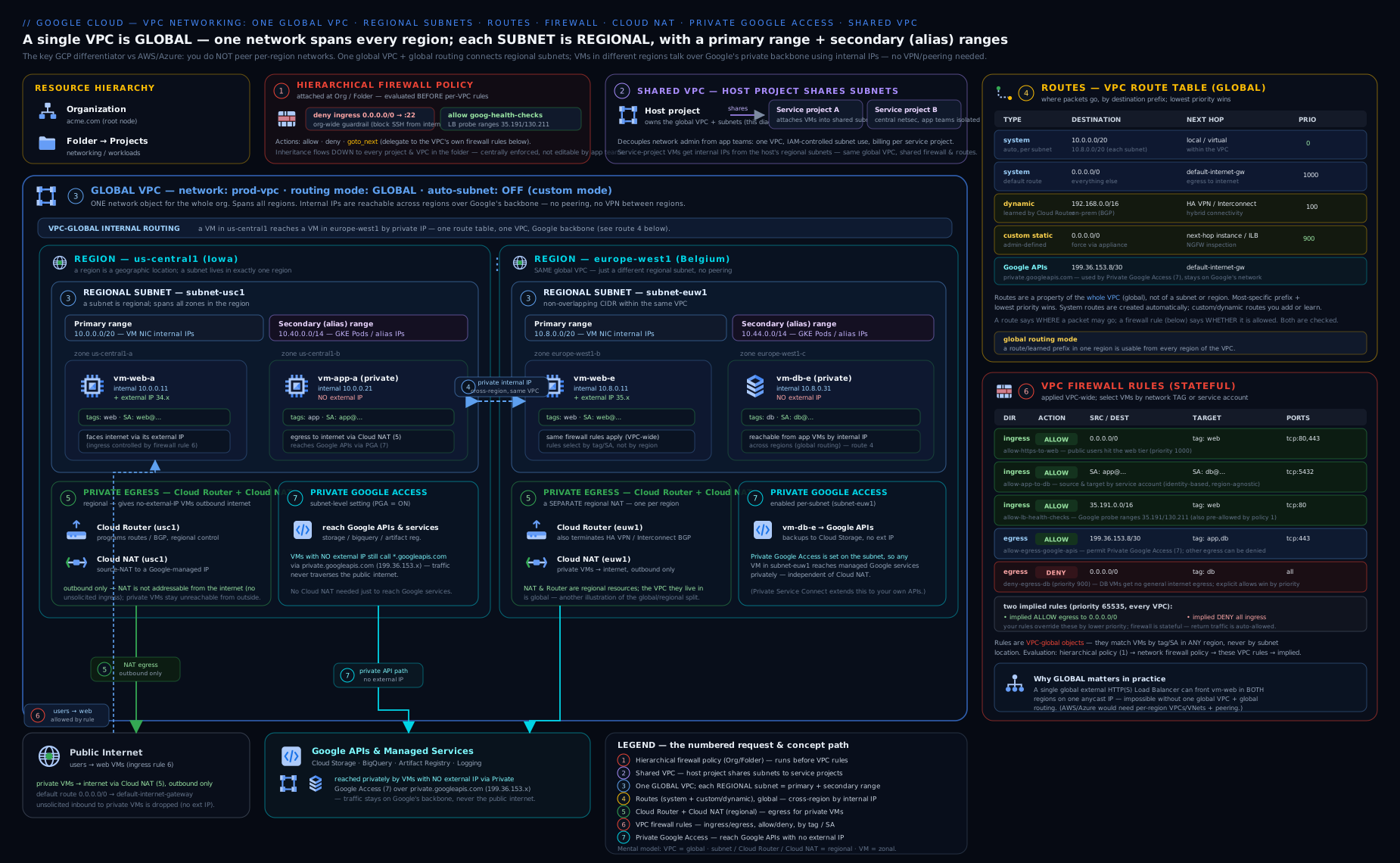
The diagram above ties the pieces together: a single global VPC with regional subnets in two regions (each with primary + secondary ranges), the route table showing system subnet routes plus a custom 0.0.0.0/0 route, firewall rules scoped by tags/service accounts with the implied deny-ingress/allow-egress underneath, a Cloud Router anchoring Cloud NAT for private-VM egress, Private Google Access and a PSC endpoint reaching Google APIs, a Shared VPC sharing subnets to a service project, and flow logs streaming to Cloud Logging. Trace one packet from a private VM out to the internet (sourced through Cloud NAT, no external IP anywhere), then a second packet from a VM to Cloud Storage (kept on Google’s network by Private Google Access), and a third from an asia-south1 VM to a europe-west1 VM over internal IPs with no peering — and you have walked the spine of this entire lesson.
Hands-on lab
Build a custom-mode VPC with a subnet, lock down firewall rules, add Cloud NAT so a no-external-IP VM can reach the internet, and verify — exactly what you’d do (and be asked to do) on the job. Everything is gcloud in Cloud Shell; the only metered pieces are tiny and cleaned up at the end. Set your project first: gcloud config set project YOUR_PROJECT.
1. A custom-mode VPC and a subnet
REGION=asia-south1
ZONE=asia-south1-a

gcloud compute networks create vpc-lab \
  --subnet-mode=custom --bgp-routing-mode=regional

gcloud compute networks subnets create snet-lab \
  --network=vpc-lab --region=$REGION \
  --range=10.10.0.0/24 \
  --enable-private-ip-google-access
2. Firewall rules: SSH via IAP only, allow internal
# Allow SSH only from Google's IAP range (no public 22)
gcloud compute firewall-rules create lab-allow-ssh-iap \
  --network=vpc-lab --direction=INGRESS --action=ALLOW \
  --rules=tcp:22 --source-ranges=35.235.240.0/20 --target-tags=ssh

# Allow all internal traffic within the subnet
gcloud compute firewall-rules create lab-allow-internal \
  --network=vpc-lab --direction=INGRESS --action=ALLOW \
  --rules=all --source-ranges=10.10.0.0/24
3. A VM with NO external IP
gcloud compute instances create vm-private \
  --zone=$ZONE --subnet=snet-lab --no-address \
  --tags=ssh --machine-type=e2-micro
At this point the VM has no internet egress — it can’t even apt update.
4. Cloud Router + Cloud NAT to give it egress
gcloud compute routers create rtr-lab --network=vpc-lab --region=$REGION

gcloud compute routers nats create nat-lab \
  --router=rtr-lab --region=$REGION \
  --auto-allocate-nat-external-ips --nat-all-subnet-ip-ranges \
  --enable-logging --log-filter=ERRORS_ONLY
5. Verify
# Subnet routes + the default route should be present
gcloud compute routes list --filter="network:vpc-lab" -o table

# NAT config exists and covers the subnet
gcloud compute routers nats describe nat-lab --router=rtr-lab --region=$REGION

# SSH in via IAP (no external IP needed) and test egress
gcloud compute ssh vm-private --zone=$ZONE --tunnel-through-iap \
  --command="curl -s -o /dev/null -w '%{http_code}\n' https://cloud.google.com"
Expected: the routes list shows a system route per subnet range plus 0.0.0.0/0 → default-internet-gateway; the NAT describe shows your subnet under NAT; and the SSH curl returns 200 — proving the no-external-IP VM now has outbound internet via Cloud NAT while remaining unreachable from the internet (the implied deny-ingress still holds, and you never opened anything but IAP SSH).
Cleanup
gcloud compute instances delete vm-private --zone=$ZONE --quiet
gcloud compute routers nats delete nat-lab --router=rtr-lab --region=$REGION --quiet
gcloud compute routers delete rtr-lab --region=$REGION --quiet
gcloud compute firewall-rules delete lab-allow-ssh-iap lab-allow-internal --quiet
gcloud compute networks subnets delete snet-lab --region=$REGION --quiet
gcloud compute networks delete vpc-lab --quiet
Cost note
The VPC, subnet, routes, and firewall rules are free to define. The e2-micro VM may fall under the Free Tier in eligible regions; otherwise it’s a few rupees per hour. Cloud NAT bills an hourly gateway charge + per-GB processed (you sent a trivial amount). Total for an hour of this lab: roughly ₹5–₹20. Always run the cleanup — a forgotten Cloud NAT or VM is the usual source of surprise charges. (If you have the $300 free trial credit, this lab barely dents it.)
Common beginner mistakes
These are misconceptions, not just symptoms — the wrong mental model a beginner carries over (usually from AWS/Azure) and the right one to replace it with.
-
“A VPC needs a big CIDR block up front, like an AWS VPC.” Wrong: a GCP VPC has no address range at all. Right model: ranges live on subnets; you plan a per-subnet, per-region scheme (kept non-overlapping with peers and on-prem), and there is nothing to “size” at the network level.
-
“I need one subnet per zone for high availability.” Wrong: a GCP subnet is regional and already spans every zone in its region. Right model: one subnet per region; you spread VMs across zones when you place them, and cross-zone HA is automatic within the subnet.
-
“Firewall rules attach to a subnet or an instance, like a security group / NSG.” Wrong: a firewall rule attaches to the whole VPC. Right model: it’s a network-wide policy scoped by target tag or service account — you choose which VMs it governs, not which subnet it sits on.
-
“Network tags make a rule secure.” Wrong: a network tag is a mutable attribute — anyone with
compute.instances.setTagcan add it and inherit the rule’s access. Right model: scope sensitive rules with service accounts (IAM identities) or secure tags (IAM-governed), not plain tags. -
“Private Google Access gives my Cloud SQL instance a private IP.” Wrong: that’s Private Service Access (PSA). Right model: PGA lets a no-external-IP VM reach Google’s public APIs; PSA (reserved range + peering) gives a managed service a private IP; PSC is a private endpoint in your subnet. Three different features, easy to conflate.
-
“Peering is transitive — if the hub peers with both spokes, the spokes can talk.” Wrong: VPC peering is non-transitive, always. Right model: peer spokes directly, route through an ILB-next-hop/NVA in the hub, or use Network Connectivity Center for transitivity.
-
“Cloud NAT is a gateway VM I have to size, and it can be a bottleneck.” Wrong: Cloud NAT is SDN configuration on a Cloud Router, enforced distributed at the host — there is no instance in the data path. Right model: you size ports (min-ports, dynamic port allocation, number of NAT IPs), never instances.
-
“An
allowrule means the traffic is allowed.” Wrong: a lower priority number wins first — a stricter deny, or a hierarchical policy above the VPC, can override your allow. Right model: reason in priority order across all policy levels, and confirm withget-effective-firewalls. -
“I’ll just keep the
defaultnetwork / widendefault-allow-internal.” Wrong: the auto-createddefaultnetwork ships SSH and RDP open to0.0.0.0/0and wide intra-VPC allows. Right model: delete the default (via org policy), build a custom-mode VPC, and write tight, tagged/SA-scoped rules.
Common mistakes & troubleshooting
| Symptom | Likely cause | Fix |
|---|---|---|
Private VM can’t reach the internet (apt/curl hang) |
No external IP and no Cloud NAT | Create a Cloud Router + Cloud NAT for the region; or give the VM an external IP. |
| Can’t SSH to a VM | No allow-ingress rule for tcp:22 (implied deny blocks it) | Add a firewall rule for 22 — ideally from the IAP range 35.235.240.0/20 with --tunnel-through-iap, not 0.0.0.0/0. |
| Two VPCs won’t peer / “overlapping ranges” | Subnet CIDRs overlap | Re-plan IP space; peered (and on-prem) ranges must be non-overlapping. |
| Peered VPC can reach subnets but not on-prem/NVA routes | Custom routes not exchanged | Set export/import custom routes on both peering sides. |
| Spoke-A can’t reach Spoke-B through a peered hub | VPC peering is non-transitive | Peer directly, or route via an NVA/ILB with custom routes; or use a single Shared VPC / NCC. |
| Firewall “allow” rule has no effect | A higher-priority (lower number) deny wins, or wrong target tag/SA | Check effective rules; verify priority and that the VM actually has the target tag/SA. |
| VM with no external IP can’t reach Cloud Storage/BigQuery | Private Google Access not enabled on the subnet | --enable-private-ip-google-access on the subnet (+ correct DNS/routing for *.googleapis.com). |
| Cloud NAT drops connections under load | Port exhaustion (min-ports too low for concurrency) | Raise min ports or enable dynamic port allocation; add more NAT IPs. |
| GKE cluster won’t create / “no secondary ranges” | Subnet lacks pods/services secondary ranges | Add secondary ranges sized for max pods/services (VPC-native clusters need them). |
| Large transfers hang while pings succeed | MTU mismatch across a peer/VPN/Interconnect | Align MTU on both sides (or lower the VPC MTU to the smallest in the path); confirm PMTUD isn’t blocked. |
Going deeper
You can build a working VPC with the sections above. This is what separates someone who configures GCP networking from someone who can reason about it under load, at org scale, and when it misbehaves.
How firewall rules are actually enforced
GCP firewall rules are not a box the packet passes through — they’re programmed by Andromeda (Google’s SDN) directly at each VM’s virtual NIC, on the host. Enforcement is distributed (no chokepoint, no appliance to size) and stateful: allow one direction of a flow and the connection-tracking table permits the return traffic automatically, so you don’t write a matching reverse rule.
When several layers of policy exist, a packet on a given vNIC is evaluated in this order, and the first terminal decision wins:
- Hierarchical firewall policies — organisation, then folders top-down.
- Global network firewall policy attached to the VPC.
- Regional network firewall policy for the VM’s region.
- The VPC’s own (legacy) firewall rules.
- The two implied rules (allow-egress, deny-ingress).
Within each level the lowest priority number wins. An allow or deny is terminal; the special goto_next action means “I have no opinion — hand the decision to the next level down.” That’s how an org guardrail can force a deny while still delegating everything it doesn’t care about.
Because rules come from several places, “read the VPC’s rules” is not enough to know what a VM actually permits. Ask the VM directly:
# The real, merged, in-priority-order rule set for one interface
gcloud compute instances network-interfaces get-effective-firewalls vm-private \
  --zone=asia-south1-a --network-interface=nic0
Firewall Insights (part of Network Intelligence Center) goes further — it flags shadowed rules (a higher-priority rule makes a lower one dead), overly permissive rules, and rules with no hits, which is how you clean up years of accumulated allow-lists safely.
Network firewall policies and secure tags — the modern model
The classic “VPC firewall rules” are per-network and target VMs by network tags (mutable strings) or service accounts. The newer network firewall policies — global and regional — are a richer model that sits above legacy rules in the evaluation order and unlocks objects legacy rules can’t express:
- Address groups — reusable, named IP sets (IPv4/IPv6) you reference from many rules; change the group once, every rule updates.
- FQDN objects — match egress by domain (
*.example.com) instead of chasing IPs. - Geo-location objects — match by country/region code (allow one country, block a sanctioned region).
- Threat Intelligence objects — match Google-curated lists of known-malicious IPs, Tor exit nodes, or public-cloud ranges.
- Secure tags — IAM-governed key/value tags (Resource Manager
tagValues) used as rule targets. Unlike a network tag (which anyone withcompute.instances.setTagcan add), binding a secure tag needs the IAM Tag User role, so targeting becomes identity-grade, not attribute-grade.
# A reusable address group of partner egress destinations
gcloud network-security address-groups create partners \
  --type=IPV4 --capacity=200 --location=global \
  --items=203.0.113.0/24,198.51.100.7/32

# A global network firewall policy that allows egress only to that group
gcloud compute network-firewall-policies create fw-global --global
gcloud compute network-firewall-policies rules create 1000 \
  --firewall-policy=fw-global --global-firewall-policy \
  --direction=EGRESS --action=allow --layer4-configs=tcp:443 \
  --dest-address-groups=partners
gcloud compute network-firewall-policies associations create \
  --firewall-policy=fw-global --global-firewall-policy --network=vpc-prod
(Commands are representative — resource paths/IDs are placeholders.) For most orgs the pattern is: hierarchical policies for non-negotiable guardrails, network firewall policies for reusable app patterns with address/FQDN/geo objects, and legacy VPC rules only where you still need them.
Beating non-transitive peering: NCC and the ILB-next-hop trick
VPC peering is non-transitive by hard design: hub↔spoke-A and hub↔spoke-B never gives spoke-A↔spoke-B. Three ways out, in rough order of modernity:
- Network Connectivity Center (NCC) — a hub resource with VPC spokes that makes connectivity transitive across the hub (full mesh or star). It also terminates hybrid spokes (HA VPN, Interconnect, router appliances), so it’s becoming the standard backbone for large estates.
- ILB-as-next-hop / NVA in the hub — a static route in each spoke pointing spoke-to-spoke traffic at an internal load balancer (or firewall appliance) in the hub, with export/import custom routes on the peerings.
- One Shared VPC — sidestep the problem entirely: a single network has no “transitivity” to lose.
# NCC hub + two VPC spokes = transitive spoke-to-spoke (representative)
gcloud network-connectivity hubs create hub-core \
  --description="Transitive backbone"
gcloud network-connectivity spokes linked-vpc-network create spoke-a \
  --hub=hub-core --global \
  --vpc-network=projects/PROJECT/global/networks/vpc-a
gcloud network-connectivity spokes linked-vpc-network create spoke-b \
  --hub=hub-core --global \
  --vpc-network=projects/PROJECT/global/networks/vpc-b
Scale caveats: a network has a soft quota on peerings, and peered networks share route and instance limits across the “peering group.” Past a handful of spokes, NCC or a Shared VPC scales more cleanly than a growing mesh of manual peerings. Check IAM & Admin → Quotas for current, raisable limits before you design a large mesh.
Cloud NAT internals: the port math that bites
Cloud NAT reserves a block of source ports per VM per NAT IP. Each NAT IP offers roughly 64,512 usable ports, so:
VMs served per NAT IP ≈ 64,512 ÷ (min-ports-per-VM). At the default 64 min-ports, one NAT IP covers about 1,008 VMs. Halve the ports and you double the VMs per IP — but each VM can then open fewer simultaneous connections before port exhaustion (the #1 Cloud NAT failure, seen as intermittent connection resets under load).
Two levers fix exhaustion without over-provisioning:
- Dynamic Port Allocation (DPA) — give a
min/max(powers of two); idle VMs hold the min, busy VMs grow toward the max on demand. - More NAT IPs — linearly increases total ports; use manual/static IPs when a partner must allow-list your egress address.
gcloud compute routers nats create nat-asia \
  --router=rtr-asia --region=asia-south1 \
  --auto-allocate-nat-external-ips --nat-all-subnet-ip-ranges \
  --enable-dynamic-port-allocation \
  --min-ports-per-vm=32 --max-ports-per-vm=2048
Other internals worth knowing: Endpoint-Independent Mapping (EIM) keeps the same internal→external mapping regardless of destination (needed for some STUN/P2P; turning it off improves port reuse); NAT rules let you source-NAT to different external IPs based on the destination (e.g. present a dedicated IP only to a specific partner); and Private NAT translates for VPC-to-VPC / hybrid flows rather than the internet.
Dynamic routing, global vs regional, in depth
The VPC’s BGP routing mode decides how far Cloud Router advertisements and learned routes travel. In global mode, a Cloud Router in one region advertises all the VPC’s subnets to on-prem and installs learned on-prem routes in every region — with a regional cost (MED) added so traffic prefers the Cloud Router nearest the destination. Regional mode confines both to the router’s own region. You can also shape advertisements with custom route advertisements (advertise a PSA range or a summarised block) and get ECMP across multiple VPN tunnels / Interconnect attachments for aggregate throughput. For any hybrid design spanning regions, global is almost always right.
IPv6, and the quotas that constrain a design
Subnets can be dual-stack (--stack-type=IPV4_IPV6) with an internal (ULA) or external (GUA) IPv6 range; firewall rules must then match IPv6 sources explicitly (::/0 is not covered by an IPv4 0.0.0.0/0 rule), and the implied allow-egress/deny-ingress apply to IPv6 too. Finally, several quotas silently shape large networks — routes per network, firewall rules/tuples per policy, subnet ranges per network, instances per VPC, and peerings per network. Most are soft and raisable, but you should know they exist before you design a 50-project landing zone, not discover them at rollout.
Practice challenges
Work these in order — each assumes the previous concepts. Try before opening the solution; every answer ends with the one-line why.
1. (Beginner) Create the production baseline. Make a custom-mode VPC named vpc-ex with global BGP routing, and one subnet snet-ex in europe-west1 using 10.50.0.0/24 with Private Google Access enabled.
<details> <summary><strong>Solution</strong></summary>
gcloud compute networks create vpc-ex \
  --subnet-mode=custom --bgp-routing-mode=global
gcloud compute networks subnets create snet-ex \
  --network=vpc-ex --region=europe-west1 \
  --range=10.50.0.0/24 --enable-private-ip-google-access
Why: custom mode (full IP control) + Private Google Access (no external IPs needed to reach Google APIs) is the production default for every subnet. </details>
2. (Beginner) Reserved-IP math. A subnet uses 10.10.5.0/27. How many usable addresses does it have, and which four are reserved?
<details> <summary><strong>Solution</strong></summary>
A /27 holds 32 addresses; GCP reserves 4, leaving 28 usable. Reserved: 10.10.5.0 (network), 10.10.5.1 (gateway), 10.10.5.30 (second-to-last, reserved for future use), 10.10.5.31 (broadcast).
Why: GCP reserves 4 per subnet (AWS/Azure reserve 5) — a classic exam trap and the reason a /29 gives only 4 usable IPs.
</details>
3. (Intermediate) Ingress the right way. Write firewall rules so (a) anyone on the internet can reach web VMs on tcp:443, and (b) SSH is allowed only from Google’s IAP range to VMs tagged ssh.
<details> <summary><strong>Solution</strong></summary>
gcloud compute firewall-rules create ex-allow-https \
  --network=vpc-ex --direction=INGRESS --action=ALLOW \
  --rules=tcp:443 --source-ranges=0.0.0.0/0 --target-tags=web

gcloud compute firewall-rules create ex-allow-ssh-iap \
  --network=vpc-ex --direction=INGRESS --action=ALLOW \
  --rules=tcp:22 --source-ranges=35.235.240.0/20 --target-tags=ssh
Why: public exposure is limited to the one port the app needs; admin SSH rides IAP (35.235.240.0/20) so port 22 is never open to the internet.
</details>
4. (Intermediate) Stable egress a partner can allow-list. Give a no-external-IP VM outbound internet through Cloud NAT using a static egress IP.
<details> <summary><strong>Solution</strong></summary>
gcloud compute addresses create nat-ip-ew1 --region=europe-west1
gcloud compute routers create rtr-ex --network=vpc-ex --region=europe-west1
gcloud compute routers nats create nat-ex \
  --router=rtr-ex --region=europe-west1 \
  --nat-custom-subnet-ip-ranges=snet-ex \
  --nat-external-ip-pool=nat-ip-ew1
Why: --nat-external-ip-pool pins egress to a reserved IP you can hand a partner to allow-list, instead of Google’s rotating auto-allocated addresses.
</details>
5. (Advanced) Size a subnet for a GKE VPC-native cluster. Plan the primary and secondary ranges for a cluster that must scale to 500 nodes, 110 pods/node, and 2,000 Services.
<details> <summary><strong>Solution</strong></summary>
- Nodes (primary range): 500 node IPs → a
/22(1,024 addresses, ~1,020 usable) leaves headroom. A/23(512) is too tight once you subtract reserved IPs and allow growth. - Pods (secondary): at 110 pods/node GKE allocates a /24 (256) per node; 500 nodes × /24 = 512 /24 blocks → a
/15pods range. - Services (secondary): 2,000 Services → a
/21(2,048).
gcloud compute networks subnets create snet-gke \
  --network=vpc-ex --region=europe-west1 \
  --range=10.60.0.0/22 \
  --secondary-range pods=10.128.0.0/15,services=10.64.0.0/21 \
  --enable-private-ip-google-access
Tighten the pods range by lowering --max-pods-per-node: at 64, GKE uses a /25 per node, so 500 nodes fit in a /16 instead of a /15.
Why: under-sized secondary ranges are the most common reason a GKE cluster stops scheduling pods or won’t create — size for max nodes/pods/Services up front, since a running cluster’s ranges are hard to grow. </details>
6. (Advanced) Make peering transitive. A hub VPC peers with spoke-A and spoke-B, but spoke-A cannot reach spoke-B. Give two fixes, and show one.
<details> <summary><strong>Solution</strong></summary>
Two fixes: (1) Network Connectivity Center — attach both VPCs as spokes of an NCC hub for transitive connectivity; (2) an ILB-as-next-hop / NVA in the hub with export/import custom routes on the peerings. (A single Shared VPC avoids the problem entirely.)
# Fix (1), representative:
gcloud network-connectivity hubs create hub-core
gcloud network-connectivity spokes linked-vpc-network create spoke-a \
  --hub=hub-core --global \
  --vpc-network=projects/PROJECT/global/networks/vpc-a
gcloud network-connectivity spokes linked-vpc-network create spoke-b \
  --hub=hub-core --global \
  --vpc-network=projects/PROJECT/global/networks/vpc-b
Why: VPC peering is non-transitive by design; NCC (or an NVA/ILB hop) is what restores spoke-to-spoke reachability without a full mesh of direct peerings. </details>
Best practices
- Use custom-mode VPCs in production. Delete the
defaultnetwork (via org policy) and design your own IP plan; never inherit the auto-mode ranges or the wide-open default SSH/RDP rules. - Plan IP space centrally and keep it non-overlapping with every VPC you’ll peer and with on-prem — there’s no VPC CIDR to lean on, so a documented subnet-by-region scheme is essential.
- Scope firewall rules with service accounts, not tags, for anything sensitive (tags are attributes anyone can set; SAs are IAM-bound identities).
- Push guardrails up the hierarchy with hierarchical firewall policies (org/folder) so project teams can’t open SSH to the world; keep per-app rules on the VPC.
- Give private VMs egress via Cloud NAT and reach Google via Private Google Access — keep external IPs off VMs entirely; use IAP for SSH.
- Prefer Shared VPC for an enterprise landing zone (one IP plan, central firewall/NAT/DNS); use peering to join independently-owned networks, remembering it’s non-transitive.
- Use
globalBGP routing mode for hybrid so Cloud Routers advertise/learn routes VPC-wide. - Turn on flow logs (sampled) on important subnets and route to BigQuery for security analytics; tag/label everything for cost and governance.
Security notes
- The implied deny-ingress is your friend — don’t punch wide holes. Expose app ingress through a load balancer (and Cloud Armor), and admin access through IAP, never
0.0.0.0/0on 22/3389. - Lock SSH/RDP to the IAP range (
35.235.240.0/20) and usegcloud compute ssh --tunnel-through-iap; this removes the entire class of “VM exposed on 22” attacks. - Keep VMs off public IPs. Cloud NAT for egress + Private Google Access for Google APIs means no instance needs an external address.
- Prefer service-account-scoped rules so access follows identity, not a mutable tag.
- Layer hierarchical policies for org-wide deny guardrails that teams cannot override, and consider VPC Service Controls perimeters to stop data exfiltration to/from Google APIs.
- Enable flow logs for forensics and route them somewhere durable; alert on denied/anomalous flows.
- Mind the global blast radius: an untagged
0.0.0.0/0route or an overly broad firewall rule hits every region — scope tightly and review changes to routes and firewall rules.
Cost & sizing
The levers that move a Google Cloud networking bill, roughly in order of impact:
| Lever | Cost behaviour |
|---|---|
| VPC / subnets / routes / firewall rules / peering | Free to define. |
| Egress data | Charged per GB — internet egress and inter-region egress are the big ones; intra-region, same-zone internal traffic is cheapest. |
| Cloud NAT | Hourly per NAT gateway + per-GB processed + any reserved static IPs. |
| Cloud VPN / Interconnect | Hourly per tunnel/attachment + egress; Cloud Router itself has no separate charge. |
| External IP addresses | Reserved-but-unused static IPs are billed; in-use ephemeral IPs on running VMs are billed hourly. |
| VPC Flow Logs | Charged on log volume ingested into Cloud Logging (+ export/storage). |
| Private Service Connect | Endpoint hourly + per-GB processed (the producer side may add charges). |
| Premium vs Standard network tier | Premium (Google’s backbone, global) vs Standard (cheaper, regional, public-internet transit) — affects egress pricing and performance. |
Sizing rules of thumb: the size of a subnet (/24 vs /20) doesn’t change cost — data movement and add-on resources do. The biggest accidental bills are forgotten Cloud NAT gateways, idle static IPs, VPN tunnels, and inter-region egress from chatty cross-region traffic. Keep talkative workloads in one region, consolidate egress, set flow-log sampling, and choose the Standard network tier where global performance isn’t needed.
Interview & exam questions
-
How is a Google Cloud VPC fundamentally different from an AWS VPC or Azure VNet? A GCP VPC is global — one network spans all regions, with regional subnets under it, and there is no VPC-level CIDR (each subnet owns its range). AWS VPCs and Azure VNets are regional and define a CIDR at the network level. Consequently, cross-region private communication on GCP is native (no peering/gateway), and routes/firewall rules are global resources.
-
How many IP addresses are reserved per subnet on GCP, and which are they? Four: the network address, the default gateway, the second-to-last address (reserved for future use), and the broadcast address. So a
/24yields 252 usable. (Azure and AWS reserve 5.) -
What are the implied firewall rules on every VPC? Implied allow egress (all outbound permitted) and implied deny ingress (all inbound denied), both at the lowest priority and overridden by any rule you add. Net effect: outbound open, inbound closed.
-
Can a GCP firewall rule deny traffic? How do you scope which VMs a rule affects? Yes — unlike AWS security groups, GCP firewall rules support an explicit deny action. You scope which VMs with target tags or target service accounts (prefer service accounts for security), and who matches with source ranges/tags/service accounts.
-
What’s the difference between Shared VPC and VPC Peering? Shared VPC = one network owned by a host project and shared (subnet-by-subnet) to service projects — centralised admin, one IP plan, ideal for a landing zone. VPC Peering = two separate networks joined, each independently administered; it’s non-transitive and ranges must not overlap.
-
A VM has no external IP and can’t reach the internet. How do you fix it without giving it a public IP? Create a Cloud Router and Cloud NAT in the VM’s region. Cloud NAT provides managed, distributed source NAT for outbound only — no inbound is opened, and no VM needs an external address.
-
Distinguish Private Google Access, Private Service Access, and Private Service Connect. PGA = a subnet toggle letting no-external-IP VMs reach Google’s public APIs privately. PSA = reserving a range and peering to a Google-managed producer VPC so a managed service (e.g. Cloud SQL) gets a private IP in your VPC. PSC = a private endpoint (internal IP in your subnet) to a Google API bundle or a specific published service — the most granular.
-
How does GCP decide between two routes that could both match a packet? Longest-prefix match first; if prefixes tie, the route with the lower priority value wins (0 = highest priority). Subnet routes are most specific and generally win for in-VPC destinations.
-
What is a Cloud Router and why does Cloud NAT need one? A Cloud Router is a managed, regional BGP speaker used to exchange dynamic routes with on-prem over VPN/Interconnect. Cloud NAT attaches to a Cloud Router (which anchors the regional config) even though NAT itself uses no BGP.
-
What are hierarchical firewall policies and how do they relate to VPC firewall rules? Policies attached at the org or folder level that apply to all VPCs beneath them, evaluated before a VPC’s own rules. They add the
goto_nextaction to delegate decisions downward. They’re how you enforce non-overridable org-wide guardrails (e.g. deny internet SSH everywhere). -
Why are secondary (alias IP) ranges important, and what uses them? They let a VM own additional internal IPs from a named subnet range without extra NICs. GKE VPC-native clusters use them: pod IPs from a
podssecondary range, Service ClusterIPs from aservicessecondary range — so the subnet must be sized for max pods/services. -
You peered two VPCs; subnet traffic works but on-prem routes learned by one side aren’t visible to the other. Why? Peering exchanges subnet routes automatically but not custom static/dynamic routes unless you enable export/import custom routes on both sides. And remember peering is non-transitive.
-
Cloud NAT is dropping connections for a busy fleet behind one NAT IP. Walk through the fix. It’s port exhaustion: each NAT IP has ~64,512 ports, and at 64 min-ports per VM one IP serves ~1,008 VMs’ worth of connection capacity. Enable Dynamic Port Allocation (min/max) so busy VMs grab more ports on demand, and/or add NAT IPs. Confirm with NAT translation logs.
-
What is the firewall evaluation order when hierarchical policies, network firewall policies, and VPC rules all exist? Hierarchical (org→folder) → global network firewall policy → regional network firewall policy → the VPC’s legacy rules → the implied rules. Within a level, lowest priority number wins;
allow/denyis terminal andgoto_nextdelegates downward. Verify the merged result withget-effective-firewalls.
Quick check
- True or false: a Google Cloud VPC is a regional resource, like an AWS VPC.
- How many usable IPs does a GCP
/24subnet have, and why? - What two implied firewall rules exist on every VPC?
- Which managed resources let a no-external-IP VM make outbound internet connections?
- Name the three “private access” features and what each reaches.
Answers
- False — a GCP VPC is global; only its subnets are regional.
- 252 — Google reserves 4 addresses per subnet (network, gateway, second-to-last, broadcast);
256 − 4 = 252. - Implied allow egress (all outbound) and implied deny ingress (all inbound) — outbound open, inbound closed.
- Cloud Router + Cloud NAT (managed, distributed source NAT; outbound only).
- Private Google Access → Google’s public APIs; Private Service Access → Google-managed service producers (e.g. Cloud SQL private IP) via a peered range; Private Service Connect → a private endpoint to a Google API bundle or a specific published service.
Exercise
Design and build (in gcloud) a minimal two-region topology in a single custom-mode VPC: one subnet in asia-south1 (10.10.0.0/24) and one in europe-west1 (10.20.0.0/24), each with Private Google Access enabled. Add a firewall rule allowing internal traffic across both subnet ranges, and a second allowing SSH only from the IAP range. Create a no-external-IP VM in each region and a Cloud Router + Cloud NAT per region. Then: (a) SSH into the asia-south1 VM via IAP and ping the europe-west1 VM’s internal IP — proving cross-region private connectivity over the global VPC with no peering; (b) curl https://cloud.google.com to prove Cloud NAT egress; and © run gcloud compute routes list and identify the system subnet routes versus the default internet route. Write one paragraph explaining why this same design on AWS would require a second VPC and a peering connection (or Transit Gateway), and why on GCP it doesn’t. Clean up with the per-resource deletes (or delete the whole project’s lab resources).
Certification mapping
| Exam | Skills this lesson covers |
|---|---|
| Associate Cloud Engineer (ACE) | Configuring network resources: creating VPCs and subnets (auto vs custom), primary/secondary ranges, firewall rules (tags/SAs, ingress/egress), routes, Cloud NAT, Private Google Access, and basic peering/Shared VPC. The gcloud lab mirrors the exam’s task style. |
| Professional Cloud Network Engineer (PCNE) | Designing, implementing, and managing VPC networks: the global model, hierarchical firewall policies and network firewall policies, dynamic routing with Cloud Router (global vs regional), Cloud NAT options (port allocation, static IPs), PGA/PSA/PSC, Shared VPC vs peering trade-offs, MTU/jumbo frames, and flow-log strategy. |
Glossary
- VPC network — A global, software-defined private network in Google Cloud, owned by a project; has no CIDR of its own.
- Subnet — A regional partition of a VPC owning a primary IP range (and optional secondary ranges); spans all zones in its region.
- Primary range — A subnet’s main CIDR, from which VM NIC internal IPs are assigned (4 IPs reserved).
- Secondary range / alias IP — Extra named subnet ranges used by alias IPs; the basis of GKE VPC-native pod/Service networking.
- Auto vs custom mode — Auto-mode VPCs get a subnet per region automatically; custom-mode requires you to define every subnet (use custom in production).
- Route — A destination-CIDR-to-next-hop entry; types are system-generated, custom static, and dynamic (BGP). Selected by longest-prefix then lowest priority.
- Longest-prefix match — The route-selection rule: the most specific (longest-mask) matching route wins; ties break on the lowest priority value.
- Firewall rule — A stateful allow/deny on a 5-tuple, applied VPC-wide, scoped by target tags or service accounts.
- Implied rules — The uneditable allow-egress and deny-ingress rules present on every VPC.
- Hierarchical firewall policy — An org/folder-level policy applied to all VPCs beneath it, evaluated before VPC rules; adds
goto_next. - Network firewall policy (global/regional) — The newer firewall model, evaluated above legacy VPC rules, supporting address groups, FQDN, geo, and threat-intel objects.
- Effective firewall rules — The merged, in-priority-order rule set actually applied to a VM’s interface across all policy levels (
get-effective-firewalls). - Network tag — A label on a VM used to target firewall rules and routes; a mutable attribute, not an identity.
- Secure tag — An IAM-governed key/value tag (Resource Manager) used as a network-firewall-policy target; more secure than a network tag.
- Address group — A reusable, named set of IP ranges referenced by network-firewall-policy rules.
- BGP routing mode (global/regional) — VPC setting deciding whether Cloud Routers advertise/learn routes across all regions (global) or only their own (regional).
- Cloud Router — A managed, regional BGP speaker for dynamic routes; anchors Cloud NAT.
- Cloud NAT — Managed, distributed source NAT giving private VMs outbound internet with no external IPs and no inbound exposure.
- Dynamic Port Allocation (DPA) — Cloud NAT feature letting a VM’s source-port block grow between a min and max on demand, preventing port exhaustion.
- Endpoint-Independent Mapping (EIM) — Cloud NAT behaviour keeping the same internal→external mapping regardless of destination.
- MTU / jumbo frames — The largest packet a VM sends without fragmentation; set on the network (default 1460, up to 8896 for jumbo frames). All endpoints in a path must agree.
- Private Google Access (PGA) — A subnet setting letting no-external-IP VMs reach Google’s public APIs privately.
- Private Service Access (PSA) — A reserved range + peering to a Google-managed producer VPC (e.g. Cloud SQL private IP).
- Private Service Connect (PSC) — A private internal endpoint to a Google API bundle or a specific published service.
- Proxy-only subnet — A special-purpose subnet (
REGIONAL_MANAGED_PROXY) required by regional Envoy-based Application Load Balancers. - IP forwarding (
--can-ip-forward) — A VM setting allowing it to forward packets not addressed to itself; required for an NVA used as a route next hop. - Network Connectivity Center (NCC) — A hub-and-spoke resource that makes VPC-to-VPC connectivity transitive and terminates hybrid links.
- Shared VPC — One network owned by a host project, with subnets shared to service projects; centralised admin.
- VPC Network Peering — A connection joining two separate VPCs over internal IPs; non-transitive, non-overlapping ranges.
- VPC Flow Logs — Sampled records of VM NIC flows written to Cloud Logging for analysis and forensics.
Next steps
- Google Cloud Load Balancing, In Depth: Global vs Regional, the LB Types & Backends — the natural sequel: front your subnets and firewall rules with global and regional load balancers, backend services, NEGs, and health checks.
- Building a Shared VPC: Centralized Networking Across Many GCP Projects — the enterprise landing-zone design: host/service projects, subnet delegation, granular IAM, hybrid connectivity, and centralised DNS.
- Controlling Egress on GCP: Hierarchical Firewall Policies and Cloud NAT, End to End — layer hierarchical policies with Cloud NAT and Private Google Access for auditable, controlled outbound traffic.
- Private Service Connect: the Producer/Consumer Model, In Depth — the full producer/consumer model for publishing and consuming services privately.