In a mature GCP organization, dozens of teams want their own projects but nobody wants dozens of disconnected networks. Shared VPC lets a single host project own the network while many service projects attach to it and deploy workloads into its subnets, keeping connectivity, IP space, and firewall policy under one roof. This walkthrough builds that seam end to end: model selection, project attachment, IP planning, subnet-scoped IAM, private access patterns, hybrid links, and centralized DNS.
In a nutshell
Level: Advanced · Time: ~26 min
Picture an office tower. The host project is the building’s landlord and facilities team: they own the plumbing, the electrical, the elevators, the security desk at the lobby, and the single fibre line that connects the whole building to the street. The service projects are the tenant companies that lease floors. Each tenant brings its own desks and staff — that’s your VMs, your GKE clusters, your Cloud Run services — but no tenant drills its own hole to the street or runs its own plumbing. They plug into what the building already provides.
That one picture explains almost every rule in this lesson. The building manager (the platform/network team) decides which tenant gets a keycard to which floor — that’s subnet-scoped IAM (compute.networkUser on one subnet, not the whole building). Everyone shares one security desk (firewall policy), one directory in the mailroom (Cloud DNS), one loading dock to the outside world (hybrid connectivity and Cloud NAT), and one street connection that the landlord maintains once for everybody. Tenants never negotiate their own street connection, and they never see each other’s keys.
Why a beginner should care: without this model, every team spins up its own network, its own VPN to the data centre, its own DNS, and its own overlapping 10.0.0.0/8. Within a year you have fifty islands that can’t talk, IP ranges that collide the moment you try to connect them, and no single place to enforce “no workload gets a public IP.” Shared VPC is how one organization keeps central network control while letting many teams move independently — it is the network backbone of a GCP landing zone.
The one sentence to carry through: the host project owns the network (VPC, subnets, IP plan, firewall, DNS, hybrid links); service projects own only their workloads and consume the host’s subnets through a narrow, subnet-scoped grant.
This is an advanced lesson. It assumes you already understand the global VPC model, subnets, and firewall rules from Google Cloud VPC, In Depth, and where networking sits inside a landing zone. If “CIDR”, “subnet”, or “firewall rule” is new, start there first. After this lesson you will be able to:
- Decide, against a concrete requirement, when Shared VPC is right versus VPC Peering or Network Connectivity Center.
- Enable a host project, attach service projects, and grant
compute.networkUserat subnet scope for least privilege. - Plan non-overlapping IP space with GKE secondary ranges that won’t exhaust RFC 1918.
- Wire private access (Private Google Access, PSC, serverless) and hybrid links once in the host so every service project inherits them.
- Grant the GKE service agents the exact IAM they need so clusters actually create.
- Centralize DNS and lock the estate down with org policy.
The whole model fits in one picture:
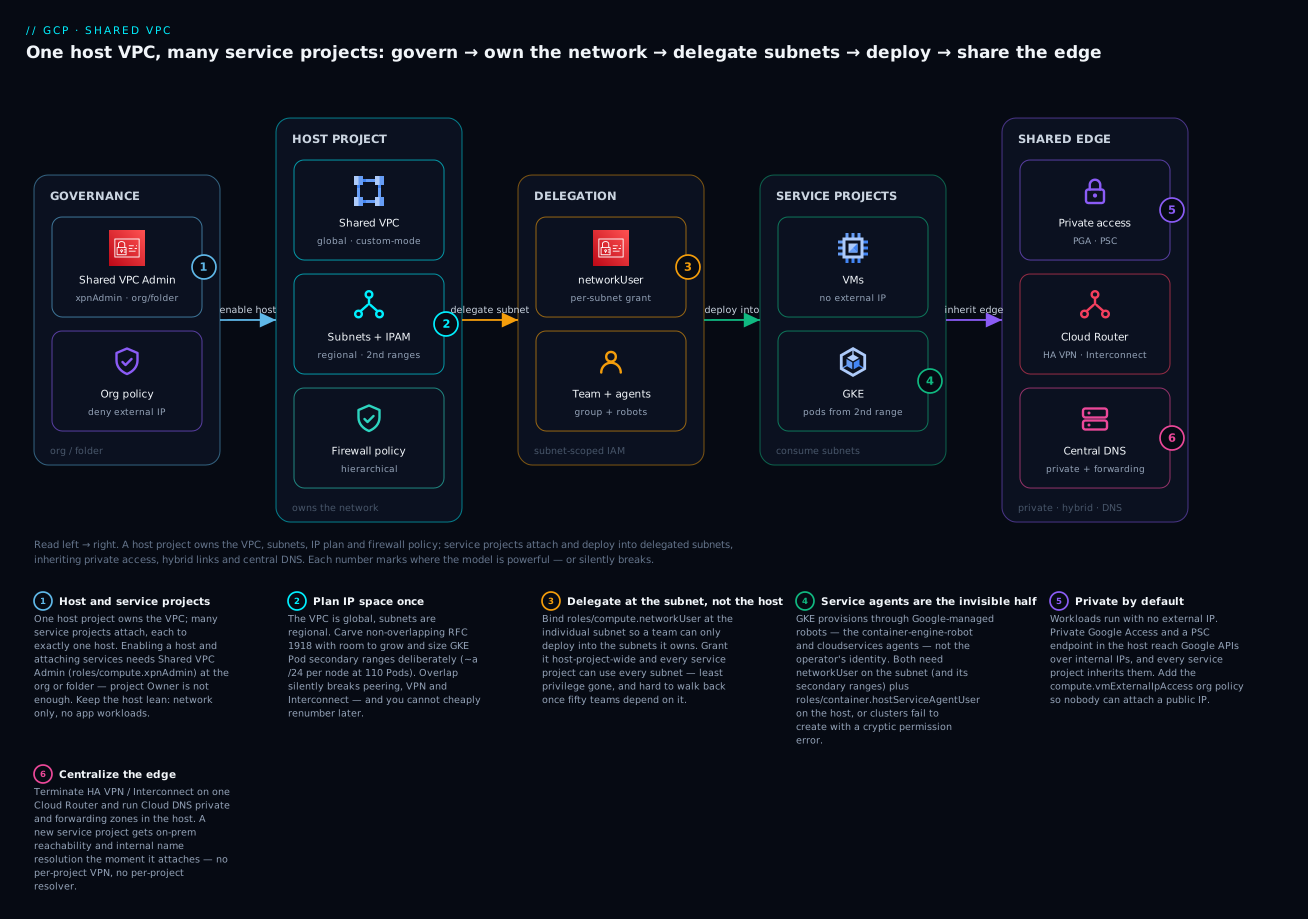
Read it left to right. Governance at the org/folder level enables the host and enforces guardrails (only Shared VPC Admin can turn a host on; org policy denies external IPs). The host project owns the one global VPC, the regional subnets and IP plan, and the firewall policy. Delegation is the seam: compute.networkUser bound at an individual subnet lets exactly the right team — and its service agents — deploy there. Service projects then attach and run VMs and GKE that draw internal IPs from the host’s subnets. Finally every service project inherits the shared edge: private access to Google APIs, hybrid links to on-prem, and central DNS, all built once in the host. The six badges mark where the model is powerful — and where it silently breaks; we return to each below.
The core split: host project vs service projects
Before the commands, internalize the ownership line, because every permission error and every design argument in Shared VPC traces back to it. One team owns the network; other teams own their workloads; a narrow grant is the contract between them.
| The host project owns | Each service project owns |
|---|---|
| The VPC network (global, custom-mode) | Its workloads: VMs, GKE clusters, Cloud SQL instances, Cloud Run services |
| Every subnet and the IP plan (primary + secondary ranges) | Compute-level IAM for its own resources |
| Firewall rules and hierarchical firewall policies | App configuration, images, data |
| Cloud Router + HA VPN / Interconnect (hybrid) | The bill for its own compute and egress |
| Cloud NAT, Private Google Access, PSC endpoints | Requests for new subnets/rules it doesn’t own |
| Cloud DNS private and forwarding zones | — |
The thing in the middle — neither purely host nor purely service — is the grant: compute.networkUser at subnet scope, plus the service-agent IAM that lets managed services provision on a team’s behalf. Get that seam right and a new team onboards by attaching a project and receiving a keycard to one subnet. Get it wrong and you either over-grant (every team can use every subnet) or under-grant (GKE clusters refuse to create). The rest of this lesson is that seam, built carefully.
Step 0: Choose the right model
Before touching gcloud, decide why you are not just peering everything. The three common patterns solve different problems.
| Model | Connectivity | IAM / ownership | Best for |
|---|---|---|---|
| Shared VPC | Service projects deploy into the host’s subnets; one routing domain | Network team owns subnets and firewall; app teams own VMs | A single org’s landing zone with central network control |
| VPC Peering | Two independent VPCs exchange routes, non-transitive | Each side owns its own network fully | Connecting separately-owned VPCs (e.g. partner, acquisition) |
| Network Connectivity Center (NCC) | Hub-and-spoke; spokes can be VPCs, HA VPN, Interconnect | Each spoke independent; hub provides transitivity | Many VPCs/sites needing transitive any-to-any reach |
The decisive question is ownership. Shared VPC centralizes control: a platform team defines subnets and firewall rules, and application teams consume them without ever creating a network. Peering keeps networks fully separate and is non-transitive (A-B and B-C does not give you A-C), which collapses at scale. NCC adds a transitive hub and is the right tool when you have many already-independent VPCs or a large hybrid estate to stitch together. These compose: a common enterprise topology is a Shared VPC per environment, with those host VPCs as NCC spokes for cross-environment or cross-region transitivity.
Rule of thumb: one team should govern IP allocation and firewall policy for a blast radius. That governance boundary is your Shared VPC.
Step 1: Designate the host project and attach service projects
You need the Compute Shared VPC Admin role (roles/compute.xpnAdmin) at the organization or folder level to enable a host and attach services. Project-level Owner is not enough.
# Enable the project as a Shared VPC host
gcloud compute shared-vpc enable HOST_PROJECT_ID

# Attach a service project to the host
gcloud compute shared-vpc associated-projects add SERVICE_PROJECT_ID \
  --host-project HOST_PROJECT_ID

# Verify the association
gcloud compute shared-vpc list-associated-resources HOST_PROJECT_ID
A host project can serve many service projects; a service project attaches to exactly one host. Keep the host project lean: it should contain the VPC, subnets, firewall rules, Cloud Routers, VPN/Interconnect, and Cloud DNS, and ideally no application workloads.
In Terraform the same wiring is explicit and reviewable:
resource "google_compute_shared_vpc_host_project" "host" {
  project = var.host_project_id
}

resource "google_compute_shared_vpc_service_project" "svc" {
  host_project    = google_compute_shared_vpc_host_project.host.project
  service_project = var.service_project_id
}
Step 2: Plan IP space and regional layout
IP planning is the decision you cannot cheaply undo. Subnets are regional in GCP, and a VPC is global, so a single VPC spans every region without peering. Carve a clear hierarchy out of RFC 1918 space and leave room to grow.
A workable convention is to give each region a large aggregate and slice subnets from it by environment and tier:
10.0.0.0/8                  org aggregate (reserve generously)
  10.10.0.0/16              region: us-central1
    10.10.0.0/20            prod   - general workloads
    10.10.16.0/20           prod   - GKE nodes
    10.10.64.0/20           nonprod
  10.20.0.0/16              region: europe-west1
For GKE you also need secondary ranges on the subnet for Pods and Services. Size the Pod range deliberately: with the default of 110 Pods per node, plan roughly a /24 of Pod IPs per node, which makes Pod ranges the fastest way to exhaust RFC 1918.
gcloud compute networks create hub-vpc \
  --project=HOST_PROJECT_ID \
  --subnet-mode=custom

gcloud compute networks subnets create prod-usc1 \
  --project=HOST_PROJECT_ID \
  --network=hub-vpc \
  --region=us-central1 \
  --range=10.10.0.0/20 \
  --secondary-range=pods=10.110.0.0/16,services=10.120.0.0/20 \
  --enable-private-ip-google-access \
  --enable-flow-logs
Avoiding RFC 1918 exhaustion is mostly discipline: never assign overlapping ranges (peering, VPN, and Interconnect all break on overlap), keep a documented IPAM source of truth, and reserve a separate non-overlapping block for GKE Pods so it never collides with on-prem.
Step 3: Delegate subnet-level access with the right scope
This is the part teams get wrong. Granting roles/compute.networkUser at the host project level lets a service project use every subnet and shared resource. For least privilege, bind compute.networkUser at the individual subnet level so a team can only deploy into the subnets they own.
# Per-subnet grant: this team can only use prod-usc1
gcloud compute networks subnets add-iam-policy-binding prod-usc1 \
  --project=HOST_PROJECT_ID \
  --region=us-central1 \
  --member="group:team-payments@example.com" \
  --role="roles/compute.networkUser"
You typically grant compute.networkUser to two principals: the human/group deploying resources, and the service agents that provision on their behalf. GKE and some managed services act through Google-managed service accounts (for example the GKE service agent and the Google APIs service agent), and those agents need networkUser on the subnet and its secondary ranges, plus roles/container.hostServiceAgentUser on the host project for GKE.
# GKE in a service project needs its host service agent user role
gcloud projects add-iam-policy-binding HOST_PROJECT_ID \
  --member="serviceAccount:service-SVC_PROJECT_NUMBER@container-engine-robot.iam.gserviceaccount.com" \
  --role="roles/container.hostServiceAgentUser"
Keep the scope tight from day one. Walking back an org-wide networkUser binding after fifty teams depend on it is a multi-quarter project.
Step 4: Private access patterns
Workloads in the host subnets usually should not have external IPs. Wire up private egress to Google and producer services in the host project so every service project inherits it.
Private Google Access lets instances without external IPs reach Google APIs and services over internal IPs. Enable it per subnet (the --enable-private-ip-google-access flag above) and ensure DNS resolves *.googleapis.com appropriately (the private.googleapis.com — 199.36.153.8/30 — or restricted.googleapis.com — 199.36.153.4/30 — virtual IP ranges combined with a route).
Private Service Connect (PSC) gives you a private endpoint inside your VPC for Google APIs or for a third party’s published service, keeping traffic off the internet. The endpoint for the Google APIs bundle is a global internal address and forwarding rule; create it in the host project so it is reachable from all service projects:
# Reserve a GLOBAL internal address for the PSC endpoint
# (a reserved endpoint IP that must not overlap any subnet range)
gcloud compute addresses create psc-googleapis \
  --project=HOST_PROJECT_ID \
  --global \
  --purpose=PRIVATE_SERVICE_CONNECT \
  --addresses=10.10.200.10 \
  --network=hub-vpc

# Global forwarding rule targeting the Google APIs bundle
gcloud compute forwarding-rules create psc-googleapis-fr \
  --project=HOST_PROJECT_ID \
  --global \
  --network=hub-vpc \
  --address=psc-googleapis \
  --target-google-apis-bundle=all-apis
Serverless VPC Access connectors let Cloud Run, Cloud Functions, and App Engine reach internal resources in the Shared VPC. Create the connector in the host project against a dedicated /28 and grant the service project’s serverless agents networkUser:
gcloud compute networks vpc-access connectors create serverless-usc1 \
  --project=HOST_PROJECT_ID \
  --region=us-central1 \
  --network=hub-vpc \
  --range=10.8.0.0/28
Newer Cloud Run revisions support Direct VPC egress, which skips the connector entirely and scales better. Prefer it for new Cloud Run services; keep connectors for Cloud Functions and App Engine standard.
Step 5: Hybrid connectivity into the host project
Terminate all on-prem connectivity in the host project so every service project reaches the data center through one governed path. Use Cloud Interconnect (Dedicated or Partner) for high, predictable bandwidth, and HA VPN for encrypted connectivity over the internet. Both attach to a Cloud Router that exchanges routes via BGP, and those learned routes are visible to all service projects automatically.
HA VPN gives you a 99.99% SLA when you build two interfaces to two peer devices:
gcloud compute routers create hub-router \
  --project=HOST_PROJECT_ID \
  --network=hub-vpc \
  --region=us-central1 \
  --asn=64512

gcloud compute vpn-gateways create hub-ha-vpn-gw \
  --project=HOST_PROJECT_ID \
  --network=hub-vpc \
  --region=us-central1
From there you create two vpn-tunnels (one per gateway interface), peer BGP sessions on hub-router, and advertise your VPC ranges. Because routing lives in the host project, a new service project gets on-prem reachability the moment it attaches and is granted a subnet, with no per-project VPN to manage. The mechanics of Cloud Router, BGP sessions, and route advertisement are covered in depth in HA VPN, Cloud Router & BGP.
Watch route quotas. Dynamic routes learned over BGP and custom static routes both count against per-VPC limits. Aggregate advertised prefixes from on-prem rather than leaking hundreds of specifics.
Step 6: Centralized DNS
Run Cloud DNS in the host project. Private zones authoritative for your internal domains attach to the host VPC, so every service project resolves them. For resolving on-prem names, use DNS forwarding zones (forward to your on-prem resolvers); for the reverse, configure inbound server policy so on-prem can resolve GCP names.
# Private zone for internal names, attached to the host VPC
gcloud dns managed-zones create internal-corp \
  --project=HOST_PROJECT_ID \
  --dns-name="corp.example.internal." \
  --description="Internal records" \
  --visibility=private \
  --networks=hub-vpc
DNS peering lets one VPC delegate resolution of a zone to another VPC’s DNS configuration. In a Shared VPC this is mostly unnecessary because service projects already resolve the host VPC’s private zones, but it is the mechanism when you bridge resolution between separate VPCs (for example a Shared VPC host and a peered partner VPC).
Verify
Confirm the seam actually works before handing it to teams.
# Host is enabled and the right service projects are attached
gcloud compute shared-vpc list-associated-resources HOST_PROJECT_ID

# Subnet-level IAM shows only the intended bindings
gcloud compute networks subnets get-iam-policy prod-usc1 \
  --project=HOST_PROJECT_ID --region=us-central1

# A test VM in a SERVICE project can target the host subnet
gcloud compute instances create conn-test \
  --project=SERVICE_PROJECT_ID \
  --zone=us-central1-a \
  --subnet=projects/HOST_PROJECT_ID/regions/us-central1/subnetworks/prod-usc1 \
  --no-address

# BGP sessions to on-prem are established and learning routes
gcloud compute routers get-status hub-router \
  --project=HOST_PROJECT_ID --region=us-central1
From the test VM, validate Private Google Access (curl -s https://storage.googleapis.com should succeed with no external IP), resolve an internal name from the central zone, and ping an on-prem host to prove hybrid routing. Then delete the test VM.
Enterprise scenario
A fintech platform team ran one Shared VPC per environment and had wired compute.networkUser at subnet scope cleanly. Then a new service project’s GKE Autopilot clusters refused to create, failing with Google Compute Engine: Required 'compute.subnetworks.use' permission on the shared subnet. The human operator had networkUser on the subnet, so the assumption was the binding was correct.
The gotcha: Autopilot and node auto-provisioning provision through the GKE host service agent, not the operator’s identity. That agent (service-PROJECT_NUMBER@container-engine-robot.iam.gserviceaccount.com) needs networkUser on the subnet and both secondary ranges (Pods and Services), plus container.hostServiceAgentUser on the host project. They had granted it on the primary range only, so cluster creation passed subnet checks but died allocating the Pod range.
The fix was to bind the agent at the secondary-range level explicitly, which the subnet IAM binding does not cover by default:
gcloud compute networks subnets add-iam-policy-binding prod-usc1 \
  --project=HOST_PROJECT_ID --region=us-central1 \
  --member="serviceAccount:service-SVC_PROJECT_NUMBER@container-engine-robot.iam.gserviceaccount.com" \
  --role="roles/compute.networkUser"
They then codified the full set (agent + secondary ranges + hostServiceAgentUser) into the Terraform module that stamps every service project, so the next forty teams onboarded without a ticket. The lesson: in Shared VPC, service-agent IAM is the invisible half of the contract, and secondary ranges are where it silently breaks.
Going deeper
The steps above stand up a working Shared VPC. This section is for the reader who has to operate one at scale — where the IAM edge cases, IP math, quotas, and guardrails decide whether the landing zone stays sane past fifty projects.
The IAM you actually need
Shared VPC IAM is a small set of roles, but the mistakes come from missing one of them or binding it at the wrong scope. Grant the least role at the lowest node, and remember that managed services provision through Google-managed robots, not the human operator.
| Role | Granted to | At | Why |
|---|---|---|---|
roles/compute.xpnAdmin |
Platform/network admins | Org or folder | Enable a host, attach/detach service projects. Project Owner cannot do this. |
roles/compute.networkUser |
Deploying group + service agents | Subnet (not host project) | Use one subnet + its secondary ranges. Subnet scope = least privilege. |
roles/container.hostServiceAgentUser |
Service project’s GKE agent (service-NUM@container-engine-robot…) |
Host project | Lets the service project’s GKE agent act as the host’s GKE agent to manage networking. |
roles/compute.networkViewer |
Auditors, dashboards | Host project | Read-only visibility into the network without deploy rights. |
For GKE specifically, two service agents need networkUser on the subnet, not one: the GKE agent service-SVC_NUM@container-engine-robot.iam.gserviceaccount.com and the Google APIs (cloud services) agent SVC_NUM@cloudservices.gserviceaccount.com. The enterprise scenario above shows what happens when the set is incomplete — clusters pass the primary-range check and die on the Pod range. For serverless, the connector needs the service project’s serverless agents to hold roles/vpcaccess.user on the connector plus networkUser on its subnet.
A subnet-level networkUser binding covers the subnet’s secondary ranges, so you normally bind once at the subnet. If you need finer control — a team that may use the primary range but only one named secondary range — you scope the grant to specific ranges (an option the Console’s “add subnet permissions” flow exposes, and which you can express with IAM conditions).
IP planning that survives scale
The Pod secondary range is almost always the first thing to run out, because GKE does not hand each node a tidy 110 addresses — it allocates each node a CIDR sized to 2 × maxPodsPerNode rounded up to the next power of two. At the default 110 Pods per node that is 220 → /24 (256 addresses) per node.
| Consumer | Rough sizing | Note |
|---|---|---|
| Subnet primary (VM/node NICs) | /20 ≈ 4,096 IPs (minus 4 reserved) |
One primary IP per VM NIC and per GKE node. |
| GKE Pod secondary | /24 per node → size for peak nodes |
A /16 Pod range caps you near ~256 nodes; a 1,000-node cluster needs a /14. |
| GKE Services secondary | /20 per cluster is generous |
ClusterIP space; rarely the bottleneck. |
| PSA (managed services) | A dedicated /16–/20 you allocate once |
Cloud SQL, Memorystore, etc. draw from a Private Service Access range you reserve on the VPC. |
| PSC / serverless / proxy-only | /28–/24 reserved blocks |
PSC endpoints, serverless connectors, and regional L7 LBs each need their own small ranges. |
When RFC 1918 genuinely runs dry, GCP supports privately-used public IP addresses (routing a public range you own, or one you don’t advertise, internally) and non-RFC-1918 ranges for subnets — a pressure valve, not a first choice. The durable answer is discipline: an authoritative IPAM, non-overlapping allocations per region and environment, and a Pod range that can never collide with on-prem.
Which private-access pattern, when
“Private access” is four different mechanisms that solve overlapping problems. Choosing wrong means either a public IP you didn’t want or a connector you didn’t need.
| Pattern | Reaches | Use when |
|---|---|---|
| Private Google Access | Google APIs (*.googleapis.com, gcr.io) |
VMs/GKE with no external IP need Google APIs. Free, per-subnet flag. |
| Private Service Access (PSA) | Google-managed producer services (Cloud SQL, Memorystore) | You need a private IP to a managed service; requires a reserved range + VPC peering to the producer. |
| Private Service Connect (PSC) | Google APIs bundle, or a third-party/published service | You want a private endpoint IP you control, VPC-SC compatibility, or to consume a partner’s service. |
| Serverless VPC connector / Direct VPC egress | Internal resources from Cloud Run/Functions/App Engine | Serverless code must reach VMs/DBs on internal IPs. Prefer Direct VPC egress for new Cloud Run. |
Build all of these in the host project so every attached service project inherits them. Duplicating a PSC endpoint or connector per service project is the anti-pattern the whole model exists to avoid.
Guardrails: org policy, hierarchical firewall, VPC Service Controls
Central network control is only real if it is enforced, not documented. Layer three mechanisms:
- Org policies (constraints) at org/folder:
compute.vmExternalIpAccess(deny external IPs, or allow-list specific VMs),constraints/compute.restrictSharedVpcHostProjectsandconstraints/compute.restrictSharedVpcSubnetworks(control which projects may be hosts and which subnets a service project may use), andconstraints/compute.restrictVpcPeering(stop teams peering around your governance). - Hierarchical firewall policies at folder/org for guardrail rules (deny RFC 1918 to the internet, allow the IAP range for SSH) that apply above any VPC firewall rule an app team could write.
- VPC Service Controls perimeter around the host and its service projects, so even a valid identity cannot exfiltrate data from Cloud Storage/BigQuery to a project outside the perimeter. This is where Shared VPC and data-exfiltration controls meet.
Quotas, limits, and blast radius
A single Shared VPC has hard edges. Service projects attachable to one host, subnets per network, and — critically — dynamic + static routes per VPC all have quotas, and a hybrid estate that leaks hundreds of on-prem specifics will hit the route ceiling and stop learning new prefixes. Aggregate advertised prefixes at the Cloud Router. The deeper reason to run one Shared VPC per environment rather than one giant host for everything is blast radius: a bad firewall change, a route-quota exhaustion, or a mis-peer is contained to prod or nonprod, never both. Per-environment hosts, stitched with NCC only where you need transitivity, is the pattern that scales.
Cost model and day-2
Shared VPC itself is free — you pay for what flows through it. Each service project is billed for its own VMs and their egress; inter-region egress across the global VPC is real money and easy to forget when a subnet in us-central1 chats with one in europe-west1. Cloud NAT, Interconnect/VPN, and VPC Flow Logs are billed in the host project, so the platform team owns those line items — plan the flow-log sampling rate accordingly. On day two, migrating an existing standalone project into Shared VPC means recreating its resources on host subnets (you cannot move a running VM’s NIC between networks), so migrate service-by-service behind the same DNS names. Codify the whole onboarding — attach, subnet grant, both GKE agents, hostServiceAgentUser, DNS — into a Terraform module so the fiftieth project is a one-line change, not a ticket.
Common beginner mistakes
These are misconceptions — the wrong mental model that produces a whole class of errors — not one-off symptoms. Each pairs the belief with the correction.
-
“I’ll grant
networkUserat the host project so I don’t have to think about subnets.” That hands every service project the keys to every subnet and shared resource — least privilege is gone on day one, and clawing it back after teams depend on it is a multi-quarter project. The right model: bindnetworkUserat the individual subnet, one keycard per floor. -
“The operator has
networkUser, so GKE will deploy.” GKE, Autopilot, and node auto-provisioning act through Google-managed service agents, not the human. If thecontainer-engine-robotandcloudservicesagents lacknetworkUseron the subnet (pluscontainer.hostServiceAgentUseron the host), cluster creation dies with a crypticcompute.subnetworks.useerror. The right model: grant the robots, not just the humans. -
“A service project can attach to a couple of hosts for redundancy.” A service project attaches to exactly one host project. Redundancy comes from HA inside the host’s network (HA VPN, multi-region subnets), not from multiple hosts. The right model: one host per service project; many service projects per host.
-
“Shared VPC must need peering between the host and the service projects.” No peering exists. Service projects deploy their VMs directly into the host’s subnets — one routing domain, no peering, no gateway. The right model: service projects consume the host’s network; they do not connect two networks.
-
“I’ll size the VPC’s CIDR up front like on AWS.” GCP has no VPC-level CIDR. The VPC is global; each subnet independently owns its range. You plan subnet ranges, not an enclosing block. The right model: subnets own IP space; the VPC owns policy and connectivity.
-
“Peering is simpler than all this, I’ll just peer everything.” VPC Peering is non-transitive: A↔B and B↔C never gives you A↔C, and it collapses into a mesh of exceptions at scale. The right model: Shared VPC for one org’s central control; peering only for genuinely separate networks; NCC when you need transitivity.
-
“Each team should run its own PSC endpoint / VPN / DNS zone.” Duplicating the shared edge per service project defeats the entire point. The right model: build private access, hybrid links, and DNS once in the host; every service project inherits them.
-
“Firewall rules and subnets belong with my workload in the service project.” They live in the host project, owned by the network team. A developer who cannot open a firewall rule files a ticket, not a
gcloudcommand. The right model: network team owns the seam; delegate scoped rule creation or use hierarchical policies where a team genuinely needs it.
Practice challenges
Work these top to bottom; they escalate from picking the model to locking the estate down. Each solution is one click away — try first, then check. No live GCP is assumed; the commands are schema-correct and real.
Challenge 1 (Beginner) — Pick the model. For each case choose Shared VPC, VPC Peering, or NCC and say why: (a) one company’s landing zone where a platform team must own all subnets and firewall policy; (b) connecting to an acquired company’s existing, independently-owned VPC; © 30 already-independent VPCs across three regions that need transitive any-to-any reach.
<details> <summary>Solution</summary>
(a) Shared VPC — central ownership of one network with many consuming projects is exactly its purpose. (b) VPC Peering — two separately-owned networks join without either giving up control; you accept its non-transitivity for a single link. © NCC — a hub provides the transitivity peering lacks, with VPCs and hybrid links as spokes. Why: the deciding axis is ownership and transitivity — one owner → Shared VPC, two owners → peering, many owners needing any-to-any → NCC. </details>
Challenge 2 (Beginner) — Stand up the host. Write the commands to enable HOST_PROJECT_ID as a host, attach SERVICE_PROJECT_ID, and verify the association. Which role at which level do you need?
<details> <summary>Solution</summary>
gcloud compute shared-vpc enable HOST_PROJECT_ID
gcloud compute shared-vpc associated-projects add SERVICE_PROJECT_ID \
  --host-project HOST_PROJECT_ID
gcloud compute shared-vpc list-associated-resources HOST_PROJECT_ID
You need roles/compute.xpnAdmin (Compute Shared VPC Admin) at the organization or folder level. Why: enabling a host is an org-hierarchy operation; project-level Owner cannot do it.
</details>
Challenge 3 (Intermediate) — Least-privilege delegation. The team-payments group must deploy into prod-usc1 (region us-central1) and no other subnet. Write the binding, and say why granting networkUser at the host-project level would be wrong here.
<details> <summary>Solution</summary>
gcloud compute networks subnets add-iam-policy-binding prod-usc1 \
  --project=HOST_PROJECT_ID --region=us-central1 \
  --member="group:team-payments@example.com" \
  --role="roles/compute.networkUser"
Why: binding at the subnet scopes the team to exactly that subnet and its secondary ranges. A host-project-level grant would let them deploy into every subnet and shared resource — over-privileged, and painful to walk back once other teams rely on the network. </details>
Challenge 4 (Intermediate) — GKE won’t create. In a service project, team-payments (who do have networkUser on prod-usc1) create a GKE Autopilot cluster and it fails with Required 'compute.subnetworks.use' permission. Which identities are missing which roles, and where?
<details> <summary>Solution</summary>
The service agents, not the humans, provision the cluster. Grant on the host: roles/container.hostServiceAgentUser to service-SVC_NUM@container-engine-robot.iam.gserviceaccount.com. Grant roles/compute.networkUser on the subnet prod-usc1 (covering its Pod/Service secondary ranges) to both service-SVC_NUM@container-engine-robot.iam.gserviceaccount.com and SVC_NUM@cloudservices.gserviceaccount.com. Why: GKE acts through Google-managed robots; a human’s subnet grant never covers them, and the Pod range is where it silently breaks.
</details>
Challenge 5 (Advanced) — Size the ranges. A subnet must host up to 200 GKE nodes at 110 Pods/node, plus up to 4,000 Services. Size the subnet primary range, the Pod secondary range, and the Services secondary range, showing the Pod math.
<details> <summary>Solution</summary>
- Primary: ~200 node NICs (plus VMs/headroom) → a
/23(510 usable) is comfortable; a/22leaves room to grow. - Pods: GKE gives each node
2 × 110 = 220→ next power of two = /24 (256) per node. 200 nodes × /24 = 200 × 256 ≈ 51,200 addresses → a /16 (65,536) fits with headroom; a/17would be too tight at peak. - Services: 4,000 ClusterIPs → a
/20(4,096) is exact; use/19for headroom.
Why: the Pod range dominates because allocation is per-node /24, so it must be sized against peak node count, not Pod count directly.
</details>
Challenge 6 (Advanced) — Lock the estate. Enforce three things org-wide: no workload may get an external IP; only approved projects may be Shared VPC hosts; and the on-prem route count must stay under the per-VPC quota. Name the mechanisms.
<details> <summary>Solution</summary>
- No external IPs: org policy
constraints/compute.vmExternalIpAccessset to deny (or an allow-list of specific VMs), at org/folder. - Approved hosts only: org policy
constraints/compute.restrictSharedVpcHostProjects(andrestrictSharedVpcSubnetworksto control subnet use). - Route quota: aggregate advertised prefixes at the Cloud Router (advertise summary ranges, not hundreds of on-prem specifics) so learned dynamic routes stay well under the per-VPC limit; add hierarchical firewall guardrails above app rules.
Why: guardrails must be enforced by org policy and route design, not left to documentation — central control is only real when a team cannot opt out of it. </details>
Checklist
Pitfalls and next steps
The recurring failure mode is owning the seam: the network team owns subnets and firewall rules in the host project, while application teams deploy workloads from service projects. Make that contract explicit, because a developer who cannot open a firewall rule will file a ticket, not a gcloud command. Prefer hierarchical firewall policies at the folder/org level for guardrails, and delegate scoped rule creation only where a team genuinely needs it.
Other traps: overlapping CIDRs that silently break peering and VPN; org-wide networkUser grants that erase least privilege; forgetting service-agent IAM so GKE clusters fail to create with cryptic permission errors; and route-quota exhaustion from leaking on-prem specifics. Next, codify all of this in Terraform with a per-environment host project, layer NCC if you need transitive multi-region or multi-VPC reach, and add Network Firewall Policies plus org policies (compute.vmExternalIpAccess) so the landing zone stays secure as it scales.
Glossary
- Shared VPC — a model where one host project owns a VPC network and many service projects attach to deploy workloads into its subnets; one routing domain, central network control.
- Host project — the project that owns the shared VPC, its subnets, firewall policy, hybrid links, and DNS. Serves many service projects; ideally runs no app workloads.
- Service project — a project attached to a host that deploys VMs, GKE, Cloud SQL, etc. into the host’s subnets. Attaches to exactly one host.
roles/compute.xpnAdmin(Shared VPC Admin) — the role, granted at org or folder, that enables a host and attaches/detaches service projects. (“XPN” is Google’s internal name for Shared VPC.)roles/compute.networkUser— the role that lets a principal (a group or a service agent) use a network or subnet; bind it at subnet scope for least privilege.roles/container.hostServiceAgentUser— granted on the host so a service project’s GKE service agent can act as the host’s GKE agent to manage networking.- Service agent / robot account — a Google-managed service account (e.g.
…@container-engine-robot…,…@cloudservices.gserviceaccount.com) through which managed services provision resources on your behalf; the “invisible half” of Shared VPC IAM. - Subnet — a regional range of IPs within the global VPC; VM NICs and GKE nodes draw internal IPs from a subnet’s primary range.
- Secondary range (alias IP range) — an additional range on a subnet used by alias IPs; GKE Pods and Services come from secondary ranges.
- IPAM — IP Address Management; the authoritative record of which CIDR is allocated where, the source of truth that prevents overlap.
- RFC 1918 — the private IPv4 ranges (
10/8,172.16/12,192.168/16) most internal networks draw from; finite, so plan against exhaustion. - Private Google Access (PGA) — a per-subnet feature letting instances with no external IP reach Google APIs over internal IPs.
- Private Service Access (PSA) — a reserved range + peering that gives private IPs to Google-managed producer services like Cloud SQL and Memorystore.
- Private Service Connect (PSC) — a private endpoint inside your VPC for the Google APIs bundle or a published service, keeping traffic off the internet.
- Serverless VPC Access connector / Direct VPC egress — mechanisms that let Cloud Run, Cloud Functions, and App Engine reach internal VPC resources; Direct VPC egress is the newer, connector-free path for Cloud Run.
- Cloud Router — the managed BGP speaker that exchanges routes with on-prem over HA VPN or Interconnect; runs in the host so all service projects inherit the routes.
- HA VPN / Cloud Interconnect — encrypted-over-internet and dedicated/partner private links to on-prem; terminate them in the host for one governed path.
- Cloud DNS private / forwarding zone — authoritative internal zones and on-prem forwarders attached to the host VPC so every service project resolves the same names.
- Network Connectivity Center (NCC) — a hub-and-spoke service providing transitive any-to-any connectivity across VPCs and hybrid links; complements Shared VPC for multi-region/multi-VPC reach.
- VPC Peering — a direct, non-transitive connection between two independently-owned VPCs; the right tool for separate networks, not for one org’s landing zone.
- Hierarchical firewall policy — firewall rules applied at folder/org level, above any VPC rule, used for organization-wide guardrails.
- Org policy constraint — a governance rule (e.g.
compute.vmExternalIpAccess,compute.restrictSharedVpcHostProjects) enforced across the hierarchy so teams cannot opt out of a control. - VPC Service Controls — a security perimeter around projects that blocks data exfiltration from managed services (Cloud Storage, BigQuery) to destinations outside the perimeter.