In a nutshell
The network pillar of a landing zone is the plumbing every future workload will silently depend on: how VMs and Pods reach each other, how they reach on-premises and the internet, how they reach Google’s own APIs without the internet, and how every one of those flows is filtered and named. It is the layer where the abstract org chart of projects becomes something packets actually traverse — and it is the layer you least want to redesign once forty teams are running on it.
Picture building the road-and-utility grid of a new planned city before anyone moves in. A single city planning authority (the network team, in a host project) lays every road and assigns every street address so two houses never collide — that is your VPC, subnets, and IP plan. It builds the highways to neighbouring cities (Cloud Interconnect / HA VPN to your data centres), posts checkpoints that decide what may pass (firewall policies), runs the one directory / post office that everyone shares (Cloud DNS), and installs a single monitored toll-gate for anything leaving the city (Cloud NAT). Individual businesses — your service projects — just rent a building on a planned street. They never lay their own roads or hand out their own addresses, so the city stays coherent as it grows from one neighbourhood to fourteen countries.
Why a beginner should care: almost no landing-zone network incident is “someone unplugged a cable.” It is “two teams picked overlapping IP ranges,” or “the private path to Google APIs leaked to the internet because nobody set up DNS,” or “we claimed a 99.99% link but both fibres landed in the same building.” Get the spine right — one owner for the network, a planned IP space, redundant hybrid links, guardrails above the project, and one central edge for egress, private access and DNS — and security, connectivity and naming all hang off a stable structure instead of fighting it.
Level: Advanced (the mental model is beginner-friendly) · Time: ~35 min to read and work the challenges
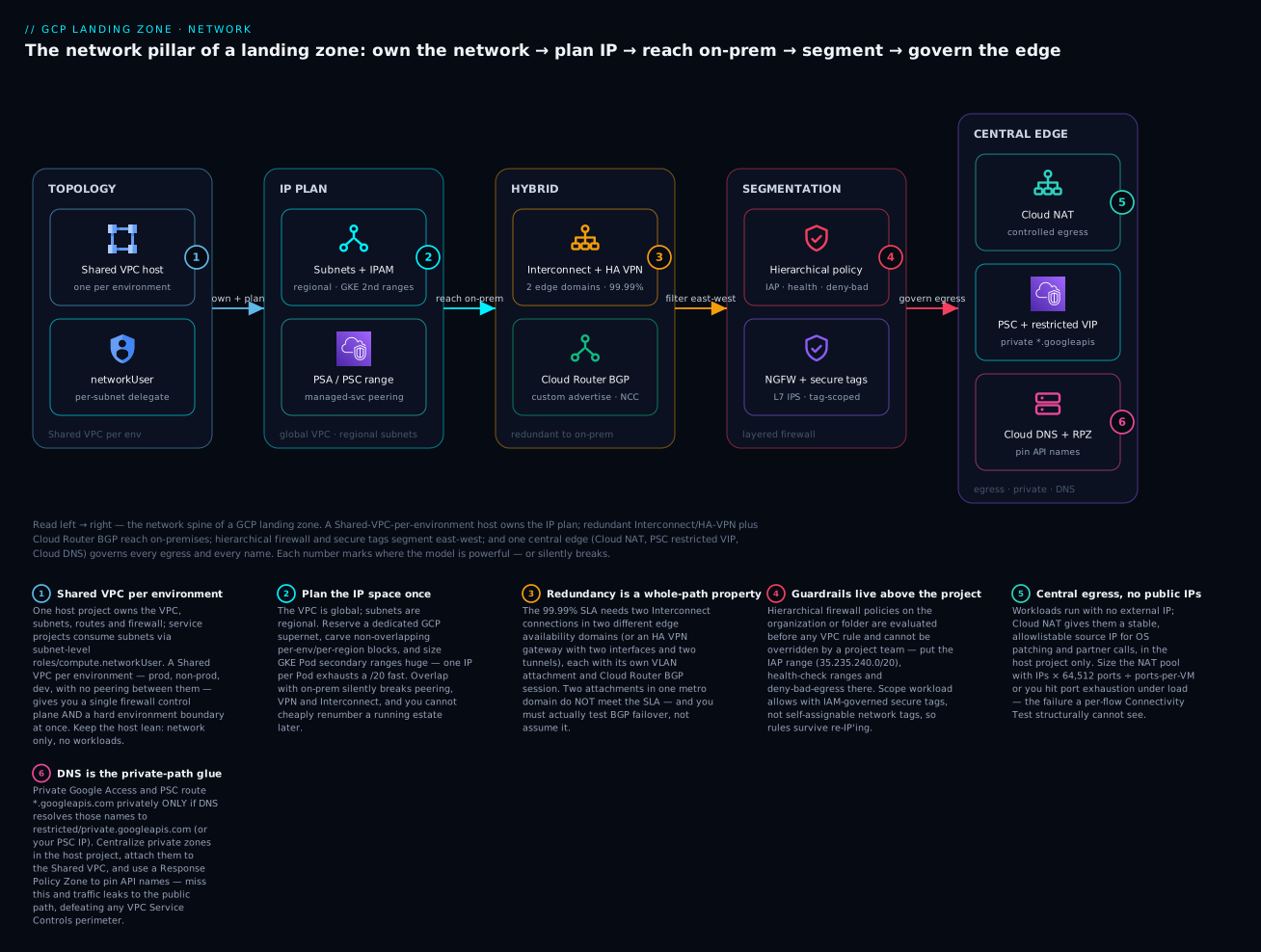
Read the diagram left → right as the spine of the network pillar: a Shared-VPC-per-environment host owns the network and delegates subnets; a planned IP space gives global-VPC/regional-subnet layout with oversized GKE ranges; redundant Interconnect/HA-VPN plus Cloud Router BGP reach on-premises; a layered firewall (hierarchical policies for guardrails, secure tags + NGFW for workload rules) segments east-west; and one central edge — Cloud NAT for egress, PSC + the restricted VIP for private Google access, Cloud DNS for names — governs everything leaving. Each numbered badge marks where the model is powerful, or where it silently breaks.
Prerequisites and what you’ll be able to do
Know these first. You should be comfortable with the basic VPC building blocks — a subnet, a CIDR range (10.0.0.0/8 and friends), and what a firewall rule is (allow or deny, matched on direction, protocol, port, and source/destination). You should also understand GCP’s resource hierarchy (organization → folder → project) and the idea of an IAM role binding, because the whole tenancy model here is “who may use which subnet.” If any of that is fuzzy, these sibling lessons set it up — this article assumes parts 1 and 2 of the series are already in place:
- GCP Landing Zone: Resource Hierarchy — part 1, the organization/folder/project scaffold the networking folder and host projects slot into.
- GCP Landing Zone: Identity & IAM — part 2, the IAM and Organization Policy model this pillar leans on for
networkUsergrants and guardrails. - Shared VPC: multi-project network architecture — a hands-on deep dive on the host/service split you will use as the default topology.
- HA VPN, Cloud Router & BGP hybrid connectivity — the BGP and redundancy mechanics behind the hybrid section.
After this lesson you will be able to:
- Choose between Shared VPC per environment and hub-and-spoke for a given estate, and defend the choice on blast-radius, isolation, and transitivity grounds.
- Draft an IP plan that reserves a dedicated GCP supernet, sizes GKE Pod/Service secondary ranges correctly, and reserves a PSA range — with zero overlap against on-premises.
- Design a 99.99% hybrid topology (Interconnect across two edge domains, or HA VPN with two interfaces) and explain why two links in one metro domain do not qualify.
- Layer hierarchical firewall policies (org/folder guardrails) with network firewall policies scoped by secure tags, and decide when to reach for Cloud NGFW versus an NVA.
- Wire Private Google Access, PSC for Google APIs, Cloud NAT, and Cloud DNS so private workloads reach Google services without touching the internet — including the DNS half everyone forgets.
- Express the whole spine in Terraform / Infrastructure Manager so network changes go through the same review gate as IAM.
Where this fits
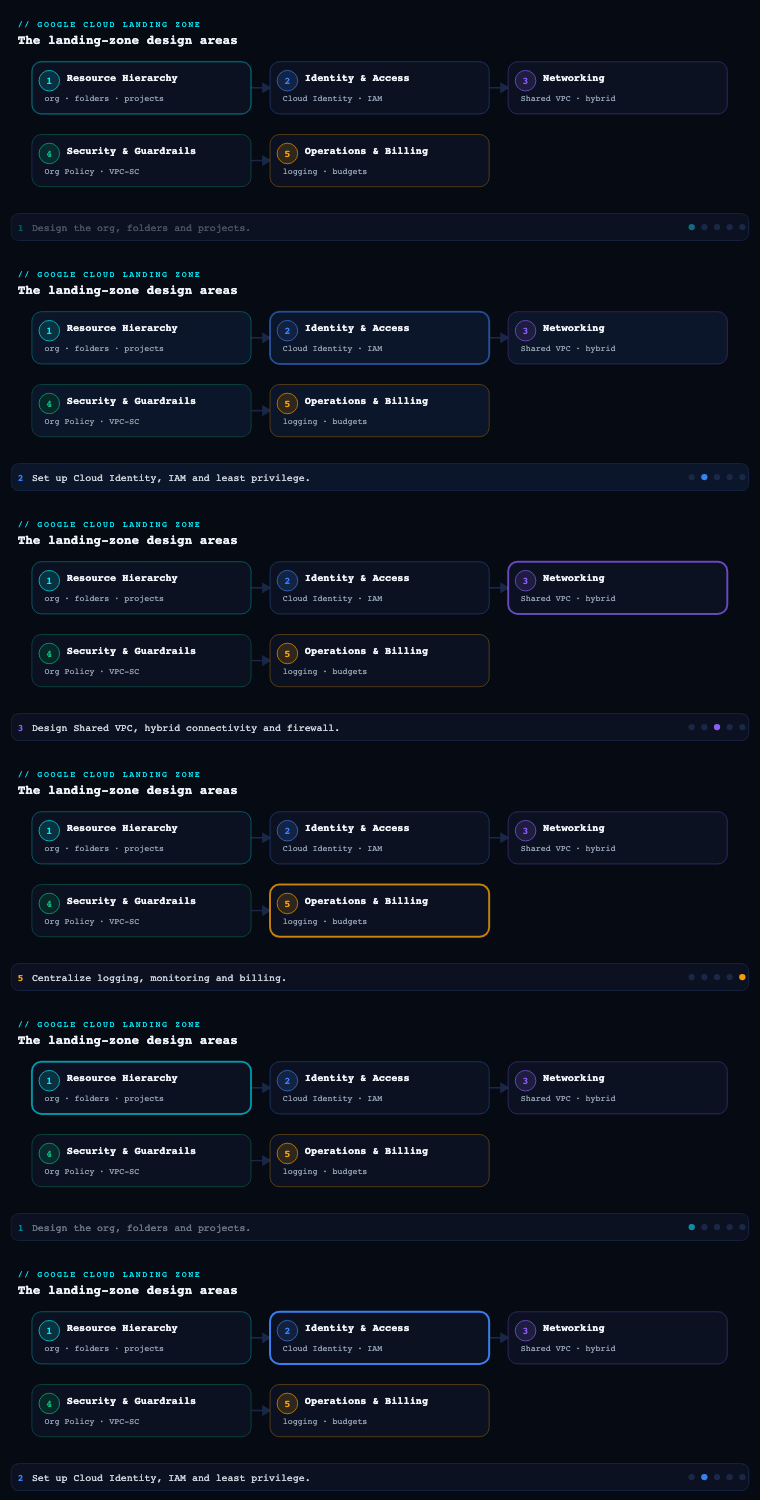
In the Google Cloud Landing Zone Design series we have already set the resource hierarchy (organization, folders, projects) in part 1 and identity, IAM, and Organization Policy in part 2. Networking is part 3, and it is where the abstract hierarchy becomes something packets actually traverse: it owns how workloads reach each other, how they reach on-premises and the internet, how they reach Google APIs without going to the internet, and how every flow is filtered and named. Get it wrong and you will be re-IP’ing production two years from now; get it right and security, hybrid connectivity, and DNS all hang off a stable, centrally-governed spine. This article is the spine.
Shared VPC vs hub-and-spoke
These are the two reference topologies in Google’s enterprise foundation, and the first architectural fork you face. They are not mutually exclusive — large estates run both — but the default decision drives everything downstream.
Shared VPC lets one project (the host project) own a VPC network and share its subnets with other projects (service projects). A VM in a service project gets an IP from a subnet that lives in the host project. The host project, owned by the network team, centralizes the VPC, subnets, routes, firewall rules, Cloud Router, Interconnect/VPN attachments, and Cloud NAT. Service-project teams just consume subnets via the compute.networkUser role. There is exactly one network and one firewall control plane for everything attached, so there is no east-west bottleneck and no need to peer dozens of VPCs.
Hub-and-spoke instead gives each environment or business unit its own VPC (a spoke) and connects them to a central hub VPC. Spokes reach shared services and on-premises through the hub. The connective tissue is one of three things: VPC Network Peering (cheap, but non-transitive — spokes cannot reach each other through the hub, and you hit the peering-group route/limit ceiling), Network Connectivity Center (NCC) with VPC spokes (Google’s managed transitive hub — spokes do exchange routes through the hub, removing the classic non-transitivity pain), or routing through a chain of NVA firewalls in the hub (full inspection, full control, full operational cost).
| Dimension | Shared VPC | Hub-and-spoke (peering) | Hub-and-spoke (NCC) |
|---|---|---|---|
| Network admin model | Centralized in host project | Per-spoke autonomy | Per-spoke autonomy, central hub |
| East-west between workloads | Native, no peering | Non-transitive — spoke↔spoke needs full mesh | Transitive via NCC hub |
| Firewall control plane | Single (host project) | Per-VPC | Per-VPC + hub |
| Blast radius of a misconfig | Larger (one network) | Smaller (isolated VPCs) | Medium |
| Typical fit | One BU / one environment per host | Strong BU isolation, M&A, regulatory separation | Many VPCs needing transitivity |
| Scale ceiling to watch | Subnets, IPs, FW rules per VPC | Peering group limits (routes, peerings) | NCC hub/spoke quotas |
How to do it well. The pattern Google’s foundation blueprint actually recommends is a Shared VPC per environment — separate host projects for production, non-production (dev/test/UAT), and a development sandbox, each with its own host project and its own VPC. You get centralized control and a hard environment boundary, because there is no peering between the prod and non-prod host projects by default. Reserve true hub-and-spoke for when business units demand independent network ownership, or when M&A / regulatory boundaries make a single shared network politically or legally untenable. Concretely:
- Put host projects in a dedicated
common/networkingor per-environment networking folder so IAM and Org Policy target them precisely. - Grant
roles/compute.networkUserat the subnet level, not project-wide — that is your tenancy control (team A only sees team A’s subnets). - Keep workload service projects free of any network admin role; they get use, never manage.
Decisions & artifacts: topology decision record (Shared VPC per env vs hub-spoke), host-project inventory, subnet-sharing IAM matrix, and a terraform module wiring google_compute_shared_vpc_host_project + google_compute_shared_vpc_service_project with per-subnet compute.networkUser bindings.
VPC design
Once topology is chosen, VPC design is about IP address planning, subnet layout, and routing — the decisions that are most expensive to reverse.
A GCP VPC is global: one VPC spans every region, and subnets are regional. Routes are global. This is a genuine differentiator versus AWS/Azure and it shapes the design — you do not need a VPC per region, you need a subnet per region. Two routing modes exist: regional (Cloud Router advertises only same-region subnets) and global dynamic routing (Cloud Router advertises all subnets in the VPC across regions). For a landing zone connected to on-premises, global dynamic routing is usually correct so a single Interconnect in one region can reach workloads in another — but understand it widens failure domains and route propagation.
IP planning is the heart of it. Reserve a large, well-documented RFC 1918 (and, increasingly, RFC 6598 100.64/10) supernet for all of GCP, then carve non-overlapping per-environment, per-region blocks. Plan for the four IP consumers that bite people later:
| IP consumer | What needs space | Planning note |
|---|---|---|
| Primary subnet range | VM/node primary NICs | Size per region, leave headroom |
| Pod secondary range (GKE alias IPs) | One IP per Pod | Huge — a /17–/14 per cluster is common with VPC-native GKE |
| Service secondary range (GKE Services) | One IP per ClusterIP Service | Smaller but still a dedicated alias range |
| PSA range for managed services | Cloud SQL, Memorystore, etc. | A /16-ish allocated range peered to Google’s producer VPC |
For GKE, always use VPC-native (alias IP) clusters with explicit secondary ranges — never routes-based — so Pods are first-class VPC IPs that firewall rules, Private Google Access, and on-prem routes all understand. For managed databases, reserve a Private Service Access (PSA) allocated range up front (google_compute_global_address with purpose = VPC_PEERING), or adopt Private Service Connect (PSC) endpoints where the service supports it (PSC avoids the consumed peering range and the transitivity caveats entirely).
How to do it well. Standardize a subnet naming convention ({env}-{region}-{tier}), keep a single source-of-truth IPAM spreadsheet or (better) Infrastructure Manager / Terraform state as the IPAM, enable flow logs on every subnet for security and troubleshooting, and turn on Private Google Access at the subnet level from day one (covered below). Decide MTU deliberately — 1460 default, or 8896 if you want jumbo frames consistently end-to-end.
Decisions & artifacts: the IP address management (IPAM) plan, subnet schedule (CIDR / region / secondary ranges per environment), routing-mode decision, GKE range reservations, and the PSA/PSC strategy doc.
Hybrid connectivity (Cloud Interconnect, Cloud VPN)
Almost no enterprise landing zone is an island; you need a deterministic, redundant path to on-premises and often to other clouds. GCP gives you three building blocks, and the choice is a function of bandwidth, SLA, and time-to-provision.
| Option | Bandwidth | SLA | Path | Use when |
|---|---|---|---|---|
| Dedicated Interconnect | 10/100 Gbps links (LAG up to terabits) | Up to 99.99% (with topology) | Private, your fiber into a Google colo | High, steady throughput; data-residency on the wire |
| Partner Interconnect | 50 Mbps–50 Gbps | Up to 99.99% | Via a supported service provider | No presence in a Google PoP; flexible bandwidth |
| HA VPN | ~3 Gbps per tunnel aggregate | 99.99% (two interfaces) | IPsec over the internet | Lower bandwidth, fast to stand up, or as Interconnect backup |
| Classic VPN | Per-tunnel | 99.9% | IPsec, single interface | Legacy only — avoid for new builds |
The connective glue for all of these is Cloud Router, which runs BGP to exchange routes dynamically with on-premises — no static routes to maintain. The 99.99% SLA is not free: it requires a specific redundant topology. For Dedicated Interconnect that means at least two Interconnect connections in two different metropolitan-area edge availability domains, each with its own VLAN attachment and Cloud Router BGP session. For HA VPN it means a gateway with two interfaces, two tunnels, to two peer devices, with BGP on each.
How to do it well.
- Make hybrid connectivity a property of the host project / networking project, never a workload project — it is a shared, centrally-governed asset.
- A very common pattern: Dedicated/Partner Interconnect as primary + HA VPN as encrypted backup over a different physical path. If your compliance requires encryption even over the private link, layer HA VPN over Cloud Interconnect or use MACsec on Cloud Interconnect.
- Control route exchange deliberately: use custom route advertisements on Cloud Router to advertise only the prefixes on-prem should see, and import only what GCP needs. With global dynamic routing, one regional attachment can reach all regions; weigh that against keeping failure domains regional.
- Plan link redundancy across edge availability domains and document the path diversity with your carrier — two attachments in the same domain do not buy you the 99.99% SLA.
Decisions & artifacts: the connectivity design (Interconnect type, number of links, edge domains), Cloud Router BGP plan (ASNs, advertised/learned prefixes), the redundancy/SLA topology diagram, and the runbook for failover testing.
Firewall and NGFW
Filtering is layered on GCP, and a mature landing zone uses all the layers rather than scattering legacy per-network rules.
1. Hierarchical firewall policies attach at the organization or folder level and apply before network-level rules. This is how you enforce non-negotiable, org-wide guardrails — block egress to known-bad ranges, allow IAP TCP forwarding source ranges (35.235.240.0/20) for break-glass SSH/RDP, permit Google health-check ranges — that no project team can override. Rules can allow, deny, or goto_next (delegate the decision down the hierarchy).
2. Global and regional Network Firewall Policies replace the old VPC firewall rules with policy objects you can attach to networks and reuse. Crucially they support tags for firewall (IAM-governed, secure tags — distinct from the old network tags that any instance owner could self-assign) so policy is expressed against governed identity rather than spoofable labels.
3. Layer-7 / NGFW. When you need IPS/IDS, TLS inspection, FQDN filtering, or threat intelligence at the packet level, you have two routes:
| Approach | What it is | Trade-off |
|---|---|---|
| Cloud NGFW Enterprise | Google-managed, in-line L7 inspection via Palo Alto-powered threat prevention, attached through firewall endpoints + security profiles | Native, no NVAs to run; per-zone firewall endpoint cost |
| 3rd-party NVA firewalls | Palo Alto / Fortinet / Check Point VMs, traffic steered via routes or an ILB-as-next-hop in a hub | Full vendor feature set, but you operate, scale, and patch them |
The modern, recommended default is Cloud NGFW Enterprise with security profiles referenced from firewall-policy rules — you keep the policy-as-code model and add intrusion prevention without standing up an NVA fleet. Reserve NVAs for teams with deep existing investment in a vendor’s management plane or features GCP does not yet expose.
How to do it well. Default-deny ingress and egress; open flows explicitly using secure tags, not IP lists, so rules survive re-IP’ing. Put the universal guardrails (IAP range, health checks, deny-bad-egress) in hierarchical policies at the org/folder layer; put workload-specific allows in network firewall policies scoped by tag; turn on Firewall Rules Logging for any deny rule you care about; and use Firewall Insights (Network Intelligence Center) to find shadowed and overly-permissive rules. Validate intended reachability with Connectivity Tests before and after every change.
Decisions & artifacts: the hierarchical-policy ruleset (Terraform), the secure-tag taxonomy and IAM bindings, the NGFW vs NVA decision record, security-profile definitions, and the logging/Firewall-Insights review cadence.
Private Google Access
By default, a VM without an external IP cannot reach Google APIs (Cloud Storage, BigQuery, Artifact Registry, etc.) — because that traffic would otherwise need the internet. In a hardened landing zone almost no workload VM has a public IP, so you must deliberately choose how private workloads reach Google services. There are several distinct mechanisms and they solve different problems:
| Mechanism | Solves | Reaches |
|---|---|---|
| Private Google Access (subnet) | No-external-IP VMs reaching Google APIs | Default + select Google APIs via internal path |
| Private Service Connect for Google APIs | A single, custom private endpoint IP for all Google APIs | all-apis / vpc-sc bundles, your chosen IP |
| Private Service Access (PSA) | Reaching managed services (Cloud SQL, Memorystore) over peering | Producer VPC behind a peered range |
| Private Service Connect (endpoint/backend) | Privately consuming a published service (managed or partner) | A specific service via a PSC endpoint |
| Private Google Access for on-prem | On-prem hosts reaching Google APIs via Interconnect/VPN | Through hybrid + the right DNS/route |
How to do it well. Enable Private Google Access on every subnet as a baseline. For governed estates layer Private Service Connect for Google APIs so all *.googleapis.com resolves to a single private IP you own (e.g., 10.0.0.2) — that gives you one auditable chokepoint and plays cleanly with VPC Service Controls perimeters. The piece people forget is DNS: the private path only works if *.googleapis.com (and per-service names) resolve to private.googleapis.com / restricted.googleapis.com (or your PSC endpoint IP) instead of public Anycast IPs — which is exactly the Cloud DNS work below. For on-prem access, you advertise the relevant Google API ranges over Cloud Router and create matching DNS response policy / private zones so on-prem resolvers return the restricted VIPs.
Decisions & artifacts: the subnet PGA enablement standard, the PSC-for-Google-APIs endpoint and IP, the restricted vs private VIP decision (use restricted.googleapis.com when you want VPC-SC-only services), and the DNS records that pin Google API names to the private path.
Cloud DNS
DNS is the connective layer most likely to be an afterthought and most likely to cause a 2 a.m. incident. In a landing zone you design it as deliberately as routing.
Cloud DNS offers several zone types you compose:
- Private zones — internal namespaces (e.g.,
corp.internal,gcp.example.com) resolvable only inside attached VPCs. - Cross-project / shared binding — a private zone created in the networking host project but attached to the Shared VPC so every service project resolves it.
- Forwarding zones — forward queries for on-prem domains to on-prem resolvers over Interconnect/VPN.
- DNS server policy with inbound/outbound forwarding — an inbound policy exposes a Cloud DNS resolver IP so on-prem can query GCP private zones; outbound forwarding (alternative name servers) sends GCP queries to on-prem.
- DNS peering — let one VPC resolve another’s private zones without re-creating them (central hub pattern).
- Response Policy Zones (RPZ) — override resolution, e.g., force
*.googleapis.comto the restricted VIP, or sinkhole malicious domains.
How to do it well. Centralize all private zones in the networking host project and attach/peer them outward, so there is one authoritative place for internal DNS. Build bidirectional hybrid resolution: an inbound server policy + a forwarding zone to on-prem gives clean two-way name resolution across the Interconnect. Use a Response Policy Zone to pin Google API names to restricted.googleapis.com — this is the operational glue that makes Private Google Access / PSC actually route privately. Enable DNSSEC on public zones, turn on Cloud DNS logging for query visibility and threat hunting, and keep zone definitions in Terraform so DNS changes go through the same review as firewall changes.
Decisions & artifacts: the DNS architecture diagram (private zones, forwarding, peering, server policies), the namespace plan, the RPZ ruleset for Google APIs and sinkholing, the DNSSEC/logging standard, and the hybrid-resolution runbook.
Wiring the spine: a worked example
The six sections above are the decisions; here is what they look like as code. Everything below is schema-correct against the current gcloud and Terraform provider surfaces. Project IDs, org/folder IDs and group emails are placeholders — swap in your own. Work top-to-bottom and you have built the whole spine: host + service projects, a planned subnet, subnet-scoped tenancy, a managed-service range, a guardrail firewall policy, central egress, and the DNS pin that makes private access actually private.
Step 1 — Designate a host project and attach a service project. The host owns the network; the service project only consumes it.
# Enable Shared VPC on the network team's host project
gcloud compute shared-vpc enable HOST_PROJECT_ID

# Attach a workload (service) project to that host
gcloud compute shared-vpc associated-projects add SERVICE_PROJECT_ID \
  --host-project=HOST_PROJECT_ID
Why: enabling a host and attaching services needs Shared VPC Admin (roles/compute.xpnAdmin) at the org or folder — project Owner is not enough. Keep the host lean (network only).
Step 2 — Create a custom-mode, global-routing VPC and a planned regional subnet. Custom mode means you decide every subnet; global routing lets one Interconnect reach every region.
gcloud compute networks create lz-vpc \
  --subnet-mode=custom \
  --bgp-routing-mode=global

gcloud compute networks subnets create prod-euw3 \
  --network=lz-vpc --region=europe-west3 \
  --range=10.130.0.0/20 \
  --secondary-range pods=10.160.0.0/14,services=10.176.0.0/20 \
  --enable-private-ip-google-access \
  --enable-flow-logs
Why: --enable-private-ip-google-access and --enable-flow-logs are day-one non-negotiables, and the two secondary ranges make this subnet ready for VPC-native GKE (pods for alias IPs, services for ClusterIPs) — note the Pod range is a /14, dwarfing the /20 primary, because GKE consumes one IP per Pod.
Step 3 — Delegate the subnet, not the project. This is the tenancy control: a team can deploy only into the subnet it owns.
gcloud compute networks subnets add-iam-policy-binding prod-euw3 \
  --region=europe-west3 --project=HOST_PROJECT_ID \
  --member="group:team-tracking@example.com" \
  --role="roles/compute.networkUser"
Why: bind networkUser at the subnet level. Grant it host-project-wide and every team can use every subnet — least privilege gone, and hard to walk back once fifty teams depend on it.
Step 4 — Reserve a Private Service Access range for managed databases. Cloud SQL, Memorystore and friends live behind a peered producer VPC and need a range you allocate up front.
gcloud compute addresses create google-managed-services-lz-vpc \
  --global --purpose=VPC_PEERING --prefix-length=16 \
  --network=lz-vpc

gcloud services vpc-peerings connect \
  --service=servicenetworking.googleapis.com \
  --ranges=google-managed-services-lz-vpc \
  --network=lz-vpc --project=HOST_PROJECT_ID
Why: this /16 is consumed by Google’s producer VPC over peering — plan it inside your GCP supernet so it never collides with a subnet or an on-prem range. Where the service supports it, prefer PSC endpoints, which skip the peered range entirely.
Step 5 — Put the universal guardrails above the project, in Terraform. A hierarchical firewall policy on the networking folder is evaluated before any VPC rule and cannot be overridden by a workload team.
resource "google_compute_firewall_policy" "guardrails" {
  parent      = "folders/${var.networking_folder_id}"
  short_name  = "lz-guardrails"
  description = "Landing-zone guardrails: IAP, health checks, deny-bad-egress"
}

# Allow IAP TCP forwarding so break-glass SSH/RDP works without public IPs
resource "google_compute_firewall_policy_rule" "allow_iap" {
  firewall_policy = google_compute_firewall_policy.guardrails.id
  priority        = 1000
  direction       = "INGRESS"
  action          = "allow"
  match {
    src_ip_ranges = ["35.235.240.0/20"]
    layer4_configs {
      ip_protocol = "tcp"
      ports       = ["22", "3389"]
    }
  }
}

resource "google_compute_firewall_policy_association" "assoc" {
  name              = "lz-guardrails-assoc"
  firewall_policy   = google_compute_firewall_policy.guardrails.id
  attachment_target = "folders/${var.networking_folder_id}"
}
Why: the policy enforces nothing until the association attaches it to the folder — the single most common “my rule isn’t working” cause is a policy that was created but never associated. Add companion rules for Google health-check ranges and a final deny-bad-egress that uses action = "deny" (not goto_next) so it cannot be re-opened below.
Step 6 — Central, no-public-IP egress with Cloud NAT. Private VMs still need to reach the internet for OS patching; give them one stable, allowlistable source IP set.
gcloud compute routers create lz-nat-router \
  --network=lz-vpc --region=europe-west3

gcloud compute addresses create lz-nat-ip-1 lz-nat-ip-2 --region=europe-west3

gcloud compute routers nats create lz-nat \
  --router=lz-nat-router --region=europe-west3 \
  --nat-external-ip-pool=lz-nat-ip-1,lz-nat-ip-2 \
  --nat-all-subnet-ip-ranges \
  --enable-logging
Why: a manual --nat-external-ip-pool gives deterministic IPs partners can allowlist (auto-allocation hands out ephemeral IPs that rotate). Each IP provides 64,512 source ports — size the pool with IPs × 64,512 ÷ ports-per-VM or you hit port exhaustion under load.
Step 7 — Pin Google APIs to the private path in Cloud DNS. This is the half everyone forgets: without it, PGA/PSC are configured but names still resolve to public Anycast and traffic leaks to the internet.
# Private zone for googleapis.com, attached to the VPC
gcloud dns managed-zones create googleapis \
  --dns-name=googleapis.com. \
  --networks=lz-vpc --visibility=private \
  --description="Pin Google APIs to the restricted VIP"

# A record for the restricted VIP block (199.36.153.4/30)
gcloud dns record-sets create restricted.googleapis.com. \
  --zone=googleapis --type=A --ttl=300 \
  --rrdatas=199.36.153.4,199.36.153.5,199.36.153.6,199.36.153.7

# Wildcard CNAME so *.googleapis.com follows the restricted VIP
gcloud dns record-sets create "*.googleapis.com." \
  --zone=googleapis --type=CNAME --ttl=300 \
  --rrdatas=restricted.googleapis.com.
Why: restricted.googleapis.com (VIP 199.36.153.4/30) reaches only VPC-SC-supported APIs and is the right choice inside a perimeter; use private.googleapis.com (199.36.153.8/30) if you need APIs that VPC-SC does not yet cover. Pair the DNS pin with the firewall allow and a route for the VIP — private access is firewall + route + DNS, all three.
Real-world enterprise scenario
Meridian Freight Logistics is a fictional global logistics company (~9,000 employees, operations in 14 countries) migrating from two on-prem data centers (Frankfurt, Singapore) onto GCP. Their regulator requires that production and non-production never share a network, and that all egress to the internet and all Google-API traffic be auditable. Their existing on-prem uses 10.0.0.0/8 heavily, so GCP must avoid overlap. They organize the foundation under a Networking folder with three host projects: mfl-net-prod, mfl-net-nonprod, mfl-net-dev.
Topology (Shared VPC per environment). Meridian rejects a single shared network and rejects full hub-and-spoke. They deploy one Shared VPC per environment, each in its own host project — satisfying the regulator’s hard prod/non-prod boundary while keeping a single firewall control plane per environment. Workloads live in ~40 service projects (mfl-tracking-prod, mfl-billing-prod, …) that consume subnets via subnet-level compute.networkUser. There is no peering between prod and non-prod.
VPC design. They reserve 10.128.0.0/9 exclusively for GCP (carved away from the busy on-prem 10.0.0.0/9). Each environment-region gets a planned block: prod europe-west3 primary 10.130.0.0/20, GKE Pod range 10.160.0.0/14, Service range 10.176.0.0/20; prod asia-southeast1 a parallel block. All GKE is VPC-native with explicit secondary ranges. They pick global dynamic routing so a Frankfurt Interconnect can reach Singapore workloads during a regional event. A PSA allocated range (10.252.0.0/16) is reserved for Cloud SQL and Memorystore. Flow logs are on for every subnet.
Hybrid connectivity. Meridian provisions Dedicated Interconnect: two 10 Gbps connections in two edge availability domains at the Frankfurt colo (plus a matching pair at Singapore), each with its own VLAN attachment and Cloud Router BGP session, for the 99.99% SLA. HA VPN runs as encrypted backup over the public internet on a diverse path. Cloud Router uses custom advertisements to publish only the GCP supernet to on-prem and learn only the data-center prefixes.
Firewall and NGFW. A hierarchical firewall policy at the Networking folder enforces: allow IAP range 35.235.240.0/20, allow Google health-check ranges, deny a curated list of malicious egress CIDRs, else goto_next. Global network firewall policies express workload allows using secure tags (tag: tier-web, tag: tier-db) so rules survive re-IP’ing. For PCI-scoped billing flows they enable Cloud NGFW Enterprise with a security profile doing intrusion prevention, attached via firewall endpoints in each prod zone — no NVA fleet to run. Every deny rule logs; Firewall Insights runs a monthly shadow-rule review; Connectivity Tests gate every change.
Private Google Access. PGA is on for all subnets. They deploy Private Service Connect for Google APIs with endpoint IP 10.128.0.2, scoped to the vpc-sc bundle, wrapped in a VPC Service Controls perimeter so data cannot exfiltrate to a personal project. No production VM has an external IP; egress to the internet (for OS patching) goes through Cloud NAT in the host project only.
Cloud DNS. All private zones (gcp.meridianfreight.com, reverse zones) live in the host projects and are attached to the Shared VPCs. An inbound server policy lets on-prem resolvers query GCP names; a forwarding zone sends *.corp.meridianfreight.com to the Frankfurt/Singapore resolvers over the Interconnect. A Response Policy Zone pins *.googleapis.com to restricted.googleapis.com, so every private-path API call resolves to the PSC endpoint. DNSSEC is enabled on the public zone; Cloud DNS query logging feeds the SIEM.
Measurable outcome. Within one quarter Meridian onboarded 40 service projects against a stable IP plan with zero overlap incidents, passed the regulator’s network-segregation audit on first submission, achieved the 99.99% Interconnect SLA with a tested sub-minute BGP failover, and reduced firewall rules by ~60% by collapsing per-instance network tags into ~12 secure tags governed by IAM. Mean time to add a new workload’s connectivity dropped from days (ticket-driven on-prem) to a Terraform PR merged in under an hour.
Going deeper
The concepts above are enough to build a correct landing-zone network. This section is for the edges that surface at scale, in an audit, or on a bill — the things an experienced engineer is expected to have already reasoned about.
Firewall evaluation order is fixed by hierarchy, not by priority number. A packet is evaluated against hierarchical policies on the organization first, then each folder down the tree, then global and regional network firewall policies on the VPC, then legacy VPC firewall rules, then an implied allow egress / deny ingress pair. Priority (lower number wins) orders rules within a single policy only. A priority-100 rule in a VPC policy does not beat a priority-2000 rule in the org policy, because the whole org policy is consulted before the VPC layer is ever reached. This is why guardrails belong at the org/folder layer: a project team cannot out-prioritise them. The corollary trap: a folder-level “deny all egress” set to goto_next is not a deny — it defers to the next layer, and a VPC allow below can re-open it. Make guardrail denies action = deny, terminal.
Secure tags are IAM resources, not labels. A legacy network tag is free text any instance editor can self-assign, so it is spoofable — anyone who can edit a VM can attach tag: tier-db and inherit its firewall allows. A secure tag is an org-level key/value resource; binding it to a resource requires the roles/resourcemanager.tagUser permission, and firewall policies match on the tag’s governed identity. At scale this is also a rule-count collapse: Meridian went from hundreds of per-instance network-tag rules to ~12 tag-scoped policy rules. Secure tags also gate IAM conditions and Org Policy, so the same taxonomy does double duty.
Peering non-transitivity and the limits that bite. VPC Network Peering is strictly non-transitive — if spoke-A and spoke-B both peer with hub, they still cannot reach each other, and neither learns routes through the hub. You also inherit peering-group limits (a cap on total learned/advertised routes across a VPC and its directly-peered VPCs, and a cap on peerings per network), which quietly throttle a growing hub. Network Connectivity Center with VPC spokes solves the transitivity: spokes exchange routes through the hub as a managed mesh, replacing an N² peering fabric — at the cost of NCC hub/spoke quotas you now track. Shared-VPC-per-environment sidesteps peering entirely for intra-environment traffic, which is why it is the recommended default.
Global dynamic routing widens the failure domain. Choosing --bgp-routing-mode=global means one Cloud Router advertises every subnet in the VPC across every region, so a single regional Interconnect can reach all workloads — convenient, and often correct for hybrid. But it also means a route flap or a mis-advertised prefix propagates estate-wide rather than staying regional, and Cloud Router’s learned/advertised route counts are consumed globally. Summarise aggressively with custom advertisements (advertise a /16, not sixty /24s), and set the same route policy in both directions or you get asymmetric routing that breaks stateful firewalls — the single most common hybrid bug.
restricted vs private VIP, and why the distinction matters for VPC-SC. restricted.googleapis.com (199.36.153.4/30) resolves only APIs that support VPC Service Controls, so it is the correct pin inside a perimeter — a workload literally cannot reach a non-perimeter-aware API and exfiltrate through it. private.googleapis.com (199.36.153.8/30) resolves a broader set including some APIs VPC-SC does not cover. Pick restricted by default in a governed estate and only fall back to private for a specific API you have vetted. Either way the DNS pin, the route for the VIP, and the firewall allow are all required together.
Cost levers people discover on the bill. Cloud Interconnect charges per VLAN attachment capacity plus per-GB egress that is cheaper than standard internet egress — a real reason to route bulk on-prem traffic over Interconnect rather than VPN. Cloud NAT bills per gateway-hour plus per-GB processed, so a NAT per region across many small subnets adds up; consolidate. Cloud NGFW Enterprise bills per firewall endpoint per zone plus inspected traffic — enable it on the flows that need L7, not estate-wide. PSC endpoints bill hourly plus per-GB. And GKE Pod IP exhaustion is a hidden cost: undersize the Pod secondary range and you cannot add nodes, forcing a disruptive re-range.
Quotas and limits to design against. Subnets, routes, and firewall rules per VPC; instances per VPC; secondary ranges per subnet; peerings per network and the peering-group route limit; Cloud Router learned/advertised route caps; NCC spokes per hub. None of these are infinite, and several are silent until you hit them (a cluster that will not scale, a peering that will not add). Track them in your IPAM/quota doc and request increases ahead of a migration wave, not during one.
MTU is an end-to-end contract. A VPC’s MTU (1460 default, up to 8896 for jumbo frames) must match across the VPC, the VMs, and the hybrid path. Set 8896 for throughput-heavy workloads only if on-prem and the Interconnect support it end-to-end; a mismatch causes fragmentation or black-holed packets that look like an application bug, not a network one.
Org Policy is the belt to the firewall’s braces. Pair the network design with constraints like compute.vmExternalIpAccess (deny public IPs), compute.restrictSharedVpcSubnetworks (which subnets a service project may use), compute.restrictVpcPeering, and compute.skipDefaultNetworkCreation. The firewall says what traffic may flow; Org Policy says what network shapes may exist at all — together they make the landing zone’s network posture declarative and un-drift-able.
Deliverables & checklist
Common pitfalls
- Overlapping CIDRs with on-prem (or future M&A). The single most expensive mistake — it blocks routing and is nearly impossible to fix in production. Reserve a dedicated GCP supernet up front, keep a real IPAM, and over-allocate GKE Pod ranges (they consume an IP per Pod and silently exhaust).
- Relying on legacy network tags for firewall scope. Old network tags are self-assignable by anyone who can edit an instance, so they are spoofable. Use secure tags (IAM-governed) in network firewall policies and put universal guardrails in hierarchical policies the project teams cannot override.
- Building hybrid for “99.99%” but landing both links in one edge domain. Two attachments in the same metro availability domain do not meet the SLA. Require two edge availability domains (and ideally an HA VPN backup on a diverse path), and actually test BGP failover.
- Turning on Private Google Access but forgetting the DNS half. PGA/PSC route privately only if
*.googleapis.comresolves toprivate/restricted.googleapis.com(or your PSC IP). Without a Response Policy Zone, names resolve to public Anycast and traffic leaks to the internet path — defeating the control and any VPC-SC perimeter. - Assuming VPC Peering is transitive. Spokes peered to a hub cannot reach each other through it, and peering-group route limits bite at scale. Use Network Connectivity Center for transitive hubs, or design Shared-VPC-per-environment instead.
- Scattering DNS across projects. Per-project private zones drift and break hybrid resolution. Centralize private zones in the host project, attach/peer them outward, and run bidirectional hybrid resolution (inbound policy + forwarding zone) so names work both ways across the Interconnect.
Practice challenges
Reading the design is easy; making the calls — sizing IP space, qualifying an SLA topology, picking the control that matches the layer — is the skill. Work each challenge the way the lesson teaches before opening the solution. They escalate from an obvious call to genuine judgement, and a couple hide a distractor designed to tempt you toward the wrong tool.
Challenge 1 (beginner). Your on-prem already uses 10.0.0.0/8 heavily. Propose a GCP supernet that will not overlap, then give one prod region’s primary, GKE Pod, and GKE Service ranges.
<details> <summary>Model answer</summary>
Reserve a dedicated block inside 10.0.0.0/8 that on-prem does not use — e.g. carve 10.128.0.0/9 exclusively for GCP. Then for prod europe-west3: primary 10.130.0.0/20, Pod secondary 10.160.0.0/14, Service secondary 10.176.0.0/20. Why: a dedicated, documented GCP supernet with an oversized Pod range (a /14, because GKE burns one IP per Pod) is what prevents the overlap-and-exhaustion incidents that are nearly impossible to fix later.
</details>
Challenge 2 (beginner). Write the gcloud to create a custom-mode, global-routing VPC and a europe-west3 subnet with Pod and Service secondary ranges, Private Google Access, and flow logs enabled.
<details> <summary>Model answer</summary>
gcloud compute networks create lz-vpc \
  --subnet-mode=custom --bgp-routing-mode=global

gcloud compute networks subnets create prod-euw3 \
  --network=lz-vpc --region=europe-west3 \
  --range=10.130.0.0/20 \
  --secondary-range pods=10.160.0.0/14,services=10.176.0.0/20 \
  --enable-private-ip-google-access \
  --enable-flow-logs
Why: --subnet-mode=custom (never auto), VPC-native secondary ranges, PGA, and flow logs are the day-one baseline every landing-zone subnet should carry.
</details>
Challenge 3 (intermediate). A service-project team can deploy VMs into every subnet in the host, including another team’s. What single IAM change fixes this, and at what scope?
<details> <summary>Model answer</summary>
Grant roles/compute.networkUser at the individual subnet (gcloud compute networks subnets add-iam-policy-binding <subnet> --region=<r> --member=group:team@... --role=roles/compute.networkUser) and remove any host-project-wide networkUser binding. Why: subnet-scoped networkUser is the tenancy control — granted project-wide, every service project can use every subnet, and least privilege is gone.
</details>
Challenge 4 (intermediate). You need the 99.99% Dedicated Interconnect SLA. Your carrier offers two 10 Gbps connections, but both terminate in the same metropolitan edge availability domain. Does this meet the SLA? What is the fix?
<details> <summary>Model answer</summary>
No. The 99.99% topology requires two connections in two different edge availability domains, each with its own VLAN attachment and Cloud Router BGP session. Two attachments in one metro domain share a failure domain and qualify only for a lower tier. Fix: place the second connection in a different edge availability domain (and add HA VPN as encrypted backup on a diverse physical path). Why: redundancy is a whole-path property, and the SLA is defined against edge-domain diversity, not raw link count. </details>
Challenge 5 (advanced). Private Google Access is enabled on the subnet, a route sends the restricted VIP to the internet gateway, and the firewall allows 199.36.153.4/30 — yet SDK calls to storage.googleapis.com still egress to the public internet. Diagnose and fix.
<details> <summary>Model answer</summary>
DNS is the missing piece. Without an override, storage.googleapis.com resolves to a public Anycast IP, so the packet never uses the restricted VIP. Create a private managed zone for googleapis.com attached to the VPC with restricted.googleapis.com. → A 199.36.153.4–7 and *.googleapis.com. → CNAME restricted.googleapis.com.. Why: private access is firewall + route + DNS; the first two are configured and the third is not, so names still resolve public and traffic leaks.
</details>
Challenge 6 (advanced). Two spokes are peered to a hub VPC. Each reaches the hub’s shared services but they cannot reach each other, and you are near the peering-group route limit. Give the two viable fixes and the trade-off between them.
<details> <summary>Model answer</summary>
(1) Network Connectivity Center with VPC spokes — spokes exchange routes transitively through the hub as a managed mesh, and route management consolidates; cost: NCC hub/spoke quotas to track. (2) Re-architect to Shared-VPC-per-environment — intra-environment traffic becomes native with no peering at all; cost: one broader firewall control plane per environment. Trade-off: NCC preserves per-BU VPC autonomy but adds a managed hub to operate; Shared VPC centralises control and removes peering entirely. Why: VPC peering is non-transitive and route-limited by design — reaching for “just peer them together” is the distractor. </details>
Common beginner mistakes
- “I need a VPC per region.” A GCP VPC is global — one VPC spans every region. You need a subnet per region, not a VPC per region. Right model: global VPC, regional subnets, global routes.
- “A subnet and a VPC are both regional.” Only the subnet is regional; the VPC (and its routes and firewall policies) is global. Right model: the VPC is the whole country, a subnet is one city’s street grid.
- “A VM must have an external IP to reach the internet or Google APIs.” No — Cloud NAT reaches the internet and Private Google Access reaches Google APIs, both with no external IP. Right model: external IP and reachability are decoupled; a hardened workload has neither a public IP nor a reachability problem.
- “Network tags and secure tags are the same thing.” Network tags are self-assignable free text (spoofable by anyone who can edit the VM); secure tags are IAM-governed key/value resources. Right model: scope firewall policy with secure tags so rules can’t be spoofed and survive re-IP’ing.
- “VPC Peering is transitive like a router.” Peering is strictly non-transitive — spokes peered to a hub cannot reach each other through it, and you hit peering-group route limits. Right model: use Network Connectivity Center for transitivity, or Shared-VPC-per-environment to avoid peering.
- “Turning on Private Google Access makes API traffic private.” PGA is only one of three required pieces — you also need a route for the VIP and a DNS override pinning
*.googleapis.comto the restricted/private VIP. Right model: private access = firewall + route + DNS. - “Shared VPC means one giant network for the entire org.” The recommended pattern is a Shared VPC per environment (prod / non-prod / dev), each isolated with no peering between them. Right model: centralised control within an environment, hard boundary between environments.
- “DNS is an afterthought I’ll wire up later.” DNS is the connective glue that makes private access, hybrid resolution, and VPC-SC actually work — and the most common cause of a 2 a.m. incident. Right model: design DNS as deliberately as routing, centralised in the host project.
Glossary
- Shared VPC — a model where one host project owns a VPC and shares its subnets with attached service projects, giving one central network and firewall control plane.
- Host project / service project — the project that owns the shared network (host) versus a project that consumes delegated subnets to run workloads (service).
- Hub-and-spoke — a topology where each environment/BU gets its own VPC (spoke) connected to a central hub, via peering, NCC, or NVA chains.
- VPC Network Peering — a direct, non-transitive connection between two VPCs; spokes peered to a hub cannot reach each other through it.
- Network Connectivity Center (NCC) — Google’s managed hub that makes VPC (and hybrid) spokes transitive, replacing an N² peering mesh.
- Custom-mode VPC — a VPC where you create every subnet explicitly (versus auto-mode, which pre-creates one per region); always use custom mode for a landing zone.
- Secondary range / alias IP — an additional CIDR on a subnet used for VPC-native GKE (one range for Pods, one for Services) so Pods are first-class VPC IPs.
- Private Service Access (PSA) — a reserved allocated range peered to Google’s producer VPC so you can reach managed services (Cloud SQL, Memorystore) privately.
- Private Service Connect (PSC) — a private endpoint IP in your VPC for a published or Google service, avoiding PSA’s consumed peering range and transitivity caveats.
- Private Google Access (PGA) — a subnet setting that lets no-external-IP VMs reach Google APIs over an internal path.
- Restricted / private VIP —
199.36.153.4/30(restricted.googleapis.com, VPC-SC-aware APIs only) and199.36.153.8/30(private.googleapis.com, broader set) — the private endpoints Google API names are pinned to. - Cloud Interconnect (Dedicated / Partner) — a private physical (or provider-mediated) link into Google, for high-bandwidth, low-latency hybrid connectivity.
- HA VPN — a redundant IPsec VPN gateway with two interfaces and two tunnels that earns a 99.99% SLA over the internet.
- Cloud Router — the managed BGP speaker that dynamically advertises and learns routes across a hybrid link, so you never hand-maintain static routes.
- BGP — Border Gateway Protocol, the routing protocol Cloud Router uses to exchange prefixes with on-premises.
- Edge availability domain — a metro-level failure domain for Interconnect; the 99.99% SLA requires two connections in two different ones.
- Global dynamic routing — a VPC mode where Cloud Router advertises subnets across all regions, so one regional attachment can reach the whole VPC.
- Hierarchical firewall policy — a firewall policy attached to the organization or a folder, evaluated before any VPC rule and un-overridable by a project team.
- Network firewall policy — a policy attached to a VPC (global or regional), the modern replacement for legacy VPC firewall rules, supporting secure tags.
- Secure tag — an IAM-governed key/value resource used as a firewall target, distinct from a spoofable, self-assignable network tag.
- Cloud NGFW (Enterprise) — Google-managed, in-line L7 firewalling (IPS/IDS, TLS inspection) via firewall endpoints and security profiles, with no NVAs to run.
- NVA (Network Virtual Appliance) — a third-party firewall VM (Palo Alto, Fortinet, …) traffic is steered through when you need vendor-specific features.
- Cloud NAT — managed source-NAT giving no-external-IP VMs a stable, allowlistable outbound IP; egress-initiated only, no inbound.
- Cloud DNS private zone — an internal namespace resolvable only inside attached VPCs; centralise these in the host project.
- Forwarding zone / DNS server policy — mechanisms to forward queries to on-prem resolvers (outbound) or expose a GCP resolver IP to on-prem (inbound) for bidirectional hybrid resolution.
- Response Policy Zone (RPZ) — a Cloud DNS override used to pin
*.googleapis.comto the restricted VIP or to sinkhole malicious domains. - IPAM — IP Address Management: the authoritative plan (spreadsheet or, better, Terraform state) of every CIDR the estate uses.
- VPC Service Controls perimeter — an API-layer boundary that stops data exfiltration to projects outside the perimeter, complementing IP-layer egress control.
What’s next
Part 4 of Google Cloud Landing Zone Design moves from the network spine to security and governance — VPC Service Controls perimeters, Security Command Center, organization policy guardrails, and centralized logging — layering detection and data-exfiltration controls on the foundation you just built.