In a nutshell
Every landing zone has a layer that answers one question before any resource can be touched: who — or what — is allowed to do this? That is the identity pillar. It has two halves. The first is authentication — proving you are who you say you are — which lives in your existing corporate identity provider (Microsoft Entra ID, Okta, Ping) and is trusted by Google through Cloud Identity. The second is authorization — deciding what a proven identity may do — which lives in Google Cloud IAM, a policy engine that grants roles to principals across the resource hierarchy from Part 1.
Picture a large office building. Cloud Identity is the security desk that issues every badge and knows every employee; your corporate IdP is HR, the real source of who works here — the security desk simply trusts HR’s list and syncs from it. You never wire a specific door to a named person (“only Jane opens Lab 3”); you wire doors to badge types (“anyone holding a Lab badge”), and HR decides who carries which badge. That badge type is a Google Group, and the door it opens is an IAM role. Robots and delivery carts — your workloads and CI jobs — don’t get a permanent master key to carry around in a pocket where it can be dropped; they get a short-lived pass from a dispenser at the door each time (attached service accounts and Workload Identity Federation). And two or three physical master keys live in a sealed glass case for the day the badge system itself is down — the break-glass super-admins. Get this pillar right and networking, security, and CI/CD all inherit clean, auditable, least-privilege access; get it wrong and the hierarchy is just expensive scaffolding.
Level: Advanced · Time: ~34 min · Prerequisites: Part 1 — the resource hierarchy (Organization, folders, projects, inheritance) and the basic IAM idea that a principal is granted a role on a resource.
After this lesson you can:
- Explain why Cloud Identity/Workspace is the org root and how to federate authentication to an external IdP with SAML/OIDC while provisioning users and groups with SCIM or GCDS.
- Separate the super-admin tier from Organization Admin, and design a break-glass account model with FIDO2 and MFA.
- Design groups-based IAM (function → environment → team groups) and bind roles to groups at the lowest sensible node — never to users.
- Choose between basic, predefined, and custom roles, and add context with IAM Conditions and IAM Deny policies.
- Give non-human workloads identity with attached service accounts, GKE Workload Identity, and Workload Identity Federation — keyless — and ban exported keys org-wide.
- Wire up the least-privilege toolchain: IAM Recommender, Policy Analyzer, Privileged Access Manager (JIT), and Org Policy guardrails.
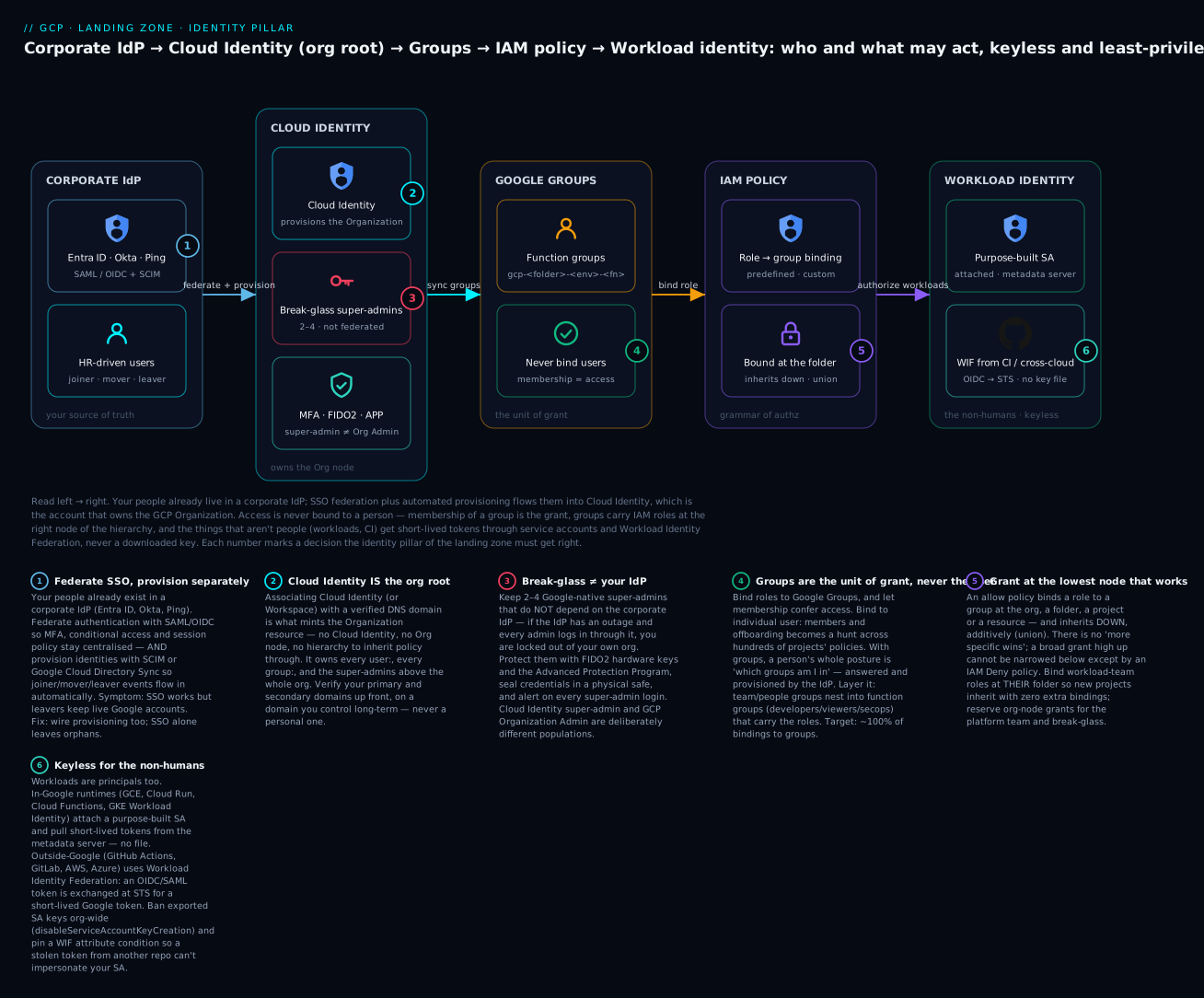
Read left → right: your people flow from the corporate IdP into Cloud Identity (which owns the Org node), a person’s access is decided by which groups they belong to, groups carry IAM roles bound at the right node of the hierarchy, and the non-humans — workloads and CI — get short-lived tokens through service accounts and Workload Identity Federation, never a downloaded key; two or three non-federated break-glass super-admins sit off to the side for the day the IdP is down.
Where this fits
In Part 1 we built the resource hierarchy — the Organization node, folders, and projects that give Google Cloud its shape. Identity & Access is the layer that decides who and what may act on that hierarchy, and with what privilege. On Google Cloud every authenticated action resolves to a principal (a human, a group, or a workload) evaluated against an IAM allow policy attached somewhere on the hierarchy and inherited downward. Get this layer wrong and the hierarchy is just expensive scaffolding; get it right and every later phase — networking, security, CI/CD — inherits clean, auditable, least-privilege access. This article goes deep on the five pillars that make that possible: Cloud Identity as the identity source of truth, Google Groups as the unit of grant, IAM roles and policies as the grammar of authorization, service accounts plus Workload Identity Federation for non-human and cross-cloud access, and least-privilege design as the discipline that ties them together.
Cloud Identity — the source of truth for principals
What it is. Cloud Identity is Google’s standalone Identity-as-a-Service (IDaaS) product — effectively Google Workspace without the productivity apps. It provisions the Google Cloud Organization resource the first time it is associated with a verified DNS domain, and it owns the lifecycle of every human principal (user: members), every group:, and the super administrators who sit above the entire org. Without a Cloud Identity (or Workspace) account you cannot have an Organization node, and without an Organization node you have no hierarchy to inherit policy through — so Cloud Identity is genuinely the foundation stone of the landing zone, not an afterthought.
Why it matters. Cloud Identity is where the authoritative list of people lives. In almost every enterprise that list already exists in an external IdP — Microsoft Entra ID (Azure AD), Okta, or Ping. The landing-zone decision is therefore not “do we use Cloud Identity?” but “how does our existing IdP federate and provision into it?” The standard pattern is SAML 2.0 / OIDC for authentication (the IdP issues the assertion, Google trusts it) combined with automated provisioning via SCIM or Google Cloud Directory Sync (GCDS) so that joiners, movers, and leavers in the HR-driven IdP flow into Cloud Identity without manual toil. Federating SSO but forgetting provisioning is a classic mistake — you end up with orphaned Google accounts that outlive employment.
How to do it well.
- Verify the primary domain and any secondary domains up front; the verified domain is what gives you the Organization. Use a domain you control long-term, never a personal one.
- Federate authentication to the corporate IdP so MFA, conditional access, and session policy stay centralised. Reserve a tiny number of non-federated, Google-native super-admin accounts (typically 2–4) as break-glass — these must not depend on the IdP, or an IdP outage locks you out of your own org.
- Provision groups and users automatically. Prefer GCDS (a Google-supported on-prem connector that syncs from LDAP/AD) or SCIM from Entra/Okta. Decide the system of record — usually HR feeds the IdP, the IdP feeds Cloud Identity — and never let admins hand-create production principals.
- Harden the super-admin tier: enforce hardware security keys (FIDO2) for every super admin, enrol them in the Advanced Protection Program, store break-glass credentials in a physical safe, and alert on every super-admin login via Cloud Audit Logs.
- Separate the Cloud Identity admin role from the GCP Organization Admin role. A Cloud Identity super admin can reset any user and is not automatically a Google Cloud IAM admin — keep these populations deliberately distinct.
Key artifacts & decisions
| Decision | Options | Landing-zone default |
|---|---|---|
| Identity edition | Cloud Identity Free / Premium, or Workspace | Cloud Identity Premium (device mgmt, security centre, more API quota) |
| Authentication | Google-native vs federated SSO | Federated SAML/OIDC to corporate IdP |
| Provisioning | Manual, GCDS, or SCIM | GCDS (AD-centric) or SCIM (Entra/Okta) |
| Super admins | Count and protection | 2–4 break-glass, FIDO2 + Advanced Protection |
| Domains | Primary + secondaries | Verify all corporate domains; block consumer-account takeover |
Worked example — confirm the Org exists and who holds Organization Admin. The Organization resource appears only after Cloud Identity verifies a domain. From there, treat “who is an Organization Administrator” as a tiny, named, auditable set — and remember it is a different thing from a Cloud Identity super admin (managed in the Admin console, not in IAM):
# The Organization is minted by Cloud Identity when a domain is verified.
gcloud organizations list
#   DISPLAY_NAME   ID              DIRECTORY_CUSTOMER_ID
#   example.com    123456789012    C0abcd123               (representative)

# Who holds roles/resourcemanager.organizationAdmin? Should be a small group,
# not a pile of individual user: members.
gcloud organizations get-iam-policy 123456789012 \
  --flatten="bindings[].members" \
  --filter="bindings.role=roles/resourcemanager.organizationAdmin" \
  --format="table(bindings.members)"
#   MEMBERS
#   group:gcp-org-admins@example.com                         (representative)
If that second command returns individual user: members or an unfamiliar account, you have found your first landing-zone finding: Organization Admin has leaked outside the platform team.
Google Groups — the unit of grant, never the user
What it is. A Google Group is a named collection of members (group:platform-admins@example.com) that is itself a valid IAM principal. Crucially, IAM treats a group exactly like a user when evaluating policy — so you bind roles to groups, and membership of the group is what actually confers access. Groups can nest (a group can be a member of another group), and that nesting is the lever that lets you model business reality without exploding the number of IAM bindings.
Why it matters. This is the single highest-leverage practice in GCP access management. If you bind roles directly to individual user: members, then onboarding, offboarding, and audits become a sprawling search across hundreds of projects’ IAM policies. Bind to groups instead and the entire access posture of a person is governed by which groups they belong to — a question answered (and provisioned) by your IdP. Access reviews collapse from “audit every binding” to “audit group membership,” and offboarding becomes a single membership removal in the IdP that propagates everywhere.
How to do it well.
- Adopt a strict naming convention that encodes scope, environment, and function so the group name alone tells an auditor what it grants — e.g.
gcp-<folder>-<env>-<function>@example.com→gcp-retail-prod-developers@example.com. - Map groups to the hierarchy, not to projects. Create groups aligned to folders (workload domains, environments) and bind them at the folder level so the grant inherits to every current and future project beneath. New projects then inherit access with zero extra bindings.
- Use a layered group model. Function groups (
*-developers,*-viewers,*-secops) are bound to roles; people groups (per team) are nested into function groups. Move a person between teams and their effective access changes automatically. - Provision membership from the IdP, never by hand in the Google Admin console. Entra ID dynamic groups or Okta group rules synced via SCIM/GCDS keep membership HR-driven.
- Control group settings: restrict who can create groups, disable external membership for privileged groups, and audit membership changes through the Cloud Identity Groups API and audit logs.
| Group layer | Example | Bound to a role? | Membership source |
|---|---|---|---|
| Function group | gcp-org-billing-admins |
Yes (Billing Account Admin) | Nested people groups |
| Environment group | gcp-retail-prod-developers |
Yes (custom Developer role at folder) | Nested team groups |
| People/team group | team-checkout-engineering |
No (only nests upward) | IdP / HR feed |
| Break-glass group | gcp-org-breakglass |
Yes (Org Admin, time-boxed) | Manual, tiny, alerted |
Worked example — bind a group to a role at a folder. The grant then inherits to every current and future project in that folder with no further bindings. Do it in gcloud for a one-off, and in Terraform for the version-controlled reality:
# Membership is provisioned from the IdP; here we only bind the group to a role.
# Bind at the FOLDER so all projects beneath inherit it.
gcloud resource-manager folders add-iam-policy-binding FOLDER_ID \
  --member="group:gcp-retail-prod-developers@example.com" \
  --role="organizations/123456789012/roles/kvDeveloper"
# Terraform — the source of truth. Note it is a *group* member, and a *folder* scope.
resource "google_folder_iam_member" "retail_prod_devs" {
  folder = "folders/FOLDER_ID"
  role   = "organizations/123456789012/roles/kvDeveloper" # org-level custom role
  member = "group:gcp-retail-prod-developers@example.com"
}
Use google_folder_iam_member (adds one binding, additive) rather than google_folder_iam_policy (authoritative — replaces the entire policy and will happily delete every other grant you didn’t list). The difference between those two resource types has ended more than one on-call evening.
IAM roles and policies — the grammar of authorization
What it is. Google Cloud IAM answers a single question: can this principal perform this permission on this resource? The answer is computed from an allow policy (Policy) — a set of bindings, each pairing a role (a bundle of permissions like roles/compute.networkAdmin) with one or more members and an optional IAM Condition. Policies attach to the Organization, a folder, a project, or in many cases an individual resource, and they inherit downward and are additive/union — a principal’s effective permissions are the union of everything granted at every level above and at the resource itself. There is no “deny by being more specific”; broad grants high in the hierarchy are dangerous precisely because they cannot be narrowed lower down except by IAM Deny policies.
Why it matters. Three role types exist and choosing among them is a real landing-zone decision:
| Role type | Examples | When to use | Caution |
|---|---|---|---|
| Basic (primitive) | roles/owner, roles/editor, roles/viewer |
Almost never in production | Thousands of permissions; editor can modify nearly everything — ban above sandbox |
| Predefined | roles/compute.networkAdmin, roles/bigquery.dataViewer |
The default workhorse | Google-maintained; granular; still review for scope |
| Custom | org-level org.kvNetworkOperator |
When predefined is too broad/narrow | You own maintenance as Google adds permissions |
How to do it well.
- Ban basic roles above the sandbox folder. Enforce with the Org Policy constraint
iam.allowedPolicyMemberDomainsfor domain restriction and use IAM Deny policies plus org policies to keeproles/owner/roles/editorout of shared and production folders. - Grant at the highest sensible node, no higher. Bind platform-team roles at the Organization or platform folder; bind workload-team roles at their folder. Never grant a workload team a role at the Org node.
- Use IAM Conditions to add context: time-bound access (
request.time), resource-name prefixes (resource.name.startsWith), or restricting a role to specific resource types. Conditions turn a coarse predefined role into a sharp grant. - Layer IAM Deny policies for guardrails that must hold regardless of additive allows — e.g. deny
iam.serviceAccounts.getAccessTokenoutside an approved set of principals, or deny deletion of org-level resources for everyone but break-glass. - Define custom roles at the Organization level (not per project) so they are reusable, version them in Terraform, and keep them few — a handful of well-named custom roles beats dozens of snowflakes.
- Manage every binding as code. IAM policy belongs in Terraform (
google_*_iam_*resources), reviewed via pull request, withauthoritativeresources used carefully so out-of-band console grants are detected and reverted.
A subtle but critical artifact is the IAM policy evaluation model your team must internalise: Deny policies are evaluated first and win; otherwise the union of all inherited allow bindings applies. Document this, because engineers coming from AWS expect explicit-deny-beats-allow everywhere, and on GCP allow policies are union-only. (The IAM deep-dive lesson walks the whole evaluation chain and the Recommender loop in detail.)
Worked example — a conditional grant, and a Deny guardrail. First a predefined role sharpened with an IAM Condition so it applies only to one region and only until year-end — a coarse roles/run.admin becomes a narrow, self-expiring grant:
gcloud projects add-iam-policy-binding PROJECT_ID \
  --member="group:gcp-retail-prod-deployers@example.com" \
  --role="roles/run.admin" \
  --condition='expression=resource.name.startsWith("projects/PROJECT_ID/locations/europe-west1") && request.time < timestamp("2026-12-31T00:00:00Z"),title=eu-run-2026,description=EU Cloud Run deploy, expires 2026'
Then an IAM Deny policy that must hold no matter what allow bindings exist — nobody may mint access tokens for service accounts except the approved CI group. Deny rules match permissions, not roles, so this cuts across every role that would otherwise grant it:
{
  "displayName": "deny-sa-token-minting-except-ci",
  "rules": [
    {
      "denyRule": {
        "deniedPrincipals": ["principalSet://goog/public:all"],
        "exceptionPrincipals": ["group:gcp-org-ci-deployers@example.com"],
        "deniedPermissions": ["iam.googleapis.com/serviceAccounts.getAccessToken"]
      }
    }
  ]
}
# Attach the deny policy high on the hierarchy so it inherits everywhere.
gcloud iam policies create deny-sa-token-minting-except-ci \
  --attachment-point="cloudresourcemanager.googleapis.com/organizations/123456789012" \
  --kind=denypolicies \
  --policy-file=deny.json
Because deny is evaluated before the allow union, even a stray roles/owner binding cannot out-vote this rule — which is exactly why Deny policies are the only real “explicit deny” GCP gives you.
Service accounts and Workload Identity Federation — identity for the things that aren’t people
What they are. A service account (SA) is a special principal that represents a workload rather than a human — a Compute Engine VM, a GKE pod, a Cloud Run service, a CI job. It is both an identity (it appears in IAM bindings as serviceAccount:...) and a resource (it has its own IAM policy controlling who may act as it). Historically workloads authenticated as an SA using a downloaded JSON service-account key — a long-lived static secret. That key is the single most common GCP credential-leak vector, which is why the modern landing zone treats exported SA keys as essentially forbidden and replaces them with two keyless mechanisms.
Why keyless matters — the two pillars:
- Attached service accounts + the metadata server for in-Google workloads. A VM, GKE Workload Identity, Cloud Run, or Cloud Functions runtime is attached to an SA and obtains short-lived OAuth tokens from the GCP metadata server automatically. No key file ever exists. For GKE specifically, GKE Workload Identity maps a Kubernetes service account to a Google service account so pods get scoped, keyless tokens.
- Workload Identity Federation (WIF) for outside-Google workloads. WIF lets an external identity — a GitHub Actions OIDC token, an AWS IAM role, an Azure AD/Entra workload, or any OIDC/SAML IdP — exchange its native credential for a short-lived Google access token via the Security Token Service (STS), with no service-account key. You create a Workload Identity Pool, add a Workload Identity Provider (the trust to GitHub/AWS/Azure/OIDC), define attribute mappings (
google.subject,attribute.repository, etc.) and attribute conditions that restrict which external identities are accepted, then grant those mapped principals the right to impersonate an SA. This is how the landing zone eliminates the last static keys from CI/CD and cross-cloud integrations. (See the dedicated Workload Identity Federation lesson for the full CI/CD keyless walkthrough.)
How to do it well.
- One purpose-built SA per workload, named for its job (
sa-checkout-api@<project>.iam.gserviceaccount.com); never reuse one SA across unrelated workloads and never use the default Compute/App Engine SAs (they carryroles/editor— disable their automatic grant with theiam.automaticIamGrantsForDefaultServiceAccountsorg policy). - Forbid SA key creation org-wide via
iam.disableServiceAccountKeyCreation, and forbid key upload viaiam.disableServiceAccountKeyUpload. Enforce keyless access everywhere instead. - Use Service Account impersonation for humans and pipelines that genuinely need an SA’s privileges: grant
roles/iam.serviceAccountTokenCreatoron the specific SA, mint a short-lived token on demand, and audit everygenerateAccessTokencall. This replaces shared keys with traceable, time-bound, per-principal access. - Scope WIF tightly. Always set an attribute condition (e.g.
assertion.repository == 'example/checkout' && assertion.ref == 'refs/heads/main') so a stolen OIDC token from an unrelated repo or branch cannot impersonate your SA. A pool/provider with no condition is a foot-gun. - Right-size SA permissions like any principal — predefined or custom roles at the project/resource scope, never
editor.
| Workload location | Recommended identity mechanism | Static key? |
|---|---|---|
| Compute Engine / Cloud Run / Cloud Functions | Attached SA + metadata server | No |
| GKE pods | GKE Workload Identity (KSA→GSA) | No |
| GitHub Actions / GitLab CI | Workload Identity Federation (OIDC) | No |
| AWS or Azure workloads calling GCP | WIF with AWS/Azure provider | No |
| Legacy / unsupported external system | SA key only as last resort, short rotation + Secret Manager | Avoid |
Worked example — keyless three ways. First, forbid keys org-wide so the anti-pattern can’t come back; then wire GKE pods and GitHub Actions to identities instead of files.
# org-policy.yaml — kill the #1 credential-leak vector at the root.
name: organizations/123456789012/policies/iam.disableServiceAccountKeyCreation
spec:
  rules:
    - enforce: true
gcloud org-policies set-policy org-policy.yaml
# GKE Workload Identity — the Kubernetes SA is annotated with the Google SA it maps to.
apiVersion: v1
kind: ServiceAccount
metadata:
  name: checkout-api
  namespace: checkout
  annotations:
    iam.gke.io/gcp-service-account: sa-checkout-api@PROJECT_ID.iam.gserviceaccount.com
# Let that specific KSA impersonate the GSA — the KSA member format is svc.id.goog[ns/name].
gcloud iam service-accounts add-iam-policy-binding \
  sa-checkout-api@PROJECT_ID.iam.gserviceaccount.com \
  --role="roles/iam.workloadIdentityUser" \
  --member="serviceAccount:PROJECT_ID.svc.id.goog[checkout/checkout-api]"

# GitHub Actions via WIF — pool + OIDC provider WITH an attribute condition (never omit it).
gcloud iam workload-identity-pools create github-pool \
  --location=global --display-name="GitHub Actions"

gcloud iam workload-identity-pools providers create-oidc github-provider \
  --location=global --workload-identity-pool=github-pool \
  --issuer-uri="https://token.actions.githubusercontent.com" \
  --attribute-mapping="google.subject=assertion.sub,attribute.repository=assertion.repository,attribute.ref=assertion.ref" \
  --attribute-condition="assertion.repository_owner == 'meridianpay' && assertion.ref == 'refs/heads/main'"

# Only main-branch builds of ONE repo may impersonate the deploy SA (scoped principalSet, not /*).
gcloud iam service-accounts add-iam-policy-binding \
  sa-deployer@PROJECT_ID.iam.gserviceaccount.com \
  --role="roles/iam.workloadIdentityUser" \
  --member="principalSet://iam.googleapis.com/projects/PROJECT_NUMBER/locations/global/workloadIdentityPools/github-pool/attribute.repository/meridianpay/checkout"
Nowhere in any of that is a downloadable key. The pod pulls its token from the metadata server; the CI job exchanges its OIDC token at STS. That is the entire point.
Least-privilege design — the discipline that ties it together
What it is. Least privilege is the operating principle that every principal — human or workload — holds the minimum roles needed for its task, at the narrowest scope, for the shortest time. On GCP this is not a single feature but a composition of the four pillars above plus a set of supporting tools that measure and enforce the principle continuously.
How to do it well — the GCP toolchain:
- IAM Recommender (Policy Intelligence) analyses 90 days of actual usage and recommends removing unused permissions or downgrading over-broad roles. Treat its findings as a backlog and drive excess-permission ratio toward zero.
- Policy Analyzer / Policy Troubleshooter answers “who can access what” and “why does this principal have this access” across the org — essential for access reviews and incident response.
- Privileged Access Manager (PAM) grants just-in-time, time-boxed, approval-gated elevation so standing access to powerful roles approaches zero; engineers request elevation, an approver signs off, the grant auto-expires.
- Org Policy Service enforces the structural guardrails least privilege depends on — restrict resource locations, disable SA key creation, ban external members, and disable default-SA grants — so misconfigurations are prevented, not just detected.
- IAM Conditions + Deny policies keep grants context-bound and provide the only “explicit deny” GCP offers.
| Discipline | GCP tool / mechanism | KPI to track |
|---|---|---|
| Remove unused permissions | IAM Recommender | Excess-permission ratio → 0 |
| Eliminate standing privilege | Privileged Access Manager (JIT) | % of privileged access that is standing |
| Group-based grants | Google Groups + IdP | % of bindings to groups vs users (target ~100%) |
| Keyless workloads | WIF + attached SAs + key-creation deny | Count of exported SA keys (target 0) |
| Prevent misconfig | Org Policy Service | # of high-risk org-policy violations |
| Answer “who can do what” | Policy Analyzer | Time to complete an access review |
Worked example — measure it, don’t guess it. Two commands do most of the audit work. The Recommender tells you what a principal isn’t using (your pruning backlog); Policy Analyzer answers “who can do this dangerous thing” across the entire inheritance chain — which a per-node get-iam-policy cannot, because it hides inherited grants:
# What roles/permissions has usage NOT justified in the last 90 days?
gcloud recommender recommendations list \
  --project=PROJECT_ID \
  --recommender=google.iam.policy.Recommender \
  --location=global --format=json

# Across the whole org, who can DELETE buckets — inherited grants included?
gcloud asset analyze-iam-policy \
  --organization=123456789012 \
  --identity="group:gcp-retail-prod-developers@example.com" \
  --permissions="storage.buckets.delete"
Real-world enterprise scenario
MeridianPay, a fictional European payments platform (1,900 employees, PCI-DSS and DORA in scope), is standing up its Google Cloud landing zone. Its existing IdP is Microsoft Entra ID, fed by Workday HR. Engineering is split into a central Platform team and four product domains — checkout, ledger, risk, and partners — each with dev/staging/prod environments, mirroring the folder hierarchy from Part 1.
Cloud Identity. MeridianPay verifies meridianpay.eu and two secondary brand domains, provisioning Cloud Identity Premium. Authentication is federated via SAML to Entra ID, so corporate MFA and conditional access apply; user and group provisioning runs through SCIM from Entra so Workday joiner/leaver events propagate within minutes. They create 3 break-glass super admins with FIDO2 keys enrolled in the Advanced Protection Program, credentials sealed in the SecOps safe, and a Cloud Audit Logs alert on every super-admin sign-in. Entra remains the system of record; no production principal is ever hand-created.
Google Groups. Membership lives in Entra dynamic groups and syncs to Cloud Identity. They adopt gcp-<domain>-<env>-<function>@meridianpay.eu. Function groups such as gcp-checkout-prod-developers are bound to a custom Developer role at the checkout folder; team groups like team-checkout-eng are nested into the right environment groups. A gcp-org-breakglass group holds Org Admin via a PAM-gated, time-boxed grant. Net result: onboarding an engineer is one Entra group add; offboarding is one removal — both driven by Workday.
IAM roles and policies. Basic roles are banned above the sandbox folder via Org Policy and IAM Deny. The Platform team defines six org-level custom roles (network operator, security reviewer, billing operator, developer, deployer, read-only auditor) in Terraform. Workload-team grants are bound at each product folder, never at the Org node. IAM Conditions restrict the deployer role to resources whose names start with the team’s prefix, and a Deny policy blocks iam.serviceAccounts.getAccessToken for everyone outside the approved CI principals. Every binding is a reviewed Terraform PR.
Service accounts & WIF. Default Compute/App Engine SAs are stripped via iam.automaticIamGrantsForDefaultServiceAccounts, and SA key creation and upload are disabled org-wide. Each workload gets a dedicated SA; GKE pods use GKE Workload Identity. CI/CD runs in GitHub Actions authenticating through a Workload Identity Pool with a GitHub OIDC provider, and an attribute condition pinning assertion.repository_owner == 'meridianpay' and the protected refs/heads/main branch — so only main-branch builds from MeridianPay repos can impersonate the per-environment deployer SAs. Zero exported keys exist across the org.
Least privilege. IAM Recommender runs monthly and feeds a permission-pruning backlog; PAM provides JIT elevation so standing privileged access is near zero; Policy Analyzer powers the quarterly PCI access review.
Measurable outcome (first two quarters): exported SA keys went from an estimated 40+ in their legacy estate to 0; 100% of IAM bindings target groups, not users; the quarterly access review dropped from ~3 weeks of manual spreadsheet work to 2 days using Policy Analyzer; and standing privileged access fell to under 4% of all privileged grants, the rest brokered just-in-time through PAM — comfortably satisfying their DORA and PCI auditors.
Going deeper
This section is for the reader who already knows the five pillars and wants the internals, edge cases, and the caveats that bite in production.
Two authorization planes that are constantly conflated: IAM vs Org Policy
Newcomers assume “deny a thing” is one mechanism. It is two, on different planes:
- IAM (allow + deny policies) governs requests: “can this principal call this API on this resource right now?” A failure here is
PERMISSION_DENIED(HTTP 403). IAM Deny rules live on this plane. - Org Policy Service governs configuration: “may a resource of this shape exist at all in this part of the tree?” A failure here is a
FAILED_PRECONDITIONat create time (e.g. “external IP not allowed here”). It is not about a principal’s permissions — even an owner cannot create a resource an org policy forbids.
They compose but never substitute. You deny the permission to mint SA tokens with an IAM Deny policy; you forbid the existence of SA keys with the Org Policy constraint iam.disableServiceAccountKeyCreation. Confusing the two — trying to “org-policy away” a runtime permission, or “IAM-deny away” a resource shape — is a common design error.
Allow-policy math and where “explicit deny” really lives
The effective allow set for a principal is the union of every binding from the resource up through project → folder → org, with conditions evaluated per binding. There is no precedence by specificity: a roles/editor binding three folders up is fully in effect on a leaf resource even if a narrower role is bound at the leaf. The only things that can subtract from that union are IAM Deny policies, which are evaluated first and win outright. Practical consequences:
- You cannot “scope down” a broad grant by adding a narrow one below it. You must remove the broad grant or claw it back with a Deny policy.
- Deny rules match permissions (
storage.googleapis.com/buckets.delete), not roles — so one deny rule neutralises that permission across every role, present and future. - Basic roles (
owner/editor/viewer) cannot carry an IAM Condition, which is one more reason to ban them: you lose the ability to add context. get-iam-policyon a single node shows only that node’s bindings. To see a principal’s effective access you need Policy Analyzer (gcloud asset analyze-iam-policy), which walks the whole chain.
Impersonation and delegation chains — the token mechanics
Human and pipeline access to an SA’s privileges should be impersonation, not keys. The caller holds only its own identity plus roles/iam.serviceAccountTokenCreator on the target SA, and calls generateAccessToken (default 1-hour OAuth token) or generateIdToken (an OIDC token, e.g. to call a private Cloud Run service). Nuances that matter:
- Chains are hop-by-hop. A → B → C impersonation works only if each hop is individually authorized; pass
--delegatesto gcloud to declare the chain. There is no transitive shortcut — if A can act as B and B can act as C, A still cannot act as C without an explicit grant. - Token lifetime is capped. The default is 1 hour; you can lower it, and you can extend the max to 12 hours only by allow-listing the SA via the
constraints/iam.allowServiceAccountCredentialLifetimeExtensionorg policy. Longer-lived is deliberately hard. - Every mint is audited.
generateAccessToken/generateIdTokencalls appear in Cloud Audit Logs, so impersonation is traceable per principal — the property a shared key can never give you.
WIF under the hood — STS, attribute conditions, and going SA-less
When a GitHub job presents its OIDC token, Google’s Security Token Service validates the JWT signature against the issuer’s JWKS, checks the aud/iss and the provider’s attribute condition (a CEL expression), then applies the attribute mapping to produce Google attributes (google.subject, attribute.repository, …). Two expert points:
assertion.*vsattribute.*. In the attribute condition and mapping you read raw claims from the incoming token asassertion.<claim>; downstream, in the IAM member you bind, you reference the mapped Google attributes asprincipalSet://…/attribute.repository/<owner>/<repo>. Mixing them up is the most common WIF authoring bug.- Direct resource access (no SA at all). Newer WIF supports binding the federated
principal:///principalSet://directly to a resource role — e.g. grantroles/storage.objectVieweron a bucket straight toprincipalSet://…/attribute.repository/acme/app, skipping SA impersonation entirely. It removes a moving part, but note some Google APIs still expect an SA identity, and org policies/tooling may key offserviceAccount:members — so impersonation remains the compatible default for most CI deploys. - The confused-deputy risk. A provider with no attribute condition trusts every token that names it — any GitHub repo on the planet. The attribute condition is evaluated before any IAM binding, so it is your real front door. Pin
repository_owner,repository, and ideallyref/environment.
Scale and quota edges — why groups are a scaling primitive, not just a convenience
Groups aren’t only about tidy audits; they dodge hard limits. An IAM allow policy has a cap on the number of principals it can list (on the order of ~1,500 members per policy, and a bounded policy size). Bind 900 engineers individually across dev/prod and you march toward that ceiling and a policy blob that is slow to read and merge. Bind one group and the policy holds a single member while membership scales in Cloud Identity. Related edges:
- Provisioning latency is real. SCIM/GCDS sync and group-membership propagation are near-real-time but not instant; a freshly added member may wait seconds-to-minutes for a new grant to take effect. Design offboarding to remove from the IdP (authoritative) rather than racing the sync.
- Custom roles carry maintenance. When Google adds a permission to a service, your custom role does not automatically include it — predefined roles do. Keep custom roles few and reviewed, and diff them against predefined roles periodically.
- Deny policies and conditions have their own limits (bounded number of rules/bindings per resource); treat them as scarce, high-value guardrails, not a place to encode fine-grained per-user logic.
Hardening the super-admin tier and context-aware access
The super-admin account is the keys to the entire org, so treat it as break-glass, not daily-driver:
- FIDO2 + Advanced Protection Program for every super admin; APP blocks non-Google sign-in flows and enforces hardware keys, which defeats the phishing that beats TOTP.
- Context-Aware Access / Access Context Manager can gate admin consoles behind device posture, IP range, and geography — a second, attribute-based factor beyond “you have the password and key.”
- Alert on every super-admin login and every Org-Admin IAM change via Cloud Audit Logs → a log-based alert. Standing super-admin sessions should be rare and loud.
- Keep super-admin ≠ Organization Admin. The Cloud Identity super admin manages people and the directory;
roles/resourcemanager.organizationAdminmanages GCP IAM. Deliberately different, small populations, so no single compromised account owns both planes.
Practice challenges
Work these in a sandbox org or project you control. Placeholders (PROJECT_ID, FOLDER_ID, 123456789012, service-account emails) are illustrative — substitute your own. Each solution notes the one idea it proves.
1. (Beginner) Find the org and its administrators. Print your Organization ID, then list who holds roles/resourcemanager.organizationAdmin. Is it a group or a pile of users?
<details> <summary>Solution</summary>
gcloud organizations list
gcloud organizations get-iam-policy ORG_ID \
  --flatten="bindings[].members" \
  --filter="bindings.role=roles/resourcemanager.organizationAdmin" \
  --format="table(bindings.members)"
Why: the Org node is the root every policy inherits from, and Organization Admin should be a small, group-based, auditable set — individual user: members here are a finding.
</details>
2. (Beginner) Bind a group, not a user, at a folder. Grant roles/viewer to a group at a folder and confirm the binding is by group:.
<details> <summary>Solution</summary>
gcloud resource-manager folders add-iam-policy-binding FOLDER_ID \
  --member="group:gcp-retail-viewers@example.com" \
  --role="roles/viewer"
Why: binding to groups (never users) is the single highest-leverage access practice — a person’s access becomes “which groups am I in,” provisioned by the IdP, and inherits to every project in the folder. </details>
3. (Intermediate) Make a grant self-expire with an IAM Condition. Add a binding that grants roles/logging.viewer only until a fixed date.
<details> <summary>Solution</summary>
gcloud projects add-iam-policy-binding PROJECT_ID \
  --member="group:gcp-incident-responders@example.com" \
  --role="roles/logging.viewer" \
  --condition='expression=request.time < timestamp("2026-12-31T00:00:00Z"),title=temp-incident-access'
Why: request.time turns a standing grant into a time-boxed one — the manual cousin of PAM’s just-in-time elevation, and a guard against forgotten access. (Basic roles can’t take a condition — try it with roles/editor and it is rejected.)
</details>
4. (Intermediate) Kill SA keys org-wide with an Org Policy. Enforce iam.disableServiceAccountKeyCreation at the org node.
<details> <summary>Solution</summary>
# org-policy.yaml
name: organizations/ORG_ID/policies/iam.disableServiceAccountKeyCreation
spec:
  rules:
    - enforce: true
gcloud org-policies set-policy org-policy.yaml
Why: this closes the #1 GCP credential-leak vector at the configuration plane — no principal, however privileged, can create a key beneath this node. Pair it with iam.disableServiceAccountKeyUpload.
</details>
5. (Advanced) Stand up keyless GitHub CI with WIF — with an attribute condition. Create a pool + OIDC provider that accepts only your org’s main-branch builds, then let a scoped principalSet impersonate a deploy SA.
<details> <summary>Solution</summary>
gcloud iam workload-identity-pools create github-pool \
  --location=global --display-name="GitHub Actions"

gcloud iam workload-identity-pools providers create-oidc github-provider \
  --location=global --workload-identity-pool=github-pool \
  --issuer-uri="https://token.actions.githubusercontent.com" \
  --attribute-mapping="google.subject=assertion.sub,attribute.repository=assertion.repository,attribute.ref=assertion.ref" \
  --attribute-condition="assertion.repository_owner == 'ACME' && assertion.ref == 'refs/heads/main'"

gcloud iam service-accounts add-iam-policy-binding \
  sa-deployer@PROJECT_ID.iam.gserviceaccount.com \
  --role="roles/iam.workloadIdentityUser" \
  --member="principalSet://iam.googleapis.com/projects/PROJECT_NUMBER/locations/global/workloadIdentityPools/github-pool/attribute.repository/ACME/app"
Why: the attribute condition is the real trust boundary (evaluated before any IAM binding); without it, any repo’s OIDC token that names your provider is accepted. The principalSet scopes impersonation to one repo, not the whole pool.
</details>
6. (Advanced) Prove a Deny policy beats an allow, then verify with Policy Analyzer. Deny serviceAccounts.getAccessToken to everyone except a CI group at the org node, then confirm a normal developer is blocked even though they hold a role that would otherwise grant it.
<details> <summary>Solution</summary>
# deny.json as shown in the IAM worked example, then:
gcloud iam policies create deny-sa-token-minting-except-ci \
  --attachment-point="cloudresourcemanager.googleapis.com/organizations/ORG_ID" \
  --kind=denypolicies --policy-file=deny.json

# Verify effective access across the whole inheritance chain:
gcloud asset analyze-iam-policy \
  --organization=ORG_ID \
  --identity="group:gcp-retail-prod-developers@example.com" \
  --permissions="iam.serviceAccounts.getAccessToken"
Why: Deny policies are evaluated first and win outright, so even a roles/owner allow cannot mint tokens here — and Policy Analyzer, unlike a per-node get-iam-policy, reports the effective result after deny + inherited allows are combined.
</details>
Common beginner mistakes
These are misconceptions, not typos — each is a wrong mental model that leads to a wrong design.
- “Cloud Identity is just SSO — it’s the same thing as our IdP.” No. Your IdP (Entra/Okta) authenticates people; Cloud Identity is the Google account that owns the Organization and holds the
user:/group:/super-admin lifecycle. You still federate authentication to your IdP and provision into Cloud Identity. Right model: IdP = HR (source of truth for people); Cloud Identity = the security desk that trusts HR and mints the org. - “Super admin and Organization Admin are the same all-powerful role.” They live on different planes. The Cloud Identity super admin manages the directory (reset users, manage domains);
roles/resourcemanager.organizationAdminmanages GCP IAM. Keep them as separate, tiny populations so one compromised account never owns both. - “It’s just one person — I’ll grant them the role directly.” Every
user:binding is future audit debt and an offboarding leak. Bind to a group and treat any direct user grant as a justified exception. Onboarding/offboarding then becomes one membership change in the IdP. - “My project-level grant is more specific, so it overrides the broad folder grant.” GCP allow policies are union, not most-specific-wins. A broad grant higher up is fully in effect below and cannot be narrowed by a tighter grant beneath it — only an IAM Deny policy subtracts. Remove the broad grant; don’t try to out-specific it.
- “Service-account keys are fine as long as I store them in Secret Manager.” A stored key is still a long-lived static secret with no audience and no expiry, one copy-paste from a build log away from leaking. The target is keyless: attached SAs and WIF. Keys are a last resort for a legacy system that supports nothing else, with short rotation.
- “My WIF pool authenticates, so CI is secure.” Authentication succeeding is not authorization being scoped. Without an attribute condition, the provider trusts every token that names it — including tokens from unrelated repos. Pin
repository_owner/repository/ref, and grant impersonation to a scopedprincipalSet, never the whole-pool/*.
Deliverables & checklist
Common pitfalls
- Binding roles to individual users instead of groups. Audits and offboarding become a per-project hunt and access leaks past employment. Fix: bind to groups only, drive membership from the IdP, and treat any
user:binding as an exception that requires justification. - Leaving the default service accounts with
roles/editor. Every new VM/App Engine app silently gets near-admin rights. Fix: setiam.automaticIamGrantsForDefaultServiceAccountsto disabled and create purpose-built SAs. - Exporting service-account keys for CI or cross-cloud. Long-lived keys leak and rarely get rotated. Fix: disable key creation/upload via org policy and use Workload Identity Federation and attached SAs instead — keyless everywhere.
- WIF providers with no attribute condition. A stolen OIDC token from any repo/branch can impersonate your SA. Fix: always pin
repository,repository_owner, andref(or the AWS/Azure equivalents) in the provider condition. - Granting at the Organization node “to be safe.” Because allow policies are additive and inherited, an Org-level grant is the broadest blast radius possible and cannot be narrowed below. Fix: grant at the lowest folder that satisfies the need; reserve Org-level bindings for the platform team and break-glass.
- Expecting AWS-style explicit deny to win automatically. GCP allow policies are union-only; only IAM Deny policies override allows. Fix: document the evaluation model and use Deny policies deliberately for must-hold guardrails.
Glossary
| Term | Plain-language meaning |
|---|---|
| Cloud Identity | Google’s standalone IDaaS (Workspace without the apps). The account that owns the GCP Organization and the lifecycle of users, groups, and super admins. |
| Workspace | Cloud Identity plus Google’s productivity apps; either one can be the org’s identity source. |
| Organization (resource) | The root node of the GCP hierarchy, created when Cloud Identity verifies a domain. Everything (folders, projects, IAM, org policy) hangs off it. |
| Principal / member | Anything that can be authenticated and appear in an IAM policy: user:, group:, serviceAccount:, or a federated principalSet:. |
| Super administrator | The top Cloud Identity admin — manages the directory and domains. Not automatically a GCP IAM admin. Keep to 2–4 break-glass accounts. |
| Organization Administrator | roles/resourcemanager.organizationAdmin — the top GCP IAM role. A different plane from super admin; keep the two populations distinct. |
| IAM allow policy | The set of bindings on a resource that grant access. Inherited downward and combined as a union. |
| Binding | One row of an allow policy: a role + one or more members + an optional IAM Condition. |
| Role (basic/predefined/custom) | A bundle of permissions. Basic = huge legacy (owner/editor/viewer, avoid); predefined = Google-maintained, granular (the default); custom = your own, org-level. |
| IAM Condition | A CEL expression on a binding (time, resource name/type, tag) that must be true for the grant to apply. Not supported on basic roles. |
| IAM Deny policy | A rule that blocks a permission; evaluated before allows and wins outright. GCP’s only real “explicit deny.” |
| Org Policy Service | A separate plane that governs what configuration may exist (e.g. no external IPs, no SA keys), enforced at create time — not a per-request permission check. |
| Google Group | A named, nestable collection of members that is itself an IAM principal. The unit you bind roles to. |
| Function / people group | Function groups (*-developers) carry roles; people/team groups nest into them and carry no roles directly. |
| Service account (SA) | A non-human principal representing a workload. Both an identity and a resource with its own “who may act as me” policy. |
| Default service account | The Compute/App Engine SA auto-created with roles/editor. Disable its automatic grant and prefer purpose-built SAs. |
| Service-account key | A downloadable long-lived JSON credential — the #1 leak vector. Forbid creation/upload org-wide; go keyless. |
| Attached service account | An SA bound to a runtime (VM, Cloud Run, GKE) that pulls short-lived tokens from the metadata server — no key file. |
| Metadata server | The in-VM/in-pod endpoint that vends short-lived OAuth tokens for the attached SA. |
| GKE Workload Identity | Maps a Kubernetes service account (KSA) to a Google service account (GSA) so pods get scoped, keyless tokens. |
| Workload Identity Federation (WIF) | Lets an external identity (GitHub/AWS/Azure/OIDC) exchange its native token for a short-lived Google token via STS — keyless. |
| Workload Identity Pool / Provider | The pool is the container; the provider is the trust to a specific external IdP, holding the attribute mapping and condition. |
| Attribute mapping / condition | Mapping translates incoming token claims (assertion.*) to Google attributes (attribute.*); the condition (CEL) decides which tokens are accepted at all. |
| STS (Security Token Service) | sts.googleapis.com — validates the external token and exchanges it for a federated Google credential. |
| Impersonation | Acting as an SA by minting a short-lived token, granted via roles/iam.serviceAccountTokenCreator on that SA. Auditable; replaces shared keys. |
| principalSet | An IAM member that names a set of federated identities (e.g. one repo’s WIF tokens) rather than a single account. |
| GCDS | Google Cloud Directory Sync — an on-prem connector that syncs users/groups from LDAP/AD into Cloud Identity. |
| SCIM | The standard provisioning protocol Entra/Okta use to push users/groups into Cloud Identity. |
| Break-glass | A tiny set of highly protected, non-federated accounts reserved for emergencies (e.g. IdP outage), sealed and alerted. |
| FIDO2 / Advanced Protection Program | Hardware-security-key MFA and Google’s strongest account-protection tier; mandatory for super admins. |
| IAM Recommender | Policy Intelligence tool that flags unused permissions from 90 days of usage — your least-privilege pruning backlog. |
| Policy Analyzer | Answers “who can do X, effectively” across the whole inheritance chain (gcloud asset analyze-iam-policy). |
| Privileged Access Manager (PAM) | Just-in-time, time-boxed, approval-gated elevation so standing privileged access approaches zero. |
| Least privilege | The discipline of minimum roles, narrowest scope, shortest time — a composition of all the above, measured continuously. |
What’s next
With principals, groups, IAM, service accounts, and keyless workload identity in place, Part 3 — Networking designs the Shared VPC, hierarchical firewall policies, hybrid connectivity, and the perimeter controls those identities will operate within.