A downloaded service account key is a bearer credential with no expiry, no audience binding, and no idea where it is being used. Workload Identity Federation (WIF) deletes that whole class of risk: your CI system already proves its identity to its own provider with a short-lived OIDC token, and GCP’s Security Token Service (STS) exchanges that token for a federated GCP credential scoped to exactly one repository and branch. This walkthrough builds the GitHub Actions case end to end, then generalizes it to GitLab, Terraform Cloud, and AWS-to-GCP workloads.
In a nutshell
Your CI system — GitHub Actions, GitLab CI, a Jenkins box — needs to deploy things into GCP: push an image, roll out a Cloud Run revision, run terraform apply. To do that it has to authenticate as someone GCP recognizes. The old way was to create a service account key (a long JSON secret), paste it into the CI system, and let the pipeline log in with it. That key never expires, works for anyone who copies it, and has no idea whether it is being used by your pipeline or by an attacker who found it in a build log. Workload Identity Federation is the keyless replacement. Your CI already knows how to prove who it is to its own identity provider; WIF teaches GCP to trust that proof directly, so there is no key to store, leak, or rotate.
Here is the mental model. A downloaded SA key is like taping a spare house key under the doormat and mailing copies to every contractor who has ever worked on your house — it opens the door forever, for anyone who finds one, and you have no record of who is holding them. WIF is like a building with a front desk: a contractor shows a photo ID they already carry, the desk checks it against a trusted list, and issues a visitor badge that only opens one floor and expires at 5 p.m. Nobody walks around with a permanent master key, and revoking access is as simple as taking that name off the trusted list.
Three actors do all the work. The CI job is the visitor. The OIDC token — a short-lived, signed JSON Web Token minted by the CI’s own provider — is the photo ID. GCP’s Security Token Service plus a workload identity pool provider is the front desk that checks the ID against the trusted list you configured and hands back a badge (a federated credential) good for about an hour. Get those three straight and everything below is detail.
Level: Advanced · Time: ~30 min
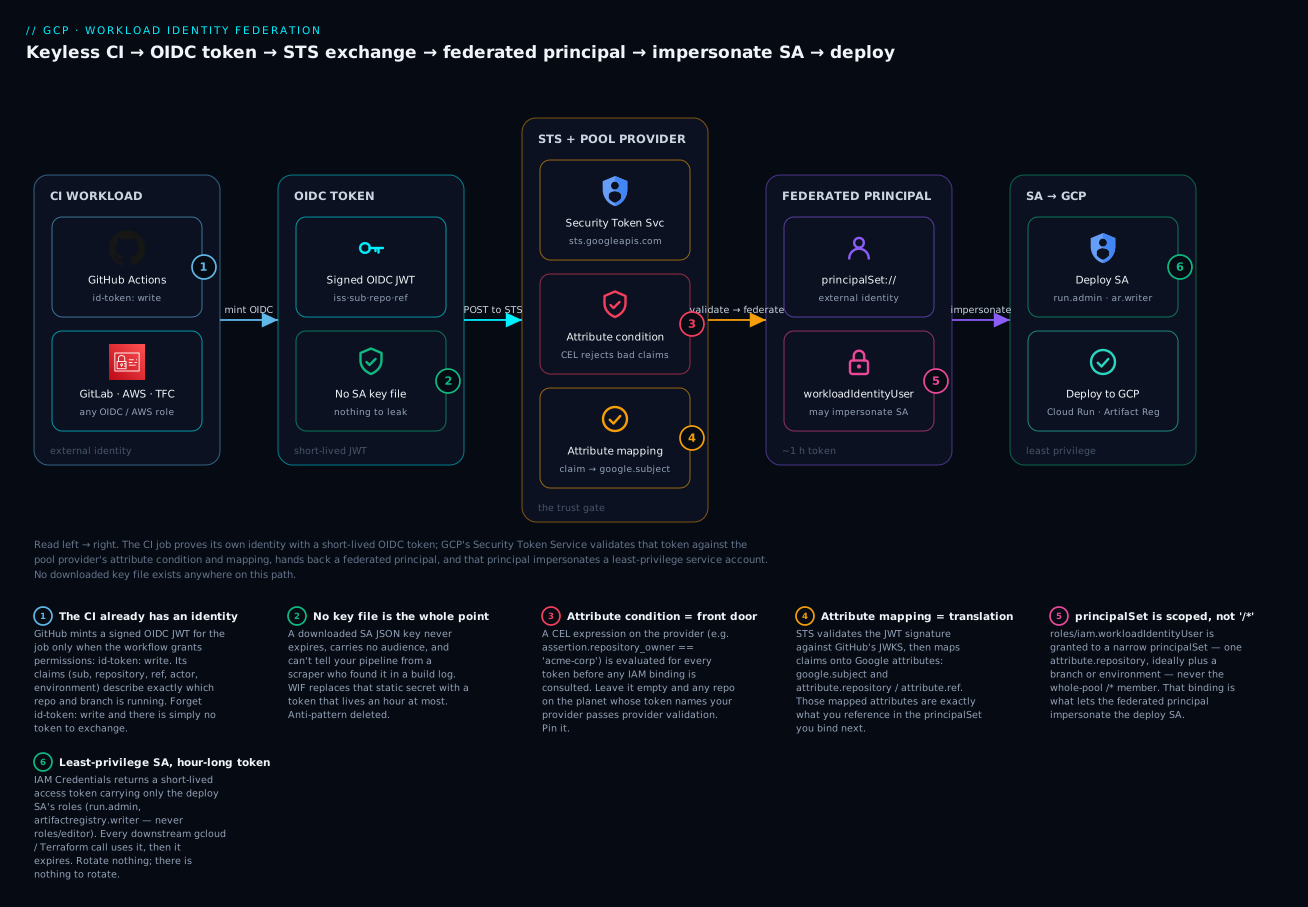
Read the diagram left to right: the CI job mints a short-lived OIDC token (no key file exists — badge 2 is the whole point), POSTs it to GCP’s Security Token Service, which validates it against the pool provider’s attribute condition (badge 3, the front door) and translates its claims through the attribute mapping (badge 4). What comes back is a federated principalSet that is bound with roles/iam.workloadIdentityUser (badge 5) to impersonate a least-privilege deploy service account (badge 6) — the credential your gcloud and Terraform steps actually use.
Prerequisites and what you’ll be able to do
You will get the most from this lesson if you are already comfortable with a few earlier building blocks:
- IAM roles, members, and bindings — what a
roles/...grant is and howadd-iam-policy-bindingattaches a member to a resource. See IAM Fundamentals: Roles, Service Accounts, Policy. - Service accounts as a non-human identity, and the idea of one identity impersonating another. The mechanics of impersonation and IAM Conditions are covered in the IAM Deep Dive.
- Basic CI/CD — you know what a GitHub Actions workflow file is and where a pipeline’s secrets live today.
- Project IDs versus project numbers (they are different, and the difference bites here).
You do not need to know OIDC internals in advance — this lesson builds that up. After working through it you will be able to:
- Explain, in plain terms, why a downloaded SA key file is an anti-pattern and what a federated token replaces it with.
- Create a workload identity pool and an OIDC provider for GitHub Actions, with an attribute mapping and a locking-down attribute condition.
- Bind a federated
principalSetto a least-privilege service account withroles/iam.workloadIdentityUser, scoped to one repository or branch. - Wire a GitHub Actions workflow that authenticates to GCP with zero secrets and read the audit trail to prove the exchange happened.
- Extend the identical pattern to GitLab CI, Terraform Cloud/HCP Terraform, and AWS workloads.
- Reason about the advanced edges: direct resource access, the raw STS exchange, the
google.subjectlength limit, and org-policy guardrails.
1. Why JSON keys are a liability and what federation replaces
A gcloud iam service-accounts keys create JSON file is the single most common credential-leak vector on GCP. The reasons are structural, not operational:
- It does not expire. A key committed to a repo in 2022 still works today unless someone remembers to revoke it.
- It is a static secret you must store, rotate, and inject into every CI runner. Each of those is a place it can leak.
- It carries no context. STS cannot tell whether the holder is your pipeline or an attacker who scraped it from a build log.
Federation replaces the static key with a trust relationship. Instead of “here is a secret only my pipeline knows”, the model becomes “GCP trusts tokens minted by GitHub’s OIDC issuer, but only when the claims inside prove the token came from my-org/my-repo on main”. The credential the pipeline ends up holding is a federated access token that lives for an hour at most.
If your org has set the
iam.disableServiceAccountKeyCreationorg policy constraint (and it should), key creation is already blocked. WIF is then not optional hardening, it is the supported path for CI to authenticate at all.
The moving parts:
| Component | What it is | Lifetime |
|---|---|---|
| Workload identity pool | A container for external identities, scoped to a project | Permanent |
| Pool provider (OIDC) | Trust config for one external issuer (GitHub, GitLab, etc.) | Permanent |
| Attribute mapping | Maps OIDC claims (sub, repository) to Google attributes |
Config |
| Attribute condition | A CEL expression that rejects tokens failing the predicate | Config |
| STS token exchange | The runtime swap of OIDC token for a GCP federated token | ~1 hour |
2. How the STS token exchange actually works
Understanding the flow is what lets you debug it later. End to end:
- GitHub mints a signed OIDC JWT for the running job. Its
issishttps://token.actions.githubusercontent.com, and its claims includesub,repository,ref,actor, andworkflow. - The
google-github-actions/authstep POSTs that JWT to GCP STS (sts.googleapis.com), naming the pool provider as the audience. - STS validates the JWT signature against GitHub’s published JWKS, evaluates your attribute condition, and applies your attribute mapping.
- If everything passes, STS returns a short-lived federated access token representing the external identity (a
principalSet). - Optionally, the step calls IAM Credentials to impersonate a real service account, returning an access token that carries that SA’s roles. This is the credential your
gcloud/Terraform steps use.
There are two ways to consume the result. Service account impersonation (the external identity is granted roles/iam.workloadIdentityUser on a target SA, then impersonates it) is the broadly compatible path and the one I recommend by default. Direct resource access (granting IAM roles to the principalSet directly, no SA) is newer and avoids the SA entirely, but not every Google client library and service honors federated principals yet, so it carries compatibility caveats. We will wire impersonation here and note the direct variant at the end.
3. Create the pool and a GitHub OIDC provider
Set your context. Use the project number, not the ID, in the provider resource names later; mixing them up is the most common copy-paste failure.
export PROJECT_ID="acme-cicd-prod"
export PROJECT_NUMBER="$(gcloud projects describe "${PROJECT_ID}" --format='value(projectNumber)')"
export POOL_ID="github-pool"
export PROVIDER_ID="github-provider"
export GITHUB_ORG="acme-corp"
export GITHUB_REPO="acme-corp/payments-service"

gcloud config set project "${PROJECT_ID}"

gcloud services enable \
  iam.googleapis.com \
  iamcredentials.googleapis.com \
  sts.googleapis.com
Create the pool:
gcloud iam workload-identity-pools create "${POOL_ID}" \
  --project="${PROJECT_ID}" \
  --location="global" \
  --display-name="GitHub Actions pool"
Create the OIDC provider for GitHub. The --issuer-uri is GitHub’s fixed OIDC issuer. The attribute mapping translates GitHub’s JWT claims into Google attributes, and the attribute condition restricts trust to a single org before any IAM binding is even consulted.
gcloud iam workload-identity-pools providers create-oidc "${PROVIDER_ID}" \
  --project="${PROJECT_ID}" \
  --location="global" \
  --workload-identity-pool="${POOL_ID}" \
  --display-name="GitHub provider" \
  --issuer-uri="https://token.actions.githubusercontent.com" \
  --attribute-mapping="google.subject=assertion.sub,attribute.repository=assertion.repository,attribute.ref=assertion.ref,attribute.repository_owner=assertion.repository_owner" \
  --attribute-condition="assertion.repository_owner == '${GITHUB_ORG}'"
The attribute condition is not cosmetic. Without it, any GitHub repository on the planet whose token names your provider as audience would pass provider validation; only the downstream IAM binding would stop them. Pinning
repository_owner(orrepository) at the provider closes that gap at the front door. This is the single most important hardening step in the whole setup.
4. Attribute mappings and conditions to scope trust
google.subject is special: it becomes the federated principal’s identity and is what shows up in audit logs. Mapping it to assertion.sub gives you a subject like repo:acme-corp/payments-service:ref:refs/heads/main. The custom attribute.* values are what you reference in IAM bindings to scope access more precisely.
A few claims worth mapping deliberately:
| GitHub claim | Example value | Use it to scope by |
|---|---|---|
repository |
acme-corp/payments-service |
A specific repo |
ref |
refs/heads/main |
A branch |
repository_owner |
acme-corp |
The whole org |
environment |
production |
A GitHub deployment environment |
The environment claim is the strongest control GitHub offers. It is only present when the job targets a protected GitHub Environment, which can require manual approval and restrict which branches may deploy. Tightening the attribute condition to demand it means a token is only honored for an approved production deploy:
# Tighten an existing provider to require a protected environment.
gcloud iam workload-identity-pools providers update-oidc "${PROVIDER_ID}" \
  --project="${PROJECT_ID}" \
  --location="global" \
  --workload-identity-pool="${POOL_ID}" \
  --attribute-mapping="google.subject=assertion.sub,attribute.repository=assertion.repository,attribute.environment=assertion.environment,attribute.repository_owner=assertion.repository_owner" \
  --attribute-condition="assertion.repository_owner == '${GITHUB_ORG}' && assertion.environment == 'production'"
Defense in depth: enforce coarse trust (
repository_owner) at the attribute condition, then enforce fine-grained trust (exact repo, branch, or environment) at the IAM binding in the next step. The condition is evaluated for every token; the binding decides which SA a passing token may use.
5. Bind the external identity to a service account with least privilege
Create (or reuse) a service account whose roles are exactly what the pipeline needs. Resist the urge to grant roles/editor; scope to the specific deploy roles.
gcloud iam service-accounts create gh-deployer \
  --project="${PROJECT_ID}" \
  --display-name="GitHub Actions deployer"

export DEPLOY_SA="gh-deployer@${PROJECT_ID}.iam.gserviceaccount.com"

# Example: this pipeline only deploys Cloud Run and reads from Artifact Registry.
gcloud projects add-iam-policy-binding "${PROJECT_ID}" \
  --member="serviceAccount:${DEPLOY_SA}" \
  --role="roles/run.admin"

gcloud projects add-iam-policy-binding "${PROJECT_ID}" \
  --member="serviceAccount:${DEPLOY_SA}" \
  --role="roles/artifactregistry.writer"
Now grant the federated identity permission to impersonate that SA. The member uses the principalSet:// prefix and references your mapped attribute, scoping impersonation to one repository:
gcloud iam service-accounts add-iam-policy-binding "${DEPLOY_SA}" \
  --project="${PROJECT_ID}" \
  --role="roles/iam.workloadIdentityUser" \
  --member="principalSet://iam.googleapis.com/projects/${PROJECT_NUMBER}/locations/global/workloadIdentityPools/${POOL_ID}/attribute.repository/${GITHUB_REPO}"
The principal identifier follows a strict grammar:
- A single subject:
principal://.../subject/{value} - All identities matching a mapped attribute:
principalSet://.../attribute.{name}/{value} - The entire pool:
principalSet://.../workloadIdentityPools/{pool}/*(avoid in production)
To pin to a branch, bind on attribute.ref with value refs/heads/main instead of attribute.repository. To pin to a GitHub Environment, bind on attribute.environment.
Never bind
roles/iam.workloadIdentityUserto the whole-pool/*principal set in production. That trusts every token the provider accepts. Bind to the narrowest attribute you can — ideally a single repo plus branch.
6. Configure the GitHub Actions workflow and verify the exchange
The workflow needs id-token: write permission so GitHub will mint the OIDC token, plus contents: read. Reference the provider by its full resource name and name the SA to impersonate.
name: deploy
on:
  push:
    branches: [main]

permissions:
  contents: read
  id-token: write   # required for GitHub to issue the OIDC token

jobs:
  deploy:
    runs-on: ubuntu-latest
    environment: production   # ties the job to the protected GitHub Environment
    steps:
      - uses: actions/checkout@v4

      - id: auth
        uses: google-github-actions/auth@v2
        with:
          project_id: acme-cicd-prod
          workload_identity_provider: projects/123456789012/locations/global/workloadIdentityPools/github-pool/providers/github-provider
          service_account: gh-deployer@acme-cicd-prod.iam.gserviceaccount.com

      - uses: google-github-actions/setup-gcloud@v2

      - name: Prove identity
        run: gcloud auth list

      - name: Deploy
        run: |
          gcloud run deploy payments-service \
            --image="us-docker.pkg.dev/acme-cicd-prod/apps/payments:${GITHUB_SHA}" \
            --region=us-central1
The auth action handles the STS exchange and writes a credential file, exporting GOOGLE_APPLICATION_CREDENTIALS so every downstream gcloud, gsutil, and Terraform google provider call picks it up automatically. There is no key anywhere in this workflow.
The
workload_identity_providervalue uses the project number. If you paste the project ID there, the exchange fails with an opaque permission error. This is the most frequent real-world misconfiguration.
Verify
First, confirm the provider and binding from your workstation:
# Provider exists with the issuer and condition you expect.
gcloud iam workload-identity-pools providers describe "${PROVIDER_ID}" \
  --project="${PROJECT_ID}" \
  --location="global" \
  --workload-identity-pool="${POOL_ID}"

# The SA's IAM policy shows the principalSet member on workloadIdentityUser.
gcloud iam service-accounts get-iam-policy "${DEPLOY_SA}" \
  --project="${PROJECT_ID}"
Then run the workflow and read the audit trail. A successful exchange emits an STS event; the federated principal appears as the authentication info. Look for the token-generation calls:
gcloud logging read \
  'protoPayload.serviceName="sts.googleapis.com" OR protoPayload.serviceName="iamcredentials.googleapis.com"' \
  --project="${PROJECT_ID}" \
  --limit=10 \
  --format="table(timestamp, protoPayload.methodName, protoPayload.authenticationInfo.principalSubject)"
The principalSubject field is your proof of who exchanged the token — expect something like principal://.../subject/repo:acme-corp/payments-service:ref:refs/heads/main. If the job fails at the auth step, the message almost always points to one of three causes: the project number/ID swap, an attribute condition the token did not satisfy, or a missing roles/iam.workloadIdentityUser binding for the exact principal.
7. Extending the pattern to GitLab, Terraform Cloud, and AWS
The pool and impersonation binding stay identical; only the provider’s issuer, audience, and claim names change.
GitLab CI issues an OIDC JWT in a CI/CD variable (commonly GITLAB_OIDC_TOKEN via the id_tokens keyword). Its issuer is your GitLab instance URL, and useful claims include project_path and ref.
gcloud iam workload-identity-pools providers create-oidc "gitlab-provider" \
  --project="${PROJECT_ID}" \
  --location="global" \
  --workload-identity-pool="${POOL_ID}" \
  --issuer-uri="https://gitlab.com" \
  --attribute-mapping="google.subject=assertion.sub,attribute.project_path=assertion.project_path,attribute.ref=assertion.ref" \
  --attribute-condition="assertion.project_path == 'acme-group/payments'"
Terraform Cloud / HCP Terraform presents an OIDC token whose issuer is https://app.terraform.io. Map terraform_workspace_id or the sub claim and scope the binding to a workspace. The audience defaults to the provider resource name, configurable via TFC_WORKLOAD_IDENTITY_AUDIENCE.
gcloud iam workload-identity-pools providers create-oidc "tfc-provider" \
  --project="${PROJECT_ID}" \
  --location="global" \
  --workload-identity-pool="${POOL_ID}" \
  --issuer-uri="https://app.terraform.io" \
  --attribute-mapping="google.subject=assertion.sub,attribute.terraform_workspace_id=assertion.terraform_workspace_id" \
  --attribute-condition="assertion.terraform_organization_name == 'acme'"
AWS workloads use a different provider type entirely — create-aws rather than create-oidc — because the trust is built on AWS account identity rather than a generic OIDC issuer. An EC2 instance or EKS pod with an IAM role can then federate to GCP without any AWS access keys crossing the boundary.
gcloud iam workload-identity-pools providers create-aws "aws-provider" \
  --project="${PROJECT_ID}" \
  --location="global" \
  --workload-identity-pool="${POOL_ID}" \
  --account-id="111122223333" \
  --attribute-condition="assertion.arn.startsWith('arn:aws:sts::111122223333:assumed-role/ci-runner')"
Codify whichever providers you use rather than running CLI commands by hand. The Terraform shape mirrors the gcloud flags:
resource "google_iam_workload_identity_pool" "github" {
  workload_identity_pool_id = "github-pool"
  display_name              = "GitHub Actions pool"
}

resource "google_iam_workload_identity_pool_provider" "github" {
  workload_identity_pool_id          = google_iam_workload_identity_pool.github.workload_identity_pool_id
  workload_identity_pool_provider_id = "github-provider"

  attribute_mapping = {
    "google.subject"             = "assertion.sub"
    "attribute.repository"       = "assertion.repository"
    "attribute.repository_owner" = "assertion.repository_owner"
  }

  attribute_condition = "assertion.repository_owner == 'acme-corp'"

  oidc {
    issuer_uri = "https://token.actions.githubusercontent.com"
  }
}

resource "google_service_account_iam_member" "wif_user" {
  service_account_id = google_service_account.gh_deployer.name
  role               = "roles/iam.workloadIdentityUser"
  member             = "principalSet://iam.googleapis.com/${google_iam_workload_identity_pool.github.name}/attribute.repository/acme-corp/payments-service"
}
8. Auditing exchanges and locking down with policy
A federated setup is only as good as the controls around it. Three layers, from broad to narrow:
- Org policy. Keep
iam.disableServiceAccountKeyCreationenforced org-wide so no one quietly falls back to JSON keys. Consideriam.workloadIdentityPoolProvidersto allowlist exactly which external issuer URIs may be configured anywhere in the org — it stops a team from wiring up a provider that trusts an attacker-controlled issuer. - Attribute conditions and bindings. Audit every provider for a non-empty attribute condition and every
workloadIdentityUserbinding for a narrowprincipalSet. A binding to/*or a provider with no condition is a finding. - Logs. STS and IAM Credentials calls land in Cloud Audit Logs. Build a sink or alert on token generation from unexpected
principalSubjectvalues, and watch for exchanges outside business hours or from repos that should not deploy.
# Inventory every WIF provider in the project and check for missing conditions.
gcloud iam workload-identity-pools providers list \
  --project="${PROJECT_ID}" \
  --location="global" \
  --workload-identity-pool="${POOL_ID}" \
  --format="table(name, attributeCondition, disabled)"
To revoke trust instantly during an incident, disable the provider (existing federated tokens stop being honored) without tearing down the pool or the binding:
gcloud iam workload-identity-pools providers update-oidc "${PROVIDER_ID}" \
  --project="${PROJECT_ID}" \
  --location="global" \
  --workload-identity-pool="${POOL_ID}" \
  --disabled
Enterprise scenario
A platform team running a shared acme-cicd-prod project bound roles/iam.workloadIdentityUser to attribute.repository_owner/acme-corp so any repo in the org could deploy with one provider. Convenient — until a security review flagged that a developer could spin up a brand-new repo under the org, point a workflow at the provider, and impersonate the deploy SA that held roles/run.admin. The org-wide attribute condition (repository_owner == 'acme-corp') was doing its job; the binding was the hole.
The real gotcha surfaced when they tried to tighten it: GitHub’s sub claim format differs between a normal branch push (repo:acme-corp/svc:ref:refs/heads/main) and an environment-gated job (repo:acme-corp/svc:environment:production). Their first fix bound on google.subject directly and silently broke every non-environment job.
The fix was to stop binding on sub and bind on an explicit mapped attribute per service, gated behind a protected GitHub Environment, so a new repo gets nothing until IAM is changed via Terraform:
gcloud iam service-accounts add-iam-policy-binding "${DEPLOY_SA}" \
  --project="${PROJECT_ID}" \
  --role="roles/iam.workloadIdentityUser" \
  --member="principalSet://iam.googleapis.com/projects/${PROJECT_NUMBER}/locations/global/workloadIdentityPools/${POOL_ID}/attribute.repository/acme-corp/payments-service"
They then split the one shared SA into per-service deployers, each bound to exactly one attribute.repository. The principle that stuck: enforce coarse trust at the provider condition, but never let the binding be broader than a single repo plus environment.
Going deeper
The seven numbered sections give you a working, hardened setup. This section is for when you need to debug the exchange from first principles, decide between impersonation and direct access, or defend the design in a security review.
The raw STS token exchange
The google-github-actions/auth action is a convenience wrapper around a plain OAuth 2.0 token-exchange call (RFC 8693). Knowing the raw shape is what lets you reproduce a failure with curl and see the real error. The request STS receives looks like this (form-encoded):
POST https://sts.googleapis.com/v1/token
Content-Type: application/x-www-form-urlencoded

grant_type=urn:ietf:params:oauth:grant-type:token-exchange
audience=//iam.googleapis.com/projects/PROJECT_NUMBER/locations/global/workloadIdentityPools/POOL_ID/providers/PROVIDER_ID
requested_token_type=urn:ietf:params:oauth:token-type:access_token
scope=https://www.googleapis.com/auth/cloud-platform
subject_token_type=urn:ietf:params:oauth:token-type:jwt
subject_token=<the GitHub OIDC JWT>
The audience is the provider’s full resource name with the leading //iam.googleapis.com/ — and it uses the project number. STS validates the subject_token signature against the issuer’s JWKS (which Google fetches and caches from <issuer-uri>/.well-known/openid-configuration), checks the token’s own aud claim matches the configured audience, evaluates your attribute condition, applies the mapping, and returns a federated access token. If you want the impersonated SA token instead, that federated token is then presented to iamcredentials.googleapis.com’s generateAccessToken — which is the second event you saw in the audit query.
Application Default Credentials without an Action
Outside GitHub Actions — a self-hosted runner, a Jenkins agent, any process that can read a file — you generate a credential configuration file that Application Default Credentials (ADC) understands. It contains no secret; it only tells the client library where to read the fresh OIDC token and which provider/SA to target:
gcloud iam workload-identity-pools create-cred-config \
  "projects/${PROJECT_NUMBER}/locations/global/workloadIdentityPools/${POOL_ID}/providers/${PROVIDER_ID}" \
  --service-account="${DEPLOY_SA}" \
  --credential-source-file="/var/run/oidc/token" \
  --output-file="/etc/gcp/creds.json"
The resulting file has "type": "external_account" (contrast with a key file’s "type": "service_account") and looks like:
{
  "type": "external_account",
  "audience": "//iam.googleapis.com/projects/PROJECT_NUMBER/locations/global/workloadIdentityPools/POOL_ID/providers/PROVIDER_ID",
  "subject_token_type": "urn:ietf:params:oauth:token-type:jwt",
  "token_url": "https://sts.googleapis.com/v1/token",
  "service_account_impersonation_url": "https://iamcredentials.googleapis.com/v1/projects/-/serviceAccounts/DEPLOY_SA@PROJECT_ID.iam.gserviceaccount.com:generateAccessToken",
  "credential_source": {
    "file": "/var/run/oidc/token",
    "format": { "type": "text" }
  }
}
Point GOOGLE_APPLICATION_CREDENTIALS at that file and every Google client library federates transparently. The credential_source can also be a url (for metadata-style token endpoints) or an environment variable — the same file shape covers AWS and Azure sources too.
Direct resource access — dropping the service account
Impersonation is the compatible default, but you can grant IAM roles to the principalSet directly and delete the intermediate SA entirely. The federated principal itself becomes the member:
gcloud storage buckets add-iam-policy-binding gs://acme-artifacts \
  --role="roles/storage.objectViewer" \
  --member="principalSet://iam.googleapis.com/projects/${PROJECT_NUMBER}/locations/global/workloadIdentityPools/${POOL_ID}/attribute.repository/acme-corp/payments-service"
Trade-offs to weigh before you commit:
| Service account impersonation | Direct resource access | |
|---|---|---|
| Client/library support | Universal | Most, but not every API/library honors federated principals |
| Extra hop | generateAccessToken call to IAM Credentials |
None — STS token used directly |
| Audit subject | The SA email + the principalSubject |
The principalSet only |
| Blast radius knob | The SA’s roles | Roles granted per resource to the principalSet |
| Good fit | CI that runs gcloud/Terraform broadly |
A workload touching a small, known set of resources |
Limits and edges that bite in production
google.subjectis capped at 127 characters. GitHub’ssubfor an environment-gated job (repo:owner/name:environment:production) can approach that; long org/repo/environment names can push a mapped subject over the limit and the exchange fails. If you are near it, mapgoogle.subjectto a shorter, unique claim rather than the rawsub.- Pools and providers soft-delete for 30 days. Delete a pool or provider and you cannot recreate one with the same ID until it is purged — you must
undeleteit or wait. Name deliberately; do not treat pools as disposable. - Attribute mappings are effectively immutable governance. You can add a mapping later, but you cannot bind on an attribute for tokens minted before it existed, and changing a mapping others depend on can break their bindings. Decide your claim-to-attribute plan up front.
- The provider location is always
globalfor OIDC/AWS providers — there is no regional provider. The pool is a project-level, global resource. - Propagation is not instant. A brand-new pool, provider, or binding can take a short while to be usable; a first-run failure that fixes itself on retry is usually propagation, not misconfiguration.
Security posture and cost
WIF itself has no line-item cost — STS and IAM Credentials calls are free; you pay only for the audit logs you choose to retain. The security wins are the point: no long-lived secret to exfiltrate, tokens that expire in ~1 hour, and an audit trail (principalSubject) that names the exact repo/branch behind every action. Layer it with an org-policy guardrail that blocks key creation and allowlists issuer URIs, and pair the least-privilege SA design with the impersonation and IAM-condition patterns in Deny Policies, Conditions, and Impersonation Chains. For a workload behind VPC Service Controls, remember STS and IAM Credentials are the API surfaces the exchange touches — include them when you scope a perimeter.
Practice challenges
Work these in order; each <details> block has a runnable answer and a one-line reason. Use placeholders (PROJECT_ID, PROJECT_NUMBER, org/repo names) — do not paste real IDs.
1. (Beginner) Turn on the APIs and create an empty pool. WIF needs three APIs and a pool container before anything else. Enable them and create a pool named github-pool.
<details><summary>Solution</summary>
gcloud services enable iam.googleapis.com iamcredentials.googleapis.com sts.googleapis.com \
  --project="${PROJECT_ID}"

gcloud iam workload-identity-pools create "github-pool" \
  --project="${PROJECT_ID}" --location="global" \
  --display-name="GitHub Actions pool"
Why: sts.googleapis.com performs the exchange and iamcredentials.googleapis.com mints the impersonated token — without both enabled the auth step fails opaquely.
</details>
2. (Beginner) Create a GitHub OIDC provider that trusts only your org. Map repository and repository_owner, and pin the condition to repository_owner == 'acme-corp'.
<details><summary>Solution</summary>
gcloud iam workload-identity-pools providers create-oidc "github-provider" \
  --project="${PROJECT_ID}" --location="global" \
  --workload-identity-pool="github-pool" \
  --issuer-uri="https://token.actions.githubusercontent.com" \
  --attribute-mapping="google.subject=assertion.sub,attribute.repository=assertion.repository,attribute.repository_owner=assertion.repository_owner" \
  --attribute-condition="assertion.repository_owner == 'acme-corp'"
Why: the condition rejects every token from outside your org before any IAM binding is consulted — the single most important hardening step. </details>
3. (Intermediate) Bind one repo to a least-privilege SA. Let only acme-corp/payments-service impersonate gh-deployer, and give that SA just roles/run.admin.
<details><summary>Solution</summary>
gcloud projects add-iam-policy-binding "${PROJECT_ID}" \
  --member="serviceAccount:gh-deployer@${PROJECT_ID}.iam.gserviceaccount.com" \
  --role="roles/run.admin"

gcloud iam service-accounts add-iam-policy-binding \
  "gh-deployer@${PROJECT_ID}.iam.gserviceaccount.com" \
  --role="roles/iam.workloadIdentityUser" \
  --member="principalSet://iam.googleapis.com/projects/${PROJECT_NUMBER}/locations/global/workloadIdentityPools/github-pool/attribute.repository/acme-corp/payments-service"
Why: scoping the principalSet to one attribute.repository means only that repo’s tokens can impersonate the SA — never bind the whole-pool /*.
</details>
4. (Intermediate) Write the minimal workflow that proves the exchange. The job should authenticate keylessly and print the active identity — nothing more.
<details><summary>Solution</summary>
permissions:
  contents: read
  id-token: write
jobs:
  whoami:
    runs-on: ubuntu-latest
    steps:
      - uses: google-github-actions/auth@v2
        with:
          project_id: acme-cicd-prod
          workload_identity_provider: projects/PROJECT_NUMBER/locations/global/workloadIdentityPools/github-pool/providers/github-provider
          service_account: gh-deployer@acme-cicd-prod.iam.gserviceaccount.com
      - uses: google-github-actions/setup-gcloud@v2
      - run: gcloud auth list
Why: id-token: write is what makes GitHub mint the OIDC token; without it the job has nothing to exchange. Note the provider path uses the project number.
</details>
5. (Advanced) Gate impersonation behind a protected production environment. A token should only be honored when the job runs in the GitHub production environment. Update the mapping, the condition, and the binding.
<details><summary>Solution</summary>
gcloud iam workload-identity-pools providers update-oidc "github-provider" \
  --project="${PROJECT_ID}" --location="global" \
  --workload-identity-pool="github-pool" \
  --attribute-mapping="google.subject=assertion.sub,attribute.repository=assertion.repository,attribute.environment=assertion.environment,attribute.repository_owner=assertion.repository_owner" \
  --attribute-condition="assertion.repository_owner == 'acme-corp' && assertion.environment == 'production'"

gcloud iam service-accounts add-iam-policy-binding \
  "gh-deployer@${PROJECT_ID}.iam.gserviceaccount.com" \
  --role="roles/iam.workloadIdentityUser" \
  --member="principalSet://iam.googleapis.com/projects/${PROJECT_NUMBER}/locations/global/workloadIdentityPools/github-pool/attribute.environment/production"
Why: the environment claim only appears when the job targets a protected Environment (which can require approval), so a non-prod job’s token fails the condition outright — and the workflow must set environment: production.
</details>
6. (Advanced) Audit the whole project for weak WIF config. Produce a one-liner that lists every provider with its attribute condition so you can spot any that are missing one, then show the direct-access binding you would use to drop the SA for a read-only bucket workload.
<details><summary>Solution</summary>
# Any row with an empty attributeCondition is a finding.
gcloud iam workload-identity-pools providers list \
  --project="${PROJECT_ID}" --location="global" \
  --workload-identity-pool="github-pool" \
  --format="table(name, attributeCondition, disabled)"

# Direct resource access — no SA, principalSet is the member itself.
gcloud storage buckets add-iam-policy-binding gs://acme-artifacts \
  --role="roles/storage.objectViewer" \
  --member="principalSet://iam.googleapis.com/projects/${PROJECT_NUMBER}/locations/global/workloadIdentityPools/github-pool/attribute.repository/acme-corp/payments-service"
Why: a provider with no condition trusts every token the issuer will sign; and for a small, fixed resource set, direct access removes the impersonation hop (accepting the compatibility caveat). </details>
Common beginner mistakes
- “I’ll put the project ID in the provider path.” The
workload_identity_providervalue and theprincipalSet://audience both take the project number, not the ID. Paste the ID and you get an opaque permission error at the auth step. Mental model: the number is the resource’s immutable address; the ID is a human-friendly alias that these low-level IAM resource names do not accept. - “The IAM binding alone is enough — I’ll skip the attribute condition.” A provider with no condition trusts every repository on the internet whose token names it as audience; only the binding stands between them and your SA. Right model: condition first (coarse trust at the front door), binding second (fine-grained trust). Defense in depth, not either/or.
- “
id-token: writeis on by default.” It is not. GitHub only mints the OIDC token when the workflow explicitly grantspermissions: id-token: write. Without it the job silently has no token, andauthfails with a confusing message. Add it at the job or workflow level. - “Binding to
/*is fine, I’ll tighten it later.” The whole-pool principal set trusts every identity the provider accepts — every repo in the org, every branch. “Later” rarely comes. Bind the narrowest attribute from day one; widening a binding is easy, discovering an over-broad one in an incident is not. - “WIF means I don’t need a service account at all.” By default you still impersonate an SA — WIF replaces the key, not the identity. You can go SA-less with direct resource access, but that is an explicit choice with compatibility caveats, not the default.
- “The federated token is long-lived, like the key was.” It expires in about an hour, and that short life is the entire security benefit. Do not try to cache or persist it; the exchange is cheap, so re-run it. There is nothing to rotate because there is no standing secret.
- “I’ll bind directly on
google.subject.” GitHub’ssubformat changes between a branch push and an environment-gated job, so a binding onsubsilently breaks half your pipelines. Bind on an explicit mappedattribute.*instead.
Checklist
Glossary
- Bearer credential — a secret that grants access to whoever holds it, with no further proof of identity. A downloaded SA key is one; WIF’s goal is to eliminate the standing bearer credential.
- Service account (SA) key — a downloaded JSON file (
"type": "service_account") containing a private key that authenticates as an SA. Never expires; the anti-pattern this lesson replaces. - OIDC (OpenID Connect) — an identity layer on top of OAuth 2.0 in which an issuer mints signed tokens describing who is making a request. GitHub, GitLab, and Terraform Cloud are OIDC issuers.
- JWT (JSON Web Token) — the signed token format OIDC uses: a header, a claims payload, and a signature, dot-separated and base64url-encoded.
- Claim — a field inside a JWT, e.g.
sub,repository,ref,environment. Claims are what you map and condition on. - Issuer (
iss) — the URL that minted and signs the token, e.g.https://token.actions.githubusercontent.com. Its public keys are published at a well-known JWKS URL. - Audience (
aud) — who the token is intended for. In WIF the token’s audience must match the provider you configure, which prevents a token minted for one system being replayed at another. - Subject (
sub) — the token’s principal identity claim, e.g.repo:acme-corp/payments-service:ref:refs/heads/main. Maps togoogle.subject. - STS (Security Token Service) — GCP’s
sts.googleapis.com, which performs the OAuth 2.0 token exchange: external OIDC/AWS token in, short-lived federated GCP token out. - Token exchange — the RFC 8693 flow (
grant_type=...token-exchange) STS implements to swap a subject token for a federated access token. - Workload identity pool — a project-scoped, global container for external (non-Google) identities.
- Pool provider — trust configuration for one external issuer (OIDC or AWS) inside a pool: its issuer URI, attribute mapping, and attribute condition.
- Attribute mapping — the rules translating incoming JWT claims into Google attributes (
google.subject,attribute.repository, …) that IAM can reference. - Attribute condition — a CEL predicate evaluated on every token before any IAM binding; a token that fails it is rejected at the provider. Your front-door filter.
- CEL (Common Expression Language) — the small expression language used for attribute conditions (and IAM Conditions), e.g.
assertion.repository_owner == 'acme-corp'. - Principal / principalSet — IAM members representing a federated identity.
principal://.../subject/{value}is one exact identity;principalSet://.../attribute.{name}/{value}is every identity matching a mapped attribute. roles/iam.workloadIdentityUser— the role that lets a federated principal impersonate a service account. Bind it to the narrowest principalSet possible.- Service account impersonation — a federated principal obtaining a short-lived access token that carries a target SA’s roles, via IAM Credentials
generateAccessToken. - Direct resource access — granting IAM roles to the
principalSetitself, no intermediate SA. Newer, fewer hops, some compatibility caveats. - External account credential — an ADC configuration file (
"type": "external_account") that tells client libraries where to read the OIDC token and how to federate — contains no secret. - ADC (Application Default Credentials) — the standard way Google client libraries discover credentials, e.g. via
GOOGLE_APPLICATION_CREDENTIALS. - JWKS (JSON Web Key Set) — the issuer’s published public keys STS uses to verify a token’s signature.
iam.disableServiceAccountKeyCreation— the org-policy constraint that blocks creating SA keys org-wide, making WIF the supported CI auth path.- Project number vs project ID — the immutable numeric address (e.g.
123456789012) vs the human-readable alias (e.g.acme-cicd-prod). WIF resource names require the number.
Pitfalls and next steps
The failures that cost the most time: using the project ID where the provider name needs the project number; forgetting permissions: id-token: write (the job silently has no token to exchange); creating a provider with no attribute condition and assuming the IAM binding alone is enough; and binding workloadIdentityUser to the whole pool, which trusts every repo the issuer can speak for. Also remember that mapped attributes are fixed at provider-creation governance time — adding a new attribute.* mapping later does not retroactively let you bind on it for tokens you have already reasoned about, so plan your claim mappings up front.
Next, push every pool and provider into Terraform behind a plan gate, evaluate direct resource access (granting roles to the principalSet and dropping the intermediate SA) for services and clients that support it, and wire a Security Command Center or log-based alert that fires on any token exchange from an unexpected subject. At that point the last long-lived key in your estate can be deleted for good.