In a nutshell
Picture a wall of numbered safe-deposit drawers with a sticky note labelled latest stuck to the newest full drawer. You never erase a drawer — to change a password you fill the next empty drawer and slide the sticky note across. That wall is Secret Manager: a secret is the wall, each version is a drawer, and the drawers are immutable, so latest is just a pointer at the newest one.
Automatic rotation is the building’s night-shift clerk. On a schedule it prints a fresh combination, changes the real lock (your database password), files the new combination in the next drawer, and slides the latest note across — while the previous drawer’s combination still opens the door long enough for everyone to catch up. Nobody is woken at 3 a.m., and the old code keeps working until you are sure nothing still needs it. On GCP that clerk is a Cloud Function, the “schedule fired” alarm is a Pub/Sub message, CMEK means you own the master key to the whole cabinet, and IAM decides who may read a drawer, who may only add one, and who may shred one.
Why a beginner should care: a password that never changes has, statistically, already leaked by the time you notice. The single biggest security win here is deleting the human from the loop — no runbook, no calendar reminder, no “we’ll rotate it during the next maintenance window” that never comes.
Level: Advanced · Time: ~30 min
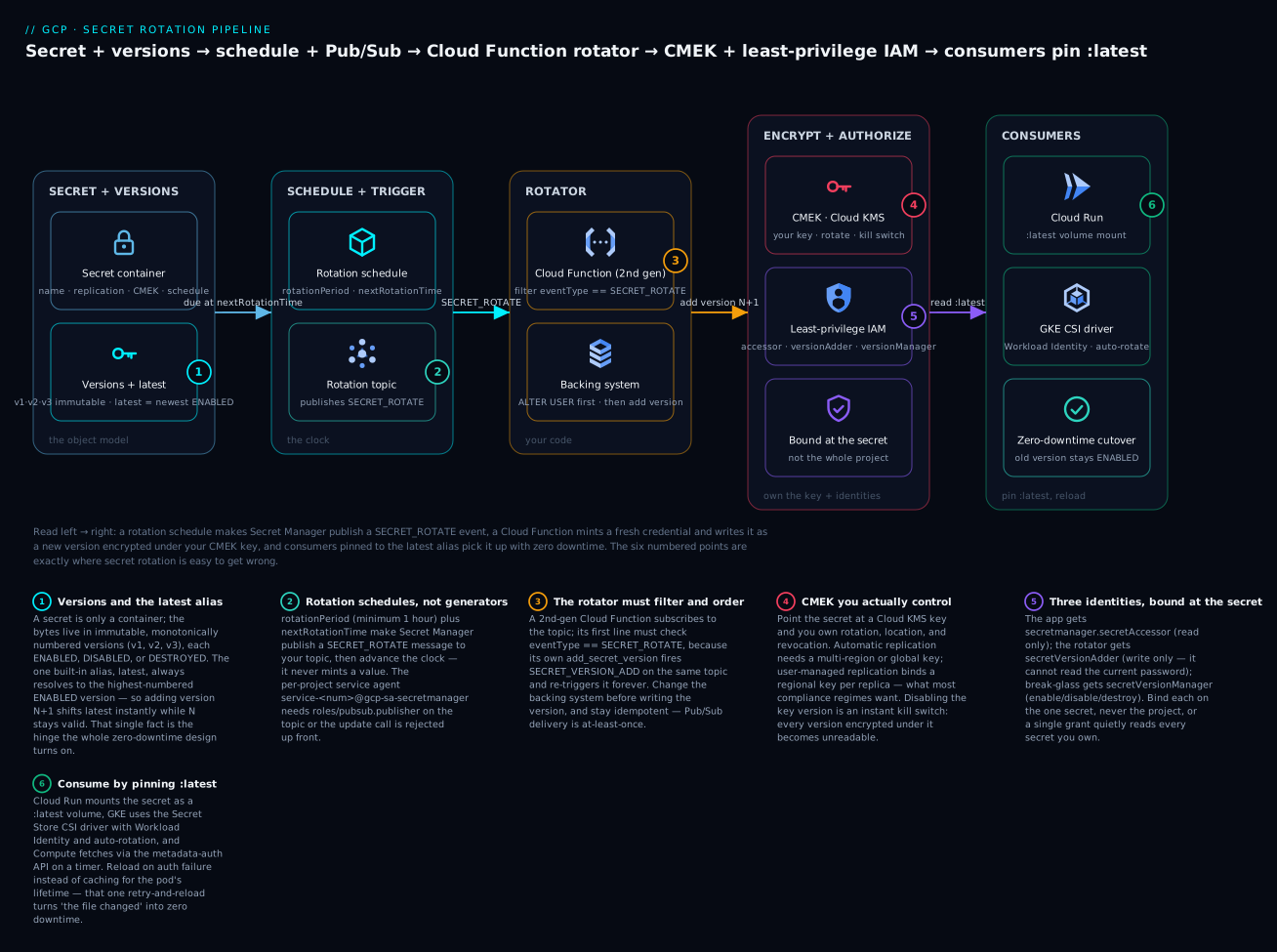
Read the diagram left to right: a rotation schedule makes Secret Manager publish a SECRET_ROTATE event to a topic, a Cloud Function mints a fresh credential and writes it as a new version (encrypted under your CMEK key), and consumers pinned to the latest alias pick it up with zero downtime — the six numbered points are exactly where the pipeline is easy to get wrong.
Before you start
This is an advanced lesson that assembles five services into one pipeline. You will move faster if you are already comfortable with:
- Secret Manager and KMS basics — what a secret, a version, and a key are. See Cloud KMS & Secret Manager fundamentals.
- Envelope encryption and CMEK — data-encryption-key vs key-encryption-key. See Cloud KMS, CMEK & envelope encryption.
- Cloud Functions (2nd gen) and Eventarc/Pub/Sub triggers. See Cloud Functions 2nd gen & event-driven architecture.
- IAM roles and service accounts — how a binding grants a role to a member on a resource. See IAM fundamentals: roles, service accounts & policy.
After this lesson you will be able to:
- Explain the Secret Manager object model — secret, version, version state, and the
latestalias — and why immutability enables zero-downtime rotation. - Attach a rotation schedule (
rotation-period+next-rotation-time) and wire the Pub/Sub notification the way Secret Manager expects. - Write a Cloud Functions rotator that filters
SECRET_ROTATE, changes the backing system first, and adds a new version — idempotently. - Encrypt a secret with a customer-managed key and choose automatic vs user-managed (regional) replication for your compliance posture.
- Split access into three least-privilege identities (
secretAccessor,secretVersionAdder,secretVersionManager) bound at the secret, not the project. - Consume a rotating secret from Cloud Run, GKE, and Compute Engine so the new value propagates without a redeploy.
Secret Manager will happily store a database password forever, and that is exactly the problem. A static credential that never changes is one that has already leaked by the time you find out. The fix is not a calendar reminder and a runbook; it is a pipeline: Secret Manager emits a Pub/Sub message when a secret is due to rotate, a Cloud Functions rotator mints a fresh credential and adds it as a new version, your workloads pick up the new version, and the old version is disabled. Done right, the credential changes every 30 days with zero downtime and no human in the loop.
This walkthrough builds that pipeline end to end for a Cloud SQL database password, wraps the secret in CMEK, and locks every identity to least privilege. The same shape works for API keys and TLS material.
1. The Secret Manager object model
Get the model exact before automating; the rotation logic depends on it.
- A secret is a logical container with a name, replication policy, optional rotation schedule, and IAM bindings. It holds no payload itself.
- A secret version holds the bytes. Versions are numbered monotonically (
1,2,3…) and are immutable once added. - A version has a state:
ENABLED,DISABLED, orDESTROYED. Disabled versions reject access but can be re-enabled; destroyed versions have their payload deleted permanently. - The
latestalias always resolves to the highest-numberedENABLEDversion. It is the only built-in alias; Secret Manager has no named/staged labels like some other vaults.
That last point drives the zero-downtime design. Because latest follows the newest enabled version, a rotator that adds version N+1 instantly shifts latest while version N stays enabled and valid. Consumers pinned to latest get the new value on their next read; in-flight consumers keep working. You only break something by destroying or disabling the old version too early.
# Create the secret container with no payload yet, automatic replication.
gcloud secrets create db-app-password \
  --replication-policy="automatic" \
  --project="$PROJECT_ID"

# Versions are immutable; "add-version" always creates a new number.
echo -n "initial-bootstrap-pw" | \
  gcloud secrets versions add db-app-password --data-file=- \
  --project="$PROJECT_ID"

# Resolve latest, or pin to an explicit number.
gcloud secrets versions access latest  --secret=db-app-password
gcloud secrets versions access 1       --secret=db-app-password
2. Rotation schedules and Pub/Sub notifications
Secret Manager’s rotation feature does not generate new secret values. It is a scheduler: at next-rotation-time it publishes a message to a topic you nominate, then advances the clock by rotation-period. Minting and storing the credential is yours to implement in a subscriber. That separation is deliberate and it is why the feature is generic.
First, the topic and the publish grant. Secret Manager publishes as a per-project service agent, service-<PROJECT_NUMBER>@gcp-sa-secretmanager.iam.gserviceaccount.com, which must hold roles/pubsub.publisher on the topic or the secret create/update call is rejected up front.
PROJECT_NUMBER=$(gcloud projects describe "$PROJECT_ID" --format='value(projectNumber)')
SM_AGENT="service-${PROJECT_NUMBER}@gcp-sa-secretmanager.iam.gserviceaccount.com"

gcloud pubsub topics create secret-rotation-events --project="$PROJECT_ID"

# Without this binding, attaching the topic to a secret fails validation.
gcloud pubsub topics add-iam-policy-binding secret-rotation-events \
  --member="serviceAccount:${SM_AGENT}" \
  --role="roles/pubsub.publisher" \
  --project="$PROJECT_ID"
Now attach a rotation schedule and the notification topic to the secret. rotation-period has a hard minimum of 3600s (1 hour) and next-rotation-time must be at least 300s in the future.
gcloud secrets update db-app-password \
  --next-rotation-time="2026-07-01T03:00:00Z" \
  --rotation-period="2592000s" \
  --topics="projects/${PROJECT_ID}/topics/secret-rotation-events" \
  --project="$PROJECT_ID"
Every message carries the event type in an attribute. The rotation cron fires SECRET_ROTATE; the same topic also receives SECRET_VERSION_ADD, SECRET_VERSION_ENABLE, SECRET_VERSION_DISABLE, SECRET_VERSION_DESTROY, and SECRET_UPDATE. Your rotator must filter on the attribute or it recurses: it adds a version, that fires SECRET_VERSION_ADD, which re-triggers the rotator. Filter ruthlessly.
| Pub/Sub message attribute | Meaning |
|---|---|
eventType |
One of SECRET_ROTATE, SECRET_VERSION_ADD, SECRET_VERSION_DISABLE, etc. |
secretId |
Full resource name: projects/<num>/secrets/<name> |
data (base64 body) |
The secret resource as JSON; includes rotation and topics |
3. Building the Cloud Functions rotator
The rotator is a Pub/Sub-triggered Cloud Function (2nd gen, on Cloud Run under the hood). Its contract: receive a SECRET_ROTATE event, generate a strong credential, apply it to the backing system (the Cloud SQL instance), add it as a new secret version, and stop. It must be idempotent because Pub/Sub delivery is at-least-once.
# main.py -- 2nd-gen Cloud Function, entry point "rotate_secret"
import base64
import json
import secrets
import string

import functions_framework
from google.cloud import secretmanager
import sqlalchemy
from google.cloud.sql.connector import Connector

SM = secretmanager.SecretManagerServiceClient()
DB_USER = "app_user"
INSTANCE = "my-proj:us-central1:app-sql"  # project:region:instance

def _strong_password(n: int = 32) -> str:
    alphabet = string.ascii_letters + string.digits + "-_.~"
    return "".join(secrets.choice(alphabet) for _ in range(n))

@functions_framework.cloud_event
def rotate_secret(cloud_event):
    attrs = cloud_event.data["message"].get("attributes", {})
    # Critical guard: only act on the rotation cron, never on our own writes.
    if attrs.get("eventType") != "SECRET_ROTATE":
        print(f"Ignoring eventType={attrs.get('eventType')}")
        return

    secret_resource = attrs["secretId"]          # projects/<num>/secrets/<name>
    new_password = _strong_password()

    # 1) Apply the new credential to the backing system FIRST.
    #    If this fails we never publish a version that does not work.
    connector = Connector()
    def _admin_conn():
        return connector.connect(INSTANCE, "pg8000", user="rotator",
                                 enable_iam_auth=True, db="appdb")
    engine = sqlalchemy.create_engine("postgresql+pg8000://", creator=_admin_conn)
    with engine.connect() as conn:
        conn.execute(sqlalchemy.text(
            f'ALTER USER "{DB_USER}" WITH PASSWORD :pw'
        ), {"pw": new_password})
        conn.commit()

    # 2) Only now record the value as a new ENABLED version.
    SM.add_secret_version(
        parent=secret_resource,
        payload=secretmanager.SecretPayload(
            data=new_password.encode("utf-8")
        ),
    )
    print(f"Rotated {secret_resource}; 'latest' now points to the new version.")
Ordering matters. Change the live system before writing the secret version. If the ALTER USER fails, the function throws, Pub/Sub redelivers, and latest was never moved to a credential the database does not accept. The reverse ordering would publish a “valid” version that fails every login.
Deploy it with a dedicated identity and bounded concurrency:
gcloud functions deploy secret-rotator \
  --gen2 --runtime=python312 --region=us-central1 \
  --source=. --entry-point=rotate_secret \
  --trigger-topic=secret-rotation-events \
  --service-account="rotator-sa@${PROJECT_ID}.iam.gserviceaccount.com" \
  --set-env-vars="PROJECT_ID=${PROJECT_ID}" \
  --max-instances=3 \
  --project="$PROJECT_ID"
4. Two-version strategy for zero-downtime cutover
The single-credential rotator works when a credential updates atomically. When the old one must stay valid while consumers catch up, you need the two-version pattern: at any moment two credentials are accepted, and rotation alternates between them.
For databases the cleanest implementation uses two roles, app_user_a and app_user_b, behind a connection that reads latest. Each rotation rotates the password of the role that is not currently latest, then flips latest to it. The previously-live role stays valid for one full rotation period, giving every consumer time to re-read.
# Determine which role is currently "live" by reading latest, then rotate the other.
def _current_live_role(secret_resource: str) -> str:
    resp = SM.access_secret_version(name=f"{secret_resource}/versions/latest")
    return json.loads(resp.payload.data)["role"]   # payload is {"role":..,"password":..}

def rotate_two_version(secret_resource: str):
    live = _current_live_role(secret_resource)
    standby = "app_user_b" if live == "app_user_a" else "app_user_a"
    new_pw = _strong_password()
    # rotate the STANDBY role; the live role keeps working untouched
    _alter_user(standby, new_pw)
    SM.add_secret_version(
        parent=secret_resource,
        payload=secretmanager.SecretPayload(
            data=json.dumps({"role": standby, "password": new_pw}).encode()
        ),
    )
    # 'live' is still valid; it becomes the standby next cycle.
This guarantees a window equal to your rotation-period during which both N and N-1 work. Size the period against how often your longest-lived workload re-reads: a fleet that re-reads on every pool refresh has enormous headroom at 30 days, but workloads that cache a secret for a pod’s lifetime need the window set to max pod age plus margin.
Do not destroy old versions in the rotator. Disable them on a separate, slower schedule once you have telemetry proving nothing is reading them. A destroyed version is unrecoverable; a disabled one can be re-enabled during an incident in seconds.
5. CMEK encryption and regional replication
By default Secret Manager encrypts payloads with Google-managed keys. Regulated workloads want customer-managed encryption keys (CMEK) in Cloud KMS so you control rotation, location, and revocation via the key version. CMEK and replication are coupled: automatic replication requires a multi-region or global KMS key, while a user-managed (per-region) replication policy binds a distinct regional key to each replica. Most compliance regimes want the latter so the key never leaves the jurisdiction.
# A regional keyring + key co-located with the secret replica.
gcloud kms keyrings create secrets-kr --location=us-central1 --project="$PROJECT_ID"
gcloud kms keys create db-secret-key \
  --location=us-central1 --keyring=secrets-kr \
  --purpose=encryption --rotation-period=90d \
  --next-rotation-time="2026-09-01T00:00:00Z" \
  --project="$PROJECT_ID"

# The Secret Manager service agent must be able to use the key.
gcloud kms keys add-iam-policy-binding db-secret-key \
  --location=us-central1 --keyring=secrets-kr \
  --member="serviceAccount:${SM_AGENT}" \
  --role="roles/cloudkms.cryptoKeyEncrypterDecrypter" \
  --project="$PROJECT_ID"
Create the secret with user-managed replication pinning the region and its CMEK key:
gcloud secrets create db-app-password-cmek \
  --replication-policy="user-managed" \
  --locations="us-central1" \
  --kms-key-name="projects/${PROJECT_ID}/locations/us-central1/keyRings/secrets-kr/cryptoKeys/db-secret-key" \
  --project="$PROJECT_ID"
KMS key rotation and secret rotation are independent and complementary: rotating the KMS key re-wraps the data encryption keys without touching the payload, while secret rotation changes the payload. You want both. The kill switch matters too: disabling the KMS key version makes every secret version encrypted under it instantly unreadable, the fastest containment for a confirmed compromise.
6. Least-privilege IAM: three distinct identities
The biggest mistake teams make is one service account that can read, write, and manage a secret. Split it into three roles bound at the secret resource, not the project:
| Identity | Role | Granted on | Why |
|---|---|---|---|
| Consumer (your app) | roles/secretmanager.secretAccessor |
The one secret | Read payloads only; cannot list, write, or destroy |
| Rotator (the function) | roles/secretmanager.secretVersionAdder |
The one secret | Add new versions; cannot read existing ones |
| Operator (break-glass) | roles/secretmanager.secretVersionManager |
The one secret | Enable/disable/destroy versions during incidents |
The rotator deliberately does not get secretAccessor. It generates new values and never needs old ones (the two-version variant reads only to learn which role is live, so grant secretAccessor on just that one secret if you use it). A compromise of the rotator function therefore cannot exfiltrate the current production password.
SECRET=projects/${PROJECT_ID}/secrets/db-app-password

# App reads only.
gcloud secrets add-iam-policy-binding db-app-password \
  --member="serviceAccount:app-sa@${PROJECT_ID}.iam.gserviceaccount.com" \
  --role="roles/secretmanager.secretAccessor" --project="$PROJECT_ID"

# Rotator writes versions, cannot read them.
gcloud secrets add-iam-policy-binding db-app-password \
  --member="serviceAccount:rotator-sa@${PROJECT_ID}.iam.gserviceaccount.com" \
  --role="roles/secretmanager.secretVersionAdder" --project="$PROJECT_ID"

# Break-glass operator can disable/destroy.
gcloud secrets add-iam-policy-binding db-app-password \
  --member="group:secret-operators@example.com" \
  --role="roles/secretmanager.secretVersionManager" --project="$PROJECT_ID"
Bind at the secret, never the project. A project-level secretAccessor grant reads every secret in the project, which is almost never what you intend.
7. Consuming secrets from GKE, Cloud Run, and Compute
Pin consumers to latest so rotation propagates without a redeploy, but know each platform’s caching so you know your real propagation window.
Cloud Run mounts a secret as an env var or a file. Env-var injection is resolved at instance start; a :latest file mount is re-read as new revisions and restarts roll. Prefer the volume mount for rotating secrets.
gcloud run deploy app \
  --image="$IMG" --region=us-central1 \
  --update-secrets="/secrets/db-pw=db-app-password:latest" \
  --service-account="app-sa@${PROJECT_ID}.iam.gserviceaccount.com"
GKE should use the Secret Store CSI driver with the GCP provider plus Workload Identity, not a synced Kubernetes Secret if you can avoid it. With auto-rotation enabled the CSI driver re-polls and updates the mounted file in place on its rotation interval.
apiVersion: secrets-store.csi.x-k8s.io/v1
kind: SecretProviderClass
metadata:
  name: db-pw
spec:
  provider: gcp
  parameters:
    secrets: |
      - resourceName: "projects/PROJECT_ID/secrets/db-app-password/versions/latest"
        path: "db-pw"
The app must reload from the mounted path on connection failure, not cache for the pod’s lifetime. That single retry-and-reload loop turns “the file changed” into “zero downtime”.
Compute Engine has no native mount; fetch at boot via the metadata-authenticated API and refresh on a timer or on auth failure.
TOKEN=$(curl -s -H "Metadata-Flavor: Google" \
  "http://metadata.google.internal/computeMetadata/v1/instance/service-accounts/default/token" \
  | python3 -c 'import sys,json;print(json.load(sys.stdin)["access_token"])')
curl -s -H "Authorization: Bearer ${TOKEN}" \
  "https://secretmanager.googleapis.com/v1/projects/${PROJECT_ID}/secrets/db-app-password/versions/latest:access" \
  | python3 -c 'import sys,json,base64;print(base64.b64decode(json.load(sys.stdin)["payload"]["data"]).decode())'
8. Auditing, disabling leaked versions, and alerting
Secret Manager writes Admin Activity audit logs unconditionally (create/update/destroy), but Data Access logs for AccessSecretVersion are off by default and must be enabled explicitly, per service, or you have no record of who read what.
# Enable DATA_READ for Secret Manager in the audit config.
gcloud projects get-iam-policy "$PROJECT_ID" --format=yaml > /tmp/policy.yaml
# Append under auditConfigs, then set-iam-policy:
#   - service: secretmanager.googleapis.com
#     auditLogConfigs:
#       - logType: DATA_READ
gcloud projects set-iam-policy "$PROJECT_ID" /tmp/policy.yaml
When a version leaks, disable before you destroy so you keep a re-enable path during the incident, then containment is one command:
gcloud secrets versions disable 7 --secret=db-app-password --project="$PROJECT_ID"
Build the alert in Cloud Logging. This query surfaces every access from outside your expected workload identities, the tripwire for a stolen credential being used:
resource.type="audited_resource"
logName="projects/PROJECT_ID/logs/cloudaudit.googleapis.com%2Fdata_access"
protoPayload.serviceName="secretmanager.googleapis.com"
protoPayload.methodName="google.cloud.secretmanager.v1.SecretManagerService.AccessSecretVersion"
protoPayload.resourceName=~"secrets/db-app-password/"
protoPayload.authenticationInfo.principalEmail!="app-sa@PROJECT_ID.iam.gserviceaccount.com"
Wire that into a log-based metric and a Cloud Monitoring alert policy so an unexpected accessor pages on-call instead of sitting in a log nobody reads.
Enterprise scenario
A fintech platform team ran 40+ Cloud SQL Postgres instances behind GKE services, each with a single application role whose password was set once at provisioning and pinned to latest. An auditor flagged it: PCI required 90-day rotation, and “we rotate manually during the maintenance window” did not survive scrutiny because three of the 40 had not been touched in over a year.
The constraint that made the simple rotator dangerous was their consumption pattern. The Java services cached the password at connection-pool initialization and held it for the pod’s lifetime, and pods ran for weeks. A single-credential ALTER USER rotation would have invalidated every pool the instant latest moved, taking the service down until pods recycled, the kind of self-inflicted outage that gets rotation projects cancelled.
They solved it with the two-version role pattern from section 4 plus an explicit reload on failure. Each instance got app_user_a and app_user_b; the rotator rotated whichever role was not live and flipped latest to it, leaving the previously-live role valid for the full 90-day window. The pool was wrapped so a Postgres 28P01 (invalid password) error triggered a single re-read and pool rebuild rather than a hard failure.
// HikariCP: on auth failure, re-read latest from the CSI-mounted file and rebuild.
catch (SQLException e) {
    if ("28P01".equals(e.getSQLState())) {
        Credential c = readCredentialFromMount("/secrets/db-pw"); // {role,password}
        dataSource.setUsername(c.role());
        dataSource.setPassword(c.password());
        dataSource.getHikariPoolMXBean().softEvictConnections();   // drain gracefully
    } else { throw e; }
}
The result: every instance rotated automatically every 90 days, the old credential stayed valid long enough that the 28P01 path was the safety net rather than the mechanism, and the audit finding closed. The rotator’s secretVersionAdder-only identity meant the function touching all 40 production databases could not read a single stored password.
Going deeper
The eight sections above are the working pipeline. This section is the production nuance that separates “it rotated in the demo” from “it rotates 40 databases at 3 a.m. and never pages anyone”.
The rotation clock is a state machine you can starve
next-rotation-time is not a cron expression; it is a single future timestamp. Each time the schedule fires, Secret Manager publishes SECRET_ROTATE and then advances the stored next-rotation-time by rotation-period. Two consequences follow. First, rotation-period is bounded — a minimum of 3600s (1 hour) — and next-rotation-time must sit at least 300s in the future when you set it. Second, if your rotator is broken, the clock keeps ticking anyway. The events pile up in the trigger’s Pub/Sub subscription and are dropped after the subscription’s message-retention window (7 days by default). A rotation you never processed is silently gone; the secret’s next-rotation-time has already moved on. Alert on rotator errors and on secret age, not just on the schedule existing.
To force a rotation on demand — for testing, or after an emergency manual change — reset next-rotation-time to a few minutes out and let the normal path fire:
gcloud secrets update db-app-password \
  --next-rotation-time="$(date -u -v+6M +%Y-%m-%dT%H:%M:%SZ)" \
  --project="$PROJECT_ID"
Idempotency and the duplicate-rotation trap
Pub/Sub is at-least-once, and a push-triggered function uses a push subscription, so the same SECRET_ROTATE can arrive twice, or a slow handler can miss its ack deadline and be redelivered mid-run. Naively, two deliveries mean two ALTER USER calls and two new versions — latest jumps twice in a minute and can outrun consumers still catching up to the first change. Two cheap defenses: dedupe on the Pub/Sub messageId (record processed IDs in a short-TTL store), or check the age of the newest version before adding another and bail if you rotated in the last few minutes.
# Guard against duplicate delivery: skip if we already rotated very recently.
from datetime import datetime, timedelta, timezone

def _rotated_recently(secret_resource: str, within=timedelta(minutes=10)) -> bool:
    versions = SM.list_secret_versions(request={"parent": secret_resource})
    newest = next((v for v in versions if v.state.name == "ENABLED"), None)
    if newest is None:
        return False
    return newest.create_time > datetime.now(timezone.utc) - within
CMEK coupling, key location, and the kill switch
CMEK adds three failure modes the Google-managed default hides:
- Location coupling. The KMS key must live in the same location as the secret replica it encrypts. A
us-central1replica needs aus-central1key; automatic (multi-region) replication forces a multi-region or global key. Mismatch is a create-time rejection, not a silent fallback. - The service-agent grant. The Secret Manager service agent needs
roles/cloudkms.cryptoKeyEncrypterDecrypteron the key. Forget it and the secret create/update fails withPERMISSION_DENIED— again, no fallback to a Google key. - The kill switch is the key version, not the key. Disabling the active CryptoKeyVersion makes every secret version wrapped by it unreadable within moments — the fastest possible containment for a confirmed compromise — and re-enabling restores access. Destroying the key version is permanent data loss. Reach for disable during an incident; reserve destroy for decommissioning.
Key rotation and secret rotation are orthogonal and you want both: rotating the KMS key re-wraps the data-encryption keys (envelope encryption) without touching a single secret payload, while secret rotation changes the payload under an unchanged wrapping key.
Global secrets vs regional secrets
There are now two flavors of secret, and the choice is about data residency, not size:
| Dimension | Global secret (classic) | Regional secret |
|---|---|---|
| Resource path | projects/P/secrets/S |
projects/P/locations/L/secrets/S |
| Endpoint | secretmanager.googleapis.com |
secretmanager.L.rep.googleapis.com |
| Replication | automatic or user-managed policy |
fixed to the one region |
| CMEK | per-replica key (user-managed) or multi-region key (automatic) | one regional key, mandatory co-location |
| Reach for it when | default; multi-region availability | strict data residency / a single-region VPC-SC perimeter |
Regional secrets keep the entire control and data plane inside one region — useful when a compliance boundary or a VPC Service Controls perimeter must not span regions. Rotation, CMEK, and the three IAM roles all work the same way; only the resource path and endpoint change.
Delayed destruction as a safety net
By default, destroy is immediate and irreversible. A secret-level version destroy TTL turns destroy into a scheduled operation: the version moves to a scheduled-for-destruction state and can be restored during the TTL window. Turn it on for any secret you could not trivially recreate.
gcloud secrets update db-app-password \
  --version-destroy-ttl="86400s" \
  --project="$PROJECT_ID"   # destroy now schedules 24h out, restorable until then
Cost, quotas, and the caching that pays for itself
Billing has three dimensions: active secret versions per location per month, access operations (per 10,000), and rotation notifications. The subtlety that surprises teams: you stop paying for a version only when it is DESTROYED — a DISABLED version still bills. That is a second reason (after tidiness) to prune old versions on a slow schedule once telemetry proves they are unread. Access operations are also quota-limited per project and region, so a fleet that calls access latest on every request can throttle itself. Cache the payload in-process behind a short TTL and reload on auth failure — that same reload loop is your rotation-pickup path, so you get propagation and quota safety from one mechanism. (Payloads are capped at 64 KiB, which is plenty for credentials but not for, say, a large keystore — store those in Cloud Storage with CMEK and keep only the unlock secret here.)
Put the whole thing inside a perimeter
For the highest-value secrets, wrap Secret Manager in a VPC Service Controls perimeter so that even a valid, stolen access token cannot call AccessSecretVersion from outside the perimeter. Combined with a regional secret you get a single-region perimeter where the credential, the key, and the API surface never leave the jurisdiction.
Verify
Confirm the whole pipeline before trusting it in production:
# 1) The schedule is attached and the next time is set.
gcloud secrets describe db-app-password \
  --format="yaml(rotation, topics)" --project="$PROJECT_ID"

# 2) Force a rotation now by setting next-rotation-time ~6 min out, then watch.
gcloud secrets update db-app-password \
  --next-rotation-time="$(date -u -v+6M +%Y-%m-%dT%H:%M:%SZ)" \
  --project="$PROJECT_ID"

# 3) After it fires, confirm a NEW version exists and latest advanced.
gcloud secrets versions list db-app-password --project="$PROJECT_ID"

# 4) Confirm the rotator actually ran (and only on SECRET_ROTATE).
gcloud functions logs read secret-rotator --gen2 --region=us-central1 --limit=20

# 5) Prove the new password works against the database, old version still enabled.
gcloud secrets versions access latest --secret=db-app-password | <connect-and-test>

# 6) CMEK: confirm the secret is bound to your key, not Google-managed.
gcloud secrets describe db-app-password-cmek \
  --format="yaml(replication)" --project="$PROJECT_ID"
If step 3 shows no new version, the rotator either filtered out the event incorrectly or lacks secretVersionAdder; check the function logs from step 4 first.
Checklist
Practice challenges
Work these in a scratch project. Every value below is a placeholder — swap in your own project ID, service-account emails, and never a real credential.
Challenge 1 — Versions and the latest alias (beginner)
Create a secret, add two versions with different payloads, then prove that latest resolves to the second while version 1 still returns its original bytes.
<details> <summary>Solution</summary>
gcloud secrets create demo-secret --replication-policy="automatic" --project="$PROJECT_ID"
echo -n "value-one" | gcloud secrets versions add demo-secret --data-file=- --project="$PROJECT_ID"
echo -n "value-two" | gcloud secrets versions add demo-secret --data-file=- --project="$PROJECT_ID"

gcloud secrets versions access latest --secret=demo-secret   # -> value-two
gcloud secrets versions access 1      --secret=demo-secret   # -> value-one
Why: versions are immutable and monotonic, so adding a version never overwrites — latest simply points at the newest ENABLED one.
</details>
Challenge 2 — Read-only access on one secret (beginner)
Grant an application service account permission to read demo-secret and nothing else — not list, not write, and not any other secret in the project.
<details> <summary>Solution</summary>
gcloud secrets add-iam-policy-binding demo-secret \
  --member="serviceAccount:app-sa@${PROJECT_ID}.iam.gserviceaccount.com" \
  --role="roles/secretmanager.secretAccessor" \
  --project="$PROJECT_ID"
Why: binding secretAccessor on the secret (not the project) grants payload reads for that one resource only — a project-level grant would read every secret you own.
</details>
Challenge 3 — Attach a rotation schedule (intermediate)
Wire a topic to demo-secret so it publishes SECRET_ROTATE every 30 days, including the grant Secret Manager needs to publish. Assume the topic does not exist yet.
<details> <summary>Solution</summary>
PROJECT_NUMBER=$(gcloud projects describe "$PROJECT_ID" --format='value(projectNumber)')
SM_AGENT="service-${PROJECT_NUMBER}@gcp-sa-secretmanager.iam.gserviceaccount.com"

gcloud pubsub topics create secret-rotation-events --project="$PROJECT_ID"
gcloud pubsub topics add-iam-policy-binding secret-rotation-events \
  --member="serviceAccount:${SM_AGENT}" \
  --role="roles/pubsub.publisher" --project="$PROJECT_ID"

gcloud secrets update demo-secret \
  --next-rotation-time="$(date -u -v+7d +%Y-%m-%dT%H:%M:%SZ)" \
  --rotation-period="2592000s" \
  --topics="projects/${PROJECT_ID}/topics/secret-rotation-events" \
  --project="$PROJECT_ID"
Why: the --topics attach is validated up front against the service agent’s pubsub.publisher grant, so the binding must exist first or the update is rejected.
</details>
Challenge 4 — The anti-recursion guard (intermediate)
Explain what breaks if the rotator does not filter on eventType, and write the exact guard.
<details> <summary>Solution</summary>
@functions_framework.cloud_event
def rotate_secret(cloud_event):
    attrs = cloud_event.data["message"].get("attributes", {})
    if attrs.get("eventType") != "SECRET_ROTATE":
        return  # ignore SECRET_VERSION_ADD, SECRET_UPDATE, etc.
    # ... mint credential, ALTER USER, add_secret_version ...
Why: the rotator’s own add_secret_version publishes SECRET_VERSION_ADD on the same topic; without the guard that re-triggers the function, which adds another version, which re-triggers it — an infinite, billable loop.
</details>
Challenge 5 — A CMEK-encrypted regional secret (advanced)
Create demo-secret-cmek encrypted with a customer-managed key, pinned to us-central1, with the key grant Secret Manager needs. Assume the keyring exists.
<details> <summary>Solution</summary>
gcloud kms keys create demo-key --location=us-central1 --keyring=secrets-kr \
  --purpose=encryption --rotation-period=90d \
  --next-rotation-time="$(date -u -v+90d +%Y-%m-%dT%H:%M:%SZ)" --project="$PROJECT_ID"

gcloud kms keys add-iam-policy-binding demo-key \
  --location=us-central1 --keyring=secrets-kr \
  --member="serviceAccount:${SM_AGENT}" \
  --role="roles/cloudkms.cryptoKeyEncrypterDecrypter" --project="$PROJECT_ID"

gcloud secrets create demo-secret-cmek \
  --replication-policy="user-managed" --locations="us-central1" \
  --kms-key-name="projects/${PROJECT_ID}/locations/us-central1/keyRings/secrets-kr/cryptoKeys/demo-key" \
  --project="$PROJECT_ID"
Why: user-managed replication pins a regional key per replica (the key must be co-located), and the service agent needs cryptoKeyEncrypterDecrypter or the create fails PERMISSION_DENIED with no fallback to a Google key.
</details>
Challenge 6 — Alert on unexpected access (advanced)
Turn on the audit trail for secret reads and describe the log-based alert that fires when any principal other than app-sa reads db-app-password.
<details> <summary>Solution</summary>
# 1) Enable Data Access (DATA_READ) logging for Secret Manager.
gcloud projects get-iam-policy "$PROJECT_ID" --format=yaml > /tmp/policy.yaml
# Add under auditConfigs, then apply:
#   - service: secretmanager.googleapis.com
#     auditLogConfigs:
#       - logType: DATA_READ
gcloud projects set-iam-policy "$PROJECT_ID" /tmp/policy.yaml
# 2) Log-based-metric filter -> Cloud Monitoring alert policy (threshold > 0).
protoPayload.serviceName="secretmanager.googleapis.com"
protoPayload.methodName="google.cloud.secretmanager.v1.SecretManagerService.AccessSecretVersion"
protoPayload.resourceName=~"secrets/db-app-password/"
protoPayload.authenticationInfo.principalEmail!="app-sa@PROJECT_ID.iam.gserviceaccount.com"
Why: AccessSecretVersion is a Data Access log that is off by default, so without step 1 there is no record to alert on; the principalEmail != app-sa clause turns “someone read the prod password” into a page.
</details>
Common beginner mistakes
- “Turning on rotation generates a new password.” It does not. Rotation is only a scheduler that publishes a
SECRET_ROTATEevent — you supply the rotator that mints the value and adds the version. Enable rotation without a subscriber and nothing changes but the clock. - “I’ll just update the secret in place.” There is no in-place update of a payload. Versions are immutable; you
adda new one andlatestmoves. Trying to “overwrite” is the wrong mental model and leads people to destroy the old version prematurely. - Not filtering
eventType. The rotator’s own write re-publishes to the same topic. Skip theif eventType != "SECRET_ROTATE": returnguard and you get an infinite, billable recursion — the single most common way this pipeline melts down. - One service account for everything. Giving the rotator
secretAccessor(or worse,secretmanager.admin) defeats the design: a compromised rotator should be able to write a new password, never read the current one. Keep the three roles separate. - Binding roles at the project, not the secret. A project-level
secretAccessorreads every secret in the project. Always bind on the individual secret unless you genuinely mean “all secrets”. - Destroying old versions immediately. Destroy is irreversible. Disable first (re-enable takes seconds during an incident), and only destroy on a slow schedule once telemetry proves nothing reads the version. Consider a version-destroy-TTL as a safety net.
- Assuming consumers pick up the new value instantly. They pick it up on their next read. A service that caches the credential for a pod’s lifetime will keep using the old one until it restarts — which is exactly why you need the two-version window and a reload-on-auth-failure loop.
- Forgetting the service-agent grants. The Secret Manager service agent needs
pubsub.publisheron the topic andcryptoKeyEncrypterDecrypteron the CMEK key. Miss either and the create/update is rejected up front — there is no silent fallback.
Glossary
- Secret — the named container (name, replication policy, optional rotation schedule, IAM). Holds no bytes itself.
- Secret version — an immutable, monotonically numbered payload (
1,2,3…). The unit that actually stores the credential. - Version state —
ENABLED(accessible),DISABLED(rejects access, re-enablable), orDESTROYED(payload deleted, permanent). latestalias — the built-in pointer that always resolves to the highest-numberedENABLEDversion. The mechanism behind zero-downtime cutover.- Rotation schedule —
rotation-period(how often, minimum 1 hour) plusnext-rotation-time(the next fire, ≥ 300s out). Advances the clock on each fire. SECRET_ROTATE— the Pub/SubeventTypeemitted when the schedule fires. The trigger your rotator filters for.- Secret Manager service agent —
service-<PROJECT_NUMBER>@gcp-sa-secretmanager.iam.gserviceaccount.com, the Google-managed identity that publishes rotation events and uses your CMEK key. - Rotator — your Cloud Function (2nd gen) that receives
SECRET_ROTATE, mints a credential, applies it to the backing system, and adds a new version. - Idempotency — the property that processing the same event twice is safe. Required because Pub/Sub delivery is at-least-once.
- CMEK — Customer-Managed Encryption Key: a Cloud KMS key you own that encrypts the secret, giving you control of rotation, location, and revocation.
- Envelope encryption — payloads are encrypted with a data-encryption key (DEK) that is itself wrapped by the key-encryption key (your CMEK). Rotating the CMEK re-wraps the DEK without touching the payload.
- Automatic replication — Google places replicas across regions for you; CMEK then requires a multi-region or global key.
- User-managed replication — you pick the region(s); each replica binds a co-located regional CMEK key. The choice for data residency.
- Regional secret — a secret whose resource path and endpoint are pinned to one region (
projects/P/locations/L/secrets/S), for strict residency or single-region perimeters. secretmanager.secretAccessor— read secret payloads. The role your application gets.secretmanager.secretVersionAdder— add new versions but not read existing ones. The role your rotator gets.secretmanager.secretVersionManager— enable/disable/destroy versions. The break-glass operator role.- Two-version (N / N-1) pattern — keeping the previous credential valid for one full rotation period so cached consumers have time to re-read.
- Secret Store CSI driver — the Kubernetes driver (with the GCP provider and Workload Identity) that mounts a secret as a file in GKE and re-polls it when auto-rotation is on.
- Data Access audit log — the
DATA_READlog that recordsAccessSecretVersion. Off by default; enable it to know who read a secret. - Version destroy TTL — a secret-level delay that turns
destroyinto a scheduled, restorable operation instead of an immediate deletion.